How to publish applications to our users globally with Cloud DNS Routing policies?

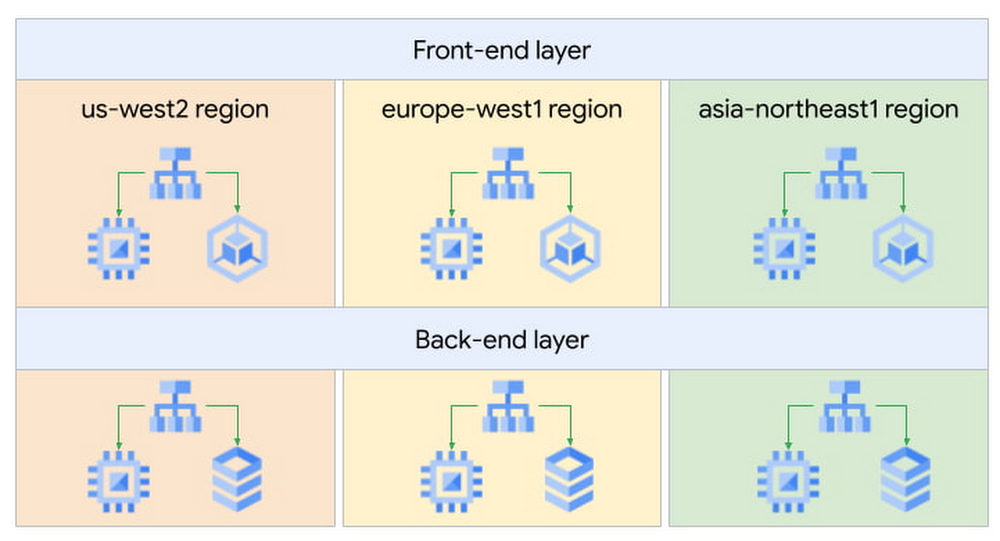
When building applications that are critical to your business, one key consideration is always high availability. In Google Cloud, we recommend building your strategic applications on a multi-regional architecture. In this article, we will see how Cloud DNS routing policies can help simplify your multi-regional design.As an example, let’s take a web application that is internal to our company, such as a knowledge-sharing wiki application. It uses a classic 2-tier architecture: front-end servers tasked to serve web requests from our engineers and back-end servers containing the data for our application. This application is used by our engineers based in the US (San Francisco), Europe (Paris) and Asia (Tokyo), so we decided to deploy our servers in three Google Cloud regions for better latency, performance and lower cost.High level designIn each region, the wiki application is exposed via an Internal Load Balancer (ILB), which engineers connect to over an Interconnect or Cloud VPN connection. Now our challenge is determining how to send users to the closest available front-end server. Of course, we could use regional hostnames such as <region>.wiki.example.com where <region> is US, EU, or ASIA – but this puts the onus on the engineers to choose the correct region, exposing unnecessary complexity to our users. Additionally, it means that if the wiki application goes down in a region, the user has to manually change the hostname to another region – not very user-friendly!So how could we design this better? Using Cloud DNS Policy Manager, we could use a single global hostname such as wiki.example.com and use a geo-location policy to resolve this hostname to the endpoint closest to the end user. The geo-location policy will use the GCP region where the Interconnect or VPN lands as the source for the traffic and look for the closest available endpoint.For example, we would resolve the hostname for US users to the IP address of the US Internal Load Balancer in the below diagram:DNS resolution based on the location of the userThis allows us to have a simple configuration on the client side and to ensure a great user experience.The Cloud DNS routing policy configuration would look like this:See the official documentation page for more information on how to configure Cloud DNS routing policies.This configuration also helps us improve the reliability of our wiki application: if we were to lose the application in one region due to an incident, we can update the geo-location policy and remove the affected region from the configuration. This would mean that new users will resolve the next closest region to them, and it would not require an action on the client’s side or the application team’s side.We have seen how this geo-location feature is great for sending users to the closest resource, but it can also be useful for machine-to-machine traffic. Expanding on our web application example, we would like to ensure that front-end servers all have the same configuration globally and use the back-end servers in the same region. We would configure front-end servers to connect to the global hostname backend.wiki.example.com. The Cloud DNS geo-location policy will use the front-end servers’ GCP region information to resolve this hostname to the closest available backend tier Internal Load Balancer.Front-end to back-end communication (instance to instance)Putting it all together, we now have a multi-regional and multi-tiered application with DNS policies to smartly route users to the closest instance of that application for optimal performance and costs. In the next few months, we will introduce even smarter capabilities to Cloud DNS routing policies, such as health checks to allow automatic failovers. We look forward to sharing all these exciting new features with you in another blog post.Related ArticleSimplify traffic steering with Cloud DNS routing policiesCloud DNS routing policies (geo-location and weighted round robin) helps you define custom ways to steer private and Internet traffic usi…Read Article
Quelle: Google Cloud Platform

Developing and securing a platform for healthcare innovation with Google Cloud

In an industry as highly regulated as healthcare, building a single secure and compliant application that tracks patient care and appointments at a clinic requires a great deal of planning from development and security teams. So, imagine what it would be like to build a solution that includes almost everything related to a patient’s healthcare, including insurance and billing. That’s what Highmark Health (Highmark)—a U.S. health and wellness organization that provides millions of customers with health insurance plans, a physician and hospital network, and a diverse portfolio of businesses–decided to do. Highmark is developing a solution called Living Health to re-imagine healthcare delivery, and it is using Google Cloud and the Google Cloud Professional Services Organization (PSO) to build and maintain the innovation platform supporting this forward thinking experience. Considering all the personal information that different parties like insurers, specialists, billers and coders, clinics, and hospitals share, Highmark must build security and compliance into every part of the solution. In this blog, we look at how Highmark Health and Google are using a technique called “secure-by-design” to address the security, privacy, and compliance aspects of bringing Living Health to life.Secure-by-design: Preventive care for developmentIn healthcare, preventing an illness or condition is the ideal outcome. Preventive care often involves early intervention—a course of ideas and actions to ward off illness, permanent injury, and so on. Interestingly, when developing a groundbreaking delivery model like Living Health, it’s a good idea to take the same approach to security, privacy, and compliance. That’s why Highmark’s security and technology teams worked with their Google Cloud PSO team to implement secure-by-design for every step of design, development, and operations. Security is built into the entire development process rather than waiting until after implementation to reactively secure the platform or remediate security gaps. It’s analogous to choosing the right brakes for a car before it rolls off the assembly line instead of having an inspector shut down production because the car failed its safety tests. The key aspect of secure-by-design is an underlying application architecture created from foundational building blocks that sit on top of a secure cloud infrastructure. Secure-by-design works to ensure that these building blocks are secure and compliant before moving on to development.The entire approach requires security, development, and cloud teams to work together with other stakeholders. Most importantly, it requires a cloud partner, cloud services, and a cloud infrastructure that can support it. Finding the right cloud and services for secure-by-design Highmark chose Google Cloud because of its leadership in analytics, infrastructure services, and platform as a service. In addition, Google Cloud has made strategic investments in healthcare interoperability and innovation, which was another key reason Highmark decided to work with Google. As a result, Highmark felt that Google Cloud and the Google Cloud PSO were best suited for delivering on the vision of Living Health—its security and its outcomes. “Google takes security more seriously than the other providers we considered, which is very important to an organization like us. Cloud applications and infrastructure for healthcare must be secure and compliant,” explains Highmark Vice President and Chief Information Security Officer, Omar Khawaja. Forming a foundation for security and complianceHow does security-by-design with services work? It starts with the creation and securing of the foundational platform, allowing teams to harden and enforce specified security controls. It’s a collaborative process that starts with input from cross-functional teams—not just technology teams—using terms they understand, so that everyone has a stake in the design. A strong data governance and protection program classifies and segments workloads based on risk and sensitivity. Teams build multiple layers of defense into the foundational layers to mitigate against key industry risks. Google managed services such as VPC Service Controls help prevent unauthorized access. Automated controls such as those in Data Loss Prevention help teams quickly classify data and identify and respond to potential sources of data risk. Automation capabilities help ensure that security policies are enforced.After the foundational work is done, it’s time to assess and apply security controls to the different building blocks, which are Google Cloud services such as Google Kubernetes Engine, Google Compute Engine, and Google Cloud Storage. The goal is to make sure that these and similar building blocks, or any combination of them, do not introduce additional risks and to ensure any identified risks are remediated or mitigated. Enabling use cases, step by stepAfter the foundational security is established, the security-by-design program enables the Google Cloud services that developers then use to build use cases that form Living Health. The service enablement approach allows Highmark to address complexity by providing the controls most relevant for each individual service. For each service, the teams begin by determining the risks and the controls that can reduce them. The next step is enforcing preventive and detective controls across various tools. After validation, technical teams can be granted an authorization to operate, also called an ATO. An ATO authorizes the service for development in a use case.For use cases with greater data sensitivity, the Highmark teams validate the recommended security controls with an external trust assessor, who uses the HITRUST Common Security Framework, which maps to certifications and compliance such as HIPAA, NIST, GDPR, and more. A certification process follows that can take anywhere from a few weeks to a few months. In addition to certification, there is ongoing monitoring of the environment for events, behavior, control effectiveness, and control lapses or any deviation from the controls.The approach simplifies compliance for developers by abstracting compliance requirements away. The process provides developers a set of security requirements written in the language of the cloud, rather than in the language of compliance, providing more prescriptive guidance as they build solutions. Through the secure-by-design program, the Highmark technology and security teams, Google, the business, and the third-party trust assessor all contribute to a secure foundation for any architectural design with enabled Google Cloud services as building blocks. Beating the learning curve Thanks to the Living Health project, the Highmark technology and security teams are trying new methods. They are exploring new tools for building secure applications in the cloud. They are paying close attention to processes and the use case steps and, when necessary, aligning different teams to execute. Because everyone is working together collaboratively toward a shared goal, teams are delivering more things on time and with predictability, which has reduced volatility and surprises. The secrets to success: Bringing everyone to the table early and with humilityTogether, Highmark and Google Cloud PSO have created over 24 secure-by-design building blocks by bringing everyone to the table early and relying on thoughtful, honest communication. Input for the architecture design produced for Highmark came from privacy teams, legal teams, security teams, and the teams that are building the applications. And that degree of collaboration ultimately leads to a much better product because everyone has a shared sense of responsibility and ownership of what was built. Delivering a highly complex solution like Living Health takes significant, more purposeful communication and execution. It is also important to be honest and humble. The security, technology, and Google teams have learned to admit when something isn’t working and to ask for help or ideas for a solution. The teams are also able to accept that they don’t have all the answers, and that they need to figure out solutions by experimenting. Khawaja puts it simply, “That level of humility has been really important and enabled us to have the successes that we’ve had. And hopefully that’ll be something that we continue to retain in our DNA.”
Quelle: Google Cloud Platform

Bio-pharma organizations can now leverage the groundbreaking protein folding system, AlphaFold, with Vertex AI

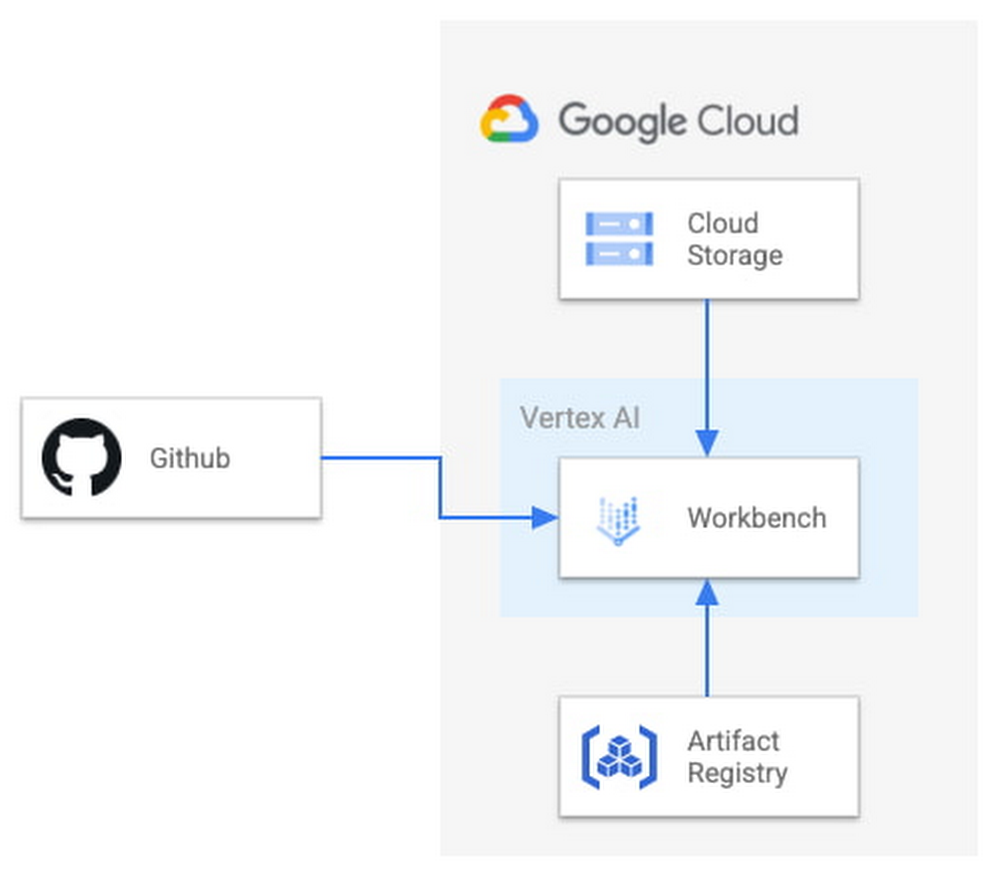
At Google Cloud, we believe the products we bring to market should be strongly informed by our research efforts across Alphabet. For example, Vertex AI was ideated, incubated and developed based on the pioneering research from Google’s research entities. Features like Vertex AI Forecast, Explainable AI, Vertex AI Neural Architecture Search (NAS) and Vertex AI Matching Engine were born out of discoveries by Google’s researchers, internally tested and deployed, and shared with data scientists across the globe as an enterprise-ready solution, each within a matter of a few short years. Today, we’re proud to announce another deep integration between Google Cloud and Alphabet’s AI research organizations: the ability in Vertex AI to run DeepMind’s groundbreaking protein structure prediction system, AlphaFold. We expect this capability to be a boon for data scientists and organizations of all types in the bio-pharma space, from those developing treatments for diseases to those creating new synthetic biomaterials. We’re thrilled to see Alphabet AI research continue to shape products and contribute to platforms on which Google Cloud customers can build. This guide provides a way to easily predict the structure of a protein (or multiple proteins) using a simplified version of AlphaFold running in a Vertex AI. For most targets, this method obtains predictions that are near-identical in accuracy compared to the full version. To learn more about how to correctly interpret these predictions, take a look at the “Using the AlphaFold predictions” section of this blog post below. Please refer to the Supplementary Information for a detailed description of the method.Solution OverviewVertex AI lets you develop the entire data science/machine learning workflow in a single development environment, helping you deploy models faster, with fewer lines of code and fewer distractions.For running AlphaFold, we choose Vertex AI Workbench user-managed notebooks, which uses Jupyter notebooks and offers both various preinstalled suites of deep learning packages and full control over the environment. We also use Google Cloud Storage and Google Cloud Artifact Registry, as shown in the architecture diagram below.Figure 1. Solution OverviewWe provide a customized Docker image in Artifact Registry, with preinstalled packages for launching a notebook instance in Vertex AI Workbench and prerequisites for running AlphaFold. For users who want to further customize the docker image for the notebook instance, we also provide the Dockerfile and a build script you can build upon. You can find the notebook, the Dockerfile and the build script in the Vertex AI community content.Getting StartedVertex AI Workbench offers an end-to-end notebook-based production environment that can be preconfigured with the runtime dependencies necessary to run AlphaFold. With user-managed notebooks, you can configure a GPU accelerator to run AlphaFold using JAX, without having to install and manage drivers or JupyterLab instances. The following is a step-by-step walkthrough for launching a demonstration notebook that can predict the structure of a protein using a slightly simplified version of AlphaFold that does not use homologous protein structures or the full-sized BFD sequence database.1. If you are new to Google Cloud, we suggest familiarizing yourself with the materials on the Getting Started page, and creating a first project to host the VM Instance that will manage the tutorial notebook. Once you have created a project, proceed to step 2 below.2. Navigate to the tutorial notebook, hosted in the vertex-ai-samples repository on GitHub.3. Launch the notebook on Vertex Workbench via the “Launch this Notebook in Vertex AI Workbench” link. This will redirect to the Google Cloud Platform Console and open Vertex AI Workbench using the last project that you used.4. If needed, select your project using the blue header at the top of the screen, on the left.If you have multiple Google Cloud user accounts, make sure you select the appropriate account using the icon on the right.First-time users will be prompted to take a tutorial titled “Deploy a notebook on AI Platform,” with the start button appearing on the bottom-right corner of the screen.This tutorial is necessary for first-time users; it will help orient you to the Workbench, as well as configure billing and enable the Notebooks API (both required).A full billing account is required for GPU acceleration, and is strongly recommended. Learn more here.5. Enter a name for the notebook but don’t click “Create” just yet; you still need to configure some “Advanced Options.” If you have used Vertex AI Workbench before, you may first need to select “Create a new notebook.”6. GPU acceleration is strongly recommended for this tutorial. When using GPU acceleration, you should ensure that you have sufficient accelerator quota for your project. Total GPU quota: “GPUs (all regions)”Quota for your specific GPU type: “NVIDIA V100 GPUs per region”Enter the Quota into the “filter” box and ensure Limit > 0. If needed, you can spin up small quota increases in only a few minutes by selecting the checkbox, and the “Edit Quotas.”7. Next, select “Advanced Options,” on the left, which will give you the remaining menus to configure:Under Environment, configure “Custom container” (first in the drop-down menu) In the “Docker container image” text box, enter (without clicking “select”): us-west1-docker.pkg.dev/cloud-devrel-public-resources/alphafold/alphafold-on-gcp:latestSuggested VM configuration:Machine type: n1-standard-8 (8 CPUs, 30 GB RAM)GPU type: NVIDIA Tesla V100 GPU accelerator (recommended).Longer proteins may require a powerful GPU; check your quota configuration for your specific configuration, and request a quota increase if necessary (as in Step 6).If you don’t see the GPU that you want, you might need to change your Region / Zone settings from Step 5. Learn more here.Number of GPUs: 1Make sure the check box “Install NVIDIA GPU driver automatically for me” is checked.The defaults work for the rest of the menu items. Press Create!8. After several minutes, a virtual machine will be created and you will be redirected to a JupyterLab instance. When launching, you may need to confirm the connection to the Jupyter server running on the VM; click Confirm:9. If a message about “Build Recommended” appears, click “Cancel.”10. The notebook is ready to run! From the menu, select Run > Run all Cells to evaluate the notebook top-to-bottom, or run each cell by individually highlighting and clicking <shift>-return. The notebook has detailed instructions for every step, such as where to add the sequence(s) of a protein you want to fold.11. Congratulations, you’ve just folded a protein using AlphaFold on the Vertex AI Workbench!12. When you are done with the tutorial, you should stop the host VM instance in the “Vertex AI” > ”Workbench” menu to avoid any unnecessary billing. Using the AlphaFold predictionsThe protein structure that you just predicted has automatically been saved as ‘selected_prediction.pdb’ to the ‘prediction’ folder of your instance. To download it, use the File Browser on the left side to navigate to the ‘prediction’ folder, then right click on the ‘selected_prediction.pdb’ file and select ‘Download’. You can then use this file in your own viewers and pipelines.You can also explore your prediction directly in the notebook by looking at it in the 3D viewer. While many predictions are highly accurate, it should be noted that a small proportion will likely be of lower accuracy. To help you interpret the prediction, take a look at the model confidence (the color of the 3D structure) as well as the Predicted LDDT and Predicted Aligned Error figures in the notebook. You can find out more about these metrics and how to interpret AlphaFold structures on this page and in this FAQ.If you use AlphaFold (e.g. in publications, services or products), please cite the AlphaFold paper and, if applicable, the AlphaFold-Multimer paper. Looking toward innovation in biology and medicineIn this guide, we covered how to get started with AlphaFold using Vertex AI, enabling a secure, scalable, and configurable environment for research in the Cloud. If you would like to learn more about AlphaFold, the scientific paper and source code are both openly accessible. We hope that insights you and others in the scientific community make will unlock many exciting future advances in our understanding of biology and medicine.Related ArticleVertex AI NAS: higher accuracy and lower latency for complex ML modelsHow Google Cloud’s Vertex AI Neural Architecture Search (NAS) accelerates time-to-value for sophisticated ML workloads.Read Article
Quelle: Google Cloud Platform

Understanding Firestore performance with Key Visualizer

Firestore is a serverless, scalable, NoSQL document database. It is ideal for rapid and flexible web and mobile application development, and uniquely supports real-time client device syncing to the database.To get the best performance out of Firestore, while also making the most out of Firestore’s automatic scaling and load balancing features, you need to make sure the data layout of your application allows requests to be processed optimally, particularly as your user traffic increases. There are some subtleties to be aware of when it comes to what could happen when traffic ramps up, and to help make this easier to identify, we’re announcing the General Availability of Key Visualizer, an interactive, performance monitoring tool for Firestore.Key Visualizer generates visual reports based on Firestore documents accessed over time, that will help you understand and optimize the access patterns of your database, as well as troubleshoot performance issues. With Key Visualizer, you can iteratively design a data model or improve your existing application’s data usage pattern.Tip: While Key Visualizer can be used with production databases, it’s best to identify performance issues prior to rolling out changes in production. Consider running application load tests with Firestore in a pre-production environment, and using Key Visualizer to identify potential issues.Viewing a visualizationThe Key Visualizer tool is available to all Firestore customers. Visualizations are generated at every hour boundary, covering data for the preceding two hours. Visualizations are generated as long as overall database traffic during a selected period meets the scan eligibility criteria.To get an overview of activity using Key Visualizer, first select a two-hour time period and review the heatmap for the “Total ops/s” metric. This view estimates the number of operations per second and how they are distributed across your database. Total ops/s is an estimated sum of write, lookup, and query operations averaged by seconds.Firestore automatically scales using a technique called range sharding. When using Firestore, you model data in the form of documents stored in hierarchies of collections. The collection hierarchy and document ID is translated to a single key for each document. Documents are logically stored and ordered lexicographically by this key. We use the term “key range” to refer to a range of keys. The full key range is then automatically split up as-needed, driven by storage and traffic load, and served by many replicated servers inside of Firestore.The following example of Key Visualizer visualization shows a heatmap where there are some major differences in the usage pattern across the database. The X-axis is time, and the Y-axis is the key range for your database, broken down into buckets by traffic.Ranges shown in dark colors have little or no activity.Ranges in bright colors have significantly more activity. In the example below, you can see the “Bar” and “Qux” collections going beyond 50 operations per second for some period of time.Additional methods of interpreting Key Visualizer visualizations are detailed in our documentation.Besides the total number of operations, Key Visualizer also provides views with metrics for ops per second, average latency, and tail latency, where traffic is broken down for writes and deletes, lookups, and queries. This capability allows you to identify issues with your data layout or poorly balanced traffic that may be contributing to increased latencies.Hotspots and heatmap patternsKey Visualizer gives you insight into how your traffic is distributed, and lets you understand if latency increases correlate with a hotspot, thus providing you with information to determine what parts of your application need to change. We refer to a “hotspot” as a case where traffic is poorly balanced across the database’s keyspace. For the best performance, requests should be distributed evenly across a keyspace. The effect of a hotspot can vary, but typically hotspotting causes higher latency and in some cases, even failed operations.Firestore automatically splits a key range into smaller pieces and distributes the work of serving traffic to more servers when needed. However, this has some limitations. Splitting storage and load takes time, and ramping up traffic too fast may cause hotspots while the service adjusts. The best practice is to distribute operations across the key range, while ramping up traffic on a cold database with 500 operations per second, and then increasing traffic by up to 50% every 5 minutes. This is called the “500/50/5″ rule, and allows you to rapidly warm up a cold database safely. For example, ramping to 1,000,000 ops/s can be achieved in under two hours.Firestore can automatically split a key range until it is serving a single document using a dedicated set of replicated servers. Once this threshold is hit, Firestore is unable to create further splits beyond a single document. As a result, high and sustained volumes of concurrent operations on a single document may result in elevated latencies. You can observe these high latencies using Key Visualizer’s average and tail latency metrics. If you encounter sustained high latencies on a single document, you should consider modifying your data model to split or replicate the data across multiple documents.Key Visualizer will also help you identify additional traffic patterns:Evenly distributed usage: If a heatmap shows a fine-grained mix of dark and bright colors, then reads and writes are evenly distributed throughout the database. This heatmap represents an effective usage pattern for Firestore, and no additional action is required.Sequential Keys: A heatmap with a single bright diagonal line can indicate a special hotspotting case where the database is using strictly increasing or decreasing keys (document IDs). Sequential keys are an anti-pattern in Firestore, which will result in elevated latency especially at higher operations per second. In this case, the document IDs that are generated and utilized should be randomized. To learn more, see the best practices page.Sudden traffic increase: A heatmap with a key range that suddenly changes from dark to bright indicates a sudden spike in load. If the load increase isn’t well distributed across the key range, and exceeds the 500/50/5 rule best practice, the database can experience elevated latency in the operations. In this case, the data layout should be modified to reflect a better distribution of usage and traffic across the keyspace.Next stepsFirestore Key Visualizer is a performance monitoring tool available to administrators and developers to better understand how their applications interact with Firestore. With this launch, Firestore joins our family of Cloud-native databases, including Cloud Spanner and Cloud Bigtable, in offering Key Visualizer to its customers. You can get started with Firestore Key Visualizer for free, from the Cloud Console.AcknowledgementSpecial thanks to Minh Nguyen, Lead Product Manager for Firestore, for contributing to this post.
Quelle: Google Cloud Platform

How can demand forecasting approach real time responsiveness? Vertex AI makes it possible

Everyone wishes they had a crystal ball—especially retailers and consumer goods companies looking for the next big trend, or logistics companies worried about the next big storm. With a veritable universe of data now at their fingertips (or at least at their keyboards), these companies can now get closer to real-time forecasting across a range of areas when they leverage the right AI and machine learning tools.For retailers, supply chain, and consumer goods organizations, accurate demand forecasting has always been a key driver of efficient business planning, inventory management, streamlined logistics and customer satisfaction. Accurate forecasting is critical to ensure that the right products, in the right volumes, are delivered to the right locations. Customers don’t like to see items out of stock, but too much inventory is costly and wasteful. Retailers lose over a trillion dollars a year in mismanaged inventory, according to IHL Group, whereas a 10% to 20% improvement in demand forecasting accuracy can directly produce a 5% reduction in inventory costs and a 2% to 3% increase in revenue (Notes from the AI Frontier, McKinsey & Company).Yet, inventory management is only one of the applications among many that demand forecasting can support—retailers need to also staff their stores and their support centers for busy periods, plan promotions and evaluate different factors that can impact store or online traffic. As retailers’ product catalog and global reach broaden, the available data becomes more complex and more difficult to forecast accurately. Unconstrained activities through the pandemic have only accentuated supply chain bottlenecks and forecasting challenges as the pace of change has been so rapid. Retailers can now infuse machine learning into their existing demand forecasting to achieve high forecast accuracy, by leveraging Vertex AI Forecast. This is one of the latest innovations born of Google Brain researchers and being made available to enterprises within an accelerated time frame. Top performing models within two hoursVertex AI Forecast can ingest datasets of up to 100 million rows covering years of historical data for many thousands of product lines from BigQuery or CSV files. The powerful modeling engine would automatically process the data and evaluate hundreds of different model architectures and package the best ones into one model which is easy to manage, even without advanced data science expertise. Users can include up to 1,000 different demand drivers  (color, brand, promotion schedule, e-commerce traffic statistics, and more) and set budgets to create the forecast. Given how quickly market conditions change, retailers need an agile system that can learn quickly. Teams can build demand forecasts at top-scoring accuracy with Vertex AI Forecast within just two hours of training time and no manual model tuning.The key part of the Vertex AI Forecast is model architecture search, where the service evaluates hundreds of different model architectures and settings. This algorithm allows Vertex AI Forecast to consistently find the best performing model setups for a wide variety of customers and datasets. Google has effectively built the brain that is applied towards demand forecasting in a non-intrusive and contextual way, to merge the art and (data) science of accurate demand forecasting. In benchmarking tests based on Kaggle datasets, Vertex AI Forecast performed in the highest 3% of accuracy in M5, the World’s Top Forecasting Competition. Leading retailers are already transforming their operations and reaping the benefits of highly accurate forecasting. ​​”Magalu has deployed Vertex AI Forecast to transform our forecasting predictions, by implementing distribution center level forecasting and reducing prediction errors simultaneously” said Fernando Nagano, director of Analytics and Strategic Planning at Magalu. “Four-week live forecasting showed significant improvements in error (WAPE) compared to our previous models,” Nagano added. “This high accuracy insight has helped us to plan our inventory allocation and replenishment more efficiently to ensure that the right items are in the right locations at the right time to meet customer demand and manage costs appropriately.”From weather to leather, Vertex AI can handle all kind of inputsWith the hierarchical forecast capabilities of Vertex AI Forecast, retailers can generate a highly accurate forecast that works on multiple levels (for example, tying together the demand at the individual item, store level, and regional levels) to minimize challenges created by organizational silos. Hierarchical models can also improve overall accuracy when historical data is sparse. When the demand for individual items is too random to forecast, the model can still pick up on patterns at the product category level.Vertex AI can ingest large volumes of structured and unstructured data, allowing planners to include many relevant demand drivers such as weather, product reviews, macroeconomic indicators, competitor actions, commodity prices, freight charges, ocean shipping carrier costs, and more. Vertex AI Forecast explainability features can show how each of these drivers contributes to the forecast and help the decision makers understand what drives the demand to take the corrective action early.The demand driver attributions are available not only for the overall forecast but for each individual item at every point. For instance, planners may discover that promotions are the main drivers of demand in the clothing category on weekdays, but not during the holidays. These kinds of insights can be invaluable when decisions are made on how to act on forecasts.Vertex AI Forecast is already helping Lowe’s with a range of models at the company’s more than 1,700 stores, according to Amaresh Siva, senior vice president for Innovation, Data and Supply Chain Technology at Lowe’s.“At Lowe’s, our stores and operations stretch across the United States, so it’s critical that we have highly accurate SKU-level forecasts to make decisions about allocating inventory to specific stores and replenishing items in high demand,” Siva said. “Using Vertex AI Forecast, Lowe’s has been able to create accurate hierarchical models that balance between SKU and store-level forecasts. These models take into account our store-level, SKU-level, and region-level inventory, promotions data and multiple other signals, and are yielding more accurate forecasts.”Key retail and supply chain partners, including o9 Solutions and Quantiphi, are already integrating Vertex AI Forecast into to provide value added services to customers. To learn more about demand forecasting with Vertex AI, please contact your Field Sales Representative, or try Vertex AI for free here.Related ArticleGoogle Cloud unveils Vertex AI, one platform, every ML tool you needGoogle Cloud launches Vertex AI, a managed platform for experimentation, versioning and deploying ML models into production.Read Article
Quelle: Google Cloud Platform

How Macy’s enhances the customer experience with Google Cloud services

Editor’s note: Learn from Mohamed Nazeemudeen, Director of software engineering at Macy’s, about Macy’s strategy regarding choosing cloud databases and how Macy’s pricing services leverage Cloud Bigtable under the hood. You can also find Mohamed’s Google Cloud Next ‘21 session on this topic on YouTube.At Macy’s we lead with our aim of fostering memorable shopping experiences for our customers. Our transition from on-premises operations to the Google Cloud Platform (GCP) cloud-first managed service databases is an extension of this dedication. Our mutual commitment to innovation in customer service led to the acceleration of our digital transition at an uncertain time for our industry and our company. As one of the nation’s premier omnichannel fashion retailers, Macy’s has 727 stores and operates in 43 states in the US. By leveraging Google’s databases, we’ve emerged from the COVID-19 pandemic with newfound scalability, flexibility, customer growth, and a vision that consistently challenges and inspires us to enhance the customer experience. Through our Google partnership, we succeeded at bolstering our e-commerce platform, optimizing internal operational efficiency, and enhancing every critical component of our services by choosing the appropriate database tools. How Macy’s leveraged GCP services to optimize efficiencyCommon Services is a strategic initiative at Macy’s that leverages GCP-managed services. The goal of Common Services is to provide a single source of truth for all internal clients of Macy’s selling channels. This centralization of our operations allows us to provide an integrated customer experience across the various channels of our company (digital, stores, enterprise, call centers, etc.).How Bigtable and Spanner support pricing and inventory managementThe SLA for Common Services is a 99.99% uptime, with cross-regional availability, supporting more than tens of thousands of queries per second at single digit latency at the 95th percentile. We decided to use GCP-managed services to lower our operational overhead.To store data from our catalog and support our inventory management, we leveraged Spanner. Our catalog service requires low latency and is tolerant to slightly stale data, so we used stale reads from Spanner with about 10 seconds exact staleness to keep latency low (single digit).We utilized Bigtable on Google Cloud as the backing database for our pricing system as it entails a very intensive workload and is highly sensitive to latency. BigTable allows us to get the information we need, with latency under 10ms at p99, regardless of the scale and size of the data. Our access pattern entails finding an item’s ticket price based on a given division, location, and the universal price code (UPC) which identifies the item. The system on BigTable supports a time that spans from multiple days in the past to multiple days in the future.We have millions of UPCs and more are added every day. With 700+ stores, and potentially multiple  price points per item, we create billions of data points. Our calculations, therefore, show that we will require  dozens of terabytes of storage. The storage available on GCP supports all our extensive storage needs while optimizing speed, functionality, and efficiency.How we designed our BigTable schemaWe wanted to access the information with one row key lookup to keep the overall latency low. For the row key, we use the location and the UPC. In order to avoid key range scans, and to be mindful of storage requirements, for the timestamp price values, we chose to use a protobuf inside a cell. Our performance testing showed that the cost of deserializing the protobuf was negligible and with GCP, our latency remained in single digit milliseconds.The Cloud Bigtable schema design for the price common serviceOur price systems involve heavy batch writes while processing price adjustment instructions, we have isolated the read and write workloads using Bigtable app profiles. The app profile is configured with multi-cluster routing so that Bigtable does the high availability for us.Our ability to enhance the performance of our operations and deliver a better experience for our customers is a direct reflection of GCP-managed services. The success of our partnership with Google reflects a mutual commitment to embracing innovation and imagination. We enjoyed this opportunity to expand Macy’s reach and streamline the shopping experience for our customers. We are excited to bring a new standard of personalization, accessibility, and comfort to today’s retail industry. 
Quelle: Google Cloud Platform

Quantum Metric explores retail big data use cases on BigQuery

Editor’s note: To kick off the new year, we invited partners from across our retail ecosystem to share stories, best practices, and tips and tricks on how they are helping retailers transform during a time that has seen tremendous change. The original version of this blog was published by Quantum Metric. Please enjoy this updated entry from our partner.If you had access to 100% of the behavioral data on the visitors to your digital properties, what would you change? The key to any digital intelligence platform is adoption. For this to happen, you need data – big data. Our most advanced customers are using Quantum Metric data outside the walls of the UI and exploring big data use cases for experience data.As such, Quantum Metric is built on Google Cloud BigQuery which enables our customers, many of which are retailers, to have access to their raw data. They can leverage this data directly in BigQuery or stream it to any data lake, cloud, or other system of their choosing. Through the Quantum Metric and BigQuery integration, customers can start leveraging experience data in more ways than you might realize. Let’s explore three ways enterprises are leveraging Quantum Metric data in BigQuery to enhance the customer experience. Use Case 1: Retargeting consumers when they don’t complete an online purchaseFirst, we look at retargeting. Often, when a shopping cart is abandoned or an error occurs during a consumer’s online shopping experience, you may not know why the situation occurred nor how to fix it in real-time.  With Quantum Metric data in Google BigQuery, you can see user behavior, including what happens when a cohort of users don’t convert. As a result, enterprises can leverage those insights to retarget and win the consumer over. Use Case 2: Enable real-time decision making with a customer data platformNext, consider how you can inform a customer data platform (CDP) to enable real-time decision making – the holy grail of data analytics. Imagine you are an airline undergoing digital transformation. Most airlines offer loyalty status or programs, and this program is usually built in tandem with a CDP, which allows airlines to get a 360-degree view of their customer from multiple sources of data and from different systems. With Quantum Metric on Google Cloud, you can combine customer data with experience data, empowering you to better understand how users are experiencing your products, applications or services, and enabling you to take action as needed in real-time.For example, you can see when loyalty members are showing traits of frustration and deploy a rescue via chat, or even trigger a call from a special support agent. You can also send follow-up offers like promos to drive frustrated customers back to your website. The combined context of behavior data and customer loyalty status data allows you to be more pragmatic and effective with your resources. This means taking actions that rescue frustrated customers and drive conversion rates.Use Case 3: Developing impactful personalizationThe above CDP example is just the beginning of what you can achieve with the Quantum Metric and BigQuery integration. To develop truly impactful personalization programs, you need a joint dataset that is informed by real-time behavioral data. With Quantum Metric and BigQuery, customers can access real-time behavioral data, such as clicks, view time, and frustrations, which allows you to develop impactful personalized experiences. Let’s think about this through an example. Imagine a large retailer that specializes in selling commodities and needs to perform well on Black Friday. Through the Quantum Metric and BigQuery integration, they have real-time data on product engagement, such as clicks, taps, view time, frustration, and other statistics. When they combine these insights with products available by region and competitive pricing data, they have a recipe for success when it comes to generating sales on Black Friday. With these data insights, retailers can create cohorts of users (by age, device, loyalty status, purchase history, etc.). These cohorts receive personalized product recommendations based on the critical sources of data. These recommendations are compelling for consumers, since they are well priced, popular products that shoppers know are in stock. This approach to personalization will become more important as supply chain inventory challenges continue into 2022.Quantum MetricWith Quantum Metric and BigQuery, you can explore these three big data use cases. The exciting part is, this is just the beginning of what you can accomplish when you combine real-time experience analytics data with critical business systems. Read the companion piece to learn more about how companies are making the most of Quantum Metric and BigQuery today.Related ArticleFaster time to value with Data Analytics Design PatternsDesign Patterns provide customers with tools they need to accelerate time to value and implement common use cases so they can focus on in…Read Article
Quelle: Google Cloud Platform

10 questions to help boards safely maximize cloud opportunities

The accelerating pursuit of cloud-enabled digital transformations brings new growth opportunities to organizations, but also raises new challenges. To ensure that they can lock in newfound agility, quality improvements, and marketplace relevance, boards of directors must prioritize safe, secure, and compliant adoption processes that support this new technological environment. The adoption of cloud at scale by a large enterprise requires the orchestration of a number of significant activities, including:Rethinking how strategic outcomes leverage technology, and how to enable those outcomes by changing how software is designed, delivered, managed across the organization. Refactoring security, controls, and risk governance processes to ensure that the organization stays within its risk appetite and in compliance with regulation during and following the transformation.Implementing new organizational and operating models to empower a broad and deep skills and capabilities uplift, and fostering the right culture for success.As such, the organization across all lines of defense has significant work to do. The board of directors plays a key role in overseeing and supporting management on this journey, and our new paper is designed to provide a framework and handbook for boards of directors in that position. We provide a summary of our recommendations, in addition to a more detailed handbook. This paper complements two papers we published in 2021: The CISO’s Guide to Cloud Security Transformation, and Risk Governance of Digital Transformation in the Cloud, which is a detailed guide for chief risk officers, chief compliance officers, and heads of internal audit.We have identified 10 questions that we believe help a board of directors in a structured, meaningful discussion with their organization and its approach to cloud. We’ve included additional points with each, as examples of what a good approach could look like, and potential red flags that might indicate all is not well with the program. At a high level, those questions are:How is the use of cloud technology being governed within the organization? Is clear accountability assigned and is there clarity of responsibility in decision making structures?How well does the use of cloud technology align with, and support, the technology and data strategy for the organization, and, ideally, the overarching business strategy, in order that the cloud approach can be tailored to achieve those right outcomes?Is there a clear technical and architectural approach for the use of cloud, that incorporates the controls necessary to ensure that infrastructure and applications are deployed and maintained in a secure state? Has a skills and capabilities assessment been conducted, in order to determine what investments are needed across the organization?How is the organization structure and operating model evolving to both fully leverage cloud, but also to increase the likelihood of a secure and compliant adoption? How are risk and control frameworks being adjusted, with an emphasis on understanding how the organization’s risk profile is changing and how the organization is staying within risk appetite? How are independent risk and audit functions adjusting their approach in light of the organization’s adoption of cloud?How are regulators and other authorities being engaged, in order to keep them informed and abreast of the organization’s strategy and of the plans for the migration of specific business processes and data sets?How is the organization prioritizing resourcing to enable the adoption of cloud, but also to maintain adequate focus on managing existing and legacy technologies?  Is the organization consuming and adopting the cloud provider’s set of best practices and leveraging the lessons the cloud provider will have learned from their other customers?Our conclusions in this whitepaper have been guided by Google’s years of leading and innovating in cloud security and risk management, and the experience that Google Cloud experts have gained from their previous roles in risk and control functions in large enterprises. The board of directors plays a critical role in overseeing any organization’s cloud-enabled digital transformation. We recommend a structured approval to that oversight and asking the questions we pose in this whitepaper. We are excited to collaborate with you on the risk governance of your cloud transformation.
Quelle: Google Cloud Platform

Where is your Cloud Bigtable cluster spending its CPU?

CPU utilization is a key performance indicator for Cloud Bigtable. Understanding CPU spend is essential for optimizing Bigtable performance and cost. We have significantly improved Bigtable’s observability by allowing you to visualize your Bigtable cluster’s CPU utilization in more detail. We now provide you with the ability to break the utilization down by various dimensions like app profile, method and table. This finer grained reporting can help you make more informed application design choices and help with diagnosing performance related incidents.In this post, we present how this visibility may be used in the real world, through example persona-based user journeys.User Journey: Investigate an incident with high latencyTarget Persona: Site Reliability Engineer (SRE)ABC Corp runs Cloud Bigtable in a multi-tenant environment. Multiple teams at ABC Corp use the same Bigtable instance.Alice is an SRE at ABC Corp. Alice gets paged because the tail latency of a cluster exceeded the acceptable performance threshold. Alice looks at the cluster level CPU utilization chart and sees that the CPU usage spiked during the incident window.P99 latency for app profile personalization-reader spikesCPU utilization for the cluster spikesAlice wants to drill down further to get more details about this spike. The primary question she wants to answer is “Which team should I be reaching out to?” Fortunately, teams at ABC Corp follow the best practice of tagging the usage of each team with an app profile in the following format: <teamname>-<workload-type>The bigtable instance has the following app profiles:revenue-updaterinfo-updaterpersonalization-readerpersonalization-batch-updaterThe instance’s data is stored in the following tables:revenueclient-infopersonalizationShe uses the CPU per app profile chart to determine that the personalization-batch-updater app profile utilized the most CPU during the time of the incident and also saw a spike that corresponded with the spike in latency of the serving path traffic under the personalization-reader app profile.At this point, Alice knows that the personalization-batch-updater traffic is adversely impacting the personalization-reader traffic. She further digs into the dashboards in Metrics Explorer to figure out the problematic method and table.CPU usage breakdown by app profile, table and methodAlice has now identified the personalization-batch-updater app profile, the personalization table and the MutateRows method as the reason for the increase in CPU utilization that is causing high tail latency of the serving path traffic.With this information, she reaches out to the personalization team to provision the cluster correctly before the batch job starts so that the performance of other tenants is not affected. The following options can be considered in this scenario:Run the batch job on a replicated instance with multiple clusters. Provision a dedicated cluster for the batch job and use single cluster routing to completely isolate the serving path traffic from the batch updatesProvision more nodes for the cluster before the batch job starts and for the duration of the batch job. This option is less preferred than option 1, since serving path traffic may still be impacted. However, this option is more cost effective.User Journey: Schema and cost optimizationTarget Persona: DeveloperBob is a developer who is onboarding a new workload on Bigtable. He completes the development of his feature and moves on to the performance benchmarking phase before releasing to production. He notices that both the throughput and latency of his queries are lower than what he expected and begins debugging the issue. His first step is to look at the CPU utilization of the cluster, which is higher than expected and is hovering around the recommended max.CPU utilization by clusterTo debug further, he looks at the CPU utilization by app profile and the CPU utilization by table charts. He determines that the majority of the CPU is consumed by the product-reader app profile and the product_info table.CPU utilization by app profileCPU utilization by tableHe inspects the application code and notices that the query includes a value range filter. He realizes that value filters are expensive, so he moves the filtering to the application. This leads to substantial decrease in Bigtable cluster CPU utilization. Consequently, not only does he improve performance, but he can also lower costs for the Bigtable cluster.CPU utilization by cluster after removing value range filterCPU utilization by app profile after removing value range filterCPU utilization by table after removing value range filterWe hope that this blog helps you to understand why and when you might want to use our new observability metric – CPU per app profile, method and table. Accessing the metricsThese metrics can be accessed on the Bigtable Monitoring UI under the Tables and Application Profiles tabs. To see the method breakdown, view the metric in Metrics Explorer, which you can also navigate to from Cloud Monitoring UI.
Quelle: Google Cloud Platform

How Bayer Crop Science uses BigQuery and geobeam to improve soil health

Bayer Crop Science uses Google Cloud to analyze billions of acres of land to better understand the characteristics of the soil that produces our food crops. Bayer’s teams of data scientists are leveraging services from across  Google Cloud to load, store, analyze, and visualize geospatial data to develop unique business insights. And because much of this important work is done using publicly-available data, you can too!Agencies such as the United States Geological Survey (USGS), National Oceanic and Atmospheric Administration (NOAA), and the National Weather Service (NWS) perform measurements of the earth’s surface and atmosphere on a vast scale, and make this data available to the public. But it is up to the public to turn this data into insights and information. In this post, we’ll walk you through some ways that Google Cloud services such as BigQuery and Dataflow make it easy for anyone to analyze earth observation data at scale. Bringing data togetherFirst, let’s look at some of the datasets we have available. For this project, the Bayer team was very interested in one dataset in particular from ISRIC, a custodian of global soil information. ISRIC maps the spatial distribution of soil properties across the globe, and collects soil measurements such as pH, organic matter content, nitrogen levels, and much more. These measurements are encoded into “raster” files, which are large images where each pixel represents a location on the earth, and the “color” of the pixel represents the measured value at that location. You can think of each raster as a layer, which typically corresponds to a table in a database. Many earth observation datasets are made available as rasters, and they are excellent for storage of gridded data such as point measurements, but it can be difficult to understand spatial relationships between different areas of a raster, and between multiple raster tiles and layers.Processing data into insightsTo help with this, Bayer used Dataflow with geobeam to do the heavy-lifting of converting the rasters into vector data by turning them into polygons, reprojecting them to the WGS 84 coordinate system used by BigQuery, and generating h3 indexes to help us connect the dots — literally. Polygonization in particular is a very complex operation and its difficulty scales exponentially with file size, but Dataflow is able to divide and conquer by splitting large raster files into smaller blocks and processing them in parallel at massive scale. You can process any amount of data this way, at a scale and speed that is not possible on any single machine using traditional GIS tools. What’s best is that this is all done on the fly with minimal custom programming. Once the raster data is polygonized, reprojected, and fully discombobulated, the vector data is written directly to BigQuery tables from Dataflow.Once the data is loaded into BigQuery, Bayer uses BigQuery GIS and the h3 indexes computed by geobeam to join the data across multiple tables and create a single view of all of their soil layers. From this single view, Bayer can analyze the combined data, visualize all the layers at once using BigQuery GeoViz, and apply machine learning models to look for patterns that humans might not seeScreenshot of Bayer’s soil analysis in GeoVizUsing geospatial insights to improve the businessThe soil grid data is essential to help characterize the soil characteristics of the crop growth environments experienced by Bayer’s customers. Bayer can compute soil environmental scenarios for global crop lands to better understand what their customers experience in order to aid in testing network optimization, product characterization, and precision product design. It also impacts Bayer’s real-world objectives by enabling them to characterize the soil properties of their internal testing network fields to help establish a global testing network and enable environmental similarity calculations and historical modeling.It’s easy to see why developing spatial insights for planting crops is game-changing for Bayer Crop Sciences, and these same strategies and tools can be used across a variety of industries and businesses.Google’s mission is to organize the world’s information and make it universally accessible and useful, and we’re excited to work with customers like Bayer Crop Sciences who want to harness their data to build products that are beneficial to their customers and the environment. To get started building amazing geospatial applications for your business, check out our reference guide to learn more about geospatial capabilities in Google Cloud, and open BigQuery in the Google Cloud console to get started using BigQuery and geobeam for your geospatial workloads.
Quelle: Google Cloud Platform