Cloud Scheduler: Now available across 23 GCP Regions

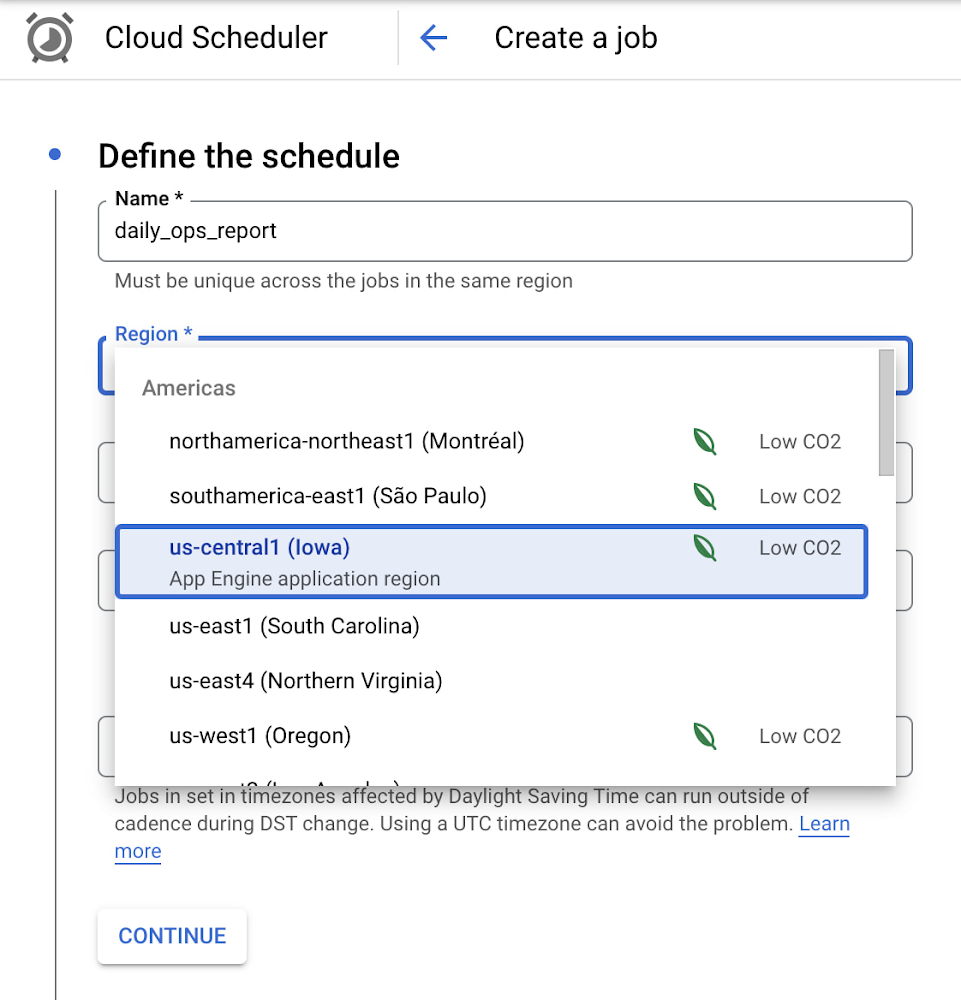
Reliably executing tasks on a schedule is critical for everything from data engineering, to infrastructure management, and application maintenance. Today, we are thrilled to announce that Google Cloud Scheduler, our enterprise-grade scheduling service, is now available in more GCP regions and multiple regions can now be used from a single project removing the prior limit of a single region per project.With many enterprise customers deploying complex distributed cloud systems, Cloud Scheduler has helped solve the problem of single-server cron scheduling being a single point of failure. With this update you are now able to create Scheduler jobs across distinct cloud regions that can help satisfy cross-regional availability and fail-over scenarios. Furthermore, you are no longer required to create an AppEngine application in order to use Cloud Scheduler. For existing Cloud Scheduler jobs, it is safe to disable the AppEngine application within the project. Jobs will continue to function without an AppEngine application. Creating jobs in different regions is easy. You simply pick the location where you would like your job to run. For example you can specify a location when creating a job through the gcloud command line :HTTP TargetsPub/Sub TopicsAppEngine ServicesOr you can pick a location when creating a job through the Cloud Console:Google Cloud Scheduler is now available in 23 GCP Regions,  and this number is expected to grow in the future. You can always find an up-to-date list of available regions by running:We hope you are as excited about this launch as we are. Please reach out to us with any suggestions or questions in our public issue tracker.Related ArticleCloud Tasks: Now available in 23 GCP RegionsLaunch announcement for Google Cloud Tasks service availability in 23 new GCP RegionsRead Article
Quelle: Google Cloud Platform
Introducing Compute Optimized VMs powered by AMD EPYC processors

Over the last six months, we launched 3rd Gen AMD EPYC™ CPUs (formerly code-named “Milan”) across our Compute Engine virtual machine (VM) families. We introduced the Tau VM family, targeting scale-out workloads. Tau VMs are the leader both in terms of performance and workload total cost of ownership (TCO) from any leading provider available today. We also refreshed our general-purpose N2D instances with 3rd Gen AMD EPYC processors, providing a 30% boost in price-performance. Today, we’re excited to announce the General Availability of the newest instance series in our Compute Optimized family, C2D, also powered by 3rd Gen AMD EPYC processors.”AMD EPYC processors continue to showcase their capabilities for HPC and compute-focused workloads. Whether that’s running drug simulations for the latest vaccines, exploring the cosmos, or helping design critical hardware and electronics for the future of the industry,” said Lynn Comp, corporate vice president, Cloud Business, AMD. “The Google Cloud C2D instances with AMD EPYC processors show the continued growth of the AMD and Google Cloud collaboration, by now offering some of the highest performance instances for demanding, performance-intensive workloads.”New larger machine shapes for the Compute Optimized FamilyC2D instances take advantage of advances in processor architecture from the latest generation AMD EPYC™ CPUs including  “Zen 3” core.  C2D supports Persistent Disks, Advanced Networking, Compact Placement Policies, and soon-to-follow Sole Tenant nodes. Instances are configurable with up to 112 vCPUs (56 cores), 896 GB of memory, and 3 TB of Local SSD. C2D is available in standard, high-cpu and high-mem, each with seven machine types for optimal memory-to-core ratio, to better align with your workload. Improved performance for a wide variety of workloads The Compute Optimized VM family is ideal for customers with performance-intensive workloads. C2D instances provide the largest VM sizes within the Compute Optimized VM family and are best-suited for memory-bound workloads such as high-performance databases, gaming, and high-performance computing (HPC) workloads, such as electronic design automation (EDA) and computational fluid dynamics (CFD). C2D high-cpu and standard instances serve existing compute-intensive workloads, including high-performance web servers, media transcoding, and AAA Gaming. C2D high-mem machine configurations are well suited for workloads such as HPC and EDA that require higher memory configurations. For optimal HPC workload performance, check out Google’s best practices for running tightly-coupled HPC applications on Compute Engine.Performance reportWe’ve illustrated below how C2D with 3rd Gen EPYC compares against N2D with 2nd Gen EPYC (formerly code-named “Rome”)    in GCP’s preferred set of benchmarks to measure compute intensive performance, media transcoding, and gaming benchmarks.We worked with AMD engineers to benchmark some key applications in the HPC industry. The improvements in the Compute Optimized family are clear when C2D is compared directly to AMD’s previous generation of EPYC processors, specifically the n2d-standard-128 machine shape, closest to C2D’s 112 vCPUs. We first compare performance on industry-standard measures of memory bandwidth (STREAM Triad) and floating-point performance (HPL).Compared to the N2D VM’s baseline performance, the C2D’s 3rd Gen EPYC processor improvements, including higher L3 cache sizes per core and full NUMA exposure, have a direct benefit in memory performance. This is empirically observed through the 30% improved STREAM Triad results. C2D’s floating-point improvements can also be seen in the 7% performance increase in the HPL results, despite being run with 12.5% fewer cores than the previous-generation EPYC processor. Looking at application benchmarks across some key areas of focus in HPC, we can see that C2D VMs provide material gains for representative benchmarks in areas such as weather forecasting (WRF CONUS 2.5km), molecular dynamics (NAMD), and CFD (OpenFOAM).What customers are sayingNot only is the c2d-standard-112 machine shape faster overall in the above workloads, but it’s also ~6% cheaper than the baseline n2d-standard-128 machine shape. It’s no wonder that customers are choosing it for their memory-intensive and HPC workloads. Here’s a sampling.AirShaper is an cloud-based CFD platform that helps designers and engineers to easily run aerodynamic simulations to improve the performance and efficiency of cars, drones, motorbikes — even athletes themselves.“Getting the best performance helps us drastically reduce run times, improving user experience and cutting costs at the same time. By running our CFD simulations on C2D, we’ve been able to reduce our costs by almost 50% and reduce simulation times by 30% compared to previous generation high-performance computing instances. Also, compared to our on-prem instances we’ve been able to reduce our simulation times by more than a factor of three.” – Wouter Remmerie, CEO AirshaperClutch’s Integrated Customer Data and Marketing platform delivers customer intelligence and personalized engagements for brands to identify, understand and motivate each segment of their customer base. Clutch offers solutions for CDP, Loyalty, Offer Management, Marketing Orchestration and Stored Value that use embedded machine learning to increase the lifetime value of each customer.“We moved our compute and memory intensive Data Analytics platform to Compute Optimized on AMD EYPC Milan instances. The C2D instances provide a sweet spot of memory and CPU performance.” – Ed Dunkelberger, SVP TechnologyGoogle Kubernetes Engine supportGoogle Kubernetes Engine (GKE) is the leading platform for organizations looking for advanced container orchestration, delivering the highest levels of reliability, security, and scalability. GKE supports C2D VMs, helping you get the most out of your containerized workloads. You can add C2D 3rd Gen EPYC CPU-based VMs to your GKE clusters by choosing the C2D machine type in your GKE node pools. Confidential Computing (coming soon)Confidential Computing is an industry-wide effort to protect data in-use including encryption of data in-memory — while it’s being processed. With Confidential Computing, you can run your most sensitive applications and services on C2D VMs.We’re committed to delivering a portfolio of Confidential Computing VM instances and services such as GKE and Dataproc using the AMD Secure Encrypted Virtualization (SEV) security feature. We’ll support SEV using this latest generation of AMD EPYC™ processors in the near term and plan to add more security capabilities in the future.Get started with C2D todayC2D instances are available today in regions around the globe: us-central1 (Iowa), asia-southeast1 (Singapore), us-east1 (South Carolina), us-east4 (North Virginia), asia-east1 (Taiwan), and europe-west4 (Netherlands), and in additional regions in the coming months. C2D instances are available via on-demand, as Spot VMs, and via reservations. You can also take advantage of further cost savings by purchasing Committed Use Discounts (CUDs) in one- and three-year terms. To start using C2D instances, simply choose the C2D option when creating a new VM or GKE node in the Google Cloud Console.Related ArticleCompute Engine explained: Choosing the right machine family and typeAn overview of Google Compute Engine machine families and machine types.Read Article
Quelle: Google Cloud Platform
Build, deploy, and scale ML models faster with Vertex AI’s new training features

Vertex AI includes over a dozen powerful MLOps tools in one unified interface, so you can build, deploy, and scale ML models faster. We’re constantly updating these tools, and we recently enhanced Vertex AI Training with an improved Local Mode to speed up your debugging process and Auto-Container Packaging to simplify cloud job submissions. In this article, we’ll look at these updates, and how you can use them to accelerate your model training workflow.Debugging is an inherently repetitive process with small code change iterations. Vertex AI Training is a managed cloud environment that spins up VMs, loads dependencies, brings in data, executes code, and tears down the cluster for you. That’s a lot of overhead to test simple code changes, which can greatly slow down your debugging process. Before submitting a cloud job, it’s common for developers to first test code locally.Now, with Vertex AI Training’s improved Local Mode, you can iterate and test your work locally on a small sample data set without waiting for the full Cloud VM lifecycle. This is a friendly and fast way to debug code before running it at cloud scale. By leveraging the environment consistency made possible by Docker Containers, Local Mode  lets users submit their code as a local run with the expectation it will be processed in a similar environment to the one executing a cloud job. This results in greater reliability and reproducibility. With this new capability, you can debug simple run time errors faster since they do not need to submit the job to the cloud and wait for VM cluster lifecycle overhead. Once you have setup the environment,  you can launch a local run with gcloud:Once you are ready to run your code at cloud scale, Auto-Container Packaging simplifies the cloud job submission process. To run a training application, you need to upload your code and any dependencies. Previously this process took three steps:Build the docker container locally.Push the built container to a container repository.Create a Cloud Vertex AI Training job.With Auto-Container Packaging, that 3 step process is brought down to a single Create step:Additionally, even if you are not familiar with Docker, Auto-Container Packaging lets you take advantage of the consistency and reproducibility benefits of containerization.These new Vertex AI Training features further simplify and speed up your model training workflow. Local Mode helps you iterate faster with small code changes to quickly debug runtime errors. Auto-Container Packaging reduces the steps it takes to submit your local python code as a scaled up cloud job.You can try this codelab to gain hands-on experience with these features.To learn more about the improved local mode, visit our local mode documentation guide.Auto-Container Packaging documentation can be found on the Create a Custom Jobdocumentation page under “gcloud.”To learn about Vertex AI, check out this blog post from our developer advocates.Related ArticleBio-pharma organizations can now leverage the groundbreaking protein folding system, AlphaFold, with Vertex AIHow to run DeepMind’s AlphaFold on Google Cloud’s Vertex AI.Read Article
Quelle: Google Cloud Platform
3 ways Dataflow is delivering 50%+ productivity boost and cost savings to customers

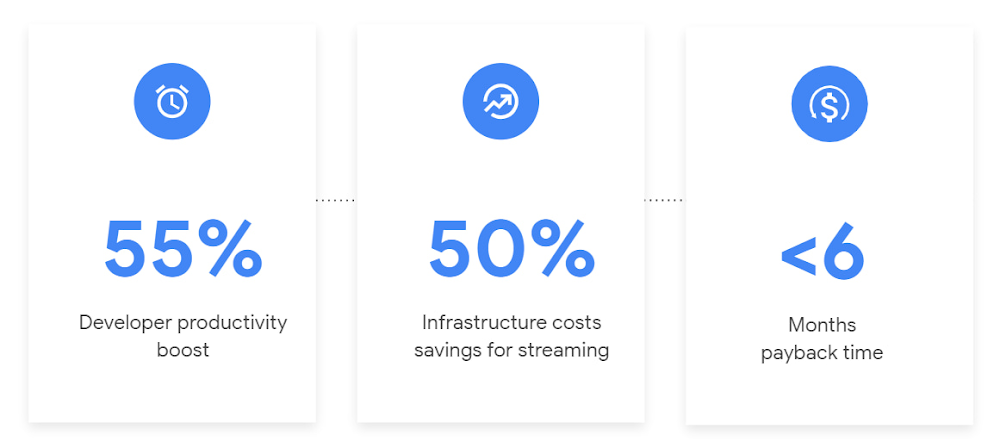
In our conversations with technology leaders about data-driven transformation using Google Data Cloud –  industry’s leading unified data and AI solution – , one important topic is incorporating continuous intelligence to move from answering questions such as “What has happened? to questions like “What is happening?” and “What might happen?”. The core to this evolution is the need for an underlying data processing that not only provides powerful real-time capabilities for events happening close to origination, but also brings together existing data sources under one unified data platform to enable organizations to draw insights and take actions holistically. Dataflow, Google’s cloud-native data processing and streaming analytics platform, is a key component of any modern data and AI architecture and data transformation journey, along with BigQuery, Google’s internet-scale warehouse with built-in streaming, BI engine and ML; Pub/Sub, a global no-ops event delivery service; and Looker, a modern BI and embedded analytics platform. One of the key evaluation factors is potential economic value of Dataflow to their organization, particularly in the context of engaging other stakeholders is key for many of the leaders that we engage with. So we commissioned Forrester Consulting to conduct a comprehensive study on the impact that Dataflow had on their organization by interviewing actual customers . Today we’re excited to share our commissioned study conducted by Forrester Consulting, the Total Economic Impact™ of Google Cloud Dataflow, which allows data leaders to understand and quantify the benefits of Dataflow, and use cases it enables. Forrester conducted interviews with Dataflow customers to evaluate the benefits, costs, and risks of investing in Dataflow across an organization. Based on their interviews, Forrester identified major financial benefits across four different areas: business growth, infrastructure cost savings, data engineer productivity, and administration efficiency. In fact, Forrester found that customers adopting Dataflow can achieve a 55% boost in developer productivity and a 50% reduction in infrastructure costs. In fact, Forrester projects that customers adopting Dataflow can achieve a range of up to 171% Return on Investment (ROI) and a less than six months payback period. Customers can now use figures in the report to compute their own Return on Investment (ROI) and payback period.“Dataflow is integral to accelerating time-to-market, decreasing time-to-production, reducing time to figure out how to use data for use cases, focusing time on value-add tasks, streamlining ingestion, and reducing total cost of ownership.” – Lead technical architect, CPGLet’s take a deeper look at the ways that Forrester found that Dataflow can help you achieve your goals and unlock your business potential. Benefit #1: Increase data engineer productivity by 55%Developers can choose among a variety of programming languages to define and execute data workflows. Dataflow also seamlessly integrates with other Google Cloud Platform and open source technologies to maximize value and applicability to a wide variety of use cases. Dataflow streamlined workflows with code reusability,dynamic templates, and the simplicity of a managed service. Engineers trusted pipelines to run correctly and adhere to governance. Data engineers avoided laborious issue-monitoring and remediation tasks that were common in the legacy environments such as poor performance, lack of availability, and failed jobs. Teams valued the language flexibility and open source base.“Dataflow provided us with ETL replacement that opened limitless potential use cases and enabled us to do smarter data enhancement while data remains in motion.” — Director of data projects, financial servicesBenefit #2: Reduce infrastructure costs by up-to 50% for batch and streaming workloads Dataflow’s serverless autoscaling and discrete control of job needs, scheduling, and regions eliminated overhead and optimized technology spending. Consolidating global data processing solutions to Dataflow further eliminated excess costs while ensuring performance, resilience, and governance across environments. Dataflow’s unified streaming and batch data platform gives organizations the flexibility to define either workload in the same programming model, run it on the same infrastructure, and manage it from a single operational management tool. “Our costs with our cloud data platform using Dataflow are just a fraction of the costs we faced before. Now we only pay for cloud infrastructure consumption because the open source base helps us avoid licensing costs. We spend about $120,000 per year with Dataflow, but we’d be spending millions with our old technologies.” – Lead technical architect, CPGBenefit #3: Increase top-line revenue by improving customer experience and retention with payback time of < 6 monthsStreaming analytics is an essential capability in today’s digital world to gain real-time actionable insights. Likewise, organizations must also have flexible, high- performance batch environments to analyze historical data for building machine learning models, business intelligence, and advanced analytics. Dataflow enabled real-time streaming use cases, improved data enrichment, encouraged data exploration,improved performance and resiliency, reduced errors, increased trust, and eliminated barriers to scale. As a result, organizations provided customers with more accurate, relevant, and in-the-moment data-backed services and insights — boosting customer experience, creating new revenue streams, and improving acquisition, retention, and enrichment.“It’s already been proven that we are getting more business [with Dataflow] because we can turn around results faster for customers.” – VP of technology, financial services technology“When we provide data to our customers and partners with Dataflow, we are much more confident in those numbers and can provide accurate data within a minute. Our customers and partners have taken note and commented on this. It’s reduced complaints and prevented churn.” – Senior software engineer, mediaOther benefits Eliminated administrative overhead and toilAs a cloud-native managed service, all administration tasks such as provisioning, scaling, and updates are automatically handled by Google Cloud. Teams no longer need to manage servers and related software for legacy data processing solutions. Admins also streamlined processes for setting up data sources, adding pipelines, and enforcing governance.Saved business operations costs for support teams and data end usersDataflow improved the speed, quality, reliability, and ease of access to data for insights for general business users, saving time and empowering users to drive better data-backed outcomes. It also reduced support inquiry volume while automating manual job creation.What’s next?Download the Forrester Total Economic Impact study today to dive deep into the economic impact Dataflow can deliver your organization. We would love to partner with you to explore the potential Dataflow can unlock in your teams. Please reach out to our sales team to start a conversation about your data transformation with Google Cloud.Related ArticleDataflow Prime: bring unparalleled efficiency and radical simplicity to big data processingCreate even better data pipelines with Dataflow Prime, coming to Preview in Q3 2021.Read Article
Quelle: Google Cloud Platform
Know more, spend less: how GKE cost optimization insights help you optimize Kubernetes

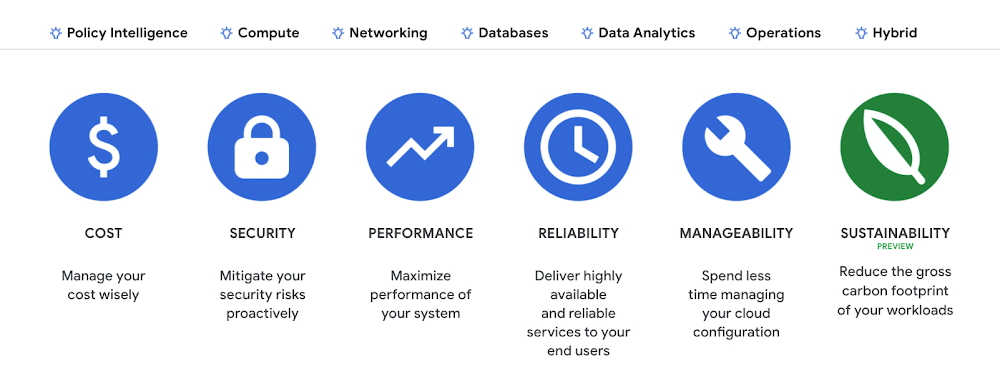
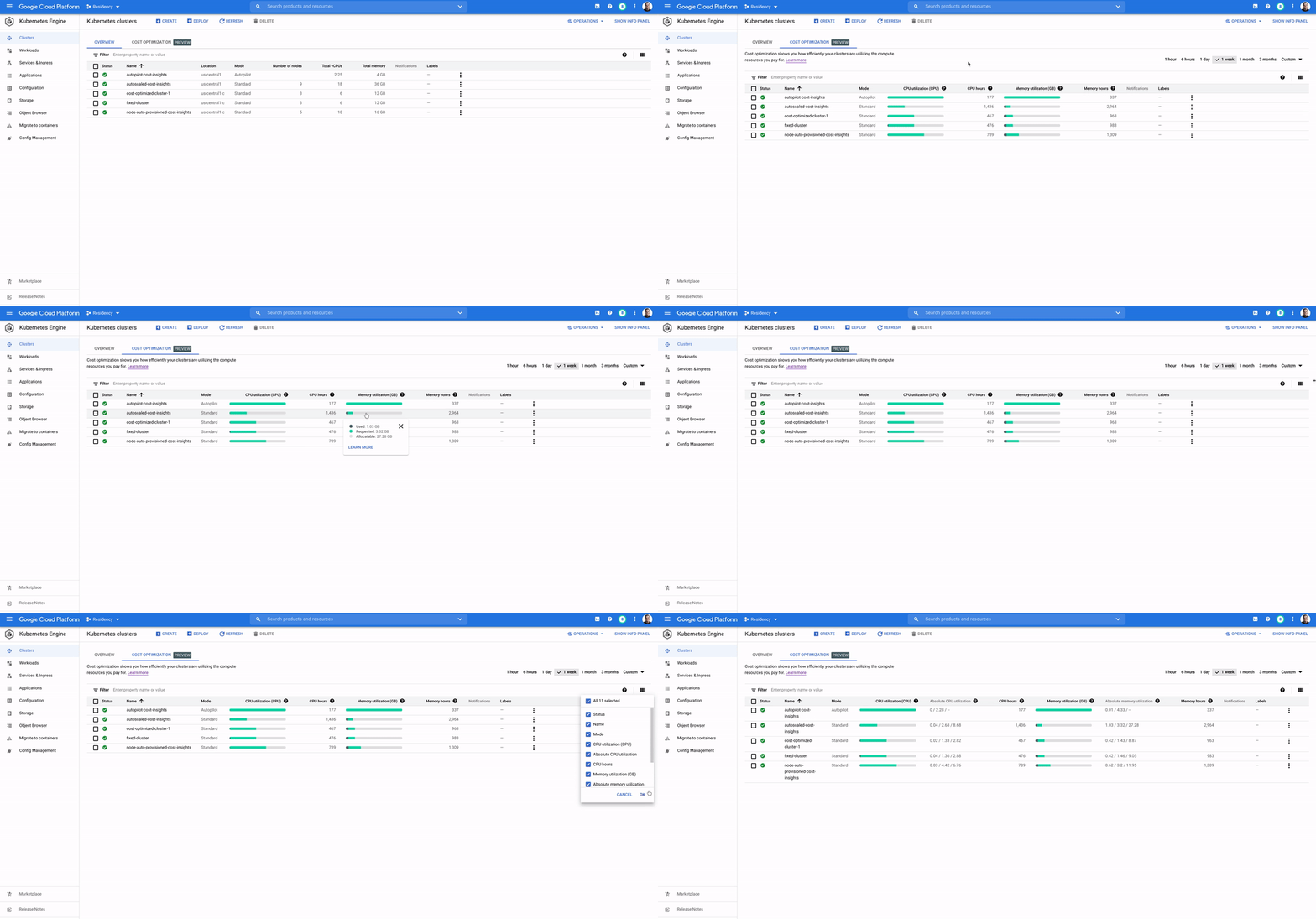
If there’s one thing we learned talking to Kubernetes users, it’s that  optimizing for reliability, performance, and cost efficiency is hard — especially at scale.That is why, not long ago, we released GKE cost optimization insights in preview, a tab within the Google Cloud Console that helps you discover optimization opportunities at scale, across your Google Kubernetes Engine clusters and workloads, automatically with minimal friction.The functionality allows you to figure out, over a selected period of time, the current state of your clusters by exposing the actual used, requested and allocated resources. For workloads running on your clusters, it shows your actual used and requested resources, as well as the set limits, so you can  make granular, workload-level right-sizing optimizations.GKE cost optimization insights have proved popular with users right out of the gate. For example, Arne Claus, Site Reliability Engineer at hotel search platform provider Trivago says that “The new GKE cost optimization insights view helped us to identify cost optimization opportunities at the cluster and workload level and take immediate action. In the first weeks of use, the Trivago team spotted and improved the cost/performance balance of several clusters.”Today, we’re graduating GKE cost optimization insights from Preview to GA. It has undergone multiple improvements that we believe will help you with your day-to-day optimization routines. For instance, we’ve made it easier to spot under-provisioned workloads that could be at risk of instability due to insufficient resource requests.Now that you have the insights into optimization opportunities, let’s recap what capabilities are helping the most with reliability, performance, and cost efficiency in GKE, and what resources are available for your teams to get up to speed with GKE cost optimization.In public cloud managed Kubernetes services, there are four major pitfalls that lead to non-optimized usage of Kubernetes clusters:Culture – Many teams that embrace the public cloud have never worked with a pay-as-you-go service like GKE before, so they’re unfamiliar with how resource allocation and app deployment processes can affect their costs. The new GKE cost optimization insights can help teams better understand such an environment and can help improve business value by providing insights into balancing cost, reliability and performance needs. Bin packing – The more efficiently you pack apps into nodes, the more you save. You can pack apps into nodes efficiently by ensuring you’re requesting the right amount of resources based on your actual utilization. GKE cost optimization insights helps you identify bin-packing gaps by looking at the gray bar in the cluster view.App right-sizing – You need to be able to configure the appropriate resource requests and workload autoscale targets for the objects that are deployed in your cluster. The more precise you are in setting accurate resource amounts to your pods, the more reliably your apps will run and, in the majority of cases, the more space you will open in the cluster. With GKE cost optimization insights, you can visualize the right-sizing information by looking at the green bar in both cluster and workload views.Demand-based downscaling – To save money during low-demand periods such as nighttime, your clusters should be able to scale down with demand. However, in some cases, you can’t scale them down because there are workloads that cannot be evicted or because a cluster has been misconfigured.GKE cost optimization insights help you better understand and visualize these pitfalls. In order to solve them, or make them non-issues right from the beginning, there are de-facto solutions available from Google Cloud. For example, you can use the new GKE cost optimization insights to help with monitoring and with the cultural shift toward FinOps. If you don’t want to deal with bin packing, you can use the Autopilot mode of operation. Set up node auto-provisioning along with optimize-utilization profile can also help optimize bin packing. To help with app right-sizing and demand-based downscaling you can take advantage of GKE Pod autoscalers — in addition to the classic Horizontal Pod Autoscaler, we also provide a Vertical Pod Autoscaler and a Multidimensional Pod Autoscaler.We’ve extensively written about GKE features such as Autopilot, optimized VM types, Node auto-provisioning, pod autoscalers and others in our GKE best practices to lessen overprovisioning. This is a great place to learn how to solve for your newly discovered optimization opportunities.If you want a deeper dive into technical details, check out these best practices for running cost-optimized Kubernetes applications on GKE, an exhaustive list of GKE best practices.And finally, for the visual learner, there’s the GKE cost optimization video series on Youtube, where our experts will walk you through key concepts of cost optimization step by step.Related ArticleFind your GKE cost optimization opportunities right in the consoleNew GKE cost optimization insights now appear in the console, making it easier to adopt Kubernetes best practices like app right-sizing a…Read Article
Quelle: Google Cloud Platform

Protecting customers against cryptomining threats with VM Threat Detection in Security Command Center

As organizations move to the cloud, VM-based architectures continue to make up a significant portion of compute-centric workloads. To help ensure strong protection for these deployments, we are thrilled to announce a public preview of our newest layer of threat detection in Security Command Center (SCC): Virtual Machine Threat Detection (VMTD). VMTD is a first-to-market detection capability from a major cloud provider that provides agentless memory scanning to help detect threats like cryptomining malware inside your virtual machines running in Google Cloud.The economy of scale enabled by the cloud can help fundamentally change the way security is executed for any business operating in today’s threat landscape. As more companies adopt cloud technologies, security solutions built into cloud platforms help address emerging threats for more and more organizations. For example, in the latest Google Cybersecurity Action Team Threat Horizons Report, we saw 86% of compromised cloud instances were used to perform cryptocurrency mining. VMTD is one of the ways we protect our Google Cloud Platform customers against growing attacks like coin mining, data exfiltration, and ransomware.Our unique approach with agentless VM threat detectionTraditional endpoint security relies on deploying software agents inside a guest virtual machine to gather signals and telemetry to inform runtime threat detection. But as is the case in many other areas of infrastructure security, cloud technology offers the ability to rethink existing models. For Compute Engine, we wanted to see if we could collect signals to aid in threat detection without requiring our customers to run additional software. Not running an agent inside of their instance means less performance impact, lowered operational burden for agent deployment and management, and exposing less attack surface to potential adversaries. What we learned is that we could instrument the hypervisor — the software that runs underneath and orchestrates our customers’ virtual machines — to include nearly universal and hard-to-tamper-with threat detection.Illustrative data path for Virtual Machine Threat DetectionGetting Started with Virtual Machine Threat Detection (VMTD)We’re excited about the kinds of detection that are possible with VMTD. During our public preview, VMTD detects cryptomining attacks. Over the next months as we move VMTD towards general availability, you can expect to see a steady release of new detective capabilities and integrations with other parts of Google Cloud. To get started with VMTD, open the Settings page in Security Command Center. Click on “MANAGE SETTINGS” under Virtual Machine Threat Detection. You can then select a scope for VMTD. To confirm that VMTD is working for your environment, you can download and execute this test binary that simulates cryptomining activity. Safeguarding customer trustWe know safeguarding users’ trust in Google Cloud is as important as securing their workloads. We are taking several steps to ensure the ways in which VMTD inspects workloads for potential threats preserves trust: First, we are introducing VMTD’s public preview as an opt-in service for our Security Command Center Premium customers. Additionally, not only does Confidential Computing provide encryption for memory as it moves out of a CPU to RAM, we never process memory in VMTD from Confidential nodes. Comprehensive threat detection with SCC PremiumVirtual Machine Threat Detection is fully integrated and available through Security Command Center Premium. VMTD complements the existing threat detection capabilities enabled by the Event Threat Detection and Container Threat Detection built-in services in SCC Premium. Together, these three layers of advanced defense provide holistic protection for workloads running in Google Cloud: Multiple layers of threat detection in Security Command CenterIn addition to threat detection, the premium version of Security Command Center is a comprehensive security and risk management platform for Google Cloud. It provides built-in services that enable you to gain visibility into your cloud assets, discover misconfigurations and vulnerabilities in your resources, and help maintain compliance based on industry standards and benchmarks.To enable a Security Command Center Premium subscription, contact your Google Cloud Platform sales team. You can learn more about all these new capabilities in SCC in ourproduct documentation.Related ArticleHow Vuclip safeguards its cloud environment across 100+ projects with Security Command CenterLearn how Security Command Center enables Vuclip to manage security and risk for their cloud environment.Read Article
Quelle: Google Cloud Platform
Getting Started with Google Cloud Logging Python v3.0.0

We’re excited to announce the release of a major update to the Google Cloud Python logging library. v3.0.0 makes it even easier for Python developers to send and read logs from Google Cloud, providing real-time insights into what is happening in your application.  If you’re a Python developer working with Google Cloud, now is a great time to try out Cloud Logging!If you’re unfamiliar with the `google-cloud-logging` library, getting started is simple. First, download the library using pip:Now, you can set up the client library to work with Python’s built-in `logging` library. Doing this will make it so that all your standard Python log statements will start sending data to Google Cloud:We recommend using the standard Python `logging` interface for log creation, as demonstrated above. However, if you need access to other Google Cloud Logging features (reading logs, managing log sinks, etc), you can use `google.cloud.logging` directly:Here are some of the main features of the new release:Support More Cloud EnvironmentsPrevious versions of google-cloud-logging supported onlyApp Engine andKubernetes Engine. Users reported that the library would occasionally drop logs on serverless environments like Cloud Run and Cloud Functions. This was because the library would send logs in batches over the network. When a serverless environment would spin down, unsent batches could be lost.v3.0.0 fixes this issue by making use of GCP’s built instructured JSON logging functionality on supported environments (GKE, Cloud Run, or Cloud Functions). If the library detects it is running on an environment that supports structured logging, it will automatically make use of the newStructuredLogHandler, which writes logs as JSON strings printed to standard out. Google Cloud’s built-in agents will then parse the logs and deliver them to Cloud Logging, even if the code that produced the logs has spun down. Structured Logging is more reliable on serverless environments, and it allows us to support all major GCP compute environments in v3.0.0. Still, if you would prefer to send logs over the network as before, you can manually set up the library with a CloudLoggingHandler instance:Metadata AutodetectionWhen you troubleshoot your application, it can be useful to have as much information about the environment as possible captured in your application logs. `google-cloud-logging` attempts to help in this process by detecting and attaching metadata about your environment to each log message. The following fields are currently supported:`resource`: The Google Cloud resource the log originated from for example, Functions, GKE, or Cloud Run`httpRequest`: Information about an HTTP request in the log’s contextFlask and Django are currently supported`sourceLocation` : File, line, and function namestrace, spanId, and traceSampled: Cloud Trace metadataSupports X-Cloud-Trace-Context and w3c transparent trace formatsThe library will make an attempt to populate this data whenever possible, but any of these fields can also be explicitly set by developers using the library.JSON Support in Standard Library IntegrationGoogle Cloud Logging supports bothstring and JSON payloads for LogEntries, but up until now,the Python standard library integration could only send logs with string payloads.In `google-cloud-logging` v3,  you can log JSON data in two ways:1. Log a JSON-parsable string:2. Pass a `json_fields` dictionary using Python logging’s `extra` argument:Next StepsWith version v3.0.0, the Google Cloud Logging Python library now supports more compute environments, detects more helpful metadata, and provides more thorough support for JSON logs. Along with these major features, there are also user-experience improvements like a new log method and more permissive argument parsing. If you want to learn more about the latest release, these changes and others are described in more detail in the v3.0.0 Migration Guide. If you’re new to the library, check out the google-cloud-logging user guide. If you want to learn more about observability on GCP in general, you can spin up test environments using Cloud Ops Sandbox.Finally, if you have any feedback about the latest release, have new feature requests, or would like to make any contributions, feel free to open issues on our GitHub repo. The Google Cloud Logging libraries are open source software, and we welcome new contributors!Related ArticleTake the first step toward SRE with Cloud Operations SandboxSpin up the Cloud Operations Sandbox to see how Google’s logging, monitoring, tracing, profiling and debugging can kickstart your SRE pra…Read Article
Quelle: Google Cloud Platform
Measure and maximize the value of Data Science and AI teams

Investing in Artificial Intelligence (AI) can bring a competitive advantage to your organization. If you’re in charge of an AI or Data Science team, you’ll want to measure and maximize the value that you’re providing. Here is some advice from our years of experience in the field. A checklist to embark on a project: As you embark on projects we’ve found it’s good to have the following areas covered: Have a customer. It’s important to have a customer for your work, and that they  agree with what you’re trying to achieve. Be sure to know what value you’re delivering to them. Have a business case.  This will rely on estimates and assumptions, and may take no more than a few minute’s work.  You should revise this, but always know what justifies your team’s effort, and what you (and your customer) expect to get in return. Know what process you will change or create. You’ll want to put your work in production, so you have to be clear about what business operations are changing or created around your work and who needs to be involved to make it happenHave a measurement plan. You’ll want to show that ongoing work is impacting some relevant business indicator. Measure and show incremental value. The goal of these measurements is to establish what has changed because of your project that would otherwise not have changed. Be sure to account for other factors like seasonality or other business changes that may affect your measurements.Use all the above to get your organization’s support for your team and your work. What measures to use?As you start the work, what measures and indicators can you use to show that your team’s work is useful for your organization?How many decisions you make. A major function of ML is to automate and optimize decisions: which product to recommend, which route to follow, etc. Use logs to track how many decisions your systems are making. Changes to revenue or costs. Better and quicker decisions often lead to increased revenue or savings. If possible, measure it directly, otherwise estimate it (for example fuel costs saved from less distance traveled, or increased purchases from personalized offers). As an example, the Illinois Department of Employment Security is using Contact Center AI to rapidly deploy virtual agents to help more than 1 million citizens file unemployment claims. To measure success the team tracked the two outcomes:  (1) the number of web inquiries and voice calls they were able to handle, and (2) the overall cost of the call center after the implementation. Post implementation, they were able to observe more than 140,000 phone and web inquiries per day and over 40,000 after-hours calls per night. They  also anticipate an estimated annual cost savings of $100M based on an initial analysis of IDES’s virtual agent data (see more in the link to case study).Implementation costs. The other side of increased revenue or savings, is to put your achievements in the context of how much they cost. Show the technology costs that your team incurs and, ideally, how you can deliver more value, more efficiently. How much time was saved.  If the team built a routing system then it saved travel time, if it built an email classifier then it saved reading time, etc. Quantify how many hours were given back to the organization thanks to the efficiency of your system. In the medical field, quicker diagnostics matter. Johns Hopkins University’s Brain Injury Outcomes (BIOS) Division has focused on studying brain hemorrhage aiming to improve medical outcomes. The team identified the time to insights as a key metric in measuring business success. They experimented with a range of cloud computing solutions like Dataflow, Cloud Healthcare API, Compute Engine, and AI Platform for distributed training to accelerate iterations. As a result, in their recent work they were able to accelerate insights from scans from approximately 500 patients from 2,500 hours to 90 minutes.How many applications your team supports. Some of your organization’s operations don’t use ML (say reconciling financial ledgers) but others do. Know how many parts of your organization benefit from the optimization and automation your team builds.User experience. You may be able to measure your customer’s experience: fewer complaints, better reviews, reduced latency, more interactions, etc. This is valid both for internal and external stakeholders. At Google we measure usage and regularly ask for feedback on any internal system or process.One of our customers, The City of Memphis, is using VisionAI and ML to tackle a common but very challenging issue: identifying and addressing potholes.  The implementation team identified the percentage increase of potholes identified as one of the key metrics along with accuracy and cost savings. The solution captures video footage from it’s public vehicles and leverages Google Cloud capabilities like Compute Engine, AI Platform, and BigQuery to automate the review of videos.  The project increased  pothole detection by 75% with over 90% accuracy. By measuring and demonstrating these outcomes, the team proved the viability of a cost-effective, cloud-based machine learning model and is looking into new applications of AI and ML that will further improve city services and help it build a better future for its 652,000 residents. AcknowledgementsFilipe and Payam would like to thank our colleague and co-author Mona Mona (AI/ML Customer Engineer, Healthcare and lifesciences) who contributed equally to the writing.Related ArticleInnovating and experimenting in EMEA’s Public Sector: Lessons from 2020–2021Government organisations worldwide have been using technology to manage remote work challenges and continue to provide services to consti…Read Article
Quelle: Google Cloud Platform

Unveiling a new visual user interface for Google Cloud’s Speech-to-Text API

At Google Cloud, we’re committed to making artificial intelligence (AI) accessible to everyone and easier to harness for new use cases.  That’s why we’re excited to announce the general availability of our intuitive, new visual user interface for Google Cloud’s Speech-to-Text (STT) API, right in Google Cloud Console, which makes the API much simpler and easier for developers to use.  The STT API lets developers convert speech into text by leveraging Google’s years of research in automatic speech recognition and transcription technology. As advancements in AI continue to bring speech to new interfaces and devices, the STT API helps developers add speech functionality to their applications in order to better meet consumer demands. The STT API covers a wide variety of use cases, from dictation and short commands, to captioning and subtitles. Getting the most of STT, however, can be a complicated process. To achieve the highest accuracy on any AI use case requires careful testing and tuning. Previously, developers building on the STT API had to do this work manually by carefully experimenting with our API. Just to get started, developers needed familiarity with GCP integration concepts and had to either build their own tools or manage various scripts and API calls to fully understand the API documentation.  These actions required cumbersome and time-consuming effort and made measuring, customizing, and improving models even more difficult.  Today’s announcement significantly simplifies the process, facilitating iteration and integration of models into developers’ applications by letting developers perform every API function from within the Google Cloud Console.  These tools will make it easier for developers to integrate the STT API with their products or services. This update also gives developers the ability to manage and quickly iterate on their STT model customizations with Model Adaptation.Model Adaptation allows developers to customize STT specifically for their domains or use cases. Developers can maintain lists of words and weights that will be applied to either every request or just single requests, depending on their needs. Model adaptations are reusable and composable, so once developers have seen good results in the STT Cloud Console, they can deploy to their entire solution. The Speech-to-Text Cloud Console and Model Adaptation API is available now in all Google Cloud regions and languages and is accessible to all GCP users with no additional cost to that of the underlying API usage. The STT API supports over 70 languages in 120 different local variants. If you’re a developer looking for an easy to use, easy to integrate, and high-quality STT experience, sign up for our free trial and try our new interface on your own datasets today!Related ArticleMaking public services more accessible with AI-powered translations from Google CloudWe explain, with practical use cases, how public administrations can use AI translation technology to overcome language barriers.Read Article
Quelle: Google Cloud Platform

Simplify data processing and data science jobs with Serverless Spark, now available on Google Cloud

Most businesses today choose Apache Spark for their data engineering, data exploration and machine learning use cases because of its speed, simplicity and programming language flexibility. However, managing clusters and tuning infrastructure have been highly inefficient, and a lack of an integrated experience for different use cases are draining productivity gains, opening up governance risks and reducing the potential value that businesses could achieve with Spark. Today, we are announcing the general availability of Serverless Spark, industry’s first autoscaling serverless Spark. We are also announcing the private preview of Spark through BigQuery, empowering BigQuery users to use serverless Spark for their data analytics, along with BigQuery SQL. With these, you can effortlessly power ETL, data science, and data analytics use cases at scale. Dataproc Serverless for Spark (GA)Per IDC, developers spend 40% time writing code, and 60% of the time tuning infrastructure and managing clusters. Furthermore, not all Spark developers are infrastructure experts, resulting in higher costs and productivity impact. Serverless Spark, now in GA, solves for these by providing the following benefits:Developers can focus on code and logic. They do not need to manage clusters or tune infrastructure. They submit Spark jobs from their interface of choice, and processing is auto-scaled to match the needs of the job.Data engineering teams do not need to manage and monitor infrastructure for their end users. They are freed up to work on higher value data engineering functions.Pay only for the job duration, vs paying for infrastructure time.How OpenX is using Serverless Spark: From heavy cluster management to ServerlessOpenX, the largest independent ad exchange network for publishers and demand partners, was in the process of migrating an old MapReduce pipeline. The previous MapReduce cluster was shared among multiple jobs, which required frequent cluster size updates, autoscaler management and also, from time to time, cluster recreation due to upgrades as well as other unrecoverable reasons. OpenX used Google Cloud’s serverless Spark to abstract away all the cluster resources and just focus on the job itself. This significantly helped to boost the team’s productivity, while reducing infrastructure costs.  It turned out that for OpenX, serverless Spark is cheaper from the resource perspective, not to mention maintenance costs of a cluster lifecycle management. During implementation, OpenX first evaluated the existing pipeline characteristics. It’s hourly batch workload with input size varies from 1.7 TB to 2.8 TB compressed Avro per hour. The pipelines were run on the shared cluster along with other jobs and do not require data shuffling.To set up the flow, Airflow Kubernetes worker is assigned to a workload identity, which submits a job to the Dataproc serverless batch service using Airflow’s plugin DataprocCreateBatchOperator. The batch job itself is assigned to a tailored service account and Spark application jar is released to the Google Cloud Storage using gradle plugin as Dataproc batches can load a jar directly from there. Another job dependency (Spark-Avro) is loaded from the driver or worker filesystem. The batch job is then started with the initial size of 100 executors (1vCPU + 4GB RAM) and autoscaler adds resources as needed, as the hourly data sizes vary during the day.Serverless Spark through BigQuery (Preview)We announced at NEXT that BigQuery is adding a unified interface for data analysts to write SQL or PySpark. That Preview is now live, and you can request access through the signup form.You can write PySpark code in the BigQuery editor, and the code is executed using serverless Spark seamlessly, without the need for infrastructure provisioning. BigQuery has been the pioneer for serverless data warehousing, and now supports serverless Spark for Spark-based analytics.What’s next?We are working on integrating serverless Spark with the interfaces different users use, for enabling Spark without any upfront infrastructure provisioning. Watch for the availability of serverless Spark through Vertex AI workbench for data scientists, and Dataplex for data analysts, in the coming months. You can use the same signup form to express interest.Getting started with Serverless Spark and Spark through BigQuery todayYou can try serverless Spark using this tutorial, or use one of templates for common ETL tasks. To sign up for Spark through BigQuery preview, please use this form.Related ArticleSpark on Google Cloud: Serverless Spark jobs made seamless for all data usersSpark on Google Cloud allows data users of all levels to write and run Spark jobs that autoscale, from the interface of their choice, in …Read Article
Quelle: Google Cloud Platform





