Maximize your Cloud Spanner savings with new committed use discounts

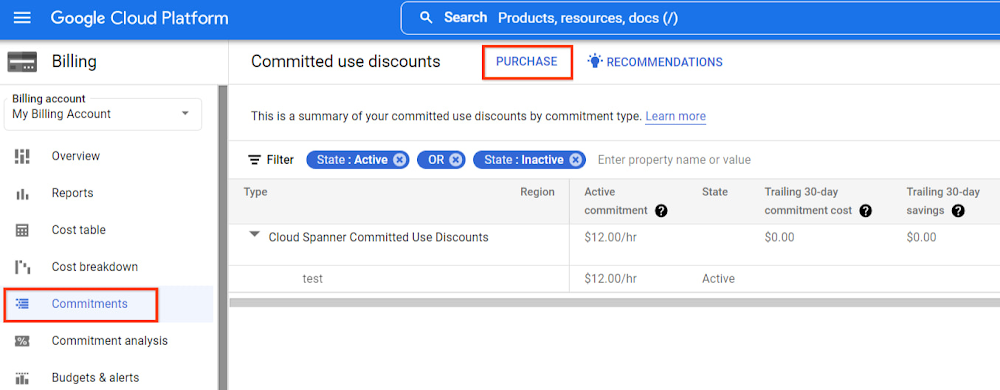
Cloud Spanner is a fully managed relational database that offers near unlimited scale, strong consistency, and industry leading high availability of up to 99.999%. Spanner powers applications of all sizes in multiple industries including financial services, gaming, retail, and healthcare. Spanner provides great value and price-performance since it helps you save operational costs, provides multiple replicas of your data by default, and allows you to pay for only what you need. Multiple customers have built their mission critical-applications on Spanner and are committed to expand its usage to transform many more applications. We are excited to announce the launch of Committed Use Discounts (CUDs) to further reduce costs for customers committing to use Spanner. You can get up to 40% discount on Spanner compute capacity by purchasing committed use discounts. Spanner committed use discounts provide deeply discounted prices in exchange for your commitment to continuously use Spanner compute capacity (as measured in nodes or processing units) for a one or three year period. One-year commitment provides a 20% discount whereas a three-year commitment provides a 40% discount! Spanner committed use discounts are available now and are applicable for all Spanner instance configurations in all regions.Greater flexibility drives higher utilizationSpanner committed use discounts provide full flexibility in terms of how discounts are applied. Once you make a commitment to spend a certain amount on an hourly basis on Spanner from a billing account, you can get discounts on instances in different instance configurations, regions, and projects associated with that billing account. Both regional and multi-region instances can utilize the same spend commitment. This flexibility helps you achieve a high utilization rate of your commitment across regions and projects without manual intervention, saving you time and money. If for business reasons you need to migrate your application from single region to multi-region in future, you can do so with the same commitment while continuing to enjoy the discounts.Committed use discounts along with other launches such as PostgreSQL interface and granular instance sizing democratize access to Spanner and make it easier for you to power more of your workloads with Spanner.How to purchase committed use discountsYou can purchase a Cloud Spanner committed use discount in the Google Cloud Console billing page by selecting the Commitments tab and then selecting PURCHASE at the top as shown below. Read the purchasing spend-based commitments section in Google Cloud’s documentation for more details.Once you click on PURCHASE, choose the billing account, commitment period and hourly commitment amount, in terms of equivalent on-demand spend.This amount represents the equivalent of on-demand costs that you would have incurred without the committed use discount.After you purchase a Spanner committed use discount, it automatically applies to aggregated spending on compute capacity (as measured in nodes or processing units) in all regions, instance configurations, and projects. We have provided this flexibility so that you need not make separate commitments for each region and instead have higher savings by automatically applying the discount in all regions.Spanner committed use discounts don’t apply to storage, backup, and network pricing. When you purchase a Spanner committed use discount, you pay the same commitment fee for the entire commitment period. You still receive the same discount percentage on applicable usage in the event of a price change. The commitment fee is billed monthly.When is committed use discounts right for you? Spanner committed use discounts are ideal when your spending on Spanner compute capacity has a predictable portion that you can commit to for a one or three year period. Let’s take an example. Let’s say you have a couple of Spanner instances in different regions and you have provisioned a total of 125 nodes. Let’s say you are consistently spending an average of $100/hour on this computer capacity. Let’s further assert that you feel confident this usage rate will not decline over the next year.This sort of steady usage represents an excellent opportunity to buy a Spanner committed use discount—in this case, a one-year commitment to spend $100/hour on Spanner nodes, in exchange for a 20% discount to that commitment. Let’s look at how such a purchase would apply to three different per-hour billing scenarios.In the first hour, you spend $100 on Spanner nodes. This matches your commitment exactly, with no overage. With the commitment’s 20 percent discount applied, this hour would cost you $80, saving you $20.Let’s say you scaled up Spanner nodes in the next hour, spending $110. You still enjoy a 20% discount for the $100 that your commitment covers. The remaining $10 gets billed at an on-demand rate.  Your bill for this hour would come to $80 plus the $10 of usage beyond the coverage of the commitment, for $90. Compared to the full $110 for the second hour, that still nets a $20 savings, just as in the previous hour.In the third hour, you scale down Spanner nodes, spending only $85. Your bill for this hour would still be $80 based on a $100/hour commitment with the 20% discount applied. As you can see, this commitment has saved you $45 over a three-hour span—even though one of those hours had a spending below the $100/hour commitment. Given that a typical month contains around 730 hours, a well-chosen committed use discount can add up to significant monthly savings for you. Let us see how. For example, considering $100 per hour On-demand spend on Spanner:Monthly expenditure based on On-demand rate = $100 per hour * 730 hours = $73,000Monthly expenditure based on 1 year commitment =  ($100 per hour * (1-20%)) * 730 hours  = $58,400 per monthTotal savings per month = $73,000 – $58,400 = $14,600Total savings in 1 year = $14,600 per month * 12 months =  $175,200You can save even more by making a 3 year commitment:Monthly spend based on 3 year commitment =  ($100 per hour * (1-40%)) * 730 hours  = $43,800 per monthTotal savings per month = $73,000 – $43,800 = $29,200Total savings in 3 years = $29,200 per month * 36 months =  $1,051,200These examples show how committed use discounts can help you achieve significant savings on Spanner usage. Now you can use committed use discounts to expand your Spanner usage to power more applications with Spanner’s consistency, availability and scalability guarantees. Learn moreCheck out our documentation for more details on Spanner committed use discounts. For Spanner pricing information, take a look at our pricing page.To get started with Spanner, create an instanceor try it out with a Spanner Qwiklab.Related ArticleVimeo builds a fully responsive video platform on Google CloudThe video platform Vimeo leverages managed database services from Google Cloud to serve up billions of views around the world each day.Read Article
Quelle: Google Cloud Platform

Google Cloud Partners driving Retail and Commerce Innovation

With strains on the supply chain and other pandemic-driven economic challenges intensifying, retailers this year face some of their biggest mandates to date: Increasing operational efficiency, delivering a seamless online and in-store experience, and staying one step ahead of rapidly changing customer preferences while offering exceptional customer service. This is why Google’s internal media teams continuously monitor and analyze the retail market and innovate with their services partners. Their goal is to help business leaders maximize business outcomes in this new landscape.All of these challenges require business leaders to precisely balance investments in pricing, promotion, product assortment, technology, and in-store experiences. The good news is these same leaders know intuitively that cloud technology can help. And with the help of a trusted partner who has the necessary technical knowledge and business experience, they can put the right plan in place to move forward and win.Let me show you how some of our Google Cloud partners and customers are solving real-world retail and commence business challenges.Air Asia accelerating forecasting, budgeting and increasing agility Faster budgeting and forecasting enabled Air Asia’s BIG Rewards’ leadership team to transition the business from survival mode during the pandemic, to more long-term program stability looking forward. BIG Rewards partnered with Searce to innovate and quickly implement a solution with improved speed and accuracy that democratizes data to better serve the business and empower all users to create relevant reports for decision-making. With Connected Sheets, BIG Rewards employees can analyze and report on large volumes of data through a familiar Sheets interface, accelerating decision-making and enabling the business to become more agile and relevant to a fast-changing market.“With the Google Cloud and Google Workspace solution, we expect to reduce the time to complete budgets from up to three months to just two to three weeks and lower the time to undertake quarterly forecasts from one month to one to two weeks.”—Sereen Teoh, Chief Financial Officer, BIG RewardsWell-designed experiments delivering measurable ROI for American Eagle OutfittersAmerican Eagle Outfitters conducts store experiments on their key initiatives before scale-up by leveraging Google Cloud data, machine learning capabilities and Accenture’s retail data science expertise to remain quick and agile. From concept to production and deployment in four months, American Eagle Outfitters saved millions of dollars in savings through store testing and a cost-effective platform, and provided the ability to understand performance of in-store tests at a granular level across multiple metrics. Their centralized data store for transactions, inventory, and web data is used for multiple solutions without compromising on performance, and leads to accelerated solution development.  “BigQuery gave us the scalability and processing power to analyze massive datasets that were previously too hard to manage in our old systems.”—Jimmy Hunkele, Director of Data Analytics, American Eagle OutfittersUniting top retail brand, Unify, onto one collaboration platformWith the help of Devoteam, Unify successfully brought the companies behind France’s top digital media brands together onto one communications platform in just two months. Despite the COVID-19 lockdown, the migration helped improve the speed of collaboration by reducing the dependence on email using Google Meet and Google Sheets. By installing a single communications solution for multiple companies, the team reaps the rewards of a shared CRM system to illuminate new synergies and enable remote change management using face-to-face interaction. The migration transforms working norms by enabling remote collaboration between brands with tools that create harmony and support customer experiences.“Google Workspace is more intuitive than other solutions and simplifies large account migrations with automated processes. The question was never ‘Which system should we use?’ but always ‘How can we bring everyone to Google Workspace?”—Charles Misson, Manager of Corporate IT, UnifyCultivating a vision at 1-800-FLOWERS.COM, Inc.To best manage all the eCommerce environments associated with its family of brands and ensure outstanding customer service, 1-800-FLOWERS.COM, Inc. has been working with MongoDB and Google Cloud to revolutionize its DevOps culture. As organizations modernize IT, MongoDB encourages DevOps professionals to place more importance on understanding customers, driving business values, and taking a people-first approach to work. By encouraging experimentation and innovation, 1-800-FLOWERS.COM, Inc., opens up new possibilities for software and infrastructure together. As a result, their DevOps team is able to act independently and bolster performance as demand fluctuates due to turbulent external factors across the retail marketplace.“From agility in scaling and improved resource management to seamless global clusters and premium monitoring, MongoDB and Google Cloud reduce complexity and allow our teams to stay lean and focused on innovation rather than infrastructure.”—Chief Technology Officer, Abi SachdevaPartner specializations create unique opportunities for retailersThese four examples show that Google Cloud, along with its services partners, helps retailers achieve their digital transformation goals with intelligent, data-driven solutions that are extended by our ecosystem of partners. One of the beauties of working with a partner is the instant access to expertise and experience necessary to align challenges with solutions and aspirations with reality. We continue to add thousands of people across Google Cloud to ensure our partners and customers receive all the support needed to thrive and win. Looking for a solution focused partner in your region who has achieved Expertise and/or Specialization in your industry? Search our Global Partner Directory. Not yet a Google Cloud partner? Visit Partner Advantage and learn how to become one today!Learn more about how Google Cloud is transforming retail and e-commerce to meet changing customer expectations at the NRF 2022 archives.Related ArticleLeading with Google Cloud & Partners to modernize infrastructure in manufacturingLearn how Google Cloud Partner Advantage partners help customers solve real-world business challenges in manufacturing.Read Article
Quelle: Google Cloud Platform
The L’Oréal Beauty Tech Data Platform – A data story of terabytes and serverless

Editor’s note: In Today’s guest post we hear from beauty leader L’Oréal about their approach to building a modern data platform on fully managed services: managing the ingest of diverse datasets into BigQuery with Cloud Run, and orchestrating transformations into relevant business domain representations for stakeholders across the organization. Learn more about how businesses have benefited from Cloud Run in Forrester’s report on Total Economic Impact.L’Oréal was born out of science. For over 100 years, we have always shaped the future of beauty, and taken its eternal quest to new horizons. This has earned us our current position as the world’s uncontested beauty leader (~€ 32 B annual sales in 2021), present in 150 countries with over 85,000 employees. Today, with the power of our game-changing science, multiplied by cutting-edge technologies, we continue our lifelong journey of shaping the future of beauty. As a Beauty Tech company, we leverage our decades-long heritage of rich data assets to empower our decision-making with instant, sophisticated analysis. Because we oversee global brands, which must adapt to local requirements, we need to maintain a deep understanding of what a brands’ data represents, while managing disparate legal and regulatory requirements for different countries. Our end goal is to run a safe, compliant and sustainable data warehouse as efficiently and effectively as possible. We sync and aggregate internal and external data from a wide variety of sources across organizations and retail stores. This made the management of our data warehouse infrastructure used to be very complex and hard to manage before Google Cloud. L’Oréal’s footprint was so large that we once found it impossible to have a standardized method to handle data. Every process was vendor-specific, and the infrastructure was brittle. We went looking for a solution to our complex data infrastructure needs, and defined the following non-negotiable principles: No Ops: The job of a developer at L’Oréal is not to manage servers. We need an elastic infrastructure that scales on demand, so that our developers can focus on delivering customized and inclusive beauty experiences to all consumers, rather than focusing on managing servers. Secure: We have strict security and compliance requirements which vary by country, and we employ a zero-trust security strategy. We must keep both our own internal data and customer data safe and encrypted. Sustainable : Our data lives in multiple environments, including on-prem data centers and public cloud services. We must be able to securely access and analyze this data while minimizing the complexity and environmental impact of moving and duplicating data. End-to-end supervision: Because developers shouldn’t be managing servers, we need a “single pane of glass” dashboard to monitor and triage the system if something goes wrong. Easy-to-deploy: Deploying code safely should not compromise velocity. We are constantly developing innovations that push the boundaries of science and reinvent beauty rituals. We need integrated tools to make our code deployment process seamless and safe. Event-driven architecture: Our data is used globally by research, product, business and engineering teams with high expectations on data quality and timeliness. Many of our internal processes and analysis are based on near real-time data. Data products delivered “as a service”: We want to empower our employees to drive business value at record speed. To that end, we need solutions that enable us to remove the developers from the critical path of solution delivery as much as possible. Extract-load-transform (ELT): Our goal is to implement the pattern to load data as soon as possible into the data warehouse to take advantage of SQL transformations. After considering multiple vendors on the market, with these principles in mind, we landed on end-to-end Google Cloud serverless and data tooling. We were already using Google Cloud for a few processes, including BigQuery, and loved the experience. We’ve now expanded our use of Google Cloud to fully support the L’Oréal Beauty Tech Data Platform.L’Oréal’s Beauty Tech Data Platform incorporates data from two types of sources: directly via API, which is data that adapts easily to our schema and is inserted directly into BigQuery, and bulk data from integrations, which require event-driven transformations using Eventarc mechanisms. These transformations are performed in Cloud Run and Cloud Functions (2nd gen), or directly in SQL. With Google Cloud, we can adapt very quickly. Today, we currently have 8500 flows for ~5000 users using the native zero-trust capabilities offered by Google Cloud. Indeed, the flows come from Google Cloud and other third-party services. BigQuery enabled us to adopt standard SQL as our universal language in our data warehouse and meet all expectations for queries and reporting. We were also able to load original data using features like federated queries, and efficiently transitioned from ETL to ELT data ingestion by handling semi-structured data with SQL. This approach of loading original data from sources into BigQuery with non-destructive transformations allows us to reprocess data for new use-cases easily, directly within BigQuery. Our applications are hosted on multiple environments – on-premises, in Google Cloud, and in other public clouds. This made it difficult for our data engineers and analysts to natively analyze data across clouds until we started usingBigQuery Omni. This capability of BigQuery allowed us to globally access and analyze data across clouds through a single pane of glass using the native BigQuery user interface itself. Without BigQuery Omni, it would’ve been impossible for our teams to natively do cross-cloud analytics. Moreover, it eliminated the need for us to move sensitive data, which is not only expensive because of local tax and subsea transport, but also incredibly risky – sometimes even forbidden – because of local regulations. Today Google Cloud powers our Beauty Tech Data Platform, which stores 100TB of production data in BigQuery and processes 20TB of data each month. We have more than 8000 governed datasets, and 2 millions of BigQuery tables coming from multiple data sources such as Salesforce, SAP, Microsoft, and Google Ads. For more complex transformations where custom and specific libraries are required,Cloud Workflows help us to manage the complexity very efficiently by orchestrating steps in containers through Cloud Run, Cloud Functions and even BigQuery jobs — the most used way to transform and add value to the L’Oréal data. Additionally, by using BigQuery and Google Cloud’s serverless compute for API ingestion, bulk data loading, and post-loading transformations, we can keep the entire system in a single boundary of trust at a fraction of the cost. With ingest, queries, and transformations all being fully elastic and on-demand, we no longer have to perform capacity planning for either the compute or analytics components of the system. And of course these services’ pay-as-you-go model perfectly aligns with L’Oréal’s strategy of only paying for something when you use it.  Google Cloud fulfilled the requirements of our Beauty Tech Data Platform. And as if offering us a no-ops, secure, easy-to-deploy, custom-development free, event-based platform with end-to-end supervision wasn’t enough, Google Cloud also helped us with our sustainability efforts.  Being able to measure and understand the environmental footprint of our public cloud usage is also a key part of our sustainable tech roadmap. With Google Cloud Carbon Footprint, we can easily see the impact of our sustainable infrastructure approach and architecture principles. Our Beauty Tech platform is a strategic ambition for L’Oréal: inventing the beauty products of the future while becoming the company of the future. Sustainable tech is an imperative and a very important step towards this ambition of creating responsible beauty for our consumers, and sustainable-by-design tech services for our employees. We all have a role to play, and by joining forces, we can have a positive impact. Google Cloud’s data ecosystem and serverless tools are highly complementary, and made it possible to build a next-generation data analytics platform that met all our needs. Get started using serverless and BigQuery together on Google Cloud today.Related ArticleShowing the speed of serverless through hackathon solutionsGoogle Cloud Easy as Pie Hackathon, the results are in.Read Article
Quelle: Google Cloud Platform

Women Techmakers journey to Google Cloud certification

In many places across the globe, March is celebrated as Women’s History Month, and March 8th, specifically, marks the day known around the world as International Women’s Day. Here at Google, we’re excited to celebrate women from all backgrounds and are committed to increasing the number of women in the technology industry. Google’s Women Techmakers community provides visibility, community, and resources for women in technology to drive participation and innovation in the field. This is achieved by hosting events, launching resources, and piloting new initiatives with communities and partners globally. By joining Women Techmakers, you’ll receive regular emails with access to resources, tools and opportunities from Google and Women Techmakers partnerships to support you in your career.Google Cloud, in partnership with Women Techmakers, has created an opportunity to bridge the gaps in the credentialing space by offering a certification journey for Ambassadors of the Women Techmakers community. Participants will have the opportunity to take part in a free-of-charge, 6-week cohort learning journey, including: weekly 90-minute exam guide review sessions led by a technical mentor, peer-to-peer support in the form of an Online Community, and 12 months access to Google Cloud’s on-demand learning platform, Google Cloud Skills Boost. Upon completion of the coursework required in the learning journey, participants will receive a voucher for the Associate Cloud Engineer certification exam. This program, and other similar offerings such as Cloud Career Jumpstart, and the learning journey for members transitioning out of the military, are just a few examples of the investment Google Cloud is making into the future of the technology workforce. Are you interested in staying in the loop with future opportunities with Google Cloud? Join our community here.Related ArticleCloud Career Jump Start: our virtual certification readiness programCloud Career Jump Start is Google Cloud’s first virtual Certification Journey Learning program for underrepresented communities.Read Article
Quelle: Google Cloud Platform
Leveraging OpenTelemetry to democratize Cloud Spanner Observability

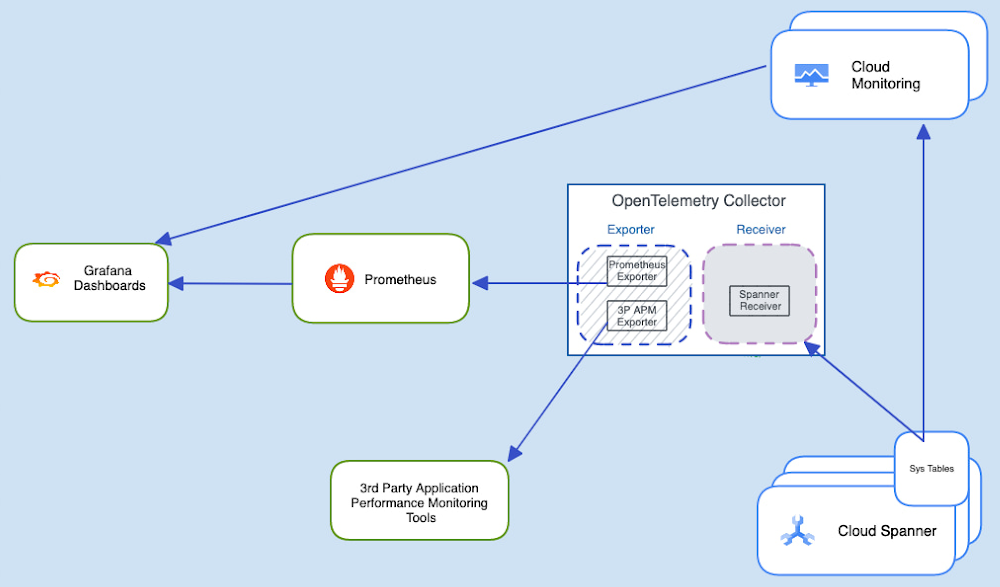
Today we’re announcing the launch of an OpenTelemetery receiver for Cloud Spanner,  which provides an easy way for you to process and visualize metrics from Cloud Spanner System tables, and export these to the APM tool of your choice. We have also built a reference integration with Prometheus and sample Grafana dashboards which customers  can use as a template for their own troubleshooting needs. This receiver is available starting version v0.41.0Whether you are a database admin or a developer, it is important to have tools that help you understand the performance of your database, detect if something goes wrong (elevated latencies, increased error rates, reduced throughput etc), and identify the root cause of these signals. Cloud Spanner offers a wide portfolio of Observability tools that allow you to easily monitor database performance, diagnose and fix potential issues. However, some of our customers would like to have the flexibility of consuming Cloud Spanner metrics in their own observability tooling, which could be either an open source combination of a time-series database like Prometheus coupled with a Grafana dashboard, or it could be a commercial Application Monitoring (APM) tool like Splunk, Datadog, Dynatrace, NewRelic or AppDynamics. The reason is that, organizations have already invested in their own observability tooling and don’t want to switch, since switching to a different vendor or a visualization console will require spending a great deal of effort. This is where OpenTelemetry comes in.OpenTelemetry is a vendor-agnostic observability framework for instrumenting, generating, collecting, and exporting telemetry data (traces, metrics and logs). It integrates with many libraries and frameworks across various languages to offer a large set of automatic instrumentation capabilities. The OpenTelemetry ReceiverAn OpenTelemetery receiver is a component of the OpenTelemetery Collector which is built on a Receiver-Exporter model, and by installing the new receiver for Cloud Spanner and configuring a corresponding exporter, developers can now export metrics to their APM tool of choice. This architecture offers a vendor-agnostic implementation on how to receive, process, and export telemetry data. It removes the need to run, operate, and maintain multiple agents / collectors which send traces and metrics in proprietary formats to one or more tracing and/or metrics backends. Cloud Spanner has a number of introspection tools in the form of System Tables (built-in tables that you can query to gain helpful insights about operations in Spanner such as queries, reads, and transactions). Now, with the introduction of the OpenTelemetry receiver for Cloud Spanner, developers can now consume these metrics and visualize them in their APM tool.Reference ImplementationAs a reference implementation, we have created a set of sample dashboards on Grafana, which consume metrics both from Prometheus (exported by the OpenTelemetery Collector) and Cloud monitoring to enable an end-to-end debugging experience. NOTE: Instead of deploying a self managed instance of Prometheus, customers can now also use Google’s managed service for Prometheus. Using this service will let you monitor and alert on your workloads, using Prometheus, without having to manually manage and operate Prometheus at scale. Learn more about using this service here.PrerequisitesPrometheus installed and configured. OpenTelemetry version v0.41.0 (or higher).Here are the specific configurations of these components:OpenTelemetry collectorBelow is a sample configuration file that enables the receiver and sets up an endpoint for Prometheus to scrape metrics from.[config.yml]code_block[StructValue([(u’code’, u’receivers:rn googlecloudspanner:rn collection_interval: 60srn top_metrics_query_max_rows: 100rn # backfill_enabled: truern projects:rn – project_id: “<YOUR_PROJECT>”rn service_account_key: “<SERVICE_ACCOUNT_KEY>.json”rn instances:rn – instance_id: “<YOUR_INSTANCE>”rn databases:rn – “<YOUR_DATABASE>”rnrnexporters:rn prometheus:rn send_timestamps: truern endpoint: “0.0.0.0:8889″ rnrn logging:rn loglevel: debugrnrnprocessors:rn batch:rn send_batch_size: 200rnrnservice:rn pipelines:rn metrics:rn receivers: [googlecloudspanner]rn processors: [batch]rn exporters: [logging, prometheus]’), (u’language’, u”)])]PrometheusOn Prometheus, you need to add a scrape configuration like so:[prometheus.yml]code_block[StructValue([(u’code’, u’global:rn scrape_interval: 15srnrnscrape_configs:rn – job_name: “otel”rn honor_timestamps: truern static_configs:rn – targets: [“collector:8888″, “collector:8889″]’), (u’language’, u”)])]GrafanaFinally, you need to configure Grafana and add datasources and dashboards. Our reference dashboards use two data sources – Cloud monitoring and Prometheus. This sample configuration file can be used with the dashboards we’ve shared above.[datasource.yml]code_block[StructValue([(u’code’, u’apiVersion: 1rnrndatasources:rn- name: Google Cloud Monitoringrn type: stackdriverrn access: proxyrn jsonData:rn tokenUri: https://oauth2.googleapis.com/tokenrn clientEmail: <YOUR SERVICE-ACCOUNT EMAIL> rn authenticationType: jwtrn defaultProject: <YOUR SPANNER PROJECT NAME>rn secureJsonData:rn privateKey: |rn <YOUR SERVICE-ACCOUNT PRIVATE KEY BELOW>rn —–BEGIN PRIVATE KEY—–rn rn —–END PRIVATE KEY—–rnrn- name: Prometheusrn type: prometheusrn # Access mode – proxy (server in the UI) or direct (browser in the UI).rn access: proxyrn url: http://prometheus:9090′), (u’language’, u”)])]Sample DashboardsThe monitoring dashboard powered by Cloud monitoring metrics.The Query Insights dashboard powered by PrometheusWe believe that a healthy observability ecosystem serves our customers well and this is reflected in our continued commitment to open-source initiatives. We’ve received the following feedback from the OpenTelemetry Community on this implementation: “OpenTelemetry has grown from a proposal between two open-source communities to the north star for the collection of metrics and other observability signals. Google has strengthened their commitment to our community by constantly supporting OpenTelemetry standards. Using this implementation and the corresponding dashboards, developers can now consume these metrics in any tooling of their choice, and will be very easily able to debug common issues with Cloud Spanner.” —Bogdan Drutu, Co-Founder of OpenTelemetryWhat’s next?We will continue to provide flexible experiences to developers, embrace open standards, support our partner ecosystem and continue being a key contributor to the open source ecosystem. We will also continue to provide best-in-cloud native observability tooling in our console so that our customers get the best experience wherever they are. To learn more about our Cloud Spanner’s introspection capabilities, read this blog post, and to learn more about Cloud Spanner in general, visit our website.Related ArticleImproved troubleshooting with Cloud Spanner introspection capabilitiesCloud-native database Spanner has new introspection capabilities to monitor database performance and optimize application efficiency.Read Article
Quelle: Google Cloud Platform

Get more insights from your Java applications logs

Today it is even easier to capture logs in your Java applications. Developers can get more data with their application logs using a new version of the Cloud Logging client library for Java. The library populates the current executing context implicitly with every ingested log entry. Read this if you want to learn how to get HTTP requests and tracing information and additional metadata in your logs without writing a single line of code.There are three ways to ingest log data into Google Cloud Logging:Develop a proprietary solution that directly calls the Logging API.Leverage logging capabilities of the Google Cloud managed environments like GKE or install Google Cloud Ops agent and print your application logs to stdout and stderr.Use Google Cloud Logging client library in one of many supported programming languages.The library provides you with ready to use boilerplate constructs built following the best practices of using Logging API. Java applications can use the Google Cloud Logging library to ingest logs using the integrations with Java Logging and Logback framework.If you are new to using Google Logging client libraries for Java, follow the steps to set up Cloud Logging for Java and get started.In the version 3.6 release of the the Logging client library for Java you get many long demanding features including automatic population of the metadata about the environment’s resource supporting Cloud Run and Cloud Functions, HTTP request contextual information, tracing correlation that enables displaying grouped log entries in Logs Explorer and more. This release of the library is composed of the three packages:google-cloud-logging — provides the hand-written layer above Cloud Logging API and the integration with legacy Java Logging solution.google-cloud-logging-logback is the integration with the Logback framework and ingests logs using the google-cloud-logging package.google-cloud-logging-servlet-initializer is a new addition to the library; it provides integration with servlet-based Web applications.The features are available in the versions ≥3.6.3 and ≥0.123.3-alpha of the google-cloud-logging and google-cloud-logging-logback packages respectively.If you are using Maven, update the packages’ versions in the pom.xml:code_block[StructValue([(u’code’, u'<dependency>rn <groupId>com.google.cloud</groupId>rn <artifactId>google-cloud-logging</artifactId>rn <version>3.6.3</version>rn</dependency>rn<dependency>rn <groupId>com.google.cloud</groupId>rn <artifactId>google-cloud-logging-logback</artifactId>rn <version>0.123.3-alpha</version>rn</dependency>’), (u’language’, u”)])]If you are using Gradle, , update your dependencies:code_block[StructValue([(u’code’, u”implementation ‘com.google.cloud:google-cloud-logging:3.6.3’rnimplementation ‘com.google.cloud:google-cloud-logging-logback:0.123.3-alpha'”), (u’language’, u”)])]You can use the official Google Cloud BOM version 0.167.0 that includes the new releases of the packages.What is newThe Java library inserts structured information about the executing environment including resource types, HTTP request metadata, tracing and more. Using the library you can write your payloads in one of the three formats:A text provided as a Java stringA JSON object provided as an instance of Map<String, ?> or StructA protobuf object provided as an instance of AnyYou can use the structured logs with enhanced filtering in Logs Explorer to observe and troubleshoot their applications. The Logs Explorer uses structured logs to establish correlations between traces and logs and to group together logs that belong to the same transaction. The correlated “child” logs are displayed “under” the entry of the “parent” log:Grouped logs display in Logs ExplorerWith the previous versions of the Logging library you had to write code to explicitly populate these fields. For example, developers that use Logback framework had to write a code like below to populate the trace field of the ingested logs:code_block[StructValue([(u’code’, u’// . . .rnString traceInfo = request.getHeader(“x-cloud-trace-context”);rnTraceLoggingEventEnhancer.setCurrentTraceId(traceInfo);rn// . . .’), (u’language’, u”)])]And to invoke this code at the beginning of each transaction.The new features of the Logging library makes implementing the population logic unnecessary. The new version of the library supports automatic population of following log entry fields:resource ‒ describes the resource type and its attributes where the application is running. Along with GCE instances, it supports Google Cloud managed services such as GKE, AppEngine (both Standard and Flexible), Cloud Run and Cloud Functions.httpRequest ‒ captures info about HTTP requests from the current application’s context. The context is defined per-thread and can be populated both explicitly in the application code or implicitly from the Jakarta servlet requests pipeline.trace and spanId ‒ reads the tracing data from the HTTP request header. The tracing data assists in correlating multiple logs that belong to the same transaction.sourceLocation ‒ stores info about the class and method names as well as the line of code where the application called the log ingestion method. The library retrieves the data by traversing the trace stack up until the first entry that is not part of the Logging library code or the system package.What is left to you is to set the payload and relevant payload’s metadata labels. The only field in the log entry that the library does not automatically populate now is the operation field.Disable information auto-population in log entriesYou have full control over the auto-population functionality. The auto-population is enabled by default for your convenience. But in certain scenarios it can be desirable to disable it. For example, if your application is log intensive and has a narrow bandwidth, you may want to disable the auto-population in order to save the connection’s bandwidth for the application communication.If you are ingesting logs using the write() method of the Logging interface, you can configure the LoggingOptions argument to disable the auto-population:code_block[StructValue([(u’code’, u’LoggingOptions options = LoggingOptions.newBuilder()rn .setAutoPopulateMetadata(false).build();rnLogging logging = options.getService();’), (u’language’, u”)])]If you are using Java Logging, you can disable auto population by adding the following to your logging.properties file:code_block[StructValue([(u’code’, u’com.google.cloud.logging.LoggingHandler.autoPopulateMetadata=false’), (u’language’, u”)])]If you are using Logback framework, you can disable auto population by adding the following to your Logback configuration:code_block[StructValue([(u’code’, u'<autoPopulateMetadata>false</autoPopulateMetadata>’), (u’language’, u”)])]How the current context is populatedRich query and display capabilities of Log Explorer such as displaying correlated logs use the log entries’ fields such as httpRequest and trace. The new version of the library uses the Context class to store the information about the HTTP request and tracing data in the current application context. The context’s scope is per thread. Before the library ingests logs into Cloud Logging, it reads the HTTP request and tracing information from the current context and sets the respective fields in the log entries. The fields are populated only if the caller did not explicitly provide values in these fields. Using the ContextHandler class you can setup the HTTP request and tracing data of the current context:code_block[StructValue([(u’code’, u’import com.google.cloud.logging.HttpRequest;rn// . . .rnHttpRequest request;rn// . . .rnContextHandler ctxHandler = new ContextHandler();rnContext ctx = Context.newBuilder()rn .setRequest(request)rn .setTraceId(traceId)rn .setSpanId(spanId)rn .build();rnctxHandler.setCurrentContext(ctx);’), (u’language’, u”)])]After the context is set all logs that will be ingested in the same scope as the context will be populated with the HTTP request and tracing information that was set in the current context. The Context class can setup the HTTP request using partial data such as URL or request method:code_block[StructValue([(u’code’, u’import com.google.cloud.logging.HttpRequest.RequestMethod;rn// . . .rnContextHandler ctxHandler = new ContextHandler();rnContext ctx = Context.newBuilder()rn .setRequestUrl(“https://example.com/info”)rn .setRequestMethod(RequestMethod.GET);rn .build();rnctxHandler.setCurrentContext(ctx);’), (u’language’, u”)])]The builder of the Context class also supports setting the tracing information from the parsed values of the Google tracing context and  W3C tracing context strings using the methods loadCloudTraceContext() and loadW3CTraceParentContext() respectively.Implementation of the context population can be a complex task. Java Web servers support asynchronous execution of the request handlers. To manage the context in the right scope may require in-depth knowledge of specific implementation details about each Web server. The new version of the Logging library provides a simple way to automate the process of the current context management, saving you the effort of implementing the code by themselves. The automation supports all Web servers that are based on the Jakarta servlets such as Tomcat, Jetty or Undertow. The current implementation supports Jakarta servlets version ≥ 4.0.4. The implementation is added to the new google-cloud-logging-servlet-initializer package. All that you have to do to enable automatic capturing of the current context is to add the package to your application.If you are using Maven add the following to your pom.xml:code_block[StructValue([(u’code’, u'<dependency>rn <groupId>com.google.cloud</groupId>rn <artifactId>google-cloud-logging-servlet-initializer</artifactId>rn <version>0.1.7-alpha</version>rn <type>pom</type>rn</dependency>’), (u’language’, u”)])]If you are using Gradle, add the following to your dependencies:code_block[StructValue([(u’code’, u”implementation ‘com.google.cloud:google-cloud-logging-servlet-initializer:0.1.7-alpha'”), (u’language’, u”)])]The added package uses the Java’s Service Provider Interface to register the ContextCaptureInitializer class which integrates into the servlet pipeline to capture information about current HTTP requests. The information is parsed to populate the HttpRequest structure. It also parses the request’s headers to retrieve tracing information. It supports “x-cloud-trace-context” (Google tracing context) and “traceparent” (W3C tracing context) headers.Use Logging library with logging agentsMany applications utilize logging capabilities of the Google Cloud managed services. The applications output their logs to stdout and stderr, and the logs are ingested into Cloud Logging by Logging agents or the Cloud managed services with the logging agent capabilities. This approach benefits from asynchronous log processing that does not consume application resources. The drawback of the approach is that if you want to populate fields in the structured logs or provide the structured payload, they have to format their output following the special Json format that the logging agents can parse. Also, while the logging agents can detect and populate the resource information about the managed environment, they cannot help with auto population of other fields of the log entry such as traceId or sourceLocation.The new release of the Logging library for Java introduces the support for logging agents in both of its Java Logging and Logback integrations. Now the library’s users can instruct the appropriate handler to redirect the log writing to stdout instead of Logging API.If you are using Java Logging, add the following to your logging.properties file:code_block[StructValue([(u’code’, u’com.google.cloud.logging.LoggingHandler.redirectToStdout=true’), (u’language’, u”)])]If you are using Logback, add the following to the Logback configuration:code_block[StructValue([(u’code’, u'<redirectToStdout>true</redirectToStdout>’), (u’language’, u”)])]By default, both LoggingHandler and LoggingAppender write logs by calling the Logging API. You have to add the above configurations to make them utilize the logging agents for the log ingestion.Some limitations of using Logging AgentsWhen configuring the library’s Java Logging handler or Logback adapter to redirect log writing to stdout, you should be aware of the constraints that the use of logging agents implies.Google Cloud managed services (e.g. GKE) automatically install logging agents in the resources that they provision. For example, a GKE cluster has a logging agent installed in each worker node (GCE instance) of the cluster. As a result, logging agents are constrained with the resource they run and do not support customization of the resource field of the ingested log entries.Additionally, the logName of all ingested logs is defined by the agent and cannot be changed*. It means that the application cannot define the log name or where the log entry will be stored (a.k.a. log’s destination name).If it is essential for you to define a custom resource type or to control to which project the logs will be routed and/or the log name, you should not redirect the log writing to standard output.* It is possible to customize the log name (but not the destination) by customizing the Logging agent’s configuration in GCE instances by defining the name as the “tag”.What is nextLet’s recap the benefits of upgrading your logging client to the latest version.Use the new Logging library if you need log correlation capabilities of Log Explorer or forward Cloud Logging structured logs to external solutions and use the data in the auto-populated fields.Use the google-cloud-logging-servlet-initializer package to automate the context management if you run a request based application that uses Jakarta servlets. Note that it will not work with legacy Java EE servlets or Web servers that are not based on Java servlets such as Netty.If you run your application in the Google Cloud serverless environments like Cloud Run or Cloud Functions, consider using Java Logging or Logback with the configuration that redirects formatted logs to standard output like it is described in the previous section. Leveraging logging agents for ingesting logs resolves some reliability problems about asynchronous log ingestion such as CPU throttling on Cloud Run or no grace period in Cloud Functions.Related ArticleGetting Started with Google Cloud Logging Python v3.0.0Learn how to manage your app’s Python logs and related metadata using Google Cloud client libraries.Read Article
Quelle: Google Cloud Platform
How Google Cloud helps you to architect for DR when you have locality restricted workloads

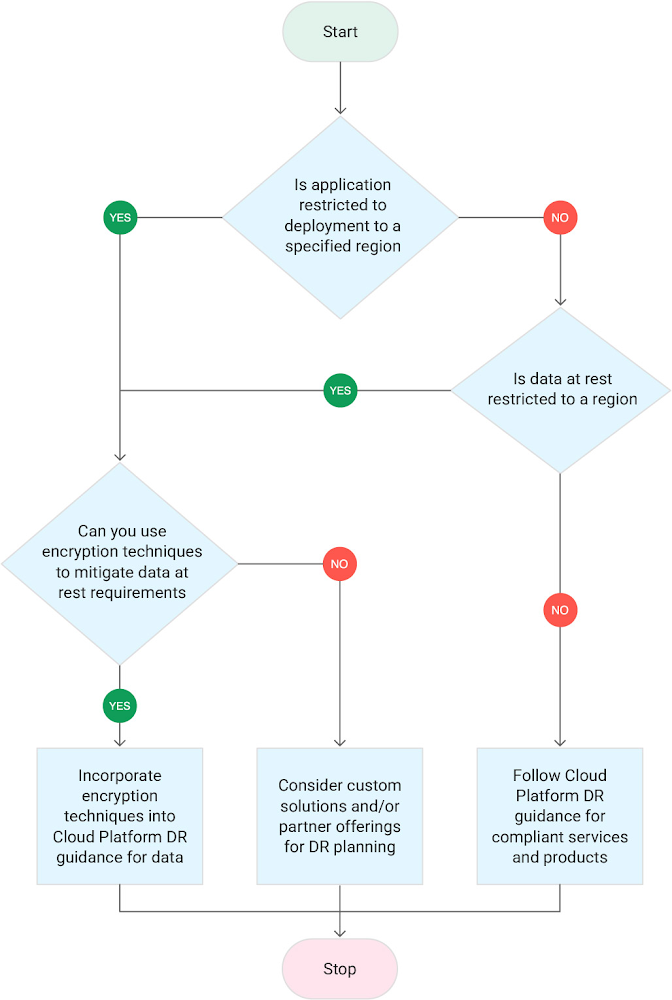
There are many reasons why locality restrictions need to be taken into consideration and it’s something CISOs and resiliency officers need to factor in. A balance needs to be met between taking advantage of the best features of the cloud while meeting your locality requirements. Google Cloud helps you meet your business objectives; whether your architecture is all-in on Google Cloud, a hybrid pattern which may be on-premises and Google Cloud, or on Google Cloud and an alternative cloud provider.Before starting to design your architecture you need to consider the locality requirements you need to meet. These can at a high level be one or more of three scenarios: Data localization: Data needs to be stored and processed within a specified entity (for example the EU) or a specific country or designated countries. Data residency: Data is stored in a specified geographical location.Data sovereignty: Builds upon both data localization and residency, but to meet sovereignty requirements, you will be subject to regulations and laws of an entity such as the EU, regulated industry groups, or a specific country.These scenarios are often conflated because they are related, yet they are distinct. Designing your locality restricted architecture requires you to also design your disaster recovery (DR) architecture to meet your localization requirements. The approach to designing your DR architecture for locality restricted architectures is the same as designing DR architectures that do not have any DR locality restrictions, but with augmentation to address the locality requirements. Start by reading the Google Cloud disaster recovery planning guide. Next, as you consider locality-restricted workloads, we have two additional DR guides that focus on meeting locality restrictions:Architecting disaster recovery for locality-restricted workloads – Start here and focus first on the requirements discussed in the planning section of this guide. This also discusses the locality features of a subset of the Google Cloud portfolio which is useful to review when designing your overall architecture.   Disaster recovery use cases: locality-restricted data analytics applications – This guide helps you understand what designing your DR architecture looks like in practice. It has two data analytic use cases which have locality restricted requirements. The guide talks through the locality considerations for both use cases. Use the following flowchart to help you determine what you need to take into consideration when designing your DR architecture architecture:Click to enlargeIf you end up considering custom solutions or partner offerings, then use the Google Cloud disaster recovery planning guide together with the locality restricted guides Architecting disaster recovery for locality-restricted workloads and Disaster recovery use cases: locality-restricted data analytics applications to help you with designing your locality restricted DR architecture.Related ArticleNew in Google Cloud VMware Engine: Single nodes, certifications and moreThe latest version of Google Cloud VMware Engine now supports single node clouds, compliance certs and Toronto availabilityRead Article
Quelle: Google Cloud Platform

Cloud CISO Perspectives: February 2022

As the war in Ukraine continues to unfold, I want to update you on how we’re supporting our customers and partners during this time. Google is taking a number of actions. Our security teams are actively monitoring developments, and we offer a host of security products and services designed to keep customers and partners safe from attacks. We have published security checklists for small businesses and medium-to-large enterprises, to enable entities to take necessary steps to promote resilience to malicious cyber activity.Below, I’ll recap the latest efforts from the Google Cybersecurity Action Team such as our second Threat Horizons Report, and highlight new capabilities from our cloud security product teams who have been working to deliver new controls, security solutions and more to earn the trust of our customers globally. Munich Cyber Security ConferenceEarlier this month, I joined a panel at the Munich Cyber Security Conference (Digital Edition) to discuss supply chain risks and cyber resiliency. It was great to see a packed agenda featuring diverse voices from the security industry along with government leaders and policymakers coming together to discuss the challenges we’re working to collectively solve in cybersecurity. One area of particular focus is securing the software supply chain. During the panel, we talked about Google’s approach to building our own internal software and incorporating open source code in a secure way. This has been the foundation of our BeyondProd approach.We implement multiple layers of safeguards like multi-party change controls and a hardened build process that produces digitally signed software that our infrastructure explicitly validates before executing. We’ve since turned this into an open framework that all organizations can use to assess themselves and their supply chains: SLSA. How we collectively as an industry secure the software supply chain and prevent vulnerabilities in open source software will continue to be critical for cloud and SaaS providers, governments and maintainers throughout 2022. Google Cloud Security Talks  On March 9, we’ll host our first Cloud Security Talks of 2022 that will focus on how enterprises can modernize their approach to threat detection and response with Google Cloud. Sessions will highlight how SecOps teams can leverage our threat detection, investigation and response capabilities across on-premise, cloud, and hybrid environments, including new SOAR capabilities from our recent acquisition of Siemplify. Registerhere. Google Cybersecurity Action Team Highlights Here are the latest updates, products, services and resources from our cloud security teams this month: Security FIDO security key support for GCE VMs: Physical security keys can now be used to authenticate to Google Compute Engine virtual machine (VM) instances that use our OS Login service for SSH management. Security keys offer some of the strongest protection against phishing and account takeovers and are strongly recommended in administrative workflows like this.IAM Conditions and Tags support in Cloud SQL: We introduced IAM Conditions and Tags in Cloud SQL which bring powerful new capabilities for finer-grained administrative and connection access control for Cloud SQL instances. Achieving Autonomic Security Operations: Anton Chuvakin and Iman Ghanizada from the Cybersecurity Action Team shared their latest blog post on how organizations can achieve Autonomic Security Operations by leveraging key learnings from SRE principles. The post highlights multiple ways automation can serve as a force multiplier to achieve better outcomes in your SOC.Certificate Manager integration with External HTTPS Load Balancing: We released the public preview of our Certificate Manager service and integration with External HTTPS Load Balancing to help simplify the way you deploy HTTPS services for your customers. You can bring your own TLS certificates and keys if you have an existing certificate lifecycle management solution or use Google Cloud’s fully managed TLS offerings. Another helpful feature of this release is integration of alerts on certificate expiry into Cloud Logging.Virtual Machine Threat Detection: The cloud is impacted by unique threat vectors but also offers novel opportunities to build effective detection into the platform natively. This dynamic underpins our latest Security Command Center Premium capability: Virtual Machine Threat Detection (VMTD). VMTD helps ensure strong protection for VM-based workloads by providing agentless memory scanning that can detect threats like cryptomining malware inside your Google Compute Engine VMs.Chrome Browser Cloud Management: A large part of enterprise security is protecting endpoints that access the web overall and a big part of this is not only using a secure browser like Chrome, but also how you get to manage and support that. We have a lot of these capabilities in Chrome Browser Cloud Management along with our overall zero trust approach. We also recently extended CIS benchmark coverage to include Chrome. Google Cloud architecture diagramming tool: We recently launched the brand new Google Cloud Architecture Diagramming Tool. This is an awesome tool for cloud architects, developers and security teams alike, and it’s another opportunity for us to be helpful in providing pre-baked reference architectures into the tools. Watch out for more on this as we build in more security patterns. Some of the Best Security Tools Might Not be “Security Tools”: Remember, there are many problems in risk management, security and compliance that don’t need specialist security tools. In fact some of the best tools might be from our data analysis and AI stacks such as our Vertex AI capability. Check out these new training features from the team. Stopping website attacks with reCAPTCHA Enterprise: reCAPTHA Enterprise is a great solution that mitigates many of the issues in the OWASP Automated Threat Handbook and can be deployed seamlessly for your website. Industry updatesOpen source software security: Just a few weeks after technology companies (including Google) and industry foundations convened at the White House summit on open source security, the OpenSSFannounced the Alpha-Omega project. The project aims to help improve software supply chain security for 10,000 OSS projects through direct engagement of software security experts and automated testing. Microsoft and Google are supporting the Alpha-Omega Project with an initial investment of $5 million. Building cybersecurity resilience in healthcare: Taylor Lehmann and Seth Rosenblatt from Google’s Cybersecurity Action team recently outlined best practices healthcare leaders can adopt to build resilience for IT systems, overcome attacks to improve both security and business outcomes, and above all, protect patient care and data.  Threat IntelligenceThreat Horizons Report Issue 2: Providing timely, actionable cloud threat intelligence to our customers so they can take action to protect their environments is critical and this is the aim of our Threat Horizons report series. Customers benefit from guidance on how to securely use and configure the cloud, which is why we operate within a “shared fate” model that exemplifies a true partnership with our customers regarding their security outcomes. In the latest Google Cybersecurity Action Team Threat Horizons Report, we observed vulnerable instances of Apache Log4j are still being sought by attackers, which requires continued vigilance by customers and cloud providers alike in ensuring patching is effective. Additionally, Google Cloud Threat Intelligence has observed that the Sliver framework is being used by adversaries post initial compromise in attempts to ensure they maintain access to networks. Check out the fullreport for this month’s findings and best practices you can adopt to stay protected against these and other evolving threats.ControlsAssured Workloads for EU: Organizations around the world need confidence they can meet their unique and evolving needs for security, privacy, and digital sovereignty as they use cloud services. Assured Workloads for EU, now GA, allows GCP customers to create and maintain workloads with data residency in their choice of EU Google Cloud regions, personnel access and customer support restricted to EU persons located in the EU, and cryptographic control over data access using encryption keys stored outside Google Cloud infrastructure.Client Authorization for gRPC Services with Traffic Director: One way developers use the open source gRPC framework is for backend service-to-service communications. The latest release of Traffic Director now supports client authorization by proxyless gRPC services. This release, in conjunction with Traffic Director’s capability for managing mTLS credentials for Google Kubernetes Engine (GKE) enables customers to centrally manage access between workloads using Traffic Director.Don’t forget to sign-up for our newsletter if you’d like to have our Cloud CISO Perspectives post delivered every month to your inbox. We’ll be back next month with more updates and security-related news.Related ArticleCloud CISO Perspectives: January 2022Google Cloud CISO Phil Venables shares his thoughts on the latest security updates from the Google Cybersecurity Action Team.Read Article
Quelle: Google Cloud Platform

Four ways Google Cloud Marketplace simplifies buying cloud software

Discovering, purchasing, and managing solutions on Google Cloud has never been easier thanks to Google Cloud Marketplace, where you can explore thousands of enterprise-ready products and services that integrate with Google Cloud. Marketplace simplifies buying solutions from Google and top software vendors as all purchases are seamlessly added to your existing Google Cloud invoice, so you receive just one bill from Google. We’re continuously improving how our customers can evaluate, procure, and manage cloud software online because we know that’s increasingly how you want to buy. In fact, in 2021 our marketplace third-party transaction value was up more than 500% YoY from 2020 (Q1-Q3). Let’s revisit the top four improvements we’ve made to the cloud software buying and selling experience in just the last few months that have accelerated buying momentum.1. Find what you’re looking for fasterWith enhanced filters, quickly discover top solutions ready to run in your Google Cloud instance. Filters are now more intuitive, allowing you to browse solutions by industry, type, category, use case, and more. Check out the “free trial” filter if you want to try a solution before buying. And if you’re looking for inspiration, we surface popular, new, and featured products across categories. Once you’ve found what you’re looking for, you’ll benefit from more detailed product cards to help you evaluate what’s best for your organization. Explore the Google Cloud Marketplace catalog to find innovative solutions to your business problems.2. Buy and sell the way you wantWe’ve added new subscription models and payment schedules, making it simpler than ever to save money and meet your organization’s procurement needs. Through Google Cloud Marketplace, you can negotiate with third-party vendors and retire Google Cloud committed spend on first and third-party purchases. Many of our software vendors now have the ability to offer flexible subscription models, including flat fees, usage-based, hybrid flat fee + usage, and committed use discounts that customers can pay for monthly or up front. These partners can now also include standard or customized terms to meet your organization’s procurement needs. Learn more about initiating and accepting customized offers. And to make buying easier in large organizations, billing admins can now set up a procurement governance workflow that allows end-users to submit procurement requests for new SaaS products directly from Google Cloud Marketplace.For the many software vendors accelerating growth via the Google Cloud Marketplace, in addition to these new pricing tools and the partner investments we announced last month, we’ve also broadened migration to Producer Portal, our new offer publishing, deal-making, and analytics portal. This new experience makes many of the new pricing features possible. Plus we’ve improved partner disbursements to set you up for success as your marketplace deal flow grows – all in pursuit of being the easiest cloud to go-to-market with. If you’re interested in selling your enterprise-grade solution to Google Cloud customers, here’s how to get started.3. Manage purchases convenientlyAfter purchasing a great solution, you’ve got to set up and manage it. We’ve also made a few improvements to speed up your post-purchase time-to-value: The new Your Orders page provides a unified experience where you can view and manage all third-party subscription purchases under a single billing account. Your Products helps developers easily find, access, and receive relevant updates for the products that they used or are available to them within their project so they always have them at their fingertips.Plus we’ve simplified SaaS setup for admins with the Service Account Provisioning UI. It used to be that the software vendor had to manually share service account details with you, and someone on your end needed to provide access via command-line interface (CLI). We’ve made this easier: software vendors can now get the access their product needs with just a few clicks. And if you’re a SaaS vendor looking to speed up customer onboarding, read how you can incorporate this feature into your product. 4. Maintain control over your solutions – easilyOnce customers build or buy, establishing and enforcing standards and controls across your cloud landscape can be a headache, especially in large organizations. Luckily, Google Cloud Marketplace has Service Catalog functionality built-in to make teams more productive by helping you efficiently distribute approved solution configurations across your organization. Enforcing governance policies in-console with Service Catalog not only simplifies compliance, but it also saves engineering time by reducing manual configuration steps and post-build reviews. And now with the ability to publish Terraform configurations, Service Catalog allows for a consistent, flexible approach that reduces the need for organizations to learn multiple infrastructure-as-code (IaC) solutions. Ready to get started? Be up-and-running fast with our Service Catalog quickstart guide.We know you’ll love these enhancements, and we’re not slowing down. We can’t wait to share more about what we’re working on soon.Related ArticleGoogle Cloud doubles-down on ecosystem in 2022 to meet customer demandGoogle Cloud will double spend in its partner ecosystem over the next few years, including new benefits, incentives, programs, and training.Read Article
Quelle: Google Cloud Platform

Google Cloud Data Heroes Series: Meet Lynn, a cloud architect equipping bioinformatic researchers with genomic-scale data pipelines on GCP

Google Cloud Data Heroes is a series where we share stories of the everyday heroes who use our data analytics tools to do amazing things. Like any good superhero tale, we explore our Google Cloud Data Heroes’ origin stories, how they moved from data chaos to a data-driven environment, what projects and challenges they are overcoming now, and how they give back to the community.Lynn Langit rides her bike in the middle of a snowy Minnesota winterFor our first issue, we couldn’t be more excited to introduce Google Cloud Data Heroine Lynn Langit. Lynn is a seasoned business woman in Minnesota beginning her eleventh year as the Founder of her own consulting business, Lynn Langit Consulting LLC. Lynn wears many data professional hats including Cloud Architect, Developer, and Educator. If that wasn’t already a handful, she also loves riding her bike at any given season of the year (pictured on the right), which you might imagine gets a bit challenging when you have to invest in bike studded snow tires!Tell us how you got to be a data practitioner. What was that experience like and how did this journey bring you to GCP?I worked on the business side of tech for many years. While I enjoyed my work, I found I was intrigued by the nuanced questions practitioners could ask – and the sophisticated decisions they could make – once they unlocked value from their data. This initial intrigue developed into a strong curiosity and I ultimately made the switch from business worker to data practitioner over 15 years ago. This was a huge change in career considering I got my bachelor’s degree in Linguistics and German. And so I started small. I taught myself most everything both at the beginning and even now through online resources, courses, and materials. I began with database and data warehousing, specifically building and tuning many enterprise databases. It wasn’t until Hadoop/NoSQL became available that I pivoted to Big Data…Back then, I supplemented my self-paced learning with Microsoft technologies, even earning all Microsoft certifications in just one year. When I noticed the industry shifting from on premise to cloud, I shifted my learning from programming to cloud, too. I have been working in the public cloud for over ten years already!“I started with AWS, but recently I have been doing most everything in GCP. I particularly love implementing data pipelining, data ops, and machine learning.”How did you supplement your self teachings with Google Cloud data upskilling opportunities like product deep dives and documentation, courses, skills, and certificates?One of the first Google Cloud data analytics products I fell in love with was BigQuery. BigQuery was my gateway product into a much larger open, intelligent, and unified data platform full of products that combined data analytics, databases, AI/ML, and business intelligence.I’ve used BigQuery forever. It’s been amazing since it’s initial release and it keeps getting better and better. Then I discovered Dataproc and BigTable. Dataproc is my go-to for Apache Spark projects and I’ve used BigTable for several projects as well. I am also a heavy user of TensorFlow and also AutoMLI’ve achieved Skills Badges in BigQuery, Data Analysis, and more. I’ve also achieved Google’s Professional Data Engineer Certification, and have been a Google Developer Expert since 2012. Most recently, I was named one of few Data Analysis Innovator Champions within the Google Cloud Innovators Program, which I’m particularly excited about because I’ve heard it’s a coveted spot for data practitioners and necessitates a Googler nomination to move from the Innovator membership to Champion title!You’re undoubtedly a data analytics thought leader in the community. When did you know you moved from data student to data master and what data project are you most excited about? I knew I had graduated, if you will, to the data architect realm once I was able to confidently do data work that matters, even if that work was outside of my usual domains: adTech and finTech.. For example, my work over the past few years has been around human health outcomes, including combatting the COVID-19 pandemic. I do this by supporting scientists and bioinformatic researchers with genomic-scale data pipelines. Did I know anything about genomics before I started? Not at all! I self-studied bioinformatics and recorded my learnings on GitHub.  Along the way  I  adopted my learnings into an open source GCP course on GitHub aimed at researchers who are new to working with GCP. What’s cool about the course is that I begin from the true basics of how to set up a GCP account. Then I gradually work up to mapping out genomic-scale data workflows, pipelines, analyses, batch jobs, and more using BigQuery and a host of other Google Cloud data products. Now, I’ve received feedback that this repository has made a positive impact on researchers’ ability to process and synthesize enormous amounts of data quickly. Plus, it achieves the greater goal of broadening accessibility to a public cloud like GCP. In what ways do you think you uniquely bring value back to the data community? Why is it important to you to give back to the data community? I stay busy always sharing my learnings back to the community. I record Cloud and Big data technical screencasts (demos) on Youtube, I’ve authored 25 data and cloud courses on LinkedIn Learning, and I occasionally write Medium articles on cloud technology and random thoughts I have about everyday life. I’m also the cofounder of Teaching Kids Programming, with a mission to help equip middle and high school teachers with a great programming curriculum on Java.If I had to rationalize why giving back to the data community was important to me, I’d say this: I just turned 60 and I am learning cutting edge technology constantly – my latest foray is into cloud quantum computing Technology benefits us when we combine life experience with curiosity, so I feel an immense duty to keep learning and share my progress and success along the way!Begin your own hero’s journeyReady to embark on your Google Cloud data adventure? Begin your own hero’s journey with GCP’s recommended learning path where you can achieve badges and certifications along the way. Join the Cloud Innovators program today to stay up to date on more data practitioner tips, tricks, and events.Connect with Google’s data community at our upcoming virtual event “Latest Google Cloud data analytics innovations”. Register and save your spot now to get your data questions answered live by GCP’s top data leaders and watch demos from our latest products and features including BigQuery, Dataproc, Dataplex, Dataflow, and more. Lynn will take the main stage as an emcee for this event – you won’t want to miss!Finally, if you think you have a good Data Hero story worth sharing, please let us know! We’d love to feature you in our series as well.Related ArticleGoogle data experts share top data practitioner skills needed in 2022Top data analytics skills to learn in 2022 as a data practitioner, Google Cloud experts weigh in.Read Article
Quelle: Google Cloud Platform



