Google Cloud launches Optimization AI: Cloud Fleet Routing API to help customers make route planning easier

Increased customer demands, climate concerns, and higher delivery expectations from the consumer market are just a few of the emerging macro trends that retail, logistics, and consumer packaged goods industries face. To stay competitive in this environment, businesses need to improve execution, both to serve customers and to address the onslaught of logistical and environmental factors that go into delivery. Significant and pressing among those factors: companies need to make intelligent use of new technologies that not only accelerate business impact, but also contribute to sustainability improvements required in a post-carbon digital economy.That’s why today, Google Cloud is announcing the public general availability ofOptimization AI and of its first feature: Cloud Fleet Routing (CFR) API. Optimization AI helps businesses plan for the future, decide the appropriate action, and clarify the business impact; CFR specifically helps vehicle fleet operators to create accurate fleet-wide routing plans at scale.Quickly create complex plans reliablyOur customers have shared with us that they would like to send out the fleet as early as possible, allow for later cutoff times, and easily incorporate changes to plans. In addition, providing an effective action plan that customers can quickly and reliably disseminate to their fleet is a must. By intelligently harnessing the scale of Google Cloud’s infrastructure, CFR can solve small route planning problems in seconds and offers batch processing that can scale up to model even very large  logistics operations.Example illustration of routes built by Cloud Fleet Routing APIFor example, to continue improving its delivery service and leverage one of its main strategic pillars, which is to offer the fastest delivery in the country, Brazilian retailer Magalu adopted the CFR API to optimize last-mile route for same-day delivery, all while navigating a dense logistics network that involves more than 2.1 million shipments per month. “Google’s Cloud Fleet Routing API not only helps us meet our growing demand with efficient routes, it also gives us more reliability. The Google Cloud solution allows you to calculate multiple pickups and deliveries on the same route in seconds. Thus, we improve our ability to plan routes quickly, flexibly and accurately, generating more productivity and scalability. This also contributes to more efficient costs, which keeps us more competitive,” said Talita Paschoini, IT Director at Magalu. Reduce CO2 and deliver business impactIt is not easy to accurately predict and fulfill competitive ETAs while making cost-effective allocation and scheduling decisions, and it is near-impossible to do so with manual planning. With our CFR API, customers have options to bring their own distance matrix or use the native integration with Google Maps to take advantage of AI-infused ETA. Sharing accurate visit times and infeasibilities as early as possible helps customers build trust with the brand. With CFR, it has never been easier to spot opportunities to reduce CO2 footprints via fuel savings, promote work-life balance by providing optimal workloads, and meet customers’ demands.“At Instabox we have environmental sustainability close to heart – and optimizing our routes is a crucial way of bringing more value to customers while limiting our environmental footprint,” said Staffan Gabrielsson, CTO and co-founder at Instabox. “Google’s Cloud Fleet Routing API improved the efficiency of our routes and reduced the planning time. Our customers are getting their deliveries faster through our increased capacity and we are reducing operating costs at the same time.”Navigate through uncertainty with easeLast mile operations are fraught with disruptions: change of delivery time, vehicle malfunction, last-minute workforce changes, and the list goes on. To help our customers stay agile, the CFR API lets them reoptimize their existing plan up to 20 times a day without incurring any additional cost. This ability is especially useful for the last mile, where dynamic changes such as traffic congestion or ad hoc requests can require frequent re-optimization. As a result,  customers can use our CFR API to plan effective disruption responses worry-free, so that operators can quickly take the best action with consumers as soon as possible.Get startedTo learn more about how to get started on the Optimization AI: Cloud Fleet Routing API, check out the product page. For an integrated last mile planning and execution use case, check out Last Mile Fleet Solution to get  started. Please join us for the Spotlight session “Shining a light on supply chain and logistics” to learn more about how Google Cloud can support demand shaping, inventory positioning, and perfect fulfillment by providing the end-to-end visibility you need for optimized planning and decision making.We are thrilled to partner with you to help deliver joy to your customersFor additional support, select partners have created discovery sessions, proof of value projects, and pilots to help you get started.Related ArticleIntroducing Last Mile Fleet Solution: Maximize fleet performance from ecommerce order to doorstep deliveryStarting today, Last Mile Fleet Solution is available to help fleet operators create exceptional delivery experiences, from start to finish.Read Article
Quelle: Google Cloud Platform
How to migrate from Apache HBase to Cloud Bigtable with Live Migrations

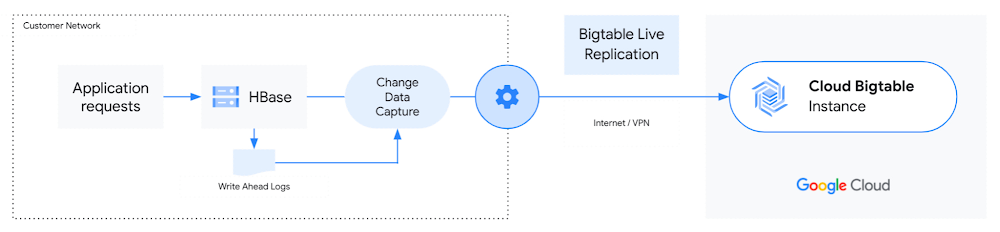
Cloud Bigtable is a natural destination for Apache HBase workloads, as it is a fully managed service that is compatible with the HBase API. As a result, many customers running business-critical applications with large-scale data and low-latency needs consider migrating to Bigtable.However, migrating from HBase to Bigtable can still be challenging since you typically have to pause your applications for migration downtime. In addition, some companies choose to write custom tools, which require extensive resources to build and test, adding months to the migration process.Today, we’re announcing that Live Migrations from Apache HBase to Cloud Bigtable are now generally available. This enables faster and simpler migrations from HBase to Bigtable to ensure accurate data migration, reduce migration effort, and provide a better overall developer experience.HBase to Bigtable migrations just got easier Historically, you would need to manually create tables in Bigtable from your existing HBase tables and execute several steps to export and import data, define target tables, and validate data integrity. This process can be tedious, especially if the migration requires moving multiple tables or pre-splitting tables. At Google Cloud, we’re always trying to find ways to make migrations from HBase to Bigtable even easier for our customers. Our latest Live Migration features aim to provide a more straightforward, more efficient, and proven way to migrate data from HBase to Bigtable with minimal downtime. All together, they provide the necessary components to complete a seamless live migration.We have built four new features:Schema Translation Tool automates table schema conversions.HBase Bigtable Replication Library minimizes downtime for live migrations.Snapshot Import Tool easily imports HBase snapshots into Cloud Bigtable. Migration Validation Tool ensures accurate data migration.Now, you can automate the migration process and facilitate end-to-end data pipelines. The Schema Translation Tool fully automates table conversion by connecting to HBase, copying the table schema, and creating similar tables in Bigtable. You can also import HBase snapshots and validate data migration for a more seamless migration process with our Snapshot Import and Migration Validation tools. The HBase Bigtable Replication Library, which becomes available today, removes the need for building custom migration tools. It allows you to use HBase replication to sequence bulk imports and live writes correctly, ensuring consistent performance during migration of large workloads.How live migrations from HBase to Bigtable worksHBase provides asynchronous replication between clusters for various use cases like disaster recovery and data aggregation workloads. The HBase Bigtable Replication Library enables Bigtable to be added as an HBase cluster replication target. HBase to Bigtable replication enables customers to sync mutations happening on their HBase cluster to Bigtable, providing near-zero downtime migrations from HBase to Cloud Bigtable. The following diagram shows a live replication from HBase to Bigtable:The HBase Cluster is the source database, which can be located in an on-premises network, another cloud provider, or managed data services. Once enabled, live replication allows all the writes happening on the source cluster to be replicated to the target Bigtable Instance.Before enabling replication, you will need to create all the tables from HBase with the same column families in Bigtable. You can use the Schema Translation Tool to create target tables in Bigtable based on your existing HBase schema. To enable replication, the source cluster must be able to connect to the target Bigtable instance.Get started with HBase to Bigtable live migrationsTo learn more about HBase to Bigtable Live Migrations and how to get started, please visit our documentation page.To learn more about Bigtable:Create an instanceor try it out with a Bigtable Qwiklab.Check out these Youtube video tutorials for a step-by-step introduction to how Bigtable can be used for real-world applications like Personalization and Fraud detection.Related ArticleMigrating table schemas from Apache HBase to Cloud BigtableCloud Bigtable Schema Translation Tool: A new tool to seamlessly create new tables in Cloud Bigtable from an existing Apache HBase table’…Read Article
Quelle: Google Cloud Platform

Database observability for developers: announcing Cloud SQL Insights for MySQL (in preview)

In 2021, we announced Cloud SQL Insights, an easy to use tool that helps developers quickly understand and resolve database performance issues in Cloud SQL for PostgreSQL. We designed Insights using open standards, with intuitive visualizations and modern architectures, such as microservices, in mind.Insights became one of the fastest adopted new capabilities in Cloud SQL, so it was no surprise that many of our customers asked for the same functionality for MySQL, the other most widely used open-source relational database. Today, we’re happy to announce that support for Cloud SQL for MySQL is available in preview.Let’s take the opportunity to review the benefits of Cloud SQL Insights for application developers and DBAs and the significance of MySQL support.Why is it difficult to keep up with database performance problems?Application development teams are shipping features faster than ever before. With the rise of DevOps, what was once an event a few times a year has shifted to multiple releases per week, or even several a day. In addition, more application users are spread around the globe, continuously creating load on your applications. If performance issues aren’t properly identified during development, they may show up in production. When performance issues arise, the database is often the root cause. More ownership of the development lifecycle has now moved to software developers. However, developers may not have the skills or tools to solve database performance problems, and they’ll need to wait their turn if they turn to database experts, such as DBAs, for help. DBAs are now a scarce resource, heavily outnumbered by developers and overloaded as they try to meet the demand of today’s data-driven businesses. More often than not, urgent performance issues are left unresolved, resulting in poor end user experiences.Introducing Cloud SQL Insights for MySQLInsights, a feature of Cloud SQL on Google Cloud, helps developers diagnose and provide a resolution for MySQL database performance problems on their own, allowing for faster iteration on application development and freeing DBAs to work on more strategic tasks like data modeling, query optimization, and data analysis.Let’s dive a little deeper into Insights’ capabilities. Application-centric database observabilityTraditional monitoring tools provide a query-centric view of performance. This is a limitation since it creates a disconnect between performance and application code, especially with modern architectures. Insights provides developers with database monitoring through the lens of the application. You can use tags to associate queries with specific business functions, such as payments, inventory, business analytics, and shipping. For example, you can quickly evaluate the database load contributed by specific microservices or user flows.Insights provides a holistic view of performance organized by business function rather than query. Here’s a look at database load sorted by tags:In many applications, Object-Relational Mappers (ORMs) simplify database query development. However, ORMs tend to generate inefficient queries that are very difficult to diagnose. Insights integrates with Sqlcommenter, an open-source library that enables your ORMs to add comments to SQL statements to help you identify which application code is causing problems.Sqlcommenter automatically creates query tags, so you don’t need to make any changes to application code. It supports many popular ORMs, such as Hibernate, Spring, Django, Flask, and others. Learn more about Sqlcommenter.Self-service experience for query diagnosticsDatabase performance troubleshooting brings a few important challenges: quickly determining which query is causing the problem, finding the root cause of the problem, and identifying the specific application code causing the problem. Today, you likely have to rely on multiple tools to correlate data, a task that requires expertise and time. In the cloud, the challenge increases further as development teams often use multiple database engines for different use cases.Insights for MySQL allows you to move from detection to diagnosis seamlessly, using a single interface. Similar to Cloud SQL Insights for PostgreSQL, you can identify query performance problems early with pre-built dashboards. Here’s an example:This end-to-end application trace helps determine the source of the problematic query in context, including by model, view, controller, route, user, and host. And visual query plans give insights into the root cause of performance problems. Here’s a look at that view:Insights manages the collection of telemetry for diagnostics and reduces the performance impact on the database and the time you spend managing third-party monitoring products. To safeguard your data, all performance metrics are protected by Google Cloud’s enterprise-class security, privacy, and compliance.Database observability with your favorite tools and open standardsFor DevOps to work effectively, it’s imperative that the database be included seamlessly in the software development lifecycle, allowing a variety of stakeholders like developers, SREs, platform engineers, and DBAs to collaborate on troubleshooting database performance issues. This requires access to database telemetry across various enterprise monitoring tools—for example, developers want access to database traces in their favorite APM tool, while SREs want to access critical database signals in their operational dashboard.Insights helps increase database observability within existing tools, enabling developers and operations teams to address issues early and save time on troubleshooting. Unlike alternative approaches that require installing APM agents on top of the database, which can cause security concerns and performance overhead, Insights provides database metrics and traces through the open standard OpenTelemetry and the Cloud Monitoring and Cloud Trace APIs. As a result, it’s easy to execute end-to-end tracing in your existing tools and get a full-stack view of all your environments, from the application to the database. Insights also integrates with Cloud Monitoring, letting you quickly create custom dashboards and alerts on query metrics or tags and receive notifications via email, SMS, Slack, PagerDuty, and more. Cloud Monitoring also allows you to build customized dashboards.Sign up for the Insights for MySQL previewCloud SQL Insights for MySQL is now in preview. Sign up to join, and be sure to provide your feedback!Related ArticleDatabase observability for developers: introducing Cloud SQL InsightsNew Insights tool helps developers quickly understand and resolve database performance issues on Cloud SQL.Read Article
Quelle: Google Cloud Platform
Boost the power of your transactional data with Cloud Spanner change streams

Data is one of the most valuable assets in today’s digital economy. One way to unlock the value of your data is to give it life after it’s first collected. A transactional database, like Cloud Spanner, captures incremental changes to your data in real time, at scale, so you can leverage it in more powerful ways. Cloud Spanner is our fully managed relational database that offers near unlimited scale, strong consistency, and industry-leading high availability of up to 99.999%. The traditional way for downstream systems to use incremental data that’s been captured in a transactional database is through change data capture (CDC), which allows you to trigger behavior based on changes to your database, such as a deleted account or an updated inventory count.Today, we are announcing Spanner change streams, coming soon, that lets you capture change data from  Spanner databases and easily integrate it with other systems to unlock new value. Change streams for Spanner goes above and beyond the traditional CDC capabilities of tracking inserts, updates, and deletes. Change streams are highly flexible and configurable, letting you track changes on exact tables and columns or across an entire database. You can replicate changes from Spanner to BigQuery for real-time analytics, trigger downstream application behavior using Pub/Sub, and store changes in Google Cloud Storage (GCS) for compliance. This ensures you have the freshest data to optimize business outcomes. Change streams provides a wide range of options to integrate change data with other Google Cloud services and partner applications through turnkey connectors, including custom Dataflow processing pipelines or the change streams read API.Spanner consistently processes over 1.2 billion requests per second. Since change streams are built right into Spanner, you not only get industry-leading availability and global scale—you also don’t have to spin up any additional resources. The same IAM permissions that already protect your Spanner databases can be used to access change streams queries.Change stream queries are protected by spanner.databases.select, and change stream DDL operations are protected by spanner.databases.updateDdl.Change streams in actionIn this section, we’ll look at how to set up a change stream that sends change data from Spanner to an analytic data warehouse in BigQuery.Creating a change stream As discussed above, a change stream tracks changes on an entire database, a set of tables, or a set of columns in a database. Each change stream can have a retention period of anywhere from one day to seven days, and you can set up multiple change streams to track exactly what you need for your specific business objectives. First, we’ll create a change stream on a table called InventoryLedger. This table tracks inventory changes on two columns: InventoryLedgerProductSku and InventoryLedgerChangedUnits with a 7-day retention period.Change recordsEach change record contains a wealth of information, including primary key, the commit timestamp, transaction ID, and of course, the old and new values of the changed data, wherever applicable. This makes it easy to process change records as an entire transaction, in sequence based on their commit timestamp, or individually as they arrive, depending on your business needs. Back to the inventory example, now that we’ve created a change stream on the InventoryLedger table, all inserts, updates, and deletes on this table will be published to the InventoryStream change stream. These changes are strongly consistent with the commits on the InventoryLedger table: When a transaction commit succeeds, the relevant changes will automatically persist in the change stream. You never have to worry about missing a change record.Processing a change streamThere are numerous ways that you can process change streams depending on the use case:Analytics: You can send the change records to BigQuery, either as a set of change logs or by updating the tables.  Event triggering: You can send change logs to Pub/Sub for further processing by downstream systems. Compliance: You can retain the change log to Google Cloud Storage for archiving purposes. The easiest way to process change stream data is to use our Spanner connector for Dataflow, where you can take advantage of Dataflow’s built-in pipelines to BigQuery, Pub/Sub, and Google Cloud Storage. The diagram below shows a Dataflow pipeline that processes this change stream and imports change data directly into BigQuery.Alternatively, you can build a custom Dataflow pipeline to process change data with Apache Beam. In this case, we provide a Dataflow connector that outputs change data as an Apache Beam PCollection of DataChangeRecord objects. For even more flexibility, you can use the underlying change streams query API. The query API is a powerful interface that lets you read directly from a change stream to implement your own connector and stream changes to the pipeline of your choice. On the query API side, a change stream is divided into multiple partitions, which can be used to query a change stream in parallel for higher throughput. Spanner dynamically creates these partitions based on load and size. Partitions are associated with a Spanner database split, allowing change streams to scale as effortlessly as the rest of Spanner.Get started with change streamsWith change streams, your Spanner data follows you wherever you need it, whether that’s for analytics with BigQuery, for triggering events in downstream applications, or for compliance and archiving. Change streams are highly flexible and configurable —allowing you to capture change data for the exact data you care about, and for the exact period of time that matters for your business. And because change streams are built into  Spanner, there’s no software to install, and you get external consistency, high scale, and up to 99.999% availability.There’s no extra charge for using change streams, and you’ll pay only for extra compute and storage of the change data at the regular Spanner rates.To get started with Spanner, create an instance, or try it out with a Spanner Qwiklab.We’re excited to see how Spanner change streams will help you unlock more value out of your data!Related ArticleCloud Spanner myths bustedThe blog talks about the 7 most common myths and elaborates the truth for each of the myths.Read Article
Quelle: Google Cloud Platform

Meet Google’s unified data and AI offering

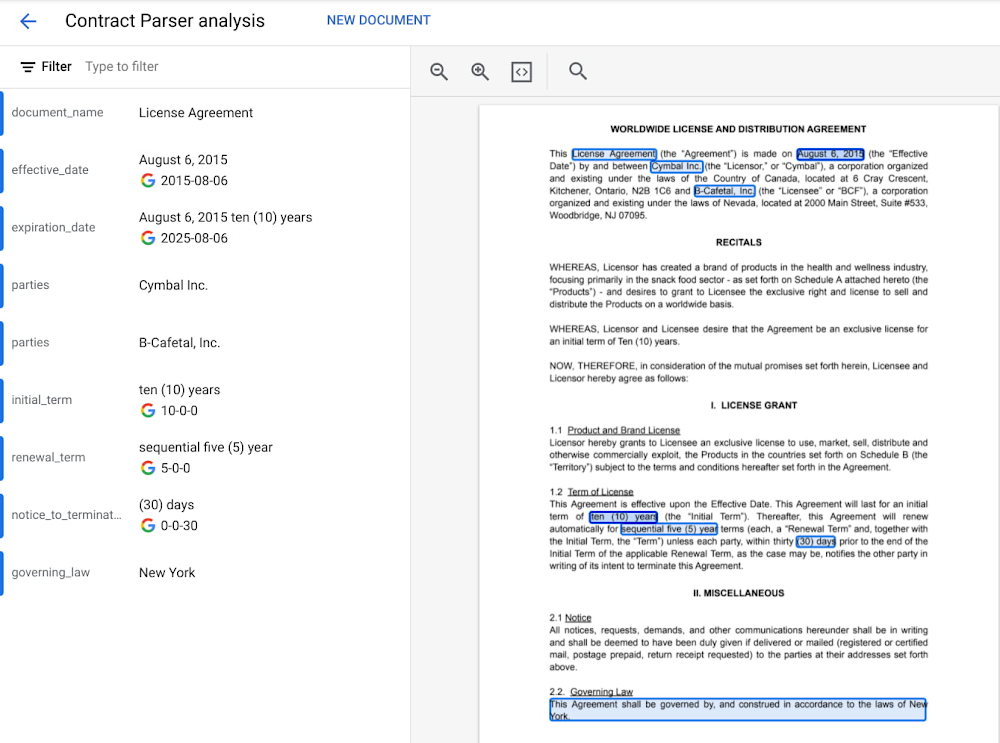
Without AI, you’re not getting the most out of your data.Without data, you risk stale, out-of-date, suboptimal models.But most companies are still struggling with how to keep these highly interdependent technologies in sync and operationalize AI to take meaningful action from data.We’ve learned from Google’s years of experience in AI development how to make data-to-AI workflows as cohesive as possible and as a result our data cloud is the most complete and unified data and AI solution provider in the market. By bridging data and AI, data analysts can take advantage of user-friendly, accessible ML tools, and data scientists can get the most out of their organization’s data. All of this comes together with built-in MLOps to ensure all AI work — across teams — is ready for production use. In this blog we’ll show you how all of this works, including exciting announcements from the Data Cloud Summit:Vertex AI Workbench is now GA bringing together Google Cloud’s data and ML systems into a single interface so that teams have a common toolset across data analytics, data science, and machine learning. With native integrations across BigQuery, Spark, Dataproc, and Dataplex data scientists can build, train and deploy ML models 5X faster than traditional notebooks. Introducing Vertex AI Model Registry, a central repository to manage and govern the lifecycle of your ML models. Designed to work with any type of model and deployment target, including BigQuery ML, Vertex AI Model Registry makes it easy to manage and deploy models. Use ML to get the most out of your data, no matter the formatAnalyzing structured data in a data warehouse, like using SQL in BigQuery, is the bread and butter for many data analysts. Once you have data in a database, you can see trends, generate reports, and get a better sense of your business. Unfortunately, a lot of useful business data isn’t in the tidy tabular format of rows and columns. It’s often spread out over multiple locations and in different formats, frequently as so-called “unstructured data” — images, videos, audio transcripts, PDFs — can be cumbersome and difficult to work with. Here, AI can help. ML models can be used to transcribe audio and videos, analyze language, and extract text from images—that is, to translate elements of unstructured data into a form that can be stored and queried in a database like BigQuery. Google Cloud’s Document AI platform, for example, uses ML to understand documents like forms and contracts. Below, you can see how this platform is able to intelligently extract structured text data from an unstructured document like a resume. Once this data is extracted, it can be stored in a data warehouse like BigQuery.Bring machine learning to data analysts via familiar toolsToday, one of the biggest barriers to ML is that the tools and frameworks needed to do ML are new and unfamiliar. But this doesn’t have to be the case. BigQuery ML, for example, allows you to train sophisticated ML models at scale using SQL code, directly from within BigQuery. Bringing ML to your data warehouse alleviates the complexities of setting up additional infrastructure and writing model code. Anyone who can write SQL code can train a ML model quickly and easily.Easily access data with a unified notebook interfaceOne of the most popular ML interfaces today are notebooks: interactive environments that allow you to write code, visualize and pre-process data, train models, and a whole lot more. Data scientists often spend most of their day building models within notebook environments. It’s crucial, then, that notebook environments have access to all of the data that makes your organization run, including tools that make that data easy to work with. Vertex AI Workbench, now generally available, is the single development environment for the entire data science workflow. Integrations across Google Cloud’s data portfolio allow you to natively analyze your data without switching between services:Cloud Storage: access unstructured dataBigQuery: access data with SQL, take advantage of models trained with BigQuery MLDataproc: execute your notebook using your Dataproc cluster for controlSpark: transform and prepare data with autoscaling serverless SparkBelow, you’ll see how you can easily run a SQL query on BigQuery data with Vertex AI Workbench.But what happens after you’ve trained the model? How can both data analysts and data scientists make sure their models can be utilized by application developers and maintained over time?Go from prototyping to production with MLOpsWhile training accurate models is important, getting those models to be scalable, resilient, and accurate in production is its own art, known as MLOps. MLOps allow you to:Know what data your models are trained onMonitor models in productionMake training process repeatableServe and scale model predictionsA whole lot more! (See the “Practitioners Guide to MLOps” whitepaper for a full and detailed overview of MLOps)Built-in MLOps tools within Vertex AI’s unified platform remove the complexity of model maintenance. Practical tools can help with everything from training and hosting ML models, managing model metadata, governance, model monitoring, and running pipelines – all critical aspects of running ML in production and at scale. And now, we’re extending our capabilities to make MLOps accessible to anyone working with ML in your organization. Easy handoff to MLOps with Vertex AI Model RegistryToday, we’re announcing Vertex AI Model Registry, a central repository that allows you to register, organize, track, and version trained ML models and is designed to work with any type of model and deployment target, whether that’s through BigQuery, Vertex AI, AutoML, custom deployments on GCP or even out of the cloud.Vertex AI Model Registry is particularly beneficial for BigQuery ML. While BigQuery ML brings the powerful scalability of BigQuery for batch predictions, using a data warehouse engine for real-time predictions just isn’t practical. Furthermore, you might start to wonder how to orchestrate your ML workflows based in BigQuery. You can now discover and manage  BigQuery ML models and easily deploy those models to Vertex AI for real-time predictions and MLOps tools. End-to-End MLOps with pipelinesOne of the most popular approaches to MLOps is the concept of ML pipelines: where each distinct step in your ML workflow from data preparation to model training and deployment are automated for sharing and reliably reproducing. Vertex AI Pipelines is a serverless tool for orchestrating ML tasks using pre-built components or your own custom code. Now, you can easily process data and train models with BigQuery, BigQuery ML, and Dataproc directly within a pipeline. With this capability, you can combine familiar ML development within BigQuery and Dataproc into reproducible, resilient pipelines and orchestrate your ML workflows faster than ever.See an example of how this works with the new BigQuery and BigQuery ML components.Learn more about how to use BigQuery and BigQuery ML components with Vertex AI Pipelines.Learn more and get started We’re excited to share more about our unified data and AI offering today at the Data Cloud Summit. Please join us for the spotlight session on our “AI/ML strategy and product roadmap” or the “AI/ML notebooks ‘how to’ session.”And if you’re ready to get hands on with Vertex AI, check out these resources:Codelab: Training an AutoML model in Vertex AICodelab: Intro to Vertex AI WorkbenchVideo Series: AI Simplified: Vertex AIGitHub: Example NotebooksTraining: Vertex AI: Qwik StartRelated ArticleWhat is Vertex AI? Developer advocates share moreDeveloper Advocates Priyanka Vergadia and Sara Robinson explain how Vertex AI supports your entire ML workflow—from data management all t…Read Article
Quelle: Google Cloud Platform

BigLake: unifying data lakes and data warehouses across clouds

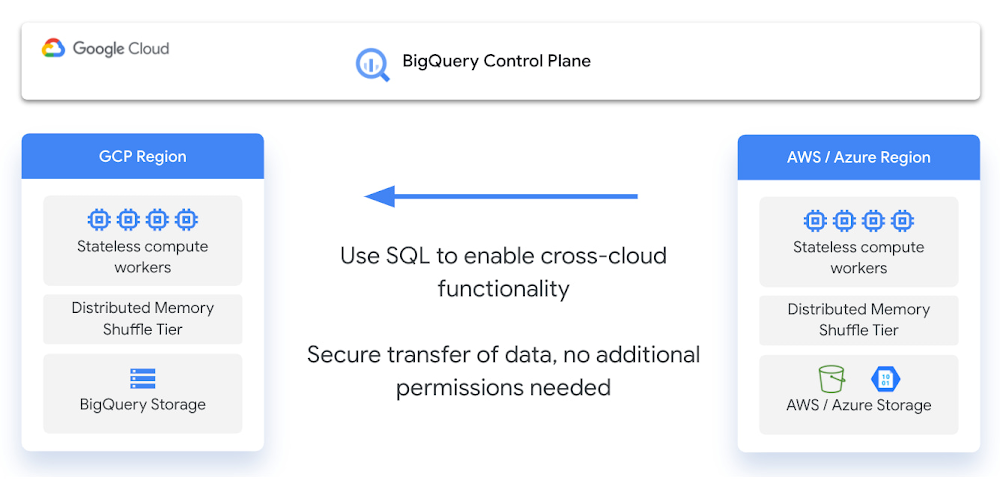
The volume of valuable data that organizations have to manage and analyze is growing at an incredible rate. This data is increasingly distributed across many locations, including  data warehouses, data lakes, and NoSQL stores. As an organization’s data gets more complex and proliferates across disparate data environments, silos emerge, creating increased risk and cost, especially when that data needs to be moved. Our customers have made it clear; they need help. That’s why today, we’re excited to announce BigLake, a storage engine that allows you to unify data warehouses and lakes. BigLake gives teams the power to analyze data without worrying about the underlying storage format or system, and eliminates the need to duplicate or move data, reducing cost and inefficiencies. With BigLake, users gain fine-grained access controls, along with performance acceleration across BigQuery and multicloud data lakes on AWS and Azure. BigLake also makes that data uniformly accessible across Google Cloud and open source engines with consistent security. BigLake extends a decade of innovations with BigQuery to data lakes on multicloud storage, with open formats to ensure a unified, flexible, and cost-effective lakehouse architecture.BigLake architectureBigLake enables you to:Extend BigQuery to multicloud data lakes and open formats such as Parquet and ORC with fine-grained security controls, without needing to set up new infrastructure.Keep a single copy of data and enforce consistent access controls across analytics engines of your choice, including Google Cloud and open-source technologies such as Spark, Presto, Trino, and Tensorflow.Achieve unified governance and management at scale through seamless integration with Dataplex.Bol.com, an early customer using BigLake, has been accelerating analytical outcomes while keeping their costs low:“As a rapidly growing e-commerce company, we have seen rapid growth in data. BigLake allows us to unlock the value of data lakes by enabling access control on our views while providing a unified interface to our users and keeping data storage costs low. This in turn allows quicker analysis on our datasets by our users.”—Martin Cekodhima, Software Engineer, Bol.comExtend BigQuery to unify data warehouses and lakes with governance across multicloud environmentsBy creating BigLake tables, BigQuery customers can extend their workloads to data lakes built on Google Cloud Storage (GCS), Amazon S3, and Azure data lake storage Gen 2. BigLake tables are created using a cloud resource connection, which is a service identity wrapper that enables governance capabilities. This allows administrators to manage access control for these tables similar to BigQuery tables, and removes the need to provide object store access to end users. Data administrators can configure security at the table, row or column level on BigLake tables using policy tags. For BigLake tables defined over Google Cloud Storage, fine grained security is consistently enforced across Google Cloud and supported open-source engines using BigLake connectors. For BigLake tables defined on Amazon S3 and Azure data lake storage Gen 2, BigQuery Omni enables governed multicloud analytics by enforcing security controls. This enables you to manage a single copy of data that spans BigQuery and data lakes, and creates interoperability between data warehousing, data lake, and data science use cases.Open interface to work consistently across analytic runtimes spanning Google Cloud technologies and open source engines Customers running open source engines like Spark, Presto, Trino, and Tensorflow through Dataproc or self managed deployments can now enable fine-grained access control over data lakes, and accelerate the performance of their queries. This helps you build secure and governed data lakes, and eliminate the need to create multiple views to serve different user groups. This can be done by creating BigLake tables from a supported query engine like Spark DDL, and using Dataplex to configure access policies. These access policies are then enforced consistently across the query engines that access this data – greatly simplifying access control management. Achieve unified governance & management at scale through seamless integration with DataplexBigLake integrates with Dataplex to provide management-at-scale capabilities. Customers can logically organize data from BigQuery and GCS into lakes and zones that map to their data domains, and can centrally manage policies for governing that data. These policies are then uniformly enforced by Google Cloud and OSS query engines. Dataplex also makes management easier by automatically scanning Google Cloud storage to register BigLake table definitions in BigQuery, and makes them available via Dataproc Metastore. This helps end users discover these BigLake tables for exploration and querying using both OSS applications and BigQuery. Taken together, these capabilities enable you to run multiple analytic runtimes over data spanning lakes and warehouses in a governed manner. This breaks down data silos and significantly reduces the infrastructure management, helping you to advance your analytics stack and unlock new use cases.What’s next?If you would like to learn more about BigLake, please visit our website. Alternatively, get started with BigLake today by using this quickstart guide, or contact the Google Cloud sales team.Related ArticleLimitless Data. All Workloads. For EveryoneRead about the newest innovations in data cloud announced at Google Cloud’s Data Cloud Summit.Read Article
Quelle: Google Cloud Platform
Bringing together the best of both sides of BI with Looker and Data Studio

In today’s data world, companies have to consider many scenarios in order to deliver insights to users in a way that makes sense to them. On one hand, they must deliver trusted, governed reporting to inform mission-critical business functions. But on the other hand, they must enable a broad population to answer questions on their own, in an agile and self-serve manner. Data-driven companies want to democratize access to relevant data and empower their business users to get answers quickly. The trade-off is governance; it can be hard to maintain a single shared source of truth, granular control of data access, and secure centralized storage. Speed and convenience compete with trust and security. Companies are searching for a BI solution that can be easily used by everyone in an organization (both technical and non-technical), while still producing real-time governed metrics.Today, a unified experience for both self-serve and governed BI gets one step closer, with our announcement of the first milestone in our integration journey between Looker and Data Studio. Users will now be able to access and import governed data from Looker within the Data Studio interface, and build visualizations and dashboards for further self-serve analysis.This union allows us to better deliver a complete, integrated Google Cloud BI experience for our users. Business users will feel more empowered than ever, while data leaders will be able to preserve the trust and security their organization needs.This combination of ​self-serve and governed BI together will help enterprises make better data-driven decisions. Looker and Data Studio, Better Together Looker is a modern enterprise platform for business intelligence and analytics, that helps organizations build data-rich experiences tailored to every part of their business. Data Studio is an easy to use self-serve BI solution enabling ad-hoc reporting, analysis, and data mashups across 500+ data sets. Looker and Data Studio serve complementary use cases. Bringing Looker and Data Studio together opens up exciting opportunities to combine the strengths of both products and a broad range of BI and analytic capabilities to help customers reimagine the way they work with data. How will the integration work?This first integration between these products allows users to connect to the Looker semantic model directly from Data Studio. Users can bring in the data they wish to analyze, connect it to other available data sources, and easily explore and build visualizations within Data Studio. The integration will follow three principles with respect to governance:Access to data is enforced by Looker’s security features, the same way it is when using the Looker user interface.Looker will continue to be the single access point for your data.Administrators will have full capabilities to manage Data Studio and Looker together.How are we integrating these products?This is the first step in our roadmap that will bring these two products closer together. Looker’s semantic model allows metrics to be centrally defined and broadly used, ensuring a single version of the truth across all of your data. This integration allows the Looker semantic model to be used within Data Studio reports, allowing people to use the same tool to create reports that rely on both ad-hoc and governed data. This brings together the best of both worlds – a governed data layer, and a self-serve solution that allows analysis of both governed and ungoverned data.With this announcement, the following use cases will be supported:Users can turn their Looker-governed data into informative, highly customizable dashboards and reports in Data Studio.Users can blend governed data from Looker with data available from over 500 data sources in Data Studio, to rapidly generate new insights.Users can analyze and rapidly prototype ungoverned data (from spreadsheets, csv files, or other cloud sources) within Data Studio.Users can collaborate in real-time to build dashboards with teammates or people outside the company. When will this integration be available to use?The Data Studio connector for Looker is currently in preview. If you are interested in trying it out, please fill out this form.Next StepsThis integration is the first of many in our effort to bring Looker and Data Studio closer together. Future releases will introduce additional features to create a more seamless user experience across these two products. We are very excited to roll out new capabilities in the coming months and will keep you updated on our future integrations of the two products.Related ArticleLimitless Data. All Workloads. For EveryoneRead about the newest innovations in data cloud announced at Google Cloud’s Data Cloud Summit.Read Article
Quelle: Google Cloud Platform

Limitless Data. All Workloads. For Everyone

Today, data exists in many formats, is provided in real-time streams, and stretches across many different data centers and clouds, all over the world. From analytics, to data engineering, to AI/ML, to data-driven applications, the ways in which we leverage and share data continues to expand. Data has moved beyond the analyst and now impacts every employee, every customer, and every partner. With the dramatic growth in the amount and types of data, workloads, and users, we are at a tipping point where traditional data architectures – even when deployed in the cloud – are unable to unlock its full potential. As a result, the data-to-value gap is growing. To address these challenges, we are unveiling several data cloud innovations today that allow our customers to work with limitless data, across all workloads, and extend access to everyone. These announcements include BigLake and Spanner change streams to further unify customer data while ensuring it’s delivered in real-time, as well as Vertex AI Workbench and Model Registry to close the data to AI value gap. And to bring data within reach for anyone, we are announcing a unified business intelligence (BI) experience that includes a new Workspace integration, along with new programs that further enable our data cloud partner ecosystem. Removing all data limits Today, we are announcing the preview of BigLake, a data lake storage engine, to remove data limits by unifying data lakes and warehouses. Managing data across disparate lakes and warehouses creates silos and increases risk and cost, especially when data needs to be moved. BigLake allows companies to unify their data warehouses and lakes to analyze data without worrying about the underlying storage format or system, which eliminates the need to duplicate or move data from a source and reduces cost and inefficiencies. With BigLake, customers gain fine-grained access controls, with an API interface spanning Google Cloud and open file formats like Parquet, along with open-source processing engines like Apache Spark. These capabilities extend a decade’s worth of innovations with BigQuery to data lakes on Google Cloud Storage to enable a flexible and cost-effective open lake house architecture. Twitter already uses storage capabilities with BigQuery to remove the limits of data to better understand how people use their platform, and what types of content they might be interested in. As a result, they are able to serve content across trillions of events per day with an ads pipeline that runs more than 3M aggregations per second. Another major innovation we’re announcing today is Spanner change streams. Coming soon, this new product will further remove data limits for our customers, allowing them to track changes within their Spanner database in real time in order to unlock new value. Spanner change streams tracks Spanner inserts, updates, and deletes to stream the changes in real time across a customer’s entire Spanner database. This ensures customers always have access to the freshest data as they can easily replicate changes from Spanner to BigQuery for real-time analytics, trigger downstream application behavior using Pub/Sub, or store changes in Google Cloud Storage (GCS) for compliance. With the addition of change streams, Spanner, which currently processes over 2 billion requests per second at peak with up to 99.999% availability, now gives customers endless possibilities to process their data. Remove the limits of your data workloadsOur AI portfolio is powered by Vertex AI, a managed platform with every ML tool needed to build, deploy and scale models, and is optimized to work seamlessly with data workloads in BigQuery and beyond. Today, we’re announcing new Vertex AI innovations that will provide customers with an even more streamlined experience to get AI models into production faster and make maintenance even easier.Vertex AI Workbench, which is now generally available, brings data and ML systems into a single interface so that teams have a common toolset across data analytics, data science, and machine learning. With native integrations across BigQuery, Serverless Spark, and Dataproc, Vertex AI Workbench enables teams to build, train and deploy ML models 5X faster than traditional notebooks. In fact, a global retailer was able to drive millions of dollars in incremental sales and deliver 15% faster speed to market with Vertex AI Workbench.With Vertex AI, customers have the ability to regularly update their models. But managing the sheer number of artifacts involved can quickly get out of hand. To make it easier to manage the overhead of model maintenance, we are announcing new MLOps capabilities with Vertex AI Model Registry. Now in preview, Vertex AI Model Registry provides a central repository for discovering, using, and governing machine learning models, including those in BigQuery ML. This makes it easy for data scientists to share models and application developers to use them, ultimately enabling teams to turn data into real-time decisions, and be more agile in the face of shifting market dynamics.Extending the reach of your dataToday, we are launching Connected Sheets for Looker, and the ability to access Looker data models within Data Studio. Customers now have the ability to interact with data however they choose, whether it be through Looker Explore, from Google Sheets, or using the drag-and-drop Data Studio interface. This will make it easier for everyone to access and unlock insights from data in order to drive innovation, and to make data-driven decisions with this new unified Google Cloud business intelligence (BI) platform. This unified BI experience makes it easy to tap into governed, trusted enterprise data, to incorporate new data sets and calculations, and to collaborate with peers.Mercado Libre, the largest online commerce and payments ecosystem in Latin America, has been an early adopter of Connected Sheets for Looker. Using this integration, they have been able to provide broader access to data through a spreadsheet interface that their employees are already familiar with. By lowering the barrier to entry, they have been able to build a data-driven culture in which everyone can inform their decisions with data. Doubling down on the data cloud partner ecosystemClosing the data-to-value gap with these data innovations would not be possible without our incredible partner ecosystem. Today, there are more than 700 software partners powering their applications using Google’s data cloud. Many partners like Bloomreach, Equifax, Exabeam, Quantum Metric, and ZoomInfo, have started using our data cloud capabilities with the Built with BigQuery initiative, which provides access to dedicated engineering teams, co-marketing, and go-to-market support. Our customers want partner solutions that are tightly integrated and optimized with products like BigQuery. So today, we’re announcing Google Cloud Ready – BigQuery, a new validation that recognizes partner solutions like those from Fivetran, Informatica and Tableau that meet a core set of functional and interoperability requirements. Today, we already recognize more than 25 partners in this new Google Cloud Ready – BigQuery program that reduces costs for customers associated with evaluating new tools while also adding support for new customer use cases. We’re also announcing a new Database Migration Program to help our customers efficiently and effectively accelerate the move from on-premise and other clouds to Google’s industry-leading managed database services. This includes tooling, resources, and knowledgeable experience from alliances like Deloitte, as well as incentives from Google to offset the cost of migrating databases.We remain committed to continued innovation with the leading data and analytics companies where our customers are investing. This week Databricks, Fivetran, MongoDB, Neo4j, and Redis are all announcing significant new capabilities for customers on Google Cloud.All of these announcements and more will be shared in detail at our Data Cloud Summit. Be sure to watchthe data cloud strategy sessions, breakouts, and get access to hands on content. There is no doubt the future of data holds limitless possibilities, and we are thrilled to be on this data cloud journey.Related ArticleReady to solve for the future? Data Cloud Summit ’22 is coming April 6Hear from customers, leaders and builders from Google Cloud at Data Cloud Summit 2022 to get the insight you need for your data organizationRead Article
Quelle: Google Cloud Platform

How Managed Security Service Providers can accelerate their business with Google Cloud Security’s Partner Program using Google Chronicle

Managed Security Service Providers (MSSPs) can deliver high-value security services for customers, helping to drive efficiencies in security operations across people, product, and processes. In an environment where the threat landscape continues to be challenging, MSSPs can allow customers to scale their security teams driving enhanced security outcomes. At the same time, MSSPs operating their own SOC team can face challenges – from core operating capabilities around an increasing number of alerts, to the shortage of skilled security professionals, to the highly manual and “tribal knowledge” investigation and response approach. MSSPs are generally constantly looking at opportunities to enhance customer satisfaction, while providing advanced security operations capability. To help, we are excited to announce our new Chronicle MSSP Program, which will offer MSSPs around the world the ability to provide scalable, differentiated, and effective detection and response capabilities with our cloud-native SIEM product, Chronicle. In a highly competitive environment where customers have little to differentiate between various MSSP providers, we are helping to turbocharge our MSSP partners with specialized services offerings, enabling branded portals and advanced threat detection, investigation, and response capabilities. “We are proud to partner with Google Cloud Security to solve functional challenges that exist in security for our customers. As a major partner and a distributor/MSSP, we are excited to leverage this new  program, helping our customers and delivering security outcomes”—Robert Herjavec, CEO, Herjavec Group and Fishtech GroupOur partners can help drive success for their business with: Google-scale partnership support to help grow your business – Go-to-market with a team that are incentivized to sell your solution. Help unlock greenfield accounts and expand into new territories quickly.   More controls over margins, and easy, straight-forward pricing – The modern licensing model gives MSSPs advanced control over their margins.  Building differentiated solutions that demonstrate your expertise – Chronicle MSSPs can add their solution on Chronicle to help make their solution both unique in the market and easier to sell. MSSPs can drive additional leverage with branded reporting, unique solutions, and advanced threat intelligence.Additionally, our partners are able to utilize key technical differentiators in Chronicle to help drive value for customers: API driven multi-tenancy – We can make it easier for you by helping to streamline and automate customer management workflows and enable the delivery of fully featured instances in a few API calls.Ingest everything, helping to ensure no more blindspots – Chronicle is designed to ingest data from any cloud – even the voluminous datasets (e.g. EDR, NDR, Cloud). This ability can enable security data to exist in one place, and perhaps more importantly, aliased and correlated into a timeline of events. This capability can enable SOCs to begin to operationalize their data into meaningful signals.Help prioritize threats and quickly respond to alerts  with context-aware detections – With context-aware detections in Chronicle, the supporting information from authoritative sources (e.g. CMDB, IAM, and DLP) including telemetry, context, relationships, and vulnerabilities are available as a “single” detection event. Our partners can use this capability to write context-driven detections, prioritize existing alerts, and drive fast investigation.Simply put, Google Chronicle will help reduce the MTTR (mean time to respond) for our partners by helping to minimize the need to wait for contextual understanding before making a decision and taking an investigatory action, which can lead to greater customer and cost benefits. We have partners already using the Chronicle MSSP program. Our partners like  CYDERES, Netenrich, and Novacoast, among others, have used this program to help accelerate customers’ security operations modernization journeys. We at Google Cloud are helping to drive innovations that are foundational to security operations and helping our partners support customers effectively. The Chronicle MSSP Program builds on the momentum of our MSSP program for VirusTotal, which can provide our partners with world-class crowdsourced threat intelligence. To learn more about the Chronicle and VirusTotal MSSP programs, register for our MSSP webinar.  For more information about the Chronicle MSSP Program, contact us at gcsecurity-mssp@google.com. Additionally, learn more about our VirusTotal MSSP programRelated ArticleIntroducing Community Security AnalyticsIntroducing Community Security Analytics, an open-source repository of queries for self-service security analytics to help you get starte…Read Article
Quelle: Google Cloud Platform

Enhance your analysis with new international Google Trends datasets in BigQuery

Sharing and exchanging data is a critical element of any organization’s analytics strategy. In fact, BigQuery customers already share data using our existing infrastructure, with over 4,500 customers swapping data across organizational boundaries. Creating seamless access to analytics workflows and insights has become that much easier with the introduction of Analytics Hub and surfacing datasets unique to Google.Last summer, the Google Trends public dataset was launched to democratize access to Google first-party data and drive additional value to our customers. At no additional cost, you can access Top 25 stories and Top 25 Rising search queries in the United States through a SQL-interface, unlocking countless new opportunities to derive insights from blending Google Trends datasets with other structured data sources. Since launching in June of 2021, over 30 terabytes of the Google Trends dataset have been queried by users across the United States. From joining the Search Trends data to Nielsen Designated Market Area (DMA) boundaries to know where to activate marketing campaigns, to creating term forecasts and predictions to hypothesize and experiment product development, there are a broad range of applications across many business and consumer profiles.  Through the secure and streamlined access to this highly desirable data in BigQuery, business and consumers alike are finally able to make better data-driven decisions at scale.With the success of the Google Trends dataset launch in the United States, we knew that meeting the needs of our global counterparts would be a fast follow. After all, we are citizens of a global economy and must do better to accommodate the world we operate in. As such, we began our journey to provide a more comprehensive view of how trends occur across the globe for our customers.What’s new?Today, we are excited to announce the expansion of the Google Trends public dataset beyond the US to cover approximately 50 additional countries worldwide. This is available in public preview and covers all major countries where the Google Trends service exists today. Most of the features of the international Google Trends dataset will mimic its United States counterpart, backed by the same privacy-first mindset. The international dataset will remain anonymized, indexed, normalized, and aggregated prior to publication. New sets of top terms and top rising queries will continue to be generated daily, with data being inserted into a new partition of their respective table. The expiration date of each top term and top rising set (e.g. each set’s partition) will also stay at 30 days. Every term within a set will still be enriched with a historical backfill over a rolling five year period. Learn more about the schema of each table in the dataset listing.In addition to surfacing the top trends in the United States by Designated Market Area (DMA), the international dataset will provide the daily top stories and top rising queries by ISO country and sub-region. Countries and/or sub-regions may be excluded based on data-sharing regulation and policies. The sheer scale of coverage and reach now increases multi-fold by simply applying similar or existing use cases to different parts of the globe.International Google Trends dataset now available in the Google Cloud Marketplace or Analytics Hub.Working with the international Google Trends datasetJust like all other Google Cloud datasets, users can obtain access without charges of up to 1TB/month in queries and up to 10GB/month in storage through BigQuery’s free tier and leverage the BigQuery sandbox, all subject to BigQuery’s free tier thresholds.To begin exploring the global Google Trends dataset, simply query the international tables for the top 25 and top 25 rising terms from the Google Cloud Console. To minimize the data scanned and processed, utilize the partition filter, as well as country and region filters (if possible) in your query:code_block[StructValue([(u’code’, u”SELECTrn *rnFROMrn `bigquery-public-data.google_trends.international_top_terms`rnWHERErn refresh_date = DATE_SUB(CURRENT_DATE(), INTERVAL 1 DAY)rn AND country_code = ‘CA’rn AND region_name = ‘Alberta'”), (u’language’, u”)])]Sample data:We’ve also updated the Looker dashboard to incorporate the new global dataset, and it even includes filtering for the countries and regions you care about most.What’s next for Google Cloud Datasets?We are continuing to progress forward in the path to making Google’s first-party data universally accessible. Stay tuned for updates on more dataset launches and availability, as well as our integration with Analytics Hub. In the meantime, explore the new international Google Trends dataset in your own project, or if you’re new to BigQuery spin up a project using the BigQuery sandbox.Related ArticleTop 25 Google Search terms, now in BigQueryGoogle Trends datasets for the Top 25 terms and Top 25 Rising terms now available in BigQuery to enhance your business analysesRead Article
Quelle: Google Cloud Platform




