CIS hardening support in Container-Optimized OS from Google

At Google, we follow a security-first philosophy to make safeguarding our clients’ and users’ data easier and more scalable, with strong security principles built into multiple layers of Google Cloud. In line with this philosophy, we want to make sure that our Container-Optimized OS adheres to industry-standard security best practices. To this end, we released a CIS benchmark for Container-Optimized OS that codifies the recommendations for hardening and security measures we have been using. Our Container-Optimized OS  97 releases now support CIS Level 1 compliance, with an option to enable support for CIS Level 2 hardening.CIS benchmarks help define the security recommendations for various software systems, including various operating systems. In the past, Google had developed a CIS benchmark for Kubernetes as part of the continued contributions to the container orchestration space. We decided to build a CIS benchmark for Container-Optimized OS because they are well recognized across the industry, are created and reviewed in open source, and can provide a good baseline when it comes to hardening your operating systems. Our benchmarks for Container-Optimized OS are based on the CIS benchmarks defined by their security community for distribution-independent Linux OSes. In addition to applying some of the security recommendations for generic Linuxes—such as making file permissions more strict—we included measures to support hardening specific to Container-Optimized OS, such as verifying that the OS has the capabilities for checking filesystem integrity with dm-verity or that logs can be exported to Cloud Logging. We also removed some checks that don’t apply to Container-Optimized OS due to its minimal OS footprint that can reduce the attack surface. Container-Optimized OS 97 and later versions come with support for CIS Level 1 and can allow users to optionally apply support for Level 2 hardening as well.Compliance is not just about a one-time hardening effort, however. You will need to ensure that the deployed OS images stay within compliance throughout their life. At Google, we continually run scans on our Google Cloud projects to help verify that our VMs and container images are kept up-to-date with the latest CIS security guidelines. To help scan a wide range of products with a low resource usage overhead, we developed Localtoast, our own open-source configuration scanner.Localtoast is highly customizable and can be used to detect insecure OS configurations on local and remote machines, VMs, and containers. Google uses Localtoast internally to help verify CIS compliance on a wide range of Container-Optimized OS installations and other OSes. Its configuration and scan results are stored in the same Grafeas format that deploy-time security enforcement systems such as Kritis use, which can make it easier to integrate with existing supply chain security and integrity tooling. See this video for a showcase of how you can use this Localtoast scanner on COS.Included in the Localtoast repo is a set of scan configuration files that help scan Container-Optimized OS’ CIS benchmarks. For other Linux OSes, we include a fallback config which supports and is based on the distribution-independent Linux CIS benchmarks and aims to help provide relevant security findings for a wide range of Linuxes—with support for more OSes coming in the future.Apart from the configs for scanning live instances, we also released modified configs for scanning container images.Container-Optimized OS 97 and above comes with Localtoast and the Container-Optimized OS-specific scanning config that supports CIS compliance pre-installed. We welcome you to try out our user-guide, and hope that the provided tools will help you get a step further in your journey toward keeping your cloud infrastructure secure. If you have any questions, don’t hesitate to reach out to us.Related Article4 new ways Citrix & Google Cloud can simplify your Cloud MigrationCitrix and Google Cloud simplify your cloud migration. The expanding partnership between Citrix and Google Cloud means that customers con…Read Article
Quelle: Google Cloud Platform

Solving for food waste with data analytics in Google Cloud

With over ⅓ of the food in the USA ending up as waste according to the USDA, it is a compelling challenge to address this travesty.  What will happen to hunger, food prices, trash reduction, water consumption, and overall sustainability when we stop squandering this abundance?Beginning with the departure from the farm to the back of the store, the freshness clock continues to run.  Grocers work very hard to purchase high quality produce items for their customers and the journey to the shelf can take a toll in both quality and remaining shelf life.  Suppliers focus on delivering their items through the arduous supply chain journey to the store with speed and gentle handling.  The baton is then passed to the store to unload and present the items to customers with care to sell through each lot significantly before the expiration or sell by date.  This is to ensure that the time spent in the customer’s home is ample to ensure a great eating experience as well. Food waste is a farm to fork problem with opportunity at every step of the chain, but today we will focus on the segment that the grocery industry oversees.With the complexities of weather, geopolitical issues, distribution, sales variability, pricing, promotions, and inventory management, it seems daunting to impact waste.  Fortunately, data analytics and machine learning in the cloud is a powerful weapon in the fight against food waste. Data Scientists harness knowledge to draw meaning from data turning that data into decision driving information. One key Google has been working on to accelerate value is to break down data silos and leverage machine learning to realize better outcomes, using our Google Data Cloud platform. This enables better planning through demand forecasting, Inventory management, assortment planning, and dynamic pricing and promotions.That sounds great but how does it work?  Let’s walk through a day in the life journey to see how the integrated Google Data Cloudplatform can change the game for good. Our friendly fictitious grocer FastFreshFood is committed to selling high quality perishable items to their local market. Their goal is to minimize food waste and maximize revenue by selling as much perishable fresh food as possible before the sell by date. Our fictitious grocer in partnership with Google Cloud could build a solution that will take a significant bite out of their food waste volume and better satisfy customers. Sales through the register and online are processed in real time with Datastream, Dataflow to keep an accurate perpetual inventory by minute of every single item.A Demand forecasting model using machine learning algorithms in BigQuery then identifies needs for back room replenishment, so Direct Store Delivery and daily store Distribution Centers manage ordering more efficiently to ensure just the right amount of each product each day.Realtime reporting dashboards in Looker with alerting capabilities enable the system to operate with strong associate support and understanding. The reporting suite shows inventory levels into the future, daily orders, and at risk items.The pricing algorithm could also alert store leadership concerning any items that will not sell through and suggest real time in store specials resulting in zero waste at shelf and maximized revenue.This approach is not just for perishable categories and is a pattern that works well for in-store produced items and center store items.  The key point is that by bringing ML/AI to difficult business problems grocers are reinventing what is possible for both their profitability and sustainability.The technical implementation of this design pattern in Google Cloud leverages Datastream, Dataflow, BigQuery and Looker products, it is detailed in a technical tutorial accompanying this blog post.In partnership with Google Cloud, retailers can solve complex problems with innovative solutions to achieve higher quality, lower cost, and provide great customer experiences. To learn more from this and other use cases, please visit our Design Patterns website.Curious to learn more? We’re excited to share what we know about tackling food waste at Google, a topic we’ve been working on in the last decade as we’ve embarked on reducing our own food waste in our operations in over 50 countries in the world. The Google Food for Good team works exclusively on Google Cloud Platform with our partners on this topic. Two additional articles below. Silos are for food, not for data – tackling food waste with technologyThis business Cloud blog directly addresses information silos that currently exist across many nodes in the food system and how to break down cultural and organizational barriers to sharing. “Unsiloing” data to work toward solving food waste and food insecurity This follow-on technical Cloud blog articulates the path to setting up data pipelines, translating between data sets (not everyone calls a tomato a tomato!) and making sense of emergent insights.Related ArticleSilos are for food, not data—tackling food waste with technologySee how Kroger, Feeding America, St. Mary’s and other food banks joined forces to solve the problems of food waste and food insecurity us…Read Article
Quelle: Google Cloud Platform

Optimize and scale your startup on Google Cloud: Introducing the Build Series

We understand that at each stage of the startup journey, you need different levels of support and resources to start, build and grow. To help with your journey, we created the Google Cloud Technical Guide for Startups to help your organization across these different milestones.Technical Guides for Startups to support your startup journeyThe Google Cloud Technical Guides for Startups series includes a video series and handbooks, consisting of three parts optimized for different stages of a startup’s journey.The Start Series: Begin by building, deploying and managing new applications on Google Cloud from start to finish.The Build Series: Optimize and scale existing deployments to reach your target audiences.The Grow Series:  Grow and attain scale with deployments on Google Cloud.The Start Series – is fully available on this playlist. In this series,  we introduced topics to get you started on Google Cloud. This included setting up your project, choosing the right compute option, configuring databases, networking, as well as understanding support and billing.Now that you have applications running on Google Cloud, it is time to take the next step to optimize and scale these deployments.Kicking off the Build SeriesWith our Start Series complete, we are happy to announce the second program in the series – the Build Series! The Build Series focuses on optimizing deployments and scaling your business, enabling you to build a foundation to accelerate your startups’ growth in the future. We will dive into many exciting topics, ranging from startup programs to Google Cloud’s data analytics and pipelines solutions, machine learning, API management and more. You will learn to gain insights from your data and to better manage and secure your applications, which will accelerate scale and understanding of your end user. Our first episode shares an overview of these topics, and features our new website which has many useful startup resources and technical handbooks. Watch our kick off video to find out more.Embark on the journey togetherWe hope that you will join us on this journey, as we Start, Build, and Grow together. Get started by checking out our website and our full playlist on the Google Cloud Tech channel. Don’t forget to subscribe to stay up to date. See you in the cloud!Related ArticleBootstrap your startup with the Google Cloud Technical Guides for Startups : A Look into the Start SeriesAnnouncing the summary of the first phase of the Google Cloud Technical Guides for Startups, a video series for technical enablement aime…Read Article
Quelle: Google Cloud Platform

Advancing systems research with open-source Google workload traces

With rapid expansion of internet and cloud computing, warehouse-scale computing (WSC) workloads (search, email, video sharing, online maps, online shopping, etc.) have reached planetary scale and are driving the lion’s share of growth in computing demand. WSC workloads also differ from others in their requirements for on-demand scalability, elasticity and availability. Many studies (e.g., Profiling a warehouse-scale computer) and books (e.g., The Datacenter as a Computer: Designing Warehouse-Scale Machines) have pointed out that WSC workloads have fundamentally different characteristics than traditional benchmarks and require changes to modern computer architecture to achieve optimal efficiency. Google workloads have data and instruction footprints that go beyond the capacity of modern CPU caches, such that the CPU spends a significant portion of its time waiting for code and data. Simply increasing memory bandwidth would not solve the problem, as many accesses are in the critical path for application request processing; it is just as important to reduce memory access latency as it is to increase memory bandwidth.Over the years, the computer architecture community has expressed the need for WSC workload traces to perform architecture research. Today, we are pleased to announce that we’ve published select Google workload traces. These traces will help systems designers better understand how WSC workloads perform as they interact with underlying components, and develop new solutions for front-end and data-access bottlenecks.We captured these workload traces using DynamoRIO on computer servers running Google workloads — you can find more details at https://dynamorio.org/google_workload_traces.html. To protect user privacy, these traces only contain instruction and memory addresses. We have found these traces useful for understanding WSC workloads and seeding internal research on processor front-ends, on-die interconnects, caches and memory subsystems, etc. — all areas that greatly impact WSC workloads. For example, we used these traces to develop AsmDB. Likewise, we hope these traces will enable  the computer architecture community to develop new ideas that improve performance and efficiency of other WSC workloads.
Quelle: Google Cloud Platform

Are your SLOs realistic? How to analyze your risks like an SRE

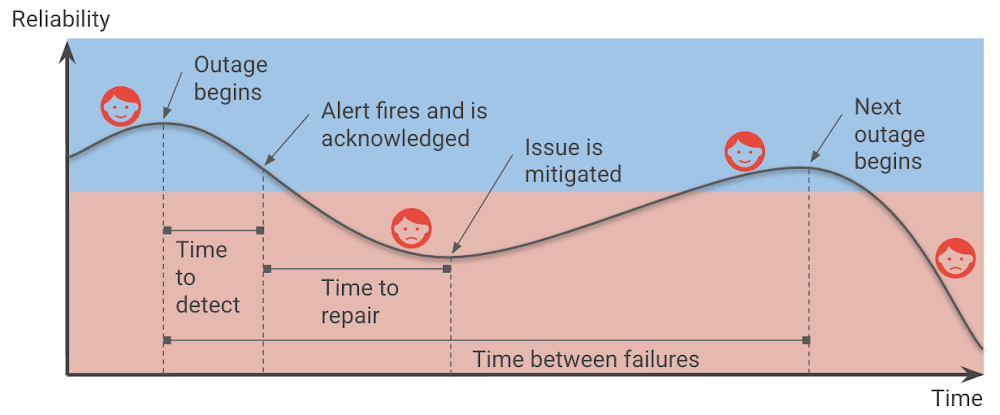
Setting up Service Level Objectives (SLOs) is one of the foundational tasks of Site Reliability Engineering (SRE) practices, giving the SRE team a target against which to evaluate whether or not a service is running reliably enough. The inverse of your SLO is your error budget — how much unreliability you are willing to tolerate. Once you’ve identified those targets and learned how to set SLOs, the next question you should ask yourself is whether your SLOs are realistic, given your application architecture and team practices? Are you sure that you can meet them? And what’s most likely to spend the error budget?At Google, SREs answer these questions up front when they take on a new service, as part of a Production Readiness Review (PRR). The intention of this risk analysis is not to prompt you to change your SLOs, but rather to prioritize and communicate the risks to a given service, so you can evaluate whether you’ll be able to actually meet your SLOs, with or without any changes to the service. In addition, it can help you identify which risks are the most important to prioritize and mitigate, using the best available data.You can make your service more reliable by identifying and mitigating risks.Risk analysis basicsBefore you can evaluate and prioritize your risks, though, you need to come up with a comprehensive list of things to watch out for. In this post, we’ll provide some guidelines for teams tasked with brainstorming all the potential risks to an application. Then, with that list in hand, we’ll show you how to actually analyze and prioritize the risks you’ve identified. What risks do you want to consider?When brainstorming risks, it’s important to try to map risks in different categories — risks that are related to your dependencies, monitoring, capacity, operations, and release process. And for each of those, imagine what will happen if specific failures happen, for example, if a third party is down, or if you introduce an application or configuration bug. Thus, when thinking about your measurements, ask yourself: Are there any observability gaps? Do you have alerts for this specific SLI? Do you even currently collect those metrics? Also be sure to also map any monitoring and alerting dependencies. For example, what happens if a managed system that you use goes down?Ideally, you want to identify the risks associated with each failure point for each critical component in a critical user journey, or CUJ. And after identifying those risks, you will want to quantify them:What percentage of users was affected by the failure?How often do you estimate that failure will occur?How long did it take to detect the failure? It’s also helpful to gather information about any incidents that happened in the last year that affected CUJs. Compared with gut feelings, relying on historical data can provide more accurate estimates and a good starting point for actual incidents. For example, you may want to consider incidents such as:A configuration mishap that reduces capacity, causing overload and dropped requestsA new release that breaks a small set of requests; the failure is not detected for a day; quick rollback when detected.A cloud provider’s single-zone VM/network outageA cloud provider’s regional VM/network outageThe operator accidentally deletes a database, requiring a restore from backupAnother aspect to think about is risk factors; these are global factors that affect the overall time to detection (TTD) and time to repair (TTR). These tend to be operational factors that can increase the time needed to detect outages (for example when using log-based metrics) or alert the on-call engineers. Another example could be a lack of playbooks/documentation or lack of automatic procedures. For example, you have:  Estimated time to detection (ETTD) of +30m due to operational overload such as noisy alertingA 10% greater frequency of a possible failure, due to lack of postmortems or action item follow-upBrainstorming guidelines: Recommendation for the facilitatorBeyond the technical aspects of what to look for in a potential risk to your service, there are some best practices to consider when holding a brainstorming session with your team. Start the discussion with a high-level block diagram of the service, its users, and its dependencies. Get a set of diverse opinions in the room — different roles that intersect with the product differently than you do. Also, avoid having only one party speak. Ask participants for the ways in which each element of the diagram could cause an error to be served to the user. Group similar root causes together into a single risk category, such as “database outage”.Try to avoid spending too long discussing things where the estimated time between a given failure is longer than a couple of years, or where the impact is limited to a very small subset of users.Creating your risk catalog You don’t need to capture an endless list of risks; seven to 12 risks per Service Level Indicator (SLI) are sufficient. The important thing is that the data capture high probability and critical risks. Starting with real outages is best. Those can be as simple as unavailability of <depended service or network>.Capture both infrastructure- and software-related issues. Think about risks that can affect the SLI, the time-to-detect and time-to-resolve, and frequency — more on those metrics below.Capture both risks in the risk catalog and risk factors (global factors). For example, the risk of not having a playbook adds to your time-to-repair; not having alerts for the CUJ adds to the time-to-detection; the risk of a log sync delay of x minutes increases your time-to-detection by the same amount. Then, catalog all these risks and their associated impacts to a global impacts tab.Here are a few examples of risks: A new release breaks a small set of requests; not detected for a day; quick rollback when detected.A new release breaks a sizable subset of requests; and no automatic rollback.A configuration mishap reduces capacity / Unnoticed growth in usage hits max.Recommendation: Examining the data/result of implementing the SLI will give you a good indication of where you stand in regard to achieving your targets. I recommend starting with creating one dashboard for each CUJ — ideally a dashboard that includes metrics that will also allow us to troubleshoot and debug problems in achieving the SLOs.Analyzing the risksNow that you’ve generated a list of potential risks, it’s time to analyze them, in order to prioritize their likelihood, and potentially find ways to mitigate against them. It’s time, in other words, to do a risk analysis. Risk analysis provides a data-driven approach to address and prioritize the needed risks, by estimating four key dimensions: the above-mentioned TTD and TTR, as well as time-between failures (TBF), and their impact on users.In Shrinking the impact of production incidents using SRE principles, we introduced a diagram of the production incident cycle. Blue represents when users are happy, and red represents when users are unhappy. The time that your services are unreliable and your users are unhappy consists of the time-to-detect and the time-to-repair, and is affected by the frequency of incidents (which can be translated to time-between-failures).Therefore, we can improve reliability by increasing the time between failures, decreasing the time-to-detect or time-to-repair, and of course, reducing the impact of the outages in the first place.Engineering your service for resiliency can reduce the frequency of total failures. You should avoid single points of failure in your architecture, whether it be an individual instance, availability zone, or even an entire region, which can prevent a smaller, localized outage from snowballing into global downtime.You can reduce the impact on your users by reducing the percentage of infrastructure or users affected or the requests (e.g., throttling part of the requests vs. all of them). In order to reduce the blast radius of outages, avoid global changes and adopt advanced deployments strategies that allow you to gradually deploy changes. Consider progressive and canary rollouts over the course of hours, days, or weeks, which allow you to reduce the risk and to identify an issue before all your users are affected.Further, having robust Continuous Integration and Continuous Delivery (CI/CD) pipelines allows you to deploy and roll back with confidence and reduce customer impact (See: SRE Book: Chapter 8 – Release Engineering). Creating an integrated process of code review and testing will help you find the issues early on before users are affected. Improving the time to detect means that you catch outages faster. As a reminder, having an estimated TTD expresses how long until a human being is informed of the problem. For example, imagine someone receives and acts upon a page. TTD also includes any delays until the ‘detection’ like data processing. For example, if I’m using a log-based alert, and my log system has an ingestion time of 5 minutes, this increases the TTD for every alert by 5 minutes.ETTR (estimated time-to-repair) is the time between the time a human sees the alert and the time your users are happy. Improving time-to-repair means that we fix outages quicker, in principle. That said, our focus should still be “does this incident still affect our users?” In most cases mitigations like rolling back new releases or diverting traffic to unaffected regions can reduce or eliminate the impact of an ongoing outage on users much faster than trying to roll forward to a new, patched build. The root cause isn’t yet fixed, but the users don’t know or care — all they see is that the service is working again. While it takes the human out of the loop, using automation can reduce the TTR and can be crucial to achieving higher reliability targets. However, it doesn’t eliminate the TTR altogether, because even if a mitigation such as failing over to a different region is automated, it still takes time for it to have an impact.A note about “estimated” values: At the beginning of a risk analysis, you might start with rough estimates for these metrics. But as you collect more data from incidents data you can update these estimates based on data from prior outages. Risk analysis process at a high level The risk analysis process starts by brainstorming risks for each of your SLOs, and more correctly for each one of your SLIs, as different SLIs will be exposed to different risks. In the next phase, build a risk catalog and iterate on it.Create a risk analysis sheet for two or three SLIs, using this template. Read more at How to prioritize and communicate risks.Brainstorm risks internally, considering the things that can affect your SLOs, and gathering some initial data. Do this first with the engineering team and then include the product team.The risk analysis sheets for each of your SLIs should include ETTD, ETTR, impact, and frequency. Include global factors and suggested risks and whether these risks are acceptable or not.Collect historical data and consult with the product team regarding the SLO-business needs. Iterate and update data based on incidents in production.Accepting risksAfter building the risk catalog and capturing the risk factors, finalize the SLOs according to business need and risk analysis. This step means you need to evaluate whether your SLO is achievable given the risks, and if it isn’t — what do you need to do to achieve your targets? It is crucial that PMs be part of this review process especially as they might need to prioritize engineering work that mitigates or eliminates any unacceptable risks.In how to prioritize and communicate risks, we introduce how to use the ‘Risk Stack Rank’ sheet to see how much a given risk may “cost” you, and which risks you can accept (or not) for a given SLO. For example, in the template sheet, you could accept all risks and achieve 99.5% reliability, some of the risks to achieve 99.9% and none of them to achieve 99.99%. If you can’t accept a risk because you estimate that it will burn more error budget than your SLO affords you, that is a clear argument for dedicating engineering time to either fixing the root cause or building some sort of mitigation.One final note: similar to SLOs, you will want to iterate on your risk refining your ETTD based on actual TTD observed during outages, and similarly for ETTR. After incidents, you need to update the data and see where you stand regarding those estimates. In addition, revisit those estimates periodically to evaluate whether your risks are still relevant, if your estimates are correct, or if there are any additional risks that you need to account for. Like the SRE principle of continuous improvement, it’s work that’s never truly done, but that is well worth the effort!For more on this topic, check out my upcoming DevOpsDays 2022 talk, taking place in Birmingham on May 6 and in Prague on May 24.   Further reading and resourcesSite Reliability Engineering: Measuring and Managing Reliability (Coursera course)Google Cloud Architecture Framework: ReliabilityThe Calculus of Service AvailabilityKnow thy enemy: how to prioritize and communicate risks—CRE life lessonsIncident Metrics in SRE – Google – Site Reliability EngineeringSRE on Google CloudRelated ArticleKnow thy enemy: How to prioritize and communicate risks—CRE life lessonsHow to effectively communicate and stack-rank risks in your system.Read Article
Quelle: Google Cloud Platform
Orchestrate Looker data transformations with Cloud Composer

Today, we are announcing that Looker’s new Google Cloud operators for Apache Airflow are available in Cloud Composer, Google Cloud’s fully managed service for orchestrating workflows across cloud, hybrid, and multi-cloud environments. This integration gives users the ability to orchestrate Looker persistent derived tables (PDTs) alongside the rest of their data pipeline.Looker PDTs are the materialized results of a query, written to a Looker scratch schema in the connected database and rebuilt on a defined schedule. Because they are defined within LookML, PDTs reduce friction and speed up time to value by putting the power to create robust data transformations in the hands of data modelers. But administration of these transformations can be difficult to scale. By leveraging this new integration, customers can now get greater visibility into and exercise more granular control over their data transformations. Using Looker with Cloud Composer enables customers to:Know exactly when PDTs are going to rebuild by directly linking PDT regeneration jobs to the completion of other data transformation jobs. This insight ensures that PDTs are always up to date without using Looker datagroups to repeatedly query for changes in the underlying data and enables admins to closely control job timing and resource consumption.Automatically kick off other tasks that leverage data from PDTs, like piping transformed data into a machine learning model or delivering transformed data to another tool or file store. Quickly get alerted of errors that occur for more proactive troubleshooting and issue resolution.Save time and resources by quickly identifying any points of failure within a chain of cascading PDTs and restarting the build process from there rather than from the beginning. Within Looker, there are only options to rebuild a specific PDT or to rebuild the entire chain.Easily pick up any changes in your underlying database by forcing incremental PDTs to reload in full on a schedule or on an ad-hoc basis with the click of a button.Pairing Looker with Cloud Composer provides customers with a pathway for accomplishing key tasks like these, making it easier to manage and scale PDT usage.What’s NewThere are two new Looker operators available that can be used to manage PDT builds using Cloud Composer:LookerStartPdtBuildOperator: initiates materialization for a PDT based on a specified model name and view name and returns the materialization ID.LookerCheckPdtBuildSensor: checks the status of a PDT build based on a provided materialization ID for the PDT build job.These operators can be used in Cloud Composer to create tasks inside of a Directed Acyclic Graph, or DAG, with each task representing a specific PDT build. These tasks can be organized based on relationships and dependencies across different PDTs and other data transformation jobs.Getting StartedYou can start using Looker and Cloud Composer together in a few steps:Within your connection settings in your Looker instance, turn on the Enable PDT API Control toggle. Make sure that this setting is enabled for any connection with PDTs that you’d like to manage using Cloud Composer.Set up a Looker connection in Cloud Composer. This connection can be done through Airflow directly, but for production use, we’d recommend that you use Cloud Composer’s Secret Manager.Create a DAG using Cloud Composer.Add tasks into your DAG for PDT builds.Define dependencies between tasks within your DAG.To learn more about how to externally orchestrate your Looker data transformations, see this tutorial in the Looker Community. Data Transformations at ScaleThis integration between Looker and Cloud Composer pairs the speed and agility of PDTs with the added scalability and governance of Cloud Composer. By managing these Looker data transformations using Cloud Composer, customers can:Define and manage build schedules to help ensure that resourcing is allocated efficiently across all ongoing processesSee the jobs that are running, have errored, or have completed, including Looker data transformations, in one placeLeverage the output of a PDT within other automated data transformations taking place outside of LookerThanks to this integration with Cloud Composer, Looker is giving customers the ability to empower modelers and analysts to transform data at speed, while also tapping into a scalable governance model for transformation management and maintenance.  Looker operators for Cloud Composer are generally available to customers using an Airflow 2 environment. For more information, check out the Cloud Composer documentation or read this tutorial on setting up Looker with Apache Airflow.Acknowledgements: Aleks Flexo, Product ManagerRelated ArticleWhat is Cloud Composer?What is Cloud Composer? A fully managed workflow orchestration service built on Apache Airflow that helps author, schedule, and monitor p…Read Article
Quelle: Google Cloud Platform

Introducing Topaz — the first subsea cable to connect Canada and Asia

There’s a new subsea cable in town: Topaz, the first-ever fiber cable to connect Canada and Asia. Once complete, Topaz will run from Vancouver to the small town of Port Alberni on the west coast of Vancouver Island in British Columbia, and across the Pacific Ocean to the prefectures of Mie and Ibaraki in Japan. We expect the cable to be ready for service in 2023, not only delivering low-latency access to Search, Gmail and YouTube, Google Cloud, and other Google services, but also increasing capacity to the region for a variety of network operators in both Japan and Canada. Google is spearheading construction of the project, joined by a number of local partners in Japan and Canada to deliver the full Topaz subsea cable system. Other networks and internet service providers will be able to benefit from the cable’s additional capacity, whether for their own use or to provide to third parties. And, similar to other cables we’ve built, with Topaz we will exchange fiber pairs with partners who have systems along similar routes. This is a longstanding practice in the industry that strengthens the intercontinental network lattice for network operators, for Google, and for users around the world.Network infrastructure investments like Topaz bring significant economic activity to the regions where they land. For example, according to a recent Analysys Mason study, Google’s historical and future network infrastructure investments in Japan are forecasted to enable an additional $303 billion (USD) in GDP cumulatively between 2022 and 2026. The width of a garden hose, the Topaz cable will house 16 fiber pairs, for a total capacity of 240 Terabits per second (not to be confused with TSPs). It includes support for Wavelength Selective Switch (WSS), an efficient and software-defined way to carve up the spectrum on an optical fiber pair for flexibility in routing and advanced resilience. We’re proud to bring WSS to Topaz and to see the technology is being implemented widely across the submarine cable industry.  While Topaz is the first trans-Pacific fiber cable to land on the West Coast of Canada, it’s not the first communication cable to connect to Vancouver Island. In the 1960s, the Commonwealth Pacific Cable System (COMPAC) was a copper undersea cable linking Vancouver with Honolulu (United States), Sydney (Australia), and Auckland (New Zealand), expanding high-quality international phone connectivity. Today, COMPAC is no longer in service but its legacy lives on. The original cable landing station in Vancouver — the facility where COMPAC made landfall on Canadian soil — has been upgraded to fit the needs of modern fiber optics and will house the eastern end of the Topaz cable.Traditional and treaty rights, and local communities, are deeply important to our infrastructure projects. The Topaz cable is built alongside the traditional territories of the Hupacasath, Maa-nulth, and Tseshaht, and we have consulted with and partnered with these First Nations every step of the way. “Tseshaht is very proud of this collaboration and our partnership with Google, who has been very respectful and thoughtful in its engagement with our Nation. That’s how we carry ourselves and that’s how we want business to carry themselves in our territory.“ — Tseshaht First Nation – Elected Chief Councillor-Ken Watts “The five First Nations of the Maa-nulth Treaty Society are pleased that we have concluded an agreement with Google Canada and have consented to the installation of a new, high-speed fiber optic cable through our traditional territories. This agreement, in which both Google Canada and our Nations benefit, is based on respect for our constitutionally protected treaty and aboriginal rights and enhances the process of reconciliation. We would also like to acknowledge the sensitivity that Google Canada expressed during our talks in regard to the pain and trauma experienced by our people as a result of residential school experience. We look forward to a long and mutually beneficial relationship with Google Canada.” —Chief Charlie Cootes, President of the Maa-nulth Treaty Society“Google’s respect towards our Nation is appreciated and has good energy behind it.” —Hupacasath First Nation – Elected Chief Councilor – Brandy Lauder With the addition of Topaz today, we have announced investments in 20 subsea cable projects. This includes Curie, Dunant, Equiano, Firmina and Grace Hopper, and consortium cables like Blue, Echo, Havfrue and Raman — all connecting 29 cloud regions, 88 zones, 146 network edge locations across more than 200 countries and territories. Learn about Google Cloud’s network and infrastructure on our website and in the below video.
Quelle: Google Cloud Platform

Meet the people of Google Cloud: Priyanka Vergadia, bringing Google Cloud to life in illustrations

Editor’s note: Cloud computing helps people do all sorts of new things—including, for Priyanka Vergadia, becoming a best-selling author. Her book, “Visualizing Google Cloud: 101 Illustrated References for Cloud Engineers and Architects,” is based on her tremendously popular series of blog posts and videos and sold out its first printing within a month of its March 15 release. Priyanka started drawing as a way to connect to the developer community in a world shut down by COVID, and in it, discovered a new superpower. And, it’s all for a good cause. Priyanka is donating her portion of book proceeds to Akshaya Patra, an organization that provides meals to kids in schools in India.How did you come to Google Cloud?I was born and raised in Indore, between Mumbai and Delhi, and I moved to the U.S. for grad school.I started my career writing code to load test for call center software, then I switched to customer-focused engineering, which opened a world of possibilities, seeing so many exciting and unique technical challenges everyday. Those experiences exposed me to the world of cloud and cloud architectures, which brought me here. I like many styles of learning, solving different problems.What gave you the idea for this book?I work in Developer Relations, and we connected with our community through conferences and events. COVID abruptly ended that. I thought about “advocacy without planes,” and realized there were common questions that could be explained in sketches. I started with Google Compute Engine, the biggest product, and the very frequent question, “Where should I run my stuff?” When we put it on the bog, it got more than 100,000 views!That sounds like a strong signal.I did another on data analytics pipelines, databases, a few other things. All did well, with the idea to see how much we could teach with the fewest words.The book has 101 illustrations on 95 products. Each illustration is reviewed by stakeholders for accuracy, so there are a lot of people involved. I’ve learned an amazing amount putting this together.These illustrations are both fun and practical. Have you always been a visual storyteller or was this a pandemic hobby?Drawing and painting has been my hobby since childhood. I am a visual learner so growing up I always took very pretty handwritten notes with images and text. Since we were not traveling as much during the pandemic, it presented a great opportunity to explore ways to communicate with the tech community from home. I combined my note taking and sketching skills together with the Cloud knowledge and came up with ideas and layout for these sketches. Visual storytelling is definitely one of my favorite ways of communicating because it is the fastest way to learn a concept. Why do you think it resonates with people?A picture is much less daunting than twenty pages of text—I find a lot of people are grateful to have something that lays it all out and isn’t 600 pages of words. It’s nice to give an alternative way to sink into Cloud and bring it to life for different audiences. What’s next for the book?There’s interest to create editions in Spanish, Portuguese and Korean. I’ll take it with me as we start seeing customers, thinking about conferences again. And of course, lots of products are already changing, so I get to learn more for future editions.Read more about the book and how it can help developers here.Related ArticleMeet the people of Google Cloud: Jim Hogan, driving innovation through inclusionJim Hogan shares his experience as an autistic Googler and how inclusion drives innovation.Read Article
Quelle: Google Cloud Platform

A focus on network connectivity use cases in the cloud

Enterprises today have a very broad mix of networks — from SD-WANs, dedicated WANs such as MPLS, cloud interconnects, to VPNs. At the same time, they’re moving those WANs to the cloud to take advantage of faster turn-up, lower cost, and increased feature velocity. As workloads migrate to the cloud and multi-cloud environments, we believe that it’s critical to simplify enterprises’ networking model.Each major cloud provider uses distinct abstraction models to configure networks or connections between your resources. Some use gateways, some use connections or links. Network Connectivity Center, launched last year, provides a simple management solution for your network connection, and is now Generally Available. In this post, we outline the typical connectivity use cases for customers to help you select and set up the best connectivity option for your environment.Understanding cloud network connectivityCloud networking refers to the ability to connect two resources together inside a cloud, across clouds and with on-premises data centers. A cloud provider needs to provide three main types of connectivity:Site-to-cloud – Between on-premises equipment and cloud resourcesSite-to-site – To connect on-premises resources togetherVPC-to-VPC – Connectivity between cloud resourcesLet’s take a look at each one. Site-to-cloud connectivitySite-to-cloud connectivity traditionally is done via a cloud interconnect or a cloud VPN. The automatic exchange of routes between on-premises and multiple VPCs can be done using a transit VPC. A newer approach is to add cloud providers into an SD-WAN mesh using a router virtual appliance in Google Cloud. Network Connectivity Center brings the capacity to synchronize the appliance routes dynamically via BGP to Cloud Router and hence their VPCs. It enables connectivity between on-premises data centers and branch offices and their cloud workloads via SD-WAN-enabled connectivity. This capability is available globally across all 29+ Google Cloud regions. Several of our partners also support this capability in their router appliances.Site-to-site connectivitySite-to-site connectivity enables network connectivity directly between two or more hybrid connection points (VPN, Interconnect or SD-WAN). Network Connectivity Center simplifies this model by automating the routing announcements in this environment, such that all sites connected to a single global Network Connectivity Center hub are able to communicate freely in any-any fashion. You can see an example of this for a specific market vertical use case in a recent blog, Voice trading in the cloud — digital transformation of private wires.VPC-to-VPC connectivity You can create a full or partial mesh of VPC connections using multiple technologies, with VPC peering being the most common. VPC peering provides highly performant, low latency, private connectivity for customer networks connected via hybrid connectivity and Network Connectivity Center to multiple VPCs containing workloads, which can be segmented via granular firewall policies as needed. Alternatively, you can use a transit VPC model to connect multiple VPCs together in a hub and spoke topology.With tight integration with third-party router appliances as mentioned earlier, you can also leverage their third-party supported solutions such as next-generation firewalls to connect your VPCs together to meet specific compliance and segmentation requirements. Network Connectivity Center allows you to synchronize the routing tables of these appliances with your VPC’s routing table, simplifying the process of setting up redundant configurations.What’s next for cloud networking connectivity in Google Cloud? As enterprises continue to migrate different types of workloads to public cloud providers, networking topologies are becoming more complex. In summary, we have solutions for all connectivity needs. We aim to keep our models and solutions understandable and simple. Over time, look for Network Connectivity Center to become Google Cloud’s single point of configuration for all your connectivity needs, with capabilities to handle the most complex network.Related ArticleIntroducing Media CDN—the modern extensible platform for delivering immersive experiencesWe’re excited to announce the general availability of Media CDN — a content and media distribution platform with unparalleled scale.Read Article
Quelle: Google Cloud Platform
Cloud CISO Perspectives: April 2022

This month marks one year of our Cloud CISO Perspectives Series! Over the past year, we’ve discussed many milestones and challenges across our industry. I’m most proud of the work our collective security teams at Google Cloud are doing everyday to help improve security for our customers and society at large through the cloud. Below, catch up on the latest updates from our Google Cybersecurity Action Team, open source software security progress, and don’t forget to register for our Google Cloud Security Summit… Google Cloud Security Summit On Tuesday, May 17, we will host our second annual Google Cloud Security Summit to introduce the latest advances in our portfolio of security solutions and share our vision for the future of security. Major themes of the sessions include how we are helping customers move to zero trust architectures, new solutions that help strengthen software supply chain security, resiliency frameworks to help defend against ransomware and other emerging threats and new products and capabilities in cloud governance and digital sovereignty. You’ll also hear directly from our Google Cloud customers who are solving some of today’s biggest business challenges with our security solutions and services. Don’t miss these sessions: Opening Keynote: Charting a safer future with Google Cloud Managing the risks of open source dependencies in your software supply chainHow Google is helping customers move to zero trustA holistic defense strategy for modern ransomware attacksA comprehensive strategy for managing sensitive data in the cloudRegister for the event here. Open Source Software SecurityIn February, Google announced support for the OpenSSF’s Alpha-Omega Project to help improve improve the security posture of open source software. The announcement came after our participation, alongside many other industry leaders, in the White House Summit on open source software security. Earlier this month, OpenSSF announced that it has selected Node.js as the first open source project to receive support through the Alpha-Omega Project, committing $300,000 throughout 2022 to enhance Node.js security resources and vulnerability maintenance. It’s exciting to see the progress being made since the log4j vulnerabilities to support better open source security standards and practices for all. We still have a lot of work to do in this area, and Google remains committed to advancing the future of open source software security. Google Cybersecurity Action Team Highlights Here are the latest updates, products, services and resources from our cloud security teams this month: Security Secured data warehouse blueprint: At Google Cloud, we take an active stake to help customers achieve better security through our shared fate vision, which drives us to make it easier to build robust security into their cloud deployments. One way we do help customers is by providing best practices and opinionated guidance in the form of security blueprints. Earlier this month we announced the latest addition to our portfolio of blueprints – the Secured Data Warehouse Blueprint guide and deployable Terraform – to help accelerate our customers’ cloud data warehouse deployments.Automatic DLP for BigQuery: Continuing on our mission to deliver secure products, not just security products, the Google Cloud Security team released Automatic DLP for BigQuery in general availability. This is a fully-managed service that can continuously scan data across an entire cloud organization to provide general awareness of what data exists and specific visibility into where sensitive data is stored and processed, ultimately helping customers prevent unintended exposure. Chronicle MSSP Program: We introduced the new Chronicle MSSP Program, which will offer MSSPs around the world the ability to help provide scalable, differentiated, and effective detection and response capabilities with our cloud-native SIEM product, Chronicle. Chrome Browser Cloud Management for Mobile Devices: As hybrid work becomes the reality for many organizations today, employees more than ever before need easy access to business apps and data – anytime, anywhere, and on their devices. For IT admins, they need to be able to manage their tech stack across various devices and operating systems. In Chrome Browser Cloud Management, IT admins can manage and help secure their organization’s browser from the cloud across Windows, Linux, macOS and now, Android and iOS as well. API Management Security: API connectivity between business applications intra- and inter- enterprise is more prevalent than ever, and we see security as the number one consideration for this connectivity. Apigee outlined other considerations in a recent trends piece. Cloud Network Design: While we focus on workload security, identity, and access controls and application security, it’s important to remember the foundational controls in cloud networking. These controls include the use of shared VPCs to provide for separation of duties between the security and other teams over network policy configuration and the valuable use of VPC Service Controls to establish not just defense in depth from attacks, but also defense in depth from configuration errors. Learn more about our best practices for network design in this blog post. Industry updatesConfidential VMs in healthcare: The Idea Evolver and AstraZeneca teams recently discussed how they are using Google Cloud products and services like Confidential VMs for their Technology-Assisted Cholesterol Trial in Consumers (TACTiC), a Software as a Medical Device (SaMD) application designed to ensure that only the candidates in the trial with an appropriate level of risk are eligible to access the appropriate medicine. ConfidentialVMs allow for encryption of data while in use, helping to protect the confidentiality of personal health data. TIC compliant solutions on Google Cloud: Trusted Internet Connections (TIC) is a federal cybersecurity initiative established in 2007 to enhance network and boundary security across the federal government. The new TIC version 3.0 broadens the concepts of the program to accommodate cloud and mobile applications. As part of our commitment to supporting U.S. Federal Agencies, we shared several resources to help agencies design and deploy TIC 3.0 compliant solutions on Google Cloud. We prepared these artifacts to align with the controls, use cases, and assumptions provided in the Cybersecurity & Infrastructure Security Agency (CISA) TIC 3.0 core guidance documents. Compliance & Controls Managing Cloud Encryption Keys: One of Google Cloud’s biggest differentiators is the breadth of customer controls for managing data on Google Cloud. These key controls includes our Cloud External Key Manager (Cloud EKM) solution, which can allow customers to protect their data in Google Cloud with encryption keys that are stored and managed in a third-party key management system outside Google Cloud’s infrastructure. The Cloud EKM team has added several features to Cloud EKM, including: Cloud EKM over VPC: Cloud EKM support for Virtual Private Cloud (VPC) networks is now available, allowing Cloud EKM to connect via a secured private network to help provide customers stricter control over network access to their external key manager.Support for asymmetric keys: Cloud EKM now recognizes both RSA and Elliptic Curve asymmetric keys created in a supported external key manager in addition to symmetric encryption keys. Protection level organization policy: A new organization policy available for Cloud KMS that allows for fine-grained control over what types of keys are used. 2021 CCAG customer pooled audit: We work closely with our customers, their regulators, and appointed independent auditors who want to verify the security and privacy of Google Cloud. One example of how the Google Cybersecurity Action Team supports customers’ risk management efforts is our recently completed annual audit with the Collaborative Cloud Audit Group (CCAG). The pooled audit executed by CCAG is an example of customers working together to efficiently deploy their resources and gain detailed information and assurances of Google Cloud’s trust posture. The annual engagement lasts approximately six months and is a comprehensive assessment of the design and the effectiveness of Google Cloud security and privacy controls.Help meet Canadian compliance requirements with Protected B Landing Zone: As part of our commitment to serving the Canadian government with the security capabilities and controls they need, we’ve developed a set of open-source recommendations that map Google Cloud capabilities and security settings to Canadian Protected B regulatory requirements. We’ll be back next month with more important updates on our efforts to secure open source software and to recap highlights from our Cloud Security Summit. We hope to see you there. To have our Cloud CISO Perspectives post delivered every month to your inbox, sign up for our newsletter. We’ll be back next month with more security-related updates.Related ArticleCloud CISO Perspectives: March 2022Google Cloud CISO Phil Venables shares his thoughts on the latest security updates from the Google Cybersecurity Action Team.Read Article
Quelle: Google Cloud Platform






