Announcing PSP's cryptographic hardware offload at scale is now open source

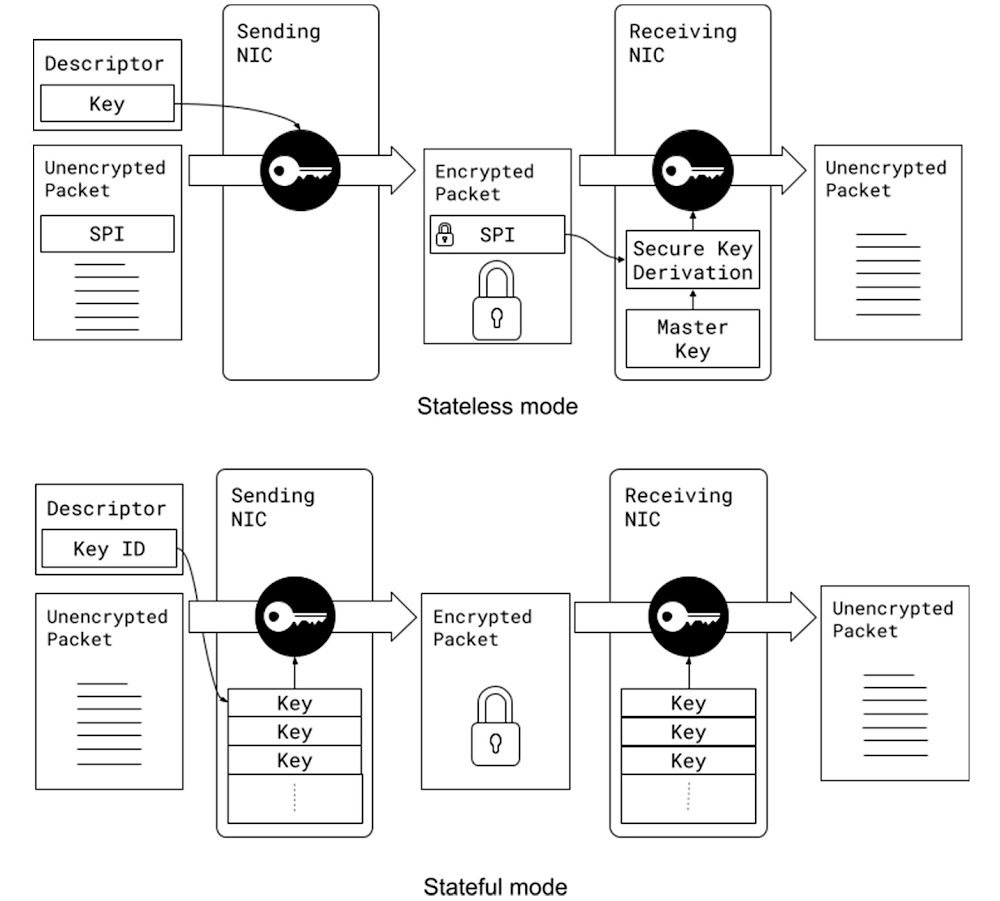
Almost a decade ago, we started encrypting traffic between our data centers to help protect user privacy. Since then, we gradually rolled out changes to encrypt almost all data in transit. Our approach is described in our Encryption in Transit whitepaper. While this effort provided invaluable privacy and security benefits, software encryption came at significant cost: it took ~0.7% of Google’s processing power to encrypt and decrypt RPCs, along with a corresponding amount of memory. Such costs spurred us to offload encryption to our network interface cards (NICs) using PSP (a recursive acronym for PSP Security Protocol), which we are open sourcing today.Google’s production machines are shared among multiple tenants that have strict isolation requirements. Hence, we require per-connection encryption and authentication, similar to Transport Layer Security (TLS). At Google’s scale, the implication is that the cryptographic offload must support millions of live Transmission Control Protocol (TCP) connections and sustain 100,000 new connections per second at peak. Before inventing a new offload-friendly protocol, we investigated existing industry-standards: Transport Layer Security (TLS) and Internet Protocol Security (IPsec). While TLS meets our security requirements, it is not an-offload friendly solution because of the tight coupling between the connection state in the kernel and the offload state in hardware. TLS also does not support non-TCP transport protocols, such as UDP. IPsec protocol, on the other hand, is transport independent and can be offloaded to hardware. However, a limitation of IPSec offload solutions is that they cannot economically support our scale partly because they store the full encryption state in an associative hardware table with modest update rates. Assuming the size of an entry is 256B in either direction, transmit or receive, the total memory requirement for 10M connections is 5GB (256B x 2 x 10M) – which is well beyond the affordable capacity of commodity offload engines. Existing IPsec offload engines are designed to support encryption for a small number of site-to-site tunnels. Ultimately, we decided that IPsec does not meet our security requirements as it lacks support for keys per layer-4 connection.To address these challenges, we developed PSP (a recursive acronym for PSP Security Protocol,) a TLS-like protocol that is transport-independent, enables per-connection security, and is offload-friendly.At Google, we employ all of these protocols depending on the use case. For example, we use TLS for our user-facing connections, we use IPsec for site-to-site encryption where we need interoperability with 3rd party appliances, and we use PSP for intra- and inter- data center traffic.PSP is intentionally designed to meet the requirements of large-scale data-center traffic. It does not mandate a specific key exchange protocol and offers few choices for the packet format and the cryptographic algorithms. It enables per-connection security by allowing an encryption key per layer-4 connection (such as a TCP connection.) It supports stateless operation because the encryption state can be passed to the device in the packet descriptor when transmitting packets and can be derived when receiving packets using a Security Parameter Index (SPI) and an on-device master key. This enables us to maintain minimal state in the hardware, avoiding hardware state explosion compared to typical stateful encryption technologies maintaining large on-device tables.PSP supports both stateful and stateless modes of operation: In the stateless mode, encryption keys are stored in the transmit packet descriptors and derived for received packets, using a master key stored on the device. In contrast, stateful technologies typically maintain the actual encryption keys in a table per connection.PSP uses User Datagram Protocol (UDP) encapsulation with a custom header and trailer. A PSP packet starts with the original IP header, followed by a UDP header on a prespecified destination port, followed by a PSP header containing the PSP information, followed by the original TCP/UDP packet (including header and payload), and ends with a PSP trailer that contains an Integrity Checksum Value (ICV). The layer-4 packet (header and payload) can be encrypted or authenticated, based on a user-provided offset called Crypt Offset. This field can be used to, for example, leave part of the TCP header authenticated yet unencrypted in transit while keeping the rest of the packet encrypted to support packet sampling and inspection in the network if necessary.  This is a critical visibility feature for us enabling proper attribution of traffic to applications, and is not feasible to achieve with IPsec. Of note, the UDP header is protected by the UDP checksum and the PSP header is always authenticated.PSP packet format for encrypting a simple TCP/IP packet in the Linux TCP/IP stack.We support PSP in our production Linux kernel, Andromeda (our network virtualization stack), and Snap (our host networking system), enabling us to use PSP for both internal communication and for Cloud customers. As of 2022, PSP cryptographic offload saves 0.5% of Google’s processing power. Similar to any other cryptographic protocol, we need both ends of a connection to support PSP. This can be prohibitive in brownfield deployments with a mix of old and new (PSP-capable) NICs. We built a software implementation of PSP (SoftPSP) to allow PSP-capable NICs to communicate with older machines, dramatically increasing coverage among pairwise server connections.PSP delivers multiplicative benefits when combined with zero-copy techniques. For example, the impact of TCP zero-copy for both sending and receiving was limited by extra reads and writes of the payloads for software encryption. Since PSP eliminates these extra loads and stores, RPC processing no longer requires touching the payload in the network stack. For large 1MB RPCs, for example, we see a 3x speed up from combining PSP and zero-copy.PSP and ZeroCopy have multiplicative impact, enabling us to send and receive RPCs without touching the payload. For large 1MB RPCs, using PSP alongside Zero-copy increases the throughput of TCP channels by 3x.We believe that PSP can provide a number of significant security benefits for the industry. Given its proven track record in our production environment, we hope that it can become a standard for scalable, secure communication across a wide range of settings and applications. To support this, we are making PSP open source to encourage broader adoption by the community and hardware implementation by additional NIC vendors. For further information, please refer to http://github.com/google/psp which includes:The PSP Architecture Specification.A reference software implementation.A suite of test cases.For further questions and discussions, please join the PSP discussion Google Group or contact the group here: psp-discuss@googlegroups.com.Acknowledgements: We are thankful to a large number of colleagues from Technical Infrastructure and Cloud who contributed to PSP since its inception, including but not limited to Platforms, Security, Kernel Networking, RPCs, Andromeda, and other Network Infrastructure teams.Related ArticleIntroducing Google Cloud’s new Assured Open Source Software serviceAnnouncing Google Cloud’s new Assured Open Source Software Service, which can help organizations add the same software that Google uses i…Read Article
Quelle: Google Cloud Platform

New Research shows Google Cloud Skill Badges build in-demand expertise

We live in a digital world, and the future of work is in the cloud. In fact, 61% of HR professionals believe hiring developers will be their biggest challenge in the years ahead.1During your personal cloud journey, it’s critical to build and validate your skills in order to evolve with the rapidly changing technology and business landscape.That is why we created skill badges – a micro-credential issued by Google Cloud to demonstrate your cloud competencies and your commitment to staying on top of the latest Google Cloud solutions and products. To better understand the value of skills badges to holders’ career goals, we commissioned a third-party research firm, Gallup, to conduct a global study on the impact of Google Cloud skill badges. Skill badge earners overwhelmingly gain value from and are satisfied with Google Cloud skill badges.Skill badge holders state that they feel well equipped with the variety of skills gained through skill badge attainment, that they are more confident in their cloud skills, are excited to promote their skills to their professional network, and are able to leverage skill badges to achieve future learning goals, including a Google Cloud certification. 87% agree skill badges provided real-world, hands-on cloud experience286% agree skill badges helped build their cloud competencies2 82% agree skill badges helped showcase growing cloud skills290% agree that skill badges helped them in their Google Cloud certification journey274% plan to complete a Google Cloud certification in the next six months2Join thousands of other learners and take your career to the next level with Google Cloud skill badges.To learn more, download the Google Cloud Skills Badge Impact Report at no cost.1. McKinsey Digital,Tech Talent Technotics: Ten new realities for finding, keeping, and developing talent , 20222. Gallup Study, sponsored by Google Cloud Learning: “Google Cloud Skill Badge Impact report”, May 2022Related ArticleHow to prepare for — and ace — Google’s Associate Cloud Engineer examThe Cloud Engineer Learning Path is an effective way to prepare for the Associate.Read Article
Quelle: Google Cloud Platform
Equifax data fabric uses Google Cloud to spin faster innovation

Editor’s note: Here, we look at how Equifax used Google Cloud’s Bigtable as a foundational tool to reinvent themselves through technology.Identifying stolen identities, evaluating credit scores, verifying employment and income for  processing credit requests requires data—truckloads of data—galaxies of data! But it’s not enough to just have the most robust data assets; you have to protect, steward and manage them with precision. As one of the world’s largest fintechs, operating in a highly regulated space, our business at Equifax revolves around extracting unique insights from data and delivering them in real-time so our customers can make smarter decisions. Back in 2018, our leadership team made the decision to rebuild our business in the cloud. We had been more than a traditional credit bureau for years, but we knew we had to reinvent our technology infrastructure to become a next-generation data, analytics and technology company. We wanted to create new ways to integrate our data faster, scale our reach with automation and empower employees to innovate new products versus a “project” mindset. The result of our transformation is the Equifax Cloud™, our unique mix of public cloud infrastructure with industry-leading security, differentiated data assets and AI analytics that only Equifax can provide. The first step involved migrating our legacy data ecosystem to Google Cloud to build a data fabric. We set out to shut down all 23 global data centers and bring everything on the data fabric for improved collaboration and insights. With help from the Google Cloud team, we’re already well underway.Building data fabric on Cloud Bigtable From the start, we knew we wanted a single, fully managed platform that would allow us to focus on innovating our data and insights products. Instead of trying to build our own expertise around infrastructure, scaling and encryption, Google Cloud offers these capabilities right out of the box, so we can focus on what drives value for our customers.   We designed our data fabric with Google Cloud’s NoSQL database, Bigtable, as a key component of the data architecture. As a fully managed service, Bigtable allows us to increase the speed and scale of our innovation. It supports the Equifax Cloud data fabric by rapidly ingesting data from suppliers, capturing and organizing the data, and serving it to users so they can build new products. Our proprietary data fabric is packaged as Equifax-in-a-Box, and it includes integrated platforms and tools that provide 80-90 percent of the foundation needed for a new Equifax business in a new geography. This allows our teams to rapidly deploy in a new region and comply with local regulations.Bigtable hosts the financial journals—the detailed history of observations across data domains such as Consumer Credit, Employment & Utility and more — for the data fabric, which play a role in nearly all our solutions. One of our largest journals, which hosts the US credit data, consists of about 3 billion credit observations along with other types of observations. When we run our proprietary Keying and Linking services to determine the identity of the individual to whom these datasets belong to, Bigtable handles keying and linking the repository to help us scale up instantly and get answers quickly. Innovating with the Equifax Cloud From everyday activities to new innovative offerings, we’re using the data fabric to transform our industry. Bigtable has been the bedrock of our platform, delivering the capabilities we need. For example, when a consumer goes into a store to finance a cellphone, we provide the retailer a credit file, which requires finding, farming, building, packaging and returning that file in short order. By moving to Google Cloud and Bigtable, we will be able to do all that now in under 100 milliseconds. Likewise, we’re using the data fabric to create a global fraud prevention product platform. Our legacy stack made it challenging to pull out and shape the data the way we wanted on a quick turn. However, with managed services like Bigtable, we have been able to build seven distinct views of the data for our fraud platform within four weeks—versus the few months it might have taken without the data fabric. Greater impact with Google Cloud We’ve made tremendous progress transforming into a cloud-native, next-generation data, analytics and technology company. With a global multi-region architecture, the data fabric runs in seven Google Cloud regions and eventually will support all 25 countries where Equifax operates. Our Equifax Cloud, leveraging key capabilities from Google Cloud, has given us additional speed, security and flexibility to focus on building powerful data products for the future. Learn more about Equifax and Cloud Bigtable. And check out our recent blog and graphics that answer the question, How BIG is Cloud Bigtable?Related ArticleCloud Bigtable launches Autoscaling plus new features for optimizing costs and improved manageabilityCloud Bigtable launches autoscaling that automatically adds or removes capacity in response to the changing demand for your applications.Read Article
Quelle: Google Cloud Platform
Announcing policy guardrails for Terraform on Google Cloud CLI preview

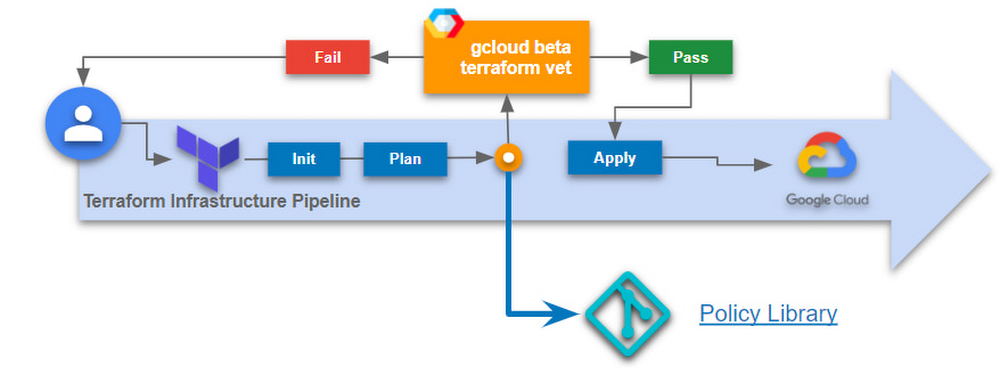
Terraformis a popular open source Infrastructure as Code (IaC) tool today and is used by organizations of all sizes across the world. Whether you use Terraform locally as a developer or as a platform admin managing complex CI/CD pipelines, Terraform makes it easy to deploy infrastructure on Google Cloud. Today, we are pleased to announce gcloud beta terraform vet, which is a client-side tool, available at no charge which enables policy validation for your infrastructure deployments and existing infrastructure pipelines. With this release, you can now write policies on any resource from Terraform’s google and google-beta providers. If you’re already using Terraform Validator on GitHub today, follow the migration instructions to leverage this new capability. The challengeInfrastructure automation with Terraform increases agility and reduces errors by automating the deployment of infrastructure and services that are used together to deliver applications.Businesses implement continuous delivery to develop applications faster and to respond to changes quickly. Changes to infrastructure are common and in many cases occur often. It can become difficult to monitor every change to your infrastructure, especially across multiple business units to help process requests quickly and efficiently in an automated fashion. As you scale Terraform within your organization, there is an increased risk for misconfigurations and human error. Human authored configuration changes can extend infrastructure vulnerability periods which expose organizations to compliance or budgetary risks. Policy guardrails are necessary to allow organizations to move fast at scale, securely, and in a cost effective manner – and the earlier in the development process, the better to avoid problems with audits down the road. The solutiongcloud beta terraform vet provides guardrails and governance for your Terraform configurations to help reduce misconfigurations of Google Cloud resources that violate any of your organization’s policies.These are some of the benefits of using gcloud beta terraform vet:  Enforce your organization’s policy at any stage of application developmentPrevent manual errors by automating policy validationFail fast with pre-deployment checksNew functionalityIn addition to creating CAI based constraints, you can now write policies on any resource from Terraform’s google and google-beta providers. This functionality was added after receiving feedback from our existing users of terraform validator on github. Migrate to gcloud beta terraform vet today to take advantage of this new functionality. Primary use cases for policy validationPlatform teams can easily add guardrails to infrastructure CI/CD pipelines (between the plan & apply stages) to ensure all requests for infrastructure are validated before deployment to the cloud. This limits platform team involvement by providing failure messages to end users during their pre-deployment checks which tell them which policies they have violated. Application teams and developers can validate their Terraform configurations against the organization’s central policy library to identify misconfigurations early in the development process. Before submitting to a CI/CD pipeline, you can easily ensure your Terraform configurations are in compliance with your organization’s policies, thus saving time and effort.Security teams can create a centralized policy library that is used by all teams across the organization to identify and prevent policy violations. Depending on how your organization is structured, the security team (or other trusted teams) can add the necessary policies according to the company’s needs or compliance requirements. Getting startedThe quickstart provides detailed instructions on how to get started. Let’s review the simple high-level process:1. First, clone the policy library. This contains sample constraint templates and bundles to get started. These constraint templates specify the logic to be used by constraints.2. Add your constraints to the policies/constraints folder. This represents the policies you want to enforce. For example, the IAM domain restriction constraint ensures all IAM policy members are in the “gserviceaccount.com” domain. See sample constraints for more samples.code_block[StructValue([(u’code’, u’apiVersion: constraints.gatekeeper.sh/v1alpha1rnkind: GCPIAMAllowedPolicyMemberDomainsConstraintV2rnmetadata:rn name: service_accounts_onlyrn annotations:rn description: Checks that members that have been granted IAM roles belong to allowlistedrn domains.rnspec:rn severity: highrn match:rn target: # {“$ref”:”#/definitions/io.k8s.cli.setters.target”}rn – “organizations/**”rn parameters:rn domains:rn – gserviceaccount.com’), (u’language’, u”)])]3. Generate a Terraform plan and convert it to JSON format$ terraform show -json ./test.tfplan > ./tfplan.json4. Install the gcloud component, terraform-tools$ gcloud components update$ gcloud components install terraform-tools5. Run gcloud beta terraform vet$ gcloud beta terraform vet tfplan.json –policy-library=.6. Finally, view the results. If you violated any policy checks, you will see the following outputs. Pass:code_block[StructValue([(u’code’, u'[]’), (u’language’, u”)])]Fail: The output is much longer, here is a snippet:code_block[StructValue([(u’code’, u'[rn{rn “constraint”: rnu2026 rnrn”message”: “IAM policy for //cloudresourcemanager.googleapis.com/projects/PROJECT_ID contains member from unexpected domain: user:user@example.com”,rnu2026rn]’), (u’language’, u”)])]FeedbackWe’d love to hear how this feature is working for you and your ideas on improvements we can make.Related ArticleEnsuring scale and compliance of your Terraform deployment with Cloud BuildThe best way to run Terraform on Google Cloud is with Cloud Build and Cloud Storage. This article explains why, covering scale, security …Read Article
Quelle: Google Cloud Platform

Google Cloud VMware Engine: Optimize application licensing costs with custom core counts

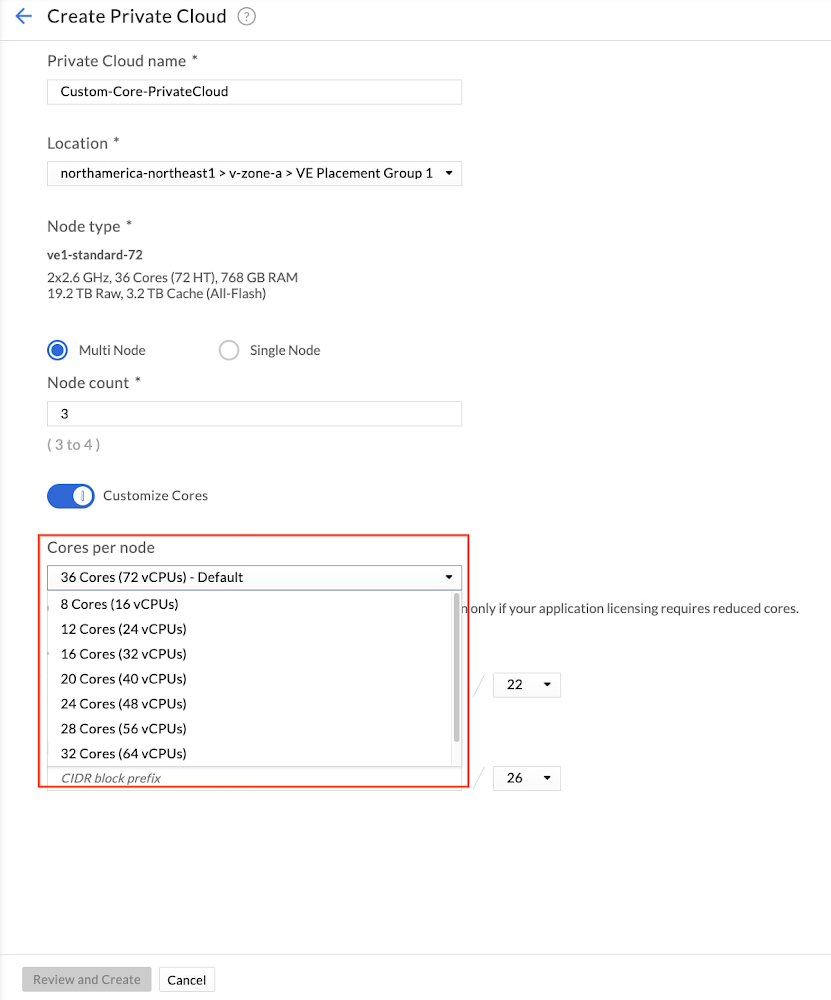
Customers are increasingly migrating their workloads to the cloud, including applications that are licensed and charged based on the number of physical CPU cores on the underlying node or in the cluster. To help customers manage and optimize their application licensing costs on Google Cloud VMware Engine, we introduced a capability called custom core counts — giving you the flexibility to configure your clusters to help meet your application-specific licensing requirements and reduce costs.You can set the required number of CPU cores for your workloads at the time of cluster creation, thereby effectively reducing the number of cores you may have to license for that application. You can set the number of physical cores per node in multiples of 4 — such as 4, 8, 12, and so on up to 36. VMware Engine also creates any new nodes added to that cluster with the same number of cores per node, including when replacing a failed node. Custom core counts are supported for both the initial cluster and for subsequent clusters created in a private cloud.It’s easy to get started, with just three or fewer steps depending on whether you’re creating a new private cloud and customizing cores in a cluster or adding a custom core count cluster to an already existing private cloud. Let’s take a quick look at how you can start using custom core counts:1. During private cloud creation, select the number of cores you want to set per node. The image below shows the selection process.2. Provide network information for the management components.3. Review the inputs and create a private cloud with custom cores per cluster node.That’s it. We’ve created a private cloud with a cluster that has 3 nodes and each node has 24 cores enabled (48 vCPUs). This gives a total of 72 cores enabled in the cluster. With this feature, you can right-size your cluster to meet your application licensing needs. If you’re running an application that is licensed on a per-core basis, you’ll only need to license 72 cores with custom core count, as opposed to 108 cores (36 cores X 3 nodes). For additional clusters in an already running private cloud, you just need 1 step to activate custom core counts.Stay tuned for more updates and bookmark our release notes for the latest update on Google Cloud VMware Engine. And if you’re interested in taking your first step, sign up for this no-cost discovery and assessment with Google Cloud!Related ArticleRunning VMware in the cloud: How Google Cloud VMware Engine stacks upLearn how Google Cloud VMware Engine provides unique capabilities to migrate and run VMware workloads natively in Google Cloud.Read Article
Quelle: Google Cloud Platform
Introducing the latest Slurm on Google Cloud scripts

Google Cloud is a great home for your high performance computing (HPC) workloads. As with all things Google Cloud, we work hard to make complex tasks seem easy. For HPC, a big part of user friendliness is support for popular tools such as schedulers.If you run high performance computing (HPC) workloads, you’re likely familiar with the Slurm workload manager. Today, with SchedMD, we’re announcing the newest set of features for Slurm running on Google Cloud, including one-click hybrid configuration, Google Cloud Storage data migration support, real-time configuration updates, Bulk API support, improved error handling, and more. You can find these new features today in the Slurm on Google Cloud GitHub repository and on the Google Cloud Marketplace.Slurm is one of the leading open-source HPC workload managers used in TOP 500 supercomputers around the world. Over the past five years, we’ve worked with SchedMD, the company behind Slurm, to release ever-improving versions of Slurm on Google Cloud. Here’s more information about our newest features:Turnkey hybrid configurationYou can now use a simple hybrid Slurm configuration setup script for enabling Google Cloud partitions in an existing Slurm controller, allowing Slurm users to connect an on-premise cluster to Google Cloud quickly and easily.Google Cloud Storage data migration supportSlurm now has a workflow script that supports Google Cloud Storage, allowing users to define data movement actions to and from storage buckets as part of their job. Note that Slurm can handle jobs with input and output data pointing to different Google Cloud Storage locations.Real-time Configuration UpdatesSlurm now supports post-deployment reconfiguration of partitions, with responsive actions taken as needed, allowing users to make changes to their HPC environment on-the-fly.Bulk API supportBuilding on the Bulk API integration completed in the Slurm scripts released last year, the newest scripts now support Bulk API’s Regional Endpoint calls, Spot VMs, and more.Clearer error handlingThis latest version of Slurm on Google Cloud will indicate the specific place (e.g. job node, node info, filtered log file, etc.) where an API error has occurred, and expose any underlying Google API errors directly to users. The scripts also add an “installing” animation and guidance on how to check for errors during the installation process if it takes a longer time than expected.Billing tracking in BigQuery and StackdriverYou can now access usage data in BigQuery, which you can merge with Google Cloud billing data to compute the costs of individual jobs, and track and display custom metrics for Stackdriver jobs.Adherence to Terraform and Image Creation best practicesThe Slurm image creation process has now been converted to a Packer-based solution. The necessary scripts are incorporated into an image and then parameters are provided via metadata to define the Ansible configuration, all of which follows Terraform and Image Creation best practices. All new Terraform resources now use Cloud Foundation Toolkit modules where available, and you can use bootstrap scripts to configure and deploy Terraform modules.Authentication ConfigurationYou can now enable or disable oslogin and install LDAP libraries (e.g. OSLogin, LDAP, Disabled, etc) across your Slurm cluster. Note that the admin must manually configure non-oslogin auth across the cluster.Support for Instance TemplatesFollowing on the Instance Template support launched in last year’s Slurm on Google Cloud version, you can now use additional Instance Template features launched in the intervening year (e.g. hyperthreading, Spot VM).Enhanced customization of partitionsThe latest version of Slurm on Google Cloud adds multiple ways to customize your deployed partitions including: Injection of custom prolog and epilog scripts, pre-partition startup scripts, and the ability to configure more Slurm capabilities on compute nodes.Getting startedThe Slurm experts at SchedMD built this new release. You can download this release in SchedMD’s GitHub repository. For more information, check out the included README. If you need help getting started with Slurm check out the quick start guide, and for help with the Slurm features for Google Cloud check out the Slurm Auto-Scaling Cluster codelab and the Deploying a Slurm cluster on Google Compute Engine and Installing apps in a Slurm cluster on Compute Engine solution guides. If you have further questions, you can post on the Slurm on Google Cloud Google discussion group, or contact SchedMD directly.Related ArticleIntroducing the latest Slurm on GCP scriptsThe latest version of Slurm for Google Cloud includes support for Terraform, the HPC VM Image, placement policies, Bulk API and instance …Read Article
Quelle: Google Cloud Platform
Cutting-edge disaster recovery for critical enterprise applications

Enterprise data backup and recovery has always been one of the most compelling and widely adopted public cloud use cases. That’s still true today, as businesses leverage the cloud to protect increasingly critical applications with stricter RTO/RPO requirements.Veeam and Google Cloud have long been leaders at providing reliable, verifiable, cloud-based recovery solutions across any environment or application. And now, we’re taking another step in that direction with the introduction of Continuous Data Protection (CDP) disaster recovery for business-critical Tier One applications. Veeam Backup & Replication (VBR) and Veeam Backup for Google Cloud (VBG), available on Google Cloud Marketplace, offer enterprises a faster, simpler, and more cost-effective way to level up your company’s backup and recovery capabilities. Enterprise customers can take control and craft a backup and storage strategy based on their SLA requirements and RTO/RPO goals, rather than cost, capacity, or scalability constraints. And with Google Cloud, enterprises get the secure, global cloud infrastructure and applications they need to achieve value with digital transformation.3 ways Veeam and Google Cloud elevate your company’s backup and recovery gameMore than ever, businesses are adopting cloud migration and modernization strategies to cut costs, simplify and streamline IT overhead, and enable innovation. And with four out of five organizations planning to use either cloud storage or a managed backup service within the next two years¹, many will be looking to understand just how and why the cloud can help them protect their businesses and serve their big-picture cloud objectives.There are a lot of different ways to tackle these questions when it comes to leveraging VBR and VBG on Google Cloud infrastructure. We’ll focus here on a few that appear to be top of mind with many of our customers.Cloud-based CDP for business-critical applications. Disaster recovery (DR) for critical Tier One applications doesn’t leave much room for error: Many of these applications will measure RTOs and RPOs in minutes or even seconds to avoid a major business disruption.In some cases, these applications use dedicated, high-availability infrastructure to maintain independent disaster recovery capabilities. In many others, however, it falls upon IT to maintain an on-prem CDR solution, running on dedicated DR infrastructure, to ensure near real-time RTOs/RPOs for enterprise Tier One applications.VBR on Google Cloud gives these enterprises a complete and fully managed CDR solution delivering RPOs measured in seconds. And by running VBR on Google Cloud’s highly secure, global cloud infrastructure, even the most advanced enterprise IT organizations can deploy a DR environment that will match or exceed their on-prem capabilities — with none of the CapEx, overhead costs, or management headaches.Right-sizing your enterprise backup strategy. Of course, many enterprise applications don’t require this level of protection, especially in terms of RPOs. In many cases, snapshot-based replication, typically with 6-12-hour RPOs, is enough for a business to recover less critical systems without suffering a major business setback.Veeam customers get the flexibility they need to choose the right type of protection for their applications and business data. They can easily store both VM replicas and an unlimited number of Veeam backups in Google Cloud, and restore from either source. Google’s Archive tier of object storage gives VBG customers one of the industry’s most cost-effective long-term storage solutions—while still achieving relatively fast RTOs.Running Veeam on Google Cloud also solves the scalability challenges that so many enterprises face when they manage on-prem systems. With Veeam and Google Cloud, an organization’s DR and backup capabilities will always align seamlessly with business needs.For example, resizing a Google Cloud VMware Engine (GCVE) cluster or spinning up additional clusters is something that can happen on the fly to accommodate restores and migrations. There’s no need to worry about overprovisioning and, with Veeam’s Universal Licensing, no additional licenses are required to migrate to the cloud. Customers can make DR and backup decisions based entirely on risk and business considerations, rather than on budget constraints or arbitrary resource limitations.Getting out of the data center game. Finally, running VBR on Google Cloud can be a major step towards retiring costly, resource-intensive, on-prem IT assets. Most enterprises today are moving aggressively to retire data centers and migrate applications to the public cloud; virtually all of them are now managing hybrid cloud environments that make it easier to move workloads between on-prem and public cloud infrastructure.By leveraging the cloud as a DR target, Veeam on Google Cloud reduces some of the costs and IT resources associated with maintaining on-prem data centers, servers, storage, and network infrastructure. Setting the stage for digital transformationDisaster recovery has always been a frustrating initiative for enterprise IT. It’s a demanding, expensive, resource-intensive task, yet it’s also one where dropping the ball can be a catastrophic mistake. We can’t take DR — or backup and recovery in general — off an IT organization’s list of priorities. But Veeam and Google Cloud can make it much simpler, easier, and less expensive for our customers to maintain world-class backup and recovery capabilities while putting themselves in a great position to achieve their broader digital transformation goals.Google Cloud Marketplace makes procurement easier, too: Buying VBR and VBG on Google Cloud Marketplace helps fast-track corporate technology purchases by allowing you to purchase from an approved vendor, Google. All Marketplace purchases are included in your single Google Cloud bill, while drawing down any monthly spend commitment you may already have with Google Cloud. To learn more about how Veeam and Google Cloud work together to help you keep your critical applications protected, visit veeam.com/google-cloud-backup.Related ArticleCIS hardening support in Container-Optimized OS from GoogleOur latest Container-Optimized OS release supports CIS benchmark compliance and can provide continuous CIS scanning capabilities.Read Article
Quelle: Google Cloud Platform

Introducing Autonomic Security Operations for the U.S. public sector

As sophisticated cyberattack campaigns increasingly target the U.S. public and private sectors during the COVID era, the White House and federal agencies have taken steps to protect critical infrastructure and remote-work infrastructure. These include Executive Order 14028 and the Office of Management and Budget’s Memorandum M-21-31, which recommend adopting Zero Trust policies, and span software supply chain security, cybersecurity threat management, and strengthening cyberattack detection and response.However, implementation can be a challenge for many agencies due to cost, scalability, engineering, and a lack of resources. Meeting the requirements of the EO and OMB guidance may require technology modernization and transformational changes around workforce and business processes. Today we are announcing Autonomic Security Operations (ASO) for the U.S. public sector, a solution framework to modernize cybersecurity analytics and threat management that’s aligned with the objectives of EO 14028 and OMB M-21-31. Powered by Google’s Chronicle and Siemplify, ASO helps agencies to comprehensively manage cybersecurity telemetry across an organization, meet the Event Logging Tier requirements of the White House guidance, and transform the scale and speed of threat detection and response. ASO can support government agencies in achieving continuous detection and continuous response so that security teams can increase their productivity, reduce detection and response time, and keep pace with – or ideally, stay ahead of – attackers. While the focus of OMB M-21-31 is on the implementation of technical capabilities, transforming security operations will require more than just technology. Transforming processes and people in the security organization is also important for long-term success. ASO provides a more comprehensive lens through which to view the OMB event logging capability tiers, which can help drive a parallel transformation of security-operations processes and personnel.Modern Cybersecurity Threat Detection and ResponseGoogle provides powerful technical capabilities to help your organization achieve the requirements of M-21-31 and EO 14028:Security Information & Event Management (SIEM) – Chronicle provides high-speed petabyte-scale analysis, and is capable of consuming log types outlined in the Event Logging (EL) tiers in a highly cost-effective manner.Security Orchestration, Analytics, and Response (SOAR) – Siemplify offers dozens of out-of-box playbooks to deliver agile cybersecurity response and drive mission impact, including instances of automating 98% of Tier-1 alerts and driving an 80% reduction in caseload.User and Entity Behavior Analytics (UEBA) – For agencies that want to develop their own behavioral analytics, agencies can use BigQuery, Google’s petabyte scale data lake, to store, manage, and analyze diverse data types from many sources. Telemetry can be exported out of Chronicle, and custom data pipelines can be built to import other relevant data from disparate tools and systems, such as IT Ops, HR and personnel data, and physical security data. From there, users can leverage BQML to readily generate machine learning models without needing to move the data out of BigQuery. For Google Cloud workloads, our Security Command Center Premium product offers native, turnkey UEBA across GCP workloads.Endpoint Detection and Response (EDR)– For most agencies, EDR is a heavily adopted technology that has broad applicability in Security Operations. We offer integrations to many EDR vendors. Take a look at our broad list of Chronicle integrations here.Threat intelligence – Our solution offers a native integration with VirusTotal, has the ability to operationalize threat intelligence feeds natively in Chronicle, and integrates with various TI and TIP solutions.Community Security AnalyticsTo increase collaboration across public-sector and private-sector organizations, we recently launched our Community Security Analytics (CSA) repository, where we’ve partnered with the MITRE Engenuity Center for Threat-Informed Defense, CYDERES, and others to develop open-source queries and rules that support self-service security analytics for detecting common cloud-based security threats. CSA queries are mapped to the MITRE ATT&CK® framework of tactics, techniques and procedures (TTPs) to help you evaluate their applicability in your environment and include them in your threat model coverage.“Deloitte is excited to collaborate with Google Cloud on their transformational public sector Autonomic Security Operations (ASO) solution offering. Deloitte has been recognized as Google Cloud’s Global Services Partner of the Year for four consecutive years, and also as their inaugural Public Sector Partner of the Year in 2020,” said Chris Weggeman, managing director of GPS Cyber and Strategic Risk, Google Cloud Cyber Alliance Leader, Deloitte & Touche LLP. “Our deep bench of more than 1,000 Google Cloud certifications, capabilities spanning the Google Cloud security portfolio, and decades of delivery experience in the government and public sector makes us well-positioned to help our clients undertake critical Security Operations Center transformation efforts with Google Cloud ASO.”Cost-effective for government agenciesTo help Federal Agencies meet the requirements of M-21-31 and the broader EO, Google’s ASO solutions can drive efficiencies and help manage the overall costs of the transformation. ASO can make petabyte-scale data ingestion and management more viable and cost-effective. This is critical at a time when M-21-31 is requiring many agencies to ingest and manage dramatically higher volumes of data that had not been previously budgeted for. PartnersWe’re investing in key partners who can help support U.S. government agencies on this journey. Deloitte and CYDERES both have deep expertise to help transform agencies’ Security Operations capabilities, and we continue to expand our partners to support the needs of our clients. A prototypical journey can be seen below.“Cyderes shares Google Cloud’s mission to transform security operations, and we are honored to deliver the Autonomic Security Operations solution to the U.S. public sector. As the number one MSSP in the world (according to Cyber Defense Magazine’s 2021 Top MSSPs List) with decades of advisory and technology experience detecting and responding to the world’s biggest cybersecurity threats, Cyderes is uniquely positioned to equip federal agencies and departments to go far beyond the requirements of the executive order to transform their security programs entirely via Google’s unique ASO approach,” said Robert Herjavec, CEO of CYDERES. “As an original launch partner of Google Cloud’s Chronicle, our deep expertise will propel our joint offering to modernize security operations in the public sector, all with significant cost efficiency compared to competing solutions.” said Eric Foster, President of CYDERES.Embracing ASOAutonomic Security Operations can help U.S. government agencies advance their event logging capabilities in alignment with OMB maturity tiers. More broadly, ASO can help the U.S. government undertake a larger transformation of technology, process, and people, toward a model of continuous threat detection and response. As such, we believe that ASO can help address a number of challenges presently facing cybersecurity teams, from the global shortage of skilled workers, to the overproliferation of security tools, to poor cybersecurity situational awareness and analyst burnout caused by an increase of data without sufficient context or tools to automate and scale detection and response.We believe that by embracing ASO, agencies can help agencies achieve:10x technology, through the use of cloud-native tools that help agencies meet event logging requirements in the near term, while powering a longer-term transformation in threat management; 10x process, by redesigning workflows and using automation to achieve Continuous Detection and Continuous Response in security operations; 10x people, by transforming the productivity and effectiveness of security teams and expanding their diversity; and10x influence across the enterprise through a more collaborative and data-driven approach to solving security problems between security teams and non-security stakeholders.To learn more about Google’s Autonomic Security Operations solution for the U.S. public sector, please read our whitepaper. More broadly, Google Cloud continues to provide leadership and support for a wide range of critical public-sector initiatives, including our work with the MITRE Engenuity Center for Threat-Informed Defense, the membership of Google executives on the President’s Council of Advisors on Science and Technology and the newly established Cyber Safety Review Board; Google’s White House commitment to invest $10 billion in Zero Trust and software supply chain security, and Google Cloud’s introduction of a framework for software supply chain integrity. We look forward to working with the U.S. government to make the nation more secure.Visit our Google Cloud for U.S. federal cybersecurity webpage.Related posts:Autonomic Security Operations for the U.S. Public Sector Whitepaper“Achieving Autonomic Security Operations: Reducing toil”“Achieving Autonomic Security Operations: Automation as a Force Multiplier”“Advancing Autonomic Security Operations: New resources for your modernization journey”Related ArticleRead Article
Quelle: Google Cloud Platform

Twitter takes data activation to new heights with Google Cloud

Twitter is an open, social platform that’s home to a world of diverse people, perspectives, ideas, and information. We aim to foster free and global conversations that allow people to consume, create, distribute, and discover information about the topics they care about the most.Founded in 2006, Twitter keeps a watchful eye on emerging technologies to maintain a modern platform that can meet the needs of the changing times. These early investments helped accelerate Twitter’s product but predated modern open source equivalents. As a result of its desire to leverage more open source technologies to keep up with the changing times, Twitter wanted to use the data it collected to maximize the user experience. However, its past generation of operational tools highlighted a need to create less time-consuming and more reliable data processing techniques that allowed Twitter developers to automate complex, manual tasks to relieve developer burden. This presented an opportunity for Twitter to modernize its tools and glean valuable insights that would be transformative for the evolution of its products and partnerships with advertisers. With the plan to standardize and simplify its approach to data processing across its operations, Twitter progressively migrated its operations to BigQuery on Google Cloud.In the complex, competitive world of programmatic advertising, the relevance, quality, and interpretation of data insights are critical in a company’s ability to stay ahead of ever-changing needs. The ability to streamline its approach to large-scale data processing quickly became an anchor in Twitter’s plan to better align its goals with those of its advertisers and customers. With the recent migration of its advertising data from on-premises to Google Cloud, Twitter has leveraged several Google Cloud solutions, notably BigQuery and Dataflow, to facilitate this greater alignment.Leveraging BigQuery for improved advertising partnerships and data extractionAligning the goals of advertisers and customers with those of a company is a considerable challenge, but for a company with hundreds of millions of avid users like Twitter, developing and executing an approach that balanced the needs of all parties was proving to be a complex task. Pradip Thachile, a senior data scientist responsible for Twitter’s revenue team’s adoption of Google Cloud, likened the process to a kind of flywheel that allows the Twitter team to work in collaboration with advertising partners to develop and test hypothetical approaches that center its goals and those of advertising partners. He explained the essential role of the BigQuery solution in the synthesis of these goals with an eye on the optimization of business growth for all involved. “Mating all this is a nontrivial problem at scale. The only way we can accomplish it is by being able to build this kind of scientific learning flywheel. BigQuery is a critical component, because the velocity with which we can go from hypothesizing to actual action through BigQuery is huge.”As the anchoring service for the ingestion, movement, and the extraction of valuable insights from all data at Twitter, BigQuery is the engine of Twitter’s recent optimization of internal productivity and revenue growth.Data modeling for optimized productivity and value extraction with DataflowAs a fully managed streaming analytics service, Dataflow has proven to be a time-saving solution that contributes significantly to the enhancement of productivity at Twitter. Through the reduction of the time invested in manual tasks for scaling, Dataflow facilitates the seamless and effortless organization and templatization of the movement of the archetypal data sets at Twitter. With less time devoted to the calibration of operational tools, Twitter’s team can focus on the higher-value tasks related to the discovery and development of innovative ways to further leverage its data insights. Reliable support with data expertise from GoogleNotable for its expertise in data, Google Cloud contributed substantial technical support to Twitter. The Twitter team routinely accessed the Google Cloud product team for guidance on ingestion velocity as they leveraged the sizable ingestion capabilities of BigQuery for its data. At a higher level, the Google Cloud support team supplied valuable resources including white papers and use cases that could enhance Twitter’s performance. Thachile describes the value of Google Cloud’s support, “Google Cloud provides a very effective stratified layer of support. They can be as close to the problem as you’d like them to be.”For more of the story about how Twitter is using BigQuery, read this blog from Twitter.Related ArticleNow generally available: BigQuery BI Engine supports many BI tools or custom applicationLearn about BigQuery BI Engine and how to analyze large and complex datasets interactively with sub-second query response time and high c…Read Article
Quelle: Google Cloud Platform

Maintenance made flexible: Cloud SQL launches self-service maintenance

Routine maintenance is critical in the upkeep of any healthy database system. Maintenance involves updating your operating system and upgrading your database software so that you can rest assured that your system is secure, performant, and up-to-date. When you run your database on Cloud SQL, we schedule maintenance for you once every few months during your weekly maintenance window, so that you can turn your attention to more interesting matters. However, from time-to-time, you may find that Cloud SQL’s regular maintenance cadence just doesn’t work for you. Maybe you need a bug fix from the latest database minor version to address a performance issue, or maybe there’s an operating system vulnerability that your security team wants patched as soon as possible. Whatever the case, having the flexibility to update before the next scheduled maintenance event would be ideal.Cloud SQL has now made self-service maintenance generally available. Self-service maintenance allows you the freedom to upgrade your Cloud SQL instance’s maintenance version to the latest on your own, so that you can receive the latest security patches, bug fixes, and new features on demand. When combined with deny maintenance periods, self-service maintenance gives you the flexibility to upgrade your instance according to your own maintenance schedule. You can perform self-service maintenance using just a single command through gcloud or the API.Cloud SQL has also launched maintenance changelogs, a new section in our documentation that describes the contents of maintenance versions released by Cloud SQL. For each database engine major version, Cloud SQL publishes a running list of the maintenance versions and the changes introduced in each, such as database minor version upgrades and security patches. With maintenance changelogs, you can know what’s new with the latest maintenance version and make informed decisions about when you need to maintain your instance on your own ahead of regularly scheduled maintenance. Cloud SQL also upkeeps an RSS feed for each maintenance changelog that you can subscribe your feed reader to and receive notifications when Cloud SQL releases new maintenance versions.How to perform self-service maintenanceSay you’re a PostgreSQL database administrator at a tax accounting software firm named Taxio. During Q1 of each year, you use a deny maintenance period to skip maintenance on your database instance named tax-services-prod in order to ensure your environment is as stable as possible during your busy season. Now that it’s May, you take a closer look at how your PostgreSQL 12.8 instance is operating on the older maintenance version.After studying the query performance patterns using Query Insights, you realize that your queries that use regular expressions are running far slower than you expected. You check out the PostgreSQL bugs page and you see that other users reported the same performance regression in PostgreSQL 12.8. Fortunately, it looks like the issue was patched in PostgreSQL 12.9 and later minor versions.You decide you’d like to go ahead and take care of the issue right away ahead of the next scheduled maintenance event, which is a few months away. First, you need to see what maintenance version tax-services-prod is running and what the latest maintenance version available is. You spin up gcloud and retrieve the instance’s configuration information with the following command:code_block[StructValue([(u’code’, u’gcloud sql instances describe tax-services-prod’), (u’language’, u”)])]Cloud SQL returns the following information:code_block[StructValue([(u’code’, u”connectionName: taxio:us-central1:tax-services-prodrncreateTime: ‘2019-03-22T03:30:48.231Z’rndatabaseInstalledVersion: POSTGRES_12_8rnu2026rnmaintenanceVersion: POSTGRES_12_8.R20210922.02_00rnu2026rnavailableMaintenanceVersions: rn- POSTGRES_12_10.R20220331.02_01rnu2026″), (u’language’, u”)])]You see that there is a new maintenance version, POSTGRES_12_10.R20220331.02_01, that is much more current than your current maintenance version, POSTGRES_12_8.R20210922.02_00. From the version name, it looks like the new maintenance version runs on PostgreSQL 12.10, but you want to be sure. You navigate to the PostgreSQL 12 maintenance changelog page in the documentation and confirm that the new maintenance version upgrades the database minor version to PostgreSQL 12.10.You decide to perform self-service maintenance. You enter the following command into gcloud:code_block[StructValue([(u’code’, u’gcloud sql instances patch tax-services-prod \rnu2013maintenance-version=POSTGRES_12_10.R20220331.02_01′), (u’language’, u”)])]Cloud SQL returns the following response:code_block[StructValue([(u’code’, u’The following message will be used for the patch API method.rn{“maintenanceVersion”: “POSTGRES_12_10.R20220331.02_01″, “name”: “tax-services-prod”, “project”: “taxio”, “settings”: {}}rnPatching Cloud SQL instance…working..’), (u’language’, u”)])]A few minutes later, your tax-services-prod is up-to-date, running PostgreSQL 12.10. You run some acceptance tests and you’re delighted to see that the performance for queries with regular expressions is much better.Learn moreWith self-service maintenance, you can update your instance with the latest maintenance version, outside of the flow of regularly scheduled maintenance. You can also use maintenance changelogs to review the contents of new maintenance versions. See our documentation to learn more about self-service maintenance and maintenance changelogs.Related ArticleUnderstanding Cloud SQL Maintenance: why is it needed?Get acquainted with the way maintenance works in Cloud SQL so you can effectively plan availability.Read Article
Quelle: Google Cloud Platform




