Notified team gets smart on MLOps through Advanced Solutions Lab for Machine Learning

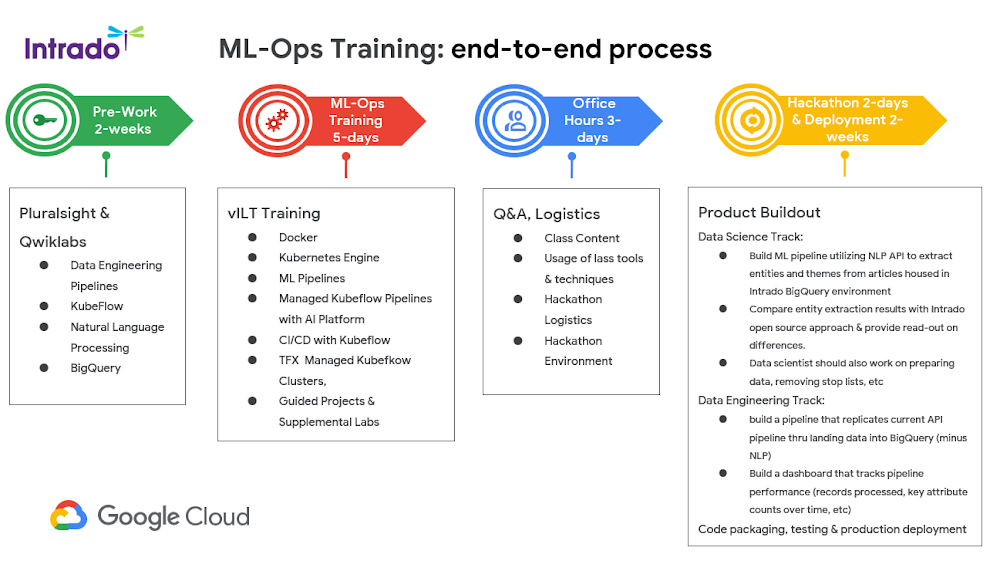
Editor’s note: Notified, one of the world’s largest newswire distribution networks, launched a public relations workbench that uses artificial intelligence to help customers pinpoint relevant journalists and expand media coverage. Here’s how they worked with Google Cloud and the Advanced Solutions Lab to train their team on Machine Learning Operations (MLOps).At Notified, we provide a global newswire service for customers to share their press releases and increase media exposure. Our customers can also search our database of journalists and influencers to discover writers who are likely to write relevant stories about their business. To enhance our offering, we wanted to use artificial intelligence (AI) and natural language processing (NLP) to uncover new journalists, articles, and topics—ultimately helping our customers widen their outreach. While our team has expertise in data engineering, product development, and software engineering, this was the first time we deployed an NLP API to be applied to other products. The deployment was new territory, so we needed a solid handle on MLOps to ensure a super responsive experience for our customers. That meant nailing down the process—from ingesting data, to building machine learning (ML) pipelines, and finally deploying an API so our product team could connect their continuous integration/continuous delivery (CI/CD) pipelines. First, I asked around to see how other companies solved this MLOps learning gap. But even at digital-first organizations, the problem hadn’t been addressed in a unified fashion. They may have used tools to support their MLOps, but I couldn’t find a program that trained data scientists and data engineers on the deployment process.Teaming up with Google Cloud to tailor an MLOps curriculumSeeing that disconnect, I envisioned a one-week MLOps hackathon to ramp up my team. I reached out to Google Cloud to see if we could collaborate on an immersive MLOps training. As an AI pioneer, I knew Google would have ML engineers from Advanced Solutions Lab (ASL) who could coach my team to help us build amazing NLP APIs. ASL already had a fully built, deep-dive curriculum on MLOps, so we worked together to tailor our courses and feature a real-world business scenario that would provide my team with the insights they needed for their jobs. That final step of utilization, including deployment and monitoring, was crucial. I didn’t want to just build a predictive model that no one can use. ASL really understood my vision for the hackathon and the outcomes I wanted for my team. They never said it couldn’t be done, we collaborated on a way to build on the existing curriculum, add a pre-training component, and complete it with a hackathon. The process was really smooth because ASL had the MLOps expertise I needed, they understood what I wanted, and they knew the constraints of the format. They were able to flag areas that were likely too intensive for a one-week course, and quickly provided design modules we hadn’t thought to cover. They really were a true part of our team.. In the end—just four months after our initial conversation—we launched our five-week MLOps program. The end product went far beyond my initial hackathon vision to deliver exactly what I wanted, and more.Starting off with the basics: Pre-workThere was so much we wanted to cover in this curriculum that it made sense to have a prerequisite learning plan ahead of our MLOps deep dive training with the ASL team. Through a two-week module, we focused on the basics of data engineering pipelines and ramped up on KubeFlow—an ML toolkit for Kubernetes—as well as NLP and BigQuery, a highly scalable data warehouse on Google Cloud. Getting back in the classroom: MLOps trainingAfter the prerequisite learning was completed, we transitioned into five days of live, virtual training on advanced MLOps with the ASL team. This was a super loaded program, but the instructors were amazing. For this component, we needed to center on real-world use cases that could connect back to our newswire service, making the learning outcomes actionable for our team. We wanted to be extremely mindful of data governance and security so we designed a customized lab based on public datasets. Taking a breather and asking questions: Office hoursAfter nearly three weeks, our team members needed a few days off to absorb all the new information and process everything they had learned. There was a risk of going into the hackathon and being burnt out. Office hours solved that. We gave everyone three days to review what they had learned and get into the right headspace to ace the hackathon. Diving in: Hackathon and deploymentFinally, the hackathon was a chance for our team to implement what they had learned, drill down on our use cases, and actually build a proof of concept–or best-case scenario— working model. Our data scientists built an entity extraction API and a topics API using Natural Language AI to target articles housed in our BigQuery environment. On the data engineering side, we built a pipeline by loading data into BigQuery. We also developed a dashboard that tracks pipeline performance metrics such as records processed and key attribute counts.For our DevOps genius, Donovan Orn, the hackathon was where everything started to click. “After the intensive, instructor-led training, I understood the different stages of MLOps and continuous training, and was ready to start implementing,” Orn said. “The hackathon made a huge difference in my ability to implement MLOps and gave me the opportunity to build a proof of concept. ASL was totally on point with their instruction and, since the training, my team has put a hackathon project into production.”Informing OSU curriculum with a new approach to teaching MLOps The program was such a success that I plan to use the same framework to shape the MLOps curriculum at Oklahoma State University (OSU) where I’m a corporate advisory board member. The format we developed with ASL will inform the way we teach MLOps to students so they can learn the MLOps interactions between data scientists and data engineers that many organizations rely on today. Our OSU students will practice MLOps through real-world scenarios so they can solve actual business problems. And the best part is ASL will lead a tech talk on Vertex AI to help our students put it into practice.Turning our hackathon exercise into a customer-ready serviceIn the end, both my team and Notified customers have benefited from this curriculum. Not only did the team improve their MLOps skills, but they also created two APIs that have already gone into production and significantly augmented the offering we’re delivering to customers. We’ve doubled the number of related articles we’re able to identify and we’re discovering thousands of new journalists or influencers every month. For our customers, that means they can cast a much wider net to share their stories and grow their media coverage. Up next is our API that will pinpoint more reporters and influencers to add to our database of curated journalists.Related ArticleUnlock real-time insights from your Oracle data in BigQueryA tutorial on how to replicate operational data from an Oracle database into BigQuery so that you can keep multiple systems in sync real-…Read Article
Quelle: Google Cloud Platform
Google Cloud Data Heroes Series: Meet Antonio, a Data Engineer from Lima, Peru

Google Cloud Data Heroes is a series where we share stories of the everyday heroes who use our data analytics tools to do incredible things. Like any good superhero tale, we explore our Google Cloud Data Heroes’ origin stories, how they moved from data chaos to a data-driven environment, what projects and challenges they are overcoming now, and how they give back to the community.In this month’s edition, we’re pleased to introduce Antonio! Antonio is from Lima, Peru and works as a full time Lead Data Engineer at Intercorp Retail and a Co-founder of Datapath. He’s also a part time data teacher, data writer, and all around data enthusiast. Outside of his allegiance to data, Antonio is a big fan of the Marvel world and will take any chance to read original comic books and collect Marvel souvenirs. He’s also an avid traveler and enjoys the experience of reliving family memories through travel. Antonio is proudly pictured here atop a mountain in Cayna, Peru, where all of his grandparents lived.When were you introduced to Google Cloud and how did it impact your career? In 2016, I applied for a Big Data diploma at the Universidad Complutense del Madrid, where I had my first experience with cloud. That diploma opened my eyes to a new world of technology and allowed me to get my first job as a Data Engineer at Banco de Crédito del Perú (BCP), the largest bank and the largest supplier of integrated financial services in Perú and the first company in Peru using Big Data technologies. At BCP, I developed pipelines using Apache Hadoop, Apache Spark and Apache Hive in an on-premise platform. In 2018, while I was teaching Big Data classes at the Universidad Nacional de Ingeniería, I realized that topics like deploying a cluster in a traditional PC were difficult for my students to learn without their own hands-on experience. At the time, only Google Cloud offered free credits, which was fantastic for my students because they could start learning and using cloud tools without worrying about costs.In 2019, I wanted a change in my career and left on-prem technologies to specialize in cloud technologies. After many hours of study and practice, I got the Associate Cloud Engineer certification at almost the same time I applied for a Data Engineer position at Intercorp, where I would need to use GCP data products. This new job pushed me to build my knowledge and skills on GCP and matched what I was looking for. Months later, I obtained the Professional Data Engineer certification. That certification, combined with good performance at work, allowed me to get a promotion to Data Architect in 2021. In 2022, I have started in the role of Lead Data Engineer.How have you given back to your community with your Google Cloud learnings?To give back to the community, once a year, I organize a day-long conference called Data Day at Universidad Nacional Mayor de San Marcos where I talk about data trends, give advice to college students, and call for more people to find careers in cloud. I encourage anyone willing to learn and I have received positive comments from people from India and Latin America. Another way I give back is by writing articles sharing my work experiences and publishing them on sites like Towards Data Science, Airflow Community and the Google Cloud Community Blog. Can you highlight one of your favorite projects you’ve done with GCP’s data products?At Intercorp Retail, the digital marketing team wanted to increase online sales by giving recommendations to users. This required the Data & Analytics team to build a solution to publish product recommendations related to an item a customer is viewing on a web page. To achieve this, we built an architecture that looks like the following diagram.We had several challenges. First, finding a backend that supports millions of requests per month. So after some research, we decided to go with Cloud Run because of the ease of development and deployment. The second decision was to define a database for the backend. Since we needed a database that responds in milliseconds, we chose Firestore.Finally, we needed to record all the requests made to our API to identify any errors or bad responses. In this scenario, Pub/Sub and Dataflow allowed us to do it in a simple way without worrying about scaling. After two months, we were ready to see it on a real website (see below). For future technical improvements we’re considering using Apigee as our API proxy to gather all the requests and take them to the correct endpoint. Cloud Build will be our alternative to our deployment process.What’s next for you and what do you hope people will take away from your data hero story? Thanks to the savings that I’ve collected while working in the past five years, I recently bought a house in Alabama. For me, this was a big challenge because I have only lived and worked outside of the United States. In the future, I hope to combine my data knowledge with the real estate world and build a startup to facilitate the home buying process for Latin American people.I’ll also focus on gaining more hands-on experience in data products, and giving back to my community through articles and soon, videos. I dream one day to present a successful case of my work in a big conference like the Google Cloud Next.If you are reading this and you are interested in the world of data and cloud, you just need an internet connection and some invested effort to kickstart your career. Even if you are starting from scratch and are from a developing country like me, believe that it is possible to be successful. Enjoy the journey and you’ll meet fantastic people along the way. Keep learning just like you have to exercise to keep yourself in shape. Finally, if there is anything that I could help you with just send me a message and I would be happy to give you any advice.Begin your own Data Hero journeyReady to embark on your Google Cloud data adventure? Begin your own hero’s journey with GCP’s recommended learning path where you can achieve badges and certifications along the way. Join the Cloud Innovators program today to stay up to date on more data practitioner tips, tricks, and events.If you think you have a good Data Hero story worth sharing, please let us know! We’d love to feature you in our series as well.Related ArticleGoogle Cloud Data Heroes Series: Meet Lynn, a cloud architect equipping bioinformatic researchers with genomic-scale data pipelines on GCPGoogle Cloud introduces their Data Hero series with a profile on Lynn Langit, a data cloud architect, educator, and developer on GCPRead Article
Quelle: Google Cloud Platform
Introducing GKE cost estimator, built right into the Google Cloud console

Have you ever wondered what it will cost to run a particular Google Kubernetes Engine (GKE) cluster? How various configurations and feature choices will affect your costs? What the potential of autoscaling might be on your bill?If you’ve ever tried to  estimate this yourself, you know it can be a puzzle — especially if you’re just starting out with Kubernetes, and don’t have many reference points from existing infrastructure to help. Today we are launching the GKE cost estimator in Preview, seamlessly integrated into the Google Cloud console.This is just the latest of a number of features to help you understand and optimize your GKE environment, for example GKE’s built-in workload rightsizing or GKE cost optimization insights. In addition, if you use GKE Autopilot, you pay for resources that you requested for your currently scheduled Pods, eliminating the need to manage the cost of nodes.It’s all part of our commitment to making Google Cloud the most cost-effective cloud — offering leading price/performance and customer-friendly licensing of course, but also predictable, transparent pricing, so that you can feel confident about building your applications with us. Our customers are embracing these cost optimization methods, as 42% of surveyed customers report that Google Cloud saves them up to 30% over three years. Inside the GKE cost estimator The new GKE cost estimator is part of the GKE cluster creation flow, and surfaces a number of variables that can affect your compute running costs. See the breakdown of costs between management fees, individual node pools, licenses and more. You can also use it to learn how enabling autoscaling mechanisms can impact your estimated expenses, by changing your expected average cluster size.While the GKE cost estimator doesn’t have visibility into your entire environment (e.g., networking, logging, or certain types of discounts), we believe it still provides a helpful overall estimate and will help you understand GKE’s compute cost structure. Combined with the proactive estimator for Cluster autoscaler and Node auto-provisioning, getting a sense for cost has never been easier. Simply input your desired configuration and use the provided sliders to choose the estimated average values that represent your cluster. Try it today!Related ArticleGKE workload rightsizing — from recommendations to actionWith new workload rightsizing capabilities, you get recommendations about your Kubernetes Pod resource requests, and apply them in the GK…Read Article
Quelle: Google Cloud Platform

Training Deep Learning-based recommender models of 100 trillion parameters over Google Cloud

Training recommender models of 100 trillion parametersA recommender system is an important component of Internet services today: billion dollar revenue businesses are directly driven by recommendation services at big tech companies. The current landscape of production recommender systems is dominated by deep learning based approaches, where an embedding layer is first adopted to map extremely large-scale ID type features to fixed-length embedding vectors; then the embeddings are leveraged by complicated neural network architectures to generate recommendations. The continuing advancement of recommender models is often driven by increasing model sizes–several models have been previously released with billion parameters up to even trillion very recently. Every jump in the model capacity has brought in significant improvement on quality.  The era of 100 trillion parameters is just around the corner. The scale of training tasks for recommender models has created unique challenges.  There is a staggering heterogeneity of the training computation–the model’s embedding layer could include more than 99.99% of the total model size, which is extremely memory-intensive. Meanwhile, the complicated, dense rest neural network is increasingly computation-intensive with more than 100 TFLOPs in each training iteration.  Thus, it is important to have some sophisticated mechanism to manage a cluster with heterogeneous resources for such training tasks. Recently, Kwai Seattle AI Lab and DS3 Lab from ETH Zurich have collaborated to propose a novel system named “Persia” to tackle this problem through careful co-design of both the training algorithm and the training system. At the algorithm level, Persia adopts a hybrid training algorithm to handle the embedding layer and dense neural network modules differently. The embedding layer is trained asynchronously to improve the throughput of training samples, while the rest neural network is trained synchronously to preserve statistical efficiency. At the system level, a wide range of system optimizations for memory management and communication reduction have been implemented to unleash the full potential of the hybrid algorithm.  Deploying a large-scale training on Google CloudThe massive scale required by Persia posed multiple challenges, from network bandwidth required across components to the amount of RAM memory required to store the embeddings. Additionally, there is a sizable number of virtual machines needed to be deployed, automated, and orchestrated to minimize the pipeline and optimize costs. Specifically, the workload runs on the following heterogeneous resources:3,000 cores of compute-intensive Virtual Machines8 A2 Virtual Machines adding a total of 64 A100 Nvidia GPUs30 High Memory Virtual Machines, each with 12 TB of RAM, totalling 360 TBOrchestration with KubernetesAll resources had to be launched concurrently in the same zone to minimize network latency. Google Cloud was able to provide the required capacity with very little notice.Given the bursty nature of the training, Google Kubernetes Engine (GKE) was utilized to orchestrate the deployment of the 138 VMs and software containers. Having the workload containerized also allows for porting and repeatability of the training. The team chose to keep all embeddings in memory during the training. This requires the availability of highly specialized “Ultramem” VMs, though for a relatively short period of time. This was critical to scale the training up to 100 trillions parameters while keeping cost and duration of processing under control. Results and ConclusionsWith the support of the Google Cloud infrastructure, the team demonstrated Persia’s scalability up to 100 trillion parameters. The hybrid distributed training algorithm introduced elaborate system relaxations for efficient utilization of heterogeneous clusters, while converging as fast as vanilla SGD. Google Cloud was essential to overcome the limitations of on-premise hardware and proved an optimal computing environment for distributed Machine Learning training on a massive scale. Persia has been released as an open source project on github with setup instructions for Google Cloud —everyone from both academia and industry would find it easy to train 100-trillion-parameter scale, deep learning recommender models.Related ArticleRecommendations AI modelingIn this series of Recommendations AI deep dive blog posts, we started with an overview of Recommendations AI and then walked through the …Read Article
Quelle: Google Cloud Platform

Built with BigQuery: Material Security’s novel approach to protecting email

Editor’s note: The post is part of a series highlighting our awesome partners, and their solutions, that are Built with BigQuery.Since the very first email was sent more than 50 years ago, the now-ubiquitous communication tool has evolved into more than just an electronic method of communication. Businesses have come to rely on it as a storage system for financial reports, legal documents, and personnel records. From daily operations to client and employee communications to the lifeblood of sales and marketing, email is still the gold standard for digital communications.But there’s a dark side to email, too: It’s a common source of risk and a preferred target for cybercriminals. Many email security approaches try to make it safer by blocking malicious emails, but leave the data in those mailboxes unguarded in case of a breach.Material Security takes a different approach. As an independent software vendor (ISV), we start with the assumption that a bad actor already has access to a mailbox, and tries to reduce the severity of the breach by providing additional protections for sensitive emails.For example, Material’s Leak Prevention solution finds and redacts sensitive content in email archives but allows for it to be reinstated with a simple authentication step when needed. The company’s other products include:ATO Prevention, which stops attackers from misusing password reset emails to hijack other services.Phishing Herd Immunity, which automates security teams’ response to employee phishing reports.Visibility and Control, which provides risk analytics, real-time search, and other tools for security analysis and management.Material’s products can be used with any cloud email provider, and allow customers to retain control over their data with a single-tenant deployment model. Powering data-driven SaaS apps with Google BigQueryEmail is a large unstructured dataset, and protecting it at scale requires quickly processing vast amounts of data — the perfect job for Google Cloud’s BigQuery data warehouse. “BigQuery is incredibly fast and highly scalable, making it an ideal choice for a security application like Material,” says Ryan Noon, CEO and co-founder of Material. “It’s one of the main reasons we chose Google Cloud.” BigQuery provides a complete platform for large-scale data analysis inside Google Cloud, from simplified data ingestion, processing, and storage to powerful analytics, AI/ML, and data sharing capabilities. Together, these capabilities make BigQuery a powerful security analytics platform, enabled via Material’s unique deployment model.Each customer gets their own Google Cloud project, which comes loaded with a BigQuery data warehouse full of normalized data across their entire email footprint. Security teams can query the warehouse directly to power internal investigations and build custom, real-time reporting — without the burden of building and maintaining large-scale infrastructure themselves. Material’s solutions are resonating with a diverse range of customers including leading organizations such as Mars, Compass, Lyft, DoorDash and Flexport. The Built with BigQuery advantage for ISVs Material’s story is about innovative thinking, skillful design, and strategic execution, but BigQuery is also a foundational part of the company’s success. Mimicking this formula is now easier for ISVs through Built with BigQuery, which was announced at the Google Data Cloud Summit in April.Through Built with BigQuery, Google is helping tech companies like Material build innovative applications on Google’s data cloud with simplified access to technology, helpful and dedicated engineering support, and joint go-to-market programs. Participating companies can: Get started fast with a Google-funded, pre-configured sandbox. Accelerate product design and architecture through access to designated experts from the ISV Center of Excellence who can provide insight into key use cases, architectural patterns, and best practices. Amplify success with joint marketing programs to drive awareness, generate demand, and increase adoption.BigQuery gives ISVs the advantage of a powerful, highly scalable data warehouse that’s integrated with Google Cloud’s open, secure, sustainable platform. And with a huge partner ecosystem and support for multicloud, open source tools and APIs, Google provides technology companies the portability and extensibility they need to avoid data lock-in. Click here to learn more about Built with BigQuery.Related ArticleHelping global governments and organizations adopt Zero Trust architecturesGoogle details how it helps governments embark on a Zero Trust journey as the anniversary of the Biden Zero Trust Executive Order approac…Read Article
Quelle: Google Cloud Platform
Get more insights with the new version of the Node.js library

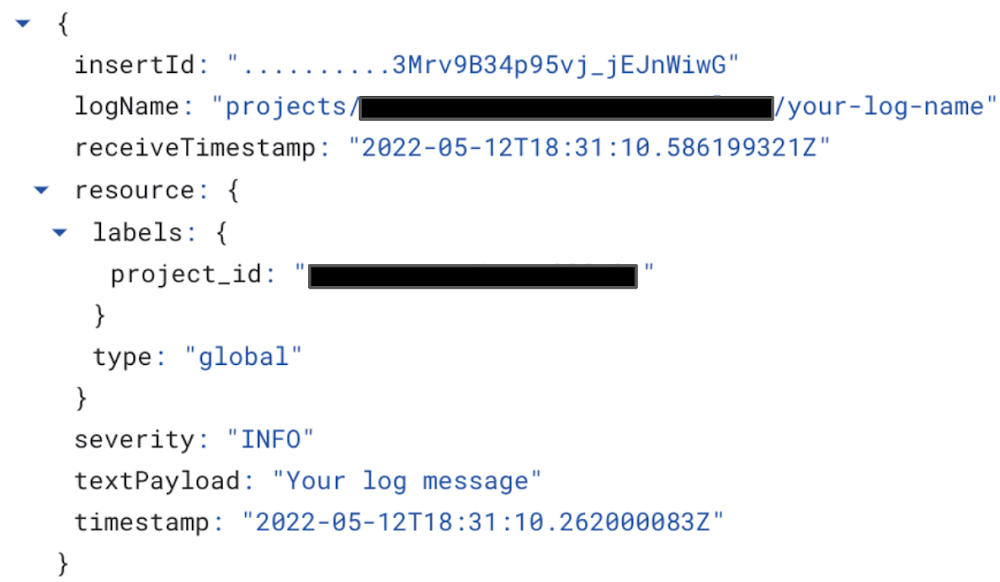
We’re thrilled to announce the release of a new update to the Cloud Logging Library for Node.js with the key new features of improved error handling and writing structured logging to standard output which becomes handy if you run applications in serverless environments like Google Functions!The latest v9.9.0 of Cloud Logging Library for Node.js makes it even easier for Node.js developers to send and read logs from Google Cloud providing real-time insight into what is happening in your application through comprehensive tools like Log Explorer. If you are a Node.js developer working with Google Cloud, now is a great time to try out Cloud Logging.The latest features of the Node.js library are also integrated and available in other packages which are based on Cloud Logging Library for Node.js:@google-cloud/logging-winston – this package integrates Cloud Logging with the Winston logging library. @google-cloud/logging-bunyan – this package integrates Cloud Logging with the Bunyan logging library. If you are unfamiliar with the Cloud Logging Library for Node.js, start by running following command to add the library to your project:code_block[StructValue([(u’code’, u’npm install @google-cloud/logging’), (u’language’, u”)])]Once the library is installed, you can use it in your project. Below, I demonstrate how to initialize the logging library, create a client assigned configured with a project ID,  and log a single entry ‘Your log message':code_block[StructValue([(u’code’, u”// Imports the Google Cloud client library rn const { Logging } = require(‘@google-cloud/logging’);rn // Creates a client with predefined project Id and a path torn // credentials JSON file to be used for auth with Cloud Loggingrn const logging = new Logging(rn {rn projectId: ‘your-project-id’,rn keyFilename: ‘/path/to/key.json’,rn }rn );rn // Create a log with desired log namern const log = logging.log(‘your-log-name’);rn // Create a simple log entry without any metadatarn const entry = log.entry({}, ‘Your log message’);rn // Log your record!!!rn log.info(entry);”), (u’language’, u”)])]Here’s the log message generated by this code in Log Explorer:Two critical features of the latest Cloud Logging Library for Node.js release are writing structured log entries to standard output and error handling with a default callback. Let’s dig in deeper. Writing structured log entries to standard outputThe LogSync class helps users write context-rich structured logs to stdout or any other Writable interface. This class extracts additional log properties like trace context from HTTP headers, and can be used to toggle between writing to the Cloud Logging endpoint or to stdout during local development.In addition, writing structured logging to stdout can be integrated with a Logging agent. Once a log is written to stdout, a Logging agent then picks up those logs and delivers those to Cloud Logging out-of-process. Logging agents can add more properties to each entry before streaming it to the Logging API.We recommend serverless applications (i.e. applications running in Cloud Functions and Cloud Run) to use the LogSync class as async logs delivery may be dropped due to lack of CPU or other environmental factors  preventing the logs from being sent immediately to the Logging API. Cloud Functions and Cloud Run applications by their nature are ephemeral and can have a short lifespan which will cause logging data drops when an instance is shut down before the logs have been sent to Cloud Logging servers. Today, Google Cloud managed services automatically install Logging agents for all Google serverless environments in the resources that they provision – this means that you can use LogSync in your application to seamlessly deliver logs to Cloud Logging through standard output.Below is a sample how to use LogSync class:code_block[StructValue([(u’code’, u”const { Logging } = require(‘@google-cloud/logging’);rn const logging = new Logging(rn {rn projectId: ‘your-project-id’,rn keyFilename: ‘/path/to/key.json’,rn }rn );rn// Create a LogSync transport, defaulting to `process.stdout`rnconst log = logging.logSync(‘Your-log-name’);rnconst entry = log.entry({}, ‘Your log message’);rnlog.write(entry);”), (u’language’, u”)])]If you use @google-cloud/logging-winston  or @google-cloud/logging-bunyan library, you can set the redirectToStdout parameter in LoggingWinston or LoggingBunyan constructor options respectively. Below is a sample code how to redirect structured logging output to stdout for LoggingWinston class:code_block[StructValue([(u’code’, u”// Imports the Google Cloud client library for Winstonrnconst {LoggingWinston} = require(‘@google-cloud/logging-winston’);rnrn// Creates a client that writes logs to stdoutrnconst loggingWinston = new LoggingWinston({rn projectId: ‘your-project-id’,rn keyFilename: ‘/path/to/key.json’,rn redirectToStdout: true,rn});”), (u’language’, u”)])]Error Handling with a default callbackThe Log class provides users the ability to write and delete logs asynchronously. However, there are cases when log entries cannot be written or deleted and an error is thrown – if the error is not handled properly, it can crash the application. One possible way to handle the error is to await the log write/delete calls and wrap it with try/catch. However, waiting for every write or delete call may introduce delays which could be avoided by simply adding a callback as shown below:code_block[StructValue([(u’code’, u”// Asynchronously write the log entry and handle response or rn // any errors in provided callbackrn log.write(entry, err => {rn if (err) {rn // The log entry was not written.rn console.log(err.message);rn } else {rn console.log(‘No error in write callback!’);rn }rn });”), (u’language’, u”)])]Adding a callback to each write or delete call is duplicate code and remembering to include it for each call may be toilsome, especially if  the code handling the error is always the same. To eliminate this burden, we introduced the ability to provide a default callback for the Log class which can be set through the LogOptions passed to the Log constructor as in example below:code_block[StructValue([(u’code’, u”const {Logging} = require(‘@google-cloud/logging’);rn const logging = new Logging();rn rn // Create options with default callback to be called on rn // every write/delete response or errorrn const options = {rn defaultWriteDeleteCallback: function (err) {rn if (err) {rn console.log(‘Error is: ‘ + err);rn } else {rn console.log(‘No error, all is good!’);rn }rn },rn };rnrn const log = logging.log(‘my-log’, options);”), (u’language’, u”)])]If you use @google-cloud/logging-winston  or @google-cloud/logging-bunyan library, you can set the callback through defaultCallback parameter in LoggingWinston or LoggingBunyan constructor options respectively. Here is an example of  how to set a default callback for LoggingWinston class:code_block[StructValue([(u’code’, u”// Imports the Google Cloud client library for Winstonrnconst {LoggingWinston} = require(‘@google-cloud/logging-winston’);rnrn// Creates a clientrnconst loggingWinston = new LoggingWinston({rn projectId: ‘your-project-id’,rn keyFilename: ‘/path/to/key.json’,rn defaultCallback: err => {rn if (err) {rn console.log(‘Error occurred: ‘ + err);rn }rn },rn});”), (u’language’, u”)])]Next StepsNow, when you integrate the Cloud Logging Library for Node.js in your project, you can start using the latest features. To try the latest Node.js library in Google Cloud you can follow this quickstart walkthrough guide:For more information on the latest check out for Cloud Logging Library for Node.js user guide.For any feedback or contributions, feel free to open issues in our Cloud Logging Library for Node.js GitHub repo. Issues can be also opened for bugs, questions about library usage and new feature requests.Related ArticleIntroducing a high-usage tier for Managed Service for PrometheusNew pricing tier for our managed Prometheus service users with over 500 billion metric samples per month. Pricing for existing tiers redu…Read Article
Quelle: Google Cloud Platform

Run your fault-tolerant workloads cost-effectively with Google Cloud Spot VMs, now GA

Available in GA today, you can now begin deploying Spot VMs in your Google Cloud projects to start saving now. For an overview of Spot VMs, see our Preview launch blog and for a deeper dive, check out our Spot VM documentation. Modern applications such as microservices, containerized workloads, and horizontal scalable applications are engineered to persist even when the underlying machine does not. This architecture allows you to leverage Spot VMs to access capacity and run applications at a low price. You will save 60 – 91% off the price of our on-demand VMs with Spot VMs.To make it even easier to utilize Spot VMs, we’ve incorporated Spot VM support in a variety of tools. Google Kubernetes Engine (GKE)Containerized workloads are often a good fit for Spot VMs as they are generally stateless and fault tolerant. Google Kubernetes Engine (GKE) provides container orchestration. Now with native support for Spot VMs, use GKE to manage your Spot VMs to get cost savings. On clusters running GKE version 1.20 and later, the kubelet graceful node shutdown feature is enabled by default, which allows the kubelet to notice the preemption notice, gracefully terminate Pods that are running on the node, restart Spot VMs, and reschedule Pods. As part of this launch, Spot VM support in GKE is now GA. For best practices on how to use GKE with Spot VMs, see our architectural walkthrough on running web applications on GKE using cost-optimized Spot VMs as well as our GKE Spot VM documentation.  GKE Autopilot Spot PodsKubernetes is a powerful and highly configurable system. However, not everyone needs that much control and choice. GKE Autopilot provides a new mode of using GKE which automatically applies industry best practices to help minimize the burden of node management operations. When using GKE Autopilot, your compute capacity is automatically adjusted and optimized based on your workload needs. To take your efficiency to the next level, mix in Spot Pods to drastically reduce the cost of your nodes. GKE Autopilot gracefully handles preemption events by redirecting requests away from nodes with preempted Spot Pods and manages autoscaling and scheduling to ensure new replacement nodes are created to maintain sufficient resources. Spot Pods for GKE Autopilot is now GA, and you can learn more through the GKE Autopilot and Spot Pods documentation.  TerraformTerraform makes managing infrastructure as code easy, and Spot VM support is now available for Terraform on Google Cloud. Using Terraform templates to define your entire environment, including networking, disks, and service accounts to use with Spot VMs, makes continuous spin-up and tear down of deployments a convenient, repeatable process. Terraform is especially important when working with Spot VMs as the resources should be treated as ephemeral. Terraform works even better in conjunction with GKE to define and manage a node poolseparately from the cluster control plane. This combination gives you the best of both worlds by using Terraform to set up your compute resources while allowing GKE to handle autoscaling and autohealing to make sure you have sufficient VMs after preemptions. SlurmSlurm is one of the leading open-source HPC workload managers used in TOP 500 supercomputers around the world. Over the past five years, we’ve worked with SchedMD, the company behind Slurm, to release ever-improving versions of Slurm on Google Cloud. SchedMD recently released the newest Slurm for Google Cloud scripts, available through the Google Cloud Marketplace and in SchedMD’s GitHub repository. This latest version of Slurm for Google Cloud includes support for Spot VMs via the Bulk API. You can read more about the release in the Google Cloud blog post.Related ArticleCloud TPU VMs are generally availableCloud TPU VMs with Ranking & Recommendation acceleration are generally available on Google Cloud. Customers will have direct access to TP…Read Article
Quelle: Google Cloud Platform

Google Cloud establishes European Advisory Board

Customers around the globe turn to Google Cloud as their trusted partner to digitally transform, enable growth, and solve their most critical business problems. To help inform Google Cloud on how it can continually improve the value and experience it delivers for its customers in Europe, the company has set up a European advisory board comprising accomplished leaders from across industries. Rather than representing Google Cloud, the European Advisory Board serves as an important feedback channel and critical voice to the company in Europe, helping ensure its products and services meet European requirements. The group also helps Google Cloud accelerate the understanding of key challenges enterprises across industries and the public sector face and helps further drive the company’s expertise and differentiation in the region.Members of the European Advisory Board offer proven expertise and distinct understanding of key market dynamics in Europe. Google Cloud’s European Advisory Board Members are:Michael Diekmann Michael Diekmann is currently Chairman of the Supervisory Board of Allianz SE, having served as Chairman of the Board of Management and CEO from 2003 to 2015. He is also Vice Chairman of the Supervisory Board of Fresenius SE & Co. KGaA, and a member of the Supervisory Board of Siemens AG. Mr. Diekmann presently holds seats at various international Advisory Boards and is an Honorary Chairman of the International Business Leaders Advisory Council for the Mayor of Shanghai (IBLAC).Brent HobermanBrent Hoberman is Co-Founder and Executive Chairman of Founders Factory (global venture studios, seed programmes and accelerator programmes), Founders Forum (global community of founders, corporates and tech leaders), and firstminute capital ($300m seed fund with global remit, backed by over 100+ unicorn founders). Previously, he co-foundedMade.com in 2010, which went public in 2021 with a valuation of $1.1bn, andlastminute.com in 1998 where he was CEO from its inception and sold it in 2005 to Sabre for $1.1bn. Mr. Hoberman has backed nine unicorns at Seed stage, and technology businesses he has co-founded have raised over $1bn and include Karakuri.Anne-Marie Idrac Anne-Marie Idrac is former Minister of French State for Foreign Trade, Minister of State for Transport, and member of the Assemblée Nationale. Ms. Idrac’s other roles include chair and CEO of RATP and of French Railways SNCF, as well as chair of Toulouse–Blagnac Airport. She is currently a director of Saint Gobain, Total, and Air France KLM. Ms. Idrac also chairs the advisory board of the public affairs school of Sciences Po in Paris, as well as France’s Logistics Association. She is also a special senior representative to the French autonomous vehicles strategy group.Julia Jaekel Julia Jaekel served for almost ten years as CEO of Gruner + Jahr, a leading media and publishing company and held various leadership positions in Bertelsmann SE & Co KGaA, including on the Bertelsmann’s Group Management Committee. She is currently on the Board of Adevinta ASA and Holtzbrinck Publishing Group.Jim Snabe (Lead Advisor) Jim Snabe currently serves as Chairman at Siemens and board member at C3.ai. He is also a member of the World Economic Forum Board of Trustees and Adjunct Professor at Copenhagen Business School. Mr. Snabe was previously co-CEO of SAP and Chairman of A. P. Moller Maersk. Delphine Geny StephannDelphine Gény-Stephann is the former Secretary of State to the Minister of the Economy and Finance in France. She held various leadership positions in Saint-Gobain, including on the group’s General Management Committee. She is currently on the Board of Eagle Genomics, EDF and Thales.Jos WhiteJos White is a founding partner at Notion Capital, a venture capital firm focused on SaaS and Cloud. Jos is a pioneer in Europe’s Internet and SaaS industry having co-founded Star, one of the UK’s first Internet providers and MessageLabs, one of the world’s first SaaS companies, and through Notion who have made more than 70 investments in European SaaS companies including Arqit, CurrencyCloud, Dixa, GoCardless, Mews, Paddle, Unbabel and Yulife.
Quelle: Google Cloud Platform

GKE workload rightsizing — from recommendations to action

Do you know how to rightsize a workload in Kubernetes? If you’re not 100% sure, we have some great news for you! Today, we are launching a fully embedded, out-of-the-box experience to help you with that complex task. When you run your applications on Google Kubernetes Engine (GKE), you now get an end-to-end workflow that helps you discover optimization opportunities, understand workload specific resource request suggestions and, most importantly, act on those recommendations — all in a matter of seconds.This workload optimization workflow helps rightsize applications by looking at Kubernetes resource requests and limits, which are often one of the largest sources of resource waste. Correctly configuring your resource requests can be the difference between an idle cluster and a cluster that has been downscaled in response to actual resource usage.If you’re new to GKE, you can save time and money by following the rightsizer’s recommended resource request settings. If you’re already running workloads on GKE, you can also use it to quickly assess optimization opportunities for your existing deployments.Then, to optimize your workloads even more, combine these new workload rightsizing capabilities with GKE Autopilot, which is priced based on Pod resource requests. With GKE Autopilot, any optimizations you make to your Pod resource requests (assuming they are over the minimum) are directly reflected on your bill.We’re also introducing a new metric for Cloud Monitoring that provides resource requests suggestions for each individual eligible workload, based on its actual usage over time.Seamless workload rightsizing with GKEWhen you run a workload on GKE, you can use cost optimization insights to discover your cluster and workload rightsizing opportunities right in the console.Here, you can see your workload’s actual usage and get signals for potentially undersized workloads that are at risk of either reliability or performance impact because they have low resource requests.However, taking the next step and correctly rightsizing those applications has always been a challenge — especially at scale. Not anymore with GKE’s new workload rightsizing capability.Start by picking up the workload you want to optimize. Usually, the best candidates are the ones where there’s a considerable divergence between resource requests and limits and actual usage. In the cost optimization tab of the GKE workloads console, just look for the workloads with a lot of bright green.Once you pick a workload, go to workload details and choose “Actions” => “Scale” => “Edit resource requests” to get more step-by-step optimization guidance.The guidance you receive relies heavily on new “Recommended per replica request cores” and “Recommended per replica request bytes” metrics (the same metrics that are available in Cloud Monitoring), which are both based on actual workload usage. You can access this view for every eligible GKE deployment, with no configuration on your part.Once you confirm the values that are best for your deployment, you can edit the resource requests and limits directly in the GKE console, and they will be directly applied to your workloads.Note: Suggestions are based on the observed usage patterns of your workloads and might not always be the best fit for your application. Each case might have its corner cases and specific needs. We advise a comprehensive check and understanding of values that are best for your specific workload.Note: Due to limited visibility into the way Java workloads use memory, we do not support memory recommendations for JVM-based workloads.Optionally, if you’d rather set the resource requests and limits from outside the GKE console, you can generate a YAML file with the recommended settings that you can use to configure your deployments.Note: Workloads with horizontal pod autoscaling enabled will not receive suggested values on the same metric for which horizontal pod autoscaling is configured. For instance, if your workload has HPA configured for CPU, only memory suggestions will be displayed.For more information about specific workload eligibility and compatibility with other scaling mechanisms such as horizontal pod autoscaling, check out the feature documentation here.Next-level efficiency with GKE Autopilot and workload rightsizingWe’ve talked extensively about GKE Autopilot as one of GKE’s key cost optimization mechanisms. GKE Autopilot provides a fully managed infrastructure offering that eliminates the need for nodepool and VM-level optimization, thus removing the bin-packing optimization challenges related to operating VMs, as well as unnecessary resource waste and day-two operations efforts. In GKE Autopilot, you pay for the resources you request. Combined with workload rightsizing, which primarily targets resource request optimization, you can easily now address two out of three main issues that lead to optimization gaps: app right-sizing and bin-packing. By running eligible workloads on GKE Autopilot and improving their resource requests, you should start to see a direct, positive impact on your bill right away!Rightsizing metrics and more resources for optimizing GKETo support the new optimization workflow we also launched two new metrics called “Recommended per replica request cores” and “Recommended per replica request bytes”. Both are available in the Kubernetes Scale metric group in Cloud Monitoring under “Kubernetes Scale” => “Autoscaler” => “Recommended per replica request”. You can also use these metrics to  build your own customization and ranking views and experiences, and export latest optimization opportunities.Excited about the new optimization opportunities? Ready for a recap of many other things you could do to run GKE more optimally? Check our Best Practices for Running Cost Effective Kubernetes Applications, the Youtube series, and have a look at the GKE best practices to lessen overprovisioning.Related ArticleGoogle Cloud at KubeCon EU: New projects, updated services, and how to connectEngage with experts and learn more about Google Kubernetes Engine at KubeCon EU.Read Article
Quelle: Google Cloud Platform

Unlock real-time insights from your Oracle data in BigQuery

Relational databases are great at processing transactions, but they’re not designed to run analytics at scale. If you’re a data engineer or a data analyst, you may want to continuously replicate your operational data into a data warehouse in real time, so you can make timely, data driven business decisions.In this blog,  we will show you a step by step tutorial on how to replicate and process operational data from an Oracle database into Google Cloud’s BigQuery so that you can keep multiple systems in sync – minus the need for bulk load updating and inconvenient batch windows.The operational flow shown in the preceding diagram is as follows:Incoming data from an Oracle source is captured and replicated into Cloud Storage through Datastream.This data is processed and enriched by Dataflow templates, and is then sent to BigQuery for analytics and visualizationGoogle does not provide licenses for Oracle workloads. You are responsible for procuring licenses for the Oracle workloads that you choose to run on Google Cloud, and you are responsible for complying with the terms of these licenses. CostsThis tutorial uses the following billable components of Google Cloud:DatastreamCloud StoragePub/SubDataflowBigQueryCompute EngineTo generate a cost estimate based on your projected usage, use the pricing calculator.When you finish this tutorial, you can avoid continued billing by deleting the resources you created. For more information, see Clean up.Before you begin1. In the Google Cloud Console, on the project selector page, select or create a Google Cloud project.Note: If you don’t plan to keep the resources that you create in this procedure, create a project instead of selecting an existing project. After you finish these steps, you can delete the project, removing all resources associated with the project.2. Make sure that billing is enabled for your Cloud project. Learn how to check if billing is enabled on a project.3. Enable the Compute Engine, Datastream, Dataflow, and Pub/Sub APIs. 4. You must also have the role of Project owner or Editor.Step 1: Prepare your environment1. In Cloud Shell, define the following environment variables:code_block[StructValue([(u’code’, u’export PROJECT_NAME=”YOUR_PROJECT_NAME”rnexport PROJECT_ID=”YOUR_PROJECT_ID”rnexport PROJECT_NUMBER=”YOUR_PROJECT_NUMBER”rnexport BUCKET_NAME=”${PROJECT_ID}-oracle_retail”‘), (u’language’, u”)])]Replace the following:YOUR_PROJECT_NAME: The name of your projectYOUR_PROJECT_ID: The ID of your projectYOUR_PROJECT_NUMBER: The number of your project2. Enter the following:code_block[StructValue([(u’code’, u’gcloud config set project ${PROJECT_ID}’), (u’language’, u”)])]3. Clone the GitHub tutorial repository which contains the scripts and utilities that you use in this tutorial:code_block[StructValue([(u’code’, u’git clone \rnhttps://github.com/caugusto/datastream-bqml-looker-tutorial.git’), (u’language’, u”)])]4. Extract the comma-delimited file containing sample transactions to be loaded into Oracle:code_block[StructValue([(u’code’, u’bunzip2 \rndatastream-bqml-looker-tutorial/sample_data/oracle_data.csv.bz2′), (u’language’, u”)])]5. Create a sample Oracle XE 11g docker instance on Compute Engine by doing the following:a. In Cloud Shell, change the directory to build_docker:code_block[StructValue([(u’code’, u’cd datastream-bqml-looker-tutorial/build_docker’), (u’language’, u”)])]b. Run the following build_orcl.sh script:code_block[StructValue([(u’code’, u’./build_orcl.sh \rn-p <YOUR_PROJECT_ID> \rn-z <GCP_ZONE> \rn-n <GCP_NETWORK_NAME> \rn-s <GCP_SUBNET_NAME> \rn-f Y \rn-d Y’), (u’language’, u”)])]Replace the following:YOUR_PROJECT_ID: Your Cloud project IDGCP_ZONE: The zone where the compute instance will be createdGCP_NETWORK_NAME= The network name where VM and firewall entries will be createdGCP_SUBNET_NAME= The network subnet where VM and firewall entries will be createdY or N= A choice to create the FastFresh schema and ORDERS table (Y or N). Use Y for this tutorial.Y or N= A choice to configure the Oracle database for Datastream usage (Y or N). Use Y for this tutorial.The script does the following:Creates a new Google Cloud Compute instance.Configures an Oracle 11g XE docker container.Pre-loads the FastFresh schema and the Datastream prerequisites.After the script executes, the build_orcl.sh script gives you a summary of the connection details and credentials (DB Host, DB Port, and SID). Make a copy of these details because you use them later in this tutorial.After the script executes, the build_orcl.sh script gives you a summary of the connection details and credentials (DB Host, DB Port, and SID). Make a copy of these details because you use them later in this tutorial. 6. Create a Cloud Storage bucket to store your replicated data:code_block[StructValue([(u’code’, u’gsutil mb gs://${BUCKET_NAME}’), (u’language’, u”)])]Make a copy of the bucket name because you use it in a later step.7. Configure your bucket to send notifications about object changes to a Pub/Sub topic. This configuration is required by the Dataflow template. Do the following:a. Create a new topic called oracle_retail:code_block[StructValue([(u’code’, u’gsutil notification create -t projects/${PROJECT_ID}/topics/oracle_retail -f \rnjson gs://${BUCKET_NAME}’), (u’language’, u”)])]b. Create a Pub/Sub subscription to receive messages which are sent to the oracle_retail topic:code_block[StructValue([(u’code’, u’gcloud pubsub subscriptions create oracle_retail_sub \rn–topic=projects/${PROJECT_ID}/topics/oracle_retail’), (u’language’, u”)])]8. Create a BigQuery dataset named retail:code_block[StructValue([(u’code’, u’bq mk –dataset ${PROJECT_ID}:retail’), (u’language’, u”)])]9. Assign the BigQuery Admin role to your Compute Engine service account:code_block[StructValue([(u’code’, u”gcloud projects add-iam-policy-binding ${PROJECT_ID} \rn–member=serviceAccount:${PROJECT_NUMBER}-compute@developer.gserviceaccount.com \rn–role=’roles/bigquery.admin'”), (u’language’, u”)])]Step 2: Replicate Oracle data to Google Cloud with DatastreamDatastream supports the synchronization of data to Google Cloud databases and storage solutions from sources such as MySQL and Oracle.In this section, you use Datastream to backfill the Oracle FastFresh schema and to replicate updates from the Oracle database to Cloud Storage in real time.Create a stream1. In Cloud Console, navigate to Datastream and click Create Stream. A form appears. Fill in the form as follows, and then click Continue:Stream name: oracle-cdcStream ID: oracle-cdcSource type: OracleDestination type: Cloud StorageAll other fields: Retain the default value2. In the Define & Test Sourcesection, select Create new connection profile. A form appears. Fill in the form as follows, and then click Continue:Connection profile name: orcl-retail-sourceConnection profile ID: orcl-retail-sourceHostname: <db_host>Port: 1521Username: datastreamPassword: tutorial_datastreamSystem Identifier (SID): XEConnectivity method: Select IP allowlisting3. Click Run Test to verify that the source database and Datastream can communicate with each other, and then click Create & Continue.You see the Select Objects to Include page, which defines the objects to replicate, specific schemas, tables, and columns and be included or excluded.If the test fails, make the necessary changes to the form parameters and then retest.4. Select the following: FastFresh > Orders, as shown in the following image:5. To load existing records, set the Backfill mode to Automatic, and then click Continue. 6. In the Define Destination section, select Create new connection profile. A form appears. Fill in the form as follows, and then click Create & Continue:Connection Profile Name: oracle-retail-gcsConnection Profile ID: oracle-retail-gcsBucket Name: The name of the bucket that you created in the Prepare your environment section.7. Keep the Stream path prefix blank, and for Output format, select JSON. Click Continue.8. On the Create new connection profile page, click Run Validation, and then click Create.The output is similar to the following:Step 3: Create a Dataflow job using the Datastream to BigQuery templateIn this section, you deploy Dataflow’s Datastream to BigQuery streaming template to replicate the changes captured by Datastream into BigQuery.You also extend the functionality of this template by creating and using UDFs.Create a UDF for processing incoming dataYou create a UDF to perform the following operations on both the backfilled data and all new incoming data:Redact sensitive information such as the customer payment method.Add the Oracle source table to BigQuery for data lineage and discovery purposes.This logic is captured in a JavaScript file that takes the JSON files generated by Datastream as an input parameter.1. In the Cloud Shell session, copy and save the following code to a file named retail_transform.js:code_block[StructValue([(u’code’, u’function process(inJson) {rnrn var obj = JSON.parse(inJson),rn includePubsubMessage = obj.data && obj.attributes,rn data = includePubsubMessage ? obj.data : obj;rnrn data.PAYMENT_METHOD = data.PAYMENT_METHOD.split(‘:’)[0].concat(“XXX”);rnrn data.ORACLE_SOURCE = data._metadata_schema.concat(‘.’, data._metadata_table);rnrn return JSON.stringify(obj);rn}’), (u’language’, u”)])]2. Create a Cloud Storage bucket to store the retail_transform.js file and then upload the JavaScript file to the newly created bucket:code_block[StructValue([(u’code’, u’gsutil mb gs://js-${BUCKET_NAME}rnrngsutil cp retail_transform.js \rngs://js-${BUCKET_NAME}/utils/retail_transform.js’), (u’language’, u”)])]Create a Dataflow job1. In Cloud Shell, create a dead-letter queue (DLQ) bucket to be used by Dataflow:code_block[StructValue([(u’code’, u’gsutil mb gs://dlq-${BUCKET_NAME}’), (u’language’, u”)])]2. Create a service account for the Dataflow execution and assign the account the following roles: Dataflow Worker, Dataflow Admin, Pub/Sub Admin, BigQuery Data Editor,BigQuery Job User, Datastream Admin and Storage Admin.code_block[StructValue([(u’code’, u’gcloud iam service-accounts create df-tutorial’), (u’language’, u”)])]code_block[StructValue([(u’code’, u’gcloud projects add-iam-policy-binding ${PROJECT_ID} \rn–member=”serviceAccount:df-tutorial@${PROJECT_ID}.iam.gserviceaccount.com” \rn–role=”roles/dataflow.admin”rnrngcloud projects add-iam-policy-binding ${PROJECT_ID} \rn–member=”serviceAccount:df-tutorial@${PROJECT_ID}.iam.gserviceaccount.com” \rn–role=”roles/dataflow.worker”rnrngcloud projects add-iam-policy-binding ${PROJECT_ID} \rn–member=”serviceAccount:df-tutorial@${PROJECT_ID}.iam.gserviceaccount.com” \rn–role=”roles/pubsub.admin”rnrngcloud projects add-iam-policy-binding ${PROJECT_ID} \rn–member=”serviceAccount:df-tutorial@${PROJECT_ID}.iam.gserviceaccount.com” \rn–role=”roles/bigquery.dataEditor”rnrngcloud projects add-iam-policy-binding ${PROJECT_ID} \rn–member=”serviceAccount:df-tutorial@${PROJECT_ID}.iam.gserviceaccount.com” \rn–role=”roles/bigquery.jobUser”rnrngcloud projects add-iam-policy-binding ${PROJECT_ID} \rn–member=”serviceAccount:df-tutorial@${PROJECT_ID}.iam.gserviceaccount.com” \rn–role=”roles/datastream.admin”rnrnrngcloud projects add-iam-policy-binding ${PROJECT_ID} \rn–member=”serviceAccount:df-tutorial@${PROJECT_ID}.iam.gserviceaccount.com” \rn–role=”roles/storage.admin”‘), (u’language’, u”)])]3. Create a firewall egress rule to let Dataflow VMs communicate, send, and receive network traffic on TCP ports 12345 and 12346 when auto scaling is enabled:code_block[StructValue([(u’code’, u’gcloud compute firewall-rules create fw-allow-inter-dataflow-comm \rn–action=allow \rn–direction=ingress \rn–network=GCP_NETWORK_NAME \rn–target-tags=dataflow \rn–source-tags=dataflow \rn–priority=0 \rn–rules tcp:12345-12346′), (u’language’, u”)])]4. Create and run a Dataflow job:code_block[StructValue([(u’code’, u’export REGION=us-central1rnrngcloud dataflow flex-template run orders-cdc-template –region ${REGION} \rn–template-file-gcs-location “gs://dataflow-templates/latest/flex/Cloud_Datastream_to_BigQuery” \rn–service-account-email “df-tutorial@${PROJECT_ID}.iam.gserviceaccount.com” \rn–parameters \rninputFilePattern=”gs://${BUCKET_NAME}/”,\rngcsPubSubSubscription=”projects/${PROJECT_ID}/subscriptions/oracle_retail_sub”,\rninputFileFormat=”json”,\rnoutputStagingDatasetTemplate=”retail”,\rnoutputDatasetTemplate=”retail”,\rndeadLetterQueueDirectory=”gs://dlq-${BUCKET_NAME}”,\rnautoscalingAlgorithm=”THROUGHPUT_BASED”,\rnmergeFrequencyMinutes=1,\rnjavascriptTextTransformGcsPath=”gs://js-${BUCKET_NAME}/utils/retail_transform.js”,\rnjavascriptTextTransformFunctionName=”process”‘), (u’language’, u”)])]Check the Dataflow console to verify that a new streaming job has started.5. In Cloud Shell, run the following command to start your Datastream stream:code_block[StructValue([(u’code’, u’gcloud datastream streams update oracle-cdc \rn–location=us-central1 –state=RUNNING –update-mask=state’), (u’language’, u”)])]6. Check the Datastream stream status:code_block[StructValue([(u’code’, u’gcloud datastream streams list –location=us-central1′), (u’language’, u”)])]Validate that the state shows as Running. It may take a few seconds for the new state value to be reflected.Check the Datastream console to validate the progress of the ORDERS table backfill.The output is similar to the following:Because this task is an initial load, Datastream reads from the ORDERS object. It writes all records to the JSON files located in the Cloud Storage bucket that you specified during the stream creation. It will take about 10 minutes for the backfill task to complete.Final step: Analyze your data in BigQueryAfter a few minutes, your backfilled data replicates into BigQuery. Any new incoming data is streamed into your datasets in (near) real time. Each record is processed by the UDF logic that you defined as part of the Dataflow template.The following two new tables in the datasets are created by the Dataflow job:ORDERS: This output table is a replica of the Oracle table and includes the transformations applied to the data as part of the Dataflow template.ORDERS_log: This staging table records all the changes from your Oracle source. The table is partitioned, and stores the updated record alongside some metadata change information, such as whether the change is an update, insert, or delete.BigQuery lets you see a real-time view of the operational data. You can also run queries such as a comparison of the sales of a particular product across stores in real time, or combining sales and customer data to analyze the spending habits of customers in particular stores.Run queries against your operational data1. In BigQuery, run the following SQL to query the top three selling products:code_block[StructValue([(u’code’, u’SELECT product_name, SUM(quantity) as total_salesrnFROM `retail.ORDERS`rnGROUP BY product_namernORDER BY total_sales descrnLIMIT 3;’), (u’language’, u”)])]The output is similar to the following:2. In BigQuery, run the following SQL statements to query the number of rows on both the ORDERS and ORDERS_log tables:code_block[StructValue([(u’code’, u’SELECT count(*) FROM `hackfast.retail.ORDERS_log`;rnSELECT count(*) FROM `hackfast.retail.ORDERS`;’), (u’language’, u”)])]With the backfill completed, the last statement should return the number 520217.Congratulations! Now you just completed the change data capture of Oracle data in BigQuery, real-time!Clean upTo avoid incurring charges to your Google Cloud account for the resources used in this tutorial, either delete the project that contains the resources, or keep the project and delete the individual resources. To remove the project:In the Cloud console, go to the Manage resources page.In the project list, select the project that you want to delete, and then click Delete.In the dialog, type the project ID, and then click Shut down to delete the project.What’s next?If you’re looking to further build on this foundation, wonder how to forecast future demand, and how to visualize this forecast data as it arrives, explore this tutorial: Build and visualize demand forecast predictions using Datastream, Dataflow, BigQuery ML, and Looker.Related ArticleSecurely exchange data and analytics assets at scale with Analytics Hub, now available in previewEfficiently and securely exchange valuable data and analytics assets across organizational boundaries with Analytics Hub. Start your free…Read Article
Quelle: Google Cloud Platform



