Palexy empowers retailers to increase in-store sales with the help of Google Cloud

Many people are again crowding store aisles as they look for their favorite products and eagerly try on clothing, shoes, and jewelry. Although some shoppers purchase multiple items, others leave the store empty handed. As retailers know, there are many possible reasons why some people only window shop. Perhaps a favorite item is too expensive, out of stock, or too hard to find in the store.The problem for many retailers, though, is that they often lack real insights into why shoppers leave without ever buying anything. That’s why we builtPalexy. With the Palexy platform, any retailer can easily use in-store video feeds combined with point of service (POS) data to gain actionable insights about customer shopping behavior, preferences, and interactions. The real time insights enable retailers to improve store layouts, stock popular items, set more competitive prices, and train more responsive staff. Today, hundreds of retailers worldwide use Palexy to create exciting in-store experiences that boost customer engagement and increase sales. As we continue to grow, Palexy will introduce new features and services to analyze and perfect every step of a customer’s journey so brick-and-mortar stores can more effectively compete against online shopping.Building a comprehensive retail analytics platformWe started Palexy with a small and dedicated team based in Southeast Asia. From the beginning, we were determined to positively disrupt the retail market. However, as a new startup with a limited budget, we quickly realized we couldn’t affordably or efficiently scale without a reliable technology partner.We looked at the options and identifiedGoogle Cloud, including theGoogle for Startups Cloud Program, as the best choice for us. In just a year we created a comprehensive retail analytics platform that delivers solutions for management, operations, merchandising, marketing, and loss prevention. We now have hundreds of customers around the world—and recently made theCBInsights list of top 10 global indoor mapping analytics vendors! We accomplished all this on thehighly secure-by-design infrastructure of Google Cloud.To accurately analyze the in-store customer journey with our computer vision and AI technology, we built our own model and processing pipeline from scratch, and we use a lot of T-4 GPUs from Google Cloud for our processing pipeline. These solutions enable Palexy to leverage existing store cameras to intelligently track how many customers enter the store, what they try on, how they interact with staff, and which aisles they visit. We also rely onGoogle Kubernetes Engine (GKE) to rapidly build, test, deploy, and manage containerized applications. We optimize GKE performance by streaming custom metrics fromPub/Sub to automatically select and scale different node pools. Since we started using GKE, we’ve lowered our application deployment costs by 30%. We’re also seeingTau VMs reduce video decoding costs by up to 40%.We use additional Google Cloud solutions to power the Palexy platform. We store and analyze customer data withCloud SQL for PostgreSQL, build API gateways onCloud Endpoints, create mobile applications withFirebase, coordinateCloud Run onCloud Scheduler, and archive processed videos onCloud Storage.Perfecting the in-store customer journeyThe Google for Startups Cloud Program has helped us to rapidly build a comprehensive retail analytics platform that is used by thousands of stores around the world. We continue to tap the deep technical knowledge of the dedicated Google for Startups Success Team who work closely with us to roll out new features and services. We also use Google Cloud credits to affordably explore additional solutions to manage and analyze the terabytes of videos, images, and data generated by our customers. Our customers are seeing incredible success with Palexy. For example, a major sporting goods retailer in Southeast Asia increased sales 59% after rearranging store shelves, redesigning window displays, and retraining staff. Point of sale data (POS) combined with video analysis also helped a fashion chain boost customer interaction rates 38% and raise conversion rates 24%.Worldwide demand for Palexy continues to grow at an impressive pace. As we expand our team, we look forward to launching Palexy in new markets and empowering retailers to perfect in-store shopping experiences. If you want to learn more about how Google Cloud can help your startup, visit our pagehere to get more information about our program, and sign up for our communications to get a look at our community activities, digital events, special offers, and more.Related ArticleQuintoAndar becomes largest housing platform in Latin America with help from Google CloudLearn how Brazilian startup QuintoAndar leveraged Google for Startups and Google Cloud for ultimate growth.Read Article
Quelle: Google Cloud Platform
How Google Cloud can help secure your software supply chain

With the recent announcement of Assured Open Source Software service, Google Cloud can help customers secure their open source software by providing them with the same open source packages that Google uses. By getting security assurances from using these open source packages, Google Cloud customers can enhance their security posture and build their own software using the same tools that we use such as Cloud Build, Artifact Registry and Container/Artifact Analysis. Here’s how Assured OSS can be incorporated into your software supply chain to provide additional software security assurances during the software development and delivery process.Building security into your software supply chainOut of the gate, the software development process begins with assurances from Google Cloud as developers are able to use open-source software packages from the Assured OSS service through their integrated development environment (IDE). When developers commit their code to their Git code repository, Cloud Build is triggered to build their application in the same way Assured OSS packages are built. This includes Cloud Build automatically generating, signing and storing the build provenance, which can provide up to SLSA level 2 assurance. As part of the build pipeline, the built artifacts are stored in Artifact Registry and automatically scanned for vulnerabilities, similar to how Assured OSS packages are scanned. Vulnerability scanning can be further enhanced using Kristis Signer policies that define acceptable vulnerability criteria which can be validated by the build pipeline.It’s important that only vetted applications be permitted into runtime environments like Google Kubernetes Engine (GKE) and Cloud Run. Google Cloud provides the Binary Authorization policy framework for defining and enforcing requirements on applications before they are admitted into these runtimes. Trust is accumulated in the form of attestations, which can be based on a broad range of factors including the use of blessed tools and repositories, vulnerability scanning requirements, or even manual processes such as code review and QA testing.Once the application has been successfully built and stored with passing vulnerability scans and trust-establishing attestations, it’s ready to be deployed. Google Cloud Deploy can help streamline the continuous delivery process to GKE, with built-in delivery metrics and security and auditing capabilities. Rollouts to GKE can be configured with approval gates to ensure that the appropriate stakeholders or systems have approved application deployments to target environments.When the application is deployed to the runtime, Binary Authorization is used to ensure that only applications that previously have been signed by Cloud Build or have otherwise successfully collected required attestations throughout the supply chain are permitted to run.This software supply chain allows you to build your applications in a similar manner as our Assured OSS packages, and securely delivers them to a runtime with added assurances provided by Cloud Deploy and Binary Authorization. As a result, you’re able validate the integrity of the application that you developed, built, and deployed—and have a greater level of confidence in the security of running applications.Take the next stepWe are thrilled to provide you with a growing set of capabilities across our services to help secure your software supply chain.To get started, try out Cloud Build, Artifact Registry, Container/Artifact Analysis, Cloud Deploy and Binary Authorization. To learn more about Assured OSS, please fill out this form.Related ArticleIntroducing Google Cloud’s new Assured Open Source Software serviceAnnouncing Google Cloud’s new Assured Open Source Software Service, which can help organizations add the same software that Google uses i…Read Article
Quelle: Google Cloud Platform
Connecting Apigee to GKE using headless services and Cloud DNS

We’ve recently supported an organization who wanted to expose its Google Kubernetes Engine (GKE) backend behind Apigee X. A quite common architecture, which most of the users delivering modern web applications on Google Cloud tend to build upon.In this scenario, Google’s API gateway, Apigee, receives requests and performs L7 routing, redirecting you to the correct backend application, running as one or more pods on GKE.Performing L7 routing in Apigee is not just advantageous, but it’s necessary. It is the job of the API gateway to route requests based on a combination of hostnames, URIs (and more), and applying authentication and authorization mechanisms through native policies.When the organization asked how to expose GKE applications internally to Apigee, it was natural to recommend using Kubernetes ingress or gateways. These objects allow sharing the same GCP load balancer between multiple applications and perform L7 routing, so the requests are sent to the right Kubernetes pod.Isn’t this fantastic? We allocate more than one load balancer per service, so companies spend less and avoid hitting limits, once they scale the infrastructure.On the other hand, the system is performing L7 routing twice: once in Apigee and once in Kubernetes. This may increase latency and add management overhead. You will need to configure the mapping between matching hostnames and URIs and backends twice — once in Apigee and once in GKE.Is there a way to avoid this? It turns out that a combination of recently released features in Google Cloud have the prerequisites to do the job.What we describe in this article is currently only a proof of concept, so it should be carefully evaluated. Before describing the end-to-end solution, let’s discover each building block and its benefits.VPC-native GKE clustersGoogle Cloud recently introduced VPC-native GKE clusters. One of the interesting features about VPC native GKE clusters is that they use VPC IP alias ranges for pods and cluster IP services. While cluster IPs remain routable within the cluster only, pod IPs also become reachable from the other resources in your VPC (and from the interconnected infrastructure, like other VPCs or on-premises). Even if possible, clients shouldn’t reference pod IPs directly, as they are intrinsically dynamic. Kubernetes services are a much better alternative, as the Kubernetes DNS registers a well-known, structured record every time you create one.Kubernetes headless servicesAs introduced earlier, we need to create Kubernetes services (so DNS entries) that directly reference the pod IPs. This is exactly what Kubernetes headless services do — headless services reference pods just as any other Kubernetes service, but the cluster DNS binds the service DNS record and the pod IPs, instead of a dedicated service IP (such as ClusterIP services do). Now the question is how to make the internal Kubernetes DNS available also to external clients, so that they can query the headless service IP record and point exactly to the right pod IP (as the pod scales in and out).GKE and Cloud DNS integrationGKE uses kube-dns as the default cluster Domain Name Service, but optionally, you can choose to integrate GKE with Cloud DNS. While this is normally done to circumvent kube-dns scaling limitations, it also turns out to be very useful for our use-case. Setting GKE and Cloud DNS with a VPC scope allows clients outside the cluster to directly query the entries registered by the cluster in Cloud DNS.Apigee DNS peeringApigee is the client that needs to communicate with the backend applications running on GKE. This means that, in the model we discussed above, it also needs to query the DNS entry to get in touch with the right pod. Living in a dedicated Google-managed project and VPC, Apigee needs to have DNS peering in place between its project and the user VPC. This way, it will gain visibility of the same DNS zones your VPC has visibility of, including the one managed by GKE. All of this can be easily achieved with a dedicated command.Putting pieces togetherLet’s summarize what we got:A VPC-native GKE cluster using Cloud DNS as its DNS service (configured in VPC scope)A backend application running on GKE (in form of one or more pods)A headless service pointing to the pod(s)Apigee configured to direct DNS queries to the user VPCWhen a request comes in, Apigee reads the Target Endpoint value and queries Cloud DNS to get the IP of the application pod. Apigee reaches the pod directly, with no need for additional routing to be configured on the K8s cluster.If you’re not interested in exposing secure backends to Apigee (using SSL/TLS certificates), you can stop reading here and go through the repository to give it a try.Exposing secure backendsYou may also want to encrypt the communication end-to-end, not only from the client, to Apigee, but also up to the GKE pod. This means that the corresponding backends will expose certificates to Apigee.SSL/TLS offloading is one of the main tasks of ingress and gateway objects but this comes at the extra cost of maintaining an additional layer of software and defining L7 routing configurations in the cluster, which is exactly what we wanted to avoid and the reason why we came up with this proof of concept.Fortunately, other well-established Kubernetes APIs and tools can help you to achieve this goal.Cert-manager is a popular open source tool used to automate certificates lifecycle. Users can either create certificates from an internal Certificate Authority (CA) or request certificates from another CA outside the cluster. Through certificate objects and issuers, users can request SSL keypairs for pods running in the cluster and manage their renewal.While using cert-manager alone would be sufficient to make pods expose SSL certificates, it would require you to attach certificates manually to the pods. This is just a repetitive action that can certainly be automated using MutatingAdmissionWebhooks.To further demonstrate the viability of the solution, the second part of our exercise consisted in writing and deploying a Kubernetes mutating webhook. When you create a pod, the webhook automatically adds a sidecar container, running a reverse proxy that exposes the application TLS certificates (previously generated through cert-manager and mounted in the sidecar container as Kubernetes volumes).Conclusions, limitations and next stepsIn this article, we proposed a new way to connect Apigee and GKE backends, so that you won’t have to perform L7 routing in both components. We think this will likely help you to save time (managing way less configurations) and to reach better performances.Collaborations are welcome. We really value your feedback and new ideas that may bring useful inputs to the project, so please give it a try. We released our demo as open source. You’ll learn more about GKE, Apigee, and all the tools and configurations we talked about above.We’re definitely aware of some limitations and conscious of some good work that the community may benefit from, moving forward:When Cloud DNS is integrated with GKE, it sets for all records a default Time To Live (TTL) of 10 seconds. If you try to change this value manually, the Cloud DNS GKE controller will periodically override it, putting the default value back. Having high DNS values may cause clients to not be able to reach the pods that Kubernetes recently scaled. We’re working with the product team to understand if there is the chance to make this value configurable.On the other hand, using very low TTLs may largely increase the number of Cloud DNS queries, causing the increase of prices.We definitely look forward to adding support for other reverse proxies, such as Envoy or Apache HTTP Server. Contributions are always very welcome. In case you’d like to contribute but you don’t know where to start, don’t hesitate to contact us or to open an issue, directly in the repositoryWe believe this use case is not uncommon and as such we decided to jump on it and give it a spin. We don’t know how far this journey will bring us, but it has definitely been instructive and fun, and so we hope it will be for you too.Related ArticleApplication Rationalization through Google Cloud’s CAMP FrameworkApplication Rationalization through CAST Highlight (automated source code scan with business context) and mFit (VM workload assessment & …Read Article
Quelle: Google Cloud Platform

The new Google Cloud region in Dallas, Texas is now open

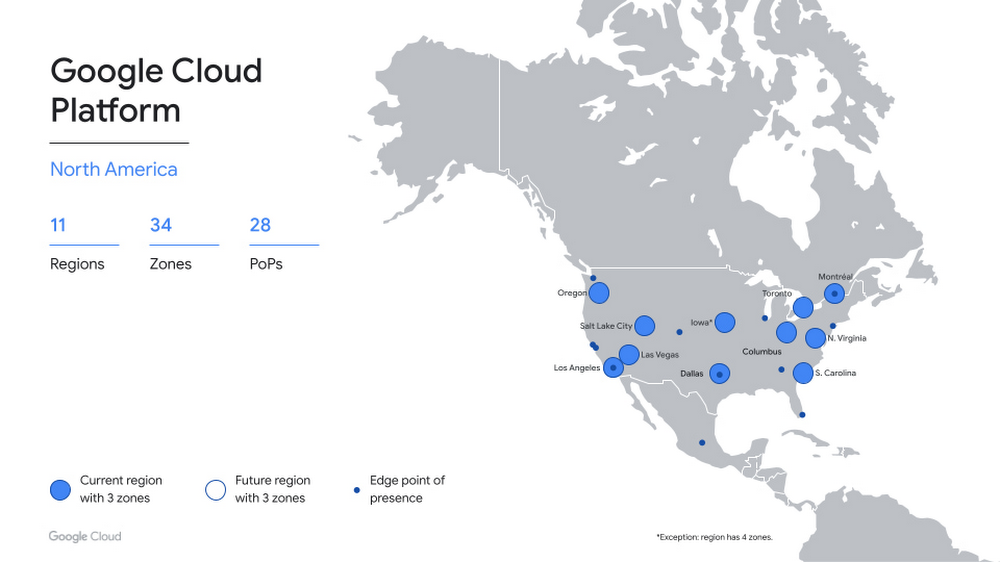
Google is proud to have roots in Texas, where over 2,400 Googlers from Android, Cloud, Ads and other product areas, support millions of Texas businesses. In 2021, Google helped provide $38.25 billion of economic activity for Texas businesses, nonprofits, publishers, creators and developers. Today, we’re excited to expand our presence in Texas with the launch of our newest Google Cloud region in Dallas, bringing a second region to the central United States, the eleventh in North America, and our global total to 34.Local capacity for the Lone Star StateNow open to Google Cloud customers, the Dallas region provides you with the speed and availability you need to innovate faster and build high-performing applications that cater to the needs of nearby end users. We’ve heard from many of you that the availability of your workloads and business continuity are increasingly top priorities. The Dallas region gives you added capacity and the flexibility to distribute your workloads across the U.S.Getting startedIf you’re new to Google Cloud, check out some of our resources to get started. You can also integrate your on-premises workloads with our new region using Cloud Interconnect or explore multi-cloud options with Anthos. You’ll have access to our standard set of products, including Compute Engine, Google Kubernetes Engine, Cloud Storage, Persistent Disk, CloudSQL, and Cloud Identity. We are excited to welcome you to our new cloud region in Dallas, and eagerly await to see what you build with our platform. Stay tuned for more region announcements and launches. For more information contact sales and get started with Google Cloud today.Related ArticleThe new Google Cloud region in Columbus, Ohio is openGoogle Cloud’s Columbus, Ohio region is now open, bringing a second region to the midwest, for a total of 33 regions across the globe.Read Article
Quelle: Google Cloud Platform

Learn how to tackle supply chain disruptions with SAP IBP and Google Cloud

Responding to multiple, simultaneous disruptive forces has become a daily routine for most demand planners. To effectively forecast demand, they need to be able to predict the unpredictable while accounting for diverse and sometimes competing factors, including:Labor and materials shortagesGlobal health crisesShifting cross-border restrictionsUnprecedented weather impactsA deepening focus on sustainability Rising inflationInnovators are looking to improve demand forecast accuracy by incorporating advanced capabilities for AI and data analytics, which also speed up demand planning. According to a McKinsey survey of dozens of supply chain executives, 90% expect to overhaul planning IT within the next five years, and 80% expect to or already use AI and machine learning in planning.Google Cloud and SAP have partnered to help customers navigate these challenges and supply chain disruptions starting with the upstream demand planning process, focusing on improving forecast accuracy and speed through integrated, engineered solutions. The partnership is enabling demand planners who use SAP IBP for Supply Chain in conjunction with Google Cloud services to access a growing repository of third-party contextual data for their forecasting, as well use an AI-driven methodology that streamlines workflows and improves forecast accuracy. Let’s take a closer look at these capabilities.Unify data from SAP software with unique Google data signalsWhen it comes to demand forecasting and planning, the more high-quality and relevant contextual data you use, the better, because it helps you understand the influencing factors of your product sales to sense trends and react to disruptions or capitalize on market opportunities more timely and accurately.The expanded Google Cloud and SAP partnership helps customers who use SAP® Integrated Business Planning for Supply Chain (SAP IBP for Supply Chain) bring public and commercial data sets that Google Cloud offers into their own instances of SAP IBP  and include them in their demand planning models in SAP IBP. So, in addition to sales history, promotions, stakeholder inputs and customer data that are typically in SAP IBP, a demand planner can incorporate their advertising performance, online search, consumer trends, community health data, and many more data signals from Google Cloud when working through demand scenarios.More data enables more robust and accurate planning, so Google continues to build an ecosystem of data providers and grow the number of available data sets on Google Cloud. Some current providers include the U.S. Census Bureau, the National Oceanic and Atmospheric Administration, and Google Earth, and partnerships are underway with Crux, Climate Engine, Craft, and Dun & Bradstreet to help companies identify and mitigate risk and build resilient supply chains.Augmenting demand planning with additional external causal factor data is a starting point to drive more accurate forecasting. For example, knowing what regional events may be happening, or the weather patterns that may impact sales of your products, allows you to react faster to these changes by making sure adequate supply is being provided. The result is a more accurate overall plan that reduces resource waste and out-of-stock events. Planners can respond with more accurate and granular daily predictions about sales, pricing, sourcing, production, inventory, logistics, marketing, advertising, and more based on the expanded data.Get more accurate forecasts with Google AI inside Extending the already expansive algorithm selection available in SAP IBP, the release of version 2205 allows SAP IBP customers to access Google Cloud’s supply chain forecasting engine, which is built on Vertex AI — Google Cloud’s AI-as-a-platform offering — from within SAP IBP as part of their forecasting process. The benefit of using an AI-driven engine for demand forecasting is that it meaningfully improves forecast accuracy. Most demand forecasting today is done through a manually set, rules-based model versus an AI-driven model that is smarter and gets better at predicting demand as it works. Take the fastest path from data to value with streamlined workflowsVertex AI can include relevant contextual data sets for demand planning, and the results can be shown in SAP IBP for planners to incorporate when building their workflows.In addition to more accurate forecasts, planners can work faster and more efficiently as they build potential scenarios, meaning they can do more simulations than they do now so that a wider range of disruptions can be modeled. Customers of SAP IBP don’t have to do any of the heavy lifting. They just have to share their data from SAP IBP with Google, then access the process workflow capabilities to set up automated workflows that use the combined data. Google makes the data available so that planners can use it as they’re setting up their workflows in Vertex AI. Users of the Google Supply Chain twinand SAP IBP can combine the rich planning data from IBP with additional SAP data and other Google data sources to provide better supply chain visibility. The  Google Supply Chain twin is a real-time digital representation of your supply chain based on sales history, open customer orders, past and future promotions, pricing and competitor insights, consumer history signals, external data signals and Google data.Leverage Google data signals with SAP IBP for more accurate forecastsIt’s not difficult to access these new capabilities, and the benefits are more accurate near-term forecasts and more return on your investments in SAP IBP and Google Cloud. If you happen to be at the Gartner Supply Chain Symposium from June 6-8th in Orlando, Florida, stop by our booth to say hello. Or, get started nowRelated ArticleHow Google Cloud and SAP solve big problems for big companiesOn the occasion of SAP Sapphire, here’s a rundown of the key Google Cloud and SAP initiatives we’ll be talking to customers about at the …Read Article
Quelle: Google Cloud Platform
Moss simplifies climate change mitigation with Google Cloud

Editor’s note: World Environment Day reminds us that we all can contribute to creating a cleaner, healthier, and more sustainable future. Google Cloud is excited to celebrate innovative startup companies developing new technology and driving sustainable change. Today we’re highlighting Moss, a Brazilian startup, simplifying carbon offset transactions and increasing traceability, using blockchain and Google Cloud technology. Brazil is an important nation in the fight against climate change. With 212 million people, it’s the sixth most populous country in the world. And the Amazon rainforest is by far the world’s largest rainforest—larger, in fact, than the next two largest rainforests combined—and therefore the earth’s largest carbon sink. Yet as much as 17 percent of the rainforest is already lost to agricultural development and resource extraction.I’m passionate about enabling a more sustainable future for Brazilians and for people all over the world, as is my business partner, Luis Felipe Adaime, who used to work in financial services. That industry—at least in Brazil—is still in the early stages of embracing more sustainability initiatives. Luis Felipe was interested in climate change and environmental, social, and governance (ESG) strategies, but few people in Brazilian finance were even talking about these things. After his daughter was born, he decided to dedicate his life to combating climate change and foundedMoss.Moss, where I am a Partner and Managing Director, makes it easier by simplifying green carbon offset transactions. We started in Brazil, but we’re global now, and we’re growing fast, with 44 employees dedicated to reaching more customers worldwide. The focus on sustainability is increasing everywhere now. For instance in 2019, the UK became the first country in the world to pass a net zero carbon emissions law, requiring itself to reduce net emissions of greenhouse gasses by 100 percent compared to 1990 levels by the year 2050. Other countries worldwide are embracing similar goals. Net zero carbon emissions doesn’t mean that no carbon dioxide (or its equivalent) is released into the atmosphere. That is likely impossible given how economies and the people they serve operate today. Net zero means that for every ton of carbon dioxide emitted, another ton is removed, such as by the planting of trees to replace it with a carbon sink. Fernanda Castilho, Partner and Managing Director at MossExpanding access to carbon credits to fight climate changeOur mission is simple: combat climate change by digitizing the tools we need to expand the market for buying carbon offset credits. We started by transferring existing credits to blockchain and by creating a green token, MCO2, which we sell to companies and individuals who want to do their part. MCO2 is an ERC-20 utility token, a standard used for creating and issuing smart contracts on the Ethereum blockchain. If you purchase carbon offset credits from us, and retire them, we believe that you’re donating money to projects that prevent deforestation in the Amazon for timber harvesting and cattle grazing. Moss makes publicly available a real-time reconciliation on itswebsite, where holders can check the total supply of tokens on the Ethereum blockchain and compare it to the regular inventory of the carbon credit market.We partner with global companies such as Harrison Street, a real estate investment fund in the UK, and One River Asset Management, a crypto management fund in the US. But our largest clients are corporations here in Brazil that acquire our credits with the objective to offset their carbon footprints or offer it to their own clients.GOL, for instance, Brazil’s largest airline, now gives passengers the option to offset carbon emissions from their trips when they purchase a ticket. We also work with a number of Brazilian soccer teams, and there’s an app available in the Google Play store that individuals can use to purchase credits to offset their personal carbon footprints. Rapid time to market with advanced securityOur CTO, Renan Kruger, lobbied hard to use Google Cloud right at the beginning because he loved using Google Workspace at his previous job. Our IT team also heavily promoted the use of Google Cloud thanks to capabilities in Cloud SQL, Cloud Storage, Compute Engine, Google Kubernetes Engine (GKE), BigQuery, Dataflow, and Cloud Functions. We also value that Google Cloud takes environmental sustainability as seriously as we do.BigQuery is a terrific repository for capturing and analyzing massive amounts of data, so the flexibility to manage and analyze vast pools of data is integral to creating our carbon credit exchange. GKE can be one of the simplest ways to eliminate operational overhead by automatically deploying, scaling, and managing Kubernetes. Google Cloud Dataflow is perfect for fast, cost-effective, serverless data processing, and we love that Cloud Functions lets us pay as we go to run our code without any server management. All of this is crucial for us because we have immense flexibility to scale and don’t need or want to run hardware. Our product is an app for buying and selling credits rather than physical objects, so we can operate entirely in the cloud. We used Firebase, the Google mobile development platform, to quickly build and grow our app with basically no infrastructure in aNoOps scenario to achieve a rapid time to market. We can deploy edge functions and back-end functions using Node JS inside the Firebase stack itself. We can also deploy our solutions on blockchain to help secure our product keys. And Google Cloud data governance helps us deploy and maintain clusters, reducing the time, cost, and labor of maintaining traditional infrastructure.Equally critical is security. With Google Cloud, we don’t worry about patching or hardening the system or any of the other headaches IT teams deal with using on-premise infrastructure or less-secure cloud environments.Moving toward net zero emissionsRight now we’re trying to reduce carbon emissions, but removing carbon that’s already in the atmosphere and reversing rather than slowing climate change is a priority. Damage control, while important today, isn’t enough in the long run. A big challenge is that right now it’s very expensive to remove carbon from the atmosphere. Fortunately, technology is always improving, which could help lower carbon-elimination costs. The reality is that we all have to work together and contribute to combat climate change. Everyone everywhere is already witnessing impacts that are projected to only worsen in frequency and severity. The more people who are empowered to take action, the better it will be for everyone. At Moss, we offer another important avenue for people to get involved, with a vision that additional,  transparent and  high-quality carbon credits will aid in installing the destruction we see today and tomorrow. If you want to learn more about how Google Cloud can help your startup, visit our pagehere to get more information about our program, and sign up for our communications to get a look at our community activities, digital events, special offers, and more.Related ArticleHow Google Cloud is helping more startups build, grow, and scale their businessesLearn how Google is investing in startups at the 2022 Google Cloud Startup Summit.Read Article
Quelle: Google Cloud Platform

Google Cloud’s preparations to address the Digital Operational Resilience Act

European legislators came to an inter-institutional agreement on the Digital Operational Resilience Act (DORA) in May 2022. This is a major milestone in the adoption of new rules designed to  ensure financial entities can withstand, respond to and recover from all types of ICT-related disruptions and threats, including increasingly sophisticated cyberattacks.DORA will harmonize how financial entities must report cybersecurity incidents, test their digital operational resilience, and manage ICT third-party risk across the financial services sector and European Union (EU) member states. In addition to establishing clear expectations for the role of ICT providers, DORA will also allow financial regulators to directly oversee critical ICT providers.  Google Cloud welcomes the agreement on DORA. As part of our Cloud On Europe’s Terms initiative, we are committed to building trust with European governments and enterprises with a cloud that meets their regulatory, digital sovereignty, sustainability, and economic objectives. We recognize the continuous effort by the European Commission, European Council, and European Parliament to design a proportionate, effective, and future-proof regulation. We have been engaging with the policymakers on the DORA proposal since it was tabled in September 2020, and appreciate the constructive dialogue that the legislators have held with ICT organizations.Google Cloud’s perspective on DORAWe firmly believe that DORA will be crucial to the acceleration of digital innovation in the European financial services sector. It creates a solid framework to enhance understanding, transparency, and trust among ICT providers, financial entities, and financial regulators. Here are a few key benefits of DORA:Coordinated ICT incident reporting: DORA consolidates financial sector incident reporting requirements under a single streamlined framework. This means financial entities operating in multiple sectors or EU member states should no longer need to navigate parallel, overlapping reporting regimes during what is necessarily a time-sensitive situation. DORA also aims to address parallel incident reporting regimes like NIS2. Together these changes help get regulators the information they need while also allowing financial entities to focus on other critical aspects of incident response. New framework for digital operational resilience testing: Drawing on existing EU initiatives like TIBER-EU, DORA establishes a new EU-wide approach to testing digital operational resilience, including threat-led penetration testing. By clarifying testing methodology and introducing mutual recognition of testing results, DORA will help financial entities continue to build and scale their testing capabilities in a way that works throughout the EU. Importantly, DORA addresses the role of the ICT provider in testing and permits pooled testing to manage the impact of testing on multi-tenant services like public clouds.CoordinatedICT third party risk management: DORA builds on the strong foundation established by the European Supervisory Authorities’ respective outsourcing guidelines by further coordinating ICT third-party risk management requirements across sectors, including the requirements for contracts with ICT providers. By helping to ensure that similar risks are addressed consistently across sectors and EU member states, DORA will enable financial entities to consolidate and enhance their ICT third-party risk management programs. Direct oversight of critical ICT providers: DORA will allow financial regulators to directly oversee critical ICT providers. This mechanism will create a direct communication channel between regulators and designated ICT providers via annual engagements, including oversight plans, inspections, and recommendations. We’re confident that this structured dialogue will help to improve risk management and resilience across the sector.How Google Cloud is  preparing for DORAAlthough political agreement on the main elements of DORA have been reached, legislators are still finalizing the full details. We expect the final text to be published later this year and that there will be a two-year implementation period after publication. While DORA isn’t expected to take effect until 2024 at the earliest, here’s four important topics that DORA will impact and what Google Cloud does to support our customers in these areas today.Incident reporting: Google Cloud runs an industry-leading information security operation that combines stringent processes, a world-class team, and multi-layered information security and privacy infrastructure. Our data incident response whitepaper outlines Google Cloud’s approach to managing and responding to data incidents. We also provide sophisticated tools and solutions that customers can use to independently monitor the security of their data, such as the Security Command Center. We continuously review our approach to incident management based on evolving laws and industry best practices, and will be closely following the developments in this area under DORA.Digital operational resilience testing: We recognize that operational resilience is a key focus for the financial sector. Our research paper on strengthening operational resilience in financial services by migrating to Google Cloud discusses the role that a well-executed migration to Google Cloud can play in strengthening resilience. We also recognize that resilience must be tested. Google Cloud conducts our own rigorous testing, including penetration testing and disaster recovery testing. We also empower our customers to perform their ownpenetration testing and disaster recovery testing for their data and applications. Third-party risk: Google Cloud’s contracts for financial entities in the EU address the contractual requirements in the EBA outsourcing guidelines, the EIOPA cloud outsourcing guidelines, the ESMA cloud outsourcing guidelines, and other member state requirements. We are paying close attention to how these requirements will evolve under DORA.Oversight: Google Cloud is committed to enabling regulators to effectively supervise a financial entity’s use of our services. We grant information, audit and access rights to financial entities, their regulators and their appointees, and support our customers when they or their regulators choose to exercise those rights. We would approach a relationship with a lead overseer with the same commitment to ongoing transparency, collaboration, and assurance.We share the same objectives as legislators and regulators seeking to strengthen the digital operational resilience of the financial sector in Europe, and we intend to continue to build on our strong foundation in this area as we prepare for DORA. Our goal is to make Google Cloud the best possible service for sustainable, digital transformation for European organizations on their terms—and there is much more to come.Related ArticleHelping build the digital future. On Europe’s terms.Cloud computing is globally recognized as the single most effective, agile and scalable path to digitally transform and drive value creat…Read Article
Quelle: Google Cloud Platform

Apigee best practices for Contact Center AI

By now, you’ve probably interacted with a customer service chatbot at some point. However, many of those interactions may have left a lot to be desired. Modern consumers generally expect more than a simple bot that answers questions with predefined answers—they expect a virtual agent that can solve their problems.Google Cloud Contact Center AI (CCAI) can make it easier for organizations to efficiently support their end customers with natural interactions delivered through AI-powered conversation. In this guide, we’ll share seven Apigee best practices for building fast, effective chatbots with secure APIs using CCAIand Apigee API Management.This blog post assumes you have basic knowledge of CCAI and Apigee API Management.Good conversation is challengingOne of the many challenges organizations face is how to provide a bot experience to customers when information resides in more places than ever. Creating an optimal virtual agent generally involves integrating with both new and legacy systems that are spread out across a mix of on-premises and cloud environments, using REST APIs.Dialogflow CX is a natural language processing module of CCAI that translates text or audio from a conversation into structured data. A powerful feature of Dialogflow CX is webhook fulfillments to connect with backend systems. Once a virtual agent triggers a webhook, Dialogflow CX connects to backend APIs, consumes the responses, and stores required information in its context. This integration can allow virtual agents to have more informed and purposeful interactions with end users, such as verifying store hours, determining whether a particular item is in stock, and checking the status of an order.Developing APIs for CCAI fulfillment is not a straightforward task. There can be many challenges associated with it, including:Complexity: You may need to access APIs that are not exposed externally, which can require significant collaboration and rules to enable access to existing data and systems. This can easily lead to technical debt and more inefficiency without an API Gateway that can translate the complexities of data systems in real time and forward them to a customer.Increased customer frustration: Contact centers often act as one of the primary drivers of customer experience. Improving the speed of response can enhance experiences, but any friction or delays can be magnified. Caching and prefetching data are some commonly used flows to enable faster virtual agent responses. API Orchestration: APIs generally require more than just exposing an endpoint as they need to change often in response to customer needs. This flexibility can require API orchestration, where APIs are decoupled from rigid services and integrated into an interface tailored to the expected consumption patterns and security requirements of interacting with Dialogflow CX. Without an API platform, translating complexities of data systems in realtime and forwarding to the caller is not efficient.How Dialogflow and Apigee deliver better chatbot experiencesCCAI can be more effective when woven into the fabric of the business via APIs. The more functionality (and therefore more APIs) you add to the agent, the more critical it can become to streamline the API onboarding process. You need to consolidate repetitive work, validate security postures, and identify and implement optimizations to ensure a great end user experience.Apigee API Management can pave the way for faster and easier fulfillment. Apigee is an intuitive platform for bot designers and architects to incorporate key business processes and insights into their workflow. More specifically, it enables Dialogflow to speak with your backend systems. You can use Apigee’s built-in policies to inspect Dialogflow requests, set responses, validate defined parameters, and trigger events in real time. For example, if a call meets a defined business criteria, Apigee can augment a “360 degree view” in a data warehouse like BigQuery, add a customer to a campaign list, or send a SMS/text alert—all without any material impact on the routing time. By pairing CCAI with Apigee, you can leverage a greater portion of Google Cloud’s transformation toolset, reduce the amount of time needed for conversation architects to integrate APIs, and create a more cohesive development environment for solving call center challenges.Seven ways to get more out of Contact Center AI API development with ApigeeThe following are several best practices for Apigee API development for Dialogflow CX API fulfillments:1. Create a single common Apigee API proxy Let’s assume we have a Dialogflow CX virtual agent that needs three fulfillment APIs that will be fronted by Apigee:get list of moviesadd movie ticket to cartorder item in cartTechnically, you can create a separate Dialogflow CX webhook for each of these APIs, which can point to three separate API proxies. However, because Dialogflow has a proprietary request and response format, creating three separate API proxies for those fulfillment APIs results in three non-RESTful proxies that are difficult to consume for any clients other than Dialogflow CX virtual agents.Instead, we recommend creating a common Apigee API proxy that is responsible for handling all the fulfillment APIs required by the agent. Dialogflow CX will have just one webhook that is configured to send requests to the common Apigee API proxy. Each webhook call is sent with a webhook tag that uniquely identifies the correct fulfillment API.2. Leverage Dialogflow policies as much as possibleApigee provides two Dialogflow-specific policies: ParseDialogflowRequest and SetDialogflowResponse. It is highly recommended to use these policies whenever possible. Doing so not only adheres to the general best practice of choosing built-in policies first over custom code, but also ensures that parsing and setting of Dialogflow request and response is standardized, hardened, and performant.As a general rule:ParseDialogflowRequest is required only once in an API proxy and placed in the PreFlow after authentication has taken place.SetDialogflowResponse may be used for each distinct fulfillment response (i.e., for each unique webhook tag). If the SetDialogflowResponse does not meet all of the requirements, either supplement or replace it with AssignMessage or JavaScript policies.3. Use conditional flows for each webhook tagConditional flows should be used to separate the logic for different fulfillment APIs. The easiest way to implement this is by placing a ParseDialogflowRequest policy in the PreFlow. Once that policy has been added, the flow variable google.dialogflow.<optional-prefix>.fulfillment.tag will be populated with the value of the webhook tag. This variable can then be used to define the conditions in which a request enters a particular conditional flow.Here is an example of a conditional flow using the same three fulfillment APIs from above:4. Consider utilizing proxy chainingDialogflow CX webhooks have their own request and response format instead of following RESTful conventions such as GET for reads, POST for creates, PUT for updates, etc. This makes it difficult for conventional clients to easily consume an API Proxy created for DIalogflow CX.Hence we recommend using proxy chaining. With proxy chaining you can separate API proxies into two categories: Dialogflow proxies and resource proxies. Dialogflow proxies can be lightweight proxies limited to actions specific to the Dialogflow client. These might include:Authenticating requestsTranslating a Dialogflow CX request into a RESTful formatSending a RESTful request to the resource proxyTranslating the response back from the resource proxy into the Dialogflow formatAnd any tasks that involve connecting to the backend and exchanging data should fall to your resource proxies. You should create resource proxies just like any other Apigee API proxy, without considerations for Dialogflow in mind. The focus should be on providing an eloquent, RESTful interface for all types of clients to easily consume.Proxy chaining provides a way to reuse proxies. However, it can incur some additional overhead as the call moves from one proxy to another. Another approach you can use is to develop components that are expressly designed to be reused, using Reusable shared flows. Shared flows combine policies and resources together and can be abstracted into shared libraries, allowing you to capture functionality that can be consumed in multiple places. They also let security teams standardize on approach and rules for connectivity to trusted systems, assuring security compliance without compromising the rate of innovation. Proxies you want to connect in this way must be in the same organization and environment.5. Improve performance with cache prefetchingWhen creating a chatbot or any other natural language understanding-enhanced application, response latency is an important metric — the time it takes for a bot to respond back to the user. Minimizing this latency helps retain user attention and avoids scenarios where the user is left wondering whether the bot is broken.If a backend API that a Dialogflow virtual agent relies on has a long response time, it may be useful to prefetch the data and store it in Apigee’s cache to improve performance. You can include tokens and other meta-information, which can directly impact the time elapsed between customer input and a return prompt from Dialogflow. The Apigee cache is programmable, which can enable greater flexibility and thus a better conversation experience. You can implement prefetching and caching data using Response Cache (or Populate Cache) combined with Service Callout policy.6. Prefer responding with a single complex parameter instead of multiple scalar parametersWhen responding to a virtual agent with the SetDialogflowResponse policy, one can return multiple values at once via the <Parameters> element. This element accepts one or more children <Parameter> elements. If possible, it’s generally more effective to return a single parameter as a JSON object instead of breaking up the response as multiple parameters, each containing a single string or number. You can leverage this strategy via <JSONPath>.This approach is recommended because: Parameters will be logically grouped.Dialogflow CX can still easily access the composite parameters using dot notation.The agent can use a null value for a single parameter to erase previous response parameters and delete the entire JSON object instead of having to specify a null value for many different individual parameters7. Consider responding with 200s on certain errorsIf a webhook service encounters an error, Dialogflow CX recommends returning certain 4XX and 5XX status codes to notify the virtual agent that an error has occurred. Whenever Dialogflow CX receives these types of errors, it invokes the webhook.error event and continues execution without making the contents of the error response available to the agent.However, there are scenarios where it is reasonable for the fulfillment API to provide feedback on an error, such as notifying the user that a movie is no longer available or that a certain cinema ticket is invalid. In these cases, consider responding with a 200 HTTP status code to provide context around whether the error was expected (e.g. 404) vs. unexpected (e.g. 5XX).Get startedApigee’s built-in policies, nuanced approach to security, shared flows, and caching mechanism can provide a smoother way to implement effective virtual agents that deliver speedy responses to your end customers. By applying these best practices, your Dialogflow engineers can have more time to innovate and focus on building better conversation experiences rather than integrating backend systems.Try building a sample Contact Center AI workflow with Apigee or visit Integrating with Contact Center AI to find out more.Related ArticleContact Center AI reimagines the customer experience through full end-to-end platform expansionGoogle Cloud extends Contact Center AI with Contact Center AI Platform, adding CRM integration for end-to-end management of customer jour…Read Article
Quelle: Google Cloud Platform

QuintoAndar becomes largest housing platform in Latin America with help from Google Cloud

Stanford University classmates Gabriel Braga and André Penha knew the real estate market in Brazil was plagued by bureaucracy and steep fees, and they were sure they could build something better. They envisioned a digital marketplace that could connect potential tenants and homebuyers to landlords and sellers to streamline real estate transactions in Brazil. In 2012, they founded QuintoAndar, a housing marketplace that connects property owners, residents, brokers and agents in Brazil. The company, which began with a small team of developers, has now the largest valuation of a proptech in Latin America at $5.1B as of August 2021, after raising another $120M on top of the $300 million in Series E funding they raised in May 2021.Building a PWA at Google for Startups Accelerator: BrazilQuintoAndar started out with four projects in two stacks for their front end main products: Android and iOS mobile apps and desktop and mobile websites. The brand wasn’t well-known, so users were hesitant to install its apps. To meet their aggressive traffic and growth goals, QuintoAndar decided to participate in the Google for Startups Accelerator: Brazil program. Their Google mentors introduced them to the concept of Progressive Web Apps, which use modern web capabilities to deliver an app-like user experience, and described a long-term strategy for QuintoAndar using a PWA. QuintoAndar’s leadership could see that a PWA would allow them to evolve the product on multiple platforms by unifying the production and support of new features.To help focus developers on a main stack and offer users a great web experience, the QuintoAndar team decided to go all-in on a PWA written in React, using Chrome for the browser and Chrome DevTools to develop and debug the app. They used WorkBox to improve the offline experience and Google Material Design to unify the desktop-app cross-platform experience.The PWA served as QuintoAndar’s main web digital channel, and three apps met the needs of three user categories: home buyers and renters; sellers or landlords; and real estate agents. Home buyers and renters used QuintoAndar’s main PWA to search for homes, schedule virtual or on-site visits, negotiate, and complete all the steps of the rental or sales process. Homeowners used the homeowners’ app to list properties for sale or rent, monitor visits, negotiate with potential buyers or tenants, and close deals. Real estate agents used the agent’s app to manage their schedules, book visits, contact clients, and manage deals.QuintoAndar’s four years of focusing on its PWA helped the company shape its product and drive growth. Traffic increased to 30 times its initial rates. By 2021, with a larger engineering and product team and a well-known brand, QuintoAndar decided to invest in mobile app development, to offer a better user experience. After researching mobile development options, the company built a native app with Flutter, and QuintoAndar’s app score went up from 3.9 to 4.5. The company continues to invest in both web and native mobile app platforms.Leveraging Google Cloud to get results Now, QuintoAndar has dedicated platform teams to improve its tech stack and build developer tools for stream-aligned teams, like design system, web performance, and native teams. On the stack side, they use Next.js for web and Flutter for native apps. They also use YouTube, Google Maps Platform, Firebase, Cloud Firestore, Cloud Functions, and Analytics to real time sync in features such as favorite lists and negotiations (which are back-and-forth messages between the tenant/buyer and the homeowner/seller). When QuintoAndar launched, none of the players in the proptech market in Brazil showed exact locations of their listings, which had a negative impact on user experience. QuintoAndar uses Google Maps to show the exact location of properties, which forces the market to change accordingly.Looking forward to growthQuintoAndar has grown steadily, and today, the company employs over 4,000 people, with technical teams of more than 600. QuintoAndar is available in all five 5 regions of Brazil and more than 60 Brazilian cities, and is expanding internationally, starting with Mexico. Taking its lead from Google mentors, the company has adopted guiding principles of innovation, keeping customers at the center of decision-making, working collaboratively, and delivering results.  If you want to learn more about how Google Cloud can help your startup, visit our pagehere to get more information about our program, and sign up for our communications to get a look at our community activities, digital events, special offers, and more.Related ArticleHow Google Cloud is helping more startups build, grow, and scale their businessesLearn how Google is investing in startups at the 2022 Google Cloud Startup Summit.Read Article
Quelle: Google Cloud Platform

Understanding Google Cloud’s VMware Engine Migration Process and Performance

Google Cloud VMware Engine (GCVE) allows a user to deploy a managed VMware environment within an Enterprise Cloud Solution. We’ve put together a new white paper, “Google Cloud VMware Engine Performance Migration & Benchmarks,” to help our customers better understand the architecture, its performance, and the benefits. If you’re not familiar with Google Cloud VMware Engine yet, let’s talk a bit more about it.Utilizing Google Cloud lets you access existing services and cloud capabilities; one of those services and solutions mentioned within this document is our Hybrid Cloud Extension, also known as HCX. HCX provides you with an easier transition from on-prem to the cloud, allowing systems administrators to quickly deploy a private cloud and scale their needed Virtual Machines accordingly. The proposed referenced solution is well suited for organizations looking to begin their cloud migration journey and understand the technical requirements within the process without having to be fully committed to their cloud strategy or evacuation data center strategy.Currently, many organizations are navigating their way through their current IT challenges and cloud solutions. Google Cloud VMware Engine provides you the “easy on-ramp” to migrate your workloads into the cloud. You don’t have to move everything to the cloud at once, though, because GCVE provides the option to scale your IT infrastructure from on-prem to the cloud at your discretion by leveraging HCX. HCX also lets you migrate a virtual machine from on-premise to the cloud via a VPN or internet connection without any additional downtime or having to save their work and log off of their machine. With GCVE, you can continue to work during your business hours and operations while your systems administrators migrate your teams to the cloud without the downtime associated with virtual machine migration.The ability to migrate a virtual machine from on-prem to the cloud raises another question: how fast can a targeted virtual machine migrate to the cloud? Google analyzed this specific scenario, assessing what the requirements were to migrate an on-prem virtual machine to the cloud via a Virtual Private Network (VPN), and then analyzing how fast that connection was established and transmitted through HCX. The answer to that question—and more—is all contained within our brand new white paper, “Google Cloud VMware Engine Performance Migration & Benchmarks,“ which you can download now. And if you’re ready to get started with your migration efforts, sign up for a free discovery and assessment with our migration experts.Related ArticleHow Google Cloud and partners can accelerate your migration successLearn more about our updates to RAMP, our holistic, end-to-end migration program to help customers simplify and accelerate their path to …Read Article
Quelle: Google Cloud Platform



