Now in preview, BigQuery BI Engine Preferred Tables

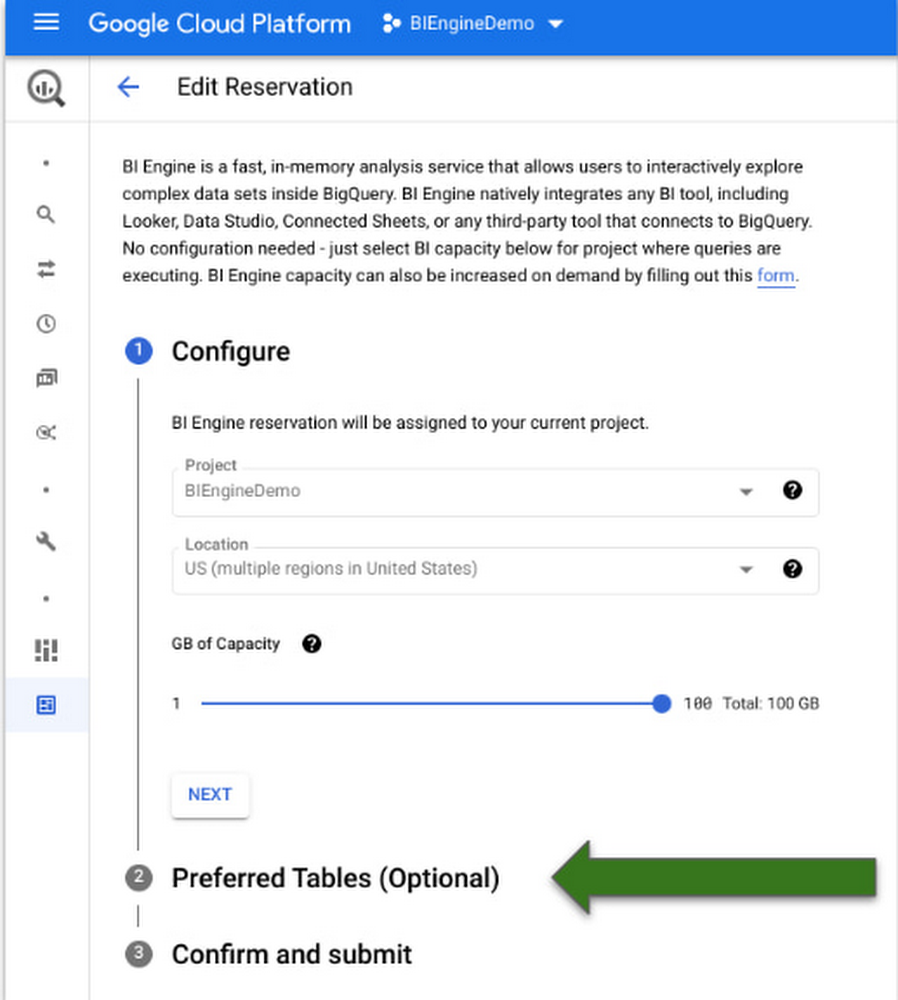
Earlier in the quarter we had announced that BigQuery BI Engine support for all BI and custom applications was generally available. Today we are excited to announce the preview launch of Preferred Tables support in BigQuery BI Engine!  BI Engine is an in-memory analysis service that helps customers get low latency performance for their queries across all BI tools that connect to BigQuery.  With support for preferred tables,  BigQuery customers now have the ability to prioritize specific tables for acceleration, achieving predictable performance and optimized use of their BI Engine resources. BigQuery BI Engine is designed to help deliver freshest insights without having to sacrifice the performance of their queries by accelerating their most popular dashboards and reports.  It provides intelligent scaling and ease of configuration where customers do not have to worry about any changes to their BI tools or in the way they interact with BigQuery. They simply have to create a project level memory reservation.  BigQuery BI Engine’s smart caching algorithm ensures that the data that tends to get queried often is in memory for faster response times.  BI Engine also creates replicas of the data being queried to support concurrent access, this is based on the query patterns and does not require manual tuning from the administrator.  However, some workloads are more latency sensitive than others.  Customers would therefore want more control of the tables to be accelerated within a project to ensure reliable performance and better utilization of their BI Engine reservations.  Before this feature,  BigQuery BI Engine customers could achieve this by using separate projects for only those tables that need acceleration. However, that requires additional configuration and not the best reason to use separate projects.With the launch of preferred tables in BI Engine, you can now tell BI Engine which tables should be accelerated.  For example, if you have two types of tables being queried from your project.  The first being a set of pre-aggregated or dimension tables that get queried by dashboards for executive reporting and the other representing all tables used for ad hoc analysis.  You can now ensure that your reporting dashboards get predictable performance by configuring them as ‘preferred tables’ in the BigQuery project.  That way, other workloads from the same project will not consume memory required for interactive use-cases. Getting startedTo use preferred tables, you can use cloud console, BigQuery Reservation API or a data definition language (DDL) statement in SQL.  We will show the UI experience below.  You can look at detailed documentation of the preview feature here. You can simply edit existing BI Engine configuration in the project.  You will see an optional step of specifying the preferred tables, followed by a box to specify the tables you want to set as preferred.The next step is to confirm and submit the configuration and you will be ready to go! Alternatively, you can also achieve this by issuing a DDL statement in SQL editor as follows:code_block[StructValue([(u’code’, u’ALTER BI_CAPACITY `<PROJECT_ID>.region-<REGION>.default`rnSET OPTIONS(rn size_gb = 100,rn preferred_tables = [“bienginedemo.faadata.faadata1″]);’), (u’language’, u”), (u’caption’, <wagtail.wagtailcore.rich_text.RichText object at 0x3e3bfa4a22d0>)])]This feature is available in all regions today and rolled out to all BigQuery customers. Please give it a spin!Related ArticleLearn how BI Engine enhances BigQuery query performanceThis blog explains how BI Engine enhances BigQuery query performance, different modes in BI engine and its monitoring.Read Article
Quelle: Google Cloud Platform
Incorporating quota regression detection into your release pipeline

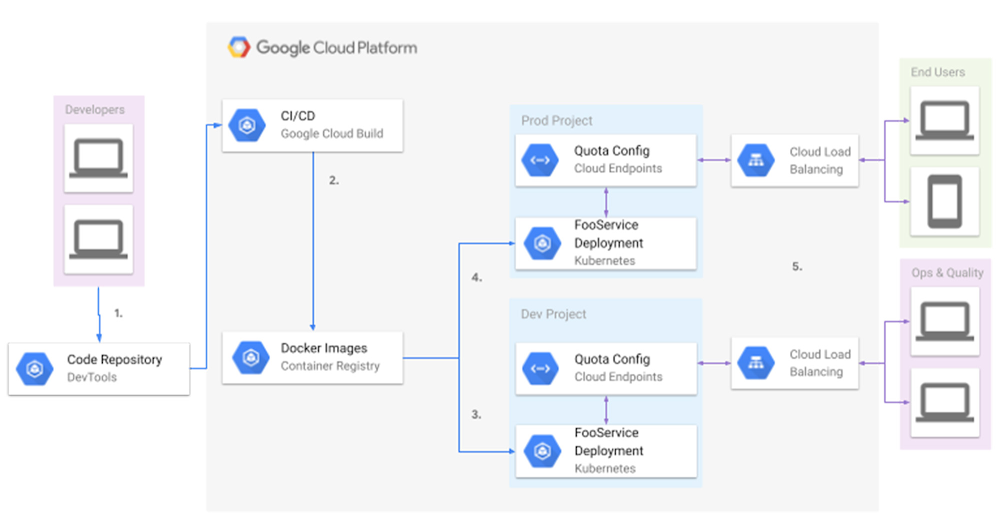
On Google Cloud, one of the ways an organization may want to enforce fairness in how much of a resource can be consumed is through the use of quotas. Limiting resource consumption on services is one way that companies can better manage their cloud costs. Oftentimes, people associate quotas with APIs to access that said resource. Although an endpoint may be able to handle a high number of Queries Per Second (QPS), the quota gives them a means to ensure that no one user or customer has monopoly over the available capacity. This is where fairness comes into play. It allows people to put limits that can be scoped per user or per customer and allows them to increase or lower those limits.Although quota limits address the issue of fairness from a resource providers’ point of view — in this case, Google Cloud — you still need a way as the resource consumer to ensure that those limits are adhered to and, just as importantly, ensure that you don’t inadvertently violate those limits. This is especially important in a continuous integration and continuous delivery (CI/CD) environment, where there is so much automation going on. CI/CD is heavily based on automating product releases and you want to ensure that the products released are always stable. This brings us to the issue of quota regression.What is quota regression and how can it occur? Quota regression refers to the unplanned change in an allocated quota that oftentimes results in a reduced capacity for resource consumption. Let’s take for example an accountant firm. I have many friends in this sector and they can never hang out with me during their busy season between January and April. At least, that’s the excuse. During the busy season, they have an extraordinarily high caseload, and a low caseload the rest of the year. Let’s assume that these caseloads actually have an immediate impact on your resource costs on Google Cloud. Since this high caseload only occurs at a particular point throughout the year, it may not be necessary to maintain a high quota at all times. It’s not financially prudent since resources are paid on a “per-usage” model. If the accountant firm has an in-house engineering team that has built load-tests to ensure the system is functioning as intended, you would expect the load capacity to increase before the busy season. If the load test is being done in an environment separate from the serving one (which it should be due to reasons such as security and avoiding unnecessary access grants to data), this is where you might start to see a quota regression. An example of this is load testing in your non-prod Google Cloud project (e.g.your-project-name-nonprod) and promoting images to your serving project (e.g.your-project-name-prod).In order for the load tests to pass, there must be a sufficient quota allocated to the load testing environment. However, there exists a possibility that that quota has not been granted in the serving environment. It could be due to simply an oversight in the process where the admin needed to request the additional quota in the serving environment, or it could be because that quota was reverted after a busy season and thus went unnoticed. Whatever the reason, it still depends on human intervention to assert that the quotas are consistent across environments. If this is missed, the firm can go into a busy season with passing load tests and still have a system outage due to lack of quota in the serving environment.Why not just use traditional monitoring?This brings to mind the argument of “Security Monitor vs Security Guard.” Even with monitoring to detect such inconsistencies, alerts can be ignored and alerts can be late. Alerts work if there is no automation tied to the behavior. In the example above, alerts may just suffice. However, in the context of CI/CD, it’s likely for a deployment that introduces a higher QPS on dependencies to be promoted from a lower environment to the serving environment, because the load tests pass if the lower environment has sufficient quota. The problem here is that now that deployment is automatically pushed to production with alerts probably occurring with the outage. The best way to handle these scenarios is to incorporate an automated way of not just monitoring and alerting, but a means for preventing promotion of that regressive behavior to the serving environment. The last thing you want is new logic that requires a higher resource quota than what is granted being automatically promoted to prod.Why not use existing checks in tests? The software engineering discipline offers several types of tests (unit, integration, performance, load, smoke, etc…), none of which address something as complex as cross-environment consistency. Most of them focus on the user and expected behaviors. The only test that really focuses on infrastructure is the load test, but a quota regression is not necessarily part of the load test. It’s not something you’re going to detect since a load test occurs in its own environment and is agnostic of where it’s actually running. In other words, a quota regression test needs to be aware of the environments — it needs an expected baseline environment where the load test occurs and an actual serving environment where the product will be deployed. What I am proposing is an environment aware test to be included in the suite of many other tests.Quota regression testing on Google CloudGoogle Cloud already provides services that you can use to easily incorporate this feature. This is more of a systems architecture practice that you can exercise. The Service Consumer Management API provides the tools you need to create your own quota regression test. Take for example the ConsumerQuotaLimit Resource that’s returned via the list api. For the remainder of this discussion, let’s assume an environment setup such as this:Diagram demonstrating an extremely simple deployment pipeline for a resource provider.In the diagram above, we have a simplified deployment pipeline:Developers submit code to some repositoryThe Cloud Build build and deployment trigger gets firedTests are runDeployment images are pushed if the prerequisite steps succeedImages are pushed to their respective environments (in this case build to dev, and previous dev to prod)Quotas are defined for the endpoints on deploymentCloud Load Balancer makes the endpoints available to end usersQuota limitsWith this mental model, let’s hone in on the role quotas play in the big picture. Let’s assume we have the following service definition for an endpoint called “FooService”. The service name, metric label and quota limit value are what we care about for this example.gRPC Cloud Endpoint Yaml Examplecode_block[StructValue([(u’code’, u’type: google.api.Servicernconfig_version: 3rnname: fooservice.endpoints.my-project-id.cloud.googrntitle: Foo Service gRPC Cloud Endpointsrnapis:rn – name: com.foos.demo.proto.v1.FooServicernusage:rn rules:rn # ListFoos methods can be called without an API Key.rn – selector: com.foos.demo.proto.v1.FooService.ListFoosrn allow_unregistered_calls: truern # GetFoo methods can be called without an API Key.rn – selector: com.foos.demo.proto.v1.FooService.GetFoorn allow_unregistered_calls: truern # UpdateFoo methods can be called without an API Key.rn – selector: com.foos.demo.proto.v1.FooService.UpdateFoorn allow_unregistered_calls: truernmetrics:rn – name: library.googleapis.com/read_callsrn display_name: “Read Quota”rn value_type: INT64rn metric_kind: DELTArn – name: library.googleapis.com/write_callsrn display_name: “Write Quota”rn value_type: INT64rn metric_kind: DELTArnquota:rn limits:rn – name: “apiReadQpmPerProject”rn metric: library.googleapis.com/read_callsrn unit: “1/min/{project}”rn values:rn STANDARD: 1rn – name: “apiWriteQpmPerProject”rn metric: library.googleapis.com/write_callsrn unit: “1/min/{project}”rn values:rn STANDARD: 1rn # By default, all calls are measured with a cost of 1:1 for QPM.rn # See https://github.com/googleapis/googleapis/blob/master/google/api/quota.protorn metric_rules:rn – selector: “*”rn metric_costs:rn library.googleapis.com/read_calls: 1rn – selector: com.foos.demo.proto.v1.FooService.UpdateFoorn metric_costs:rn library.googleapis.com/write_calls: 2′), (u’language’, u”), (u’caption’, <wagtail.wagtailcore.rich_text.RichText object at 0x3ee0bf95a4d0>)])]In our definition we’ve established:Service Name: fooservice.endpoints.my-project-id.cloud.googMetric Label: library.googleapis.com/read_callsQuota Limit: 1With these elements defined, we’ve now restricted read calls to exactly one per minute for the service. Given a project number, (e.g., 123456789) we can now issue a call to the Consumer Quota Metrics Service to display the service quota.Example commands and output.code_block[StructValue([(u’code’, u’$ alias gcurl=’curl -H “Authorization: Bearer $(gcloud auth print-access-token)” -H “Content-Type: application/json”‘rn$ gcurl https://serviceconsumermanagement.googleapis.com/v1beta1/services/fooservice.endpoints.my-project-id.cloud.goog/projects/my-project-id/consumerQuotaMetrics’), (u’language’, u”), (u’caption’, <wagtail.wagtailcore.rich_text.RichText object at 0x3ee0e000b2d0>)])]Response example (truncated)code_block[StructValue([(u’code’, u'{rn “metrics”: [rn {rn “name”: “services/fooservice.endpoints.my-project-id.cloud.goog/projects/123456789/consumerQuotaMetrics/library.googleapis.com%2Fread_calls”,rn “displayName”: “Read Quota”,rn “consumerQuotaLimits”: [rn {rn “name”: “services/fooservice.endpoints.my-project-id.cloud.goog/projects/123456789/consumerQuotaMetrics/library.googleapis.com%2Fread_calls/limits/%2Fmin%2Fproject”,rn “unit”: “1/min/{project}”,rn “metric”: “library.googleapis.com/read_calls”,rn “quotaBuckets”: [rn {rn “effectiveLimit”: “1”,rn “defaultLimit”: “1”rn }rn ]rn }rn ],rn “metric”: “library.googleapis.com/read_calls”rn }rn u2026′), (u’language’, u”), (u’caption’, <wagtail.wagtailcore.rich_text.RichText object at 0x3ee0cf183650>)])]In the above response, the most important thing to note is the effective limit for a given service’s metric. The effective limit is the limit being applied to a resource consumer when enforcing customer fairness as discussed earlier.Now that we’ve established how to get the effectiveLimit for a quota definition on a resource per project, we can define the assertion of quota consistency as: Load Test Environment Quota Effective Limit <= Serving Environment Quota Effective Limit Having a test like this, you can then integrate that with something like Cloud Build to block the promotion of your image from the lower environment to your serving environment if that test fails to pass. That saves you from introducing regressive behavior from the new image into the serving environment that would otherwise result in an outage. The importance of early detectionIt’s not enough to alert on a detected quota regression and block the image promotion to prod. It’s better to raise alarms as soon as possible. If resources are lacking when it’s time to promote to production, you’re now faced with the problem of wrangling enough resources in time. This may not always be possible in the desired timeline; it’s possible that the resource provider needs to scale up its resources to handle the increase in quota. This is not always something that can just be done in a day. For example, is the service hosted on Google Kubernetes Engine (GKE)? Even with autoscale, what if the ip pool is exhausted? Cloud infrastructure changes, although elastic, are not instant. Part of production planning needs to account for the time needed to scale.In summary, quota regression testing is a key component that should be added to the entire concept of handling overload and dealing with load balancing in any cloud service — not just Google Cloud. It is important for product stability with the dips and spikes in demands, which will inevitably show up as a problem in many spaces. If you continue to rely on human intervention to ensure consistency of your quota across your configurations, you will only guarantee that eventually, you will have an outage when that consistency is not met. For more on working with quotas, check out the documentation. Related Article5 principles for cloud-native architecture—what it is and how to master itLearn to maximize your use of Google Cloud by adopting a cloud-native architecture.Read Article
Quelle: Google Cloud Platform
CISO Perspectives: June 2022

June saw the in-person return of the RSA Conference in San Francisco, one of the largest cybersecurity enterprise conferences in the world. It was great to meet with so many of you at many of our Google Cloud events, at our panel hosted in partnership with Cyversity, and throughout the conference. At RSA we focused on our industry-leading security products, but even more importantly on our goal to make (and encourage others to make) more secure products, not just security products. And remember, we make this newsletter available on the Google Cloud blog and by email—you can subscribe here.RSA ConferenceThose of us who attended RSA from Google Cloud were grateful for the chance to connect in person with so many of our customers, partners, and peers from across the industry. Some key themes Google Cloud discussed at press, analyst, government and customer meetings at the conference included: Digital sovereignty: How the cloud can be used to help organizations address and manage requirements around data localization, and achieve the necessary operational and software sovereignty. We believe that sovereignty is more than just meeting regulatory requirements. These principles can help organizations become more innovative and resilient while giving them the ability to control their digital future.Defending against advanced threats: Organizations are operating against a backdrop of ever more advanced threats, and are looking to enhance their protection through capabilities like posture management and more pervasive implementation of Zero Trust capabilities. We also were focused on work to increase productivity and upskilling of threat management and security operations teams. Threat intelligence: A big part of supporting customers is ongoing interest in how we can further curate and release threat intelligence through our various products and capabilities. These themes point to what security and tech decision-makers are looking for: secure products overall, not just security products. This is the backbone of our “shared fate” philosophy at Google Cloud. We know that in today’s environment, we can reduce and prevent toil for our customers by prioritizing security first, and building secure capabilities into all our products and solutions. As RSA brings together incredible people and organizations, we also took stock of work happening across the industry to grow a more diverse cybersecurity workforce. We had the opportunity to host a panel discussion at Google’s San Francisco office with Cyversity and UC Berkeley’s Center for Long-Term Cybersecurity, two organizations who are deeply committed to advancing diversity in our industry.MK Palmore, Director, Office of the CISO at Google Cloud, moderates a panel on diversity and cybersecurity with Ann Cleaveland, UC Berkeley; Rob Duhart, Walmart; and Larry Whiteside, Jr., Cyversity. Photo courtesy MK Palmore.One resounding takeaway was that diversity of background, experience, and perspective is vital for cybersecurity organizations to effectively manage risks, especially security risks. As my colleague MK Palmore noted, so much of the threat landscape is about problem solving. This is why it’s imperative to bring different views and vantage points to address the most challenging issues. One way we can achieve this is through expanding the talent pipeline. Over one million cybersecurity positions go unfilled each year across the industry, so we need to actively introduce cybersecurity topics to students and new job seekers, including those who come to security from non-traditional backgrounds. Progress requires a combination of private and public partnership, and organizations like Cyversity have established track records of providing women and individuals from underrepresented communities with the right resources and opportunities. As a company, Google is committed to growing a more diverse workforce for today and for the future. Secure Products, not just Security ProductsSecurity should be built into all products. We all should be focused on constantly improving the base levels of security in all products. One recent example is in our recent guide on how to incorporate Google Cloud’s new Assured Open Source Software service into your software supply chain. Assured OSS can provide you with a higher assurance collection of the open source software that you rely on. Additionally, we are working hard across all of our developer tooling to embed security capabilities, such as Cloud Build, Artifact Registry, and Container/Artifact Analysis.Google Cybersecurity Action Team HighlightsHere are the latest updates, products, services and resources from our cloud security teams this month: SecurityMapping security with MITRE: Through our research partnership with the MITRE Engenuity Center for Threat-Informed Defense, we have mapped the native security capabilities of Google Cloud to MITRE ATT&CK. This can help customers with their adoption of Autonomic Security Operations, which requires the ability to use threat-informed decision making throughout the continuous detection and continuous response (CD/CR) workflow. Read more.Two new BigQuery capabilities to help secure and manage sensitive data: Managing data access continues to be an important concern for organizations and regulators. To fully address those concerns, sensitive data needs to be protected with the right mechanisms so that data can be kept secure throughout its entire lifecycle. We’re offering two new features in BigQuery that can help secure and manage sensitive data. Now generally available, encryption SQL functions can encrypt and decrypt data at the column level; and in preview is dynamic data masking, which can selectively mask column-level data at query time based on the defined masking rules, user roles, and privileges. Introducing Confidential GKE Nodes: Part of the growing Confidential Computing product portfolio, Confidential GKE Nodes make sure your data is encrypted in memory. GKE workloads you run today can run confidentially without any code changes.Adding more granular GKE release controls: Customers can now subscribe their GKE clusters to release channels, so that they can decide when, how, and what to upgrade in clusters and nodes. These upgrade release controls can help organizations to automate tasks such as notifying their DevOps teams when a new security patch is available.Detecting password leaks using reCAPTCHA Enterprise: We all know that reusing passwords is a risk. But as long as the password remains an unfortunately common form of account authentication, people will wind up reusing them. reCAPTCHA Enterprise’s password leak detection can help organizations warn their end-users to change passwords. It uses a privacy-preserving API which hides the credential details from Google’s backend services, and allows customers to keep their users’ credentials private. Database auditing comes to Cloud SQL: This security feature can let customers monitor changes to their Google Cloud SQL Server databases, including database creations, data inserts, and table deletions.DNS zone permissions: Our Cloud DNS has introduced in Preview a new managed zone permissions capability that can allow enterprises with distributed DevOps teams to delegate Cloud DNS managed zone administration to their individual application teams. It can prevent one application team from accidentally changing the DNS records of another application, and it also can allow for a better security posture because only authorized users will be able to modify managed zones. This better supports the principle of least privilege.  New capabilities in Cloud Armor: We’ve expanded Cloud Armor’s coverage to more types of workloads. New edge security policies can help defend workloads using Cloud CDN, Media CDN, and Cloud Storage, and filter requests before they are served from cache. Cloud Armor also now supports the TCP Proxy and SSL Proxy Load Balancers to help block malicious traffic attempting to reach backends behind these load balancers. We’ve also added features to improve the security, reliability, and availability of deployments, including two new rule actions for per-client rate limiting, malicious bot defense in reCAPTCHA Enterprise, and machine learning-based Adaptive Protection to help counter advanced Layer 7 attacks.Industry updatesHow SLSA and SBOM can help healthcare resiliency: Healthcare organizations continue to be a significant target from many different threats and we are helping the healthcare industry develop more resilient cybersecurity practices. We believe part of developing that resiliency in the face of rising cyberattacks are software bills of materials (SBOM) and Supply chain Levels for Software Artifacts (SLSA) framework. Securing the software supply chain is a critical priority for defenders and something Google is committed to helping organizations do, which we explain more in-depth in this deep dive on SLSA and SBOM.Google Cloud guidance on merging organizations: When two organizations merge, it’s vital that they integrate their two cloud deployments in as securely a manner as possible. We’ve published these best practices that address some security concerns they may have, especially around Identity and Access Management. Stronger privacy controls for the public sector: Google Workspace has added client-side encryption to let public agencies retain complete confidentiality and control over their data by choosing how and where their encryption keys are stored. Compliance & ControlsGoogle Cloud security overview: Whether your organization is just getting started with its digital transformation or is running on a mature cloud, this wonderfully-illustrated summary of how Google Cloud security works is a great way for business and dev teams to help explain what Google Cloud security can do to make your organization more secure.  New commitments on processing of service data for Google Cloud customers: As part of our work with the Dutch government and its Data Protection Impact Assessment (DPIA) of Google Workspace and Workspace for Education, Google intends to offer new contractual privacy commitments for service data that align with the commitments we offer for customer data. Read more.Google Cloud’s preparations to address DORA: Google Cloud welcomes the inter-institutional agreement agreed to by European legislators on the Digital Operational Resilience Act (DORA). This major milestone in the adoption of new rules designed to ensure financial entities can withstand, respond to, and recover from all types of information and communications technology-related disruptions and threats, including increasingly sophisticated cyberattacks. Read more. Google Cloud Security PodcastsWe launched in February 2021 a new podcast focusing on Cloud Security. If you haven’t checked it out, we publish four or five podcasts a month where hosts Anton Chuvakin and Timothy Peacock chat with cybersecurity experts about the most important and challenging topics facing the industry today. This month, they discussed:What good detection and response looks like in the cloud, with Dave Merkel and Peter Silberman, who lead managed detection and response company Expel. Listen here.How Google runs “red team” exercises, with our own Stefan Friedli, senior security engineer. Listen here. Anton and Timothy’s reactions to RSA 2022. Listen here.How best to observe and track cloud security threats, with James Condon, director of security research at cloud security startup Lacework. Listen here.And everything you wanted to know about AI threats but might’ve been afraid to ask, with Nicholas Carlini, research scientist at Google. Listen here.To have our Cloud CISO Perspectives post delivered every month to your inbox, sign up for our newsletter. We’ll be back next month with more security-related updates.Related ArticleCloud CISO Perspectives: May 2022Google Cloud CISO Phil Venables shares his thoughts on the latest security updates from the Google Cybersecurity Action Team.Read Article
Quelle: Google Cloud Platform
Google Cloud announces new products, partners and programs to accelerate sustainable transformations

At Google, we believe that the path to a sustainable future begins with the small decisions we make every day. But industries, governments and corporations are challenged to make these decisions without the right data or insights to inform them. Even a small choice for an organization — which raw material to choose for a new product, when to proactively water crops ahead of a drought, which green funds to invest in — requires understanding unique and often complex information. Everyone wants to better understand how to become more sustainable, and take actions that have a meaningful impact. This year in the U.S., “how to reduce my carbon footprint” is being searched more than ever, and searches for “what is greenwashing” have increased five-fold over the past decade. Businesses and individuals alike are wondering how to turn sustainability ambition into action.At the Google Cloud Sustainability Summit, we’re excited to expand our sustainability solutions, and launch new datasets, tools and partnership programs that can help make the sustainable choice the easy choice, for everyone. Providing climate insights for every organizationLast week we announced two new climate insights offerings for the public sector to help institutions better understand the risks to infrastructure and natural resources due to climate change. These insights can help governments transform the way they manage physical and natural resources, helping them become more climate-resilient. Every industry is also experiencing a new era of sustainability-driven transformation. Like with any transformation, how, why and what you transform needs to be informed by accurate data about your current state, and insights into the potential impact of your decisions. To help deliver these insights to all our customers, we’re excited to share that Google Earth Engine on Google Cloud is now generally available. Google Earth Engine, which originally launched to scientists and NGOs in 2010, is a leading technology for planetary-scale environmental monitoring. Google Earth Engine combines data from hundreds of satellites and other sources with geospatial cloud computing resources to show timely, accurate, high-resolution and decision-relevant insights about the state of the world’s habitats and ecosystems — and how they’re changing over time. With one of the largest publicly available data catalogs and a global data archive that goes back 50 years and updates every 15 minutes, it’s possible to detect trends and understand correlations between human activities and environmental impact more precisely than ever before.With Google BigQuery, Google Maps Platform and Earth Engine, Google provides a powerful combination of geospatial cloud products and solutions to serve customers’ location-aware analysis needs regardless of the scale, complexity or format of the data. This will enable customers like Regrow, a startup in the field of regenerative agriculture, to more easily contribute to our shared challenges around climate change and tackle their unique business challenges involving geospatial data. “Regrow aims to make regenerative agriculture ubiquitous across the globe with an overall mission to mitigate climate change. That job has been made easier by Google Earth Engine, a platform which has allowed us to scale our technology and increase confidence in our data and reports,” said Juan Delard de Rigoulieres Mantelli, CTO, Regrow Sharing carbon-free energy insights with customersWhen we set out to use 24/7 carbon-free energy across our global operations by 2030, we knew that we would need better tools to track energy consumption and production. After all, you can’t manage what you don’t measure, and existing approaches to clean energy tracking were not designed to track hour-by-hour energy use. For the past 10 years, and together with our partners, we’ve collected insights and knowledge about how to progress our business towards a carbon-free future. We’re excited to start sharing 24/7 carbon-free energy insights with our Google Cloud customers through a new pilot program.With access to historical and real-time data, and at regional and hourly granularity, customers will see a clear picture of their electricity emissions profile. The pilot will enable customers to baseline their existing carbon-free energy (CFE) score and their scope 2 carbon footprint, help them forecast and plan for an optimized energy portfolio, and eventually execute on carbon-free energy transactions. Sharing knowledge like this will be key to helping everyone reach ambitious net-zero targets. For example, companies like Iron Mountain are joining the Carbon-free Energy Compact to accelerate decarbonization. “In 2021 we adopted the same 24/7 carbon-free energy goal pioneered by Google, and we recognize that the key to making progress towards this is access to good data and the ability to share that data with solution providers,” said Chris Pennington, Director of Energy and Sustainability at Iron Mountain. “Our early steps towards 24/7 have been enabled by key partners, including Google, who are providing us with the insights we need to evaluate our current performance and identify the next steps on our 24/7 journey. We place a great deal of value in collaboration to achieve better results, faster.”Expanding the Carbon Sense suiteIn the latest launch of the Carbon Sense suite of products we’re adding new data, expanding reporting coverage and making it easier for cloud architects and administrators to prioritize sustainability. Last year we announced Carbon Footprint for Google Cloud, which helps companies measure, report and reduce the gross carbon emissions of using Google Cloud services. We’re excited that early next year, we’ll launch Carbon Footprint for Google Workspace, providing similar reporting functionality for the emissions associated with products like Gmail, Meet, Docs and others. For sustainability teams that need to access the data in Carbon Footprint for reporting purposes, we’re also excited to launch a dedicated Identity and Access Management (IAM) role for Carbon Footprint. This will enable non-technical users of Google Cloud to easily access the emissions data and use it for tracking or in disclosures. You don’t need to be a cloud computing expert to view and export carbon emissions data associated with your cloud usage. Shopify’s sustainability and IT teams are closely aligned on their sustainability goals. “Shopify is on a mission to be the lowest carbon commerce platform for millions of entrepreneurs around the world,” says Stacy Kauk, Head of Sustainability at Shopify. “Tools like Carbon Footprint allow our engineers to understand the carbon impact of our technology decisions, and ensure we continue to architect a fast, resilient and low-carbon commerce solution.” You also don’t need to be a sustainability expert to make sustainable computing choices. For IT teams, and the administrators and cloud architects within them, we’re introducing low-carbon mode, which enables you to restrict your cloud resources to the low-carbon locations across our infrastructure using new low-carbon locations value groups. One of the most impactful actions you can take to reduce the gross emissions of using Google Cloud is to prioritize the locations with more carbon-free energy powering our infrastructure. Relative to other choices, you may be able to lower carbon emissions by 5-10x.One company that is putting emissions data in the hands of engineers is Uber. “At Uber we take sustainability seriously across the organization,” said Michael Sudakovich, Sustainable Engineering Lead and Senior Security Engineer at Uber. “From giving riders more sustainable choices to now giving our engineers data about their services’ cloud emissions and recommendations on emission reduction, with Carbon Footprint. Helping everyone make more sustainable choices is a priority for all of our teams as we work to make Uber a zero-emission platform in Canada, Europe, and the US by 2030, and worldwide by 2040.”Finally, Carbon Footprint is adding both scope 1 and 3 emissions to its reporting data. These are the apportioned amounts of Google’s scope 1 and 3 emissions, associated with a customers use of Google Cloud. You can read a detailed explanation of different scopes of emissions here, but for a quick breakdown: Scope 1 emissions are from sources an organization controls directly; Scope 2 are associated with the production of energy used by the organization (those were already in Carbon Footprint); and scope 3 are indirect emissions from up and down the value chain. Users will soon have a comprehensive view of the emissions associated with their Google Cloud usage. “At SAP, sustainability is core to our culture and operations and we ensure it is infused across the organization. Our SAP Cloud deployment strategy focuses on sustainable data centers to help achieve our commitment to net-zero by 2030. We are leveraging Carbon Footprint to understand, report, and reduce our gross carbon emissions associated with our Google Cloud usage. Google data centers help SAP, and our joint customers, make their entire value chains more sustainable,” said Tom Lee, Head of Multicloud Products and Services, SAP. Growing our sustainability ecosystemThe ecosystem of Google Cloud partners focused on sustainability continues to expand at a remarkable pace. The initiative, which brings technology providers together to help global businesses and governments accelerate sustainability programs, has added multiple new partners with innovative solutions. Today, we’re announcing two new programs to make it easier for partners to participate in the initiative, and for organizations to find the tools and expertise to help achieve their sustainability goalsFirst, Google Cloud Ready – Sustainability is a new validation program for partners with a business-ready solution available on Google Cloud that helps customers achieve sustainability goals. Partners with the GCR-Sustainability designation deliver solutions that reduce carbon emissions, increase the sustainability of value chains, help organizations process ESG data or help them identify climate risks for increased resilience. Carto, Climate Engine, NGIS, GEOTAB, Planet, Atlas AI, Electricity Map have already achieved their Google Cloud Ready – Sustainability designation. Many of these partners have expertise in next-generation technologies addressing ESG challenges such as geospatial or climate data and analytics. Providers like Dun & Bradstreet are excited about this new sustainability validation program.”As climate-related events increase in magnitude and frequency, it’s imperative that we incorporate climate data into business risk management across company locations and supply chains. Programs like Google Cloud Ready for Sustainability accelerate access to solutions that can drive ESG transformations, such as applying climate-based risk factors alongside traditional financial considerations,” said Rochelle March, Head of ESG Product at Dun & Bradstreet. Cloud Ready for Sustainability is part of Google Cloud Partner Advantage, designed to maximize our partners’ success across business models, customer requirements, success metrics, and strategic priorities. You can learn more about Google Cloud Ready for Sustainability and complete an application here.Second, we’re launching the Google Cloud Marketplace Sustainability Hub, providing customers with easy access to validated sustainability solutions. The Marketplace Sustainability Hub will showcase Google Cloud Ready for Sustainability solutions, which can be purchased directly from the site. Look for the Marketplace Sustainability Hub to launch soon.Don’t miss all the exciting content at the Sustainability SummitTomorrow, June 28, we’re bringing technologists, developers, business and sustainability leaders together to learn how the climate leaders of today are building for the future. You can catch all the talks, films, presentations and demos here, so don’t miss out!Related ArticleAnnouncing new tools to measure—and reduce—your environmental impactNow you can evaluate and reduce the carbon footprint of your cloud workloads, and evaluate your environmental impact with Earth Engine.Read Article
Quelle: Google Cloud Platform
Twitter: gaining insights from Tweets with an API for Google Cloud

Editor’s note: Although Twitter has long been considered a treasure trove of data, the task of analyzing Tweets in order to understand what’s happening in the world, what people are talking about right now, and how this information can support business use cases has historically been highly technical and time-consuming. Not anymore. Twitter recently launched an API toolkit for Google Cloud which helps developers to harness insights from Tweets, at scale, within minutes. This blog is based on a conversation with the Twitter team who’ve made this possible. The authors would like to thank Prasanna Selvaraj and Nikki Golding from Twitter for contributions to this blog. Businesses and brands consistently monitor Twitter for a variety of reasons: from tracking the latest consumer trends and analyzing competitors, to staying ahead of breaking news and responding to customer service requests. With 229 million monetizable daily active users, it’s no wonder companies, small and large, consider Twitter a treasure trove of data with huge potential to support business intelligence. But language is complex, and the journey towards transforming social media conversations into insightful data involves first processing large amounts of Tweets by ways of organizing, sorting, and filtering them. Crucial to this process are Twitter APIs: a set of programmatic endpoints that allow developers to find, retrieve, and engage with real-time public conversations happening on the platform. In this blog, we learn from the Twitter Developer Platform Solutions Architecture team about the Twitter API toolkit for Google Cloud, a new framework for quickly ingesting, processing, and analyzing high volumes of Tweets to help developers harness the power of Twitter. Making it easier for developers to surface valuable insights from Tweets Two versions of the toolkit are currently available: The Twitter API Toolkit for Google Cloud Filtered Stream and the Twitter API Toolkit for Google Cloud Recent Search.The Twitter API for Google Cloud for Filtered Stream supports developers with a trend detection framework that can be installed on Google Cloud in 60 minutes or less. It automates the data pipeline process to ingest Tweets into Google Cloud, and offers visualization of trends in an easy-to-use dashboard that illustrates real-time trends for configured rules as they unfold on Twitter. This tool can be used to detect macro- and micro-level trends across domains and industry verticals, and can horizontally scale and process millions of Tweets per day. “Detecting trends from Twitter requires listening to real-time Twitter APIs and processing Tweets on the fly,” explains Prasanna Selvaraj, Solutions Architect at Twitter and author of this toolkit. “And while trend detection can be complex work, in order to categorize trends, tweet themes and topics must also be identified. This is another complex endeavor as it involves integrating with NER (Named Entity Recognition) and/or NLP (Natural Language Processing) services. This toolkit helps solve these challenges.”Meanwhile, the Twitter API for Google Cloud Recent Search returns Tweets from the last seven days that match a specific search query. “Anyone with 30 minutes to spare can learn the basics about this Twitter API and, as a side benefit, also learn about Google Cloud Analytics and the foundations of data science,” says Prasanna. The toolkits leverage Twitter’s new API v2 (Recent Search & Filtered Stream) and use BigQuery for tweet storage, Data Studio for business intelligence and visualizations, and App Engine for data pipeline on the Google Cloud Platform. “We needed a solution that is not only serverless but also can support multi-cardinality, because all Twitter APIs that return Tweets provide data encoded using JavaScript Object Notation (JSON). This has a complex structure, and we needed a database that can easily translate it into its own schema. BigQuery is the perfect solution for this,” says Prasanna. “Once in BigQuery, one can visualize that data in under 10 minutes with Data Studio, be it in a graphic, spreadsheet, or Tableau form. This eliminates friction in Twitter data API consumption and significantly improves the developer experience.” Accelerating time to value from 60 hours to 60 minutesHistorically, Twitter API developers have often grappled with processing, analyzing, and visualizing a higher volume of Tweets to derive insights from Twitter data. They’ve had to build data pipelines, select storage solutions, and choose analytics and visualization tools as the first step before they can start validating the value of Twitter data. “The whole process of choosing technologies and building data pipelines to look for insights that can support a business use case can take more than 60 hours of a developer’s time,” explains Prasanna. “And after investing that time in setting up the stack they still need to sort through the data to see if what they are looking for actually exists.”Now, the toolkit enables data processing automation at the click of a button because it provisions the underlying infrastructure it needs to work, such as BigQuery as a database and the compute layer with App Engine. This enables developers to install, configure, and visualize Tweets in a business intelligence tool using Data Studio in less than 60 minutes.“While we have partners who are very well equipped to connect, consume, store, and analyze data, we also collaborate with developers from organizations who don’t have a myriad of resources to work with. This toolkit is aimed at helping them to rapidly prototype and realize value from Tweets before making a commitment,” explains Nikki Golding, Head of Solutions Architecture at Twitter.Continuing to build what’s next for developersAs they collaborated with Google Cloud to bring the toolkit to life, the Twitter team started to think about what public datasets exist within the Google Cloud Platform and how they can complement some of the topics that Twitter has a lot of conversations about, from crypto to weather. “We thought, what are some interesting ways developers can access and leverage what both platforms have to offer?” shares Nikki. “Twitter data on its own has high value, but there’s also data that is resident in Google Cloud Platform that can further support users of the toolkit. The combination of Google Cloud Platform infrastructure and application as a service with Twitter’s data as a service is the vision we’re marching towards.”Next, the Twitter team aims to place these data analytics tools in the hands of any decision-maker, both in technical and non-technical teams. “To help brands visualize, slice, and dice data on their own, we’re looking at self-serve tools that are tailored to the non-technical person to democratize the value of data across organizations,” explains Nikki. “Google Cloud was the platform that allowed us to build the easiest low-code solution relative to others in the market so far, so our aim is to continue collaborating with Google Cloud to eventually launch a no-code solution that helps people to find the content and information they need without depending on developers. Watch this space!”Related ArticleSmooth sailing: The resource hierarchy for adopting Google Cloud BigQuery across TwitterTo provide one-to-one mapping from on-prem Hadoop to BigQuery, the Google Cloud and Twitter team created this resource hierarchy architec…Read Article
Quelle: Google Cloud Platform

Earn Google Cloud swag when you complete the #LearnToEarn challenge

The MLOps market is expected to grow to around $700m by 20251. With the Google Cloud Professional Data Engineer certification topping the list of highest paying IT certifications in 20212, there has never been a better time to grow your data and ML skills with Google Cloud. Introducing the Google Cloud #LearnToEarn challenge Starting today, you’re invited to join the data and ML #LearnToEarn challenge- a high-intensity workout for your brain.  Get the ML, data, and AI skills you need to drive speedy transformation in your current and future roles with no-cost access to over 50 hands-on labs on Google Cloud Skills Boost. Race the clock with players around the world, collect badges, and earn special swag! How to complete the #LearnToEarn challenge?The challenge will begin with a core data analyst learning track. Then each week you’ll get new tracks designed to help you explore a variety of career paths and skill sets. Keep an eye out for trivia and flash challenges too!  As you progress through the challenge and collect badges, you’ll qualify for rewards at each step of your journey. But time and supplies are limited – so join today and complete by July 19! What’s involved in the challenge? Labs range from introductory to expert level. You’ll get hands-on experience with cutting edge tech like Vertex AI and Looker, plus data differentiators like BigQuery, Tensorflow, integrations with Workspace, and AutoML Vision. The challenge starts with the basics, then gets gradually more complex as you reach each milestone. One lab takes anywhere from ten minutes to about an hour to complete. You do not have to finish all the labs at once – but do keep an eye on start and end dates. Ready to take on the challenge?Join the #LearnToEarn challengetoday!1. IDC, Market Analysis Perspective: Worldwide AI Life-Cycle Software, September 20212. Skillsoft Global Knowledge, 15 top-paying IT certifications list 2021, August 2021
Quelle: Google Cloud Platform

Black Kite runs millions of cyber-risk assessments at scale on Google Cloud

Data breaches and ransomware attacks impact millions of people every year. Although major corporations have the resources to comply with international data privacy laws and standards, many smaller companies in high-risk markets struggle to protect sensitive customer information. These vulnerable businesses are often targeted by cyber criminals who use them as digital stepping-stones to attack more secure organizations.We built Black Kite to empower any company to easily understand if third-party vendors, partners, and suppliers are safe and secure to work with. Our platform reduces risk assessments from weeks to minutes by non-intrusively analyzing registered domains and scoring cyber risks across three primary categories: technical, financial, and compliance. With Black Kite, companies can continuously monitor red-flagged organizations in high-risk industries such as automotive, pharmaceutical, and critical infrastructure.Black Kite identifies vulnerabilities and attack patterns using 400 security controls and over 20 criteria. These include credential and patch management, attack surface, DDOS resiliency, SSL/TLS strength, IP/Domain Reputation, and DNS health. We also leverage the Open FAIR™ model to calculate the probable financial impact of third-party data breaches—and assign easy-to-understand letter grades with transparent formulas developed by the MITRE Corporation. Scaling and Securing Black KiteI started Black Kite as a certified ethical hacker (CEH) and  previously worked with the North Atlantic Treaty Organization (NATO) Counter Cyber Terrorist Task Force to identify cybercriminal loopholes. Slowly I started to build an awesome management team after founding the company. As we transitioned to a startup with a limited budget, we quickly realized we couldn’t securely and rapidly scale without a reliable technology partner to help us process, analyze, and store enormous amounts of sensitive data. That’s why we started working withGoogle Cloud and partnering with theGoogle for Startups Program. We participated in the Mach37 incubator and accelerator and received a $100k credit that is valid for 2 years. Google Cloud gives us ahighly secure-by-design infrastructure that complies with major international data privacy laws and standards. Black Kite stores and encrypts everything on highly secureCloud Storage, leveraging a combination of solid-state drives (SSDs) and hard disk drives (HDDs) for hot, nearline, and coldline data. We also manage and archive the 30 terabytes of logs Black Kite generates every day withGoogle Cloud’s operations suite. To create risk assessment ratings, we spin upGoogle Kubernetes Engine (GKE),Cloud Functions, andCloud Run. The platform scans registered domains using natural language processing (NLP) and other machine learning (ML) techniques with sophisticated models developed onTensorFlow. We also leverage additional Google Cloud products to operate Black Kite, includingApp Engine,Cloud Scheduler,Cloud SQL, andCloud Tasks.Running millions of microservices on Google CloudIn 2016, we started an exciting journey to help companies to work safely and securely with third-party vendors, partners, and suppliers. Thanks to Google Cloud, the Google for Startups Program, and the Mach37 incubator and accelerator, over 300 companies around the world are satisfied Black Kite customers. These companies continuously use our platform to assess third-party cyber risks, rate ransomware susceptibility, and ensure compliance with international data and privacy laws.In addition to being thehighest-rated customer’s choice vendor, we continue to work with the Google Cloud Success team to further optimize our 5,000 microservices that run concurrently during every risk-assessment scan. Google startup experts are amazingly responsive, with deep technical knowledge and problem-solving skills that help us scale up to a million microservices a day!We also want to highlight theGoogle Cloud research credits we use to affordably explore new solutions to manage, analyze, and validate the enormous amounts of information Black Kite generates. We now flawlessly run millions of standards-based cyber risk assessments—and rapidly correlate data with major industry standards such as National Institute of Standards and Technology (NIST), Payment Card Industry Data Security Standard (PCI-DSS), and General Data Protection Regulation (GDPR).With Black Kite, companies are taking control of third-party cyber risk assessment on a scalable, automated, and intelligent platform built from a hacker’s perspective. We can’t wait to see what we accomplish next as we continue to expand the Black Kite team and positively disrupt the security industry to safeguard systems and information for businesses (and their customers) worldwide. If you want to learn more about how Google Cloud can help your startup, visit our pagehere to get more information about our program, andsign up for our communications to get a look at our community activities, digital events, special offers, and more.Related ArticlePride Month: Q&A with bunny.money founders about saving for goodLearn how bunny.money makes it easy for people to save routinely and responsibly while donating to their favorite causes.Read Article
Quelle: Google Cloud Platform

Learn how BI Engine enhances BigQuery query performance

BigQuery BI Engine is a fast, in-memory analysis service that lets users analyze data stored in BigQuery with rapid response times and with high concurrency to accelerate certain BigQuery SQL queries. BI Engine caches data instead of query results, allowing different queries over the same data to be accelerated as you look at different aspects of the data. By using BI Engine with BigQuery streaming, you can perform real-time data analysis over streaming data without sacrificing write speeds or data freshness.​​BI Engine architectureThe BI Engine SQL interface expands BI Engine support to any business intelligence (BI) tool that works with BigQuery such as Looker, Tableau, Power BI, and custom applications to accelerate data exploration and analysis. With BI Engine, you can build rich, interactive dashboards and reports in BI tool of your choice without compromising performance, scale,security, or data freshness. To learn more about the BI Engine SQL interface, please refer here.The following diagram shows the updated architecture for BI Engine:Shown here is one simple example of a Looker dashboard that was created with BI Engine capacity reservation (top) versus the same dashboard without any reservation (bottom).This dashboard is created from the BigQuery public dataset `bigquery-public-data.chicago_taxi_trips.taxi_trips`  to analyze the Sum of total_trip cost and logarithmic average of total trip cost over time.total_trip cost for past 5 yearsBI Engine will cache the minimum amount of data possible to resolve a query to maximize the capacity of the reservation. Running business intelligence on big data can be tricky.Here is a query against the same public dataset, ‘bigquery-public-data.chicago_taxi_trips.taxi_trips,’ to demonstrate BI Engine performance with/without reserved BigQuery slots.Example Querycode_block[StructValue([(u’code’, u”SELECTrn (DATE(trip_end_timestamp , ‘America/Chicago’)) AS trip_end_timestamp_date,rn (DATE(trip_start_timestamp , ‘America/Chicago’)) AS trip_start_timestamp_date,rn COALESCE(SUM(CAST(trip_total AS FLOAT64)), 0) AS sum_trip_total,rn CONCAT (‘Hour :’,(DATETIME_DIFF(trip_end_timestamp,trip_start_timestamp,DAY) * 1440) ,’ , ‘,’Day :’,(DATETIME_DIFF(trip_end_timestamp,trip_start_timestamp,DAY)) ) AS trip_time,rn CASE WHENrn ROUND(fare + tips + tolls + extras) = trip_total THEN ‘Tallied’rn WHEN ROUND(fare + tips + tolls + extras) < trip_total THEN ‘Tallied Less’rn WHEN ROUND(fare + tips + tolls + extras) > trip_total THEN ‘Tallied More’rn WHEN (ROUND(fare + tips + tolls + extras) = 0.0 AND trip_total = 0.0) THEN ‘Tallied 0’rn ELSE ‘N/A’ END AS trip_total_tally,rn REGEXP_REPLACE(TRIM(company),’null’,’N/A’) as company,rn CASE WHENrn TRIM(payment_type) = ‘Unknown’ THEN ‘N/A’rn WHEN payment_type IS NULL THEN ‘N/A’ ELSE payment_type END AS payment_typern FROMrn `bigquery-public-data.chicago_taxi_trips.taxi_trips`rn GROUP BYrn 1,rn 2,rn 4,rn 5,rn 6,rn 7rnORDER BYrn 1 DESC,rn 2 ,rn 4 DESC,rn 5 ,rn 6 ,rn 7rnLIMIT 5000″), (u’language’, u”), (u’caption’, <wagtail.wagtailcore.rich_text.RichText object at 0x3ee1a4db3b10>)])]The above query was run with the below combinations: Without any BigQuery slot reservation/BI Engine reservation,  the query observed 7.6X more average slots and 6.3X more job run time compared to the run with reservations (last stats in the result). Without BI Engine reservation but with BigQuery slot reservation, the query observed 6.9X more average slots and 5.9X more job run time compared to the run with reservations (last stats in the result). With BI Engine reservation and no BigQuery slot reservation, the query observed 1.5 more average slots and the job completed in sub-seconds (868 ms). With both BI Engine reservation and BigQuery slot reservation, only 23 average slots were used and the job completed in sub-second as shown in results.This is the most cost effective way in regards to average slots and run time compared to all other options (23.27 avg_slots , 855 ms run time).INFORMATION_SCHEMA is a series of views that provide access to metadata about datasets, routines, tables, views, jobs, reservations, and streaming data. You can query the INFORMATION_SCHEMA.JOBS_BY_* view to retrieve real-time metadata about BigQuery jobs. This view contains currently running jobs, and the history of jobs completed in the past 180 days.Query to determine bi_engine_statistics and number of slots. More schema information can be found here.code_block[StructValue([(u’code’, u”SELECTrn project_id,rn job_id,rn reservation_id,rn job_type,rn TIMESTAMP_DIFF(end_time, creation_time, MILLISECOND) AS job_duration_mseconds,rn CASErn WHEN job_id = ‘bquxjob_54033cc8_18164d54ada’ THEN ‘YES_BQ_RESERV_NO_BIENGINE’rn WHEN job_id = ‘bquxjob_202f17eb_18149bb47c3′ THEN ‘NO_BQ_RESERV_NO_BIENGINE’rn WHEN job_id = ‘bquxjob_404f2321_18164e0f801′ THEN ‘YES_BQ_RESERV_YES_BIENGINE’rnWHEN job_id = ‘bquxjob_48c8910d_18164e520ac’ THEN ‘NO_BQ_RESERV_YES_BIENGINE’ ELSE ‘NA’ END as query_method,rn bi_engine_statistics,rn — Average slot utilization per job is calculated by dividingrn– total_slot_ms by the millisecond duration of the jobrn SAFE_DIVIDE(total_slot_ms,(TIMESTAMP_DIFF(end_time, start_time, MILLISECOND))) AS avg_slotsrnFROMrnregion-us.INFORMATION_SCHEMA.JOBS_BY_PROJECTrnwhere creation_time BETWEEN TIMESTAMP_SUB(CURRENT_TIMESTAMP(), INTERVAL 80 DAY) AND CURRENT_TIMESTAMP()rnAND end_time BETWEEN TIMESTAMP_SUB(CURRENT_TIMESTAMP(), INTERVAL 7 DAY) AND CURRENT_TIMESTAMP()rnANd job_id in (‘bquxjob_202f17eb_18149bb47c3′,’bquxjob_54033cc8_18164d54ada’,’bquxjob_404f2321_18164e0f801′,’bquxjob_48c8910d_18164e520ac’)rnORDER BY avg_slots DESC”), (u’language’, u”), (u’caption’, <wagtail.wagtailcore.rich_text.RichText object at 0x3ee18b949590>)])]From the observation, the most effective way of improving performance  for BI queries is to use BI ENGINE reservation along with BigQuery slot reservation.This will increase query performance, throughput and also utilizes less number of slots. Reserving BI Engine capacity will let you save on slots in your projects.BigQuery BI Engine optimizes the standard SQL functions and operators when connecting business intelligence (BI) tools to BigQuery. Optimized SQL functions and operators for BI Engine are found here.Monitor BI Engine with Cloud MonitoringBigQuery BI Engine integrates with Cloud Monitoring so you can monitor BI Engine metrics and configure alerts.For information on using Monitoring to create charts for your BI Engine metrics, see Creating charts in the Monitoring documentation.We ran the same query without BI engine reservation and noticed 15.47 GB were processed.After BI Engine capacity reservation, in Monitoring under BIE Reservation Used Bytes dashboard we got a compression ratio of ~11.74x (15.47 GB / 1.317 MB). However compression is very data dependent, primarily compression depends on the data cardinality. Customers should run tests on their data to determine their compression rate.Monitoring metrics ‘Reservation Total Bytes’ gives information about the BI engine capacity reservation whereas ‘Reservation Used Bytes’ gives information about the total used_bytes. Customers can make use of these 2 metrics to come up with the right capacity for reservation. When a project has BI engine capacity reserved, queries running in BigQuery will use BI engine to accelerate the compatible subquery performance.​​The degree of acceleration of the query falls into one of the below mentioned modes:BI Engine Mode FULL – BI Engine compute was used to accelerate leaf stages of the query but the data needed may be in memory or may need to be scanned from a disk. Even when BI Engine compute is utilized, BQ slots may also be used for parts of the query. The more complex the query,the more slots are used.This mode executes all leaf stages in BI Engine (and sometimes all stages).BI Engine Mode PARTIAL – BI Engine accelerates compatible subqueries and BigQuery processes the subqueries that are not compatible with BI Engine.This mode also provides bi-engine-reason for not using BI Engine mode fully.This mode executes some leaf stages in BI Engine and rest in BigQuery.BI Engine Mode DISABLED – When BI Engine process subqueries that are not compatible for acceleration, all leaf stages will get processed in BigQuery. This mode also provides bi-engine-reason for not using BI Engine mode fully/partially.Note that when you purchase a flat rate reservation, BI Engine capacity (GB) will be provided as part of the monthly flat-rate price. You can get up to 100 GB of BI Engine capacity included for free with a 2000-slot annual commitment. As BI Engine reduces the number of slots processed for BI queries, purchasing less slots by topping up little BI Engine capacity along with freely offered capacity might suffice your requirement instead of going in for more slots!Referencesbi-engine-introbi-engine-reserve-capacity streaming-apibi-engine-sql-interface-overview bi-engine-pricing bi-engine-sql-interface-overview To learn more about how BI Engine and BigQuery can help your enterprise, try out listed Quickstarts page bi-engine-data-studiobi-engine-looker Bi-engine-tableauRelated ArticleIntroducing Firehose: An open source tool from Gojek for seamless data ingestion to BigQuery and Cloud StorageThe Firehose open source tool allows Gojek to turbocharge the rate it streams its data into BigQuery and Cloud Storage.Read Article
Quelle: Google Cloud Platform

Forrester names Google Cloud a leader in Document Analytics Platforms

At Google, our mission is to organize the world’s information and make it universally accessible and useful. For our Document AI solutions suite, as well as the Vertex AI platform atop which Document AI is built, achieving this goal involves building capabilities to extract structured data from unstructured sources. Since launching Document AI in late 2020, we’ve tailored this technology to many of the most common and complex workflow challenges that enterprises face when dealing with unstructured data. Watching customers adopt these solutions has been gratifying, and today, we’re thrilled to share that leading global research and advisory firm Forrester Research has named Google Cloud as a Leader in two recently published reports: The Forrester Wave™: Document-Oriented Text Analytics Platforms, Q2 2022 and The Forrester Wave™: People-Oriented Text Analytics Platforms, Q2 2022 authored by Boris Evelson. The Forrester Wave™ serves as an important guide for buyers considering technology options and is based on Forrester’s objective analysis and opinion.Our Document AI suite of offerings is helping enterprises large and small automate data capture at scale to improve the speed of doing business and reduce document processing costs. In addition to our general processors for Document OCR (Optical Character Recognition), which allow you to identify and extract text from documents in over 200 languages for printed text and 50 languages for handwritten text, we’ve also invested in specialized parsers for procurement, contracts, lending and, most recently, identity—all based on the challenges we’ve seen our customers face in industries like financial services, retail, and public sector. Forrester recognizes the power of our investments and innovations in its analysis in The Forrester Wave™: Document-Oriented Text Analytics Platforms, Q2 2022 report, saying: “Google Cloud’s strengths include document capture, image analytics, full ModelOps cycle capabilities, unstructured data security, and integration with Google Cloud’s augmented BI platform Looker.”Google Cloud has a close relationship with the Google Research organization that allows us to move very quickly to integrate bleeding edge technologies into our solutions. Large Language Models like LaMDA (our breakthrough conversation technology), and MUM (Multitask Unified Model, which can process complex queries and information across text and images) are examples of research technologies that we are currently using to develop our Document AI offerings. The power of connecting Google’s research to applications was acknowledged by both of Forrestor’s Wave reports for text analytics. In The Forrester Wave™: Document-Oriented Text Analytics Platforms, Q2 2022 report, Forrester says, “Google’s text analytics strategy is impressive, particularly its development and use of language models – such as its own LaMDA to improve cognitive search via conversational UX, open-source BERT, and partnering with PEGASUS project for document summarization.”Our customers such ase Mr Cooper, Workday,Unified Post, State of Hawaii  and many others are seeing great success in improving efficiency of document processing and customer service speed and satisfaction. If you’re dealing with a document based workflow and are not satisfied with the efficiency, accuracy, or cost of your current processes talk to your Google Cloud sales executive about how Document AI may help your business. You can read the findings from The Forrester Wave™: Document-Oriented Text Analytics Platforms, Q2 2022 by downloading your complimentary copy here.Related ArticleGoogle Cloud simplifies customer verification and benefits processing with Document AI for Identity cardsGoogle Cloud simplifies customer verification and benefits processing with Document AI for Identity.Read Article
Quelle: Google Cloud Platform

Google Cloud launches new sustainability offerings to help public sector agencies improve climate resilience

Governments play a vital role in understanding and responding to climate change; however, they often lack the actionable insights they need to respond quickly. To help solve this problem, Google Cloud is introducing new offerings that help organizations utilize Earth observation data to better understand climate risks and provide insights to inform policies for adaptation strategies. With these data-driven insights, public sector agencies and researchers can improve their response time to climate disasters, make more accurate predictions, and implement disaster-response plans with greater confidence. These offerings — Climate Insights for natural resources and Climate Insights for infrastructure — are already having an impact in the public sector and can be used to inform a multitude of use cases, including land and infrastructure management, and city and regional planning.Introducing Climate InsightsClimate Insights leverages the scale and power of Google Earth Engine (GEE) running on Google Cloud and combines artificial intelligence (AI) and machine learning (ML) capabilities with geospatial analysis using Google BigQuery and Vertex AI. Through GEE, climate researchers can access a multi-petabyte catalog of satellite imagery and geospatial datasets with planetary-scale analysis capabilities. Climate Insights can help Earth observation and remote-sensing scientists standardize and aggregate data from different sources, analyze them quickly, and easily visualize their outputs. Climate Insights for natural resources By unlocking geospatial data, Climate Insights for natural resources can help leaders manage the risks of extreme heat, wildfires, floods, droughts, which have dramatically impacted communities, and economies around the globe. It draws on GEE’s data catalog of more than 900 open datasets spanning 40 years, and leverages the expertise of Climate Engine to provide departments and agencies with an efficient way to ingest, process, and deliver pre-built Earth observation insights via API into decision-making contexts. For example, Natural Resources Canada (NRCan) has been using GEE to process satellite data to track environmental changes at scale. NRCan researcher Dr. Richard Fernandes has been using GEE to power his LEAF Toolbox, which creates customizable maps of foliage density in real time. Agriculture Canada is currently exploring using the LEAF toolbox to assess how crops are progressing, which impacts local economies and the global food supply. Furthermore, NRCan is currently piloting Climate Insights to provide scientists tools to accelerate their research.“Through a strategic partnership with Google Cloud, our scientists are leveraging cutting-edge cloud technologies to enhance the value of Earth observation science and data,” says Dr. Fernandes. “These types of next-generation geo-solutions allow massive volumes of Earth observation data to be converted into actionable insights supporting evidence-based decision-making that improve Canada’s economic and environmental performance.” Climate Insights for infrastructureUnderstanding and anticipating climate risk to the built environment is a challenge for any organization managing infrastructure. Not only is it necessary to have up-to-date insights regarding climate risks, but also current climate data needs to be combined with infrastructure data to assess risk and prioritize investments. Public sector organizations store large amounts of data in Geographic Information System (GIS) systems. Climate Insights for infrastructure helps make that data easy to access, analyze, and share through a unified solution. Building on top of GEE, Google Cloud, and CARTO, these insights enable planners, policy analysts, operations staff, and executives to access data for their decision making through an intuitive and easy to use location intelligence platform. The State of Hawaii Department of Transportation (HDOT) manages 2,500 miles of highway, with 20% of roads facing risks due to erosion and sea-level rise. With Climate Insights for infrastructure, HDOT can assess risk and prioritize investment decisions based on multiple climate factors, asset conditions, and community impact. “Our goal is to have a common data-driven platform to collect and share information across agencies, counties, and cities,” says Ed Sniffen, deputy director of highways for HDOT. “This helps us collaborate within our department and engage with our communities so we can better serve the public.”All running on the cleanest cloud in the industryWe support our cloud customers by operating the cleanest cloud in the industry, helping them act today to decarbonize their digital applications and infrastructure, and achieve their most ambitious sustainability targets. And by 2030, Google aims to operate on 24/7 carbon-free energy at all of our campuses, cloud regions and offices around the world.To learn more about Climate Insights and Google’s solutions for the public sector, register for the Google Cloud Sustainability Summit or contact our team. Click here to learn more about Google Cloud sustainability.Related ArticleAdopting real-world sustainability solutions with Google Cloud’s ecosystemGoogle Cloud and its ecosystem of sustainability-focused partners provide data, insights, and intelligence to support customer sustainabi…Read Article
Quelle: Google Cloud Platform





