Celebrating the winners of the 2023 Google Cloud Customer Awards

It’s that time once again, where we announce the winners of our Google Cloud Customer Awards. These awards celebrate organizations around the world that are turning inspiring ideas into exciting realities. Whether it’s social enterprise experts like Singapore’s FairPrice Group, transformational talent backers like Ford Motor Company, environmental leaders like SAP, or diversity, equity, and inclusion game-changers like COTA—we are honored to celebrate innovators who are building new ways forward with AI, data, infrastructure, collaboration, and security technologies in the cloud.This year, AI has demonstrated significant potential to help companies innovate and become more efficient. Google Cloud is supporting its customers in this ambition, like one of this year’s industry winners, Carrefour Belgium, which is using Google Cloud AI tools to extract value from its operational data to accelerate insights. AI research and development firm Kakao Brain in South Korea, meanwhile, is using Google Cloud’s AI/ML infrastructure to underpin the generative AI services it provides to its customers. Recognizing innovative thinkingJust like last year, we received a tremendous number of entries for the awards, which a panel of senior Google Cloud executives independently assessed according to select criteria. Specifically, judges looked for real-world metrics, examples of innovative thinking, and outstanding business transformation results. Regardless of who won, every organization that submitted an entry should be proud of what they have achieved with cloud technologies.Google Cloud Customer Awards are given to companies from around the globe and across a number of industries, such as healthcare and life sciences, financial services, and government, using Google Cloud technologies to improve their operations, and their social and governance (ESG) measures. Congratulations to all the winners!Technology for Good AwardsSustainabilityEnvironmental impact is a key priority for our global customers. We are excited to see growing momentum around implementing sustainability-focused solutions, which we introduced last year as a category in our Technology for Good Awards. Our Sustainability Customer Awards recognize customers with new and innovative solutions to accelerate sustainability within their own organizations and drive meaningful climate action. The winning team from the New York State Department of Environmental Conservation—who used Google Cloud tools like BigQuery to implement the mobile monitoring of air quality and greenhouse gas emissions—shows one inspiring way this can be done.Diversity, Equity, and InclusionIn an era when technology and data are reshaping the world, customers who won our DEI Customer Awards distinguished themselves for their commitment to using cloud tools to promote economic mobility and representation for historically underrepresented communities. The organizations below, and their partners, are leveraging the power of data and AI to transform and strengthen representation, progression, retention, and the inclusion of underserved or underrepresented groups in their organizations. By making a difference to their communities, they’re also leading the way for other organizations to drive for a more equitable world.Social Impact The Social Impact Customer Award winners made a positive impact with technology projects that cultivated inclusion, openness, and community support. In a time of economic and climate uncertainty, these customers used Google Cloud solutions to create positive change at the scale the world critically needs. From government agencies encouraging public input on transportation planning, to supermarkets partnering with food banks, we applaud them for the work they are doing to improve their communities.Talent Transformation When it comes to fostering digital skills for all employees, some of the world’s most recognizable brands are leading the way. This includes our Talent Transformation Customer Award winners like General Motors, DataLab, and EFX, who are empowering their workforces with hands-on learning opportunities to boost their technology skills. With the country facing a critical gap in technological capabilities, this kind of work is important to not only drive long-term business success, but also improve the lives and careers of employees.Industry Customer AwardsCommunications and Service Providers (CSP)With our CSP Customer Awards, we are proud to recognize leading companies in the telecommunications sector who are finding new ways to improve customer experience. Whether it’s leveraging Google Cloud tools like Dataflow to process millions of real-time records every hour, or using BigQuery to assess performance and optimize data, these winners are getting creative with the cloud to scale and meet the needs of their customers.Cross-Industry Customers in the Cross-Industry category demonstrated innovation across multiple verticals. One of this year’s winners, cybersecurity firm Palo Alto Networks, built its cloud-first security platform, ADEM (Autonomous Digital Experience Management), on Google Cloud. ADEM is a digital experience management platform that helps Palo Alto customers proactively monitor and manage infrastructure, system, and application issues. ADEM has increased security visibility across networks, applications, and devices, ultimately reducing ticket escalations by 46%.Education With schools racing to adapt to new ways of learning, winners of our Education Customer Awards are using cloud technologies to make education accessible. This year, educational institutions like FMU in Brazil are using Google Cloud to exponentially increase the number of students they are able to reach, while the Salk Institute for Biological Studies in San Diego unlocked entirely new areas of scientific enquiry by mining its data more efficiently. Both institutions demonstrated what a dramatic impact cloud technology can have on the world of learning.Financial ServicesWe received hundreds of entries in every geography around the world for the Financial Services Award category, reflecting the high standard of business excellence in this industry. Financial services firms who won these awards undertook a number of successful projects, ranging from launching new apps and features to take customers’ experiences to the next level, to leading complex migrations and business transformations, to using automation to strengthen security.Government Government organizations often ask themselves the same question: How can we better serve our citizens? It’s this people-centric mindset, combined with using data-driven  solutions and secure cloud platforms that enabled these Government Award winners  to accomplish their missions this year. More than ever before, governments are turning to cloud technologies to collaborate internally and with their citizens to support the people they serve in a more agile and helpful way.Healthcare & Life Sciences Healthcare is a sector that creates extraordinary levels of innovation, and our Healthcare & Live Sciences Customer Award -winner showed how far it can push scientific boundaries. COTA is working with Google Cloud to transform the raw, unstructured data in electronic health records into a usable format that is driving a new era of data-driven cancer care. Google Cloud is proud to partner with COTA, who is saving lives by speeding up medical breakthroughs.Manufacturing Manufacturers, particularly in the automotive vertical, are undergoing a sea change to more climate-focused solutions. A good example is our Manufacturing Customer Award winner, Jaguar Land Rover (JLR), who is digitally transforming by investing in vehicle electrification and advanced autonomous driving. JLR has used Google Cloud solutions to help it understand and manage supply chain shortages in critical EV components, such as semiconductor chips, so that it can continue to deliver electric vehicles to a growing list of customers.Media & EntertainmentBy using cloud technologies, including AI/ML, data analytics, and more, our Media & Entertainment Award winners are modernizing content production and reinventing audience experiences with engaging and personalized insights. Combined with AI-infrastructure like TPUs, customers like Kakao Mobility can greatly accelerate ML insights at lower costs. Creating a more meaningful connection with viewers is one of this industry’s fundamental goals, and these customers are achieving it.RetailOur Retail Customer Award winners are facing a shopping world that has shifted from ecommerce (during the pandemic) to today’s omnichannel reality. By using the cloud to enable enhanced and seamless services, businesses like Carrefour Belgium, FairPrice Group, and Schnucks Markets are delighting their customers with highly personalized online and in-person shopping experiences made possible by cloud AI.Supply Chain & LogisticsInnovation is critical in the supply chain and logistics sector. One of our Customer Award winners, the Finnish accounting software firm Snowfox, is taking advantage of the serverless nature of Google Cloud to automate the processes of its clients’ invoices. Snowfox has gone even further by setting up Carbonfox, which uses AI to calculate its customers’ carbon emissions—proving that supply chain and sustainability can go hand-in-hand.What connects these Google Cloud customers? They’re all building new ways forward with the cloud—whether it’s improving access to education, personalizing their customers’ experiences, or saving lives. We’re proud to serve customers in more than 200 countries and territories, and we’ll continue to help them forge new ways with ground-breaking technology, industry expertise, and relentless optimism. Discover today how customers are transforming their business through Google Cloud.
Quelle: Google Cloud Platform

Introducing new SQL functions to manipulate your JSON data in BigQuery

Enterprises are generating data at an exponential rate, spanning traditional structured transactional data, semi-structured like JSON and unstructured data like images and audio. Beyond the scale of the data, these divergent types present processing challenges for developers, at times requiring separate processing flows for each. With its initial release BigQuery’s support for semi-structured JSON eliminated the need for such complex preprocessing and providing schema flexibility, intuitive querying and the scalability benefits afforded to structured data. Today, we are excited to announce the release of new SQL functions for BigQuery JSON, extending the power and flexibility of our core JSON support. These functions make it even easier to extract and construct JSON data and perform complex data analysis.With these new query functions, you can:Convert JSON values into primitive types (INT64, FLOAT64, BOOL and STRING) in an easier and more flexible way with the new JSON LAX functionsEasily update and modify an existing JSON value in BigQuery  with the new JSON  mutator functions.Construct JSON object and JSON array with SQL in BigQuery with the new JSON constructor functions.Let’s review these new features and some examples of how to use them. First, we will create a table for demonstration.code_block[StructValue([(u’code’, u’CREATE TABLE dataset_name.users_sample AS (rn SELECT JSON ‘{“name”: “Alice”, “age”: 28, “address”: {“country”: “USA”, “city”: “SF”, “zipcode”: 94102}}’ AS user UNION ALLrn SELECT JSON ‘{“name”: “Bob”, “age”: “40”, “address”: {“country”: “Germany”}}’ UNION ALLrn SELECT JSON ‘{“name”: “Charlie”, “age”: null, “address”: {“zipcode”: 12356, “country”: null}}’rn)’), (u’language’, u”), (u’caption’, <wagtail.wagtailcore.rich_text.RichText object at 0x3eb666f43750>)])]code_block[StructValue([(u’code’, u’Query:rnrn– Table contentsrnSELECT * FROM dataset_name.users_sample ORDER BY STRING(user.name);rnOutput:rn+———————————————————————————–+rn| user |rn+———————————————————————————–+rn| {“address”:{“city”:”SF”,”country”:”USA”,”zipcode”:94102},”age”:28,”name”:”Alice”} |rn| {“address”:{“country”:”Germany”},”age”:”40″,”name”:”Bob”} |rn| {“address”:{“country”:null,”zipcode”:12356},”age”:null,”name”:”Charlie”} |rn+———————————————————————————–+’), (u’language’, u”), (u’caption’, <wagtail.wagtailcore.rich_text.RichText object at 0x3eb666f43790>)])]Great! Let’s say we want to get a list of all users over 30. Looking at the table, you will see that user.age contains a JSON number in the first record, a JSON string in the second, and a JSON null in the third. With the new powerful LAX function, LAX_INT64, all types are automatically inferred and processed correctly.code_block[StructValue([(u’code’, u’Query:rnrnrnSELECT user.name FROM dataset_name.users_samplernWHERE LAX_INT64(user.age) > 30rnOutput:rn+——-+rn| name |rn+——-+rn| “Bob” |rn+——-+’), (u’language’, u”), (u’caption’, <wagtail.wagtailcore.rich_text.RichText object at 0x3eb665254e50>)])]Unlike the “strict” conversion functions, which require that the JSON type matches the primitive type exactly, the “lax” conversion functions will also handle conversions between mismatched data types. For example, the strict conversion function below would return an error:code_block[StructValue([(u’code’, u’Query:rnrnSELECT INT64(JSON ‘”10″‘) AS strict_int64rnOutput:rnError: The provided JSON input is not an integer’), (u’language’, u”), (u’caption’, <wagtail.wagtailcore.rich_text.RichText object at 0x3eb6642ce210>)])]However, the lax conversion function below would return the desired result:code_block[StructValue([(u’code’, u’Query:rnrnSELECT LAX_INT64(JSON ‘”10″‘) AS lax_int64rnOutput:rn+———–+rn| lax_int64 |rn+———–+rn| 10 |rn+———–+’), (u’language’, u”), (u’caption’, <wagtail.wagtailcore.rich_text.RichText object at 0x3eb6671f4090>)])]Furthermore, you can quickly and easily remove a field in the JSON data by using JSON_REMOVE functions.code_block[StructValue([(u’code’, u’Query:rnrnrnUPDATE dataset_name.users_sample SET user = JSON_REMOVE(user, “$.address.zipcode”)rnWHERE truernAfter the query above; if you run the query u201cSELECT * FROM dataset_name.users_sample ORDER BY STRING(user.name);u201d, you will receive the following Output:rnrnrn+——————————————————————-+rn| user |rn+——————————————————————-+rn| {“address”:{“city”:”SF”,”country”:”USA”},”age”:28,”name”:”Alice”} |rn| {“address”:{“country”:”Germany”},”age”:”40″,”name”:”Bob”} |rn| {“address”:{“country”:null},”age”:null,”name”:”Charlie”} |rn+——————————————————————-+’), (u’language’, u”), (u’caption’, <wagtail.wagtailcore.rich_text.RichText object at 0x3eb665b19190>)])]JSON_STRIP_NULLS compresses the data by removing JSON nulls. Although BigQuery null values neither impact performance nor storage cost, it can be helpful for reducing data size during exports.code_block[StructValue([(u’code’, u’Query:rnrnrnUPDATE dataset_name.users_sample SET user = JSON_STRIP_NULLS(user, remove_empty=>true) WHERE truernAfter the query above; if you run the query u201cSELECT * FROM dataset_name.users_sample ORDER BY STRING(user.name);u201d, you will receive the following Output:rnrnrn+——————————————————————-+rn| user |rn+——————————————————————-+rn| {“address”:{“city”:”SF”,”country”:”USA”},”age”:28,”name”:”Alice”} |rn| {“address”:{“country”:”Germany”},”age”:”40″,”name”:”Bob”} |rn| {“name”:”Charlie”} |rn+——————————————————————-+’), (u’language’, u”), (u’caption’, <wagtail.wagtailcore.rich_text.RichText object at 0x3eb66723f6d0>)])]Now, what if we want to modify or add a field to the JSON data? You can now update the data with the new JSON_SET function. And you have the ability to mix and match JSON functions together to achieve desired results. For example, the query below adds a new field, “region_code”, to the table. The value of the field will be “America” if the value of the “country” field is “USA”, and “Other” if it is not.code_block[StructValue([(u’code’, u’– Updating/Adding a field is easy to do as well. The structure will be automatically created (see “Charlie” row)rnrnQuery:rnrnUPDATE dataset_name.users_sample SET user = JSON_SET(user, “$.address.region_code”, IF(LAX_STRING(user.address.country) = “USA”, “America”, “Other”)) WHERE truernAfter the query above; if you run the query u201cSELECT * FROM dataset_name.users_sample ORDER BY STRING(user.name);u201d, you will receive the following Output:rnrn+——————————————————————————————-+rn| user |rn+——————————————————————————————-+rn| {“address”:{“city”:”SF”,”country”:”USA”,”region_code”:”America”},”age”:28,”name”:”Alice”} |rn| {“address”:{“country”:”Germany”,”region_code”:”Other”},”age”:”40″,”name”:”Bob”} |rn| {“address”:{“region_code”:”Other”},”name”:”Charlie”} |rn+——————————————————————————————-+’), (u’language’, u”), (u’caption’, <wagtail.wagtailcore.rich_text.RichText object at 0x3eb66723f110>)])]Last but not least, let’s say you have a table of property/value pairs you want to convert to a JSON object. With the new JSON_OBJECT constructor function, you can effortlessly create the new JSON object.code_block[StructValue([(u’code’, u’Query:rnrnWITH Fruits AS (rnSELECT 0 AS id, ‘color’ AS k, ‘Red’ AS v UNION ALLrnSELECT 0, ‘fruit’, ‘apple’ UNION ALLrnSELECT 1, ‘fruit’,’banana’ UNION ALLrnSELECT 1, ‘ripe’, ‘true’rn)rnSELECT JSON_OBJECT(ARRAY_AGG(k), ARRAY_AGG(v)) AS json_datarnFROM FruitsrnGROUP BY idrnOutput:rn+———————————-+rn| json_data |rn+———————————-+rn| {“color”:”Red”,”fruit”:”apple”} |rn| {“fruit”:”banana”,”ripe”:”true”} |rn+———————————-+’), (u’language’, u”), (u’caption’, <wagtail.wagtailcore.rich_text.RichText object at 0x3eb665591cd0>)])]Complete list of functionsLax conversion functions:LAX_BOOLLAX_INT64LAX_FLOAT64LAX_STRINGJSON constructor functions:JSON_ARRAYJSON_OBJECTJSON mutator functions:JSON_ARRAY_APPENDJSON_ARRAY_INSERTJSON_REMOVEJSON_SETJSON_STRIP_NULLSTry it out!Google BigQuery is constantly adding new features to make it easier and more powerful to analyze your data. We encourage you to check them out and provide your feedback to us as we continue to develop additional features and capabilities to make working JSON easier and faster over time.
Quelle: Google Cloud Platform

Building internet-scale event-driven applications with Cloud Spanner change streams

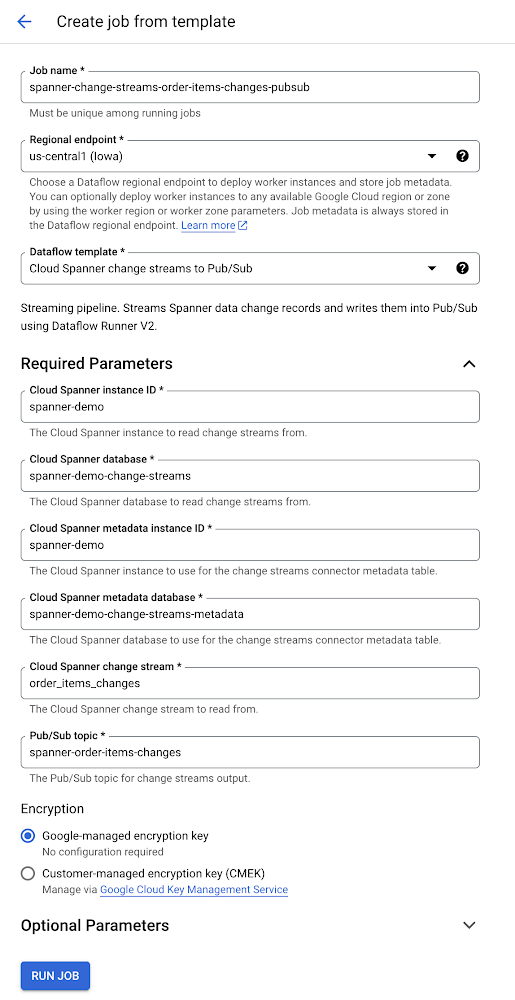
Since its launch, Cloud Spanner change streams has seen broad adoption by Spanner customers in healthcare, retail, financial services, and other industries. This blog post provides an overview of the latest updates to Cloud Spanner change streams and how they can be used to build event-driven applications.A change stream watches for changes to your Spanner database (inserts, updates, and deletes) and streams out these changes in near real-time. One of the most common uses of change streams is replicating Spanner data to BigQuery for analytics. With change streams, it’s as easy as writing Data definition language (DDL) to create a change stream on the desired tables and configuring Dataflow to replicate these changes to BigQuery so that you can take advantage of BigQuery’s advanced analytic capabilities.Yet analytics is just the start of what change streams can enable. Pub/Sub and Apache Kafka are asynchronous and scalable messaging services that decouple the services that produce messages from the services that process those messages. With support for Pub/Sub and Apache Kafka, Spanner change streams now lets you use Spanner transactional data to build event-driven applications.An example of an event-driven architecture is an order system that triggers inventory updates to an inventory management system whenever orders are placed. In this example, orders are saved in a table called order_items. Consequently, changes on this table will trigger events in the inventory system. To create a change stream that tracks all changes made order_items, run the following DDL statement:code_block[StructValue([(u’code’, u’CREATE CHANGE STREAM order_items_changes FOR order_items’), (u’language’, u”), (u’caption’, <wagtail.wagtailcore.rich_text.RichText object at 0x3ef9f6d0c6d0>)])]Once the order_items_changes change stream is created, you can create event streaming pipelines to Pub/Sub and Kafka.Creating an event streaming pipeline to Pub/SubThe change streams Pub/Sub Dataflow template lets you create Dataflow jobs that send change events from Spanner to Pub/Sub and build these kinds of event streaming pipelines.Once the Dataflow job is running, we can simulate inventory changes by inserting and updating order items in the Spanner database:code_block[StructValue([(u’code’, u”INSERT INTO order_items (order_item_id, order_id, article_id, quantity)rnVALUES (rn ‘5fb2dcaa-2513-1337-9b50-cc4c56a06fda’,rn ‘b79a2147-bf9a-4b66-9c7f-ab8bc6c38953′, rn ‘f1d7f2f4-1337-4d08-a65e-525ec79a1417′, rn 5rn);”), (u’language’, u”), (u’caption’, <wagtail.wagtailcore.rich_text.RichText object at 0x3efa0d3d6450>)])]code_block[StructValue([(u’code’, u”UPDATE order_items rnSET quantity = 10 rnWHERE order_item_id = ‘5fb2dcaa-2513-1337-9b50-cc4c56a06fda';”), (u’language’, u”), (u’caption’, <wagtail.wagtailcore.rich_text.RichText object at 0x3efa0d3d6b90>)])]This causes two change records to be streamed out through Dataflow and published as messages to the given Pub/Sub topic, as shown below:The first Pub/Sub message contains the inventory insert, and the second message contains inventory update.From here, the data can be consumed using any of the many integration options Pub/Sub offers.Creating an event streaming pipeline to Apache KafkaIn many event-driven architectures, Apache Kafka is the central event store and stream-processing platform. With our newly added Debezium-based Kafka connector, you can build event streaming pipelines with Spanner change streams and Apache Kafka. The Kafka connector produces a change event for every insert, update, and delete. It sends groups change event records for each Spanner table into a separate Kafka topic. Client applications then read the Kafka topics that correspond to the database tables of interest, and can react to every row-level event they receive from those topics.The connector has built-in fault-tolerance. As the connector reads changes and produces events, it records the last commit timestamp processed for each change stream partition. If the connector stops for any reason (e.g. communication failures, network problems, or crashes), it simply continues streaming records where it last left off once it restarts.To learn more about the change streams connector for Kafka, see Build change streams connections to Kafka. You can download the change streams connector for Kafka from Debezium.Fine-tuning your event messages with new value capture typesIn the example above, the stream order_items_changed that uses the default value capture type OLD_AND_NEW_VALUES. This means that the Change streams change record includes both the old and new values of a row’s modified columns, along with the primary key of the row. Sometimes, however,  you don’t need to capture all that change data. For this reason, we added two new value capture types: NEW_VALUES and NEW_ROW, described below:To continue with our existing example, let’s create another change stream that contains only the new values of changed columns. This is the value capture type with the lowest memory and storage footprint.code_block[StructValue([(u’code’, u”CREATE CHANGE STREAM order_items_changed_values rnFOR order_itemsrnWITH ( value_capture_type = ‘NEW_VALUES’ )”), (u’language’, u”), (u’caption’, <wagtail.wagtailcore.rich_text.RichText object at 0x3ef9f6e7bf90>)])]The DDL above creates a change stream using the PostgreSQL interface syntax. Read Create and manage change streams to learn more about the DDL for creating change streams for both PostgreSQL and GoogleSQL Spanner databases.SummaryWith change streams, your Spanner data follows you wherever you need it, whether that’s for analytics with BigQuery, for triggering events in downstream applications, or for compliance and archiving. And because change streams are built into Spanner, there’s no software to install, and you get external consistency, high scale, and up to 99.999% availability.With support for Pub/Sub and Kafka, Spanner change streams makes it easier than ever to build event-driven pipelines with whatever flexibility you need for your business.To get started with Spanner, create an instance or try it out for free, or take a Spanner QwiklabTo learn more about Spanner change streams, check out About change streams To learn more about the change streams Dataflow template for Pub/Sub, go to Cloud Spanner change streams to Pub/Sub template To learn more about the change streams connector for Kafka, go to Build change streams connections to Kafka
Quelle: Google Cloud Platform

Unlock insights faster from your MySQL data in BigQuery

Data practitioners know that relational databases are not designed for analytical queries. Data-driven organizations that connect their relational database infrastructure to their data warehouse get the best of both worlds: a production database unhassled by a barrage of analytical queries, and a data warehouse that is free to mine for insights without the fear of bringing down production applications. The remaining question is how do you create a connection between two disparate systems with as little operational overhead as possible.Dataflow Templates makes connecting your MySQL data warehouse with BigQuery as simple as filling out a web form. No custom code to write, no infrastructure to manage. Dataflow is Google Cloud’s serverless data processing for batch and streaming workloads that makes data processing fast, autotuned, and cost-effective. Dataflow Templates are reusable snippets of code that define data pipelines — by using templates, a user doesn’t have to worry about writing a custom Dataflow application. Google provides a catalog of templates that help automate common workflows and ETL use cases. This post will dive into how to schedule a recurring batch pipeline for replicating data from MySQL to BigQuery.Launching a MySQL-to-BigQuery Dataflow Data PipelineFor our pipeline, we will launch a Dataflow Data Pipeline. Data Pipelines allow you to schedule recurring batch jobs1 and feature a suite of lifecycle management features for streaming jobs that make it an excellent starting point for your pipeline. We’ll click on the “Create Data Pipeline” button at the top.We will select the MySQL to BigQuery pipeline. As you can see, if your relational database is Postgres or SQL Server, we also have templates for those systems as well.The form will now expand to provide a list of parameters for this pipeline that will help execute the pipeline:Required parametersSchedule: The recurring schedule for your pipeline (you can schedule hourly, daily, or weekly jobs, or define your own schedule with unix cron)Source: The URL connection string to connect to the Jdbc source. If your database requires SSL certificates, you can append query strings that enable SSL mode and the GCS locations of certificates. These can be encoded using Google Cloud Key Management Service.Target: BigQuery output tableTemp Bucket: GCS bucket for staging filesOptional parameters Jdbc source SQL query, if you want to replicate a portion of the database. Username & password, if your database requires authentication. You can also pass in an encoded string from Google Cloud KMS, if you desire.Partitioning parametersDataflow-related parameters, including options to modify autoscaling, number of workers, and other configurations related to the worker environment. If you require an SSL certificate and you have truststore and certificate files, you will use the “extra files to stage” parameter to pass in their respective locations.Once you’ve entered your configurations, you are ready to hit the Create Pipeline button.Creating the pipeline will take you to the Pipeline Info screen, which will show you a history of executions of the pipeline. This is a helpful view if you are looking for jobs that ran long, or identifying patterns that happen across multiple executions. You’ll find a list of jobs related to the pipeline in a table view near the bottom of the page. Clicking on one of those job IDs will allow you to inspect a specific execution in more detail.The Dataflow monitoring experience features a job graph showing a visual representation of the pipeline you launched, and includes a logging panel at the bottom that displays logs collected from the job and workers. You will find information associated with the job on the right hand panel, as well as several other tabs that allow you to understand your job’s optimized execution, performance metrics, and cost.Finally, you can go to the BigQuery SQL workspace to see your table written to its final destination. If you prefer a video walkthrough of this tutorial, you can find that here. You’re all set for unlocking value from your relational database — and it didn’t take an entire team to set it up!What’s nextIf your use case involves reading and writing changes in continuous mode, we recommend checking out our Datastream product, which serves change-data-capture and real-time replication use cases. If you prefer a solution based on open-source technology, you can also explore our Change Data Capture Dataflow template that uses a Debezium connector to publish messages to Pub/Sub, then writes to BigQuery.Happy Dataflowing!1. If you do not need to run your job on a scheduled basis, we recommend using the “Create Job from Template” workflow, found on the “Jobs” page
Quelle: Google Cloud Platform

How to use custom holidays for time-series forecasting in BigQuery ML

Time-series forecasting is one of the most important models across a variety of industries, such as retail, telecom, entertainment, manufacturing. It serves many use cases such as forecasting revenues, predicting inventory levels and many others. It’s no surprise that time series is one of the most popular models in BigQuery ML. Defining holidays is important in any time-series forecasting model to accommodate for variations and fluctuations in the time-series data. In this blog post we will discuss how you can take advantage of the recent enhancements to define custom holidays and get better explainability for your forecasting models in BigQuery ML.You could already specify HOLIDAY_REGION when creating a time-series model. The model would use the holiday information within that HOLIDAY_REGION to capture the holiday effect. However, we heard from our customers that they are looking to understand the holiday effect in detail — which holidays are used in modeling, what is the contribution of individual holidays in the model as well as the ability to customize or create their own holidays for modeling.To address these, we recently launched the preview of custom holiday modeling capabilities in ARIMA_PLUS and ARIMA_PLUS_XREG. With these capabilities, you can now do the following:Access to all the built-in holiday data by querying the BigQuery public dataset bigquery-public-data.ml_datasets.holidays_and_events_for_forecasting or by using the table value function ML.HOLIDAY_INFO. You can inspect the holiday data used for fitting your forecasting modelCustomize the holiday data (e.g. primary date and holiday effect window) using standard GoogleSQL to improve time series forecasting accuracyExplain the contribution of each holiday to the forecasting resultBefore we dive into using these features, let’s first understand custom holiday modeling and why one might need it. Let’s say you want to forecast the number of daily page views of the Wikipedia page for Google I/O, Google’s flagship event for developers. Given the large attendance of Google I/O you can expect significantly increased traffic to this page around the event days. Given that these are Google-specific dates and not included in the default HOLIDAY_REGION, the forecasted page views will not provide a good explanation for the spikes around those dates. So you need the ability to specify custom holidays in your model so that you get better explainability for your forecasting. With custom holiday modeling features, you can now build more powerful and accurate time-series forecasting models using BigQuery ML.The following sections show some examples of the new custom holiday modeling in forecasting in BigQuery ML. In this example, we explore the bigquery-public-data.wikipedia dataset, which has the daily pageviews for Google I/O, create a custom holiday for Google I/O event, and then use the model to forecast the daily pageviews based on its historical data and factoring in the customized holiday calendar.“The bank would like to utilize a custom holiday calendar as it has ‘tech holidays’ due to various reasons like technology freezes, market instability freeze etc. And, it would like to incorporate those freeze calendars while training the ML model for Arima,” said a data scientist of a large US based financial institution.An example: forecast wikipedia daily pageviews for Google I/OStep 1. Create the datasetBigQuery hosts hourly wikipedia page view data across all languages. As a first step, we aggregate them by day and all languages.code_block[StructValue([(u’code’, u”CREATE OR REPLACE TABLE `bqml_tutorial.googleio_page_views`rnASrnSELECTrn DATETIME_TRUNC(datehour, DAY) AS date,rn SUM(views) AS viewsrnFROMrn `bigquery-public-data.wikipedia.pageviews_*`rnWHERErn datehour >= ‘2017-01-01’rn AND datehour < ‘2023-01-01’rn AND title = ‘Google_I/O’rnGROUP BYrn DATETIME_TRUNC(datehour, DAY)”), (u’language’, u”), (u’caption’, <wagtail.wagtailcore.rich_text.RichText object at 0x3ee7b577b810>)])]Step 2: Forecast without custom holidayNow we do a regular forecast. We use the daily page view data from 2017 to 2021 and forecast into the year of 2022.code_block[StructValue([(u’code’, u”CREATE OR REPLACE MODEL `bqml_tutorial.forecast_googleio`rn OPTIONS (rn model_type = ‘ARIMA_PLUS’,rn holiday_region = ‘US’,rn time_series_timestamp_col = ‘date’,rn time_series_data_col = ‘views’,rn data_frequency = ‘DAILY’,rn horizon = 365)rnASrnSELECTrn *rnFROMrn `bqml_tutorial.googleio_page_views`rnWHERErn date < ‘2022-01-01′;”), (u’language’, u”), (u’caption’, <wagtail.wagtailcore.rich_text.RichText object at 0x3ee7b5756a10>)])]We can visualize the result from ml.explain_forecast using Looker Studio and get the following graph:As we can see, the forecasting model is capturing the general trend pretty well. However, it is not capturing the increased traffic that are related to previous Google I/O events and not able to generate an accurate forecast for 2022 either.Step 3: Forecast with custom holidayAs we can see from below, Google I/O happened during these dates between 2017 and 2022. We would like to instruct the forecasting model to consider these dates as well.code_block[StructValue([(u’code’, u”CREATE OR REPLACE MODEL `bqml_tutorial.forecast_googleio_with_custom_holiday`rn OPTIONS (rn model_type = ‘ARIMA_PLUS’,rn holiday_region = ‘US’,rn time_series_timestamp_col = ‘date’,rn time_series_data_col = ‘views’,rn data_frequency = ‘DAILY’,rn horizon = 365)rnAS (rn training_data AS (rn SELECTrn *rn FROMrn `bqml_tutorial.googleio_page_views`rn WHERErn date < ‘2022-01-01’rn ),rn custom_holiday AS (rn SELECTrn ‘US’ AS region,rn ‘GoogleIO’ AS holiday_name,rn primary_date,rn 1 AS preholiday_days,rn 2 AS postholiday_daysrn FROMrn UNNEST(rn [rn DATE(‘2017-05-17′),rn DATE(‘2018-05-08′),rn DATE(‘2019-05-07′),rn — cancelled in 2020 due to pandemicrn DATE(‘2021-05-18′),rn DATE(‘2022-05-11′)])rn AS primary_datern )rn);”), (u’language’, u”), (u’caption’, <wagtail.wagtailcore.rich_text.RichText object at 0x3ee7b575e110>)])]As we can see, we provide a full list of Google I/O’s event dates to our forecasting model. Besides, we also adjust the holiday effect window to cover four  days around the event date to better capture some potential view traffic before and after the event.After visualizing in Looker Studio, we get the following chart:As we can see from the chart, our custom holiday significantly helped boost the performance of our forecasting model and now it is perfectly capturing the increase of page views caused by Google I/O.Step 4: Explain fine-grained holiday effectYou can further inspect the holiday effect contributed by each individual holidays by using ml.explain_forecast:code_block[StructValue([(u’code’, u’SELECTrn time_series_timestamp,rn holiday_effect_GoogleIO,rn holiday_effect_US_Juneteenth,rn holiday_effect_Christmas,rn holiday_effect_NewYearrnFROMrn ml.explain_forecast(rn modelrn bqml_tutorial.forecast_googleio_with_custom_holiday,rn STRUCT(365 AS horizon))rnWHERE holiday_effect != 0;’), (u’language’, u”), (u’caption’, <wagtail.wagtailcore.rich_text.RichText object at 0x3ee7b5741c10>)])]The results look similar to the following. As we can see, Google I/O indeed contributes a great amount of holiday effect to the overall forecast result for those custom holidays.Step 5: Compare model performanceAt the end, we use ml.evaluate to compare the performance of the previous model created without custom holiday and the new model created with custom holiday. Specifically, we would like to see how the new model performs when it comes to forecasting a future custom holiday, and hence we are setting the time range on the week of Google I/O in 2022.code_block[StructValue([(u’code’, u’SELECTrn “original” AS model_type,rn *rnFROMrn ml.evaluate(rn MODEL bqml_tutorial.forecast_googleio,rn (rn SELECTrn *rn FROMrn `bqml_tutorial.googleio_page_views`rn WHERErn date >= ‘2022-05-08’rn AND date < ‘2022-05-12’rn ),rn STRUCT(rn 365 AS horizon,rn TRUE AS perform_aggregation))rnUNION ALLrnSELECTrn “with_custom_holiday” AS model_type,rn *rnFROMrn ml.evaluate(rn MODELrn bqml_tutorial.forecast_googleio_with_custom_holiday,rn (rn SELECTrn *rn FROMrn `bqml_tutorial.googleio_page_views`rn WHERErn date >= ‘2022-05-08’rn AND date < ‘2022-05-12’rn ),rn STRUCT(rn 365 AS horizon,rn TRUE AS perform_aggregation));’), (u’language’, u”), (u’caption’, <wagtail.wagtailcore.rich_text.RichText object at 0x3ee7b5772550>)])]We get the following result, which demonstrates the great performance boost of the new model:ConclusionIn the previous example, we demonstrated how to use custom holidays in forecasting and evaluate its impact on a forecasting model. The public dataset and the ML.HOLIDAY_INFO table value function is also helpful for understanding what holidays are used to fit your model. Some gains brought by this feature are as follows:You can configure custom holidays easily using standard GoogleSQL, enjoying BigQuery scalability, data governance, etc.You get elevated transparency and explainability of time series forecasting in BigQuery.What’s next?Custom holiday modeling in forecasting models is now available for you to try in preview. Check out the tutorial in BigQuery ML to learn how to use it. For more information, please refer to the documentation.Acknowledgements: Thanks to Xi Cheng, Haoming Chen, Jiashang Liu, Amir Hormati, Mingge Deng, Eric Schmidt and Abhinav Khushraj from the BigQuery ML team. Also thanks to Weijie Shen, Jean Ortega from the Fargo team of Resource Efficiency Data Science team.Related ArticleHow to do multivariate time series forecasting in BigQuery MLMultivariate time series forecasting allows BigQuery users to use external covariate along with target metric for forecasting.Read Article
Quelle: Google Cloud Platform

The big picture: How Google Photos scaled rapidly on Spanner

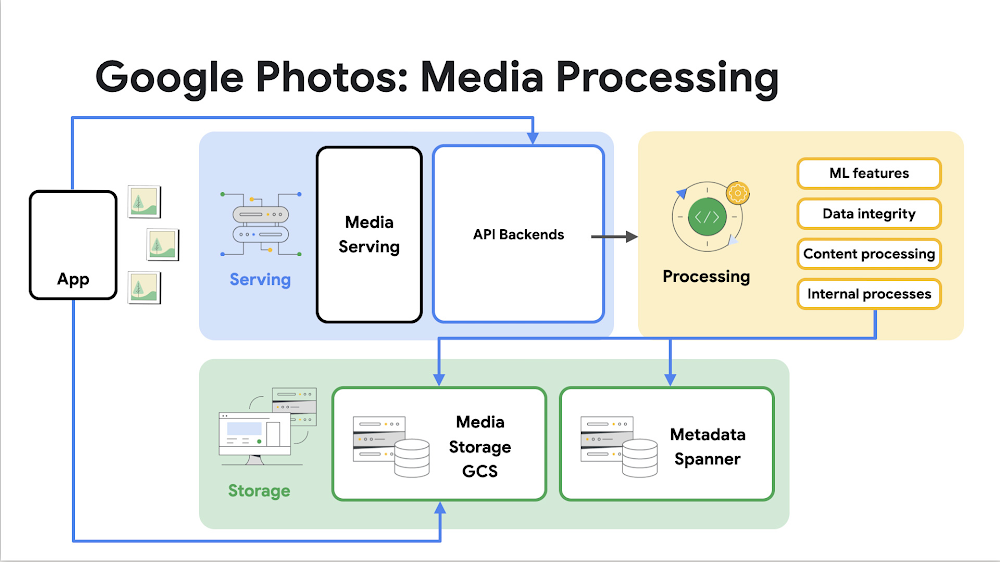
Mobile photography has become ubiquitous over the past decade, and it’s now easier than ever to take professional quality photos with the push of a button. This has resulted in explosive growth in the number of photo and video captures, and a huge portion of these photos and videos contain private, cherished, and beloved memories — everything from small, everyday moments to life’s biggest milestones. Google Photos aims to be the home for all these memories, organized and brought to life so that users can share and save what matters. With more than one billion users and four trillion photos and videos — and with the responsibility to protect personal, private, and sensitive user data — Google Photos needs a database solution that is highly scalable, reliable, secure, and supports large scale data processing workloads conducive to AI/ML applications. Spanner has proved to be exactly the database we needed.A picture says a thousand wordsGoogle Photos offers a complete consumer photo workflow app for mobile and web. Users can automatically back up, organize, edit, and share their photos and videos with friends and family. All of this data can be accessed and experienced in delightful ways thanks to machine learning-powered features like search, suggested edits, suggested sharing, and Memories. With Photos storing over 4 trillion photos and videos, we need a database that can handle a staggering amount of data with a wide variety of read and write patterns. We store all the metadata that powers Google Photos in Spanner, including both media-specific and product-specific metadata for features like album organization, search, and clustering. The Photos backend is composed of dozens of microservices, all of which interact with Spanner in different ways, some serving user-facing traffic, and others handling batch traffic. Photos also has dozens of large batch-processing Flume pipelines that power our most expensive workloads: AI/ML processes, data integrity management, and other types of full account or database-wide processing.High level architecture for media processing in Google Photos using SpannerDespite Google Photos’ size and complexity, Spanner has a number of features that make our integration easy to maintain. Thanks to Spanner’s traffic isolation, capacity management, and automatic sharding capabilities, we are able to provide a highly reliable user experience even with unpredictably bursty traffic loads. Balancing our online and offline traffic is also manageable thanks to Spanner’s workload tunable replication capabilities. Photos enables users to access all of their photos at any time, reliably across the globe. Photos relies on Spanner to automatically replicate data with 99.999% availability. Spanner’s sharding capabilities give us low latency worldwide, help us smooth our computational workloads, and make it easy for us to support the ever increasing set of regulatory requirements concerning data residency.  The system has to be reliable and available for user uploads, while simultaneously ensuring that ML-based features not only perform well, but also don’t impact interactive traffic. Spanner’s sharding flexibility allows both these use cases to be satisfied in the same database. We have read-only and read/write shards to separate these use cases. We need to serve our active online users quickly because we know they expect their photos to be instantaneously displayed and shareable.Photos also has strict consistency and concurrency needs. That’s not surprising when you consider the variety of first- and third-party clients that upload media, processing pipelines performing updates, and various feature needs – many of which involve cross-user sharing. It’s Spanner’s high write throughput, consistency guarantees, and resource management tools that have allowed Photos to build and scale these features and pipelines by 10x with minimal re-architecture. Our use of Spanner has proven Spanner’s ability to scale rapidly without compromise — something rare in traditional, vertically scalable SQL databases. Equally as important, Spanner has significantly increased our operational efficiency. We now save a lot of time and energy on tactical placement, location distribution, redundancy, and backup management. Replica management is a simple matter of configuration management, and we rely on Spanner to manage the changes. In addition, automated index verifications, automatic sharding, and guaranteed data consistency across all regions, save us a lot of manual work.Trust paints the whole pictureOur users entrust us with their private and precious data, and we take that responsibility very seriously. Privacy, security, and safety are incredibly important to Google Photos — they are core principles that are considered in every feature and user experience that we build. Spanner’s secure access controls help significantly by eliminating unilateral data access, managing the risk of internal or external data breaches, and ensuring that data privacy is respected throughout our backend. Reliability and trust are the cornerstones of Google Photos. It’s critical that users can access their data whenever they want it, and that fundamental product features like backup and sharing remain highly available even during peak load (holidays, for example). The Photos team continues to heavily focus on reliability improvements to ensure that we’re delivering the experience that our users have come to expect from Google. Thanks to Spanner’s ongoing investment in this area, Photos has been able to continuously raise this bar — which is particularly notable given Photos’ own rapid growth rate. Running multiple replicas is a key aspect of how our system runs reliably, and Spanner’s strong external consistency features and continuous index verifications ensure that data remains correct. In addition, Spanner offers robust backup and recovery systems which provide us even more confidence that our datastores will remain correct and complete. Picture perfectThe numbers speak for themselves. Spanner supports a staggering amount of traffic across many regions, over a billion users, and metadata for more than four trillion images. We’ve already experienced 10x growth since launching our Spanner database, and we’re confident that Spanner can support another 10-fold increase in the future. Going forward, we’re confident in Spanner’s robust, easy-to-use nature to help us scale to the next billion users and drive even more incredible experiences for our users. Learn moreRead the blog “SIGOPS Hall of Fame goes to Spanner paper — here’s why that matters” by Chris Taylor, Distinguished Software Engineer, on the recent award and the evolution of Spanner.Learn more about Cloud Spannerand create a 90-day Spanner free trial instance.Related ArticleEvaluating the true cost or TCO of a database — and how Cloud Spanner comparesCloud Spanner databases offer high performance at lower costs by providing a fully managed experience with unlimited scalability and high…Read Article
Quelle: Google Cloud Platform

Expanding 24/7 multilingual support: Now in Mandarin Chinese and Korean

At Google Cloud, we fully grasp that the need for technical support can arise at any hour. Further,  the importance of communicating in a language you’re comfortable is paramount, particularly when dealing with urgent issues.To help, we’re expanding the current 8×5 support offering to 24×7 for P1 and P2 cases for Korean Enhanced and Premium Support customers, as well as for Chinese Enhanced customers, aligning with what we already provide for Chinese Premium Support customers today. With this, Premium and Enhanced Support customers will be able to reach out to us in Mandarin Chinese or Korean, regardless of the time or day for urgent issues.For a comprehensive understanding of our Customer Care offerings, we invite you to visitcloud.google.com/support.In accordance with these additions, we have amended our Technical Support Services Guidelines, ensuring they reflect recent enhancements.We’re eager to engage with an increasing number of our customers in these important Google Cloud regions, offering support and solutions in a language they’re comfortable with.
Quelle: Google Cloud Platform

Four steps to managing your Cloud Logging costs on a budget

As part of our ongoing series on cost management for observability data in Google Cloud, we’re going to share four steps for getting the most out of your logs while on a budget. While we’ll focus on optimizing your costs within Google Cloud, we’ve found that this works with customers with infrastructure and logs on prem and in other clouds as well.Step 1: Analyze your current spending on logging toolsTo get started, create an itemized list of what volume of data is going where and what it costs. We’ll start with the billing report and the obvious line items including those under Operations Tools/Cloud Logging:Log Volume – the cost to write log data to disk once (see our previous blog post for an explanation)Log Storage Volume – the cost to retain logs for more than 30 days If you’re using tools outside Cloud Logging, you’ll also need to include any costs related to these solutions. Here’s a list to get you started:Log vendor and hardware costs — what are you paying to observability vendors? If you’re running your own logging solution, you’ll want to include the cost of compute and disk.If you export logs within Google Cloud, include Cloud Storage and BigQuery costsProcessing costs — consider the costs for Kafka, Pub/Sub or Dataflow to process logs. Network egress charges may apply if you’re moving logs outside Google Cloud.Engineering resources dedicated to managing your logging tools across your enterprise often are significant too!Step 2: Eliminate waste — don’t pay for logs you don’t needWhile not all costs scale directly with volume, optimizing your log volume is often the best way to reduce spend. Even if you are using a vendor with a contract that locks you into a fixed price for a period of time, you may still have costs in your pipeline that can be reduced by avoiding wasteful logs such as Kafka, Pub/Sub or Dataflow costs. Finding chatty logs in Google CloudThe easiest way to understand which sources are generating the highest volume of logs within Google Cloud is to start with our pre-built dashboards in Cloud Monitoring. To access the available dashboards:Go to Monitoring -> DashboardsSelect “Sample Library” -> “Logging”This blog post has some specific recommendations for optimizing logs for GKE and GCE using prebuilt dashboards.As a second option, you can use Metrics Explorer and system metrics to analyze the volume of logs. For example, type “log bytes ingested” into the filter. This specific metric corresponds to the Cloud Logging “Log Volume” charge. There are many ways to filter this data. To get a big picture, we often start with grouping by both “resource_type” and “project_id”. To narrow down the resource type in a particular project, add a “project_id” filter. Select “sum” under the Advanced Options -> Click on Aligner and select “sum”. Sort by volume to see the resources with the highest log volume.While these rich metrics are great for understanding volumes, you’ll probably want to eventually look at the logs to see whether they’re critical to your observability strategy. In Logs Explorer, the log fields on the left side help you understand volumes and filter logs from a resource type.Reducing log volume with the Logs Router Now that we understand what types of logs are expensive, we can use the Log Router and our sink definitions to reduce these volumes. Your strategy will depend on your observability goals, but here are some general tools we’ve found to work well.The most obvious way to reduce your log volume is not to send the same logs to multiple storage destinations. One common example of this is when a central security team uses an aggregated log sink to centralize their audit logs but individual projects still ingest these logs. Instead, use exclusion filters on the _Default log sink and any other log sinks in each project to avoid these logs. Exclusion filters also work on log sinks to BigQuery, Pub/Sub, or Cloud Storage.Similarly, if you’re paying to store logs in an external log management tool, you don’t have to save these same logs to Cloud Logging. We recommend keeping a small set of system logs from GCP services such as GKE in Cloud Logging in case you need assistance from GCP support but what you store is up to you, and you can still export them to the destination of your choice!Another powerful tool to reduce log volume is to sample a percentage of chatty logs. This can be particularly useful with 2XX log balancer logs, for example. This can be a powerful tool, but we recommend you design a sampling strategy based on your usage, security and compliance requirements and document it clearly.Step 3: Optimize costs over the lifecycle of your logsAnother option to reduce costs is to avoid storing logs for more time than you need them. Cloud Logging charges based on the monthly log volume retained per month. There’s no need to switch between hot and cold storage in Cloud Logging; doubling the default amount of retention only increases the cost by 2%. You can change your custom log retention at any time.If you are storing your logs outside of Cloud Logging, it is a good idea to compare the cost to retain logs and make a decision. Step 4: Setup alerts to avoid surprise billsOnce you are confident that the volume of logs being routed through log sinks fit in your budget, set up alerts so that you can detect any spikes before you get a large bill. To alert based on the volume of logs ingested into Cloud Logging:Go to the Logs-based metrics page. Scroll down to the bottom of the page and click the three dots on “billing/bytes_ingested” under System-defined metrics. Click “ Create alert from metric”Add filters (For example: use resource_id or project_id. This is optional). Select the logs based metric for the alert policy.You can also set up similar alerts on the volume for log sinks to Pub/Sub, BigQuery or Cloud Storage.ConclusionOne final way to stretch your observability budget is to use more Cloud Operations. We’re always working to bring our customers the most value possible for their budget such as our latest feature, Log Analytics, which adds querying capabilities but also makes the same data available for analytics, reducing the need for data silos. Many small customers can operate entirely on our free tier. Larger customers have expressed their appreciation for the scalable Log Router functionality available at no extra charge that would otherwise require an expensive event store to process data. So it’s no surprise that a 2022 IDC report showed that more than half of respondents surveyed stated that managing and monitoring tools from public cloud platforms provide more value compared to third-party tools. Get started with Cloud Logging and Monitoring today.
Quelle: Google Cloud Platform

How an open data cloud is enabling Airports of Thailand and EVme to reshape the future of travel

Aviation and accommodation play a big role in impacting the tourism economy, but analysis of recent data also highlights tourism’s impact on other sectors, from financial services to healthcare, to retail and transportation. With travel recovery in full swing post pandemic, Google search queries related to “travel insurance” and “medical tourism” in Thailand have increased by more than 900% and 500% respectively. Financial institutions and healthcare providers must therefore find ways to deliver tailored offerings to travelers who are seeking peace of mind from unexpected changes or visiting the country to receive specialized medical treatment.Interest in visiting Thailand for “gastronomy tourism” is also growing, with online searches increasing by more than 110% year-on-year.  Players in the food and beverage industry should therefore be looking at ways to better engage tourists keen on authentic Thai cuisine.Most importantly, digital services will play an integral role in travel recovery. More than one in two consumers in Thailand are already using online travel services, with this category expected to grow 22% year-on-year and contribute US$9 billion to Thailand’s digital economy by 2025. To seize growth opportunities amidst the country’s tourism rebound, businesses cannot afford to overlook the importance of offering always-on, simple, personalized, and secure digital services.That is why Airports of Thailand (AOT), SKY ICT (SKY) and EVME PLUS (EVme) are adopting Google Cloud’s open data cloud to deliver sustainable, digital-first travel experiences.Improving the passenger experience in the cloudWith Thailand reopening its borders, there has been an upturn in both inbound and outbound air travel. To accommodate these spikes in passenger traffic across its six international airports, AOT migrated its entire IT footprint to Google Cloud, which offers an open, scalable, and secure data platform, with implementation support from its partner SKY, an aviation technology solutions provider.Tapping on Google Cloud’s dynamic autoscaling capabilities, the IT systems underpinning AOT’s ground aviation services and the SAWASDEE by AOT app can now accommodate up to 10 times their usual workloads. AOT can also automatically scale down its resources to reduce costs when they are no longer in use. Using the database management services of Google Cloud to eliminate data silos, the organization is able to enhance its capacity to deliver real-time airport and flight information to millions of passengers. As a result, travelers enjoy a smoother passenger experience, from check-in to baggage collection.At the same time, SKY uses Google Kubernetes Engine (GKE) to transform SAWASDEE by AOT into an essential, all-in-one travel app that offers a full range of tourism-related services. GKE allows AOT to automate application deployment and upgrades without causing downtime. This frees up time for the tech team to accelerate the launch of new in-app features, such as a baggage tracker service, airport loyalty programs, curated travel recommendations, an e-payment system, and more.EVme drives sustainable travel with dataBeing able to travel more efficiently is only one part of the future of travel. More than ever, sustainability is becoming a priority for consumers when they plan their travel itineraries. For instance, search queries related to “sustainable tourism” in Thailand have increased by more than 200% in the past year, with close to four in 10 consumers sharing that they are willing to pay more for a sustainable product or service.To meet this increasing demand and support Thailand’s national efforts to become a low-carbon society, EVme, a subsidiary of PTT Group, is building its electric vehicle lifestyle app on Google Cloud, the industry’s cleanest cloud. It has also deployed the advanced analytics and business intelligence tools of Google Cloud to offer its employees improved access to data-driven insights, which helps them better understand customer needs and deliver personalized interactions. These insights have helped EVme determine the range of electric vehicle models it offers for rental via its app, so as to cater to different preferences. At the same time, the app can also share crucial information, such as the availability of public electric vehicle charging stations, while providing timely support and 24-hour emergency assistance to customers.As we empower organizations across industries with intelligent, data-driven capabilities to make smarter business decisions and be part of an integrated ecosystem that delivers world-class visitor experiences, our collaborations with AOT, SKY, and EVme will enhance their ability to serve travelers with personalized, digital-first offerings powered by our secure and scalable open data cloud.
Quelle: Google Cloud Platform

How to easily migrate your apps to containers — free deep dive and workshop

Just here for the event registration link?Click here.Are you looking to migrate your applications to Google Cloud? Thinking about using containers for some of those apps? If so, you’re in luck! Google Cloud is hosting a free workshop on May 24th, 2023, that will teach you everything you need to know about migrating your app to containers in Google Cloud. The workshop starts at 9AM PST and will be led by Google Cloud experts who will walk you through some of your migration options, the costs involved, and the security considerations. We’ll also feature a hands-on lab so you can get familiar with some of the tools we use to achieve your migration goals. And we’ll wrap up with a live Q&A so you have the opportunity to ask questions of the experts and get your specific questions answered.Whether you’re a developer, a system administrator, or a business decision-maker, this workshop will give you the insights you need to make an informed decision about how to migrate your apps to Google Cloud. Click here to register for this free workshop. We hope to see you there!Need a bit more info before you sign up? No problem. Let’s chat about some of the benefits of migrating on-prem workloads to containers in Google Cloud: Wide range of container services: Choose between Google Kubernetes Engine (GKE), Cloud Run, and Anthos, giving you the flexibility to choose the container service that best meets your needs.Global network infrastructure: With our global network of data centers, you can deploy containers close to your users. This improves performance and reduces latency.Tools and resources: There’s a variety of tools and resources to help you manage and deploy your containers, including the Google Cloud console, the gcloud command-line tool, and the GKE dashboard.Commitment to security: Google Cloud takes security seriously, and our container services are built on a secure foundation. This includes features like role-based access control (RBAC), network policies, and encryption.Still have questions? We’ve got answers, and hope you’ll join us for this free workshop on May 24th at 9AM PST. And if you can’t wait until then, you can also check out our new whitepaper: The future of infrastructure will be containerized.We hope to see you on the 24th!
Quelle: Google Cloud Platform