How Kitabisa re-structured its fundraising platform to drive "kindness at scale" on Google Cloud

The name Kitabisa means “we can” in Bahasa Indonesia, the official language of Indonesia, and captures our aspirational ethos as Indonesia’s most popular fundraising platform. Since 2013, Kitabisa has been collecting donations in times of crisis and natural disasters to help millions in need. Pursuing our mission of “channeling kindness at scale,” we deploy AI algorithms to foster Southeast Asia’s philanthropic spirit with simplicity and transparency.Unlike e-commerce platforms that can predict spikes in demand, such as during Black Friday, Kitabisa’s mission of raising funds when disasters like earthquakes strike is by definition unpredictable. This is why the ability to scale up and down seamlessly is critical to our social enterprise.In 2020, Indonesia’s COVID-19 outbreak coincided with Ramadan. Even in normal times, this is a peak period, as the holy month inspires charitable activity. But during the pandemic, the crush of donations pushed our system beyond the breaking point. Our platform went down for a few minutes just as Indonesia’s giving spirit was at its height, creating frustrations for users. A new cloud beginningThat’s when we realized we needed to embark on a new cloud journey, moving from our monolithic system to one based on microservices. This would enable us to scale up for surges in demand, but also scale down when a wave of giving subsides. We also needed a more flexible database that would allow us to ingest and process the vast amounts of data that flood into our system in times of crisis.These requirements led us to re-architect our entire platform on Google Cloud. Guided by a proactive Google Cloud team, we migrated to Google Kubernetes Engine (GKE) for our overall containerized computing infrastructure, and from Amazon RDS to Cloud SQL for MySQL and PostgreSQL, for our managed database services.The result surpassed our expectations. During the following year’s Ramadan season, we gained a 50% boost in computing resources to easily handle escalating crowdfunding demands on our system. This was thanks to both the seamless scaling of GKE and recommendations from the Google Cloud Partnership team on deploying and optimizing Cloud SQL instances with ProxySQL to optimize our managed database instances.A progressive journey to kindness at scale While Kitabisa’s mission has never wavered, our journey to optimized performance took us through several stages before we ultimately landed on our current architecture on Google Cloud.Origins on a monolithic provider Kitabisa was initially hosted on DigitalOcean, which only allowed us to run monolithic applications based on virtual machines (VMs) and a stateful managed database. This meant manually adding one VM at a time, which led to challenges in scaling up VMs and core memory when a disaster triggered a spike in donations. Conversely, when a fundraising cycle was complete, we could not scale down automatically from the high specs of manually provisioned VMs, which was a strain on manpower and budgetary resources.Transition to containersTo improve scalability, Kitabisa migrated from DigitalOcean to Amazon Web Services (AWS), where we hoped deploying load balancers would provide sufficient automated scaling to meet our network needs. However, we still found manual configurations to be too costly and labor-intensive. We then attempted to improve automation by switching to a microservices-based architecture. But on Amazon Elastic Container Service (Amazon ECS) we hit a new pain point: when launching applications, we needed to ensure that they were compatible with CloudFormation in deployment, which reduced the flexibility of our solution building due to vendor locking. We decided it was “never too late” to migrate to Kubernetes, which is a more agile containerized solution. Given that we were already using AWS, it seemed natural to move our microservices to Amazon Elastics Kubernetes Service (Amazon EKS). But we soon found that provisioning Kubernetes clusters with EKS was still a manual process that required a lot of configuration work for every deployment. Unlocking automated scalability At the height of the COVID-19 crisis, faced with mounting demands on our system, we decided it was time to give Google Kubernetes Engine (GKE) a try. Since Kubernetes is a Google-designed solution, it seemed likeliest that GKE would provide the most flexible microservices deployment, alongside better access to new features. Through a direct comparison with AWS, we discovered that everything from provisioning Kubernetes clusters to deploying new applications became fully automated, with the latest upgrades and minimal manual setups. By switching to GKE, we can now absorb any unexpected surge in donations, and add new services without expanding the size of our engineering team. The transformative value of GKE became apparent when severe flooding hit Sumatra in November 2021, affecting 25,000 people. Our system easily handled the 30% spike in donations.Moving to Cloud SQL and ProxySQL Kitabisa was also held back by its monolithic database system, which was prone to crashing under heavy demand. We started to solve the problem by moving from a stateful DigitalOcean database to a stateless Redis one, which freed us from relying on a single server, giving us better agility and scale. But the strategy left a major pain point because it still required us to self-manage databases. In addition, we were experiencing high database egress costs due to the need to execute data transfers from a non-Google Cloud database into BigQuery. In December 2021, we migrated our Amazon RDS to Cloud SQL for MySQL, and immediately saved 10% in egress costs per month. But one of the greatest benefits came when the Google Cloud team recommended using the open source proxy for  MySQL to improve the scalability and stability of our data pipelines.Cloud SQL’s compatibility allowed us to use connection pooling tools such as ProxySQL to better load balance our application. Historically, creating a direct connection to a monolithic database was a single point of failure that could end up in a crash. With Cloud SQL plus ProxySQL, we create layers in front of our database instances. It serves as a load balancer that allows us to connect simultaneously to multiple database instances, by creating a primary and a read replica instance. Now, whenever we have a read query, we redirect the query to our read replica instance instead of the primary instance. This configuration has transformed the stability of our database environment because we can have multiple database instances running at the same time, with the load distributed across all instances. Since switching to Cloud SQL as our managed database, and using ProxySQL, we have experienced zero downtime on our fundraising platform even when a major crisis hits.We are also saving costs. Rather than having a separate database for each different Kubernetes cluster, we’ve merged multiple database instances into one instance. We now group databases according to business units instead of per service, yielding database cost reductions of 30%. Streamlining with Terraform deployment There’s another key way in which Google Cloud managed services have allowed us to optimize our environment: using Terraform as an infrastructure-as-a-code tool to create new applications and upgrades to our platform. We also managed to automate the deployment of Terraform code into Google Cloud with the help of Cloud Build, and no human intervention. That means our development team can focus on creative tasks, while Cloud Build deploys a continuous stream of new features to Kitabisa.  The combination of seamless scalability, resilient data pipelines, and creative freedom is enabling us to drive the future of our platform, expanding our mission to inspire people to create a kinder world in other Asian regions.We believe that having Google Cloud as our infrastructure backbone will be a critical part of our future development, which will include adding exciting new insurtech features. Now firmly established on Google Cloud, we can go further in shaping the future of fundraising to overcome turbulent times.Related ArticleTokopedia’s journey to creating a Customer Data Platform (CDP) on Google Cloud PlatformUsing tools like Big Query, and Data Flow, Tokopedia can better personalize search results and product recommendations for customers.Read Article
Quelle: Google Cloud Platform

How Google is preparing for a post-quantum world

The National Institute of Standards and Technology (NIST) on Tuesday announced the completion of the third round of the Post-Quantum Cryptography (PQC) standardization process, and we are pleased to share that a submission (SPHINCS+) with Google’s involvement was selected for standardization. Two submissions (Classic McEliece, BIKE) are being considered for the next round. We want to congratulate the Googlers involved in the submissions (Stefan Kölbl, Rafael Misoczki, and Christiane Peters) and thank Sophie Schmieg for moving PQC efforts forward at Google. We would also like to congratulate all the participants and thank NIST for their dedication to advancing these important issues for the entire ecosystem.This work is incredibly important as we continue to advance quantum computing. Large-scale quantum computers will be powerful enough to break most public-key cryptosystems currently in use and compromise digital communications on the Internet and elsewhere. The goal of PQC is to develop cryptographic systems that safeguard against these potential threats, and NIST’s announcement is a critical step toward that goal. Governments in particular are in a race to secure information because foreign adversaries can harvest sensitive information now and decrypt it later.  At Google, our work on PQC is focused on four areas: 1) driving industry contributions to standards bodies;  2) moving the ecosystem beyond theory and into practice (primarily through testing PQC algorithms); 3) taking action to ensure that Google is PQC ready; and 4) helping customers manage the transition to PQC. Driving industry contributions to a range of standards bodies In addition to our work with NIST, we continue to drive industry contributions to international standards bodies to help advance PQC standards. This includes ISO 14888-4, where Googlers are the editors for a standard on stateful hash-based signatures. More recently, we also contributed to the IETF proposal on data formats, which will define JSON and CBOR serialization formats for PQC digital signature schemes. These standards, collectively, will enable large organizations to build PQC solutions that are compatible and ease the transition globally.Moving the ecosystem beyond theory and into practice: Testing PQC algorithmsWe’ve been working with the security community for over a decade to explore options for PQC algorithms beyond theoretical implementations. We announced in 2016 an experiment in Chrome where a small fraction of connections between desktop Chrome and Google’s servers used a post-quantum key-exchange algorithm, in addition to the elliptic-curve key-exchange algorithm that would typically be used. By adding a post-quantum algorithm in a hybrid mode with the existing key-exchange, we were able to test its implementation without affecting user security. We took this work further in 2019 and announced a wide-scale post-quantum experiment with Cloudflare. We worked together to implement two post-quantum key exchanges, integrated them into Cloudflare’s TLS stack, and deployed the implementation on edge servers and in Chrome Canary clients. Through this work, we learned more about the performance and feasibility of deployment in TLS of two post-quantum key agreements, and have continued to integrate these learnings into our technology roadmap.  In 2021, we tested broader deployment of post-quantum confidentiality in TLS and discovered a range of network products that were incompatible with post-quantum TLS. We were able to work with the vendor so that the issue was fixed in future firmware updates. By experimenting early, we resolved this issue for future deployments.Taking action to ensure that Google is PQC readyAt Google, we’re well into a multi-year effort to migrate to post-quantum cryptography that is designed to address both immediate and long-term risks to protect sensitive information. We have one goal: ensure that Google is PQC ready. Internally, this effort has several key priorities, including securing asymmetric encryption, in particular encryption in transit. This means using ALTS, for which we are using a hybrid key-exchange, to secure internal traffic; and using TLS (consistent with NIST standards) for external traffic. A second priority is securing signatures in the case of hard-to-change public keys or keys with a long lifetime, in particular focusing on hardware, especially hardware deployed outside of Google’s control. We’re also focused on sharing the information we learn to help others address PQC challenges. For example, we recently published a paper that includes PQC transition timelines, leading strategies to protect systems against quantum attacks, and approaches for combining pre-quantum cryptography with PQC to minimize transition risks. The paper also suggests standards to start experimenting with now and provides a series of other recommendations to allow organizations to achieve a smooth and timely PQC transition. Helping customers manage the transition to PQCAt Google Cloud, we are working with many large enterprises to ensure they are crypto-agile and to help them prepare for the PQC transition. We fully expect customers to turn to us for post-quantum cloud capabilities, and we will be ready. We are committed to supporting their PQC transition with a range of Google products, services, and infrastructure. As we make progress, we will continue to provide more PQC updates on Google core, cloud, and other services, and updates will also come from Android, Chrome and other teams. We will further support our customers with Google Cloud transformation partners like the Google Cybersecurity Action Team to help provide deep technical expertise on PQC topics. Additional References:Google Cloud Security Foundations GuideGoogle Cloud Architecture Framework Google infrastructure security design overviewRelated ArticleRead Article
Quelle: Google Cloud Platform

AI Booster: how Vodafone is supercharging AI & ML at scale

One of the largest telecommunications companies in the world, Vodafone is at the forefront of building next-generation connectivity and a sustainable digital future.  Creating this digital future requires going beyond what’s possible today and unlocking significant investment in new technology and change. For Vodafone, a key driver is the use of artificial intelligence (AI) and machine learning (ML), enabling predictive capabilities in enhancing the customer experience, improving network performance, accelerating advances in research, and much more. Following 18 months of hard work, Vodafone has made a huge leap forward in advancing its AI capabilities at scale with the launch of its “AI Booster” AI / ML platform. Led by the Global Big Data & AI organization under Vodafone Commercial, the platform will use the latest Google technology to enable the next generation of AI use cases, such as optimizing customer experiences, customer loyalty, and product recommendations. Vodafone’s Commercial team has long focused on advancing its AI and ML capabilities to drive business results. Yet as demand grows, it is easier said than done to embed AI and ML into the fabric of the organization and rapidly build and deploy ML use cases at scale in a highly regulated industry. Accomplishing this task means not only having the right platform infrastructure, but also developing new skills, ways of working, and processes. Having made meaningful strides in extracting value from data by moving it into a single source of truth on Google Cloud, Vodafone had already significantly increased efficiency, reduced data costs, and improved data quality. This enabled a plethora of use cases that generate business value using analytics and data science. The next step was building industrial scale ML capability, capable of handling thousands of ML models a day across 18+ countries, while streamlining data science processes and keeping up with technological growth. Knowing they had to do something drastically different to scale successfully, along came the idea for AI Booster. “To maximize business value at pace and scale, our vision was to enable fast creation and horizontal / vertical scaling of use cases in an automated, standardized manner. To do this, 18 months ago we set out to build a next-generation AI / ML platform based on new Google technology, some of which hadn’t even been announced yet. “We knew it wouldn’t be easy. People said, ‘Shoot for the stars and you might get off the ground…’ Today, we’re really proud that AI Booster is truly taking off, and went live in almost double the markets we had originally planned. Together, we’ve used the best possible ML Ops tools and created Vodafone’s “AI Booster Platform” to make data scientists’ lives easier, maximise value and take co-creation and scaling of use cases globally to another level,” says Cornelia Schaurecker, Global Group Director for Big Data & AI at Vodafone. AI Booster: a scalable, unified ML platform built entirely on Google CloudGoogle’s Vertex AI lets customers build, deploy, and scale ML models faster, with pre-trained and custom tooling within a unified platform. Built upon Vertex AI, Vodafone’s AI Booster is a fully managed cloud-native platform that integrates seamlessly with Vodafone’s Neuron platform, a data ocean built on Google Cloud. “As a technology platform, we’re incredibly proud of building a cutting-edge MLOps platform based on best-in-class Google Cloud architecture with in-built automation, scalability and security. The result is we’re delivering more value from data science, while embedding reliability engineering principles throughout,” comments Ashish Vijayvargia, Analytics Product Lead at VodafoneIndeed, while Vertex AI is at the core of the platform, it’s much more than that. With tools like Cloud Build and Artifact Registry for CI/CD, and Cloud Functions for automatically triggering Vertex Pipelines, automation is at the heart of driving efficiency and reducing operational overhead and deployment times. Today, users simply complete an online form, and then, within minutes, receive a fully functional AI Booster environment with all the right guardrails, controls, and approvals. Not long ago it could take months to move a model from a proof of concept (PoC) to launching live in production. By focusing on ML operations (MLOps), the entire ML journey is now more cost-effective, faster, and flexible, all without compromising security. PoC-to-production can now be as little as four weeks, an 80% reduction.Diving a bit deeper, Vodafone’s AI Booster Product Manager, Sebastian Mathalikunnel, summarizes key features of the platform: “Our overarching vision was a single ML platform-as-a-service that scales horizontally (business use cases across markets) and vertically (from PoC to Production). For this, we needed innovative solutions to make it both technically and commercially feasible. Selecting a few highlights, we: completely automated ML lifecycle compliance activities (drift / skew detection, explainability, auditability, etc.) via reusable pipelines, containers, and managed services; embedded security by design into the heart of the platform;capitalized on Google-native ML tooling using BQML, AutoML, Vertex AI and others;accelerated adoption through standardized and embedded ML templates.”For the last point, Datatonic, a Google Cloud data and AI partner, was instrumental in building reusable MLOps Turbo Templates, a reference implementation of Vertex Pipelines, to accelerate building a production-ready MLOps solution on Google Cloud.  “Our team is devoted to solving complex challenges with data and AI, in a scalable way. From the start, we knew the extent of change Vodafone was embarking on with AI Booster. Through this open-source codebase, we’ve created a common standard for deploying ML models at scale on Google Cloud. The benefit to one data scientist alone is significant, so scaling this across hundreds of data scientists can really change the business,” says Jamie Curtis, Datatonic’s Practice Lead for MLOps.  Reimagining the data scientist & machine learning engineer experience With the new technology platform in place, driving adoption across geographies and markets is the next challenge. The technology and process changes have a considerable impact on people’s roles, learning, and ways of working. For data scientists, non-core work now is supported by machines in the background—literally at the click of a button. They can spend time doing what they do best and discovering new tools to help them do the job. With AI Booster, data scientists and ML engineers have already started to drive greater value and collaborate on innovative solutions. Supported by instructor-led and on-demand learning paths with Google Cloud, AI Booster is also shaping a culture of experimentation and learning. Together We Can Eighteen months in the making, AI Booster would not have happened without the dedication of teams across Vodafone, Datatonic, and Google Cloud. Googlers from across the globe were engaged in supporting Vodafone’s journey and continue to help build the next evolution of the platform. Cornelia highlights that “all of this was only possible due to the incredible technology and teams at Vodafone and Google Cloud, who were flexible in listening to our requirements and even tweaking their products as a result. Alongside our ‘Spirit of Vodafone,’ which encourages experimenting and adapting fast, we’re able to optimize value for our customers and business. A huge thank you also to Datatonic, who were a critical partner throughout this journey and to Intel for their valuable funding contribution.” The Google & Vodafone partnership continues to go from strength to strength, and together, we are accelerating the digital future and finding new ways to keep people connected. “Vodafone’s flourishing relationship with Google Cloud is a vital aspect of our evolution toward becoming a world-leading tech communications company. It accelerates our ability to create faster, more scalable solutions to business challenges like improving customer loyalty and enhancing customer experience, whilst keeping Vodafone at the forefront of AI and data science,” says Cengiz Ucbenli, Global Head of Big Data and AI, Innovation, Governance at Vodafone. Find out more about the work Google Cloud is doing to help Vodafone here, and to learn more about how Vertex AI capabilities continue to evolve, read about our recent Applied ML Summit.Related ArticleAccelerating ML with Vertex AI: From retail and finance to manufacturing and automotiveHow businesses across industries are accelerating deployment of machine learning models into production with VertexAI.Read Article
Quelle: Google Cloud Platform

What GKE users need to know about Kubernetes' new service account tokens

When you deploy an application on Kubernetes, it runs as a service account — a system user understood by the Kubernetes control plane. The service account is the basic tool for configuring what an application is allowed to do, analogous to the concept of an operating system user on a single machine. Within a Kubernetes cluster, you can use role-based access control to configure what a service account is allowed to do (“list pods in all namespaces”, “read secrets in namespace foo”). When running on Google Kubernetes Engine (GKE), you can also use GKE Workload Identity and Cloud IAM to grant service accounts access to GCP resources (“read all objects in Cloud Storage bucket bar”).How does this work? How does the Kubernetes API, or Cloud Storage know that an HTTP request is coming from your application, and not Bob’s? It’s all about tokens: Kubernetes service account tokens, to be specific. When your application uses a Kubernetes client library to make a call to the Kubernetes API, it attaches a token in the Authorization header, which the server then validates to check your application’s identity.How does your application get this token, and how does the authentication process work? Let’s dive in and take a closer look at this process, at some changes that arrived in Kubernetes 1.21 that will enhance Kubernetes authentication, and how to modify your applications to take advantage of the security capabilities.Legacy tokens: Kubernetes 1.20 and belowLet’s spin up a pod and poke around. If you’re following along, make sure that you are doing this on a 1.20 (or lower) cluster.code_block[StructValue([(u’code’, u'(dev) $ kubectl apply -f – <<EOFrnapiVersion: v1rnkind: Podrnmetadata:rn name: basic-debian-podrn namespace: defaultrnspec:rn serviceAccountName: defaultrn containers:rn – image: debianrn name: mainrn command: [“sleep”, “infinity”]rnEOFrnrn(dev) $ kubectl exec -ti basic-debian-pod — /bin/bashrnrn(pod) $ ls /var/run/secrets/kubernetes.io/serviceaccountrnca.crtrnnamespacerntoken’), (u’language’, u”), (u’caption’, <wagtail.wagtailcore.rich_text.RichText object at 0x3ed5e9ba4790>)])]What are these files? Where did they come from? They certainly don’t seem like something that ships in the Debian base image:ca.crt is the trust anchor needed to validate the certificate presented by the Kubernetes API Server in this cluster. Typically, it will contain a single, PEM-encoded certificate.namespace contains the namespace that the pod is running in — in our case, default.token contains the service account token — a bearer token that you can attach to API requests. Eagle-eyed readers may notice that it has the tell-tale structure of a JSON Web Token (JWT): <base64>.<base64>.<base64>.An aside for security hygiene: Do not post these tokens anywhere. They are bearer tokens, which means that anyone who holds the token has the power to authenticate as your application’s service account.To figure out where these files come from, we can inspect our pod object as it exists on the API server:code_block[StructValue([(u’code’, u'(dev) $ kubectl get pods basic-debian-pod -o yamlrnapiVersion: v1rnkind: Podrnmetadata:rn name: basic-debian-podrn namespace: defaultrn # Lots of stuff omitted hereu2026rnspec:rn serviceAccountName: defaultrn containers:rn – image: debianrn name: mainrn command:rn – sleeprn – infinityrn volumeMounts:rn – mountPath: /var/run/secrets/kubernetes.io/serviceaccountrn name: default-token-g9gggrn readOnly: truern # Lots of stuff omitted hereu2026rn volumes:rn – name: default-token-g9gggrn secret:rn – defaultMode: 420rn secretName: default-token-g9gggrn # Lots of stuff omitted hereu2026′), (u’language’, u”), (u’caption’, <wagtail.wagtailcore.rich_text.RichText object at 0x3ed5e9ba4250>)])]The API server has added… a lot of stuff. But the relevant portion for us is:When the pod was scheduled, an admission controller injected a secret volume into each container in our pod.The secret contains keys and data for each file we saw inside the pod.Let’s take a closer look at the token. Here’s a real example, from a cluster that no longer exists.code_block[StructValue([(u’code’, u’eyJhbGciOiJSUzI1NiIsImtpZCI6ImtUMHZXUGVVM1dXWEV6d09tTEpieE5iMmZrdm1KZkZBSkFMeXNHQXVFNm8ifQ.eyJpc3MiOiJrdWJlcm5ldGVzL3NlcnZpY2VhY2NvdW50Iiwia3ViZXJuZXRlcy5pby9zZXJ2aWNlYWNjb3VudC9uYW1lc3BhY2UiOiJkZWZhdWx0Iiwia3ViZXJuZXRlcy5pby9zZXJ2aWNlYWNjb3VudC9zZWNyZXQubmFtZSI6ImRlZmF1bHQtdG9rZW4tZzlnZ2ciLCJrdWJlcm5ldGVzLmlvL3NlcnZpY2VhY2NvdW50L3NlcnZpY2UtYWNjb3VudC5uYW1lIjoiZGVmYXVsdCIsImt1YmVybmV0ZXMuaW8vc2VydmljZWFjY291bnQvc2VydmljZS1hY2NvdW50LnVpZCI6ImFiNzFmMmIwLWFiY2EtNGJjNy05MDVhLWNjOWIyZDY4MzJjZiIsInN1YiI6InN5c3RlbTpzZXJ2aWNlYWNjb3VudDpkZWZhdWx0OmRlZmF1bHQifQ.UiLY98ETEp5-JmpgxaJyyZcTvw8AkoGvqhifgGJCFC0pJHySDOp9Zoq-ShnFMOA2R__MYbkeS0duCx-hxDu8HIbZfhyFME15yrSvMHZWNUqJ9SKMlHrCLT3JjLBqX4RPHt-K_83fJfp4Qn2E4DtY6CYnsGUbcNUZzXlN7_uxr9o0C2u15X9QAATkZL2tSwAuPJFcuzLWHCPjIgtDmXczRZ72tD-wXM0OK9ElmQAVJCYQlAMGJHMxqfjUQoz3mbHYfOQseMg5TnEflWvctC-TJd0UBmZVKD-F71x_4psS2zMjJ2eVirLPEhmlh3l4jOxb7RNnP2N_EvVVLmfA9YZE5A’), (u’language’, u”), (u’caption’, <wagtail.wagtailcore.rich_text.RichText object at 0x3ed5d1fd6dd0>)])]As mentioned earlier, this is a JWT. If we pop it in to our favorite JWT inspector, we can see that the token has the following claims:code_block[StructValue([(u’code’, u'{rn “iss”: “kubernetes/serviceaccount”,rn “kubernetes.io/serviceaccount/namespace”: “default”,rn “kubernetes.io/serviceaccount/secret.name”: “default-token-g9ggg”,rn “kubernetes.io/serviceaccount/service-account.name”: “default”,rn “kubernetes.io/serviceaccount/service-account.uid”: “ab71f2b0-abca-4bc7-905a-cc9b2d6832cf”,rn “sub”: “system:serviceaccount:default:default”rn}’), (u’language’, u”), (u’caption’, <wagtail.wagtailcore.rich_text.RichText object at 0x3ed5d1fd6310>)])]Breaking them down:iss (“issuer”) is a standard JWT claim, meant to identify the party that issued the JWT. In Kubernetes legacy tokens, it’s always hardcoded to the string “kubernetes/serviceaccount”, which is technically compliant with the definition in the RFC, but not particularly useful.sub (“subject”) is a standard JWT claim that identifies the subject of the token (your service account, in this case). It’s the standard string representation of your service account name (the one also used when referring to the serviceaccount in RBAC rules): system:serviceaccount:<namespace>:<name>. Note that this is technically not compliant with the definition in the RFC, since this is neither globally unique, nor is it unique in the scope of the issuer; two service accounts with the same namespace and name but from two unrelated clusters will have the same issuer and subject claims. This isn’t a big problem in practice, though.kubernetes.io/serviceaccount/namespace is a Kubernetes-specific claim; it contains the namespace of the serviceaccount.kubernetes.io/serviceaccount/secret.name is a Kubernetes-specific claim; it names the Kubernetes secret that holds the token.kubernetes.io/serviceaccount/service-account.name is a Kubernetes-specific claim; it names the service account.kubernetes.io/serviceaccount/service-account.uid is a Kubernetes-specific claim; it contains the UID of the service account. This claim allows someone verifying the token to notice that a service account was deleted and then recreated with the same name. This can sometimes be important.When your application talks to the API server in its cluster, the Kubernetes client library loads this JWT from the container filesystem and sends it in the Authorization header of all API requests. The API Server then validates the JWT signature and uses the token’s claims to determine your application’s identity.This also works for authenticating to other services. For example, a common pattern is to configure Hashicorp Vault to be able to authenticate callers using service account tokens from your cluster. To make the task of the relying party (the service seeking to authenticate you) easier, Kubernetes provides the TokenReview API; the relying party just needs to call TokenReview, passing the token you provided. The return value indicates whether or not the token was valid; if so, it also contains the username of your serviceaccount (again, in the form system:serviceaccount:<namespace>:<name>).Great. So what’s the catch? Why did I ominously title this section “legacy” tokens? Legacy tokens have downsides:Legacy tokens don’t expire. If one gets stolen, or logged to a file, or committed to Github, or frozen in an unencrypted backup, it remains dangerous until the end of time (or the end of your cluster).Legacy tokens have no concept of an audience. If your application passes a token to service A, then service A can just forward the token to service B and pretend to be your application. Even if you trust service A to be trustworthy and competent today, because of point 1, the tokens you pass to service A are dangerous forever. If you ever stop trusting service A, you have no practical recourse but to rotate the root of trust for your cluster.Legacy tokens are distributed via Kubernetes secret objects, which tend not to be very strictly access-controlled, and means that they usually aren’t encrypted at rest or in backups.Legacy tokens require extra effort for third-party services to integrate with; they generally need to explicitly build support for Kubernetes because of the custom token claims and the need to validate the token with the TokenReview API.These issues motivated the design of Kubernetes’ new token format called bound service account tokens.Bound tokens: Kubernetes 1.21 and upLaunched in Kubernetes 1.13, and becoming the default format in 1.21, bound tokens address all of the limited functionality of legacy tokens, and more:The tokens themselves are much harder to steal and misuse; they are time-bound, audience-bound, and object-bound.They adopt a standardized format: OpenID Connect (OIDC), with full OIDC Discovery, making it easier for service providers to accept them.They are distributed to pods more securely, using a new Kubelet projected volume type.Let’s explore each of these properties in turn.We’ll repeat our earlier exercise and dissect a bound token. It’s still a JWT, but the structure of the claims has changed:code_block[StructValue([(u’code’, u'{rn “aud”: [rn “foobar.com”rn ],rn “exp”: 1636151360,rn “iat”: 1636147760,rn “iss”: “https://container.googleapis.com/v1/projects/taahm-gke-dev/locations/us-central1-c/clusters/mesh-certs-test2″,rn “kubernetes.io”: {rn “namespace”: “default”,rn “pod”: {rn “name”: “basic-debian-pod-bound-token”,rn “uid”: “a593ded9-c93d-4ccf-b43f-bf33d2eb7635″rn },rn “serviceaccount”: {rn “name”: “default”,rn “uid”: “ab71f2b0-abca-4bc7-905a-cc9b2d6832cf”rn }rn },rn “nbf”: 1636147760,rn “sub”: “system:serviceaccount:default:default”rn}’), (u’language’, u”), (u’caption’, <wagtail.wagtailcore.rich_text.RichText object at 0x3ed5d1fd6650>)])]Time-binding is implemented by the exp (“expiration”), iat (“issued at”), and nbf (“not before”) claims; these are standardized JWT claims. Any external service can use its own clock to evaluate these fields and reject tokens that have expired. Unless otherwise specified, bound tokens default to a one-hour lifetime. The Kubernetes TokenReview API automatically checks if a token is expired before deciding that it is valid.Audience binding is implemented by the aud (“audience”) claim; again, a standardized JWT claim. An audience strongly associates the token with a particular relying party. For example, if you send service A a token that is audience-bound to the string “service A”, A can no longer forward the token to service B to impersonate you. If it tries, service B will reject the token because it expects an audience of “service B”. The Kubernetes TokenReview API allows services to specify the audiences they accept when validating a token.Object binding is implemented by the kubernetes.io group of claims. The legacy token only contained information about the service account, but the bound token contains information about the pod the token was issued to. In this case, we say that the token is bound to the pod (tokens can also be bound to secrets). The token will only be considered valid if the pod is still present and running according to the Kubernetes API server — sort of like a supercharged version of the expiration claim. This type of binding is more difficult for external services to check, since they don’t have (and you don’t want them to have) the level of access to your cluster necessary to check the condition. Fortunately, the Kubernetes TokenReview API also verifies these claims.Bound service account tokens are valid OpenID Connect (OIDC) identity tokens. This has a number of implications, but the most consequential can be seen in the value of the iss (“issuer”) claim. Not all implementations of Kubernetes surface this claim, but for those that do (including GKE), it points to a valid OIDC Discovery endpoint for the tokens issued by the cluster. The upshot of this is that the external services do not need to be Kubernetes-aware in order to authenticate clients using Kubernetes service accounts; they only need to support OIDC and OIDC Discovery. As an example of this type of integration, the OIDC Discovery endpoints underlie GKE Workload Identity, which integrates the Kubernetes and GCP identity systems.As a final improvement, bound service account tokens are deployed to pods in a more scalable and secure way. Whereas legacy tokens are generated once per service account, stored in a secret, and mounted into pods via a secret volume, bound tokens are generated on-the-fly for each pod, and injected into pods using the new Kubelet serviceAccountToken volume type. To access them, you add the volume spec to your pod and mount it into the containers that need the token.code_block[StructValue([(u’code’, u'(dev) $ kubectl apply -f – <<EOFrnapiVersion: v1rnkind: Podrnmetadata:rn name: basic-debian-pod-bound-tokenrn namespace: defaultrnspec:rn serviceAccountName: defaultrn containers:rn – image: debianrn name: mainrn command: [“sleep”, “infinity”]rn volumeMounts:rn – name: my-bound-tokenrn mountPath: /var/run/secrets/my-bound-tokenrn volumes:rn – name: my-bound-tokenrn projected:rn sources:rn – serviceAccountToken:rn path: tokenrn audience: foobar.comrn expirationSeconds: 3600rnEOF’), (u’language’, u”), (u’caption’, <wagtail.wagtailcore.rich_text.RichText object at 0x3ed5d1fd6e90>)])]Note that we have to choose an audience for the token up front, and that we also have control over the token’s validity period. The audience requirement means that it’s fairly common to mount multiple bound tokens into a single pod, one for each external party that the pod will be communicating with.Internally, the serviceAccountToken projected volume is implemented directly in Kubelet (the primary Kubernetes host agent). Kubelet handles communicating with kube-apiserver to request the appropriate bound token before the pod is started, and periodically refreshes the token when its expiry is approaching.To recap, bound tokens are:Significantly more secure than legacy tokens due to time, audience, and object binding, as well as using a more secure distribution mechanism to pods.Easier to iterate with for external parties, due to OIDC compatibility.However, the way you integrate with them has changed. Whereas there was a single legacy token per service account, always accessible at /var/run/secrets/kubernetes.io/serviceaccount/token, each pod may have multiple bound tokens. Because the tokens expire and are refreshed by Kubelet, applications need to periodically reload them from the filesystem.Bound tokens have been available since Kubernetes 1.13, but the default token issued to pods continued to be a legacy token, with all the security downsides that implied. In Kubernetes 1.21, this changes: the default token is a bound service account token. Kubernetes 1.22 finishes off the migration by promoting bound service account tokens by default to GA.In the next sections, we will take a look at what these changes mean for users of Kubernetes service account tokens, first for clients, and then for service providers.Impacts on clientsIn Kubernetes 1.21, the default token available at /var/run/secrets/kubernetes.io/serviceaccount/token is changing from a legacy token to a bound service account token. If you use this token as a client, by sending it as a bearer token to an API, you may need to make changes to your application to keep it working.For clients, there are two primary differences in the new default token:The new default token has a cluster-specific audience that identifies the cluster’s API server. In GKE, this audience is the URL https://container.googleapis.com/v1/projects/PROJECT/locations/LOCATION/clusters/NAME.The new default token expires periodically, and must be refreshed from disk.If you only ever use the default token to communicate with the Kubernetes API server of the cluster your application is deployed in, using up-to-date versions of the official Kubernetes client libraries (for example, using client-go and rest.InClusterConfig), then you do not need to make any changes to your application. The default token will carry an appropriate audience for communicating with the API server, and the client libraries handle automatically refreshing the token from disk.If your application currently uses the default token to authenticate to an external service (common with Hashicorp Vault deployments, for example), you may need to make some changes, depending on the precise nature of the integration between the external service and your cluster.First, if the service requires a unique audience on its access tokens, you will need to mount a dedicated bound token with the correct audience into your pod, and configure your application to use that token when authenticating to the service. Note that the default behavior of the Kubernetes TokenReview API is to accept the default Kubernetes API server audience, so if the external service hasn’t chosen a unique audience, it might still accept the default token. This is not ideal from a security perspective — the purpose of the audience claim is to protect yourself by ensuring that tokens stolen from (or used nefariously by) the external service cannot be used to impersonate your application to other external services.If you do need to mount a token with a dedicated audience, you will need to create a serviceAccountToken projected volume, and mount it to a new path in each container that needs it. Don’t try to replace the default token. Then, update your client code to read the token from the new path.Second, you must ensure that your application periodically reloads the token from disk. It’s sufficient to just poll for changes every five minutes, and update your authentication configuration if the token has changed. Services that provide client libraries might already handle this task in their client libraries.Let’s look at some concrete scenarios:Your application uses an official Kubernetes client library to read and write Kubernetes objects in the local cluster: Ensure that your client libraries are up-to-date. No further changes are required; the default token already carries the correct audience, and the client libraries automatically handle reloading the token from disk.Your application uses Google Cloud client libraries and GKE Workload Identity to call Google Cloud APIs: No changes are required. While Kubernetes service account tokens are required in the background, all of the necessary token exchanges are handled by gke-metadata-server.Your application uses the default Kubernetes service account token to authenticate to Vault: Some changes are required. Vault integrates with your cluster by calling the Kubernetes TokenReview API, but performs an additional check on the issuer claim. By default, Vault expects the legacy token issuer of kubernetes/serviceaccount, and will reject the new default bound token. You will need to update your vault configuration to specify the new issuer. On GKE, the issuer follows the pattern https://container.googleapis.com/v1/projects/PROJECT/locations/LOCATION/clusters/NAME.Currently, Vault does not expect a unique audience on the token, so take care to protect the default token. If it is compromised, it can be used to retrieve your secrets from Vault.Your application uses the default Kubernetes service account token to authenticate to an external service: In general, no immediate changes are required, beyond ensuring that your application periodically reloads the default token from disk. The default behavior of the Kubernetes TokenReview API ensures that authentication keeps working across the transition. Over time, the external service may update to require a unique audience on tokens, which will require you to mount a dedicated bound token as described above.Impacts on servicesServices that authenticate clients using the default service account token will continue to work as clients upgrade their clusters to Kubernetes 1.21, due to the default behavior of the Kubernetes TokenReview API. Your service will begin receiving bound tokens with the default audience, and your TokenReview requests will default to validating the default audience. However, bound tokens open up two new integration options for you.First, you should coordinate with your clients to start requiring a unique audience on the tokens you accept. This benefits both you and your clients by limiting the power of stolen tokens:Your clients no longer need to trust you with a token that can be used to authenticate to arbitrary third parties (for example, their bank or payment gateways).You no longer need to worry about holding these powerful tokens, and potentially being held responsible for breaches. Instead, the tokens you accept can only be used to authenticate to your service.To do this, you should first decide on a globally-unique audience value for your service. If your service is accessible at a particular DNS name, that’s a good choice. Failing that, you can always generate a random UUID and use that. All that matters is that you and your clients agree on the value.Once you have decided on the audience, you need to update your TokenReview calls to begin validating the audience. In order to give your clients time to migrate, you should conduct a phased migration:Update your TokenReview calls to specify both your new audience and the default audience in the spec.audiences list. Remember that the default audience is different for every cluster, so you will either need to obtain it from your client, or guess it based on the kube-apiserver endpoint they provide you. As a reminder, for GKE cluster, the default audience is https://container.googleapis.com/v1/projects/PROJECT/locations/LOCATION/clusters/NAME. At this point, your service will accept both the old and the new audience.Have your clients begin sending tokens with the new audience, by mounting a dedicated bound token into their pods and configuring their client code to use it.Update your TokenReview calls to specify only your new audience in the spec.audiences list.Second, if you have certain requirements, you can consider integrating with Kubernetes using the OpenID Connect Discovery standard. If instances of your service integrate with thousands of individual clusters, need to support high authentication rates, or aim to federate with many non-Kubernetes identity sources, you can consider integrating with Kubernetes using the OpenID Connect Discovery standard, rather than the Kubernetes TokenReview API.This approach has benefits and downsides: The benefits are:You do not need to manage Kubernetes credentials for your service to authenticate to each federated cluster (in general, OpenID Discovery documents are served publicly).Your service will cache the JWT validation keys for federated clusters, allowing you to authenticate clients even if kube-apiserver is down or overloaded in their clusters.This cache also allows your service to handle higher call rates from clients, with lower latency, by taking the federated kube-apiservers off of the critical path for authentication.Supporting OpenID Connect gives you the ability to federate with additional identity providers beyond Kubernetes clusters.The downsides are:You will need to operate a cache for the JWT validation keys for all federated clusters, including proper expiry of cached keys (clusters can change their keys without advance warning).You lose some of the security benefits of the TokenReview API; in particular, you will likely not be able to validate the object binding claims.In general, if the TokenReview API can be made to work for your use case, you should prefer it; it’s much simpler operationally, and sidesteps the deceptively difficult problem of properly acting as an OpenID Connect relying party.Related ArticleHere’s what to know about changes to kubectl authentication coming in GKE v1.25Starting with GKE v1.25, you will need to download and use a new kubectl plugin called “gke-gcloud-auth-plugin” to authenticate to GKERead Article
Quelle: Google Cloud Platform
More support for structured logs in new version of Go logging library

The new version of the Google logging client library for Go has been released. Version 1.5 adds new features and bug fixes including new structured logging capabilities that complete last year’s effort to enrich structured logging support in Google logging client libraries.Here are few of the new features in v1.5:Faster and more robust way to detect and capture Google Cloud resources that the application is running on.Automatic source location detection to support log observability for debugging and troubleshooting.W3C header traceparent for capturing tracing information within the logged entries.Better control over batched ingestion of the log entries by supporting the partialSuccess flag within Logger instances.Support for out-of-process ingestion with redirection of the logs to stdout and stderr using a structured logging format.Let’s look into each closer:Resource detectionResource detection is an existing feature of the logging library. It detects a resource on which an application is running. Retrieves the resource’s metadata. And implicitly adds this metadata to each log entry the application ingests using the library. It is especially useful for applications that run on Google Cloud since it collects a lot of resource’s attributes from the Metadata server of the resource. These attributes enrich ingested logs with additional information such as a location of the VM, a name of the container or a service Id of the AppEngine service. The below Json shows a sample of the retrieved information after detecting the resource as a GKE container and retrieving resource metadata according to the documentation.code_block[StructValue([(u’code’, u'{rn “type”: “k8s_container”,rn “labels”: {rn “project_id”: “dev-env-060122″,rn “location”: “us-central1-a”,rn “cluster_name”: “dev-test-cluster-47fg”,rn “namespace_name”: “default”,rn “pod_name” : “frontend-4fgd4″,rn “container_name”: “frontend-4fgd4-acgf12a5″rn }rn}’), (u’language’, u”), (u’caption’, <wagtail.wagtailcore.rich_text.RichText object at 0x3e4c9ad10a50>)])]The implementation is optimized to avoid performance degradation during the data collection process. Previously, the heuristic for identifying the resource was heavily based on environment variables which could result in many false positives. Additionally, the implementation performed too many queries to the metadata server which could sometimes cause delayed responses. In the 1.5 release the heuristic was updated to use additional artifacts beside the environment variables in the resource detection logic and the number of the queries to the metadata server was reduced to a bare minimum. As a result, false detection of GCP resources is decreased by an order of magnitude and the performance penalties to run the heuristic in non-GCP resources is decreased as well. The change does not affect the ingestion process and does not require any changes in the application’s code.Source location capturingIt is useful to capture the location in code where the log was ingested. While the main usage is in troubleshooting and debugging it can be useful in other circumstances. In this version of the library you can configure your logger instance to capture the source location metadata for each log entry ingested using Logger.Log() or Logger.LogSync() functions. Just pass the output of the SourceLocationPopulation() as a LoggerOption argument in the call to Client.Logger() when creating a new instance of the logger. The following snippet creates a logger instance that adds source location metadata into each ingested log with severity set to Debug:code_block[StructValue([(u’code’, u’logger := client.Logger(“debug-logger”,rn logging.SourceLocationPopulation(PopulateSourceLocationForDebugEntries))’), (u’language’, u”), (u’caption’, <wagtail.wagtailcore.rich_text.RichText object at 0x3e4cee876f50>)])]The function SourceLocationPopulation() accepts the following constants:logging.DoNotPopulateSourceLocation ‒ is a default configuration that prevents capturing the source location in the ingested logslogging.PopulateSourceLocationForDebugEntries ‒ adds the source location metadata into logs with Debug severity.logging.AlwaysPopulateSourceLocation ‒ populates the source location in all ingested logs.This feature has to be enabled explicitly because the operation of capturing the source location in Go may increase the total execution time of the log ingestion by a factor of 2. It is strongly discouraged to enable it for all ingested logs.Use W3C context header for tracingYou could add tracing information with your logs in the previous versions of the library. The way to do it was directly, by providing trace and span identification and, optionally, the sampling flag. The following code demonstrates the manual setting of the trace and span identifiers:code_block[StructValue([(u’code’, u’logger := client.Logger(“my-log”)rn// u2026rnlogger.Log(rn logging.Entry{rn Payload: “keep tracing”,rn Trace: “4bf92f3577b34da6a3ce929d0e0e4736″,rn SpanID: “00f067aa0ba902b7″,rn })’), (u’language’, u”), (u’caption’, <wagtail.wagtailcore.rich_text.RichText object at 0x3e4cee8fa650>)])]Or indirectly, by passing an instance of the http.Request as a part of the Http request metadata:code_block[StructValue([(u’code’, u’logger := client.Logger(“my-log”)rn// u2026rnfunc MyHandler(w http.ResponseWriter, r *http.Request) {rn logger.log(rn logging.Entry{rn Payload: “My handler invoked”,rn HttpRequest: &logging.HttpRequest{rn Request: r,rn },rn })rn}’), (u’language’, u”), (u’caption’, <wagtail.wagtailcore.rich_text.RichText object at 0x3e4cee8fa110>)])]In the latter case, the library will try to pull tracing information from the x-cloud-tracing-context header. From this release, the library also supports W3C tracing context header. If both headers are present, the tracing information is captured from the W3C traceparent header.Out-of-process logs’ ingestionBy default the library supports synchronous and asynchronous log ingestions by calling the Cloud Logging API directly. In certain cases the log ingestion is better to be done using external logging agents or built-in support for logs collection. In this release, you can configure a logger instance to write logs to stdout or stderr instead of ingesting it to Cloud Logging directly. The following example creates a logger that redirects logs to stdout using specially formatted Json string:code_block[StructValue([(u’code’, u’logger := client.Logger(“not-ingesting-log”, RedirectAsJSON(os.Stdout)rnlogger.Log(logging.Entry{Severity: logging.Debug, Payload: “out of process log”})’), (u’language’, u”), (u’caption’, <wagtail.wagtailcore.rich_text.RichText object at 0x3e4cee3a1c10>)])]The above code will print something like the following line to the standard output:code_block[StructValue([(u’code’, u'{“message”:”out of process log”, “severity”:”DEBUG”, “timestamp”:”seconds:1656381253″}’), (u’language’, u”), (u’caption’, <wagtail.wagtailcore.rich_text.RichText object at 0x3e4cee3a1310>)])]In some circumstances, when the standard output cannot be used for printing logs, the logger can be configured to redirect output to the standard error (os.Stderr) with the same effect.There are a couple of things to be aware of when you use the out-of-process logging:Methods Logger.Log() and Logger.LogSync() behave the same way when the logger is configured with the out-of-process logging option. They write the Jsonified logs to the provided io.Write writer. And an external logging agent determines the logs’ collection and ingestion.You do not have control over the Log ID. All logs that are ingested by the logging agent or the built-in support of the managed service (e.g. Cloud Run) will use the Log ID that is determined out-of-process.More control over batch ingestionWhen you ingest logs using Logger.Log() function, the asynchronous ingestion batches multiple log entries together and ingest them using the entries.write Logging API. If the ingestion of any of the aggregate logs fails, no logs get ingested. Starting with this release you can control this logic by opting in the partial success flag. When the flag is set, the Logging API tries to ingest all logs, even if some other log entry fails due to a permanent error such as INVALID_ARGUMENT or PERMISSION_DENIED. This option can be opted-in when creating a new logger using the PartialSuccess logger option:code_block[StructValue([(u’code’, u’logger := client.Logger(“my-log”, PartialSuccess())’), (u’language’, u”), (u’caption’, <wagtail.wagtailcore.rich_text.RichText object at 0x3e4cee3a1d10>)])]Wrapping upWhen you upgrade to version 1.5 you get a more robust and deterministic resource detection algorithm while keeping the behavior of the library unchanged. Additional functionality such as out-of-process ingestion, source location or batch ingestion control can be opted-in using the logger options. With these new features and fixes the behavior of the library becomes more deterministic and robust. Learn more about the release at go.pkg.dev. Please also visit the library’s project on Github.Related ArticleGetting Started with Google Cloud Logging Python v3.0.0Learn how to manage your app’s Python logs and related metadata using Google Cloud client libraries.Read Article
Quelle: Google Cloud Platform
Bonjour Paris: New Google Cloud region in France is now open

At Google Cloud, we recognize that to be truly global, we must be local too. This means we need to be as close as possible to our customers, their locations, their regulations, and their values. Today, we’re excited to announce another step towards this goal: Our new Google Cloud region in Paris, France is officially open. Designed to help break down the barriers to cloud adoption in France, the new France region (europe-west 9) puts uniquely scalable, sustainable, secure, and innovative technology within arm’s reach, so that French organizations can embrace and drive digital transformation. A recent report indicates that Google Cloud’s impact on the productivity of French firms will support €2.4B – €2.6B in GDP growth and 13,000 – 14,000 jobs by 2027. Separately, the report details the impact of Google’s infrastructure investments in France, which will support €490M in GDP growth and 4,600 jobs by 2027.Focusing on FranceGoogle Cloud’s global network is the cornerstone of our cloud infrastructure, helping you serve your customers better with high-performance, low-latency, and sustainable services. With the new France region, we now offer 34 regions, 103 zones and available in more than 200 countries and territories across the globe. The region launches with three cloud zones and our standard set of services including Compute Engine, Google Kubernetes Engine, Cloud Storage, Persistent Disk, CloudSQL, and Cloud Identity. In addition, it offers core controls to enable organizations to meet their unique compliance, privacy, and digital sovereignty needs.For the first time ever, both public and private organizations within France will be able to run their applications, store data locally, and better leverage real-time data, analytics, and AI technologies to differentiate, streamline, and transform their business—all on the cleanest cloud in the industry.“In order for Renault Group to become a tech company and accelerate its digital transformation, it is important to have what is best in the market. This new Google Cloud region in France is synonymous with more security, resilience and sovereignty, and lower latency, which altogether reinforces the value of the cloud solutions. We can therefore be certain to offer the highest level of services for our users and ultimately the best customer experience. It is also a more eco-friendly infrastructure that supports our efforts in sustainability, without compromising efficiency.” – Frédéric Vincent, Head of Information systems and Digital, Renault Group “This new Google Cloud region brings us a smarter, more secure and local cloud. It enables us to comply with French and European security, compliance and sovereignty requirements, and is an opportunity to better serve our customers with new and always more relevant offerings.” – Pascal Luigi, Executive General Manager, BforBank Tackling Europe’s digital challenges together The new Paris region will allow local organizations from the private and public sector to take advantage of a transformation cloud to be:Smarter: Data is the core ingredient in any business transformation.  Google Cloud enables you to unify data across the organization and leverage smart analytics capabilities and AI solutions to get the most value from structured or unstructured data, regardless of where it is stored. Open: Google Cloud’s commitment to multicloud, hybrid cloud, and open source provides the freedom to choose the best technology and the flexibility to fit specific needs, apps, and services while allowing developers to build and innovate faster, in any environment. Sustainable: At Google we’re working to build a carbon-free future for everyone. We are the only major cloud provider to purchase enough renewable energy to cover our entire operations and are working closely with every industry to help increase climate resilience by applying cloud technology to key challenges like responsible materials sourcing, climate risk analysis, and more. Secure: Google Cloud offers a zero-trust architecture to comprehensively protect data, applications, and users against potential threats and minimize attacks. We also work closely with local partners to help support compliance with local regulations. Across Europe, companies of all sizes and in every industry are looking to migrate their mission-critical workloads and data to the cloud. But despite the proven benefits of cloud—from agility to scalability to performance and innovation potential—many IT decision makers have opted for lesser technology capabilities due to lack of trust. Beyond powerful, embedded security capabilities, Google Cloud provides controls to help meet your unique compliance, privacy, and digital sovereignty needs, such as the ability to keep data in a European geographic region, local administrative and customer support, comprehensive visibility and control over administrative access, and encryption of data with keys that you control and manage outside of Google Cloud’s infrastructure.We have also formed a strategic partnership with French cybersecurity leader Thales to develop a trusted cloud offering, specifically designed to meet the sovereign cloud criteria defined by the French government. This new France cloud region will enable the development of  local offerings from this partnership, confirming our trajectory to become a “Cloud de confiance,”  as defined by the French authorities. Our customers in France will benefit from a cloud that meets their requirements for security, privacy, and sovereignty without having to compromise on functionality or innovation. Visit our Paris region page for more details about the region, and our cloud locations page, where you’ll find updates on the availability of additional services and regions.Related ArticleCiao, Milano! New cloud region in Milan now openThe new Milan region provides low-latency, highly available services with international security and data protection standards.Read Article
Quelle: Google Cloud Platform

Built with BigQuery: How Exabeam delivers a petabyte-scale cybersecurity solution

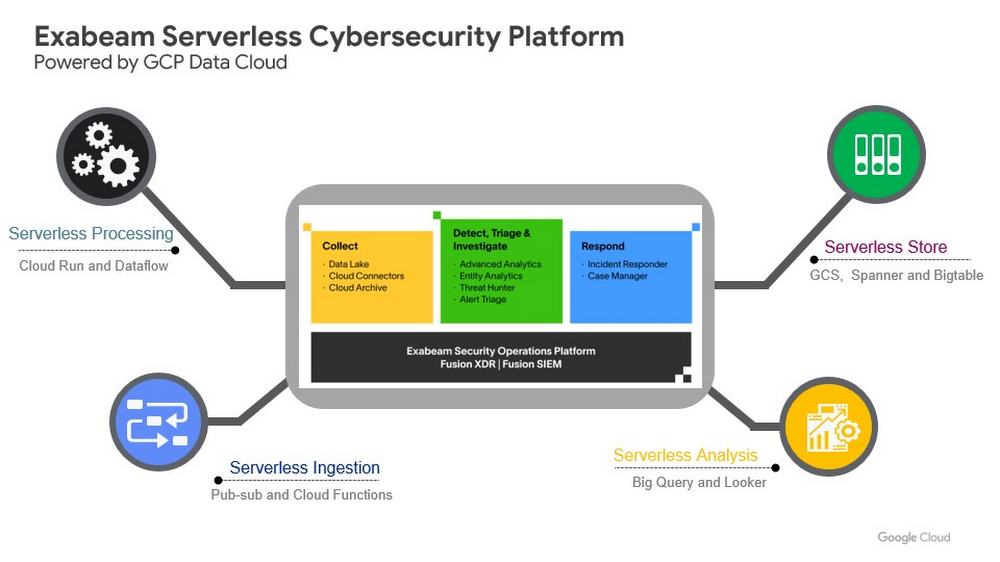
Editor’s note: The post is part of a series highlighting our awesome partners, and their solutions, that are Built with BigQuery.Exabeam, a leader in SIEM and XDR, provides security operations teams with end-to-end Threat Detection, Investigation, and Response (TDIR) by leveraging a combination of user and entity behavioral analytics (UEBA) and security orchestration, automation, and response (SOAR) to allow organizations to quickly resolve cybersecurity threats. As the company looked to take its cybersecurity solution to the next level, Exabeam partnered with Google Cloud to unlock its ability to scale for storage, ingestion, and analysis of security data.Harnessing the power of Google Cloud products including BigQuery, Dataflow, Looker, Spanner and Bigtable, the company is now able to ingest data from more than 500 security vendors, convert unstructured data into security events, and create a common platform to store them in a cost-effective way. The scale and power of Google Cloud enables Exabeam customers to search multi-year data and detect threats in secondsGoogle Cloud provides Exabeam with three critical benefits.  Global scale security platform. Exabeam leveraged serverless Google Cloud data products to speed up platform development. The Exabeam platform supports horizontal scale with built-in resiliency (backed by 99.99% reliability) and data backups in three other zones per region. Also, multi-tenancy with tenant data separation, data masking, and encryption in transit and at rest are backed up in the data cloud products Exabeam uses from Google Cloud.Scale data ingestion and processing. By leveraging Google’s compute capabilities, Exabeam can differentiate itself from other security vendors that are still struggling to process large volumes of data. With Google Cloud, Exabeam can provide a path to scale data processing pipelines. This allows Exabeam to offer robust processing to model threat scenarios with data from more than 500 security and IT vendors in near-real time. Search and detection in seconds. Traditionally, security solutions break down data into silos to offer efficient and cost-effective search. Thanks to the speed and capacity of BigQuery, Security Operations teams can search across different tiers of data in near real time. The ability to search data more than a year old in seconds, for example, can help security teams hunt for threats simultaneously across recent and historical data. Exabeam joins more than 700 tech companies powering their products and businesses using data cloud products from Google, such as BigQuery, Looker, Spanner, and Vertex AI. Google Cloud announced theBuilt with BigQuery initiative at the Google Data Cloud Summit in April, which helps Independent Software Vendors like Exabeam build applications using data and machine learning products. By providing dedicated access to technology, expertise, and go-to-market programs, this initiative can help tech companies accelerate, optimize, and amplify their success. Google’s data cloud provides a complete platform for building data-driven applications like those from Exabeam — from simplified data ingestion, processing, and storage to powerful analytics, AI, ML, and data sharing capabilities — all integrated with the open, secure, and sustainable Google Cloud platform. With a diverse partner ecosystem and support for multi-cloud, open-source tools, and APIs, Google Cloud can help provide technology companies the portability and the extensibility they need to avoid data lock-in.   To learn more about Exabeam on Google Cloud, visit www.exabeam.com. Click here to learn more about Google Cloud’s Built with BigQuery initiative. We thank the many Google Cloud team members who contributed to this ongoing security collaboration and review, including Tom Cannon and Ashish Verma in Partner Engineering.Related ArticleCISO Perspectives: June 2022Google Cloud CISO Phil Venables shares his thoughts on the RSA Conference and the latest security updates from the Google Cybersecurity A…Read Article
Quelle: Google Cloud Platform

Cloud Monitoring metrics, now in Managed Service for Prometheus

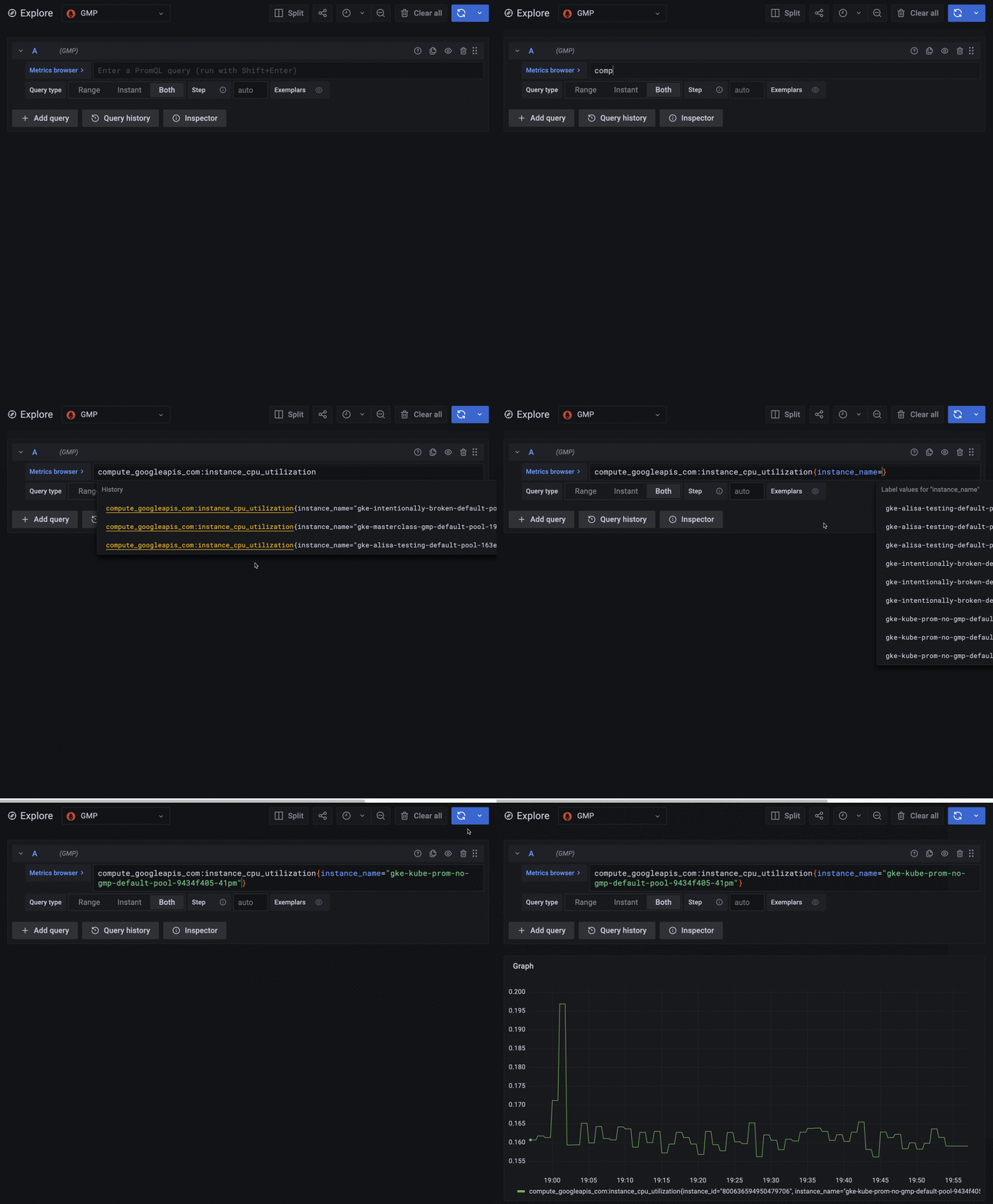
According to a recent CNCF survey, 86% of the cloud native community reports that they use Prometheus for observability. As Prometheus becomes more of a standard, an increasing number of developers are becoming fluent in PromQL, Prometheus’ built-in query language. While it is a powerful, flexible, and expressive query language, PromQL is typically only able to query Prometheus time series data. Other sources of telemetry, such as metrics offered by your Cloud provider or metrics generated from logs, remain isolated in separate products and might require developers to learn new query tools in order to access them.Introducing PromQL for Google Cloud Monitoring metricsPrometheus metrics alone aren’t enough to get a single pane of glass view of your Cloud footprint. Cloud Monitoring provides over 1,000 free metrics that let you monitor and alert on your usage of Google Cloud services, including metrics for Compute Engine, Kubernetes Engine, Load Balancing, BigQuery, Cloud Storage, Pub/Sub, and more. We’re excited to announce that you can now query all Cloud Monitoring metrics using PromQL and Managed Service for Prometheus, including Google Cloud system metrics, Kubernetes metrics, log-based metrics, and custom metrics.Google Cloud metrics appear within Grafana and can be queried using PromQL.Because we built Managed Service for Prometheus on top of the same planet-scale time series database as Cloud Monitoring, all your metrics are stored together and are queryable together. Metrics in Cloud Monitoring are automatically generated when you use Google Cloud services at no additional cost to you. View all your metrics in one place with the query language that developers already know and prefer, opening up possibilities such as:Correlating spikes in traffic with Redis cache misses using Cloud Load Balancing metrics and Prometheus’ Redis exporterGraphing Cloud Logging’s logs-based metrics alongside Prometheus metricsAlerting on your Compute Engine utilization or your Pub/Sub backlog size using PromQL and Managed Service for Prometheus’ rule evaluationSubstituting paid Istio metrics for their free Google Cloud Istio or Anthos Service Mesh equivalentExposing these metrics using PromQL means that developers who are familiar with Prometheus can start using all time series telemetry data without first having to learn a new query language. New members of your operations team can ramp up faster, as many industry hires will already be familiar with PromQL from previous experience.Why Managed Service for PrometheusIn addition to PromQL for all metrics, Managed Service for Prometheus offers open-source monitoring combined with the scale and reliability of Google services. Additional benefits include: Hybrid- and multi-cloud support, so you can centralize all your metrics across clouds and on-prem deploymentsTwo-year retention of all Prometheus metrics, included in the priceCost-effective monitoring on a per-sample basisEasy cost identification and attribution using Cloud MonitoringYour choice of collection, with managed collection for those who want a completely hands-off Prometheus experience and self-deployed collection for those who want to keep using existing Prometheus configsHow to get startedYou can query Cloud Monitoring metrics with PromQL by using the interactive query page in Cloud Console or Grafana. To learn how to write PromQL for Google Cloud metrics, see Mapping Cloud Monitoring metric names to PromQL. To configure a Grafana data source that can read all your metrics in Cloud Monitoring, see Configure a query user interface in the Managed Service for Prometheus documentation.To query Prometheus data alongside Cloud Monitoring, you have to first get Prometheus data into the system. For instructions on configuring Managed Service for Prometheus ingestion, see Get started with managed collection.Related ArticleGoogle Cloud Managed Service for Prometheus is now generally availableAnnouncing the GA of Google Cloud Managed Service for Prometheus for the collection, storage, and querying of Kubernetes metrics.Read Article
Quelle: Google Cloud Platform

Announcing Apigee Advanced API Security for Google Cloud

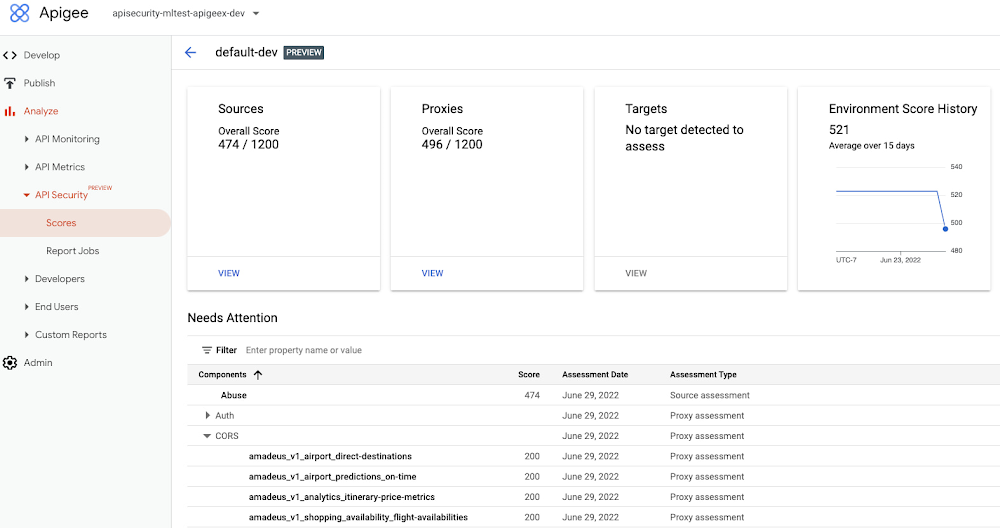
Organizations in every region and industry are developing APIs to enable easier and more standardized delivery of services and data for digital experiences. This increasing shift to digital experiences has grown API usage and traffic volumes. However, as malicious API attacks also have grown, API security has become an important battleground over business risk. To help customers more easily address their growing API security needs, Google Cloud is announcing today the Preview of Advanced API Security, a comprehensive set of API security capabilities built on Apigee, our API management platform. Advanced API Security enables organizations to more easily detect security threats. Here’s a closer look at the two key functionality included in this launch: identifying API misconfigurations and detecting bots.Identify API misconfigurationsMisconfigured APIs are one of the leading reasons for API security incidents. In 2017, Gartner® predicted that by 2022 API abuses will be the most frequent attack vector resulting in data breaches for enterprise web applications. Today, our customers tell us application API security is one of their top concerns, which is supported by an independent study from 2021 by Fugue and Sonatype. The report found that misconfigurations are the number one cause of data breaches, and that “too many cloud APIs and interfaces to adequately govern” are frequently the main point of attack in cyberattacks.While identifying and resolving API misconfigurations is a top priority for many organizations, the configuration management process can be time consuming and require considerable resources.Advanced API Security can make it easier for API teams to identify API proxies that do not conform to security standards. To help identify APIs that are misconfigured or experiencing abuse, Advanced API Security regularly assesses managed APIs and provides API teams with a recommended action when configuration issues are detected.Advanced API Security identifies misconfigured API proxies, including the missing CORS policy.APIs form an integral part of the digital connective tissue that make modern medicine run smoothly for patients and healthcare staff. One common healthcare API use case occurs when a healthcare organization inputs a patient’s medical coverage information into a system that works with insurance companies. Almost instantly, that system determines the patient’s coverage for a specific medication or procedure, a process which is enabled by APIs. Because of the often-sensitive personal healthcare data being transmitted, it is important that the required authentication and authorization policies are implemented so that only authorized users, such as an insurance company, can access the API. Advanced API Security can detect if those required policies have not been applied, an alert which can help reduce the surface area of API security risks. By leveraging Advanced API Security, API teams at healthcare organizations can more easily detect misconfiguration issues and can reduce security risks to sensitive information. Detect BotsBecause of the increasing volume of API traffic, there is also an increase in cybercrime in the form of API bot attacks—the automated software programs deployed over the Internet for malicious purposes like identity theft. Advanced API Security uses pre-configured rules to help provide API teams an easier way to identify malicious bots within API traffic. Each rule represents a different type of unusual traffic from a single IP address. If an API traffic pattern meets any of the rules, Advanced API Security reports it as a bot.Additionally, Advanced API Security can speed up the process of identifying data breaches by identifying bots that successfully resulted in the HTTP 200 OK success status response code.Advanced API Security helps visualize Bot traffic per API proxy.Financial services APIs are frequently the target of malicious bot attacks due to the high-value data that is processed. A bank that has adopted open banking standards by making APIs accessible to customers and partners can use Advanced API Security to make it easier to analyze traffic patterns and identify the sources of malicious traffic. You may experience this when your bank allows you to access your data with a third-party application. While a malicious hacker could try to use a bot to access this information, Advanced API Security can help the bank’s API team to identify and stop malicious bot activity in API traffic.API Security at EquinixEquinix powers the world’s digital leaders, bringing together and interconnecting infrastructure to fast-track digital advantage. Operating a global network of more than 240 data centers with a 99.999% or greater uptime, Equinix simplifies global interconnections for organizations, saving customers time and effort with the Apigee API management platform.  “A key enabler of our success is Google’s Apigee, delivering digital infrastructure services securely and quickly to our customers and partners,” said Yun Freund, senior vice president of Platform at Equinix. “Security is a key pillar to our API-first strategy and Apigee has been instrumental in enabling our customers to securely bridge the connections they need for their businesses to easily identify potential security risks and mitigate threats in a timely fashion. As our API traffic has grown, so has the amount of time and effort required to secure our APIs. Having a bundled solution in one managed platform gives us a differentiated high-performing solution.”Getting startedTo learn more, check out the documentation or contact us to request access to get started with Advanced API Security.To learn more about API security best practices, please register to attend our Cloud OnAir webcast on Thursday, July 28th, 2:00 pm PT.Gartner, API Security: What You Need to Do to Protect Your APIs, Mark O’Neill, Dionisio Zumerle, Jeremy D’Hoinne, 28 August 2019GARTNER is a registered trademark and service mark of Gartner, Inc. and/or its affiliates in the U.S. and internationally and is used herein with permission. All rights reserved.Related ArticleCISO Perspectives: June 2022Google Cloud CISO Phil Venables shares his thoughts on the RSA Conference and the latest security updates from the Google Cybersecurity A…Read Article
Quelle: Google Cloud Platform

Introducing Query Insights for Cloud Spanner: troubleshoot performance issues with pre-built dashboards

Today, application development teams are more agile and are shipping features faster than ever before. In addition to these rapid development cycles and the rise of microservices architectures, the end-to-end ownership of feature development (and performance monitoring) has moved to a shared responsibility model between advanced database administrators and full-stack developers. However, most developers don’t have the years of experience or the time needed to debug complex query performance issues and database administrators are now a scarce resource in most organizations. As a result, there is a dire need for tools for developers and DBAs alike to quickly diagnose performance issues. Introducing Query Insights for SpannerWe are delighted to announce the launch of Query Insights for Spanner,  a set of visualization tools that provide an easy way for developers and database administrators to quickly diagnose query performance issues on Spanner. Using Query Insights, users can now troubleshoot query performance in a self-serve way. We’ve designed Query Insights using familiar design patterns with world-class visualizations to provide an intuitive experience for anyone who is debugging issues with query performance on Spanner. Query Insights is available at no additional cost.By using out-of-the-box visual dashboards and graphs, developers can visualize aberrant behavior like peaks and troughs in various performance metrics over a time-series and quickly identify problematic queries. Time series data provides significant value to organizations because it enables them to analyze important real-time and historical metrics. Data is valuable only if it’s easy to comprehend;. that’s where being able to view intuitive dashboards becomes a force multiplier for organizations looking to expose their time series data across teams.Follow a visual journey with pre-built dashboardsWith Query Insights, developers can seamlessly move from detection of database performance issues to diagnosis of problematic queries using a single interface. Query Insights will help identify query performance issues easily with pre-built dashboards. The user could do this by following a simple journey where they can quickly confirm, identify and analyze query performance issues. Let’s walk through an example scenario. Understand database performanceThis journey will start by the user setting up an alert on Google Cloud Monitoring for CPU utilization going above a certain threshold. The alert could be configured in a way that if this threshold is crossed, the user will be notified with an email alert, with a link to the “Monitoring” dashboard.Once the user receives this alert, they would click on the link in the email, and navigate to the “Monitoring” dashboard. If they observe high CPU Utilization and high read latencies, the possible root cause could be expensive queries. A spike in CPU Utilization could be a strong signal that the system is using more compute than it usually would, due to an inefficient query.The next step is to identify which query might be the problem, this is where Query Insights comes in. The user can get to this tool by clicking on Query Insights in the left navigation of your Spanner Instance. Here, they can drill down into the CPU usage by query and observe that for a specific database, CPU Utilization (attributed to all queries) is spiking for a particular time window. This confirms that the CPU utilization is due to inefficient queries.Identifying a problematic queryThe user now observes the TopN (Top queries by CPU Utilization) query graph to see the TopN queries by CPU Utilization. From the graph, it is very easy to visualize and identify the top queries which could be causing the spike in CPU Utilization.In the above screenshot, we can see that the first query in the table is showing a clear spike at 10:33 PM consuming 48.81% of total CPU. This is  a clear indication that this query could be problematic, and the user should investigate further.Analyzing the query performanceOnce they have identified the problematic query, they can now drill down into this query shape to confirm, identify the root cause of the high CPU utilization. They can do this by clicking on the Fingerprint ID for the specific query from the topN table, and navigating to the Query Details page where they will be able to see a list of metrics (Latency, CPU Utilization, Execution count, Rows Scanned / Rows Returned) over a time series for that specific query.  In this example, we notice that the average number of rows scanned for this specific query are very high (~ 600k rows scanned to return ~ 12k rows), which could point to a poor query design, resulting in an inefficient query. We can also observe that latency is high (1.4s) for this query.Fixing the issueTo fix the problem in this scenario, the user could optimize this query by specifying a secondary index in the query using a FORCE_INDEX query hint to provide an index directive. This would provide more consistent performance, make the query more efficient, and lower CPU utilization for this query.In the screenshot below, you can see that after specifying the index in the query, the query performance dramatically increases in terms of CPU, rows scanned (54K vs 630k) and also in terms of query latency (536 ns vs 1.4 s).Unoptimized Query:Optimized Query:By following this simple visual journey, the user can easily detect, diagnose and debug inefficient queries on Spanner.Get started with Query Insights todayTo learn more about Query Insights, review the documentation here. Query Insights is enabled by default. In the Spanner console, you can click on Query Insights in the left navigation and start visualizing your query performance metrics! New to Spanner? Get started in minutes with a new database.Related ArticleImproved troubleshooting with Cloud Spanner introspection capabilitiesCloud-native database Spanner has new introspection capabilities to monitor database performance and optimize application efficiency.Read Article
Quelle: Google Cloud Platform



