Hear how this Google M&A Lead is helping to build a more diverse Cloud ecosystem

Editor’s note: Wayne Kimball, Jr. is Principal for Google Cloud’s Mergers & Acquisitions business. He is also the founder of Black+TechAmplify, a corporate development initiative to accelerate the growth of traditionally untapped, diverse founders. In both cases, he says, it’s about creating empathy around people and processes to create greater value.You’re a “boomerang,” or returning Googler. How do you view your career?It’s been a fun journey, with a lot of excitement, work, and rewards. I studied engineering at North Carolina A&T State University, the nation’s largest HBCU. I was student body president, and one of my goals was to enhance the technology experience for fellow students by convincing the university to transition to  Gmail. A friend of a friend helped put me in touch with Google, who then came to campus for strategic conversations with administrators and to meet with students. The school ended up adopting Gmail, and soon thereafter, I was offered a job at Google, becoming the first ever hire from North Carolina A&T.I started out doing technology operations as a PeopleOps rotational associate, but pretty soon I realized that I wanted to be on the sales side, as I like seeing the dynamic of people, technology, and business. Eventually I left Google, went to business school, then did strategy and M&A work at a couple of places before I came back to do it at Cloud.What drew you to M&A? Working in sales taught me all about growing organically. M&A is exciting because the work drives enterprise value through inorganic acquisitions. I find it truly rewarding to identify and merge the various points of view, and make them ultimately work seamlessly together more organically. We always have to start with customer focus, but that can mean a lot of things. Then, when it comes to the acquisition, Google Cloud is first a customer that needs to get the right acquisition, and subsequently the company we acquire is a customer that needs to be acclimated to being a part of Google.I always say, “Change should happen with people, not to people.”Is Black+TechAmplify a passion project, or an extension of what you do inside Cloud?It’s a bit of both. There are almost ten Google employees now supporting Black+TechAmplify, but the project started with me asking, “How many of our acquisitions have been Black-owned or women-owned?” It wasn’t a lot. So we set out to identify tech startups that were Black-owned, and develop more resources and exposure, including ways to partner and grow with Google. After two cohorts, the companies have raised over $20 million in additional funding. We feel like it’s a model we can extend to other founders from underrepresented groups.I also partner closely with Google for Startups to support their review and selection of startup applicants, and serve as an Advisor for Black and Latinx founders in their programs. It’s also encouraging to see a number of other companies, in addition to Google, now leaning into this kind of activity.Is there a common theme in what you’re doing at Cloud?I’d say it’s all focused on accelerating the growth of Google Cloud by accelerating the value capture for the customer, wherever they are. In every case, to accelerate value capture you have to look after people, making sure they are treated well. If you look after that, the profit will eventually come.Related Article“Take that leap of faith” Meet the Googler helping customers create financial inclusionCloud Googler shares how she has brought her purpose to her work, creating equity in the financial services space.Read Article
Quelle: Google Cloud Platform
Drive Hockey Analytics uses Google Cloud to deliver pro-level sports tracking performance to youth

In ice hockey’s earlier days, National Hockey League (NHL) coaches made their most important decisions based on gut instincts. Today, experience and instincts are still vital, but NHL coaches now have another essential tool at their disposal: powerful data analytics. Before and after every game, coaches and even players meticulously pore over game data and review detailed statistics to improve performance and strategy. And while this is a win for the NHL, higher-end data analytics tools have typically been out of reach for youth hockey teams largely because capturing game performance data on the ice is expensive, complicated, and time consuming.We built Drive Hockey Analytics to democratize pro-level analytics and help young players develop their gameplay and build a higher hockey IQ. Coaches and parents can now easily and affordably track 3,000 data points per second from players, sticks, and pucks. Drive Hockey Analytics—which takes 15 minutes to set up at the rink after initial calibration—converts these raw data points into actionable statistics and insights to improve player performance in real time and boost post-game training.Scaling a market-ready stick and puck tracking platform on Google CloudDrive Hockey Analytics began as an engineering project in the MAKE+ prototype lab of the British Columbia Institute of Technology (BCIT). We quickly realized that we couldn’t transform Drive Hockey Analytics into a market-ready stick and puck tracking platform without shifting more resources to R&D. After meeting with the dedicated Google Startup Success Managers from theGoogle for Startups Cloud Program, with this support, we decided to migrate from AWS toGoogle Cloud so our small team could reduce IT costs and accelerate time to market. Google Cloud solutions make everything easier to build, scale, and secure. We immediately took advantage of Google Cloud’s highly secure-by-design infrastructure to implement robust user authentication and institute strict privacy controls to comply with the Children’s Online Privacy Protection Act (COPPA). In just days, we enabled coaches and players to access individual analytics dashboards and more securely share key statistics such as speed, acceleration, agility and edgework, zone time, positioning, among many others  with teammates and family.We also separated performance and personalstorage data on Google Cloud, encrypted containers withGoogle Kubernetes Engine (GKE), and wrote third-party applications and pipelines that autoscale withSpark on Google Cloud. These processes could have taken us weeks or even months if we had to manually design and integrate all these security capabilities on our own.To build our interactive player analytics engine, we leveragedTensorFlow,BigQuery, andMongoDB Atlas on Google Cloud. With the simple and flexible architecture offered in Google Cloud, we quickly moved from concept to code, and from code to state-of-the-art predictive models. We now collect and analyze thousands of data points every second to identify key performance metrics, break-out game intelligence, and deliver actionable recommendations. Coaches and players can leverage this data to increase team possession of the puck, optimize player positions, reduce shot attempts, and score more goals.In the future, we plan to explore additional Google products and services such asGoogle Cloud Tensor Processing Units (TPUs),Google Cloud Endpoints for OpenAPI, andGoogle Ads. These solutions will enable us to further expand our ML stack, leverage streaming data from wearables and cameras, and reach new markets.Bringing pro-level sports analytics to youth hockeyThe Startup Success team has been instrumental in helping us rapidly transform Drive Hockey Analytics from a university engineering project into a top shelf player and puck tracking system. Their guidance and responsiveness are amazing, with a human touch that stands out compared to services from other technology providers. We especially want to highlight the Google Cloud research credits that help us affordably explore new solutions to address extremely large dataset challenges. Thanks to these credits, we successfully process thousands of data points in streams and batches, apply ML-driven logic, and run resource-efficient queries. Google Cloud research credits also give us access to dedicated startup experts, managed compute power, vast amounts of secure storage, and potential for joining the Google Cloud Marketplace.Demand for Drive Hockey Analytics continues to grow, and we constantly evolve our platform based on input from youth teams and coaches. We’re looking to go fully to market in 2023. With Drive Hockey Analytics, youth teams are putting on their mitts and taking control of the puck as they improve real-time player performance and help their team count more wins. We can’t wait to see what we accomplish next as we continue transforming dusters into barnburners by democratizing advanced analytics that were once only available to pro-sports teams.If you want to learn more about how Google Cloud can help your startup, visit our pagehere to get more information about our program, andsign up for our communications to get a look at our community activities, digital events, special offers, and more.Related ArticleBlack Kite runs millions of cyber-risk assessments at scale on Google CloudLearn how Black Kite flawlessly runs millions of cyber-risk assessments on Google Cloud.Read Article
Quelle: Google Cloud Platform

Google Cloud’s innovation-first infrastructure

Organizations are driving the complete transformation of their business by inventing new ways to accomplish their objectives using the cloud; from making core processes more efficient, to improving how they reach and better serve their customers, to achieving insights through data that fuel innovation. Cloud infrastructure belongs at the center of every organization’s transformation strategy. We see a vast landscape of opportunity to innovate in our cloud’s core capabilities that will have long-standing impact on the speed and simplicity of building solutions on Google Cloud. From data management and machine learning to security and sustainability, we continue to invest deeply in infrastructure innovation that generates value from the foundation upward. We focus on three defining attributes of our infrastructure that help our customers accelerate through innovation:Optimized: Customers want solutions that meet their specific needs. They want to build and run apps where they need them, tailored for popular workloads, industry solutions, and for specific outcomes whether it is high performance, cost savings, or a balance of both. Their workloads should just run better on Google Cloud.Transformative: Transformation is more than “lifting and shifting” infrastructure to the cloud for cost saving and convenience. Transformative infrastructure integrates the best of Google’s AI and ML capabilities to drive faster innovation, while meeting the most stringent security, sovereignty, and compliance needs.Easy: As cloud platforms become more versatile, they can become very complex to adopt and operate. Reducing your operational burden is possible with an easy-to-use cloud platform. Our customers often tell us that Google Cloud makes complex tasks seem simple, and this is a product of intentional engineering. Google’s 20+ years of technology leadership is built on a culture of innovation and focus on our customers. Here are some examples of new innovation we are bringing in these areas. Solutions that are optimized for what matters most to youLet’s start with optimizing for price-performance. Last year, we launched Tau VMs optimized for cost-effective performance of scale-out workloads. Tau T2D leapfrogged every leading public cloud provider in both performance and total cost of ownership delivering up to 42% better price performance versus comparable VMs from any other leading cloud. Today, we are delighted to announce that we are offering more choice to customers, with the addition of Arm-based machines to the Tau VM family. Powered by Ampere® Altra® Arm-based processors, T2A VMs deliver exceptional single-threaded performance at a compelling price, making them ideal for scale-out, cloud-native workloads. Developers now have the option of choosing the optimal architecture to test, develop and run their workloads.Cost optimization is a major goal for many of our customers. Spot VMs enable you to take advantage of our idle machine cycles at deep discounts with a guaranteed 60% off and up to 91% savings off on-demand pricing. These are the perfect choice for batch jobs and fault-tolerant workloads in high performance computing, big data and analytics. Customers told us that they would like to see less variability and more predictability in the pricing of Spot VMs. We have heard you loud and clear. Our Spot VMs offer the least variability (once per month price changes) and more predictability in pricing compared to other leading clouds. Optimizing for global scale is critical to meet the high demands of today’s consumers — especially when it comes to video streaming. Launched in May 2022, Media CDN is optimized to deliver immersive video streaming experience at a global scale. Available in more than 1,300 cities, Media CDN leverages the same infrastructure that YouTube uses to deliver content to over 2 billion users around the world. Customers including U-NEXT and Stan have quickly rolled out Media CDN to deliver a modern, high quality experience to their viewers. Another emerging opportunity is the rise of distributed systems and distributed workers, and the ability to build and run apps wherever needed. With Google Distributed Cloud, we now extend Google Cloud infrastructure and services to different physical locations (or distributed environments) including on premises or co-location data centers and a variety of edge environments. Anthos powers all Google Distributed Cloud offerings, to deliver a common control plane for building, deploying and running your modern containerized applications at scale, wherever you choose.For greater choice, we have designed Google Distributed Cloud as a portfolio of hardware, software, and services with multiple offerings to address the specific requirements of your workloads and use cases. You can choose from our Edge, Virtual, and Hosted offerings to meet the needs of your business.Driving transformation through AI/ML and securityThe pace of innovation in the field of machine learning continues to accelerate and Google has been a long time pioneer. From Search and YouTube to Play and Maps, ML has helped bring out the best that our products have to offer. We’ve made it a point to make the best of Google available to our customers, and JAX and Cloud TPU v4 are two great examples. JAX is a cutting edge open source ML framework developed by Google researchers. It’s designed to give ML practitioners more flexibility and allow them to more easily scale their models to the largest of scales. We recently made Cloud TPU v4 pods available to all our customers through our new ML hub. This cluster of Cloud TPU v4 pods offers 9 exaflops of peak aggregate performance and runs at 90% carbon-free energy, making it one of the fastest, most efficient, and most sustainable ML infrastructure hubs in the world. Cloud TPU v4 has enabled researchers to train a variety of sophisticated models including natural language processing models and recommender models to name a few. Customers are already seeing the benefits, including Cohere who saw a 70% improvement in training times and LG Research who used Cloud TPU v4 to train their large multi-modal 300 billion parameter model.On the security front, increasing cybersecurity threats has every company rethinking its security posture. Our investments in our planet-scale network that’s secure, performant and reliable is matched with our lead in defining industry wide frameworks and standards to help customers better secure their software supply chain. Google last year introduced SLSA (supply chain levels for software artifacts), an end-to- end framework for ensuring the integrity of artifacts throughout the software supply chain. It is an open-source equivalent of many of the processes we have been implementing internally at Google. We challenge ourselves to enable security without complex configuration or performance degradation. One example of this is our Confidential VMs – where data is stored in the trusted execution environment outside of which it is impossible to view the data or operations performed on it, even with a debugger. Another is Cloud Intrusion Detection System (Cloud IDS), which provides network threat detection built on ML-powered threat analysis which processes over 15 Trillion transactions per day to identify new threats with 4.3M unique security updates made each day. With the highest possible rating of AAA by CyberRatings.org, Cloud IDS has proven efficacy to block virtually all evasions. Developer-first ease of useMaking your transformation journey simpler, with easy-to-use tools to accelerate your innovation is our priority. Today, we are introducing Batch in preview, a fully managed job scheduler to help customers run thousands of batch jobs with just a single command. It’s easy to set up, and supports throughput oriented workloads including those requiring MPI libraries. Jobs run on auto-scalable resources, giving you more time to work on the greatest areas of value. This improves the developer experience for executing HPC, AI/ML, and data processing workloads such as genomics sequencing, media rendering, financial risk modeling, and electronic design automation.Continuing innovation for greater ease, we recently announced the availability of the new HPC toolkit. This is an open source tool from Google Cloud that enables you to easily create repeatable, turnkey HPC clusters based on proven best practices, in minutes. It comes with several blueprints and broad support for third party components such as the Slurm scheduler and Intel DAOS and DDN Lustre storage. System performance and awareness of what infrastructure is doing is closely tied to security, but to do this well, it needs to be easy. We recently introduced Network Analyzer to help customers transform reactive workflows into proactive processes and reduce network and service downtime by automatically monitoring VPC network configurations. Network Analyzer is part of our Network Intelligence Center, providing a single console for Google Cloud network observability, monitoring, and troubleshooting. This is just a sample of what we are doing in Google Cloud to provide infrastructure that gives customers the freedom to securely innovate and scale from on-premises, to edge, to cloud on an easy, transformative, and optimized platform. To learn more about how customers such as Broadcom and Snap are using Google Cloud’s flexible infrastructure to solve their biggest challenges, be sure to watch our Infrastructure Spotlight event, aired today.
Quelle: Google Cloud Platform

Expanding the Tau VM family with Arm-based processors

Organizations that are developing ever larger, scale-out applications will leave no stone unturned in their search for a compute platform that meets their needs. For some, that means looking to the Arm® architecture. Known for delivering excellent performance per watt efficiency, Arm-based chips are already ubiquitous in mobile devices, and have proven themselves for supercomputing workloads. At Google Cloud, we’re also excited about using Arm chips for the next generation of scale-out, cloud-native workloads.Last year, we added Tau VMs to Compute Engine, offering a new family of VMs optimized for cost-effective performance for scale-out workloads. Today we are thrilled to announce the Preview release of our first VM family based on the Arm architecture, Tau T2A. Powered by Ampere® Altra® Arm-based processors, T2A VMs deliver exceptional single-threaded performance at a compelling price. Tau T2A VMs come in multiple predefined VM shapes, with up to 48 vCPUs per VM, and 4GB of memory per vCPU. They offer up to 32 Gbps networking bandwidth and a wide range of network attached storage options, making Tau T2A VMs suitable for scale-out workloads including web servers, containerized microservices, data-logging processing, media transcoding, and Java applications.Google Cloud customers and developers now have the option of choosing an Arm-based Google Cloud VM to test, develop and run their workloads on the optimal architecture for their workload. Several of our customers have had private preview access to T2A VMs for the last few months and have had a great experience with these new VMs. Below is what few of them have to say about T2A VMs.“Our drug discovery research at Harvard includes several compute-intensive workloads that run on SLURM using VirtualFlow1. The ability to run our workloads on tens of thousands of VMs in parallel is critical to optimize compute time. We ported our workload to the new T2A VM family from Google and were up and running with minimal effort. The improved price-performance of the T2A will help us screen more compounds and therefore discover more promising drug candidates.” – Christoph Gorgulla, Research Associate, Harvard University“In recent years, we have come to rely on Arm-based servers to power our engineering activity at lower cost and higher performance compared to legacy environments. The introduction of the Arm Neoverse N1-based T2A instance allows us to diversify our use of cloud compute on Arm-based hardware and leverage the Google Compute Engine to build the exact virtual machine types we need, with the convenience of Google Kubernetes Engine for containerized workloads.” – Mark Galbraith, Vice President, Productivity Engineering, Arm.Ampere Computing has been a key partner for Google Cloud and delivering this VM. “Ampere® Altra® Cloud Native Processors were designed from the ground up to meet the demands of modern cloud applications,” said Jeff Wittich, Chief Product Officer, Ampere Computing. “Our close collaboration with Google Cloud has resulted in the launch of the new price-performance optimized Tau T2A instances, which enable demanding scale-out applications to be deployed rapidly and efficiently.”Integration with Google Cloud services Google Cloud is ramping up its support for Arm. T2A VMs support most popular Linux operating systems such as RHEL, CentOS, Ubuntu, and Rocky Linux. In addition, T2A VMs also support Container-optimized OS to bring up Docker containers quickly, efficiently and securely. Further, developers building applications on Google Cloud can already use several Google Cloud services with T2A VMs — with more coming later this year: Google Kubernetes Engine – Google Kubernetes Engine (GKE) is the leading platform for organizations looking for advanced container orchestration. Starting today, GKE customers can run their containerized workloads using the Arm architecture on T2A. Arm nodes come packed with key GKE features, including the ability to run in GKE Autopilot mode for a hands-off experience. Read more about running your Arm workloads with GKE here. Batch – Our newly launched Batch service supports T2A. As of today users will be able to run batch jobs on T2A instances to optimize their cost of running workloads.Dataflow – Dataflow is a fully managed streaming analytics service that minimizes latency, processing time, and cost through autoscaling and batch processing. You can now use T2A VMs with your Dataflow workloads.Extensive ISV partner ecosystemWhile Arm chips are relative newcomers to data center workloads, there’s already a robust ecosystem of ISV support for Tau T2A VMs. In fact, Ampere lists more than 100 applications, databases, cloud-native software and programming languages that are already running on Ampere-based T2A VMs, with more being added all the time. Further, ISV partners that have validated their solutions on T2A VMs have been impressed by the ease with which they were able to port their software to Tau T2A VMs. “Momento’s serverless cache enables developers to accelerate database and application performance at scale. Over the past few months, we have become intimately familiar with Google Cloud’s new T2A VMs. We were pleasantly surprised with the ease of portability to Arm instance from day one. The maturity of the T2A platform gives us the confidence to start using these VMs in production. Innovations like T2A VMs in Google Cloud help us continuously innovate on behalf of our customers.” – Khawaja Shams, CEO, Momento. Learn more about Momento’s T2A experience.“SchedMD’s Slurm open-source workload manager is designed specifically to satisfy the demanding needs of compute-intensive workloads. We are thrilled with the introduction of the T2A VMs on Compute Engine. The introduction of T2A will give our customers more choice of virtual machines for their demanding workload management needs using Slurm.” – Nick Ihli, Director of cloud and Solutions Engineering, SchedMD.”At Rescale, we help our customers deliver innovations faster with high performance computing built for the cloud. We are excited to now offer T2A VMs to our customers, with compelling price-performance to further drive engineering and scientific breakthroughs. With Arm-based VMs on Google Cloud, we are able to offer our customers a larger portfolio of solutions for computational discovery.” – Joris Poort, CEO, Rescale“Canonical Ubuntu is a popular choice for developers seeking a third party server operating system running on Google Cloud, and we are very happy to provide Ubuntu as the guest OS for users of Compute Engine on Google Cloud’s new Arm-based VMs, which supports our most recent long-term supported versions. Once migrated, users will find a completely familiar environment with all the packages and libraries they know and rely on to manage their workloads.” – Alexander Gallagher, VP of Cloud Sales at CanonicalTo help you get started, we’re providing customers, ISV and ecosystem partners access to T2A VMs at no charge for a trial period, to help jumpstart development on Ampere Arm-based processors. When Tau T2A reaches General Availability later this year, we’ll continue to offer a generous trial program that offers up to 8 vCPUs and 32 GB of RAM at no cost.Pricing and availabilityTau T2A VMs are price-performance optimized for your cloud-native applications. A 32vCPU VM with 128GB RAM will be priced at $1.232 per hour for on-demand usage in us-central1. T2A VMs are currently in preview in several Google Cloud regions: us-central (Iowa – Zone A,B,F), europe-west4 (Netherlands – Zone A,B,C) and asia-southeast1 (Singapore – Zone B,C) and will be in General Availability in the coming months. We look forward to working with you as you explore using Ampere Arm-based T2A VMs for your next scale-out workload in the cloud.To learn more about Tau T2A VMs or other Compute Engine VM options, check out our machine types and pricing pages. To get started, go to the Google Cloud Console and select T2A for your VMs.1. https://www.nature.com/articles/s41586-020-2117-zRelated ArticleRun your Arm workloads on Google Kubernetes Engine with Tau T2A VMsWith Google Kubernetes Engine’s (GKE) support for the new Tau VM T2A, you can run your containerized workloads on the Arm architecture.Read Article
Quelle: Google Cloud Platform

Run your Arm workloads on Google Kubernetes Engine with Tau T2A VMs

At Google Kubernetes Engine (GKE), we obsess over customer success. One major way we continue to meet the evolving demands of our customers is by driving innovations on the underlying compute infrastructure. We are excited to now give our customers the ability to run their containerized workloads using the Arm® architecture! Earlier today, we announced Google Cloud’s virtual machines (VMs) based on the Arm architecture on Compute Engine. Called Tau T2A, these VMs are the newest addition to the Tau VM family that offers VMs optimized for cost-effective performance for scale-out workloads. We are also thrilled to announce that you can run your containerized workloads on the Arm architecture using GKE. Arm nodes come packed with the key GKE features you love on the x86 architecture, including the ability to run in GKE Autopilot mode for a hands-off experience, or on GKE Standard clusters where you manage your own node pools. See the ‘Key GKE features’ below for more details.”The new Arm-based T2A virtual machines (VMs) supported on the Google Kubernetes Engine (GKE) are providing cloud customers with the higher performance and energy efficient options required to run their modern containerized workloads. The Arm engineering team has collaborated on Kubernetes CI/CD enablement and we look forward to seeing the ease-of-use and ecosystem support that comes with Arm support on GKE.”– Bhumik Patel, Director of Software Ecosystem Development, Infrastructure Line of Business, Arm.Starting today, Google Cloud customers and developers can run their Arm workloads on GKE in Preview1 by selecting a T2A machine shape during cluster or node pool creation either through gcloud or the Google Cloud console. Check out our tutorial video to get started!Some of our customers who had early access to T2A VMs highlighted the ease of use in working with their Arm workloads on GKE.”Arcules offers cloud-based video surveillance as a service for multi-site customers that’s easy-to-use, scalable, and reliable – all within an open platform and supported by customer service that truly cares. We are excited to run our workloads using Arm-based T2A VMs with Google Kubernetes Engine (GKE). We were thoroughly impressed by how easily we could provision Arm nodes on a GKE cluster independently and alongside x86-based nodes. We believe that this multi-processor architecture will help us reduce costs while providing a better experience for our customers.”—Benjamin Rowe, Cloud and Security Architect, ArculesKey GKE features supported with Arm-based VMsWhile the T2A is Google Cloud’s first VM based on the Arm architecture, we’ve ensured that it comes with support for some of the most critical GKE features — with more on the way. Arm Pods on GKE Autopilot – Arm workloads can be easily deployed on Autopilot with GKE version 1.24.1-gke.1400 or later in supported regions1 by specifying both the scale-out compute class (which also enters Preview today), and the Arm architecture using node selectors or node affinity. See the docs for an example Arm workload deployment on Autopilot.Ease-of-use in creating GKE nodes – You can provision Arm nodes with GKE version 1.24 or later using the Container-optimized OS (COS) with containerd node image and selecting the T2A machine series. In other words, GKE automatically provisions the correct node image to be compatible with your choice of x86 or Arm machine series. Multi-architecture clusters – GKE clusters support scheduling workloads on multiple compute (x86 and Arm) architectures. A single cluster can either have only x86 nodes, only Arm nodes, or a combination of both x86 and Arm nodes. You can even run the same workloads on both architectures in order to evaluate the optimal architecture for your workloads.Networking and security features – Arm nodes support the latest in GKE networking features such as GKE Dataplane V2 and creating and enforcing a GKE network policy. GKE’s security features such as workload identity and shielded nodes are also supported on Arm nodes.Scalability features – When running your Arm workloads, you can use GKE’s best-in-class scalability features such as cluster autoscaler (CA), node auto provisioning (NAP), and horizontal and vertical pod autoscaling (HPA / VPA).Support for Spot VMs – GKE supports T2A Spot VMs out-of-the-box to help save costs on fault-tolerant workloads. Enhanced developer toolsWe’ve updated many popular Google Cloud developer tools to let you create containerized workloads that run on GKE nodes with both Arm and x86 architectures, simplifying the transition to developing for Arm or multi-architecture GKE clusters. When using Cloud Code IDE extensions or Skaffold on the command line, you can build Arm containers locally using Dockerfiles, Jib, or Ko, then iteratively run and debug your applications on GKE. With Cloud Code and Skaffold, building locally for GKE works automatically regardless of whether you’re developing on an x86- or Arm-based machine. Whether you build Arm or multi-architecture images, Artifact Registry can be used to securely store and manage your build artifacts before deploying them. If you develop on Arm-based local workstations, you can use Minikube to emulate GKE clusters with Arm nodes locally while taking advantage of simplified authentication with Google Cloud using the gcp-auth addon. Finally, Google Cloud Deploy makes it easy to set up continuous delivery to Arm and multi-architecture GKE clusters just like it does with x86 GKE clusters. Updating a pipeline for these Arm-inclusive clusters is as simple as pointing your Google Cloud Deploy pipeline to an image registry with the appropriate architecture image. A robust DevOps, security, and observability ecosystemWe’ve also partnered with leading CI/CD, observability, and security ISVs to ensure that our partner solutions and tooling are compatible with Arm workloads on GKE. You can use the following partner solutions to run your Arm workloads on GKE straight out-of-the-box.Datadog provides comprehensive visibility into all your containerized apps running on GKE by collecting metrics, logs and traces to help to surface performance issues and provide context when troubleshooting. Starting today, you can use Datadog when running your Arm workloads on GKE. Learn more.Dynatrace uses its software intelligence platform to track the availability, health and utilization of applications running on GKE, thereby helping surface anomalies and determine their root causes. You can now use these features of Dynatrace with GKE Arm nodes. Learn more.Palo Alto Networks’ Prisma Cloud Daemonset Defenders enforce security policies for your cloud workloads, while Prisma Cloud Radar displays a comprehensive visualization of your GKE clusters as well as the containers and nodes, so you can easily identify risks and investigate incidents. Use Prisma Cloud Daemonset Defenders with GKE Arm nodes for enhanced cloud workload security. Learn more.Splunk Observability Cloud provides developers and operators with deep visibility into the composition, state, and ongoing issues within a cluster. You can now use Splunk Observability Cloud when running your Arm workloads on GKE. Learn more.Agones is an open source platform built on top of Kubernetes that helps you deploy, host, scale, and orchestrate dedicated game servers for large scale multiplayer games. Through a combination of efforts from the community and Google Cloud, Agones now supports the Arm architecture starting with the 1.24.0 release of Agones. Learn more. Try out GKE Arm today!To help you make the most of your experience with GKE Arm nodes, we are providing guides to help you with learning more about Arm workloads on GKE, creating clusters and node pools with Arm nodes, building multi-arch images for Arm workloads, and preparing an Arm workload for deployment to your GKE cluster. To get started with running Arm workloads on GKE, check out the tutorial video! 1. T2A VMs are currently in preview in several Google Cloud regions: us-central (Iowa – Zone A,B,F), europe-west4 (Netherlands – Zone A,B,C) and asia-southeast1 (Singapore – Zone B,C).Related ArticleExpanding the Tau VM family with Arm-based processorsThe Tau T2A is Google Cloud’s first VM family based on the Arm architecture and designed for organizations building cloud-native, scale-o…Read Article
Quelle: Google Cloud Platform

Moving off CentOS? Introducing Rocky Linux Optimized for Google Cloud

As CentOS 7 reaches end of life, many enterprises are considering their options for an enterprise-grade, downstream Linux distribution on which to run their production applications. Rocky Linux has emerged as a strong alternative that, like CentOS, is 100% compatible with Red Hat Enterprise Linux. In April 2022, we announced a customer support partnership with CIQ, the official support and services partner and sponsor of Rocky Linux, as the first step in providing a best-in-class enterprise-grade supported experience for Rocky Linux on Google Cloud. Today we’re excited to announce the general availability of Rocky Linux Optimized for Google Cloud. We developed this collection of Compute Engine virtual machine images in close collaboration with CIQ so that you get optimal performance when using Rocky Linux on Compute Engine to run your CentOS workloads.These new images contain customized variants of the Rocky Linux kernel and modules that optimize networking performance on Compute Engine infrastructure, while retaining bug-for-bug compatibility with Community Rocky Linux and Red Hat Enterprise Linux. The high bandwidth networking enabled by these customizations will be beneficial to virtually any workload, and are especially valuable for clustered workloads such as HPC (see this page for more details on configuring a VM with high bandwidth).Going forward, we’ll collaborate with CIQ to publish both the community and Optimized for Google Cloud editions of Rocky Linux for every major release, and both sets of images will receive the latest kernel and security updates provided by CIQ and the Rocky Linux community.  And of course, we’ll offer support with CIQ for both these images, per our partnership. Rocky Linux Optimized for Google Cloud lets you take advantage of everything Compute Engine has to offer, including day-one support for our latest VM families, GPUs, and high-bandwidth networking. And for customers building for a multi-cloud deployment environment, the community Rocky images have you covered.Starting today, Rocky Linux 8 Optimized for Google Cloud is available for all x86-based Compute Engine VM families (and soon for the new Arm-based Tau T2A), with version 9 soon to follow. Give it a try and let us know what you think.Related ArticleGoogle Cloud partners with CIQ to provide an enterprise-grade experience for Rocky LinuxGoogle announces CIQ-backed support for Rocky Linux, and pre-announces performance-tuning, new migration tools, and out-of-the-box suppor…Read Article
Quelle: Google Cloud Platform
Multicloud reporting and analytics using Google Cloud SQL and Power BI

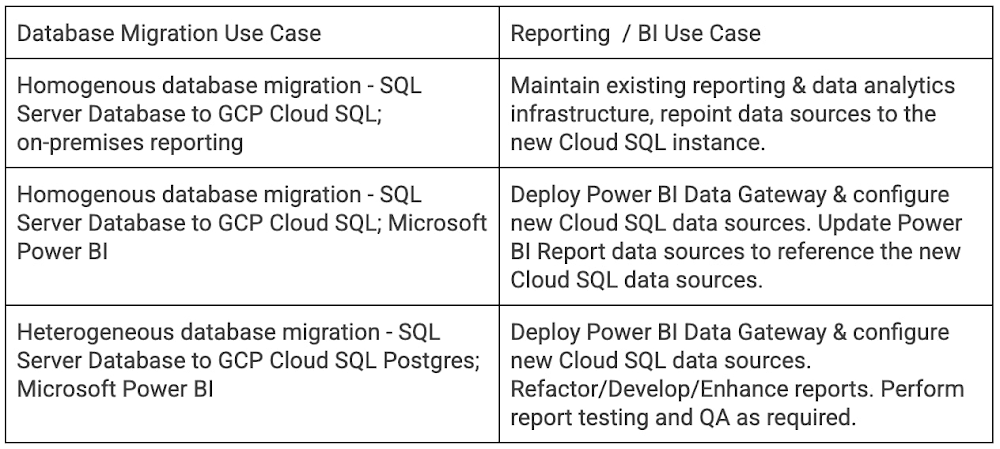
After migrating databases to Google Cloud,  Cloud SQL developers and business users can use familiar business intelligence tools and services like Microsoft Power BI to connect to and report from Cloud SQL MySQL, PostgreSQL, and SQL Server databases.  The ability to quickly migrate databases to GCP without having to worry about refactoring or developing new reporting and BI tools is a key capability for businesses migrating to CloudSQL. Organizations can migrate today, and then replatform databases and refactor reporting in subsequent project phases.The following guide demonstrates key steps to configure Power BI reporting from Cloud SQL. While your environment and requirements may vary, the design remains the same. To begin, create three Cloud SQL Instances, each with a Private IP address.After creating the database instances, create a Windows VM in the same VPC as the Cloud SQL instances. Install and configure the Power BI Gateway on this VM along with the required ODBC connectors.Download and Install ODBC Connectors for PostgreSQL and MySQL.Postgres:  https://www.postgresql.org/ftp/odbc/versions/msi/  MySQL: https://dev.mysql.com/downloads/connector/odbc/  Configure System DSNs for each Database connection. Examples follow. SQL ServerPostgreSQLMySQLThe traffic between the CloudSQL instance and the VM hosting the data gateway stays inside the Google VPC and is encrypted via Encryption in Transit in Google Cloud. To add an additional layer of SSL encryption for the data inside the Google VPC, configure each System DSN to use CloudSQL SSL/TLS certificates . Next, download, install, and configure the Power BI Gateway. Note that the gateway may be installed in an HA configuration. The screenshot below shows a single standalone gateway. On-premises data gateway configuration: Create a new on-premises data gatewayOn-premises data gateway configuration: Validate Gateway ConfigurationOn-premises data gateway configuration: Review logging settingsOn-premises data gateway configuration: Review HTTPS modeMake sure that outgoing HTTPS traffic is allowed to exit from the VPC.Next, download and open Power BI Desktop. Log into Power BI and select “Manage gateways” to configure data sources.Add data sources for each instance, and then test the data source connections. In the example below a data source is added for each CloudSQL instance.Load test data into each database instance (optional). In the example below a simple table containing demo data is created in each source database.Launch Power BI desktop and log in. Next, add data sources and create a report. Select “Get data” and add ODBC connections for CloudSQL SQL Server, PostgreSQL and MySQL, then create a sample report with data from each instance.Using the Power BI publish feature, publish the report to the Power BI service. Once the report and data sources are published, update the data sources in the Power BI workspace to point to the data gateway data sources.Map the datasets to the CloudSQL database gateway connections.Optional: Schedule a refresh time.To perform an end-to-end test, update the test data and refresh the reports to view the changes.Use the Publish to – Power BI Service to publish Power BI reports that were developed with Power BI Report Builder to a workspace (Power BI Premium Capacity is required).ConclusionHopefully this blog was helpful in demonstrating how Power BI reports and dashboards can connect to Google Cloud SQL Databases using the Power BI Gateway. You can also use the Power BI Gateway to connect to your Big Query datasets and databases running on GCE VMs. For more information on Cloud SQL, please visit Google Cloud Platform Cloud SQL.  Related ArticleSQL Server SSRS, SSIS packages with Google Cloud BigQueryThe following blog details patterns and examples on how Data teams can use SQL Server Integration Services (SSIS) and SQL Server Reportin…Read Article
Quelle: Google Cloud Platform

How to think about threat detection in the cloud

As your organization transitions from on-premises to hybrid cloud or pure cloud, how you think about threat detection must evolve as well—especially when confronting threats across many cloud environments. A new foundational framework for thinking about threat detection in public cloud computing is needed to better secure digital transformations. Because these terms have had different meanings over time, here’s what we mean by threat detection and detection and response. A balanced security strategy covers all three elements of a security triad: prevention, detection, and response. Prevention can improve, but never becomes perfect. Despite preventative controls, we still need to be on the lookout for threats that penetrate our defenses. Finding and confirming malicious activities, and automatically responding to them or presenting them to the security team constitutes detection and response.Vital changes impact the transition from the traditional environment to the cloud and affect three key areas: Threat landscapesIT environment Detection methodsFirst, threat landscapes change. This means new threats evolve, old threats disappear, and the importance of many threats changes. If you perform a threat assessment on your environment and then migrate the entire environment to the public cloud, even if you use the lift and shift approach, the threat assessment will look very different. MITRE ATT&CK Cloud can help us understand how some threat activities apply to public cloud computing. Second, the entire technology environment around you changes. This applies to the types of systems and applications you as a defender would encounter, but also to technologies and operational practices. Essentially, cloud as a realm where you have to detect threats is different —this applies to the assets being threatened and technologies doing the detecting. Sometimes cloud looks to traditional “blue teams” as some alien landscape where they would have only challenges. In reality, cloud does bring a lot of new opportunities for detection. The main theme here is change, some for the worse and some for the better. After all, cloud is Usually distributed—running over many regions and data centersOften immutable—utilizes systems that are replaced, rather than updatedEphemeral uses workloads often created for the task and then removedAPI driven—enabled by pervasive APIsCentered on identity layer—mostly uses identities and not just network perimeter to separate workloadsAutomatically scalable—able to expand with theincreasing workloadShared with the providerSometimes the combination of Distributed, Immutable, and Ephemeral cloud properties is called a DIE triad. All these affect detection for the cloud environment.Third, telemetry sources and detection methods also change. While this may seem like it’s derived from the previous point we made, that’s not entirely true. For some cloud services, and definitely for SaaS, a popular approach of using an agent such as EDR would not work. However, new and rich sources of telemetry may be available—Cloud Audit Logs are a great example here. Similarly, the expectation that you can sniff traffic on the perimeter, and that you even will have a perimeter, may not be entirely correct. Pervasive encryption hampers Layer 7 traffic analysis, while public APIs rewrite the rules on what a perimeter is. Finally, detection sources and methods are also inherently shared with the cloud provider, with some under cloud service provider control while others are under cloud user control.This leads to several domains where we can and should detect threats in the cloud.Let’s review a few cloud threat detection scenarios.Everybody highlights the role of identity in cloud security. Naturally, it matters in threat detection as well—and it matters a lot. While we don’t want to repeat the cliche that in a public cloud you are one IAM mistake away from a data breach, we know that cloud security missteps can be costly. To help protect organizations, Google Cloud offers services that automatically and in real-time analyze every IAM grant to detect outsiders being added—even indirectly.Detecting threats inside compute instances such as virtual machines (VM) using agents seems to be about the past. After all, VMs are just servers, right? However, this is an area where cloud brings new opportunities. For example, VM Threat Detection allows security teams to do completely agentless YARA rule execution against their entire compute fleet. Finally, products like BigQuery require new ways of thinking about detecting data exfiltration. Security Command Center Premium detects queries and backups in BigQuery that would copy data to different Google Cloud organizations. Naturally, some things stay the same in the cloud. These include broad threat categories such as insiders or outsiders; steps in the cyber exploit chain such as coarse-grained stages of an attack; and the MITRE ATT&CK Tactics are largely unchanged. It is also likely that broad detection use cases stay the same. What does that mean for the defenders?When you move to the cloud, your threats and your IT change—and change a lot.This means that using on-premises detection technology and approaches as a foundation for future development may not work well.This also means that merely copying all your on-premise detection tools and their threat detection content is not optimal.Instead, moving to Google Cloud is an opportunity to transform how you can achieve your continued goals of confidentiality, integrity, and availability with the new opportunities created by the technology and process of cloud.Call to action:Listen to “Threat Models and Cloud Security” (ep12) Listen to “What Does Good Detection and Response Look Like in the Cloud? Insights from Expel MDR” (ep72)Listen to “Cloud Threats and How to Observe Them” (ep69)and read the related blog “How to think about cloud threats today”Review how to test cloud detectionsRead the guidance on cloud threat investigation with SCC and ChronicleRelated ArticleRead Article
Quelle: Google Cloud Platform

Making AI more accessible for every business

Alphabet CEO Sundar Pichai has compared the potential impact of artificial intelligence (AI) to the impact of electricity—so it may be no surprise that at Google Cloud, we expect to see increased AI and machine learning (ML) momentum across the spectrum of users and use cases.Some of the momentum is more foundational, such as the hundreds of academic citations that Google AI researchers earn each year, or products like Google Cloud Vertex AI accelerating ML development and experimentation by 5x, with 80% fewer lines of code required. Some are more concrete, like mortgage servicer Mr. Cooper using Google Cloud Document AI to process documents 75% faster with 40% cost savings; Ford leveraging Google Cloud AI services for predictive maintenance and other manufacturing modernizations; and customers across a wide range of industries deploying ML platforms atop Google Cloud. Together, these proof points reflect our belief that AI is for everyone, and that it should be easy to harness in workflows of all kinds and for people of all levels of technical expertise. We see our customers’ accomplishments as validation of this philosophy and a sign that we are taking away the right things from our conversations with business leaders. Likewise, we see validation in recognition from analysts, which recently includes Google being named a Leader byGartner® in the 2022 Magic Quadrant™ for Cloud AI Developer Services reportForrester in the Forrester Wave™: AI Infrastructure, Q4 2021 report, the Forrester Wave™: Document-Oriented Text Analytics Platforms, Q2 2022 report, and The Forrester Wave™: People-Oriented Text Analytics Platforms, Q2 2022 report In June, we talked about four pillars that guide our approach to creating products for MLOps and to accelerate development of ML models and their deployment into product. In this article, we’ll look more broadly at our AI and ML philosophy, and what it means to create “AI for everyone.” AI should be for everyoneOne of the pillars we discussed in June was “meeting users where they are,” and this idea extends far beyond products for data scientists. Technical expertise should not be a barrier to implementing AI—otherwise, use cases where AI can help will languish without modernization, and enterprises without well-developed AI practices will risk falling behind their competitors. To this end, we focus on creating AI and ML services for all kinds of users, e.g.: DocumentAI, Contact Center AI, and other solutions that inject AI and ML into business workflows without imposing heavy technical requirements or retraining on users; Pre-trained APIs, ranging from Speech to Fleet Optimization, that let developers leverage pre-trained ML models and free them from having to develop core AI technologies from scratch; BigQuery ML to unite data analysis tasks with ML;AutoML for abstracted and low-code ML production without requiring ML expertise; Vertex AI to speed up ML experimentation and deployment, with every tool you need to build deploy and the lifecycle of ML projectsAI Infrastructure options for training deep learning and machine learning models cost effectively. Including Deep Learning VMs optimized for data science and machine learning tasks and AI accelerators for every use case, from low-cost inference to high-performance training. It’s important to provide not only leading tools for advanced AI practitioners, but also leading AI services for users of all kinds. Some of this involves abstracting or automating parts of the ML workflow to meet the needs of the job and technical aptitude of the user. Some of it involves integrating our AI and ML services with our broader range of enterprise products, whether that means smarter language models invisibly integrated into Google Docs or BigQuery making ML easily accessible to data analysts. Regardless of any particular angle, AI is turning into a multi-faceted, pervasive technology for businesses and users the world over, so we feel technology providers should reflect this by building platforms that help users harness the power of AI by meeting them wherever they are. How we’re powering the next generation of AICreating  products that help bring AI to everyone requires large research investments, including in areas where the path to productization may not be clear for years. We feel a foundation in research combines with our focus on business needs and users to inform sustainable AI products that are in keeping with our AI principles and encourages responsible use of AI.  Many of our recent updates to our AI and ML platforms began as Google research projects. Just consider how DeepMind’s breakthrough AlphaFold project has led to the ability to run protein prediction models in Vertex AI. Or how  research into neural networks helped create Vertex AI NAS, which lets data science teams train models more accurately with lower latency and power requirements. Research is crucial, but also only one way of validating an AI strategy. Products have to speak for themselves when they reach customers, and customers need to see their feedback reflected as products are iterated and updated. This reinforces the importance of seeing customer adoption and success across a range of industries, use cases, and user types. In this regard, we feel very fortunate to work with so many great customers, and very proud of the work we help them accomplish. I’ve already mentioned Ford and Mr. Cooper, but those are just a small sampling. For example, Vodafone Commercial’s “AI Booster” platform uses the latest Google technology to enable cutting-edge AI use cases such as optimizing customer experiences, customer loyalty, and product recommendations. Our conversational AI technologies are used by companies ranging from Embodied, whose Moxie robot helps children overcome developmental challenges, to HubSpot connecting meeting notes to CRM data. Across our products and across industries around the world, customer stories grow by the day. We also see validation in our partner network. As we noted in the pillars discussed in June, partners like Nvidia help us to ensure customers have freedom of choice when building their AI stacks, and partners like Neo4j help our customers to expand our services into areas like graph structures. Partners support our mission to bring AI to everyone, helping more customers use our services for new and expanded use cases.Accelerating the momentumOverall, to create products that reflect AI’s potential and likely future ubiquity, we have to take all of the preceding factors, from research to customer and analyst conversations to working with partners, and turn them into products and product updates. We’ve been very active over the last year, from the launch of Call Center AI Platform in March, to the new Speech model we released in May, to a range of announcements at the Google Cloud Applied ML Summit in June. We have much more planned in coming months, and we’re excited to work with customers not just to maintain the pace of AI momentum, but to accelerate it. To learn more about Google Cloud’s AI and ML services, visit this link orbrowse recent AI and ML articles on the Google Cloud Blog. GARTNER and MAGIC QUADRANT are registered trademarks and service marks of Gartner, Inc. and/or its affiliates in the U.S. and internationally and are used herein with permission. All rights reserved. Gartner does not endorse any vendor, product or service depicted in its research publications and does not advise technology users to select only those vendors with the highest ratings or other designation. Gartner research publications consist of the opinions of Gartner’s Research & Advisory organization and should not be construed as statements of fact. Gartner disclaims all warranties, expressed or implied, with respect to this research, including any warranties of merchantability or fitness for a particular purpose.Related ArticleCloud TPU v4 records fastest training times on five MLPerf 2.0 benchmarksCloud TPU v4 ML supercomputers set performance records on five MLPerf 2.0 benchmarks.Read Article
Quelle: Google Cloud Platform

Quantifying portfolio climate risk for sustainable investing with geospatial analytics

Financial services institutions are increasingly aware of the significant role they can play in addressing climate change. As allocators of capital through their lending and investment portfolios, they direct financial resources for corporate development and operations in the wider economy. This capital allocation responsibility balances growth opportunities with risk assessments to optimize risk-adjusted returns. Identifying, analyzing, reporting, and monitoring climate risks associated with physical hazards, such as wildfires and water scarcity, is becoming an essential element of portfolio risk management.Implementing a cloud-native portfolio climate risk analytics systemTo help quantify these climate risks, this design pattern includes cloud-native building blocks that financial services institutions can use to implement a portfolio climate risk analytics system in their own environment. This pattern includes a sample dataset from RS Metrics and leverages several Google Cloud products, such as BigQuery, Data Studio, Vertex AI Workbench, and Cloud Run. The technical architecture is shown below.Technical architecture for cloud-native portfolio climate risk analytics.Please refer to the source code repository for this pattern to get started, and read through the rest of this post to dig deeper into the underlying geospatial technology and business use cases in portfolio management. You can use the Terraform code provided in the repository to deploy the sample datasets and application components in your selected Google Cloud Project. The README has step-by-step instructions.After deploying the technical assets, we recommend performing the following steps to get more familiar with the pattern’s technical capabilities:Review the example Data Studio dashboard to get familiar with the dataset and portfolio risk analytics (see screenshot below)Explore the included R Shiny app, deployed with Cloud Run, for more in-depth analyticsVisit Vertex AI Workbench and walk through the exploratory data analysis provided in the included Python-based Jupyter notebookDrop into BigQuery to directly query the sample data for this patternPortfolio climate risk analytics Data Studio dashboard. This dashboard visualizes sample climate risk data stored in BigQuery, and dynamically displays aggregate fire and water stress risk scores based on your selections and filters.The importance of granular objective dataAssessing exposure to climate risks under various climate change scenarios can involve combining geospatial layers, expertise in climate models, and using information about company operations. Depending on where they are located, companies’ physical assets – like their manufacturing facilities or office buildings – can be susceptible to varying types of climate risk. A facility located in a desert will likely experience greater water stress, and a plant located near sea level will have a larger risk of coastal flooding.Asset-level physical climate risk analysisGoogle Cloud partner RS Metrics offers two data products that cover a broad set of investable public equities: ESGSignals® and AssetTracker®. These products include 50 transition and physical climate risk metrics such as biodiversity, greenhouse gas (GHG) emissions, water stress, land usage, and physical climate risks. As an introduction to these concepts, we’ll first describe two key physical risks: water stress risk and fire risk.Water Stress RiskWater stress occurs when an asset’s demand for water exceeds the amount of water available for that asset, resulting in higher water costs or in extreme cases, complete loss of water supply. This can negatively impact the unit economics of the asset, or even result in the asset being shut down. According to a 2020 report from CDP, 357 surveyed companies disclosed a combined $301 billion in potential financial impact of water risks.When investors don’t have asset location data, they use industry average water intensity and basin level water risk to estimate water stress risk, as described in a 2020 report by Ceres. However, ESGSignals® allows a more granular approach, integrating meteorological and hydrological variables at the basin and sub-basin levels, drought severity, evapotranspiration, and surface water availability for millions of individual assets.Left: Watershed map of North America showing 2-digit hydrologic units. Source: usgs.govRight: Water cycle of the Earth’s surface, showing evapotranspiration, composed of transpiration and evaporation. Source: WikipediaAs an example, let’s look at mining, a very water-intensive industry. One mining asset, the Cerro Colorado copper mine in Chile, produced 71,700 metric tons of copper in 2019, according to an open dataset published by Chile’s Ministry of Mining. ESGSignals® identifies this mining asset as having significant water stress, resulting in a water risk score of 75 out of 100. For assets like these, reducing water consumption via efficiency improvements and the use of desalinated seawater will not only save precious water resources for nearby communities, but also reduce operating costs over time.A map illustrating asset level overall risk score calculated from ESGSignals® fire risk and water stress risk scores (range: 0-100). The pop-up in the middle: asset information and scores relevant to BHP Group’s Cerro Colorado Copper Mine. Source: RS Metrics portfolio climate risk Shiny appFire RiskWildfires have caused significant damage in recent years. For example, economists estimated that the 2019-2020 Australian bushfire season caused approximately A$103 billion in property damage and economic losses. Such wildfires pose safety and operational risk for all kinds of commercial operations located in Australia.ESGSignals® fire risk score is calculated by combining historical fire events, proximity, and intensity of fire with company asset locations (AssetTracker®). Based on ESGSignals® assessments, the majority of mining assets located in Australia have medium to high exposure to fire risk.Google Earth Engine animation of wildfires occurring within 100km of two mills owned by the same company during 2021. Asset (a) is considered a high fire risk asset while asset (b) has comparatively lower fire risk. Fire Data Source: NASA FIRMS.Incorporating asset-level climate risk analytics into portfolio management Now that we have an understanding of the mechanics of asset-level climate risk, let’s focus on how portfolio managers could incorporate these analytics into their portfolio management processes, including portfolio selection, portfolio monitoring, and company engagement.Portfolio selectionPortfolio selection can involve various investment tools. In screening, the portfolio manager sets up filtering criteria to select companies for inclusion in, or exclusion from, the portfolio. Asset-level climate risk scores can be included in these screening criteria, along with other financial or non-financial factors. For example, a portfolio manager could search for companies whose average asset-level water stress score is less than 30. This would result in an investment portfolio that has an overall lower risk from water stress than a given benchmark index (see figure below).Portfolio climate risk analytics Data Studio dashboard showing portfolio selection via screening for companies whose average asset-level water stress score is less than 30. In this case, overall score is defined as the mean of water stress risk score and fire risk score.Portfolio monitoringFor portfolio monitoring, it’s important to first establish a baseline of physical climate risk for existing holdings within the portfolio. A periodic reporting process that looks for changes in water stress, wildfire, or other physical climate risk metrics can then be created. Any material changes in risk scores would trigger a more detailed analysis to determine the next best action, such as rebalancing the portfolio to meet the target risk profile.Monitoring fire risk score from 2018 to 2021 for three corporate assets with low, low-medium, and medium-high fire risk scores. For more time series analysis, see the source code repository.Portfolio engagementSome portfolio managers engage with companies held in their portfolios, either through shareholder initiatives or by meeting with corporate investor relations teams. For these investors, it’s important to clearly identify the assets with significant exposure to climate risks. To focus on the locations with the highest opportunity for impact, a portfolio manager could sort the millions of AssetTracker locations by water stress or fire risk score, and engage with companies near the top of these ranked lists. Highlighting mitigation opportunities for these most at-risk assets would be an effective engagement prioritization strategy.Portfolio climate risk analytics Data Studio dashboard as a tool for portfolio engagement. Companies with high risk assets based on fire risk score are shown at the top of the list.Expanding beyond portfolio managementApplying an asset-level approach to physical climate risk analytics can be helpful beyond the use cases in portfolio management presented above. For example, risk managers in commercial banking could use this methodology to quantify lending risk during underwriting and ongoing loan valuation. Insurance companies could also use these techniques to improve risk assessment and pricing decisions for both new and existing policyholders.To enable further insights, additional geospatial datasets can be blended with those used in this pattern via BigQuery’s geospatial analytics capabilities. Location information in these datasets, such as points or polygons encoded in a GEOGRAPHY data type, allow them to be combined together with spatial JOINs. For example, a risk analyst could join AssetTracker data with BigQuery public data, such as population information for states, counties, congressional districts, or zip codes available in the Census Bureau US Boundaries dataset.A cloud-based data environment can help enterprises manage these and other sustainability analytics workflows. Infosys, a Google Cloud partner, provides blueprints and digital data intelligence assets to accelerate the realization of sustainability goals in a secure data collaboration space to connect, collect, correlate information assets such as RS Metrics geospatial data, enterprise data, and digital data to activate ESG intelligence within and across the financial value chain.Curious to learn more? To learn more from RS Metrics about analyzing granular asset-level risk metrics with ESGSignals®, you can review their recent and upcoming webinars, or connect directly with them here.To learn more about sustainability services from Infosys, reach out to the Infosys Sustainability team here. If you’d like a demo of the Infosys ESG Intelligence Cloud solution for Google Cloud, contact the Infosys Data, Analytics & AI team here.To learn more about the latest strategies and tools that can help solve the tough challenges of climate change across industries, view the sessions on demand from our recent Google Cloud Sustainability Summit.Special thanks to contributorsThe authors would like to thank these Infosys collaborators: Manojkumar Nagdev, Rushiraj Pradeep Jaiswal, Padmaja Vaidyanathan, Anandakumar Kayamboo, Vinod Menon, and Rajan Padmanabhan. We would also like to thank Rashmi Bomiriya, Desi Stoeva, Connie Yaneva, and Randhika H from RS Metrics, and Arun Santhanagopalan, Shane Glass and David Sabater Dinter from Google.DisclaimerThe information contained on this website is meant for the purposes of information only and is not intended to be investment, legal, tax or other advice, nor is it intended to be relied upon in making an investment or other decision. All content is provided with the understanding that the authors and publishers are not providing advice on legal, economic, investment or other professional issues and services.Related ArticleGoogle Cloud announces new products, partners and programs to accelerate sustainable transformationsIn advance of the Google Cloud Sustainability Summit, we announced new programs and tools to help drive sustainable digital transformation.Read Article
Quelle: Google Cloud Platform



