Google Cloud Data Heroes Series: Meet Tomi, a data engineer based in Germany and creator of the ‘Not So BigQuery Newsletter’

Google Cloud Data Heroes is a series where we share stories of the everyday heroes who use our data tools to do incredible things. Like any good superhero tale, we explore our Google Cloud Data Heroes’ origin stories, how they moved from data chaos to a data-driven environment, what projects and challenges they are overcoming now, and how they give back to the community. In this month’s edition, we’re pleased to introduce Tomi! Tomi grew up in Croatia, and is now residing in Berlin, Germany, where he currently works as a freelance Google Cloud data engineer. In this role, he regularly uses BigQuery. Tomi’s familiarity with BigQuery and his passion for Google Cloud led him to creating the weekly newsletter Not So BigQuery, where he discusses the latest data-related information from the GCP world.  Additionally, he also works for one of the largest automotive manufacturers in Germany as an analyst. When not in front of the keyboard, Tomi enjoys walking with his dog and his girlfriend, going to bakeries, or spending a night watching television.When were you introduced to the cloud, tech, or data field? What made you pursue this in your career? I always struggled with the question ‘what do you want to do in your life?. I attended school at Zagreb University of Applied Science for my information technology studies degree, but I was still unsure if I should become a developer, data engineer or something completely different.A couple of years into working as a junior IT Consultant, I stumbled upon a job advertisement looking for a Data Analyst/Scientist. Back then, finding out that you can get paid to just work with data all day sounded mind-blowing to me. A dream job.I immediately applied for the role and started learning about the skills needed. This is also where I gained my first experience with the Cloud as I signed up for a Google Cloud Platform free trial in February 2018. On the platform, there was a blog post describing how to run Jupyter notebooks in the Cloud. It interested me, and I went ahead and created my very first Compute Engine instance in Google Cloud Platform.I didn’t get the job I initially applied for, but this was the trigger for me that set things in motion and got me to where I am now.What courses, studies, degrees, or certifications were instrumental to your progression and success in the field? In your opinion, what data skills or competencies should data practitioners be focusing on acquiring to be successful in 2022 and why? Looking back at my university days, I really enjoyed the course about databases, which was partially because I had a really great teacher, but also because this was the first time I got to do something which catered to my then still-unknown data-nerdy side.In 2019, I got my Google Cloud Certified Associate Cloud Engineer Certification which was a challenging and rewarding entry-level certification for Google Cloud. I would recommend considering getting one of these as a way of focusing one’s learning.One major change I’ve observed since working in the data field is the ongoing transition from on-prem to cloud and serverless. I remember a story from my early consulting days working in an IT operations team, when there was a major incident caused by an on-prem server outage. At some point one frustrated colleague said something like, ‘why do we even have to have servers? Why can’t it just *run* somehow?’ What sounded like a bit of a silly question back then turned out to be quite ‘visionary’ with all the serverless and cloud-based tech we have today.What drew you to Google Cloud? Tell us about that process, what you’re most proud of in this area, and why you give back to the community? There is this great newsletter on Google Cloud Platform called GCP Weekly, run by a data community member named Zdenko Hrček that I really like. However, since the GCP ecosystem is growing at a rapid pace there are sometimes just too many news and blogs in a single week. I really struggled to catch up with all the new product updates and tutorials. That’s when I had the idea: ‘what if there would be a shorter newsletter with only news about BigQuery and other data-related tools’? Fast forward to today, my Not So BigQuery newsletter has more than 220 subscribers.I was also inspired by the awesome content created by Priyanka Vergadia, Staff Developer Advocate at Google Cloud, such as her Sketchnotes series. I created the GCP Data Wiki, which is a public Notion page with cards for every database/storage service in GCP with useful details such as links to official docs, Sketchnotes and more.What are 1-2 of your favorite projects you’ve done with Google Cloud’s data products? One of my first projects built with Google Cloud products was an automated data pipeline to get track data from the official Spotify API. I was looking for a data project to add to my portfolio and found out that Spotify lets you query their huge library via a REST API. This later evolved into a fully-serverless pipeline running on Google Cloud Functions and BigQuery. I also wrote a blog post about the whole thing, which got 310 claps on Medium.Additionally, the Not So BigQuery newsletter I created is actually powered by a tool I built using Google Sheets and Firebase (Functions). I have a Google Sheet where I pull in the news feed sections from sources such as the Google Cloud Blog and Medium. Using the built-in Sheets formulas such as IMPORTFEED and FILTER, I built a keyword-based article curation algorithm pre-selecting the articles to include in the next issue of the newsletter. Then my tool called crssnt (pronounced as the french pastry) takes the data from the Google Sheet and displays it in the newsletter. If you are curious how the Google Sheet looks like, you can check it out here.What are your favorite Google Cloud Platform data products within the data analytics, databases, and/or AI/ML categories? What use case(s) do you most focus on in your work? What stands out about GCP’s offerings?My favorite is BigQuery but I’m also a huge fan of Firestore. BigQuery is my tool of choice for pretty much all of my data warehouse needs (for both personal and client projects). What really stood out to me for me is the ease of use when it comes to setting up new databases from scratch and getting first results in the form of e.g. a Data Studio dashboard built on top of a BigQuery table. Similarly, I always go back to Firestore whenever I have an idea about some new front-end project since it’s super easy to get started and gives me a lot of flexibility.From similar non-Google products, I used Snowflake a while ago but didn’t find the user interface nearly as intuitive and user-friendly as BigQuery.What’s next for you in life? It’s going to be mostly ‘more of the same’ for me: as a data nerd, there is always something new to discover and learn. My overall message to readers would be to try to not worry too much about fitting into predefined career paths, job titles and so on, and just do your thing. There is always more than one way of doing things and reaching your goals. Want to join the Data Engineer Community?Register for the Data Engineer Spotlight on July 20th, where attendees have the chance to learn from four technical how-to sessions and hear from Google Cloud Experts on the latest product innovations that can help you manage your growing data. Begin your own Data Hero journeyReady to embark on your Google Cloud data adventure? Begin your own hero’s journey with GCP’s recommended learning path where you can achieve badges and certifications along the way. Join the Cloud Innovators program today to stay up to date on more data practitioner tips, tricks, and events.If you think you have a good Data Hero story worth sharing, please let us know! We’d love to feature you in our series as well.Related ArticleGoogle Cloud Data Heroes Series: Meet Francisco, the Ecuadorian American founder of Direcly, a Google Cloud PartnerIn the Data Heroes series we share stories of people who use data analytics tools to do incredible things. In this month’s edition, Meet …Read Article
Quelle: Google Cloud Platform
Using Google Kubernetes Engine’s GPU sharing to search for neutrinos

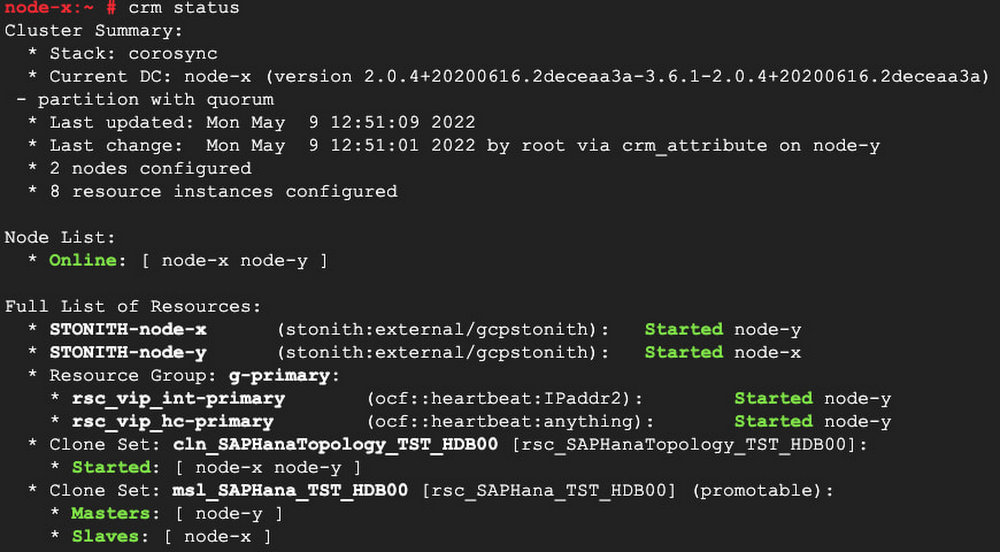
Editor’s note: Today we hear from the San Diego Supercomputer Center (SDSC) and University of Wisconsin-Madison about how GPU sharing in Google Kubernetes Engines is helping them detect neutrinos at the South Pole with the gigaton-scale IceCube Neutrino Observatory.IceCube Neutrino Observatory is a detector at the South Pole designed to search for nearly massless subatomic particles called neutrinos. These high-energy astronomical messengers provide information to probe events like exploding stars, gamma-ray bursts, and cataclysmic phenomena involving black holes and neutron stars. Scientific computer simulations are run on the sensory data that IceCube collects on neutrinos to pinpoint the direction of detected cosmic events and improve their resolution.The most computationally intensive part of the IceCube simulation workflow is the photon propagation code, a.k.a. ray-tracing, and that code can greatly benefit from running on GPUs. The application is high throughput in nature, with each photon simulation being independent of the others. Apart from the core data acquisition system at the South Pole, most of IceCube’s compute needs are served by an aggregation of compute resources from various research institutions all over the world, most of which use the Open Science Grid (OSG) infrastructure as their unifying glue. GPU resources are relatively scarce in the scientific resource provider community. In 2021, OSG had only 6M GPU hours vs 1800M CPU core hours in its infrastructure. The ability to expand the available resource pool with cloud resources is thus highly desirable.The SDSC team recently extended the OSG infrastructure to effectively use Kubernetes-managed resources to support IceCube compute workloads on the Pacific Research Platform (PRP). The service manages dynamic provisioning in a completely autonomous fashion by implementing horizontal pilot pod autoscaling based on the queue depth of the IceCube batch system. Unlike on-premises systems, Google Cloud offers the benefits of elasticity (on-demand scaling) and cost efficiency (only pay for what gets used). We needed a flexible platform that can avail these benefits to our community. We found Google Kubernetes Engine (GKE) to be a great match for our needs due to its support for auto-provisioning, auto-scaling, dynamic scheduling, orchestrated maintenance, job API and fault tolerance, as well as support for co-mingling of various machine types (e.g. CPU + GPU and on-demand + Spot) in the same cluster and up to 15,000 nodes per cluster.While IceCube’s ray-tracing simulation greatly benefits from computing on the GKE GPUs, it still relies on CPU compute for feeding the data to the GPU portion of the code. And GPUs have been getting faster at a much higher rate than CPUs have! With the advent of the NVIDIA V100 and A100 GPUs, the IceCube code is now CPU-bound in many configurations. By sharing a large GPU between multiple IceCube applications, the IceCube ray-tracing simulation again becomes GPU-bound, and therefore we get significantly more simulation results from the same hardware. GKE has native support for both simple GPU time-sharing and the more advanced A100 Multi-Instance GPU (MIG) partitioning, making it incredibly easy for IceCube — and OSG at large — to use.To leverage the elasticity of the Google Cloud, we fully relied on GKE horizontal node auto-scaling for provisioning and de-provisioning GKE compute resources. Whenever there were worker pods that could not be started, the auto-scaler provisioned more GKE nodes, up to a set maximum. Whenever a GKE node was unused, the auto-scaler de-provisioned it to save costs.Performance resultsUsing Google Cloud GPU resources was very simple through GKE. We used the same setup we were already using on the on-prem PRP Kubernetes cluster, simply pointing our setup to the new cluster.After the initial setup, IceCube was able to efficiently use Google Cloud resources, without any manual intervention by the supporting SDSC team beyond setting the auto-scaling limits. This was a very welcome change from other cloud activities the SDSC team has performed on behalf of IceCube and others, that required active management of provisioned resources.AutoscalingThe GKE auto-scaling for autonomous provisioning and de-provisioning of cloud resources worked as advertised, closely matching the demand from IceCube users, as seen in Fig. 1. We were particularly impressed by GKE’s performance in conjunction with GPU sharing; the test run shown used seven A100 MIG partitions per GPU.Fig. 1: Monitoring snapshot of the unconstrained GKE auto-scaling test run.GPU sharingBoth full-GPU and shared-GPU Kubernetes nodes with A100, V100 and T4 GPUs were provisioned, but IceCube jobs did not differentiate between them, since all provisioned resources met the jobs’ minimum requirements.We assumed that GPU sharing benefits would vary based on the CPU-to-GPU ratio of the chosen workflow, so during this exercise we picked one workflow from each extreme. IceCube users can choose to speed up the GPU-based ray-tracing compute of some problems by, roughly speaking, increasing the size of the target for the photons by some factor. For example, setting oversize=1 gives the most precise simulation, and oversize=4 gives the fastest. Faster compute (of course) results in a higher CPU-to-GPU ratio. The fastest oversize=4 workload benefitted the most from GPU sharing. As can be seen from Fig. 2, IceCube oversize=4 jobs cannot make good use of anything faster than a NVIDIA T4. Indeed, even for the low-end T4 GPU, sharing increases the job throughput by about 40%! For the A100 GPU, GPU sharing gets us a 4.5x throughput increase, which is truly transformational. Note that MIG and “plain” GPU sharing provide comparable throughput improvements, but MIG comes with much stronger isolation guarantees, which would be very valuable in a multi-user setup.Fig. 2: Number of IceCube oversize=4 jobs per hour, grouped by GPU setup.The more demanding oversize=1 workload makes much better use of the GPUs, so we observe no job throughput improvement for the older T4 and V100 GPUs. The A100 GPU, however, is still too powerful to be used as a whole, and GPU sharing gives us almost a 2x throughput improvement here, as illustrated in Fig. 3.Fig. 3: Number of IceCube oversize=1 jobs per day, grouped by GPU setup.GPU sharing of course increases the wallclock time needed by any single job to run to completion. This is however not a limiting factor for IceCube, since the main objective is to produce the output of thousands of independent jobs, and the expected timeline is measured in days, not minutes. Job throughput and cost effectiveness are therefore much more important than compute latency.Finally, we would like to stress that most of the used resources were provisioned on top of Spot VMs, making them significantly cheaper than their on-demand equivalents. GKE gracefully handled any preemption, making this mode of operation very cost effective.Lessons learnedGKE with GPU sharing has proven to be very simple to use, given that our workloads were already Kubernetes-ready. From a user point of view, there were virtually no differences from the on-prem Kubernetes cluster they were accustomed to.The benefits of GPU sharing obviously depend on the chosen workloads, but at least for IceCube it seems to be a necessary feature for the latest GPUs, i.e. the NVIDIA A100. Additionally, a significant fraction of IceCube jobs can benefit from GPU sharing even for lower-end T4 GPUs.When choosing the GPU-sharing methodology, we definitely prefer MIG partitioning. While less flexible than time-shared GPU sharing, MIG’s strong isolation properties make management of multi-workload setups much more predictable. That said, “plain” GPU sharing was still more than acceptable, and was especially welcome on GPUs that lack MIG support.In summary, the GKE shared-GPU experience was very positive. The observed benefits of GPU sharing in Kubernetes were an eye-opener and we plan to make use of it whenever possible.Want to learn more about sharing GPUs on GKE? Check out this user guide.Related ArticleTurbocharge workloads with new multi-instance NVIDIA GPUs on GKEYou can now partition a single NVIDIA A100 GPU into up to seven instances and allocate each instance to a single Google Kubernetes Engine…Read Article
Quelle: Google Cloud Platform
Deploying high-throughput workloads on GKE Autopilot with the Scale-Out compute class

GKE Autopilot is a full-featured, fully managed Kubernetes platform that combines the full power of the Kubernetes API with a hands-off approach to cluster management and operations. Since launching Autopilot last year, we’ve continued to innovate, adding capabilities to meet the demands of your workloads. We’re excited to introduce the concept of compute classes in Autopilot, together with the Scale-Out compute class, which offers high performance x86 and Arm compute, now available in Preview.Autopilot compute classes are a curated set of hardware configurations on which you can deploy your workloads. In this initial release, we are introducing the Scale-Out compute class, which is designed for workloads that are optimized for a single-thread-per-core and scale horizontally. The Scale-Out compute class currently supports two hardware architectures — x86 and Arm — allowing you to choose whichever one offers the best price-performance for your specific workload. The Scale-Out compute class joins our original, general-purpose compute option and is designed for running workloads that benefit from the fastest CPU platforms available on Google Cloud, and with greater cost-efficiency for applications that have high CPU utilization.We also heard from you that some workloads would benefit from higher-performance compute. To serve this need, x86 workloads running on the Scale-Out compute class are currently served by 3rd Gen AMD EPYCTM processors, with Simultaneous Multithreading (SMT) disabled, achieving the highest per-core benchmark among x86 platforms in Google Cloud.And for the first time, Autopilot supports Arm workloads. Currently utilizing the new Tau T2A VMs running on Ampere® Altra® Arm-based processors, the Scale-Out compute class gives your Arm workloads price-performance benefits combined with a thriving, open, end-to-end platform independent ecosystem. Autopilot Arm Pods are currently available in us-central, europe-west4, and asia-southeast1.Deploying Arm workloads using the Scale-Out compute classTo deploy your Pods on a specific compute class and CPU, simply add a Kubernetes nodeSelector or node affinity rule with the following labels in your deployment specification:cloud.google.com/COMPUTE-CLASSkubernetes.io/ARCHTo run an Arm workload on Autopilot, you need a cluster running version 1.24.1-gke.1400 or later and in one of the supported regions. You can create a new cluster at this version, or upgrade an existing one. To create a new Arm-supported cluster on the CLI, use the following:code_block[StructValue([(u’code’, u’CLUSTER_NAME=autopilot-armrnREGION=us-central1rnVERSION=1.24.1-gke.1400rngcloud container clusters create-auto $CLUSTER_NAME \rn –release-channel “rapid” –region $REGION \rn –cluster-version $VERSION’), (u’language’, u”), (u’caption’, <wagtail.wagtailcore.rich_text.RichText object at 0x3e2ad76ca790>)])]For example, the following Deployment specification will deploy the official Nginx image on the Arm architecture:code_block[StructValue([(u’code’, u’apiVersion: apps/v1rnkind: Deploymentrnmetadata:rn name: nginx-arm64rnspec:rn selector:rn matchLabels:rn app: nginxrn template:rn metadata:rn labels:rn app: nginxrn spec:rn nodeSelector:rn cloud.google.com/compute-class: Scale-Outrn kubernetes.io/arch: arm64rn containers:rn – name: nginxrn image: nginx:latest’), (u’language’, u”), (u’caption’, <wagtail.wagtailcore.rich_text.RichText object at 0x3e2ad7dcb7d0>)])]Deploying x86 workloads on the Scale-Out compute classThe Scale-out compute class also supports the x86 architecture by simply adding a selector for the `Scale-Out` compute class. You can either explicitly set the architecture with kubernetes.io/arch: amd64 or omit that label from the selector, as x86 is the default.To run an x86 Scale-Out workload on Autopilot, you need a cluster running version 1.24.1-gke.1400 or later and in one of the supported regions. The same CLI command from the example above will get you an x86 Scale-Out-capable GKE Autopilot cluster.code_block[StructValue([(u’code’, u’apiVersion: apps/v1rnkind: Deploymentrnmetadata:rn name: nginx-arm64rnspec:rn selector:rn matchLabels:rn app: nginxrn template:rn metadata:rn labels:rn app: nginxrn spec:rn nodeSelector:rn cloud.google.com/compute-class: Scale-Outrn containers:rn – name: nginxrn image: nginx:latest’), (u’language’, u”), (u’caption’, <wagtail.wagtailcore.rich_text.RichText object at 0x3e2ad7b83090>)])]Deploying Spot Pods using the Scale-Out compute classYou can also combine compute classes with Spot Pods by adding the label cloud.google.com/gke-spot: “true”to the nodeSelector:code_block[StructValue([(u’code’, u’apiVersion: apps/v1rnkind: Deploymentrnmetadata:rn name: nginx-arm64rnspec:rn selector:rn matchLabels:rn app: nginxrn template:rn metadata:rn labels:rn app: nginxrn spec:rn nodeSelector:rn cloud.google.com/gke-spot: “true”rn cloud.google.com/compute-class: Scale-Outrn kubernetes.io/arch: arm64rn containers:rn – name: nginxrn image: nginx:latest’), (u’language’, u”), (u’caption’, <wagtail.wagtailcore.rich_text.RichText object at 0x3e2ad7b83050>)])]Spot Pods are supported for both the x86 and Arm architectures when using the Scale-Out compute class.Try the Scale-Out compute class on GKE Autopilot today!To help you get started, check out our guides on creating an Autopilot cluster, getting started with compute classes, building images for Arm workloads, and deploying Arm workloads on GKE Autopilot.Related ArticleRun your Arm workloads on Google Kubernetes Engine with Tau T2A VMsWith Google Kubernetes Engine’s (GKE) support for the new Tau VM T2A, you can run your containerized workloads on the Arm architecture.Read Article
Quelle: Google Cloud Platform

How to overcome 5 common SecOps challenges

Editor’s note: This blog was originally published by Siemplify on April 12, 2022.The success of the modern security operations center, despite the infusion of automation, machine learning, and artificial intelligence, remains heavily dependent on people. This is largely due to the vast amounts of data a security operations center must ingest—a product of an ever-expanding attack surface and the borderless enterprise brought on by the rapid rise of cloud adoption. All those alerts coming in mean proactive and reactive human decision making remains critical.Perhaps it should come as no surprise that the information security analyst now ranks as No. 1 in U.S. News’ 100 Best Jobs Rankings, “determined by identifying careers with the largest projected number and percentage of openings through 2030, according to the U.S. Bureau of Labor Statistics.” Security, and specifically detection and response, is not only a business imperative—it is arguably the top worry on the minds of CEOs.However, the security analyst is also one of the most likely professionals to want to leave their jobs, according to a newly released “Voice of the SOC Analyst” study conducted by Tines. What gives? Turnover woes are attributable to several key SecOps challenges that never seem to budge.1)  Alert fatigue and false positives: Have you ever received so much spam or junk mail that you end up ignoring your new messages entirely, leading you to miss an important one? The same can happen for alerts. Too much noise is unsustainable and can lead to the real threats being missed, especially as perimeters expand and cloud adoption increases.2) Disparate tools: Already in the company of too many point-detection tools, security operations professionals are saying hello to a few more in the era of remote work and increased cloud demands. The latest count is north of 75 security tools that need to be managed by the average enterprise.3) Manual processes: Use case procedures that result in inconsistent, unrepeatable processes can bottleneck response times and frustrate SecOps teams. Not everything in the SOC needs to—or should be—automated, but much can be, which then frees up analysts and engineers to concentrate on higher-order tasks and be able to more easily train new employees.4) Talent shortage: Death, taxes, and the cybersecurity skills shortage. As sure as the sun will rise tomorrow, so will the need for skilled individuals to wage the cybersecurity fight. But what happens when not enough talent is filling the seats? Teams must compensate to fill the gap.5) Lack of visibility: Security operations metrics are critical for improving productivity and attracting executive buy-in and support, but SecOps success can be difficult to track, as reports can require a significant amount of work to pull together.The caveat of course is that it would be rare to find a SecOps team working without the above challenges. As such, some of the immediate steps you can take to push back against these constraints focus on people-powered processes and technologies to remedy the issues.According to a recent paper co-authored by Google Cloud and Deloitte: Humans are—and will be—needed to both perform final triage on the most obtuse security signals (similar to conventional SOC Level 3+) and to conduct a form of threat hunting (i.e. looking for what didn’t trigger that alert). Machines will be needed to deliver better data to humans, both in a more organized form (stories made of alerts) and in improved quality detections using rules and algorithms— all while covering more emerging IT environments.Both humans and machines will need to work together on mixed manual and automated workflows.So, what does this ultimately mean you must do to improve your security operations? Here are five practical suggestions:Detect Threats More EfficientlyEfficiencies within the SOC can be realized from a SIEM solution that automatically detects threats in real-time and at scale. The right platform will support massive data ingestion and storage, relieve traditional cost and scaling limitations, and broaden the lens for anomaly and machine learning/AI-based detection. With data stored and analyzed in one place, security teams can investigate and detect threats more effectively.Respond to Threats AutomaticallySOAR can be a game-changer in terms of caseload reduction and faster (and smarter, especially when integrated with threat intelligence) response times. But before rushing headfirst into automation, you should consider your processes, review outcomes you are trying to achieve (such as reduced MTTD)–and then decide exactly what you want to automate (which can be a lot with SOAR). Once clear processes are determined where automation can contribute, SOC personnel are freed up to be more creative in their work.Prioritize LogsMany teams lack a strategy for collecting, analyzing and prioritizing logs, despite the fact that these sources of insight often hold the clues of an ongoing attack. To help, here are two cheat sheets featuring essential logs to monitor.Outsource What You Can’t Do YourselfProcess improvements may help you compensate for perceived personnel shortages (for example, perhaps fixing a misconfigured monitoring tool will reduce alert noise). Of course, many organizations need additional human hands to help them perform tasks like round-the-clock monitoring and more specialized functions like threat hunting. Here is where a managed security services provider or managed detection provider can be helpful. Be realistic about your budget, however, as you may be able to introduce some solutions in-house. Institute Career ModelsLack of management support is cited as the fourth-biggest obstacle to a fully functioning SOC model, according to the 2022 SANS Security Operations Center Survey. To overcome this, SecOps leaders must help improve workflow processes, protect innovation, keep teams absorbed in inspiring and impactful work versus mundane tasks, remain flexible with staff, and endorse training and career development. Because at the end of the day, the SOC is still distinctly human–and that is who will be the difference maker between success and failure.Related ArticleRaising the bar in Security Operations: Google Acquires SiemplifyGoogle has acquired Siemplify, a leading security orchestration, automation and response (SOAR) provider. Siemplify will join Google Clou…Read Article
Quelle: Google Cloud Platform
Flock Freight builds a more efficient, resilient and environmentally sustainable shipping supply chain on Google Cloud

Commercial trucks often travel partially empty because many shippers don’t have enough cargo to fill an entire container or trailer. Although offering available space to other shippers helps minimize carbon emissions and reduce operating costs, most trucking companies can’t efficiently schedule, track, or deliver multiple freight loads.Companies have always struggled to ship over-the-road freight efficiently. However,recent economic events have created an unprecedentedlogistics and transportation crisis that continues to disrupt supply chains, delay deliveries, and significantly raise the price of basic goods. Since some stores can’t keep their shelves fully stocked, many people across the country are finding it more difficult than ever to buy the things they need at an affordable price. Although exacerbated by the pandemic, many of these supply chain issues have existed for decades. That’s why, in 2015, Flock Freight was started with the mission of reducing waste and inefficiency from the supply chain by reimagining the way freight moves. First to market with advanced algorithms that enable pooling shipments at scale, we create a new standard of service for shippers, increase revenue for carriers and reduce the impact of carbon emissions through shared truckload (STL) service. Our technology helps lower prices compared to full truckload (FTL) by enabling shippers to only pay for the space they need—and maintain full control over pickup and delivery dates. Flock Freight also optimizes travel routes to speed up deliveries compared to traditional less than truckload (LTL), while eliminating unnecessary shipping hub transfers to minimize damage to cargo.Today, thousands of shippers and trucking companies across the U.S. use Flock Freight to schedule shared truckloads, lower shipping costs, quickly deliver and track goods, and reduce their carbon footprint by up to 40%. Flock Freight further offsets carbon emissions by buying carbon credits for every FlockDirect™ guaranteed shared truckload shipment—at no extra cost to shippers.Moving Flock Freight to Google CloudWe founded Flock Freight with a small team based in southern California. We soon realized we needed a more scalable and affordable technology stack to support our rapidly growing platform and team. After joining theGoogle for Startups Cloud Program and consulting with dedicated Google startup experts, we decided to move all our data and applications toGoogle Cloud.Thehighly secure-by-design infrastructure of Google Cloud now enables thousands of Flock Freight customers to move their freight faster, cheaper, and with less damage than traditional shipping methods. Specifically, we rely onGoogle Kubernetes Engine (GKE) to support the combinatorial optimization and machine learning (ML) algorithms and services that identify, pool, and schedule shared truckloads. We also leverage GKE to rapidly develop, deploy, and manage new applications and services.In addition, we leverageCloud SQL to automate database provisioning, storage capacity management, and other time-consuming tasks. Cloud SQL easily integrates with existing apps and Google Cloud services such as GKE andPub/Sub. Lastly, we useCompute Engine to create and run virtual machines, optimize resource utilization, and lower computing costs by up to 91%. These cost savings allow us to shift more resources to R&D and rapidly develop new solutions and services for our customers.Building a greener, more resilient, and responsive supply chainThe Google for Startups Cloud Program and dedicated Google startup experts were instrumental in helping us manage cloud infrastructure cost and maintaining very high SLAs,  helping Flock Freight to focus on developing a comprehensive shipping platform that powers shared truckloads and drives positive industry change. We especially want to highlight the Google Cloud research credits we relied on to launch Flock Freight and make rapid progress toward transforming the shipping industry. To this day, we continue to work with Google Cloud Managed Services partnerDoiT International to further scale and optimize operations on Google Cloud.We’re proud of the results we’re delivering for our customers. For example, ahome improvement importer now enjoys faster, safer, and easier shipping with 99.9% damage-free service and a 97.5% on-time delivery rate. Apackaging supplier continues to maintain a 99% on-time delivery streak and decrease carbon emissions by 37%, while a mineral water companyconsistently reduces delivery expenses upwards of 50%. Nationwide demand for shared truckloads continues to increase as the shipping industry works to lower costs and alleviate supply chain disruptions. With the Flock Freight platform, companies are building a more sustainable and resilient supply chain by efficiently combining multiple shipments into shared truckloads.If you want to learn more about how Google Cloud can help your startup, visit our pagehere to get more information about our program, and sign up for our communications to get a look at our community activities, digital events, special offers, and more.Related ArticleDrive Hockey Analytics uses Google Cloud to deliver pro-level sports tracking performance to youthLearn how Drive Hockey Analytics is bringing affordable and predictive pro-level analytics to youth teams on Google Cloud.Read Article
Quelle: Google Cloud Platform
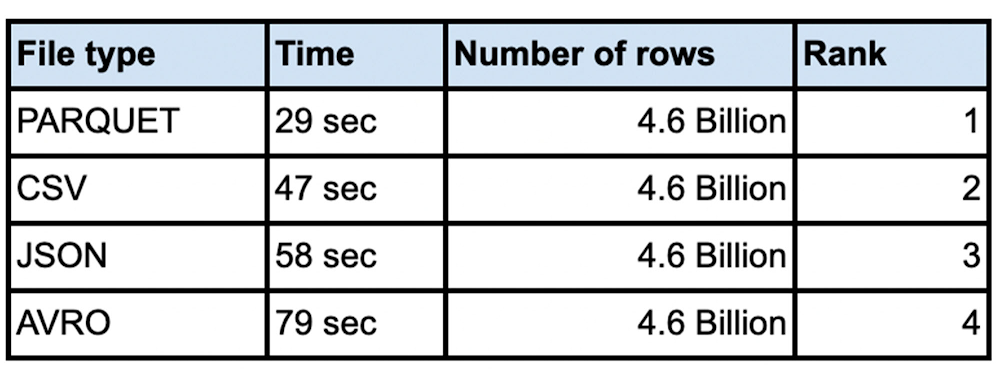
Performance considerations for loading data into BigQuery

It is not unusual for customers to load very large data sets into their enterprise data warehouse. Whether you are doing an initial data ingestion with hundreds of TB of data or incrementally loading from your systems of record, performance of bulk inserts is key to quicker insights from the data. The most common architecture for batch data loads uses Google Cloud Storage(Object storage) as the staging area for all bulk loads. All the different file formats are converted into an optimized Columnar format called ‘Capacitor’ inside BigQuery.This blog will focus on various file types and data loading tools for best performance. Data files that are uploaded to BigQuery, typically come in Comma Separated Values(CSV), Avro, Parquet, JSON, ORC formats. We are going to use a large dataset to compare and contrast each of these file formats. We will explore loading efficiencies of compressed vs. uncompressed data for each of these file formats. Data can be loaded into BigQuery using multiple tools in the GCP ecosystem. You can use the Google Cloud console, bq load command, using the BigQuery API or using the client libraries. We will also compare and contrast each loading mechanism for the same dataset. This blog attempts to elucidate the various options for bulk data loading into BigQuery and also provides data on the performance for each file-type and loading mechanism.Introduction There are various factors you need to consider when loading data into BigQuery. Data file formatData compressionTool used to load dataLevel of parallelization of data loadSchema autodetect ‘ON’ or ‘OFF’Data file formatBulk insert into BigQuery is the fastest way to insert data for speed and cost efficiency. Streaming inserts are however more efficient when you need to report on the data immediately. Today data files come in many different file types including comma separated(CSV), json, parquet, avro  to name a few. We are often asked how the file format matters and whether there are any advantages in choosing one file format over the other. CSV files (comma-separated values) contain tabular data with a header row naming the columns. When loading data one can parse the header for column names. When loading from csv files one can use the header row for schema autodetect to pick up the columns. With schema autodetect set to off, one can skip the header row and create a schema manually, using the column names in the header. CSV files can use other field separator/newline characters too as a separator, since many data outputs already have a comma in the data. You cannot store nested or repeated data in CSV file format.JSON (JavaScript object notation) data is stored as a key-value pair in a semi structured format. JSON is preferred as a file type because it can store data in a hierarchical format. The schemaless nature of json data rows gives the flexibility to evolve the schema and thus change the payload. JSON and XML formats are user-readable, but JSON documents are typically much smaller than XML. REST-based web services use json over other file types.Parquet is a column-oriented data file format designed for efficient storage and retrieval of data.  Parquet compression and encoding is very efficient and provides improved performance to handle complex data in bulk.Avro: The data is stored in a binary format and the schema is stored in JSON format. This helps in minimizing the file size and maximizes efficiency. Avro has reliable support for schema evolution by managing added, missing, and changed fields. From a data loading perspective we did various tests with millions to hundreds of billions of rows with narrow to wide column data .We have done this test with a public dataset named `bigquery-public-data:worldpop.population_grid_1km`. We used 4000 flex slots for the test and the number of loading slots is limited to the number of slots you have allocated for your environment, though the load slots do not use all of the slots you throw at it.. Schema Autodetection was set to ‘NO’. For the parallelization of the data files each file should typically be less than 256MB for faster throughput and here is a summary of our findings:Do I compress the data? Sometimes batch files are compressed for faster network transfers to the cloud. Especially for large data files that are being transferred, it is faster to compress the data before sending over the cloud Interconnect or VPN connection. In such cases is it better to uncompress the data before loading into BigQuery? Here are the tests we did for various file types with different compression algorithms.Shown results are the average of five runs:How do I load the data?There are various ways to load the data into BigQuery. You can use the Google Cloud Console, command line, Client Library(shown python here) or use the Direct API call. We compared these data loading techniques and compared the efficacy of each method. Here is a comparison of the timings for each method. You can also see that Schema Autodetect works very well, where there are no datatype quality issues in the source data and you are consistently getting the same columns from a data sourceConclusionThere is no advantage in loading time when the source file is in compressed format. In fact for the most part uncompressed data loads in the same or faster time than compressed data. We noticed that for csv and avro file types you do not need to uncompress for faster load times. For other file types including parquet and json it takes longer to load the data when the file is compressed. Decompression is a CPU bound activity and your mileage varies based on the amount of load slots assigned to your load job. Data loading slots are different from the data querying slots. For compressed files, you should parallelize the load operation, so as to make sure that data loads are efficient. Split the data files to 256MB or less to avoid spilling over the uncompression task to disk.From a performance perspective avro, csv and parquet files have similar load times. Use the command line to load larger volumes of data for the most efficient data loading. Fixing your schema does load the data faster than schema autodetect set to ‘ON’. Regarding ETL jobs, it is faster and simpler to do your transformation inside BigQuery using SQL, but if you have complex transformation needs that cannot be done with SQL, use Dataflow for unified batch and streaming, Dataproc for open source based pipelines, or Cloud Data Fusion for no-code / low-code transformation needs.To learn more about how Google BigQuery can help your enterprise, try out Quickstarts page here.Disclaimer: These tests were done with limited resources for BigQuery in a test environment during different times of the day with noisy neighbors, so the actual timings and the number of rows might not be reflective of your test results. The numbers provided here are for comparison sake only, so that you can choose the right file types, compression and loading technique for your workload. Related ArticleLearn how BI Engine enhances BigQuery query performanceThis blog explains how BI Engine enhances BigQuery query performance, different modes in BI engine and its monitoring.Read Article
Quelle: Google Cloud Platform

Moving data from the mainframe to the cloud made easy

IBM mainframes have been around since the 1950s and are still vital for many organizations. In recent years many companies that rely on mainframes have been working towards migrating to the cloud. This is motivated by the need to stay relevant, the increasing shortage of mainframe experts and the cost savings offered by cloud solutions. One of the main challenges in migrating from the mainframe has always been moving data to the cloud. The good thing is that Google has open sourced a bigquery-zos-mainframe connector that makes this task almost effortless.What is the Mainframe Connector for BigQuery and Cloud Storage?The Mainframe Connector enables Google Cloud users to upload data to Cloud Storage and submit BigQuery jobs from mainframe-based batch jobs defined by job control language (JCL). The included shell interpreter and JVM-based implementations of gsutil and bq command-line utilities make it possible to manage a complete ELT pipeline entirely from z/OS. This tool moves data located on a mainframe in and out of Cloud Storage and BigQuery; it also transcodes datasets directly to ORC (a BigQuery supported format). Furthermore, it allows users to execute BigQuery jobs from JCL, therefore enabling mainframe jobs to leverage some of Google Cloud’s most powerful services.The connector has been tested with flat files created by IBM DB2 EXPORT that contain binary-integer, packed-decimal and EBCDIC character fields that can be easily represented by a copybook. Customers with VSAM files may use IDCAMS REPRO to export to flat files, which can then be uploaded using this tool. Note that transcoding to ORC requires a copybook and all records must have the same layout. If there is a variable layout, transcoding won’t work, but it is still possible to upload a simple binary copy of the dataset.Using the bigquery-zos-mainframe-connectorA typical flow for Mainframe Connector involves the following steps:Reading the mainframe datasetTranscoding the dataset to ORCUploading ORC to Cloud StorageRegistering it as an external tableRunning a MERGE DML statement to load new incremental data into the target tableNote that if the dataset does not require further modifications after loading, then loading into a native table is a better option than loading into an external table.In regards to step 2, it is important to mention that DB2 exports are written to sequential datasets on the mainframe and the connector uses the dataset’s copybook to transcode it to an ORC.The following simplified example shows how to read a dataset on a mainframe, transcode it to ORC format, copy the ORC file to Cloud Storage, load it to a BigQuery-native table and run SQL that is executed against that table.1. Check out and compile:code_block[StructValue([(u’code’, u’git clone https://github.com/GoogleCloudPlatform/professional-servicesrncd ./professional-services/tools/bigquery-zos-mainframe-connector/rn rn# compile util library and publish to local maven/ivy cacherncd mainframe-utilrnsbt publishLocalrn rn# build jar with all dependencies includedrncd ../gszutilrnsbt assembly’), (u’language’, u”), (u’caption’, <wagtail.wagtailcore.rich_text.RichText object at 0x3e7e135cd450>)])]2. Upload the assembly jar that was just created in target/scala-2.13 to a path on your mainframe’s unix filesystem.3. Install the BQSH JCL Procedure to any mainframe-partitioned data set you want to use as a PROCLIB. Edit the procedure to update the Java classpath with the unix filesystem path where you uploaded the assembly jar. You can edit the procedure to set any site-specific environment variables.4. Create a jobSTEP 1:code_block[StructValue([(u’code’, u’//STEP01 EXEC BQSHrn//INFILE DD DSN=PATH.TO.FILENAME,DISP=SHRrn//COPYBOOK DD DISP=SHR,DSN=PATH.TO.COPYBOOKrn//STDIN DD *rngsutil cp –replace gs://bucket/my_table.orcrn/*’), (u’language’, u”), (u’caption’, <wagtail.wagtailcore.rich_text.RichText object at 0x3e7e115c0850>)])]This step reads the dataset from the INFILE DD and reads the record layout from the COPYBOOK DD. The input dataset could be a flat file exported from IBM DB2 or from a VSAM file. Records read from the input dataset are written to the ORC file at gs://bucket/my_table.orc with the number of partitions determined by the amount of data.STEP 2:code_block[StructValue([(u’code’, u’//STEP02 EXEC BQSHrn//STDIN DD *rnbq load –project_id=myproject \rn myproject:MY_DATASET.MY_TABLE \rn gs://bucket/my_table.orc/*rn/*’), (u’language’, u”), (u’caption’, <wagtail.wagtailcore.rich_text.RichText object at 0x3e7e126e2850>)])]This step submits a BigQuery load job that will load ORC file partitions from my_table.orc into MY_DATASET.MY_TABLE. Note this is the path that was written to on the previous step. STEP 3:code_block[StructValue([(u’code’, u’//STEP03 EXEC BQSHrn//QUERY DD DSN=PATH.TO.QUERY,DISP=SHRrn//STDIN DD *rnbq query –project_id=myprojectrn/*’), (u’language’, u”), (u’caption’, <wagtail.wagtailcore.rich_text.RichText object at 0x3e7e126e2690>)])]This step submits a BigQuery Query Job to execute SQL DML read from the QUERY DD (a format FB file with LRECL 80). Typically the query will be a MERGE or SELECT INTO DML statement that results in transformation of a BigQuery table. Note: the connector will log job metrics but will not write query results to a file.Running outside of the mainframe to save MIPSWhen scheduling production-level load with many large transfers, processor usage may become a concern. The Mainframe Connector executes within a JVM process and thus should utilize zIIP processors by default, but if capacity is exhausted, usage may spill over to general purpose processors. Because transcoding z/OS records and writing ORC file partitions requires a non-negligible amount of processing, the Mainframe Connector includes a gRPC server designed to handle compute-intensive operations on a cloud server; the process running on z/OS only needs to upload the dataset to Cloud Storage and make an RPC call. Transitioning between local and remote execution requires only an environment variable change. Detailed information on this functionality can be found here. AcknowledgementsThanks to those who tested, debugged, maintained and enhanced the tool: Timothy Manuel, Suresh Balakrishnan,Viktor Fedinchuk,Pavlo KravetsRelated Article30 ways to leave your data center: key migration guides, in one placeEssential guides for all the workloads your business is considering migrating to the public cloud.Read Article
Quelle: Google Cloud Platform

How to run SAP on Google Cloud when high availability is high priority

Over the past couple of years, businesses across every industry have faced unexpected challenges in keeping their enterprise IT systems safe, secure, and available to users. Many have experienced sudden spikes or drops in demand for their products and services and most are now operating in a hybrid work environment. In such changing conditions, with business requirements and expectations constantly evolving, it is a best practice to periodically revisit your IT system service-level objectives (SLOs) and agreements (SLAs) and ensure they are still aligned with your business needs.Adapting to these new requirements can be especially complex for companies that run their SAP enterprise applications in on-premises environments. These organizations are often already struggling with running business-critical SAP instances as they can be complex and costly to maintain. They know how much their users depend on these systems and how disruptive dealing with unplanned outages can be, so they see the on-premises setup—backed up with major investments in high availability (HA) systems and infrastructure—as the best way to ensure the security and availability of these essential applications. IT organizations charged with running on-premises SAP landscapes, in many cases, must also manage a growing number of other business-critical applications—all while under pressure to do more with less.For many organizations, this is an unsustainable approach. In fact, according to a SIOS survey looking at trends in HA solutions, companies at the time were already struggling to hold the line with on-premises application availability:95% of the companies surveyed reported at least occasional failures in the HA services that support their applications.98% reported regular or occasional application performance issues, and 71% reported them once or more per monthWhen HA application issues occurred, companies surveyed spent 3–5 hours, on average, to identify and fix the problem.Things aren’t getting easier for these companies. Today’s IT landscape is dominated by risk, uncertainty, and the prospect of belt-tightening down the road. At the same time, it’s especially important now to keep your SAP applications—the software at the heart of your company—secure, productive, and available for the business.At Google Cloud, we’ve put a lot of thought into solving the challenges around high availability for SAP environments. We recognize this as a potential make-or-break issue for customers and we prioritize giving them a solution: a reliable, scalable, and cost-effective SAP environment, built on a cloud platform designed to deliver high availability and performance.When you use Google Cloud, you get many services that are designed to be fault tolerant or highly available. The concepts are similar, but understanding the difference can save you time and effort when designing your architecture.We consider fault tolerant components as fully redundant mechanisms, where any failure of these components is designed to be seamless to the system availability. It includes components like storage (Google Cloud Storage, Persistent Disks) and network (Google Network, Cloud DNS, Cloud Load Balancer). Highly available services, however, will have an automated recovery mechanism of all the relevant architectural components, also known as single points of failure, which minimizes the recovery time objective (RTO) and recovery point objective (RPO). It usually involves replicating components and automating the failover process between them.Four levels of SAP high availability on Google CloudUnderstanding how to give SAP customers the right availability solution starts with recognizing that each customer will have different target availability SLAs and those targets will vary depending on their business needs, budgets, SAP application use cases, and other factors. Let’s look at the SAP high availability landscape infrastructure, operating system and application availability components, and what you would need to consider for your SAP system’s overall availability strategy.Level 1: InfrastructureMany customers find that simply moving their SAP system from on-premises to Google Cloud can increase their system’s uptime, because they are able to leverage the platform’s embedded security, networking, compute and storage features which are highly available by default.Compute ServicesFor compute services, Google Cloud Compute Engine has three built-in capabilities that are especially important and can reduce or even eliminate disruptions to applications due to hardware failures:Live Migration: When a customer’s VM instances are running on a host system that needs scheduled maintenance, Live Migration moves the VM instance from one host to another, without triggering a restart or disrupting the application. This is a built-in feature that every Google Cloud user gets at no additional cost. It works seamlessly and automatically, no matter how large or complex a user’s workloads happen to be. Google Cloud conducts hardware maintenance and applies hypervisor security patches and updates globally and seamlessly without ever having to inform a single customer to restart their VM as our maintenance does not impact your running applications, thanks to the power of Live Migration. Memory Poisoning Recovery (MPR): Even the highest-quality hardware infrastructure could break at some point and memory errors are the most common type of hardware malfunction (see Google Cloud’s study on memory reliability). Modern CPU architectures have native features like Error Correction Code (ECC), which enable hosts to recover from correctable errors. However, uncorrectable errors will crash and restart all VMs in the host, resulting in unexpected downtime. If you have HANA databases, you also have to account for the time it takes to load the data into memory. In that case, a host crash can cause hours of business critical service downtime, depending on the database size.Google Cloud developed a solution which integrates the CPU native error handling capabilities, SAP HANA and Google Cloud capabilities to reduce disruptions and downtime due to memory errors. With MPR, the uncorrectable memory error is detected and isolated until the VMs can be live migrated off of the affected host.If the uncorrectable error is found on a VM hosting SAP HANA, Google Cloud MPR will send a signal to SAP HANA, with Fast Restart enabled, to reload only the affected memory from disk, thus resolving the issue without downtime in most situations. Subsequently, all VMs on the affected host will be live migrated to a healthy host to prevent any downtime or disruption to customer’s applications running on those VMs.Automatic Restart: In the rare case when an unplanned shutdown cannot be prevented, this feature swings into action and automatically restarts the VM instance on a different host. When necessary, it calls up a user-defined startup script to ensure that the application running on top of the VM restarts at the same time. The goal is to ensure the fastest possible recovery from an unplanned shutdown, while keeping the process as simple and reliable as possible for users.  These services aim to increase the uptime of the single node, but highly critical workloads need resilience against compute related failures, including a complete zone outage. To cover this, Google Cloud Compute Engine offers a monthly uptime percentage SLAof 99.99% for instances distributed across multiple zones. Network File System storage (NFS)Another important component of highly available SAP infrastructure is the Network File System storage (NFS), which is used for SAP shared files, such as the interfaces directory and transport management. Google Cloud offers several file sharing solutions, like its first party Filestore Enterprise and third party solutions, such as NetApp CVS-Performance, both offering a 99.99% availability SLA. (if you need more information comparing NFS solutions on Google Cloud, please check the documentation available).Level 2: Operating SystemA critical part of the failover mechanism is clustering compute components at operating system level. It allows for fast component failure detection and triggers the failover procedures, minimizing the application downtime. Clustering at the OS level on Google Cloud, is very similar to the on-prem approach to clustering, with a couple improved features. Both SUSE Enterprise Linux (SLES) and Red Hat Enterprise Linux (RHEL) implement Pacemaker as a clustering resource manager and provide cluster agents designed for Google Cloud, which allows it to seamlessly manage functions and features like STONITH fencing, VIP routes and storage actions. When deploying OS clusters on Google Cloud, customers can avail themselves of the HA/DR provider hooks that allow SAP HANA to send out notifications to ensure a successful failover without data loss. For more information, see the detailed documentation for configuring HA clusters on RHEL and on SLES in our SAP high availability deployment guides.Windows-based workloads use Microsoft failover clustering technology and have special features on Google Cloud to enable and configure the cluster. Here you can find detailed documentation.Level 3: DatabaseEvery SAP environment depends on a central database system to store and manage business-critical data. Any SAP high availability solution must consider how to maintain the availability and integrity of this database layer. In addition, SAP systems support a variety of database systems—many of which employ different mechanisms to achieve high availability performance. By supporting and documenting the use of HA architectures for SAP HANA, MaxDB, SAP ASE, IBM Db2, Microsoft SQL Server and Oracle workloads (using our Bare Metal Solution, you can use HA certified hardware and even install Oracle RAC solution). Google Cloud gives customers the freedom to decide how to balance the costs and benefits of HA for their SAP databases.SAP ​HANA System Replication​ (HSR) is one of the most important application-native technologies for ensuring HA for any SAP HANA system. It works by replicating data continuously from a primary system to one or more secondary systems, and that data can be preloaded into memory to allow for a rapid failover if there’s a disaster.Google Cloud supports and complements HSR by supporting the use of synchronous replication for SAP instances that reside in any zone within the same region. That means users can place their primary and secondary instances in different zones to keep them protected against a single-point-of-failure in either zone.Other database systems like SAP ASE or IBM Db2 offer similar functionalities, which are also supported to run on Google Cloud infrastructure. The low network latency between zones in the same region coupled with our tools for automated deployments give companies the choice to run a variety of database HA options, tailored to their current business needs. Review our latest documentation for a current list of supported database systems and reference architectures.Level 4: Application serverSAP’s NetWeaver architecture helps users avoid app-server bottlenecks that can threaten HA uptime requirements. Google Cloud takes that advantage and runs with it by giving customers the high availability compute and networking capabilities they need to protect against the loss of data through synchronization and to get the most reliability and performance from SAP NetWeaver. It uses one OS level cluster (SLES or RHEL), with Pacemaker cluster resource manager and STONITH fencing for the ABAP SAP Central Services (ASCS) and Enqueue Replication Server (ERS), each with is own internal load balancer (ILB) for virtual IP. Detailed documentation for deploying and configuring HA clusters can be found for both RHEL and SLES in our NetWeaver high availability planning guides.Distributing application server instances across multiple zones of the same region provides the best protection against zonal failures while still providing great performance to the end user. Through automated deployments your IT team can quickly react to changes in demand and spin up additional instances in moments to keep the SAP system up and running, even during peak situations. Other ways Google Cloud supports high availability SAP systemsThere are many other ways Google Cloud can help maximize SAP application uptime, even in the most challenging circumstances. Consider a few examples, and keep in mind how tough it can be for enterprises, even larger ones, to implement similar capabilities at an affordable cost:Geographic distribution and redundancy. Google Cloud’s global footprint currently includes 30 regions, divided into 91 zones and over 140 points of presence. By distributing key Google Cloud services across multiple zones in a region, most SAP users can achieve their availability goals without sacrificing performance or affordability. Powerful and versatile load-balancing capabilities. For many enterprises, load balancing and distribution is another key to maintaining the availability of their SAP applications. Google Cloud meets this need with a range ofload-balancing options, including global load balancing that can direct traffic to a healthy region closest to users. Google Cloud Load Balancing reacts instantaneously to changes in users, traffic, network, backend health, and other related conditions. And, as a software-defined service, it avoids the scalability and management issues many enterprises encounter with physical load-balancing infrastructure. Another important load balancer service for highly available SAP systems is the Internal Load Balancer, which allows you to automate the Virtual IP (VIP) implementation between the primary and secondary systems.Tools that keep developers focused and productive. Google Cloud’sserverless platform includes managed compute and database products that offer built-in redundancy and load balancing. It allows a company’s SAP development teams to deploy side-by-side extensions to the SAP systems without worrying about the underlying infrastructure. By using Apigee API Management, companies can provide a scalable interface to their SAP systems for these extensions, which protects the backend system from traffic peaks and malicious attacks. Google Cloud alsosupports CI/CD through native tools and integrations with popular open source technologies, giving modern DevOps organizations the tools they need to deliver software faster and more securely. Moreover, Google Cloud’s Cortex Framework provides accelerators and best practices to reduce risk, complexity and costs when innovating alongside SAP and unlocks the best of Google Cloud’s Analytics in a seamless setup that brings more value to the business.Flexible, full-stack monitoring. Google Cloud Monitoring gives enterprises deep visibility into the performance, uptime, and overall health of their SAP environments. It collects metrics, events, and metadata from Google Cloud, Amazon Web Services, hosted uptime probes, application instrumentation, and even application components such as Cassandra, Nginx, Apache Web Server, Elasticsearch, and many others. With a custom monitoring agent for SAP HANA and the Cloud Operation’s Ops Agent, Cloud Monitoring uses this data to power flexible dashboards and rich visualization tools, which helps SAP teams identify and fix emerging issues before they affect your business.Explore your HA optionsWe’ve only scratched the surface when it comes to understanding the many ways Google Cloud supports and extends HA for SAP instances. For an even deeper dive, our documentation goes into more technical detail on how you can set up a high availability architecture for SAP landscapes using Google Cloud services.Related ArticleLearn how to tackle supply chain disruptions with SAP IBP and Google CloudSAP IBP now integrated with Google Cloud for faster, more accurate forecasting to navigate challenges with supply chain disruptionsRead Article
Quelle: Google Cloud Platform

Introducing model co-hosting to enable resource sharing among multiple model deployments on Vertex AI

When deploying models to the Vertex AI prediction service, each model is by default deployed to its own VM. To make hosting more cost effective, we’re excited to introduce model co-hosting in public preview, which allows you to host multiple models on the same VM, resulting in better utilization of memory and computational resources. The number of models you choose to deploy to the same VM will depend on model sizes and traffic patterns, but this feature is particularly useful for scenarios where you have many deployed models with sparse traffic.Understanding the Deployment Resource PoolCo-hosting model support introduces the concept of a Deployment Resource Pool, which groups together models to share resources within a VM. Models can share a VM if they share an endpoint, but also if they are deployed to different endpoints. For example, let’s say you have four models and two endpoints, as shown in the image below.Model_A, Model_B, and Model_C are all deployed to Endpoint_1 with traffic split between them. And Model_D is deployed to Endpoint_2, receiving 100% of the traffic for that endpoint. Instead of having each model assigned to a separate VM, we can group Model_A and Model_B to share a VM, making them part of DeploymentResourcePool_X. We can also group models that are not on the same endpoint, so Model_C and Model_D can be hosted together in DeploymentResourcePool_Y. Note that for this first release, models in the same resource pool must also have the same container image and version of the Vertex AI pre-built TensorFlow prediction containers. Other model frameworks and custom containers are not yet supported.Co-hosting models with Vertex AI PredictionsYou can set up model co-hosting in a few steps. The main difference is that you’ll first create a DeploymentResourcePool, and then deploy your model within that pool. Step 1: Create a DeploymentResourcePoolYou can create a DeploymentResourcePool with the following command. There’s no cost associated with this resource until the first model is deployed.code_block[StructValue([(u’code’, u’PROJECT_ID={YOUR_PROJECT}rnREGION=”us-central1″rnVERTEX_API_URL=REGION + “-aiplatform.googleapis.com”rnVERTEX_PREDICTION_API_URL=REGION + “-prediction-aiplatform.googleapis.com”rnMULTI_MODEL_API_VERSION=”v1beta1″rn rn# Give the pool a namernDEPLOYMENT_RESOURCE_POOL_ID=”my-resource-pool”rn rnCREATE_RP_PAYLOAD = {rn “deployment_resource_pool”:{rn “dedicated_resources”:{rn “machine_spec”:{rn “machine_type”:”n1-standard-4″rn },rn “min_replica_count”:1,rn “max_replica_count”:2rn }rn },rn “deployment_resource_pool_id”:DEPLOYMENT_RESOURCE_POOL_IDrn}rnCREATE_RP_REQUEST=json.dumps(CREATE_RP_PAYLOAD)rn rn!curl \rn-X POST \rn-H “Authorization: Bearer $(gcloud auth print-access-token)” \rn-H “Content-Type: application/json” \rnhttps://{VERTEX_API_URL}/{MULTI_MODEL_API_VERSION}/projects/{PROJECT_ID}/locations/{REGION}/deploymentResourcePools \rn-d ‘{CREATE_RP_REQUEST}”), (u’language’, u”), (u’caption’, <wagtail.wagtailcore.rich_text.RichText object at 0x3e467adcff10>)])]Step 2: Create a modelModels can be imported to the Vertex AI Model Registry at the end of a custom training job, or you can upload them separately if the model artifacts are saved to a Cloud Storage bucket. You can upload a model through the UI or with the SDK using the following command:code_block[StructValue([(u’code’, u”# REPLACE artifact_uri with GCS path to your artifactsrnmy_model = aiplatform.Model.upload(display_name=’text-model-1′,rn artifact_uri=u2019gs://{YOUR_GCS_BUCKET}u2019,rn serving_container_image_uri=’us-docker.pkg.dev/vertex-ai/prediction/tf2-cpu.2-7:latest’)”), (u’language’, u”), (u’caption’, <wagtail.wagtailcore.rich_text.RichText object at 0x3e464c9e0f90>)])]When the model is uploaded, you’ll see it in the model registry. Note that the deployment status is empty since the model hasn’t been deployed yet.Step 3: Create an endpointNext, create an endpoint via the SDK or the UI. Note that this is different from deploying a model to an endpoint.endpoint = aiplatform.Endpoint.create(‘cohost-endpoint’)When your endpoint is created, you’ll be able to see it in the console.Step 4: Deploy Model in a Deployment Resource PoolThe last step before getting predictions is to deploy the model within the DeploymentResourcePool you created.code_block[StructValue([(u’code’, u’MODEL_ID={MODEL_ID}rnENDPOINT_ID={ENDPOINT_ID}rn rnMODEL_NAME = “projects/{project_id}/locations/{region}/models/{model_id}”.format(project_id=PROJECT_ID, region=REGION, model_id=MODEL_ID)rnSHARED_RESOURCE = “projects/{project_id}/locations/{region}/deploymentResourcePools/{deployment_resource_pool_id}”.format(project_id=PROJECT_ID, region=REGION, deployment_resource_pool_id=DEPLOYMENT_RESOURCE_POOL_ID)rn rnDEPLOY_MODEL_PAYLOAD = {rn “deployedModel”: {rn “model”: MODEL_NAME,rn “shared_resources”: SHARED_RESOURCErn },rn “trafficSplit”: {rn “0”: 100rn }rn}rnDEPLOY_MODEL_REQUEST=json.dumps(DEPLOY_MODEL_PAYLOAD)rnpp.pprint(“DEPLOY_MODEL_REQUEST: ” + DEPLOY_MODEL_REQUEST)rn rn!curl -X POST \rn-H “Authorization: Bearer $(gcloud auth print-access-token)” \rn-H “Content-Type: application/json” \rnhttps://{VERTEX_API_URL}/{MULTI_MODEL_API_VERSION}/projects/{PROJECT_ID}/locations/{REGION}/endpoints/{ENDPOINT_ID}:deployModel \rn-d ‘{DEPLOY_MODEL_REQUEST}”), (u’language’, u”), (u’caption’, <wagtail.wagtailcore.rich_text.RichText object at 0x3e464c9e0c90>)])]When the model is deployed, you’ll see it ready in the console. You can deploy additional models to this same DeploymentResourcePool for co-hosting using the same endpoint we created already, or using a new endpoint.Step 5: Get a predictionOnce the model is deployed, you can call your endpoint in the same way you’re used to.x_test= [‘The movie was spectacular. Best acting I’ve seen in a long time and a great cast. I would definitely recommend this movie to my friends!’]endpoint.predict(instances=x_test)What’s nextYou now know the basics of how to co-host models on the same VM. For an end to end example, check out this codelab, or refer to the docs for more details. Now it’s time for you to start deploying some models of your own!Related ArticleSpeed up model inference with Vertex AI Predictions’ optimized TensorFlow runtimeThe Vertex AI optimized TensorFlow runtime can be incorporated into serving workflows for lower latency predictions.Read Article
Quelle: Google Cloud Platform

Cloud SQL – SQL Server Performance Analysis and Query Tuning

The following blog covers popular performance analysis tools and technologies database administrators can use to tune and optimize Cloud SQL for SQL Server. Common performance challenges are described in each section along with tools and strategies to analyze, address and remediate them. After reviewing this blog, consider applying the tools and processes detailed in each section to a non-production database in order to gain a deeper understanding of how they can help you to manage and optimize your databases. We will also publish a follow up blog that will walk you through common performance issues and how to troubleshoot and remediate those using the tools and processes described here.1. Getting Started: Connecting to your Cloud SQL for SQL Server instance.The most common use cases for connecting to Cloud SQL include connecting from a laptop over VPN and using a jump host in GCP. SQL Server DBAs who connect from a local laptop over VPN using SQL Server Management Studio (SSMS) should review this Quickstart document for connecting to a Cloud SQL instance that is configured with a private IP address. DBAs may also prefer to connect to a single jump host for centralized management of multiple Cloud SQL for SQL Server instances. In this scenario, a Google Compute Engine (GCE) VM is provisioned and DBAs use a Remote Desktop Protocol (RDP) tool to connect to the jump host and manage their Cloud SQL databases. For a comprehensive list of options on connecting to Cloud SQL, see connecting to Cloud SQL for SQL Server. 2. Activity Monitoring: What’s running right now? When responding to urgent support calls, DBAs have an immediate need to determine what is currently running on the instance.  Historically, DBAs have relied on system stored procedures such as sp_Who and sp_Who2 to support triage and analysis. To determine what’s running right now, consider installing Adam Machanic’s sp_WhoIsActive stored procedure. To view currently running statements and to obtain details on the plans, use the statement below. Note that in the following example, the procedure sp_WhoIsActive has been installed on the dbo schema of the dbtools database. EXEC dbtools.dbo.sp_WhoIsActive @get_plans=1Also, see Brent Ozar’s sp_BlitzFirst stored procedure, which is included in the SQL-Server-First-Responder-Kit. Review the documentation for examples. 3. Optimizing queries using the SQL Server Query Store.Query optimization is best to be performed proactively  as a weekly DBA checklist item.  The SQL Server Query Store feature can help with this and provides DBAs with query plans, history and useful performance metrics. Before starting the SQL Server Query Store, it is a good idea to review the following Microsoft SQL Server Performance Monitoring article: Monitoring performance by using the Query Store . Query Store is enabled on a database level and must be enabled for each user database. See the example below for how to enable Query Store. ALTER DATABASE <<DBNAME>>SET QUERY_STORE = ON (WAIT_STATS_CAPTURE_MODE = ON);After enabling Query Store, review the Query Store configuration using SSMS. Right-click on the database and view Query Store properties. Review the Microsoft article Monitoring performance by using the Query Store for more information on properties and settings. Screenshot: Query Store has been enabled on the AdventureWorksDW2019 database.After enabling Query Store on a busy instance, query data will normally be available for review within a few minutes. Alternatively, run a few test queries to generate data for analysis. Next, expand the Query Store node to explore available reports.In the example below, I selected “Top Resource Consuming Queries”. I then sorted the table by total duration and reviewed the execution plan for the top resource consuming query. In reviewing the execution plan I noted that a table scan was occurring. I was then able to remediate the issue by asking the user to modify their query to select specific columns rather than selecting all the columns, and then added a non-clustered index to the underlying table to include the required columns.Example Index Change:code_block[StructValue([(u’code’, u’CREATE NONCLUSTERED INDEX NCIX_dbo_scenario1_LastName_INCLUDE_FirstName_BirthDatern ON [dbo].[scenario1] (LastName) INCLUDE (FirstName, BirthDate); rnGO’), (u’language’, u”), (u’caption’, <wagtail.wagtailcore.rich_text.RichText object at 0x3ec8a528d690>)])]To track a query over time, right-click the query and select “Track Query”.Note that the plans for before and after the index change are shown below.Select both plans, then choose “Compare Plans” to view pre and post plan changes.SQL Server Query Store is a helpful built-in performance tuning tool that is available for Cloud SQL DBAs to capture, analyze and tune T-SQL statements. It makes sense to spend time learning about how Query Store can help you manage and optimize your SQL Server databases.4. Analyzing instance and database health, configuration and performance.The SQL Server Community offers many free tools and scripts for reviewing and analyzing SQL Server instances and databases. A few popular script resources are noted below. Glen Berry’s SQL Server Diagnostic Queries are useful for assessing on-prem instances when planning for a migration, and analyzing configurations and performance once databases are running in GCP.  For more information on how to use the SQL Server Diagnostic Queries, and for help interpreting the results, review Glen’s YouTube videos.Brent Ozar’s SQL-Server-First-Responder-Kit is another popular community tool used to quickly assess and analyze SQL Server instances. Note that Cloud SQL for SQL Server does not support installing objects in the master database, and it is recommended that a separate database is created for the scripts. Many DBAs create a tools database (for example: dbtools), and install scripts and procedures in that database. Review the documentation and Brent’s how-to videosfor tips on installing and using the kit. 5. Configuration and performance levers to reduce locking and blocking.Performance problems related to locking and blocking may be reduced by scaling up the instance and optimizing database objects like tables, queries and stored procedures. While increasing instance performance may provide quick wins in the short-term, optimizing SQL and application code results in better stability and performance over the long term.Instance Cores and Storage CapacityIncreasing cores and storage capacity, also known as scaling up, has an immediate effect on IO throughput and performance, and many workload performance issues may be mitigated by increasing CPU and Storage configuration settings. Disk performance is based on the disk size and the number of vCPUs. Add more storage space and vCPUs to increase IOPS and throughput.Read Committed Snapshot Isolation (RCSI) If you find yourself adding NO LOCK to your queries in an attempt to reduce contention and speed things up, it’s probably a good idea to take a look at Read Committed Snapshot Isolation. When READ_COMMITTED_SNAPSHOT is turned on, SQL Server Engine uses row versioning instead of locking.  For more information, see Kendra Little’s blog post on How to Choose Between RCSI and Snapshot Isolation Levels to determine if RCSI is right for your database workloads.Forced ParameterizationIf you run across an application that generates a lot of dynamic SQL or executes SQL without parameters, you may see a lot of CPU time wasted on creating new plans for SQL queries. In some cases, Forced Parameterization can help your database performance when you are not able to change or influence application coding standards. For more on forced parameterization and how it can be applied, review the following link:  SQL Server Database Parameterization option and its Query Performance effects  6. Managing Indexes and Statistics: SQL Server maintenanceOla Hallengren’s SQL Server Maintenance Solution is a SQL Server Community standard database maintenance solution. In an on-premises or GCE environment, a DBA may choose to install the entire maintenance solution, including backup scripts. Since backups are handled internally by Cloud SQL, a DBA may choose to install only the Statistics and Indexing procedures and supporting objects. Visit https://ola.hallengren.com/ to learn more about the solution, and take time to review the associated scripts, instructions, documentation and examples of how to install and use the SQL Server Maintenance Solution.ConclusionProactively managing and tuning your Cloud SQL SQL Server databases enables DBAs to spend less time on production support calls and increases the performance, efficiency and scalability of databases. Many of the tools and recommendations noted in this blog are also applicable to SQL Server databases running on GCE. Once you become familiar with the tools and processes featured in this blog, consider integrating them into your database workflows and management plans.Related ArticleCloud SQL for SQL Server: Database administration best practicesCloud SQL for SQL Server is a fully-managed relational database service that makes it easy to set up, maintain, manage, and administer SQ…Read Article
Quelle: Google Cloud Platform


