Use R to train and deploy machine learning models on Vertex AI

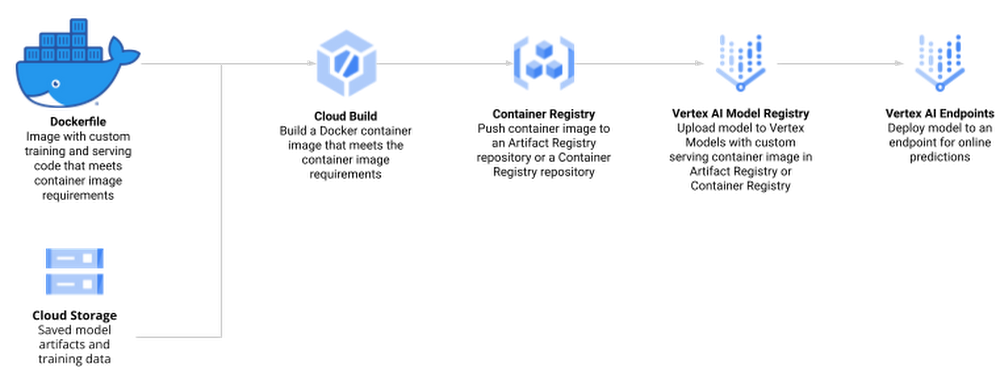
R is one of the most widely used programming languages for statistical computing and machine learning. Many data scientists love it, especially for the rich world of packages from tidyverse, an opinionated collection of R packages for data science. Besides the tidyverse, there are over 18,000 open-source packages on CRAN, the package repository for R. RStudio, available as desktop version or on theGoogle Cloud Marketplace, is a popular Integrated Development Environment (IDE) used by data professionals for visualization and machine learning model development.Once a model has been built successfully, a recurring question among data scientists is: “How do I deploy models written in the R language to production in a scalable, reliable and low-maintenance way?”In this blog post, you will walk through how to use Google Vertex AI to train and deploy  enterprise-grade machine learning models built with R. OverviewManaging machine learning models on Vertex AI can be done in a variety of ways, including using the User Interface of the Google Cloud Console, API calls, or the Vertex AI SDK for Python. Since many R users prefer to interact with Vertex AI from RStudio programmatically, you will interact with Vertex AI through the Vertex AI SDK via the reticulate package. Vertex AI provides pre-built Docker containers for model training and serving predictions for models written in tensorflow, scikit-learn and xgboost. For R, you build a container yourself, derived from Google Cloud Deep Learning Containers for R.Models on Vertex AI can be created in two ways:Train a model locally and import it as a custom model into Vertex AI Model Registry, from where it can be deployed to an endpoint for serving predictions.Create a TrainingPipeline that runs a CustomJob and imports the resulting artifacts as a Model.In this blog post, you will use the second method and train a model directly in Vertex AI since this allows us to automate the model creation process at a later stage while also supporting distributed hyperparameter optimization.The process of creating and managing R models in Vertex AI comprises the following steps:Enable Google Cloud Platform (GCP) APIs and set up the local environmentCreate custom R scripts for training and servingCreate a Docker container that supports training and serving R models with Cloud Build and Container Registry Train a model using Vertex AI Training and upload the artifact to Google Cloud StorageCreate a model endpoint on Vertex AI Prediction Endpoint and deploy the model to serve online prediction requestsMake online predictionFig 1.0 (source)DatasetTo showcase this process, you train a simple Random Forest model to predict housing prices on the California housing data set. The data contains information from the 1990 California census. The data set is publicly available from Google Cloud Storage at gs://cloud-samples-data/ai-platform-unified/datasets/tabular/california-housing-tabular-regression.csvThe Random Forest regressor model will predict a median housing price, given a longitude and latitude along with data from the corresponding census block group. A block group is the smallest geographical unit for which the U.S. Census Bureau publishes sample data (a block group typically has a population of 600 to 3,000 people).Environment SetupThis blog post assumes that you are either using Vertex AI Workbench with an R kernel or RStudio. Your environment should include the following requirements:The Google Cloud SDKGitRPython 3VirtualenvTo execute shell commands, define a helper function:code_block[StructValue([(u’code’, u’library(glue)rnlibrary(IRdisplay)rnrnsh <- function(cmd, args = c(), intern = FALSE) {rn if (is.null(args)) {rn cmd <- glue(cmd)rn s <- strsplit(cmd, ” “)[[1]]rn cmd <- s[1]rn args <- s[2:length(s)]rn }rn ret <- system2(cmd, args, stdout = TRUE, stderr = TRUE)rn if (“errmsg” %in% attributes(attributes(ret))$names) cat(attr(ret, “errmsg”), “n”)rn if (intern) return(ret) else cat(paste(ret, collapse = “n”))rn}’), (u’language’, u”), (u’caption’, <wagtail.wagtailcore.rich_text.RichText object at 0x3eadaafa0290>)])]You should also install a few R packages and update the SDK for Vertex AI:code_block[StructValue([(u’code’, u’install.packages(c(“reticulate”, “glue”))rnsh(“pip install –upgrade google-cloud-aiplatform”)’), (u’language’, u”), (u’caption’, <wagtail.wagtailcore.rich_text.RichText object at 0x3ead93a419d0>)])]Next, you define variables to support the training and deployment process, namely:PROJECT_ID: Your Google Cloud Platform Project IDREGION: Currently, the regions us-central1, europe-west4, and asia-east1 are supported for Vertex AI; it is recommended that you choose the region closest to youBUCKET_URI: The staging bucket where all the data associated with your dataset and model resources are storedDOCKER_REPO: The Docker repository name to store container artifactsIMAGE_NAME: The name of the container imageIMAGE_TAG: The image tag that Vertex AI will useIMAGE_URI: The complete URI of the container imagecode_block[StructValue([(u’code’, u’PROJECT_ID <- “YOUR_PROJECT_ID”rnREGION <- “us-central1″rnBUCKET_URI <- glue(“gs://{PROJECT_ID}-vertex-r”)rnDOCKER_REPO <- “vertex-r”rnIMAGE_NAME <- “vertex-r”rnIMAGE_TAG <- “latest”rnIMAGE_URI <- glue(“{REGION}-docker.pkg.dev/{PROJECT_ID}/{DOCKER_REPO}/{IMAGE_NAME}:{IMAGE_TAG}”)’), (u’language’, u”), (u’caption’, <wagtail.wagtailcore.rich_text.RichText object at 0x3ead93a41550>)])]When you initialize the Vertex AI SDK for Python, you specify a Cloud Storage staging bucket. The staging bucket is where all the data associated with your dataset and model resources are retained across sessions.code_block[StructValue([(u’code’, u’sh(“gsutil mb -l {REGION} -p {PROJECT_ID} {BUCKET_URI}”)’), (u’language’, u”), (u’caption’, <wagtail.wagtailcore.rich_text.RichText object at 0x3ead93a41d90>)])]Next, you import and initialize the reticulate R package to interface with the Vertex AI SDK, which is written in Python.code_block[StructValue([(u’code’, u’library(reticulate)rnlibrary(glue)rnuse_python(Sys.which(“python3″))rnrnaiplatform <- import(“google.cloud.aiplatform”)rnaiplatform$init(project = PROJECT_ID, location = REGION, staging_bucket = BUCKET_URI)’), (u’language’, u”), (u’caption’, <wagtail.wagtailcore.rich_text.RichText object at 0x3ead93a41410>)])]Create Docker container image for training and serving R modelsThe docker file for your custom container is built on top of the Deep Learning container — the same container that is also used for Vertex AI Workbench. In addition, you add two R scripts for model training and serving, respectively.Before creating such a container, you enable Artifact Registry and configure Docker to authenticate requests to it in your region.code_block[StructValue([(u’code’, u’sh(“gcloud artifacts repositories create {DOCKER_REPO} –repository-format=docker –location={REGION} –description=”Docker repository””)rnsh(“gcloud auth configure-docker {REGION}-docker.pkg.dev –quiet”)’), (u’language’, u”), (u’caption’, <wagtail.wagtailcore.rich_text.RichText object at 0x3ead93a41d50>)])]Next, create a Dockerfile.code_block[StructValue([(u’code’, u’# filename: Dockerfile – container specifications for using R in Vertex AIrnFROM gcr.io/deeplearning-platform-release/r-cpu.4-1:latestrnrnWORKDIR /rootrnrnCOPY train.R /root/train.RrnCOPY serve.R /root/serve.Rrnrn# Install FortranrnRUN apt-get updaternRUN apt-get install gfortran -yyrnrn# Install R packagesrnRUN Rscript -e “install.packages(‘plumber’)”rnRUN Rscript -e “install.packages(‘randomForest’)”rnrnEXPOSE 8080′), (u’language’, u”), (u’caption’, <wagtail.wagtailcore.rich_text.RichText object at 0x3ead93a41450>)])]Next, create the file train.R, which is used to train your R model. The script trains a randomForest model on the California Housing dataset. Vertex AI sets environment variables that you can utilize, and since this script uses a Vertex AI managed dataset, data splits are performed by Vertex AI and the script receives environment variables pointing to the training, test, and validation sets. The trained model artifacts are then stored in your Cloud Storage bucket.code_block[StructValue([(u’code’, u’#!/usr/bin/env Rscriptrn# filename: train.R – train a Random Forest model on Vertex AI Managed Datasetrnlibrary(tidyverse)rnlibrary(data.table)rnlibrary(randomForest)rnSys.getenv()rnrn# The GCP Project IDrnproject_id <- Sys.getenv(“CLOUD_ML_PROJECT_ID”)rnrn# The GCP Regionrnlocation <- Sys.getenv(“CLOUD_ML_REGION”)rnrn# The Cloud Storage URI to upload the trained model artifact tornmodel_dir <- Sys.getenv(“AIP_MODEL_DIR”)rnrn# Next, you create directories to download our training, validation, and test set into.rndir.create(“training”)rndir.create(“validation”)rndir.create(“test”)rnrn# You download the Vertex AI managed data sets into the container environment locally.rnsystem2(“gsutil”, c(“cp”, Sys.getenv(“AIP_TRAINING_DATA_URI”), “training/”))rnsystem2(“gsutil”, c(“cp”, Sys.getenv(“AIP_VALIDATION_DATA_URI”), “validation/”))rnsystem2(“gsutil”, c(“cp”, Sys.getenv(“AIP_TEST_DATA_URI”), “test/”))rnrn# For each data set, you may receive one or more CSV files that you will read into data frames.rntraining_df <- list.files(“training”, full.names = TRUE) %>% map_df(~fread(.))rnvalidation_df <- list.files(“validation”, full.names = TRUE) %>% map_df(~fread(.))rntest_df <- list.files(“test”, full.names = TRUE) %>% map_df(~fread(.))rnrnprint(“Starting Model Training”)rnrf <- randomForest(median_house_value ~ ., data=training_df, ntree=100)rnrfrnrnsaveRDS(rf, “rf.rds”)rnsystem2(“gsutil”, c(“cp”, “rf.rds”, model_dir))’), (u’language’, u”), (u’caption’, <wagtail.wagtailcore.rich_text.RichText object at 0x3ead920dc110>)])]Next, create the file serve.R, which is used for serving your R model. The script downloads the model artifact from Cloud Storage, loads the model artifacts, and listens for prediction requests on port 8080. You have several environment variables for the prediction service at your disposal, including:AIP_HEALTH_ROUTE: HTTP path on the container that AI Platform Prediction sends health checks to.AIP_PREDICT_ROUTE: HTTP path on the container that AI Platform Prediction forwards prediction requests to.code_block[StructValue([(u’code’, u’#!/usr/bin/env Rscriptrn# filename: serve.R – serve predictions from a Random Forest modelrnSys.getenv()rnlibrary(plumber)rnrnsystem2(“gsutil”, c(“cp”, “-r”, Sys.getenv(“AIP_STORAGE_URI”), “.”))rnsystem(“du -a .”)rnrnrf <- readRDS(“artifacts/rf.rds”)rnlibrary(randomForest)rnrnpredict_route <- function(req, res) {rn print(“Handling prediction request”)rn df <- as.data.frame(req$body$instances)rn preds <- predict(rf, df)rn return(list(predictions=preds))rn}rnrnprint(“Staring Serving”)rnrnpr() %>%rn pr_get(Sys.getenv(“AIP_HEALTH_ROUTE”), function() “OK”) %>%rn pr_post(Sys.getenv(“AIP_PREDICT_ROUTE”), predict_route) %>%rn pr_run(host = “0.0.0.0”, port=as.integer(Sys.getenv(“AIP_HTTP_PORT”, 8080)))’), (u’language’, u”), (u’caption’, <wagtail.wagtailcore.rich_text.RichText object at 0x3ead920dcf10>)])]Next, you build the Docker container image on Cloud Build — the serverless CI/CD platform.  Building the Docker container image may take 10 to 15 minutes.code_block[StructValue([(u’code’, u’sh(“gcloud builds submit –region={REGION} –tag={IMAGE_URI} –timeout=1h”)’), (u’language’, u”), (u’caption’, <wagtail.wagtailcore.rich_text.RichText object at 0x3ead920dcc90>)])]Create Vertex AI Managed DatasetYou create a Vertex AI Managed Dataset to have Vertex AI take care of the data set split. This is optional, and alternatively you may want to pass the URI to the data set via environment variables.code_block[StructValue([(u’code’, u’data_uri <- “gs://cloud-samples-data/ai-platform-unified/datasets/tabular/california-housing-tabular-regression.csv”rnrndataset <- aiplatform$TabularDataset$create(rn display_name = “California Housing Dataset”,rn gcs_source = data_urirn)’), (u’language’, u”), (u’caption’, <wagtail.wagtailcore.rich_text.RichText object at 0x3ead920dc650>)])]The next screenshot shows the newly created Vertex AI Managed dataset in Cloud Console.Train R Model on Vertex AIThe custom training job wraps the training process by creating an instance of your container image and executing train.R for model training and serve.R for model serving.Note: You use the same custom container for both training and serving.code_block[StructValue([(u’code’, u’job <- aiplatform$CustomContainerTrainingJob(rn display_name = “vertex-r”,rn container_uri = IMAGE_URI,rn command = c(“Rscript”, “train.R”),rn model_serving_container_command = c(“Rscript”, “serve.R”),rn model_serving_container_image_uri = IMAGE_URIrn)’), (u’language’, u”), (u’caption’, <wagtail.wagtailcore.rich_text.RichText object at 0x3ead93040050>)])]To train the model, you call the method run(), with a machine type that is sufficient in resources to train a machine learning model on your dataset. For this tutorial, you use a n1-standard-4 VM instance.code_block[StructValue([(u’code’, u’model <- job$run(rn dataset=dataset,rn model_display_name = “vertex-r-model”,rn machine_type = “n1-standard-4″rn)rnrnmodel$display_namernmodel$resource_namernmodel$uri’), (u’language’, u”), (u’caption’, <wagtail.wagtailcore.rich_text.RichText object at 0x3ead930402d0>)])]The model is now being trained, and you can watch the progress in the Vertex AI Console.Provision an Endpoint resource and deploy a ModelYou create an Endpoint resource using the Endpoint.create() method. At a minimum, you specify the display name for the endpoint. Optionally, you can specify the project and location (region); otherwise the settings are inherited by the values you set when you initialized the Vertex AI SDK with the init() method.In this example, the following parameters are specified:display_name: A human readable name for the Endpoint resource.project: Your project ID.location: Your region.labels: (optional) User defined metadata for the Endpoint in the form of key/value pairs.This method returns an Endpoint object.code_block[StructValue([(u’code’, u’endpoint <- aiplatform$Endpoint$create(rn display_name = “California Housing Endpoint”,rn project = PROJECT_ID,rn location = REGIONrn)’), (u’language’, u”), (u’caption’, <wagtail.wagtailcore.rich_text.RichText object at 0x3ead93040ed0>)])]You can deploy one of more Vertex AI Model resource instances to the same endpoint. Each Vertex AI Model resource that is deployed will have its own deployment container for the serving binary.Next, you deploy the Vertex AI Model resource to a Vertex AI Endpoint resource. The Vertex AI Model resource already has defined for it the deployment container image. To deploy, you specify the following additional configuration settings:The machine type.The (if any) type and number of GPUs.Static, manual or auto-scaling of VM instances.In this example, you deploy the model with the minimal amount of specified parameters, as follows:model: The Model resource.deployed_model_displayed_name: The human readable name for the deployed model instance.machine_type: The machine type for each VM instance.Due to the requirements to provision the resource, this may take up to a few minutes.Note: For this example, you specified the R deployment container in the previous step of uploading the model artifacts to a Vertex AI Model resource.code_block[StructValue([(u’code’, u’model$deploy(endpoint = endpoint, machine_type = “n1-standard-4″)’), (u’language’, u”), (u’caption’, <wagtail.wagtailcore.rich_text.RichText object at 0x3ead93040b50>)])]The model is now being deployed to the endpoint, and you can see the result in the Vertex AI Console.Make predictions using newly created EndpointFinally, you create some example data to test making a prediction request to your deployed model. You use five JSON-encoded example data points (without the label median_house_value) from the original data file in data_uri. Finally, you make a prediction request with your example data. In this example, you use the REST API (e.g., Curl) to make the prediction request.code_block[StructValue([(u’code’, u’library(jsonlite)rndf <- read.csv(text=sh(“gsutil cat {data_uri}”, intern = TRUE))rnhead(df, 5)rnrninstances <- list(instances=head(df[, names(df) != “median_house_value”], 5))rninstancesrnrnjson_instances <- toJSON(instances)rnurl <- glue(“https://{REGION}-aiplatform.googleapis.com/v1/{endpoint$resource_name}:predict”)rnaccess_token <- sh(“gcloud auth print-access-token”, intern = TRUE)rnrnsh(rn “curl”,rn c(“–tr-encoding”,rn “-s”,rn “-X POST”,rn glue(“-H ‘Authorization: Bearer {access_token}'”),rn “-H ‘Content-Type: application/json'”,rn url,rn glue(“-d {json_instances}”)rn ),rn)’), (u’language’, u”), (u’caption’, <wagtail.wagtailcore.rich_text.RichText object at 0x3ead93040b90>)])]The endpoint now returns five predictions in the same order the examples were sent.CleanupTo clean up all Google Cloud resources used in this project, you can delete the Google Cloud project you used for the tutorial or delete the created resources.code_block[StructValue([(u’code’, u’endpoint$undeploy_all()rnendpoint$delete()rndataset$delete()rnmodel$delete()rnjob$delete()’), (u’language’, u”), (u’caption’, <wagtail.wagtailcore.rich_text.RichText object at 0x3ead93078150>)])]SummaryIn this blog post, you have gone through the necessary steps to train and deploy an R model to Vertex AI. For easier reproducibility, you can refer to this Notebook on GitHubAcknowledgementsThis blog post received contributions from various people. In particular, we would like to thank  Rajesh Thallam for strategic and technical oversight, Andrew Ferlitsch for technical guidance, explanations, and code reviews, and Yuriy Babenko for reviews.
Quelle: Google Cloud Platform
Meet the new Professional Cloud Database Engineer certification

After a successful certification beta, we’re excited to share that the Professional Cloud Database Engineer certification is now generally available. This new certification allows you to showcase your ability to manage databases that power the world’s most demanding workloads. Traditional data management roles have evolved and now call for elevated cloud data management expertise, making this certification especially important now because 80% of IT leaders note a lack of skills and knowledge among their employees. Google Cloud certifications have proven to be critical for employees and businesses looking to adopt cloud technologies. In fact, 76% of IT decision makers agree that certifications have increased their confidence in their staff’s knowledge and ability. Certification exam tips from a beta testerThe new certification validates your ability to design, plan, test, implement, and monitor cloud databases. Plus, it also demonstrates your ability to lead database migration efforts and guide organizational decisions based on your company’s use cases.Kevin Slifer, Technical Delivery Director, Cloud Practice, EPAM Systems shares his experience in becoming a Google Cloud certified Professional Cloud Database Engineer:“Preparing for the Professional Cloud Database Engineer certification improved my proficiency in database migration and management in the cloud.  Passing the exam has enabled me to add immediate value to the organizations that I work with in navigating their database migration and modernization journeys, including my current project, which involves the adoption of Cloud SQL at scale. Candidates who are preparing for this exam should make an investment in understanding the key benefits of bringing legacy database platforms into Google-managed services like Cloud SQL and Bare Metal Solution, as well as the additional upside to going cloud-native with Google’s own database platforms like Spanner and Firestore.”Deepen your database knowledgeGet started with our recommended content to enhance your database knowledge, on your journey towards becoming a Google Cloud certified Professional Cloud Database Engineer. This is a Professional certification requiring both industry knowledge and hands-on experience working with Google Cloud databases.Start with the exam guide and familiarize yourself with the topics covered.Round out your skills by following the Database Engineer Learning Path which covers many of the topics on the exam, including migrating databases to Google Cloud and managing Google Cloud databases.Gain hands-on practice by earning the skill badges in the learning path:Create and Manage Cloud Spanner Databases  Manage Bigtable on Google Cloud Migrate MySQL data to Cloud SQL using Database Migration Service Manage PostgreSQL Databases on Cloud SQL Don’t skip the additional resources to help you prepare for the exam, such as:Your Google Cloud database options, explainedDatabase modernization solutions Database migration solutions Register for the exam! Mark Your CalendarsRegister for our upcoming Cloud OnAir webinar on August 4, 2022 at 9am PT featuring Mara Soss, Credentials and Certification Engagement Lead and Priyanka Vergadia, Google Cloud Staff Developer Advocate, as they dive into the new certification, how to best prepare, and they will take your questions live.Related ArticleWhy IT leaders choose Google Cloud certification for their teamsWhy IT leaders should choose Google Cloud training and certification to increase staff tenure, improve productivity for their teams, sati…Read Article
Quelle: Google Cloud Platform

No pipelines needed. Stream data with Pub/Sub direct to BigQuery

Pub/Sub’s ingestion of data into BigQuery can be critical to making your latest business data immediately available for analysis. Until today, you had to create intermediate Dataflow jobs before your data could be ingested into BigQuery with the proper schema. While Dataflow pipelines (including ones built with Dataflow Templates) get the job done well, sometimes they can be more than what is needed for use cases that simply require raw data with no transformation to be exported to BigQuery.Starting today, you no longer have to write or run your own pipelines for data ingestion from Pub/Sub into BigQuery. We are introducing a new type of Pub/Sub subscription called a “BigQuery subscription” that writes directly from Cloud Pub/Sub to BigQuery. This new extract, load, and transform (ELT) path will be able to simplify your event-driven architecture. For Pub/Sub messages where advanced preload transformations or data processing before landing data in BigQuery (such as masking PII) is necessary, we still recommend going through Dataflow.Get started by creating a new BigQuery subscription that is associated with a Pub/Sub topic. You will need to designate an existing BigQuery table for this subscription. Note that the table schema must adhere to certain compatibility requirements. By taking advantage of Pub/Sub topic schemas, you have the option of writing Pub/Sub messages to BigQuery tables with compatible schemas. If schema is not enabled for your topic, messages will be written to BigQuery as bytes or strings. After the creation of the BigQuery subscription, messages will now be directly ingested into BigQuery.Better yet, you no longer need to pay for data ingestion into BigQuery when using this new direct method. You only pay for the Pub/Sub you use. Ingestion from Pub/Sub’s BigQuery subscription into BigQuery costs $50/TiB based on read (subscribe throughput) from the subscription. This is a simpler and cheaper billing experience compared to the alternative path via Dataflow pipeline where you would be paying for the Pub/Sub read, Dataflow job, and BigQuery data ingestion. See the pricing page for details. To get started, you can read more about Pub/Sub’s BigQuery subscription or simply create a new BigQuery subscription for a topic using Cloud Console or the gcloud CLI.
Quelle: Google Cloud Platform

Achieving Autonomic Security Operations: Why metrics matter (but not how you think)

What’s the most difficult question a security operations team can face? For some, is it, “Who is trying to attacks us?” Or perhaps, “Which cyberattacks can we detect?” How do teams know when they have enough information to make the “right” decision? Metrics can help inform our responses to those questions and more, but how can we tell which metrics are the best ones to rely on during mission-critical or business-critical crises?As we discussed in our blogs, “Achieving Autonomic Security Operations: Reducing toil” and “Achieving Autonomic Security Operations: Automation as a Force Multiplier,” your Security Operations Center (SOC) can learn a lot from what IT operations discovered during the Site Reliability Engineering (SRE) revolution. In this post, we discuss how those lessons apply to your SOC, and center them on another SRE principle—Service Level Objectives (SLOs).Even though industry definitions can vary for these terms, SLI, SLO, and SLA have specific meanings, wrote the authors of the Service Level Objectives chapter in our e-book, “Site Reliability Engineering: How Google runs production systems.” (All subsequent quotes come from the SLO chapter of the book, which we’ll refer to as the “SRE book.”)SLI: “An SLI is a service level indicator—a carefully defined quantitative measure of some aspect of the level of service that is provided.”SLO: “An SLO is a service level objective: a target value or range of values for a service level that is measured by an SLI.” SLA: An SLA is a Service Level Agreement about the above: “an explicit or implicit contract with your users that includes consequences of meeting (or missing) the SLOs they contain.”In practice, we measure something (SLI) and we set the target value (SLO); we may also have an agreement about it (SLA).This is not about cliches like “what gets measured gets done” here, but metrics and SLIs/SLOs will to a large extent determine the fate of your SOC. For example, SOCs (including at some Managed Security Service Providers) that obsessively focus on “time to address the alert” end up reducing their security effectiveness while making things go “whoosh” fast. If you equate mean time to detect or discover (MTTD) with “time to address the alert” and then push the analyst to shorten this time, attackers gain an advantage while defenders miss things and lose.How to choose which metrics to trackOne view of metrics would be that “whatever sounds bad” (such as attacks per second or incidents per employee) needs to be minimized, while “whatever sounds good” (such as successes, reliability, or uptime) needs to be maximized.But the SRE experience is that sometimes good metrics have an optimum level, and yes, even reliability (and maybe even security). The book’s authors, Chris Jones, John Wilkes, and Niall Murphy with Cody Smith, cite an example of a service that defied common wisdom and was too reliable. “Its high reliability provided a false sense of security because the services could not function appropriately when the service was unavailable, however rarely that occurred… SRE makes sure that global service meets, but does not significantly exceed, its service level objective,” they wrote.The SOC lesson here is that some security metrics have optimum value. The above-mentioned time to detect has an optimum for your organization. Another example is the number of phishing incidents, which may in fact have an optimum value. If nobody phishes you, it’s probably because they already have credentialed access to many of your systems – so in your SOC, think of SLI optimums, and don’t automatically assume zero or infinite targets for metrics.Three specific quotes from the SRE book remind us that “good metrics” may need to be balanced with other metrics, rather than blindly pushed up: “User-facing serving systems generally care about availability, latency, and throughput.”“Storage systems often emphasize latency, availability, and durability.”“Big data systems, such as data processing pipelines, tend to care about throughput and end-to-end latency.” In a SOC, this may mean that you can detect threats quickly, review all context related to an incident, and perform deep threat research—but the results may differ for various threats. A fourth guidepost explains why your SOC should care even about this: “Whether or not a particular service has an SLA, it’s valuable to define SLIs and SLOs and use them to manage the service.”   Indeed, we agree that SLIs and SLOs matter more for your SOC than any SLAs or other agreements. Metrics matter, but so does flexibilityWhen considering the list of most difficult questions a security operations team can face, it’s vital to understand how to evaluate metrics to reach accurate answers. Consider another insight from the book: “Most metrics are better thought of as distributions rather than averages.” If the average alert response is 20 minutes, does that mean that “all alerts are addressed in 18 to 22 minutes,” or that “all alerts are addressed in five minutes, while one alert is addressed in six hours?” Those different answers point to very different operational environments.What we’ve seen before in SOCs is that a single outlier event is probably the one that matters most. As the authors put it, “The higher the variance in response times, the more the typical user experience is affected by long-tail behavior.” So, in security land, that one alert that took six hours to respond to was likely related to the most dangerous activity detected. To address this, the book advises, “Using percentiles for indicators allows you to consider the shape of the distribution.” Google detection teams track the 5% and 95% values, not just averages.Another useful concept from SRE is the “error budget,” a rate at which the SLOs can be missed, and tracked on a daily or weekly basis. It’s  a SLO for meeting other SLOs.The SOC value here may not be immediately obvious, but it’s vital to understanding the unique role security occupies in technology. In security, metrics can be a distraction because the real game is about preventing the threat actor from achieving their objectives. Based on our own experiences, most blue teams would rather miss the SLO and catch the threat in their environment. The defenders win when the attacker loses, not when the defenders “comply with a SLA.” The concept of the error budget might be your best friend here.The SRE book takes that line of thinking even further. “It’s both unrealistic and undesirable to insist that SLOs will be met 100% of the time: doing so can reduce the rate of innovation and deployment.” More broadly, and as we said in our recent paper with Deloitte on SOCs, rigid obeisance is its own vulnerability to exploit. “This adherence to process and lack of ability for the SOC to think critically and creativity provides potential attackers with another opportunity to successfully exploit a vulnerability within the environment, no matter how well planned the supporting processes are.” To be successful at defending their organizations, SOCs must be less like the unbending oak and more like the pliant but resilient willow.Track metrics but stay focused on threatsA third interesting puzzle from our SRE brethren: “Don’t pick a target based on current performance.” We all want to get better at what we do, so choosing a target goal for improvement based on our existing performance can’t be bad, right? It turns out, however, that choosing a goal that sets up unrealistic or otherwise unhelpful, or woefully insufficient,  expectations can do more harm than good.Here is an example: An analyst handles 30 alerts a day (per their SLI), and their manager wants to improve by 15% so they set the SLO to 35 alerts a day. But how many alerts are there? Leaving aside the question of whether it is the right SLI for your SOC, what if you have 5,000 alerts, and you drop 4,970 of them on the floor. When you “improve,” you still drop 4,965 on the floor. Is this a good SLO? No, you need to hire, automate, filter, tune, or change other things in your SOC, not set better SLO targets that seemingly improve upon today’s numbers.To this, our SRE peers say: “As a result, we’ve sometimes found that working from desired objectives backward to specific indicators works better than choosing indicators and then coming up with targets… Start by thinking about (or finding out!) what your users care about, not what you can measure.” In the SOC, this probably means start with threat models and use cases, not the current alert pipeline performance.SOC guidance can sometimes be more cryptic than we’ve let on. One challenging question is determining how many metrics we really need in a typical SOC. SREs wax philosophical here: “Choose just enough SLOs to provide good coverage of your system’s attributes.” In our experience, we haven’t seen teams succeed with more than 10 metrics, and we haven’t seen people describe and optimize SOC performance with fewer than 3. However, SREs offer a helpful, succinct test: “If you can’t ever win a conversation about priorities by quoting a particular SLO, it’s probably not worth having that SLO.” SLOs will get to define your SOC, so define them the way you want your SOC to be, the book advises. “It’s better to start with a loose target that you tighten than to choose an overly strict target that has to be relaxed when you discover it’s unattainable. SLOs can—and should—be a major driver in prioritizing work for SREs and product developers, because they reflect what users care about.”Importantly, make SLOs for your SOC transparent within the company. As the SREs say, “Publishing SLOs sets expectations for system behavior.” The benefit is that nobody can blame you for non-performance if you perform to those agreed upon SLOs.Finally, here are some examples of metrics from our teams at Google. In addition to reviewing all escalated alerts, they collect and review weekly:event volumeevent source countspipeline latencytriage time median triage time at 95%Analyzing these metrics can reveal useful guidance for applying SRE principles and ideas with their detection and response teams.Event volume: What we need to know here is what is driving the volume. Is the event volume normal, high, or low—and why? Was there a flood of messages? New data source causing high volume? What caused it? Any bad signals? Or is there a problematic area of the business that needs strategic follow-up to implement additional controls?Event source count: Are there signals or automation that’s behaving abnormally? Is there new automation that’s misbehaving? Counting events for each source call makes for a decent SLI.Pipeline latency: Here at Google, we aim for a confirmed detection within an hour of an event being generated. The aspirational time is 5 minutes. This means that the event pipeline latency is something that must be tracked very diligently. This also means that we must scrutinize automation latency. To achieve this, we try to remove self-caused latency so that we’re not hiding the pain of bad signals or bad automation.We triage medianand95p time: We track the response time to events. As the SRE book points out, tracking only a single average number can get you in trouble very quickly. Note that triage time is not the same as time to resolution, but more of a dwell time for an attacker before they are discovered. Incident resolution times: When you have a SLI but not a SLO, this can be the proverbial elephant in the room and create all sorts of bad incentives to “go fast” instead of “go good.” Specifically, SLO without SLI causes harm from encouraging the analysis to resolve quickly and potentially increase the risk of missing serious security incidents, especially when subtle signals are involved. When reviewing alert escalations, we look to determine if the analysis is deep enough, if handoffs contain the right information for our response teams, and to get a sense of analyst fatigue. If analysts are phoning in their notes, it’s a sign that they’re over a particular signal or that there are a ton of duplicate incidents and we need to drive the business in some way.By measuring these and other factors, metrics allow us to drive down the cost of each detection. Ultimately, this can help our detection and response operation scale faster than the threats.Related posts:“Achieving Autonomic Security Operations: Automation as a Force Multiplier”“Achieving Autonomic Security Operations: Reducing toil”“Taking an autonomic approach to security operations” video“New Paper: “Future Of The SOC: Process Consistency and Creativity: a Delicate Balance” (Paper 3 of 4)”“New Paper: “Autonomic Security Operations — 10X Transformation of the Security Operations Center””“EP75 How We Scale Detection and Response at Google: Automation, Metrics, Toil” podcast episodeRelated ArticleAchieving Autonomic Security Operations: Reducing toilAs organizations go through digital transformation, the importance of building a highly effective threat management function rises to be …Read Article
Quelle: Google Cloud Platform

How Cohere is accelerating language model training with Google Cloud TPUs

Over the past few years, advances in training large language models (LLMs) have moved natural language processing (NLP) from a bleeding-edge technology that few companies could access, to a powerful component of many common applications. From chatbots to content moderation to categorization, a general rule for NLP is that the larger the model, the greater the accuracy it’s able to achieve in understanding and generating language.But in the quest to create larger and more powerful language models, scale has become a major challenge. Once a model becomes too large to fit on a single device, it requires distributed training strategies, which in turn require extensive compute resources with vast memory capacity and fast interconnects. You also need specialized algorithms to optimize the hardware and time resources.Cohere engineers are working on solutions to this scaling challenge that have already yielded results. Cohere provides developers a platform for working with powerful LLMs without the infrastructure or deep ML expertise that such projects typically require. In a new technical paper, Scalable Training of Language Models using JAX pjit and TPUv4, engineers at Cohere demonstrate how their new FAX framework deployed on Google Cloud’s recently announced Cloud TPU v4 Pods addresses the challenges of scaling LLMs to hundreds of billions of parameters. Specifically, the report reveals breakthroughs in training efficiency that Cohere was able to achieve through tensor and data parallelism. This framework aims to accelerate the research, development, and production of large language models with two significant improvements: scalability and rapid prototyping. Cohere will be able to improve its models by training larger ones more quickly, delivering better models to its customers faster. The framework also supports rapid prototyping of models that address specific objectives — for example, creating a generative model that powers customer-service chatbot — by experimenting and testing new ideas. The ability to switch back and forth among model types and optimize for different objectives will ultimately allow Cohere to offer models optimized for particular use cases. The FAX framework relies heavily on the partitioned just-in-time compilation (pjit) feature of JAX, which abstracts the relationship between device and workload. This allows Cohere engineers to optimize efficiency, and performance by aligning devices and processes in the ideal configuration for the task at hand. Pjit works by compiling an arbitrary function into a single program (an XLA computation), that runs on multiple devices — even those residing on different hosts.Cohere’s new solution also takes advantage of Google Cloud’s new TPU v4 Pods to perform tensor parallelism. which is more efficient than the earlier pipeline parallelism implementation. As the name suggests, the pipeline parallel approach uses accelerators in a linear fashion to scale a workload, like a single long assembly line. Accelerators must process each micro-batch of data before passing it along to the next one, and then run the backward pass in reverse order. Tensor parallelism eliminates the accelerator idle time of pipeline parallelism, also known as the pipeline bubble. Tensor parallelism involves partitioning large tensors (mathematical arrays that define the relationship among multiple objects such as the words in a paragraph) across accelerators to perform computations at the same time on multiple devices. If pipeline parallelism is an ever-lengthening assembly line, tensor parallelism is a series of parallel assembly lines — one making the engine, the other the body, etc. — that simultaneously come together to form a complete car in a fraction of the time.These computations are then collated, a process made practical thanks to Google Cloud TPU v4 VMs, which more than double the computational power of their v3 predecessors. The superior performance of v4 chips has enabled Cohere to iterate on ideas and validate them 1.7X faster in computation than before.At Cohere, we build cutting-edge natural language processing (NLP) services, including APIs for language generation, classification, and search. These tools are built on top of a set of language models that Cohere trains from scratch on Cloud TPUs using JAX. We saw a 70% improvement in training time for our largest model when moving from Cloud TPU v3 Pods to Cloud TPU v4 Pods, allowing faster iterations for our researchers and higher quality results for our customers. The exceptionally low carbon footprint of Cloud TPU v4 Pods was another key factor for us. Aidan Gomez CEO and co-founder, CohereWhy Google Cloud for LLM training?As part of a multiyear technology partnership, Cohere leverages Google Cloud’s advanced AI and ML infrastructure to power its platform. Cohere develops and deploys its products on Cloud TPUs, Google Cloud’s custom-designed machine learning chips that are optimized for large-scale ML. Cohere’s recently announced their new model improvements and scalability by training an LLM using FAX on Google Cloud TPUs, and this model has demonstrated that transitioning from TPU v3 to TPU v4 has so far enabled them to achieve a total speedup of 1.7x . In addition to a significant performance boost, TPUs provide an excellent user experience with the new TPU VM architecture. Importantly, Google Cloud ensures that Cohere’s state-of-the-art ML training is achieved with the highest standards of sustainability,  powered by 90% carbon-free energy in the world’s largest publicly available ML hub.By adopting Cloud TPUs, Cohere is making LLM training faster, more economical, and more agile. This helps them provide larger and more accurate LLMs to developers, and put NLP technology in the hands of developers and businesses of all sizes.To learn more about these LLM training advances, you can read the full paper, Scalable Training of Language Models using JAX pjit and TPUv4. To learn more about Cohere’s best practices and AI principles, you can check this article co-authored with Open AI and AI 21 Labs.Related ArticleGoogle Cloud unveils world’s largest publicly available ML hub with Cloud TPU v4, 90% carbon-free energyGoogle Cloud unveils world’s largest publicly available machine learning cluster with up to 9 exaflops of computing power.Read Article
Quelle: Google Cloud Platform

70 apps in 2 years: How Renault tackled database migration

Editor’s note: Renault, the French automaker, embarked on a wholesale migration of its information systems—moving 70 applications to Google Cloud. Here’s how they migrated from Oracle databases to Cloud SQL for PostgreSQL.The Renault Group, known for its iconic French cars has grown to include four complementary brands, and sold nearly 3 million vehicles in 2020. Following our company-wide strategic plan, “Renaulution,” we’ve shifted our focus over the past year from a car company integrating tech, to a tech company integrating cars that will develop software for our business. For the information systems group, that meant modernizing our entire portfolio and migrating 70 in-house applications (our quality and customer information systems) to Google Cloud. It was an ambitious project, but it’s paid off. In two years we migrated our Quality and Customer Satisfaction information systems applications, optimized our code, and cut costs thanks to managed database services. Compared to our on-premises infrastructure, using Google Cloud services and open-source technologies comes to roughly one dollar per user per year, which is significantly cheaper. An ambitious journey to Google CloudWe began our cloud journey in 2016 with digital projects integrating a new way of working and new technologies. These new technologies included those for agility at scale, data capabilities and CI/CD toolchain. Google Cloud stood out as the clear choice for its data capabilities. Not only are we using BigQuery and Dataflow to improve scaling and costs, but we are also now using fully managed database services like Cloud SQL for PostgreSQL. Data is a key asset for a modern car maker because it connects the car maker to the user, allows car makers to better understand usage and better informs what decisions we should make about our products and services. After we migrated our data lake to Google Cloud, it was a natural next step to move our front-end applications to Google Cloud so they would be easier to maintain and we could benefit from faster response times. This project was no small undertaking. For those 70 in-house applications (e.g. vehicle quality evaluation, statistical process control in plants, product issue management, survey analysis) for our information systems landscape, we had a range of technologies—including Oracle, MySQL, Java, IBM MQ, and CFT—with some applications created 20 years ago. Champions spearhead each migrationBefore we started the migration, we did a global analysis of the landscape to understand each application and its complexity. Then we planned a progressive approach, focusing on the smallest applications first such as those with a limited number of screens or with simple SQL queries, and saving the largest for last. Initially we used some automatic tools for the migration, but we learned very quickly nothing can replace the development team’s institutional knowledge. They served as our migration champions.The apps go marching one by oneWhen we migrated our first few Oracle databases to Cloud SQL for PostgreSQL we tracked our learnings in an internal wiki to share common SQL patterns, which helped us speed up the process. For some applications, we simplified the architecture and took the opportunity to analyze and optimize SQL queries during the rework. We also used monitoring tools like Dynatrace and JavaMelody to ensure we improved the user experience.The approach we developed was very successful—where database migration was initially seen as insurmountable, the entire migration project was completed in two years.With on-premises applications it was hard for our developers to separate code performance from infrastructure limitations. So as part of our migration to Google Cloud, we optimized our applications with monitoring services. With these insights our team has more control over resources, which has reduced our maintenance and operations activity and resulted in faster, more stable applications. Plus, migrating to Cloud SQL has made it much easier for us to change our infrastructure as needed, add more power when necessary or even reduce our infrastructure size. A new regime on Cloud SQLNow that we’re running on Cloud SQL, we’ve improved performance even on large databases with many connected users. Thanks to built-in tools in the Google Cloud environment, we can now easily understand performance issues and quickly solve them. For example, we were able to reduce the duration of a heavy batch processing by a factor of three from nine to three hours. And we don’t have to wait for the installation of a new server, so our team can move faster. Beyond speed, we’ve also been able to cut costs. We optimized our code based on insights from monitoring tools, which not only enabled a more responsive application for the user, but it also reduced our costs because we’re not overprovisioned.   Learn more about the Renault Group and try out Cloud SQL today.Related ArticleHow Kitabisa re-structured its fundraising platform to drive “kindness at scale” on Google CloudThe Indonesian fundraising platform overhauled its platform by moving to containers, a microservices architecture and Cloud SQL and Proxy…Read Article
Quelle: Google Cloud Platform

Cloud Composer at Deutsche Bank: workload automation for financial services

Running time-based, scheduled workflows to implement business processes is regular practice at many financial services companies. This is true for Deutsche Bank, where the execution of workflows is fundamental for many applications across its various business divisions, including the Private Bank, Investment and Corporate Bank as well as internal functions like Risk, Finance and Treasury. These workflows often execute scripts on relational databases, run application code in various languages (for example Java), and move data between different storage systems. The bank also uses big data technologies to gain insights from large amounts of data, where Extract, Transform and Load (ETL) workflows running on Hive, Impala and Spark play a key role.Historically, Deutsche Bank used both third-party workflow orchestration products and open-source tools to orchestrate these workflows. But using multiple tools increases complexity and introduces operational overhead for managing underlying infrastructure and workflow tools themselves.Cloud Composer, on the other hand, is a fully managed offering that allows customers to orchestrate all these workflows with a single product. Deutsche Bank recently began introducing Cloud Composer into its application landscape, and continues to use it in more and more parts of the business.“Cloud Composer is our strategic workload automation (WLA) tool. It enables us to further drive an engineering culture and represents an intentional move away from the operations-heavy focus that is commonplace in traditional banks with traditional technology solutions. The result is engineering for all production scenarios up front, which reduces risk for our platforms that can suffer from reactionary manual interventions in their flows. Cloud Composer is built on open-source Apache Airflow, which brings with it the promise of portability for a hybrid multi-cloud future, a consistent engineering experience for both on-prem and cloud-based applications, and a reduced cost basis. We have enjoyed a great relationship with the Google team that has resulted in the successful migration of many of our scheduled applications onto Google Cloud using Cloud Composer in production.” -Richard Manthorpe, Director Workload Automation, Deutsche BankWhy use Cloud Composer in financial servicesFinancial services companies want to focus on implementing their business processes, not on managing infrastructure and orchestration tools. In addition to consolidating multiple workflow orchestration technologies into one and thus reducing complexity, there are a number of other reasons companies choose Cloud Composer as a strategic workflow orchestration product.First of all, Cloud Composer is significantly more cost-effective than traditional workflow management and orchestration solutions. As a managed service, Google takes care of all environment configuration and maintenance activities. Cloud Composer version 2  introduces autoscaling, which allows for an optimized resource utilization and improved cost control, since customers only pay for the resources used by their workflows. And because Cloud Composer is based on open source Apache Airflow, there are no license fees; customers only pay for the environment that it runs on, adjusting the usage to current business needs.Highly regulated industries like financial services must comply with domain-specific security and governance tools and policies. For example, Customer-Managed Encryption Keys ensure that data won’t be accessed without the organization’s consent, while Virtual Private Network Service Controls mitigate the risk of data exfiltration. Cloud Composer supports these and many other security and governance controls out-of-the box, making it easy for customers in regulated industries to use the service without having to implement these policies on their own. The ability to orchestrate both native Google Cloud as well as on-prem workflows is another reason that Deutsche Bank chose Cloud Composer. Cloud Composer uses Airflow Operators (connectors for interacting with outside systems) to integrate with Google Cloud services like BigQuery, Dataproc, Dataflow, Cloud Functions and others, as well as hybrid and multi-cloud workflows. Airflow Operators also integrate with Oracle databases, on-prem VMs, sFTP file servers and many others, provided by Airflow’s strong open-source community.And while Cloud Composer lets customers consolidate multiple workflow orchestration tools into one, there are some use cases where it’s just not the right fit. For example, if customers have just a single job that executes once a day on a fixed schedule, Cloud Scheduler, Google Cloud’s managed service for Cron jobs, might be a better fit. Cloud Composer in turn excels for more advanced workflow orchestration scenarios. Finally, technologies based on open source technologies also provide a simple exit strategy from cloud — an important regulatory requirement for financial services companies. With Cloud Composer, customers can simply move their Airflow workflows from Cloud Composer to a self-managed Airflow cluster. Because Cloud Composer is fully compatible with Apache Airflow, the workflow definitions stay exactly the same if they are moved to a different Airflow cluster. Cloud Composer applied Having looked at why Deutsche Bank chose Cloud Composer, let’s dive into how the bank is actually using it today. Apache Airflow is well-suited for ETL and data engineering workflows thanks to the rich set of data Operators (connectors) it provides. So Deutsche Bank, where a large-scale data lake is already in place on-prem, leverages Cloud Composer for its modern Cloud Data Platform, whose main aim is to work as an exchange for well-governed data, and enable a “data mesh” pattern. At Deutsche Bank, Cloud Composer orchestrates the ingestion of data to the Cloud Data Platform, which is primarily based on BigQuery. The ingestion happens in an event-driven manner, i.e., Cloud Composer does not simply run load jobs based on a time-schedule; instead it  reacts to events when new data such as Cloud Storage objects arrives from upstream sources. It does so using so-called Airflow Sensors, which continuously watch for new data. Besides loading data into BigQuery, Composer also schedules ETL workflows, which transform data to derive insights  for business reporting. Due to the rich set of Airflow Operators, Cloud Composer can also orchestrate workflows that are part of standard, multi-tier business applications running non-data-engineering workflows. One of the use cases includes a swap reporting platform that provides information about various asset classes, including commodities, credits, equities, rates and Forex. In this application, Cloud Composer orchestrates various services implementing the business logic of the application and deployed on Cloud Run — again, using out-of-the-box Airflow Operators.These use cases are already running in production and delivering value to Deutsche Bank. Here is how their Cloud Data Platform team sees the adoption of Cloud Composer: “Using Cloud Composer allows our Data Platform team to focus on creating Data Engineering and ETL workflows instead of on managing the underlying infrastructure. Since Cloud Composer runs Apache Airflow, we can leverage out of the box connectors to systems like BigQuery, Dataflow, Dataproc and others, making it well-embedded into the entire Google Cloud ecosystem.”—Balaji Maragalla, Director Big Data Platforms, Deutsche BankWant to learn more about how to use Cloud Composer to orchestrate your own workloads? Check out this Quickstart guide or Cloud Composer documentation today.
Quelle: Google Cloud Platform

How PicnicHealth is revolutionizing healthcare with Google Workspace and Google Cloud

In the fragmented world of U.S. healthcare, patients often have to wait in line or on hold, navigate multiple patient portals, and fill out numerous request forms—all in pursuit of their own medical history. Healthcare technology startup PicnicHealth is on a mission to put control back with the patient, where it belongs. PicnicHealth’s growth, from closing successful venture rounds to winning machine learning (ML) competitions, speaks to not only improvements and opportunities in healthcare, but also how startups are leveraging Google Workspace and Google Cloud services to accelerate momentum. The company does the heavy lifting of collecting records and leverages human-in-the-loop ML to transcribe and validate them with an abstraction team of medical professionals. The records are then structured into a complete medical history that patients can access and share with providers to get better care. But PicnicHealth helps to improve patient health on more than one front. It allows patients to contribute their data to de-identified medical research, building high-quality, anonymized datasets that researchers and life sciences companies can use to better understand disease progression and treatment in the real world. Google Workspace has been part of PicnicHealth from day one, helping the founders collaborate and shape the company’s vision using cloud-synced documents and spreadsheets to collaborate and model predictions. “I’ve had a Gmail account since 2006, and in college 100% of people worked out of Google Docs. Workspace continues to be the best choice for online collaboration, and that’s why it’s still the default standard for startups,” said Troy Astorino, CoFounder & CTO of PicnicHealth. “When we started PicnicHealth, my co-founder Noga Leviner was in San Francisco and I was in Southern California, and of course we used Workspace.” Today, Google Workspace continues to play a central role in the company’s collaboration. “We create design documents in Google Docs, primarily for engineering and product changes, and get really healthy, vibrant discussions through comments,” noted Astorino. “This practice has grown beyond engineering and is used for everything from how the company operates to communication norms.” Google Workspace offers everything the team needs to collaborate, no matter where employees are. PicnicHealth’s team has spread from San Francisco to being distributed across the country and around the world. Instant collaboration is crucial. “We work in a complex domain where people need a lot of information to make good decisions,” said Astorino. “Google Workspace allows us to operate in a mode of default transparency, where people can easily get the information they need even if it wasn’t intentionally or directly shared with them. Whether it’s working in Docs or scheduling in Calendar, we can operate much more effectively than we could otherwise.”By any measure, PicnicHealth’s trajectory is one of record success. The startup is a 2014 alumni of Y Combinator, a program that helped launch household names like Airbnb, DoorDash, and Dropbox. Three years later, the team went on to win the $1 million grand prize at Google’s Machine Learning Competition. And the momentum has continued— PicnicHealth has recently announced a $60 million Series C round, bringing the amount raised to date to over $100 million. With the Series C, PicnicHealth is investing in expanding its reach to more patients across over 30 diseases. As a healthcare startup, PicnicHealth faced a very particular set of challenges, especially when working with and accessing data. Data fragmentation and interoperability are only some of the challenges of realizing the value of big data in the cloud. The healthcare industry is notoriously difficult to navigate due to sensitive data protection laws and regulations like the Health Insurance Portability and Accountability Act (HIPAA). PicnicHealth started in the cloud on Amazon Web Services (AWS). However, after migrating over to Kubernetes and facing an expanding list of requirements for HIPAA compliance, the company started to explore alternatives. “We needed to be HIPAA compliant, which was going to be painful on AWS, and we wanted to get away from managing and operating our own Kubernetes clusters,” recalled Astorino. “We had heard good things about GKE (Google Kubernetes Engine). And particularly valuable for us, — many technical requirements you need for HIPAA compliance are configured by default on Google Cloud.” PicnicHealth would have had to implement a lot of changes and get specialized instance types to get their existing configuration to work. So, they began experimenting with Google Cloud and discovered a much smoother experience. “It was a lot easier to manage in terms of product setup and developer experience,” said Astorino. “There is a sane product hierarchy of resources you can access and use through Google Cloud and the relationships between them, from coordinated IAM (identity and access management) to using Google Groups for granting permissions. Overall, it’s cleaner.” Astorino added that the move has also opened the doors to taking advantage of other services in the Google Cloud ecosystem like Cloud SQL, BigQuery, and Cloud Composer. PicnicHealth also uses Security Command Center because it easily integrates with everything but also helps meet various compliance frameworks’ requirements, providing visibility, near-real-time asset discovery, and security information and event management. But most importantly, the integrated ecosystem has simplified the work needed for PicnicHealth to create a secure environment for employees to use when working with sensitive medical records while still providing all the tools they need. For example, abstractors not only use Google Workspace but also have Chromebooks because they are easy to manage and secure. Altogether, Google Cloud helps form a technology stack that has enabled the startup to build a massive labeled dataset containing over 100 million labeled medical data concepts. In turn, it accelerates PicnicHealth’s ability to generate highly-performant AI models and feed other ML pipelines, which has been vital for processing and reviewing data at scale.To learn more about how Google Workspace and Google Cloud help startups like PicnicHealth accelerate their journey, visit our startups solutions pages for Google Workspace and Google Cloud.Related ArticleGoogle Workspace, GKE help startup CAST AI grow faster and optimize cloud costsHow startup CAST AI accelerated its growth with Google Workspace and Google Kubernetes Engine.Read Article
Quelle: Google Cloud Platform

New Google Cloud Marketplace Private Offers features to help our partners grow

As we shared at the beginning of the year, we are making significant investments in Google Cloud Marketplace to accelerate growth for our customers and partners. This includes new technical capabilities that provide the purchasing flexibility and choice our enterprise customers need when buying software from Google Cloud partners through Marketplace.Private Offers are now more flexible than everToday, we are excited to announce that Private Offers in Google Cloud Marketplace is now generally available. With these new and expanded deal-making capabilities, Google Cloud partners can help our shared customers buy the way they want. All Marketplace partners now have more options to further customize pricing, payment schedules, and terms for privately negotiated Google Cloud Marketplace deals, including: Support across product types: SaaS, Virtual Machine and Kubernetes products can now be purchased via Private Offers.Expanded subscription and discounting models: New committed use discounts (CUD) and enhanced flat fee and flat fee with usage experiences can better support your business model.Flexible payment schedule and contract duration options: Align your Private Offers to how our mutual customers want to buy with pre or post-pay timing options and choice of various contract periods.Prepay installments functionality: Allow customers to make multiple prepay payments of equal or increasing amounts over the course of the contract to align with when they want to pay.Deal-specific terms: Upload pre-existing or customized license agreements to each offer, enabling customers to leverage deal-specific terms of service and accelerate the purchase process by reducing redlining.Private Offer amendment and extension:  Support for renewals, expanding existing deals, updating customer plans, and launching new product features.Offering these capabilities is an important step forward in helping our partners grow their business on Google Cloud. As Kathy Barboza, NetApp’s Worldwide Head of Google Cloud Sales Specialist says, Private Offers open new and expanded opportunities, helping us better serve our customers together: “NetApp and Google Cloud have partnered to meet our customers’ unique needs through Private Offers on Google Marketplace and are collaborating to establish long term relationships, growth, and revenue. The partnership provides our joint customers with the ability to anticipate budgets along with the flexibility to address their business-critical requirements as they navigate digital transformation.”And these new capabilities are on top of the existing customer benefits that accelerate deals transacted  through Google Cloud Marketplace: Buyers can leverage their existing agreement with Google Cloud for Marketplace purchases, simplifying procurement for quicker deployment and time to value.Customers can decrement their committed spend through Marketplace transactions, which maximizes their cost savings and helps them spend smartly across first and third-party solutions. All Marketplace purchases show up on one bill from Google, allowing customers to easily analyze and manage spend.Check out the Marketplace Partner Fundamentals within Partner Advantage for more on the benefits of Google Cloud Marketplace for your business and customers.This is a major step forward in helping customers solve business challenges more quickly and driving additional growth for our partner ecosystem. Google Cloud Marketplace was already the fastest way to show up to Google Cloud customers in-product worldwide. Now transacting and growing large, customized enterprise deals is easier and more flexible than ever.Simple Private Offer configurationReady to grow your business on Google Cloud with Private Offers? Let’s walk through the guided creation flow.As a prerequisite, you’ll need to publish a transactable listing on Google Cloud Marketplace.Once your product is published, customers can request a negotiated deal by reaching out to you directly within Marketplace, through their Google seller, or via an existing engagement. While confirming  pricing, terms, and payment schedules with the customer offline, you can start creating a new Private Offer in Google Cloud Marketplace > Producer Portal and selecting the relevant transactable SaaS, VM, or Kubernetes product and plan that will support one of three subscription models per deal:For SaaS, VM and Kubernetes products with Usage Only pricing models, you can provide your customer with a committed use discount (CUD) subscription. The customer commits to spending a certain amount to use the product and receives a discount based on this commitment. They can apply this commitment flexibly towards different resources of the product.For SaaS products specifically, there are two additional subscription models available:Flat fee: your customer pays a set subscription fee for a specified quantity of software features.Flat fee with usage:  your customer pays a fee to use the software, including access to features in specific quantities. Customers pay an additional fee for resource usage incurred beyond what’s included in the flat fee.The three types of Private Offer subscription models are committed use discount (CUD), flat fee, and flat fee with usageAfter selecting the product and plan, you’ll enter the recipient details for the customer or the Google Cloud reseller if this offer is being resold. Enter the recipient’s Billing Account ID—which they can learn more about identifying here. A Private Offer will apply to all projects assigned to their billing account. You’ll then provide a sales contact at your organization that the customer can reach out to if they have any questions on this Private Offer. You can also add notes that your organization will see in the Private Offer dashboard. We’ve seen partners use this for order numbers, procurement IDs, or other CRM IDs to track deals within tools they use internally.Next, you’ll select a payment schedule and the discounted pricing that you’re providing the customer. A postpay schedule will bill the customer monthly, while a prepay schedule—which many larger organizations prefer to help manage cloud spend—allows you to configure an installment schedule. Each installment can be up to a year in length, and each must be equal or greater in value than the previous one. You’ll also indicate a contract duration and offer an acceptance deadline that can be up to 3 months from the creation date. For postpay schedules, you can also select whether the customer can automatically renew this order at the end of the contract duration.Now, select the software license terms you want the customer to agree to for your solution. You can use Google’s standard end-user license agreement (EULA), or you can upload and name a custom deal-specific one. We see most Private Offers using the standard EULA, but you may want to provide custom terms in certain scenarios. For instance, reusing previously agreed-to terms with an existing customer could skip redundant legal reviews, saving you and your customer time.Now you’re ready to review the details for accuracy and preview the customer view of the deal. When everything looks great, generate a link to the Private Offer that you can send for your customer to review and accept.By the way, don’t worry about future-proofing your offer now. We’ve built in plenty of flexibility to support growth in customer usage and renewals. Partners will also be able to amend existing offers as your customers’ needs grow, including:Modifying installment contracts to upsell and upgradeAdding future installments and edit unpaid installmentsExtending contract durationsOffering new features that are launched on existing plansOnce configured, review it for accuracy and click Generate URL to send it to the customer or reseller.Learn more about how to leverage this new feature set in the Private Offer documentation.We’re excited to offer these new Private Offer features that provide you and our mutual customers with greater deal-making flexibility than ever in Google Cloud Marketplace. Stay tuned as we continue to invest in our partner ecosystem to unlock further opportunities that accelerate our customers’ digital transformation. See you in the cloud.Related ArticleHow SingleStoreDB uses Google Cloud Marketplace to drive great customer experiencesGoogle Cloud Marketplace enables partners like SingleStoreDB to enhance customer experiences.Read Article
Quelle: Google Cloud Platform

Unify data lakes and warehouses with BigLake, now generally available

Data continues to grow in volume and is increasingly distributed across lakes, warehouses, clouds, and file formats. As more users demand more use cases, the traditional approach to build data movement infrastructure is proving difficult to scale. Unlocking the full potential of data requires breaking down these silos, and is increasingly a top priority for enterprises. Earlier this year, we previewed BigLake, a storage engine that extends innovations in BigQuery storage to open file formats running on public cloud object stores. This allows customers to build secure multi-cloud data lakes over open file formats. BigLake provides consistent, fine-grained security controls for Google Cloud and open-source query engines to interact with data. Today, we are excited to announce General Availability for BigLake, and a set of new capabilities to help you build a differentiated data platform. “We are using GCP to build and extend one of the street’s largest risk systems. During several tests we have seen the great potential and scale of BigLake. It is one of the products that could support our cloud journey and drive application’s future efficiency” – Scott Condit, Director, Risk CTO Deutsche Bank.Build a distributed data lake that spans across warehouses, object stores & clouds with BigLakeCustomers can create BigLake tables on Google Cloud Storage (GCS), Amazon S3 and ADLS Gen 2 over supported open file formats, such as Parquet, ORC and Avro. BigLake tables are a new type of external table that can be managed similar to data warehouse tables. Administrators do not need to grant end users access to files in object stores, but instead manage access at a table, row or a column level. These tables can be created from a query engine of your choice, such as BigQuery or open-source engines using the BigLake connector. Once these tables are created, BigLake and BigQuery tables can be centrally discovered in the data catalog and managed at scale using Dataplex. BigLake extends the BigQuery storage API to object stores to help you build a multi-compute architecture. BigLake connectors are built on the BigQuery storage API and enable Google Cloud DataFlow and open-source query engines (such as Spark, Trino, Presto, Hive) to query BigLake tables by enforcing security. This eliminates the need to move the data to a query engine specific use case and security only needs to be configured at one place and is enforced everywhere. “We are using GCP to design datalake solutions for our customers and transform their digital strategy to create a data-driven enterprise. Biglake has been critical for our customers to quickly realize the value of analytical solutions by reducing the need to build ETL pipelines and cutting-down time-to-market. The performance & governance features of BigLake enabled a variety of data lake use cases for our customers.” – Sureet Bhurat, Founding Board member – Synapse LLCBigLake unlocks new use cases using Google Cloud and OSS Query enginesDuring the preview, we saw a large number of customers use BigLake in various ways. Some of the top use cases include: Building secure and governed data lakes for open-source workloads – Workloads migrating from Hadoop, Spark first customers, or those using Presto/Trino, can now use BigLake to build secure, governed and performant data lakes on GCS. BigLake tables on GCS provide fine-grained security, table management (vs giving access to files), better query performance and integrated governance with Dataplex. These characteristics are accessible across multiple OSS query engines when using the BigLake connectors.”To support our data driven organization, Wizard needs a data lake solution that leverages open file formats and can grow to meet our needs. BigLake allows us to build and query on open file formats, scales to meet our needs, and accelerates our insight discovery. We look forward to expanding our use cases with future BigLake features” – Rich Archer, Senior Data Engineer – WizardEliminate or reduce data duplication across data warehouses and lakes – Customers who use GCS, and BigQuery managed storage had to previously create two copies of data to support users using BigQuery and OSS engines. BigLake makes the GCS tables more consistent with BigQuery tables, reducing the need to duplicate data. Instead, customers can now keep a single copy of data split across BigQuery storage and GCS, and data can be accessed by BigQuery or OSS engines in either places in a consistent, secure manner.Fine-grained security for multi-cloud use cases – BigQuery Omni customers can now use BigLake tables on Amazon S3, and ADLS Gen 2 to configure fine grained security access control, and take advantage of localized data processing, and cross cloud transfer capabilities to do multi-cloud analytics. Tables created on other clouds are centrally discoverable on Data catalog for ease of management & governance Interoperability between analytics and data science workloads – Data science workloads, using either Spark or Vertex AI notebooks can now directly access data in BigQuery or GCS through the API connector, enforcing security & eliminating the need to import data for training models. For BigQuery customers, these models can be imported back into BigQuery ML to produce inferences.  Build a differentiated data platform with new BigLake capabilitiesWe are also excited to announce new capabilities as part of this General Availability launch. These include:Analytics Hub support: Customers can now share BigLake tables on GCS with partners, vendors or suppliers as linked data sets. Consumers can access this data in place through the preferred query engine of their choice (BigQuery, Spark, Presto, Trino, Tensorflow).BigLake tables is now the default table type BigQuery Omni, and has been upgraded from the previous default of external tables.BigQuery ML support: BigQuery customers can now train their models on GCS BigLake tables using BigQuery ML, without needing to import data, and accessing the data in accordance to the access policies on the table.Performance acceleration (preview): Queries for GCS BigLake tables can now be accelerated using the underlying BigQuery infrastructure. If you would like to use this feature please get in touch with your account team or fill out this form.Cloud Data Loss Prevention (DLP) profiling support (coming soon): Cloud DLP can soon scan BigLake tables to identify and protect sensitive data at scale. If you would like to use this feature please get in touch with your account team or fill out this form.Data masking and audit logging (Coming soon): BigLake tables now support dynamic data masking, enabling you to mask sensitive data elements to meet compliance needs. End user query requests to GCS for BigLake tables are now audit logged and are available to query via logs.Next stepsRefer to BigLake documentation to learn more, or get started with this quick start tutorial. If you are already using external tables today, consider upgrading them to BigLake tables to take advantage of above mentioned new features. For more information, reach out to the Google cloud account team to see how BigLake can add value to your data platform.Special mention to Anoop Johnson, Thibaud Hottelier, Yuri Volobuev and rest of the BigLake engineering team to make this launch possible.Related ArticleBigLake: unifying data lakes and data warehouses across cloudsBigLake unifies data warehouses and data lakes into a consistent format for faster data analytics across Google Cloud and open source for…Read Article
Quelle: Google Cloud Platform