Founders and tech leaders share their experiences in “Startup Stories” podcast

From some angles, a lot of startup founders consider broadly similar questions, such as “should I use serverless?”, “how do I manage my data?”, or “do I have a use case for Web3?” But the deeper you probe, the more every startup’s rise becomes unique, from the early moments among founders, to the of hiring employees and creation of company culture, to efforts to find market fit and scale. These intersections of “common startup challenges” and individual paths to success mean almost any founder can learn something from another, across industries and technology spaces. To give startup leaders more access to these stories and insights, we’re pleased to launch our “Startup Stories” podcast, available on YouTube, Google Podcasts, and Spotify. Each episode features an intimate, in-depth conversation with a leader of a startup using Google Cloud, with topics ranging from technical implication to brainstorming ideas over glasses of whiskey. The first eleven episodes of season 1 are already online, where you can learn from the following founders and startup leaders: KIMO: Founder and CEO Rens ter Weijde, founder and CEO of KIMO, a Dutch AI startup focused on individualized learning paths, discusses how the concept of “mental resilience” has been key to his company’s growth.Nomagic: Ex-Googler Kacper Nowicki, now founder and CEO at Nomagic, a Polish AI startup that provides robotic systems, shares his experience closing an important seed roundWithlocals: Matthijs Keij, CEO of Withlocals, a Dutch experiential travel startup that connects travelers to local hosts, explores how her company and industry adapted to COVID-19.nPlan: Alan Mosca, founder and CEO of software startup nPlan, recalls that he knew what kind of company culture he wanted to build even before determining what product he wanted to sell. Huq Industries: Isambard Poulson, co-founder and CTO at UK-based mobility data provider Huq Industries, shares how his company persevered through the toughest early days. SiteGround: Reneta Tsankova, COO at European web-hosting provider SiteGround, explains how the founding team remained loyal to their values while handling rapid growth.Puppet: Deepak Giridharagopal, Puppet’s CTO, explains how Puppet managed to build its first SaaS product, Relay, while maintaining speed and agility.Orderly Health: Orderly Health software engineers share who created an ML solution to improve the accuracy of healthcare data, including how they built the initial product in only 60 days and how they leverage Google Cloud to innovate quickly and scale.Kinsta: Andrea Zoellner, VP of Marketing at US-based WordPress hosting platformKinsta, tells us how the company opted for a more risky and expensive investment in order to prioritize quality.Yugabyte: Karthik Ranganathan, founder and CTO of Yugabyte, reveals all of the challenges of building a distributed SQL database company that provides a fully managed and hosted database as a service.Current: Trevor Marshall, CTO at Current, tells us how he started his journey and how Google Cloud has supported the success of his business. We’re thrilled to highlight the innovative work and business practices of startups who’ve chosen Google Cloud. To learn more about how startups are using Google Cloud, please visit this link.Related ArticleCelebrating our tech and startup customersTech companies and startups are choosing Google Cloud so they can focus on innovation, not infrastructure. See what they’re up to!Read Article
Quelle: Google Cloud Platform

Zero-ETL approach to analytics on Bigtable data using BigQuery

Modern businesses are increasingly relying on real-time insights to stay ahead of their competition. Whether it’s to expedite human decision-making or fully automate decisions, such insights require the ability to run hybrid transactional analytical workloads that often involve multiple data sources.BigQuery is Google Cloud’s serverless, multi-cloud data warehouse that simplifies analytics by bringing together data from multiple sources. Cloud Bigtable is Google Cloud’s fully-managed, NoSQL database for time-sensitive transactional and analytical workloads.Customers use Bigtable for a wide range of use cases such as real time fraud detection, recommendations, personalization and time series. Data generated by these use cases has significant business value. Historically, while it has been possible to use ETL tools like Dataflow to copy data from Bigtable into BigQuery to unlock this value, this approach has several shortcomings, such as data freshness issues and paying twice for the storage of the same data, not to mention having to maintain an ETL pipeline. Considering the fact that many Bigtable customers store hundreds of Terabytes or even Petabytes of data, duplication can be quite costly. Moreover, copying data using daily ETL jobs hinders your ability to derive insights from up-to-date data which can be a significant competitive advantage for your business. Today, with the General Availability of Bigtable federated queries with BigQuery, you can query data residing in Bigtable via BigQuery faster, without moving or copying the data, in all Google Cloud regions with increased federated query concurrency limits, closing a longstanding gap between operational data and analytics. During our feature preview period, we heard about two common patterns from our customers.Enriching Bigtable data with additional attributes from other data sources (using SQL JOIN operator) such as BigQuery tables and other external databases (e.g. CloudSQL, Spanner) or file formats (e.g. CSV, Parquet) supported by BigQueryCombining hot data in Bigtable with cold data in BigQuery for longitudinal data analysis over long time periods (using SQL UNION operator)Let’s take a look at how to set up federated queries so BigQuery can access data stored in Bigtable.Setting up an external tableSuppose you’re storing digital currency transaction logs in Bigtable. You can create an external table to make this data accessible inside BigQuery using a statement like the following.External table configuration provides BigQuery with information like column families, whether to return multiple versions for a record, column encoding and data types given Bigtable allows for a flexible schema with 1000s of columns and varying encodings with version history. You can also specify app profiles to reroute these analytical queries to a different cluster and/or track relevant metrics like CPU utilization separately.Writing a query that accesses the Bigtable dataYou can query external tables backed by Bigtable just like any other table in BigQuery.code_block[StructValue([(u’code’, u’SELECT *rn FROM `myProject.myDataset.TransactionHistory`’), (u’language’, u”), (u’caption’, <wagtail.wagtailcore.rich_text.RichText object at 0x3e45dd909650>)])]The query will be executed by Bigtable, so you’ll be able to take advantage of Bigtable’s high throughput, low-latency database engine and quickly identify the requested columns and relevant rows within the selected row range even across a petabyte dataset. However note that unbounded queries like the example above could take a long time to execute over large tables so to achieve short response times make sure a rowkey filter is provided as part of the WHERE clause.code_block[StructValue([(u’code’, u”SELECT SPLIT(rowkey, ‘#’)[OFFSET(1)] AS TransactionID,rn SPLIT(rowkey, ‘#’)[OFFSET(2)] AS BillingMethodrn FROM `myProject.myDataset.TransactionHistory`rn WHERE rowkey LIKE ‘2022%'”), (u’language’, u”), (u’caption’, <wagtail.wagtailcore.rich_text.RichText object at 0x3e45cde1fe50>)])]Query operators not supported by Bigtable will be executed by BigQuery with the required data streamed to BigQuery’s database engine seamlessly.The external table we created can also take advantage of BigQuery features like JDBC/ODBC drivers and connectors for popular Business Intelligence and data visualization tools such as DataStudio, Looker and Tableau, in addition to AutoML tables for training machine learning models and BigQuery’s Spark connector for data scientists to load data into their model development environments. To use the data in Spark you’ll need to provide a SQL query as shown in the PySpark example below. Note that the code for creating the Spark session is excluded for brevity.code_block[StructValue([(u’code’, u’sql = SELECT u201cu201du201d SELECT rowkey, userid rn FROM `myProject.myDataset.TransactionHistory` u201cu201du201drnrn df = spark.read.format(u201cbigqueryu201d).load(sql)’), (u’language’, u”), (u’caption’, <wagtail.wagtailcore.rich_text.RichText object at 0x3e45ded85fd0>)])]In some cases, you may want to create views to reformat the data into flat tables since Bigtable is a NoSQL database that allows for nested data structures.code_block[StructValue([(u’code’, u’SELECT rowkey as AccountID, i.timestamp as TransactionTime, rn i.value as SKU, m.value as Merchant, c.value AS Chargern FROM `myProject.myDataset.TransactionHistory`, rn UNNEST(transaction.Item.cell) AS i rn LEFT JOIN UNNEST(transaction.Merchant.cell) AS m rn ON m.timestamp = i.timestamprn LEFT JOIN UNNEST(transaction.Charge.cell) AS c rn ON m.timestamp = c.timestamp’), (u’language’, u”), (u’caption’, <wagtail.wagtailcore.rich_text.RichText object at 0x3e45ded85f90>)])]If your data includes JSON objects embedded in Bigtable cells, you can use BigQuery’s JSON functions to extract the object contents.You can also use external tables to copy the data over to BigQuery rather than writing ETL jobs. If you’re exporting one day worth of data for the stock symbol GOOGL for some exploratory data analysis, the query might look like the example below.code_block[StructValue([(u’code’, u”INSERT INTO `myProject.myDataset.MyBigQueryTable` rn (symbol, volume, price, timestamp) rn SELECT ‘GOOGL’, volume, price, timestamprn FROM `myProject.myDataset.BigtableView` rn WHERE rowkey >= ‘GOOGL#2022-07-07′ rn AND rowkey < ‘GOOGL#2022-07-08′”), (u’language’, u”), (u’caption’, <wagtail.wagtailcore.rich_text.RichText object at 0x3e45ded85890>)])]Learn moreTo get started with Bigtable, try it out with a Qwiklab.You can learn more about Bigtable’s federated queries with BigQuery in the product documentation.Related ArticleMoloco handles 5 million+ ad requests per second with Cloud BigtableMoloco uses Cloud Bigtable to build their ad tech platform and process 5+ million ad requests per second.Read Article
Quelle: Google Cloud Platform

Introducing Data Studio as our newest Google Cloud service

Today we are announcing Data Studio, our self-service business intelligence and data visualization product, as a Google Cloud service, enabling customers to get Data Studio on the Google Cloud terms of service, simplifying product acquisition and integration in their company’s technology stack.Why are we doing this?Google Cloud customers of all types widely use Data Studio today as a critical piece of their business intelligence measurement and reporting workflow. Many of our customers have asked for Data Studio on Google Cloud terms, to ensure Google supports the same privacy and security commitments for Data Studio as for other Google Cloud products. Now, that’s possible. What benefits do customers get?Data Studio now supports additional compliance standards for internal auditing, controls and information system security, including SOC 1, SOC 2, SOC 3 and PCI DSS, with more compliance certifications coming soon. Data Studio can be used under the same terms as other Google Cloud services, reducing procurement complexity and enabling it to be covered by customers’ existing Cloud Master Agreement.If customers are subject to HIPAA and have signed a Google Cloud Business Associate Amendment (BAA), it will apply to Data Studio as well. Data Studio is still free to use, although as a free offering, it is not currently supported through Google Cloud support.What’s not changingThis additional certification does not change a single pixel of the end-user experience for Data Studio. Customers can still analyze their data, create beautiful reports, and share insights using all of Data Studio’s self-service BI functionality with no disruption. For customers who aren’t yet using Google Cloud, Data Studio will continue to be available under our existing terms and conditions as well.When everyone is empowered to dig into data, the results can be transformational. This is just the beginning of our investment in making the power of Google Cloud accessible to everyone through easy-to-use cloud BI. To switch Data Studio to the Google Cloud terms, follow these simple steps. Visualize on.Related ArticleBringing together the best of both sides of BI with Looker and Data StudioGet the self-serve speed you need with the certainty of central BI by integrating Looker and Data Studio.Read Article
Quelle: Google Cloud Platform

Why automation and scalability are the most important traits of your Kubernetes platform

Today’s consumers expect incredible feats of speed and service delivered through easy-to-use apps and personalized interactions. Modern conveniences have taught consumers that their experience is paramount—no matter the size of the company, complexity of the problem, or regulations in the industry. “Cloud-native technologies empower organizations to build and run scalable applications in modern, dynamic environments such as public, private, and hybrid clouds. Containers, service meshes, microservices, immutable infrastructure, and declarative APIs exemplify this approach. These techniques enable loosely coupled systems that are resilient, manageable, and observable. Combined with robust automation, they allow developers to make high-impact changes frequently and predictably with minimal toil.” (per Cloud Native Computing Foundation)Modern cloud is container-firstContainers are a better way to develop and deploy modern cloud applications. Containers are more lightweight, faster, more portable, and easier to manage than virtual machines. Containers help developers to build more testable, secure systems while the operations team can isolate workloads inside cost-effective clusters. In a climate where IT needs are rapidly changing, driven by evolving customer demands, building and managing modern cloud applications means so much more than having a managed service platform. Modern cloud has become synonymous with containers and having a Kubernetes strategy is essential to success in IT.Kubernetes for next-generation developersA managed container platform like Kubernetes can extend the advantages of containers even further. Think of Kubernetes as the way to build customized platforms that enforce rules your enterprise cares about through controls over project creation, the nodes you use, and libraries and repositories you pull from. Background controls are not typically managed by app developers, rather they provide developers with a governed and secure framework to operate within. Kubernetes is not just a technology — it’s a model for creating and scaling value for your business, a way of developing reliable apps and services, and a means to secure and develop cloud-based IT capabilities for innovation.Open source makes it easy Google invented Kubernetes and continues to be the leading committer to this open source project. By betting on open source, you get the freedom to run where you want to. And the ecosystem around open source projects like Kubernetes means you get standardized plugins and extensions to create a developer-friendly, comprehensive platform. You can build best-in-class modern applications using open source that can seamlessly and securely be moved to Google Cloud when they are ready to deploy in the cloud.GKE leads the way Open source gives you freedom, while managed services based on open source give you the built-in best practices for deploying and running that software. Created by the same developers that built Kubernetes, Google Kubernetes Engine (GKE) is the best of both. Use standard Kubernetes, expertly operated by the company that knows it best. GKE lets you recognize the benefits of innovation initiatives without getting bogged down troubleshooting infrastructure issues and managing day-to-day operations related to enterprise-scale container deployment. The recipe for long-term success with Kubernetes is two-fold: automation that matters and scale that saves.#1 Automation that mattersFor cloud-based companies, the only constant is change. That means you need to be able to adapt quickly to changing conditions. This applies to your platforms too! Your application platform needs to be elastic and able to absorb changes without downtime. GKE delivers most dimensions of automation to efficiently and easily operate your applications. With fully managed Autopilot mode of operation combined with multi-dimensional auto-scaling capabilities, you can get started with a production ready secured cluster in minutes and have complete control over the configurations and maintenance.Day 2 operations: With GKE, you have the option to automate node provisioning and upgrades, control plane upgrades, with choice of selective node auto upgrades and configurations. These capabilities provide you the flexibility to automate your infrastructure the way you want and gain significant time savings and alleviate maintenance requirements. Moreover, with GKE release channels, you have the power to decide not only when, but how, and what to upgrade in your clusters and nodes.Modern cloud stack: You can install service mesh and config management solutions with the click of a button, and leave the provisioning and operations of these solutions to us. Google Cloud provisions, scales, secures and updates both the control and data planes, giving you all the benefits of a service mesh with none of the operational burden. You can let Google manage the upgrade and lifecycle tasks for both your cluster and your service mesh. In addition, you can take advantage of advanced telemetry, security and Layer 7 network policies provided by the mesh.Cost optimization: You can optimize your Kubernetes resources with actionable insights: use GKE cost optimization insights, workload rightsizing and cost estimator, built right into the Google Cloud console . Read how a robotics startup switched clouds and reduced its Kubernetes ops costs with GKE Autopilot; fewer pages at night as clusters are scaled and maintained by Google Cloud, reduced cost, and a better and more secure experience for customers, freed up developer time away from managing Kubernetes.Partner solutions: You can use your favorite DevOps and security solutions with GKE Autopilot out of the box. Despite being a fully managed Kubernetes platform that provides you with a hands-off approach to nodes, GKE Autopilot still supports the ability to run node agents using DaemonSets. This allows you to do things like collect node-level metrics without needing to run a sidecar in every Pod.#2 Scale that savesWhether your organization is scaling up to meet a sudden surge in demand or scaling down to manage costs, modern cloud applications have never been more important. Only GKE can run 15,000 node clusters, outscaling other cloud providers by up to 10X, letting you run applications effectively and reliably at scale. Organizations like Kitabisa and IoTex are already experiencing the benefits of running their modern cloud applications on the most scalable Kubernetes platform.“The transformative value of GKE became apparent when severe flooding hit Sumatra in November 2021, affecting 25,000 people. Our system easily handled the 30% spike in donations.” – Kitabisa “We regularly experience massive scaling surges from random places in the crypto universe. In the future, the IoTeX platform will secure billions of connected devices feeding their data snapshot to the blockchain. With GKE Autopilot and Cloud Load Balancing, we can easily absorb any load no matter how much or how fast we grow.” – Larry Pang, Head of Ecosystem, IoTeXWant to learn how to incorporate GKE into your own cloud environment? Register now to learn helpful strategies and best practices to power your business with modern cloud apps.Related ArticleHow tech companies and startups get to market faster with containers on Google CloudGoogle Cloud’s whitepaper explores how startups and tech companies can move faster with a managed container platformRead Article
Quelle: Google Cloud Platform

Five must-know security and compliance features in Cloud Logging

As enterprise and public sector cloud adoption continues to accelerate, having an accurate picture of who did what in your cloud environment is important for security and compliance purposes. Logs are critical when you are attempting to detect a breach, investigating ongoing security issues, or performing forensic investigations. These five must-know Cloud Logging security and compliance features can help customers create logs to best conduct security audits. The first three features were launched recently in 2022, while the last two features have been available for some time.1. Cloud Logging is a part of Assured Workloads. Google Cloud’s Assured Workloads helps customers meet compliance requirements with a software-defined community cloud. Cloud Logging and external log data is in scope for many regulations, which is why Cloud Logging is now part of Assured Workloads. Cloud Logging with Assured Workloads can make it even easier for customers to meet the log retention and audit requirements of NIST 800-53 and other supported frameworks. Learn how to get started by referring to this documentation.2. Cloud Logging is now FedRAMP High certified.FedRAMP is a U.S. government program that promotes the adoption of secure cloud services by providing a standardized approach to security and risk assessment for federal agencies adopting cloud technologies. The Cloud Logging team has received certification for implementing the controls required for compliance with FedRAMP at the High Baseline level. This certification will allow customers to store sensitive data in cloud logs and use Cloud Logging to meet their own compliance control requirements. Below are the controls that Cloud Logging has implemented as required by NIST for this certification. In parenthesis, we’ve included example control mapping to capabilities: Event Logging (AU-2) – A wide variety of events are captured. Examples of events as specified include password changes, failed logons or failed accesses related to systems, security or privacy attribute changes, administrative privilege usage, Personal Identity Verification (PIV) credential usage, data action changes, query parameters, or external credential usage.Making Audits Easy (AU-3) – To provide users with all the information needed for an audit, we capture the type of event, time occurred, location of the event, source of the event, outcome of the event, and identity information. .Extended Log Retention (AU-4) – We support the outlined policy for log storage capacity and retention to provide support for after-the-fact investigations of incidents. We help customers meet their regulatory and organizational information retention requirements by allowing them to configure their retention period. Alerts for Log Failures (AU-5) – A customer can create alerts when a log failure occurs.Create Evidence (AU-16) – A system-wide (logical or physical) audit trail composed of audit records in a standardized format is captured. Cross-organizational auditing capabilities can be enabled.Check out this webinar to learn how Assured Workloads can help support your FedRAMP compliance efforts. 3. “Manage your own Keys,” also known as customer managed encryption keys (CMEK), can encrypt Cloud Logging log buckets.For customers with specific encryption requirements, Cloud Logging now supports CMEK via Cloud KMS. CMEK can be applied to individual logging buckets and can be used with the log router. Cloud Logging can be configured to centralize all logs for the organization into a single bucket and router if desired, which makes applying CMEK to the organization’s log storage simple. Learn how to enable CMEK for Cloud Logging Buckets here.4. Setting a high bar for cloud provider transparency with Access Transparency.Access Transparency logs can help you to audit actions taken by Google personnel on your content, and can be integrated with your existing security information and event management (SIEM) tools to help automate your audits on the rare occasions that Google personnel may access your content. While Cloud Audit logs tell you who in your organization accessed data in Google Cloud, Access Transparency logs tell you if any Google personnel accessed your data. These Access Transparency logs can help you: Verify that Google personnel are accessing your content only for valid business reasons, such as fixing an outage or attending to your support requests.Review actual actions taken by personnel when access is approved. Verify and track Assured Workload Support compliance with legal or regulatory obligations.Learn how to enable Access Transparency for your organization here.5. Track who is accessing your Log data with Access Approval Logs. Access Approvals can help you to restrict access to your content to Google personnel according to predefined characteristics. While this is not a logging-specific feature, it is one that many customers ask about. If a Google support person or engineer needs to access your content for support for debugging purposes (in the event a service request is created), you would use the access approval tool to approve or reject the request. Learn about how to set up access approvals here. We hope that these capabilities make adoption and use of Cloud Logging easier, more secure, and more compliant. With additional features on the way, your feedback on how Cloud Logging can help meet additional security or compliance obligations is important to us. Learn more about Cloud Logging with our qwiklab quest and join us in our discussion forum. As always, we welcome your feedback. To share feedback, contact us here.Related ArticleHow to help ensure smooth shift handoffs in security operationsSOAR tech can help make critical shift handoffs happen in the SOC, ensuring pending tasks are completed and active incidents are resolved.Read Article
Quelle: Google Cloud Platform

Running AlphaFold batch inference with Vertex AI Pipelines

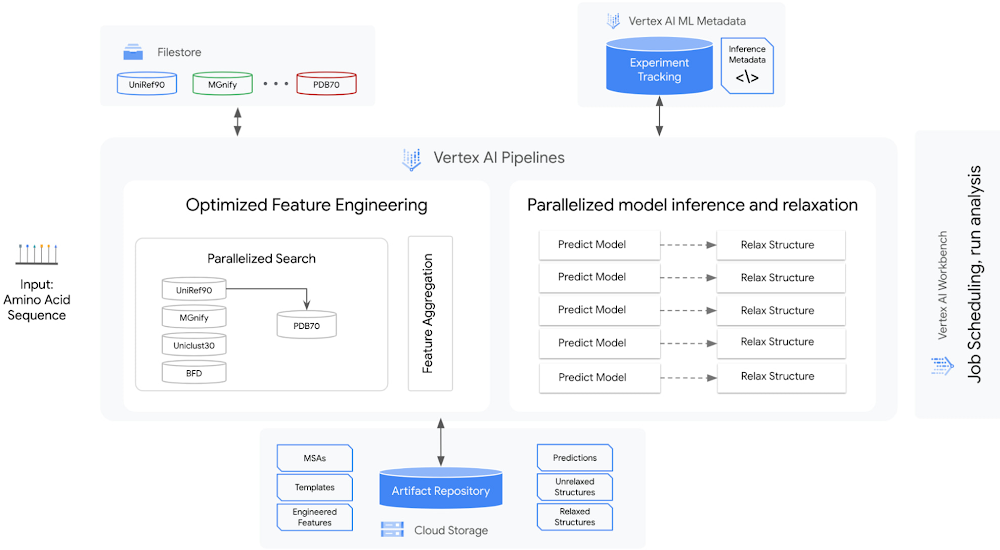
Today, to accelerate research in the bio-pharma space, from the creation of treatments for diseases to the production of new synthetic biomaterials, we are announcing a new Vertex AI solution that demonstrates how to use Vertex AI Pipelines to run DeepMind’s AlphaFold protein structure predictions at scale. Once a protein’s structure is determined and its role within the cell is understood, scientists can develop drugs that can modulate the protein function based on its role in the cell. DeepMind, an AI research organization within Alphabet, created the AlphaFold system to advance this area of research by helping data scientists and other researchers to accurately predict protein geometries at scale.In 2020, in the Critical Assessment of Techniques for Protein Structure Prediction (CASP14) experiment, DeepMind presented a version of AlphaFold that predicted protein structures so accurately, experts declared the “protein-folding problem” solved. The next year, DeepMind open sourced the AlphaFold 2.0 system. Soon after, Google Cloud released a solution that integrated AlphaFold with Vertex AI Workbench to facilitate interactive experimentation. This made it easier for many data scientists to efficiently work with AlphaFold, and today’s announcement builds on that foundation.Last week, AlphaFold took another significant step forward when DeepMind, in partnership with the European Bioinformatics Institute (EMBL-EBI), released predicted structures for nearly all cataloged proteins known to science. This release expands the AlphaFold database from nearly 1 million structures to over 200 million structures—and potentially increases our understanding of biology to a profound degree. Between this continued growth in the AlphaFold database and the efficiency of Vertex AI, we look forward to the discoveries researchers around the world will make. In this article, we’ll explain how you can start experimenting with this solution, and we’ll also survey its benefits, which include offering lower costs through optimized selection of hardware, reproducibility through experiment tracking, lineage and metadata management, and faster run time through parallelization.Background for running AlphaFold on Vertex AIGenerating a protein structure prediction is a computationally intensive task. It requires significant CPU and ML accelerator resources and can take hours or even days to compute. Running inference workflows at scale can be challenging—these challenges include optimizing inference elapsed time, optimizing hardware resource utilization, and managing experiments.Our new Vertex AI solution is meant to address these challenges.To better understand how the solution addresses these challenges, let’s review the AlphaFold inference workflow:Feature preprocessing. You use the input protein sequence (in the FASTA format) to search through genetic sequences across organisms and protein template databases using common open source tools. These tools include JackHMMER with MGnify and UniRef90, HHBlits with Uniclust30 and BFD, and HHSearch with PDB70. The outputs of the search (which consist of multiple sequence alignments (MSAs) and structural templates) and the input sequences are processed as inputs to an inference model. You can run the feature preprocessing steps only on a CPU platform. If you’re using full-size databases, the process can take a few hours to complete.Model inference. The AlphaFold structure prediction system includes a set of pretrained models, including models for predicting monomer structures, models for predicting multimer structures, and models that have been fine-tuned for CASP. At inference time, you independently run the five models of a given type (such as monomer models) on the same set of inputs. By default, one prediction is generated per model when folding monomer models, and five predictions are generated per model when folding multimers. This step of the inference workflow is computationally very intensive and requires GPU or TPU acceleration.(Optional) Structure relaxation. In order to resolve any structural violations and clashes that are in the structure returned by the inference models, you can perform a structure relaxation step. In the AlphaFold system, you use the OpenMM molecular mechanics simulation package to perform a restrained energy minimization procedure. Relaxation is also very computationally intensive, and although you can run the step on a CPU-only platform, you can also accelerate the process by using GPUs.The Vertex AI solutionThe AlphaFold batch inference with the Vertex AI solution lets you efficiently run AlphaFold inference at scale by focusing on the following optimizations:Optimizing inference workflow by parallelizing independent steps.Optimizing hardware utilization (and as a result, costs) by running each step on the optimal hardware platform. As part of this optimization, the solution automatically provisions and deprovisions the compute resources required for a step.Describing a robust and flexible experiment tracking approach that simplifies the process of running and analyzing hundreds of concurrent inference workflows.The following diagram shows the architecture of the solution.The solution encompasses the following:A strategy for managing genetic databases. The solution includes high-performance, fully managed file storage. In this solution, Cloud Filestore is used to manage multiple versions of the databases and to provide high throughput and low-latency access.An orchestrator to parallelize, orchestrate, and efficiently run steps in the workflow. Predictions, relaxations, and some feature engineering can be parallelized. In this solution, Vertex AI Pipelines is used as the orchestrator and runtime execution engine for the workflow steps.Optimized hardware platform selection for each step. The prediction and relaxation steps run on GPUs, and feature engineering runs on CPUs. The prediction and relaxation steps can use multi-GPU node configurations. This is especially important for the prediction step because the memory usage is approximately quadratic with the number of residues. Therefore, predicting a large protein structure can exceed the memory of a single GPU device.Metadata and artifact management. The solution includes management for running and analyzing experiments at scale. In this solution, Vertex AI Metadata is used to manage metadata and artifacts.The basis of the solution is a set of reusable Vertex AI Pipelines components that encapsulate core steps in the AlphaFold inference workflow: feature preprocessing, prediction, and relaxation. In addition to those components, there are auxiliary components that break down the feature engineering step into tools, and helper components that aid in the organization and orchestration of the workflow.The solution includes two sample pipelines: the universal pipeline and a monomer pipeline. The universal pipeline mirrors the settings and functionality of the inference script in the AlphaFold Github repository. It tracks elapsed time and optimizes compute resources utilization. The monomer pipeline further optimizes the workflow by making feature engineering more efficient. You can customize the pipeline by plugging in your own databases.Next stepsTo learn more and to try out this solution, check our GitHub repository, which contains the components and universal and monomer pipelines. The artifacts in the repository are designed so that you can customize them. In addition, you can integrate this solution into your upstream and downstream workflows for further analysis. To learn more about Vertex AI, visit our product page. AcknowledgementsWe would like to thank the following people for their collaboration: Shweta Maniar, Sampath Koppole, Mikhail Chrestkha, Jasper Wong, Alex Burdenko, Meera Lakhavani, Joan Kallogjeri, Dong Meng (NVIDIA), Mike Thomas (NVIDIA), and Jill Milton (NVIDIA).Finally and most importantly, we would like to thank our Solution Manager Donna Schut for managing this solution from start to finish. This would not have been possible without Donna.Related ArticleGetting started with ML: 25+ resources recommended by role and taskWhether you are a Data Analyst, Data Scientist, ML Engineer or Software Engineer, here are specific resources to help you get started wit…Read Article
Quelle: Google Cloud Platform

Sharing is caring: How GPU sharing on GKE saves you money

Developers and data scientists are increasingly turning to Google Kubernetes Engine (GKE) to run demanding workloads like machine learning, visualization/rendering and high-performance computing, leveraging GKE’s support for NVIDIA GPUs. In the current economic climate, customers are under pressure to do more with fewer resources, and cost savings are top of mind. To help, in July, we launched a GPU time-sharing feature on GKE that lets multiple containers share a single physical GPU, thereby improving its utilization. In addition to GKE’s existing support for multi-instance GPUs for NVIDIA A100 GPUs, this feature extends the benefits of GPU sharing to all families of GPUs on GKE. Contrast this to open source Kubernetes, which only allows for allocation of one full GPU per container. For workloads that only require a fraction of the GPU, this results in under-utilization of the GPU’s massive computational power. Examples of such applications include notebooks and chat bots, which stay idle for prolonged periods, and when they are active, only consume a fraction of GPU. Underutilized GPUs are an acute problem for many inference workloads such as real-time advertising and product recommendations. Since these applications are revenue-generating, business-critical and latency-sensitive, the underlying infrastructure needs to handle sudden load spikes gracefully. While GKE’s autoscaling feature comes in handy, not being able to share a GPU across multiple containers often leads to over-provisioning and cost overruns.Time-sharing GPUs in GKEGPU time-sharing works by allocating time slices to containers sharing a physical GPU in a round-robin fashion. Under the hood, time-slicing works by context switching among all the processes that share the GPU. At any point in time, only one container can occupy the GPU. However, at a fixed time interval, the context switch ensures that each container gets a fair time-slice. The great thing about the time-slicing is that if only one container is using the GPU, it gets the full capacity of the GPU. If another container is added to the same GPU, then each container gets 50% of the GPU’s compute time. This means time-sharing is a great way to oversubscribe GPUs and improve their utilization. By combining GPU sharing capabilities with GKE’s industry-leading auto-scaling and auto-provisioning capabilities, you can scale GPUs automatically up or down, offering superior performance at lower costs. Early adopters of time-sharing GPU nodes are using the technology to turbocharge their use of GKE for demanding workloads. San Diego Supercomputing Center (SDSC) benchmarked the performance of time-sharing GPUs on GKE and found that even for the low-end T4 GPUs, sharing increased job throughput by about 40%. For the high-end A100 GPUs, GPU sharing offered a 4.5x throughput increase, which is truly transformational.NVIDIA multi-instance GPUs (MIG) in GKEGKE’s GPU time-sharing feature is complementary to multi-instance GPUs, which allow you to partition a single NVIDIA A100 GPU into up to seven instances, thus improving GPU utilization and reducing your costs. Each instance with its own high-bandwidth memory, cache and compute cores can be allocated to one container, for a maximum of seven containers per single NVIDIA A100 GPU. Multi-instance GPUs provide hardware isolation between workloads, and consistent and predictable QoS for all containers running on the GPU. Time-sharing GPUs vs. multi-instance GPUsYou can configure time-sharing GPUs on any NVIDIA GPU on GKE including the A100. Multi-instance GPUs are only available in the A100 accelerators.If your workloads require hardware isolation from other containers on the same physical GPU, you should use multi-instance GPUs. A container that uses a multi-instance GPU instance can only access the CPU and memory resources available to that instance. As such, multi-instance GPUs are better suited to when you need predictable throughput and latency for parallel workloads. But if there are fewer containers running on a multi-instance GPU than available instances then the remaining instances will be unused. On the other hand, in the case of time-sharing, context switching lets every container access the full power of the underlying physical GPU. Therefore, if only one container is running, it still gets the full capacity of the GPU. Time-shared GPUs are ideal for running workloads that need only a fraction of GPU power and burstable workloads. Time-sharing allows a maximum of 48 containers to share a physical GPU whereas multi-instance GPUs on A100 allows up to a maximum of 7 partitions. If you want to maximize your GPU utilization, you can configure time-sharing for each multi-instance GPU partition. You can then run multiple containers on each partition, with those containers sharing access to the resources on that partition.Get started todayThe combination of GPUs and GKE is proving to be a real game-changer. GKE brings auto-provisioning, autoscaling and management simplicity, while GPUs bring superior processing power. With the help of GKE, data scientists, developers and infrastructure teams can build, train and serve the workloads without having to worry about underlying infrastructure, portability, compatibility, load balancing and scalability issues. And now, with GPU time-sharing, you can match your workload acceleration needs with right-sized GPU resources. Moreover, you can leverage the power of GKE to automatically scale the infrastructure to efficiently serve your acceleration needs while delivering a better user experience and minimizing operational costs. To get started with time-sharing GPUs in GKE, check out the documentation.Related ArticleUsing Google Kubernetes Engine’s GPU sharing to search for neutrinosNative support for GPU time sharing and A100 Multi-Instance GPU partitioning allowed many more IceCube ray-tracing simulations from the s…Read Article
Quelle: Google Cloud Platform

From NASA to Google Cloud, Ivan Ramirez helps top gaming companies reach new levels

Editor’s note: Ivan Ramirez, Gaming Team Lead, works in one of Google Cloud’s most dynamic, and least understood businesses, supporting some of the world’s biggest online gaming companies. He’s in a world of extreme potential, heart-stopping challenges, big teamwork, and managing scarce resources for the maximum outcome. And that’s before we get to the gaming.I assume most people in gaming are lifelong gamers. True?Not in my case, but I did start out playing the world’s best video game. I graduated from Georgia Tech with a degree in Aerospace Engineering and went to NASA. I trained to work on the electrical and thermal control systems of the International Space Station, and simulated things like an explosion or a medical emergency for 12 hours at a time.What was it like moving over to the Gaming industry?I had a lot of jobs before I started at Google in 2016. Now, as a Gaming Team Lead, I’m working with customers in many different aspects of the technology relationship, from working hands on keyboard alongside engineers to giving industry vision presentations to executives and everything in between. The great thing about this industry is that at every level, Gaming wants to be at the bleeding edge of technology. They want to be using the best graphics chips, have the most players online at once, or the fastest networking. They want lots of analytics, for things like placing ads in real time, or detecting cheaters while a game is going on. Look at something like Niantic’s Pokemon GO Fest this year, where players caught over one billion Pokémon, spun over 750 million PokéStops and collectively explored over 100 million kilometers. We’ve got big scale numbers like that with a few customers.How does that affect the rest of Google Cloud?When they push us to go faster and deliver more, it helps us invent the future.  Gaming companies also value the freedom to innovate, and have a real passion for their customers, which is something Google Cloud shares in our culture, as well as our leadership in scale, data analytics and more.You say you did a lot of different jobs, but you’ve been here six years. Why?I grew up in Lima, Peru. When I was 10, my dad got an offer to relocate to Miami. It was tough for him, but it was an opportunity he couldn’t pass up. Later, I wanted to go to Georgia Tech because they were strong for Aerospace, even though in Peru you traditionally stay close to family. I think I learned early on that you have to get over your comfort zone to rise up. I’ve had a great time here at Google because it enables me to continue to grow. Over the six years it’s always stayed interesting. Being at Google pushes me to try new things.Do you think Gaming has affected you personally, too?Maybe it affects the way I think about work and people. Some of my proudest moments are helping people, connecting them with others. I try to teach them some of the things I’ve learned, including taking care of yourself. We are people who want to say “yes” to everything, who feel like there’s always something more that we can do, or another project we can improve. You have to find limits and ways to care for yourself and your family too, or you won’t be able to last over the long haul, or even be a good partner and teammate.Related ArticleHear how this Google M&A Lead is helping to build a more diverse Cloud ecosystemPrincipal for Google Cloud’s Mergers & Acquisitions business and founder of Google’s Black+TechAmplify, Wayne Kimball, Jr. shares how inv…Read Article
Quelle: Google Cloud Platform

SevenRooms serves up personalized hospitality, food, and beverage services with Google Cloud

Finding ways to increase customer loyalty and profitability in a post-COVID world is top of mind for hotels, bars, and restaurants. Unfortunately, many food and beverage services providers struggle to deliver the personalized experiences that keep guests coming back for more. The reality is that most traditional hospitality apps offer only limited insight into guest activities, preferences, underlying operating costs, and other essential details. We built SevenRooms to help food and beverage operators create truly memorable experiences by managing and personalizing every step of the guest journey. With SevenRooms, restaurants in more than 250 cities globally leverage technology and data to provide unforgettable hospitality experiences with a human touch. That includes seating guests at their favorite table, pouring complimentary glasses of wine from a preferred vintage, offering special menu options, and personalized experiences for special occasions. Scaling guest experience and retention on Google CloudWhen developing SevenRooms, we needed a technology partner that would enable our small team to securely scale services, automate manual tasks, and accelerate time to market while reducing IT costs. That’s why we started working withGoogle App Engine—and later became more involved with the Google for Startups Cloud Program.We soon realized many traditional apps lacked the integrations and capabilities needed to respond to the unique challenges facing food and beverage operators that the Google for Startups Cloud Program services provide. With guidance from experts on the Google Startups Success team, we quickly transformed SevenRooms from a beta restaurant and nightclub reservation and guest management point solution into a full-fledged guest experience and retention platform that analyzes actionable data to automatically build and continuously update detailed guest profiles. The combination of Google App Engine and other Google Cloud solutions makes everything easier to build and scale. We’re seeing our total cost of ownership (TCO) decline by 10-15%, so we can shift additional resources to R&D to help customers create one-of-a-kind interactions with their guests. And importantly, we can bring new products to market 200-300% faster than competitors.Because SevenRooms handles a lot of sensitive guest data, stringent security protocols are vital. We store all data onGoogle Cloud, taking advantage of its highly secure-by-design infrastructure and built-in support for international data privacy laws such as GDPR. We useBigQuery andLooker for data analysis and reporting, and power our NoSQL database withFirestore. We also scale workloads and runElasticsearch onGoogle Compute Engine (GCE)—and seamlessly integrate our reservation booking engine with Google Maps andGoogle Search.     In the future, we’re looking to further market actionable guest data with the help of advancedmachine learning (ML) models withTensorFlow andGoogle Cloud Tensor Processing Units (TPUs). Cloud TPUs and Google Cloud data and analytics services are fully integrated with other Google Cloud offerings, includingGoogle Kubernetes Engine (GKE). By running ML workloads on Cloud TPUs, SevenRooms will benefit from Google Cloud’s leading networking and data analytics technologies such as BigQuery. We’re also exploring additional Google Cloud solutions such asAnthos to unify the management of infrastructure and applications across on-premises, edge, and multiple public clouds, as well asGoogle Cloud Run to deploy scalable containerized applications on a fully managed serverless platform. These solutions will enable us to continue to quickly expand our services and offer customers a variety of new benefits. Building a profitable, sustainable future in food and beverageOur work with the Google Startups Success team has been instrumental to helping us get where we are today. Their responsiveness is incredible and stands out compared to services from other technology providers. Google Cloud gives us a highly secure infrastructure and next-level training to evolve our infrastructure using solutions such as BigQuery andBackup and Disaster Recovery.We also work with Google Cloud partner, DoiT International, to further scale and optimize our operations. In particular, DoiT provided expert scripts to short-cut lengthy processes, while actively troubleshooting any issues or questions that came up. DoiT continues to share guidance in key areas for future products and features. They have provided expertise for architecture, infrastructure and cost management. Moving forward, we’re excited to work with Google Cloud and DoiT to handle a growing surge in users which we anticipate in 2023 and beyond.With Google Cloud, SevenRooms is revitalizing food and beverage service delivery by enabling businesses to cultivate and maintain direct guest relationships, deliver exceptional experiences, and encourage repeat visits. We’ve compiled many case studies that demonstrate how our customers see great results by personalizing their interactions with guests, from $1.5M in cost savings, to $400K of additional revenue, to a 68% jump in email open rates.Demand for our guest experience and retention platform keeps growing as we help our customers take a people-first approach by delivering unique and tailored dining experiences. We can’t wait to see what we accomplish next as we expand our team and reach new markets worldwide. If you want to learn more about how Google Cloud can help your startup, visit our pagehere to get more information about our program, andsign up for our communications to get a look at our community activities, digital events, special offers, and more.Related ArticleHow PicnicHealth is revolutionizing healthcare with Google Workspace and Google CloudHealthcare startup PicnicHealth uses Google Cloud and Google Workspace to revolutionize healthcare data.Read Article
Quelle: Google Cloud Platform

How to help ensure smooth shift handoffs in security operations

Editor’s note: This blog was originally published by Siemplify on Oct. 29, 2019.Much the same way that nursing teams need to share patient healthcare updates when their shift ends, security operations centers (SOC) need to have smooth shift-handoff procedures in place to ensure that continuous monitoring of their networks and systems is maintained.Without proper planning, knowledge gaps can arise during the shift-change process. These include:Incomplete details: Updates, such as the work that has been done to address active incidents and the proposed duties to continue these efforts, are not thoroughly shared.Incorrect assumptions: Operating with fragmented information, teams engage in repetitive tasks, or worse, specific investigations are skipped entirely because it is assumed they were completed by another shift.Dropped tasks: From one shift to the next, some tasks can fall entirely through the cracks and are never reported to the incoming personnel.Because of these gaps, security analysts tend to spend too much time following up with each other to ensure items are completed. With major incidents, this may mean keeping personnel from the previous shift on for a partial or even full second shift until the incident is closed out. Ramifications of being overworked can include physical and mental fatigue and even burnout.Fortunately, these gaps are not inevitable.Getting a process in placeDecide on the basicsBefore you can succeed with shift handoffs, you need to decide how you will design your shifts. Will shifts be staggered? Will they be covered from geographically different regions (i.e. “follow the sun” model)? If so, handovers may be challenged by language and cultural differences.Do you allow for people to swap shifts (i.e. work the early shift one week and the graveyard the next)? If shifts are fixed then you can create shift teams. If shifts rotate, you need to ensure analysts work each shift for a set period of time to adapt to the specific types of cases and ancillary work that each shift is responsible for. Rotating shifts also can infuse a fresh set of eyes to processes or problems. It also may help retain talent, as working consistently irregular hours can have a negative impact on one’s health.Properly share communicationWhen you work in a SOC, you don’t punch in and out like in the old factory days. Active cases may require you or someone from the team to arrive early to receive a debriefing, or stay late to deliver your own to arriving colleagues (as well as complete any pending paperwork). Streamlining the transfer process is critical but simple: Create a standard handoff log template that each shift uses to clearly communicate tasks and action items. Be prepared for questions.Log activitiesSecurity orchestration, automation, and response (SOAR) technology can help in the collaboration process. In addition, SOAR gives managers the ability to automatically assign cases to the appropriate analyst. Through playbooks, escalations can be defined and automated based on the processes that are unique to your organization.Related ArticleHow to overcome 5 common SecOps challengesHere are 5 common issues that many SecOps teams struggle with—and how to fix them.Read Article
Quelle: Google Cloud Platform