Cloud Functions 2nd gen is GA, delivering more events, compute and control

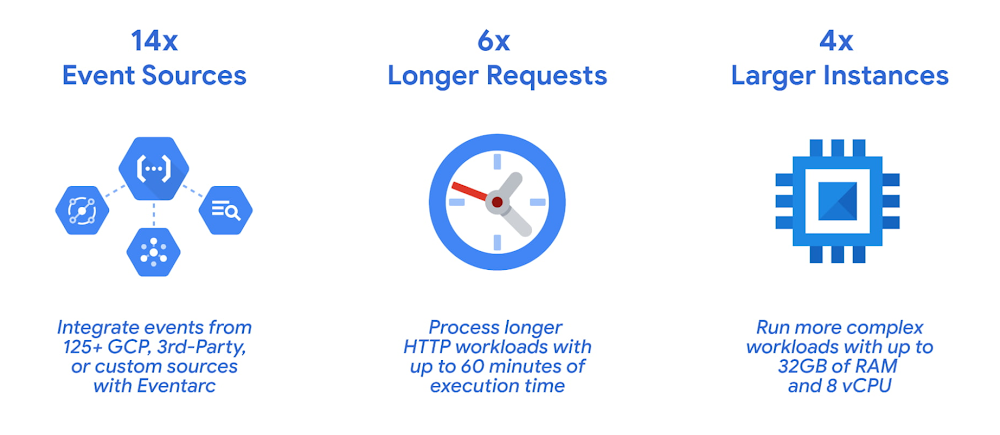
For over seven years, Functions-as-a-Service has changed how developers create solutions and move toward a programmable cloud. Functions made it easy for developers to build highly scalable, easy-to-understand, loosely-coupled services. But as these services evolved, developers faced challenges such as cold starts, latency, connecting disparate sources, and managing costs. In response, we are evolving Cloud Functions to meet these demands, with a new generation of the service that offers increased compute power, granular controls, more event sources, and an improved developer experience. Today, we are announcing the general availability of the 2nd generation of Cloud Functions, enabling a greater variety of workloads with more control than ever before. Since the initial public preview, we’ve equipped Cloud Functions 2nd gen with more powerful and efficient compute options, granular controls for faster rollbacks and new triggers from over 125 Google and third-party SaaS event sources using Eventarc. Best of all, you can start to use 2nd gen Cloud Functions for new workloads, while continuing to use your 1st gen Cloud Functions.Let’s take a closer look at what you’ll find in Cloud Functions 2nd gen.Increased compute with granular controlsOrganizations are choosing Cloud Functions for increasingly demanding and sophisticated workloads that require increased compute power and more granular controls. Functions built on Cloud Functions 2nd gen have the following features and characteristics: Instance concurrency – Process up to 1000 concurrent requests with a single instance. Concurrency can drastically reduce cold starts, improve latency and lower cost.Fast rollbacks, gradual rollouts – Quickly and safely roll back your function to any prior deployment or configure how traffic is routed across revisions. A new revision is created every time you deploy your function.6x longer request processing – Run your 2nd gen HTTP-triggered Cloud Functions for up to one hour. This makes it easier to run longer request workloads such as processing large streams of data from Cloud Storage or BigQuery.4x larger instances – Leverage up to 16GB of RAM and 4 vCPUs on 2nd gen Cloud Functions, allowing larger in-memory, compute-intensive and more parallel workloads. 32GB / 8 vCPU instances are in preview.Pre-warmed instances – Configure a minimum number of instances that will always be ready to go to cut your cold starts and make sure the your application’s bootstrap time doesn’t impact its performance.More regions – 2nd gen Cloud Functions will be available in all 1st gen regions plus new regions including Finland (europe-north1) and Netherlands (europe-west4).Extensibility and portability- By harnessing the power of Cloud Run’s scalable container platform, 2nd gen Cloud Functions let you move your function to Cloud Run or even to Kubernetes if your needs change.Lots more event sourcesAs more workloads move to the cloud, you need to connect more event sources together. Using Eventarc, 2nd gen Cloud Functions supports 14x more event sources than 1st gen, supporting business-critical event-driven workloads.Here are some highlights of events in 2nd gen Cloud Functions:125+ Event sources: 2nd gen Cloud Functions can be triggered from a growing set of Google and third-party SaaS event sources (through Eventarc) and events from custom sources (by publishing to Pub/Sub directly). Standards-based Event schema for consistent developer experience: These event-driven functions are able to make use of the industry-standard CloudEvents format. Having a common standards-based event schema for publishing and consuming events can dramatically simplify your event-handling code.CMEK support: Eventarc supports customer-managed encryption keys, allowing you to encrypt your events using your own managed encryption keys that only you can access.As Eventarc adds new event providers, they become available in 2nd gen Cloud Functions as well. Recently, Eventarc added Firebase Realtime Database, DataDog, Check Point CloudGuard, LaceWork and ForgeRock, as well as the Firebase Stripe / Revenuecat extensions as event sources. Improved developer experienceYou can use the same UI and gcloud commands as for your 2nd gen functions as for 1st gen, help you get started quickly from one place. That’s not to say we didn’t make some big improvements to the UI:Eventarc subtask – Allows you to easily discover and configure how your function is triggered during creation.Deployment tracker – Enables you to view the status of your deployment and spot any errors quickly if they occur during deployment.Improved testing tab – Simplifies calling your function with sample payloads.Customizable dashboard – Gives you important metrics at a glance and the accessibility updates improve the experience for screen readers.As with 1st gen, you can drastically speed up development time by using our open source Functions Framework to develop your functions locally.Tying it together2nd gen Cloud Functions allows developers to connect anything from anywhere to get important work done. This example shows an end-to-end architecture for an event-driven solution that uses new features in 2nd gen Cloud Functions and Eventarc. It starts with identifying the data sources to which you want to programmatically respond. These can be any of the 125+ Google Cloud or third-party sources supported by Eventarc. Then you’re able to configure the trigger and code the function while specifying instance size, concurrency and processing time based on your workload. Your function can process and store the data using Google Cloud’s AI and data platforms to transform data into actionable insights.Get started with the new Cloud FunctionsWe built Cloud Functions to be the future of how organizations build enterprise applications. Our 2nd generation incorporates feedback we’ve received from customers to meet their needs for more compute, control and event sources with an improved developer experience. We’re excited to see what you build with 2nd gen functions. You can learn more about Cloud Functions in the documentation and get started using Quickstarts: Cloud Functions.Related ArticleSupercharge your event-driven architecture with new Cloud Functions (2nd gen)The next generation of our Cloud Functions Functions-as-a-Service platform gives you more features, control, performance, scalability and…Read Article
Quelle: Google Cloud Platform
Fueling business growth with a seamless Google Cloud migration

In today’s hybrid office environments, it can be difficult to know where your most valuable, sensitive content is, who’s accessing it, and how people are using it. That’s why Egnyte focuses on making it simple for IT teams to manage and control a full spectrum of content risks, from accidental data deletion to privacy compliance. I used to be an Egnyte customer before joining the team, so I’ve experienced first-hand the transformative effects that Egnyte can have on a company. Because data is fundamental to a company’s success, we take the trust of our 16,000 clients very seriously. There is no room for error with a cloud governance platform, which means that the technology providers we work with can’t fail either. That’s why we work with Google Cloud.Since Egnyte was founded in 2007, we have delivered our services to clients 24/7. We do this by running our own data centers: two in the USA and one in Europe. But as the company continued its steady growth, owning and managing these data centers became unsustainable. There’s a tremendous amount of work that goes into managing everything that we need from a data center. Not only were we constantly building, maintaining, and paying for all this infrastructure, but we’d have to constantly expand our data centers to accommodate our business growth. This caused a never-ending pipeline issue because we had to predict how many businesses we were going to win over the next 12 to 18 months. What if we planned to grow the business by 20%, and ended up growing by 25% instead? We knew that being limited to our own data centers was going to negatively impact our business, so we looked for alternatives. To gain scalability and introduce another layer of reliability to our business, we decided to collaborate with a reputable cloud provider who could reliably back up our data. We examined the offerings of every cloud provider, and found that in every category that we analyzed, Google was hands-down the winner.One of these categories is the reach of the network. With its own transoceanic fiber with points of presence in all markets where we’re currently doing business as well as markets where we intend to do business one day, Google network is second to none. Another important criteria for us was flexibility in the product offering, so we could better consider the financial risks of this large-scale data migration. For a while, we needed to pay for both our new cloud infrastructure and our old on-premises one while they overlapped during the migration, but Google Cloud made it easier for us to plan for this. By December 2021, we had completed our full migration to Google Cloud. This significant migration was completed gradually and without disrupting our services at any point. Our close collaboration with the Google Cloud team is one of the big reasons we completed this so successfully. Google Cloud was able to anticipate some of the problems we’d likely be facing and helped us overcome them along the way. We were able to shut off our last data center in February 2022, and the beneficial changes to the business are already obvious. Capacity planning, which used to be our biggest challenge on-premises, is now a problem of the past. The ability to spin up new resources on Google Cloud means we no longer need to buy additional resources a year in advance and wait for them to be shipped. Using Google Cloud means that we no longer rely on aging infrastructure, which is a very limiting factor when you’re developing and engineering a platform as complex as Egnyte. Our entire platform is now always operating on the latest storage, processing, network, and services available on Google Cloud.Additionally, we have services embedded on our infrastructure such as Cloud SQL, Cloud Bigtable, BigQuery, Dataflow, Pub/Sub, and Memorystore for Redis, which means we no longer need to build services from scratch or shop, install, and build them into the product and company work flow. There’s a long list of Google Cloud services that have significantly simplified our processes and that now support our flagship products, Egnyte Collaborate and Secure and Govern.Looking ahead, we’ll continue to take advantage of what Google Cloud has to offer. Our migration has impacted not only our business but also our clients. We can offer even higher reliability and faster scalability to our clients whenever they need our platform to protect and manage critical content on any cloud or any app, anywhere in the world. We look forward to seeing what’s next.Related Article4 new ways Citrix & Google Cloud can simplify your Cloud MigrationCitrix and Google Cloud simplify your cloud migration. The expanding partnership between Citrix and Google Cloud means that customers con…Read Article
Quelle: Google Cloud Platform
Introducing Google Cloud and Google Workspace support for multiple Identity providers with Single Sign-On

Google is one of the largest identity providers on the Internet. Users rely on our identity systems to log into Google’s own offerings, as well as third-party apps and services. For our business customers, we provide administratively managed Google accounts that can be used to access Google Workspace, Google Cloud, and BeyondCorp Enterprise. Today we’re announcing that these organizational accounts support single sign-on (SSO) from multiple third-party identity providers (IdPs), available in general availability immediately. This allows customers to more easily access Google’s services using their existing identity systems. Google has long provided customers with a choice of digital identity providers. For over a decade, we have supported SSO via the SAML protocol. Currently, Google Cloud customers can enable a single identity provider for their users with the SAML 2.0 protocol. This release significantly enhances our SSO capabilities by supporting multiple SAML-based identity providers instead of just one. Business cases for supporting multiple identity providersThere are many reasons for customers to federate identity to multiple third-party identity providers. Often, organizations have multiple identity providers resulting from mergers and acquisitions, or due to differing IT strategies across corporate divisions and subsidiaries. Supporting multiple identity providers allows the users from these different organizations to all use Google Cloud without time-consuming and costly migrations.Another increasingly common use case is data sovereignty. Companies that need to store the data of their employees in specific jurisdictional locations may need to use different identity providers. Migrations are yet another common use case for supporting multiple identity providers. Organizations transitioning to new identity providers can now keep their old system active with the new one during the transition phase.”The City of Los Angeles is launching a unified directory containing all of the city’s workforce. Known as “One Digital City,” the directory provides L.A. city systems with better security and a single source for authentication, authorization, and directory information,” said Nima Asgari, Google Team Manager for the City of Los Angeles. “As the second largest city in the United States, this directory comes at a critical time for hybrid teleworkers, allowing a standard collaboration platform based on Google Docs, Sheets, Slides, Forms, and Sites. From our experience, Google Cloud’s support of multiple identity providers has saved us from having to create a number of custom solutions that would require valuable staff time and infrastructure costs.”How it worksTo use these new identity federation capabilities, Google Cloud Administrators must first configure one or more identity provider profiles in the Google Cloud Admin console; we support up to 100 profiles. These profiles require information from your identity provider, including a sign-in URL and an X.509 certificate. Once these profiles have been created, they can then be assigned to the root level for your organization or to any organizational unit (OU). In addition, profiles can be assigned to a Group as an override for the OU. It is also possible to configure an Organizational Unit or group to sign in with Google usernames and passwords instead of a third-party IdP.For detailed information on configuring SSO with third-party IdPs, see the documentation here.OIDC Support, Coming SoonCurrently, SSO supports the popular SAML 2.0 protocol. Later this year, we plan on adding support for OIDC. OIDC is becoming increasingly popular for both consumer and corporate SSO. By supporting OIDC, Google Cloud customers can choose which protocol is best for the needs of their organization. OIDC works alongside the multi-IdP support being released now,  so administrators can configure IdPs using both SAML and OIDC.Related ArticleAnnouncing Sovereign Controls for Google WorkspaceTo further enable EU organizations through digital sovereignty, we’re launching new capabilities to control, limit, and monitor transfers…Read Article
Quelle: Google Cloud Platform
New Google Cloud regions are coming to Asia Pacific

Digital tools offered by cloud computing are fueling transformation around the world, including in Asia Pacific. In fact, IDC expects that total spending on cloud services in Asia Pacific (excluding Japan) will reach 282 billion USD by 2025.1 To meet growing demand for cloud services in Asia Pacific, we are excited to announce our plans to bring three new Google Cloud regions to Malaysia, Thailand, and New Zealand — on top of six other regions that we previously announced are coming to Berlin, Dammam, Doha, Mexico, Tel Aviv, and Turin. When they launch, these new regions will join our 34 cloud regions currently in operation around the world — 11 of which are located in Asia Pacific — delivering high-performance services running on the cleanest cloud in the industry. Enterprises across industries, startups, and public sector organizations across Asia Pacific will benefit from key controls that enable them to maintain low latency and the highest security, data residency, and compliance standards, including specific data storage requirements.“The new Google Cloud regions will help to address organizations’ increasing needs in the area of digital sovereignty and enable more opportunities for digital transformation and innovation in Asia Pacific. With this announcement, Google Cloud is providing customers with more choices in accessing capabilities from local cloud regions while aiding their journeys to hybrid and multi-cloud environments,” said Daphne Chung, Research Director, Cloud Services and Software Research, IDC Asia/Pacific.What customers and partners are sayingFrom retail and media & entertainment to financial services and public sector, leading organizations come to Google Cloud as their trusted innovation partner. The new Google Cloud regions in Malaysia, Thailand, and New Zealand will help our customers continue to enable growth and solve their most critical business problems. We will work with our customers to ensure the cloud region fits their evolving needs. “Kami was born out of the digital native era, where in order to scale globally we needed a partner like Google Cloud who could support us on our ongoing innovation journey. We have since delivered an engaging and dependable experience for millions of teachers and students around the world, so it’s incredibly exciting to hear about the new region coming to New Zealand. This investment from Google Cloud will enable us to deliver services with lower latency to our Kiwi users, which will further elevate and optimize our free premium offering to all New Zealand schools.” – Jordan Thoms, Chief Technology Officer, Kami “Our customers are at the heart of our business, and helping Kiwis find what they are looking for, faster than ever before, is our key priority. Our collaboration with Google Cloud has been pivotal in ensuring the stability and resilience of our infrastructure, allowing us to deliver world-class experiences to the 650,000 Kiwis that visit our site every day. We welcome Google Cloud’s investment in New Zealand, and are looking forward to more opportunities to partner closely on our technology transformation journey.” – Anders Skoe, CEO, Trade Me “Digital transformation plays a key role in helping Vodafone deliver better customer experiences and connect all Kiwis. We welcome Google Cloud’s investment in New Zealand and look forward to working together to offer more enriched experiences for local businesses, and the communities we serve,” said Jason Paris, CEO, Vodafone New Zealand“Our journey with Google Cloud spans almost half a decade, with our most recent partnership and co-innovation initiatives paving the way for AirAsia and Capital A to disrupt the digital platform arena in the same vein as we did airlines. The announcement of a new cloud region that’s coming to Malaysia – and Thailand too if I may add – showcases Google Cloud’s continuous desire to expand its in-region capabilities to complement and support our aspiration of establishing the airasia Super App at the center of our e-commerce, logistics and fintech ecosystem, while enriching the local community and giving all 700 million people in Asean inclusivity, accessibility, and value. I couldn’t be more excited about this massive milestone and the new possibilities that Google Cloud’s growing network of cloud regions will create for us, our peers, and the common man.” – Tony Fernandes, CEO, Capital A“Google Cloud’s world-class cloud-based analytics and artificial intelligence (AI) tools have enabled Media Prima to embed a digital DNA across our organization, deliver trusted and real-time news updates during peak periods when people need them the most, and implement whole new engagement models like content commerce, thereby allowing us to diversify our revenue streams and remain at the forefront of an industry in transition. By allowing us to place our digital infrastructure and applications even closer to our audiences, this cloud region will supercharge data-driven content production and distribution, and our ability to enrich the lives of Malaysians by informing, entertaining, and engaging them through new and innovative mediums.” – Rafiq Razali, Group Managing Director, Media Prima“Google Cloud’s global network has been playing an integral role in Krungthai Bank’s adoption of advanced data analytics, cybersecurity, AI, and open banking capabilities to earn and retain the trust of the 40 million Thais who use our digital services to meet their daily financing needs. This new cloud region is a fundamentally important milestone that will help accelerate our continuous digital reinvention and sustainable growth strategy within the local regulatory framework, thereby allowing us to reach and serve Thais at all levels, including unbanked consumers and small business owners, no matter where they may be.” – Payong Srivanich, CEO, Krungthai Bank“Having migrated our operations and applications onto Google Cloud’s superior data cloud infrastructure, we are already delivering more personalized services and experiences to small business owners, delivery riders, and consumers than ever before – and in a more cost efficient and sustainable way. With the new cloud region, we will be physically closer to the computing resources that Google Cloud has to offer, and able to access cloud technologies in a faster and even more complete way. This will help strengthen our mission: to build a homegrown ‘super app’ that assists smaller players and revitalizes the grassroots economy.” – Thana Thienachariya, Chairman of the Board, Purple Ventures Co., Ltd. (Robinhood)Delivering a global networkThese new cloud regions represent our ongoing commitment to supporting digital transformation across Asia Pacific. We continue to invest in expanding connectivity throughout the region by working with partners in the telecommunications industry to establish subsea cables — including Apricot, Echo, JGA South, INDIGO, and Topaz — and points of presence in major cities. Learn more about our global cloud infrastructure, including new and upcoming regions.1. Source: Asia/Pacific (Excluding Japan) Whole Cloud Forecast, 2020—2025, Doc # AP47756122, February 2022Related ArticleA new Google Cloud region is coming to MexicoThe new Google Cloud region in Mexico will be the third in Latin America, joining Chile and Brazil, and bringing the total of regions and…Read Article
Quelle: Google Cloud Platform
How NTUC FairPrice delivers a seamless shopping and payment experience through Google Cloud

Editor’s note: Today we hear from NTUC Enterprise, which operates a sprawling retail ecosystem, including NTUC FairPrice, Singapore’s largest grocery chain, and a network of Unity pharmacies and Cheers convenience stores. As a social enterprise, NTUC Enterprise’s mission is to deliver affordable value in areas like daily essentials, healthcare, childcare, ready-to-eat meals, and financial services. Serving over two million customers annually, NTUC Enterprise strives to empower all Singaporeans to live more meaningful lives.In August 2021, NTUC FairPrice launched a new app payment solution, allowing customers to pay for purchases and accumulate reward points at any FairPrice store or Unity pharmacy, by simply scanning a QR code. The app eliminates the need to present a physical loyalty or credit card and integrates all customer activities across NTUC FairPrice’s network of stores and services. By using the FairPrice app’s payment feature, customers enjoy a seamless checkout experience at all FairPrice and Unity outlets.The mission to build an integrated app across a network of over 200 stores encountered two challenges that we were able to overcome with Google Cloud solutions, namely Cloud Functions, BigQuery, and Cloud Run:Financial reconciliation: FairPrice transactional data sits in multiple locations, including the point-of-sale (POS) server, the FairPrice app server, and the payment gateway (third-party technology used by merchants to accept purchases from customers). For the app to work, our finance team needed to ensure that all sales data coming from disparate sources are tallied correctly.Platform stability: Instead of a staggered rollout, we opted for a ‘big bang’ launch across all FairPrice and Unity stores across Singapore. System resilience, seamless autoscaling, and a near-zero latency network environment were critical for ensuring that customers weren’t stuck in line due to network delays or outages, especially during peak hours.For a complex operation such as ours, the main technical hurdle was agile syncing between transaction systems. Our finance team needed to ensure that all funds that land in the bank correspond with sales made through our stores’ POS machines. Resolving this issue required a custom solution that integrates disparate data sources across the sales spectrum.At the time, the architecture of our sales system was as follows: The POS system processed a transaction and sends the data into our SAP network. From there, the data was funneled through enterprise resource planning (ERP) workflows managed by the finance team.The actual financial transaction, however, was performed on our FairPrice app server. This communicated with a third-party payment gateway that then transferred funds electronically to our bank.The POS system was sophisticated enough to aggregate different payment methods registered in the FairPrice app, from GrabPay to Visa and Mastercard, and send granular transactions information to finance. But given that it wasn’t executing actual transactions, finance then needed to make extra reconciliations to ensure that the POS data and payment data corresponded. This process placed a significant manual strain on the team, which would only increase as the business continued to grow. Automating financial processes to drive business growth with cloud technologyTo automate financial reconciliation, we used Google Cloud tools and designed a custom solution to integrate POS data with the payment network. Here’s a step-by-step summary of how we integrated all the elements of our transactions ecosystem, unlocking the potential for growth in our FairPrice app: We first worked with the POS team to set up real-time data pipelines to import all transactional data across our retail network, from online sales to physical store purchases, into Cloud Storage every five minutes. Next, we deployed Cloud Functions to detect changes made in Cloud Storage, before processing the data and syncing it with BigQuery, our main data analytics engine for data imported from POS systems into SAP systems. Leveraging CloudSQL as our main managed database, we created data pipelines from the app server into BigQuery. We created two parallel channels to ingest datastreams into BigQuery, which then became a unified data processing engine for unlimited, real-time insights. At that point, we used Google Cloud Scheduler to send BigQuery data analytics at the end of each day to a SAP secure file transfer protocol (SFTP) folder for processing by the data analytics team. Combining readouts from these two data sources, our data scientists can now build an easy-to-read Data Studio dashboard. If transactions from different systems do not match up, an email alert will be sent to the finance team and other platform stakeholders. Finance then reconciles the transactions in Data Studio to ensure all sales from the POS system and the app server correspond correctly.Combining the power of BigQuery with the convenience of Data Studio provided us with an additional advantage: the finance team, without requiring in-depth technical knowledge, can now easily obtain any piece of data they need without seeking help from the engineering team. The finance team can directly query what they need in BigQuery, and create an instant visualization on the Data Studio dashboard for any business use case. Keeping customers happy with seamless autoscaling driven by Cloud RunOne of the key objectives of launching Pay for our FairPrice app is to enable faster, more seamless checkouts across all stores in our retail network, through quick-and-easy QR code scanning. With a ‘big bang’ rollout, we needed the most powerful and agile computing infrastructure available to handle fluctuations in footfall at our stores, from peak lunchtime to dips in the middle of the night. We sought to combine this ability to autoscale with minimal infrastructure configuration, so our development team could focus on building innovative solutions that delight our customers.Google Kubernetes Engine (GKE) had been powering NTUC FairPrice solutions for a long time. When it came to developing our new payment solution, we decided that it would be a good time to try Cloud Run, cognizant of the complex interplay of APIs required to evolve the app. The aim was to see if we could achieve even more automation and ease-of-use in scaling and deploying our solution. The experiment paid off as we gained a new dimension of API agility through the optimized deployment of Cloud Run features. Here’s an overview of how we leveraged Cloud Run to support failure-free store operation with virtually no manual configuration:Default endpoints: Our FairPrice app deploys a wide range of proprietary APIs to synchronize all aspects of the solution. Cloud Run’s key advantage here is that provides a secure HTTPS endpoint by default. This automates the connection of APIs to software programs, removing the need to set up extra layers of network components to manage APIs. Ensuring this strong connectivity results in a seamless experience for shoppers.Automated configuration: Even with Autopilot, the new GKE operating environment, we still needed to set up CPU and memory for our microservices clusters. With Cloud Run, we’re freed from this task. All that is required is to set the maximum instance variable, and Cloud Run takes care of the rest, by automatically scaling microservice clusters in real-time according to our needs. This saves our DevOps team several hours per week, which they can devote to developing new features and updates for the FairPrice app. Ultimately, this convenience is passed on to our customers, translating into a more seamless and enjoyable shopping experience. In just one year since launching Pay for the FairPrice app, we have gained measurable benefits from the innovations enabled by Google Cloud tools: A 90% rate of return to the app. This means that nine out of 10 customers who use the app once will continue using it for subsequent purchases. Added nearly 270,000 new FairPrice customers to the app, and that number is growing at an exponential rate. Since launching the app, we have been able to convert 6% of offline transactions into digital transactions.Given that app availability and seamless end user experiences are major factors in Net Promoter Scores (NPS), NTUC FairPrice has achieved ~75% in overall customer satisfaction.Building Singapore’s food “super app” with Google Cloud toolsWe’re excited about the next stage of our digital evolution, which is to turn the FairPrice App into a food ‘super app.’ We aim to spark customer delight in everything related to food within the NTUC FairPrice Group network. This includes “hawker centers” (food courts), restaurants, deliveries, and takeaways.All of these services will be built on Google Cloud solutions, in particular Cloud Run and BigQuery. We believe that with our newfound autoscaling and data analytics capabilities, NTUC FairPrice is ready to bring the business to new heights, and meet Singapore’s appetite for great food.Related ArticleNew Singapore GCP region – open nowThe Singapore region is now open as asia-southeast. This is our first Google Cloud Platform (GCP) region in Southeast Asia and our third …Read Article
Quelle: Google Cloud Platform

Filestore Enterprise for fully managed, fault tolerant persistent storage on GKE

Storing state with containers Kubernetes has become the preferred choice for running not only stateless workloads (e.g., web services) but also for stateful applications (e.g., e-commerce applications). According to the Data on Kubernetes report, over 70% of Kubernetes users run stateful applications in containers. Additionally, there is a rising trend of managed data services like MariaDB and Databricks using Google Kubernetes Engine to power their SaaS businesses to benefit from the portability of Kubernetes, built-in auto-upgrade features such as blue-green deployments, backup for GKE and out-of-the-box cost efficiency for better unit economics. All of this means that container-native storage on GKE is increasingly important. Specifically, storage that can be seamlessly attached and detached to containers as they churn (because the average container lifetime is much shorter than VMs) and remain portable across zones to stay resilient. That’s where Filestore Enterprise fits in. Customers get a fully managed regional file system with four 9s of availability. Storage is instantaneously attached to containers as they churn and zonal failovers are handled seamlessly. The rest of this blog explores multiple storage options with containers and how Filestore Enterprise fits in to help guide customers to make decisions of the best storage option that meets their needs.External persistent state for “stateless” containers (left) vs. persistent containers with CSI managed state within persistent volumes (right)Storage optionsThree storage models (from left to right): local file system, SAN and NAS.To understand the lay of the land, let’s explore three options for common patterns for attached storage with containers (note: Cloud Storage is accessed via the application code in a container and not covered here). Local file system over a local SSD device: A local file system (over local ssd block device) is the simplest to set up and can be very cost-effective and provide good performance (over local SSD), but in most cases it lacks enterprise storage capabilities such as snapshots, backups, and asynchronous DR. Also it provides limited reliability and redundancy as the state is host local. This model is well suited for scratch space/ephemeral storage use cases, but much less so for production-level, mission-critical use cases.Local file system over a remote/shared block device (SAN): The SAN (Storage Area Network) model is powerful and well known. A SAN-backed remote volume can provide good performance, advanced storage services, and good reliability. As the volume is external to the containers’ host, the persistent volume can be reattached (mounted) to a different host in case of container migration or if the original one failed, but is predominantly limited to only one host and Pod at a time. In the cloud world, SAN devices are replaced by networked block services, such as Google Cloud Persistent Disk (PD).Remote/networked file system (NAS): The NAS (Network Attached Storage) model is semantically a powerful storage model as it also allows read-write sharing of the volume across several containers. In such a model the file system logic is implemented in a remote filer and accessed via a dedicated file system protocol, most commonly Network File System (NFS). In the cloud world, NAS devices are commonly replaced by file system services such as Filestore.GCP block and file storage backendsIn Google Cloud non-local storage can be implemented using either PD or Filestore. PD provides flexible SSD- or HDD-backed block storage, while Filestore provides NFSv3 file volumes. Both models are CSI (Container Storage Interface) managed and fully integrated into the GKE management system. The main advantages and disadvantages of both models (depicted below) are as follows:PD provides capacity-optimized storage (HDD) and good price-performance variants (SSD, Balanced). PD provides flexible sizes and zonal volumes. On the other hand, PD based volumes do not support read-write sharing. This means multiple containers can’t read and write to the same volume. Customers can choose Regional support (RePD) but this is limited to active-passive models. PD-backed volumes support container migration and failover (after host failures), but such migration or failover may require time and expertise to implement.Filestore provides similar HDD and SSD variants and active-active regional (enterprise) variants. All Filestore variants support the read-write sharing model and almost instantaneous container migration and failover. Because of this increased functionality, Filestore-backed volumes have higher cost compared to the PD-backed volumes and have a minimum size limit of 1TB.Main Google Cloud storage models PD & FilestoreFilestore as fully managed container storageBoth PD and Filestore support container native operations such as migrating containers across hosts for use cases such as upgrades or failover. Customers on PD get best-in-class price/performance with extensive selection of multiple PD types. That’s why PD is popular with many GKE customers, as they benefit from price-performance and capabilities. However, with PD, customers need to have expertise in storage systems. In PD, the file system logic is built into the host. This coupling means during migration the host must cleanly shut down the container, unmount the file system, reattach the PD to the target host, mount the file system and only then boot the container. While GKE manages a lot of these operations automatically, in the case of failover there are potential file system and disk corruption issues. Users will need to run some cleanup processes (“fsck”) on the mounted volume before it can be used. With Filestore, customers get a fully managed regional file system that is decoupled from the host. Customers don’t need any expertise to operate storage and failovers are handled seamlessly as there are no infrastructure operations to attach/detach volumes. In addition, customers also benefit from storage that can be simultaneously read and written to by multiple containers.In addition to the general value of the Filestore as a GKE backend, Filestore Enterprise supports mission-critical and medium-to-large stateful deployments as it adds regional (four 9s) availability, active-active zone access, instantaneous snapshots, and smaller SSD entry point for each volume. Summary and conclusionsGoogle Cloud offers several fully managed options for GKE persistent volumes. In addition to the PD-based volumes, Filestore Enterprise is a first-class citizen storage backend for GKE and can also serve mission-critical use cases where (active/active) regional redundancy and fast failover/migration are important. Furthermore, Filestore Enterprise is just getting started on delivering better price-performance efficiency for customers. For example, customers can access a private preview to drive higher utilization of Filestore Enterprise instances by bin packing volumes as shares. Summary tableLinksAccessing file shares from Google Kubernetes Engine clusters | FilestoreHow persistent container storage works — and why it mattersDisk and image pricing | Compute Engine: Virtual Machines (VMs) | Google CloudPersistent disksService tiers Using the Filestore CSI driver1. The full list of PD models and pricing can be found here: https://cloud.google.com/compute/disks-image-pricing#disk
Quelle: Google Cloud Platform

Accelerating migrations to Google Cloud with migVisor by EPAM

Application modernization is quickly becoming one of the pillars of successful digital transformation and cloud migration initiatives. Many organizations are becoming aware of the dramatic benefits that can be achieved by moving legacy, on-premises apps and databases into cloud native infrastructure and services, such as reduced Total Cost of Ownership (TCO), elimination of expensive commercial software licenses, and improved performance, scalability, security and availability.The complexity of applications and databases to a cloud-centric architecture requires a rapid, accurate, and customized assessment of modernization potential and identification of challenges. Addressing business and functional drivers, TCO calculations, uncovering technological challenges and cross-platform incompatibilities, preparation of migration, and rollback plans can be essential to the success and outcome of the migration. These cloud migration initiatives are often divided into three high-level phases: Discovery: identifying and cataloging the source inventory. Output is usually an inventory of source apps, databases, servers, networking, storage, etc. The discovery of existing assets within a data center is usually straightforward and can often be highly automated. Pre-migration readiness: the planning phase. This includes the analysis of the current portfolio of the databases and applications for migration readiness, determining the target architecture, identifying technological challenges or incompatibilities, calculating TCO, and preparing detailed migration plans. Migration execution: where the rubber hits the road. During this phase of the migration process, database schemas are actively converted, the application data access layer is refactored, data is replicated from source to target, often in real-time, and the application is deployed in its determined compute platform(s). Successful evaluation and planning phase as part of the pre-migration readiness phase can bolster confidence in investment towards modernization. Skipping or inaccurately completing the pre-migration phase can lead to a costly and sub-optimal result. Relying on manual pre-migration assessments can lead to long migration timelines, reduced success rates and poor confidence in the post-migration state, increased risk and total migration cost. Some of the commonly asked question during pre-migration include:How compatible are my source databases, which are often commercial and proprietary in nature, with their open-source cloud-native alternatives? For example, how compatible are my Oracle workloads and usage patterns with Cloud SQL for PostgreSQL? What’s my degree of vendor lock-in with my current technology stack? Are proprietary features and capabilities being used that are incompatible with open-source database technologies?How tightly-coupled are my applications with my current database engine technology? Can my applications be deployed as-is, refactored for cloud readiness with ease, or will it be a big undertaking? How much effort will my migration require? How expensive will it be? What will be my run-rate in Google Cloud post-migration and my ROI?Can we identify quick-win applications and databases to start with?There is a direct association between the accuracy and speed of the pre-migration phase and the outcome of the migration itself. The faster and more accurately organizations complete the required pre-migration analysis, the more cost efficient and successful the migration itself will usually be.  EPAM Systems, Inc., a leader in digital transformation, worked with Google Cloud as a preferred partner to accelerate cloud migrations beginning with pre-migration assessments. Leveraging EPAM’s migVisor for Google Cloud—a unique pre-migration accelerator that automates the pre-migration process—and EPAM’s consulting and support services, organizations can quickly generate a cloud migration roadmap for rapid and systematic pre-migration analysis. This approach has resulted in the completion of thousands of database assessments for hundreds of customers.migVisor is agentless, non-intrusive, and hosted in the EPAM cloud. migVisor seamlessly connects to your source databases and runs SQL queries to ascertain the database configuration, code, schema objects and infrastructure setup. Scanning of source databases is done rapidly and without interruption to production workloads.migVisor prepares customers to land applications in Google Cloud and its managed suite of databases services and platforms such as Cloud SQL, bare metal hosting, Spanner and Cloud Bigtable. migVisor supports re-hosting (lift-and-shift), re-platforming, and re-factoring.  “EPAM’s recent application assessment update to its migration tooling system, migVisor, will bring a new level of transparency to the entire application and database modernization process”,  said Dan Sandlin, Google Cloud Data GTM Director at Google Cloud. “This enables organizations to make the most of digital technologies and provides a clear IT ecosystem transformation that allows our customers to build a flexible foundation for future innovation.”Previously, migVisor focused on assessments of the source databases and the compatibility of customers’ existing database portfolio with cloud-centric database technologies. Coming this quarter, migVisor adds support for application assessments, augmenting its existing and class-leading capabilities in the database space. The addition of application modernization assessment functionality in migVisor, combined with EPAM’s certification and specialization in Google Cloud Data Management and hands-on engineering experience, strengthens EPAM’s position as a leader for large-scale digital transformation projects and migVisor as a trusted product for cloud migration assessments to Google Cloud customers. EPAM provides customers an end-to-end solution for faster and more cost-effective migrations.  Assessments that used to take weeks can now be completed in mere days. Within minutes of registering for an account, anyone can start usingmigVisor by EPAM to automatically assess applications and application code. Visit themigVisor page to learn more and sign up for your account.Related ArticleAccelerate Google Cloud database migration assessments with EPAM’s migVisorThe Database Migration Assessment is a Google Cloud-led project to help customers accelerate their deployment to Google Cloud databases w…Read Article
Quelle: Google Cloud Platform

Analyze Pacemaker events using open source Log Parser – Part 4

This blog is the fourth in a series and it follows the blog Analyze Pacemaker events in Cloud Logging, which describes how you can install and configure Google Cloud Ops Agent to stream Pacemaker logs of all your high availability clusters to Cloud Logging. You can analyze Pacemaker events happening to any of your clusters in one central place. But what if you don’t have this agent installed and want to know what happened to your cluster?Let’s look at this open source python script logparser, which will help you consolidate relevant Pacemaker logs from cluster nodes and filter the log entries for critical events such as fencing or resource failure. It takes below log files as input files and generates an output file of log entries in chronological order for critical events.System log such as /var/log/messagesPacemaker logs such as /var/log/pacemaker.log and /var/log/corosync/corosync.loghb_report in SUSEsosreport in RedHatHow to use this script?The script is available to download from this GitHub repository and supports multiple platforms.PrerequisitesThe program requires Python 3.6+. It can run on Linux, Windows and MacOS. As the first step, install or update your Python environment. Second, clone the GitHub repository as shown below.Run the scriptSee ‘-h’ for help. Specify the input log files, optional time range or output file name. By default, the output file is ‘logparser.out’ in the current directory.The hb_report is a utility provided by SUSE to capture all relevant Pacemaker logs in one package. If ssh login without password is set up between the cluster nodes, it should gather all information from all nodes. If not, collect the hb_report on each cluster node.The sosreport is a similar utility provided by RedHat to collect system log files, configuration details and system information. Pacemaker logs are also collected. Collect the sosreport on each cluster node.You can also parse single system logs or Pacemaker logs.In Windows, execute the Python file logparser.py instead.Next, we need to analyze the output information of the log parser results.Understanding the Output InformationThe output log may contain a variety of information, including but not limited to fencing actions, resources actions, failures, or Corosync subsystem events.Fencing action reason and resultThe example below shows a fencing (reboot) action targeting a cluster node because the node left the cluster. The subsequent log entry shows the fencing operation is successful (OK).code_block[StructValue([(u’code’, u”2021-03-26 03:10:38 node1 pengine: notice: LogNodeActions: * Fence (reboot) node2 ‘peer is no longer part of the cluster’rnrn2021-03-26 03:10:57 node1 stonith-ng: notice: remote_op_done: Operation ‘reboot’ targeting node1 on node2 for crmd.2569@node1.9114cbcc: OK”), (u’language’, u”), (u’caption’, <wagtail.wagtailcore.rich_text.RichText object at 0x3e50d18d0350>)])]Pacemaker actions to manage cluster resourcesThe example below illustrates multiple actions affecting the cluster resources, such as actions moving resources from one cluster node to another, or an action stopping a resource on a specific cluster node.code_block[StructValue([(u’code’, u’2021-03-26 03:10:38 node1 pengine: notice: LogAction: * Move rsc_vip_int-primary ( node2 -> node1 )rn2021-03-26 03:10:38 node1 pengine: notice: LogAction: * Move rsc_ilb_hltchk ( node2 -> node1 )rn2021-03-26 03:10:38 node1 pengine: notice: LogAction: * Stop rsc_SAPHanaTopology_SID_HDB00:1 ( node2 ) due to node availability’), (u’language’, u”), (u’caption’, <wagtail.wagtailcore.rich_text.RichText object at 0x3e50d18d0e10>)])]Failed resource operationsPacemaker manages cluster resources by calling resource operations such as monitor, start or stop, which are defined in corresponding resource agents (shell or Python scripts). The log parser filters log entries of failed operations. The example below shows a monitor operation that failed because the virtual IP resource is not running.code_block[StructValue([(u’code’, u’2020-07-23 13:11:44 node2 crmd: info: process_lrm_event: Result of monitor operation for rsc_vip_gcp_ers on node2: 7 (not running)’), (u’language’, u”), (u’caption’, <wagtail.wagtailcore.rich_text.RichText object at 0x3e50c787ec10>)])]Resource agent, fence agent warnings and errorsA resource agent or fence agent writes detailed logs for operations. When you observe resource operation failure, the agent logs can help identify the root cause. The log parser filters the ERROR logs for all agents. Additionally, it filters WARNING logs for the SAPHana agent.code_block[StructValue([(u’code’, u”2021-03-16 14:12:31 node1 SAPHana(rsc_SAPHana_SID_HDB01): ERROR: ACT: HANA SYNC STATUS IS NOT ‘SOK’ SO THIS HANA SITE COULD NOT BE PROMOTEDrnrn2021-01-15 07:15:05 node1 gcp:stonith: ERROR – gcloud command not found at /usr/bin/gcloudrnrn2021-02-08 17:05:30 node1 SAPInstance(rsc_sap_SID_ASCS10): ERROR: SAP instance service msg_server is not running with status GRAY !”), (u’language’, u”), (u’caption’, <wagtail.wagtailcore.rich_text.RichText object at 0x3e50c787e510>)])]Corosync communication error or failureCorosync is the messaging layer that the cluster nodes use to communicate with each other. Failure in Corosync communication between nodes may trigger a fencing action.The example below shows a Corosync message being retransmitted multiple times and eventually reporting an error that the other cluster node left the cluster.code_block[StructValue([(u’code’, u’2021-11-25 03:19:33 node2 corosync: message repeated 214 times: [ [TOTEM ] Retransmit List: 31609]rn2021-11-25 03:19:34 node2 corosync [TOTEM ] FAILED TO RECEIVErn2021-11-25 03:19:58 23:28:32 node2 corosync [TOTEM ] A new membership (10.236.6.30:272) was formed. Members left: 1rn2021-11-25 03:19:58 node2 corosync [TOTEM ] Failed to receive the leave message. failed: 1′), (u’language’, u”), (u’caption’, <wagtail.wagtailcore.rich_text.RichText object at 0x3e50c4fe00d0>)])]This next example shows that a Corosync TOKEN was not received within the defined time period and eventually Corosync reported an error that the other cluster node left the cluster.code_block[StructValue([(u’code’, u’2021-11-25 03:19:32 node1 corosync: [TOTEM ] A processor failed, forming new configuration.rn2021-11-25 03:19:33 node1 corosync: [TOTEM ] Failed to receive the leave message. failed: 2′), (u’language’, u”), (u’caption’, <wagtail.wagtailcore.rich_text.RichText object at 0x3e50c4fe0950>)])]Reach migration threshold and force resource offWhen the number of failures of a resource reaches the defined migration threshold (parameter migration-threshold), the resource is forced to migrate to another cluster node.code_block[StructValue([(u’code’, u’check_migration_threshold: Forcing rsc_name away from node1 after 1000000 failures (max=5000)’), (u’language’, u”), (u’caption’, <wagtail.wagtailcore.rich_text.RichText object at 0x3e50eabad4d0>)])]When a resource fails to start on a cluster node, the number of failures will be updated to INFINITY, which implicitly reaches the migration threshold and forces a resource migration. If there is any location constraint preventing the resource to run on the other cluster nodes or no other cluster nodes are available, the resource is stopped and cannot run anywhere.code_block[StructValue([(u’code’, u’2021-03-15 23:28:33 node1 pengine: info: native_color:tResource STONITH-sap-sid-sec cannot run anywherern2021-03-15 23:28:33 node1 pengine: info: native_color:tResource rsc_vip_int_failover cannot run anywherern2021-03-15 23:28:33 node1 pengine: info: native_color:tResource rsc_vip_gcp_failover cannot run anywherern2021-03-15 23:28:33 node1 pengine: info: native_color:tResource rsc_sap_SID_ERS90 cannot run anywhere’), (u’language’, u”), (u’caption’, <wagtail.wagtailcore.rich_text.RichText object at 0x3e50eabad890>)])]Location constraint added due to manual resource movementAll location constraints with prefix ‘cli-prefer’ or ‘cli-ban’ are added implicitly when a user triggers either a cluster resource move or ban command. These constraints should be cleared after the resource movement, as they restrict the resource so it only runs on a certain node. The example below shows a ‘cli-ban’ location constraint was created, and a ‘cli-prefer’ location constraint was deleted.code_block[StructValue([(u’code’, u’2021-02-11 10:49:43 node2 cib: info: cib_perform_op: ++ /cib/configuration/constraints: <rsc_location id=”cli-ban-grp_sap_cs_sid-on-node1″ rsc=”grp_sap_cs_sid” role=”Started” node=”node1″ score=”-INFINITY”/>rnrn2021-02-11 11:26:29 node2 stonith-ng: info: update_cib_stonith_devices_v2: Updating device list from the cib: delete rsc_location[@id=’cli-prefer-grp_sap_cs_sid’]’), (u’language’, u”), (u’caption’, <wagtail.wagtailcore.rich_text.RichText object at 0x3e50eabad710>)])]Cluster/Node/Resource maintenance/standby/manage mode changeThe log parser filters log entries when any maintenance commands are issued on the cluster, cluster nodes or resources. The examples below show the cluster maintenance mode was enabled, and a node was set to standby.code_block[StructValue([(u’code’, u”(cib_perform_op) info: + /cib/configuration/crm_config/cluster_property_set[@id=’cib-bootstrap-options’]/nvpair[@id=’cib-bootstrap-options-maintenance-mode’]: @value=truernrn(cib_perform_op) info: + /cib/configuration/nodes/node[@id=’2′]/instance_attributes[@id=’nodes-2′]/nvpair[@id=’nodes-2-standby’]: @value=on”), (u’language’, u”), (u’caption’, <wagtail.wagtailcore.rich_text.RichText object at 0x3e50eabad590>)])]ConclusionThis Pacemaker log parser can give you one simplified view of critical events in your High Availability cluster. If further support is needed from the Google Cloud Customer Care Team, follow this guide to collect the diagnostics files and open a support case.If you are interested in learning more about running SAP on Google Cloud with Pacemaker, read the previous blogs in this series here:Using Pacemaker for SAP high availability on Google Cloud – Part 1What’s happening in your SAP systems? Find out with Pacemaker Alerts – Part 2Analyze Pacemaker events in Cloud Logging – Part 3
Quelle: Google Cloud Platform

How Wayfair is reaching MLOps excellence with Vertex AI

Editor’s note: In part one of this blog, Wayfair shared how it supports each of its 30 million active customers using machine learning (ML). Wayfair’s Vinay Narayana, Head of ML Engineering, Bas Geerdink, Lead ML Engineer, and Christian Rehm, Senior Machine Learning Engineer, take us on a deeper dive into the ways Wayfair’s data scientists are using Vertex AI to improve model productionization, serving, and operational readiness velocity. The authors would like to thank Hasan Khan, Principal Architect, Google for contributions to this blog.When Google announced its Vertex AI platform in 2021, the timing coincided perfectly with our search for a comprehensive and reliable AI Platform. Although we’d been working on our migration to Google Cloud over the previous couple of years, we knew that our work wouldn’t be complete once we were in the cloud. We’d simply be ready to take one more step in our workload modernization efforts, and move away from deploying and serving our ML models using legacy infrastructure components that struggle with stability and operational overhead. This has been a crucial part of our journey towards MLOps excellence, in which Vertex AI has proved to be of great support.Carving the path towards MLOps excellenceOur MLOps vision at Wayfair is to deliver tools that support the collaboration between our internal teams, and enable data scientists to access reliable data while automating data processing, model training, evaluation and validation. Data scientists need autonomy to productionize their models for batch or online serving, and to continuously monitor their data and models in production. Our aim with Vertex AI is to empower data scientists to productionize models and easily monitor and evolve them without depending on engineers. Vertex AI gives us the infrastructure to do this with tools for training, validating, and deploying ML models and pipelines.Previously, our lack of a comprehensive AI platform resulted in every data science team having to build their own unique model productionization processes on legacy infrastructure components. We also lacked a centralized feature store, which could benefit all ML projects at Wayfair. With this in mind, we chose to focus our initial adoption of the Vertex AI platform on its Feature Store component. An initial POC confirmed that data scientists can easily get features from the Feature Store for training models, and that it makes it very easy to serve the models for batch or online inference with a single line of code. The Feature Store also automatically manages performance for batch and online requests. These results encouraged us to evaluate the adoption of Vertex AI Pipelines next, as the existing tech for workflow orchestration at Wayfair slowed us down greatly. As it turns out, both of these services are fundamental to several models we build and serve at Wayfair today.Empowering data scientists to focus on building world-class ML modelsSince adopting Vertex AI Feature Store and AI Pipelines, we’ve added a couple of capabilities at Wayfair to significantly improve our user experience and lower the bar to entry for data scientists to leverage Vertex AI and all it has to offer:1. Building a CI/CD and scheduling pipelineWorking with the Google team, we built an efficient CI/CD and scheduling pipeline based on the common tools and best practices at Wayfair and Google. This enables us to release Vertex AI Pipelines to our test and production environments, leveraging cloud-native services.Keeping in mind that all our code is managed in GitHub Enterprise, we have dedicated repositories for Vertex AI Pipelines where the Kubeflow code and definitions of the Docker images are stored. If a change is pushed to a branch, a build starts in the Buildkite tool automatically. The build contains several steps, including unit and integration tests, code linting, documentation generation and automated deployment. The most important artifacts that are released at the end of the build are the Docker image and the compiled Kubeflow template. The Docker image is released to the Google Cloud Artifact Registry and we store the Kubeflow template in a dedicated Google Cloud Storage Bucket, fully versioned and secured. This way, all the components we need to run a Vertex AI Pipeline are available once we run a pipeline (manually or scheduled).To schedule pipelines, we developed a dedicated Cloud Function that has the permissions to run the pipeline. This Function listens to a Pub/Sub topic where we can publish messages with a defined schema that indicates which pipeline to run with which parameters. These messages are published from a simple cron job that runs according to a set schedule on Google Kubernetes Engine. This way, we have a decoupled and secure environment for scheduling pipelines, using fully-supported and managed infrastructure. 2. Abstracting Vertex AI services with a shared libraryWe abstracted the relevant Vertex AI services currently in use with a thin shared Python library to support the teams that develop new software or migrate to Vertex AI. This library, called `wf-vertex`, contains helper methods, examples, and documentation for working with Vertex AI, as well as guidelines for Vertex AI Feature Store, Pipelines, and Artifact Registry. One example is the `run_pipeline` method, which publishes a message with the correct schema to the Pub/Sub topic so that a Vertex AI pipeline is executed. When scheduling a pipeline, the developer only needs to call this method without having to worry about security or infrastructure configuration:code_block[StructValue([(u’code’, u’@cli.command()rndef trigger_pipeline() -> None:rn from wf_vertex.pipelines.pipeline_runner import run_pipelinernrn run_pipeline(rn template_bucket= f”wf-vertex-pipelines-{env}/{TEAM}”, # this is the location of the template, where the CI/CD has written the compiled templates torn template_filename=”sample_pipeline.json”, # this is the filename of the pipeline template to runrn parameter_values= {“import_date”: today()} # itu2019s possible to add pipeline parametersrn )’), (u’language’, u”), (u’caption’, <wagtail.wagtailcore.rich_text.RichText object at 0x3e90dc959c50>)])]Most notable is the establishment of a documented best practice for enabling hyperparameter tuning in Vertex AI Pipelines, which speeds up hyperparameter tuning times for our data scientists from two weeks to under one hour. Because it is not yet possible to combine the outputs of parallel steps (components) in Kubeflow, we designed a mechanism to enable this. It entails defining parameters at runtime and executing the resulting steps in parallel via the Kubeflow parallel-for operator. Finally, we created a step to combine the results of these parallel steps and interpret the results. In turn, this mechanism allows us to select the best model in terms of accuracy from a set of candidates that are trained in parallel:Our CI/CD, scheduling pipelines, and shared library have reduced the effort of model productionization from more than three months to about four weeks. As we continue to build the shared library, and as our team members continue to gain expertise in using Vertex AI, we expect to further reduce this time to two weeks by the end of 2022.Looking forward to more MLOps capabilitiesLooking ahead, our goal is to fully leverage all the Vertex AI features to continue modernizing our MLOps stack to a point where data scientists are fully autonomous from engineers for any of their model productionization efforts. Next on our radar are Vertex AI Model Registry and Vertex ML Metadata alongside making more use of AutoML capabilities. We’re experimenting with Vertex AI for AutoML models and endpoints to benefit some use cases at Wayfair next to the custom models that we’re currently serving in production. We’re confident that our MLOps transformation will introduce several capabilities to our team, including: automated data and model monitoring steps to the pipeline, as well as metadata management, and architectural patterns in support of real-time models requiring access to Wayfair’s network. We also look forward to performing continuous training of models by fully automating the ML pipeline that allows us to achieve continuous integration, delivery, and deployment of model prediction services. We’ll continue to collaborate and invest in building a robust Wayfair-focused Vertex AI shared library. The aim is to eventually migrate 100% of our batch models to Vertex AI. Great things to look forward to on our journey towards MLOps excellence.Related ArticleWayfair: Accelerating MLOps to power great experiences at scaleWayfair adopts Vertex AI to support data scientists with low-code, standardized ways of working that frees them up to focus on feature co…Read Article
Quelle: Google Cloud Platform

Manhattan Associates transforms supply chain IT with Google Cloud SQL

Editor’s note: Manhattan Associates provides transformative, modern supply chain and omnichannel commerce solutions. It enhanced the scalability, availability, and reliability of its software-as-a-service through a seamless migration to Google Cloud SQL for MySQL.Geopolitical shifts and global pandemics have made the global supply chain increasingly unpredictable and complex.At Manhattan Associates, we help many of the world’s leading organizations navigate that complexity through industry-leading supply chain commerce solutions like warehouse management, transportation management, order management, point of sale and much more, to continuously exceed increasing expectations.The foundation for those solutions is Manhattan Active® Platform, a cloud-native, API-first microservices technology platform that’s been engineered to handle the most complex supply chain networks in the world and designed to never feel like it.Manhattan Active solutions enable our clients to deliver exceptional shopping experiences in the store, online, and everywhere in between. They unify warehouse, automation, labor and transportation activities, bolster resilience, and seamlessly support growing sustainability requirements.More Resiliency and Less DowntimeManhattan Active solutions run 24×7 and need a database solution that can support this. Cloud SQL for MySQL helps us meet our availability goals with automatic failovers, automatic backups, point-in-time recovery, binary log management, and more. Cloud SQL also allows us to create in-region and cross-region replicas efficiently with near zero replication lags. We can create a new replica for a TB size DB in under 30 minutes, a process which used to take several days.We provide a 99.9% overall up-time service level agreement (SLA) for Manhattan Active Platform, and Cloud SQL helps us keep that promise. Unplanned downtime is 83% less than it would have been with our previous database solutions.Flexibility and Total Cost of OwnershipOne of the fundamental requirements in a cloud-native platform like Manhattan Active is a robust, efficient, and cost-effective database. Our original database solutions struggled across different cloud platforms and created challenges in total cost of ownership and licensing.We needed a more cost-efficient approach to managing a highly reliable and available database engine that could operate as a managed service, and Cloud SQL delivered.We were able to move every Manhattan Active solution from our previous cloud vendor to Google Cloud, including the shift to Cloud SQL, with less than four hours of downtime.Today, we run hundreds of Cloud SQL instances and operate most of them with just a few database administrators (DBA). By offloading the majority of our database management tasks to Cloud SQL, we significantly reduced the cost to maintain Manhattan Active Platform databases.We also need a solution where we resize our database within minutes. This requirement is needed to manage database performance and infrastructure costs. The ease of resizing our database within minutes allows us to keep the optimal performance levels and saves significantly on overall infrastructure costs.A Winning Innovation CombinationCloud SQL provides highly scalable, available, and reliable database capabilities within Manhattan Active Platform, which helps us provide significantly better outcomes for our clients and better experiences for their customers.Learn more about how you can use Cloud SQL at your organization.Get started today.Related Article70 apps in 2 years: How Renault tackled database migrationFrench automaker Renault embarked on a major migration of its information systems—moving 70 applications to Google Cloud.Read Article
Quelle: Google Cloud Platform






