Announcing new Google Cloud Client Libraries for four key services

Posted by Omar Ayoub, Product Manager
Google Cloud Platform offers a range of services and APIs supported by an impressive backend infrastructure. But to benefit from the power and capabilities of our APIs, you as a developer also need a great client-side experience: client libraries you’ll actually want to use, that are well documented, and that are easy to access.

That’s why we are announcing today the beta release of the new Google Cloud Client Libraries for four of our cloud services: BigQuery, Google Cloud Datastore, Stackdriver Logging, and Google Cloud Storage. These libraries are idiomatic, well-documented, open-source, and cover seven server-side languages: C#, Go, Java, Node.js, PHP, Python, and Ruby. Most importantly, this new family of libraries is for GCP specifically and provides a consistent experience as you use each of these four services.

Finding client libraries fast
We want to make it easy for you to discover client libraries on cloud.google.com, so we updated our product documentation pages with a prominent client library section for each of these four products. Here’s what you can see in the left-hand navigation bar of the BigQuery documentation APIs & Reference section:

Click on the Client Libraries link to see the new Client Libraries page and select the language of your choice to learn how to install the library:

Right underneath the installation section, there’s a sample that shows how to make an API call. Set up auth using a single command, copy-paste the sample code and replace your variables, and you’ll be up and running in no time.

Lower in the page, you can find the links to access the library’s GitHub repo, ask a question on StackOverflow, or navigate to the client library reference for your specific language:

Client libraries you’ll want to use
The new Google Cloud Client Libraries were built with usability in mind from day one. We strive to make the libraries idiomatic and include the usage patterns you expect from your programming language — so you feel right at home when you code against them.

They should also include plenty of samples. Each client library reference now includes a code example for every language and every API method showing you how to work with the API and best practices. For instance, the Node.js client library reference for BigQuery displays the following code with the createDataset method:

Furthermore, the product documentation on cloud.google.com for each of the four APIs contains many how-to guides with targeted samples for all our supported languages. For example, here is the code for learning how to stream data into BigQuery:

Next steps
This is just the beginning for Google Cloud Client Libraries. Our first job is to make the libraries for these four APIs generally available. We’ll also add support for more APIs, improve our documentation across the board, and keep adding more samples.

We take developer experience seriously and want to hear from you. Feel free to file issues on GitHub in one of our client library repositories or ask questions on StackOverflow.

Happy Coding!
Quelle: Google Cloud Platform

Red Hat’s OpenShift Dedicated now generally available on Google Cloud

Posted by Martin Buhr, Product Manager

Today Red Hat is releasing the general availability of their OpenShift Dedicated service running on Google Cloud Platform (GCP). This combination helps speed the adoption of Kubernetes, containers and cloud-native application patterns.

We often hear from customers that they need open source tools that enable their applications across both their own data centers and multiple cloud providers. Our collaboration with Red Hat around Kubernetes and OpenShift, is a great example of how we’re committed to working with partners on open hybrid solutions.

OpenShift Dedicated on GCP offers a new option to enterprise IT organizations that want to use Red Hat container technology to deploy, manage and support their OpenShift instances. With OpenShift Dedicated, developers maintain control over the build and isolation process for their applications. Red Hat acts as the service provider, managing OpenShift Dedicated and offering support, helping customers focus more heavily on application development and business velocity. We’ll also be working with Red Hat to make it easy for customers to augment their OpenShift applications with GCP’s broad and growing portfolio of services.

OpenShift and Kubernetes
As the second largest contributor to the project, Red Hat is a key collaborator helping to evolve and mature Kubernetes. Red Hat also uses Kubernetes as a foundation for Red Hat OpenShift Container Platform, which adds a service catalog, build automation, deployment automation and application lifecycle management to meet the needs of its enterprise customers.

OpenShift Dedicated is underpinned by Red Hat Enterprise Linux, and marries Red Hat’s enterprise-grade container application platform with Google’s 12+ years of operational expertise around containers (and the resulting optimization of our infrastructure for container-based workloads).

Enterprise developers who want to complement their on-premises infrastructure with cloud services and a global footprint, but who still want stable, more secure, open-source solutions, should try out OpenShift Dedicated on Google Cloud Platform, either as a complement to an on-premise OpenShift deployment or as a stand alone offering. You can sign up for the service here. We welcome your feedback on how to make the service even better.

Example application: analyzing a Tweet stream using OpenShift and Google BigQuery
We’re also working with Red Hat to make it easy for you to augment your OpenShift-based applications wherever they run. Below is an early example of using BigQuery, Google’s managed data warehouse, and Google Cloud Pub/Sub, its real-time messaging service, with Red Hat OpenShift Dedicated. This can be the starting point to incorporate social insights into your own services.

Step 0: If you don’t have a GCP account already, please sign-up for Google Cloud Platform, setup billing and activate APIs.

Step 1: Next, set up a service account. A service account is a way to interact with your GCP resources by using a different identity than your primary login and is generally intended for server-to-server interaction. From the GCP Navigation Menu, click on “Permissions.”

Once there, click on “Service accounts.”

Click on “Create service account,” which will prompt you to enter a service account name. Name your project and click on “Furnish a new private key.” Select the default “JSON” Key type.

Step 2: Once you click “Create,” a service account “.json” will be downloaded to your browser’s downloads location.

Important: Like any credential, this represents an access mechanism to authenticate and use resources in your GCP account — KEEP IT SAFE! Never place this file in a publicly accessible source repo (e.g., public GitHub).

Step 3: We’ll be using the JSON credential via a Kubernetes secret deployed to your OpenShift cluster. To do so, first perform a base64 encoding of your JSON credential file:

$ base64 -i ~/path/to/downloads/credentials.json

Keep the output (a very long string) ready for use in the next step, where you’ll replace‘BASE64_CREDENTIAL_STRING’ in the pod example (below) with the output of the base64 encoding.

Important: Note that base64 is encoded (not encrypted) and can be readily reversed, so this file (with the base64 string) should be treated with the same high degree of care as the credential file mentioned above.

Step 4: Create the Kubernetes secret inside your OpenShift cluster. A secret is the proper place to make sensitive information available to pods running in your cluster (like passwords or the credentials downloaded in the previous step). This is what your pod definition will look like (e.g., google-secret.yaml):

apiVersion: v1
kind: Secret
metadata:
name: google-services-secret
type: Opaque
data:
google-services.json: BASE64_CREDENTIAL_STRING

You’ll want to add this file to your source-control system (minus the credentials).

Replace ‘BASE64_CREDENTIAL_STRING’ with the base64 output from the prior step.

Step 5: Deploy the secret to the cluster:

$ oc create -f google-secret.yaml

Step 6: Now you can use Google APIs from your OpenShift cluster. To take your GCP-enabled cluster for a spin, try going through the steps detailed in Real-Time Data Analysis with Kubernetes, Cloud Pub/Sub and BigQuery, a solutions document. You’ll need to make two minor tweaks for the solution to work on your OpenShift cluster:

For any pod that needs to access Google APIs, modify it to create a reference to the secret, including exporting the environment variable “GOOGLE_APPLICATION_CREDENTIALS” to the pod (here’s more information on application default credentials).

In the PubSub-BiqQuery solution, that means you’ll modify two pod definitions:, pubsub/bigquery-controller.yaml and pubsub/twitter-stream.yaml

For example:

apiVersion: v1
kind: ReplicationController
metadata:
name: bigquery-controller
labels:
name: bigquery-controller

spec:
containers:

env:

– name: GOOGLE_APPLICATION_CREDENTIALS
value: /etc/secretspath/google-services.json
volumeMounts:
– name: secrets
mountPath: /etc/secretspath
readOnly: true
volumes:
– name: secrets
secret:
secretName: google-services-secret

Step 7: Finally, anywhere the solution instructs you to use “kubectl,” replace that with the equivalent OpenShift command “oc.”

That’s it! If you follow along with the rest of the steps in the solution, you’ll soon be able to query (and see) tweets showing up in your BigQuery table — arriving via Cloud Pub/Sub. Going forward with your own deployments, all you need to do is follow the above steps of attaching the credential secret to any pod where you use Google Cloud SDKs and/or access Google APIs.
Quelle: Google Cloud Platform

Build highly available services with general availability of Regional Managed Instance Groups

Posted by Jerzy Foryciarz, Product Manager

Businesses choose to build applications on Google Cloud Platform (GCP) for our low-latency and reliable global network. As customers build applications that are increasingly business-critical, designing for high-availability is no longer optional. That’s why we’re pleased to announce the general availability of Regional Managed Instance Groups in Google Compute Engine.

With virtually no effort on the part of customers, this release offers a fully managed service for creating highly available applications: simply specify the region in which to run your application, and Compute Engine automatically balances your machines across independent zones within the region. Combined with load balancing and autoscaling of your machine instances, your applications scale up and down gracefully based on policies fully within your control.

Distributing your application instances across multiple zones is a best practice that protects against adverse events such as a bad application build, networking problems or a zonal outage. Together with overprovisioning the size of your managed instance group, these practices ensure high availability for your applications in the regions where you serve your users.

Customers have vetted regional managed instance groups during our alpha and beta periods, ranging from major consumer-facing brands like Snap Inc. and Waze, to popular services like BreezoMeter, The Carousel and InShorts.

It’s easy to get started with regional managed instance groups. Or let us know if we can assist with architecting your most important applications with the reliability users expect from today’s best cloud apps.

Quelle: Google Cloud Platform

IBM’s software catalog now eligible to run on Google Cloud

Posted by Chuck Coulson, Global Technology Partnerships

If your organization runs IBM software, we have news for you: Google Cloud Platform is now officially an IBM Eligible Public Cloud, meaning you can run a wide range of IBM software SKUs on Google Compute Engine with your existing licenses.

Under IBM’s Bring Your Own Software License policy (BYOSL), customers who have licensed, or wish to license, IBM software through either Passport Advantage or an authorized reseller, may now run that software on Compute Engine. This applies to the majority of IBM’s vast catalog of software — everything from middleware and DevOps products (Websphere, MQ Series, DataPower, Tivoli) to data and analytics offerings (DB2, Informix, Cloudant, Cognos, BigInsights).

What comes next depends on you. Help us identify the IBM software that needs to be packaged, tuned, and optimized for Compute Engine. You can let us know what IBM software you plan to run on Google Cloud by taking this short survey. And feel free to reach out to me directly with any questions.
Quelle: Google Cloud Platform

Making every (leap) second count with our new public NTP servers

Posted by Michael Shields, Technical Lead, Time Team

As if 2016 wasn’t long enough, this year, a leap second will cause the last day of December to be one second longer than normal. But don’t worry, we’ve built support for the leap second into the time servers that regulate all Google services.

Even better, our Network Time Protocol (NTP) servers are now publicly available to anyone who needs to keep local clocks in sync with VM instances running on Google Compute Engine, to match the time used by Google APIs, or for those who just need a reliable time service. As you would expect, our public NTP service is backed by Google’s load balancers and atomic clocks in data centers around the world.

Here’s how we plan to handle the leap second and keep things running smoothly here at Google. It’s based on what we learned during the leap seconds in 2008, 2012 and 2015.

Leap seconds compensate for small and unpredictable changes in the Earth’s rotation, as determined by the International Earth Rotation and Reference Systems Service (IERS). The IERS typically announces them six months in advance but the need for leap seconds is very irregular. This year, the leap second will happen at 23:59:60 UTC on December 31, or 3:59:60 pm PST.

No commonly used operating system is able to handle a minute with 61 seconds, and trying to special-case the leap second has caused many problems in the past. Instead of adding a single extra second to the end of the day, we’ll run the clocks 0.0014% slower across the ten hours before and ten hours after the leap second, and “smear” the extra second across these twenty hours. For timekeeping purposes, December 31 will seem like any other day.

All Google services, including all APIs, will be synchronized on smeared time, as described above. You’ll also get smeared time for virtual machines on Compute Engine if you follow our recommended settings. You can use non-Google NTP servers if you don’t want your instances to use the leap smear, but don’t mix smearing and non-smearing time servers.

If you need any assistance, please visit our Getting Help page.

Happy New Year, and let the good times roll.
Quelle: Google Cloud Platform

One PowerShell cmdlet to manage both Windows and Linux resources — no kidding!

Posted by Quoc Truong, Software Engineer

If you’re managing Google Cloud Platform (GCP) resources from the command line on Windows, chances are you’re using our Cloud Tools for PowerShell. Thanks to PowerShell’s powerful scripting environment, including its ability to pipeline objects, you can efficiently author complex scripts to automate and manipulate your GCP resources.

However, PowerShell has historically only been available on Windows. So even though you had an uber-sophisticated PowerShell script to set up and monitor multiple Google Compute Engines and Google Cloud SQL instances, if you wanted to run it on Linux, you would have had to rewrite it in bash!

Fortunately, Microsoft recently released an alpha version of PowerShell that works on both OS X and Ubuntu, and we built a .NET Core version of our Tools on top of it. Thanks to that, you don’t have to rewrite your Google Cloud PowerShell scripts anymore just to make them work on Mac or Linux machines.

To preview the bits, you’ll have to:

Install Google Cloud SDK and initialize it.
Install PowerShell.
Download and unzip Cross-Platform Cloud Tools for PowerShell bits.

Now, from your Linux or OS X terminal, check out the following commands:

# Fire up PowerShell.
powershell

# Import the Cloud Tools for PowerShell module on OS X.
PS > Import-Module ~/Downloads/osx.10.11-x64/Google.PowerShell.dll

# List all of the images in a GCS bucket.
Get-GcsObject -Bucket “quoct-photos” | Select Name, Size | Format-Table

If running GCP PowerShell cmdlets on Linux interests you, be sure to check out the post on how to run an ASP.NET Core app on Linux using Docker and Kubernetes. Because one thing is for certain — Google Cloud Platform is rapidly becoming a great place to run — and manage — Linux as well as Windows apps.

Happy scripting!
Quelle: Google Cloud Platform

What is Google Cloud Deployment Manager and how to use it

Posted by Grace Mollison, Solutions Architect

Using Google Cloud Deployment Manager is a great way to manage and automate your cloud environment. By creating a set of declarative templates, Deployment Manager lets you consistently deploy, update and delete resources like Google Compute Engine, Google Container Engine, Google BigQuery, Google Cloud Storage and Google Cloud SQL. As one of the less well known features of Google Cloud Platform (GCP), let’s talk about how to use Deployment Manager.

Deployment Manager uses three types of files:

a Configuration file written in YAML
Template files, based on Jinja 2.7.3 or Python 2.7
Schema files, which define a set of rules that a configuration file must meet if it wants to use a particular template

Using templates is the recommended method of using Deployment Manager, and requires a configuration file as a minimum. The configuration file defines the resources you wish to deploy and their configuration properties such as zone and machine type.

Deployment manager supports a wide array of GCP resources. Here’s a complete list of supported resources and associated properties, which you can also retrieve with this gcloud command:

$ gcloud deployment-manager types list

Deployment Manager is often used alongside a version control system into which you can check in the definition of your infrastructure. This approach is commonly referred to as “infrastructure as code” It’s also possible to pass properties to Deployment Manager directly using gcloud command, but that’s not a very scalable approach.

Anatomy of a Deployment Manager configuration
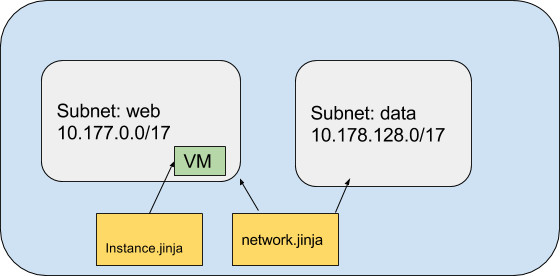
To understand how things fit together, let’s look at the set of files that are used to create a simple network with two subnets and a single deployed instance.

The configuration consists of three files:

net-config.yaml – configuration file
network.jinja – template file
instance.jinja – template file

You can use template files as logical units that break down the configuration into smaller and reusable parts. Templates can then be composed into a larger deployment. In this example, network configuration and instance deployment have been broken out into their own templates.

Understanding templates
Templates provide the following benefits and functionality:

Composability, making it easier to manage, maintain and reuse the definitions of the cloud resources declared in the templates. In some cases you may not want to recreate the end-to-end configuration as defined in the configuration file. In that case, you can just reuse one or more templates to help ensure consistency in the way in which you create resources.
Templates written in your choice of Python or Jinja2. Jinja2 is a simpler but less powerful templating language than Python. It uses the same syntax as YAML but also allows the use of conditionals and loops. Python templates are more powerful and allow you to programmatically generate the contents of your templates.
Template variables – an easy way to reuse templates by allowing you to declare the value to be passed to the template in the configuration file. This means that you can change a specific value for each configuration without having to update the template. For example, you may wish to deploy your test instances in a different zone to your production instances. In that case, simply declare within the template a variable that inherits the zone value from the master configuration file.
Environment variables, which also help you reuse templates across different projects and deployments. Examples of an environment variable include things like the Project ID or deployment name, rather than resources you want to deploy.

Here’s how to understand the distinction between the template and environment variables. Imagine you have two projects where you wish to deploy identical instances, but to different zones. In this case, name your instances based on the Project ID and Deployment name found from the environment variables, and set the zone through a template variable.

A Sample Deployment Manager configuration
For this example, we’ve decided to keep things simple and use templates written in Jinja2.

The network file
This file creates a network and its subnets whose name and range are passed through from the variable declaration in net-config.yaml, the calling configuration file.

The “for” subnet loop repeats until it has read all the values in the subnets properties. The config file below declares two subnets with the following values:

Subnet name

IP range

web

10.177.0.0/17

data

10.178.128.0/17

The deployment will be deployed into the us-central1 region. You can easily change this by changing the value of the “region” property in the configuration file without having to modify the network template itself.

The instance file
The instance file, in this case “instance.jinja,” defines the template for an instance whose machine type, zone and subnet are defined in the top level configuration file’s property values.

The configuration file
This file, called net-config.yaml, is the main configuration file that marshals the templates that we defined above to create a network with a single VM.

To include templates as part of your configuration, use the imports property in the configuration file that calls the template (going forward, the master configuration file). In our example the master configuration file is called net-config.yaml and imports two templates at lines 15 – 17:

The resource network is defined by the imported template network.jinja.
The resource web-instance is defined by the imported template instance.jinja.

Template variables are declared that are passed to each template. In our example, lines 19 – 27 define the network values that are passed through to the network.ninja template.

Lines 28 to 33 define the instance values.

To deploy a configuration, pass the configuration file to Deployment Manager via the gcloud command or the API. Using gcloud command, type the following command:

$ gcloud deployment-manager deployments create net –configuration net-config.yaml

You’ll see a message indicating that the deployment has been successful

You can see the deployment from Cloud Console.

Note that the instance is named after the deployment specified in instance.jinja.

The value for the variable “deployment” was passed in via the gcloud command “create net” where “net” is the name of the deployment

You can explore the configuration by looking at the network and Compute Engine menus:

You can delete a deployment from Cloud Console by clicking the delete button or with the following gcloud command:

$ gcloud deployment-manager deployments delete net

You’ll be prompted for verification that you want to proceed.

Next steps
Once you understand the basics of Deployment Manager, there’s a lot more you can do. You can take the example code snippets that we walked through here and build more complicated scenarios, for example, implementing a VPN that connects back to your on premises environment. There are also many Deployment Manager example configurations on Github.

Then, go ahead and start thinking about advanced Deployment Manager features such as template modules and schemas. And be sure to let us know how it goes.

Quelle: Google Cloud Platform
Power up your Google Compute Engine VMs with Intel’s next generation, Custom Cloud Xeon Processor

Posted by Hanan Youssef, Product Manager, Google Cloud Platform

Google Cloud Platform’s focus on infrastructure excellence allows us to provide great price-performance and access to the latest hardware innovations. Working closely with hardware vendors, we help guide new advancements in data center technology and the speed at which Google Cloud Platform (GCP) customers can use them.

Yesterday, Google Cloud announced a strategic alliance with Intel that builds on our long-standing relationship developing data center technology. Today, we’re excited to announce that Google Compute Engine will support Intel’s latest Custom Cloud solution based on the next-generation Xeon Processor (codenamed Skylake) in early 2017.

The upcoming Xeon processor is an excellent choice for graphics rendering, simulations and any CPU intensive workload. At launch, Compute Engine customers will be able to utilize the processor’s AVX-512 extensions to optimize their enterprise-class and HPC workloads. We’ll also add support for additional Skylake extensions over time.

You’ll be able to use the new processor with Compute Engine’s standard, highmem, highcpu and custom machine types. We also plan to continue to introduce bigger and better VM instance types that offer more vCPUs and RAM for compute- and memory-intensive workloads.

If you’d like to be notified of upcoming Skylake beta testing programs, please fill out this form.

Quelle: Google Cloud Platform

Bringing cloud-based rendering to the animation industry with ZYNC Render

Posted by Todd Prives, Product Manager

Google Cloud continues its push into media and entertainment since completing the acquisition of online video platform Anvato and a collaboration with Autodesk at NAB earlier this year. Media use cases like multi-screen video transcoding, livestreaming to global audiences and 3D rendering power demand from customers in every industry where video and creative content is used, from advertising to education and beyond.

Today we’re announcing the release of an expansion of ZYNC Render to support two new host platforms: SideFX Houdini and Maxon Cinema 4D. Both integrations will open the cost and productivity benefits for animators to leverage the power of Google Cloud Platform (GCP) to bring their projects to life, bringing massive scalability and compute access to the animation industry.

ZYNC is a turnkey rendering solution for boutique to mid-size studios that allows artists to focus on content creation. It does this through plugins to popular modeling and animation that software artists already use, offering one-stop access to powerful compute, storage and software licenses on GCP.

Users of Houdini, a leading package for complex 3D effects, can now utilize up to 32,000 cores on GCP for their rendering projects. To purchase a traditional render farm of this size is often well beyond the resources of most small to mid-size studios. Instead, artists can render on-demand, paying on a per-minute basis with the full economic benefits of GCP.

The Maxon Cinema 4D integration, a popular package for creating motion graphics, marks the first time Maxon has enabled its product through a cloud rendering service. As artists create more complicated scenes for commercial work and feature films, on-demand, scalable cloud rendering has emerged as a critical tool for studios trying to meet tight deadlines.

The media team at Google Cloud is excited to bring cloud-based rendering to the animation industry. We continue to be driven by empowering creative professionals with world-class infrastructure, giving even the smallest studio equal resources to rival the largest production houses.
Quelle: Google Cloud Platform

Deploying JFrog Artifactory SaaS on Google Cloud Platform

Posted by Doron Meirfeld, Head of DevOps at JFrog and Mansirman Singh, Solutions Engineer at JFrog

Editor’s Note: Today we hear from our partner JFrog, which recently refactored its Artifactory SaaS offering onto Google Cloud Platform (GCP), making it possible for joint JFrog and GCP customers to co-locate their development and production environments. Read on for more details about how JFrog architected and optimized the service to run on GCP.

JFrog Artifactory SaaS is a universal artifact repository hosted in the cloud. Our customers use it as the one-stop-binary-shop for their Docker registry, and repositories for Maven, npm, PyPi, Nuget and more. It offers freedom of choice in several dimensions supporting all major package formats, CI servers and build tools. We recognized the need to add Google Cloud Platform (GCP) to offer more choice, and support organizations already using GCP so they could co-locate all their cloud services. We set up Artifactory SaaS hosted on GCP using Google Cloud Storage as its massively scalable object store.

JFrog Artifactory SaaS deployment architecture
While setting up an enterprise-grade cloud service can get complicated, GCP offers an extensive range of services to make it easier. The architecture we developed is constructed as four layers based on GCP services, mainly Google Compute Engine and Cloud Storage. The four layers are:

Network Load Balancers, balance requests coming from the outside world into the front-end web Nginx stacks
Web servers based on stacked Nginx servers are responsible for internal application load balancing and proxying requests
Artifactory application servers
Data and Metadata Management using Google Cloud SQL and Cloud Storage. Cloud SQL manages the Artifactory internal database fundamental to the product’s checksum-based storage, and Cloud Storage is the application’s massively scalable object store, where all the binary artifacts are actually hosted.

Onboarding and Provisioning
To onboard new customers quickly and easily, we developed a scripted provisioning service. As soon as you register for a free trial, the JFrog Store triggers the provisioning mechanism to automatically set up and configure all layers in the service architecture, helping you get up and running virtually instantly. This structured and efficient onboarding mechanism made it easier for us to adapt our internal provisioning solution by simply swapping out API calls and replacing them with relevant GCP API calls such as those in the Compute Engine and Cloud Storage services.

This structured and efficient onboarding process made it easier for us to adopt GCP as a new additional underlying platform for the service.

The four tenets of an enterprise-grade service
In designing our setup, we wanted to ensure it would meet the requirements of any enterprise:

Scalability
Every layer in the architecture can be quickly scaled by our provisioning mechanism to meet any load requirements. Whether adding Compute Engines to the network or web service layers, or adding Artifactory instances, any element can be scaled up on demand without incurring any downtime to the system, and storage scales automatically as needed.

High availability
Our years of experience with our Artifactory SaaS taught us that one of the most critical issues that enterprises are concerned about when considering a cloud service is availability. Since an artifact repository is a vital resource for a development organization, any downtime can quickly translate to dollars lost. Our architecture takes availability to the extreme with redundancy implemented at every level, resulting in a setup with no single point-of-failure. The whole system is redundantly deployed on multiple distinct zones, so even if there is a general failure in one zone, the system will failover to another zone and continue to provide service to customers. As demand increases for JFrog Artifactory SaaS on GCP, we have complete flexibility to quickly set up redundant installations in additional zones as needed and on-demand.

Disaster recovery capabilities
To support disaster recovery, we utilize the built-in capability for multi-region storage on Cloud Storage and replicate Artifactory’s Cloud SQL database that contains both application and customer data. This allows us to failover to a recovery region in case of an outage in the main active region with no noticeable impact to users.

Security
The system maintains a clear separation at every level for both customers on a dedicated Artifactory SaaS installation and those on multi-tenanted installations. Dedicated customer installations use separate virtual devices at each layer of the architecture for maximum security. For customers in a multi-tenant environment, our provisioning mechanism automatically creates clearly separated folders, Artifactory servers and web server configurations as well as a dedicated filestore in Cloud Storage buckets.

Lessons learned
While JFrog Artifactory SaaS was already a mature and robust service, we learned a few lessons while migrating the service to GCP.

Tweak to peak
While a service may run on top of different infrastructures, each cloud provider has its nuances. To optimize JFrog Artifactory SaaS on GCP, we focused on tweaking resource allocation such as number of threads and more in each layer to get optimal performance.

Offload to buckets
Working with Cloud Storage buckets made it much easier for us to manage the service than when using traditional storage solutions such as NFS. Things like monitoring folder sizes and storage capacity was a non-issue since these functions are provided by Cloud Storage buckets. On the whole, our service got “lighter.”

Setting up JFrog Artifactory SaaS on top of GCP was a great decision for us. Our past experience with Artifactory SaaS helped us in migrating and modifying our cloud service to a new platform while maintaining the same high quality of service. As a leader in binary artifact management, we take “universality” as a guiding principle, and believe that hosting our service on GCP is a great way to serve our customers. We’ll continue to grow with Google Cloud as more services are added to enhance scalability, availability and reliability.

Open source developer? Get a free ride
JFrog’s tools are made by developers for developers. We are part of the OSS community and strive to provide it with the best vehicle to ride in. Together with the Google Cloud team, JFrog is happy to sponsor repositories free of charge (including Artifactory SaaS on top of a JFrog sponsored GCP infrastructure) for open source projects. Browse to the registration form and feel free to submit your request.

Read more about JFrog Artifactory on GCP. And may the frog be with you!
Quelle: Google Cloud Platform