Centrally manage all your Google Cloud resources with Cloud Resource Manager

Google Cloud Platform (GCP) customers need an easy way to centrally manage and control GCP resources, projects and billing accounts that belong to their organization. As companies grow, it becomes progressively difficult to keep track of an ever-increasing number of projects, created by multiple users, with different access control policies and linked to a variety of billing instruments. Google Cloud Resource Manager allows you to group resource containers under the Organization resource, providing full visibility, centralized ownership and unified management of your company’s assets on GCP.

The Organization resource is now automatically assigned to all GCP users who have G Suite accounts, without any additional steps on their part. All you need to do is create a project within your company’s domain to unlock the Organization resource and all its benefits!

Since it was introduced in October 2016, hundreds of customers have successfully deployed Cloud Resource Manager’s Organization resource, and have provided positive feedback.

“At Qubit, we love the flexibility of GCP resource containers including Organizations and Projects. We use the Organization resource to maintain centralized visibility of our projects and GCP IAM policies to ensure consistent access controls throughout the company. This gives our developers the capabilities they need to put security at the forefront throughout our migration to the cloud.” — Laurie Clark-Michalek, Infrastructure Engineer at Qubit.

Understanding the Cloud Resource Manager Organization resource
The Cloud Resource Manager Organization resource is the root of the GCP resource hierarchy and is a critical component for all enterprise use cases, from social media to financial services, from gaming to e-commerce, to name a few. Here are a few benefits offered by the Organization resource:

Tie ownership of GCP projects to your company, so they remain available when a user leaves the organization.
Allow GCP admins to define IAM policies that apply horizontally across the entire organization.
Provide central visibility and control over billing for effective cost allocation and reporting.
Enable new policies and features for improved security.

The diagram below illustrates the GCP resource hierarchy and its link with the G Suite account.

G Suite, our set of intelligent productivity apps, is currently a prerequisite to access the Cloud Resource Manager Organization resource in GCP. It represents your company by providing ownership, lifecycle control, identities and a recovery mechanism. If you don’t already have a G Suite account, you can sign up to obtain one here. (You can request a GCP account that does not require G Suite to use the Cloud Resource Manager Organization resource. For more information, contact your sales representative.)

Getting started with the Cloud Resource Manager Organization resource

Unlocking the benefits of the Cloud Resource Manager Organization resource is easy; it’s automatically provisioned for your organization the first time a GCP user in your domain creates a GCP project or billing account. The Organization resource display name is automatically synchronized with your G Suite organization name and is visible in the Cloud Console UI picker, as shown in the picture below. The Organization resource is also accessible via gcloud and the Cloud Resource Manager API.

Because of the ownership and lifecycle implications explained above, the G Suite super admin is granted full control over GCP by default. Usually, different departments in an organization manage G Suite and GCP. Thus, the first and most important step for the G Suite super admin overseeing a GCP account is to identify and assign the IAM Organization Admin role to the relevant users in their domain. Once assigned, the Organization Admins can manage IAM policies, project ownership and billing centrally, via Cloud Console, gcloud or the Cloud Resource Manager API.

All new GCP projects and billing accounts will belong to the Cloud Resource Manager Organization resource by default, and it’s easy to migrate existing GCP Projects there too. Existing projects that have not migrated under the Organization resource are visible under the “No Organization” hierarchy.

How to manage your Cloud Resource Manager Organization resource with gcloud

The following script summarizes the steps to start using the Cloud Resource Manager Organization resource.

# Query your Organization ID
> gcloud organizations list
DISPLAY_NAME ID DIRECTORY_CUSTOMER_ID
MyOrganization 123456789 C03ryezon

# Access Organization details
> gcloud organizations describe [ORGANIZATION_ID]
creationTime: ‘2016-11-15T04:42:33.042Z’
displayName: MyOrganization
lifecycleState: ACTIVEname: organizations/123456789
owner: directoryCustomerId: C03ryezon

# How to assign the Organization Admin role
# Must have Organization Admin or Super Admin permissions
> gcloud organizations add-iam-policy-binding [ORGANIZATION_ID]
–member=[MEMBER_ID] –roleroles/resourcemanager.organizationAdmin

# How to migrate an existing project into the Organization
> gcloud alpha projects move [PROJECT_ID] –organization [ORGANIZATION_ID]

# How to list all projects in the Organization
> gcloud projects list –filter ‘parent.id=[ORGANIZATION_ID] AND
parent.type=organization’

What’s next

The Cloud Resource Manager Organization resource is the root of the GCP hierarchy and is key to centralized control, management and improving security. By assigning the CRM Organization resource to all G Suite users, we’re setting the stage for more innovation. Stay tuned for new capabilities that rely on the Cloud Resource Manager Organization resource as they become available in 2017. And for a deep dive into the Cloud Resource Manager and the latest in GCP security, join us at a security bootcamp at Next ’17 in San Francisco this March.
Quelle: Google Cloud Platform

Solution guide: Creating self-service IT environments with CloudBolt

By Peter-Mark Verwoerd, Cloud Solutions Architect

IT organizations want to realize the cost and speed benefits of cloud, but can’t afford to throw away years of investment in tools, talent and governance processes they’ve built on-prem. Hybrid models of application management have emerged as a way to get the best of both worlds.

Development and test (dev/test) environments help teams create different environments to support the development, testing, staging and production of enterprise applications. Working with CloudBolt Software, we’ve prepared a full tutorial guide that describes how to quickly provision these environments in a self-service capacity, while maintaining full control over governance and policies required by enterprise IT.

CloudBolt isn’t just limited to dev/test workloads, but anything your team runs on VMs. As a cloud management platform that integrates your on-prem virtualization and private cloud resources with the public cloud, CloudBolt serves as a bridge between your existing infrastructure and Google Cloud Platform (GCP). Developers within your organization can provision the resources they need through an intuitive self-service portal, while IT maintains full control over how these provisioned environments are configured, helping them reap the cost and agility benefits of GCP using the development tools and processes they’ve built up over the years. It’s also an elegant way to rein in VM sprawl, helping organizations manage the ad-hoc environments that spring up with new projects. CloudBolt even provides a way to automatically scan and discover VMs in both on-prem and cloud environments.

Teams can get started immediately with this self-service tutorial. Or join us for our upcoming webinar featuring CloudBolt’s CTO Bernard Sanders and Google’s Product Management lead for Developer Tools on January 26th. Don’t hesitate to reach out to us to explore which enterprise workloads make the most sense for your cloud initiatives.
Quelle: Google Cloud Platform

Google Cloud Audit Logging now available across the GCP stack

By Joe Corkery, Product Manager

Google Cloud Audit Logging helps you to determine who did what, where and when on Google Cloud Platform (GCP). This fall, Cloud Audit Logging became generally available for a number of products. Today, we’re significantly expanding the set of products integrated with Cloud Audit Logging:
Google Compute Engine
Google Container Engine
Google Cloud Dataproc
Google Cloud Deployment Manager
Google Cloud DNS
Google Cloud Key Management Service (KMS)
Google Cloud Storage
Google Cloud SQL
The above integrations are all currently in beta.

We’re also pleased to announce that audit logging for Google Cloud Dataflow, Stackdriver Debugger and Stackdriver Logging is now generally available.

Cloud Audit Logging provides log streams for each integrated product. The primary log stream is the admin activity log that contains entries for actions that modify the service, individual resources or associated metadata. Some services also generate a data access log that contains entries for actions that read metadata as well as API calls that access or modify user-provided data managed by the service. Right now only Google BigQuery generates a data access log, but that will change soon.

Interacting with audit logs in Cloud ConsoleYou can see a high-level overview of all your audit logs on the Cloud Console Activity page. Click on any entry to display a detailed view of that event, as shown below.

By default, data access logs are not displayed in this feed. To enable them from the Filter configuration panel, select the “Data Access” field under Categories. (Please note, you also need to have the Private Logs Viewer IAM permission in order to see data access logs). You can also filter the results displayed in the feed by user, resource type and date/time.

Interacting with audit logs in StackdriverYou can also interact with the audit logs just like any other log in the Stackdriver Logs Viewer. With Logs Viewer, you can filter or perform free text search on the logs, as well as select logs by resource type and log name (“activity” for the admin activity logs and “data_access” for the data access logs).

Here are some log entries in their JSON format, with a few important fields highlighted.
In addition to viewing your logs, you can also export them to Cloud Storage for long-term archival, to BigQuery for analysis, and/or Google Cloud Pub/Sub for integration with other tools. Check out this tutorial on how to export your BigQuery audit logs back into BigQuery to analyze your BigQuery spending over a specified period of time.
“Google Cloud Audit Logs couldn’t be simpler to use; exported to BigQuery it provides us with a powerful way to monitor all our applications from one place.” — Darren Cibis, Shine SolutionsPartner integrationsWe understand that there are many tools for log analysis out there. For that reason, we’ve partnered with companies like Splunk, Netskope, and Tenable Network Security. If you don’t see your preferred provider on our partners page, let us know and we can try to make it happen.

Alerting using Stackdriver logs-based metricsStackdriver Logging provides the ability to create logs-based metrics that can be monitored and used to trigger Stackdriver alerting policies. Here’s an example of how to set up your metrics and policies to generate an alert every time an IAM policy is changed.

The first step is to go to the Logs Viewer and create a filter that describes the logs for which you want to be alerted. Be sure that the scope of the filter is set correctly to search the logs corresponding to the resource in which you are interested. In this case, let’s generate an alert whenever a call to SetIamPolicy is made.

Once you’re satisfied that the filter captures the correct events, create a logs-based metric by clicking on the “Create Metric” option at the top of the screen.

Now, choose a name and description for the metric and click “Create Metric.” You should then receive a confirmation that the metric was saved.
Next, select “Logs-based Metrics” from the side panel. You should see your new metric listed there under “User Defined Metrics.” Click on the dots to the right of your metric and choose “Create alert from metric.”

Now, create a condition to trigger an alert if any log entries match the previously specified filter. To do that, set the threshold to “above 0″ in order to catch this occurrence. Logs-based metrics count the number of entries seen per minute. With that in mind, set the duration to one minute as the duration specifies how long this per-minute rate needs to be sustained in order to trigger an alert. For example, if the duration were set to five minutes, there would have to be at least one alert per minute for a five-minute period in order to trigger the alert.

Finally, choose “Save Condition” and specify the desired notification mechanisms (e.g., email, SMS, PagerDuty, etc.). You can test the alerting policy by giving yourself a new permission via the IAM console.

Responding to audit logs using Cloud Functions
Cloud Functions is a lightweight, event-based, asynchronous compute solution that allows you to execute small, single-purpose functions in response to events such as specific log entries. Cloud functions are written in JavaScript and execute in a standard Node.js environment. Cloud functions can be triggered by events from Cloud Storage or Cloud Pub/Sub. In this case, we’ll trigger cloud functions when logs are exported to a Cloud Pub/Sub topic. Cloud Functions is currently in alpha, please sign up to request enablement for your project.

Let’s look at firewall rules as an example. Whenever a firewall rule is created, modified or deleted, a Compute Engine audit log entry is written. The firewall configuration information is captured in the request field of the audit log entry. The following function inspects the configuration of a new firewall rule and deletes it if that configuration is of concern (in this case, if it opens up any port besides port 22). This function could easily be extended to look at update operations as well.

Copyright 2017 Google Inc.

Licensed under the Apache License, Version 2.0 (the “License”);
you may not use this file except in compliance with the License.
You may obtain a copy of the License at

http://www.apache.org/licenses/LICENSE-2.0

Unless required by applicable law or agreed to in writing, software
distributed under the License is distributed on an “AS IS” BASIS,
WITHOUT WARRANTIES OR CONDITIONS OF ANY KIND, either express or implied.
See the License for the specific language governing permissions and
limitations under the License.

‘use strict';

exports.processFirewallAuditLogs = (event) => {
const msg = JSON.parse(Buffer.from(event.data.data, ‘base64′).toString());
const logEntry = msg.protoPayload;
if (logEntry &&
logEntry.request &&
logEntry.methodName === ‘v1.compute.firewalls.insert’) {
let cancelFirewall = false;
const allowed = logEntry.request.alloweds;
if (allowed) {
for (let key in allowed) {
const entry = allowed[key];
for (let port in entry.ports) {
if (parseInt(entry.ports[port], 10) !== 22) {
cancelFirewall = true;
break;
}
}
}
}
if (cancelFirewall) {
const resourceArray = logEntry.resourceName.split(‘/’);
const resourceName = resourceArray[resourceArray.length – 1];
const compute = require(‘@google-cloud/compute’)();
return compute.firewall(resourceName).delete();
}
}
return true;
};
As the function above uses the gcloud Node.js module, be sure to include that as a dependency in the package.json file that accompanies the index.js file specifying your source code:
{
“name” : “audit-log-monitoring”,
“version” : “1.0.0”,
“description” : “monitor my audit logs”,
“main” : “index.js”,
“dependencies” : {
“@google-cloud/compute” : “^0.4.1″
}
}
In the image below, you can see what happened to a new firewall rule (“bad-idea-firewall”) that did not meet the acceptable criteria as determined by the cloud function. It’s important to note, that this cloud function is not applied retroactively, so existing firewall rules that allow traffic on ports 80 and 443 are preserved.

This is just one example of many showing how you can leverage the power of Cloud Functions to respond to changes on GCP.

Conclusion
Cloud Audit Logging offers enterprises a simple way to track activity in applications built on top of GCP, and integrate logs with monitoring and logs analysis tools. To learn more and get trained on audit logging as well as the latest in GCP security, sign up for a Google Cloud Next ‘17 technical bootcamp in San Francisco this March.
Quelle: Google Cloud Platform

Explore Stackdriver Monitoring data with Cloud Datalab

By Mary Koes, Product Manager

Google Stackdriver Monitoring allows users to create charts and alerts on monitoring metrics gathered across their Google Cloud Platform (GCP) and Amazon Web Services environments. Stackdriver users who want to drill deeper into their monitoring data can use Cloud Datalab, an easy-to-use tool for large-scale data exploration, analysis and visualization. Based on Jupyter (formerly IPython), Cloud Datalab allows you access to a thriving ecosystem, including Google BigQuery and Google Cloud Storage, plus many statistics and machine learning packages, including TensorFlow. We include notebooks of detailed tutorials to help you get started with your Stackdriver data, and the vibrant Jupyter community is a great source for more published notebooks and tips.

Libraries from the Jupyter community open up a variety of visualization options. For example, a heatmap is a compact representation of data, often used to visually highlight patterns. With a few lines of code included in the sample notebook, Getting Started.ipynb, we can visualize utilization across different instances to look for opportunities to reduce spend.

The Datalab environment also makes it possible to do advanced analytics. For example, in the included notebook, Time-shifted data.ipynb, we walk through time-shifting the data by day to compare today vs. historical data. This powerful analysis allows you to identify anomalies in your system metrics at a glance, by visualizing how they change from their historical values.

Compare today’s CPU utilization to the weekly average by zone

Stackdriver metrics, viewed with Cloud Datalab

Get started

The first step is to sign up for a 30-day free trial of Stackdriver Premium, which can monitor workloads on GCP and AWS. It takes two minutes to set up. Next, set up Cloud Datalab, which can be easily configured to run on Docker with this Quickstart. Sample code and notebooks for exploring trends in your data, analyzing group performance and heat map visualizations are included in the Datalab container.

Let us know what you think, and we’ll do our best to address your feedback and make analysis of your monitoring data even simpler for you.

Quelle: Google Cloud Platform

How we secure our infrastructure: a white paper

By Niels Provos, Distinguished Engineer, Google Security

Trust in the cloud is paramount to any business who is thinking about using it to power their critical applications, deliver new customer experiences and house their most sensitive data. Today, we’re issuing a white paper by our security team that details how security is designed into our infrastructure from the ground up.

Google Cloud’s global infrastructure provides security through the entire information processing lifecycle.This infrastructure provides secure deployment of services, secure storage of data with end-user privacy safeguards, secure communications between services, secure and private communication with customers over the internet and safe operation by administrators.

Google uses this infrastructure to build its internet services, including both consumer services such as Search, Gmail, and Photos, and our Google Cloud enterprise services.

The paper describes the security of this infrastructure in progressive layers starting from the physical security of our data centers, continuing on to how the hardware and software that underlie the infrastructure are secured, and finally, describing the technical constraints and processes in place to support operational security.

In a final section, the paper highlights how our public cloud infrastructure, Google Cloud Platform (GCP), benefits from the security of the underlying infrastructure. We take Google Compute Engine as an example service and describe in detail the service-specific security improvements that we build on top of the infrastructure.

For more information please take a look at the paper.

https://cloud.google.com/security/security-design

We’re also pleased to announce the addition of regular, security-focused content on this blog under the Security & Identity label, which includes posts on topics like virtual machine security, identity and access management, platform integrity and the practical applications of encryption. Watch this space!
Quelle: Google Cloud Platform

Managing encryption keys in the cloud: introducing Google Cloud Key Management Service

By Maya Kaczorowski, Product Manager

Google has long supported efforts to encrypt customer data on the internet, including using HTTPS everywhere. In the enterprise space, we’re pleased to broaden the continuum of encryption options available on Google Cloud Platform (GCP) with Cloud Key Management Service (KMS), now in beta in select countries.

“With the launch of Cloud KMS, Google has addressed the full continuum of encryption and key management use cases for GCP customers. Cloud KMS fills a gap by providing customers with the ability to manage their encryption keys in a multi-tenant cloud service, without the need to maintain an on-premise key management system or HSM.” — Garrett Bekker, Principal Security Analyst at 451 Research
Customers in regulated industries, such as financial services and healthcare, value hosted key management services for the ease of use and peace of mind that they provide. Cloud KMS offers a cloud-based root of trust that you can monitor and audit. As an alternative to custom-built or ad-hoc key management systems, which are difficult to scale and maintain, Cloud KMS makes it easy to keep your keys safe.

With Cloud KMS, you can manage symmetric encryption keys in a cloud-hosted solution, whether they’re used to protect data stored in GCP or another environment. You can create, use, rotate and destroy keys via our Cloud KMS API, including as part of a secret management or envelope encryption solution. It’s directly integrated with Cloud Identity Access Management and Cloud Audit Logging for greater control over your keys.

Forward thinking cloud companies must lead by example and follow best practices. For example, Ravelin, a fraud detection provider, encrypts small secrets, such as configurations and authentication credentials, needed as part of customer transactions, and uses separate keys to ensure that each customer’s data is cryptographically isolated. Ravelin also encrypts secrets used for internal systems and automated processes.

“Google is transparent about how it does its encryption by default, and Cloud KMS makes it easy to implement best practices. Features like automatic key rotation let us rotate our keys frequently with zero overhead and stay in line with our internal compliance demands. Cloud KMS’ low latency allows us to use it for frequently performed operations. This allows us to expand the scope of the data we choose to encrypt from sensitive data, to operational data that does not need to be indexed.” — Leonard Austin, CTO at Ravelin
At launch, Cloud KMS uses the Advanced Encryption Standard (AES), in Galois/Counter Mode (GCM), the same encryption library used internally at Google to encrypt data in Google Cloud Storage. This AES GCM is implemented in the BoringSSL library that Google maintains, and continually checks for weaknesses using several tools, including tools similar to the recently open-sourced cryptographic test tool Project Wycheproof.

The GCP encryption continuum

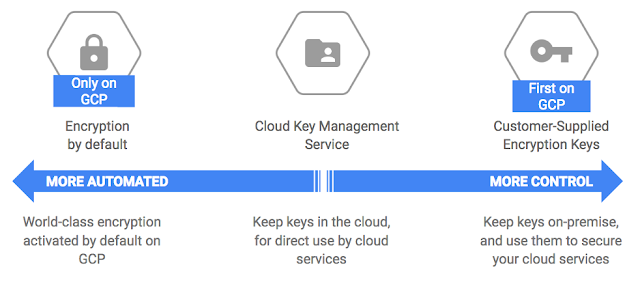
With the introduction of Cloud KMS, GCP now offers a full range of encryption key management options, allowing you to choose the right security solution for your use-case based on the nature of your data (e.g., is there financial, personal health, private individual, military, government, confidential or sensitive data?) and whether you want to store keys in the cloud or on-premise.

By default, Cloud Storage manages server-side encryption keys on your behalf. If you prefer to manage your cloud-based keys yourself, select “Cloud Key Management Service,” and if you’d like to manage keys on-premise, select “Customer Supplied Encryption Keys” (for Google Cloud Storage and for Google Compute Engine). See the diagram below for a use-case decision tree:

Your data is yours
While we’re on the topic of data protection and data privacy, it might be useful to point out how we think about GCP customer data. Google will not access or use GCP customer data, except as necessary to provide them the GCP services. You can learn more about our encryption policy by reading our whitepaper, “Encryption at Rest in Google Cloud Platform.”

Safe computing!
Quelle: Google Cloud Platform

Partnering on open source: Google and Pivotal engineers talk Cloud Foundry on GCP

By Evan Brown, Senior Software Engineer

Today we’re sharing the first episode of our Pivotal Cloud Foundry on Google Cloud Platform (GCP) mini video series, featuring engineers from the Pivotal and Google Cloud Graphite teams who’ve been working hard to make this open-source platform run great on GCP. Google’s Cloud Graphite team works exclusively on open source projects in collaboration with project maintainers and customers. We’ll have more videos and blog posts this year, just like this one, highlighting that work.

In 2016 we began working with Pivotal, and announced back in October that customers can deploy and operate Pivotal Cloud Foundry on GCP. Thanks to this partnership, companies in industries like manufacturing, healthcare and retail can accelerate their digital transformation and run cloud-native applications on the same kind of infrastructure that powers Gmail, YouTube, Google Maps and more.

“The chemistry between the two engineering teams was remarkable as if we had been working together for years. The Cloud Foundry community is already benefiting from this work. It’s simple to deploy Cloud Foundry atop Google’s infrastructure, and developers can easily extend their apps with Google’s analytics and machine learning services. We look forward to working with Google in the future to advance our shared vision for multi-cloud choice and flexibility.” — Joshua McKenty, Head of Platform Ecosystem, Pivotal
Specifically, together with Pivotal, we have:

Brought BOSH to GCP, adding support for Google’s global networking and load balancer, quick VM boot times, live migration and preemptible VM pricing
Built a service broker to let Cloud Foundry developers easily use Google services such as Google BigQuery, Google Cloud SQL and Google Cloud Machine Learning in their apps
Developed the stackdriver-tools BOSH release to give operators and developers access to health and diagnostics information in Stackdriver Logging and Stackdriver Monitoring

In the first episode of the video series, Dan Wendorf of Pivotal and I talk about deploying BOSH and Cloud Foundry to GCP, using the tutorial you can follow along with on GitHub.

Join us on YouTube to watch other episodes that will cover topics like setting up and consuming Google services with our Service Broker, or how to monitor and debug Cloud Foundry applications with Stackdriver. Just follow Google Cloud on YouTube, or @GoogleCloud on Twitter to find out when new videos are published. And stay tuned for more blog posts and videos about the work we’re doing with Puppet, Chef, HashiCorp, Red Hat, SaltStack and others.
Quelle: Google Cloud Platform

Security talks at Google during the RSA Conference

By Neal Mueller, Product Marketing Lead

If you work in cloud security, you might be planning a trip to San Francisco next month for the RSA Conference. If so, please stop by our San Francisco office for a series of 20 security talks. Our office is a 12-minute walk up Howard Street from Moscone Center where the RSA Conference is held.

Google Cloud takes security seriously, and we’re excited to share more about some of the interesting and difficult problems we’re working on day-to-day. In our security talks, you’ll hear about our efforts in cloud identity, vulnerability trends from Project Zero, DDoS mitigation, container security and more!

See below for the full agenda of exciting security talks we’ll be hosting. To learn more and RSVP, visit https://cloudplatformonline.com/rsa

We’re also excited that Googlers will be giving talks at the RSA conference itself:

Android Security: Delivering Secure, Client-Side Technology to Billions of Users
Adrian Ludwig
Tuesday, February 14, 2017 | 1:15 PM – 2:00 PM and 2:30 PM – 3:15 PM

What is Needed in The Next Generation Cloud Trusted Platform?
David Cross
Tuesday, February 14, 2017 | 2:30 PM – 3:15 PM

How Google Protects Its Corporate Security Perimeter without Firewalls
Heather Adkins and Rory Ward
Tuesday, February 14, 2017, 3:45 PM – 4:30 PM

Targeted attacks against corporate inboxes–Gmail perspective
Elie Bursztein and Mark Risher
Thursday, February 16, 2017 | 2:45 PM – 3:30 PM

Hope to see you at RSA!
Quelle: Google Cloud Platform

Google Cloud Platform for data center professionals: what you need to know

Posted by Peter-Mark Verwoerd, Solutions Architect

At Google Cloud, we love seeing customers migrate to our platform. Companies move to us for a variety of reasons, from low costs to our machine learning offerings. Some of our customers, like Spotify and Evernote, have described the various reasons that motivated them to migrate to Google Cloud.

However, we recognize that a migration of any size can be a challenging project, so today we’re happy to announce the first part of a new resource to help our customers as they migrate. Google Cloud Platform for Data Center Professionals is a guide for customers who are looking to move to Google Cloud Platform (GCP) and are coming from non-cloud environments. We cover the basics of running IT — Compute, Networking, Storage, and Management. We’ve tried to write this from the point of view of someone with minimal cloud experience, so we hope you find this guide a useful starting point.

This is the first part of an ongoing series. We’ll add more content over time, to help describe the differences in various aspects of running your company’s IT infrastructure.

We hope you find this useful in learning about GCP. Please tell us what you think and what else you would like to add, and be sure to follow along with our free trial when you sign up!
Quelle: Google Cloud Platform

Stackdriver Trace + Zipkin: distributed tracing and performance analysis for everyone

Posted by Morgan McLean, Product Manager for Stackdriver Trace

Editor’s Note: You can now use Zipkin tracers with Stackdriver Trace. Go here to get started.

Part of the promise of the Google Cloud Platform is that it gives developers access to the same tools and technologies that we use to run at Google-scale. As the evolution of our Dapper distributed tracing system, Stackdriver Trace is one of those tools, letting developers analyze application latency and quickly isolate the causes of poor performance. While it was initially focused on Google App Engine projects, Stackdriver Trace also supports applications running on virtual machines or containers via instrumentation libraries for Node.js, Java, and Go (Ruby and .Net support will be available soon), and also through an API. Trace is available at no charge for all projects, and our instrumentation libraries are all open source with permissive licenses.

Another popular distributed tracing system is Zipkin, which Twitter open-sourced in 2012. Zipkin provides a plethora of instrumentation libraries for capturing traces from applications, as well as a backend system for storing and presenting traces through a web interface. Zipkin is widely used; in addition to Twitter, Yelp and Salesforce are major contributors to the project, and organizations around the world use it to view and diagnose the performance of their distributed services.

Zipkin users have been asking for interoperability with Stackdriver Trace, so today we’re releasing a Zipkin server that allows Zipkin-compatible clients to send traces to Stackdriver Trace for analysis.

This will be useful for two groups of people: developers whose applications are written in a language or framework that Stackdriver Trace doesn’t officially support, and owners of applications that are currently instrumented with Zipkin who want access to Stackdriver Trace’s advanced analysis tools. We’re releasing this code open source on GitHub with a permissive license, as well as a container image for quick set-up.

As described above, the new Stackdriver Trace Zipkin Connector is a drop-in replacement for an existing Zipkin backend and continues to use the same Zipkin-compatible tracers. You no longer need to set up, manage or maintain a Zipkin backend. Alternatively, you can run the new collector on each service that’s instrumented with Zipkin tracers.

There are currently Zipkin clients available for Java, .Net, Node.js, Python, Ruby and Go, with built-in integration to a variety of popular web frameworks.

Setup Instructions
Read the Using Stackdriver with Zipkin Collector guide to configure and collect trace data from your distributed tracer. If you’re not already using a tracer client, you can find one in a list of the most popular Zipkin tracers.

FAQ
Q: What does this announcement mean if I’ve been wanting to use Stackdriver Trace but it doesn’t yet support my language?

If a Zipkin tracer supports your chosen language and framework, you can now use Stackdriver Trace by having the tracer library send its data to the Stackdriver Trace Zipkin Collector.

Q: What does this announcement mean if I currently use Zipkin?

You’re welcome to set up the Stackdriver Trace Zipkin server and use it in conjunction with or as a replacement for your existing Zipkin backend. In addition to displaying traces, Stackdriver Trace includes advanced analysis tools like Insights and Latency Reports that will work with trace data collected from Zipkin tracers. As Stackdriver Trace is hosted by Google, you’ll not need to maintain your own backend services for trace collection and display.

Latency reports are available to all Stackdriver Trace customers

Q: What are the limitations of using the Stackdriver Trace Zipkin Collector?
This release has two known limitations:

Zipkin tracers must support the correct Zipkin time and duration semantics.
Zipkin tracers and the Stackdriver Trace instrumentation libraries can’t append spans to the same traces, meaning that traces that are captured in one library won’t contain spans for services instrumented in the other type of library. For example:

In this example, requests made to the Node.js web application will be traced with the Zipkin library and sent to Stackdriver Trace. However, these traces do not contain spans generated within the API application or for the RPC calls that it makes to the Database. This is because Zipkin and Stackdriver Trace use different formats for propagating trace context between services. 

For this reason we recommend that projects wanting to use Stackdriver Trace either exclusively use Zipkin-compatible tracers along with the Zipkin Connector, or use instrumentation libraries that work natively with Stackdriver Trace (like the official Node.js, Java or Go libraries).

Q: Will this work as a full Zipkin server?

No, as the initial release only supports write operations. Let us know if you think that adding read operations would be useful, or submit a pull request through GitHub.

Q: How much does Stackdriver Trace cost?

You can use Zipkin with Stackdriver Trace at no cost.

Q: Can I use Stackdriver Trace to analyze my AWS, on-premises, or hybrid applications or is it strictly for services running on Google Cloud Platform?

Several projects already do this today! Stackdriver Trace will analyze all data submitted through its API, regardless of where the instrumented service is hosted, including traces and spans collected from the the Stackdriver Trace instrumentation libraries or through the Stackdriver Trace Zipkin Connector.

Wrapping up
We here on the Stackdriver team would like to send out a huge thank you to Adrian Cole of the Zipkin open source project. Adrian’s enthusiasm, technical assistance, design feedback and help with the release process have been invaluable. We hope to expand this collaboration with Zipkin and other open source projects in the future. A huge shout out is also due to the developers on the Stackdriver team who developed this feature.

Like the Stackdriver Trace instrumentation libraries, the Zipkin Connector has been published on GitHub under the Apache license. Feel free to file issues there or submit pull requests for proposed changes.

Quelle: Google Cloud Platform