PHP 7.1 for Google App Engine is generally available

By Brent Shaffer and Takashi Matsuo, Developer Programs Engineer, Google Cloud Platform

Earlier this year, we announced PHP 7.1 Google App Engine in beta. We PHP lovers at Google are proud to announce that PHP 7.1 is now generally available on Google App Engine, our easy-to-use platform for building, deploying, managing and automatically scaling services on Google’s infrastructure. The PHP 7.1 runtime is available for App Engine flexible environment.

Along with achieving general availability for PHP 7.1, the new PHP runtime includes a few exciting new features.

Extension enabler

The list of PHP extensions you can use with the App Engine runtime now includes any PHP extension that is stable (1.0 and above) and does not require a EULA. You can find a complete list on the PHP runtime page.

This is great news, but to make it even better you can now quickly and easily activate any of these extensions in your deployment by requiring them with Composer.

composer require “ext-gd:*” –ignore-platform-reqs

This is equivalent to adding the name of the extension, prefixed with “ext-”, to your application’s composer.json:
{
    “require”: {
        “ext-gd”: “*”
    }
}

You can still install a custom extension or a specific version of a supported extension, but this will require extending the PHP runtime.

Stackdriver Logging and Error Reporting support

Logging to Stackdriver from your PHP application is very simple. The first requirement is to install the Composer package google/cloud version 0.33 or higher.

composer require google/cloud

Now set enable_stackdriver_integration to true in the runtime_config section of app.yaml:

runtime_config:
  enable_stackdriver_integration: true

This configuration tells the PHP runtime to dispatch the batch-processing daemon to handle your logs behind the scenes. This ensures that when your application writes a log, calls to the Stackdriver API happen in another process so as not to add latency to your application.
Now you can create a PsrBatchLogger instance in your code and log to Stackdriver:

use GoogleCloudLoggingLoggingClient;
use PsrLogLogLevel;

$batchLogger = LoggingClient::psrBatchLogger(‘app’); // logName `app`

// You now have a PSR-3 compliant logger!

$batchLogger->log(LogLevel::DEBUG, ‘This is a debug log’);
$batchLogger->debug(‘This is a debug log’); // The same thing

Additionally, the enable_stackdriver_integration flag sets up an auto-prepend file for error reporting. This means uncaught exceptions and fatal errors are formatted and visible in Cloud Console Error Reporting!

throw new Exception(‘Uncaught exceptions are logged to Stackdriver!’);

$obj->thisDoesNotExist(); // Fatal errors are also logged to Stackdriver!

If you’d rather use individual Google Cloud packages, ensure you have both google/cloud-logging and google/cloud-error-reporting installed. When installing locally, use –ignore-platform-reqs or install gRPC according to the installation instructions.

composer require google/cloud-logging google/cloud-error-reporting

    “ext-grpc:*” –ignore-platform-reqs

Stackdriver Logging for Laravel
After you’ve configured the enable_stackdriver_integration, you can enable Stackdriver integration in an app based on the Laravel PHP framework by modifying bootstrap/app.php:

// Add `Use` for logging libs
use GoogleCloudLoggingLoggingClient;
use MonologHandlerPsrHandler;

// … other code

// Just before returning $app
if (isset($_SERVER[‘GAE_SERVICE’])) {
    $app->configureMonologUsing(function ($monolog) {
        $logger = LoggingClient::psrBatchLogger(‘app’);
        $handler = new PsrHandler($logger);
        $monolog->pushHandler($handler);
    });
}

return $app;

For Error Reporting, add an import and call our `exceptionHandler` in the `report` function in `app/Exceptions/Handler.php`:

use GoogleCloudErrorReportingBootstrap;

// .. other code
    public function report(Exception $exception)
    {
        if (isset($_SERVER[‘GAE_SERVICE’])) {
            Bootstrap::exceptionHandler($exception);<
        } else {
            parent::report($exception);
        }
    }

That’s it! The logs are sent to Stackdriver Logging with the logName ‘app’. Unhandled exceptions are sent to the logName ‘app-error’, and will show up in Stackdriver Error Reporting.

gRPC Support
Google’s highly performant RPC protocol gRPC is built right into the PHP runtime. This allows you to quickly get started making calls to Cloud Spanner and other gRPC-specific APIs. You can enable the extension in composer.json and download the client library:

composer require “ext-grpc:*” google/cloud-spanner –ignore-platform-reqs

Now you can make calls to Spanner in your application:

<?php
// index.php

require __DIR__ . ‘/vendor/autoload.php';

$spanner = new GoogleCloudSpannerSpannerClient();
$instance = $spanner->instance(‘YOUR_INSTANCE_ID’);
$database = $instance->database(‘YOUR_DATABASE_ID’);

# Execute a simple SQL statement.
echo $database->execute(‘SELECT “Hello Spanner” as test’);

By replacing YOUR_INSTANCE_ID and YOUR_DATABASE_ID with the proper values, your application now displays the text “Hello Spanner”!

Our commitment to PHP and open source
At Google, we’re committed to open source — and that goes for the new core PHP Docker runtime, google-cloud composer package and Google API client:

https://github.com/GoogleCloudPlatform/php-docker

https://github.com/GoogleCloudPlatform/google-cloud-php

https://github.com/google/google-api-php-client

https://github.com/GoogleCloudPlatform/wordpress-plugins

https://github.com/grpc/grpc-php

https://github.com/census-instrumentation/opencensus-php

We’re thrilled to welcome PHP developers to Google Cloud Platform, and we’re invested in making you as productive as possible. This is just the start — stay tuned to the blog and our GitHub repositories to catch the next wave of PHP support on GCP.

We can’t wait to hear from you. Feel free to reach out to us on Twitter, or request an invite to the Google Cloud Slack community and join the #PHP channel.

Quelle: Google Cloud Platform

Introducing nested virtualization for Google Compute Engine

By Scott Van Woudenberg, Product Manager, Google Compute Engine

Google Compute Engine now supports nested virtualization in beta. This feature allows you to run one or more virtual machines inside a Compute Engine Linux virtual machine — VMs inside of VMs. This leverages Intel VT-x, processor virtualization instructions, to deliver better performance than what’s possible with alternative technologies like emulation.

Nested virtualization makes it easier for enterprise users to move their on-premises, virtualized workloads to the cloud without having to import and convert VM images. Dev/test and CI/CD workloads that need to validate software in multiple environments are a good match for nested virtualization. Nested virtualization also enables more cost-effective, cloud-based disaster recovery solutions and is ideal for technical training and certification courses where students need identical environments to practice the exercises.

You can enable nested virtualization on Linux VMs of any size or shape, including predefined and custom machine types and Preemptible VMs, as long as the VM is running on an Intel’s Haswell CPU or newer. See our list of available regions and zones for the CPU platforms available in each zone. Compute Engine’s nested virtualization currently supports KVM-based hypervisors.

A number of partners participated in our nested virtualization alpha, including Scale Computing and appOrbit.

Scale Computing is a leading provider of complete hyper-converged (HC3) solutions with thousands of deployments, from SMBs to enterprises. Scale has been building a new offering, HC3 Cloud Unity, in collaboration with Google, that creates a seamless, private virtual network that connects Scale’s HC3 appliances running on-premises with virtualized HC3 appliances running on Compute Engine, and that uses our hardware-accelerated nested virtualization. Organizations can now move application workloads and data freely over HC3 Cloud Unity’s virtual LAN, combining their GCP and on-premise environments to make a single platform.

appOrbit’s application platform on Google Cloud gives end users the flexibility to make both legacy and cloud-native applications — inclusive of the data they rely on — portable to any modern infrastructure, without rewriting code, in minutes. Customers using appOrbit with Google’s nested virtualization can rapidly deploy and run a broader set of application workloads with zero modification, as well as simultaneously manage hybrid infrastructure and realize the full value of hybrid IT.

Other Compute Engine customers, like Functionize, also participated in our nested virtualization alpha and were able to deliver benefits such as improved performance and lower cost to their customers.

“This is a huge win for QA and development teams who need native mobile systems, such as Android, for testing/validating mobile apps. Using Google’s new hardware-accelerated nested virtualization, Functionize now enables QA teams to dramatically reduce costs, time-to-test, and the pain of maintaining a complex device inventory.” — Tamas Cser, Founder and CEO, Functionize

To learn more, check out the Compute Engine nested virtualization documentation. And be sure to contact us to share your feedback or if you encounter any issues.

Ready to try out nested virtualization? Sign up for a free trial today and get $300 in credits to get started.
Quelle: Google Cloud Platform

How we built a brand new bank on GCP and Cloud Spanner: Shine

By Raphael Simon, CTO and Co-Founder of Shine

[Editor’s note: Technology today lets companies of any size take on entire industries simply with an innovative business model plus digital distribution. Take Shine, a French startup whose platform helps freelancers manage their finances — and their administrative commitments. Here, Raphael Simon, Shine’s CTO and co-founder, talks about why Shine built a new bank on Google Cloud Platform, and in particular Cloud Spanner. Read on to learn how the enterprise-grade database combines the best of relational database structure and non-relational database scale with — coming soon — synchronous replication across regions and continents with a 99.999% (five nines) availability SLA.] 

More and more people are deciding to take the plunge and start a freelance career. Some of them by choice, others out of necessity. One of their biggest pain points is dealing with administrative tasks. In some countries, especially in Europe, the administrative burden of being a freelancer is similar to what a company of 10 or more people deals with. A freelancer doesn’t necessarily have the time or skills to manage all this paperwork. So we are building a new bank for freelancers from the ground up that helps automate administrative tasks associated with their business.

Shine’s banking services and financial tools make it as easy to work as a freelancer as it is to work for a larger company. We deal with administrative tasks on behalf of the freelancer so that he or she can focus on their job: finding and wowing clients.

Building our infrastructure 
As a new bank, we had the opportunity to build our infrastructure from the ground up. Designing an infrastructure and choosing a database presents tough decisions, especially in the financial services world. Financial institutions come under tremendous scrutiny to demonstrate stability and security. Even a tiny leak of banking data can have tremendous consequences both for the bank and its clients, and any service interruption can trigger a banking license to be suspended or a transaction to be declined.

At the same time, it’s vital for us to optimize our resources so we can maximize the time we spend developing user-facing features.

In our first six months, we iterated and validated a prototype app using Firebase, and secured our seed funding round (one of the largest in Europe in 2017).

Based on our positive experience with Firebase, plus the ease-of-use and attractive pricing that Google Cloud offered, we decided to build our platform on Google Cloud Platform (GCP). We were drawn to GCP because it has a simple, consistent interface that is easy to learn. We chose App Engine flexible environment with Google Cloud Endpoints for an auto-scaling microservices API. These helped us reduce the time, effort, and cost in terms of DevOps engineers, so we could invest more in developing features, while maintaining our agility. We use Cloud Identity and Access Management (Cloud IAM) to help control developer access to critical parts of the application such as customer bank account data. It was quite a relief to lean on a reliable partner like Google Cloud for this.

Database decisions 
Next came time to choose a database. Shine lives at the financial heart of our customers’ businesses and provides guidance on things like accounting and tax declaration. The app calculates the VAT for each invoice and forecasts the charges they must pay each quarter.

Due to the sensitivity of our customers’ data, the stakes are high. We pay careful attention to data integrity and availability and only a relational database with support for ACID transactions (Atomicity, Consistency, Isolation, Durability) can meet this requirement.

At the same time, we wanted to focus on the app and user experience, not on database administration or scalability issues. We’re trying to build the best possible product for our users, and administering a database has no direct value for our customers. In other words, we wanted a managed service.

Cloud Spanner combines a globally distributed relational database service with ACID transactions, industry-standard SQL semantics, horizontal scaling, and high availability. Cloud Spanner provided additional security, high-availability, and disaster recovery features out-of-the-box that would have taken months for us to implement on our own. Oh, and no need to worry about performance — Cloud Spanner is fast. Indeed, Cloud Spanner has been a real asset to the project, from the ease-of-use of creating an instance to scaling the database.

Cloud Spanner pro tips 
We began working with Cloud Spanner 6 months ago, and have learned a lot along the way. Here are some technical notes about our deployment and some best practices that may be useful to you down the road:

The first connection to Cloud Spanner takes a long time to initialize, which makes it difficult to expose an API through Cloud Functions. Instead, we used App Engine flexible environment to build our microservices API for a serverless approach that has very good performance. We use Cloud Functions for simple asynchronous scripts for background tasks that do not require an immediate answer to the client (e.g., sending an iOS notification given the user parameters) that we trigger via Cloud Pub/Sub. 
Cloud Spanner allows us to change a schema in production without downtime. We always use a NOT NULL constraint, because we generally think that using NULL leads to more errors in application code. We always use a default value when we create an entity through our APIs and we use Cloud Dataflow to set values when we change a schema (e.g., adding a field to an entity). 
With microservices, it’s generally a good practice to make sure every service has its own database to ensure data isolation between the different services. However, we adopted a slightly different strategy to optimize our use of Cloud Spanner. We have an instance on which there are three databases — one for production, one for staging and one for testing our continuous integration (CI) pipeline. Each service has one or more interleaved tables that are isolated from others services’ tables (we do not use foreign-keys between tables from different services). This way our microservices data are not tightly “coupled”. 
We created an internal query service that performs read-only queries to Cloud Spanner to generate a dashboard or do complex queries for analytics. It is the only service where we allow joins between tables across services. 
We take advantage of Cloud Spanner’s scalability, and thus don’t delete any data that could one day be useful and/or profitable. 
We store all of our business logs on Cloud Spanner, for example connection attempts to the application. We append the ‘-Logs’ suffix to them. 
When possible, we always create an interleave. 

 In short, implementing Cloud Spanner has been a good choice for Shine:

It’s saved us weeks, if not months, of coding. 
We feel we can rely on it since it’s been battle-tested by Google. 
We can focus on building a disruptive financial services product for freelancers and SMBs.

And because Cloud Spanner is fully managed and horizontally scalable, we don’t have to worry about hardware, security patches, scaling, database sharding, or the possibility of a long and risky database migration in the future. We are confident Cloud Spanner will grow with our business, particularly as we expand regionally and globally. I strongly recommend Cloud Spanner to any company looking for a complete database solution for business-critical, sensitive, and scalable data.

Shine will launch in France this fall, and later throughout Europe. We have our sights set on the United States in the future too. To learn more about Shine, or talk about GCP or Cloud Spanner, feel free to reach out to us on Twitter.

Quelle: Google Cloud Platform

Announcing Cloud IoT Core public beta

By Indranil Chakraborty, Product Manager, Google Cloud

At Google I/O, we introduced Google Cloud IoT Core, a fully managed service on Google Cloud Platform (GCP) to help securely connect and manage IoT devices at scale. Since then, many customers across industries such as transportation, oil and gas, utilities, healthcare and ride-sharing have used the service and provided us with insightful feedback.

Cloud IoT Core is now publicly available to all users in beta, and we have introduced new set of features in this release. With Cloud IoT Core, you can easily connect and centrally manage millions of globally dispersed IoT devices. When used as part of the broader Google Cloud IoT solution, you can ingest all your IoT data and connect to our state-of-the-art analytics services including Google Cloud Pub/Sub, Google Cloud Dataflow, Google Cloud Bigtable, Google BigQuery, and Google Cloud Machine Learning Engine to gain actionable insights.

Key new features 

Bring your own certificate 
Cloud IoT Core private beta users have asked for the ability to verify the ownership of device keys. In addition to asymmetric key-based authentication per individual device, users can now bring their own device key signed by their Certificate Authority (CA), and IoT Core verifies the signature of the key provided by the device with the CA certificate during the authentication process. This, for example, enables device manufacturers to provision their devices offline in bulk with their CA-issued certificate, and then register the CA certificates and the device public keys with Cloud IoT Core.

Connect existing devices with HTTP 
In addition to the standard MQTT protocol, you can now more securely connect existing IoT devices and gateways to Cloud IoT Core over HTTP to easily ingest data into GCP at scale.

Logical device representation 
Certain use cases require an IoT application to retrieve the last state and properties of an IoT device even when the device is not connected. Cloud IoT Core now maintains a logical representation of the physical IoT device, including device properties, and its last reported state. It provides APIs for your applications to retrieve and update the device properties and state even when the device is not connected.

Private beta users of Cloud IoT Core have built innovative IoT solutions in a short period of time. For example, transportation and logistics firms have used it to proactively stage the right vehicles in the right places at the right times. Utilities have enabled monitoring, analysis and prediction of consumer energy usage in real-time.

Our customers share feedback 
Smart Parking designs, develops and produces leading-edge technology that enables clients to manage parking efficiently and cost effectively. The company recently introduced the latest version of its platform that expands its scope from smart parking to smart cities. This new platform, built on GCP, leverages Cloud IoT Core to allow input from any number of distributed devices within a city. Smart Parking is now able to drive city-wide analytics and interconnected logic using powerful streams of real-time data.

“Our devices are heavily used and constantly send us a huge volume of data. By connecting these devices to Cloud IoT Core, we have a secure and reliable way to not only ingest that data but then also use it to gain valuable insights. We know exactly how our systems are performing and can push updates to devices to ensure we deliver the best products and services as cost effectively as possible.” John Heard, Group CTO, Smart Parking Limited 

Tellmeplus’ award-winning AI platform, Predictive Objects, leverages machine learning and big data for predictive models in domains like customer or asset intelligence. As such, it helps experts make faster and more accurate predictions in IoT-based applications. By integrating Predictive Objects with Cloud IoT Core, joint customers can deploy and run predictive models on GCP as well as inside devices managed by Predictive Objects.

“Our disruptive approach to automated embedded artificial intelligence is ideally suited for deployment using Google Cloud IoT Core. This integration enables our predictive models to not only run inside Google Cloud Platform but also inside the objects themselves, whether they are connected or not, with a single point of control and a unified management console. We are proud to have been selected by Google to help extend the value of AI in their IoT ecosystem.” Benoit Gourdon, CEO, Tellmeplus 

Partner ecosystem 
We continue to work with our partners to offer devices and kits that work seamlessly with Cloud IoT Core. You can now procure kits from our partners and start building IoT solution relevant to your business case.

Cloud IoT Core device partners:

Allwinner Technology 
Arm 
Intel 
Marvell 
Microchip 
Mongoose OS 
NXP 
Realtek 
Sierra Wireless 
SOTEC 

Pricing 
We are also introducing a simple pricing plan based on the volume of data exchanged with Cloud IoT Core. You can register as many IoT devices as you want, and you pay only when the devices connect to and exchange data with Cloud IoT Core. To make it simple to build quick prototypes with just a few devices, we have added a free tier that lets you try the service at no cost.

Ready to take it for a spin? To get started check out this quick-start tutorial on Cloud IoT Core. We look forward to your feedback and are excited to see what you build!

Quelle: Google Cloud Platform

Now live: Online practice exam for Cloud Architect certification

By Carol Martin, Community Marketing Manager

You’ve heard that old joke, “How do you get to Carnegie Hall?”

Practice, practice, practice. 

In that spirit, we’ve launched an online practice exam to help you determine your readiness for our professional-level Cloud Architect certification exam. Even if you have years of industry experience and taken all the right training courses, you now have a quick way to gauge whether you’re ready to be certified as a Cloud Architect.

The practice exam gives you 20 multiple-choice questions similar to those you might find on the actual exam. Once you complete it, we tell you which questions you answered correctly and incorrectly, so you can get a sense of how much more you need to prepare.

Here’s a sample question. The diagram below shows a typical CI/CD pipeline. Which GCP services should you use in boxes 1, 2, and 3?

That was a snap, right? Want to try some more? The practice exam is on our website and it’s available at no charge. Unlike an actual exam, there is no time limit; however, we do recommend you check yourself at 45 minutes to simulate exam conditions. Keep in mind that the actual Cloud Architect certification exam has more questions and lasts up to 120 minutes.

And no, the practice exam questions do not appear on the certification exam, although they are closely aligned.

So go ahead and take the Cloud Architect certification practice exam. You’ll be one step closer to Carnegie Hall.

Quelle: Google Cloud Platform

Extending per second billing in Google Cloud

By Paul Nash, Group Product Manager, Compute Engine

We are pleased to announce that we’re extending per-second billing, with a one minute minimum, to Compute Engine, Container Engine, Cloud Dataproc, and App Engine flexible environment VMs. These changes are effective today and are applicable to all VMs, including Preemptible VMs and VMs running our premium operating system images including Windows Server, Red Hat Enterprise Linux (RHEL), and SUSE Enterprise Linux Server.

These offerings join Persistent Disks, which has been billed by the second since its launch in 2013, as well as committed use discounts and GPUs; both of which have used per-second billing since their introduction.

In most cases, the difference between per-minute and per-second billing is very small — we estimate it as a fraction of a percent. On the other hand, changing from per-hour billing to per-minute billing makes a big difference for applications (especially websites, mobile apps and data processing jobs) that get traffic spikes. The ability to scale up and down quickly could come at a significant cost if you had to pay for those machines for the full hour when you only needed them for a few minutes.

Let’s take an example. If, on average, your VM lifetime was being rounded up by 30 seconds with per-minute billing, then your savings from running 2,600 vCPUs each day would be enough to pay for your morning coffee (at 99 cents, assuming you can somehow find coffee for 99 cents). By comparison, the waste from per-hour billing would be enough to buy a coffee maker every morning (over $100 in this example).

As you can see, the value of increased billing precision is mostly in per-minute. This is probably why we haven’t heard many customers asking for per-second. But, we don’t want to make you choose between your morning coffee and your core hours, so we’re pleased to bring per-second billing to your VMs, with a one-minute minimum.

We’ve spent years focusing on real innovation for your benefit and will continue to do so. Being first with automatic discounts for use (sustained use discounts), predictably priced VMs for non-time sensitive applications (Preemptible VMs), the ability to pick the amount of RAM and vCPUs that you want (custom machine types), billing by the minute, and commitments that don’t force you to lock into pre-payments or particular machine types/families/zones (committed use discounts).

We will continue to build new ways for you to save money and we look forward to seeing how you push the limits of Google Cloud to make the previously impossible, possible.

To get started with Google Cloud Platform, sign up today and get $300 in free credits.

Quelle: Google Cloud Platform

Java 8 on App Engine standard environment is now generally available

By Amir Rouzrokh, Product Manager

Earlier this quarter, we announced the beta availability of Java 8 on App Engine standard environment. Today, we’re excited to announce that this runtime is now generally available and is covered by the App Engine Service Level Agreement (SLA).

App Engine is a fully managed platform that allows you to build scalable web and mobile applications without worrying about the underlying infrastructure. For years, developers have loved the zero-toil, just-focus-on-your-code capabilities of App Engine. Unfortunately, using Java 7 on App Engine standard environment also required compromises, including limited Java classes, unusual thread execution and slower performance because of sandboxing overhead.

With this release, all of the above limitations will be removed. Leveraging an entirely new infrastructure, you can now take advantage of everything that OpenJDK 8 and Google Cloud Platform (GCP) have to offer, including running your applications using a OpenJDK 8 JVM (Java Virtual Machine) and Jetty 9 along with full outbound gRPC requests and Google Cloud Java Library support. App Engine standard environment also supports off-the-shelf frameworks such as Spring Boot and alternative languages like Kotlin or any other JVM supported language.

During the beta release, we continued to enhance the performance of the runtime; many of our customers, such as SnapEngage are already seeing significant performance improvements and reduced costs by migrating their application from the Java 7 runtime to the Java 8 runtime.

 “The new Java 8 runtime brings performance enhancements to our application, leading to cost savings. Running on Java 8 also means increased developer happiness and efficiency, thanks to the removal of the class white list, and to the new features the language provides. Last but not least, upgrading from the Java 7 to the Java 8 runtime was a breeze.”

— Jerome Mouton, Co-founder and CTO, SnapEngage

The migration process is simple. Just add the java8 line to your appengine-web.xml file and redeploy your application (you can read more about the migration process here). Also check out this short video on how to deploy a Java web app to App Engine Standard.

With App Engine, you can scale your applications up or down instantaneously, all the way down to zero instances when no traffic is detected. App Engine also enables global caching of static resources, native microservices and versioning, traffic splitting between any two deployed versions (including Java 7 and Java 8), local development tooling and numerous App Engine APIs that help you leverage other GCP capabilities.

We’d like to thank all of our beta users for their feedback and invite you to continue submitting your feedback on the Maven, Gradle, IntelliJ and Eclipse plugins, as well as the Google Cloud Java Libraries on their respective GitHub repositories. You can also submit feedback for the Java 8 runtime on the issue tracker. As for OpenJDK 9 support, we’re hard at work here to bring you support for the newest Java version as well, so stay tuned!

If you’re an existing App Engine user, migrate today; there’s no reason to delay. If you’re new to App Engine, now is the best time to jump on in. Create an app, and get started now.

Happy coding!

Quelle: Google Cloud Platform

Committed use discounts for Google Compute Engine now generally available

By Manish Dalwadi, Product Manager, Compute Engine

The cloud’s original promise was higher agility, lower risk and simpler pricing. Over the last four years, we’ve remained focused on delivering that promise. We introduced usage-based billing, which allows you to pay for exactly what you use. Sustained use discounts automatically lower the price of your instances when you use them for a significant portion of the month. And most recently, we introduced committed use discounts, which reward your steady-state, predictable usage in a way that’s easy-to-use and can accommodate a variety of applications.

Today, committed use discounts are now generally available. Committed use discounts are ideal for predictable, steady-state use of Google Compute Engine instances. They require no upfront payments and allow you to purchase a specific number of vCPUs and a total amount of memory for up to 57% off normal prices. At the same time, you have total control over the instance types, families and zones to which you apply your committed use discounts.

Simple and flexible 

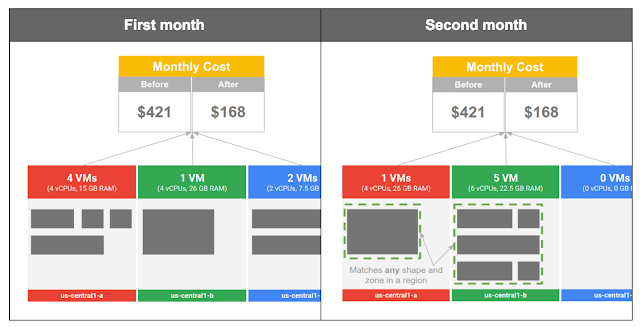
We built committed use discounts so you actually attain the savings you expect — regardless of how you configure your resources, or where you run them within a region. For example, say you run several instances for one month with aggregate vCPU and memory consumption of 10 vCPUs and 48.5 GB of RAM. Then, the next month your compute needs evolve and you change the shapes and locations of your instances (e.g., zones, machine types, operating systems), but your aggregate resource consumption stays the same. With committed use discounts, you receive the same discount both months even though your entire footprint is different!

Committed use discounts automatically apply to aggregate compute usage with no manual intervention, giving you low, predictable costs. During the beta, customers achieved over 98% utilization rates of their commitments, with little or no effort on their part.

Quizlet is one of the largest online learning communities with over 20 million monthly learners.

 “Our fleet is constantly changing with the evolving needs of our students and teachers. Even as we rapidly change instance types and Compute Engine zones, committed use discounts automatically apply to our aggregate usage, making it simple and straightforward to optimize our costs. The results speak for themselves: 60% of our total usage is now covered by committed use discounts, saving us thousands of dollars every month. Google really got the model right.” 

— Peter Bakkum, Platform Lead, Quizlet 

No hidden costs 

With committed use discounts, you don’t need to make upfront payments to see deep price cuts. Prepaying is a major source of hidden costs, as it is effectively an interest-free loan to the company you’re prepaying. Imagine you get a 60% discount on $300,000 of compute usage. At a reasonable 7% per year cost of capital, an all-upfront prepay reduces your realized savings from 60% to 56%.

“We see great financial benefits by using committed use discounts for predictable workloads. With committed use discounts, there are no upfront costs, unlike other platforms we have used. It’s also possible to change machine types as committed use discounts work on both vCPU and memory. We have been very happy with committed use discounts.”  

— Gizem Terzi Türkoğlu, Project Coordinator, MetGlobal 

Getting the best price and performance in the cloud shouldn’t require a PhD in Finance. We remain committed to that principle and continue to innovate to keep pricing simple for all your use cases. In coming months, we’ll increase the flexibility of committed use discounts by allowing them to apply across multiple projects. And rest assured, we’ll do so in a way that’s easy-to-use.

For more details on committed use discounts, check out our documentation. For pricing information, take a look at our pricing page or try out our pricing calculator. To get started and try Google Cloud Platform for free, click here.

Quelle: Google Cloud Platform

Announcing Stackdriver Debugger for Node.js

By Justin Beckwith, Product Manager, Google Cloud Platform

We’ve all been there. The code looked fine on your machine, but now you’re in production and it’s suddenly not working.

Tools like Stackdriver Error Reporting can make it easier to know when something goes wrong — but how do you diagnose the root cause of the issue? That’s where Stackdriver Debugger comes in.

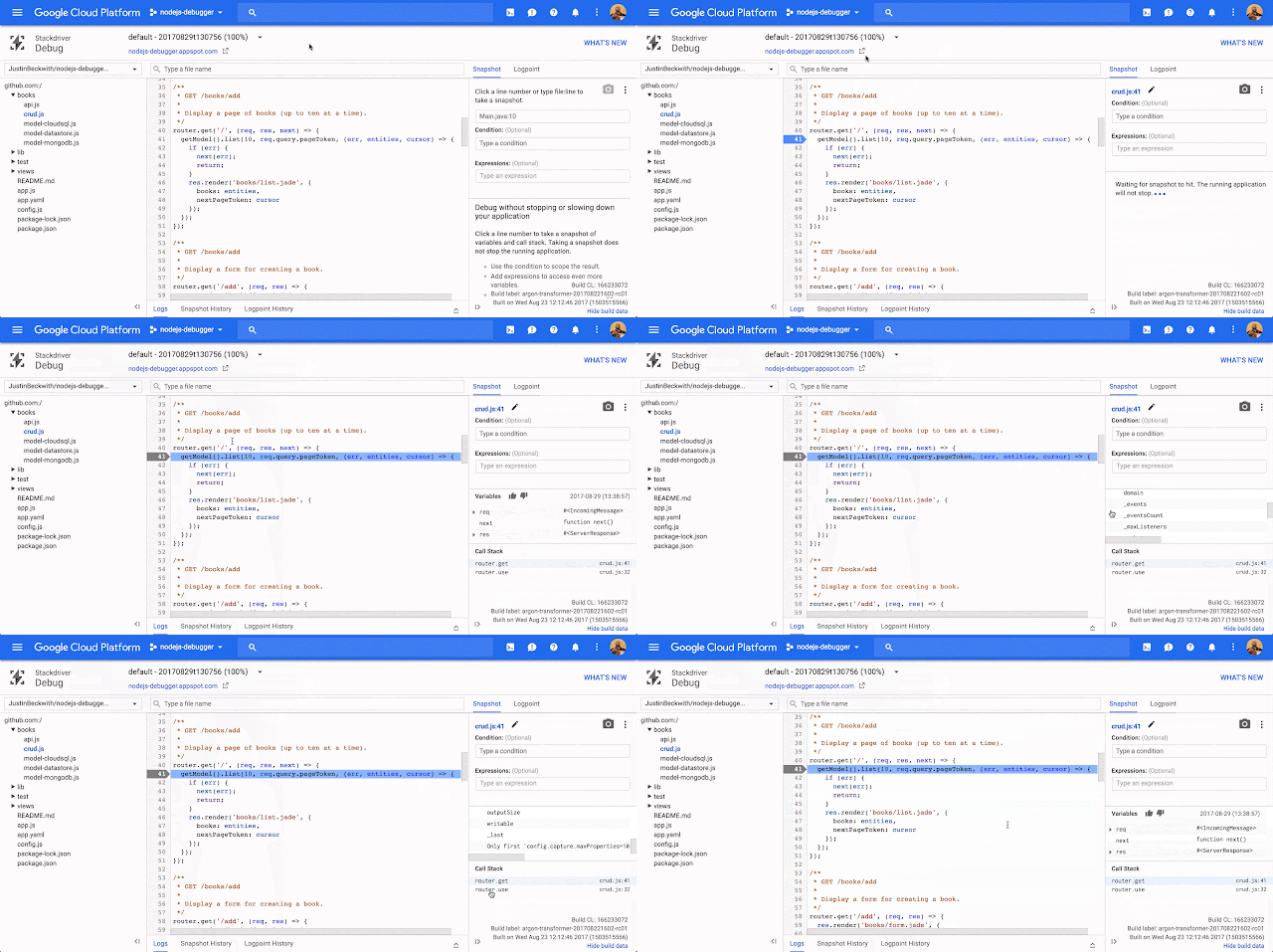
Stackdriver Debugger lets you inspect the state of an application at any code location without using logging statements and without stopping or slowing down your applications. This means users are not impacted during debugging. Using the production debugger, you can capture the local variables and call stack and link it back to a specific line location in your source code. You can use this to analyze your applications’ production state and understand your code’s behavior in production.

What’s more, we’re excited to announce that Stackdriver Debugger for Node.js is now officially in beta. The agent is open source, and available on npm.

Setting up Stackdriver Debugger for Node.js

To get started, first install the @google-cloud/debug-agent npm module in your application:

$ npm install –save @google-cloud/debug-agent

Then, require debugger in the entry point of your application:

require(‘@google-cloud/debug-agent’)
.start({ allowExpressions: true });

Now deploy your application! You’ll need to associate your sources with the application running in production, and you can do this via Cloud Source Repositories, GitHub or by copying sources directly from your desktop.

Using Logpoints 
The passive debugger is just one of the ways you can diagnose issues with your app. You can also add log statements in real time — without needing to re-deploy your application. These are called Stackdriver Debugger Logpoints.

Logpoints let you inject log statements in real time, in your production application, without redeploying your application.

These are just a few of ways you can use Stackdriver Debugger for Node.js in your application. To get started, check out the full setup guide.

We can’t wait to hear what you think. Feel free to reach out to us on Twitter @googlecloud, or request an invite to the Google Cloud Slack community and join the #nodejs channel.
Quelle: Google Cloud Platform

Announcing Stackdriver Debugger for Node.js

By Justin Beckwith, Product Manager, Google Cloud Platform

We’ve all been there. The code looked fine on your machine, but now you’re in production and it’s suddenly not working.

Tools like Stackdriver Error Reporting can make it easier to know when something goes wrong — but how do you diagnose the root cause of the issue? That’s where Stackdriver Debugger comes in.

Stackdriver Debugger lets you inspect the state of an application at any code location without using logging statements and without stopping or slowing down your applications. This means users are not impacted during debugging. Using the production debugger, you can capture the local variables and call stack and link it back to a specific line location in your source code. You can use this to analyze your applications’ production state and understand your code’s behavior in production.

What’s more, we’re excited to announce that Stackdriver Debugger for Node.js is now officially in beta. The agent is open source, and available on npm.

Setting up Stackdriver Debugger for Node.js

To get started, first install the @google-cloud/debug-agent npm module in your application:

$ npm install –save @google-cloud/debug-agent

Then, require debugger in the entry point of your application:

require(‘@google-cloud/debug-agent’)
.start({ allowExpressions: true });

Now deploy your application! You’ll need to associate your sources with the application running in production, and you can do this via Cloud Source Repositories, GitHub or by copying sources directly from your desktop.

Using Logpoints 
The passive debugger is just one of the ways you can diagnose issues with your app. You can also add log statements in real time — without needing to re-deploy your application. These are called Stackdriver Debugger Logpoints.

Logpoints let you inject log statements in real time, in your production application, without redeploying your application.

These are just a few of ways you can use Stackdriver Debugger for Node.js in your application. To get started, check out the full setup guide.

We can’t wait to hear what you think. Feel free to reach out to us on Twitter @googlecloud, or request an invite to the Google Cloud Slack community and join the #nodejs channel.
Quelle: Google Cloud Platform