Build containers faster with Cloud Build with Kaniko

At Google, we believe that fast builds are key to developer productivity. A recent internal study showed that our largest source of wasted engineering time comes from builds that take 2-10 minutes. We’re not the only ones to notice this. In another study, Stripe found that companies waste $300 billion from lost developer productivity every year. And most importantly, our customers notice this as well! Faster builds and caching have been some of the most requested features for Cloud Build since we launched it in July.Today, we’re excited to announce a new feature for Cloud Build that caches container build artifacts, resulting in much faster build times. Based on Kaniko, an open-source tool for building container images from a Dockerfile, this feature stores and indexes intermediate layers inside of Google Container Registry, so they are available for use by subsequent builds. This feature is available for testing in Cloud SDK Release 229.0.0.To try it out, run:and then (from a directory with a Dockerfile in it) send a build with:This cache is based on the exact Dockerfile and source context used by the build, and follows the general Dockerfile caching patterns. To learn more about how to optimize a Dockerfile for caching, see this documentation on leveraging the build cache. This cache is scoped on a “per-repository” basis, and has a six-hour TTL by default. This can be configured by running:You can also use Kaniko instead of “docker build” in your cloudbuild.yaml config to take advantage of these caching improvements:This is one of the first of many features we’re rolling out in Cloud Build to automatically make your builds faster, smarter and more secure. Please try it out and let us know if you have any feedback by joining the Kaniko users Google Group.
Quelle: Google Cloud Platform

Stackdriver usage and costs: a guide to understand and optimize spending

Google Stackdriver is a cloud-based managed services platform designed to give you visibility into app and infrastructure services. Stackdriver’s monitoring, logging and APM tools make it easy to navigate between data sources to view performance details and find the root causes of any issues.One of the benefits of cloud-based, managed services is that you pay only for what you use. While this usage-based pricing model might provide a cost benefit when compared to standard software licensing, it can sometimes be challenging to optimize and control costs, particularly if you’re new to cloud. We’ve worked across our organization here at Google to develop a Stackdriver cost optimization solution guide to help you understand and optimize your Stackdriver usage and costs.Stackdriver, like other Google Cloud Platform (GCP) services, provides detailed usage information and granular billing. You can use these reporting features, shown below, to understand your product usage and the resulting billing. You can see that Stackdriver is pulling data from multiple sources into one dashboard, along with sizing information:Each of the products in the Stackdriver suite provides configuration capabilities that can be used to adjust the volume of metrics, logs, or traces ingested into the platform, which can help you save on usage costs. Here are a few ways to configure the usage volumes for Logging, Monitoring and Trace.Logging: You can employ logging exclusion filters and sampling for logs with high volume to reduce your logs’ ingestion volume.Monitoring: You can carefully design or redesign your metric labels to prevent high cardinality labels from creating a large number of time series.Trace: You can use sampling and span quotas to stay within the desired volume of traces.The Stackdriver cost optimization solution guide describes these and other possible optimization strategies, what generates Stackdriver costs, and how to identify usage in the first place. You can use the solution guide to understand your own product usage and then implement strategies to meet your usage or cost objectives. Be sure to let us know about other guides and tutorials you’d like to see by clicking on the “Send Feedback” button at the bottom of the solution page.
Quelle: Google Cloud Platform

Query without a credit card: introducing BigQuery sandbox

Today we are announcing the BigQuery sandbox, a credit-card free path to enable new users and students to experiment with BigQuery at no cost—without having to enter credit card information. As organizations begin to collect more and more data, many find that a serverless data warehouse like BigQuery is the only platform that can scale to meet their needs. BigQuery also provides a flexible web-based interface for running advanced queries on large public datasets. You can now explore both these benefits of BigQuery with no financial commitment whatsoever.BigQuery is Google’s serverless cloud data warehouse that is so simple that you only need a Standard SQL query and your curiosity to start generating insights. If you’re interested in learning more from BigQuery’s documentation, you can find it here.As a BigQuery sandbox user, you can access the same compute power as paying users, and just like paying users, you get to run SQL queries over large and small data sets as well as use new capabilities like BigQuery Machine Learning and BigQuery Geospatial Information Systems.BigQuery sandbox provides you with up to 1 terabyte per month of query capacity and 10GB of free storage. All tables and partitions have a 60-day retention policy. Some features of BigQuery are not included in the sandbox (DML, Streaming, Data Transfer Service). If you want to use these capabilities, you can simply click on Upgrade in the console (see image below), which will guide you through the process of providing your payment information.Who is this for?We created BigQuery sandbox for users who want to try BigQuery for free without facing the hassle of first having to enter payment information.Students can now use BigQuery for a class or a project without needing to worry about billing.Government or civic employees who want to investigate BigQuery’s capabilities without needing to go through a spending approval process can simply log in, sign up and run a query.Professional developers who want to experiment to see how BigQuery fits into their corporate architecture can test out their integrations.Users of other Google products such as Firebase can now put their data in BigQuery (Firebase actually has an automated pipeline) to see how ad hoc analytics expands the questions that they ask of their data.Scientists and academic researchers who are interested to learn about how cloud computing can transform their analysis.The difference between BigQuery sandbox and the GCP free trialGoogle Cloud Platform (GCP) has two introductory offers. BigQuery sandbox is a BigQuery-specific initiative to provide easy access to BigQuery without needing to grab your credit card. If you want to experiment with BigQuery right now and other GCP products after, then BigQuery sandbox is where you’ll want to start. Click on TRY BIGQUERY FREE (blue oval).The GCP free trial includes a $300 credit that applies across all Google Cloud Platform (GCP) products. If you want to experiment with multiple products, then you can activate the GCP free trial by clicking on the button that says “Try free” (black dashes). Note: the free trial does require a credit card.Rolling up your sleeves in the BigQuery sandboxTo start, you can find the BigQuery webpage here. Click on the button that says “TRY BIGQUERY FREE.” Follow the prompts, and in four steps and less than 60 seconds, you’ll land at the BigQuery web interface ready to write your first query.What will your first query be? BigQuery hosts dozens of interesting datasets as part of our public datasets program—you’ll find they’re an excellent place to get started.  Here are a few of our users’ favorite queries and their corresponding datasets:Cartographers and lovers of maps:Create a map of hurricane trajectoriesusing the NOAA weather data with the query in this tutorial and BigQuery Geo Viz to plot it.Cryptocurrency or blockchain enthusiasts:What are the 10 most popular Ethereum collectibles by number of transactions?  This query determines the 10 most popular collectibles on the Ethereum blockchain by determining which have the largest number of transactions. Learn more at the Ethereum Blockchain Marketplace Page from BigQuery Public DatasetsSoftware engineers:Where do Hacker News stories live? This query parses out the host from the URL so you can see where Hacker News stories originate. Learn more at the Hacker News Marketplace Page from BigQuery Public Datasets. If you are interested in more queries to run and instructions for loading data into the BigQuery sandbox you can look at this great step by step guide from Felipe Hoffa.Sports fans:How does three-point shooting accuracy change at the end of NCAA basketball games? This query compares three-point shooting accuracy from NCAA men’s and women’s basketball games in the first 35 minutes and the final 5 minutes. Learn more at the NCAA Basketball Marketplace Page from BigQuery Public Datasets.After you’ve run your query be sure to look for this button (see the green oval in the image below) to view your results in Data Studio, Google’s free data visualization product.Some words from our partners and colleaguesBigQuery sandbox strives to make it fast and easy for you to try BigQuery and explore the public datasets and your own data. Here’s what our partners and colleagues are saying:“Google’s integration of NOAA’s data into its platform’s tools, such as BigQuery, has enabled increased public usage by effectively removing many obstacles related to understanding scientific data formats and the preparation of data for analysis. By introducing lightweight subscriptions to Google services, coupled with limited free tiers of service, Google has lowered additional obstacles to entry for data users.”—Ed Kearns, NOAA’s Chief Data Officer“BigQuery sandbox has helped thousands of Firebase projects better understand their application’s usage, analyze the context of their crashes, and evaluate launch candidates. It gives them the tools to make meaningful decisions.”—Eugene Girard, Firebase Technical Lead ManagerBigQuery is a team effortThe BigQuery team is keen to hear what you choose as your first query. Please let us know what your first query was by tweeting with the hashtag #bqsandbox. To learn more about BigQuery, RSVP for the BigQuery BBQ in a city near you, where you’ll cook up some exciting data insights over delicious food and win prizes. You’ll be joined by Google Developer Advocates Felipe Hoffa and Minhaz Kazi, to solve our data challenge contest using public datasets available in BigQuery.
Quelle: Google Cloud Platform

Exploring container security: Encrypting Kubernetes secrets with Cloud KMS

Editor’s note: This post picks up again on our blog post series on container security at Google.At Google Cloud, we care deeply about protecting your data. That’s why we encrypt data at rest by default, including data in Google Kubernetes Engine (GKE). For Kubernetes secrets—small bits of data your application needs at build or runtime—your threat model might be different, so storage-layer encryption is insufficient. Today, we’re excited to announce in beta GKE application-layer secrets encryption, using the same keys you manage in our hosted Cloud Key Management Service (KMS).Secrets in KubernetesIn a default Kubernetes installation, Kubernetes secrets are stored in etcd in plaintext. In GKE, this is managed for you: GKE encrypts these secrets on disk, and monitors this data for insider access. But this might not be enough to protect those secrets from a potentially malicious insider, or a malicious application in your environment.Kubernetes 1.7 first introduced application-layer encryption of secrets for differential protection of secrets. Using this feature, you can encrypt your secrets locally, with a key also stored in etcd. If you’re running Kubernetes in an environment that doesn’t provide encryption by default, this helps meet security best practices; however, if a malicious intruder gained access to etcd, they would still practically have access to your secrets.A few releases later in Kubernetes 1.10, envelope encryption of secrets with a KMS provider was introduced, meaning that a local key is used to encrypt the secrets (known as a “data encryption key”), and that the key is itself encrypted with another key not stored in Kubernetes (a “key encryption key”). This model means that you can regularly rotate the key encryption key without having to re-encrypt all the secrets. Furthermore, it means that you can rely on an external root of trust for your secrets in Kubernetes—systems ike Cloud KMS or HashiCorp Vault.Using Cloud KMS to protect secrets in KubernetesApplication-layer secrets encryption is now in beta in GKE, so you can protect secrets with envelope encryption: your secrets are encrypted locally in AES-CBC mode with a local data encryption key, and the data encryption key is encrypted with a key encryption key you manage in Cloud KMS as the root of trust. It’s pretty simple as all the hard work is done for you—all you have to do is choose the key you want to use for a particular cluster.This approach provides flexibility in your security model, to meet specific requirements you may have:Root of trust: You can choose whether to protect your secrets using only Kubernetes, with application-layer software-based encryption with a key from Cloud KMS, or hardware-based encryption from Cloud HSM.Key rotation: You can implement best practices for regular key rotation for your root of trust.Separation of duties: You can separate who manages your cluster and who manages and protects your secrets.Centralized auditing: You can manage and audit key accesses centrally, and use the same key for your secrets in Kubernetes as you use for other secrets in GCP.Getting startedTo enable application-layer secrets encryption for a new cluster, specify the –database-encryption-key flag as part of cluster creation, with your Cloud KMS key KMS_KEY_ID:Note that you must use a Cloud KMS key in the same location as your cluster, and that you need to give a GKE service account account to use your key for these operations.That’s how easy it is to encrypt your Kubernetes secrets with GKE. For more detail, check out Application-layer Secrets Encryption, or this Cloud KMS hands-on lab1. We also gave a talk on Kubernetes secrets at KubeCon China that provides more color. Now encrypt those secrets!1. Take this lab for free before February 28, 2019 with the code 1j-shh-441)
Quelle: Google Cloud Platform

Making the machine: the machine learning lifecycle

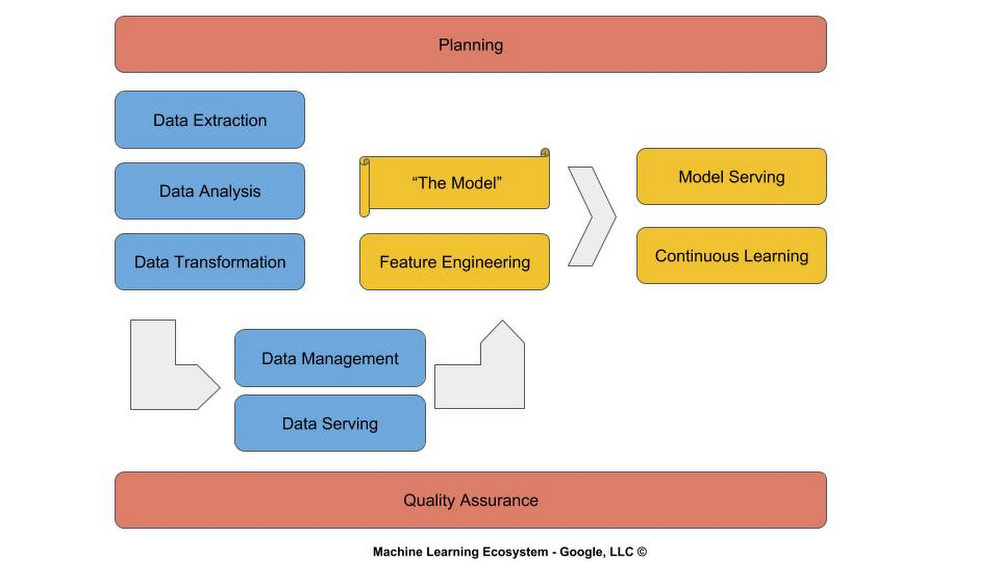
As a Googler, one of my roles is to educate the software development community on machine learning (ML). The first introduction for many individuals is what is referred to as the ‘model’. While building models, tuning them and evaluating their predictive abilities has generated a great deal of interest and excitement, many organizations still find themselves asking more basic questions, like how does machine learning fit into their software development lifecycle?In this post, I explain how machine learning (ML) maps to and fits in with the traditional software development lifecycle. I refer to this mapping as the machine learning lifecycle. This will help you as you think about how to incorporate machine learning, including models, into your software development processes.The machine learning lifecycle consists of three major phases: Planning (red), Data Engineering (blue) and Modeling (yellow).PlanningIn contrast to a static algorithm coded by a software developer, an ML model is an algorithm that is learned and dynamically updated. You can think of a software application as an amalgamation of algorithms, defined by design patterns and coded by software engineers, that perform planned tasks. Once an application is released “in the wild,” it may not perform as planned, prompting developers to rethink, redesign, and rewrite it (continuous integration/continuous delivery).We are entering an era of replacing these static algorithms with ML models, which are essentially dynamic algorithms. This dynamism presents a host of new challenges for planners, who work in conjunction with product owners and quality assurance (QA) teams.For example, how should the QA team test and report metrics? ML models are often expressed as confidence scores. Let’s suppose that a model shows that it is 97% accurate on an evaluation data set. Does it pass the quality test? If we built a calculator using static algorithms and it got the answer right 97% of the time, we would want to know about the 3% of the time it does not.Similarly, how does a daily standup work with machine learning models? It’s not like the training process is going to give a quick update each morning on what it learned yesterday and what it anticipates learning today. It’s more likely your team will be giving updates on data gathering/cleaning and hyperparameter tuning.When the application is released and supported, one usually develops policies to address user issues. But with continuous learning and reinforcement learning, the model is learning the policy. What policy do we want it to learn? For example, you may want it to observe and detect user friction in navigating the user interface and learn to adapt the interface (Auto A/B) to reduce the friction.Within an effective ML lifecycle, planning needs to be embedded in all stages to start answering these questions specific to your organization.Data engineeringData engineering is where the majority of the development budget is spent—as much as 70% to 80% of engineering funds in some organizations. Learning is dependent on data—lots of data, and the right data. It’s like the old software engineering adage: garbage in, garbage out. The same is true for modeling: if bad data goes in, what the model learns is noise.In addition to software engineers and data scientists, you really need a data engineering organization. These skilled engineers will handle data collection (e.g., billions of records), data extraction (e.g., SQL, Hadoop), data transformation, data storage and data serving. It’s the data that consumes the vast majority of your physical resources (persistent storage and compute). Typically due to the magnitude in scale, these are now handled using cloud services versus traditional on-prem methods.Effective deployment and management of data cloud operations are handled by those skilled in data operations (DataOps). The data collection and serving are handled by those skilled in data warehousing (DBAs). The data extraction and transformation are handled by those skilled in data engineering (Data Engineers), and data analysis are handled by those skilled in statistical analysis and visualization (Data Analysts).ModelingModeling is integrated throughout the software development lifecycle. You don’t just train a model once and you’re done. The concept of one-shot training, while appealing in budget terms and simplification, is only effective in academic and single-task use cases.Until fairly recently, modeling was the domain of data scientists. The initial ML frameworks (like Theano and Caffe) were designed for data scientists. ML frameworks are evolving and today are more in the realm of software engineers (like Keras and PyTorch). Data scientists play an important role in researching the classes of machine learning algorithms and their amalgamation, advising on business policy and direction, and moving into roles of leading data driven teams.But as ML frameworks and AI as a Service (AIaaS) evolve, the majority of modeling will be performed by software engineers. The same goes for feature engineering, a task performed by today’s data engineers: with its similarities to conventional tasks related to data ontologies, namespaces, self-defining schemas, and contracts between interfaces, it too will move into the realm of software engineering. In addition, many organizations will move model building and training to cloud-based services used by software engineers and managed by data operations. Then, as AIaaS evolves further, modeling will transition to a combination of turnkey solutions accessible via cloud APIs, such as for Cloud Vision and Cloud Speech-to-Text, and customizing pre-trained algorithms using transfer learning tools such as AutoML.Frameworks like Keras and PyTorch have already transitioned away symbol programming into imperative programming (the dominant form in software development), and incorporate object-oriented programming (OOP) principles such as inheritance, encapsulation, and polymorphism. One should anticipate that other ML frameworks will evolve to include object relational models (ORM), which we already use for databases, to data sources and inference (prediction). Common best practices will evolve and industry-wide design patterns will become defined and published, much like how Design Patterns by the Gang of Four influenced the evolution of OOP.Like continuous integration and delivery, continuous learning will also move into build processes, and be managed by build and reliability engineers. Then, once your application is released, its usage and adaptation in the wild will provide new insights in the form of data, which will be fed back to the modeling process so the model can continue learning.As you can see, adopting machine learning isn’t simply a question of learning to train a model, and you’re done. You need to think deeply about how those ML models will fit into your existing systems and processes, and grow your staff accordingly. I, and all the staff here at Google, wish you the best in your machine learning journey, as you upgrade your software development lifecycle to accommodate machine learning. To learn more about machine learning on Google Cloud here, visit our Cloud AI products page.
Quelle: Google Cloud Platform

Advancing confidential computing with Asylo and the Confidential Computing Challenge

Welcome to Safer Internet Week! Today, Google Cloud VP of Security Royal Hansen, who recently joined Google from the financial services industry, shared why he is excited by the opportunity that cloud computing presents to improve security for organizations around the world.Putting customers in controlIt’s no secret that taking advantage of the benefits of cloud computing requires businesses to refine how they think and operate. Trust is a core component of this change, since they no longer have direct control over parts of their infrastructure that they used to. We understand that success in the cloud requires earning our customers’ trust, and we work hard at Google Cloud to build trust through transparency, and putting customers in control of their data.For example, Google Cloud was the first major public cloud to provide customers with audit logs and justifications of authorized administrative access by Google Support and Engineering. We also give customers the ability to require explicit approval for access to their data or configurations on GCP with Access Approval.Combined with encryption at rest and in transit, these security capabilities helped establish Google Cloud as a leader in public cloud native security in 2018, according to Forrester Research.  To deliver even greater levels of control, we are investing in the area of “confidential computing.” Confidential computing aims to create computing environments that can help protect applications and data while they are in use—even from privileged access, including from the cloud provider itself. The most common approach for implementing key parts of confidential computing is using trusted execution environments (TEEs) to build software enclaves.Advancing our confidential computing strategyConfidential computing environments can help protect customers sensitive information from a number of adversaries and attack vectors:Malicious insiders – Whether inside a customer’s organization or a cloud provider’s, even insiders with root access can be restricted in their ability to observe or tamper with sensitive code or data inside an enclave.Network vulnerabilities – Confidential computing mitigates the impact of vulnerabilities in the network or guest OS, with regard to confidentiality and integrity.Compromised host OS – Because a malicious or compromised host OS or VMM/hypervisor exist outside of an enclave, vulnerabilities in these components can have less impact on code and data inside an enclave.BIOS compromise – Malicious firmware inserted into the BIOS, including UEFI drivers, are also less able to impact the confidentiality and integrity of the enclave.Despite the opportunities offered by confidential computing, the deployment and adoption of this emerging technology has been slow due to dependence on specific hardware, the lack of an application development tools to develop and run applications in confidential computing environments, and complexity around deployment. To help address these challenges, in May 2018, we introduced Asylo (Greek for “safe space”), an open source framework to make it easier to create and use enclaves, on Google Cloud and beyond.Asylo is designed to be agnostic to the hardware platform it rests on (and its trusted execution environment). This key design point is meant to make software development easier, reducing the friction developers experience when building software to run in a confidential computing environment. An application can be built to run in an Asylo enclave on hardware with Intel SGX today, and in the future, is intended to run on chipsets from other hardware vendors without code changes from the developer as well.Just as important, Asylo is designed to make it easy to build applications that run in enclaves. Simply start developing your app on top of an Asylo Docker container image, and today you can run it on any Intel SGX-capable machine. Down the road, we expect  Asylo will be integrated into popular developer pipelines, and that you’ll be able to deploy Asylo applications directly from commercial container registries and marketplaces.Forging a confidential computing futureWhile Asylo helps address core technical challenges inherent in developing trusted applications, confidential computing is still very much an emerging technology.  Enclaves, for example, are a new software design model, and there aren’t established design practices for implementing them. There’s also still more to develop a robust understanding of security risk tradeoffs, performance implications, etc. that would come from a broad use of confidential computing across the industry. The best way to develop these design patterns is for people to begin experimenting with confidential computing.For example, one model might be to move an entire component to run under an enclave. Porting may be reasonably straightforward, but might bring code into your trusted computing base (TCB) that adds security risks, reducing the intent of the model. At the other end of the spectrum, some developers might choose to run only the security-sensitive parts of their applications in a confidential computing environment to minimize the attack surface. Asylo supports both of these approaches, and each has advantages and trade-offs.In addition to the software-design challenges of developing confidential computing  applications, there are new processors and memory controllers being developed with support for runtime memory encryption and bus protection. As they come to market, these advanced hardware platforms can underpin robust confidential computing systems. To benefit from these breakthrough technologies, we are working with hardware and software partners who are contributing to the confidential computing space. Together, we hope to define a common platform-abstraction layer to underpin toolchains, compilers and interpreters, to ensure the forward-portability of confidential computing applications.Finally, we need to develop a set of industry-wide certification and interop programs to assess the security properties of CPUs and other secure hardware as they become available. Together with the industry, we can work toward more transparent and interoperable services to support confidential computing apps, for example, making it easy to understand and verify remote attestation claims, inter-enclave communication protocols, and federated identity systems across enclaves.  Enter the Confidential Computing ChallengeWe invite you to join us in exploring the advantages confidential computing can bring, and how to put it into practice.To that end, we are launching the Confidential Computing Challenge (C3), a competition dedicated to accelerating the field of confidential computing. Between now and April 1, 2019, we invite you to write an essay that develops a novel use case for confidential computing, or advances the current state of confidential computing by building upon and improving existing technology. These essays will be evaluated by a panel of judges, and the winner will receive $15,000 in cash, $5,000 worth of Google Cloud Platform credits, and a special hardware gift. To learn more about challenge and register, click here. We look forward to your submissions!We also have three hands-on labs that can help you learn how to build confidential computing apps using the Asylo toolchain, run a gRPC server inside an SGX enclave, or use Asylo to help protect secret data from an attacker with root privileges. As part of our Confidential Computing Challenge, we’ve arranged for you to access these labs at no cost. Click here and use code 1g-c3-880 to redeem this offer, which ends when our challenge closes on April 1, 2019.
Quelle: Google Cloud Platform

Beyond passwords: a roadmap for enhanced user security

When it comes to user security, a constant battle plays out between strong security controls and end-user convenience. Finding the right balance is well worth the effort; a well-designed and thoughtfully implemented security solution can be a true business enabler, allowing employees to work from anywhere, on any device — without compromising security. During Safer Internet Week, we wanted to share some of our views on the current state of user security, discuss a few approaches that we’ve taken to strengthen user protection, and offer suggestions on what you can do today as an organization to improve your security posture.  Passwords are ubiquitous, but they’re often not enoughOnline service providers, including Google, have long realized that a password alone is insufficient to protect user accounts. Users often reuse passwords across multiple services, and if one service is compromised, all of the user’s online accounts are now at risk. Employees are also often tricked into revealing their passwords, most commonly through phishing, a technique where attackers dupe users into believing they’re interacting with a legitimate service. Phishing attacks are widespread and often effective—71 % of all targeted attacks start with spear phishing according to the Symantec 2018 Internet Security Threat Report. So how can we address the shortcomings of passwords?2SV / 2FA as a protection against password reuseThe primary protection against password reuse by an attacker is 2-step verification (2SV), also known as two-factor authentication (2FA) or multi-factor authentication (MFA). With 2SV, a user needs two things to log into an account: 1) something they know (often a password), and 2) something they possess (the second factor), which can include hardware-based one-time password (OTP) tokens, time-based OTP smartphone apps (e.g. Google Authenticator), codes delivered via SMS or phone call, or smartphone push-notifications. Even if a user’s password is known, the attacker doesn’t have access to the second factor, so the account cannot be compromised.Using FIDO security keys to prevent account takeoversAs is typical in the cat-and-mouse game of security, malicious activity has intensified on remaining points of vulnerability. While 2SV is a strong step beyond a simple username and password, there are still ways that it can potentially be exploited. Many 2SV methods are vulnerable to man-in-the-middle (MITM) attacks; they are no different from a password in that they can be captured and re-used by a malicious actor.What’s missing with most 2SV methods is the ability for the technology to ensure that the user is providing their credentials to their intended destination and not to an attacker. Security keys based on the FIDO Alliance standard, such as Titan Security Keys, help solve this problem by providing cryptographic proof that the user is in possession of the second factor and that they’re interacting with a legitimate service. Security keys have been shown to be easier to use and more secure than other methods of 2SV. This level of protection is particularly important for high-value users such as cloud administrators or senior executives. Last year, Google disclosed that there have been no reported or detected G Suite account hijackings after security key deployments, a major security win for adopters of this technology.Titan Security KeyEven more phishing and malware protection through machine learningWhile FIDO security keys have proven to be a great method to protect users against account takeovers, we also work to automatically detect and prevent attacks that lead to password compromises in the first place. We use constantly refined machine learning models to quickly identify suspicious behavior and help you take action before harm is done to your organization. Examples include:Automatically flagging emails from untrusted senders that have encrypted attachments or embedded scripts, which often indicate attempts to deploy malicious softwareWarning against email that tries to spoof employee names or that comes from a domain name that looks similar to your own, common phishing tacticsScanning images for phishing indicators and expanding shortened URLs to uncover malicious and deceptive hyperlinksFlagging abnormal sign-in behavior and presenting these users with additional login challengesSecurity Center, included with G Suite Enterprise and Cloud Identity Premium, can also help highlight potential threats, bringing together security analytics, actionable insights, and best practices from Google to empower you to further protect your organization, data, and users.Take action today to improve user securityStrong user security is a must have in today’s world, but it doesn’t need to come at the sacrifice of user experience or productivity. End-user friendly 2SV methods can be enabled via solutions like G Suite and Cloud Identity. For your high-value employees, such as IT admins and executives, we strongly recommend enforcing security keys for the strongest account protection. Start protecting your users today with a free trial of Cloud Identity.
Quelle: Google Cloud Platform

The Telegraph UK: Reimagining media with the help of Google Cloud

Whether they’re reading the newspaper on the way to work, or catching up on the latest headlines on their smartphones, readers expect up-to-the-minute news wherever and whenever makes the most sense for them. As a result, media companies are increasingly looking for ways to improve, expand, and simplify their offerings, and they’re increasingly looking to the cloud to do it.For more than 160 years The Telegraph has been counted on by readers across the United Kingdom and globally for award-winning news and journalism. An early adopter of cloud technology, it’s been a G Suite customer since 2008 and has already been using Google Cloud Platform to analyze digital behaviors to improve engagement and advertising performance since 2016. Today, The Telegraph is announcing it’s migrating fully to Google Cloud. By migrating all their production and pre-production services, they aim to deliver content faster, provide compelling experiences to readers, and reduce environmental impact.“We are delighted to announce our newest collaboration with Google Cloud,” said Chris Taylor, Chief Information Officer, The Telegraph. “We have always worked closely with Google as they help us to provide our readers with great experiences on our digital products, collaboration software and internet scale through search. Their continued leadership in projects such as Kubernetes are enabling us to build flexible development environments that truly support DevOps.”Powering the Digital Publishing EcosystemThe Telegraph produces large volumes of digital content every day. It was imperative for them to find a cloud provider they could trust to support this ecosystem. By working with Google Cloud they have changed the way they see and engage with data: they can collect new information about their products every second and use that to continually hone their strategy. The Telegraph are placing more confidence and trust in the data captured about their content and now have one of the best available pieces of technology for capturing and analyzing the stories they publish in real-time.Leveraging AI to support journalistsTime is critical when journalists are on a story, and The Telegraph wants to put important data in the hands of its journalists right when they need it. To do this, it will be using AutoML to classify content for journalists and make it more discoverable. For example, a reporter will be able to bring up relevant assets that link to their stories. It will also apply AutoML to classify Telegraph stock photos to help journalists attach compelling visual content to their stories faster.Building compelling reader experiences with the help of APIsReaders have an ever-increasing expectation of personalization. To meet this need, The Telegraph launched My Telegraph, currently live in beta, to offer registered readers personalized news experiences based on their interests or the particular journalists they want to follow. My Telegraph was developed on an API management platform provided by Google Cloud’s Apigee. You can learn more about how it’s applying API management to My Telegraph, in this blog post.Working for environmental goodThe Telegraph is the biggest selling quality newspaper in the UK, an accolade which requires it to print and distribute hundreds of thousands of copies each day. Optimal management of print production is important, and by using a combination of the cloud and machine learning, The Telegraph is better able to predict demand for physical newspapers, maximizing sales and minimizing waste. This makes great business sense for The Telegraph but also has great environmental benefit.Looking aheadWe’re thrilled to see how The Telegraph is using the cloud to reimagine media operations to benefit its business, readers, and the environment. For more information on how it’s using the cloud, read The Telegraph’s case study. And to learn more about solutions for media organizations on Google Cloud, visit our website.
Quelle: Google Cloud Platform

How The Telegraph is using APIs to personalize its news feeds

Today’s post comes from Lucian Craciun, Head of Engineering & Technology—Platforms at The Telegraph. This London-based media company operates the Telegraph website and app, print publications such as The Daily Telegraph and The Sunday Telegraph, and The Telegraph Edition app. They’re using Apigee on Google Cloud to simplify the development of new services.The news business has undergone a profound transformation since the advent of the internet. In just a few years, readers have gone from consuming news primarily in printed form to overwhelmingly favoring digital channels for real-time news delivery. To keep pace with reader demand, we need to continually innovate to ensure that The Telegraph provides the online and mobile news channels that keep our readers returning again and again.Personalized content, increased registrationAt the The Telegraph, like other news organizations, we enjoy trying out new ways to attract and retain digital readers to maximize both revenues and reader experiences. In the past, we focused on getting as many page views as possible for individual articles. Recently our strategy has shifted towards getting people to come back to the website often, getting them to register for and become regular users of our services.We decided to develop My Telegraph to support our strategy. We recognize that people have an ever-increasing expectation of personalization from the content providers they interact with. My Telegraph gives registered readers the capacity to personalize their news experiences based on their interests or the particular journalists they want to follow.The model enables registered readers to view free content in their personalized feeds, and encourages them to subscribe if they want to view premium content. We have a target of ten million registered users in the next few years. Obviously, this service is heavily dependent on APIs. It would have been a lot harder and more time consuming to develop it without the API infrastructure and management that the Apigee platform gives us.Heightened reader experiencesBefore My Telegraph, readers had access to a curated feed of editorial articles and they had to use the website’s search function if they wanted to find content related to specific topics or by individual journalists. Now, My Telegraph users can select topics or journalists to follow that automatically show up in their newsfeeds when they’re logged in. We’re adding more options every day and soon people will be able to follow their favorite football teams in My Telegraph. Each of these personalization options correspond to individual APIs that we’re rolling out.Supporting personalization with APIsOur APIs are split into two functions, identity and content. The identity API makes sure people are logged in and also checks registration and subscription statuses. For example, a registered reader only gets access to one premium article a week. But a subscribed reader gets full access to all articles on the website.First, the browser makes a call to the identity API, making sure that a person is logged in to access to My Telegraph. Once logged in,  it makes a call to the API that creates a feed of articles. Then our preferences API offers an option in the browser to select which topics a reader is interested in. This in turn makes a call to the preferences API to save a reader’s preferences.We also have a feature called the “My Telegraph Alerter” that creates an alert in a browser when there’s a new article in a person’s feed. If a subscriber has her browser open and is logged into The Telegraph website, she’ll see a red dot in the “My Feed” section. This alerter API is powered by Firestore, another Google Cloud product that we’re getting a lot of value from. In addition to Apigee, The Telegraph is implementing several other Google Cloud Platform (GCP) products to run our complex properties. For example, we already host our data lake in BigQuery.Simplifying API managementWe’ve been building APIs for at least ten years, so they’re not new to us. What is new for us, however, is having a single gateway in front of all of our APIs. Previously, we used an API gateway for some, a straight load balancer for others, and a content delivery network for still others. As a result, all our APIs didn’t have a structured way of being exposed to the public or to other teams. What Apigee introduced was much-needed structure in the form of a single gateway for all our APIs. We now can easily find what we need when we need it, which is a tremendous help as we look to develop and deliver new services and continue our digital transformation journey.
Quelle: Google Cloud Platform

Stackdriver Profiler adds more languages and new analysis features

Historically, cloud developers have had limited visibility into the impact of their code changes. Profiling non-production deployments doesn’t yield useful results, and profiling tools used in production are typically expensive, with a performance impact that means that they can only be used briefly and on a small portion of the overall code base. Code that’s not performing well can add latency and slow down an application without anyone noticing. Stackdriver Profiler, part of Google Cloud’s Stackdriver monitoring and logging tool, lets you understand the performance impact of your code, down to each function call – without sacrificing speed. We’ve added new language and platform support for Profiler, along with weighted filtering and other new filters.Profiler launched to public beta last spring and it’s been critical when it comes to cost optimization for many developers using Google Cloud Platform (GCP). In particular, we’ve heard from customers that they like the continual insight into their code’s execution, and the cost and performance improvements that they achieve once Profiler is deployed. We’ve heard from multiple enterprise users that they’ve achieved double-digit compute savings with just over one hour of analysis with Profiler. Others discovered the sources of slow memory leaks that they’d previously been unable to identify.Game developer Outfit7 has already achieved success with Stackdriver Profiler: “Using Stackdriver Profiler, the backend team at Outfit7 was able to analyze the memory usage pattern in our batch processing Java jobs running in App Engine Standard, identify the bottlenecks and fix them, reducing the number of OOMs from a few per day to almost zero,” says Anže Sodja, Senior Software Engineer at Outfit7. “Stackdriver Profiler helped us to identify issues fast, as well as significantly reducing debugging time by enabling us to profile our application directly in the cloud without setting up a local testing environment.”New features and support now available for ProfilerSince the beta release, we’ve made Stackdriver Profiler even better by adding support for more runtimes and platforms, and adding powerful new analysis features. These include:Support for Node.js, Python (coming soon), and App Engine Standard JavaAnalyzing worst-case performanceIdentifying commonly called functions that have a high aggregate impactStackdriver Profiler launched with support for Java CPU profiling, and Go CPU and heap profiling. Since then, we’ve added instrumentation for Node.js, Python, and the App Engine Standard Java runtime. Here’s a quick look at the available environments:It’s incredibly easy to get started with Profiler; at most, you’ll have to add a library to your application and redeploy. You can find setup guides for all languages and platforms in the Profiler documentation.If you have Java code deployed to App Engine Standard, getting started with Profiler is even easier. Simply enable it in your appengine-web.xml or app.yaml file, and then click on Stackdriver Profiler in the Cloud Console to see how your code is running in production.Analyzing worst-case performance with ProfilerMany workloads can be characterized as having bursts or spikes of high resource consumption and poor performance. Stackdriver Profiler’s new weighted filtering functionality allows you to find out what’s causing these spikes so you can smooth them out and improve your customers’ experience with your applications.Understanding the average resource consumption of your code is incredibly useful during development or when you’re trying to reduce compute spend. However, this isn’t as useful when you’re trying to improve performance. This is where Profiler’s weighted filtering feature comes in.By applying the Weight filter, you can instruct Stackdriver Profiler to only analyze telemetry captured when your application was consuming its peak amount of resources. For example, if you select “Top 10% weight” when inspecting CPU time, Profiler will only analyze data captured from periods when CPU consumption was at its top 10%. The remaining 90% of data captured when CPU consumption was relatively lower will be ignored. Here’s what this looks like:Identifying high-aggregate impact functionsIn addition, Stackdriver Profiler now includes a list of all of the functions captured within a profile, along with their total aggregate cost. The flame graph that’s currently presented by Profiler lets you quickly discover resource-hungry functions that are called from a single code path. However, it’s less helpful for identifying suboptimal functions that are called throughout your code and impact overall performance.In the example below, we use this new function list to identify a commonly called logging process that is consuming 50% of the service’s CPU consumption. The impact of this function wasn’t necessarily obvious from looking at the flame graph alone.To open this list, click on the magnifying glass button to the left of the filter bar, as shown above. This will apply the Focus filter to the selected function.Exploring filters in ProfilerAlong with the Weight filter, there are other filters in Profiler that let you view details of your code to find issues.FocusAlong with using the function list, you can access the Focus filter view by entering “Focus” into the filter bar, or from the tool tip displayed when mousing over a function in the flame graph. Focus reflows the flame graph to show all of the code paths that flow to and from the focused function, along with their relative resource consumption. It’s great for visualizing the impact of a commonly called function or for understanding which ways a particular piece of code gets called.Show StacksA stack refers to a vertical set of functions on the flame graph, which represent a call path through a code base.The Show Stacks filter presents a similar view to Focus, with a few key differences. While Focus combines all of the instances of the selected function to show the code paths that flow in and out of it, Show Stacks simply filters the view to remove any stacks that don’t contain the selected function. This is useful when you want to preserve separate instances of a specific function and don’t want to change the structure of the flame graph.Hide StacksThis filter is similar to Show Stacks, except it removes stacks that lack the specified function name. Hide Stacks is often useful for hiding information about uninteresting threads in Wall profiles of Java programs. For example, adding a “Hide stacks: Unsafe.park” filter is rather common.Show From FrameLike the Focus filter, this combines all instances of the selected function and shows the aggregated set of paths leaving that function. Unlike Focus, it does not show the code paths that lead into a function.Also, unlike Focus, it can match several functions, and all of the matching functions will be shown as roots of the flame graph. This filter is useful to focus on a subset of functions (for example, a specific library) to dive into its performance aspects. For example, adding a “Show from frame: com.example.common.stringutil” might be a useful way to limit the view to the string utility functions used across the code base.Hide FramesThis filter removes functions that match the specified name. It is commonly used to hide unimportant stack frames, such as using “Hide frames: java.util” to emphasize application code on the flame graph.HighlightThe Highlight filter allows you to quickly identify the location of a given function in the flame graph without changing the graph itself. Think of it as Ctrl+F for function names within a profile.WeightAs discussed earlier, this filter allows you to only analyze profiles captured when the selected resource (CPU, heap, etc.) was at peak consumption.Let us know what you think of ProfilerWe’re excited to make Stackdriver Profiler more useful for more developers, and we have some bigger announcements in the works. Until then, send your feedback via our ongoing user survey (you’ll see a notification for it at the bottom of your screen when you open Profiler) or other channels. And consider taking Profiler’s Quickstart or codelab to get started.
Quelle: Google Cloud Platform