NVIDIA’s RAPIDS joins our set of Deep Learning VM images for faster data science

If you’re a data scientist, researcher, engineer, or developer, you may be familiar with Google Cloud’s set of Deep Learning Virtual Machine (VM) images, which enable the one-click setup machine learning-focused development environments. But some data scientists still use a combination of pandas, Dask, scikit-learn, and Spark on traditional CPU-based instances. If you’d like to speed up your end-to-end pipeline through scale, Google Cloud’s Deep Learning VMs now include an experimental image with RAPIDS, NVIDIA’s open source and Python-based GPU-accelerated data processing and machine learning libraries that are a key part of NVIDIA’s larger collection of CUDA-X AI accelerated software. CUDA-X AI is the collection of NVIDIA’s GPU acceleration libraries to accelerate deep learning, machine learning, and data analysis.The Deep Learning VM Images comprise a set of Debian 9-based Compute Engine virtual machine disk images optimized for data science and machine learning tasks. All images include common machine learning (typically deep learning, specifically) frameworks and tools installed from first boot, and can be used out of the box on instances with GPUs to accelerate your data processing tasks. In this blog post you’ll learn to use a Deep Learning VM which includes GPU-accelerated RAPIDS libraries.RAPIDS is an open-source suite of data processing and machine learning libraries developed by NVIDIA that enables GPU-acceleration for data science workflows. RAPIDS relies on NVIDIA’s CUDA language allowing users to leverage GPU processing and high-bandwidth GPU memory through user-friendly Python interfaces. It includes the DataFrame API based on Apache Arrow data structures called cuDF, which will be familiar to users of pandas. It also includes cuML, a growing library of GPU-accelerated ML algorithms that will be familiar to users of scikit-learn. Together, these libraries provide an accelerated solution for ML practitioners to use requiring only  minimal code changes and no new tools to learn.RAPIDS is available as a conda or pip package, in a Docker image, and as source code.Using the RAPIDS Google Cloud Deep Learning VM image automatically initializes a Compute Engine instance with all the pre-installed packages required to run RAPIDS. No extra steps required!Creating a new RAPIDS virtual machine instanceCompute Engine offers predefined machine types that you can use when you create an instance. Each predefined machine type includes a preset number of vCPUs and amount of memory, and bills you at a fixed rate, as described on the pricing page.If predefined machine types do not meet your needs, you can create an instance with a custom virtualized hardware configuration. Specifically, you can create an instance with a custom number of vCPUs and amount of memory, effectively using a custom machine type.In this case, we’ll create a custom Deep Learning VM image with 48 vCPUs, extended memory of 384 GB, 4 NVIDIA Tesla T4 GPUs and RAPIDS support.Notes:You can create this instance in any available zone that supports T4 GPUs.The option install-nvidia-driver=True Installs NVIDIA GPU driver automatically.The option proxy-mode=project_editors makes the VM visible in the Notebook Instances section.To define extended memory, use 1024*X where X is the number of GB required for RAM.Using RAPIDSTo put the RAPIDS through its paces on Google Cloud Platform (GCP), we focused on a common HPC workload: a parallel sum reduction test. This test can operate on very large problems (the default size is 2TB) using distributed memory and parallel task processing.There are several applications that require the computation of parallel sum reductions in high performance computing (HPC). Some examples include:Solving linear recurrencesEvaluation of polynomialsRandom number generationSequence alignmentN-body simulationIt turns out that parallel sum reduction is useful for the data science community at large. To manage the deluge of big data, a parallel programming model called “MapReduce” is used for processing data using distributed clusters. The “Map” portion of this model supports sorting: for example, sorting products into queues. Once the model maps the data, it then summarizes the output with the “Reduce” algorithm—for example, count the number of products in each queue. A summation operation is the most compute-heavy step, and given the scale of data that the model is processing, these sum operations must be carried out using parallel distributed clusters in order to complete in a reasonable amount of time.But certain reduction sum operations contain dependencies that inhibit parallelization. To illustrate such a dependency, suppose we want to add a series of numbers as shown in Figure 1.From the figure 1 on the left, we must first add 7 + 6 to obtain 13, before we can add 13 + 14 to obtain 27 and so on in a sequential fashion. These dependencies inhibit parallelization. However, since addition is associative, the summation can be expressed as a tree (figure 2 on the right). The benefit of this tree representation is that the dependency chain is shallow, and since the root node summarizes its leaves, this calculation can be split into independent tasks.Speaking of tasks, this brings us to the Python package Dask, a popular distributed computing framework. With Dask, data scientists and researchers can use Python to express their problems as tasks. Dask then distributes these tasks across processing elements within a single system, or across a cluster of systems. The RAPIDS team recently integrated GPU support into a package called dask-cuda. When you import both dask-cuda and another package called CuPY, which allows data to be allocated on GPUs using familiar numpy constructs, you can really explore the full breadths of models you can build with your data set. To illustrate, shown in Figures 3 and 4 show side-by-side comparisons of the same test run. On the left, 48 cores of a single system are used to process 2 terabytes (TB) of randomly initialized data using 48 Dask workers. On the right, 4 Dask workers process the same 2 TB of data, but dask-cuda is used to automatically associate those workers with 4 Tesla T4 GPUs installed in the same system.Running RAPIDSTo test parallel sum-reduction, perform the following steps:1. SSH into the instance. See Connecting to Instances for more details.2. Download the code required from this repository and upload it to your Deep Learning Virtual Machine Compute Engine instance. These two files are of particular importance as you profile performance:run.sh helper bash shell scriptsum.py summation Python scriptYou can find the sample code to run these tests, based on this blog, GPU Dask Arrays, below.3. Run the tests:Run test on the instance’s CPU complex, in this case specifying 48 vCPUs (indicated by the -c flag):Now, run the test using 4 (indicated by the -g flag) NVIDIA Tesla T4 GPUs:Figure 3.c: CPU-based solution. Figure 4.d: GPU-based solutionHere are some initial conclusions we derived from these tests:Processing 2 TB of data on GPUs is much faster (an ~12x speed-up for this test)Using Dask’s dashboard, you can visualize the performance of the reduction sum as it is executingCPU cores are fully occupied during processing on CPUs, but the GPUs are not fully utilizedYou can also run this test in a distributed environmentIn this example, we allocate Python arrays using the double data type by default. Since this code allocates an array size of (500K x 500K) elements, this represents 2 TB  (500K × 500K × 8 bytes / word). Dask initializes these array elements randomly via normal Gaussian distribution using the dask.array package.Running RAPIDS on a distributed clusterYou can also run RAPIDS in a distributed environment using multiple Compute Engine instances. You can use the same code to run RAPIDS in a distributed way with minimal modification and still decrease the processing time. If you want to explore RAPIDS in a distributed environment please follow the complete guide here.ConclusionAs you can see from the above example, the RAPIDS VM Image can dramatically speed up your ML workflows. Running RAPIDS with Dask lets you seamlessly integrate your data science environment with Python and its myriad libraries and wheels, HPC schedulers such as SLURM, PBS, SGE, and LSF, and open-source infrastructure orchestration projects such as Kubernetes and YARN. Dask also helps you develop your model once, and adaptably run it on either a single system, or scale it out across a cluster. You can then dynamically adjust your resource usage based on computational demands. Lastly, Dask helps you ensure that you’re maximizing uptime, through fault tolerance capabilities intrinsic in failover-capable cluster computing.It’s also easy to deploy on Google’s Compute Engine distributed environment. If you’re eager to learn more, check out the RAPIDS project and open-source community website, or review the RAPIDS VM Image documentation.Acknowledgements: Ty McKercher, NVIDIA, Principal Solution Architect; Vartika Singh, NVIDIA, Solution Architect; Gonzalo Gasca Meza, Google, Developer Programs Engineer; Viacheslav Kovalevskyi, Google, Software Engineer
Quelle: Google Cloud Platform

How Google Cloud helped Multiplay power a record-breaking Apex Legends Launch

Can you take a wild guess how many players a new multiplayer game typically attracts in its first day of availability? Would you say thousands, tens of thousands or even hundreds of thousands?Without any pre-launch marketing or promotional pushes, the free-to-play battle royale game Apex Legends, from Respawn Entertainment, reached a whopping one million unique players during the first eight hours of its debut on Monday, February 4, 2019. In the first 72 hours after its initial launch, Apex Legends reached 10-million players and has now reached 50 million unique players after just one month.Managing such high levels of engagement can be nerve-racking and intense. If players experience connectivity issues at launch, the game may never recover. So much rides on a game’s launch, including its reputation, revenue, and longevity; it’s no surprise that it requires a robust infrastructure for an optimal multiplayer experience.Apex Legends was developed by Respawn Entertainment and published by Electronic Arts, using the game server hosting specialists on Unity’s Multiplay team to facilitate the game’s availability across most major platforms. With a state-of-the-art cloud server orchestration framework and 24/7/365 professional services team, Multiplay is able to fully support ongoing game growth. The orchestration layer leverages Google Cloud to help deliver seamless global-scale game server hosting for Apex Legends in ten regions spanning the Americas, Europe, and Asia.Predicting the capacity required for a free-play title, from such a prominent studio, is impossible. Multiplay’s Hybrid Scaling technology scaled the majority of the demand for Apex Legends with Google Cloud while utilizing its global network of bare metal data centers.  Google Compute Engine, an Infrastructure-as-a-Service that delivers virtual machines running in Google’s data centers and global network, provides the core computing services. Compute Engine enables Multiplay to effortlessly ramp up to match user spikes — a critical requirement for many games, especially since Apex Legends received 1M downloads in eight hours after its initial debut. Compute Engine virtual machines can also spin down quickly, correlated to player demand, helping to optimize costs when fewer game servers are needed.Google Cloud’s global private network is also an important infrastructure component for Multiplay. Fast connections, low latency and the ability for game servers to crunch through updates as quickly as possible together ensure the best experience for players.Multiplay, a division of Unity Technologies, creator of the world’s most widely used real-time 3D development platform, has had a long-standing relationship with Google Cloud.“After working with Google Cloud on Respawn’s Titanfall 2, Google Cloud was the logical option for Apex Legends. With its reliable cloud infrastructure and impressive performance during our testing phase, it was clear we made the right choice,” Paul Manuel, Managing Director for Multiplay, recently shared. “Throughout launch, Google Cloud has been a great partner. We greatly appreciated the level of dedication the team demonstrated during the simulated game launch, and for making sure we had the necessary number of cores worldwide to support this launch.”You can learn more about how game developers and platforms turn to Google Cloud for game server hosting, platform services, and global scale and reach in this blog post. And for more information about game development on Google Cloud, visit our website.
Quelle: Google Cloud Platform

Making game development more flexible and open with Google Cloud

The gaming industry is entering a period of tremendous growth.There are more than two billion players across the world, from competitive gamers to casual enthusiasts, and they enjoy games across a variety of platforms. Whether it’s mobile, console, PC, AR or VR—anyone can play, from anywhere, on any device. But they are not playing alone. Advances in global connectivity have powered the rise of real-time multiplayer games that offer shared experiences to players from all over the world.As a result, these global smash hits are more than just games—increasingly they are becoming platforms themselves, with complex game economies and growing live viewing and esports communities.For game developers of all sizes, these trends have incredible implications for the underlying cloud infrastructure powering their games. To operate a global game, it’s critical to have reliable, scalable infrastructure. Game services, such as matchmaking, need to be flexible enough to support cross platform gaming. And finally, data, analytics, and machine learning are essential tools for optimizing player engagement, segmentation and monetization, especially with the prevalence of free-to-play models.Google Cloud is already powering many of the world’s top AAA and mobile games and developers, helping build better player experiences. Our infrastructure has 18 regions and a presence in over 200 countries and territories, connected by our private fiber optic network, to ensure that game servers and players are as close to each other as possible. If your game requires working with bare metal or multi-cloud deployments, we provide that flexibility as well. Through Kubernetes, we empower you to simply run your backend services wherever it makes sense, and open source Kubernetes services like Agones—co-founded with Ubisoft—helping to make hosting and scaling dedicated game servers easy and flexible. To make it even easier for developers to take advantage of Agones, we’ve now made it available in the Cloud Marketplace, which makes installation and management available in just a few clicks.We want to give game developers the freedom to build without being constrained by inflexible off-the-shelf solutions that put constraints on their vision—and that starts with building a stronger open source community for games. Open Match, our open source matchmaking framework co-founded with Unity, lets developers re-use their matchmakers instead of building them from scratch for every game. It’s designed for flexibility, allowing you to bring your own match logic, so you can build your game your way, across all platforms. Open Match was used to help create Google’s first multiplayer Doodle, which scaled to a peak of 500,000 concurrent players.Finally, Google Cloud’s leading analytics and machine learning capabilities can help developers store, manage, and analyze the petabytes of data generated by hit games, and generate insights and predictions that can help grow your game. King, makers of the Candy Crush Saga, transitioned their data warehouse from Hadoop to leverage the scalability, flexibility and reliability of BigQuery in 2018, and created hundreds of virtual players, trained using our Cloud Machine Learning Engine (CMLE), to quickly gather insights that were used to optimize the game design.If you’re attending GDC March 18-22 at San Francisco’s Moscone Center, please stop by our booth and say hello. Don’t miss our Cloud Developer Day on Wednesday, March 20 or our ongoing booth sessions at the conference to hear from Google Cloud experts as well as companies we collaborate with like DeNA, FACEIT, Improbable, Multiplay, Pocket Gems, Square Enix, SuperSolid, Ubisoft, Unity and others. They’ll share how they’re using Google Cloud to make great games. Can’t make it? No worries. Our sessions will also be live streamed and recorded, viewable here.  If you attend GDC, you’ll also hear from other Google teams such as Google Play, Google Maps Platform, Assistant, and Android on how we’re working with developers to create great games, connect with players, and scale their business.Let’s take your game to the next level, together.
Quelle: Google Cloud Platform

Analyzing 3024 rice genomes characterized by DeepVariant

Rice is an ideal candidate for study in genomics, not only because it’s one of the world’s most important food crops, but also because centuries of agricultural cross-breeding have created unique, geographically-induced differences. With the potential for global population growth and climate change to impact crop yields, the study of this genome has important social considerations.This post explores how to identify and analyze different rice genome mutations with a tool calledDeepVariant. To do this, we performed a re-analysis of the Rice 3K dataset and have made the data publicly available as part of the Google Cloud Public Dataset Program pre-publication and under the terms of the Toronto Statement.We aim to show how AI can improve food security by accelerating genetic enhancement to increase rice crop yield. According to the Food and Agriculture Organization of the United Nations, crop improvements will reduce the negative impact of climate change and loss of arable land on rice yields, as well as support an estimated 25% increase in rice demand by 2030.Why catalog genetic variation for rice on Google Cloud?In March 2018, Google AI showed that deep convolutional neural networks can identify genetic variation in aligned DNA sequence data. This approach, called DeepVariant, outperforms existing methods on human data, and we showed that the approach to call variants on a human can be used to call variants on other animal species. This blog post demonstrates that DeepVariant is also effective at calling variants on a plant, thus demonstrating the effectiveness of deep neural network transfer learning in genomics.In April 2018, three research institutions—the Chinese Academy of Agricultural Sciences (CAAS), the Beijing Genomics Institute (BGI) Shenzhen, and the International Rice Research Institute (IRRI)—published the results of a collaboration to sequence and characterize the genomic variation of the Rice 3K dataset, which consists of genomes from 3,024 varieties of rice from 89 countries. Variant calls used in this publication were identified against a Nipponbare reference genome using best practices and are available from the SNP-Seek database (Mansueto et al, 2017).We recharacterized the genomic variation of the Rice 3K dataset with DeepVariant. Preliminary results indicate a larger number of variants discovered at a similar or lower error rate than those detected by conventional best practice, i.e. GATK.In total the Rice3K DeepVariant datasetcontains ~12 billion variants at ~74 million genomic locations (SNPs and Indels). These are available in a 1.5 terabyte (TB) table that uses the BigQuery Variants Schema.Even at this size, you can still run interactive analyses, thanks to the scalable design of BigQuery. The queries we present below run on the order of a few seconds to a few minutes. Speed matters, because genomic data are often being interlinked with data generated by other precision agriculture technologies.Illustrative queries and analysesBelow, we present some example queries and visualizations of how to query and analyze the Rice 3K dataset. Our analyses focus on two topics:The distribution of genome variant positions, across 3024 rice varieties.The distribution of allele frequencies across the rice genome.For a step-by-step tutorial on how to work with variant data in BigQuery using the Rice 3K data or another variant dataset of your choosing, consider trying out the Analyzing variants with BigQuery codelab.Analysis 1: Genetic variants are not uniformly distributedGenomic locations with very high or very low levels of variation can indicate regions of the genome that are under unusually high or low selective pressure.In the case of these rice varieties, high selective pressure (which corresponds to low genetic variation) indicates regions of the genome under high artificial selective pressure (i.e. domestication). Moreover, these regions contain genes responsible for traits that regulate important cultivational or nutritional properties of the plant.We can measure the magnitude of the regional pressure by calculating at each position the Z statistic of each individual variety vs. all varieties. Here’s the query we used to produce the heatmap below, which shows the distribution of genetic variation across all 1Mbase-sized regions across all 12 chromosomes as columns (labeled by the top colored row), vs. all 3024 rice varieties as rows. Red indicates very low variant density relative to other samples within a particular genomic region, while pale yellow indicates very high variant density within a particular genomic region. The dendrogram below shows the similarity among samples (branch length) and groups similar rice varieties together:A high resolution PDF of this plot is available, as well as the R script used to generate it.Some interesting details of the dataset are highlighted (in yellow) in the heatmap above:Closer inspection of chromosome 5 (cyan columns, 1Mbase blocks 9-12) shows that the distinct distribution of Z scores across samples likely occurs due to two factors:this region includes many centromeric satellites resulting in a high false-positive rate of variants detected, anda genomic introgression present in some of the rice varieties multiplies this effect (yellow rows).Nearly all of the 3024 rice varieties included in the Rice 3K dataset are from rice species Oryza sativa. However, 5 Oryza glaberrima varieties were also included. These have a high level of detected genetic variation because they are from a different species, and are revealed as a bright yellow band at the top of the heatmap.The majority of samples can be partitioned into one group with high variant density and another group with low variant density. This partition fits with previously used methods for classification by admixture. For example, the bottom rows that are mostly red correspond to rice varieties in the japonica and circum-basmati (aromatic) groups that are similar to the Nipponbare reference genome we used.Analysis 2: Some specific regions are under selective pressureAccording to the Hardy-Weinberg Principle, the expected proportion of genotype frequencies within a randomly mating population, in the absence of selective evolutionary pressure, can be calculated from the component allele frequencies. For a bi-allelic position having alleles P and Q and corresponding population frequencies p and q, the expected genotype proportions for PP, PQ, and QQ can be calculated with the formula p2 + 2pq + q2 = 1. However we need to modify this formula by adding an inbreeding coefficient F to reflect the population structure (see: Wahlund effect) and the self-pollination tendency of rice: PP=p2+Fpq ; PQ=2(1-F)pq ; QQ=q2+Fpq where F=0.95.The significance of genomic positions deviating from the expected genotype distribution follows χ2 , allowing a p-value to be derived and thus identification of positions that are either under significant selective pressure or neutral. In short, this analysis, highlights the fact that rice is highly inbred.Below you can find a plot of 10-kilobase genome regions from the Oryza sativa genome, colored according to the proportion of variant positions that are significantly (p<0.05) out of (inbreeding modified) Hardy-Weinberg equilibrium, with white regions corresponding to those under low selective pressure and red regions corresponding to those under high selective pressure:The data shown above were retrieved using this query and plotted using this R script. The query used to make this figure was adapted to the BigQuery Variants Schema from one of a number of quality control metrics found in the Google Genomics Cookbook.Note that selective pressure on the genome is not uniformly distributed, indicated by the clumps of red visible in the plot. Interestingly, there is little correspondence between the prevalence of variants within a region (previous figure) and the proportion of variants within that same region that are under significant selective pressure. The bin size (10 kilobases) used in this visualization is on the order of the average Oryza sativa gene size (3 kilobases) and, given the low correlation between high selective pressure and variant density, it may be useful to guide a gene hunting expedition aimed at identifying genomic loci associated with phenotypes of interest (i.e. those that affect caloric areal yield, nutritive value, and drought- and pest-resistance).Data availability and conclusionGenome sequencer reads in FastQ format from Sequence Read Archive Project PRJEB6180, were aligned to the Oryza sativa Os-Nipponbare-Reference-IRGSP-1.0 reference genome using the Burrow-Wheeler Aligner (BWA), producing a set of aligned read files in BAM format.Subsequently, the BAM files were processed with the Cloud DeepVariant Pipeline, a Cloud TPU-enabled, managed service that executes the DeepVariant open-source software. The pipeline produced a list of variants detected in the aligned reads, and these variants were written out to storage as a set of variant call files in VCF format.Finally, all VCF files were processed with the Variant Transforms Cloud Dataflow Pipeline, which wrote records to a BigQuery Public Dataset table in the BigQuery Variants Schema format.For additional guidance on how to use DeepVariant and BigQuery to analyze your own data on Google Cloud, please check out the following resources:Variant Calling on a Rice Genome with DeepVariantAnalyzing variants with BigQueryThe Google Genomics CookbookDeepVariant on GitHubAcknowledgmentsWe’d like to thank our collaborators and their organizations—both within and outside Google—for making this post possible:Allen Day, Google CloudRyan Poplin, Google AIKen McNally, IRRIDmytro Chebotarov, IRRIRamil Mauleon, IRRI
Quelle: Google Cloud Platform

Get Google Cloud Certified at Next '19: What you need to know

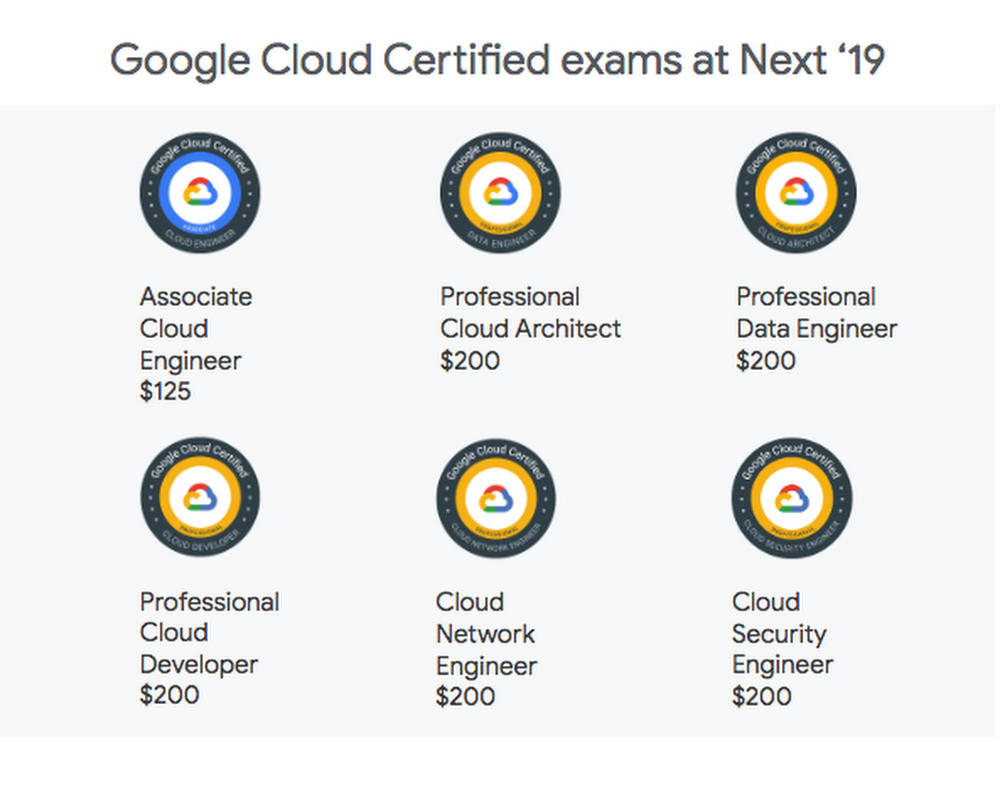
It’s only March, and it’s already been an action-packed year for the Google Cloud Certified program. We kicked off 2019 by adding four new certifications to our portfolio, bringing the total to seven to cover the range of expertise that exists in cloud today. We developed these certifications to help you move your career forward and show off your cloud knowledge, especially as cloud computing continues to grow. Being Google Cloud Certified lets you prove and validate your knowledge in designing, developing, managing and administering app infrastructure and data solutions on Google Cloud Platform (GCP).We know that finding time to certify can be challenging, so if you’re attending Next ‘19 San Francisco in April, we’ve planned some ways to make it as easy as possible to get certified while you’re there. We’ll have six certification exams available for testing. Testing will be available one day before the conference starts and one day after the main event, as well as during the event, so you have more options to take advantage of your time at Next ‘19. Here’s a look at the certified exams that are available at Next ‘19, and how much each one costs:Why get Google Cloud Certified?Google Cloud certifications are designed to help you validate your knowledge and make your cloud skills official. We have both Associate- and Professional-level exams to match the variety of cloud jobs. We also got exciting news recently that the Global Knowledge 2019 IT Skills and Salary survey ranked our Professional Cloud Architectas the top-paying certification.  Being certified has its benefits, and if you’re already Google Cloud Certified you’ll find some great perks at Next ‘19. Our certified community will receive special recognition for their expertise: exclusive swag and access to the certification lounge, which is in the Expo near the Dev Zone entrance.And if you take a Google Cloud Certified exam at Next, we’ll provide you with exclusive swag and access to the certification lounge where you can recharge, replenish, and network.Here are the details you’ll need so you can add certification to your agenda:Exam times (all exams are two hours)April 8: 1pm, 4pmApril 9: 9am, 11:45am, 2:30pmApril 10: 9am, 11:45am, 2:30pmApril 11: 11am, 1:45pm, 4:30pmApril 12: 8:15 am, 11amTesting is located at Bespoke in the Westfield San Francisco Centre, just a short walk from the Moscone Center. You’ll enter at 846 Mission Street via Bloomingdale’s, then head to Level 4 under the dome.Getting ready for your certification examFor the best preparation, check the following off your to-do list:Visit our website to get all the information on our exams.Review the Path to Success for the certification you choose. You can see the training options, including on-demand or instructor-led training, and hands-on labs.Review the exam guide.Take the online practice exam (available for some of the certifications). It’s free of charge and you can take it as many times as you’d like.Attend one of our webinars on March 29:Security on Google Cloud Platform: Getting Started and Getting CertifiedData Engineering on Google Cloud Platform: Build your Expertise and Get Google Cloud CertifiedDraw on your own experience! Your day-to-day experience in GCP is a huge source of knowledge, and the exams feature case studies to reflect the real world of cloud professionals.For those of you pursuing Professional Cloud Architect and Data Engineer certifications, we now have on-demand training specific to those exams:Preparing for the Google Cloud Professional Cloud Architect ExamPreparing for the Google Cloud Professional Data Engineer ExamIf you prefer instruction from a Google expert, we offer bootcamps at Next ‘19. Prepare for the Associate Cloud Engineer, Professional Cloud Architect or Data Engineer exams, or hone your skills in another one of our deep-dive technology sessions.Once you’ve registered for Next ’19, you can then sign up to take an exam. We’ll be cheering you on!
Quelle: Google Cloud Platform

Make your voice heard! Take the 2019 Accelerate State of DevOps survey

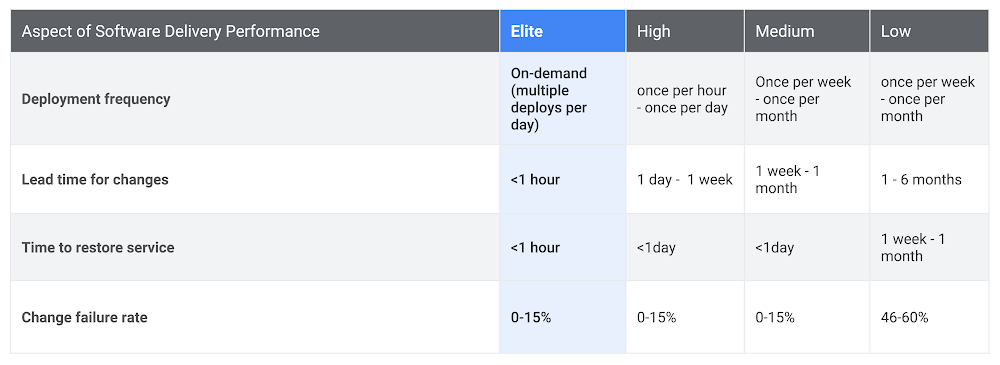
The survey for 2019 Accelerate State of DevOps Report is now live and we’d love to hear from you. Whether you’re just starting your DevOps journey, or you adopted DevOps a while ago, please make your voice is heard so that the survey captures insights from everyone.  For some background, the Accelerate State of DevOps Report is the largest and longest running research project of its kind. Since launching it six years ago, we’ve surveyed more than 30,000 technical professionals worldwide, across all industries.By contributing to the survey, you will help shape the narrative of the rapidly growing DevOps industry. Your insights will help drive conversations on how as an industry we can develop software faster with less risk.Last year, thanks to your contributions to the survey, we were able to get answers to key critical questions around DevOps. Some of the questions included:Does DevOps even matter?What drives high-performing DevOps teams?The role of cloud, open source, and culture in DevOpsKey metrics to measure DevOps performance.Last year’s report classified teams into elite, high, medium, and low performers and found such classifications exist in all types of organizations and industry verticals. We saw the proportion of high performers growing year over year, while low performers are struggling to keep up. You can learn more about insights from last year’s report here.The table below highlights some of the data from the report. It showcases software development and delivery metrics across elite, high, medium, and low-performing DevOps teams.Last year, we also focused on diversifying the percentage of women and underrepresented minorities taking the survey, and saw a big improvement. We hope to improve upon last year’s work, so please share the survey with your colleagues and your network!The 2019 survey  will take approximately 25 minutes to complete. This year, we dig into topics like deployment toolchains, cloud, disaster recovery, how we work, and more! The DORA research team and Google Cloud want to thank you in advance for your participation. Your insights will be very valuable for the entire DevOps industry and there are no right or wrong answers.Shape the future of DevOps and make your voice heard: Link
Quelle: Google Cloud Platform

Google Cloud named a leader in the Forrester Wave: Big Data NoSQL

We’re pleased to announce that Forrester has named Google Cloud as a leader in The Forrester Wave™: Big Data NoSQL, Q1 2019. We believe the findings reflect Google Cloud’s market momentum, and what we hear from our satisfied enterprise customers using Cloud Bigtable and Cloud Firestore.  According to Forrester, half of global data and analytics technology decision makers either have implemented or are implementing NoSQL platforms, taking advantage of the benefits of a flexible database that serves a broad range of use cases. The report evaluates the top 15 vendors against 26 rigorous criteria for NoSQL databases to help enterprise IT teams understand their options and make informed choices for their organizations. Google scored 5 out of 5 in Forrester’s report evaluation criteria of data consistency, self-service and automation, performance, scalability, high availability/disaster recovery, and the ability to address a breadth of customer use cases. Google also scored 5 out of 5 in the ability to execute criterion.How Cloud Firestore and Cloud Bigtable work for usersWe’re especially pleased that our recognition as a Leader in the Forrester Wave: Big Data NoSQL mirrors what we hear from our customers: Databases have an essential role to play in a cloud infrastructure. The best ones can make application development easier, make user experience better, and allow for massive scalability. Both Cloud Firestore and Cloud Bigtable include recently added features and updates to continue our mission of providing flexible database options.Cloud Firestore is our fully managed, serverless document database that recently became generally available. It’s designed and built for accelerating web, mobile and IoT apps, since it allows for live synchronization and offline support. Cloud Firestore also brings a strong consistency guarantee and a global set of locations, plus support for automatic sharding, high availability, ACID transactions and more. We’ve heard from Cloud Firestore users that they’ve been able to serve more users and move apps into production faster using the database as a powerful back end.Cloud Bigtable is our fast, globally distributed, wide-column NoSQL database service that can scale to handle massive workloads. It scales data storage from gigabytes to petabytes, while maintaining high-performance throughput and low-latency response times. It is the same database that powers many Google services such as Search, Analytics, Maps, and Gmail. Customers running apps with Cloud Bigtable can provide users with data updates in multiple global regions thanks to multi-region replication. We hear from Cloud Bigtable users that it lets them provide real-time analytics with availability and durability guarantees to their users and customers. Use cases often include IoT, user analytics, advertising tech and financial data analysis.Download the full Forrester report here, and learn more about GCP database services here.
Quelle: Google Cloud Platform

Let the queries begin: How we built our analytics pipeline for NCAA March Madness

It’s hard to believe, but a whole year has passed since last year’s epic March Madness®. As a result of our first year of partnership with the NCAA®, we used data analytics on Google Cloud to produce six live predictive television ads during the Men’s Final Four® and Championship games (all proven true, for the record), as well as a slew of additional game and data analysis throughout the tournament. And while we were waiting for March to return, we also built a basketball court to better understand the finer mechanics of solid jump shot.This year we’re back with even more gametime analysis, with the help of 30 or so new friends (more on that later). Now that Selection Sunday™ 2019 is upon us, we wanted to share a technical view of what we’ve been up to as we head into the tournament, the architectural flow that powers aspects of the NCAA’s data pipelining, and what you can look forward to from Google Cloud as we follow the road to Minneapolis in April. We’ve also put together online Google Cloud training focused on analyzing basketball and whipped up a few Data Studio dashboards to get a feel for the data (Q: Since 2003, what year has had the highest average margin of victory in the Men’s Sweet 16®? A: 2009).ETL for basketballOur architecture is similar to last year’s, with a few new players in the mix: Cloud Composer, Cloud Scheduler, Cloud Functions, and Deep Learning VMs. Collectively, the tools used and the resulting architecture is very similar to traditional enterprise ETL and data warehousing, except that this is all running on fully managed and serverless infrastructure.    The first step was to get new game data into our historical dataset. We’re using Cloud Scheduler to automate a Cloud Function to ingest raw game log data from Genius Sports every night. This fetches all of the latest game results and stores them in our data lake of decades of boxscore and play-by-play data sitting in Google Cloud Storage. The historical data corpus contains tens of thousands of files with varying formats and schema. The files are the source of truth for any auditing.As new data is ingested into Cloud Storage, an automated Cloud Composer orchestration renders several state check queries to identify changes in data, then executes a collection of Cloud Dataflow templates of Python-based Apache Beam graphs. These Apache Beam graphs then do the heavy lifting of extracting, transforming, and loading the raw NCAA and Genius Sports data into BigQuery. The beauty here is that we can run these jobs for one game for testing, or every game for complete re-load, or a slice of games (e.g. mens/2017/post_season) for targeted backfill. Cloud Dataflow can scale from one event to millions.Data warehousing with BigQueryWith BigQuery as the center of gravity of our data, we can take advantage of views, which are virtual tables built with SQL. We’ve aggregated all of the team, game, player, and play-by-play data into various views, and have nested the majority of them into uber-views.Note: You can now hack on your data (or any of our public datasets) for free with BigQuery providing 10GB of free storage and 1TB of analysis per month. Additionally, you can always take advantage of the Google Cloud Platform free tier if you want to build out beyond BigQuery.Below is a snippet of a sample SQL view that builds a team’s averaged incoming metrics over their previous seven games. We’ve applied BigQuery’s analytical functions to partitioning, which lets our analysis team create thousands of features inline in SQL instead of having to build the aggregations downstream in Python or R. And, as data is ingested via the ETL processes outlined above, the view data is immediately up-to-date.We use layered views to build complex aggregations, like this one below. This query comes in about 182 lines of SQL. Here, we are looking at scoring time durations between every event in the play-by-play table in order to answer questions such as, how long has it been since the last score? How many shots were attempted within that window? Was a time-out called? Granted, 1.7GB is not ‘big data’ by any means; however, performing windowed-row scans can be very time- or memory-intensive.Not in BigQuery.If you were to run this on your laptop, you’d burn 2GB of memory in the process. In BigQuery, you can simply run a query that is not only always up to date, but can also scale without any additional operational investment as your dataset grows (say, from one season to five). Plus, as team members finish new views, everyone in your project benefits.Data visualization with Data StudioBigQuery is powerful for rapid interactive analysis and honing SQL, but it can be a lonely place if you want to visualize data. With BigQuery’s Data Studio integration however, you can create visualizations straight from BigQuery with a few clicks. The following visualization is based on the view above which calculates in-game metrics such as percentage of time tied, percentage of time leading, percentage of time up by 10 or more. This helps answer questions around how much a team is controlling the score of a game.It doesn’t take a data scientist (or basketball expert) to find win-loss records for NCAA basketball teams or notice Gonzaga is having a great year (Tuesday’s loss notwithstanding). But with Data Studio, it’s easy to see more detail— that Gonzaga on average spent 28.8% of their minutes played being up by at least 20 points, and 50.4% of the time up by at least 10. (To be fair, Gonzaga’s scoring dominance is in part a function of their conference and resulting schedule, but still.) Once we get into the tournament, you could imagine that these numbers might move a bit. If we only had a view for schedule-adjusted metrics. (Spoiler alert: we will!)This is the kind of data you can’t glean from a box score. It requires deeper analysis, which BigQuery lets you perform easily, and Data Studio lets you bring to life without charge. Check out the Data Studio dashboard collection for more details.Exploratory data analysis and feature engineeringBeyond our ETL processes with Cloud Dataflow, interactive analysis with BigQuery and dashboarding with Data Studio, we also have tools for exploratory data analysis (EDA). For our EDA, we use two Google Cloud optimized data science environments: Colab and Deep Learning VM images.Colab is a free Jupyter environment that is optimized for Google Cloud and also provides GPU support. It also has versioning, in-line collaborative editing, and a fully configured Python environment. It’s like Google Docs for data nerds!We use Colab to drive analysis that requires processing logic or processing primitives that can’t be easily accomplished in SQL. One use case is the development of schedule adjusted metrics for every team for every calendar date for every season.Below is a snippet of our schedule-adjusted metrics notebook. We’re approaching each game-level metric as a function of three things: the team’s ability, the opponent’s ability, and home-court advantage. To get the game-level data we need to do schedule adjustment, we rely on views in BigQuery.The %%bigquery magic cell provides the ability to insert a query in-line and pump the results to a Pandas DataFrame. From there, we can flow this data through Pandas transformations, normalization, and then to scikit-learn to use ridge regression (with team season dummy variables) to get schedule-adjusted versions of our metrics.After a bit more Pandas wrangling, we can then create this informative scatter plot mapping raw and adjusted efficiency for all 353 Division I teams during the 2018-2019 season.We end this particular journey with one last step: by using the Pandas function pandas_gbq.to_gbq(adjusted_metrics, “adjusted_metrics” if_exists = “replace”) to pump this data back into BigQuery for use for model development and visualization.You can read more about how we built schedule adjusted metrics on our Medium collection, as well as additional Colabs we’ll be publishing during the tournament (or better yet, publish your own!)More predictions, More BigQuery, More madnessWith our ETL pipeline in place and a solid workflow for data and feature engineering, we can get to the fun and maddening part—predictions. In addition to revamping some of our predictions from last year, such as three-point shooting, turnover rates, and rebound estimations, we’re looking at some new targets to the mix, including dunks, scoring runs, and player contribution.We’re using a bit of scikit-learn, but we’re mainly relying on BigQuery ML to train, evaluate, and serve our primary models. BigQueryML enables you to train models in-line, and hands the training and serving off to underlying managed infrastructure. Consider the simple model below. In our friendly BigQuery editor, we can control model type, data splitting, regularization, learning rate, and override class weights—in a nutshell, machine learning.There are lots of great tools for machine learning, and there are lots of ways to solve a machine learning problem. The key is using the right tool for the right situation. While Scikit-learn, TensorFlow, Keras, and PyTorch all have their merits, for this case, BigQuery ML’s ease and speed can’t be beat.Not convinced? Try this Qwiklab designed for basketball analysis and you’ll see what we mean!The teamSince we didn’t have to design our architecture from scratch, we wanted to expand and collaborate with more basketball enthusiasts. College students were a natural fit. We started by hosting the first-ever Google Cloud and NCAA Hackathon at MIT this past January, and after seeing some impressive work, we recruited about 30 students from across the country to join our data analyst ranks.The students have split into two teams, looking at the concepts of ‘explosiveness’ and ‘competitiveness,’ each hoping to build a viable metric to evaluate college basketball teams. By iterating over Google Docs, BigQuery, and Colab, the students have been homing in on ways to use data and quantitative analysis to create definition around previously qualitative ideas.For example, sportscasters often mention how ‘explosive’ a team is at various points in a game. But aside from watching endless hours of basketball footage, how might you go about determining if a team was, in fact, playing explosively? Our student analysts considered the various factors that come into explosive play, like dunks and scoring runs. By pulling up play-by-play data in BigQuery, they could easily find boxscore data with timestamps of all historical games, yielding a score differential. Using %%bigquery magic, they pivoted to Colab, and explored the pace of play of games, creating time boundaries that isolated when teams went on a run in a game. From there, they created an expression of explosiveness, which will be used for game analysis during the tournament. You can read more about their analysis and insight at g.co/marchmadness.Still not enough March Madness and data analytics for you? We understand. While we wait for the first round of the tournament to begin, check in with the 2019 Kaggle competition, and keep an eye on g.co/marchmadness for gametime insights and predictions about key matchups (three-pointers, rebounds, close games, and more)—we’ll be covering both the men’s and women’s tournaments this year.See you on the court, and let the queries begin.
Quelle: Google Cloud Platform

Take Mobile Gaming to the Next Level with Location

Take Mobile Gaming to the Next Level with LocationGames are all about creating worlds and stories.  The richer the world, the more immersive the game. The earliest video games (think Pong, 1972) were limited to flat, two-dimensional screen. But even so, Pong was awesome. Believe us, we played a lot of Pong (not to mention the several decades of games that followed). But gamers today want more. Detailed storytelling and immersive world building are now a standard in games. This means there’s increasing expectation for game worlds to be realistic 3D environments on larger scales.At the same time this shift was happening in gaming, smartphones, big data and machine learning have propelled maps from a flat image on paper to a highly-personalized, living model of the world. And it was at the intersection of these two things that we saw the chance to build something to enable developers to create a whole new class of gaming experiences. This is why we launched Google Maps Platform’s gaming solution last year.In the last year, five games launched on our platform and we’ve learned a lot about real-world games.Location unlocks AR and social gameplayRich, dynamic, and contextual location data allows game developers to augment and enhance social and AR gaming experiences. This is why three of the top 10 ARCore games(1) in the last year were built on Google Maps Platform.  When it comes to location-driven social, players can not only team up, but also have their unique location enrich multiplayer gaming. Next Games learned how powerful this can be in The Walking Dead: Our World. In the game, players form groups, known as guilds, and are able to send flares to allow other players in the same guild to virtually join them at their location to complete missions around the flare.  When we asked about the impact location has had on the social experience of their game, Director Riku Suomela said, “If we didn’t have geolocation, the current system with social wouldn’t work.” In fact, ninety percent of the game’s daily active users are in a guild, and three out of every four players play the game with friends, so social engagement is high.  Location increases player engagement and retentionToday, gamers are people of every age and walk of life. They are rushing commuters, busy shoppers, and people just going about their daily lives. Incorporating location into a mobile game helps developers make game play more immersive and more personal. Every new location gives players a chance to engage with a game differently.For example, players hunting monsters could find toothier ones near their dentist office or hungrier ones around restaurants.  A real example of this is Ludia’s Jurassic World Alive. They found that players opened the game twice as often as Ludia’s non-location-based games. Similarly, Next Games’ The Walking Dead: Our World achieved a 54% higher seven day retention rate compared to the Top 50 US games average(2). When games connect with players where they are, in-game experiences become more immersive and this translates to a drastic increase in engagement and retention.  Location can add new life to an existing mobile gameWhen we started building Google Maps Platform’s gaming offer, we had a simple idea in mind: give developers the tools to build brand new real-world games. But thanks to creative partners, we realized the possibilities are even broader than we expected. Real-world games don’t need to be built from scratch––we’ve seen location intelligence bring new life to existing games, as well.mixi recently added a map mode to Monster Strike(3). In 2018, it became the highest-grossing mobile app of all time(4). Monster Strike was already a popular game but when mixi began re-engaging their user base with location-based in-game features, they saw a 30% increase in daily sessions per user, plus 50% of users who engaged with the location component played the game for 5 or more consecutive days. With mixi, we learned that game developers don’t need to wait for their next game release to start incorporating location into their gameplay. It can be a powerful new dimension to an existing game.  Location-driven features and real-world gameplay do a lot more than just add to the experience of a game. They redefine it. We think this has incredible potential even beyond what we’ve already seen, and we’re excited to work with developers around the world to bring more real-world gaming experiences to life with Google Maps Platform.Whether you’re looking to get people racing across the real streets of Los Angeles, rescue survivors from zombies, or battle in futuristic landscapes located right in their own neighborhoods, the opportunities are vast.  We can’t wait to work with you to build something awesome. Ready to learn more? Come to our Google booth or listen to our talk Tuesday, March 19th, 3:00-3:30 pm Room 2016 at West Hall at GDC or visit us at g.co/mapsplatform/gaming.(1) Source: Internal Google data(2) Source: AppAnnie 2018(3) MONSTER STRIKE, XFLAG, and mixi are trademarks or registered trademarks of mixi, Inc. ©️XFLAG(4) Source: Sensor Tower 2018
Quelle: Google Cloud Platform

Turning data into NCAA March Madness insights

Whether we’re collecting it, storing it, analyzing it, or just trying to make sense of it all, nearly all organizations wrangle with data. And this is particularly true for an organization like the NCAA®, with more than 80 years worth of data on everything from student-athlete performance to March Madness® tournament results.Last year, we teamed up with the NCAA to help them bring together their wealth of historical data so they could better support students and schools, as well as delight fans. During the 2018 March Madness tournament, we used data analytics on Google Cloud to help us better understand the game, and build some fun predictions for what might happen. We turned these real time predictions in TV commercials during the Final Four—and we weren’t far off the mark!In connection with this year’s March Madness tournament, we’re extending our NCAA campaign to developers everywhere with training that enables anyone with an interest in basketball and data analytics to dive in.  More and more developers want to use Google Cloud, and we are ready to meet that demand. (In fact, a recent study by Indeed found that Google Cloud skills are the fastest cloud skills growing in demand.)We’ve published a new series of Qwiklabs training to teach you how to use BigQuery to analyze NCAA basketball data with SQL and build a machine learning model to make your own predictions. At Google Cloud Next on April 9-11 (right after the Final Four), we’ll be hosting two bootcamps (Sunday and Monday) that use NCAA data to show you how to build a data science environment covering ingest, exploration, training, evaluation, deployment, and prediction. We’re co-hosting a predictive modeling competition with Kaggle that lets data scientists show their chops (and compete to win $10,000!). And we’ve published a technical blog post and a whitepaper to give you a deeper look under the hood.We’re also demonstrating our platform’s accessibility and ease of use by recruiting 30 college students from all over the country to expand our all-star predictions team. Using the same Google Cloud services that any organization would use to perform data analysis at scale, our team of student developers will be delivering data-driven predictions and insights throughout the tournament. You can see it all in action at g.co/marchmadness—as well as find links to all our training, certifications, resources, and more.Although our campaign is about college basketball, the NCAA’s challenge in gaining insights from data reflects the same kind of data challenges faced by most enterprises—and many are struggling to find the right skilled workforce to help. We hope this campaign shows how easy and accessible Google Cloud can be for developers everywhere. And we hope that by providing a fun and engaging way to learn our data platform, we can train millions of new Google Cloud developers and help organizations all over the world.To learn more about analytics on Google Cloud, visit our website.
Quelle: Google Cloud Platform