Good vibes only—don’t miss these Cloud Next ‘19 sessions on inclusivity, sustainability

At Google Cloud, we’re excited to join with our customers and build a world that works for everyone. Technology and innovation can help businesses grow sustainably, create richer, more interactive learning experiences, power economies where more people have an opportunity to thrive, and advance inclusion for all. We’ve picked a few of the sessions at Next 2019 that focus on building a cleaner, accessible and more inclusive future for generations to come. These are the ideas that give us good vibes about building with Google Cloud, so be sure not to miss them!   1. Prioritizing diversity and inclusionWorkforce diversity starts with recruiting and hiring diversity. In Inclusive by Design: Engage and Recruit Diverse Talent with AI, you’ll hear how companies like Cox are reaching a larger and more diverse talent pool and making racial, ethnic and gender diversity a key driver of innovation and growth. It takes a more diverse workforce for companies to truly build for all customers. It also makes business sense. In The Business Case for Product Inclusion, you’ll hear from a panel of Google leaders and Google Cloud customers about demonstrating the business value of inclusive products. And in the Chief Diversity Officer Panel: Building Dynamic Inclusive Cultures, you’ll hear from a panel of Chief Diversity Officers about how they are advancing vibrant, inclusive cultures across their organizations.Another amazing panel during Next ‘19 will share the stories of female technical leaders across Google. In Women of Cloud: How to Grow our Clout 2.0, senior women will discuss their past year in both the field and their careers, and answer your questions about career development and company culture. They’ll likely touch on allyship, or advocating for groups who have been historically excluded from the tech industry. If you want to learn more about allyship, and practice it, Allyship: The Fundamentals will run on both Wednesday and Thursday. This session will give you the chance to practice identity-based leadership by examining your position in social struggles and putting yourself in another’s shoes.2. Building a more sustainable futureIf you’re curious about your environmental impact as a cloud user, join us for Building Sustainability Into Our Infrastructure, Your Goals and New Products. We’ll share what it took to build a cloud with sustainability built-in, and National Geographic will share how they incorporate a corporate focus on the earth into an IT one. SunPower will also join for an exciting announcement as part of their journey toward making home solar accessible to all.  Making renewable energy like solar a primary energy source for the globe is a big challenge, and so are the challenges faced in global ocean exploitation. The oceans are big—140 million square miles big, or about 70% of the earth’s surface. But less than 5% has been explored. That presents a problem for sustainable fishing management, particularly with dark vessels that do not have any associated location data and could be fishing illegally. In Making Planet-Scale GIS Possible with Google Earth Engine and BigQuery GIS, Google Cloud customer Global Fishing Watch will share how they use Google Earth Engine to automatically extract vessel locations from massive amounts of radar imagery, then use BigQuery GIS to elucidate the dark vessels.Overfishing is just one example of the natural resource challenges we face. In 2018, the global demand for resources was 1.7 times what the earth can support in one year. Google Cloud and SAP came together to help address this challenge by hosting a sustainability contest for social entrepreneurs. In Circular Economy 2030: Cloud Computing for a Sustainable Revolution, you can learn more about how cloud computing can be mobilized for a sustainable future with responsible consumption and production, and hear the anticipated announcement of the five finalists of Circular Economy 2030.3. Nonprofit organizations making a positive impactGlobal nonprofit organizations are tackling big challenges with Google technology. One area with a promising future is using data analytics and other new technologies to solve some of the world’s greatest challenges, such as unemployment or sustainable development. In Data for Good: Driving Social and Environmental Impact with Big Data Solutions, you’ll hear about how Google Cloud is working to empower nonprofits around the world, and how we’ve collaborated with organizations like the Global Partnership for Sustainable Development Data (GPSDD) to mobilize data for sustainable development across our Data Solutions for Change, Visualize 2030, and Circular Economy 2030 initiatives. In Empowering Global Nonprofits to Drive Impact with G Suite, we’ll talk about how nonprofits are embracing technology to improve how they collaborate, engage with their community, and fundraise for their cause. You’ll hear from two Bay Area organizations making a positive impact on the lives of local youth.4. Using technology to help the visually impairedAs part of a strategic initiative by the Library of Congress to support users who are visually impaired, one Google Cloud customer is building an app to make reading books more easily available. In Making Books Accessible to the Visually Impaired, SpringML will share how users can now search for and play an audiobook from a Google Home device. Hear about the development process SpringML went through to make almost 1 TB of audio content available via their application. In addition to partnering with our customers on applications like SpringML is building, we’re working on improving accessibility with Google Cloud products. In Empowering Entrepreneurs and Employees With Disabilities Using G Suite, the Blind Institute of Technology will share how they used G Suite to establish workflows that are effective and efficient for their employees, some who happen to be visually impaired. There’s more on this in the G Suite and Chrome Accessibility Features for an Inclusive Organization session, which will go into depth on the built-in accessibility features of G Suite and Chromebooks.And finally, a session focused on those who will be building this new world in a few years. Did you know that more than half of school-aged children in the U.S. use Google in their classrooms? Join For Parents and Guardians: How Your Child Uses Google in Class to learn about the tools that are transforming learning outcomes, curriculum, and opportunities for children across the nation.For more on what to expect at Google Cloud Next ‘19, take a look at the session list here, and register here if you haven’t already. We’ll see you there.
Quelle: Google Cloud Platform
Accelerate Java application development on GCP with Micronaut

Editor’s note: Want to develop microservices in Java? Today we hear from Object Computing, Inc. (OCI), a Google Cloud partner that is also the driving force behind the Micronaut JVM framework. Here, OCI senior software engineer Sergio del Amo talks about how to use Micronaut on GCP to build serverless applications, and walks you through an example.Traditional application architectures are being replaced by new patterns and technologies. Organizations are discovering great benefits to breaking so-called monolithic applications into smaller, service-oriented applications that work together in a distributed system. The new architectural patterns introduced by this shift call for the interaction of numerous, scope-limited, independent applications: microservices.To support microservices, modern applications are built on cloud computing technologies, such as those provided by Google Cloud. Rather than managing the health of servers and data centers, organizations can deploy their applications to platforms where the details of servers are abstracted away, and services can be scaled, redeployed, and monitored using sophisticated tooling and automation.In a cloud-native world, optimizing how a Java program’s logic is interpreted and run on cloud servers via annotations and other compilation details takes on new importance. Additionally, serverless computing adds incentive for applications to be lightweight and responsive and to consume minimal memory. Today’s JVM frameworks need to ease not just development, as they have done over the past decade, but also operations.  Enter Micronaut. Last year, a team of developers at OCI  released this open source JVM framework that was designed to simplify developing and deploying microservices and serverless applications.Micronaut comes with built-in support for GCP services and hosting. Then, in addition to out-of-the-box auto-configurations, job scheduling, and myriad security options, Micronaut provides a suite of built-in cloud-native features, including:Service discovery. Service discovery means that applications are able to find each other (and make themselves findable) on a central registry, eliminating the need to look up URLs or hardcode server addresses in configuration. Micronaut builds service-discovery support directly into the @Client annotation, meaning that performing service discovery is as simple as supplying the correct configuration and then using the “service ID” of the desired service.Load balancing. When multiple instances of the same service are registered, Micronaut provides a form of “round-robin” load-balancing, cycling requests through the available instances to ensure that no one instance is overwhelmed or underutilized. This is a form of client-side load-balancing, where each instance either accepts a request or passes it along to the next instance of the service, spreading the load across available instances automatically.Retry mechanism and circuit breakers. When interacting with other services in a distributed system, it’s inevitable that at some point, things won’t work out as planned—perhaps a service goes down temporarily or drops a request. Micronaut offers a number of tools to gracefully handle these mishaps. Retry provides the ability to invoke failed operations. Circuit breakers protect the system from repetitive failures.As a result of this natively cloud-native construction, you can use Micronaut in scenarios that would not be feasible with a traditional Model-View-Controller framework in the JVM, including low-memory microservices, Android applications, serverless functions, IoT deployments, and CLI applications.Micronaut also provides a reactive HTTP server and client based on Netty, an asynchronous networking framework that offers high performance and a reactive, event-driven programming model.Sample App: Google Cloud Translate APITo see how easy it is to integrate a Micronaut application with Google Cloud services, review this tutorial for building a sample application that consumes the Google Cloud Translation API.Step 1: Install MicronautYou can build Micronaut from the source on [Github]() or download it as a binary and install it on your shell path. However the recommended way to install Micronaut is via SDKMAN!. If you do not have SDKMAN! installed already, you can do so in any Unix-based shell with the following commands:You can now install Micronaut itself with the following SDKMAN! command (use sdk list micronaut to view available versions; at the time of this writing, the latest is 1.0.3):Confirm that you have installed Micronaut by running _mn -v_:Step 2: Create the projectThe mn command serves as Micronaut’s CLI. You can use this command to create your new Micronaut project. For this exercise, we will create a stock Java application, but you can also choose Groovy or Kotlin as your preferred language by supplying the -lang flag (-lang groovy or -lang kotlin).The `mn` command accepts a features flag, where you can specify features that add support for various libraries and configurations in your project. You can view available features by running mn profile-info service.We’re going to use the spock feature to add support for the Spock testing framework to our Java project. Run the following command:Note that we can supply a default package prefix (example.micronaut) to the project name (translator). If we did not do so, the project name would be used as a default package. This package will contain the Application class and any classes generated using the CLI commands (as we will do shortly).By default the create-app command generates a Gradle build. If you prefer Maven as your build tool, you can do so using the -build flag (e.g., -build maven). This exercise uses the default Gradle project.At this point, you can run the application using the Gradle run task.TIP: If you would like to run your Micronaut project using an IDE, be sure that your IDE supports Java annotation processors and that this support is enabled for your project. In the IntelliJ IDEA, the relevant setting can be found under Preferences -> Build, Execution, Deployment -> Compiler -> Annotation Processors -> Enabled.Step 3: Create a simple interfaceCreate a Java interface to define the translation contract:If I want to translate Hello World to Spanish, you can invoke any available implementations of the previous interface with translationService.translate( “Hello World”, “en”, “es”).We create a POJO to encapsulate the translation result.Step 4: Expose an endpointSimilar to other MVC frameworks such as Grails or Spring Boot, you can expose an endpoint by creating a controller.The endpoint, which we will declare in a moment, consumes a JSON payload that encapsulates the translation request. We can map such JSON payload with a POJO.src/main/java/example/micronaut/TranslationCommand.javaPlease note that the previous class uses the annotation @ javax.validation.constraint.NotBlank to declare text, source, and target as required. Micronaut’s validation is built in with the standard framework – JSR 380, also known as Bean Validation 2.0.Hibernate Validator is a reference implementation of the validation API. You need an implementation of the validation API in the classpath. Thus, add the next snippet to _build.gradle_Next, create a controller:src/ main/java/example/micronaut/TranslationController.javaThere are several things worth mentioning about the previous code listing:The Controller exposes a _/translate_ endpoint which could be invoked with a POST request.The value of _@Post_ and _@Controller_ annotations is a RFC-6570 URI template.Via constructor injection, Micronaut supplies a collaborator; _TranslatorService_.Micronaut controllers consume and produce JSON by default._@Body_ indicates that the method argument is bound from the HTTP body.To validate the incoming request, you need to annotate your controller with _@Validated_ and the binding POJO with _@Valid_.In addition to constructor injection, as illustrated in the previous snippet, Micronaut supports the following types of dependency injection: Field injection, JavaBean property injection or Method parameter injection.Integrate with Google Cloud Translation APINow you want to add a dependency to Google Cloud Translate library:Micronaut implements the JSR 330 specification for Java dependency injection, which provides a set of semantic annotations under the javax.inject package (such as @Inject and @Singleton) to express relationships between classes within the DI container.Create a singleton implementation of _TranslationService_ that uses the Google Cloud Translation API.Here are a few things to mention about the above  code:_@Singleton_ annotation is used to declare the class as a Singleton.A method annotated with _@PostConstruct_ will be invoked once the object is constructed and fully injected.Test the app Thanks to Micronaut’s fast startup time, it is easy to write functional tests with it.Here’s how to write a functional test that verifies the behavior of the whole application.Here are a few things to note about the above code:It’s easy to run the application from a test with the _EmbeddedServer_ interface.You can easily create an HTTP Client bean to consume the embedded server.Micronaut HTTP Client makes it easy to parse JSON into Java objects.Creating HTTP Requests is easy thanks to Micronaut’s fluid API.We verify the that server responds 400 (Bad request status code) when the validation of the incoming JSON payload fails.Deploy to Google CloudThere are multiple ways to deploy a Micronaut application to Google Cloud. You may choose to containerize your app or deploy it as a FAT jar. Check out these tutorials to learn more:Deploy a Micronaut application to Google Cloud App EngineDeploy a Micronaut application containerized with Jib to Google Kubernetes EngineMicronaut performanceIn addition to its cloud-native features, Micronaut also represents a significant step forward in microservice frameworks for the JVM, by supporting common Java framework features such as dependency injection (DI) and aspect-oriented programming (AOP), without compromising startup time, performance, and memory consumption.Micronaut features a custom-built DI and AOP model that does not use reflection. Instead, an abstraction over the Java annotation processor tool (APT) API and Groovy abstract syntax tree (AST) lets developers build efficient applications without giving up features they know and love.By moving the work of the DI container to the compilation phase, there is no longer a link between the size of the codebase and the time needed to start an application or the memory required to store reflection metadata. As a result, Micronaut applications written in Java typically start within a second.This approach has opened doors to a variety of framework features that are more easily achieved with AOT compilation and that are unique to Micronaut.ConclusionCloud-native development is here to stay, and Micronaut was built with this landscape in mind. Like the cloud-native architecture that motivated its creation, Micronaut’s flexibility and modularity allows developers to create systems that even its designers could not have foreseen.To learn more about using Micronaut for your cloud-based projects, check out the Micronaut user guide. Learn how to use Micronaut in concert with Google Cloud Platform services, such as Cloud SQL, Kubernetes, and Google’s Instance Metadata Server in our upcoming webinar. There’s also a small but growing selection of step-by-step tutorials, including guides for all three of Micronaut’s supported languages: Java, Groovy, and Kotlin.Finally, the Micronaut community channel on Gitter is an excellent place to meet other developers who are already building applications with the framework and interact directly with the core development team.
Quelle: Google Cloud Platform

Exploring container security: the shared responsibility model in GKE

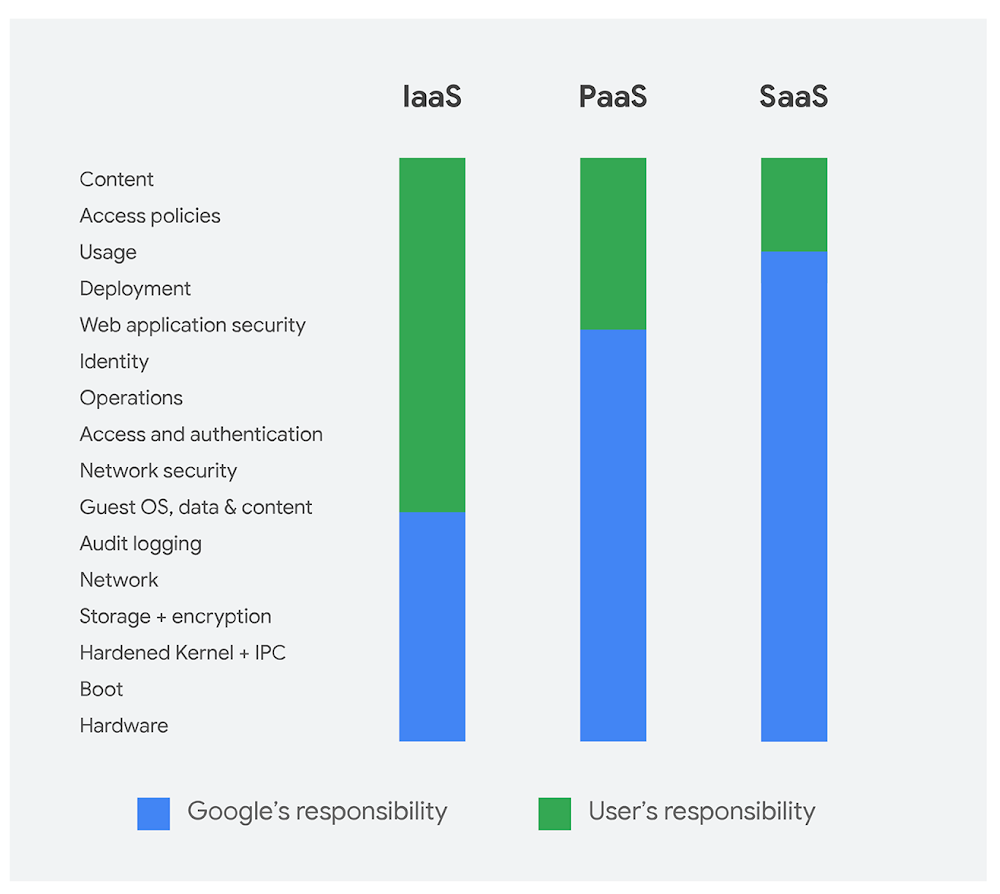
Editor’s note: This post is part of our blog post series on container security at Google.Security in the cloud is a shared responsibility between the cloud provider and the customer. Google Cloud is committed to doing its part to protect the underlying infrastructure, like encryption at rest by default, and in providing capabilities you can use to protect your workloads, like access controls in Cloud Identity and Access Management (IAM). As newer infrastructure models emerge, though, it’s not always easy to figure out what you’re responsible for versus what’s the responsibility of the provider. In this blog post, we aim to clarify for Google Kubernetes Engine (GKE) what we do and don’t do—and where to look for resources to lock down the rest.Google Cloud’s shared responsibility modelThe shared responsibility model depends on the workload—the more we manage, the more we can protect. This starts from the bottom of the stack and moves upwards, from the infrastructure as a service (IaaS) layer where only the hardware, storage, and network are the provider’s responsibility, up to software as a service (SaaS) where almost everything except the content and its access are up to the provider. (For a deep dive check out the Google Infrastructure Security Design Overview whitepaper). Platform as a service (PaaS) layers like GKE fall somewhere in the middle, hence the ambiguity that arises.For GKE, at a high level, we are responsible for protecting:The underlying infrastructure, including hardware, firmware, kernel, OS, storage, network, and more. This includes encrypting data at rest by default, encrypting data in transit, using custom-designed hardware, laying private network cables, protecting data centers from physical access, and following secure software development practices.The nodes’ operating system, such as Container-Optimized OS (COS) or Ubuntu. GKE promptly makes any patches to these images available. If you have auto-upgrade enabled, these are automatically deployed. This is the base layer of your container—it’s not the same as the operating system running in your containers.The Kubernetes distribution. GKE provides the latest upstream versions of Kubernetes, and supports several minor versions. Providing updates to these, including patches, is our responsibility.The control plane. In GKE, we manage the control plane, which includes the master VMs, the API server and other components running on those VMs, as well as the etcd database. This includes upgrades and patching, scaling, and repairs, all backed by an SLO.Google Cloud integrations, for IAM, Cloud Audit Logging, Stackdriver, Cloud Key Management Service, Cloud Security Command Center, etc. These enable controls available for IaaS workloads across Google Cloud on GKE as well.Conversely, you are responsible for protecting:The nodes that run your workloads, including VM images and their configurations. This includes keeping your nodes updated, as well as leveraging Compute Engine features and other Google Cloud products to help protect your nodes. Note that we already manage the containers that are necessary to run GKE, and provide patches for your OS—you’re just responsible for upgrading.The workloads themselves, including your application code, dockerfiles, container images, data, RBAC/IAM policy, and containers and pods that you are running. This means leveraging GKE features and other Google Cloud products to help protect your containers.Hardening the control plane is Google’s responsibilityGoogle is responsible for making the control plane more secure – which is the component of Kubernetes that manages how Kubernetes communicates with the cluster, and applies the user’s desired state. The control plane includes the master VM, API server, scheduler, controller manager, cluster CA, root-of-trust key material, IAM authenticator and authorizer, audit logging configuration, etcd, and various other controllers. All of your control plane components run on Compute Engine instances that we own and operate. These instances are single tenant, meaning each instance runs the control plane and its components for only one customer. (You can learn more about GKE control plane security here.)We make changes to the control plane to further harden these components on an ongoing basis—as attacks occur in the wild, when vulnerabilities are announced, or when new patches are available. For example, we updated clusters to use RBAC rather than ABAC by default, and locked down and eventually disable the Kubernetes dashboard.How we respond to vulnerabilities depends on which component the vulnerability is found in:The kernel or an operating system: We apply the patch to affected components, including obtaining and applying the patch to the host images for Kubernetes, COS and Ubuntu. We automatically upgrade the master VMs, but you are responsible for upgrading nodes. Spectre/Meltdown and L1TF are examples of such vulnerabilities.Kubernetes: With Googlers on the Kubernetes Product Security Team, we often help develop and test patches for Kubernetes vulnerabilities when they are discovered. Since GKE is an official distribution, we receive the patch as part of the Private Distributors’ List. We’re responsible for rolling out these changes to the master VMs, but you are responsible for upgrading your nodes. Take a look at these security bulletins for the latest examples of such vulnerabilities, CVE-2017-1002101, CVE-2017-1002102, and CVE-2018-1002015.Component used in Kubernetes Engine’s default configuration, like Calico components for Network Policy, or etcd: We don’t control the open-source projects used in GKE, however, we select open-source projects that have demonstrated robust security practices and that take security seriously. For these projects, we may receive a patch from upstream Kubernetes, a partner, or the distributor list of another open-source project. We are responsible for rolling out these changes, and/or notifying you if there is action required. TTA-2018-001 is an example of such a vulnerability that we patched automatically.GKE: If a vulnerability is discovered in GKE, for example through our Vulnerability Reward Program, we are responsible for developing and applying the fix.In all of these cases, we make these patches available as part of general GKE releases (patch releases and bug fixes) as soon as possible given the level of risk, embargo time, and any other contextual factors.We do most of the hard work to protect nodes, but it’s your responsibility to upgrade and reap the benefitsYour worker nodes in Kubernetes Engine consist of a few different surfaces that need to be protected, including the node OS, the container runtime, Kubernetes components like the kubelet and kube-proxy, and Google system containers for monitoring and logging. We’re responsible for developing and releasing patches for these components, but you are responsible for upgrading your system to apply these patches.Kubernetes components like kube-proxy and kube-dns, and Google-specific add-ons to provide logging, monitoring, and other services run in separate containers. We’re responsible for these containers’ control plane compatibility, scalability, upgrade testing, as well as security configurations. If these need to be patched, it’s your responsibility to upgrade to apply these patches.To ease patch deployment, you can use node auto-upgrade. Node auto-upgrade applies updates to nodes on a regular basis, including updates to the operating system and Kubernetes components from the latest stable version. This includes security patches. Notably, if a patch contains a critical fix and can be rolled out before the public vulnerability announcement without breaking embargo, your GKE environment will be upgraded before the vulnerability is even announced.Protecting workloads is still your responsibilityWhat we’ve been talking about so far is the underlying infrastructure that runs your workload—but you of course still have the workload itself. Application security and other protections to your workload are your responsibility.You’re also responsible for the Kubernetes configurations that pertain to your workloads. This includes setting up a NetworkPolicy to restrict pod to pod traffic and using a PodSecurityPolicy to restrict pod capabilities. For an up-to-date list of the best practices we recommend to protect your clusters, including node configurations, see Hardening your cluster’s security.If there is a vulnerability in your container image, or application, however, it is also fully your responsibility to patch it. However, there are tools you can use to help:Google managed base images, which are regularly patched by Google for known vulnerabilities.Container Registry vulnerability scanning to analyze your container images and packages for potential known vulnerabilities.Cloud Security Scanner (alpha) to help you detect common application vulnerabilities.Incident response in GKESo what if you’ve done your part, we’ve done ours, and your cluster is still attacked? Damn! Don’t panic.Google Cloud takes the security of our infrastructure—including where user workloads run—very seriously, and we have documented processes for incident response. Our security team’s job is to protect Google Cloud from potential attacks and protect the components outlined above. For the pieces you’re responsible for, if you’re looking to further protect yourself from potential container-specific attacks, Google Cloud already has a range of container security partners integrated with the Cloud Security Command Center.If you are responding to an incident, you can leverage Stackdriver Incident Response & Management (alpha) to help you reduce your time to incident mitigation, refer to sample queries for Kubernetes audit logs, and check out the Cloud Forensics 101 talk from Next ‘18 to learn more about conducting forensics.What’s the tl;dr of GKE security? For GKE, we’re responsible for protecting the control plane, which includes your master VM, etcd, and controllers; and you’re responsible for protecting your worker nodes, including deploying patches to the OS, runtime and Kubernetes components, and of course securing your own workload. An easy way to do  your part is touse node-autoupgradeprotect your workload from common image and application vulnerabilities, andfollow the Google Kubernetes Engine hardening guide.If you follow those three steps, together we can build GKE environments that are resilient to attacks and vulnerabilities, to deliver great uptime and performance.
Quelle: Google Cloud Platform

How fuboTV built a cloud-native streaming platform with GCP

Twenty years ago, if you would’ve told me that I’d watch my favorite soccer team (Manchester United) on a mobile phone from the comfort of my backyard, in a taxi or at the airport, I probably would’ve laughed and brushed the notion off as science fiction. It wasn’t that long ago when watching a sporting event was confined to either the stadium or sitting in the family room in front of a television.Now, of course, viewers can tune into games, news, television shows, movies and more—not only on their mobile phones, but across practically every connected screen. Our expectations have changed to the point that buffering, slow load times and pixelated images simply won’t be tolerated. Providers like fuboTV, a streaming service that offers live and video-on demand (VOD) content to around 250,000 monthly subscribers in the U.S., know this better than anyone.Initially launching with live sports content in 2015, fuboTV expanded to stream television shows, movies, news and more in 2017, and today is a complete cable TV replacement product for the entire family. As it broadened its offerings, fuboTV needed a partner that could ensure subscribers enjoyed an optimal streaming experience while also being well-positioned for continued future growth. fuboTV chose Google Cloud to build out its OTT platform—a platform that now comprises 100+ national live television channels, over 560 local channels and thousands of on-demand titles.For the past two years, fuboTV’s streaming video distribution supply chain has sat within Google Cloud Platform (GCP). Cloud Storage ingests and stores video assets, with flexible storage solutions for varying video workflows, and Compute Engine supports video processing. To ensure subscribers have the best possible viewing experience, fuboTV leverages Google Cloud’s Stackdriver, which can diagnose problems with real-time access logs and can gauge incoming traffic flows.Having insights into how viewers consume content is essential, too, helping to influence critical business decisions, such as what promotions to run, what content to suggest and even what region to enter next (hint: it was Spain). Using BigQuery, fuboTV can gain insights into viewership and video downtime, to scale up with viewer spikes and ramp down for cost savings. Additionally, BigQuery effortlessly integrates into fuboTV’s proprietary visualization dashboard that also includes fuboTV’s own customized streaming metrics, ultimately providing a holistic view of the entire streaming ecosystem.After ingesting video into GCP, fuboTV also relies on the open-source flexibility of Google Kubernetes Engine to operate seamlessly with high availability and scale as demand fluctuates to get their content in the hands of customers, fast.Geir Magnusson Jr., CTO at fuboTV, recently shared, “Google Cloud has helped us build a stable, cloud-native streaming service from the ground up, in less than two years. This team has truly understood our needs as a startup to work nimbly, swiftly and cost-efficiently. As we continue to reach new viewers around the world and evolve our service to anticipate their demands, we know can depend on Google Cloud to help us have a solid, state-of-the-art offering.”While working with us, fuboTV launched a 4K HDR feature in beta and experienced 100 percent growth YoY. We look forward to helping fuboTV scale with new content, add new features to its platform and expand its business in the months and years to come. Learn more about how we collaborate with content providers for better viewing experiences on our website.
Quelle: Google Cloud Platform

Simplify reporting with the Sheets data connector for BigQuery, and voila: automated content updates for G Suite

Annual and quarterly reports are a standard part of business for many enterprises. But automation can help eliminate the repetition inherent in these periodic obligations. If you find yourself needing to analyze and present findings from large sets of stored data, you can conveniently use BigQuery, Sheets, and Apps Script—all in a single workflow—to generate recurring content in seconds. Most notably, the Sheets data connector for BigQuery provides you with an interactive UI in Sheets that pulls data straight from BigQuery using standard SQL.To see an example of this solution in action, let’s pretend you’re an art history professor who needs to generate slide decks for a semester’s worth of classes. The Met Public Domain Art Works public dataset in BigQuery has all the images and metadata you need to create lessons that will highlight a different artist each week.For example, take a look at a recent lesson on Paul Cézanne:Templatizing the slide deckEach of the slide decks you’ll make for class are quite similar. They start with a title slide with the artist’s name and other biographical information. Following the title slide, you’ll see several slides that include an image, date, and title of a piece of art. You can easily turn this structure into a template deck that includes tags for each of these fields. Similar to mail merge, you can use these tags as placeholders for populating the source data.Accessing the dataIn order to pull this data from The Met Public Domain Art Works, you’ll want to use the Sheets data connector for BigQuery. Using the data connector requires a G Suite Business, Enterprise, or Education account and a BigQuery account and project.Each of today’s lessons focuses on one artist and one medium. With the data connector, you can query datasets from BigQuery using a web UI and visualize the results, all without ever leaving your spreadsheet.. Here’s what your example query should look like in the editor:You’ll notice some parameters within the query, such as @ARTIST_NAME, @MEDIUM, and @COUNT. By using parameters, you can easily swap in new artists, mediums, and number of works and run the query without updating any SQL!You’ll want to use a new sheet within the same spreadsheet to store your parameters. In this sheet, you’ll designate specific cells for your artist of choice, medium, and number of slides.Once your configuration sheet is set up, you should set your parameters to point directly to these cell references in the query editor.Now you can select any combination of artist, medium, and slide count in your configuration sheet, and hit the ‘Refresh’ button in the data sheet to perform the query.Tying it all together with Apps ScriptOnce you hit refresh, you’ll see the query results with the images and data you need for your weekly lesson. No need for a late Sunday evening, professor! In order to create your final presentation, you’ll need a bit of Apps Script to merge this data with a copy of the template slides. The less than 100 lines of Apps Script performs four main functions:Copies the template slide deck and renames itAdjusts the number of art slides for your imagesInserts the metadata, including work title and date, into your art slidesInserts the images into your art slidesFinally, you’ll add a final step to your configuration sheet which includes a “Generate” button, which begins execution of the script.If you navigate to your Google Drive home screen, you’ll see your newly minted slide deck on the Recents menu. In five simple steps, you’ve created a deck in a matter of seconds! Of course you need not be an art history professor to put this workflow to use. This process can help you build quarterly reports, or gather metrics at the drop of a hat for a senior stakeholder. Whatever your industry, when a senior manager asks for some numbers “stat!” or “pronto!” you’ll know how to deliver. Try out the Sheets data connector today.
Quelle: Google Cloud Platform

6 standout serverless sessions at Google Cloud Next ‘19

Serverless is changing the way apps are developed in the cloud; by not worrying about underlying infrastructure, you can build quickly and focus on what’s important to your app and business. Serverless has grown from just compute, expanding to databases, machine learning and more, and this rapid growth is reflected in our Google Cloud Next ‘19 sessions this year. Two years ago, we hosted just three serverless sessions. This year we have an entire serverless track with more than thirty sessions!To help you navigate the huge list of sessions, here are 6 “standout” serverless sessions from this year’s Next:1. Serverless on Google Cloud (Spotlight)Join this spotlight session and hear us talk about Google’s vision, new product developments and customer success stories. Learn how App Engine, Cloud Functions, serverless containers, Knative and other serverless offerings let you build applications that automatically scale from zero to infinity—without having to worry about managing the underlying infrastructure.2. What’s New in Serverless Compute?Join us for a look at all the new serverless compute announcements this year, as well as see a sneak peek of what we’ll be working on down the road.3. Where Should I Run My Code? Choosing From 5+ Compute OptionsFrom virtual machines to Kubernetes to serverless, there are many ways to run your code in Google Cloud today. Come learn how to navigate the trade-offs and different compute models used by open-source tools like Knative and Kubernetes, as well as GCP services such as App Engine, Cloud Functions, Compute Engine and more.4. Serverless Agility for Containerized AppsLearn about how Google Cloud is enabling you to run stateless containers on a fully managed environment or in your own GKE cluster. See demos and hear from customers about how serverless makes their developers more productive.5. Knative a Year Later: Serverless, Kubernetes and YouKnative, which provides the open-source technology for a serverless developer experience on Kubernetes, has seen remarkable growth and uptake since launching in 2018. Join us to hear what’s new and what’s happened since launch.6. Run Containers on GCP’s Serverless InfrastructureDive into GCP’s new fully managed serverless platform that lets you run arbitrary HTTP stateless containers while only paying for what you use and without worrying about the infrastructure. See demos of new use cases unlocked by running containers in a serverless way and hear from customers who already use it.Those are just the highlights, but there is a ton more content to check out, including: building serverless APIs, serverless security, DevOps for serverless, combining serverless and G Suite, building end-to-end serverless systems and using Cloud Tasks.See the full agenda here. Don’t forget to register because seats are limited; we hope to see you at Google Cloud Next ‘19!
Quelle: Google Cloud Platform

Introducing Google Cloud security training and certification: skills that could save your company millions

Information security is a top priority for global businesses, large and small. Security breaches can cost organizations millions of dollars, cause irreparable brand damage, and result in lost customers. As data and apps move to the cloud, cloud security is increasingly crucial for organizational success.According to the Breach Level Index, a global database of public data breaches, 3.3 billion data records were compromised worldwide in the first half of 2018, an increase of 72% compared to the same period in 2017. Further, the average cost of a data breach globally increased to $3.86 million, according to the Ponemon Institute’s 2018 Cost of a Data Breach Study.While these statistics are eye-popping, concern about security in the cloud is no longer hampering cloud adoption for organizations. In fact, a 2017 global survey of more than 500 IT decision-makers found that three-quarters of respondents have become more confident in cloud security. Businesses are now more concerned about the shortage of talent with the right skills to manage cloud technology, make sure the right security controls are in place, manage cloud-based access, and ensure data protection.The cost and stakes of a security breach are too high, and organizations are realizing they need a skilled team able to handle the ever-increasing workload. A recent CIO.com article, “The top 4 IT security hiring priorities and in-demand skills for 2019,” said that “when it comes to cloud security hiring, the most in-demand role for 2019 is the Cloud Security Engineer.”To address these current and future needs, we recently launched the Security in GCP specialization, our latest on-demand training course. It introduces learners to Google’s approach to security in the cloud and how to deploy and manage the components of a secure GCP solution. With focus areas such as Cloud Identity, security keys, Cloud IAM, Google Virtual Private Cloud firewalls, Google Cloud load balancing, and many more, participants will learn about securing Google Cloud deployments as well as mitigating many of the vulnerabilities, attacks, and risks mentioned above in a GCP-based infrastructure. These include distributed denial-of-service (DDoS) attacks, phishing, and data exfiltration threats involving content classification and use.While this new training is a broad study of security controls and techniques on GCP, it provides a good framework for a job role that is becoming more important to organizations, the Cloud Security Engineer. To offer organizations a way to benchmark and measure the proficiency of their team’s Google Cloud security skills, we’ve also recently completed the beta version of the Professional Cloud Security Engineer. This certification, which will be available to the public at Next ‘19, validates an individual’s aptitude for security best practices and industry security requirements while demonstrating an ability to design, develop, and manage a secure infrastructure that uses Google security technologies.At a time when many businesses are more vulnerable to cyber attacks, developing cloud security skills with this new training and certification can bring you greater confidence that your data is in safe hands.To learn more about this new training and certification, join our webinar on March 29 at 9:45am PST.
Quelle: Google Cloud Platform

Future of cloud computing: 5 insights from new global research

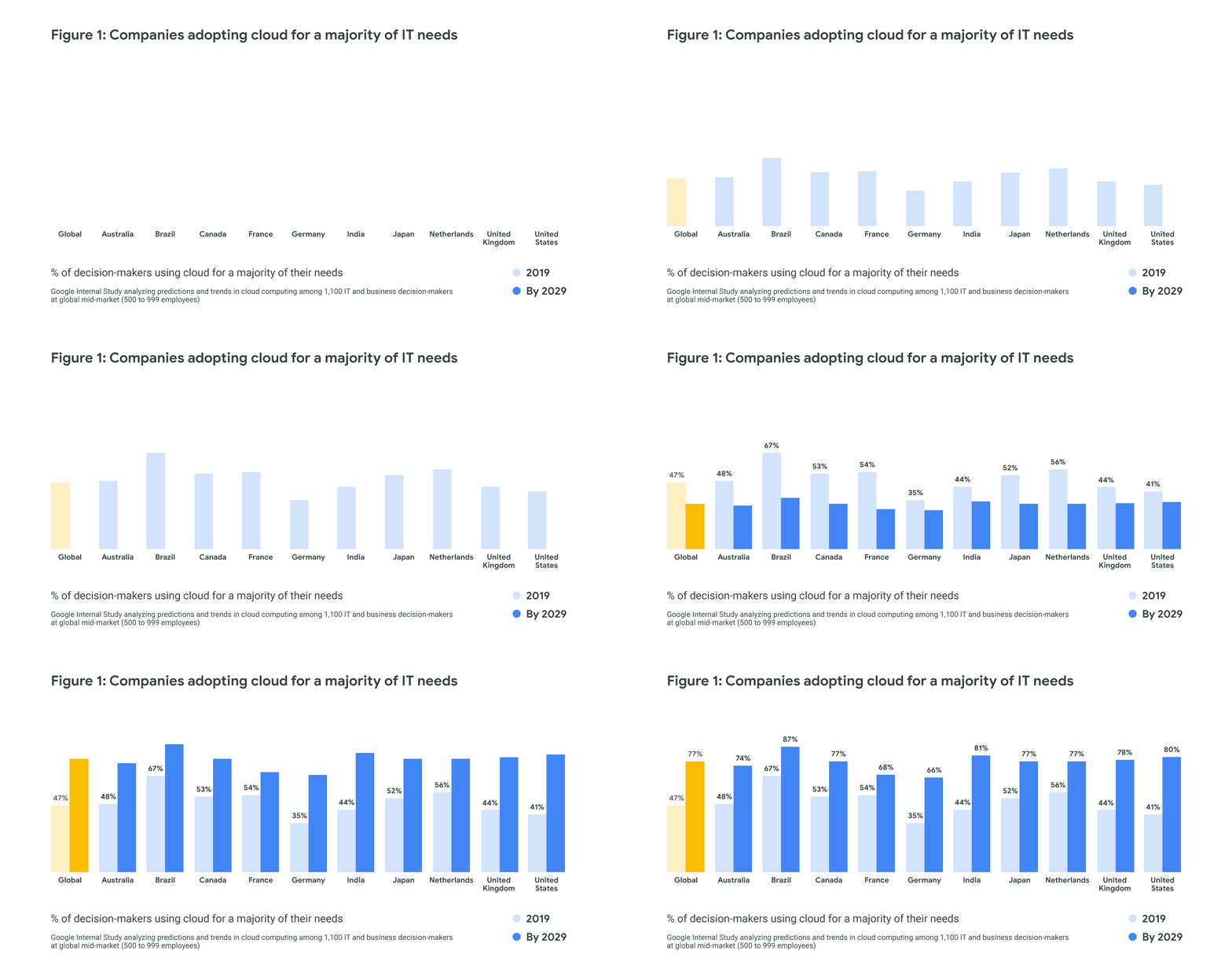
Research shows that cloud computing will transform every aspect of business, from logistics to customer relationships to the way teams work together, and today’s organizations are preparing for this seismic shift. A new report from Google on the future of cloud computing combines an in-depth look at how the cloud is shaping the enterprise of tomorrow with actionable advice to help today’s leaders unlock its benefits. Along with insights from Google luminaries and leading companies, the report includes key findings from a research study that surveyed 1,100 business and IT decision-makers from around the world. Their responses shed light on the rapidly evolving technology landscape at a global level, as well as variations in cloud maturity and adoption trends across individual countries. Here are five themes that stood out to us from this brand-new research.1. Cloud computing will move to the forefront of enterprise technology over the next decade, backed by strong executive support.Globally, 47 percent of survey participants said that the majority of their companies’ IT infrastructures already use public or private cloud computing. When we asked about predictions for 2029, that number jumped 30 percentage points. C-suite respondents were especially confident that the cloud will reign supreme within a decade: More than half anticipate that it will meet at least three-quarters of their IT needs, while only 40 percent of their non-C-suite peers share that view. What’s the takeaway? The cloud already plays a key role in enterprise technology, but the next 10 years will see it move to the forefront—with plenty of executive support. Here’s how that data breaks down around the world.2. The cloud is becoming a significant driver of revenue growth.Cloud computing helps businesses focus on improving efficiency and fostering innovation, not simply maintaining systems and status quos. So it’s not surprising that 79 percent of survey respondents already consider the cloud an important driver of revenue growth, while 87 percent expect it to become one within a decade. C-suite respondents were just as likely as their non-C-suite peers to anticipate that the cloud will play an important role in driving revenue growth in 2029. This tells us that decision-makers across global organizations believe their future success will hinge on their ability to effectively apply cloud technology.3. Businesses are combining cloud capabilities with edge computing to analyze data at its source.Over the next decade, the cloud will continue to evolve as part of a technology stack that increasingly includes IoT devices and edge computing, in which processing occurs at or near the data’s source. Thirty-three percent of global respondents said they use edge computing for a majority of their cloud operations, while 55 percent expect to do so by 2029. The United States lags behind in this area, with only 18 percent of survey participants currently using edge computing for a majority of their cloud operations, but that figure grew by a factor of 2.5 when respondents looked ahead to 2029. As more and more businesses extend the power and intelligence of the cloud to the edge, we can expect to see better real-time predictions, faster responses, and more seamless customer experiences.4. Tomorrow’s businesses will prioritize openness and interoperability.In the best cases, cloud adoption is part of a larger transformation in which new tools and systems positively affect company culture. Our research suggests that businesses will continue to place more value on openness over the next decade. By 2029, 41 percent of global respondents expect to use open-source software (OSS) for a majority of their software platform, up 14 percentage points from today. Predicted OSS use was nearly identical between IT decision-makers and their business-oriented peers, implying that technology and business leaders alike recognize the value of interoperability, standardization, freedom from vendor lock-in, and continuous innovation.5. On their journey to the cloud, companies are using new techniques to balance speed and quality.To stay competitive in today’s streaming world, businesses face growing pressure to innovate faster—and the cloud is helping them keep pace. Sixty percent of respondents said their companies will update code weekly or daily by 2029, while 37 percent said they’ve already adopted this approach. This tells us that over the next 10 years, we’ll see an uptick in the use of continuous integration and delivery techniques, resulting in more frequent releases and higher developer productivity.As organizations prepare for the future, they will need to balance the need for speed with maintaining high quality. Our research suggests that they’ll do so by addressing security early in the development process and assuming constant vulnerability so they’re never surprised. More than half of respondents said they already implement security pre-development, and 72 percent plan to do so by 2029.Cloud-based enterprises will also rely on automation to maintain quality and security as their operations become faster and more continuous. Seventy percent of respondents expect a majority of their security operations to be automated by 2029, compared to 33 percent today.Our Future of Cloud Computing report contains even more insights from our original research, as well as a thorough analysis of the cloud’s impact on businesses and recommended steps for unlocking its full potential. You can download it here.
Quelle: Google Cloud Platform

9 mustn’t-miss machine learning sessions at Next ‘19

From predicting appliance usage from raw power readings, to medical imaging, machine learning has made a profound impact on many industries. Our AI and machine learning sessions are amongst our most popular each year at Next, and this year we’re offering more than 30 on topics ranging from building a better customer service chatbot to automated visual inspection for manufacturing.If you’re joining us at Next, here are nine AI and machine learning sessions you won’t want to miss.1. Automating Visual Inspections in Energy and Manufacturing with AIIn this session, you can learn from two global companies that are aggressively shaping practical business solutions using machine vision. AES is a global power company that strives to build a future that runs on greener energy. To serve this mission, they are rigorously scaling the use of drones in their wind farm operations with Google’s AutoML Vision to automatically identify defects and improve the speed and reliability of inspections. Our second presenter joins us from LG CNS, a global subsidiary of LG Corporation and Korea’s largest IT service provider. LG’s Smart Factory initiative is building an autonomous factory to maximize productivity, quality, cost, and delivery. By using AutoML Vision on edge devices, they are detecting defects in various products during the manufacturing process with their visual inspection solution.2. Building Game AI for Better User ExperiencesLearn how DeNA, a mobile game studio, is integrating AI into its next-generation mobile games. This session will focus on how DeNA built its popular mobile game Gyakuten Othellonia on Google Cloud Platform (GCP) and how they’ve integrated AI-based assistance. DeNA will share how they designed, trained, and optimized models, and then explain how they built a scalable and robust backend system with Cloud ML Engine.3. Cloud AI: Use Case Driven Technology (Spotlight)More than ever, today’s enterprises are relying on AI to reach their customers more effectively, deliver the experiences they expect, increase efficiency and drive growth across their organizations. Join Andrew Moore and Rajen Sheth in a session with three of Google Cloud’s leading AI innovators, Unilever, Blackrock, and FOX Sports Australia, as they discuss how GCP and Cloud AI services, like the Vision API, Video Intelligence API, and Cloud Natural Language have made their products more intelligent, and how they can do the same for yours.4. Fast and Lean Data Science With TPUsGoogle’s Tensor Processing Units (TPUs) are revolutionizing the way data scientists work. Week-long training times are a thing of the past, and you can now train many models in minutes, right in a notebook. Agility and fast iterations are bringing neural networks into regular software development cycles and many developers are ramping up on machine learning. Machine learning expert Martin Görner will introduce TPUs, then dive deep into their microarchitecture secrets. He will also show you how to use them in your day-to-day projects to iterate faster. In fact, Martin will not just demo but train most of the models presented in this session on stage in real time, on TPUs.5. Serverless and Open-Source Machine Learning at Sling MediaThis session covers Sling’s incremental adoption strategy of Google Cloud’s serverless machine learning platforms that enable data scientists and engineers to build business-relevant models quickly. Sling will explain how they use deep learning techniques to better predict customer churn, develop a traditional pipeline to serve the model, and enhance the pipeline to be both serverless and scalable. Sling will share best practices and lessons learned deploying Beam, tf.transform, and TensorFlow on Cloud Dataflow and Cloud ML Engine.6. Understanding the Earth: ML With Kubeflow PipelinesPetabytes of satellite imagery contain valuable indicators of scientific and economic activity around the globe. In order to turn its geospatial data into conclusions, Descartes Labs has built a data processing and modeling platform for which all components run on Google Cloud. Descartes leverages tools including Kubeflow Pipelines as part of their model-building process to enable efficient experimentation, orchestrate complicated workflows, maximize repeatability and reuse, and deploy at scale. This session will explain how you can implement machine learning workflows in Kubeflow Pipelines, and cover some successes and challenges of using these tools in practice.7. Virtual Assistants: Demystify and DeployIn this session, you’ll learn how Discover built a customer service solution around Dialogflow. Discover’s data science team will explain how to execute on your customer service strategy, and how you can best configure your agent’s Dialogflow “model” before you deploy it to production.8. Reinventing Retail with AIToday’s retailers must have a deep understanding of each of their customers to earn and maintain their loyalty. In this session, Nordstrom and Disney explain how they’ve used AI to create engaging and highly personalized customer experiences. In addition, Google partner Pitney Bowes will discuss how they’re predicting credit card fraud for luxury retail brands. This session will discuss new Google products for the retail industry, as well as how they fit into a broader data-driven strategy for retailers.9. GPU Infrastructure on GCP for ML and HPC WorkloadsML researchers want a GPU infrastructure they can get started with quickly, run consistently in production, and dynamically scale as needed. Learn about GCP’s various GPU offerings and features often used with ML. From there, we will discuss real-world customer story of how they manage their GPU compute infrastructure on GCP.  We’ll cover the new NVIDIA Tesla T4 and V100 GPU, Deep Learning VM Image for quickly getting started, preemptible GPUs for low cost, GPU integration with Kubernetes Engine (GKE), and more.If you’re looking for something that’s not on our list, check out the full schedule. And, don’t forget to register for the sessions you plan to attend—seats are limited.
Quelle: Google Cloud Platform

Migrating your traditional data warehouse platform to BigQuery: announcing the data warehouse migration offer

Today, we’re announcing a data warehousing migration offer for qualifying customers, one that makes it easier for them to move from traditional data warehouses such as Teradata, Netezza to BigQuery, our serverless enterprise data warehouse.For decades, enterprises have relied on traditional on-premises data warehouses to collect and store their most valuable data. But these traditional data warehouses can be costly, inflexible, and difficult to maintain, and for many, they no longer meet today’s business needs. Enterprises need an easy, scalable way to store all that data, as well as to take advantage of advanced analytic tools that can help them find valuable insights. As a result, many are turning to cloud data warehousing solutions like BigQuery.BigQuery is Google Cloud’s serverless, highly scalable, low-cost enterprise data warehouse designed to make all data analysts productive. There’s no infrastructure to manage, so you can focus on finding meaningful insights using familiar Standard SQL. Leading global enterprises like 20th Century Fox, Domino’s Pizza, Heathrow Airport, HSBC, Lloyds Bank UK, The New York Times, and many others rely on BigQuery for their data analysis needs, helping them do everything from break down data silos to jump-start their predictive analytics journey—all while greatly reducing costs.Here’s a little more on the benefits of BigQuery in contrast to traditional on-premises data warehouses.Recently, independent analyst firm Enterprise Strategy Group (ESG) released a report examining the economic advantages of migrating enterprise data warehouse workloads to BigQuery. They developed a three-year total-cost-of-ownership (TCO) model that compared the expected costs and benefits of upgrading an on-premises data warehouse, migrating to a cloud-based solution provided by the same on-premises vendor, or redesigning and migrating data warehouse workloads to BigQuery. ESG found that an organization could potentially reduce its overall three-year costs by 52 percent versus the on-premises equivalent, and by 41 percent when compared to an AWS deployment.You can read more about the above total cost of ownership (TCO) analyses in ESG’s blog post.How to begin your journey to a modern data warehouseWhile many businesses understand the value of modernizing, not all know where to start. A typical data warehouse migration requires three distinct steps:Data migration: the transfer of the actual data contents from the data warehouse from the source to the destination system.Schema migration: the transfer of metadata definitions and topologies.Workload migration:the transfer of workloads that include ETL pipes, processing jobs, stored-procedures, reports, and dashboards.Today, we’re also pleased to announce the launch of BigQuery’s data warehouse migration utility. Based on the existing migration experience, we have built this data warehouse migration service to automate migrating data and schema to BigQuery, and significantly reduce the migration time.How to get started with our data warehousing migration offerOur data warehousing migration offer and tooling equips you with architecture and design guidance from Google Cloud engineers, proof-of-concept funding, free training, and usage credits to help speed up your modernization process.Here’s how it works: Step 1: Planning consultationYou’ll receive expert advice, examples, and proof-of-concept funding support from Google Cloud, and you’ll work with our professional services or a specialized data analytics partner on your proof of concept.Step 2: Complementary trainingYou’ll get free training from Qwiklabs, Coursera, or Google Cloud-hosted classroom courses to deepen your understanding of BigQuery and related GCP services. Step 3: Expert design guidanceGoogle Cloud engineers will provide you with architecture design guidance, through personalized deep-dive workshops at no additional cost.Step 4: Migration supportGoogle Cloud’s professional services organization—along with our partners—have helped enterprises all over the world migrate their traditional data warehouses to BigQuery. And as part of this offer, qualified customers may also be eligible to receive partner funding support to offset the migration and BigQuery implementation costs.Interested in learning more? Contact us.
Quelle: Google Cloud Platform