Google Cloud Deploy introduces post deployment verification

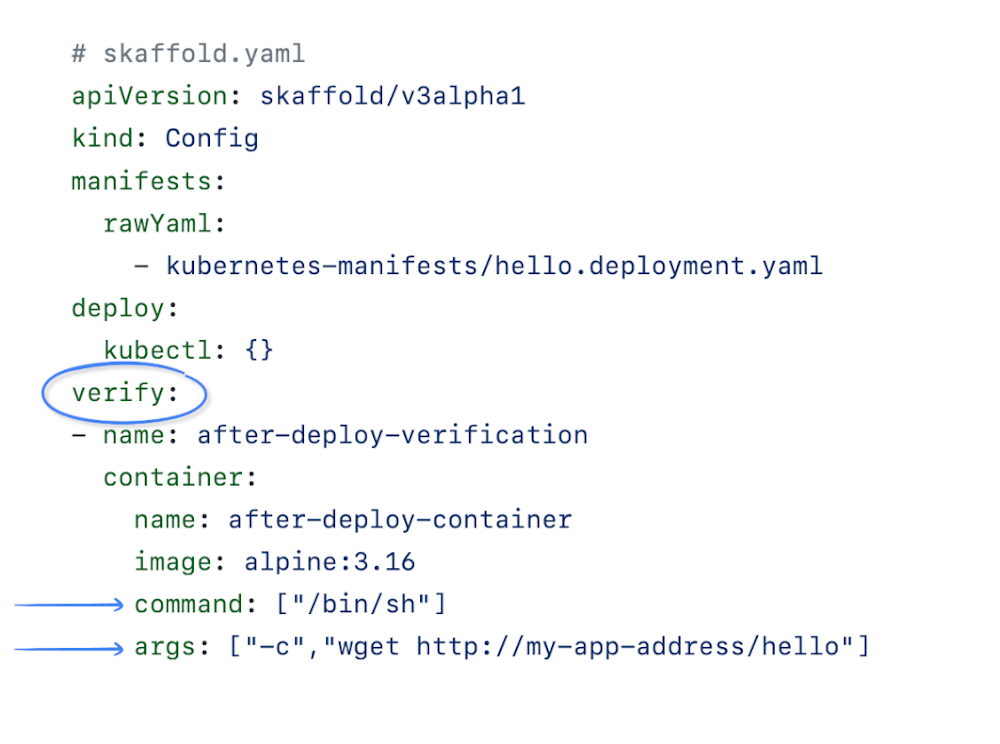
Google Cloud Deploy is introducing a new feature called deployment verification, with this feature developers and operators will be able to orchestrate and execute post deployment testing without having to undertake a more extensive testing integration, like through using Cloud Deploy notifications or manually testing.The 2021 State of DevOps report showed us that continuous testing is a strong predictor of successful continuous delivery. By incorporating early and frequent testing throughout the delivery process, with testers working alongside developers throughout, teams can iterate and make changes to their product, service, or application more quickly. What about performing post delivery testing, to determine if certain conditions are met to further validate a deployment? For most, the ability to run these tests remains critical to their business and is an oft desired table stakes capability from a continuous delivery tool.As shared in our previous post this past August, Cloud Deploy uses Skaffold for render and deploy operations. This new feature relies on a new Skaffold phase named ‘verify’, this phase allows developers and operators to add a list of test containers to be run post deployment and monitored for success/failure.How to useWe are going to use thepython-hello-world from Cloud Code Samples to show how deployment verification works. With our Cloud Build trigger and file configured and Cloud Deploy Pipeline created, we can start to try the post deployment verification feature.First, we need to modify the skaffold.yaml to insert the new verify phase:SkaffoldThe possibility to use any container image (either standalone containers or built by Skaffold) gives developers the flexibility to perform simple tests up to more complex scenarios. For this case we are going to use ‘wget’ to check if the “/hello” page exists and if it’s up (http 200 response).Although we can use Kubernetes readiness probe to check if our application/pod is ready to receive requests, this new Cloud Deploy feature allows us to perform controlled and pre-defined tests. We can check application metrics and/or execute integration tests, for example.Now let’s take a look at our clouddeploy.yaml. The post deployment verification can be used for different targets based on different Skaffold profiles, in our case the ‘dev’ target, also we need to configure the targets we want to have deployment verification, as highlighted below. This new strategy configuration allows for potential additional Cloud Deploy deployment strategies in the future, for now we are going to use the standard one. Cloud DeployAfter these changes, we can trigger our CI/CD process using ‘gcloud builds submit’ or pushing the code to the source repo in order to trigger Cloud Build. After the build phase (also known as Continuous Integration) Cloud Build will create a Google Cloud Deploy release and deploy it through the specified delivery pipeline onto our ‘dev’ target.Important: Like Cloud Deploy rendering and deployment, the verification container runs on Cloud Build secure and hosted environment, and not in the same environment of your application, so you need to expose the application to execute the post deployment verification, or you can use Cloud Build Private pools.To check the deployment status, open Cloud Deploy then navigate to the delivery pipeline and click on the last release in the release list. On the release details page, select the last rollout from the rollout list. Success LogsThe above screenshot shows the post deployment verification was successful. You can click on verification logs to see the details. If we change the address of our ‘wget’ verification on skaffold.yaml and re-run the process, we can see what happens when the verification fails.Failure LogsWhen the deployment verification fails, the rollout should also fail. All the deployment verification tests have to pass. If any deployment verification test fails the rollout also fails.  However, it’s possible to re-run post deployment verification for a failed rollout. Also it’s possible to receive a Pub/Sub notification when a verification is started and completed.Try yourself!The Google Cloud Deploy tutorials page has been updated with a deployment verification walkthrough. This interactive tutorial will take you through the steps to set up and use the Google Cloud Deploy service. This pipeline includes automated deployment verification, which runs checks at each stage to test whether the application has been successfully deployed.The FutureComprehensive, easy-to-use, and cost-effective DevOps tools are key to building an efficient software development team, and it’s our hope that Google Cloud Deploy will help you implement complete CI/CD pipelines. And we’re just getting started! Stay tuned as we introduce exciting new capabilities and features to Google Cloud Deploy in the months to come. In the meantime, check out the product page, documentation, quickstart, and tutorials. Finally, If you have feedback on Google Cloud Deploy, you can join the conversation. We look forward to hearing from you!Related ArticleGoogle Cloud Deploy gets continuous delivery productivity enhancementsIn this latest release, Google Cloud Deploy got improved onboarding, delivery pipeline management and additional enterprise features.Read ArticleRelated ArticleGoogle Cloud Deploy, now GA, makes it easier to do continuous delivery to GKEGoogle Cloud Deploy managed service, now GA, makes it easier to do continuous delivery to Google Kubernetes EngineRead Article
Quelle: Google Cloud Platform

Introducing Cloud Logging – Log Analytics, powered by BigQuery

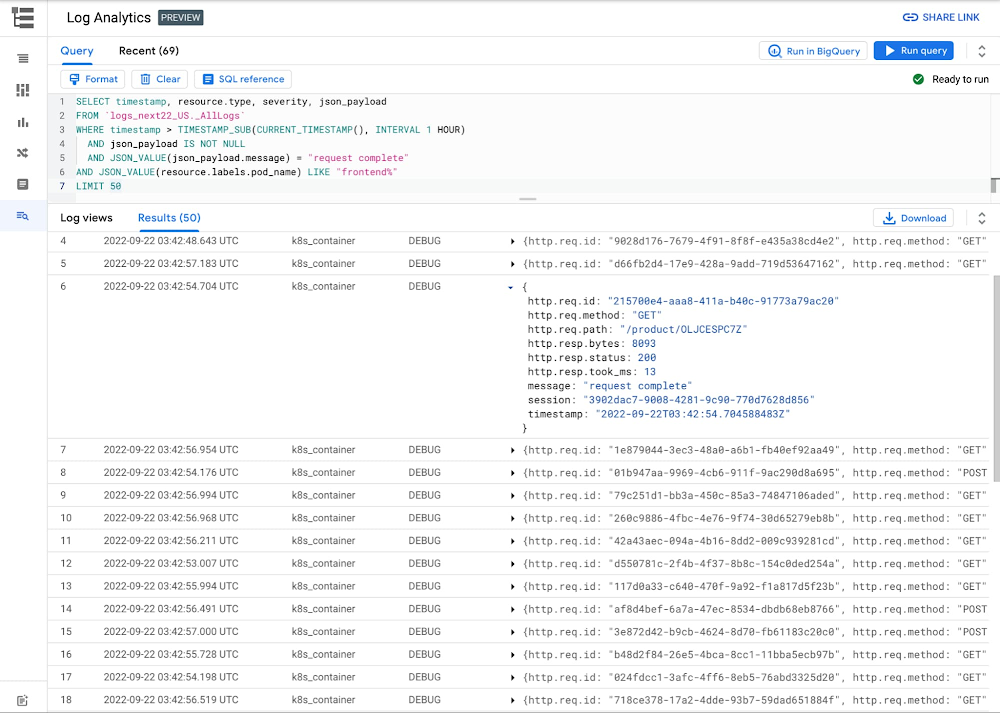
Logging is a critical part of the software development lifecycle allowing developers to debug their apps, DevOps/SRE teams to troubleshoot issues, and security admins to analyze access. Cloud Logging provides a powerful pipeline to reliably ingest logs at scale and quickly find your logs. Today, we’re pleased to announce Log Analytics, a new set of features in Cloud Logging available in Preview, powered by BigQuery that allows you to gain even more insights and value from your logs. Introducing Log AnalyticsLog Analytics brings entirely new capabilities to search, aggregate, or transform logs at query time directly into Cloud Logging with a new user experience that’s optimized for analyzing logs data through the power of BigQuery . BigQuery is a cost-effective, serverless, multi cloud data warehouse to power your data-driven innovation. With Log Analytics, you can now harness SQL (see figure 1) and the capabilities of BigQuery to analyze their logs.  Now, Cloud Logging offers the functionality you had in the past and analytical capabilities through Log Analytics Secure, compliant and scalable logging ingestion pipeline through Logs RouterManaged logging-as-a-service solution with a specialized user interface for log analysis. Support for centralized logging across Google Cloud, other clouds, and on premAutomated insights and suggestions such as Error ReportingLog based metrics and alerts for real-time aggregation, visualization and alerting of logsFlexible pay as you go pricingNEW – Powerful BigQuery engine and SQL option for ad hoc log processingNEW – Automatic read only access to all log analytics logs in BigQueryNEW – Rich visualization of log data (Figure-2, in private preview)Why is Log Analytics powerful?Log Analytics leverages the power of BigQuery to enable Cloud Logging users to perform Analytics on Log data. Centralized logging –  By collecting and centrally storing the log data in a dedicated Log Bucket, it allows multiple stakeholders to manipulate their data from the same datasource. You don’t need to make duplicate copies of the data.Reduced cost and complexity – Log Analytics allows reuse of data across the organization, effectively saving cost and reducing complexities. Ad hoc log analysis – It allows for ad-hoc query-time log analysis without requiring complex pre-processing. Scalable platform – Log Analytics can scale for observability using the serverless BQplatform and perform aggregation at petabyte scale efficientlyLog Analytics is designed for multiple users in an organization and aims to break down silos. Here are the top categories we hear from our users: Developers & DevOps use it for Infrastructure and Application troubleshootingSecurity Teams use it for Audit Log Analysis. Networking professionals use it to perform network log analysisBusiness Operations Teams can potentially manipulate the data, create KPIs and in the future create dashboards.  PricingLog Analytics is included in the standard Cloud Logging pricing. Queries submitted through the Log Analytics user interface do not incur any additional cost. Enabling analysis in BigQuery is optional and, if enabled, queries submitted against the BigQuery linked data set including Data Studio, Looker and via BigQuery API, incur the standard BigQuery query cost.Get startedVisit the Log Analytics page in the Cloud Console and upgrade an existing Log Bucket or create a new Log Bucket. Check out our sample queries to get you started. Charting in Log Analytics is available now as a Private Preview (sign-up here). In the next blog post, we will talk about how and when users should leverage Log Analytics, how you will get started with Log Analytics and dive into a few common use cases.  You can join the discussion in our Cloud Operations page on the Google Cloud Community site.Related ArticleAnnouncing new simple query options in Cloud LoggingThe faster you can find logs, the faster you can resolve issues. Today, we’re pleased to announce a simpler way to find logs in Logs Expl…Read Article
Quelle: Google Cloud Platform
4 steps to get the most out of your Google Cloud Next experience

I’ll be honest.I’ve been dreaming about Google Cloud Next. Not dreaming as in “wistfully anticipating” – dreaming as in “this is all my brain wants to think about, even while I’m asleep.” It’s going to be incredible. It’s going to be global. One of a kind. Inclusive. Truly personalized. If you can’t tell, I’m excited. Next ’22 is right around the corner now (October 11 – 13). Just 14 days until you can dive into the latest innovations, hear from Google experts, get inspired by what your peers are doing with technology, and try out a new skill in one of the lab sessions. I’m thrilled to share a little more about what you can look forward to this year. Introducing the catalogThe session catalog is live and ready for you to explore. It highlights each session, speaker, who the content is for and what you’ll learn. Here’s a preview: Content track & who it’s forWhat you’ll learnOne session you should check outBuildApplication developersHow to to build, architect, deploy, and maintain applications on Google CloudBuilding a serverless event-driven web app in under 10 mins will take a use case, break it down into composable pieces, and build an end-to-end application using the Google Cloud serverless portfolio of products.AnalyzeData analysts & data scientistsHow to model your data and optimize business insights, using the power of analytics, AI, and machine learningWhat’s next for data analysts and data scientists will illuminate the “why” and “how” of operationalizing Data Analytics and AI, and let you in on the latest product innovations for BigQuery and Vertex AI. DesignData engineersAll about tools for developing, deploying, and managing data-driven applications at scale to solve real world problemsWhat’s next for data engineers can help you understand how to navigate the pressure for increased agility by unifying your data across analytical and transactional systems. Plus, get the latest product innovations across Spanner, AlloyDB, Cloud SQL and BigQuery. ModernizeEnterprise architects & developersHow to make your cloud modernization easy with multicloud support, intuitive migration tools, and solutions for SAP & VMwareWhat’s next for enterprise architects and developers will reveal exciting new enhancements to the infrastructure portfolio, help you transform and optimize your infrastructure and spend, and share experiences from entertainment and AI industry leaders.OperateDevOps system administratorsHow to leverage Google Cloud to test, monitor, and deploy code easily and quickly.What’s next for DevOps, SysAdmins, and operators is your opportunity to hear the biggest announcements for the Ops space. Come learn about all the new services and features in store for you. SecureSecurity professionalsHow to defend against emerging threats at modern scale and efficiencyMeeting your digital sovereignty requirements: best practices, resources, & peer insights offers tools, strategic partners, and stories from peers for the best ways to meet the evolving requirements for digital sovereignty, including data residency, access and operational controls, and survivability. CollaborateBusiness leaders & IT administratorsHow to empower teams to connect, create and collaborate securely from anywhere, anytimeBoosting collaboration in the hybrid workplace covers tools to help employees deliver their best in the new norm of hybrid work. Keep your teams connected and collaborating whether they’re working from home, the office, or anywhere in between.InnovateExecutives & technology business leadersHow your peers have managed large transformative projects, programs, and assessments across technology domainsTransform digital experiences with Google AI powered search and recommendations will show you how you can increase conversions and reduce search abandonment with Google-quality search and recommendations on your digital properties.Clocking over 140 sessions total across three days, the catalog has, shall we say, a lot to offer for everyone. There is so much to learn. Fortunately, there’s a handy way to organize your favorite sessions: by building a playlist. PlaylistsMaking a playlist is your ticket to getting the best of Next. Playlists are also a big part of how we take a massive global event and make it personalized, just for you. Easily keep track of the stuff that matters to you and make the most out of your time. My playlistI’ll go first. I made a playlist called Changemakers in Cloud. The “best” product with the coolest features means nothing if no one realized actual value from it. When a customer does something totally new, makes an impact on something big like climate change, or changes someone’s life for the better using one of our products, that’s what makes what we all do together worth it. Each session in my playlist features a customer speaker sharing how they’ve driven real change with purpose using Google Cloud. You’re invited to browse the rest of the Google-curated playlists, too. Make sure to switch between the tabs above the playlist titles to see different categories. Create Your OwnYour turn. After you register for Next ’22:1. Find a session you want to attend and click the blue icon in the lower right corner of the session tile.2. Click + Create new playlist.3. Give it any name and description you like, then click Create.Et voilà,you have just created a playlist.4. When you find another session you want to add to it, click that blue icon in the session tile and then click on your playlist title. Repeat until you’ve saved everything you want to attend.To see how the list is coming along, click the blue My Playlists button in the upper right corner of the Next website. You’ll have your plan laid out before you know it. Don’t miss the momentAs one of the countless Googlers bursting with excitement and anticipation for the moment we are all working hard to bring to you this year – completely free for all. I hope you won’t miss the moment we are so excited to bring to you kicking off October 11. Register for Next today and join us live to explore what’s new and what’s coming next in Google Cloud.Can’t wait to see you there.Related ArticleRegister for Google Cloud NextRegister now for Google Cloud Next ‘22, coming live to a city near you, as well as online and on demand.Read Article
Quelle: Google Cloud Platform
Get a head start with no-cost learning challenges before Next ‘22

Google Cloud Next is just two weeks away, taking place October 11-13. We’re giving developers across the globe the chance to get a head start with no-cost learning opportunities. By registering now for Next ‘22, you’ll get early access to #GoogleClout challenges designed for Next attendees, including the recently announced Google Cloud Fly Cup challenge. Already registered? Then you can dive straight in. Explore the Next ‘22 agenda and navigate to the Developer Zone, the hub for all developer experiences at Next. Check out the latest #GoogleClout challenges with opportunities to win great prizes, take your cloud skills to the next level with the Google Cloud Fly Cup Challenge, then tune in for Google Cloud certification sessions and the Innovators Hive livestream. Flex your #GoogleClout and win the hottest book in cloud Test your cloud knowledge against participants worldwide in the #GoogleClout challenge—a no-cost, 20-minute competition posted each Wednesday. Race the clock to see how fast you can complete the challenge. The faster you go, the higher your score. How it works:Register for Google Cloud NextRace to complete the six challenges in the #GoogleClout game before time runs out on October 13 Share your scores on social media using the #GoogleClout hashtagComplete the six challenges by October 13 to earn a special digital badge, plus an e-copy of Priyanka Vergadia’s bestselling book “Visualizing Google Cloud”.Take your data analytics skills to new heights with Drone League Racing The Google Cloud Fly Cup Challenge is a new three stage developer focused competition to help boost cloud skills and drive innovation into the sport of Drone Racing. Using DRL race data and Google Cloud analytics tools, developers of any skill level will be able to predict race outcomes and provide tips to DRL pilots to help enhance their season performance. Compete for the chance to win an expenses-paid trip to the season finale of the DRL 2022-23 World Championship and be celebrated on stage. Tune in for Innovators Hive broadcast and Google Cloud certification sessions at Next Innovators Hive is broadcasting from Germany, India, Japan and the USA. You’ll hear from Google Cloud executives and engineers about new cloud technologies to help you build more—and to do it better and faster. Or are you looking to invest in your cloud career progression? Choose from the six Google Cloud certification sessions available, whether you’re growing your career in app modernization or data, infrastructure modernization, Workspace administration, or digital transformation. Hear from certified experts about the benefits to pursuing your certification path, the best preparation resources, and unlock exclusive learning offers. Register for Next and subscribe to the playlist. Ready to start your challenge and explore Google Cloud certification? Make sure to register for Next ‘22 and check out the no-cost learning challenges in the Developer Zone today, and create a playlist to join the Google Cloud certification sessions.Related ArticleSign up for the Google Cloud Fly Cup ChallengeLearn more about how to participate in the Google Cloud Fly Cup, brought to you in partnership with The Drone Racing League.Read Article
Quelle: Google Cloud Platform

Google Cloud Deploy adds Cloud Run and deployment verification support

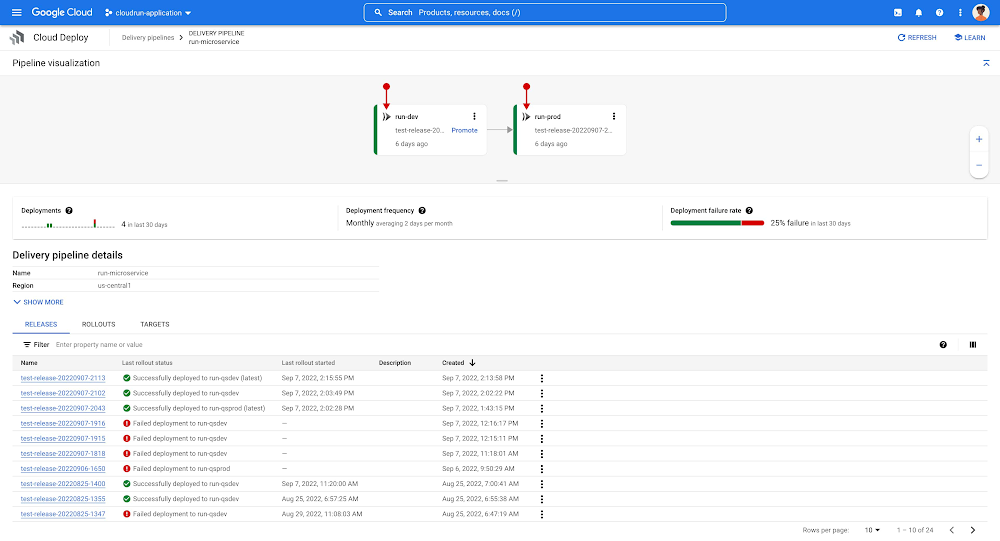
Google Cloud customers want to be able to easily deploy their applications to the full breadth of platforms that we offer, including Cloud Run. And when they push out code to production, they want confirmation that the deployment was successful. Today, we’re pleased to announce the Preview availability of Cloud Run targets and deployment verification for Google Cloud Deploy.Deploy to Cloud RunSupport for Cloud Run, our managed serverless container runtime, has been a top feature request for Google Cloud Deploy. It’s not hard to understand why: Adding a Cloud Run target to Google Cloud Deploy makes it easier to develop and deliver your enterprise applications.  Available in Preview, delivery pipelines can now specify and deploy to Cloud Run targets, enabling continuous delivery of Cloud Run services. All the continuous delivery capabilities that Google Cloud Deploy provides for other targets — rollback, approval, audit, and delivery metrics, to name just a few — are also available for Cloud Run targets. This consistency and feature parity allows platform operators and application developers to manage and reason about their application delivery pipelines in the same way, regardless of the runtime target.This consistency is enabled by Skaffold, an open-source cloud-native tool developed by Google that’s the foundation of Cloud Deploy. With the recent 2.0 beta 2 release, Skaffold users can now develop and deploy Cloud Run services just as they already do for Google Kubernetes Engine and Anthos clusters, making Skaffold workflows a consistent point of adoption and extension for Google Cloud Deploy.Continuous delivery pipeline with two Cloud Run targetsVerify your deploymentThe success or failure of a deployment frequently involves more than just rolling out an artifact to a target platform — it also involves testing to further confirm the deployment, often in the form of automated integration and canary testing. Customers told us they wanted formal support for deployment verification within Google Cloud Deploy. And when a deployment succeeds but a post-deployment verification test fails, the rollout should be identified as a failure, too.Within Google Cloud Deploy, you can now specify one or more (testing) containers to execute immediately when an application is successfully deployed. This deployment verification support within Google Cloud Deploy is based on Skaffold 2.0’s recently introduced verify command. You can use any process that runs in a container to verify the state of the application. An example could be as simple as issuing a curl command, or more complex, like validating all of the links via a third-party tool, or even gathering performance metrics. Verifying a deployment is as easy as configuring Skaffold to test the deployment (“command”), then specifying a ‘verify: true’ in the Cloud Deploy delivery pipeline’s progression sequence.As with render and deploy operations, deployment verification in Google Cloud Deploy is performed in its own execution environment. This allows for custom verification configurations using a specified worker pool or service account, and storing results in a preferred Cloud Storage location. Verification results are factored in when determining whether the rollout was a success or failure. When a deployment verification failure occurs, it’s easy to inspect the logs and, if necessary, rerun the deployment verification without having to re-deploy. Deployment verification is available for all target types, including Cloud Run.Deployment verification status and results in rollout detailsThe futureComprehensive, easy-to-use, and cost-effective DevOps tools are key to building an efficient software delivery capability, and it’s our hope that Google Cloud Deploy will help you implement complete CI/CD pipelines. And we’re just getting started. Stay tuned as we introduce exciting new capabilities and features to Google Cloud Deploy in the months to come. In the meantime, check out the product page, documentation, quickstart, and tutorials. Finally, If you have feedback on Google Cloud Deploy, you can join the conversation. We look forward to hearing from you.Related ArticleGoogle Cloud Deploy, now GA, makes it easier to do continuous delivery to GKEGoogle Cloud Deploy managed service, now GA, makes it easier to do continuous delivery to Google Kubernetes EngineRead Article
Quelle: Google Cloud Platform
Adore Me embraces the power and flexibility of Looker and Google Cloud

You don’t have to work in the women’s clothing business to know that one size doesn’t fit all. Adore Me pioneered the try-at-home shopping service, helping to ensure that every woman can feel good in what she wears. I’ve been lucky enough to have played a part in our growth and success over the years. Now, data is transforming every aspect of how we work, shop, and do business, making these last few years especially exciting. But I’m often asked about how we utilize data here at Adore Me, so I thought I’d share some of the obstacles we’ve encountered, how we resolved them, and offer up a few pointers that I hope others will find helpful. Freeing up teams from getting to the data, to use the data more effectivelyIt’s no secret: The less time we spend getting to the data, the more time we have to actually use it to support our business. Getting an online shopping service off the ground brings complexity into every part of our business. We quickly discovered that providing everyone in-house with the ability to make smart, data-driven decisions resulted in fewer errors and fewer choices that slowed down the business, driving better results for the company and our customers. Once I got my nose out of code and started looking around for ways I could help the business make the most of its data, Looker and BigQuery quickly fell into place as the solutions we needed. In BigQuery, we found a centralized, self-managed database that reduced management overhead. And once all our data was in place, Looker had the most significant impact on our overall productivity, particularly around efficiency and reducing human hours previously spent waiting for data and sharing results between teams. With Looker, we saved time on both ends: in the gathering of data as well as in sharing the insights it revealed with those who needed them most. What’s remarkable about the BigQuery and Looker combination is how much we can accomplish with relatively small teams. We have our Business Intelligence team, the Data Engineering team, and the Data Science team. These are our ‘data people’, who bring in the data rather than consume it. Then we have our power users who need quick insights from that data and therefore rely on Looker to access up-to-the minute data when they need it. Empowering everyone with data consistently pays off, and it’s a much better use of our time than hammering away at SQL. Surfacing data insights that lead to actionData permeates everything we do at Adore Me because we believe that a smarter business results in happier customers. Data helps us run interference, identify problems, and find a fix in real-time, whether that’s optimizing our delivery times or tracking lost packages. On the business planning side, our data reveals what our customers are looking at on our site. This gives us insight into their interests, what’s trending, and what they want to see more of, which in turn also helps to inform our marketing strategies. As an online shop, driving traffic to the site is critical to Adore Me’s business. With real-time data at our disposal, we’re able to determine which campaigns are the most effective and which markets are best suited for a specific message, so we can intelligently refine our campaigns during peak seasons. With the data in BigQuery and insights surfaced by Looker, we can deliver the products and services our customers want most on our site. Enabling continuous improvement with a flexible infrastructureUltimately, we want to have all of our production-critical data in BigQuery and Looker, acting as an easy-to-manage single source of truth. Data lives where we can easily access it, see it, and analyze it. We can set the rules for all of our KPIs, and everyone is able to look at the same data in order to work towards achieving them together. What makes Google Cloud Platform so powerful is the suite of products and services that allow our teams to experiment with data in ways that are relevant to our particular business needs. For example, when working with new data sources, we need the ability to quickly visualize a .csv file, and Google Data Studio is the perfect tool for enabling that. If we find something that we want to bring into production, BigQuery makes it easy while modeling it in Looker speeds up the process. This is one way we are constantly improving and enriching our organization’s data capabilities.  Making it easy to find the right tools for the jobOur teams have discovered that the variety of solutions offered by Google Cloud are ideal to address the evolving data challenges we face. Flexibility is critical in business today, and Google Cloud provides a major advantage to those who embrace a proof of concept mentality, which is why we take advantage of the free Google Cloud trials offered. They allow us to roll a product into a project, test drive it for a few days, and fail fast if necessary. No contracts. No hassle. Better still, the variety of products, their ease of use, and overall versatility make it a good bet that we’ll find a solution that works for us. Anyone with experience working with data will tell you that there’s no shortage of fly-by-night tools out there. But personal experience has shown us that, at the end of the day, success comes down to the strength of your team and choosing the right tools to get the job done. At Adore Me, we’ve built a fantastic team and, with the power of Looker and BigQuery, the sky’s the limit.
Quelle: Google Cloud Platform

How Google Cloud and Fitbit are building a better view of health for hospitals, with analytics and insights in the cloud

Great technology gives us new ways of seeing and working with the world. The microscope enabled new scientific understanding. Trains and telegraphs, in different ways, changed the way we think about distance. Today, cloud computing is changing how we can assist in improving human health.When you think of the healthcare system, it historically includes a visit to the doctor,  sometimes coupled with a hospital stay. These are deeply important events, where tests are done, information on the patient is gathered, and a consultation is set up. But as you think about this structure, there are also limits. Multiple visits are inconvenient and potentially distressing for patients, expensive for the healthcare system and, at best, provide a view of patient health at a specific point in time.But what if that snapshot of health could be supplemented with a stream of patient information that the doctor could observe and use to help predict and prevent diseases? By harnessing advancements in wearables—devices that sense temperature, heart rate, and oxygen levels—combined with  the power of cloud and artificial intelligence (AI) technologies, it is possible to develop a more accurate understanding of patient health.This broader perspective is the goal of a collaboration between cardiologists at The Hague’s Haga Teaching Hospital, Fitbit—one of the world’s leading wearables that tracks activity, sleep, stress, heart rate, and more—and Google Cloud.Initially focusing on 100 individuals who have been identified as at-risk of developing heart disease, during a pilot study (ME-TIME), cardiologists at the hospital will give patients a Fitbit Charge 5—Fitbit’s latest activity and health tracker with ECG monitoring1—to wear at home after an initial consultation.With user consent, the devices will send information about certain patient behavioural metrics to the hospital via the cloud, in an encrypted state. This data is only accessed by (Haga Teaching Hospital approved) physicians and data scientists at the hospital and is not used by Haga for any other purposes than medical research during the study.2 With user consent, the data, which includes the amount of physical activity a patient is undertaking, will be monitored by Haga ’s physicians against other clinical information already gathered about the individual by the hospital during prior consultations. With user consent, Haga Teaching Hospital will also compare the data against its other relevant pseudonymized experience data, so the hospital can learn more about potential patterns and abnormalities associated with certain heart conditions. This is made possible by Google Cloud’s infrastructure, which will be used to store the encrypted data at scale, while artificial intelligence (AI) and data analytics tools will power near real-time analysis. For example, predictive analytics on this data could help identify early signs of a life-threatening disease such as a heart attack or stroke, so doctors can investigate further and provide preventative treatment—even before symptoms arise. Haga is using Device Connect for Fitbit, a new solution from Google Cloud, as part of the trial. Now available for healthcare and life sciences enterprises, the solution empowers business leaders and clinicians with accelerated analytics and insights from consenting users’ Fitbit data, powered by Google Cloud.3The project is in collaboration with partner Omnigen who has supported Haga with deployment, in addition to processing and analysis of data. Other hospitals in the Netherlands are already expressing interest in participating in similar projects. Longer term, we see applications to help with deeper understanding of overall population health for healthcare professionals, reducing unnecessary visits to the hospital – and better operation of the wider healthcare system. Preliminary results of the project may be available as early as the end of this year.“Health is a precious commodity. You realise that all the more if you are struck down by an illness. If you can prevent it or catch it in time so that it can be treated, you have gained a great deal,” said cardiologist, Dr. Ivo van der Bilt of Haga Teaching Hospital, who has been leading on this collaboration. “Digital tools and technologies like those provided by Google Cloud and Fitbit open up a world of possibilities for healthcare and a new era of even more accessible medicine is possible.”“This collaboration shows how Fitbit can help support innovation in population health, helping healthcare systems & care programmes create more efficient and effective care pathways that aren’t always tied to primary or secondary care settings. Plus it provides patients with tools to help them with their health and wellbeing each day, with metrics which can be overseen by clinical care teams.” said Nicola Maxwell, Head of Fitbit Health Solutions Europe, Middle East & Africa.This collaboration is an important step towards a goal of creating a more dynamic, rich, and holistic understanding of human health for hospitals, carried out with a strong emphasis on transparency. We are proud to be part of a project that we expect can help patients and healthcare workers alike. We believe this is only the start of what’s possible in healthcare with digital tools like Fitbit and cloud computing. 1. The Fitbit ECG app is only available in select countries. Not intended for use by people under 22 years old. See fitbit.com/ecg for additional details.2. Haga Teaching Hospital is responsible for any consents, notices or other specific conditions as may be required to permit any accessing, storing, and other processing of this data. Google Cloud does not have control over the data used in this study, which belongs to Haga Teaching Hospital. More generally, Google’s interactions with Fitbit are subject to strict legal requirements, including with respect to how Google accesses and handles relevant Fitbit health and wellness data. Details on these obligations can be found here. 3. This is the same data as that made available through the Fitbit Web API, which the Device Connect integration is built on.Related ArticleIntroducing Device Connect for Fitbit: How Google Cloud and Fitbit are working together to help people live healthier livesHow Google Cloud and Fitbit are working together to help people live healthier lives with Device Connect for Fitbit.Read Article
Quelle: Google Cloud Platform

Introducing Device Connect for Fitbit: How Google Cloud and Fitbit are working together to help people live healthier lives

Healthcare is at the beginning of a fundamental transformation to become more patient-centered and data-driven than ever before. We now have better access to healthcare, thanks to improved virtual care, while wearables and other tools have dramatically increased our ability to take control of our own health and wellness. Healthcare alone generates as much as 30% of the world’s data and much of this will come from the Internet of Medical Things (IoMT) and consumer wearable devices. Gaining insights from wearable data can be challenging, however, due to the lack of a common data standard for health devices resulting in different data types and formats. So what do we do with all this data, and how do we make it most useful?  Today, Fitbit Health Solutions and Google Cloud are introducing Device Connect for Fitbit, which empowers healthcare and life sciences enterprises with accelerated analytics and insights to help people live healthier lives. Fitbit data from their consenting users is made available through the Fitbit Web API, providing users with control over what data they choose to share and ensuring secure data storage and protection. Unlocking actionable insights about patients can help support management of chronic conditions, help drive population health impact, and advance clinical research to help transform lives. With this solution, healthcare organizations will be increasingly able to gain a more holistic view of their patients outside of clinical care settings. These insights can enhance understanding of patient behaviors and trends while at home, enabling healthcare and life science organizations to better support care teams, researchers, and patients themselves. Based on a recent Harris poll, more than 9 in 10 physicians (92%) believe technology can have a positive impact on improving patient experiences, and 96% agree that easier access to critical information may help save someone’s life.Help people live healthier livesThis new solution can support care teams and empower patients to live healthier lives in several critical ways:Pre- and post-surgery: Supporting the patient journey before and after surgery can lead to higher patient engagement and more successful outcomes.1 However, many organizations lack a holistic view of patients. Fitbit tracks multiple behavioral metrics of interest, including activity level, sleep, weight and stress, and can provide visibility and new insights for care teams to what’s happening with patients outside of the hospital.  Chronic condition management: For people living with diabetes, maintaining their blood glucose levels within an acceptable range is a constant concern. It’s just one of countless examples, from heart diseases to high blood pressure, where care teams want to promote healthy behaviors and habits to improve outcomes. Better understanding how lifestyle factors may impact disease indicators such as blood glucose levels can enable organizations to deliver more personalized care and tools to support healthy lifestyle changes. Population health: Supporting better management of community health outcomes with a focus on preventive care can help reduce the likelihood of getting a chronic disease and improve quality of life.2 Fitbit users can choose to share their data with organizations that deliver lifestyle behavior change programs aimed at both prevention and management of chronic or acute conditions.Clinical research: Clinical trials depend on rich patient data. Collection in a physician’s office captures a snapshot of the participant’s data at one point in time and doesn’t necessarily account for daily lifestyle variables. Fitbit, used in more than 1,500 published studies–more than any other wearable device–can enrich clinical trial endpoints with new insights from longitudinal lifestyle data, which can help improve patient retention and compliance with study protocols.Health equity: Addressing healthcare disparities is a priority across the healthcare ecosystem. Analyzing a variety of datasets, such as demographic and social determinants of health (SDOH) alongside Fitbit data has the potential to provide organizations and researchers with new insights regarding disparities that may exist across populations—such as obesity disparities that exist among children in low-income families, or increased risk of complications among Black women related to pregnancy and childbirth. Learn more about Fitbit’s commitment to health equity research here.Accelerate time to insightGaining a more holistic view of the patient can better support people on their health and wellness journeys, identify potential health issues earlier, and provide clinicians with actionable insights to help increase care team efficiency. Device Connect for Fitbit addresses data interoperability to “make the invisible visible” for organizations, providing users with consent management and control over their data. Leveraging world-class Google Cloud technologies, Device Connect for Fitbit offers several pre-built components that help make Fitbit data accessible, interoperable and useful—with security and privacy as foundational features.Enrollment & consent app for web and mobile: The pre-built patient enrollment and consent app enables organizations to provide their users with the permissions, transparency, and frictionless experience they expect. For example, users have control over what data they share and how that data is used.Data connector: Device Connect for Fitbit offers an open-source data connector3, with automated data normalization and integration with Google Cloud BigQuery for advanced analytics. Our data connector can support emerging standards like Open mHealth and enables interoperability with clinical data when used with Cloud Healthcare API for cohort building and AI training pipelines.Pre-built analytics dashboard: The pre-built Looker interactive visualization dashboard can be easily customized for different clinical settings and use cases to provide faster time to insights.AI and machine learning tools: Use AutoML Tables to build advanced models directly from BigQuery or build custom models with 80% fewer lines of code required using Vertex AI—the groundbreaking ML tools that power Google, developed by Google Research. Google Cloud’s ecosystem of delivery partners will provide expert implementation of services for Device Connect for Fitbit to help customers deploy at scale, and includes BlueVector AI, CitiusTech, Deloitte, and Omnigen.Potential to help predict and prevent diseaseThe Hague’s Haga Teaching Hospital in the Netherlands is one of the first organizations to use Device Connect for Fitbit. The solution is helping the organization support a new study on early identification and prevention of vascular disease. “Collaborating with Google Cloud allows us to do our research, with the help of data analytics and AI, on a much greater scale,” cardiologist Dr. Ivo van der Bilt said. “Being able to leverage the new solution makes it easier than ever to gain the insights that will make this trial a success. Health is a precious commodity. You realize that all the more if you are struck down by an illness. If you can prevent it or catch it in time so that it can be treated, you have gained a great deal.” Fitbit innovation continuesSince becoming part of the Google family in January 2021, Fitbit has continued to help people around the world live healthier, more active lives and to introduce innovative devices and features, including FDA clearance for the new PPG AFib algorithm for irregular heart rhythm detection, released in April of this year. Fitbit metrics including activity, sleep, breathing rate, cardio fitness score (Vo2 Max), heart rate variability, weight, nutrition, SP02 and more will be accessible through Device Connect Fitbit.  Google’s interactions with Fitbit are subject to strict legal requirements, including with respect to how Google accesses and handles relevant Fitbit health and wellness data. You can find details on these obligations here.We look forward to empowering our customers to create more patient-centered, data-driven healthcare. Read more about Haga Teaching Hospital’s work to predict heart disease on the Google Cloud blog, and visit cloud.google.com/device-connect to learn more about Device Connect for Fitbit.1. Harris Poll2. CDC3. Device Connect for Fitbit is built on the Fitbit Web API and data available from consenting users is the same as that made available for third parties through the Fitbit Web API, and enables the enterprise customer services through Google Cloud.Related ArticleRead Article
Quelle: Google Cloud Platform

Best Kept Security Secrets: Tap into the power of Organization Policy Service

The canvas of cloud resources is vast, ready for an ambitious organization to craft their digital masterpiece (or perhaps just their business.) Yet before the first brush of paint is applied, a painter in the cloud needs to think about their frame: What shape should it take, what material is it made of, how will it look as a border against the canvas of their cloud service. Google Cloud’s Organization Policy Service is just such a frame, a broad set of tools for our customer’s security teams to set broad yet unbendable limits for engineers before they start working. Google Cloud’s Organization (org) Policy Service is one of our most dramatic features but is often under-appreciated by security teams. It provides for a separation of duties by focusing on what users can do, and lets the administrator set restrictions on specific resources to determine how they can be configured. This drives defense in depth from configuration errors as well as defense in depth from attacks. An org policy lets the administrator enforce compliance and conformance at a higher level than Identity and Access Management, which focuses on which users can access specific resources.Org policies can reduce toil and can improve security at the scale needed by today’s cloud users. Financial services provider HSBC is one of Google Cloud’s largest customers and has been using org policies for years to help it manage cloud resources across its highly-regulated enterprise environment. As the company explains in this video, HSBC’s creative use of org policies manages more than 15,000 service accounts and 40,000 IT professionals. They control 6.5 million virtual machines per year. That’s 22,500 virtual machines per day, and only 2,500 of those VMs exist for more than 24 hours.HSBC prefers org policies instead of other preventative controls because they are native to Google Cloud and can be enforced independently of how the request originated (such as from Infrastructure-as-Code, Google Cloud services interacting with each other, or a user in the UI.) Detecting resource violations is expensive for many customers, and often comes too late to prevent harm. Org Policies can be deployed to prevent violations from occurring and eliminate detection and remediation costs. Importantly, HSBC’s custom installation is designed so that org policy violations are immediately discoverable, which can help HSBC personnel quickly understand how to quickly and accurately correct an error condition. When an action violates org policy, an error code is returned telling the resource requester which policy was violated. Corresponding logs are generated for administrators to monitor and provide further troubleshooting.Diagram of the organization policy workflowHere are two additional use cases that further illustrate the power of organization policies.Organizations that operate in a region with rigorous data residency requirements can configure and enable the Location org policy to help ensure that all resources created (such as VMs, clusters, and buckets) are deployed in a particular cloud region. Admins who want to ensure that only trusted workloads are deployed for Google Kubernetes Engine (GKE) or Cloud Run may want to restrict developers to only use verified images in their deployment processes. They can create a custom org policy that targets GKE cluster resource type and create and update methods to block the creation or update of any clusters that do not have binary authorization enforced. How it worksGoogle Cloud offers more than 80 org policies that can be used to restrict and govern interactions with Google Cloud services and resources across important domains such as security, reliability, and compliance. Org policies can help:Restrict resource and service access to the organization domain only, secure public access to resources, or stop service account key abuse. Enforce use of global or regional DNS, and global or regional load balancing, to Improve service reliability and availability.Specify which services can access resources, in which regions, and at what times in support of compliance objectives.Secure Virtual Private Cloud (VPC) networks and reduce data exfiltration risk by preventing data from leaving a specific perimeter. See the Organization Policy Service list of constraints for more about org policies and constraints. You can also use the recently introduced Custom Organization Policies to tailor guardrails so they meet your specific compliance and security requirements. With Custom Organization Policies, security administrators can create their own constraints using Common Expression Language (CEL) to define which resource configurations are allowed or denied. Administrators can develop and deploy new policies and constraints in minutes. With great power comes great responsibility, so with that in mind we will soon be introducing Dry Run for Custom Org Policies. It will let users put a policy in an audit-only mode to observe behavior during real operations without putting production workloads at risk.Getting startedSetting up your first org policy is straightforward. An organization policy administrator enables a new organization policy on a Google Cloud organization, folder, or project in scope. Once set, the administrator then determines and applies the constraints. Here’s how it works:1. Design your constraint, which is a particular type of restriction against either a single Google Cloud service or a group of Google Cloud services. You can choose from the list of available built-in constraints by configuring desired restrictions and exceptions (based on tags) or create custom org policies.It’s important to remember that descendants of the targeted resource hierarchy node inherit the org policy. By applying an organization policy to the root organization node, you can drive enforcement of that organization policy and configuration of restrictions across your organization.2. Deploy the org policy to evaluate and allow or deny resource Create, Update, and Delete operations. This can be done through the Google Cloud console, gCloud, or via API. 3. Monitor audit logs and your Security Command Center Premium findings to detect and respond to policy violations.Do I need an org policy?Org policies can help maintain security and compliance at scale while also allowing development teams to work rapidly. Because they give you the ability to set broad guardrails, they can help ensure compliance without adding operational overhead and monitor policy violations. To learn more about org policy, please review these resources:Read the Creating and Managing Organizations page to learn how to acquire an organization resource.Read about how to create and manage organization policies with the Google Cloud console.Learn how to define organization policies using constraints.Explore the solutions you can accomplish with organization policy constraints.Listen to the podcast where Vandy Ramadurai, Google Cloud’s Org Policy product manager, explains it all.Related ArticleRead Article
Quelle: Google Cloud Platform

New startup CPU boost improves cold starts in Cloud Run, Cloud Functions

We are announcing startup CPU boost for Cloud Run and Cloud Functions 2nd gen, a new feature allowing you to drastically reduce the cold start time of Cloud Run and Cloud Functions. With startup CPU boost, more CPU is dynamically allocated to your container during startup, allowing it to start serving requests faster. For some workloads we measured, startup time was cut in half.Making cold starts a little warmerA “cold start” is the latency encountered in the processing of a request that is due to the startup of a new container instance to serve that request. For example, when a Cloud Run service scales down to zero instances, and a new request reaches the service, an instance needs to be started in order to process this request. In addition to the zero-to-one scale event, cold starts often happen when services are configured to serve a single concurrent request, or during traffic scaling events. Minimum instances can be used to remove the cold-start encountered when going from zero to one instance, but min-instances aren’t a solution for all cold-starts as traffic scales out to higher numbers of instances. As part of our continued efforts to give you more control over cold start latency, startup CPU boost can help speed up every cold start.ResultsJava applications, in particular, appear to  greatly benefit from the startup CPU boost feature. Internal testers and private preview customers reported the following startup time reductions for their Java applications:up to 50% faster for the Spring PetClinic sample application up to 47% faster for a Native Spring w/GraalVM serviceup to 23% faster for a plain Java Cloud FunctionsCustomers testing the feature in private preview with Node.js have observed startup time reductions of up to 30%, a significant improvement, a bit less than Java due to the single-threaded nature of Node.js. Each language, framework, and code base will see different levels of benefit.Get startedYou can enable startup CPU boost for your existing Cloud Run service with one command:code_block[StructValue([(u’code’, u’$ gcloud beta run services update SERVICE –cpu-boost’), (u’language’, u”), (u’caption’, <wagtail.wagtailcore.rich_text.RichText object at 0x3e7b07db2810>)])]Even better, Cloud Functions uses startup CPU boost by default. To learn more, check out the documentation.Related ArticleCloud Run min instances: Minimize your serverless cold startsWith Cloud Run’s new min instances feature, you can ensure your application never scales entirely to zero if you don’t want it to.Read Article
Quelle: Google Cloud Platform



