Efficient File Management using Batch Requests with Google Apps Script

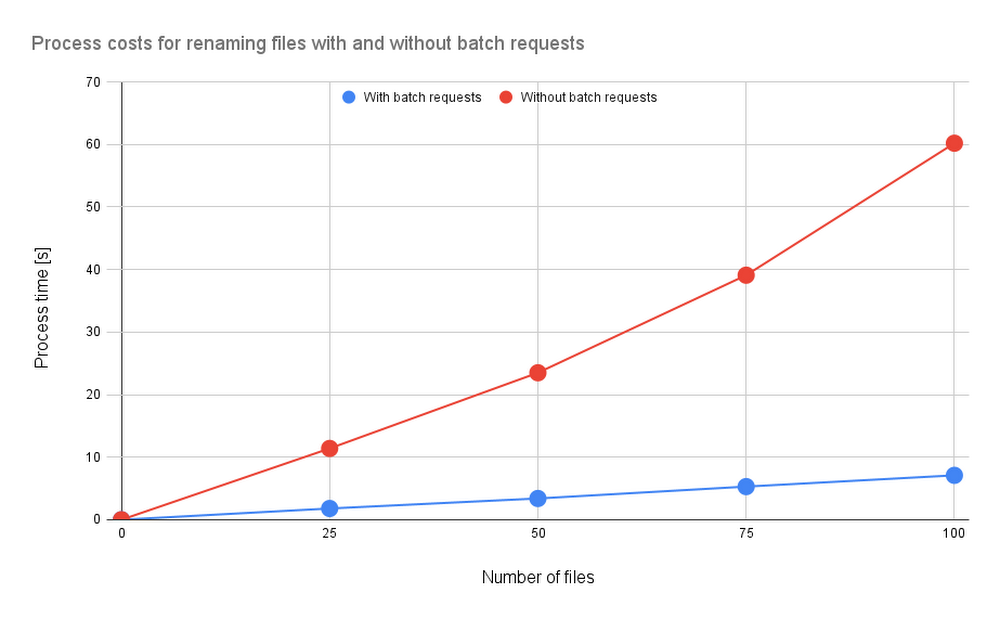
AbstractGoogle Drive alone can handle small file management jobs, but for larger batches of files, it can be too much for a simple Drive script to manage. With Google Apps Script, even large batches can be executed within 6 minutes, offering businesses the monetary and time benefits of efficient file management. This report looks at how Google Apps Script improves file management with batch requests, judging its efficacy by measuring the benchmark.IntroductionWhen you need to manage small sets of files on Google Apps Script, Drive Service is right for the job. But when there are too many files, the process cost of the script the Drive service creates can be too high.In the “Batch requests” section of the official Drive API document, we see that a batch can process multiple requests. In fact, the asynchronous process can handle up to one hundred Drive API requests with one API call. This can lead to significant process cost reduction when using batch requests for file management.The issue is that batch requests aren’t available for synchronous processes run through the Google Apps Script Drive service. This means that these users can’t easily use Drive API for their Google Apps Script batch review, removing the process cost benefit that comes from efficiently managing files during the app development process.To show how much of a difference batch processing makes, this article will measure the benchmarks involved in efficient file management. I’ve reported various Google Apps Script benchmarks before, but this is the first time I’ve measured benchmarks related to file management.Creating batch requests for Google Apps ScriptTo create Google Apps Script batch requests, you need to first build the request body and then send it as “multipart/mixed.” You can find information about Drive API batch requests in the official documentation, but here is a sample script:code_block[StructValue([(u’code’, u’/**rn * Create a request body of batch requests and request it.rn * rn * @param {Object} object Object for creating request body of batch requests.rn * @returns {Object} UrlFetchApp.HTTPResponsern */rnfunction batchRequests(object) {rn const { batchPath, requests } = object;rn const boundary = “sampleBoundary12345″;rn const lb = “rn”;rn const payload = requests.reduce((r, e, i, a) => {rn r += `Content-Type: application/http${lb}`;rn r += `Content-ID: ${i + 1}${lb}${lb}`;rn r += `${e.method} ${e.endpoint}${lb}`;rn r += e.requestBody ? `Content-Type: application/json; charset=utf-8″ ${lb}${lb}` : lb;rn r += e.requestBody ? `${JSON.stringify(e.requestBody)}${lb}` : “”;rn r += `–${boundary}${i == a.length – 1 ? “–” : “”}${lb}`;rn return r;rn }, `–${boundary}${lb}`);rn const params = {rn muteHttpExceptions: true,rn method: “post”,rn contentType: `multipart/mixed; boundary=${boundary}`,rn headers: { Authorization: “Bearer ” + ScriptApp.getOAuthToken() },rn payload,rn };rn return UrlFetchApp.fetch(`https://www.googleapis.com/${batchPath}`, params);rn}’), (u’language’, u”), (u’caption’, <wagtail.wagtailcore.rich_text.RichText object at 0x3ea611bbd1d0>)])]The sample “object” value is as follows:code_block[StructValue([(u’code’, u'{rn batchPath: “batch/drive/v3″,rn requests: [rn {rn method: “PATCH”,rn endpoint: “https://www.googleapis.com/drive/v3/files/{fileId}?fields=name”,rn requestBody: { name: “sample” },rn },rn ],rn}’), (u’language’, u”), (u’caption’, <wagtail.wagtailcore.rich_text.RichText object at 0x3ea61008b910>)])]In this sample object, the filename of an existing file is changed. In the case of Drive API v3, “batchPath” would be “batch/drive/v3″. You can learn more about this in the “batchPath” entry from the Google API Discovery Service documentation. It’s important to remember that when the batch requests are used with Drive API, the maximum number of requests which can be included in one batch request is 100. So, if you want to use 150 requests, you’ll have to run this function twice.Sample scriptsIn this section, I would like to introduce the sample batch request scripts used in this function. The sample scripts in this report use Drive API, so to recreate these, you’ll need to enable Drive API at Advanced Google services. Sample situation 1In this sample situation, filenames in the specific folder —in this sample, it’s Spreadsheet — are modified. Here, the process times were measured by changing the number of files.Sample script 1 – 1This sample script uses the Google Drive service.code_block[StructValue([(u’code’, u’function sample1A() {rn const folderId = “###”; // Please set the folder ID.rnrn const files = DriveApp.getFolderById(folderId).getFiles();rn while (files.hasNext()) {rn const file = files.next();rn const oldName = file.getName();rn const newName = `${oldName}_upadted`;rn file.setName(newName);rn }rn}’), (u’language’, u”), (u’caption’, <wagtail.wagtailcore.rich_text.RichText object at 0x3ea610e79390>)])]Sample script 1 – 2This sample script uses Drive API with the batch requests.code_block[StructValue([(u’code’, u’function sample1B() {rn const folderId = “###”; // Please set the folder ID.rnrn const list = Drive.Files.list({ q: `’${folderId}’ in parents and trashed=false`, fields: “items(id,title)” }).items;rn const requests = list.map(({ id, title }) => ({rn method: “PATCH”,rn endpoint: `https://www.googleapis.com/drive/v3/files/${id}`,rn requestBody: { name: `${title}_updated` }rn }));rn const object = { batchPath: “batch/drive/v3″, requests };rn const res = batchRequests(object);rn if (res.getResponseCode() != 200) {rn throw new Error(res.getContentText());rn }rn}’), (u’language’, u”), (u’caption’, <wagtail.wagtailcore.rich_text.RichText object at 0x3ea610e79990>)])]Sample situation 2In this sample situation, multiple Google Sheets are created to the specific folder, and each Sheet is shared with the specific users with a star. Here, the process times were measured by changing the number of files.Sample script 2 – 1This sample script uses Google Drive service and Google Sheets service.code_block[StructValue([(u’code’, u’function sample2A() {rn const n = 10; // As a sample, 10 Spreadsheets are created.rn const folderId = “###”; // Please set the folder ID.rn const emails = [“###”, “###”]; // Please set the sharing users.rnrn const folder = DriveApp.getFolderById(folderId);rn for (let i = 0; i < n; i++) {rn const name = `sample${i + 1}`;rn const ss = SpreadsheetApp.create(name);rn ss.addEditors(emails);rn const file = DriveApp.getFileById(ss.getId());rn file.setStarred(true).moveTo(folder);rn }rn}’), (u’language’, u”), (u’caption’, <wagtail.wagtailcore.rich_text.RichText object at 0x3ea612b96550>)])]Sample script 2 – 2This sample script uses Drive API with batch requests.code_block[StructValue([(u’code’, u’function sample2B() {rn const n = 10; // As a sample, 10 Spreadsheets are created.rn const folderId = “###”; // Please set the folder ID.rn const emails = [“###”, “###”]; // Please set the sharing users.rnrn const parser_ = text => {rn const temp = text.split(“–batch”);rn const regex = new RegExp(“{[\S\s]+}”, “g”);rn return temp.slice(1, temp.length – 1).map(e => regex.test(e) ? JSON.parse(e.match(regex)[0]) : e);rn };rnrn // Create new Spreadsheets.rn const requests1 = [];rn for (let i = 0; i < n; i++) {rn const name = `sample${i + 1}`;rn requests1.push({rn method: “POST”,rn endpoint: “https://www.googleapis.com/drive/v3/files”,rn requestBody: { name, parents: [folderId], mimeType: MimeType.GOOGLE_SHEETS, starred: true },rn });rn }rn const object1 = { batchPath: “batch/drive/v3″, requests: requests1 };rn const res1 = batchRequests(object1);rn const text1 = res1.getContentText();rn if (res1.getResponseCode() != 200) {rn throw new Error(text1);rn }rnrn // Create permissions.rn const requests2 = parser_(text1).flatMap(({ id }) =>rn emails.map(emailAddress => ({rn method: “POST”,rn endpoint: `https://www.googleapis.com/drive/v3/files/${id}/permissions`,rn requestBody: { role: “writer”, type: “user”, emailAddress }rn }))rn );rn const object2 = { batchPath: “batch/drive/v3″, requests: requests2 };rn const res2 = batchRequests(object2);rn if (res2.getResponseCode() != 200) {rn throw new Error(res2.getContentText());rn }rn}’), (u’language’, u”), (u’caption’, <wagtail.wagtailcore.rich_text.RichText object at 0x3ea610e11690>)])]Results and discussionsFor the above 2 sample situations, the results are as follows:Fig1. Process costs for renaming files with and without batch requests. Blue and red lines are with and without batch requests, respectively.Fig2. Process costs for creating and sharing Sheets with and without batch requests. Blue and red lines are with and without batch requests, respectively.From both results, when the batch requests are used for managing files on Google Drive, the process cost can be reduced. In Fig. 1, only the file metadata is modified, meaning the process cost for renaming the filename is small. For Fig. 2, the process cost for creating the Sheet is high. From this, we see that the process cost for Fig. 2 is higher than that of Fig. 1.SummaryThe result of the benchmarks shows that when batch requests are used for managing files on Google Drive, the process cost can be reduced.Batch requests can be used for not only Drive API, but also other APIs, including Calendar API, Gmail API, Directory API, and Cloud Storage. For example, when you use batch requests with Calendar API, you can reduce the process cost for creating and updating events.Related ArticleCustomize Google Workspace with Add-onsGoogle provides a tool that allows you to customize Google Workspace for exactly the situation I need: Google Apps Script.Read ArticleRelated ArticleHidden gems of Google BigQueryRead on to learn about BigQuery features I did not know about until recently. Once I discovered them, I loved them immediately. I hope yo…Read Article
Quelle: Google Cloud Platform
Arize AI launches on Google Cloud Marketplace and more than doubles its use of Google Cloud in 12 months

Artificial intelligence (AI) and machine learning (ML) models have become incredibly advanced in the last decade. AI has transformed how we’re served ads, receive recommendations for care at the doctor, and even how we’re helped by customer support teams. With AI playing an increasingly prominent role in the lives of consumers, it’s critical that businesses and their data science teams are equipped with the technologies needed to proactively surface,  troubleshoot and resolve ML model performance issues quickly and accurately. Enter Arize AI.Founded in 2020, startup Arize AI mission is to provide organizations with a production-grade infrastructure platform that helps organizations use AI/ML accurately by identifying and fixing any potential ML model issues quickly and seamlessly. Now, Arize is launching its platform on Google Cloud Marketplace, helping scale its product to users around the globe. The startup has also more than doubled its usage of Google Cloud over the last 12 months to meet growing demand for its products among its customers, including leading enterprises across industries including technology and financial services.With Arize’s ML observability platform, machine learning engineers can better understand how their deployed AI is–or isn’t–working. The platform connects offline ML training and validation datasets to customers’ online production data in a central inference store, which in turn enables ML practitioners to pinpoint the source of model performance problems as they surface. Using Arize, engineers can quickly identify issues like data drift and algorithmic bias, address data integrity issues impacting predictions, and improve model interpretability for optimized performance over time.With accelerated AI strategies on the rise at companies across numerous industries, Arize selected Google Cloud as its primary cloud provider so it could scale its cloud-first business with technologies like Google Kubernetes Engine (GKE). Since October 2021, the startup has been significantly expanding its usage of Google Cloud infrastructure and technologies to meet the growing demand for its platform. Today, Arize is furthering its partnership with Google Cloud in a few key ways in order to scale its business more rapidly in the cloud and continue delivering innovative platform advancements to its customers.First, Arize is today making its platform available on Google Cloud Marketplace, expanding its availability to customers globally. Leveraging Google Cloud’s go-to-market expertise, Arize will be able to increase revenues with greater scale and speed. Additionally, this expanded partnership will provide greater migration support to existing Arize customers as they move their on-prem Arize instances onto Google Cloud’s secure, global, and highly performant infrastructure. And for Google Cloud customers looking to get started with Arize, they can simply deploy the platform directly within their cloud environment and begin enhancing their ML observability capabilities.Secondly, Arize will continue to expand its use of GKE, which it uses for its developer hosting production environment and infrastructure support. With GKE, organizations are able to run fully-managed containerized applications with automation, at cloud scale, and on Google Cloud’s flexible, secure infrastructure. The platform elasticity enabled by GKE allows the Arize IT team–a small-but-mighty collective–to easily scale services up or down with demand and provide greater support to Arize developers at scale without getting bogged down with Kubernetes management.Arize also uses GKE as a part of its developer onboarding environment. Within GKE, Arize developers are equipped with a personal name space where they can run their own deployments of Arize using the full Arize stack, all within an isolated test environment. By aligning the company’s software testing and deployment standards with its developer onboarding practice, Arize developers are enabled with the skills and technologies needed to deploy new platform advancements quicker and with fewer bugs–resulting in consistently high developer efficiencies for the startup. Plus, the reliability of GKE abstractions allows Arize to remain nimble as their developer team grows and the business scales its software deployments. Besides leveraging Google’s secure infrastructure and GKE for its hosting production, developer onboarding, and application data management, Arize is also using Google Cloud tools like Cloud Storage to backup its application data, and Google BigQuery for internal analysis and back office services. As AI continues to change the way companies operate and deliver solutions to customers, Google Cloud is proud to support the growth of innovative startups like Arize with infrastructure and cloud technologies so they can empower business and their data science teams to drive accurate AI outcomes for the business and their customers.Click here to learn more about Arize on Google Cloud Marketplace, and why tech companies and startups choose Google Cloud here.Related ArticleWhy automation and scalability are the most important traits of your Kubernetes platformThe recipe for long-term success with Kubernetes: automation that matters and scalability that saves money.Read Article
Quelle: Google Cloud Platform
Introducing Workforce Identity Federation to easily manage workforce access to Google Cloud

At Google Cloud, we’re focused on giving customers new ways to strengthen their security posture. Managing identities and authorization is a core security control that underpins interactions inside and collaboration outside the organization. To address fraud, identity theft, and other security challenges associated with the proliferation of online accounts, many organizations have opted to use centralized identity provider (IdP) products that can help secure and manage identities for their users and SaaS applications, and we want to strengthen support for these solutions and the use cases they support.Today we’re pleased to announce Workforce Identity Federation in Preview. This new Google Cloud Identity and Access Management (IAM) feature can rapidly onboard workforce user identities from external IdPs and provide direct secure access to Google Cloud services and resources. Workforce Identity Federation uses a federation approach instead of Directory Synchronization, the method currently used by most organizations for onboarding Google Cloud identities. Workforce Identity Federation provides flexibility to support third-party collaboration use cases and business requirements that can be better addressed by using a localized, customer-managed IdP.Federating existing identities eliminates the need to maintain separate identities across multiple platforms. This means that organizations using Workforce Identity Federation no longer need to synchronize workforce user identities from their existing identity management solutions to Google Cloud. IdPs can include Identity-as-a-Service (IDaaS) and directory products such as those from ForgeRock, Microsoft, Okta, JumpCloud, or Ping Identity.Workforce Identity Federation overview and workflowWorkforce Identity Federation is another example of how we are working to make Google Cloud’s Invisible Security vision a reality, in this case delivering secure access leveraging customers’ current identity and access management solutions without the need for redundant user administration.VMware is one of our customers using Workforce Identity Federation in Preview. Thiru Bhat, director at VMware, explained why he’s excited for the new feature.VMware runs its own IdP and we needed a solution to allow our developers to access their Google Cloud projects while maintaining corporate control over identities and permissions. Syncing of user identities outside of our IdP is not permitted per our InfoSec policies and we deployed Google Cloud’s Workforce Identity Federation to fulfill our identity requirements. Workforce Identity Federation feature meets our needs with a solution that is robust and straightforward to configure.Here’s a closer look at a few use cases and the benefits from the new Workforce Identity Federation.Use case: Employee sign-in and authorization Streamlined authentication experience with fine-grained access controlWorkforce Identity Federation can enable your organization’s users to access Google Cloud through the same login experience they already use for their existing IdP for single sign-on. Workforce Identity Federation also can enable fine-grained access through attribute mapping and attribute conditions. Attributes — which some IdPs call claims — contain additional information about users. Google Cloud can use these attributes to further inform authentication decisions. Attribute mapping lets your administrators map identity attributes that are defined in your IdP to those that Google Cloud can use. Your administrators can configure Google Cloud with attribute conditions to authenticate conditionally — to let only a subset of external identities authenticate to your Google Cloud project based on attributes.For example, your administrators might want to let only those employees who are part of the accounting team sign in. To do this, your administrators can configure an IdP attribute, such as EmployeeJobFamily. Using attribute mapping, they could map this attribute to a similar attribute in Google Cloud, such as employee_job_family. Then, they could configure an attribute condition, assertion.employee_job_family==”accounting”.Use case: Secure access for partners and vendors Restricted and secure access to Google Cloud services from a partner or vendor that has their own IdP and associated privacy and data policiesToday, the modern enterprise depends on partners and vendors more than ever. Partners and vendors can help scale enterprise workflows, but they also can introduce new complexities for IT teams, such as how to secure partner or vendor identities in addition to the rest of their enterprise users. Workforce Identity Federation can enable enterprises to selectively federate users from partner or vendor IdPs without requiring enterprise IT teams to sync or create a separate identity store to use Google Cloud resources.One common scenario where Workforce Identity Federation can help is when a company hires a partner or vendor to provide outsourced development services using cloud resources (such as when Google Kubernetes Engine (GKE) DevOps services are outsourced to a partner.) The company creates a separate workforce pool for the partner or vendor’s administrator, who can then use their own IdP to grant access to their workforce.This use case can also help support organizations who have requirements to store and maintain identity information locally in support of data residency or digital sovereignty initiatives. By using a local IdP, either customer-managed or partner-managed, and federating identities to Google Cloud, organizations can further strengthen control over their identity information.Seamless experience for users, easy access management for administratorsBefore Workforce Identity Federation, organizations would need to duplicate user identities from their IdP by creating user accounts in Google Cloud Identity. Workforce Identity Federation can help you access Google Cloud without having to first create Cloud Identity user accounts. It also reduces toil by eliminating the need to maintain two separate identity management systems. Identity providers such as ForgeRock see tremendous value in the Workforce Identity Federation, and how Google Cloud can work with them to jointly help customers manage workforce identities. Peter Barker, ForgeRock’s Chief Product Officer, said that his company’s partnership with Google Cloud makes identity management easy and secure for administrators and users alike.“Our strategic partnership with Google Cloud delivers great value to our customers and we’re excited to continue to expand our relationship. This integration with Google Cloud Workforce Identity Federation enables ForgeRock customers to leverage their current IAM investments and makes it easier for employees, contractors, and partners to securely access Google Cloud resources.”Getting started with Workforce Identity FederationWorkforce Identity Federation is now available in Preview to customers already using Google Cloud. You can learn more about Workforce Identity Federation by visiting our webpage and watching this video.Please contact your account manager to see if workforce identity federation is the right fit for your organization. And, you can get started with these new capabilities today using our product documentation.Related ArticleIntroducing on-demand backup, schema extension support for Google Cloud’s Managed Microsoft ADSchema extension and on-demand backup/restore are now available with Managed Microsoft AD.Read Article
Quelle: Google Cloud Platform

Cloud Spanner doubles the number of updates per transaction

We are excited to announce that Cloud Spanner now supports 40,000 mutations per commit, double the existing limit at no additional cost. Cloud Spanner is a globally replicated, highly available, externally consistent ACID-compliant database. Customers across multiple sectors, including financial services and gaming, rely on externally consistent inserts, updates and deletes at scale to deliver fast and accurate experiences. A mutation represents a sequence of inserts, updates, and deletes that Spanner applies atomically to different rows and tables in a Spanner database.  Cloud Spanner places limits on the number of mutations that can be included in a single transaction to ensure fast and consistent writes. Previously, queries were limited to 20,000 mutations per transaction, whether you were using DML via SQL or the lower-level Mutation API. We’ve doubled this limit to 40,000 to simplify batch updates and deletes. This is available to all customers of Cloud Spanner today. The size limit for each transaction remains unchanged at 100MB.What are mutations?Mutations are changes to values in the database. Cloud Spanner provides multiple ways to update data Standalone DML statements in transactions Batch DML statements to reduce the number of calls (and hence, round-trip latency) to the Spanner front-end Partitioned DML to automatically divide a large update into multiple transactions The programmatic Mutation API to change one or more cells at a time. A cell is an intersection of a row and a column. The API computes the cells to be updated from the user-provided rows and columns. Mutations across these approaches aggregate into the same mutations per transaction limit mentioned above. In the case of PartitionedDML, the mutation limit is not applied to the query itself, but Spanner enforces this limit when it creates the multiple transactions. For the other approaches, the user takes the responsibility. A single transaction may contain a combination of standalone and batch DML statements, in addition to programmatic API calls. Remember though, changes made with DML statements are visible to the subsequent statements.The DML or Mutation API describes the primary table that is impacted by the mutation. Interleaved tables and indexes on the affected columns also need to be updated as part of this transaction. These additional locations are referred to as effectors. You can think of effectors as those tables that are affected by the mutations, in addition to the target of the mutation. The mutation limit includes the changes to these effectors.Change streams watch updates in Spanner tables and write records of what changed elsewhere in the database in the same transaction. These writes are not included in the mutation limit.How can I estimate mutation counts?Spanner returns the mutation counts as part of the commit response message for a transaction. You can also estimate the number of mutations in a transaction by counting the number of unique cells updated across all the tables, including secondary indexes, as part of the transaction. Remember that a cell is the intersection of a row and column, like in a spreadsheet. A table that contains R rows and C columns, has R * C cells. Inserting a new row counts asC mutations since there are C cells in each row. Similarly, updating a single column counts as R mutations.More formally, if a commit consists of inserts to a primary table and one or more secondary indexes, the formula for calculating the number of mutations per commit is as follows.where R = number of rows/objects being inserted,C = number of columns updated as part of the transaction.Ii = number of secondary indexes on the current column.In other words, for each row, the update writes C cells in the primary table and one cell for each of the secondary indexes hanging off of the columns. For example, if an update touches 4 columns (regardless of the number of columns in the row) over 10 rows and two of those columns have secondary indexes, plugging into the formula above,where Ii is 1 for each of the 2 columns with secondary indexes and 0 for others. 4 * 10 + 2 * 10 = 60 mutations. Deletes are counted differently when it comes to logically adjacent cells. These are cells that are placed next to each other in table ordering and memory. Most common examples are logically adjacent cells are:Columns in a single rowConsecutive rowsInterleaved tablesDeletion of these cells count as a single mutation. So, deleting an entire row counts as one mutation. Deletions of cells that are not placed together, are still counted the same as insertions above. This means deletions of secondary indexes and foreign keys will count as one per cell. Deleting a column counts as R mutations, not including index deletions/changes.Is there a cost to using larger mutations?Transactions with more mutations involve more work. Since Spanner scales horizontally, much of this work can be distributed across multiple nodes. If this additional work causes instances to run hot, it may impact tail latencies for your application. Larger transactions need more memory and more compute cycles to write the additional bytes to disk. Mutations that are spread across the key space span multiple database splits. The transactions are guaranteed to be externally consistent but may take longer to complete. Account for these factors when constructing your transactions and scale up your instances to handle the additional load. Luckily Spanner can scale up or down in minutes without downtime and the compute capacity is prorated.Tip: When the number of mutations in a transaction is doubled, the transaction size doubles as well if no other changes are made.Mutations spread out across the key space or involving many indexes require coordination between the nodes (to maintain consistency). More specifically, different portions of the key space may be in different Paxos groups. In Spanner, each Paxos group achieves consensus through quorum. Reaching quorum in multiple Paxos groups takes time and the transaction will need to abort if any one of the Paxos groups is unable to reach quorum. Transactions with more mutations are more likely to include more Paxos groups.To summarize, large mutations are more resource intensive and can have measurably higher latencies. You can ameliorate these effects by reducing the size of the transaction and reducing the key-range of the mutations.What’s next?Congratulations! You learnt the different ways to write mutations, how to count them and how to compose transactions such that you can do more work in each transaction. Here are some things you should consider.If your application would benefit from the larger 40,000 mutation limit, increase the number of mutations in each transaction. Monitor the CPU usage and latencies to ensure that your instances are able to handle the additional load.Add more nodes, reduce transaction size and/or key space range for the transaction to improve these metrics.You can get started today for free with a 90-day trial or for as low as $65 USD per month.Related ArticleSpanner on a modern columnar storage engineGoogle’s planet-scale database, Spanner, was migrated to a modern columnar storage engine with many critical services running on top unin…Read Article
Quelle: Google Cloud Platform

How to get the most from your Intel-based instances on Google Cloud

Deploying mission-critical applications on Google Cloud can yield immediate benefits in terms of performance and total cost of ownership (TCO). That’s why Google Cloud is partnering with Intel to help our mutual customers optimize their most demanding workloads on Intel-based instances. The Intel Software Center of Excellence (CoE) for Google Cloud launched as a pilot in North America last year, and the results were dramatic — with an increase in Tensorflow inference performance for ad ranking algorithms, gain in throughput and reduction in latency for Redis under heavy loads and faster transcoding of videos to 1080p.Now, Intel and Google Cloud are expanding the program globally by opening it up to select high-growth enterprise accounts.The Intel Software Center of Excellence is a white-glove, high-touch program for customers looking to reduce latency and improve workload efficiency. This program is designed to enhance the value customers get from their Intel Xeon Scalable processors running in Google Cloud, offering them benchmarking and performance optimization techniques. It provides:Direct access to Intel engineers providing white-glove serviceGuidance for improving the price performance and the operational performance of Intel-based Google Cloud instancesCode-level recommendations on Intel processors so customers can experience the most benefit possible from their Google Cloud investmentsOptimizing the performance of your most demanding workloadsJoining the CoE program is an opportunity to work directly with Intel engineers to maximize the performance of your workloads on Intel instances in Google Cloud. Here are just a few examples of workloads that CoE participants are able to fine-tune and better manage performance through the program:Databases: Learn to use a wide variety of relational and nonrelational databases to address latency issues at peak loads or under complex conditions, such as Redis “latency knee” for e-commerce applications.Analytics: Get guidance on using Apache Spark.AI inference, including Recommendation, natural language processing, and vision recognition: Take advantage of Intel DL Boost in N2/C2 instances and Intel Math Kernel Library, and Tensorflow optimization.Secure web transactions: Built-in Intel crypto instructions can speed security processing for applications such as NGINX and WordPress.Language runtime libraries, including Golang Crypto, Java, and Python.Media, including video transcode, encode, and decode, as well as image processing, such as AVX-512 optimization and library optimizations like multithreading.”The collaboration between Intel, Google and Equifax utilizing the Intel Software CoE successfully optimized Equifax’s environment by producing nearly 2x throughput and a 50% drop in our critical metric for latency,” says Bryson Koehler, Chief Product, Data, Analytics & Technology Officer at Equifax. “The CoE met our objectives around cost optimization while improving performance SLAs for our end-customers.”How it worksThe Intel Software Center of Excellence engagement takes place in three phases:Phase 1: Discovery. The Google Cloud and Intel teams collaborate with you to review your performance objectives and identify key projects and long-term goals that may influence compute trends. Phase 2: Performance Review. Intel engineers leverage your metrics and Intel internal resources to review resource utilization across your service footprint. Phase 3: Performance report. The engagement concludes with the Intel team delivering a Performance Report, which includes detailed optimization recommendations, an action plan, and an implementation plan, and recommendations for potential support from Google Cloud Professional Services Organization (PSO), which can give operational guidance on getting the most value from your Google Cloud products.Get in touch to participateThe Intel Software CoE is open by application. Once your application is reviewed and accepted, there is no charge for the service. To participate, please complete the online application.Related ArticleThank you Partners for three years of growth and winning togetherGoogle Cloud Partner Advantage celebrates three years of continuous partner-led success through customer successes, Market Differentiatio…Read Article
Quelle: Google Cloud Platform

Introducing support for GPU workloads and even larger Pods in GKE Autopilot

Autopilot is a fully managed mode of operation for Google Kubernetes Engine (GKE). But being fully managed doesn’t mean that you need to be limited in what you can do with it! Our goal for Autopilot is to support all user workloads (those other than administrative workloads which require privileged access to nodes) so they can be run across the full GKE product.Many workloads, especially those running AI/ML training and inference require GPU hardware. To enable such workloads on Autopilot, we are launching support in Preview for the NVIDIA T4 and A100 GPUs in Autopilot. Now you can run ML training, inference, video encoding and all other workloads that need a GPU, with the convenience of Autopilot’s fully-managed operational environment.The great thing about running GPU workloads on Autopilot is that all you need to do is specify your GPU requirements in your Pod configuration, and we take care of the rest. No need to install drivers separately, or worry about non-GPU pods running on your valuable GPU nodes, because Autopilot takes care of GPU configuration and Pod placement automatically. You also don’t have to worry about a GPU node costing you money without any currently running workloads, since with Autopilot you are just billed for Pod running time. Once the GPU Pod terminates, so do any associated charges—and you’re not charged for the setup or tear down time of the underlying resource either.Some of our customers and partners have already been trying it out. Our customer CrowdRiff had the following to say:”CrowdRiff is an AI-powered visual content marketing platform that provides user-generated content discovery, digital asset management, and seamless content delivery for the travel and tourism industry. As users of Google Kubernetes Engine (GKE) and its support for running GPU-accelerated workloads, we were excited to learn about GKE Autopilot’s upcoming support for GPUs. Through our initial testing of the feature we found that we were able to easily take advantage of GPUs for our services without having to manage the underlying infrastructure to support this. Utilizing this functionality we expect to see reduced costs versus using standard GKE clusters and lower operational complexity for our engineers.” — Steven Pall, Reliability Engineer, CrowdRiffAnd our partner SADA comments:“Our recommendation to customers is to leverage Autopilot whenever possible because of its ease of use and the reduction of operational burden. The whole GKE node layer is offloaded to Google, and GPU pods for Autopilot enable an entirely new workload type to run using Autopilot. The Autopilot mode is an exciting enhancement for our customers to run their AI/ML jobs.” — Christopher Hendrich, Associate CTO, SADAUsing GPUs with AutopilotYou can request T4 and A100 GPUs in several predefined GPU quantities. You can accept the defaults for CPU and Memory, or specify those resources as well, within certain ranges. Here’s an example Pod that requests multiple T4 GPUs.code_block[StructValue([(u’code’, u’apiVersion: apps/v1rnkind: Deploymentrnmetadata:rn labels:rn app: tensorflowrn name: tensorflow-t4rnspec:rn replicas: 1rn selector:rn matchLabels:rn app: tensorflowrn template:rn metadata:rn labels:rn app: tensorflowrn spec:rn nodeSelector:rn cloud.google.com/gke-accelerator: nvidia-tesla-t4rn containers:rn – image: tensorflow/tensorflow:latest-gpu-jupyterrn name: tensorflow-t4rn resources:rn limits:rn nvidia.com/gpu: “4”‘), (u’language’, u”), (u’caption’, <wagtail.wagtailcore.rich_text.RichText object at 0x3e94cd877e10>)])]Listing 1: Simply specify your nvidia-tesla-t4 node selector and your pod will run on GPUThose few lines in your Kubernetes configuration is all you need to do! Just specify your GPU requirements in the PodSpec, and create the object via kubectl. Autopilot takes care of tainting GPU nodes to prevent non-GPU Pods running on them, and tolerating these taints in your workload specifications – all automatically. We will automatically provision a GPU-enabled node matching your requirements, including any required Nvidia driver setup.If for some reason your GPU Pod doesn’t become ready, check what’s going on with kubectl get events -w, and double-check that your resource values are within the supported ranges.Run Large Pods on Autopilot with the Balanced Compute ClassAnd GPU isn’t the only thing we’re adding today! Autopilot already supports a leading 28 vCPU maximum Pod size with the default compute, and up to 54 vCPU with the Scale-Out compute class, but we wanted to push the limits even higher for those workloads that need a bit extra. For those times when you need computing resources on the larger end of the spectrum, we’re excited to also introduce the Balanced compute class supporting Pod resource sizes up to 222vCPU and 851GiB! Balanced joins the existing Scale-Out compute class (which has a focus on high single-threaded CPU performance), and our generic compute platform (designed for everyday workloads).To get started with Balanced, simply add a node selector to your pods. Listing 2 is an example pod definition. Be sure to adjust the resource requirements to what you actually need though! Refer to this page for the pricing information of Balanced Pods.code_block[StructValue([(u’code’, u’apiVersion: apps/v1rnkind: Deploymentrnmetadata:rn name: nginx-arm64rnspec:rn selector:rn matchLabels:rn app: nginxrn template:rn metadata:rn labels:rn app: nginxrn spec:rn nodeSelector:rn cloud.google.com/compute-class: Balancedrn containers:rn – name: nginxrn image: nginx:latestrn resources:rn requests:rn cpu: 222rn memory: 851Gi’), (u’language’, u”), (u’caption’, <wagtail.wagtailcore.rich_text.RichText object at 0x3e94cd877950>)])]Listing 2: Run large pods using the Balanced compute classAs with GPU Pods, Autopilot automatically handles the placement of Balanced compute class Pods for you, so that you will only be charged the Balanced compute class prices for Pods that directly specify it. By default, Pods without the compute class nodeSelector will run on Autopilot’s original compute platform (where they can request up to 28 vCPUs).We can’t wait to see what you do with these new capabilities of GKE Autopilot.View our docs to read more about Autopilot GPU, and the new Balanced Compute Class.Related ArticleDeploying high-throughput workloads on GKE Autopilot with the Scale-Out compute classGKE Autopilot now offers compute classes for running containerized workloads on specialized compute platforms such as the Arm architecture.Read Article
Quelle: Google Cloud Platform
Google Cloud VMware Engine – What’s New: Increased commercial flexibility, ease of use and more

We’ve made several updates to Google Cloud VMware Engine in the past few months — today’s post provides a recap of our latest milestones making it easier and more cost-effective for you to migrate and run your vSphere workloads in a cloud-native enterprise-grade VMware environment in Google Cloud. In January, we announced Single node private cloud, additional regions, PCI-DSS and more.Key updates this time around include:Inclusion of Google Cloud VMware Engine in VMware Cloud Universal subscription program for increased commercial flexibilityPreview of automation with Google Cloud API/CLI supportAdvanced migration capabilities with VMware HCX enterprise features included, at no additional costCustom core counts to optimize application licensing costsService availability in Zurich, with additional regions planned in Asia, Europe and South AmericaTraffic Director and Google Cloud VMware Engine integration for scaling web services and linking native GCP load balancers and the GCVE backendsDell PowerScale for GCVE is now available. This enables in-guest NFS, SMB, and HDFS to be accessed by GCVE VMs.Preview support for 96 node private clouds, stretch clusters and roadmap inclusion of additional compliance certifications.Google Cloud VMware Engine inclusion in the VMware Cloud Universal subscription program: You can now purchase the Google Cloud VMware Engine offering as part of VMware Cloud Universal from VMware and VMware partners. The program can allow you to take advantage of savings through the VMware Cloud Acceleration Benefit and unused VMware Cloud Universal credits. It also allows streamlined consumption by enabling you to burn down your Google Cloud commits while purchasing from VMware. To learn more, please read this post.Preview of Google Cloud API/CLI support for automation: Users can now enable automation at scale for VMware Engine infrastructure operations using Google Cloud API/CLI. It also enables you to manage these environments using a standard set of toolchain consistent with the rest of Google Cloud. If you are interested in participating in this public preview, please contact your Google account team.Custom core counts to optimize application licensing costs: To help customers manage and optimize their application licensing costs on Google Cloud VMware Engine, we introduced a capability called custom core counts — giving you the flexibility to configure your clusters to help meet your application-specific licensing requirements and reduce costs. You can set the required number of CPU cores at the time of cluster creation, selecting from a range of options, thereby effectively reducing the number of cores you may have to license for that application. To learn more, please read this post.Advanced migration capabilities with HCX enterprise features included, at no additional cost: Private cloud creation now uses the VMware HCX Enterprise license level by default, enabling premium migration capabilities. The more noteworthy of these features include HCX Replication Assisted vMotion that enables bulk, no-downtime migration from on-premises to Google Cloud VMware Engine and Mobility Optimized Networking that provides optimal traffic routing under certain scenarios to prevent network tromboning between the on-premises and cloud-based resources on extended networks. For more information on how to use HCX to migrate your workloads to Google Cloud VMware Engine, please read our documentation here.Google Cloud VMware Engine is now available in the Zurich region: This brings the availability of the service to 14 regions globally, enabling our multi-national and regional customers to leverage a VMware-compatible infrastructure-as-a-service platform on Google Cloud. In each of these regions, we support 4-9’s of SLA in a single zone.Traffic Director and Google Cloud VMware Engine integration: Traffic Director, a fully managed control plane for Service Mesh, can be combined with our portfolio of load balancers and withhybrid network endpoint groups (hybrid NEG) to provide a high-performance front-end for web services hosted in VMware Engine. Traffic Director can also serve as the glue that links the native GCP load balancers and the VMware Engine backends, enabling new services such as Cloud CDN, Cloud Armorand more. To learn more, please read this post.Dell PowerScale for Google Cloud VMware Engine: Dell PowerScale is now available for in-guest access for VMware Engine VMs. This enables seamless migration from on-prem environments and provides customers more choice in scale-out storage for VMware Engine. PowerScale for Google Cloud in-guest access includes multiprotocol access with NFS, SMB, and HDFS, snapshots, native replication, AD integration, and shared storage between VMware Engine and Compute Engine instances. To learn more check out Dell PowerScale for Google Cloud and Google Cloud VMware Engine. Preview support for 96 node private clouds for increased scale, stretch clusters for HA and roadmap inclusion of additional compliance certifications.[Preview] Increasing scale from up to 64 nodes per private cloud to a maximum of 96 nodes per private cloud. This would enable larger customer environments to be supported with the same highly performant dedicated infrastructure and would increase operational efficiency by managing such large environments with a single vCenter server[Preview] With stretched clusters, a cluster would be deployed across two availability zones in a region, with synchronous replication, enabling higher levels of availability and failure independence.[Roadmap] Working on adding more compliance certifications – SOC1, Information System Security Management and Assessment Program (ISMAP), BSI:C5Presence at VMware Explore 2022 and Google Next ‘22We recently had the opportunity to connect with many of you and share these updates at VMware Explore in San Francisco. You can revisit our breakout sessions to learn more about how you can quickly migrate and transform your VMware workloads by viewing our on-demand content. You’ll find sessions that cover a plethora of topics including migration, transformation with Google Cloud services, security, backup and disaster recovery, and more. We also have an exciting line up of sessions and demos at VMware Explore in Barcelona in November – stay tuned for more information.Join us at Google Next ‘22 for an exciting panel where you can hear how customers have used Google Cloud VMware Engine, which delivers a VMware stack running natively in Google Cloud without needing changes to existing applications, to reduce migration timelines, lower risk, and transform their businesses.You can also get started by learning about Google Cloud VMware Engine and your options for migration, or talk to our sales team to join the customers who have embarked upon this journey. This brings us to the end of our updates this time around. For the latest updates to the service, please bookmark our release notes.Related ArticleRunning VMware in the cloud: How Google Cloud VMware Engine stacks upLearn how Google Cloud VMware Engine provides unique capabilities to migrate and run VMware workloads natively in Google Cloud.Read Article
Quelle: Google Cloud Platform

Accelerating SAP CPG enterprises with Google Cloud Cortex Framework

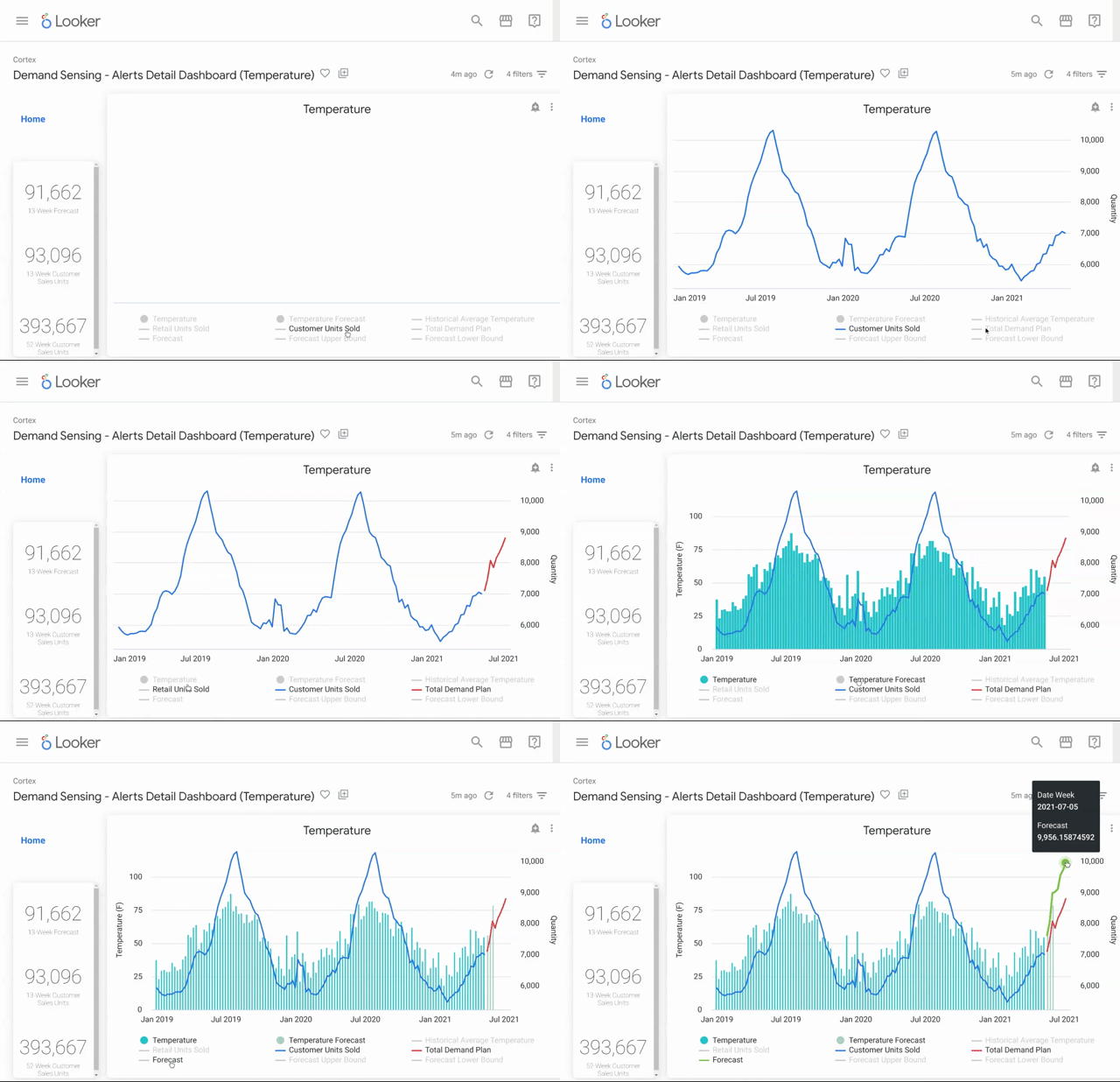
In a rapidly changing Consumer Packaged Goods (CPG) industry, business agility and digital innovation are essential to achieve business outcomes. Cost pressures, rising demand, and new consumer expectations have led to whiplash for CPG companies who need to accelerate digital transformation to remain competitive. Google Cloud has a tradition of delivering solutions specifically designed to help CPGs deliver on these imperatives. With all of these industry inflection points, CPG companies face an additional challenge:  making sense of huge volumes of data, typically siloed within multiple disparate sources inside and outside the organization. They need to tie this data together and enrich it with outside signals to improve insights and forecasts that help them meet market demands and disruptions more efficiently. To address these challenges and opportunities, CPG enterprises can leverage Google Cloud Cortex Framework which provides reference architectures, packaged solution content, and deployment accelerators to help organizations kickstart insights and reduce the time to value with Google’s Data Cloud. CPG solutions built on top of Cortex Data Foundation combine SAP data and other key data sets such as trends, weather, and more, to solve common challenges across the supply chain. Today, we are announcing new, predefined analytics content and extending our partner solution offerings for CPG organizations that build on our recent content releases. Demand Sensing – Gain a clearer picture of demandCPG organizations rely on historical sales and other data to predict demand – weeks, months, and even years into the future. A key challenge, however, is detecting and responding quickly to unexpected changes and shifts in the market during production and delivery schedules. An accurate demand plan is essential for reducing business costs and maximizing profitability, but what happens if weather suddenly changes, consumer trends vary, or marketing efforts create demand spikes or dips? Current models do not reflect these new signals, even as they materially impact the demand plan. Identifying near term changes in demand is mission critical to better match demand with supply. Unlocking greater business opportunities starts by combining data and understanding diverse signals beyond historical sales.Google Cloud Cortex Demand Sensing helps CPG companies better understand and shape demand by consolidating data from SAP ERP, Google, and third parties to enable demand planners to make proactive business decisions based on the latest market signals. With Cortex Demand Sensing, businesses can get started quickly with a modern cloud-based solution that includes the best of Google’s data cloud services like BigQuery, Vertex AI, and visualization capabilities with Looker. Our new solution accelerator content helps CPGs detect who the customer is, what product attributes are driving sales, and what factors may impact demand. The solution includes sample data, predefined analytics and machine learning models and Looker dashboarding templates to help deliver insights and highlight impact alerts to demand planners faster. By bringing together SAP and non SAP data sets, the solution helps organizations to be more nimble, through a more holistic view across demand drivers.By augmenting demand planning with additional demand signals and contextual data like weather anomalies, search trends and more, CPG companies can improve visibility into factors that influence forecasting and lower inventory holding costs, or drive greater sales thanks to improved near term demand alignment and management.At Google Cloud we understand the challenges of forecasting demand in today’s landscape and are developing products and solutions that empower CPG companies around the world to quickly gain insights and improve accuracy. We have options for companies of all sizes, whether you have in-house talent that can build upon our existing architectures and accelerators or are interested in leveraging something more “out of the box” from our partner ecosystem. A growing partner ecosystem of solution offeringsOne of the most exciting aspects of Google Cloud Cortex Framework is that it can also accelerate the onramp of data to advanced analytics and AI solutions to further accelerate business outcomes that directly deliver Top-Line and Bottom-line financial impact for customers. We are delighted to recognize several leading partners in this space including: C3 AI: A comprehensive suite of enterprise AI applications that works with Google Cloud’s leading AI tools, frameworks, industry solutions, and services. Example use cases include:Inventory Optimization: applies advanced AI, machine learning, and optimization techniques to enable companies to minimize inventory levels of parts, raw materials, and finished goods while maintaining confidence that they will have sufficient inventory available to meet customer service level agreements.​Supply Network Risk: Identify and mitigate current and future disruptions across the whole supply chain including inbound supplier delays, order delivery delays, and manufacturing bottlenecks.AI Demand Forecasting: leverage advanced AI techniques to help generate and maintain the most accurate forecasts and demand plans to maximize sales while minimizing costs.Palantir Foundry is a leading platform for data-driven operations and decision making. Example use cases include:Assortment Recommendation Engine: Optimize product assortment planning level via a recommendation engine. Incorporate planogram performance and sales metrics to specify product placementsProduct Fulfillment Optimization: Create a single source of truth for y demand forecasting and logistics teams to collaborate to ensure products are manufactured and delivered to the right locations at the right time.Inventory Management & Out-of-Stock Prevention: Predict out-of-stock events and resolve through dynamic recommendations. Simulate supply chain trade-off decisions, and proactively reroute based on dynamic demand.360 Visibility into Key Assets: Virtualize your entire value network with 360 visibility into the most valuable assets in your business, including Customers, Stores, Products, and more.What customers are sayingAlready, CPG companies around the world have taken advantage of Google Cloud Cortex Framework powered solutions to accelerate time to insight and time to value with less risk, complexity, and cost. Here’s what they have to say:  “Operating from Chile with exports of fish and shellfish to more than 50 countries across 5 continents worldwide, makes supply chain and sustainability insights critical to our company. We chose to implement Cortex Data Foundation to leverage our SAP data with other data sources in BigQuery for deeper visibility into our business. We migrated and upgraded our SAP ERP system to S/4HANA on Google Cloud in just 3 months and completed Cortex solution content installation and integration in parallel in just 2 weeks! We have been truly amazed by both the innovation and simplicity of the solution and were able to get started quickly. With new insights across our business, we can forecast faster and more accurately, which has unlocked innovation and agility not possible before.” — Pedro Aguirre, CIO, Camanchaca SAGoogle Cloud Cortex Framework continues to grow in exciting new ways, and we look forward to announcing more of them soon. Right now, CPG companies can leverage Cortex content provided and our Partner ecosystem to power next-level intelligent operations with the flexibility and scalability of the cloud. Cortex lets organizations ingest high-volume data from multiple sources securely, quickly, and cost-efficiently. Combine SAP and external data into a single unified system where it is easily accessed to fuel smarter business intelligence. To learn more about Google Cloud Cortex Framework, visit our solution site and tune in to our Google Cloud Next ’22 session. Get hands on with our Cortex Data Foundation and Cortex Demand Sensing solutions today.Related ArticleGoogle Cloud Cortex Framework extends offering in latest release and beyondGoogle Cloud is extending Google Cloud Cortex Framework with new analytics content and making it easier to combine SAP data with other da…Read Article
Quelle: Google Cloud Platform

What makes Google Cloud security special: Our reflections 1 year after joining OCISO

Editor’s note: Google Cloud’s Office of the Chief Information Security Officer (OCISO) is an expert team of cybersecurity leaders, including established industry CISOs, initially formed in 2019. Together they have more than 500 years of combined cybersecurity experience and leadership across industries including global healthcare, finance, telecommunications and media, government and public sector, and retail industries. Their goal is to meet the customer where they are and help them take the best next steps to secure their enterprise. In this column, Taylor Lehmann, Director in OCISO Director, and David Stone, Security Consultant in OCISO, reflect on their first year with Google Cloud and the OCISO team.After spending most of our careers helping secure some of the world’s most critical infrastructure and services, we joined Google Cloud because we wanted to help enterprises be safer with Google.One thing that became immediately apparent is that at Google Cloud, security is a primary ingredient baked into everything we do. We can provide organizations with an opportunity to deploy secure workloads on a secure platform, designed and maintained by thousands of security-obsessed Googlers with decades of experience defending against adversaries of all capability levels. Our engineering philosophies drive us to design products that are secure by design, secure by default, and constantly updated to incorporate lessons learned from our own research and by defeating attacks.  Our existing customers know that our continuously-improving cloud platform has security turned on and up before they set up their cloud identity and build their first project. The value of cloud technology can’t be understated: It allows security teams to reduce their attack surface through removing entire categories of threats because security has been engineered into the hardware and software from the ground up.Dogfooding: A critical component of our security cultureGoogle helped popularize the practice of dogfooding, when a software company uses its own products before making them available to the general public. We also use dogfooding to drive the creation of advanced security technologies. Because we use the security technologies we sell, we never settle for just good enough — for Googlers (who have exceptionally high expectations for the technology they use), for customers, and for their users. In some cases, these technologies (such as BeyondCorp and BeyondProd, implementations of Zero Trust security models pioneered at Google) are available to us years before the broader need for them outside of Google is fully understood. Similarly, our Threat Analysis Group (TAG) began developing approaches to track and stop threats to Google’s systems and networks following lessons we learned in 2010. What’s unique about these initiatives (and newer ones like Chronicle) is not only how they came together, but how they continue to improve by our own dogfooding.Embracing the shared fate model to better protect usersIt’s important to update your thinking to keep pace with the ever-evolving cybersecurity landscape. The shared responsibility model, which establishes whether the customer or the cloud service provider (CSP) is responsible for various aspects of security, has guided security relationships and interactions since the early days of CSPs. At Google Cloud, we believe that it now stops short of helping customers achieve better security outcomes. Instead of shared responsibility, we believe in shared fate. Shared fate includes us building and operating a trusted cloud platform for your workloads. We provide guidance for security best practices and secured, attested infrastructure-as-code patterns that you can use to deploy your workloads. We release solutions that combine Google Cloud services to solve complex security problems, and we offer innovative insurance options to help you measure and mitigate the risks that you must accept. Shared fate involves a closer interaction between us and you to secure your resources on Google Cloud. By sharing fate, we can create a system of mutual accountability and can set expectations that the CSP and their customers are actively involved in making each other secure and successful. Establishing trust in our software supply chainSoftware supply chains need to be better secured, and we believe Google’s approach to be the most robust and well-rounded. We contribute to many public communities, such as the Linux Foundation, and use our Vulnerability Rewards Program to improve the security of software we open source for the world. We recently announced Assured Open Source Software, which seeks to maintain and secure select open source packages for customers the same way Google secures them for itself. Assured Open Source is yet another dogfood project, taking what we do at Google and externalizing it for everyone’s benefit.A resilient ecosystem requires community participationBeing an active member of the community is a priority at Google, and can be a vital part of securing the critical infrastructure that we all rely on. We joined the Health-ISAC (Information Sharing and Analysis Center) as a partner this July. We’ve maintained relationships with Financial Services ISAC, Auto ISAC (for vehicle software security,) Retail ISAC, and others for years. Sharing knowledge and guidance between our organizations can only help improve everyone’s ability to defend against the latest cybersecurity threats. We’re not just partners, we’re helping build close relationships with these organizations, pairing teams together to protect communities globally.Top challenges during transformationWe believe the future is better running workloads on a trusted cloud platform like Google Cloud, but the journey there can be challenging. In feedback we’ve received over the past year, including from nearly 100 executive workshops and interactions we’ve led, our customers have shared their top challenges with us. The seven most frequent ones are: Evolving a software-defined perimeter where identity, not firewall rules, keep bad out and allow good in;Enabling secure, remote access capabilities that allow access to data and services anywhere and from any device;Ensuring data stays in approved locations while allowing the enterprise to be agile and responsible to their stakeholder use cases;Scaling effective security programs to match the growth in consumption infrastructure and cloud-native services by their business;Managing their attack surface in light of two facts: That more than 42 billion devices are expected to be connected to the internet by 2025, and organizations are looking for ways to connect and leverage an ever-growing collection of data;Analyzing and sharing data securely with third parties as businesses seek to leverage this information to get closer to customer needs while also generating more revenue; and finally,Transforming teams by federating responsibilities for security outside of the security organization and establishing effective guardrails to safely constrain and protect use of cloud resources.  The future is multi-cloudAn important point that we’ve learned, and that we’ve emphasized in our customer interactions over the past year, is that Google Cloud is not singularly-focused on how to be successful only on our own platform. We focus on building technologies that meet customers where they are at, create value for their organizations and customers, and reduce the operator toil needed to get there. It’s why we built Anthos, contribute to and support open source, and develop products like Chronicle which work well no matter where you decide to deploy a workload — on-prem, on Google Cloud, or on another cloud.At its heart, the cybersecurity community is its people and its technology. That’s why we’re investing $10 billion in cybersecurity over the next five years, why we work hard to improve DEI initiatives at Google and beyond, and why we provide accessible, free training and certification programs in security and cloud to democratize knowledge and build the next generation of cloud leaders.We close out our first year thankful for the opportunity to work with so many customers, communities, partners, and governments around the world. We have learned and have grown better at what we do from the experiences we had interacting across these groups. In the final months of this year and onwards into 2023, we will continue to find new ways to use Google’s resources to help customers, build products, and support the safety and security of societies around the world.Related ArticleRead Article
Quelle: Google Cloud Platform

Announcing the 2022 Accelerate State of DevOps Report: A deep dive into security

In 2021, more than22 billion records were exposed because of data breaches, with several huge companies falling victim. Between that andother malicious attacks, security continues to be top of mind for organizations as they work to keep customer data safe and their businesses up and running. With this in mind, Google Cloud’s DevOps Research and Assessment (DORA) team decided to focus on security for the 2022 Accelerate State of DevOps Report, which is out today.Over the past eight years, more than 33,000 professionals around the world have taken part in the Accelerate State of DevOps survey, making it the largest and longest-running research of its kind. Year after year, Accelerate State of DevOps Reports provide data-driven industry insights that examine the capabilities and practices that drive software delivery, as well as operational and organizational performance.Securing the software supply chainTo analyze the relationship between security and DevOps, we explored the topic of software supply chain security, which the survey only touched upon lightly in previous years. To do this, we used the Supply-chain Levels for Secure Artifacts (SLSA) framework, as well as the NIST’s Secure Software Development Framework (SSDF). Together, these two frameworks allowed us to explore both the technical and non-technical aspects that influence how an organization implements and thinks about software security practices.Overall, we found surprisingly broad adoption of emerging security practices, with a majority of respondents reporting at least partial adoption of every practice we asked about. Among all the practices that SLSA and NIST SSDF promote, using application-level security scanning as part of continuous integration/continuous delivery (CI/CD) systems for production releases was the most common practice, with 63% of respondents saying this was “very” or “completely” established. Preserving code history and using build scripts are also highly established, while signing metadata and requiring a two-person review process have the most room for growth.One thing we found surprising was that the biggest predictor of an organization’s software security practices was cultural, not technical: high-trust, low-blame cultures — as defined by Westrum — focused on performance were significantly more likely to adopt emerging security practices than low trust, high-blame cultures focused on power or rules. Not only that, survey results indicate that teams who focus on establishing these security practices have reduced developer burnout and are more likely to recommend their team to someone else. To that end, the data indicate that organizational culture and modern development processes (such as continuous integration) are the biggest drivers of an organization’s software security and are the best place to start for organizations looking to improve their security posture.What else is new in 2022?This year’s focus on security didn’t stop us from exploring software delivery and operational performance. We classify DevOps teams using four key metrics: deployment frequency, lead time for changes, mean-time-to-restore, and change fail rate, as well as a fifth metric that we introduced last year, reliability. Software delivery performanceLooking at these five metrics, respondents fell into three clusters – High, Medium and Low. Unlike in years past, there was no evidence of an ‘Elite’ cluster. When it came to software delivery performance, this year’s High cluster is a blend of last year’s High and Elite clusters.As shown in the percentage breakdowns in the table below, High performers are at a four-year low and Low performers rose dramatically from 7% in 2021 to 19% in 2022! The Medium cluster, however, swelled to 69% of respondents. That said, if you compare this year’s Low, Medium, and High clusters with last year’s, you’ll see that there is a shift toward slightly higher software delivery performance overall. This year’s High performers are performing better – their performance is a blend of last year’s High and Elite. Low performers are also performing better than last year – this year’s Low performers are a blend of last year’s Low and Medium.We plan to conduct further research that will help us better understand this shift, but for now, our hypothesis is that the ongoing pandemic may have hampered teams’ ability to share knowledge, collaborate, and innovate, contributing to a decrease in the number of High performers and an increase in the number of Low performers.Operational performance When it comes to DevOps, software delivery performance isn’t the whole picture — it can also contribute to the organization’s overall operational performance. To dive deeper, we performed a cluster analysis on the three categories the five metrics are designed to represent: throughput (a composite of lead time of code changes and deployment frequency), stability (a composite of time to restore a service and change failure rate) and operational performance (reliability).Through our data analysis, four distinct types of DevOps organizations emerged; these clusters differ notably in their practices and technical capabilities, so we broke them down a bit further:Starting: This cluster performs neither well nor poorly across any of our dimensions. This cluster may be in the early stages of their product, feature, or service’s development. They may be less focused on reliability because they’re focusing on getting feedback, understanding their product-market fit and more generally, exploring. Flowing: This cluster performs well across all characteristics: high reliability, high stability, high throughput. Only 17% of respondents achieve this flow state.Slowing: Respondents in this cluster do not deploy too often, but when they do, they are likely to succeed. Over a third of responses fall into this cluster, making it the most representative of our sample. This pattern is likely typical (though far from exclusive) to a team that is in the process of incrementally improving, but they and their customers are mostly happy with the current state of their application or product.  Retiring: And finally, this cluster looks like a team that is working on a service or application that is still valuable to them and their customers, but no longer under active development.Are you in the Flowing cohort? While previous respondents followed this guidance to help them achieve Elite status, teams aiming for the Flowing cohort should focus on loosely-coupled architectures, CI/CD, version control and providing workplace flexibility. Be sure to check out our technical capabilities articles, which go into more detail on these competencies and how to implement them. Show us how you use DORAThe State of DevOps Report is a great place to begin learning about some ways your team can improve its DevOps performance, but it is also helpful to see how other organizations are already using the report to make a meaningful impact throughout their organizations. Last year we launched the Inaugural Google Cloud DevOps Awards, and this year we are excited to share the DevOps Awards Ebook, which includes 13 case studies from last year’s winning companies. Learn from companies like Deloitte, Lowe’s, and Virgin Media on how they successfully implemented DORA practices in their organizations. And be sure to apply to the 2022 DevOps Awards to share your organization’s transformation story! Thanks to everyone who took our 2022 survey. We hope the Accelerate State of DevOps Report helps organizations of all sizes, industries, and regions improve their DevOps capabilities, and we look forward to hearing your thoughts and feedback. To learn more about the report and implementing DevOps with Google Cloud:Download the reportFind out more about how your organization stacks up against others in your industry with theDevOps Quick Check Learn more about how you can implement DORA practices in your organization with our Enterprise GuidebookModel your organization around the DevOps capabilities of high-performing teamsRelated ArticleDevOps for tech companies and startups: Learn from over 32,000 professionals on how to drive success with Google Cloud’s DORA researchThe 2021 State of DevOps Report is live and we want to help your organization continue to thrive with Google Cloud’s best DevOps practices.Read Article
Quelle: Google Cloud Platform



