Vodafone calls for transformative insights, Google Cloud answers

Telecommunications are essential to modern societies and economies. Consumers expect to be connected to an increasing number of devices—smartphones, home equipment and even pet monitors—wherever they are. At the same time, telecommunications also underpin the growth of a range of industries and public services, powering their ability to collect data in an era of connected devices, and enabling them to leverage networks to create new products and services. With the proliferation of artificial intelligence (AI) and 5G networks, leaders are taking this transformation to the next level, reinventing their operations to gain competitive advantage in the digital age.Digital VodafoneVodafone, one of the world’s leading telecom and technology services companies, is at the forefront of this transformation. Vodafone serves 625 million customers on owned and partner networks in 66 countries. The company’s customer and network reach drive its mission to provide the technology and services to create inclusive digital societies in its countries of operation, while also halving its environmental footprint. As part of its ‘Digital Vodafone’ transformation program, the company is working with Google Cloud to build a global big data platform spanning a large number of markets. By leveraging real-time analytics from that ocean of data, Vodafone will have the ability to create powerful new products and services based on deeper customer insight, to engage customers (who opt in) with better, more personalized support, and to leverage its anonymized network data to help tackle important societal issues.Creating a data oceanThe project is complex and multi-faceted. Vodafone’s existing on-premises group data platform is a shared service consisting of eight clusters with more than 600 servers and is used in 11 countries. The platform relies on legacy Hadoop architecture that lacks the agility or scalability to support demands for analytics and an increasing list of innovation projects.To begin, Vodafone will perform a large-scale migration of its global data into our highly secure public cloud. It will also create a custom platform for data performance that lets disparate data from across the organization be aggregated into one ‘data ocean’ (rather than multiple data lakes), within which analytics and business intelligence can take place. Once complete, the speed with which Vodafone will be able to run queries will enable it to gain real-time insights, providing new levels of agility, scalability and cost-effectiveness. Vodafone NeuronRather than lifting and shifting existing workloads into the public cloud environment, Vodafone has integrated Google Cloud tools into its custom ‘Neuron’ platform. Vodafone built Neuron on Google Cloud Platform (GCP), and is in the process of rolling it out to 11 countries. The insights from Neuron are being used to support a range of applications. For example, Vodafone’s ‘Gigabit Networks’ are increasingly optimized by AI to push capacity to where customers need it most; and real-time analytics enable Vodafone to push personalised commercial offers to customers—such as a data top-up—when they are most likely to buy.According to Simon Harris, Group Head of Big Data Delivery at Vodafone, Neuron will become the driver for AI and business intelligence for all of Vodafone globally. “Neuron serves as the foundation for Vodafone’s data ocean and the brains of our business as we transform ourselves into a digital tech company. Not only will we be able to gain real-time analytics capabilities across Vodafone products and services, it will also allow us to arrive at insights faster, which can then be used to offer more personalized product offerings to customers and to raise the bar on service.” The collaboration with Google Cloud, Harris adds, has been invaluable in shaping the operation. “Many of the leading analytics tools such as TensorFlow have been developed by Google, so having their managed service expertise has helped us to optimize our implementation.” At the dawn of a new age in connectivity, Vodafone is building the capabilities to be ahead of the curve. We’re proud to be supporting Vodafone on that journey.
Quelle: Google Cloud Platform

Achieve peace of mind with BigQuery pricing and control

For many companies, data analytics has evolved from an occasional task to something that’s mission-critical to their business. When you’re doing data analytics at scale, predictable spending is key—something we often hear from our enterprise customers, like HSBC and Sky.To that end, we launched BigQuery’s flat-rate pricing a few years ago, a fixed-rate pricing model that makes it easy for you to predict and control your monthly BigQuery bill. We’re happy to announce BigQuery Reservations, an easy and flexible self-service way to take advantage of BigQuery flat-rate pricing, available in beta in coming days. Reservations makes it even simpler to plan your spending and add flexibility and visibility to your data analytics use cases. You’ll see this feature in cloud console in the next two weeks.BigQuery Reservations lets you:Control your transparent, predictable BigQuery analysis spending. Purchase BigQuery slots in BigQuery’s web UI in seconds. Seamlessly manage your enterprise workloads in BigQuery.Avoid compute silos by easily sharing idle capacity across your entire organization.BigQuery Reservations solves enterprise customers’ largest problems”BigQuery Reservations will bring a new kind of flexibility and predictability to enterprises doing large-scale data analytics. For a serverless, cloud-native data warehouse like BigQuery, the ability to predict costs for customers is huge. And with our research showing that 42% of organizations plan to use or are exploring serverless analytics over the next 12 months, pricing and consumption flexibility will serve as a key differentiator for GCP,” says Mike Leone, Senior Analyst at Enterprise Strategy Group. “This announcement opens up more possibilities for workload management, and adds higher levels of efficiency with idle slot capacity being available for reuse.”We’ve heard that you need more power and flexibility with your resources, and the ability to buy and manage BigQuery slots on your own. “Reservations were instrumental in helping us incrementally ramp up slot capacity as we migrated over from another data warehouse, greatly increasing our cost performance,” says Jingsong Wang, engineering manager, Discord. “The ability to share idle slot capacity across projects, workloads and users helps ensure our business-critical workstreams stay online, while giving users the flexibility to run more complex workloads.”You can get a full demo here on how BigQuery Reservations work:Reservations can bring solutions to common issues:Cost predictability and conformism to budgets. While cloud-native services offer unparalleled scalability and efficiency, it’s often at the expense of cost predictability, resulting in budget overruns. Pay-per-use pricing models are especially hard to manage. BigQuery Reservations offers a predictable flat-rate pricing model—no surprises on your monthly bill.Immediate access to capacity. With BigQuery Reservations, purchasing slot commitments merely takes seconds. There is no need to wait for your data warehouse to spin up, and you no longer need to warm up your data warehouse’s disk-driven adaptive cache to get optimal performance. Enterprise-grade workload management. Your data science group may run high-priority, high-demand workloads, and need to have isolated and guaranteed analytics capacity, whereas your test workloads need access to only a small amount of capacity. Reservations lets you dynamically and programmatically partition your BigQuery slots into pockets of resources dedicated to departments or workloads.Efficiency. Partitioning analytics capacity can create compute silos, in which capacity is wasted. BigQuery Reservations distribute any unused BigQuery slots in real time to workloads with high-capacity demands, so even the largest and most complex environments can take advantage of every single BigQuery slot at any time. It’s time to say no to compute silos!We’ve heard from media company Sky that they’ve found this pricing useful. “Sky has been using BigQuery’s flat-rate for some time now,” says Vince Marco, enterprise infrastructure architecture manager at Sky. “Taking advantage of BigQuery’s flat-rate pricing has given Sky peace of mind when it comes to performance and our BigQuery bill. Reservations helped Sky rethink how to protect business-critical workloads, while isolating lower-priority development projects and making sure we get the most of BigQuery’s performance.”Adding cost predictability to your data warehouseBigQuery Reservations is a flexible platform for administering resources and workloads. It involves a three-step process to manage your environment:Commitments, which let you purchase slot capacity.Reservations (optional), which give you the ability to partition your capacity.Assignments, which gives you the ability to assign projects, folders, or your entire organization to Reservations.As an example, you may need 1,000 BigQuery slots for your organization. Your BigQuery users include a data science team, a high-priority ELT workload, and BI dashboards. With BigQuery Reservations, you can:Purchase a 1,000-slot commitment Create reservations “ds” with 500 slots, “elt” with 300 slots, and “bi” with 200 slotsAssign the data science team’s Google Cloud projects to “ds” reservationAssign your ELT projects to “elt” reservationAssign the project that runs your BI dashboard to “bi” reservationNow each of your workloads has dedicated capacity. In addition, any single unused BigQuery slot is automatically and immediately available to other workloads in your organization.You can perform these actions right in the BigQuery UI, or programmatically in the BigQuery command-line tool. We’ve heard from customers that BigQuery Reservations can streamline workload management and add efficiency. “The Slot Reservation API strikes a good balance between control and flexibility for managing BigQuery workloads,” says Henry Lin, engineering manager, Reddit. “We’re able to isolate expensive queries from each other without fearing that we’re underutilizing BigQuery resources. The API has been remarkably easy to use and, in turn, has empowered us to optimize our workflows without needing to micromanage them.”Getting started with BigQuery ReservationsBigQuery’s flat-rate pricing starts at 500 slots, and is generally a good fit for production usage and when customers are looking for price predictability. Customers can still take advantage of on-demand, serverless pricing for proof-of-concepts (POCs) and ad-hoc analysis. Here’s a look at when you might use one or the other:To get started with Reservations, head over to the Reservations getting started documentation. What’s nextBigQuery is a serverless enterprise data warehouse. As such, we strive to reduce our users’ administrative overhead, and to automate the day-to-day toil associated with managing a typical data warehouse. Reservations continues that trend by introducing powerful features that give you more control over your BigQuery environment. We are looking forward to hearing your feedback!We’re putting the final touches on BigQuery Reservations. Check back in soon.Learn more about:BigQuery flat-rate pricing documentationReservations Quickstart guideReservations documentationWhat is a BigQuery slot? documentationChoosing between on-demand and flat-rate pricing modelsEstimating the number of slots to purchaseGuide to workload management with Reservations
Quelle: Google Cloud Platform

Streaming analytics now simpler, more cost-effective in Cloud Dataflow

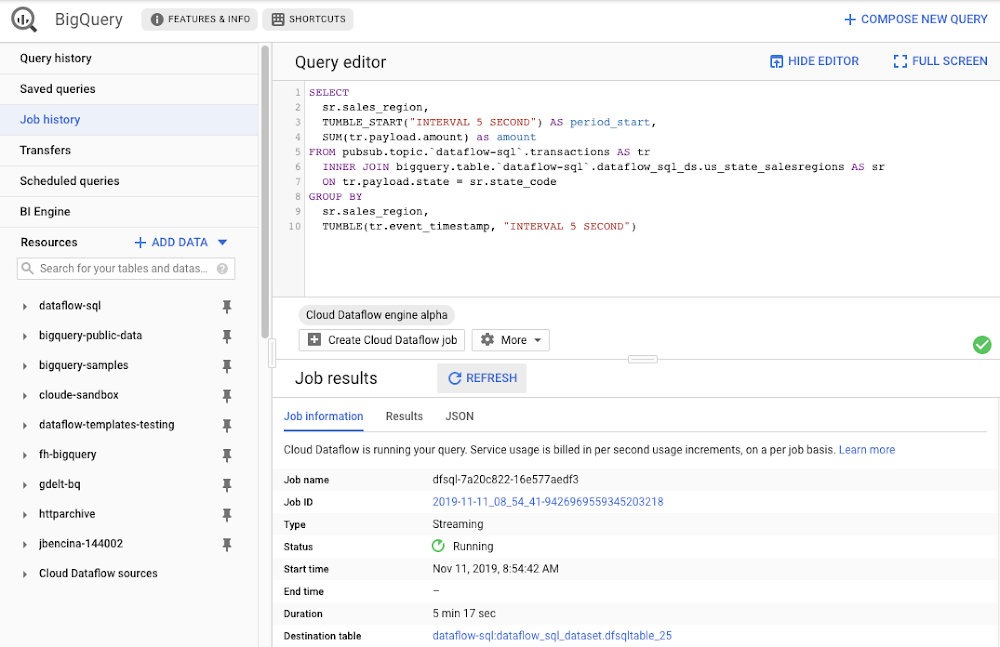
Streaming analytics helps businesses to understand their customers in real time and adjust their offerings and actions to better serve customer needs. It’s an important part of modern data analytics, and can open up possibilities for faster decisions. For streaming analytics projects to be successful, the tools have to be easy to use, familiar, and cost-effective. Since its launch in 2015, Cloud Dataflow, Google’s fully managed streaming analytics service, has been known for its powerful API available in Java and Python. Businesses have almost unlimited customization capabilities for their streaming pipelines when they use these two languages, but these capabilities come at the cost of needing programming skills that are sometimes hard to find.To advance Google Cloud’s streaming analytics further, we’re announcing new features available in the public preview for Cloud Dataflow SQL, as well as the general availability of Cloud Dataflow Flexible Resource Scheduling (FlexRS) for a very cost-effective way of batch processing of events. These new features make streaming analytics easier and more accessible to data engineers, particularly those with database experience. Here’s more detail about each of these new features:Cloud Dataflow SQL to create streaming (and batch) pipelines using SQLWe know that SQL is the standard for defining data transformations, and that you want more GUI-based tools for creating pipelines. With that in mind, several months ago we launched a public preview of Cloud Dataflow SQL, an easy way to use SQL queries to develop and run Cloud Dataflow jobs from the BigQuery web UI. Today, we are launching several new features in Cloud Dataflow SQL, including Cloud Storage file support and a visual schema editor.Cloud Dataflow SQL allows you to join Cloud Pub/Sub streams with BigQuery tables and Cloud Storage files. It also provides several additional features:Using Streaming SQL extensions for defining time windows and calculating window-based statistics;Integration with Cloud Data Catalog for storing the schema of Cloud Pub/Sub topics and Cloud Storage file sets—a key enabler for using SQL with streaming messages;A simple-to-use graphical editor available in the BigQuery web UI. If you are familiar with BigQuery’s SQL editor, you can create Cloud Dataflow SQL jobs. To switch the BigQuery web UI to Cloud Dataflow SQL editing mode, open the BigQuery web UI, go to More>Query settings and select “Cloud Dataflow” as the query engine.As an example, let’s say you have a Cloud Pub/Sub stream of sales transactions, and you want to build a real-time dashboard for the sales managers of your organization showing them the up-to-date stats of the sales in their regions. You can accomplish this in a few steps: write a SQL statement like the following one, launch a Cloud Dataflow SQL job, direct the output to a BigQuery table, then use one of the many supported dashboarding tools, including Google Sheets, Data Studio, and others, to visualize the results.In this example, we are joining the “transactions” Cloud Pub/Sub topic in the “dataflow-sql” project with a metadata table in BigQuery called “us_state_salesregions.” This table contains a mapping between the state codes (present in the “transactions” Cloud Pub/Sub topic) and the sales regions “Region_1”, “Region_2”, .., “Region_N” that are relevant to the sales managers in our example organization. In addition to the join, we’ll do a streaming aggregation of our data, using one of the several windowing functions supported by Cloud Dataflow. In our case, we will use TUMBLE windows, which will divide our stream into fixed five-second time intervals, group all the data in those time windows by the sales_region field, and calculate the sum of sales in the sales region. We also want to preserve the start of each time window, via TUMBLE_START(“INTERVAL 5 SECOND”), to plot sales amounts as a time series. To start a Cloud Dataflow job, click on “Create Cloud Dataflow job” in the BigQuery web UI.When data starts flowing into the destination table, it will contain three fields: the sales_region, the timestamp of the period start, and the amount of sales. In the next step, we will create a BigQuery Connected Sheet that shows a column chart of sales in “Region_1” over time. Select the destination BigQuery table in the nav tree. In our case, it’s the dfsqltable_25 table.Then, select Export>Explore with Sheets to chart your data. Do it from the tab where your BigQuery table is shown, and not from the tab where your original Cloud Dataflow SQL was. In Sheets, create the column chart using the data connection to BigQuery, and choose period_start for the X-axis, amount as your data series, and add a sales_region filter. This is all you have to do to build a chart in Sheets that visualizes streaming data.Mixing and joining data in Cloud Pub/Sub and BigQuery helps solve many real-time dashboarding cases, but quite a few customers have also asked for support of their Cloud Storage files to join those files with events in Cloud Pub/Sub or with tables in BigQuery. This is now possible in Dataflow SQL, enabled by our integration with Data Catalog’s Cloud Storage file sets. In the following example, you’ll see an archive of transactions stored in CSV files in the “transactions_archive” Cloud Storage bucket.Two gcloud commands can define a Cloud Storage file set and entry group in Data Catalog.Notice how we defined the file pattern “gs://dataflow-sql/inputs/transactions_archive/*.csv” as part of the file set entry definition. This pattern is what will allow Cloud Dataflow to find the CSV files once we write the SQL statement that references this file set.We can even specify the schema of this transactions_archive_fs file set using a GUI editor. For that, go to the BigQuery web UI (make sure it is running in Cloud Dataflow mode), select “Add Data” in the left navigation and choose “Cloud Dataflow sources.” Search for your newly added Cloud Storage file set and add it to your active datasets in the BigQuery UI.This will allow you to edit the schema of your file set after you select it in the nav tree. The “Edit schema” button is right there on the “Schema” tab. The visual schema editor is new and works for both Cloud Storage file sets as well as for Cloud Pub/Sub topics.Once you’ve registered the file set in Data Catalog and defined a schema for it, you can query it in Cloud Dataflow SQL. In the next example, we’ll join the transactions archive in Cloud Storage with the metadata mapping table in BigQuery.Notice how similar this SQL statement is to the one that queries Cloud Pub/Sub. The TUMBLE window function even works on Cloud Storage files, although we will define the windows based on a field “tr_time_str” that is inside the files (the Cloud Pub/Sub SQL statement used the tr.event_timestamp attribute of the Cloud Pub/Sub stream). The only other difference is the reference to the Cloud Storage file set. We accomplish this by specifying datacatalog.entry.`dataflow-sql`.`us-central1`.transactions_archive_eg.transactions_archive_fs AS trBecause both of the job inputs are bounded (batch) sources, Cloud Dataflow SQL will create a batch job (instead of a streaming job created for the first SQL statement using a Cloud Pub/Sub source) which will join your Cloud Storage files with the BigQuery table, and write the results back to BigQuery.And now you have both a streaming pipeline feeding your real-time dashboard from a Cloud Pub/Sub topic, as well as a batch pipeline capable of onboarding historical data from CSV files. Check out the SQL Pipelines tutorial to start applying your SQL skills for developing streaming (and batch) Cloud Dataflow pipelines.FlexRS for cost-effective batch processing of eventsWhile real-time streaming processing is an exciting use case that’s growing rapidly, many streaming practitioners know that every stream processing system needs a sprinkle of batch processing (as you saw in the SQL example). When you bootstrap a streaming pipeline, you usually need to onboard historical data, and this data tends to reside in files stored in Cloud Storage. When streaming events need to be reprocessed due to changes in business logic (i.e., time windows get readjusted, or new fields are added), this reprocessing is also better done in batch mode.The Apache Beam SDK and the Cloud Dataflow managed service are well-known in the industry for their unified API approach to batch and streaming analytics. The same Cloud Dataflow code can run in either mode with just minimal changes (usually replacing the data source from Cloud Pub/Sub to Cloud Storage). Remember our SQL example, where switching the SQL statement from a streaming source to a batch source was no trouble at all? And while it’s easy to go back and forth between streaming and batch processing in Cloud Dataflow, an important factor influencing the processing choice is cost. Customers who gravitate to batch processing have always looked to find the right balance between the speed of execution and costs. In many cases, that may mean you can be flexible with the amount of time it takes to process a dataset if the overall cost of processing is reduced in a significant fashion. Our new Cloud Dataflow FlexRS feature reduces batch processing costs by up to 40% using advanced resource scheduling techniques and a mix of different virtual machine (VM) types (including the preemptible VM instances) to decrease processing costs while providing the same job completion guarantees as regular Cloud Dataflow jobs. FlexRS uses the Cloud Dataflow Shuffle service, which allows it to handle the preemption of worker VMs better because the Cloud Dataflow service does not have to redistribute unprocessed data to the remaining workers.Using FlexRS requires no code changes in your pipeline and can be accomplished by simply specifying the following pipeline parameter:–flexRSGoal=COST_OPTIMIZEDRunning Cloud Dataflow jobs with FlexRS requires autoscaling, a regional endpoint in the intended region, and specific machine types, so you should review the recommendations for other pipeline settings. While Cloud Dataflow SQL does not yet support FlexRS, it will in the future.Simultaneously with launching FlexRS in general availability, we are also extending its availability to five additional regions, covering all regions now where we have regional endpoints and Cloud Dataflow Shuffle:us-central1us-east1us-west1europe-west1europe-west4asia-east1asia-northeast1To learn more about Cloud Dataflow SQL, check out our tutorial and try creating your SQL pipeline using the BigQuery web UI. Visit our documentation site for additional FlexRS usage and pricing information.Check out other recently launched streaming and batch processing features: We deployed Cloud Dataflow Shuffle and Cloud Dataflow Streaming Engine to three additional regions, bringing total availability to seven regions.We launched the ability to protect your pipeline state with customer-managed encryption keys.Python streaming support from Cloud Dataflow is now generally available.
Quelle: Google Cloud Platform

On the road to digital transformation with UK’s Department for Transport

Formed in 2002 and staffed by 3,000 employees, the UK’s Department for Transport (DfT) oversees 24 separate agencies and public bodies to support the movement of people and goods. Its responsibilities range from vehicle licensing and aviation security through to supporting regulators, policing and infrastructure projects. Its digital team delivers technology across DfT’s operations and supports the department’s broader modernization goals, which often requires it to search through and consume data produced by its constituent agencies.DfT needed to modernize its core technology stack to support digital transformation. As a result, they decided on a cloud first approach, and to achieve this, turned to Google Cloud. DfT has been working with Google Cloud over the past two years to reinvent how it optimizes internal service delivery and introduces new digital capabilities for its staff. It’s anticipated that by June 2020 the department will operate as a cloud-first organization.Prior to moving to the cloud, it was resource-intensive for DfT to maintain servers, manage backups and ensure the overall health of the IT systems, and simple utilization and querying tasks often required days to complete. Their data centers also lacked the scalability to match DfT’s longer-term needs as it looked to undertake bigger and more complex data initiatives.In an effort to build the capabilities it required in the longer-term, DfT decided to work with Google Cloud to migrate a large proportion of its applications to the public cloud. The migration, which they called the DfT Data Centre Transformation, took place during the last quarter of 2018 and the first phases were completed by mid 2019.Over the course of 12 months, DfT successfully completed the migration of hundreds of virtual machines to GCP. This has allowed DfT to decommission a large chunk of its on-premises infrastructure while improving the reliability, resilience and security of its systems.Since the migration, DfT has been able to access a broad range of services designed to dramatically enhance its capabilities, as well as develop its own software products on top of Google Cloud. These services include enhanced Infrastructure-as-a-Service (IaaS) capabilities through Compute Engine, serverless capabilities through BigQuery, and serverless Platform-as-a-Service (PaaS) capabilities through App Engine for application development and service deployment. This has allowed DfT developers to focus on the code rather than having to worry about underlying infrastructure.In the months since the migration to GCP, DfT has seen vast improvements in its IT operations. Benefits such as reduced friction in IT maintenance and the ability to make better use of its resources were largely anticipated; but an unexpected benefit was the ability to capitalize on innovation through the use of open source platforms, which has opened the department’s eyes to new possibilities and inspired greater business agility.This has manifested in the execution of several projects that previously wouldn’t have been possible, including:A DfT instance of LENNON, a data-intensive (100TB+) application used by the rail industry for ticket information, was migrated from an internal cluster into BigQuery. Before the migration, running searches on the DfT customized version of the database could take up to five days. Now, queries can be performed in a matter of seconds, enabling the Rail Data team to work more quickly and effectively.Journey Time Statistics, a road transportation analytics system, was re-platformed as a proof of concept to infrastructure as a service through Compute Engine to give the team more flexible and scalable compute capabilities. Through leveraging VMs with greater CPU, Memory and Disk performance, the time taken to complete analytics jobs performed by the system were reduced significantly, allowing the team to iterate and generate their statistical outputs faster.  Interim CIO at DfT Mark Lyons has been extremely pleased with the progress so far. “Our work with Google Cloud is helping us to become a more digital and data-driven organization. The capabilities the platform offers are helping us to utilize data better to support decision-making, policy-making, reporting and governance, as well as provide new digital services to engage with citizens on transport related initiatives.“We’ve been excited to go on this journey with Google Cloud. When you have finite resources, having a partner that understands the process of change and can direct your focus to the things that really matter is invaluable. We’ve invested in this as a long-term partnership and are excited for Google Cloud to remain our number one cloud platform provider.”The department hopes that its work with Google Cloud can spur further transformation initiatives, including innovation around image recognition, app transformation and internal performance management systems.“The use of cloud services is key, particularly agility and scalability,” says Mark. “Google Cloud is helping us to work at the scale and speed of delivery we need.”
Quelle: Google Cloud Platform

Announcing a new Cloud Acceleration Program for SAP customers

Many of the world’s largest enterprises run their businesses on SAP and are increasingly looking to the cloud to support their mission-critical workloads. To help more SAP customers simplify their transitions to the cloud, we’re excited today to announce the Cloud Acceleration Program. Earlier this year, we launched a program called Lighthouse, in partnership with system integrators, to streamline our customers’ SAP journeys to the cloud. The Cloud Acceleration Program is an evolution of Lighthouse. It empowers our customers with solutions from Google Cloud and our partners to simplify their cloud migrations—whether it’s shifting SAP workloads from on-premises to Google Cloud, or extending SAP solutions with Google Cloud or other leading third-party technologies. Customers who participate in our Cloud Acceleration Program will gain new architecture templates, accelerators, and SAP-focused support, in addition to partner-led assessment services, prototyping, and centers of excellence dedicated to SAP on GCP. Finally, a number of technology providers and ISVs are also participating in the program, assisting with code remediation, near-zero-downtime migrations, and other services.Today’s launch of the Cloud Acceleration Program includes support from global services partners such as Accenture, Atos, Deloitte, and HCL, which have created Google Cloud-specific business units to help customers migrate key workloads and applications to Google Cloud. These partners, along with Capgemini, DXC Technologies, Hitachi oXya, Infosys, NTT, TCS, and Wipro, will create SAP Centers of Excellence for Google Cloud and will provide new solutions designed to simplify SAP cloud migrations. These solutions include:Accenture has created a solution that allows customers to migrate older data into cost-efficient data stores like BigQuery, simultaneously reducing both their SAP HANA footprint and related infrastructure costs. The company is also creating several ML-based applications that will augment SAP on Google Cloud deployments.Atos has created a “Quick Cloud Start” program that allows them to move a customer’s SAP environment to Google Cloud in less than four weeks. The program also includes several Google Cloud-based ML offerings to accelerate automation and innovation, and SAP connectors for seamless integration of SAP data into Big Query. Deloitte’s Google Cloud business unit has launched “Reimagine Everything… Anywhere,” a portfolio of SAP end-to-end cloud services enabled by Google Cloud. It includes industry-based leading practices available on Google Cloud to accelerate SAP S/4 transformation, and a ready-to-deploy SAP-specific API library on Apigee for SAP-to-anywhere integration. As part of this Google Cloud portfolio, Deloitte expanded its Reimagine Platform to embrace TensorFlow and BigQuery to provide intelligent applications powered by Google Cloud machine learning and advanced data insight capabilities.NTT has created a Manufacturing/Automotive/Automotive Supply Industry Template, as well as a Life Sciences Platform-as-a-Service Offering that will be deployed on Google Cloud.Wipro has developed an SAP workload migration framework called “Safe Passage to GCP” that provides a low-risk, accelerated, minimally disruptive way to migrate to Google Cloud. This framework helps customers with automated discovery, assessment, migration, and maintenance of SAP landscapes on Google Cloud.Our technology provider partners are participating in the Cloud Acceleration Program as well, including Datavard, Gekkobrain, SNP Group, SpringML, and others. Their customer offerings for SAP migrations to Google Cloud include:SNP’s CrystalBridge platform allows SAP customers to select which data, workloads, and applications to migrate to the cloud with near-zero downtime. SNP’s capabilities to select both data for migrations and processes for transformation offer its customers an alternative to greenfield or brownfield S/4HANA migration options.Gekkobrain provides industry-leading code remediation capabilities, a critical part of SAP migrations, that automatically clean up more than 90% of custom code. Datavard has created solutions to help move data from SAP to BigQuery, for ML/AI, reporting, and SAP data archiving and decommissioning purposes. SpringML specializes in building smart workflows for SAP users using Google Cloud, including unique offerings on document processing, sales forecasting, and preventive maintenance to help SAP users quickly innovate on Google Cloud.By combining Google Cloud technologies with services and offerings from our partners, customers will benefit from greater innovation, operational efficiency, and risk mitigation along their cloud journey. The Cloud Acceleration Program for SAP is a simple and powerful way to reduce the complexities of migrating SAP to the cloud, as well as upgrading to SAP S/4HANA. To learn more about the Cloud Acceleration Program for SAP customers please contact us. To find out more about Google Cloud solutions for SAP customers, visit our website.
Quelle: Google Cloud Platform

Scale your Google Cloud services practice with Partner Advantage Partner Success Services

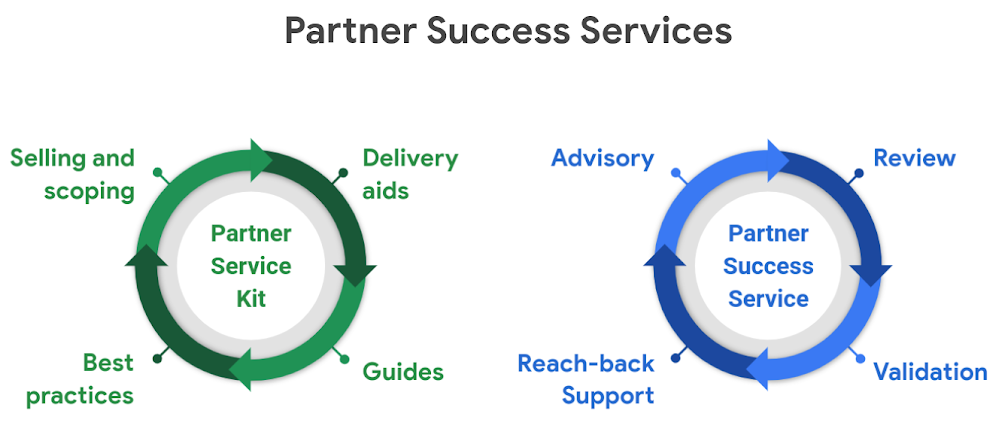
As Google Cloud continues to grow, the demand for professional services from our customers is rapidly increasing. A core part of Google Cloud Professional Services’ mission is to cultivate a rich and highly specialized partner ecosystem to help us serve our customers’ growing needs. We are investing in our services partnerships and building programs and options to help partners accelerate their Google Cloud practices. Today, Google Cloud is launching Partner Success Services. This offering from Partner Advantage is designed to support Google Cloud services partners as they scale and differentiate their Professional Services practice through a partner-oriented services portfolio from Google Cloud Professional Services. Our approach aligns with Google customer priority solutions and supports partner success with two offerings.The first offering, Partner Service Kit, is a set of Google Cloud Professional Services assets, methodologies, and IP that partners can use and customize. Assets range from sales sheets and scoping templates, to delivery aids and implementation guides. By using the service kits, partners save time with our proven delivery methodology and our enterprise-ready assets for customers. These kits are available today through Partner Advantage for partners to leverage and use free of cost.We have also created a new option for partners, to allow them to tap into the depth of Google Professional Services on an as needed basis as they expand and grow their practices. The second offering, Partner Success Services, is a for-fee service designed as modular offerings aligned to specific solutions to provide partners with guidance and validation during their customer projects. The portfolio of services is reserved for Google Cloud Partner Advantage partners included in the “Partner” and “Premier” tiers. For partners, there are two main benefits: Access to Google technical specialists: Gain access to highly technical and expert Google resources when delivering a specific priority solution or new product. For example, a partner implementing Anthos for the first time can benefit greatly if Google resources are on the ground to guide and advise them.Unified methodology: Go-to-market together and leverage the best of Google to complement your methodology and expertise to increase customer success.Partner Success Services is a new engagement offering that lets partners receive support from and access to Google Professional Services professionals and methodology. By investing in our partner ecosystem with this approach, Google Cloud can scale, Partners can mature their Services practice, and most importantly, our customers will succeed.Reach out to your Partner Advisor for more details or email pso-pss@google.com.
Quelle: Google Cloud Platform

Strengthening compliance for financial services customers in Singapore

Companies in the financial services industry have to navigate a wide variety of regulatory and industry-specific compliance requirements. This is especially true for financial services customers in Singapore that use the cloud. These requirements include those mandated by the Monetary Authority of Singapore (MAS) and the Association of Banks in Singapore (ABS). Today, we’re announcing three resources to help financial institutions in Singapore navigate their compliance requirements: Google Cloud Platform (GCP) and G Suite’s Outsourced Service Provider Audit Report (OSPAR) attestationsA whitepaper on cloud best practices for Singapore financial institutionsA set of Singapore-specific compliance guideline mapping documents To support customers’ ABS reporting and compliance requirements, we’ve obtained Outsourced Service Provider Audit Report (OSPAR) attestations for both GCP and G Suite. This means that an independent third-party has confirmed that both GCP and G Suite’s security and privacy controls meet the requirements of the Guidelines on Control Objectives and Procedures for Outsourced Service Providers (ABS Guide), which provides a set of guidelines for outsourced service providers who wish to provide services to financial services institutions operating in Singapore.G Suite is the first cloud collaboration and productivity suite to receive an OSPAR attestation, and Google Cloud Platform is among the few hyperscale commercial clouds to receive the report. This news further demonstrates Google Cloud’s commitment to supporting Singapore’s digital transformation. While third-party validation of our security and privacy controls is important, we also believe we have a responsibility to help you understand your compliance requirements and how our products, technical capabilities, and legal commitments map to them. That’s why we published the Cloud best practices for Singapore financial institutions whitepaper, and mappings to the MAS Guidelines and ABS Guide.With the whitepaper and mapping documents, we aim to help you interpret the MAS Guidelines and the ABS Guide, and provide an overview of our approach to information security, risk management, and the shared responsibility model. Compliance is critical to building trust in the financial services ecosystem, and we’re committed to working closely with customers, regulators, and industry organizations to strengthen their compliance frameworks as part of the digital transformation. For more information on our ongoing compliance efforts in Singapore and across the globe, visit our Compliance resource center.
Quelle: Google Cloud Platform

Helping Our Customers Migrate to the Cloud: Google Acquires CloudSimple

Today, Google is excited to announce that it has acquired CloudSimple, a leading provider of secure, high performance, dedicated environments to run VMware workloads in the cloud. This acquisition builds on our existing partnership with CloudSimple that we announced earlier this year, allowing us to accelerate a fully integrated VMware migration solution with improved support for our customers.Many enterprises are using VMware in their on-premises environments to run a variety of workloads: business applications such as ERP and CRM; databases such as Oracle and SQL Server; development and test environments; virtual desktops; and reporting and analytics systems. As part of their IT modernization initiatives, we hear frequently from enterprise customers that they need a simple way to migrate those workloads to the cloud. To put it simply: they want to be able to run what they want, where they want, and how they want—so they can leverage existing investments with as little toil as possible.Through our existing partnership with CloudSimple, our customers can migrate their VMware workloads from on-premises datacenters directly into Google Cloud VMware Solution by CloudSimple, while also creating new VMware workloads as needed. Their apps can run exactly the same as they have been on-premises, but with all the benefits of the cloud, like performance, elasticity, and integration with key cloud services and technologies. And best of all, customers can do all this without having to re-architect existing VMware-based applications and workloads, which helps them operate more efficiently and reduce costs, while also allowing IT staff to maintain consistency and use their existing VMware tools, workflows and support.  To that end, we believe in a multi-cloud world and will continue to provide choice for our customers to use the best technology in their journey to the cloud. “We look forward to continuing our partnership with Google Cloud as they welcome CloudSimple, a VMware Cloud Verified partner,” said Ajay Patel, senior vice president, Cloud Provider Software Unit at VMware. “Our partnership with Google Cloud enables our mutual customers to run VMware workloads on VMware Cloud Foundation in Google Cloud Platform. With VMware on Google Cloud Platform, customers will be able to leverage all of the familiarity of VMware tools and training, and protect their investments, as they execute on their cloud strategies and rapidly bring new services to market and operate them seamlessly and more securely across a hybrid cloud environment.”The acquisition of CloudSimple continues to demonstrate Google Cloud’s commitment to providing enterprise customers a broad suite of solutions to modernize their IT infrastructure. We’re thrilled about the team that will be joining us, and the expertise they bring to Google Cloud. For more information, you can read CloudSimple co-founder and CEO, Guru Pangal’s blog post and visit our site.
Quelle: Google Cloud Platform

Multi-tenancy support in Identity Platform, now generally available

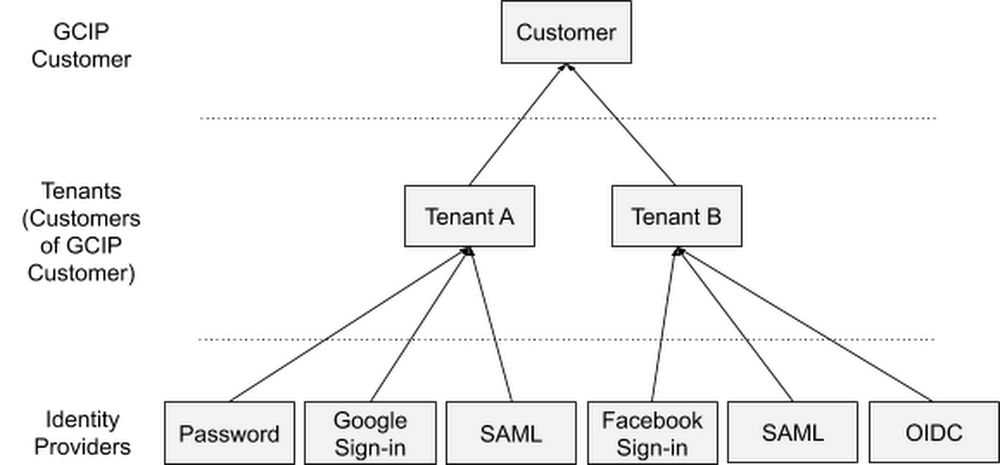
Modern businesses need to manage not only the identities of their employees but also the identities of customers, partners, and Things (IoT). In April, we made Identity Platform generally available to help you add Google-grade identity and access management functionality to your own apps and services, protect user accounts, and scale with confidence. Today, we are making the ability to create and manage multiple tenants within a single instance of Identity Platform generally available to all customers.An example customer-of-customer authentication structureMulti-tenancy allows you to create unique silos of users and configurations within a single Identity Platform instance, and it is most commonly used in business-to-business (B2B) applications to serve your customers and partners. For example, these silos might represent various customer groups with different authentication methods or employees of business units with different SAML identity providers (IdPs), subsidiaries, partners, vendors, and so on.The Identity Platform admin experienceYou can use Identity Platform tenants to establish a data isolation boundary between resource hierarchies. Each tenant has its own:Unique identifierUsersIdentity providers and authentication methodsAuditing and Cloud IAM configurationQuota allocationIdentity Platform usage breakdownThis allows tenants to operate autonomously from one another, with different configurations and users, even though they are part of the same instance.Getting startedTo get started with Identity Platform, enable it in GCP Marketplace, watch our Cloud Next ‘19 presentation, and check out the quickstart and multi-tenancy documentation.
Quelle: Google Cloud Platform

Bringing Hibernate ORM to Cloud Spanner for database adoption

When you’re adopting a new database technology, some things to consider can include learning a new SQL dialect or writing new boilerplate persistence logic. As much as possible, we’d like to make this simpler. For this type of work, Hibernate has become the de facto standard object relational mapping (ORM) solution for Java projects. It supports all major relational databases and enables even more powerful ORM tools like Spring Data JPA. We’ve developed our new open source Cloud Spanner Dialect for Hibernate ORM to make it easier to adopt Cloud Spanner. You can now get the benefits of Cloud Spanner—scalability and relational semantics—with the idiomatic persistence afforded by Hibernate. This can help you migrate existing applications to the cloud or write new ones using the familiar APIs of Hibernate-compatible environments such as JPA, Spring Data JPA, Microprofile, and Quarkus.Hibernate ORM helps address the challenges of adopting a new database technology by providing two major benefits: portability across databases and easier writing of create-read-update-delete (CRUD) logic. These benefits can increase developer productivity and speed up cloud database adoption. For more information, check out our documentation, the git repository, or try out the codelab. How to write a Java app with Hibernate and Cloud SpannerHere, we’ll take you on a quick tour of what it’s like to write a Java application that uses Hibernate to talk to Cloud Spanner. The steps are similar to what you’ll find in the codelab. We’ll create an application that stores musical artists and their albums in Cloud Spanner. Although this is a basic Hibernate example, keep in mind that this can be adapted to JPA-based systems backed by Hibernate as well.We’ll need the Cloud Spanner Dialect for Hibernate, the open source Cloud Spanner JDBC driver, and the Hibernate core. So, let’s add those dependencies to the app.pom.xmlNow, let’s tell Hibernate about the annotated entity classes we’ll be mapping to the database.src/main/resources/hibernate.cfg.xmlHibernate also needs to know how to connect to the Cloud Spanner instance and which dialect to use. So, we’ll tell it to use the SpannerDialect for SQL syntax, the Cloud Spanner JDBC driver, and the JDBC connection string with the database coordinates.src/main/resources/hibernate.propertiesWe’ll make sure that the authentication credentials are already set up, using either a service account JSON file in the GOOGLE_APPLICATION_CREDENTIALS environment variable or the application default credentials configured using the “gcloud auth application-default login” command.Now we’re ready to write some code.We’ll define two plain old Java objects (POJOs) that will map to tables in Cloud Spanner—Singer and Album. The Album will have a @ManyToOne relationship with Singer. We could have also mapped Singers to a list of their Albums with a @OneToMany annotation, but for this example, we don’t really want to load all albums every time we need to fetch a singer from the database.Since we don’t have an existing database schema, we added the hibernate.hbm2ddl.auto=update property to let Hibernate create the two tables in Cloud Spanner when we run the app for the first time.src/main/java/demo/Application.javaDon’t forget to also add a no-arg constructor, hashCode(), and equals(), to each of the entities, as Hibernate requires these. You can see all that in the full example.Also, for this example we’re using an auto-generated UUID for the primary key. This is a preferred ID type in Cloud Spanner because it avoids hotspots as the system divides data among servers by key ranges. A monotonically increasing integer key would also work, but can perform less well.With everything configured and entity objects defined, we can start writing to the database.Create a Hibernate Session.src/main/java/demo/Application.javaIt’s time to write some data into Cloud Spanner.src/main/java/demo/Application.javaAt this point, if you go to the Cloud Spanner console and view the data for the Singer and Album tables in the database, you’ll see something like this:It’s nice to easily explore the tables in the Cloud Console, but we really want to query them in our application. So, finally, let’s query some data using Hibernate. Notice that we’re using HQL, which is portable across various Hibernate dialects, not just Cloud Spanner.src/main/java/demo/Application.javaAt last, make sure to close the Hibernate resources before the application shuts down.src/main/java/demo/Application.javaFor more details, check out a full working example or one of the other code samples we have that use Spring Data JPA, Microprofile, or Quarkus. Give Hibernate a try on Cloud Spanner, and send your feedback through the Github issue tracker.
Quelle: Google Cloud Platform