Google Cloud Next for application developers: 5 can’t miss breakout sessions

Containers. Serverless. CI/CD. For forward-looking developers, Google Cloud is practically synonymous with the latest trends in application development. With Google Cloud Next starting on October 11, here are a few must-watch developer sessions to add to your playlist:1. BLD106What’s next for application developersStart your foray into Google Cloud application development news here, where Tom De Leo, Director, Product Management, Platform Developer Tools, will take you through all the new application developer services and features that we are announcing at Next ‘22. 2. BLD201Building a serverless event-driven web app in under 10 minsLed by Google Cloud Developer Advocate Prashanth Subrahmanyam, in this session we take a traditional monolithic use case, break it down into composable pieces, and build an end-to-end application using Google Cloud’s portfolio of serverless products.3. BLD209What’s new in cloud-native CI/CD: speed, scale, securityApplication development teams are increasingly embracing CI/CD. Join Google Cloud Product Manager David Jacobs and Software Engineer Edward Thiele to learn about new capabilities in Cloud Build, Artifact Registry, Artifact Analysis, and Google Cloud Deploy, and how they can help your teams deliver software to Cloud Run and Google Kubernetes Engine (GKE).4. BLD300What’s new in Kubernetes: Run batch and high performance computing in GKESpeaking of GKE, did you know that it’s emerged as a great place to deploy high performance computing workloads? Here, PGS Chief Enterprise Architect Louis Bailleul and Google Cloud Senior Product Manager Maciek Różacki share how PGS used GKE to replace its 260,000-core Cray supercomputers. The session will also go over recent feature launches in the data processing space for GKE and what’s coming up on the roadmap.5. BLD2055 reasons why your Java apps are better on Google CloudWhy should you run your Java workloads on Google Cloud? Simple: Java Cloud Client Libraries now support Native Image out of the box. In this session, Google Cloud Senior Product Manager  Cameron Balahan and Developer Advocate Aaron Wanjala show you how to compile your Java applications ahead of time, so you can dramatically speed up your cold start times.Build your developer playlistTo explore the full catalog of breakout sessions and labs designed for application developers, check out the entire Build track in the Catalog. And don’t forget to tune into the Developer Keynote presented live from the Next Innovators Hive from Sunnyvale on Tuesday October 11 from 10:00 – 11:00 PT – and again from Bengaluru, Munich, and Tokyo. See the Innovators Hive for local playtimes. Register for Next ‘22.Related ArticleRead Article
Quelle: Google Cloud Platform

How to secure APIs against fraud and abuse with reCAPTCHA Enterprise and Apigee X

A comprehensive API security strategy requires protection from fraud and abuse. To better protect our publicly-facing APIs from malicious software that engages in abusive activities, we can deploy CAPTCHAs to disrupt abuse patterns. Developers can prevent attacks, reduce their API security surface area, and minimize disruption to users by implementing Google Cloud’s reCAPTCHA Enterprise and Apigee X solutions. As Google Cloud’s API management platform, Apigee X can help protect APIs using a reverse-proxy approach to HTTP requests and responses. One important feature of Apigee X is the ability to include a reCAPTCHA Enterprise challenge in the authentication (AuthN) stage of the request. This post shows how to provision a reCAPTCHA proxy flow to protect your APIs. Complete code samples are available in this Github repo.When and why to use Apigee X for implementing CAPTCHAsThe initial way to use reCAPTCHA Enterprise as part of a Web Application and API Protection (WAAP) solution is through Cloud Armor. For developers who want a purely API-based solution, Apigee X allows developers to define the reCAPTCHA process as a set of Apigee X proxy flows. As a dedicated solution, it moves as much API security code as possible into Apigee. This method can also make code maintenance easier and can allow API business rules to be managed in code. The reCAPTCHA process can be included directly in Apigee proxies, either individually or as shared flows. This code can then be added to the same source control as all the Apigee proxy code, in line with the API business rules.Let’s first review a few implementations of reCAPTCHA Enterprise, and then contrast those with an Apigee X implementation example to see which might be best for you.An introduction to reCAPTCHA EnterpriseA reCAPTCHA challenge page can redirect incoming HTTP requests to reCAPTCHA Enterprise, which can help stop possible malicious attacks. When reCAPTCHA Enterprise is integrated with Cloud Armor, and the Challenge Page option is selected, a reCAPTCHA will trigger when the policy rule of Cloud Armor matches the incoming URL/traffic pattern.To avoid CAPTCHA fatigue (mouse-click fatigue due to too many CAPTCHA challenges), developers should consider using reCAPTCHA session-tokens, which we explain in more detail below. A challenge page is most useful for dealing with a bot making repeated programmatic HTTP requests. The challenge page redirect and possible reCAPTCHA challenge can stop malicious bots. However, the challenge page can also interrupt a legitimate user’s activity — a reCAPTCHA challenge page is less desirable for a well-intended human user.For more details, please check out the reCAPTCHA challenge page documentation.To protect important user interactions, reCAPTCHA Enterprise uses an object called an action-token. These can help protect human users and their legitimate interactions, such as shopping cart checkouts or sensitive knowledge base requests that you want to safeguard.A deeper review of reCAPTCHA Enterprise action tokens can be found in the reCAPTCHA action-tokens documentation.As an alternative to action-tokens, session-tokens protect the whole user session on the site’s domain. This can help developers reuse an existing reCAPTCHA Enterprise assessment, which is analogous to a session key, but for authentication not encryption. It is recommended to use a reCAPTCHA session-token on all the web pages of your site. This enables reCAPTCHA Enterprise to secure your entire site and recognize deviations in human browsing patterns, such as a bot crawling your site.For more details, please check out the reCAPTCHA session-tokens documentation.Using Apigee X and reCAPTCHA EnterpriseAll of the above can also be accomplished in Apigee X, without the need for Cloud Armor. Code for an Apigee X flow that initiates a reCAPTCHA Enterprise challenge is below, and is also available in our Github repo file SC-AccessReCaptchaEnterprise.xml.code_block[StructValue([(u’code’, u'<ServiceCallout name=”SC-AccessReCaptchaEnterprise”>rn <Request>rn <Set>rn <Payload contentType=”application/json”>{rn “event”: {rn “token”: “{flow.recaptcha.token}”,rn “siteKey”: “{flow.recaptcha.sitekey}”rn }rn}</Payload>rn <Verb>POST</Verb>rn </Set>rn </Request>rn <Response>recaptchaAssessmentResponse</Response>rn <HTTPTargetConnection>rn <Authentication>rn <GoogleAccessToken>rn <Scopes>rn <Scope>https://www.googleapis.com/auth/cloud-platform</Scope>rn </Scopes>rn </GoogleAccessToken>rn </Authentication>rn <URL>https://recaptchaenterprise.googleapis.com/v1/projects/{flow.recaptcha.gcp-projectid}/assessments</URL>rn </HTTPTargetConnection>rn</ServiceCallout>’), (u’language’, u”), (u’caption’, <wagtail.wagtailcore.rich_text.RichText object at 0x3e723ce0a310>)])]The most important line is the initiation of the reCAPTCHA handshake (shown in the above diagrams), with a POST request. The POST request includes both the reCAPTCHA token (either action-token or session-token, discussed above) and the reCAPTCHA sitekey (how reCAPTCHA Enterprise protects your API endpoint).code_block[StructValue([(u’code’, u'<Request>rn <Set>rn <Payload contentType=”application/json”>{rn “event”: {rn “token”: “{flow.recaptcha.token}”,rn “siteKey”: “{flow.recaptcha.sitekey}”rn }rn}</Payload>rn <Verb>POST</Verb>rn </Set>rn </Request>’), (u’language’, u”), (u’caption’, <wagtail.wagtailcore.rich_text.RichText object at 0x3e722ca98610>)])]Here is an explanation of all the proxy definitions included in the Github repo. A reCAPTCHA token is silently and periodically retrieved by a client app and transmitted to an Apigee runtime when an API is invoked.The shared flow configuration in this example is able to get a reCAPTCHA token validation status and a risk score from the Google reCAPTCHA Enterprise assessment endpoint. The sf-recaptcha-enterprise-v1 Apigee X shared flow gets a reCAPTCHA token validation status and a risk score from the Google reCAPTCHA Enterprise assessment endpoint. The risk score is a decimal value between 0.0 and 1.0.The score 1.0 indicates that the interaction poses low risk and is very likely legitimate, whereas 0.0 indicates that the interaction poses high risk and might be fraudulent. Between both extremes, the shared flow’s processing decides if an API invocation must be rejected or not. For the purpose of this reference, we consider a minimum score of 0.6: This value is configurable and can be set to a higher or lower value depending on the risk profile of the client application.The pipeline script deploys a shared flow (sf-recaptcha-enterprise-v1) on Apigee X, containing the full configuration of the reCAPTCHA Enterprise reference as well as the following artifacts:recaptcha-data-proxy-v1: a data proxy, which calls the reCAPTCHA Enterprise shared flow. The target endpoint of this proxy is httpbin.orgrecaptcha-deliver-token-v1: an API proxy used to deliver an HTML page that includes a valid reCAPTCHA token (cf. Option 2 above). This proxy is not intended to be used in production but only during test phases.The reCAPTCHA Enterprise API productA developer (Jane Doe)app-recaptcha-enterprise: a single developer app when Option 1 has been selected2 developer apps with real app credentials and reCAPTCHA Enterprise sitekeys when Option 2 has been selected:app-recaptcha-enterprise-always0App-recaptcha-enterprise-always1Google Cloud’s Web App and API Protection (WAAP) solutionThis implementation is a part of Google Cloud’s WAAP solution. Google’s WAAP security solution stack is a comprehensive solution which is an integration of web application firewall (WAF), DDoS prevention, bot mitigation, content delivery network, Zero Trust, and API protection. The Google Cloud WAAP solution consists of Cloud Armor (for DDoS and web app defense), reCAPTACHA Enterprise (for bot defense) and Apigee (for API defense). This solution is a set of tools and controls designed to protect web applications, APIs, and associated assets. Learn more about the WAAP solution here. Google’s WAAP Security solution is driven by the following principles:Safe by default Build on tested and proven components and codeDetect risky functionalityNew code should be reviewed Bypassing safe patterns should also be justified High-risk activities should be scrutinized Automate If you do it more than once, automate What’s nextGive it a try and test out the reCAPTCHA Enterprise Apigee proxy flow code for yourself. An existing reCAPTCHA token and sitekey are required so please acquire those first. When you are ready, you can explore all of Apigee X’s security features in the following documentation: Securing a proxy and Overview of Advanced API Security.Related ArticleRead Article
Quelle: Google Cloud Platform

Analyzing satellite images in Google Earth Engine with BigQuery SQL

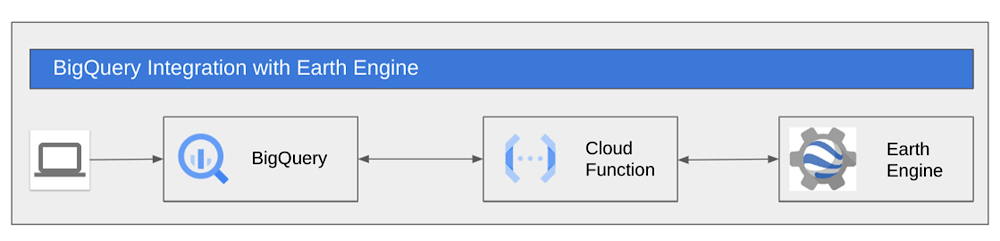
Google Earth Engine (GEE)  is a groundbreaking product that has been available for research and government use for more than a decade. Google Cloud recently launched GEE to General Availability for commercial use. This blog post describes a method to utilize GEE from within BigQuery’s SQL allowing SQL speakers to get access to and value from the vast troves of data available within Earth Engine.We will use Cloud Functions to allow SQL users at your organization to make use of the computation and data catalog superpowers of Google Earth Engine.  So, if you are a SQL speaker and you want to understand how to leverage a massive library of earth observation data in your analysis then buckle up and read on.Before we get started let’s spend thirty seconds on setting geospatial context for our use-case.  BigQuery excels at doing operations on vector data.  Vector data are things like points, polygons, things that you can fit into a table.  We use the PostGIS syntax so users that have used spatial SQL before will feel right at home in BigQuery.  BigQuery has more than 175+ public datasets available within Analytics Hub.  After doing analysis in BigQuery users can use tools like GeoViz,  Data Studio, Carto and Looker to visualize those insights. Earth Engine is designed for raster or imagery analysis, particularly satellite imagery. GEE, which holds more than 70PB of satellite imagery, is used to detect changes, map trends, and quantify differences on the Earth’s surface. GEE is widely used to extract insights from satellite images to make better use of  land, based on its diverse geospatial datasets and easy-to-use application programming interface (API).By using these two products in conjunction with each other you can expand your analysis to incorporate both vector and raster datasets to combine insights from 70PB of GEE and 175+ datasets from BigQuery.  For example, in this blog we’ll create a Cloud Function that pulls temperature and vegetation data from the Landsat satellite imagery within the GEE Catalog and we’ll do it all from SQL in BigQuery. If you are curious about how to move data from BigQuery into Earth Engine you can read about it in this post.While our example is focused on agriculture this method can apply to any industry that matters to you.Let’s get started Agriculture is transforming with the implementation of modern technologies. Technologies such as GPS and satellite image dissemination allow researchers and farmers to gain more information, monitor and manage agricultural resources. Satellite imagery can be a reliable source to track images of how a field is developing. A common analysis of imagery used in agricultural tools today is Normalized Difference Vegetation Index (NDVI). NDVI is a measurement of plant health that is visually displayed with a legend from -1 to +1. Negative values are indicative of water and moisture. But high NDVI values suggest a dense vegetation canopy. Imagery and yield tend to have a high correlation; thus, it can be used with other data like weather to drive seeding prescriptions.As an agricultural engineer you are keenly interested in crop health for all the farms and fields that you manage.  The healthier the crop the better the yield and the more profit the farm will produce.  Let’s assume you have mapped all your fields and the coordinates are available in BQ. You now want to calculate the NDVI of every field, along with the average temperature for different months, to ensure the crop is healthy and take necessary action if there is an unexpected fall in NDVI. So the question is  how do we pull NDVI and temperature information into BigQuery for the fields by only using SQL?Using GEE’s ready-to-go Landsat 8 imagerywe can calculate NDVI for any given point on the planet. Similarly, we can use the publicly available ERA5 dataset of monthly climate for global terrestrial surfaces to calculate the average temperature for any given point.ArchitectureCloud Functions are a powerful tool to augment the SQL commands in BigQuery.  In this case we are going to wrap a GEE script within a Cloud Function and call that function directly from BigQuery’s SQL. Before we start, let’s get the environment set up.Environment setupBefore you proceed we need to get the environment setup:A Google Cloud project with billing enabled.  (Note:  this example cannot run within the BigQuery Sandbox as a billing account is required to run Cloud Functions)Ensure your GCP user has access to Earth Engine, can create Service accounts and assign roles. You can sign up for Earth Engine at Earth Engine Sign Up. Verify if you have access, check if you can view the Earth Engine Code Editor with your GCP user.At this point Earth Engine and BigQuery are enabled and ready to work for you. Now let’s set up the environment and define the cloud functions.1. Once you have created your project in GCP, select it on the console and click on cloud-shell.2. On cloud-shell, you will need to clone a git repository which contains the shell script and assets required for this demo. Run the following command on cloud shell,code_block[StructValue([(u’code’, u’git clone https://github.com/dojowahi/earth-engine-on-bigquery.gitrncd ~/earth-engine-on-bigqueryrnchmod +x *.sh’), (u’language’, u”), (u’caption’, <wagtail.wagtailcore.rich_text.RichText object at 0x3ee1d943a550>)])]3. Edit config.sh – In your editor of choice update the variables in config.sh to reflect your GCP project.4. Execute setup_sa.sh. You will be prompted to authenticate and you can choose “n” to use your existing auth.code_block[StructValue([(u’code’, u’sh setup_sa.sh’), (u’language’, u”), (u’caption’, <wagtail.wagtailcore.rich_text.RichText object at 0x3ee1d943a1d0>)])]4. If the shell script has executed successfully, you should now have a new Service Account created, as shown in the image below5. A Service Account(SA) in format <PROJECT_NUMBER>-compute@developer.gserviceaccount.com was created in the previous step, you need to sign up this SA for Earth Engine at EE SA signup. Check out the last line of the screenshot above it will list out SA nameThe screenshot below shows how the signup process looks for registering your SA.6. Execute deploy_cf.sh, it should take around 10 minutes for the deployment to complete.code_block[StructValue([(u’code’, u’sh deploy_cf.sh’), (u’language’, u”), (u’caption’, <wagtail.wagtailcore.rich_text.RichText object at 0x3ee1ea169ad0>)])]You should now have a dataset named gee and table land_coords under your project in BigQuery along with the functions get_poly_ndvi_month and get_poly_temp_month.You will also see a sample query output on the Cloud shell, as shown below7. Now execute the command below in Cloudshellcode_block[StructValue([(u’code’, u”bq query –use_legacy_sql=false ‘SELECT name,gee.get_poly_ndvi_month(aoi,2020,7) as ndvi_jul, gee.get_poly_temp_month(aoi,2020,7) as temp_jul FROM `gee.land_coords` LIMIT 10′”), (u’language’, u”), (u’caption’, <wagtail.wagtailcore.rich_text.RichText object at 0x3ee1ea7367d0>)])]and you should see something like thisIf you are able to get a similar output to one shown above, then you have successfully executed SQL over Landsat imagery.Now navigate to the BigQuery console and your screen should look something like this:You should see a new external connection us.gcf-ee-conn, two external routines called get_poly_ndvi_month, get_poly_temp_month and a new table land_coords.Next navigate to the Cloud functions console and you should see two new functions polyndvicf-gen2 and polytempcf-gen2 as shown below.At this stage your environment is ready. Now you can go to the BQ console and execute queries. The query below calculates the NDVI and temperature for July 2020 for all the field polygons stored in the table land_coordscode_block[StructValue([(u’code’, u’select name,rnst_centroid(st_geogfromtext(aoi)) as centroid,rngee.get_poly_ndvi_month(aoi,2020,7) AS ndvi_jul,rngee.get_poly_temp_month(aoi,2020,7) AS temp_jul rnFROM `gee.land_coords`’), (u’language’, u”), (u’caption’, <wagtail.wagtailcore.rich_text.RichText object at 0x3ee1db774d90>)])]The output should look something like this:When the user executes the query in BQ, the function get_poly_ndvi_month and get_poly_temp_month trigger remote calls to the cloud functions polyndvicf-gen2 and polytempcf-gen2 which would initiate the script on GEE. The results from GEE are streamed back to the BQ console and shown to the user.What’s Next?You can now plot this data on a map in Data Studio or Geoviz and publish it to your usersNow that your data is within BigQuery, you can join this data with your private datasets or other public datasets within BigQuery and build ML models using BigQuery ML to predict crop yields, seed prescriptions.SummaryThe example above demonstrates how users can wrap GEE functionality within Cloud Functions so that GEE can be executed exclusively within SQL. The method we have described requires someone who can write GEE scripts. The advantage is that once the script is built,  all of your SQL-speaking data analysts-scientists-engineers can do calculations on vast troves of satellite imagery in GEE directly from the BigQuery UI or API.Once the data and results are in BigQuery you can join the data with other tables in BigQuery or with the data available through Analytics Hub.  Additionally with this method, users can combine GEE data with other functionality such as geospatial functions or BQML.  In future we’ll expand our examples to include these other BigQuery capabilities.Thanks for reading, and remember,  if you are interested in learning more about how to move data from BigQuery to Earth Engine together, check out this blog post. The post outlines a solution for a sustainable sourcing use case for a fictional consumer packaged goods company trying to understand their palm oil supply chain which is primarily located in Indonesia. Acknowledgements: Shout out to David Gibson and Chao Shen for valuable feedback.Related ArticleMosquitoes get the swat with new Mosquito Forecast built by OFF! Insect Repellents and Google CloudBy visualizing data about mosquito populations with Google Earth Engine, SC Johnson built an app that predicts mosquito outbreaks in your…Read Article
Quelle: Google Cloud Platform

How to simplify and fast-track your data warehouse migrations using BigQuery Migration Service

Migrating data to the cloud can be a daunting task. Especially moving data from warehouses and legacy environments requires a systematic approach. These migrations usually need manual effort and can be error-prone. They are complex and involve several steps such as planning, system setup, query translation, schema analysis, data movement, validation, and performance optimization. To mitigate the risks, migrations necessitate  a structured approach with a set of consistent tools to help make the outcomes more predictable.Typical data warehouse migrations: Error prone, labor intensive, trial and error basedGoogle Cloud simplifies this with the BigQuery Migration Service – a suite of managed tools that allow users to reliably plan and execute migrations, making outcomes more predictable. It is free to use and generates consistent results with a high degree of accuracy.Major brands like PayPal, HSBC, Vodafone and Major League Baseball use BigQuery Migration Service to accelerate time to unlock the power of BigQuery, deploy new use cases, break down data silos, and harness the full potential of their data. It’s incredibly easy to use, open and customizable. So, customers can migrate on their own or choose from our wide range of specialized migration partners.BigQuery Migration Service: Automatically assess, translate SQL, transfer data, and validateBigQuery Migration Service automates most of the migration journey for you. It divides the end-to-end migration journey into four components: assessment, SQL translation, data transfer, and validation. Users can accelerate migrations through each of these phases often just with the push of a few buttons. In this blog, we’ll dive deeper into each of these phases and learn how to reduce the risk and costs of your data warehouse migrations.Step 1: AssessmentBigQuery Migration Service generates a detailed plan with a view of dependencies, risks, and the optimized migrated state on BigQuery by profiling the source workload logs and metadata.During the assessment phase, BigQuery Migration Service guides you through a set of steps using an intuitive interface and automatically generates a Google Data Studio report with rich insights and actionable steps. Assessment capabilities are currently available for Teradata and Redshift, and will soon be expanded for additional sources.Assessment Report: Know before you start and eliminate surprises. See your data objects and query characteristics before you start the data transfer.Step 2: SQL Translation This phase is often the most difficult part of any migration. BigQuery Migration Service provides fast, semantically correct, human readable translations from most SQL flavors to BigQuery. It can intelligently translate SQL statements  in high-throughput batch and Google-translate-like interactive modes from Amazon Redshift SQL, Apache HiveQL, Apache Spark SQL, Azure Synapse T-SQL, IBM Netezza SQL/NZPLSQL, MySQL, Oracle SQL/PL/SQL/Exadata, Presto SQL, PostgreSQL, Snowflake SQL, SQL Server T-SQL, Teradata SQL/SPL/BTEQ and Vertica SQL.Unlike most existing offerings which parse Regular Expressions, BigQuery’s SQL translation is true compiler based, with advanced customizable capabilities to handle macro substitutions, user defined functions, output name mapping and other source-context-aware nuances. The output is  detailed and prescriptive with clear “next-actions”. Data engineers and data analysts save countless hours leveraging our industry leading automated SQL translation service.Batch Translations: Automatic translations from a comprehensive list of SQL dialects accelerate large migrationsInteractive Translations: A favorite feature for data engineers, interactive translations simplify the refactoring efforts and reduce errors dramatically and serve as a great learning aidStep 3: Data TransferBigQuery offers data transfer service from source systems into BigQuery using a simple guided wizard. Users create a transfer configuration and choose a data source from the drop down list.Destination settings walk the user through connection options to the data sources and securely connect to the source and target systems. A critical feature of BigQuery’s data transfer is the ability to schedule jobs. Large data transfers can impose additional burdens on operational systems and impact the data sources. BigQuery Migration Service provides the flexibility to schedule transfer jobs to execute at user-specified times to avoid any adverse impact on production environmentsData Transfer Wizard: A step-by-step wizard guides the user to move data from source systems to BigQueryStep 4: ValidationThis phase ensures that data at the legacy source and BigQuery are consistent after the migration is completed. Validation allows highly configurable, and orchestrate-able rules to perform a granular per-row, per-column, or per-table left-to-right comparison between the source system and BigQuery. Labeling, aggregating, group-by, and filtering enable deep validations.Validation: The peace-of-mind module for BigQuery Migration ServiceIf you would like to leverage BigQuery Migration Service for an upcoming proof-of-concept or migration, reach out to your GCP partner, your GCP sales rep or check out our documentation to try it out yourself.Related ArticleMLB’s fan data team hits it out of the park with data warehouse modernizationSee how the fan data team at Major League Baseball (MLB) migrated its enterprise data warehouse (EDW) from Teradata to BigQuery.Read Article
Quelle: Google Cloud Platform

EyecareLive transforms healthcare ecosystem with Enhanced Support

EyecareLive transforms the healthcare ecosystem with Enhanced Support, a support service  from the Google Cloud Customer Care portfolio.Telemedicine is now mainstream. It exploded during the COVID-19 pandemic. A 2022 survey by Jones Lang Lasalle (registration required) found that 38% of U.S. patients were using some form of telemedicine. This number is expected to grow as consumers are demanding more convenient and immediate access to care, and doctors are seeking efficiencies, cost savings, and to forge closer relationships with patients. But because the eye-care field is so heavily regulated, optometrists and ophthalmologists face more technical hurdles to perform telemedicine than their peers in other medical practices. To join the telemedicine revolution, a generic technology solution wouldn’t do. Eye-care professionals need a more carefully architected and rigorously secure platform – one that ensures a very high degree of compliance and privacy.EyecareLive provides exactly that. Their comprehensive cloud-based solution was built specifically for eye-care telemedicine practices. They not only facilitate telemedicine visits with patients via video, but help providers stay in compliance with complex industry regulations.What’s more, EyecareLive is the only platform in the industry that conducts vision screening using Food and Drug Administration (FDA)-registered tests to check a patient’s vision before connecting them to a doctor through a video call. The doctor can thus triage any issues immediately and quickly determine the right next steps for proper care. In addition, their platform digitally connects optometrists and ophthalmologists to the entire eye-care ecosystem, including other doctors for referrals, insurance companies, hospitals, pharmaceutical firms, pharmacies, and, of course, patients.On top of all of this, the automated back office for their eye-care practices processes electronic health records (EHRs), clinical workflow, billing, coding, and more into one platform. EyecareLive streamlines operations and frees up doctors to focus on delivering the highest possible eye healthcare and on building stronger relationships with patients.“Considering the number of plug-and-play services that Google has built into the Google Cloud Healthcare solutions, Google is basically supporting the entire healthcare industry from an infrastructure provider point of view.”  — Raj Ramchandani, CEO, EyecareLiveSeeking greater agility, EyecareLive migrated to Google CloudEyecareLive is truly cloud first. They had operated entirely in the AWS cloud since opening their doors in 2017. Several years in, they decided to look for an additional cloud provider with broader support for digital health platforms. They specifically wanted to migrate to one they could rely on to deliver plug-and-play services, which would accelerate innovation of their platform. Rather than re-architecting for a new cloud, EyecareLive wanted a cloud platform that would offer compatible services they could use to meet their needs for reliability and availability.  “If we want to deploy a new conversational bot or build AI models that assist doctors to diagnose based on a retina image, Google Cloud provides these services which are  reliable and tested by Google Cloud Healthcare solutions in many cases.” — Raj Ramchandani, CEO, EyecareLiveVersatility was another requirement. The EyecareLive platform must fulfill the demands of a variety of organizations — doctors, pharmaceutical companies, clinics, and others. EyecareLive also has an international deployment strategy that goes far beyond offering a domestic telehealth solution. Therefore EyecareLive needed a cloud functionality that extended into the broader global eye-care ecosystem.EyecareLive chose Google Cloud. The most compelling reason was the deep industry expertise found in Google Cloud for healthcare and life sciences. This distinguished Google Cloud from all other possible cloud providers considered by EyecareLive. “We like Google Cloud because of the differentiations such as Google Cloud Healthcare solutions, computer vision, and AI models that can be used out of the box,” says Raj Ramchandani, CEO of EyecareLive. “We found these features more robust for our use cases on Google Cloud than any other.”“Google is heavily into its Healthcare Cloud. That’s what differentiates it. We love that part because we can tap into innovative healthcare cloud functionality quickly.” — Raj Ramchandani, CEO, EyecareLiveKey to production deployment (and beyond): Google Cloud Enhanced SupportAs a cloud-born company, EyecareLive had an exceedingly tech-savvy team. But the migration was a complex one that involved migrating third-party software and networking products that were tightly integrated into EyecareLive’s own code. The team knew it needed expert help with the migration. What’s more, doctors, patients, and other users required 24/7 access to the platform, and any interruptions to availability or infrastructure hiccups during the migration would disrupt their online experiences. However, the EyecareLive team was already stretched by continuing to grow and innovate the business, so they asked Google Cloud for help.EyecareLive purchased Enhanced Support, a support service offered by the Google Cloud Customer Care portfolio. Specifically designed for small and midsized businesses (SMBs). Enhanced Support gave EyecareLive unlimited, fast access to expert support from a team of experienced Google Cloud engineers during the intricate, multifaceted migration.“It was my top priority to engage Google Cloud Customer Care to help us keep the platform always available for our doctors and users,” says Ramchandani. “The level of detail to the answers, the clarifications of having the Enhanced Support experts tell us to do it a certain way has been enormously helpful.” For example, one of the valuable features delivered by Enhanced Support is Third-Party Technology Support, which gives EyecareLive access to experts with specialized knowledge of third-party technologies, such as networking, MongoDB, and infrastructure. This meant all components in EyecareLive’s infrastructure could be seamlessly migrated to Google Cloud, and afterward EyecareLive could lean on Enhanced Support experts to continue to troubleshoot and mitigate issues as necessary.“The response times to the questions and issues we had when going live was fantastic. It was the best experience with a tech vendor we’ve had in a long time.” — Raj Ramchandani, CEO, EyecareLiveWith Enhanced Support at their side, EyecareLive was able to get up and running quickly in preparation for their international expansion by using Google Cloud’s prebuilt AI models, load balancers, and networking technologies that were designed to be easily deployed across multiple regions throughout the globe. “We know exactly how to implement data locality to scale our deployment into different regions and into different countries, because we’ve learned that from the Google Cloud support team.” — Raj Ramchandani, CEO, EyecareLiveEyecareLive then proceeded to rapidly scale their business, knowing that Google Cloud would ensure they could meet compliance standards in whatever country or region they expanded into.“Since we’ve moved to Google Cloud and chose Enhanced Support, we’ve had 100% availability. That’s zero downtime, which is incredible.” — Raj Ramchandani, CEO, EyecareLiveEnhanced Support also provided the capabilities for EyecareLive to:Resolve issues and minimize any unplanned downtime to maintain a high-quality, secure experience for doctors and patients during and after migrationAcquire fast responses to questions from technical support experts Learn from guidance from the Enhanced Support team beyond immediate technical issues EyecareLive builds momentum toward their vision for eye-care telemedicine  By working closely with the Google Cloud Enhanced Support team, EyecareLive was able to successfully migrate their platform. “If you ask any of my engineers which cloud provider they prefer, they’d all respond ‘Google Cloud,’” says Ramchandani. “The documentation is there, the sample code is there, everything that we need to get started is available.”EyecareLive was then able to go on to grow and scale their business in the cloud in the following ways: Successfully managed a complex migration with minimal disruption and maximum availability, ensuring a consistent, secure, and compliant-ready experience for doctors and patientsGained the trust of both doctors and patients – they know that EyecareLive protects their sensitive medical dataKept EyecareLive agile and focused on innovating forward rather than building new features from scratch by supporting the team as they took advantage of Google’s tailored, plug-and-play technologiesAnalyzed performance over time to plan for future growth by partnering with Enhanced Support for the long term“We know we can rely on Google Cloud from a security point of view. We love the fact that Google Cloud Healthcare solution is HIPAA compliant. Those are the things that make us trust Google to do the right thing.” — Raj Ramchandani, CEO, EyecareLiveWith Enhanced Support, EyecareLive sees a bright future in the cloudWith the help of Enhanced Support, EyecareLive brings digital transformation to the eye-care in the healthcare industry by integrating the entire ecosystem of eye-care partners onto one platform making EyecareLive a leader in their industry. Learn more about Google Cloud Customer Care services and sign up today.Related ArticleRead Article
Quelle: Google Cloud Platform
U.S. Army chooses Google Workspace to deliver cutting-edge collaboration

In June, we announced the creation of Google Public Sector, a new Google division focusing on helping U.S. public sector entities—including federal, state, and local governments, and educational institutions—accelerate their digital transformations. It is our belief that Google Public Sector, and our industry partner ecosystem, will play an important role in applying cloud technology to solve complex problems for our nation. Today, I’m proud to announce one of our first big partnerships following the launch of this new subsidiary, as Google Public Sector will provide up to 250,000 active-duty Army personnel of the U.S. Army workforce with the Google Workspace. The government has asked for more choice in cloud vendors who can support its missions, and Google Workspace will equip today’s military with a leading suite of collaboration tools to get their work done.In the Army, personnel often need to work across remote locations, in challenging environments, with seamless collaboration key to their success. Google Workspace was designed with these challenges in mind and can be deployed quickly across a diverse set of working conditions, locations, jobs, and skill levels. And more than three billion users already rely on Google Workspace, which means that they’re familiar tools and require little training or extended ramp-up time for Army personnel—ultimately helping Soldiers and employees communicate better and more securely than ever before. Working with Accenture Federal Services under the Army Cloud Account Management Optimization contract and our implementation partner SADA, we’re excited to help the Army deploy a cloud-first collaboration solution, improving upon more traditional technologies with unparalleled security and versatility. Google Workspace is not only “born in the cloud” with secure-by-design architecture, but also provides a clear path to future features and innovations.One of the key reasons we are able to serve the U.S. Army is that Google Workspace recently received an Impact Level 4 authorization from the DoD. IL4 is a DoD security designation related to the safe handling of controlled unclassified information (CUI). That means government officials and others can use Google Workspace with more confidence and ease than ever before. Momentum for Google Public SectorWith Google Public Sector, we are committed to building our relationship with the U.S. Army and with other public sector agencies. In fact, we recently announced a partnership with Acclima to provide New York State with hyperlocal air quality monitoring and an alliance with Arizona State University to deliver an immersive online K-12 learning technology to students in the United States and around the world.This is just the start. Google Public Sector is dedicated to helping U.S. public sector customers become experts in Google Cloud’s advanced cybersecurity products, protecting people, data, and applications from increasingly pervasive and challenging cyber threats. We have numerous training and certification programs for public sector employees and our partners in digital and cloud skills, and we continue to expand our ecosystem of partners capable of building new solutions to better serve U.S. public sector organizations.Delivering the best possible public services means making life better and work more fulfilling for millions of people, inside and outside of government. We’re thrilled by what we are accomplishing at Google Public Sector, particularly with today’s partnership with the U.S. Army, and look forward to announcing even more great developments in the future. Learn more about how the government is accelerating innovation at ourGoogle Government Summit, taking place in person on Nov. 15 in Washington D.C. Join agency leaders as they explore best practices and share industry insights on using cloud technology to meet their missions.
Quelle: Google Cloud Platform

Use Artifact Registry and Container Scanning to shift left on security and streamline your deployments

3 ways Artifact Registry & Container Analysis can help optimize and protect container workloadsCybercrime costs companies 6 trillion dollars annually, with ransomware damage accounting for $20B alone1. A major source of attack vectors is vulnerabilities present in your open source software and vulnerabilities are more common in popular projects. In 2021, the top 10% of most popular OSS project versions are 29% more likely on average to contain known vulnerabilities. Conversely, the remaining 90% of project versions are only 6.5% likely to contain known vulnerabilities2. Google understands the challenges of working with open source software. We’ve been doing it for decades and are making some of our best practices available to customers through our solutions on Google Cloud. Below are three simple ways to get started and leverage our artifact management platform.Using Google Cloud’s native registry solution: Artifact Registry is the next generation of Container Registry and a great option for securing and optimizing storage of your images. It provides centralized management and lets you store a diverse set of artifacts with seamless integration with Google Cloud runtimes and DevOps solutions, letting you build and deploy your applications with ease. Shift left to discover critical vulnerabilities sooner: By enabling automatic scanning of containers in Artifact Registry, you get vulnerability detection early on in the development process. Once enabled, any image pushed to the registry is scanned automatically for a growing number of operating system and language package vulnerabilities. Continuous analysis updates vulnerability information for the image as long as it’s in active use. This simple step allows you to shift security left and detect critical vulnerabilities in your running applications before they become more broadly available to malicious actors. Deployments made easy and optimized for GKE: With regionalized repositories, your images are well positioned for quick and easy deployment to Google Cloud runtimes. You can further reduce the start-up latency of your applications running on GKE with image streaming.Our native Artifact Management solutions have tight integration with other Google Cloud services like IAM and Binary Authorization. Using Artifact Registry with automatic scanning is a key step towards improving the security posture of your software development life cycle.End to end software supply chainLeverage these Google Cloud solutions to optimize your container workloads and help your organization shift security left. Learn more about Artifact Registry and enabling automated scanning. These features are available now.1. Cyberwarfare In The C-Suite 2. State of the software supply chain 2021Related ArticleHow Google Cloud can help secure your software supply chainGoogle Cloud just introduced its new Assured OSS service. Here’s how it can help secure your software supply chain.Read Article
Quelle: Google Cloud Platform

Cloud Monitoring further embraces open source by adding PromQL

As Kubernetes monitoring continues to standardize on Prometheus as a form factor, more and more developers are becoming familiar with Prometheus’ built-in query language, PromQL. Besides being bundled with Prometheus, PromQL is popular for being a simple yet expressive language for querying time series data. It’s been fully adopted by the community, with lots of great query repositories, sample playbooks, and trainings for PromQL available online. It’s the query language that Kubernetes developers know and love.Introducing PromQL in the Google Cloud Monitoring user interfaceCloud Monitoring is committed to open source interfaces such as Prometheus, OpenCensus, and OpenTelemetry. We believe that having common standards across the industry improves ease of use for everybody and helps customers avoid lock-in due to provider-specific conventions. A few months ago, we doubled down on our commitment to open source interfaces by releasing PromQL for over 1,500 free metrics in Cloud Monitoring, usable through self-hosted Grafana. Today, we are excited to announce that you can now use PromQL throughout the Cloud Monitoring user interface, including in Metrics Explorer and Dashboard Builder.While using Grafana for Cloud Monitoring metrics will continue to be supported, we recognize that many customers prefer to use a Google-hosted, SLO-backed visualization and dashboarding tool instead of running their own. Now, developers don’t have to learn a new query language or paradigm to use Cloud Monitoring’s UI — they can keep using the same language they already know and love, and newly joined team members who already know PromQL can quickly become fluent with Cloud Monitoring.Cloud Monitoring’s PromQL comes with autocompletion of metric names, label keys, and label values. You can use PromQL to query free Google Cloud system metrics, Kubernetes metrics, log-based metrics, custom metrics, and Prometheus metrics, and you can use PromQL even if you don’t use Managed Service for Prometheus. PromQL in Cloud Monitoring is enabled by default, meaning that using PromQL or Managed Service for Prometheus no longer requires you to configure, run, or scale self-hosted Grafana. You can use both the Cloud Monitoring UI and Grafana, depending on which works best for any given use case.How to get startedThis product is in preview and open to all Google Cloud users. You can query Cloud Monitoring metrics with PromQL by using the PromQL tab in Metrics Explorer or the Dashboard Builder.  PromQL-backed queries can be saved on your custom dashboards, and any dashboard chart can be opened in Metrics Explorer to perform ad hoc analysis using PromQL. To learn how to write PromQL for Google Cloud metrics, see PromQL for Cloud Monitoring metrics.To query Prometheus data alongside Cloud Monitoring metrics, you have to first get Prometheus data into the system. For instructions on configuring Managed Service for Prometheus ingestion, see Get started with managed collection.Related ArticleCloud Monitoring metrics, now in Managed Service for PrometheusQuery over 1,000 free Google Cloud metrics using PromQL. You can now view your Cloud Monitoring metrics alongside your Prometheus metrics.Read Article
Quelle: Google Cloud Platform
A data pipeline for MongoDB Atlas and BigQuery using Dataflow

Data is critical for any organization to build and operationalize a comprehensive analytics strategy. For example, each transaction in the BFSI (Banking, Finance, Services, and Insurance) sector produces data. In Manufacturing, sensor data can be vast and heterogeneous. Most organizations maintain many different systems, and each organization has unique rules and processes for handling the data contained within those systems.Google Cloud provides end-to-end data cloud solutions to store, manage, process, and activate data starting with  BigQuery. BigQuery is a fully managed data warehouse that is designed for running analytical processing (OLAP) at any scale. BigQuery has built-in features like machine learning, geospatial analysis, data sharing, log analytics, and business intelligence. MongoDB is a document-based database that handles the real-time operational application with thousands of concurrent sessions with millisecond response times. Often, curated subsets of data from MongoDB are replicated to BigQuery for aggregation and complex analytics and to further enrich the operational data and end-customer experience. As you can see, MongoDB Atlas and Google Cloud BigQuery are complementary technologies. Introduction to Google Cloud DataflowDataflow is a truly unified stream and batch data processing system that’s serverless, fast, and cost-effective. Dataflow allows teams to focus on programming instead of managing server clusters as Dataflow’s serverless approach removes operational overhead from data engineering workloads. Dataflow is very efficient at implementing streaming transformations, which makes it a great fit for moving data from one platform to another with any changes in the data model required. As part of Data Movement with Dataflow, you can also implement additional use cases such as identifying fraudulent transactions, real-time recommendations, etc.Announcing new Dataflow Templates for MongoDB Atlas and BigQueryCustomers have been using Dataflow widely to move and transform data from Atlas to BigQuery and vice versa. For this, they have been writing custom code using Apache Beamlibraries and deploying it on the Dataflow runtime. To make moving and transforming data between Atlas and BigQuery easier, the MongoDB and Google teams worked together to build templates for the same and make them available as part of the Dataflow page in the Google Cloud console. Dataflow templates allow you to package a Dataflow pipeline for deployment. Templates have several advantages over directly deploying a pipeline to Dataflow. The Dataflow templates and the Dataflow page make it easier to define the source, target, transformations, and other logic to apply to the data. You can key in all the connection parameters through the Dataflow page, and with a click, the Dataflow job is triggered to move the data. To start with, we have built three templates. Two of these templates are batch templates to read and write from MongoDB to BigQuery and vice versa. And the third is to read the change stream data pushed on Pub/Sub and write to BigQuery. Below are the templates for interacting with MongoDB and Google Cloud native services currently available:1. MongoDB to BigQuery template:The MongoDB to BigQuery template is a batch pipeline that reads documents from MongoDB and writes them to BigQuery2. BigQuery to MongoDB template:The BigQuery to MongoDB template can be used to read the tables from BigQuery and write to MongoDB.3. MongoDB to BigQuery CDC template:The MongoDB to BigQuery CDC (Change Data Capture) template is a streaming pipeline that works together with MongoDB change streams. The pipeline reads the JSON records pushed to Pub/Sub via a MongoDB change stream and writes them to BigQueryThe Dataflow page in the Google Cloud console can help accelerate job creation. This eliminates the requirement to set up a java environment and other additional dependencies. Users can instantly create a job by passing parameters including URI, database name, collection name, and BigQuery table name through the UI.Below you can see these new MongoDB templates currently available in the Dataflow page:Below is the parameter configuration screen for the MongoDB to BigQuery (Batch) template. The required parameters vary based on the template you select.Getting startedRefer to the Google provided Dataflow templates documentation page for more information on these templates. If you have any questions, feel free to contact us or engage with the Google Cloud Community Forum.ReferenceApache beam I/O connectorsAcknowledgement: We thank the many Google Cloud and MongoDB team members who contributed to this collaboration, and review, led by Paresh Saraf from MongoDB and Maruti C from Google Cloud.Related ArticleSimplify data processing and data science jobs with Serverless Spark, now available on Google CloudSpark on Google Cloud, Serverless and Integrated for Data Science and ETL jobs.Read Article
Quelle: Google Cloud Platform

Cloud CISO Perspectives: September 2022

Welcome to September’s Cloud CISO Perspectives. This month, we’re focusing on Google Cloud’s acquisition of Mandiant and what it means for us and the broader cybersecurity community. Mandiant has long been recognized as a leader in dynamic cyber defense, threat intelligence, and incident response services. As I explain below, integrating their technology and intelligence with Google Cloud’s will help improve our ability to stop threats and to modernize the overall state of security operations faster than ever before. As with all Cloud CISO Perspectives, the contents of this newsletter will continue to be posted to the Google Cloud blog. If you’re reading this on the website and you’d like to receive the email version, you can subscribe here.Why Mandiant mattersCybersecurity is moving through a tumultuous period of growth, change, and modernization as small organizations, global enterprises, and entire industries move to the cloud. Their digital transformations are an opportunity to do security better and more efficiently than before. At Google Cloud, we believe that our industry should evolve beyond defense strategies and incident response techniques that, in some cases, predate the wide availability of broadband Internet. Our acquisition of Mandiant only underscores how important this belief is to how we work with our customers, putting their security first.   Mandiant has been a leader in incident response and threat intelligence for well over a decade. In my experience, they’ve been at the forefront in dealing with all major developments of threats, threat actors, and landmark events in the industry. We have no intention of changing this – their expertise and capabilities will be even more amplified within Google Cloud. In fact, we see this as a terrific opportunity to combine what we’re both good at when it comes to security operations. Google Cloud already has excellent SIEM and SOAR capabilities with Chronicle and Siemplify. With Mandiant, we’re able to provide more threat intelligence and incident response capabilities than ever before. At the end of the day, this is a natural and complementary combination of products and services.We hope to lead the industry towards a democratization of security operations that focuses on “workflows, personnel, and underlying technologies to achieve an autonomic state of existence,” as Google Cloud CEO Thomas Kurian said. And as Mandiant CEO and founder Kevin Mandia wrote, protecting good people from bad is what this is all about. “We can help organizations find and validate potential security issues before they become an incident,” he said.Mandiant also embraces our shared fate vision, where we are actively involved in the outcomes of our customers. We want to work with customers where they are, and help them achieve better outcomes at every phase of their security lifecycle. From building secure infrastructure, to understanding and defending against new threats, to reacting to security incidents, we want to be there for our customers – and so does Mandiant.Mandiant is the largest acquisition ever at Google Cloud, and the second-largest in Google history. As cybercriminals continue to exploit new and old vulnerabilities — see last month’s column for more on that — bringing Mandiant on as part of Google Cloud only underscores how important effective cybersecurity has become. Coming in October: Google Cloud Next and Mandiant MwiseOur big annual user conference Google Cloud Next ‘22 is just around the corner, and it’s going to be an incredible three days of news, conversations, and hopefully more than a little inspiration. For current cloud customers and those among you who are cloud-curious, security is a foundational element in everything we do at Google Cloud and will be ever-present at Next.From October 11 – 13, you’ll be able to dive into the latest cloud tech innovations, hear from Google experts and leaders, learn what your peers are up to, and even try new skills out in the lab sessions. You can read more about the sessions for further details, and sign up here. The following week, Mandiant hosts its inaugural mWISE conference from October 18 – 20. This vendor-neutral conference is a must for SecOps leaders and security analysts, which will bring together cybersecurity leaders to transform knowledge into collective action in the fight against persistent and evolving cyber threats. You can read more about the sessions for further details, and sign up here. Google Cybersecurity Action Team highlightsHere are the latest updates, products, services and resources from our security teams this month: SecurityBest Kept Security Secrets: Organization Policy Service: Our Organization Policy Service is a highly-configurable set of platform guardrails for security teams to set broad yet unbendable limits for engineers before they start working. Learn more. Custom Organization Policy comes to GKE: Sometimes, predefined policies aren’t an exact fit for what an organization wants to accomplish. Now in Preview, the Custom Organization Policy for GKE can define and tailor policies to their organization’s unique needs. Read more.What makes our security special: Our reflections 1 year after joining OCISO: Google Cloud’s Office of the CISO Taylor Lehmann and David Stone reflect on their first year helping customers be more secure at Google Cloud. Read more.How to use Google Cloud to find and protect PII: Google Professional Services has developed a solution using Google Cloud Data Loss Prevention to inspect and classify sensitive data, and then apply these insights to automatically tag and protect data in BigQuery tables. Read more.Introducing Workforce Identity Federation, a new way to manage Google Cloud access: This new Google Cloud Identity and Access Management (IAM) feature can rapidly onboard workforce user identities from external identity providers and provide direct secure access to Google Cloud services and resources. Learn more.Three new features come to Google Cloud Firewall: Firewalls provide one of the basic building blocks for a secure cloud infrastructure, and three new features are now generally available: Global Network Firewall Policies, Regional Network Firewall Policies, and IAM-governed Tags. Here’s what they do. New ways BeyondCorp Enterprise can protect corporate applications: Following our announcement with Jamf Pro for MacOS earlier this year, we are excited to announce a new BeyondCorp Enterprise integration: Microsoft Intune, now available in Preview. Read more.Connect Gateway and ArgoCD: Integrating your ArgoCD deployment with Connect Gateway and Workload Identity provides a seamless path to deploy to Kubernetes on many platforms. ArgoCD can easily be configured to centrally manage various cluster platforms including GKE clusters, Anthos clusters, and many more. Read more. Architecting for database encryption on Google Cloud: Learn security design considerations and how to accelerate your decision making when migrating or building databases with the various encryption options supported on Google Cloud. Read more.Introducing fine-grained access control for Cloud Spanner: As Google Cloud’s fully managed relational database, Cloud Spanner powers applications of all sizes. Now in Preview, Spanner gets fine-grained access control for more nuanced IAM decisions. Read more.Building a secure CI/CD pipeline using Google Cloud built-in services: In this post, we show how to create a secure software delivery pipeline that builds a sample Node.js application as a container image and deploys it on GKE clusters. Read more.Introducing deployment verification to Google Cloud Deploy: Deployment verification can help developers and operators orchestrate and execute post-deployment testing without having to undertake a more extensive testing integration, such as with Cloud Deploy notifications or manually testing. Read more.Industry updatesThe 2022 Accelerate State of DevOps Report: Our 8th annual deep dive into the state of DevOps finds broad adoption of emerging security practices, especially among high-trust, low-blame cultures focused on performance. Read the full report.Compliance & ControlsEvolving our data processing commitments for Google Cloud and Google Workspace: We are pleased to announce that we have updated and merged our data processing terms for Google Cloud, Google Workspace, and Cloud Identity into one combined Cloud Data Processing Addendum. Read more.Data governance building blocks for financial services: How does data governance for financial services correspond to Google Cloud services and beyond? Here we propose an architecture capable of supporting the entire data lifecycle, based on our experience implementing data governance solutions with world-class financial services organizations. Read more.Update on regulatory developments and Google Cloud: As part of our commitment to be the most trusted cloud, we continue to pursue global industry standards, frameworks, and codes of conduct that tackle our customers’ foundational need for a documented baseline of addressable requirements. Here’s a summary of our efforts over the past several months. Read more.Google Cloud Security PodcastsWe launched a new weekly podcast focusing on Cloud Security in February 2021. Hosts Anton Chuvakin and Timothy Peacock chat with cybersecurity experts about the most important and challenging topics facing the industry today. This month, they discussed:Everything you wanted to know about securing AI (but were afraid to ask): What threats does artificial intelligence face? What are the best ways to approach those threats? What do we know so far about what works to secure AI? Hear answers to these questions and more with Alex Polyakov, CEO of Adversa.ai. Listen here.Inside reCAPTCHA’s magic: More than just “click on buses,” here’s how reCAPTCHA actually protects people, with Badr Salmi, product manager for reCAPTCHA. Listen here. SRE explains how to deploy security at scale: The art of Site Reliability Engineering has a lot to teach security teams about safe and rapid deployment, with our own Steve McGhee, reliability advocate at Google Cloud. Listen here.An XDR skeptic discusses all things XDR with Dimitri McKay, principal security strategist at Splunk. Listen here.To have our Cloud CISO Perspectives post delivered every month to your inbox, sign up for our newsletter. We’ll be back next month with more security-related updates.Related ArticleCloud CISO Perspectives: June 2022Google Cloud CISO Phil Venables shares his thoughts on the RSA Conference and the latest security updates from the Google Cybersecurity A…Read Article
Quelle: Google Cloud Platform






