BigQuery’s performance and scale means that everyone gets to play

Editor’s note: Today, we’re hearing from telematics solutions company Geotab about how Google BigQuery enables them to democratize data across their entire organization and reduce the complexity of their data pipelines. Geotab’s telematics devices and an extensive range of integrated sensors and apps record a wealth of raw vehicle data, such as GPS, engine speeds, ambient air temperatures, driving patterns, and weather conditions. With the help of our telematics solutions, our customers gain insights that help them optimize fleet operations, improve safety, and reduce fuel consumption. Google BigQuery sits at the heart of our platform as the data warehouse for our entire organization, ingesting data from our vehicle telematics devices and all customer-related data. Essentially, each of the nearly 3 billion raw data records that we collect every day across the organization, goes into BigQuery, whatever its purpose. In this post, we’ll share why we leverage BigQuery to accelerate our analytical insights, and how it’s helped us solve some of our most demanding data challenges. Democratizing big data with easeAs a company, Geotab manages geospatial data, but the general scalability of our data platform is even more critical for us than specific geospatial features. One of our biggest goals is to democratize the use of data within the company. If someone has an idea to use data to inform some aspect of the business better, they should have the green light to do that whenever they want.Nearly every employee within our organization has access to BigQuery to run queries related to the projects that they have permission to see. Analysts, VPs, data scientists, and even users who don’t typically work with data have access to the environment to help solve customer issues and improve our product offerings.While we have petabytes of information, not everything is big—our tables range in size from a few megabytes up to several hundred terabytes. Of course, there are many tricks and techniques for optimizing performant queries in the BigQuery environment, but most users don’t have to worry about optimization, parallelization, or scalability.Google BigQuery sits at the heart of our platform as the data warehouse for our entire organization.The beauty of the BigQuery environment is that it handles all of that for us behind the scenes. If someone needs insight from data and isn’t a BigQuery expert, we want them to be as comfortable querying those terabytes as they are on smaller tables—and this is where BigQuery excels. A user can write a simple query just as easily on a billion rows as on 100 rows without once thinking about whether BigQuery can handle the load. It’s fast, reliable, and frees up our time to rapidly iterate on product ideation and data exploration.Geotab has thousands of dashboards and scheduled queries constantly running to provide insights for various business units across the organization. While we do hit occasional performance and optimization bumps, most of the time, BigQuery races through everything without a hiccup. Also, the fact that BigQuery is optimized for performance on small tables means we can spread our operations and monitoring across the organization without too much thought—20% of the queries we run touch less than 6 MB of data while 50% touch less than 800 MB. That’s why it’s important that BigQuery excels not only at scale but at throughput for more bite-sized applications. The confidence we have in BigQuery to handle these loads across so many disparate business units is part of why we continue to push for increasingly more teams to take a data-driven approach to their business objectives.Reducing the complexity of the geospatial data pipelineThe ability of BigQuery to manage vast amounts of geospatial data has also changed our approach to data science. On the scale we are operating, with tens of petabytes of data, it’s not feasible for us to operate with anything other than BigQuery. In the past, using open-source geospatial tools, we would hit limits at volumes of around 2.5 million data points. BigQuery allows us to model over 4 billion data points, which is game-changing. Even basic functions, such as ingesting and managing geospatial polygons, used to be a complex workflow to string together in Python with Dataflow. Now, those geographic data types are handled natively by BigQuery and can be streamed directly into a table. Even better, all of the analytics, model building, and algorithm development can happen in that same environment—without ever leaving BigQuery. No other solution that would provide geospatial model building and analytics at this scale in a single environment. Here’s an example. We have datasets of vehicle movements through intersections. Even just a few years ago, we struggled to run an intersection dataset at scale and had to limit its use to one city at a time. Today, we are processing all the intersection data for the entire world every day without ever leaving BigQuery. Rather than worry about architecting a complex data pipeline across multiple tools, we can focus on what we want to do with the data and the business outcomes we are trying to achieve. BigQuery is more than a data warehouseWe frequently deal with four or five billion data points in our analytics applications and BigQuery functions like a data lake. It’s not just our SQL database—it also easily supports all of our unstructured data, such as BLOBS from our CRM systems or GIS data files as well as images. It’s been a fascinating experience to see SQL consuming more and more unstructured data and applying a more relational structure that makes it consumable and familiar to analysts with traditional database management skills. A great example is BigQuery’s support for JSON functions, which allows us to take hierarchical non-uniform data structures of metadata from things like OpenStreetMap and store it natively in BigQuery with easy access to descriptive keys and values. As a result, we can hire a wider range of analysts for roles across the business, not just PhD-level data scientists, knowing they can work effectively with the data in BigQuery. Even within our data science team, most of the things that we needed Python to accomplish a few years ago can now be done in SQL. That allows us to spend more time deriving insights rather than managing extended parts of the data pipeline. We also leverage SQL capabilities, such as stored procedures, to run within the data warehouse and churn through billions of data points with a five-second latency.The ease of using SQL to access this data has made it possible to democratize data across our company and give everyone the opportunity to use data to improve outcomes for our customers and develop interesting new applications. Reimagining innovation with Google CloudOver the years, we haven’t stayed with BigQuery because we have to—we want to. Google Cloud is helping us drive the insights that will fuel our future and the future of all organizations looking to raise the bar with data-driven insights and intelligence. BigQuery’s capabilities have continued to evolve along with our needs, with the addition of increasingly complex analytics, data science methodologies, geospatial support, and BQML. BigQuery offers Geotab an environment that provides a unique ability to manage, transform and analyze geospatial data at enormous scale. It also makes it possible to aggregate all kinds of other structured and unstructured data needed for our business into a single source of truth—against which all of our analytics can be performed.
Quelle: Google Cloud Platform

How UX researchers make Google Cloud better with user feedback

Customer experiences are critical to user experience (UX) researchers at every level of developing Google Cloud products. Whether it’s migrating a user to Google Cloud, helping them understand it once they are there, or delving into using Cloud services, one thing is clear: learning from the people who use Google Cloud is fundamental.Understanding our usersUX researchers touch various points of the customer journey, like migration, cloud operations, and data analytics. In each of these areas, understanding the customer’s business needs and goals grants the UX researcher greater insight into how to provide the best possible experience. This is primarily done by engaging with user feedback. From widely-used products like Google Kubernetes Engine and BigQuery, to the targeted solutions of the Recommendation API and Error Reporting tools, Google Cloud’s team of UX researchers are pursuing a deep understanding of customer’s workflows and pain points. Between in-person and remote sessions with UX researchers and online surveys, our Google User Experience Research program offers a range of options for customers to engage in user feedback.Applying insights to our productsGoogle’s researchers work with our product development team to act on user feedback. Insights learned during one of Google Cloud’s early customer migrations resulted in the co-creation of our beta and general availability versions of Migrate for Windows Containers in Google Slides. Not only did this underscore the importance of proactive and collaborative customer integration, but it was well received in the developer community. The user group also broadened the Google Cloud team’s perspective on the Error Reporting system by requesting that the product solutions expand to handle more categories of errors and events. As a result, the Error Reporting System now catches more types of issues, which are also presented to customers, making the reports more useful for them. Advocating for user insightsResearchers are the champions of the usability in applications, a principle which guides UX researchers as they tap into real world customer experiences to inspire new roadmaps and ways of working. This process is made possible when users share their lived experiences with our researchers. If you are interested in helping Google Cloud become more helpful for everyone, sign-up to be a part of the Cloud UX team’s user participant pool here.
Quelle: Google Cloud Platform

Paperstack uses Google Cloud to empower e-commerce sellers

Facing tight margins, e-commerce retailers are always trying to find the perfect balance between keeping inventory in stock and meeting changing market demands. This challenge has been exacerbated by the COVID-19 pandemic, where costs and supply chain disruptions continue to rise.  Recognizing the challenges facing e-commerce companies, we builtPaperstack. Our competitive financing enables e-commerce companies to routinely purchase inventory, invest in advertising, and even hire new talent. Many customers of Paperstack are e-commerce brands that use platforms like Shopify, Wix, Etsy, Square, and others and have been generating revenue for at least 12 months. Most of them use funds to fuel their marketing efforts, buy larger quantities of inventory, and cover fees for freelancers. At the same time, we empower e-commerce sellers to streamline operations with sophisticated machine learning (ML) algorithms that automatically track, analyze, and display critical business metrics on a personalized dashboard while removing bias. “The funding process can be very demoralizing. I was feeling discouraged by the time I came across Paperstack. They brought genuine interest and excitement instead of frustration and disappointment. Funding was straightforward, fair and easy. I remain grateful for their advice, excellent communication and encouragement. They are truly standouts in the messy world of small business funding.” — Allison Tryk, Founder/CEO, Floramye Since launching in 2021, Paperstack onboarded over 250 e-commerce companies that generated over 10 million in demand for working capital in on-demand funding, successfully rolling out new products and increasing their sales. As Paperstack continues to grow, we’ll introduce additional solutions and services that enable e-commerce sellers to further lower overhead costs and profitably scale their business.  “Assel, Vadim and the Paperstack team have been wonderful to work with. They are the embodiment of what a funding partner should be – a partner that genuinely wants you to succeed. They provided us with working capital at a crucial time of growth for our company. Since working with Paperstack, we have been able to expand our team and our space while allowing us to grow our revenues. Not only does Paperstack provide funding, they have also built a wonderful network of entrepreneurs and consistently deliver value through their resources such as their podcasts. They are truly a game changing partner and we are proud to have partnered with them.” — Charlene Li and Vincent Li, founders, EatableDesigning a commercially viable product, accelerating time to marketWe felt the time had come to positively disrupt the e-commerce space by helping small online merchants overcome basic startup costs so they can compete on a global scale. Prior to Paperstack, Assel Beglinova spent over 3 years in banking where she helped thousands of customers to get access to credit. She saw how outdated the process was, and realized that there was so much innovation needed when it came to the internet economy. We also knew we needed to play an active role in closing the funding gap for women, who receive less than three percent of e-commerce venture capital. Being a female immigrant founder and experiencing the realities of fundraising for women founders, Assel made it her mission to empower founders who look and sound like her with the capital and resources they need to grow.Paperstack founders Assel Beglinova and Vadim LidichAfter formulating a business plan and building a pre-market version of Paperstack inGoogle Data Studio, we applied to join theGoogle for Startups Accelerator: Women Founders program. We wanted to make Paperstack a reality and hoped the accelerator would help us design a commercially viable product and speed time to market. It did.Participating in the program gave us immediate access to theGoogle Cloud e-commerce team, the incredible technical knowledge of dedicatedGoogle for Startups experts, and Google Cloud credits which we used to affordably trial and deploy Google Cloud solutions. We also connected with mentors, introduced ourselves to Google Cloud customers, and talked to many e-commerce companies that had completed different Google for Startups accelerators.“First and foremost as a Black woman founder navigating scaling my business with historically limited access to capital, it’s amazing to see another woman changing this narrative. It’s been so great being a part of the Paperstack portfolio. Not just because of the extra capital, but also the hands-on support from Assel and team. They’ve held fireside chats with industry experts for us and Ivan has armed me with my own personal library of supplier and investor contacts. The funding was a great bridge for us to work on increasing brand awareness and cover our overhead including our warehouse rent. We used the funds to improve PR packaging and increased our team of ambassadors from 8 to 40 within one month. Paperstack is truly working to stand out from other providers through the resources they provide, an intuitive dashboard, and feasible fees for small businesses.” — Alicia Scott, Founder & CEO, Range BeautyIn less than three months, we leveraged thesecure-by-design infrastructure of Google Cloud and the expertise of Google Cloud engineers to build the first commercial iteration of Paperstack. Our backend is written in JavaScript, which we seamlessly deploy onApp Engine and take advantage of features such as auto scaling. In addition, we useCloud Functions to create and connect event driven services—and work closely with Google Cloud partnerMongoDB to integrate, optimize, and deploy our databases. We rely onData Studio to power customizable and personalized dashboards, while innovating quickly and easily onGoogle Workspace. We’re also looking forward to exploring additional Google CloudAI and machine learning products such asVertex AI to further expand the capabilities of our business analytics.Scaling Paperstack with the Google for Startups Accelerator: Women FoundersLaunching, scaling, and commercializing a market-ready platform on a limited budget would not have been possible without the amazing support of the Google for Startups Accelerator: Women Founders. Since completing the program, we’ve received positive feedback from investors, raised several rounds of funding, and participated in additional industry accelerators such asTechstars Equitech Accelerator —a partner of Google for Startups—and theFinTech Sandbox Accelerator.“I am absolutely in love with Paperstack and what they are building. Since helping me land funding I was struggling to access otherwise, they took a chance on my business The Established which allowed me to finally initiate some projects we had been keeping at bay due to lack of resources. I have since strongly connected with the founders and I love what they are doing to build a community and network in which I can feel seen and supported as an marginalized founder.” — Essence Iman, Founder/CEO,  The EstablishedAlthough we’ve come a long way, our journey is only beginning. We plan to launch Paperstack in new markets worldwide and empower millions of e-commerce companies to build economically sustainable businesses with the financial resources and tools our company provides. We’re also dedicated to helping women founders in the e-commerce space get equal access to capital by designing our underwriting and funding evaluation process in an inclusive, bias-free way. That means our underwriting technology does not disadvantage people who didn’t go to target school, or those who don’t come from a privileged background. As a result, we’ve noticed that 80% of our customers are women and minority founders – or 16 times more than the industry average! As we expand the Paperstack team, we’ll continue to work closely with our partners at Google for Startups to connect with the right people, products, and best practices to grow our success.If you want to learn more about how Google Cloud can help your startup, visit our pagehere to get more information about our program, and sign up for our communications to get a look at our community activities, digital events, special offers, and more.
Quelle: Google Cloud Platform

Google Cloud Certifications adds new sustainable benefits and donation opportunities

We are thrilled to announce some new Google Cloud certification benefits that reinforce our commitment to Google Cloud certified individuals and our global sustainability strategy. Read on for a look at what’s to come for our certified community.New Google Cloud certified digital toolkit for all Google Cloud certified individualsAn official Google Cloud certified digital toolkit will now be awarded to all Google Cloud certified and recertified individuals, including those with the Cloud Digital Leader, Associate Cloud Engineer, and Professional Google Cloud certifications. The assets in this digital toolkit are an exciting new addition to the Google Cloud certification benefits, and were designed to help any Google Cloud certified individual show off their certification accomplishment. And the best part –  they’re instantly available once becoming officially Google Cloud certified. Keep an eye out for new designs that will become available to the Google Cloud certified community on an ongoing basis.The assets include: Google Cloud Certified Google Meet background: Use this digital background to proudly display your certified status during Google Meet meetings Google Cloud Certified official email signature: Use this template to easily add your Google Cloud certification(s) on your email signatureGoogle Cloud Certified social media profile banner: Update your LinkedIn profile with a banner to better stand out across your network#GoogleCloudCertified social media bannerOur Google Cloud certified community can access their digital toolkit in the Google Cloud Certified Group.Sustainable options for Google Cloud certified professional merchandiseIndividuals who become newly Google Cloud certified at the professional level will unlock exclusive Google Cloud certified professional merchandise, which will now be shipped in sustainable, low carbon-footprint shipping boxes – that are reusable and made with 100% recycled materials. We are excited to also launch a new global fulfillment platform that will allow us to fulfill orders locally in Europe and India.  This will not only deliver items faster but will also reduce carbon emissions from transit.  Merchandise will continue to be sourced through sustainable suppliers that align with Google’s sustainability practices.The merchandise unlocked by individuals who achieve a Professional Google Cloud certification features brands that respect our planet, such as Timbuk2, which uses 100% nylon and polyester from  pre- and post- consumer materials to construct their backpacks. Celebrate your Google Cloud certification with a charitable donationIn lieu of selecting merchandise, individuals who certify or renew a professional level certification can celebrate their certification by requesting Google Cloud to donate ($55 USD) to one of two charitable organizations. We’re proud to share that we’re working with Pratham.org, one of the largest NGO organizations in India that focuses on improving the quality of education in India and ALERTWildfire, a network of nearly 1,000 specialized camera installations used by first responders and volunteers to detect, monitor, and fight wildfires before they become too big. The cameras also support critical evacuation efforts by relaying real-time information when it’s needed most.Interested in becoming Google Cloud certified? Check out our Google Cloud certifications and take advantage of the available Google Cloud certified benefits.
Quelle: Google Cloud Platform

Building a resilient architecture with Cloud SQL

Customers build and deploy many applications that have varied requirements from an availability perspective. The databases that store and manage the data created and used by these applications play a key role in determining the overall availability of the applications. Some applications can tolerate a longer recovery time or RTO (Recovery Time Objective) and have ways to deal with some amount of data loss or RPO ( Recovery Point Objective). Other critical applications have a requirement for no data loss i.e. the RPO has to be zero and be able to return to service quickly i.e. a short RTO.. The databases supporting these applications should have capabilities to meet the various RPO and RTO requirements that the applications need. Cloud SQL is Google Cloud’s fully managed relational database service for MySQL, PostgreSQL, and SQL Server. It provides full compatibility with the source database engines while reducing operational costs by automating database provisioning, storage capacity management, and other time-consuming tasks. Cloud SQL has built-in features to ensure business continuity with reliable and secure services, backed by a 24/7 SRE team providing a 99.95% SLA for the service.This guidediscusses the features in Cloud SQL that can be used to build a resilient database architecture. We list the planned and unplanned events that can impact the availability of the Cloud SQL instance. We discuss the unique capabilities of Cloud SQL that can control and limit the impact of planned maintenance events in terms of downtime. Planned events could be configuration updates or patching activities that are needed to keep the database instance in optimal health.We look at the various types of unplanned events that can cause an outage and discuss features that can be used by customers to reduce the RPO and RTO. The features include  database backup and recovery capabilities that form the foundation of an availability strategy and can protect against failures and human errors and reduce the data loss exposure to a minimum.For environments where the RPO needs to be zero, we discuss the Cloud SQL High Availability configuration that provides a RPO of zero. The replication capabilities of Cloud SQL and how replicas can be used in an availability architecture, both in the same region and using cross-region replicas as a building block to address the disaster recovery requirements, are also covered in the guide.Finally, the guide briefly discusses best practices for applications to manage connections to the database, use observability to monitor load on the database and handle failures gracefully.
Quelle: Google Cloud Platform

Announcing Apache Iceberg support for BigLake

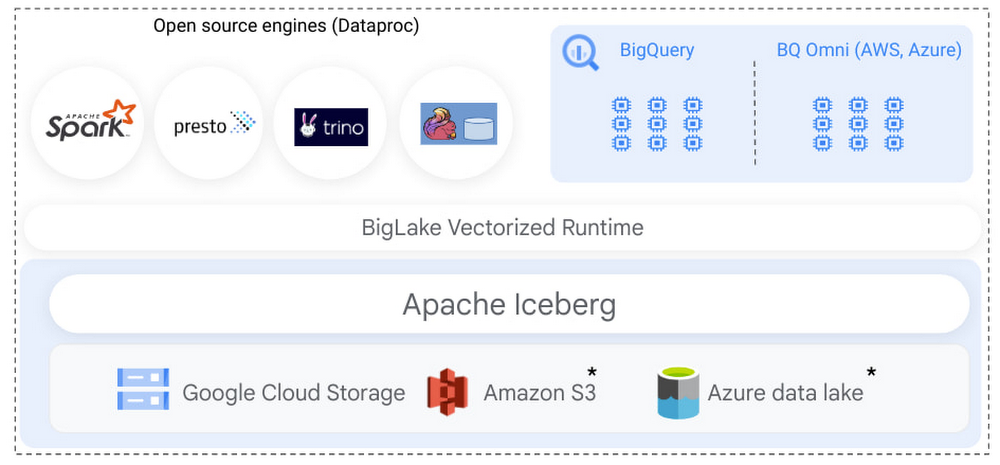
Apache Iceberg is a popular open source table format for customers looking to build data lakes. It provides many features found in enterprise data warehouses, such as transactional DML, time travel, schema evolution, and advanced metadata that unlocks performance optimization. Iceberg’s open specification allows customers to run multiple query engines on a single copy of data stored in an object store. Backed by a growing community of contributors, Apache Iceberg is becoming the de facto open standard for data lakes, bringing interoperability across clouds for hybrid analytical workloads and systems to exchange data. Earlier this year, we announced BigLake, a storage engine that enables customers to store data in open file formats (such as Parquet) on Google Cloud Storage and run GCP and open source query engines on it in a secure, governed, and performant manner.  BigLake unifies data warehouses and lakes by enabling BigQuery and open source frameworks like Spark to access data with fine-grained access control. Today, we are excited to announce that this support now extends to the Apache Iceberg format, enabling customers to take advantage of Iceberg’s capabilities to build an open format data lake while benefiting from native GCP integration using BigLake. “Besides BigQuery, a large segment of our data is stored on GCS. Our Datalake leveraged Iceberg to tap into this data in an efficient and scalable way on top of incredibly large datasets. BigLake integration makes this even easier by making this data available to our large BigQuery user base and leverage its powerful UI. Our users now have the ability to realize most BigQuery benefits on GCS data as if this was stored natively.”  — Bo Chen, Sr. Manager of Data and Insights at Snap Inc.Build a secure and governed Iceberg data lake with BigLake’s fine-grained security modelBigLake enables multi-compute architecture: Iceberg tables created in supported open source analytics engines can be read using BigQuery.code_block[StructValue([(u’code’, u”# Creation of table using Iceberg format with Dataproc Spark rnrnCREATE TABLE catalog.db.table (col1 type1, col2 type2) USING iceberg TBLPROPERTIES(bq_table='{bigquery_table}’, bq_connection='{bigquery_connection}’);”), (u’language’, u”), (u’caption’, <wagtail.wagtailcore.rich_text.RichText object at 0x3edb58d5c110>)])]Once the table has been created in Spark, easily query using BigQuery:code_block[StructValue([(u’code’, u’# Query table using the BigQuery console rnrnSELECT COL1, COL2 FROM bigquery_table LIMIT 10;’), (u’language’, u”), (u’caption’, <wagtail.wagtailcore.rich_text.RichText object at 0x3edb59443e10>)])]Apache Spark already has rich support for Iceberg, allowing customers to use Iceberg’s core capabilities, such as DML, transactions, and schema evolution, to carry out large-scale transformation and data processing. Customers can run Spark using Dataproc (managed clusters or serverless), or use built-in support for Apache Spark in BigQuery (stored procedures) to process Iceberg tables hosted on Google Cloud Storage. Regardless of your choice of Spark, BigLake automatically makes those Iceberg tables available for end users to query.Administrators can now use Iceberg tables, similar to BigLake tables, and don’t need to provide end users access to the underlying GCS bucket. The end user access is delegated through BigLake, simplifying access management and governance.  Administrators can further secure Iceberg tables using fine-grained access policies, such as row, column level access control, or data masking, extending the existing BigLake governance framework to Iceberg tables. BigQuery utilizes Iceberg’s metadata for query execution, providing a performant query experience to end users.This set of capabilities enables customers to store a single copy of data on object stores using Iceberg and run BigQuery as well as Dataproc workloads on it in a secure, governed, and performant manner, eliminating the need to duplicate data or write custom infrastructure. For GCP customers who store their data on BigQuery Storage and Google Cloud Storage, BigLake now further unifies data lake and warehouse workloads.  Customers can directly query, join, secure, and govern data across BigQuery storage and Iceberg tables on Google Cloud Storage. In the coming months, we will extend Apache Iceberg to Amazon S3 and Azure data lake Gen 2, enabling customers to build multi-cloud Iceberg data lakes. Differentiate your Iceberg workloads with native BigQuery and GCP integrationThe benefits of running Iceberg on Google Cloud extend beyond realizing Iceberg’s core capabilities and BigLake’s fine-grained security model. Customers can use native BigQuery and GCP integration to use BigQuery’s differentiated services on Iceberg tables created over Google Cloud Storage data. Some key integrations most relevant in the context of Iceberg are:  Securely exchange Iceberg data using Analytics Hub – Iceberg as an open standard provides interoperability between various storage systems and query engines to exchange data. On Google Cloud, customers use Analytics hub to share BigQuery & BigLake tables with their partners, customers, and suppliers without needing to copy data. Similar to BigQuery tables, data providers can now create shared datasets to share Iceberg tables on Google Cloud storage. Consumers of the shared data can use any Iceberg compatible supported query engine to consume the data, providing an open and governed model of sharing and consuming data.  Run data science workloads on Iceberg using BigQueryML – Customers can now use BigQueryML to extend their machine learning workloads to Iceberg tables stored on Google cloud storage, enabling customers to realize AI value on data stored outside of BigQuery. Discover, detect and protect PII data on Iceberg using Cloud DLP – Customers can now use Cloud DLP to identify, discover and secure PII data elements contained in Iceberg tables, and secure sensitive data using BigLake’s fine-grained security model to meet workload compliance.Get Started Learn more about BigLake support for Apache Iceberg by watching this demo video, and a panel discussion of  customers building using BigLake with Iceberg. Apache Iceberg support for BigLake is currently in preview, sign up to get started. Contact a Google sales representative to learn how Apache Iceberg can help evolve your data architecture.Special mention to the engineering leadership of Micah Kornfield, Anoop Johnson, Garrett Casto, Justin Levandoski and team to make this launch possible.
Quelle: Google Cloud Platform

Introducing Sensitive Actions to help keep accounts secure

At Google Cloud, we operate in a shared fate model, working in concert with our customers to help achieve stronger security outcomes. One of the ways we do this is to identify potentially risky behavior to help customers determine if action is appropriate. To this end, we now provide insights on what we are calling Sensitive Actions. Sensitive Actions, now available in Preview, are focused on understanding IAM account, or user account, behavior. They are changes made in a Google Cloud environment that are security relevant — and therefore important to be aware of and evaluate — because they may be precursors to an attack, an effort to make other attacks possible, or part of an effort to monetize a compromised account. They can quickly highlight potentially malicious activities that are facilitated by authentication cookie theft, and are another defense-in-depth mechanism that Google Cloud offers to help address this attack vector. The Sensitive Actions that are detected today will appear in two places. They are available in Security Command Center Premium, the primary source for security and risk alerts in Google Cloud, as Observations from the Sensitive Actions Service. They are also available in Cloud Logging, where we recommend that customers integrate them into their monitoring workflows. Sensitive Actions include the following list of action names (mapped to the MITRE ATT&CK tactics that these actions may correspond to) and descriptions: To ensure that adversaries do not have mechanisms to disable this protection or hide logs from users, Sensitive Actions is an on-by-default service now enabled for Cloud customers. In cases where customers have certain privacy controls or policy restrictions applied to their logging pipeline, their logs will not be analyzed by this service.You can learn more about Sensitive Actions and our overall recommendations for keeping your account secure by visiting our documentation here.
Quelle: Google Cloud Platform

Building scalable real time applications with Firestore

Firestore is a serverless, fully managed NoSQL document database. In addition to being a great choice for traditional server-side applications, Firestore in Native Mode also offers a backend-as-a-service (BaaS) model ideal for rapid, flexible web, and mobile application development. Build applications that don’t require managing any backend infrastructure.A key part of this model is real time queries where data is synchronized from the cloud directly to a user’s device, allowing you to easily create responsive multi-user applications. Firestore BaaS has always been able to scale to millions of concurrent users consuming data with real time queries, but up until now, there has been a limit of 10,000 write operations per second per database. While this is plenty for most applications, we know that there are some extreme use cases that require even higher throughput.We are happy to announce that we are now removing this limit and moving to a model where the system scales up automatically as your write traffic increases. This will be fully backwards compatible and will require no changes to existing applications.Keep reading for a deep dive into the system architecture and what is changing to allow for higher scale.Life of a real time queryReal time queries let you subscribe to some particular data in your Firestore database, and get an instant update when the data changes, synchronizing the local cache on the user’s device. The following example code uses the Firestore Web SDK to issue a real time query against the document with the key “SF”, within the collection “cities”, and will log a message in the console any time the contents of this document are updated.code_block[StructValue([(u’code’, u’const unsub = onSnapshot(doc(db, “cities”, “SF”), (doc) => {rn console.log(“Current data: “, doc.data());rn});’), (u’language’, u”), (u’caption’, <wagtail.wagtailcore.rich_text.RichText object at 0x3e1754f84dd0>)])]A good way to think about a real time query is that internally in Firestore it works as the reverse of a request-response query in a traditional database system. So rather than scanning through indexes to find the rows that match a query, the system keeps track of the active queries and, given any piece of data change, matches the changes to the registry to active queries and forwards the change to the caller of that query.The system consists of a number of components:The Firestore SDKs establish a connection from the user’s device to Firestore Front End servers. An onSnapshot API call registers a new real time query with a Subscription Handler.Whenever any data changes in Firestore, it is both persisted in replicated storage and transactionally sent to a server responsible for managing a commit-time-ordered Changelog of updates. This is the starting point for the real time query processing.Each change is then fanned out from the ChangeLog to a pool of Subscription Handlers.These handlers check which active real time queries match a specific data change, and in the case of a match (in the example above, whenever there is a change to the “cities/SF” document) forward the data to the Frontend and in turn to the SDK and the user’s application.A key part of Firestore’s scalability is the fan-out from the Changelog to the SubscriptionHandler to the Frontends. This allows a single data change to be propagated efficiently to serve millions of real time queries and connected users. High availability is achieved by running many replicas of all these components across multiple zones (or multiple regions in the case of a multi-region deployment).Previously, the changelogs were managed by a single backend server for each Firestore database. This meant that the maximum write throughput for Firestore Native was limited to what could be processed by one server.The big change coming with this update to Firestore is that the changelog servers now automatically scale horizontally depending on write traffic. As the write rate for a database increases beyond what a single server can handle, the changelog will be split across multiple servers, and the query processing will consume data from multiple sources instead of one. This is all done transparently by the backend systems when it is needed and there is no need for any application changes to take advantage of this improvement.Best practices when using Firestore at high scaleWhile this improvement to Firestore makes it easy to create very scalable applications, consider these best practices when designing your application to ensure that it will run optimally. Control traffic to avoid hotspotsBoth Firestore’s storage layer and changelogs have automatic load splitting functionality. This means that when the traffic increases, it will automatically be distributed across more servers. However, the system may take some time to react and typical split operations can take a few minutes to take effect.A common problem in systems with automatic load splitting is hotspots — traffic that is increasing so fast that the load splitter can’t keep up. The typical effect of a hotspot is increased latency for write operations, but in the case of real time queries they can also mean slower notifications for the queries listening to data that is being hotspotted.The best way to avoid hotspots is to control the way you ramp up traffic. For a good rule of thumb, we recommend following the “555 rule”. If you’re starting cold, start your traffic at 500 operations per second, then increase by at most 50% every 5 minutes. If you have a steady rate of traffic already, you can increase the rate more aggressively.Firestore Key Visualizer is a great tool for detecting and understanding hotspots. Learn more about it in the tool documentation here, and in this blog post.Keep documents, result sets, and batches smallTo ensure low latency response time from real time queries, it is best to keep the data lean. Documents with small payloads (e.g. field count, field value size, etc) can be quickly processed by the query system, and this keeps your application responsive. Big batches of updates, large documents, and queries that read large sets of data, on the other hand, may slow things down, and you may see longer delays between when data is committed and when notifications are sent out. This may be counterintuitive when compared to a traditional database where batching is often a way to get higher throughput.Control the fanout of queriesFirestore’s sharding algorithm tries to co-locate data in the same collection or collection group onto the same server. The intent is to maximize the possible write throughput while keeping the number of splits a query needs to talk to as small as possible. But certain patterns can still lead to suboptimal query processing — for example, if your application stores most of its data in one giant collection, a query against that collection may have to talk to many splits to read all the data, even if you apply a filter to the query. This in turn may increase the risk of higher variance in tail latency.To avoid this you can design your schema and application in a way where queries can be served efficiently without going to many splits. Breaking your data into smaller collections — each one with a smaller write rate — may work better. We recommend load testing to best understand the behavior and need of your application and use case.What’s nextRead more about building scalable applications with FirestoreFind out how to get real-time updates on FirestoreLearn more about Key Visualizer for Firestore
Quelle: Google Cloud Platform

Run Google Cloud Speech AI locally, no internet connection required

We’ve all been there— asking a voice assistant to play a song, launch an app, or answer a question, but the assistant doesn’t comply. Maybe it’s a network outage, or maybe you’re in the middle of nowhere, far away from coverage—either way the result is the same: the voice assistant can’t connect to the server and thus cannot help. With our Speech-to-Text (STT) API now processing over 1 billion minutes of speech each month, it’s clear that voice assistants — and Automatic Voice Recognition (ASR) in general — are essential to how millions of people make decisions and navigate their lives. Typically, however, to successfully provide high-quality speech results to consumers, the AI systems responsible for ASR have needed a stable cloud connection to specialized hardware.With Speech On-Device, which went into GA at Google Cloud Next ‘22, we’re excited to  embed the powerful speech recognition available in the cloud for a  variety of new use cases in environments with inconsistent, little, or no internet connectivity.  These on-device Speech-to-Text and Text-to-Speech technologies have already been used in Google Assistant, but with Speech On-Device, a new generation of apps and services can harness this technology. Build speech experiences with–or without–network connectivity From cars that drive through tunnels, to apps running on integrated devices like kiosks, to IoT devices, Speech On-Device delivers server-quality voice capabilities with a fraction of the processing power—all while helping to maintain privacy by keeping data on the local device. Running locally is made possible by new modeling techniques, on both the Speech-to-Text (STT) and Text-to-Speech (TTS) fronts.For Speech-to-Text (or ASR), years of work on our end-to-end Speech models, such as our latest conformer models, has decreased the size and compute necessary to run fully-featured speech models. These advancements have resulted in quality comparable to that of a server, while still allowing for models that are lightweight enough to run on local devices CPUs. For Text-to-Speech, we leverage new technology developed at Google to bring high-quality voice into vehicles. Speech On-Device TTS not only provides acoustic quality comparable to our WaveNet technology, DeepMind’s breakthrough model for generating more natural-sounding speech, but it also is significantly less computationally demanding and can easily run on embedded CPUs without the need for accelerators.Speech On-Device is easy for developers to get started with. Each system (STT and TTS) provides customers with a binary, built for their specific hardware, operating system, and software environment. This binary exposes a local gRPC interface that other services on the device can talk to, making it easy for multiple services to access speech recognition or speech synthesis as they need to, without additional libraries or integration.  Each model is only a couple hundred megabytes in size. The entire system can run on the single core of a modern ARM-based System on Chip (SoC) while still achieving latencies usable for real-time interactions. This means it can be added to existing systems without worrying about acceleration or optimization. And, as with all Cloud Speech-to-Text API models, Speech On-Device is built to work directly out-of-the-box, with no training or customization necessary. Join the Google Cloud customers already using Speech On-DeviceWe’re excited to see the new speech-driven experiences that organizations will build with this service—especially after seeing Speech On-Device’s early adopters in action. For example, Toyota is leveraging Speech On-Device as Ryan Wheeler — Vice President, Machine Learning at Toyota Connected North America — discussed in a Google Cloud Next ‘22 session. If you are interested in Speech On-Device, there is a review process to help assess whether your use case is aligned with our best practices. To get started, contact your seller today.Related ArticleGoogle Cloud Text-to-Speech API now supports custom voicesGoogle Cloud’s Text-to-Speech API now supports custom voices to help businesses differentiate their brands and deliver better customer ex…Read Article
Quelle: Google Cloud Platform

When speed is revenue: New Cloud CDN features to improve users’ digital experiences

When it comes to digital experiences, speed is revenue. Users are highly sensitive to slow experiences, and the probability of them bouncing increases by 32% when page load times go from 1 second to 3 seconds. Frustrating experiences let revenue walk out of the door.Cloud CDN can help accelerate your web services by using Google’s edge network to bring your content closer to your users. This can help you save on cloud operations costs, minimize the load on your origin servers, and scale your web experiences to a global audience. Our latest improvements to Cloud CDN expand on the tools you need to fine tune your web service performance.Speed up page load times and save on costs by compressing dynamic contentWith dynamic compression, Cloud CDN automatically reduces the size of responses that are transferred from the edge to a client, even if they were not compressed by the origin server. In a sample of popular CSS and Javascript files, we saw that dynamic compression reduced response sizes between 60 to 80%. This is a win-win for both your web service and its end users. With dynamic compression, you get:Faster page load: By reducing the size of content like CSS and Javascript resources, you can reduce time to first contentful paint and page loads overall. Cost management: Web services that serve a large amount of compressible content can significantly reduce their cache egress costs by enabling dynamic compression.Cloud CDN supports gzip and Brotli compression for web resources like HTML, CSS, Javascript, JSON, HLS playlists, and DASH manifests. Get started with dynamic compression in preview today.Customize cache keys to improve CDN performanceWhen a request comes to Cloud CDN’s edge, it gets mapped to a cache key and compared against entries in the cache. By default, Cloud CDN uses the protocol, host, path, and query string from the URI to define these cache keys. Using Cloud CDN’s new custom cache keys, you can better control caching behavior in order to improve cache hit rates and origin offload. We now support using named headers and cookies. If your web service implements A/B testing or canarying, using named cookies to define cache keys may be especially useful. Using Cloud CDN’s new allowlist for URI parameters for Cloud Storage, you can also implement cache busting. This is a strategy that enables your end users to find the latest version of a cached resource even if an older version is active in the cache. By adding a query parameter that specifies versioning and adding it to the allowlist, you can avoid needing to explicitly invalidate the older cached version. Allowlists are now available for backend buckets, in addition to existing support for backend services.Get started with custom cache keys today.Accelerate your business with Google Cloud networkingTo learn more about how customers like AppLovin use Cloud CDN and Google Cloud networking to accelerate their business, check out our Cloud NEXT session on simplifying and securing your network.
Quelle: Google Cloud Platform