Improved text analytics in BigQuery: search features now GA

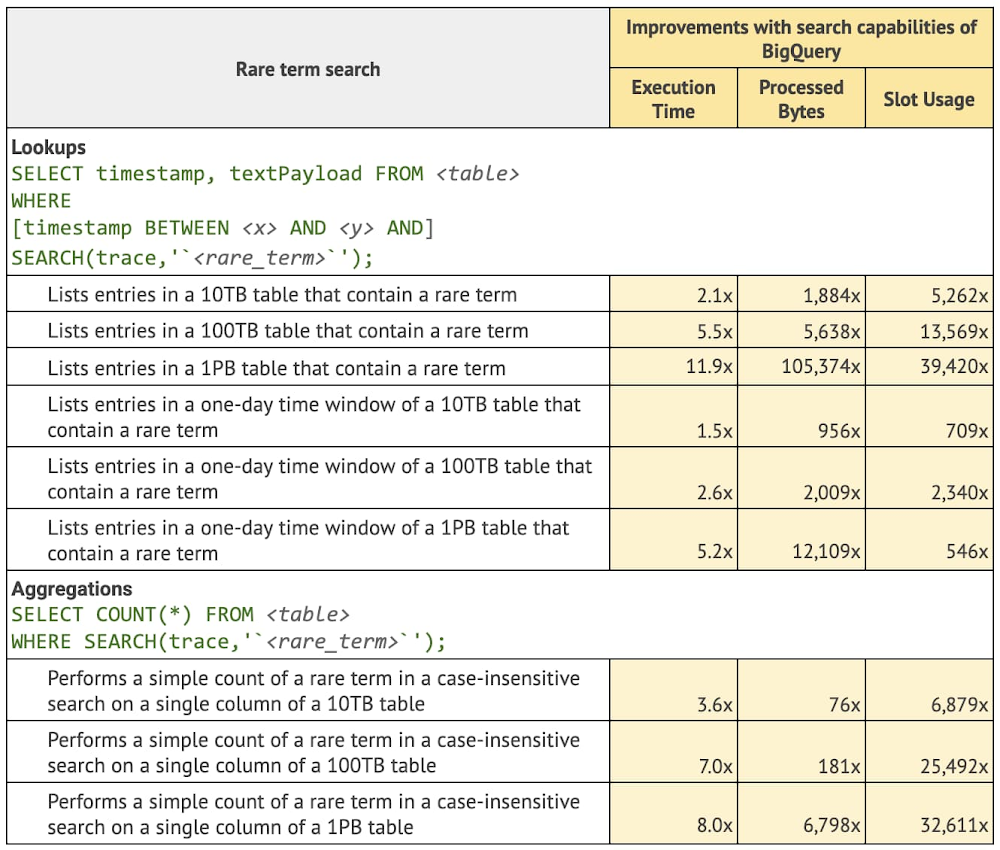
Google’s Data Cloud’s aim is to help customers close their data-to-value gap. BigQuery, Google Cloud Fully managed, serverless data platform lets customers  combine all data  — structured, semi-structured, and unstructured. Today, we are excited to announce the general availability of search indexes and search functions in BigQuery. This combination enables you to efficiently perform rich text analysis on data that may have been previously hard to explore due to the siloing of text information. With search indexes, you can reduce the need to export text data into standalone search engines and instead build data-driven applications or derive insights based on text data that is combined with the rest of your structured, semi-structured (JSON), unstructured (documents, images, audio), streaming, and geospatial data in BigQuery.  Our previous post announcing the public preview of search indexesdescribed how search and indexing allow you to use standard BigQuery SQL to easily find unique data elements buried in unstructured text and semi-structured JSON, without having to know the table schemas in advance. The Google engineering team ran queries on Google Cloud Logging data of a Google internal test project (10TB, 100TB, and 1PB scales) using the SEARCH function with a search index. We then compared that to the equivalent logic with the REGEXP_CONTAINS function (no search index) and found that for the evaluated use cases, the new capabilities  provided the following overall improvements (more specific details below): Execution time: 10x. On average, queries that use BigQuery SEARCH function backed by a search index are 10 times faster than the alternative queries for the common search use cases.Processed bytes: 2682x. On average, queries with BigQuery SEARCH function backed by a search index process 2682 times fewer bytes than the alternative queries for the common search use cases.Slot usage (BigQuery compute units): 1271x. On average, queries with BigQuery SEARCH function backed by a search index use 1271 times less slot time than the alternative queries for the common search use cases.Let’s put these numbers into perspective by discussing the common ways search indexes are used in BigQuery. Please note that all improvement numbers provided were derived from a Google engineering team analysis of common use cases and queries on a Google internal test project’s log data. The results may not map directly to customer queries and we would encourage you to test this on your own data set. Rare term search for analytics on logsLog analytics is a key industry use case enabled by Google’s Data Cloud. In a recent Google Cloud Next ‘22 talk on Operational Data Lakes, The Home Depot discussed how they were able to sunset their existing enterprise log analytics solution and instead use BigQuery and Looker as an alternative for 1,400+ active users in order to reduce costs and improve log retention. Goldman Sachs used BigQuery to solve their multi-cloud and scaling problems for logging data. Goldman Sachs moved from existing logging solutions to BigQuery to improve long term retention, detect PII in their logs with Google DLP, and implement new cost controls and allocations.  A very common query pattern in analytics on logs is rare-term search or colloquially, “finding a needle in the haystack.” That means quickly searching through millions or billions of rows to identify an exact match to a specific network ID, error code, or user name to troubleshoot an issue or perform a security audit. This is also a quintessential use case for search indexes in a data warehouse. Using a search index on a table of text data allows the BigQuery optimizer to avoid large scanning operations and pinpoint exactly the relevant data required to answer the query. Let’s review what the Google engineering team found when they reviewed queries that looked for rare terms with and without a search index.IP address search in Cloud LoggingHome Depot and Goldman Sachs used BigQuery’s basic building blocks to develop their own customized log analytics applications. However, other customers may choose to use log analytics on Google’s Data Cloud as a pre-built integration within Cloud Logging.  Log Analytics, powered by BigQuery (Preview) gives customers a managed Log Analytics as a service solution with a specialized interface for logs analysis. It leverages features of BigQuery’s search function which provides specialized ways to look up common logging data elements such as IP addresses, URLs, and e-mails. Let’s take a look at what the Google engineering team found when looking up IP addresses using a search function.Common term search on recent data for security operations Exabeam, an industry leader in security analytics and SIEM MQ, leverages BigQuery search functions and search indexes in their latest Security Operation Platform built on Google’s Data Cloud to search multi-year data in seconds [learn more data journey interview].Many security use cases are able to leverage a search optimization for queries on recent data that allows you to look up data with common terms using ORDER BY and LIMIT clauses. Let’s take a look at what the Google engineers found for queries on recent data that use an ORDER BY and LIMIT clauses.Search in JSON objects for Elasticsearch compatibility Google technical partner, Mach5 Software, offers its customers an Elasticsearch and OpenSearch-compatible platform powered by BigQuery’s search optimizations and JSON functionality. Using Mach5, customers can migrate familiar tools like Kibana, OpenSearch Dashboards, and pre-built applications, seamlessly to BigQuery, while enjoying a significant reduction in cost and management overhead. Mach5 takes advantage of BigQuery’s search index’s ability to comb through deeply nested data stored in a BigQuery’s native JSON data type. Mach5 Community Edition is freely available for you to deploy and use within your Google Cloud Platform environment.BigQuery’s SEARCH function operates directly on BigQuery’s native JSON type. Let’s look at some improvements the Google engineering team found when using search with indexing on JSON data.Learning moreAs you can see in the comparisons, there are already significant cost and performance improvements with BigQuery search functions and indexes, even at the petabyte level. Generally speaking, the larger the dataset, the more BigQuery can optimize. This means you can bring petabytes of data to BigQuery and still have it operate effectively. Many customers also combine BigQuery search features with large scale streaming pipelines built with BigQuery’s Storage Write API. This Write API has a default ingestion rate of 3GB per second with additional quota available upon request. It is also 50% lower per GB cost compared to previous streaming APIs offered by BigQuery. These streaming pipelines are fully managed by BigQuery and take care of all the operations from stream to index. Once data is available on the stream, any queries you run with a SEARCH function will have accurate and available data. To learn more about how BigQuery search features can help you build an operational data lake, check out this talk on Modern Security Analytics platforms. To see search in action, you can also watch this demo where a search index is built to improve simple searches of label and object data that is generated from running machine learning on vision data. You can get started with the BigQuery sandbox and explore these search capabilities at no cost to confirm whether BigQuery fits your needs. The sandbox lets you experience BigQuery and the Google Cloud console without providing a credit card, creating a billing account, or enabling billing for your project.
Quelle: Google Cloud Platform

Vertex AI Vision: Easily build and deploy computer vision applications at scale

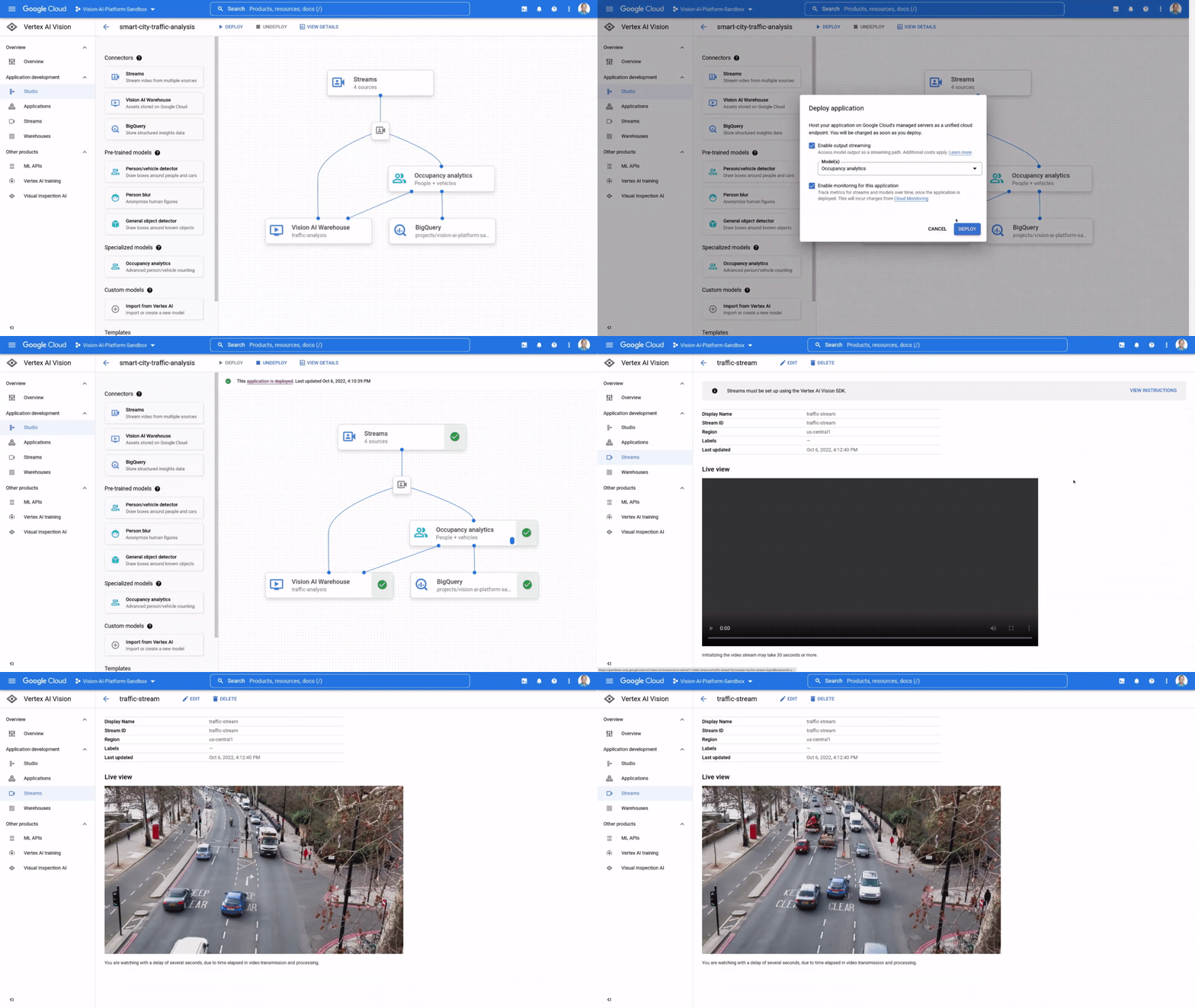
If organizations can easily analyze unstructured data streams, like live video and images, they can more effectively leverage information from the physical world to create intelligent  business applications. Retailers can improve shelf management by instantly spotting what products are out of stock, manufacturers can  reduce product defects by detecting production errors in real time, and in our communities, administrators could improve traffic management by analyzing vehicle patterns. The possibilities to create new experiences, efficiencies, and insights are endless. However, enterprises struggle to ingest, process, and analyze real-time video feeds at scale due to high infrastructure costs, development effort, longer lead times, and technology complexities.That’s why last week, at Google Cloud Next’ 22, we launched the preview of Vertex AI Vision,  a fully managed end-to-end application development environment that lets enterprises easily build, deploy, and manage computer vision applications for their unique needs. Our internal research shows that Vertex AI Vision can help developers reduce time to build computer vision applications from weeks to hours, at a fraction of the cost of current offerings. As always,  our new AI products also adhere to our AI Principles.One-stop environment for computer vision applications development Vertex AI Vision radically simplifies the process of cost-effectively creating and managing computer vision apps, from ingestion and analysis to deployment and storage. It does so by providing an integrated environment that includes all the tools needed to develop computer vision applications; developers can easily ingest live video streams (all they need is the IP address), add pre-trained models for common tasks such as “Occupancy Analytics,” “PPE Detection,” “Visual Inspection,” add custom models from Vertex AI for specialized tasks, and define a target location for output/ analytics. The application is ready to go.Vertex AI Vision comprises the following services:Vertex AI Vision Streams: a geo-distributed managed endpoint service for ingesting video streams & images.  Easily connect cameras or devices from anywhere in the world and let Google handle ingestion and scalingVertex AI Vision Applications: a serverless orchestration platform for video models & services enabling developers to stitch together large, auto-scaled media processing and analytics pipelinesVertex AI Vision Models: a new portfolio of specialized pre-built vision models for common analytics tasks including occupancy counting, PPE detection, face-blurring, retail product recognition and more. Additionally, users can build and deploy their own custom models Vertex AI Vision Warehouse: a serverless rich-media storage that provides the best of Google search combined with managed video storage.   Perfect for ingesting, storing, and searching PBs of video data. Customers are already seeing the future with Vertex AI Vision Customers are thrilled with the possibilities Vertex AI Vision opens. According to Elizabeth Spears, Co-Founder & CPO, Plainsight, a leading developer of computer vision applications,  “Vertex AI Vision is changing the game for use cases that for us have previously been economically non-viable at scale. The ability to run computer vision models on streaming video with up to a 100X cost reduction for Plainsight is creating entirely new business opportunities for our customers.”Similarly, Brain Corp Vice President Botond Szatmáry said, “Vertex AI Vision is the backend solution that enables Brain Corp’s Shelf Analytics on all BrainOS powered robots, including a new commercial ready reference platform that’s purpose built for end to end inventory analytics. The Vertex AI Product Recognizer and Shelf Recognizer, combined with BigQuery, enable us to efficiently detect products, out of stock events, and low stock events while capturing products, prices, and location within stores and warehouses. Our retail customers can be more competitive in e-commerce, better manage their inventory, improve operational efficiencies, and improve the customer shopping experience with our highly accurate, actionable, and localized inventory shelf insights.” You can hear more from Plainsight and Brain Corp in our Next ’22 session. If you are a developer and want to get started on Vertex AI Vision I invite you to experience the magic for yourself here.
Quelle: Google Cloud Platform

Accelerate your data to AI journey with new features in BigQuery ML

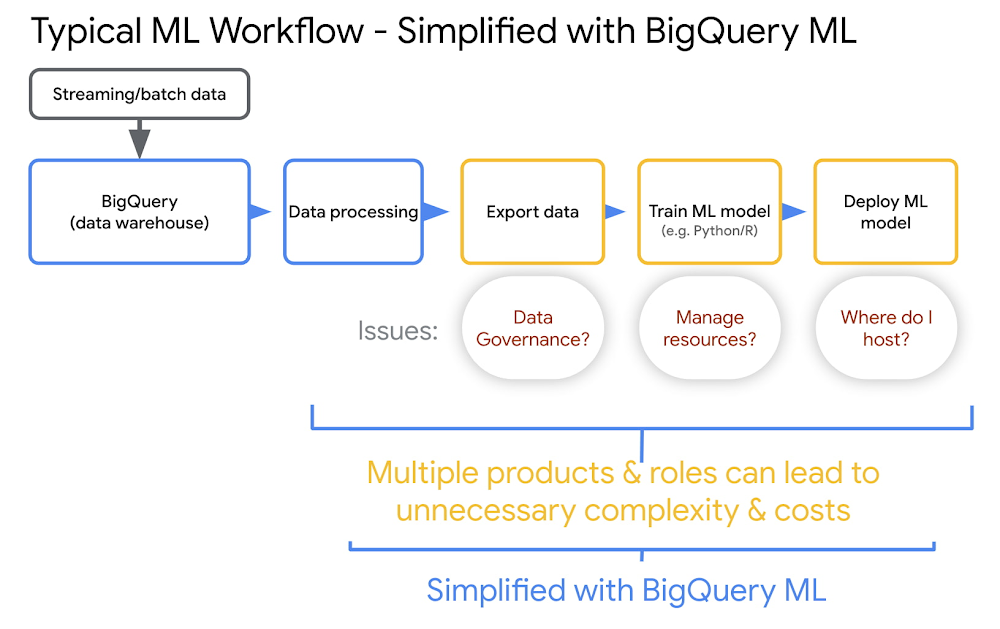
AI is at a tipping point. We are seeing the impact of AI across more and more industries and use cases. Organizations with varying levels of ML expertise are solving business-critical problems with AI — from creating compelling customer experiences, to optimizing operations, to automating routine tasks, these organizations learn to innovate faster and ultimately, get ahead in the marketplace. However, in many organizations, AI and machine learning systems are often separate and siloed from data warehouses and data lakes. This widens the data to AI gap, limiting data-powered innovation. At Google Cloud, we have harnessed our years of experience in AI development to make the data-to-AI journey as seamless as possible for our customers. Google’s data cloud simplifies the way teams work with data. Our built-in AI/ML capabilities are designed to meet users where they are, with their current skills. And our infrastructure, governance, and MLOps capabilities help organizations to leverage AI at scale. In this blog, we’ll share how you can simplify your ML workflows using BigQuery ML and Vertex AI and showcase the latest innovations in BigQuery ML.Simplify machine learning workflows with BigQuery ML and Vertex AIOrganizations that follow a siloed approach to managing databases, analytics and machine learning often need to move data from one system to another. This leads to data duplication with no single source of truth and makes it difficult to adhere to security and governance requirements. Additionally, when building ML pipelines, you need to train and deploy your models. Therefore you need to plan your infrastructure for scale. You also need to make sure that your ML models are tuned and optimized to run efficiently on your infrastructure. For example, you may need a large set of kubernetes clusters or access to GPU-based clusters so that you can train your models quickly. This forces organizations to hire highly skilled professionals with deep knowledge of Python, Java and other programming languages. Google’s data cloud provides a unified data and AI solution to help you overcome these challenges and simplify your machine learning workflows. BigQuery’s serverless, scalable architecture helps you create a powerful single source of truth for your data. BigQuery ML brings machine learning capabilities directly into your data warehouse through a familiar SQL interface. BigQuery ML’s native integration with Vertex AI allows you to leverage MLOps tooling to deploy, scale, and manage your models.BigQuery ML and Vertex AI help accelerate the adoption of AI across your organization.Easy data management: Manage ML workflows without moving data from BigQuery, eliminating security and governance problems. The ability to manage workflows within your datastore removes a big barrier to ML development and adoption.Reduce infrastructure management overhead: BigQuery takes advantage of the massive scale of Google’s compute and storage infrastructure. You don’t need to manage huge clusters or HPC infrastructure to do ML effectively.Remove skillset barrier: BigQuery ML is SQL based. This allows many model types to be directly available in SQL, such as regression, classification, recommender systems, deep learning, time series, anomaly detection, and more. Deploy models and operationalize ML workflows: Vertex AI Model Registry makes it easy to deploy BigQuery ML models to a Vertex AI REST endpoint for online or batch predictions. Further, Vertex AI Pipelines automate your ML workflows, helping you reliably go from data ingestion to deploying your model in a way that lets you monitor and understand your ML system.Get started with BigQuery ML in three stepsStep 1: Bring your data into BigQuery automatically via Pub/Sub in real time or in batch using BigQuery utilities or through one of our partner solutions. In addition, BigQuery can access data that may be residing in open source format such as Parquet/Hudi residing in object storage using BigLake. Learn more about loading data into BigQuery.Step 2: Train a model by running a simple SQL query (create model) in BigQuery and point to the dataset. BigQuery is highly scalable in terms of compute and storage, whether it is a dataset with 1000 rows or billions of rows. Learn more about model training in BigQuery ML.Step 3: Start running predictions. Use a simple SQL query to run predictions on the new data. There are a vast number of use cases supported through BigQuery ML such as demand forecasting, anomaly detection or even can be used for predicting new segments for your customer. Check out the list of supported models. Learn more about running predictions, detecting anomalies or predicting demand with forecasting.Increase impact with new capabilities in BigQuery MLAt Next ‘22, we announced several innovations in BigQuery ML that help you to quickly and easily operationalize ML at scale. To get early access and check out these new capabilities, submit this interest form. 1. Scale with MLOps and pipelinesWhen you are training a lot of models across your organization, managing models, comparing results, and creating repeatable training processes can be incredibly difficult. New capabilities make it easier to operationalize and scale BigQuery ML models with Vertex AI’s MLOps capabilities. Vertex AI Model Registry is now GA, providing a central place to manage and govern the deployment of all your models, including BigQuery ML models. You can use Vertex AI Model Registry for version control and ML metadata tracking, model evaluation and validation, deployment and model reporting. Learn more here. Another capability that further helps operationalize ML at scale is Vertex AI Pipelines, a serverless tool for orchestrating ML tasks so that they can be executed as a single pipeline, rather than manually triggered each task (e.g. train a model, evaluate the model, deploy to an endpoint) separately. We are introducing more than 20 BigQuery ML components to simplify orchestrating BigQuery ML operations. This eliminates the need for developers and ML engineers to write their own custom components to invoke BigQuery ML jobs. Additionally, if you are Data Scientist who prefers running code over SQL, you can now use these operators to train and predict in BigQuery ML.2. Derive insights from unstructured dataWe recently announced the preview of object tables, a new table type in BigQuery that enables you to directly run analytics on unstructured data including images, audio, documents and other file types. Using the same underlying framework, BigQuery ML will now help you to unlock that value from unstructured data. You can now execute SQL on image data and predict results from machine learning models using BigQuery ML. For example, you can import either state of the art TensorFlow vision models (e.g. ImageNet and ResNet 50) or your own models to detect objects, annotate photos, extract text from images.Learn more here and check out this demo of our customer Adswerve, a leading Google Marketing, Analytics and Cloud partner and their client Twiddy & Co, a vacation rental company in North Carolina, who combined structured and unstructured data using BigQuery ML to analyze images of rental listings and predict the click-through rate, enabling data-driven photo editorial decisions. In this work images attributed to 57% of the final prediction results.3. Inference EngineBigQuery ML acts an inference engine that works in a number of ways, including using existing models and can be extended to bring your own model:BigQuery ML trained modelsImported models of various formatsRemote modelsBigQuery ML supports several models out-of-the-box. However, some customers want to inference with models that are already trained in other platforms. Therefore, we are introducing new capabilities that allow users to import models beyond TensorFlow into BigQuery ML, starting with TFLite and XGBoost.Alternatively, if your model is too big to import (see current limitations here) or already deployed at an endpoint and you don’t have the ability to bring that model into BigQuery, BigQuery ML now allows you to do inference on remote models ( resources that you’ve trained outside of Vertex AI, or that you’ve trained using Vertex AI and exported). You can deploy a model on Vertex AI or Cloud Functions and then use BigQuery ML to do prediction.4. Faster, more powerful feature engineeringFeature preprocessing is one of the most important steps in developing a machine learning model. It consists of the creation of features and the cleaning of the data. Sometimes, the creation of features is also referred to as “feature engineering”. In other words, Feature engineering is all about taking data and representing it in ways that model training results in great models. BQML performs automatic feature preprocessing during training, based on the feature data types. This consists of missing value imputation and feature transformations. Besides these, all numerical and categorical features will be CASTed to double and string, respectively, for BQML training and inference. We are taking feature engineering to the next level by introducing several new numerical functions (such as MAX_ABS_SCALER, IMPUTER, ROBUST_SCALER, NORMALIZER) and categorical functions (such as ONE_HOT_ENCODER, LABEL_ENCODER, TARGET_ENCODER). BigQuery ML supports two types of feature preprocessing:Automatic preprocessing. BigQuery ML performs automatic preprocessing during training. For more information, see Automatic feature preprocessing.Manual preprocessing. BigQuery ML provides the TRANSFORM clause for you to define custom preprocessing using the manual preprocessing functions. You can also use these functions outside the TRANSFORM clause.Further, when you export BigQuery ML models by registering with Vertex AI Model Registry or manually, transform clauses will also be exported with it. This really simplifies online model deployment to Vertex.5. Multivariate time series forecastingMany BigQuery customers use the natively supported ARIMA PLUS model to forecast future demand and plan their business operations. Until now customers could forecast using only a single input variable. For example, to forecast ice cream sales, along with target metrics the past sales, customers could not forecast using external covariates such as weather. With this launch, users can now make more accurate forecasts by taking more than one variable into account through multivariate time series forecasting with ARIMA_PLUS_XREG (ARIMA_PLUS with external regressors (such as weather, location, etc).Getting StartedSubmit this form to try these new capabilities that help you accelerate your data to AI journey with BigQuery ML. Check out this video to learn more about these features and see a demo of how ML on structured and unstructured data can really transform marketing analytics.Acknowledgements: It was an honor and privilege to work on this with Amir Hormati, Polong Lin, Candice Chen, Mingge Deng, Yan Sun. We further acknowledge Manoj Gunti, Shana Matthews and Neama Dadkhahnikoo for support, work they have done and their inputs.
Quelle: Google Cloud Platform

An annual roundup of Google Data Analytics innovations

October 23rd (this past Sunday) was my 5th Googleversery and we just wrapped up an incredible Google Next 2022!  It was great to see so many customers and my colleagues in person this year in New York City. This blog is an attempt to share progress we have made since last year (4th year anniversary blog post 2021 Next). Bringing BigQuery to the heart of your Data CloudSince last year we have made significant progress across the whole portfolio. I want to start with BigQuery, which is at the heart of our customers’ Data Cloud. We have enhanced BigQuery with key launches like multi-statement transactions, Search and operational log analytics, native JSON support, slot recommender,interactive SQL translation from various dialects like Teradata, Hive, Spark, materialized views enhancements andtable snapshots. Additionally we have launched various enhancements to SQL language, accelerate customer cloud migration with BigQuery migration services and introduced scalable data transformation pipelines in BigQuery using SQL with the Dataform preview. One of the most significant enhancements to BigQuery is support for unstructured data in BigQuery through object tables. Object tables enable you to take advantage of common security and governance across your data.  You can now build data products that unify structured and unstructured data in BigQuery.To support data openness, at Next ’22 we announced the general availability of BigLake, to help you break down data silos by unifying lakes and warehouses. BigLake innovations add support for Apache Iceberg, which is becoming the standard for open source table format for data lakes. And soon, we’ll add support for formats including Delta Lake and Hudi. To help customers bring analytics to their data irrespective of where it resides, we launched BigQuery Omni. Now we are adding new capabilities such as cross-cloud transfer and cross-cloud larger query results that will make it easier to combine and analyze data across cloud environments. We also launched on-demand pricing support which enables you to get started at a low cost for BigQuery Omni. To help customers break down data boundaries across organizations, we launched Analytics Hub. Analytics Hub is a data exchange platform that enables organizations to create private or public exchanges with their business partners. We have added Google data, which includes highly valuable datasets like Google Trends. With hundreds of partners sharing valuable commercial datasets, Analytics Hub helps customers reach data beyond their organizational walls. We also partnered with the Google Earth Engine team to use BigQuery to get access to and value from the troves of satellite imagery data available within Earth Engine.We’ve also invested to bring BigQuery together with operational databases to help customers build intelligent, data-driven applications. Innovations include federated queries for Spanner, Cloud SQL and Bigtable, allowing customers to analyze data residing in operational databases in real-time with BigQuery. At Next ’22, we announced Datastream for BigQuery which provides easy replication of data from operational database sources such as AlloyDB, PostgreSQL, MySQL, and Oracle, directly into BigQuery with a few simple clicks.From Data to AI, with built-in intelligence for BigQuery and Vertex AIWe launched BigQuery Machine Learning in 2018 to make machine learning accessible to data analysts and data scientists across the globe. Now, customers create millions of models and tens of millions of predictions every month using BigQuery ML. Vertex AI enables ML Ops from data model to deployment in production and running predictions in real-time. Over the past year we have tightly integrated BigQuery and Vertex AI to simplify the ML experience. Now you can create models in BigQuery using BigQuery ML which are instantly visible inVertex AI model registry. You can then directly deploy these models to Vertex AI endpoints for real-time serving, use VertexAI pipelines to monitor and train models and view detailed explanations for your predictions through BigQuery ML and Vertex AI integration. Additionally, we announced an integration between Colab and BigQuery which allows users to explore results quickly with a data science notebook on Colab. “Colab” was developed by Google Research to allow users to execute arbitrary Python code and became a favorite tool for data scientists and machine learning researchers. The BigQuery integration enables seamless workflows for data scientists to run descriptive statistics, generate visualizations, create a predictive analysis, or share your results with others.Learn more about innovations to bring data and AI closer together, check out my session at Next with June Yang, VP of Cloud AI and Industry Solutions.Delivering the best of open sourceWe have always believed in making Google Cloud the best platform to run Open Source Software. Cloud Dataproc enables you to run various OSS engines like Spark, Flink, Hive. We have made a lot of enhancements over the past year in Dataproc. One of the most significant enhancements was to create a Serverless Spark offering that enables you to get away from clusters and focus on just running Spark Jobs. At Cloud Next 2022, we added built-in support for Apache Spark in BigQuery will allow data practitioners to create BigQuery stored procedures unifying their work in Spark with their SQL pipelines. This also provides integrated BigQuery billing with access to a curated library of highly valuable, internal and external assets. Powering streaming analyticsStreaming analytics is a key area of differentiation for Google Cloud with products like Cloud Dataflow and Cloud Pub/Sub. This year, our goal was to push the boundaries of innovation in real-time processing through Dataflow Prime and make it seamless to get real-time data coming to Pub/Sub to land into BigQuery for advanced analytics. At the beginning of the year, we introduced over 25 new Dataflow Templates as Generally Available.  At July’s Data Engineer Spotlight, we made Dataflow Prime, Dataflow ML, and Dataflow Go Generally Available. We also introduced a number of new Observability features for Dataflow to give you more visibility and control over your Dataflow pipelines.Earlier this year we introduced a new type of Pub/Sub subscription called a “BigQuery subscription” that writes directly from Cloud Pub/Sub to BigQuery. With this integration, customers no longer need to pay for data ingestion into BigQuery – you only pay for the Pub/Sub you use.Unified business intelligenceIn Feb 2020 we closed the Looker acquisition and since then we have been busy at work in building Looker capabilities and integrating it into Google Cloud. Additionally, Data Studio has been our self service BI offering for many years. It has the strongest tie-in with BigQuery and many of our BigQuery customers use Data Studio. Announced at Next’22, we are bringing all BI assets under the single umbrella of Looker. Data Studio will become Looker Studio and include a paid version that will provide enterprise support. With tight integration between Looker and Google Workspace productivity tools, customers gain easy access via spreadsheets and other documents, to consistent, trusted answers from curated data sources across your organization. Looker integration with Google Sheets is in preview now and increased accessibility of BigQuery to Connected Sheets allows more people to analyze large amounts of data. You can read more details here. Intelligent data management and governanceLastly, a challenge that is top of mind for all data teams is data management and governance across distributed data systems. Our data cloud provides customers with an end-to-end data management and governance layer, with built-in intelligence to help enable trust in data and accelerate time to insights. Earlier this year we launched Dataplex as our Data Management and Governance service. Dataplex helps organizations centrally manage and govern distributed data. Furthermore, we unified Data Catalog with Dataplex to provide a streamlined experience for customers to centrally discover their data with business context and govern and manage that data  with built-in data intelligence. At Next we introduced data lineage capabilities with Dataplex to gain end-to-end lineage from ingestion of data to analysis to ML models. Advancements for automatic data quality in Dataplex ensure confidence in your data which is critical to get accurate predictions. Based on customer input we’ve also added enhanced data discovery for automatic cataloging to databases and Looker from a business glossary and added a Spark-powered data exploration workbench. And Dataplex is now fully integrated with BigLake so you can now manage fine grained access control at scale.An open data ecosystemOver the past 5 years, the Data Analytics team goal has been to make Google Cloud the best place to run analytics. One of the key tenets of this was to ensure we have the most vibrant partner ecosystem. We have a rich ecosystem of hundreds of tech partner integrations and have 40+ partners who have been certified through the Cloud Ready-BigQuery initiative. Additionally, more than 800 technology partners are building their applications on top of our Data Cloud. Data Sharing continues to be one of the top capabilities leveraged by these partners to easily share information at any scale with their enterprise customers.  We also announced new updates and integrations with Collibra, Elastic, MongoDB, Palantir, ServiceNow, Sisu Data, Reltio, Striim and Qlik to help customers move data between platforms of your choice and bring more Google’s Data Cloud capabilities to partner platforms.Finally, we established a Data Cloud Alliance  together with 17 of our key partners who provide the most widely-adopted and fastest-growing enterprise data platforms today across analytics, storage, databases and business intelligence.  Our mission is to collaborate to solve modern data challenges providing an acceleration path to value. The first key areas where we are focusing are related to : data interoperability, data governance and solving for skills gap through education. Customer momentum across a variety of industries and use casesWe’re super excited for organizations to share their Data Cloud best practices at Next, including Walmart, Boeing, Twitter, Televisa Univision, L’Oreal, CNA Insurance, Wayfair, MLB, British Telecom, Telus, Mercado Libre, LiveRamp, and Home Depot. Check out all the Data Analytics sessions and resources from Next and get started on your Data Cloud journey today. We look forward to hearing your story at a future Google Cloud event.
Quelle: Google Cloud Platform

Google Cloud and HashiCorp deliver a more efficient approach for Cloud Support Services

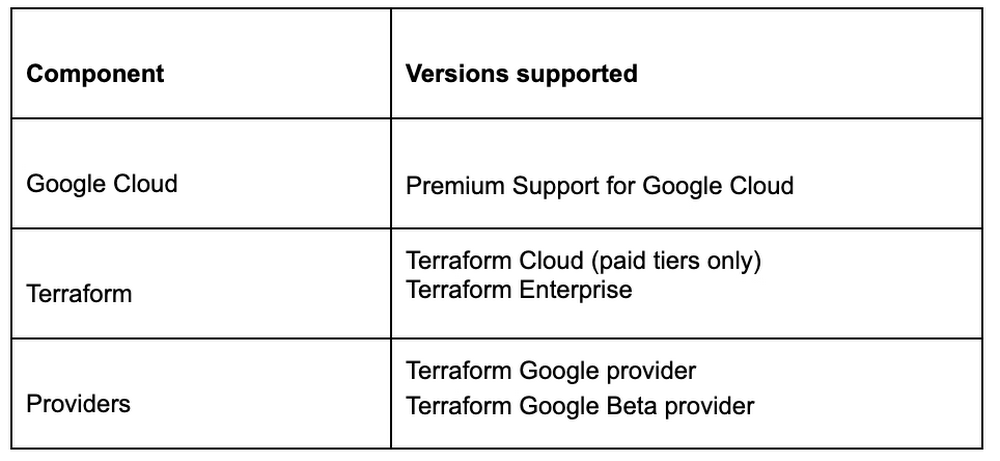
Cloud customers of all sizes require a means to reduce unplanned downtime, scale, and increase productivity while extracting the optimal value from their cloud environments. According to a leading cloud analyst, a majority of today’s businesses operate multi-cloud environments, so essential support services must also be prepared to efficiently address complex cloud environments to meet each organization’s business imperatives for sustaining a competitive advantage. After careful collection of customer feedback, Google Cloud and HashiCorp have engaged in a joint collaboration with a focus to develop a more effective support model for customers who subscribe to both Google Cloud and HashiCorp products. This innovative approach enables Google Cloud Premium Support customers and HashiCorp Terraform customers to benefit from a seamless support process which answers the who, where, when and how for technical issues and enables a faster route to resolution.A robust cloud support approachImproving customer satisfaction remains at the heart of the service challenge for technical support requirements for both organization’s customers. As a result, this proven approach was designed to deliver a simplified yet efficient cloud support experience enabling customers to access a seamless, multi-cloud support service where issues are identified, addressed and resolved. This responsive support model eliminates customer uncertainty and ensures that technical issues, no matter the origin of submission, both Google Cloud and HashiCorp support teams place each customer’s issue as a priority in their respective support queues to progress the technical case with awareness made available to both organizations till the issue has been resolved.“Google Cloud is an important partner to HashiCorp, and our enterprise customers use HashiCorp Terraform and Google Cloud to deploy mission critical infrastructure at scale. With 70 million downloads of the Terraform Google Provider this year and growing, we’re excited to collaborate closely with Google Cloud to offer our joint customers a seamless experience which we believe will significantly enhance their experience on Google Cloud.” – Burzin Patel, HashiCorp VP, Global Partner AlliancesManaging cloud investments using multiple cloud providers and apps can require complex troubleshooting. That’s why Google Cloud, Third-Party Technology Support is included as a feature with Premium Support for Google Cloud and is focused to resolve multi-vendor issues in a seamless manner along with organization setup, configuration, and troubleshooting. HashiCorp, a Google technology partner, engages in ongoing collaborations with Google Cloud to develop and ensure infrastructure innovation in the cloud. Premium Support for Google Cloud customers receive technical support services that enable them to focus on their core business and include the world-class capabilities of Technical Account Management (i.e. named Technical Account Manager); Active Assist Recommendations API (i.e. generates proactive system recommendations), Operational Health Reviews (i.e. monthly system improvement reports), and Third-Party Technology Support (i.e. service that streamlines support for multi-cloud environments), while Terraform Cloud and Terraform Enterprise secure the most expedient route to resolve their technical issues (see Table 1).Table 1: Providers and products supportedIn this joint support approach, customers with Google Cloud or HashiCorp support gain the option to submit a support case with either organization. With each case submission, the customer receives the best time-to-resolution as both organizations can help resolve the case. The submitted case initiates a detailed workflow for case progression where both organizations collaborate throughout the life-of-the-case. This ensures each customer receives the right level of technical expertise throughout the entirety of the case, delivering an end-to-end, connected support experience.When a Premium Support for Google Cloud customer chooses to contact Google Cloud Support to initiate a technical case, the Premium Support team leads the troubleshooting for the submitted issue. Should the Premium Support team determine that the issue is isolated to HashiCorp components, the customer will be instructed to open a case with HashiCorp. This is when Premium Support shares the previously collected information with the HashiCorp Support team. The Premium Support team retains the case as open until it is confirmed that HashiCorp Support has driven the case to resolution (see Figure 1). This streamlined, behind-the-scenes approach remains seamless to the customer and ensures ease of use and access to case information not otherwise made available to cloud customers. The same process remains true if or when a Google Premium Support customer initiates their technical issue with the HashiCorp Support team.Figure 1: Collaborative cloud support modelIn summaryAfter strategic collaboration and in direct response to customer feedback, Google Cloud Support and HashiCorp Support have developed a more efficient cloud support service model for their customers in common. This support model enables Premium Support for Google Cloud customers and Terraform support for HashiCorp customers to eliminate uncertainty for submission of technical issues and enables the reduction of the time-to-resolution. With the majority of today’s businesses having the complexity of multi-cloud environments, Google Cloud and HashiCorp jointly deliver a more simplified process for subscribed cloud customers to submit and resolve their technical issues.To learn more visit:Google CloudThird-party Technology SupportCustomer Care Services  Premium Support for Google CloudTerraformTerraform with Google Cloud – Best PracticesTerraform Cloud Product OverviewTerraform Google ProviderTerraform Google Beta ProviderFor questions, email:  hashicorp-terraform-gcp-support@google.com
Quelle: Google Cloud Platform

How Deutsche Bank is building cloud skills at scale

Deutsche Bank (DB) is the leading bank in Germany with strong European roots and a global network. DB was eager to reduce its workload for managing legacy infrastructure, so that their engineering community could instead focus on modernizing their financial service offerings. The bank’s desire for solutions that could dynamically scale to meet demand and reduced time to market for new applications was a key driver for migrating its infrastructure to the cloud. Deutsche Bank and Google Cloud signed a strategic partnership in late 2020 to accelerate the bank’s transition to the cloud and co-innovate the next generation of cloud-based financial services. This multi-year partnership is the first of its kind for the financial service industry. In the process of migrating its core on-premises systems to Google Cloud, Deutsche Bank became acutely aware of the need to increase its technical self-sufficiency internally through talent development and enterprise-wide upskilling. Demand for cloud computing expertise has been surging across all sectors, and growth in cloud skills and training has been unable to keep pace with industry-wide cloud migration initiatives. Asrecent reports suggest, organizations need to be taking proactive steps to grow these talent pools themselves. For Deutsche Bank, the scale of the skills and talent development challenge it was facing was significant. Following many years of drawing help from outside contractors, much of the bank’s engineering capability and domain knowledge was now concentrated outside their full-time workforce. This was exacerbated by fierce competition for cloud skills expertise across the industry as a whole. There was a clear and present need to reinvigorate DB’s engineering culture, so developing, attracting, and retaining talent became a key dimension of the bank’s cloud transformation journey. A recent IDC study1 demonstrates that comprehensively trained organizations drive developer productivity, boost innovation, and increase employee retention. With around 15,000 employees in their Technology, Data and Innovation (TDI) division across dozens of locations, DB needed to think strategically about how to deliver comprehensive learning experiences across multiple modalities, while still ensuring value for money. Through the strategic partnership, Deutsche Bank could now draw upon the expertise and resources of Google Cloud Customer Experience services, such as Google Cloud Premium Support, Consulting and Learning services, to develop a new structured learning program that could meet its businesses’ needs and target its specific skill gaps. With Premium Support, Deutsche Bank was able to collaborate with a Technical Account Manager (TAM) to receive proactive guidance on how to ensure the proposed learning program supported the bank’s wider cloud-migration processes. To guarantee this project’s success, the TAM supporting Deutsche Bank connected with a wide range of domains across the Deutsche Bank, including apps and data, infrastructure and architecture, and onboarding and controls. Cloud Consulting services also worked with DB to consider the long-term impacts of the program and how it could be continuously improved to help build a supportive, dynamic engineering culture across the business as whole. Google Cloud Learning services made this talent development initiative a reality by providing the necessary systems, expertise, and project management to help Deutsche Bank implement this enterprise-wide certification program. In a complex, regulated industry like financial services, the need for content specificity is particularly acute. This new Deutsche Bank Cloud Engineering program leverages expert-created content and a cohort approach to provide learners with content tailored to their business needs, while also enabling reflection, discussion, and debate between peers and subject matter experts. Instructor-led training is deliberately agile and is being iterated across multiple modalities to help close any emerging gaps in DB employees’ skill sets, and to ensure the right teams are prioritized for specific learning opportunities.Google Cloud Skills Boost is another essential component of Deutsche Bank’s strategy to increase its technical self-sufficiency. With Google Cloud’s help, Deutsche Bank was able to create curated learning paths designed to boost cloud skills in a particular area. Through a combination of on-demand courses, quests, and hands-on labs, DB provided specialized training across multiple teams simultaneously, each of whom have different needs and levels of technical expertise. Google Cloud Skills Boost also provides a unified learning profile so that individuals can easily track their learning journeys, while also providing easier cohort management for administrators. It was equally important to establish an ongoing, shared space for upskilling to reinforce a culture of continuous professional development. Every month Deutsche Bank now runs an “Engineering Day” dedicated to learning, where every technologist is encouraged to focus on developing new skills. Many of these sessions are led by DB subject matter experts, and they explore how the bank is using a certain Google Cloud product or service in their current projects. Alongside this broader enterprise-wide initiative, a more targeted approach was also taken to provide two back-to-back training cohorts with the opportunity to learn directly from Google Cloud’s own artificial intelligence (AI) and machine learning (ML) engineers via the Advanced Solutions Lab (ASL). This allowed DB’s own data science and machine learning (ML) experts to explore the use of MLOps onVertex AIfor the first time, allowing them to build end-to-end ML pipelines on Google Cloud, automating the whole ML process. “The Advanced Solutions Lab has really enabled us to accelerate our progress on innovation initiatives, developing prototypes to explore S&P stock prediction and how apps might be configured to help partially sighted people recognize currency in their hand. These ASL programs were a great infusion of creativity, as well as an opportunity to form relationships and build up our internal expertise.” — Mark Stokell, Head of Data & Analytics, Cloud & Innovation Network, Deutsche Bank In the first 18 months of the strategic partnership, over 5,000 individuals were trained —adding nearly 10 new Google Cloud Certifications a week—and over 1,400 engineers were supported to achieve their internal DB Cloud Engineering certification. Such high numbers of uptake and engagement with this new learning program signals its success and the value of continuing to invest in ongoing professional development for TDI employees. “Skill development is a critical enabler to our long-term success. Through a mix of instructor-led training, enhancing our events with gamified Cloud Hero events, and providing opportunities for continuous development with Google Cloud Skills Boost, it genuinely feels like we’ve been engaging with the whole firm. With our cohort-based programs, we are pioneering innovative ways to enable learning at scale, which motivate hundreds of employees to make tangible progress and achieve certifications. With consistently high satisfaction scores, our learners clearly love it.” — Andrey Tapekha, CTO of North America Technology Center, Deutsche BankAfter such a successful start to its talent development journey, Deutsche Bank is now better prepared to address the ongoing opportunities and challenges of its cloud transformation journey. Building on the shared resources and expertise of their strategic partnership, DB and Google Cloud are now turning their attention toassessing the impact of this learning program across the enterprise as a whole, and considering how the establishment of a supportive, dynamic learning culture can be leveraged to attract new talent to the company. To learn more about how Google Cloud Customer Experience services can support your organization’s talent transformation journey, visit: ● Google Cloud Premium Support to empower business innovation with expert-led technical guidance and support ● Google Cloud Training & Certification to expand and diversify your team’s cloud education ● Google Cloud Consulting services to ensure your solutions meet your business needs 1. IDC White paper, sponsored by Google Cloud Learning, To Maximize Your Cloud Benefits, Maximize Training, March 2022, IDC #US48867222.
Quelle: Google Cloud Platform

Best practices for migrating Hadoop to Dataproc by LiveRamp

AbstractIn this blog, we describe our journey to the cloud and share some lessons we learned along the way. Our hope is that you’ll find this information helpful as you go through the decision, execution, and completion of your own migration to the cloud.IntroductionLiveRamp is a data enablement platform powered by identity, centered on privacy, integrated everywhere. Everything we do centers on making data safe and easy for businesses to use. Our Safe Haven platform powers customer intelligence, engages customers at scale, and creates breakthrough opportunities for business growth.Businesses safely and securely bring us their data for enrichment and use the insights gained to deliver better customer experiences and generate more valuable business outcomes. Our fully interoperable and neutral infrastructure delivers end-to-end addressability for the world’s top brands, agencies, and publishers. Our platforms are designed to handle the variability and surge of the workload and guarantee service-level agreements (SLAs) to businesses. We process petabytes of batch and streaming data daily. We ingest, process (join and enhance), and distribute this data. We receive and distribute data from thousands of partners and customers on a daily basis. We maintain the world’s largest and most accurate identity graph and work with more than 50 leading demand-side and supply-side platforms.Our decision to migrate to Google Cloud and DataprocAs an early adopter of Apache Hadoop, we had a single on-prem production managed Hadoop cluster that was used to store all of LiveRamp’s persistent data (HDFS) and run the Hadoop jobs that make up our data pipeline (YARN). The cluster consisted of around 2500 physical machines with a total of 30PB or raw storage, ~90,000 vcores, and ~300TB of memory.  Engineering teams managed and ran multiple MapReduce jobs on these clusters. The sheer volume of applications that LiveRamp ran on this cluster caused frequent resource contention issues, not to mention potentially widespread outages if an application was tuned improperly. Our business was scaling and we were running into constraints related to data center space and power in our on-premises environment. These constraints restricted our ability to meet our business objectives so a strategic decision was made to leverage elastic environments and migrate to the cloud. The decision required financial analysis and a detailed understanding of the available options, from do-it-yourself and vendor-managed distributions to leveraging cloud-managed services. LiveRamp’s target architectureWe ultimately chose Google Cloud and Dataproc, a managed service for Hadoop, Spark, and other big data frameworks. During the migration we made a few fundamental changes to our Hadoop infrastructure:Instead of 1 large persistent cluster managed by a central team, we have decentralized the cluster ownership to individual teams. This gave the teams flexibility to recreate, perform upgrades or change configurations as they see fit. This also gives us better cost attribution, less blast radius for errors, and less chance that – a rogue job from one team will impact the rest of the workloads.Persistent data is no longer stored in HDFS on the clusters, it is in Google Cloud Storage, which, conveniently, served as a drop in replacement, as GCS is compatible with all the same APIs as HDFS. This means we can delete all the virtual machines that are part of the cluster without losing any data.Introduced autoscaling clusters to control compute cost, and to dramatically decrease request latency. On premise you’re paying for the machines so you might as well use them. Cloud compute is elastic so you want to burst when there is demand and scale down when you can.For example, one of our teams runs about 100,000 daily Spark jobs on 12 Dataproc clusters that each independently scale up to 1000 VMs. This gives that team a current peak capacity of about 256,000 cores. Because the team is bound to its own GCP Project inside of a GCP Organization, the cost attributed to that team is now very easy to report. The team uses architecture represented below to distribute the jobs across the clusters. This architecture allows them to bin similar workloads together so that they can be optimized together. Below is the logical architecture of the above workload:There will be a blog post in future that will talk about this workload in detail.Our approachOverall migration and post migration stabilization/optimization of the largest of our workloads took us about several years to complete. We broadly broke down the migration into multiple phases.Initial Proof-Of-ConceptWhen analyzing solutions for cloud-hosted big data services, any product had to meet our clear acceptance criteria:1. Cost: Dataproc is not particularly expensive compared to similar alternatives, but our discount with the existing managed Hadoop partner made it expensive. We have initially accepted that the cost would remain the same.  We did see cost benefits post migration, after several rounds of optimizations.2. Features: Some key features (compared to current state) that we were looking for are built-in autoscaler, ease of creating/updating/deleting clusters, managed big data technologies etc.3. Integration with GCP: As we had already decided to move other LiveRamp-owned services to GCP, a big data platform with robust integration with GCP was a must. Basically, we’d like to be able to leverage GCP features without a lot of effort on our end (custom vms, preemptible vms, etc).4. Performance: Cluster creation, deletion, scale up, and scale down should be fast. This will allow teams to iterate and react quickly. These are some rough estimates of how fast the cluster operations should be: Cluster creation:  <15 minutesCluster Deletion: <15 minutesAdding 50 nodes: <20 minutesRemoving 200 nodes: <10 minutes 5. Reliability: Bug free and low downtime software that has concrete SLAs on clusters and a strong commitment to the correct functioning of all of its features.An initial prototype to better understand Dataproc and Google Cloud helped us prove that target technologies and architecture will give us reliability and cost improvements. This also fed into our decisions around target architecture. This was then reviewed by the Google team before we embarked on the migration journey. Overall migrationTerraform moduleOur ultimate goal is to create self-service tooling that allows our data engineers to deploy infrastructure as easily and safely as possible. After defining some best practices around cluster creation and configuration, the central team’s first step was to build a terraform module that can be used by all the teams to create their own clusters. This module will create a dataproc cluster along with all supporting buckets, pods and datadog monitors:A dataproc cluster autoscaling policy that can be customizedA dataproc cluster with LiveRamp defaults preconfiguredSidecar applications for recording job metrics from the job history server and for monitoring the cluster healthPre configured datadog cluster health monitors for alertingThis Terraform module is also composed of multiple supporting modules underneath. This allows users to call the supporting modules directly in your project terraform as well if such a need arises.  The module can be used to create a cluster by just setting the parameters like project id, path to application source (Spark or Map/Reduce), subnet, VM instance type, auto scaling policy etc.Workload migrationBased on our analysis of Dataproc, discussions with GCP team and the POC, we used following criteria:We prioritized applications that can use preemptibles to achieve cost parity to our existing workloads We prioritized some of our smaller workloads initially to build momentum within the organization. For example, we left the single workload that accounted for ~40% of our overall batch volume to the end, after we had gained enough experience as an organization.We combined the migration to Spark along with the migration to Dataproc. This has initially resulted in some extra dev work but helped reduce the effort for testing and other activities.Our initial approach was to lift and shift from existing managed providers and Map/Reduce to Dataproc and Spark. We then later focused on optimizing the workloads for cost and reliability.What’s working wellCost AttributionAs is true with any business, it’s important to know where your cost centers are. Moving from a single cluster, made opaque by the number of teams loading work onto it, to GCP’s Organization/Project structure has made cost reporting very simple. The tool breaks down cost by project, but also allows us to attribute cost to a single cluster via tagging. As we sometimes deploy a single application to a cluster, this helps us to make strategic decisions on cost optimizations at an application level very easily. FlexibilityThe programmatic nature of deploying Hadoop clusters in a cloud like GCP dramatically reduces the time and effort involved in making infrastructure changes. LiveRamp’s use of a self-service Terraform module means that a data engineering team can very quickly iterate on cluster configurations. This allows a team to create a cluster that is best for their application while also adhering to our security and health monitoring standards. We also get all the benefits of infrastructure as code: highly complicated infrastructure state is version controlled and can be easily recreated and modified in a safe way.SupportWhen our teams face issues with services that run on Dataproc, the GCP team is always quick to respond. They work very closely with LiveRamp to develop new features for our needs. They proactively provide LiveRamp with preview access to new features that help LiveRamp to stay ahead of the curve in the Data Industry.Cost SavingsWe have achieved around 30% cost savings in certain clusters by achieving the right balance between on-demand and PVMs. The cost savings were a result of our engineers building efficient A/B testing frameworks that helped us run the clusters/jobs in several configurations to arrive at the most reliable, maintainable and cost efficient configuration. Also, one of the applications is now 10x + faster.Five lessons learnedMigration was a successful exercise that took about six months to complete, across all our teams and applications. While many aspects went really well, we also learned a few things along the way that we hope will help you when planning your own migration journey. 1. Benchmark, benchmark, benchmark It’s always a good idea to benchmark the current platform against the future platform to compare costs and performance. On-premises environments have a fixed capacity, while cloud platforms can scale to meet workload needs. Therefore, it’s essential to ensure that the current behavior of the key workload is clearly understood before the migration. 2. Focus on one thing at a timeWe initially focused on reliability while remaining cost-neutral during the migration process, and then focused on cost optimization post-migration. Google teams were very helpful and instrumental in identifying cost optimization opportunities. 3. Be aware of alpha and beta productsAlthough there usually aren’t any guarantees of a final feature set when it comes to pre-released products, you can still get a sense of their stability and create a partnership if you have a specific use case. In our specific use case, Enhanced Flexibility Mode was in alpha stage in April 2019, beta in August 2020, and released in July 2021. Therefore, it was helpful to check in on the product offering and understand its level of stability so we could carry out risk analysis and decide when we felt comfortable adopting it.4. Think about quotasOur Dataproc clusters could support much higher node counts than was possible with our previous vendor. This meant we often had to increase IP space and change quotas, especially as we tried out new VM and disk configurations.5. Preemptable and committed use discounts (CUDs)CUDs make compute less expensive while preemptables make compute significantly less expensive. However, preemptibles don’t count against your CUD purchases, so make sure you understand the impact on your CUD utilization when you start to migrate to preemptables.We hope these lessons will help you in your Data Cloud  journey.
Quelle: Google Cloud Platform

Cloud makes it better: What's new and next for data security

Today’s digital economy offers a wealth of opportunities, but those opportunities come with growing risks. It has become increasingly important to manage the risks posed by the intersection of digital resilience and today’s risk landscape. Organizations around the world should be asking themselves: If a risk becomes a material threat, how can we help our employees continue to get work done efficiently and securely despite unexpected disruption, no matter where they are? This new era of “anywhere work” is not only a technology issue, but one that encompasses leadership support and cultural shifts. In a recent webinar, Heidi Shey, principal analyst at Forrester, and Anton Chuvakin, senior staff, Office of the CISO at Google Cloud, had a spirited discussion about the future of data security. They agreed that this is a moment of inflection, when smart organizations are rethinking their entire security approach and using the opportunity to take a closer look at their security technology stack at the same time. Here are some trends that they are seeing today.Greater volume, more variety. The data that organizations generate is not only increasing in volume, but in variety as well. Sensitive information can exist anywhere, including employee communications, messaging applications, and virtual meetings, making traditional techniques for classifying data such as manual tagging less effective. Organizations need to grow their risk intelligence by using artificial intelligence (AI) and machine learning (ML) to better identify and protect sensitive information. At the same time, employees are accessing enterprise data in multiple ways, on multiple devices, wreaking havoc on traditional security perimeters and anomaly detection. A more strategic approach. Multiplying threat vectors and vulnerabilities often drive organizations into a losing game of whack-a-mole as they acquire more and more point solutions, which leads to information silos and visibility gaps. While security modernization doesn’t require a rip-and-replace, its success depends on a more strategic approach to choosing and applying controls. Successful organizations are being deliberate in creating an ecosystem of controls that interoperate and reduce data silos and visibility gaps. Zero Trust. Central to any modern security strategy should be a Zero Trust approach to user and network access, not only for people but also for the growing number of internet-of-things (IoT) devices that exchange enterprise data. Zero Trust means that organizations no longer implicitly trust any user or device inside or outside the corporate perimeters — nor should they. Rather, a company must verify that attempts to connect to a network or application are authorized before granting access. Zero Trust replaces the perimeter security model between a trusted internal network and an untrusted external network – including virtual private networks (VPNs) used to access corporate data remotely. Unlike a traditional perimeter model in which a network could become compromised if a hacker breached the organization or if a malicious insider attempts to steal a company’s sensitive data, a Zero Trust approach helps ensure users only have access to the specific resources they need at a point in time.Growing supply chain networks. As organizations expand their supply chains to increase resilience and efficiency, they need a way for vendors, customers, and other third parties to securely access the data and applications necessary to conduct business. A Zero Trust approach to access can provide a scalable solution to meet this need. Enterprise security solutions with the speed, intelligence, and scale of GoogleCybersecurity is ever-evolving as new threats arise daily. Google Cloud’s approach takes advantage of Google’s experience securing more than 5 billion devices and keeping more people safe online than any other organization. Google Cloud brings our pioneering approaches to cloud-first security to enterprises everywhere they operate, leveraging the unmatched scale of Google’s data processing, novel analytics approaches with artificial intelligence and machine learning, as well as a focus on eliminating entire classes of threats. By combining Google’s security capabilities with those of our ecosystem and alliance partners — including Cybereason, IPNet, ForgeRock, Palo Alto Networks, and SADA — we’re bringing businesses a full stack of powerful and effective solutions for managing data access, verifying identity, sharing signal information, and gaining visibility into vulnerabilities and threats. In concert with our ecosystem of partners, we will be working with Mandiant and its partners to deliver an end-to-end security operations suite with even greater capabilities to help you address the ever changing threat landscape across your cloud and on-premise environments. In sum, Google Cloud brings you the tools, insight, and partnerships that can transform your security to meet the requirements of our rapidly transforming world.  To get a deeper dive into the trends and research driving this change, watch the “Cloud Makes it Better: What’s New and Next for Data Security” webinar with Forrester and Google Cloud.
Quelle: Google Cloud Platform

Accelerate speed to insights with data exploration in Dataplex

Data Exploration Workbench in Dataplex is now generally available. What exactly does it do? How can it help you? Read on.Imagine you are an explorer embarking on an exciting expedition. You are intrigued by the possible discoveries and are anxious to get started on your journey. The last thing you need is the additional anxiety induced by running from pillar to post to get all the necessary equipment in place – protective clothing is torn, first aid kits are missing, and most of the expedition gear is malfunctioning. You end up spending more time on collecting these items rather than in the actual expedition. If you are a Data Consumer (Data Analyst or Data Scientist), your data exploration journey would be similar. You too, are excited by the insights your data has in store. But, unfortunately, you, too, need to integrate a variety of tools to stand up the required infrastructure, get access to data, fix data issues, enhance data quality, manage metadata, query the data interactively, and then operationalize your analysis.  Integrating all these tools to build a data exploration pipeline will take so much effort that you have little time left to  explore the data and generate interesting insights. This disjointed approach to data exploration is the reason why 68% of companies1 never see business value from their data. How can they? Their best data minds are busy spending 70% of their time2 just figuring out how to make all these different data exploration tools work.How is the data exploration workbench solving this problem?Now imagine you having access to all the best expedition equipment in one place. You can start your exploration instantly and have more freedom to experiment and uncover fascinating discoveries that will help humanity! Wouldn’t it be awesome if you too, as a Data Consumer,  get access to all the data exploration tools in one place? A single unified view that lets you discover and interactively query fully governed high-quality data with an option to operationalize your analysis?  This is exactly what the Data exploration workbench in Dataplex offers. It provides a Spark-powered serverless data exploration experience that lets data consumers interactively extract insights from data stored in Google Cloud Storage and BigQuery using Spark SQL scripts and open source packages in Jupyter NotebooksHow does it  work?Here is how data exploration workbench tackles the four most popular pain points faced by Data Consumers and Data Administrators during the exploration journey:Challenge 1: As a data consumer you spend more time on making different tools work together than on generating insights Solution: Data exploration workbench provides a single user interface where:You have 1-click access to run Spark SQL queries using an interactive Spark SQL editor.You can leverage open-source technologies such as PySpark, Bokeh, Plotly to visualize data and build machine learning pipelines via JupyterLab Notebooks.Your queries and notebooks run on fully managed, serverless Apache Spark sessions – Dataplex  auto-creates user-specific sessions and manages the session lifecycle.You can save the scripts and notebooks as content in Dataplex and enable better discovery and collaboration of that content across your organization. You can also govern access to content using IAM permissions. You can interactively explore data, collaborate over your work, and operationalize it with one-click scheduling of scripts and notebooks.Challenge 2: Discovering the right datasets needed to kickstart data exploration is often a “manual” process that involves reaching out to other analysts/data ownersSolution:  ‘Do we have the right data to embark on further data analysis?’ – This is the question that kickstarts the data exploration journey. With Dataplex, you can examine the metadata of the tables you want to query right from within the data exploration workbench. You can further use the indexed Search to understand not only the technical metadata but business and operational metadata along with the data quality scores for your data. And finally, you get deeper insights into your data by interactively querying  using the Workbench. Challenge 3:  Finding the right query snippet to use —analysts often don’t save and share useful query snippets in an organized or centralized way. Furthermore, once you have access to the code, you now need to recreate the same infrastructure setup to get results.Solution: Data exploration workbench allows users to save Spark SQL queries and Jupyter notebooks as content and share them  across the organization via IAM permissions. It provides a built-in Notebook viewer that helps you examine the output of a shared notebook without starting a Spark session or re-executing the code cells. You can not only share the content of a script or a notebook, but also the environment where the script ran to ensure others can run on the same underlying set up. This way, analysts can seamlessly collaborate and build on the analysis. Challenge 4: Provisioning the infrastructure necessary to support different data exploration workloads across the organization is an inefficient process with limited observability.Solution: Data Administrators can pre-configure Spark environments with the right compute capacity, software packages, and auto-scaling/auto-shutdown configurations for different use cases and teams. They can govern access to these environments via IAM permissions and easily track usage and attribution per user or environment.  How can I get started?To get started with the Data exploration workbench, visit the Explore tab in Dataplex. You choose the lake of your choice and the resource browser will list all the data tables (GCS and BigQuery) in the lake. Before you start: Make sure the lake where your data resides is federated with a Dataproc Metastore instance. Request your data administrator to set up an environment and grant you Developer role or associated or IAM permissions.You can then choose to query the data using Spark SQL scripts or Jupyter notebooks. You will be priced as per the Dataplex premium processing tier for the computational and storage resources used during querying.Data Exploration Workbench is available in us-central1 and europe-west2 regions. It will be available in more regions in the coming months. 1. Data Catalog Study, Dresner Advisory Services, LLC – June 15, 20202. https://www.anaconda.com/state-of-data-science-2020
Quelle: Google Cloud Platform

Introducing automated failover for private workloads using Cloud DNS routing policies with health checks

High availability is an important consideration for many customers and we’re happy to introduce health checking for private workloads in Cloud DNS to build business continuity/disaster recovery (BC/DR) architectures. Typical BC/DR architectures are built using multi-regional deployments on Google Cloud. In a previous blog post, we showed how highly available global applications can be published using Cloud DNS routing policies. The globally distributed, policy-based DNS configuration provided reliability, but in case of a failure, it required manual intervention to update the geo-location policy configuration. In this blog we will use Cloud DNS health check support for Internal Load Balancers to automatically failover to health instances. We will use the same setup we used in the previous blog. We have an internal knowledge-sharing web application. It uses a classic two-tier architecture: front-end servers tasked to serve web requests from our engineers and back-end servers containing the data for our application. Our San Francisco, Paris, and Tokyo engineers will use this application, so we decided to deploy our servers in three Google Cloud regions for better latency, performance, and lower cost.High level designThe wiki application is accessible in each region via an Internal Load Balancer (ILB). Engineers use the domain name wiki.example.com  to connect to the front-end web app over Interconnect or VPN. The geo-location policy will use the Google Cloud region where the Interconnect or VPN lands as the source for the traffic and look for the closest available endpoint.DNS resolution based on the location of the userWith the above setup, if our application in one of the regions goes down, we have to manually update the geo-location policy and remove the affected region from the configuration. Until someone detects the failure and updates the policy, the end users close to that region will not be able to reach the application. Not a great user experience. How can we design this better? Google Cloud is introducing Cloud DNS health check support for Internal Load balancers. For an internal TCP/UDP load balancer, we can use the existing health checks for a back-end service, and Cloud DNS will receive direct health signals from the individual back-end instances. This enables automatic failover when the endpoints fail their health checks.For example, if the US frontend service is unhealthy, Cloud DNS may return the closest region load balancer IP (in our example, Tokyo’s) to the San Francisco clients depending on the latency.DNS resolution based on the location of the user and health of ILBs backendsEnabling the health checks for the wiki.example.com record provides us with automatic failover in case of a failure and ensures that Cloud DNS always returns only the healthy endpoints in response to the client queries. This removes manual intervention and significantly improves the failover time.The Cloud DNS routing policy configuration would look like this:Creating the Cloud DNS managed zone:code_block[StructValue([(u’code’, u’gcloud dns managed-zones create wiki-private-zone \rn –description=”DNS Zone for the front-end servers of the wiki application” \rn –dns-name=wiki.example.com \rn –networks=prod-vpc \rn –visibility=private’), (u’language’, u”), (u’caption’, <wagtail.wagtailcore.rich_text.RichText object at 0x3ed50078bcd0>)])]Creating the Cloud DNS Record set:For health checking to work, we need to reference the ILB using the ILB forwarding rule name. If we use the ILB IP instead, then Cloud DNS will not check the health of the endpoint. See the official documentation page for more information on how to configure Cloud DNS routing policies with health checks.code_block[StructValue([(u’code’, u’gcloud dns record-sets create front.wiki.example.com. \rn–ttl=30 \rn–type=A \rn–zone=wiki-private-zone \rn–routing-policy-type=GEO \rn–routing-policy-data=”us-west2=us-ilb-forwarding-rule;europe-west1=eu-ilb-forwarding-rule;asia-northeast1=asia-ilb-forwarding-rule” \rn–enable-health-checking’), (u’language’, u”), (u’caption’, <wagtail.wagtailcore.rich_text.RichText object at 0x3ed50078b750>)])]Note: Cloud DNS uses the health checks configured on the load balancers itself. Users do not need to configure any additional health checks for Cloud DNS. See the official documentation page for information on how to create health checks for GCP Load Balancers.With this configuration, if we were to lose the application in one region due to an incident, the health checks on the ILB would fail, and Cloud DNS would automatically resolve new user queries to the next closest healthy endpoint.We can expand this configuration to ensure that front-end servers send traffic only to healthy bank-end servers in the region closest to them. We would configure front-end servers to connect to the global hostname backend.wiki.example.com.The Cloud DNS geo-location policy with health checks will use the front-end servers’ GCP region information to resolve this hostname to the closest available healthy back-end tier Internal Load Balancer.Front-end to back-end communication (instance to instance)Putting it all together, we now have set up our multi-regional and multi-tiered application with DNS policies to automatically failover to a healthy endpoint closest to the end user.
Quelle: Google Cloud Platform