Can writing code be emotional? Google Cloud’s Kelsey Hightower says yes

Editor’s note: Kelsey Hightower is Google Cloud’s Principal Developer Advocate, meeting customers, contributing to open source projects, and speaking at internal and external events on cutting-edge technologies in cloud computing. A deep thinker and a charismatic speaker, he’s also unusually adept at championing a rarely-noticed aspect of software engineering; it’s really emotional stuff.So how does one become Google Cloud’s Principal Developer Advocate?A big part of the role is elevating people. I speak and give demos at conferences as well as contribute and participate in Open Source projects, which allows me to get to know a lot of different communities. I’m always trying to learn new things, which involves asking people if they can teach me something, or if we can learn together. I also try to spend a lot of time with customers, working on getting a strong sense of what it’s like to be in different positions in a team and working with our products to solve problems. It’s the best way I know to build trust and help people succeed.Is this something you can learn, or does it take a certain type of person?My career is built around learning to make people successful, starting with myself. I left college when I saw the courses were generically sending people up a ladder. I read a test prep book for CompTIA A+, a qualification that gives people a good overview of the IT world. I passed, and got a job and mentor at BellSouth. We’d troubleshoot, learn the fundamentals, and use our imaginations to solve problems. After that I opened an electronics store 30 miles south of Atlanta, making sure I stocked things people really needed, such as  new modems and surge protectors anticipating the next lightning storm – I was always thinking about customers’ problems. Weekends I held free courses for people who’d bought technical books. When you teach something, you learn too. My customers and students didn’t have a lot of money, but wanted the best computing experience at the lowest cost possible.I moved on from there, learning more about software and systems and doing a lot of work in open source Python, Configuration Management, and eventually Kubernetes.  A lot of what I’m doing hasn’t changed, on a fundamental level. I’m helping people, elevating people, and learning.What has doing this work taught you?Creating good software is very emotional. No, really. I can feel it when I’m doing a live demo of a serverless system, and I point out that there are no Virtual Machines. The audience sighs because the big pain point is gone. I feel it in myself when I encounter a new open source project, and I can tell what it could mean for people – I try to bottle that, and bring that feeling to customer meetings, demos, or whiteboards. It’s like I have a new sense of possibility, and I can feel people react to that. When I’m writing code, I feel like someone does when they’re cooking something good, and you can’t wait for people to taste what they’ve made – “I can’t wait for them to try this code, they are going to love this!”A few years ago I started our Empathetic Engineering practice, which enables people at Google Cloud to get a better sense of what it’s like for customers to work with our technology. The program has had a lot of success, but I think one of the most important payoffs is that people are happier when they feel they are connecting on a deeper level with the customers.Related ArticleJason Wellman is bullish on Cloud’s ability to transform healthcare – here’s whyGoogle Cloud’s Jason Wellman has watched cloud computing evolve over his past 15 years at Google. Hear why he’s bullish on Cloud’s abilit…Read Article
Quelle: Google Cloud Platform

Cloud CISO Perspectives: October 2022

Welcome to October’s Cloud CISO Perspectives. This month, we’re focusing on our just-completed Google Cloud Next conference and Mandiant’s inaugural mWise Conference, and what our slate of cybersecurity announcements can reveal about how we are approaching the thorniest cybersecurity challenges facing the industry today. As I wrote in last month’s newsletter, a big part of our strategy involves integrating Mandiant’s threat intelligence with our own to help improve our ability to stop threats and to modernize the overall state of security operations faster than ever before. We focused on the democratization of SecOps to help provide better security outcomes for organizations of all sizes and levels of expertise. Therefore, it’s vital that our cybersecurity intelligence be an integral part of customer security strategies.This is all part of our vision of engineering advanced capabilities into our platforms and simplifying operations, so that stronger security outcomes can be achieved. As with all Cloud CISO Perspectives, the contents of this newsletter are posted to the Google Cloud blog. If you’re reading this on the website and you’d like to receive the email version, you can subscribe here.Next ‘22 and mWise: In pursuit of the grand challengeI recently wrote on my personal blog about the grind of routine security work, and the challenges security professionals face in moving forward through our daily tasks and toil to achieve a better security state. We focus on two fundamentals: We strive to achieve grand challenges and create exponential growth in security outcomes, and we remain equally focused on tactical improvements to reduce the wear and tear of the daily grind.Many of Google Cloud’s announcements at this year’s Next are the result of envisioning a new, improved security state, and working hard to achieve it.At this year’s Next, we took a deep dive into our security philosophy, helped customers achieve their security goals with hands-on training, and made five major security announcements: We introduced Chronicle Security Operations, which can help detect, investigate, and respond to cyberthreats with the speed, scale, and intelligence of Google.We introduced Confidential Space, which can help unlock the value of secure data collaboration.We introduced Software Delivery Shield, which can help improve software supply chain security. We detailed our latest advancements in digital sovereignty, to address the growing demand for cloud solutions with high levels of control, transparency, and sovereignty.And we introduced new and expanded Google Cloud partnerships with leaders across the security ecosystem.We also revealed new capabilities across our existing slate of security products. These include:Our Assured Open Source Software service, which we announced earlier this year, is now available in Preview.The integration of groundbreaking technology from Foreseeti, which can help teams understand their exposure and prioritize contextualized vulnerability findings, will be coming soon to Security Command Center in Preview.reCAPTCHA Enterprise will partner with Signifyd’s anti-fraud technology to bring to market a joint anti-fraud and abuse solution that can help enterprises reduce abuse, account takeovers, and payment fraud. Palo Alto Networks customers can now pair Prisma Access with BeyondCorp Enterprise Essentials to help secure private and SaaS app access while mitigating threats with a secure enterprise browsing experience. Google Workspace has received several security updates and advances. They bring data loss prevention (DLP) to Google Chat to help prevent sensitive information leaks, new Trust rules for Google Drive for more granular control of internal and external sharing, and client-side encryption in Gmail and Google Calendar to help address a broad range of data sovereignty and compliance requirements.Google Cloud Armor, which was instrumental in stopping the largest Layer 7 DDoS attack to date, was named a Strong Performer in The Forrester Wave™: Web Application Firewalls, Q3 2022. This is our debut in the WAF Wave, and it’s encouraging to see the recognition for the product in this market segment.New Private Service Connect capabilities available now in Preview include consumer-controlled security, routing, and telemetry to help enable more flexible and consistent policy for all services; support for on-prem traffic through Cloud Interconnects to PSC endpoints; support for hybrid environments; and five new partner managed services.We are expanding our Cloud Firewall product line and introducing two new tiers: Cloud Firewall Essentials and Cloud Firewall Standard. We want to help transform how organizations can secure themselves not just in the cloud but across all their environments. This also includes changing how security teams can engage and retain the support of their Boards and executive teams. At the mWise Conference held in Washington, D.C., the week following Next ‘22, in some of my remarks with Kevin Mandia we talked about the need for higher expectations of the board and CISO (and CIO) relationship to drive this transformation. We’ve written about the importance of this change here in this newsletter, and we at Google Cloud have suggested 10 questions that can help facilitate better conversations between CISOs and their boards. As you’ve seen, it’s been a bumper set of announcements and content this month. That momentum will continue as we further build the Most Trusted Cloud, now in partnership with our new colleagues from Mandiant.Google Cybersecurity Action Team highlightsHere are the latest updates, products, services and resources from our security teams this month: SecurityHow Cloud EKM can help resolve the cloud trust paradox: In the second of our “Best Kept Security Secrets” blog series, learn about Cloud External Key Manager, which can help organizations achieve even more control over their data in the cloud. Read more.Announcing new GKE functionality for streamlined security management: To help make security easier to use and manage, our new built-in Google Kubernetes Engine (GKE) security posture dashboard provides security guidance for GKE clusters and containerized workloads, insights into vulnerabilities and workload configuration checks, and offers integrated event logging so you can subscribe to alerts and stream insight data elsewhere. Read more.Introducing Sensitive Actions to help keep accounts secure: We operate in a shared fate model at Google Cloud, working in concert with our customers to help achieve stronger security outcomes. One of the ways we do this is to identify potentially risky behavior to help customers determine if action is appropriate. To this end, we now provide insights on what we are calling Sensitive Actions. Learn more.How to secure APIs against fraud and abuse with reCAPTCHA Enterprise and Apigee X: A comprehensive API security strategy requires protection from fraud and abuse. Developers can prevent attacks, reduce their API security surface area, and minimize disruption to users by implementing Google Cloud’s reCAPTCHA Enterprise and Apigee X solutions. Read more.Secure streaming data with Private Service Connect for Confluent Cloud: Organizations in highly regulated industries such as financial services and healthcare can now create fully segregated private data pipelines through a new partnership between Confluent Cloud and Google Cloud Private Service Connect. Read more.3 ways artifact registry and container analysis can help optimize and protect container workloads: Our artifact management platform can help uncover vulnerabilities present in open source software, and here are three ways to get started. Read more.Secure Cloud Run deployments with Binary Authorization: With Binary Authorization and Artifact Registry, organizations can easily define the right level of control for different production environments. Read more.Backup and Disaster Recovery strategies for BigQuery: Cloud customers need to create a robust backup and recovery strategy for analytics workloads. We walk you through different failure modes, the impact of these failures on data in BigQuery, and examine several strategies. Learn more.Industry updatesCloud makes it better: What’s new and next for data security: In a recent webinar, Heidi Shey, principal analyst at Forrester, and Anton Chuvakin, senior staff, Office of the CISO at Google Cloud, had a spirited discussion about the future of data security. Here are some trends that they are seeing today. Read more.How Chrome supports today’s workforce with secure enterprise browsing: Google Chrome’s commitment to security includes its ongoing partnership with our BeyondCorp Enterprise Zero Trust access solution. Here’s three ways that Chrome protects your organization. Read more.CUF boosted security, reduced costs, and drove energy savings with ChromeOS: José Manuel Vera, CIO of CUF, Portugal’s largest private healthcare provider, explains how ChromeOS securely enabled agile medical and patient care. Read more.Compliance & ControlsEnsuring fair and open competition in the cloud: Cloud-based computing is one of the most important developments in the digital economy in the last decade, and Google Cloud supports openness and interoperability. We have been a leader in promoting fair and open licensing for our customers since the start of the cloud revolution. Here’s why.Assured Workloads expands to new regions, gets new capabilities: Assured Workloads can help customers create and maintain controlled environments that accelerate running more secure and compliant workloads, including enforcement of data residency, administrative and personnel controls, and managing encryption keys. We’re expanding the service to Canada and Australia, and introducing new capabilities to automate onboarding and deploying regulated workloads. Read more.Google Cloud Security PodcastsWe launched a new weekly podcast focusing on Cloud Security in February 2021. Hosts Anton Chuvakin and Timothy Peacock chat with cybersecurity experts about the most important and challenging topics facing the industry today. This month, they published a record nine must-listen podcasts:Cloud security’s murky alphabet soup: Cloud security comes with its own dictionary of acronyms, and it may surprise you that not everybody’s happy with it. To help organizations with their cultural shift to the cloud, we discuss some of the most popular and contentious cloud security acronyms with Dr. Anna Belak, a director of thought leadership at our partner Sysdig. Listen here.A CISO walks into the cloud: Frustrations, successes, and lessons from the top of the cloud: Along with data, security leaders also need to migrate to the cloud. We hear from Alicja Cade, director for financial services at our Office of the CISO, on her personal cloud transformation. Listen here.Sharing The Mic In Cyber — Representation, Psychological Safety, and Security: A must-listen episode, this discussion digs into how DEIB intersects with psychological safety and cybersecurity, by guest hosts Lauren Zabierek, acting executive director of the Belfer Center at the Harvard Kennedy School, and Christina Morillo, principal security consultant at Trimark Security. Listen here.“Hacking Google,” Operation Aurora, and insider threats at Google: A wide-ranging conversation on insider threats at Google, the role that detection and response play in protecting our user’s trust, and the Google tool we call BrainAuth, with our own Mike Sinno, security engineering director, Google Detection and Response. Listen here. How virtualization transitions can make cloud transformations better: What lessons for cloud transformation can we glean from the history of virtualization, now two decades old? Thiébaut Meyer, director at Google Cloud’s Office of the CISO, talks about how the past is ever-present in the future of cloud tech. Listen here.As part of Next ‘22, Anton and Tim recorded four bonus podcasts centered on key cybersecurity themes:Celebrate the first birthday of the Google Cybersecurity Action Team: Google Cloud CISO Phil Venables sits down to chat about the first year of GCAT and its focus on helping customers. Listen here.Can we escape ransomware by migrating to the cloud: Google Cloud’s Nelly Kassem, security and compliance specialist, dives deep into whether public clouds can play a role in stopping ransomware. Listen here.Improving browser security in the hybrid work era: One of the unexpected consequences of the COVID-19 pandemic was the accelerated adoption of hybrid work. How modern browsers work with an existing enterprise stack is only one of the questions tackled by Fletcher Oliver, Chrome browser customer engineer. Listen here.Looking back at Log4j, looking forward at software dependencies and open source security: Is another log4j inevitable? What can organizations do to minimize their own risks? Are all open-source dependencies dependable? Hear the answers to these questions and more from Nicky Ringland, product manager for Google’s Open Source Insights. Listen here.To have our Cloud CISO Perspectives post delivered every month to your inbox, sign up for our newsletter. We’ll be back next month with more security-related updates.
Quelle: Google Cloud Platform

How to build customer 360 profiles using MongoDB Atlas and Google Cloud for data-driven decisions

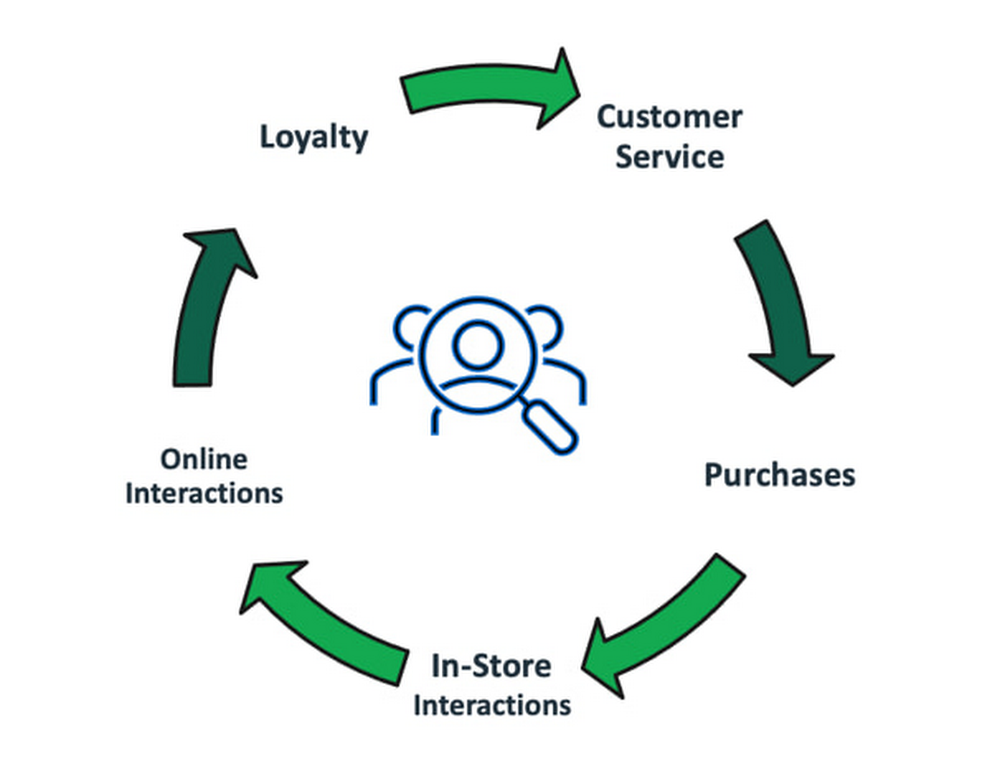
One of the biggest challenges for any retailer is to track an individual customer’s journey across multiple channels (Online and In-Store), devices, purchases, and interactions. This lack of a single view of the customer leads to a disjointed and inconsistent customer experience. Most retailers report obstacles to effective cross-channel marketing caused by inaccurate or incomplete customer data. Marketing efforts are also fragmented since the user profile data does not provide a 360˚view of customer’s experience. Insufficient information leads to  lack of visibility into customer sentiment that further hinders customer engagement and loyalty.Creating a single view of the customer across the enterprise Helps with customer engagement and loyalty by improving customer satisfaction and retention through personalization and targeted marketing communications.Helps retailers achieve higher marketing ROI by aggregating customer interactions across all channels and identifying and winning valuable new customers, resulting in increased revenues.360˚ is a relationship cycle that consists of many touch points where a customer meets the brand. The customer 360˚ solution provides an aggregated view of a customer. It collects all your customer data in one place, from customer’s primary contact information to their purchasing history, interactions with customer service, and their social media behavior.Single view of customer data records and processes:Behavior Data: Customer behavior data, including the customer’s browsing and search behavior online through click-stream data and the customer’s location if the app is location-based.Transactional Data: The transactional data includes online purchases, coupon utilization, in-store purchases, returns and refunds.Personal Information: Personal information from online registration, in-store loyalty cards and warranties will be collated into a single viewUser Profile Data: Data profiling will be used as a part of the matching and deduplication process and establish a Golden Record.  Profile segments can be utilized to enable marketing automation.An enhanced customer 360˚ solution with machine learning models can provide retailers with key capabilities for user based personalization like generating insights and orchestrate experiences for each customer.On October 1st 2022, we announced Dataflow templates that simplify the moving and processing of data between MongoDB Atlas and BigQuery.Dataflow is a truly unified stream and batch data processing system that’s serverless, fast, and cost-effective. Dataflow templates allow you to package a Dataflow pipeline for deployment. Templates have several advantages over directly deploying a pipeline to Dataflow. The Dataflow templates and the Dataflow page make it easier to define the source, target, transformations, and other logic to apply to the data. You can key in all the connection parameters through the Dataflow page, and with a click, the Dataflow job is triggered to move the data to BigQuery.BigQuery is a fully managed data warehouse that is designed for running analytical processing (OLAP) at any scale. BigQuery has built-in features like machine learning, geospatial analysis, data sharing, log analytics, and business intelligence.This integration enables Customers to move and transform data from MongoDB to BigQuery for aggregation and complex analytics. They can further take advantage of BigQuery’s Built-in ML and AI integrations for predictive analytics, fraud detection, real-time personalization, and other advanced analytics use cases.This blog talks about how Retailers can use fully managed MongoDB Atlas and Google Cloud services to build customer 360 profiles , the architecture and the reusable repository that customers can use to implement the Reference Architecture in their environmentsAs part of this reference architecture, we have considered four key data sources – user’s browsing behavior, orders, user demographic information, and product catalog. The diagram below illustrates the data sources that are used for building a single view of the customer, and some  key business outputs that can be driven from this data.The technical architecture diagram below shows how MongoDB and Google Cloud can be leveraged to provide a comprehensive view of the customer journey.The Reference Architecture consists of the following processes:1. Data IngestionDisparate data sources are brought together in the data ingestion phase.  Typically we integrate a wide array of data sources, such as Online Behavior, Purchases (Online and In-Store), Refunds, Returns and other enterprise data sources such as CRM and Loyalty platforms. In this example, we have considered four representative data sources: User profile data through User ProfilesProduct CatalogTransactional data through OrdersBehavioral data through Clickstream EventsUser profile data, product catalog, and orders data are ingested from MongoDB, and click-stream events from web server log files are ingested from csv files stored on Cloud Storage.The data ingestion process should support an initial batch load of historical data and dynamic change processing in near real-time. Near real-time changes can be ingested using a combination of MongoDB Change Streams functionality and Google PubSub to ensure high throughput and low latency design. 2. Data ProcessingThe data is converted from the the document format in MongoDB to the row and column format of BigQuery and loaded into BigQuery from MongoDB Atlas using the Google Cloud Dataflow Templates and Cloud Storage Text to BigQuery Dataflow templates to move CSV files to BQ.Google Cloud Dataflow templates orchestrate the data processing and the aggregated data can be used to train ML models and generate business insights. Key analytical insights like ​​product recommendations are brought back to MongoDB to enrich the user data.3. AI & ML The reference architecture leverages the advanced capabilities of Google Cloud BigQueryML and Vertex AI. Once the data is in BQ, BigQueryML lets you create and execute multiple machine learning models, but for this reference architecture, we focussed on the below models. K-means clustering to group data into clusters. In this case it is used to perform user segmentation.Matrix Factorization to generate recommendations. In this case, it is used to create product affinity scores using historical customer behavior, transactions, and product ratings.           The models are registered to Vertex AI Model Registry and deployed to an endpoint             for real-time prediction.4. Business InsightsUsing the content provided in github repo, we showcase the Analytics capabilities of Looker, which is seamlessly integrated with the aggregated data in BigQuery and MongoDB, providing advanced data visualizations that enable the business users to slice and dice the data and look for emerging trends. The included dashboards contain insights from MongoDB and from BigQuery, and from combining the data from both sources.The detailed implementation steps, sample datasets and the Github repository for this reference architecture are available here. There are many reasons to run MongoDB Atlas on Google Cloud, and one of the easiest is our self-service, pay-as-you-go listing on Google Cloud Marketplace. Please give it a try and let us know what you think. Also, check this blog to learn how Luckycart is able to handle large volumes of data and carry out complex computations it requires to deliver ultra-personalized activations for its customers using MongoDB and Google Cloud.We thank the many Google Cloud and MongoDB team members who contributed to this collaboration.  Thanks to the team at PeerIslands for their help with developing the reference architecture.
Quelle: Google Cloud Platform

Top 10 reasons to get started with Log Analytics today

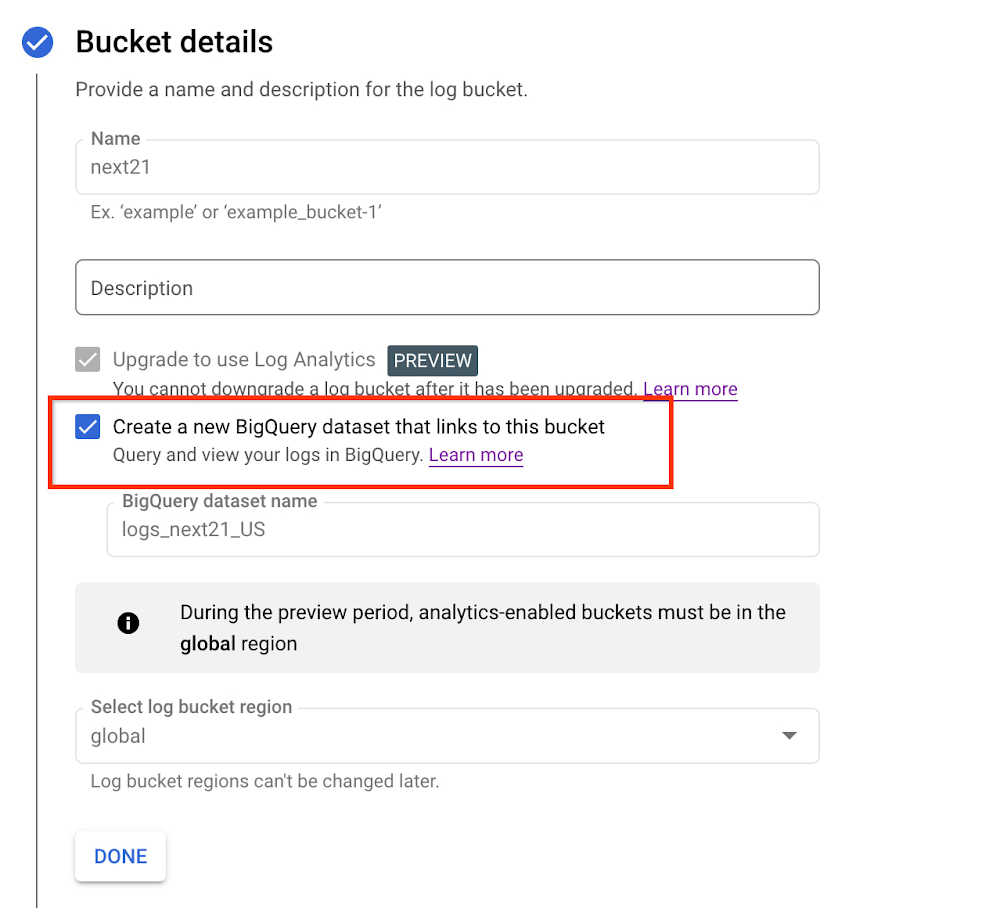
Logging is a critical part of the software development lifecycle enabling developers to debug their apps, DevOps/SRE teams to troubleshoot issues, and security admins to analyze access patterns. Log Analytics is a new set of features in Cloud Logging available in Preview to help you perform powerful analysis on log data. In this post, we’ll cover 10 reasons why you should get started with Log Analytics today. Check our introductory blog or join us for a live webinar on Nov 15, 2022 where we will walk attendees through Log Analytics use cases including a demo. Register here today.#1: Log Analytics is included in Cloud Logging pricingIf you already use Cloud Logging, Log Analytics is included in the Cloud Logging pricing. There are no additional costs associated with upgrading the log bucket or running queries on the Log Analytics UI.Our standard pricing is based on ingestion which includes storing logs in the log bucket for 30 days, our default period, or you can set a custom log retention period. Check out the pricing blog to learn how to maximize value with Cloud Logging. If you don’t already use Cloud Logging, you can leverage the free tier of 50GiB/project/month to explore Cloud Logging including Log Analytics. #2: Enable a managed logging pipeline with one-clickLog Analytics manages the log pipeline for you, eliminating the need to build and manage your own complex data pipelines, which can add cost and operational overhead. A simple one-click set-up allows you to upgrade an existing log bucketorcreate a new log bucket with Log Analytics. Data is available in real-time, allowing users to immediately access their data via either the Log Explorer or the Log Analytics page.#3: Log data is available in Cloud Logging & BigQueryUpgrading a log bucket to Log Analytics means that your logs can be accessed via the Log Analytics page in Cloud Logging. If you also want to access log data from BigQuery, you can enable the checkbox to expose a linked dataset in BigQuery that is linked to your Log Analytics bucket.Once the log bucket is upgraded, log data can be accessed both from Log Analytics in Cloud Logging or BigQuery which eliminates the need to manage or build data pipelines to store log data in BigQuery. Cloud Logging will still manage the log data including access, immutability, and retention. Additionally, Cloud Logging uses BigQuery’s new native support for semi-structured data so you don’t need to manage the schema in your logs.This can be useful when:You already have other application or business data in BigQuery and want to join it with log data from Cloud LoggingYou want to use Looker Studio or other tools in the BigQuery ecosystem.There is no cost to create a linked dataset in BigQuery, but the standard BigQuery query cost applies to querying logs via the BigQuery APIs.#4: Determine root cause faster on high cardinality logs Application, infrastructure and networking logs can often have high cardinality data with unique IP addresses, session ids and instance ids. High cardinality data can be difficult to convert, store, and analyze as metrics. For example, two common use cases are: Application and infrastructure troubleshootingNetwork troubleshootingApplication and infrastructure troubleshootingSuppose that you are troubleshooting a problem with your application running on Google Kubernetes Engine and you need to break down the requests by sessions. Using Log Analytics, you can easily group and aggregate your request logs by session, gaining insights into the request latency and how it changes over time. This insight can help you reduce time spent troubleshooting by executing just one SQL query.Network troubleshootingNetwork telemetry logs on Google Cloud are packed with detailed networking data that is often high volume and cardinality. With Log Analytics, we can easily run a SQL query on the VPC Flow Logs to find the top 10 highest count of packets and total bytes grouped by destination IP address. With this information, you can generate insights into whether any of these destination IP addresses represent unusual traffic levels that warrant deeper analysis. This latency analysis makes it easier to identify any unusual values either as a part of network troubleshooting or routine network analysis.#5: Gather business insights from log dataLog Analytics reduces the need for multiple tools by reducing data silos. The same log data can be used to gain business insights which can be useful for Business Operations teams.  Here are a few examples of how you can use Log Analytics: Determine the top 5 regions from where content is being downloadedDetermine the top 10 referrers to a URL pathConvert IP addresses to city/state/country mapping. Identify unique IP addresses from a given country accessing a URL #6: Simplify audit log analysis for security users For security analyses, one common pattern is to review all the GCP audit logs for a given user, IP address or application. This type of analysis requires very broad search and scalable capabilities since different services may log the IP address in different fields. In Log Analytics, you can easily find values in logs using the SEARCH function to comb through all the fields in the log entry across terabytes of logs without worrying about the speed and performance of the database.With the SEARCH function, you can now search across log data in SQL even when you’re not exactly sure in which field your specific search term will appear in the log entry.#7: Use Visualization for better insights We have many great enhancements on the roadmap that will make it even easier to generate insights. Charting is one of the features that can easily help users make sense of their logs. Charting in Log Analytics is available now as a Private Preview (sign-up form).During the Private Preview for charting capabilities, we’re working hard to make it easier to use with support for additional chart types and a simple charting selector.#8: Cloud Logging provides an enterprise-grade logging platform While Log Analytics is currently in Preview, the Cloud Logging platform is already GA and provides an enterprise-grade logging solution complete with alerting, logs-based metrics and advanced log management capabilities. With Cloud Logging, you can help reduce operational expenditure while supporting your security and compliance needs. #9: Use our sample queries to get started todayWe put together common queries in our Github repository to make it easy to get started.Use this SQL query to determine the min, max and average # of requests grouped for a service.Use this query to determine if your Load Balancer latency was more than 2 seconds. When actively troubleshooting, you can determine the list of top 50 requests to filter out the HTTP errors with this query.Check out Github for additional sample queries. #10: Use our lab to gain hands on experience on Log AnalyticsUsing the Log Analytics on Google Cloud lab, you can work through deploying a sample application, managing log buckets and analyzing log data. This can be a great way to get started, especially if you’re not already using Cloud Logging.SummaryWe’re building Log Analytics for Developers, SRE, DevOps and Operations teams to gain insights faster while keeping costs under control. To learn more about how you can use Log Analytics, please join our live webinar on Nov 15th (registration) which will include a live demo. To get started with Log Analytics today, you can use the lab to gain hands-on experience, visit the documentation or try out the Log Analytics page in the Cloud Console.
Quelle: Google Cloud Platform

Unleashing the power of BigQuery to create personalized customer experiences

Editor’s note: Wunderkind, a leading performance marketing software, specializes in delivering tailored experiences to individuals at scale. Today, we learn how BigQuery’s high performance drives real-time, actionable decision-making that lets Wunderkind bring large brands closer to their customers. At Wunderkind, we believe in the power of one. Behind every website visit is a living, breathing person, with unique wants and needs that can be (and should be) met by the brands they trust. When our customers and our customers’ customers get the experience they deserve, it has the potential to transform what’s possible — and deliver impactful revenue results. Our solutions integrate hyper-personalized content into the customer experiences on retailer websites to help them understand and respond accordingly to each individual shopper. In addition, we provide these shoppers with personalized emails and text messages based on their interactions onsite. For example, we’ll alert a shopper with a ‘price drop’ message for an item they browsed, an item they left in their shopping cart, or about new products that we think they’ll love. Ultimately, our best-in-class tech and insight help deliver experiences that fit individual customers, and conversions at off-the-chart rates.With the billions of one-to-one messages we send monthly, it effectively means we track a lot of data – in the trillions of events. Because of this, we want a deep understanding of this data so we can tailor our content specifically to each unique user to ensure it’s as enjoyable and engaging as possible.Wunderkind’s data journey to BigQuery: how we got hereBack in its start-up days, all of Wunderkind’s analytics relied on a MySQL database. This worked well for our reporting platform, but any sort of ad-hoc inquiry or aggregate insight was a challenge. As an analyst, I had to beg engineers to create new database indexes and tables just to support new types of reporting. As one can imagine, this consumed a lot of time and energy – figuring out how to get complicated queries to run, using SQL tricks to fake indexes, creating temporary tables, and whatever else was necessary to improve performance and execute specific queries. After all, this is a company built on data and insights – so it had to be done right.To get the most value out of our data, we  invested early in the BI platform , Looker. Our prior business intelligence efforts for the broader business were also hooked up to a single relational database. This approach was very troubling for a lot of reasons, that included but were not limited to:We could only put so much data in a relational database. We couldn’t index every query pattern that we wanted.Certain queries would never finish.We were querying off a replicated database and had no means to create any additional aggregate or derived tables.Along with our new Business Intelligence approach, we decided to move to BigQuery.  BigQuery is not just a data warehouse. It’s an analytics system that seems to scale infinitely.  It gave us a data playground where we could create our own aggregate tables, mine for new insights and KPIs, and successfully run any type of data inquiry we could think up.  It simply was a dream. As we were testing, we loaded one single day of event logs into BigQuery, and for a month, it fueled dozens of eye-opening insights  about how our products actually work and the precise influence they have on user behavior. After this single-day test there was no turning back – we needed all of our data in BigQuery.BigQuery’s serverless architecture provides an incredibly consistent performance profile regardless of the complexity of the queries we threw at it. With relational databases, you can run one query and get a sub-second, exceptionally low-latency response, while another will never finish. I sometimes joke that every single query run against BigQuery takes 30 seconds — no matter how big or small. It’s a beautiful thing knowing that virtually any question you think up can be answered in a very reasonable amount of time.BigQuery allows our Analytics team to think more about the value of the data for the business and less about the mechanics of how particular queries should run. By combining BigQuery and Looker, I can give teams across our company the flexibility to work with their data in a way that previously only analysts could. I’ve also found that BigQuery is one of the easiest and best places to learn SQL. It’s well suited to learn for so many reasons, including:It’s very accessible and in-browser, so there’s no complicated setup or install process. It’s free up to a terabyte per month. Its public datasets are vast and relatable, making your first queries more interesting. Real-time query validation lets us know quickly if  something is wrong with our query.It’s a no-ops environment.  No indexes are required.  You just query.Data Journey: How Wunderkind gets (and delivers) the value of data for digital marketingBigQuery + Looker = Data Love Our Analytics team has three key groups of stakeholders: our customers and the teams that serve them, our research and development (R&D) team, and our business/operations team. We recognize that every customer is a bit different and take pride in being able to answer their unique questions in the dimensions that make the most sense for their business. Customers may want more detail on the performance of our service for different cohorts of users or for certain types of web pages in ways that require more raw data than we provide in our standard product. BigQuery’s performance lets us respond  to customers and offer them greater confidence around our approach. Thanks to Looker, we can roll out new internal insights very quickly that help inform and drive new strategies. Plus, with dashboards and alerts we can uncover cohorts and segments where our product performs exceptionally, and areas where our strategies need work. Our R&D team is another important stakeholder group. As we plan new products and features, we work with BigQuery to forecast and simulate the expected performance and incrementality. As our product develops, we use BigQuery and Looker to prototype new KPIs and reporting. It’s helpful to easily stage live data and KPIs to ensure they’re valuable to the customer ahead of productizing in our reporting platform. BigQuery’s speed means that we can aggregate billions of rows of raw data on the fly as we perfect our stats. Additionally, we’re able to save significant engineering time by using Looker as a product development sandbox for reporting and insights.Our final key stakeholder is our internal business operations team. Business operations typically ask more thought-provoking and challenging ‘what-if’ questions geared toward driving true incremental revenue for our customers and serving them optimally. For example, they may challenge the accuracy of the industry’s standard “attribution” methods and whether we can leverage our data to better understand return on spend and “cannibalization” for our customers. Because these tougher questions tend to involve data spanning product lines and more complicated data relationships, BigQuery’s high performance is essential to making rapid iteration with this team possible. Unlocking the insights we need to truly ‘get’ our customers Across these stakeholders, we truly empower Wunderkind with actionable data. BigQuery’s performance is key to enabling real-time, iterative decision-making within our organization and in tandem with our customers. Looker is a powerful front-end to securely share data in a way that’s meaningful, actionable, and accurate. As much as I love writing SQL, I believe it’s best reserved for new ad-hoc insights and not standardized reporting. Looker is how we can enforce consistency and accuracy across our internal reporting. We’ve found the most powerful insights come out of conversations with our stakeholders. From there, we can use our data expertise and product knowledge to build flexible dashboards that scale across the organization. While it can seem a bit restrictive for some stakeholders, this approach ensures the data they’re getting is always intuitive, consistent, clean, and actionable. We’re not in the business of vanity metrics, we’re in the business of driving impact.BigQuery is the foundational element that drives our goal of identifying not just our customers’ needs, but those that drive their customers to purchase. As a result, we can deliver better outcomes for customers, more rapid evolution of our products, and continuous validation and improvement of our business operations. We aim to maximize performance, experience, and returns for our customers – BigQuery is instrumental in helping to derive these insights. Even as Wunderkind has grown, we’ve been able to operate with a proportionally leaner team because BigQuery allows our Analytics team to perform most data tasks without needing engineering resources.
Quelle: Google Cloud Platform

Unlocking the power of connected vehicle data and advanced analytics with BigQuery

As software-defined vehicles continue to advance and the quantity of digital services grows to meet consumer demand, the data required to provide these services continue to grow as well. This makes automotive manufacturers and suppliers look for capabilities to log and analyze data, update applications, and extend commands to in-vehicle software.The challenges the automotive sector faces can be quantified. A modern vehicle contains upwards of 70 electronic control units (ECUs), most of which are connected to one or more sensors. Not only is it now possible to exactly measure many aspects of vehicle performance, but new options become available. Using LIDAR (light detection and ranging), for example, vehicles are achieving higher levels of autonomy; this leads to a data stream from such demanding applications that may reach 25 GB per hour. For the in-vehicle processing of data, 100 million lines of software code may be present — more than a fighter jet. This in-vehicle code will have to be maintained with updates and new functionalities.Access to the data will allow manufacturers to gain valuable insights into operational details of their vehicles. The use of this data can help to reduce costs and risks, increase ROI, support ESG initiatives, and provide valuable insights to develop innovative solutions and shorten the time to value for Electric Vehicle innovations.Sibros’ Deep Connected Platform (DCP) makes it possible for these manufacturers to build and launch new connected vehicle use cases from production to post-sale at scale by connecting and managing all software and data throughout every life cycle stage. A key component of this platform is the SibrosDeep Logger that provides capabilities like the following:Full configurability of what to record, when to record it, and how fast to record it.High resolution timestamps of all Controller Area Network (CAN) messages.Dynamic application of live log configurations to receive new data points without deploying new software.For example, properly analyzed engine data enables true predictive maintenance for the first time, which creates the option to repair or replace components before failure happens. Another example would be the evaluation of data regarding the use of certain in-car features with the goal to redesign its interior. Two other components of the DCP are software updates and remote commands to ECUs. The DCP on Google Cloud enables seamless integration with any vehicle architecture and provides OEMs and suppliers with the platform to manage connected vehicle data at rest and in transit using a proven and secure way on a global scale.OEMs can pull data through APIs provided by Sibros into Google Data Cloud (including BigQuery) to gain access to the rich information data sets provided by the DCP within their environment and blend this data with their first party data sets to provide value insights for their business. Some of the Connected Vehicle insights that DCP information enables are:Damage prevention, improved operation, or development of the next generation of engines with insights from complex analyses that could consider parameters like model, engine type, mileage, overall speed, temperature, air pressure, load, services, and more.The combination of electric vehicle battery usage data like charging cycles, engine performance, and battery age with contributing factors as the use of the air conditioning to determine if such factors contribute to hazardous battery conditions and for improved battery development.Cross-organization collaboration in R&D by the provision of information on all these metrics and more from real-world driving, like engine knock data and even tire pressure.Google Cloud’s unified data cloud offering provides a complete platform for building data-driven applications like those from Sibros — from simplified data ingestion, processing, and storage to powerful analytics, AI, ML, and data sharing capabilities — integrated with Google Cloud. With a diverse partner ecosystem and support for multi-cloud, open-source tools and APIs, Google Cloud provides Sibros the portability and the extensibility they need to avoid data lock-in.“Software has an ever increasing importance in the automotive world, even more so with electric vehicles and new mobility services. Google Cloud is partnering with Sibros to bring their award winning Deep Connected Platform to deliver high frequency, low latency over-the-air software updates, data logging & diagnostics capabilities to our automotive customers, leveraging the security and scale of Google Cloud. This is revolutionizing everything from development cycles to business models and customer relationships.” — Matthias Breunig, Director, Global Automotive Solutions, Google CloudThrough Built with BigQuery, Google Cloud is helping tech companies like Sibros build innovative applications on Google’s Data Cloud with simplified access to technology, helpful and dedicated engineering support, and joint go-to-market programs.“Sibros is looking forward to partnering with Google Cloud, which will enable vehicle manufacturers and suppliers to reach the next level in their use of data. Sibros solutions for Deep Data Logging and Updating on the Google Data Cloud, combined with Google BigQuery, will help them to mitigate risks, reduce costs, add innovative products, and introduce value-added use cases.” — Xiaojian Huang,Chief Digital Officer, Software, SibrosSibros and Google Cloud are driving Connected Mobility transformation to help our customers accelerate R&D innovation, power efficient operations, and unlock software-defined vehicle use cases with a full stack connected vehicle platform. Click here to learn more about Sibros on Google Cloud.
Quelle: Google Cloud Platform

UKG Ready, People Insights on Google Cloud

Business Problem UKG Ready primarily operates in the Small and Medium Business (SMB) space, so inherently many customers are forced to operate and make key business decisions with less Workforce Management (WFM) / Human Capital Management (HCM) data. In addition to volume, SMB lacks the variety of data needed to create a dynamic and agile organization. This puts SMB at a major disadvantage compared to larger segments.Project Goals People Insights module is committed to surfacing insights to customers in the context of their day-to-day duties and aid in decision making. With the SMB customer data limitations mentioned above, the goal of this project was to create a global dataset that augments individual customer data to bring light to less obvious, yet important information.Challenges UKG Ready is a highly configurable application that gives customers the opportunity to build solutions on a platform that meets their specific business needs. High configurability gives high flexibility to customers in their usage of the software. However, it becomes nearly impossible to create a global dataset for machine learning and data insights. UKG Ready manages just under 4 million of the US workforce and some 30,000+ customers. Despite the large employee dataset size, machine learning models that are specific to customers are starved for data because the individual customers have a relatively small employee population. Does that mean we cannot support our SMB customers’ decision making with ML? Result Partnering with Google, we were able to develop an approach that allowed us to standardize various domain entities (pay categories, time off codes, job titles, etc.) so that we could build a global dataset to augment SMB customer data. Using machine learning we were able to build a common vocabulary across our customer base. This common vocabulary encapsulates the nuances of how our customers manage their business and yet is generalized and standardized such that the data can be aggregated over the variety of customer configurations. This allows us to serve up practical insights to customers through various use cases. Our partnership allowed us to leverage Google Cloud Services to meet the needs of our complex machine learning models, distributed data sets and CI/CD processes. How UKG Ready decided to partner with Google for an end-to-end solution for the analytics offering. This allowed us to focus on our core business logic without having to worry about the platform, environment configurations, performance and scalability of the entire solution. We make use of various Google Cloud services such as Cloud Triggers, Cloud Storage, Cloud Functions, Cloud Composer, Cloud Dataflow, Big Query, Vertex AI, Cloud Pub/Sub… to host our analytics solution. Jenkins manages the entire CI/CD pipelines and cloud environments are configured and deployed using Terraform.The standardization of business entities problem was solved in three distinct steps:Step 1: Collecting aggregated dataWe needed an approach to collect aggregated data from our highly distributed, sharded, multi-tenant data sources. We developed a custom solution that allows us to extract data aggregated at source for PII and GDPR considerations and transfer to Google Cloud Storage in the fastest manner possible. Data is then transformed and stored in Big Query. Services used: GCS, Cloud Functions, DataFlow, Cloud Composer and Big Query. All processes are orchestrated using Cloud Composer and detailed logging is available in Cloud Logging (Stackdriver).Step 2: Applying NLP (Natural Language Processing)Once we had the variety of customer configurations or the business entities available, we then applied NLP algorithms to categorize and standardize these in buckets. This approach assumes that customers use natural language for configurations like job titles, pay codes etc. String Preparation The input data for string preparation process is an entity string or several strings, that describe one entity object (like name-description pair or code-name pair). The output represents set of tokens that may be used to run classification/clustering model. The process of string preparation tokenizes strings, replaces shortcuts, handles abbreviations, translates tokens, handles grammatical errors and mistypes.ML Models Statistical The idea of the model is to use defined target classes (clusters) and assign several tokens (anchors) to each of them an entity that has any of those tokens would be “attracted” to appropriate class. All other tokens are weighted according to frequencies of usage of theses tokens in the entities with anchor tokens: Using anchor tokens, we are building kind-of Word2Vec – dimensionality of vector is equal to number of target classes. The higher specific dimension (cluster) value, the higher the probability of entity to be included in appropriate cluster. Final prediction for entity tokens list for specific class is sum of weights of all the tokens included. Predicted cluster is a cluster that has maximal prediction score. Lexical Model We managed to generate reasonable amount of labeled data during statistical model implementation and testing. That opens a possibility to build “classical” NLP model that uses labeled data to train classification neural network using pretrained layers to produce token embeddings or even string embeddings. We started experimentation with pre-trained models like GloVe and got good results with single words and bi-grams but started getting issues in handling of n-grams. Our Google account team came to our rescue and recommended some white papers that helped formulate our strategy. We now use Tensorflow nnlm-en-dim128 model to produce string embeddings – it was trained on 200B records English Google News corpus and produces for each input string 128-dimensional vector. After that we use several Dense and Dropout layers to build a classification model. Ensembling To perform ensembling all the model results for each class are cast to probabilities using softmaxtransformation with scale normalization. Final predicted probability is maximal average score of both models among all the classes scores – appropriate class is predicted class. The machine learning models are deployed on Vertex AI and are used in batch predictions. Model performance is captured at every prediction boundary and monitored for quality in production. Step 3: Making available common vocabularyHaving the standardized vocabulary, we then needed a mechanism to have the results be available in UKG Ready reports and customer specific models like Flight Risk and Fatigue. For this we again used Google Services for orchestration, data transformation and data storage.Once the modeling is complete, we made the customer specific models leveraging the above architecture be available in Reports. We utilized our proven existing technology choices in GCP for orchestration, data transformation and data storage Results We are able to build a common vocabulary of our customers’ business entities with good confidence. And be an expert advisor to our SMB customers in their decision-making using machine learning. With the advice of our Google account team and using Google services we can add value to our product in a relatively short amount of time. And we are not done! We continue to use this platform for new use cases, complex business problems and innovative machine learning solutions.Sample result:Special thanks to Kanchana Patlolla , AI Specialist, Google for the collaboration in bringing this to light
Quelle: Google Cloud Platform

Document AI adds one-click model training with ML Workbench

Each day, countless documents are created, revised, and shared across organizations. The result is a treasure trove of information, but because the data is primarily unstructured — without rows, columns or some other predefined organizational schema — it is difficult to interpret, analyze or use for business processes. That’s why we introducedDocument AI: so users can extract structured data from documents through machine learning (ML) models to automate business processes and improve decision-making. Over the last two years, our customers have used Document AI toaccelerate and enhance document-based workflows in area like procurement, lending, identity, and contracts—and at Google Cloud Next ’22, we expanded these capabilities in a big way with the release of Document AI Workbench, a new feature that makes it fast and easy to apply ML to virtually any document-based workflow. Document AI Workbench lets analysts, developers, and even business users ingest their own data to train models with the click of a button, then extract fields from documents needed for the business. Relative to traditional development approaches, Document AI Workbench lets organizations build models faster and with less data—thus accelerating time-to-value for processing and analysis of unstructured data in documents.This [Document AI Workbench] is poised to be a game changer, because we can now uptrain various text documents and forms utilizing powerful Google machine learning models to get the desired accuracy creating greater time and resource efficiencies for our clients Daan De Groodt Managing Director, Deloitte Consulting LLPIn this blog post, we’ll explore Document AI Workbench’s capabilities, as well as ways customers are already putting this new feature to work. Benefits of custom modeling with Document AI Workbench Our customers use Document AI Workbench to ultimately save time and money. “Document AI Workbench is helping us expand document automation more quickly and effectively.  By using Document AI Workbench, we have been able to train our own document parser models in a fraction of the time and with less resources.  We feel this will help us realize important operational improvements for our business and help us serve our customers much better,” said Daniel Ordaz Palacios, Global Head Business Process & Operations, at financial services company BBVA. Let’s break down some of the ways the feature delivers these benefits.  Democratized MLData scientists’ time is scarce. With Document AI Workbench, developers, analysts, and others with limited ML experience can create ML models by labeling data with a simple interface, then initiating training with the click of a button. By leveraging training data to create a model behind the scenes, Document AI Workbench expands the range of users who can contribute to ML models while preserving data scientists’ efforts for the most sophisticated projects.Many document typesWith Document AI Workbench, organizations can bring their own data to create ML models for many document types and attributes, including printed or handwritten text, tables and other nested entities, checkboxes, and more. Customers can process document images whether they were professionally scanned or captured in a quick photo, and they can import data in multiple formats, such as PDFs, common image formats, and JSON document.proto.Time-to-marketDocument AI Workbench significantly reduces customers’ time to market, compared to building custom ML models, because users simply provide training data, with Document AI handling the rest. Our users don’t have to worry about model weights, parameters, anchors, etc.Less training dataDocument AI Workbench helps customers build ML models that achieve accurate results with less training data. This is especially true when “uptraining,” in which  Document AI Workbench transfers learnings from pre-trained models to produce more accurate results. We support uptraining for Invoice, Purchase Order, Contracts, W2, 1099-R, and paystub documents.We plan to support more document types in the future, and to make ML model training even easier by continuing to reduce the amount of training data required for accurate output. As an example, Google’s DeepMind team recently developed a new method that allows the creation of document parsing  ML models for utility bills and purchase orders with 50%-70% less training data than what was previously needed for Document AI. We’re working on integrating this method into Document AI Workbench in the coming months.1No-cost trainingInstead of having to pay to spin up servers and wait while models are trained, Document AI Workbench lets users create and evaluate ML models for free. Customers simply pay as they go once models are deployed.With Document AI Workbench, organizations can enjoy all these features and more. And organizations own the data used to train models.Thanks to these benefits, many customers are already seeing impressive results. Muthukumaraswamy B, VP of Data Science at technology firm Searce said, “We estimate that our time-to-market will reduce by up to ~80% with Document AI Workbench vs. building custom models.”Similarly, software company Libeo “uptrained an invoice processor with 1,600 documents and increased testing accuracy from 75.6% (with pretrained models) to 83.9% with uptraining on Document AI Workbench,” said CPO & CTO Pierre-Antoine Glandier. “Thanks to uptraining, Document AI results beat the results of a competitor and will help Libeo save ~20% on the overall cost over the long run.”Technology firm Zencore is making strides as well. “Document AI Workbench allows us to develop highly accurate document parsing models in a matter of days. Our customers have completely automated tasks that formerly required significant human labor,” said Sean Earley, VP of Delivery Service.How to use Document AI WorkbenchUsers can leverage a simple interface in the Google Cloud Consoleto prepare training data, create and evaluate models, and deploy a model into production, at which point it can be called to extract data from documents. Import and prepare training dataTo get started, users import and label documents to train an ML model. If documents are labeled using other tools, users can simply import labels with JSON in the doc.proto format. If documents need to be labeled, they can create their document schema and use our simple interface to label documents. Optical character recognition (OCR) will automatically detect the content and prepare training data.Train a modelWith one click, users can train a model. If they are working with a document type similar in layout and schema to an existing document model, they can uptrain the relevant model to get accurate results faster. If there is no relevant, uptrainable model available for the document, they can create a model with Document AI Workbench’s Customer Document Extractor.Evaluate a model and iterateOnce a model is trained, it’s time to evaluate it by looking at the performance metrics–F1 score, precision, recall, etc. Users can dive into specific instances where the model predicted an error and provide additional training data to improve future performance.Going into productionOnce a model meets accuracy targets, it’s time to deploy into production, after which the model endpoint can be called to extract structured data from documents. Finally, users can configure human-in-the-loop review workflows to correct predictions whose confidence levels are below the required threshold. With human review, organizations can correct or confirm output before they use it in production and leverage the corrected data to train the model and improve the accuracy of future predictions.“Google’s Document AI Workbench offers a flexible, easy-to-use interface with the end-to-end functionality our clients demand. Custom document extractors and classifiers not only reduce our prototyping from months to weeks, but also offer clients added cost reductions compared to their current technologies,” said Erik Willsey, CTO at data and analytics modernization firm Pandera.     Getting started with Document AI WorkbenchWe’re thrilled to see so many customers and partners already driving value with Document AI Workbench. To learn more, check out the Document AI Workbench landing page, watch this Next’22 session on Document AI or peruse our key partners who are ready to help you get started.1. Deepmind used thousands of Google’s internal documents, such as utility bills and purchase orders from a variety of vendors to develop and evaluate this method. The performance will vary and depend on the evaluation dataset.
Quelle: Google Cloud Platform

Delivering ongoing value with a deliberate customer success strategy

Google invests in customer experienceData Capital Management (DCM) was looking to advance the development of AI investment methods by migrating to Google Cloud. DCM needed a cloud provider and support service that was more than just technical support to fix short-term issues. Instead, they wanted a true strategic ally that could provide access to engineering resources to help solve their highly complex needs and drive long-term innovation and business growth. To support customers like DCM, we’ve invested in our Customer Experience team and organized resources to be closer to our customers. From Technical Account Managers (TAM) to Customer Success teams and Professional Service Consultants, we offer a unified approach to reducing the complexities of cloud migration. This includes guided strategies spanning people, process, and technology to help customers map a successful journey.The experience that customers have with an enterprise can have a huge influence in their purchase decisions. IDC covers this in their market note “Google Cloud: Delivering Ongoing Customer Value with a Deliberate Customer Success Strategy” by Sudhir Rajagopal, which highlights the significant moves we’ve made to deliver the right service with the right specialist to our customers. IDC developed this note after spending a day with Google executives, learning about the future of our customer experience directions.We’ve pulled out a few highlights from the report to help you identify some common challenges and how Google is adapting to better address those.IDC notes that customer experience is key to buying “As we move into the age of experiences, the relationship between customers and brands continues to evolve. Customer experience (CX) reigns as the number one influencer of buying decisions. Indeed, IDC’s research shows that 80% of B2B buyers agree that their overall customer experience with a vendor will have a strong influence in purchasing from that vendor.”In addition, IDC notes that “next-generation customer experience will require organizations to elevate their customer context for emotionally intelligent engagement; deliver fluid, omni-channel experiences; and deliver value for the customer in the micro-moments and the whole journey, with a focus on empathetic customer outcomes.”Google Cloud is easier to partner withIDC notes that “global enterprises should find it easier to partner with Google with the release of new products and configurations that address special customer needs at the regional/local level (e.g., sovereign cloud offerings in Europe). Scaled solution delivery and implementation is enabled through the professional services organization (PSO), which is positioned as fundamental to Google Cloud’s customer success strategy.”“Contextual, purpose-built cloud solutions that are specific to a customer’s sector needs are key enablers in transformation programs. Google Cloud is making a deliberate effort to understand its customers in the context of its industry with tailored industry solutions and support offerings that address the challenges of the customer’s core business.”Context-aware customer engagementIDC states that “Google Cloud has a go-to-market approach that is contextualized by buyer personas with tailored value outcomes to each persona (e.g., IT leaders, LOB leaders, CISOs, CEOs), product/business function (e.g., data and analytics, security), market segment (e.g., digital native versus traditional companies that may require more complete/E2E transformation), and the engagement life cycle (e.g., early-stage engagement, implementation ramp-up).”Customer satisfactionIDC believes that “with customer experience now anchored by two-way conversational engagement, not only do customers want prescriptive experiences, but they also want the brand to know how they feel — the level of satisfaction.”  IDC notes: “To shore up customer advocacy, this year, Google Cloud is launching four new executive briefing centers in London, Paris, Munich, and Singapore set on Google Cloud campuses. Google Cloud has made efforts to extend customer experience throughout the relationship from decision to partner, solution delivery/implementation, and relationship expansion, with investments to offer scalability along with quality. IDC believes that with a continued focus on customer experience and value outcomes, Google Cloud should be able to sustain customer momentum in the market.”For all the details, read the full IDC Market Note, “Google Cloud: Delivering Ongoing Customer Value with a Deliberate Customer Success Strategy”.What’s next?To learn about how our customer experience offerings have evolved over the past year, read about our offerings.
Quelle: Google Cloud Platform

Introducing Assured Workloads in Canada and Australia, and new features for all

At Google Cloud, we continue to invest in our vision of invisible security where advanced capabilities are engineered into our platforms, operations are simplified, and stronger outcomes can be achieved. Assured Workloads is a Google Cloud service that helps customers create and maintain controlled environments that accelerate running more secure and compliant workloads, including enforcement of data residency, administrative and personnel controls, and managing encryption keys.  Today, we are extending these capabilities to more regions. Assured Workloads for Canada is now generally available, and Assured Workloads for Australia is now available in preview. We are also making it easier for customers to get started with Assured Workloads by automating the onboarding process, and offering new tools to define specific compliance requirements and then validate the compliance posture of your Assured Workloads. These new capabilities can further speed deployment of regulated workloads on Google Cloud. Customers can get started today here.Assured Workloads for Canada Today, Assured Workloads for Canada is generally available to all customers with a premium Assured Workloads subscription, and existing customers can use it right away. Assured Workloads for Canada provides:Data residency in either a specific Canadian cloud region or across any of our Canadian cloud regions (currently Toronto and Montreal)Personnel access and technical support services restricted to personnel located in CanadaCryptographic control over data, including customer-managed encryption keys. Data encrypted with keys stored within a region can only be decrypted in that region.  Service usage restrictions to centrally administer which Google Cloud products are available within the Assured Workloads environment  Assured Workloads for AustraliaAssured Workloads for Australia is available in Preview today. This launch supports public sector customers in Australia following the certification of Google Cloud against the Hosting Certification Framework (HCF) by Australia’s Digital Transformation Agency. Assured Workloads for Australia provides:Data residency in either a specific Australian cloud region or across any of our Australian cloud regions (currently Sydney and Melbourne.)Personnel access and technical support services restricted to five countries (U.S., U.K., Australia, Canada, and New Zealand.) Initially launching with just U.S. persons, we plan on expanding to more support persons next year.Cryptographic control over data, including customer managed encryption keys. Data encrypted with keys stored within a region can only be decrypted in that region Service usage restrictions to centrally administer which Google Cloud products are available within the Assured Workloads environment  Assured Workloads MonitoringWe are also excited to announce the general availability of Assured Workloads Monitoring. With Assured Workloads Monitoring, customers can get more visibility into organization policy changes that result in compliance violations. Assured Workloads Monitoring scans customer environments in real time and provides alerts whenever a change violates the defined compliance posture.Assured Workloads MonitoringAssured Workloads Monitoring can also help customers take corrective actions. The monitoring dashboard shows which policy is being violated and provides instructions on how to resolve the finding. Customers also have the ability to mark violations as exceptions and keep an audit trail of approved changes. Click here to learn more about Assured Workloads Monitoring and how you can use it to help keep your organization compliant.FedRAMP Moderate self-serve onboardingAssured Workloads provides the ability for customers to create U.S. FedRAMP Moderate environments at no charge. We’ve now made it even easier for customers to create these environments with just a few clicks. Click here to get started.ConclusionAssured Workloads helps accelerate running more secure and compliant workloads on Google Cloud. These announcements grow our global capabilities so customers can operate across markets with a consistent set of services and controls. To learn more about Assured Workloads, check out our customer session from this year’s Google Cloud Next and our Assured Workloads video walkthrough series on YouTube.
Quelle: Google Cloud Platform