Running large-scale C++ workloads with Cloud Pub/Sub and GKE

For the past couple years, we’ve been working to make Google Cloud an excellent platform for running C++ workloads. To demonstrate some of the progress we’ve made so far, we’ll show how you can use C++ with both Cloud Pub/Sub and Cloud Storage to build a highly scalable job queue running on Google Kubernetes Engine (GKE).Such applications often need to distribute work to many compute nodes to achieve good performance. Part of the appeal of public cloud providers is the ability to schedule these kinds of parallel computations on demand, growing the size of the cluster that runs the computation as needed, and shrinking it when it’s no longer running. In this post we will explore how to realize this potential for C++ applications, using Pub/Sub and GKE.A common pattern for running large-scale computations is a job queue, where work is represented by messages in the queue, and a number of worker applications pull items from the queue for processing. The recently released Pub/Sub (CPS) C++ client library makes it easy to implement this pattern. And with GKE autoscaling, the cluster running such a workload can grow and shrink on demand, saving C++ developers from the tedium of managing the cluster, and leaving them with more time to improve their applications.Sample applicationFor our example, we will create millions of Cloud Storage objects; this models a parallel application that performs some computation (e.g., analyze a fraction of some large data set) and saves the results in separate Cloud Storage objects. We believe this workload is easier to understand than some exotic simulation, but it’s not purely artificial: from time-to-time our team needs to create large synthetic data sets for load testing.OverviewThe basic idea is to break the work into a small number of work items, such as, “create 1,000 objects with this prefix”. We use a command-line tool to publish these work items to a Pub/Sub topic, which reliably delivers them to any number of worker nodes that execute the work items. We use GKE to run the worker nodes, as GKE automatically scales the cluster based on demand, and restarts the worker nodes if needed after a failure. Because Pub/Sub offers at-least-once delivery, and because the worker nodes may be restarted by GKE, it’s important to make these work items idempotent, that is, executing the work item multiple times produces the same objects in Cloud Storage as executing the work item a single time.The code for this example is available in this GitHub repository.Posting the work itemsA simple C++ struct represents the work item:Converting this struct to a Pub/Sub message takes only a few lines of code:Since the messages are posted using a Publisher, there’s no need to batch messages, or retry them, as the library takes care of these details:Reading the work itemsTo read the work items, create a Subscriber and associate a callback with it. We configure the subscription to only read a few messages at a time, as we prefer to keep the messages on the Pub/Sub service until the application is ready to act on the message.If the application running this function crashes, or needs to be rescheduled by GKE, the Pub/Sub service re-delivers the messages to a new instance. This produces the same results, as the process_one_item() function produces the same output, even if called multiple times:Compiling the applicationThe GitHub repository includes the necessary CMake and Docker scripts to compile this code into a Docker image. We use Cloud Build to run the build, freeing our workstations to do useful work (and definitely not for playing video games):The first time you run that command it might take a while, as this builds all the dependencies from source. The intermediate results are cached, and used to save time in subsequent runs.Deploying to GKEOnce the Docker image is created, you can deploy the application to a previously created GKE cluster. We use a script to generate the yaml file:And then you instruct GKE to autoscale as needed:This starts at least one replica of the application in the GKE cluster, and configures the cluster to create additional replicates (up to 200) if their CPU load is over 50%. SummaryUsing Pub/Sub as a work queue can simplify the implementation of parallel C++ applications. Pub/Sub distributes the work items across applications, retries them when a worker node terminates unexpectedly, and/or scales up as the number of worker nodes increases. Furthermore, you can deploy the worker nodes to GKE, which automatically takes care of finding or creating free virtual machines to run your worker application, scheduling your worker application in these virtual machines, and increasing or reducing the number of compute nodes as needed. If your C++ application has a lot of small work items and these can be made idempotent, consider using Pub/Sub and GKE for task scheduling.To try these techniques in your own environment, just download the example from GitHub. Or just browse the code and use them in your own applications!
Quelle: Google Cloud Platform
Find logs fast with new “tail -f” functionality in Cloud Logging

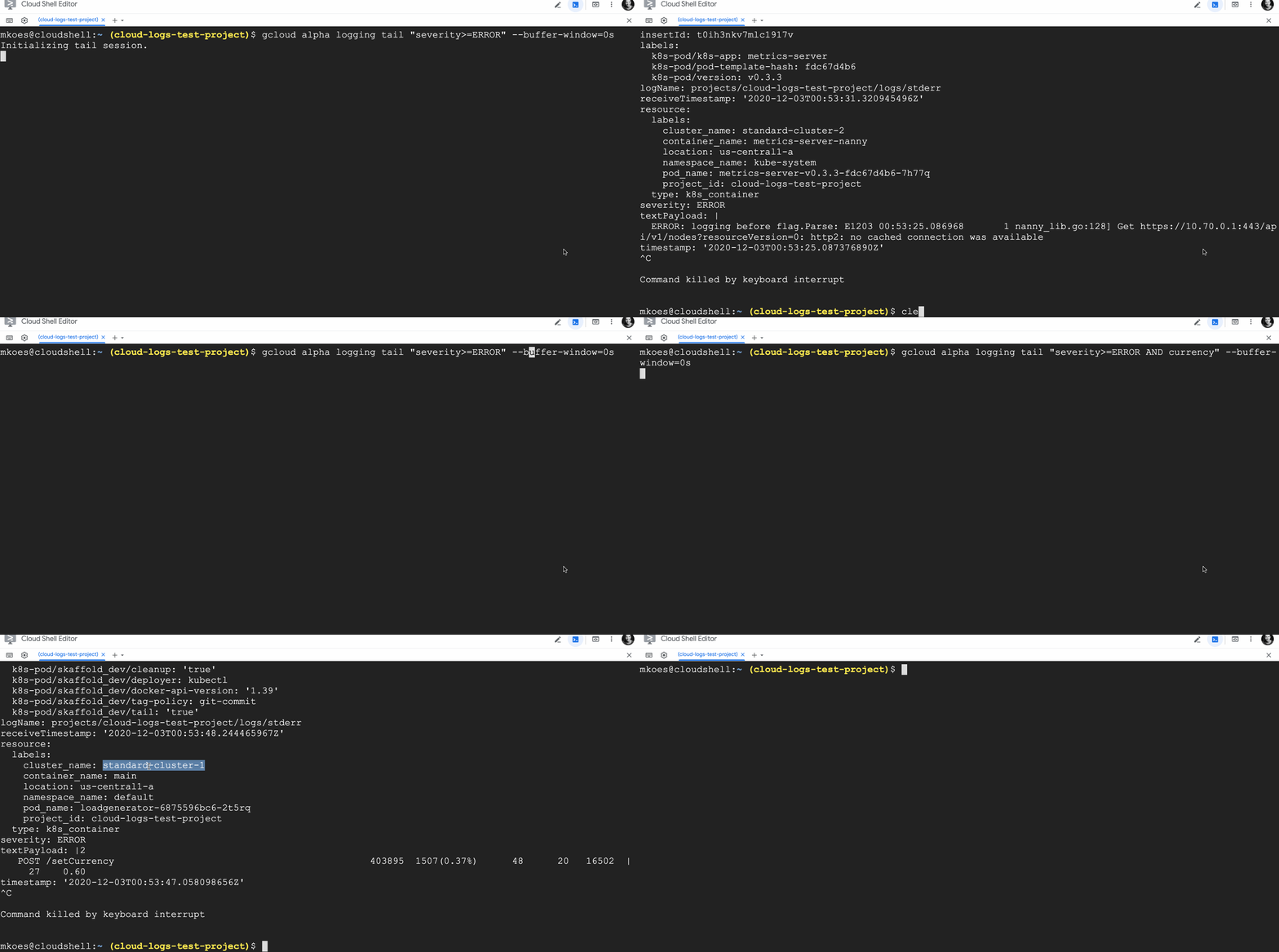
When you’re troubleshooting an app or a deployment, every second counts! Cloud Logging helps you troubleshoot by aggregating logs from across Google Cloud, on-premises or other clouds, indexing, aggregating logs into metrics, scanning for unique errors with Error Reporting and making logs available for search, all in less than a minute. And now, we’ve built two new features for streaming logs to give you even fresher insights from your logs data.By popular demand from Linux users, we added a new tool to mimic the behavior of the tail -f command, which allows you to display the contents of a log file to the console in real time. We’ve also included upgrades beyond the well-loved tail tool such as searching across all logs from all your resources at once and the ability to use Cloud Logging’s powerful logging query language including global search, regular expressions, substring matches, etc., all still in real-time. You can use the logging query language with the new live feature to find information in your logs in real-time. For example, let’s say you just deployed a new application and want to look at all error logs:gcloud alpha logging tail “severity>=ERROR”But this returns too many results so you narrow the scope to just logs that include the text “currency”:gcloud alpha logging tail “severity>=ERROR AND currency”This search returns a meaningful set of logs, all still in real time.Tailing logs with gcloud is now available to all users in Preview. Head over to our docs to get it set up and start tailing.And if you prefer using Google Cloud Console, we’ve got great news for you as well. You can now stream logs to Logs Explorer as well as easily stream, pause, explore, link to traces, resume streaming, visualize counts and download logs, all from the Cloud Console.So whether you prefer command line tail -f or a dedicated user experience for exploring logs, check out Cloud Logging’s new tools and save time troubleshooting.Related ArticleTroubleshooting your apps with Cloud Logging just got a lot easierLearn how to use the Logs Explorer feature in Cloud Logging to troubleshoot your applicationsRead Article
Quelle: Google Cloud Platform

Set your 2021 API resolutions with these top 2020 posts

With 2020’s challenges now behind us, it’s a great time to reflect on the lessons we learned. During a time when digital transformation and technology innovation took center stage during the global health crisis, API integration and management became even more critical for organizations. With all this in mind, and to help you set your 2021 API New Year’s resolutions, here is a look back at our must-read posts about APIs from 2020. Getting API design rightThere’s more to APIs than providing access to functionality and data—API design plays a significant role in maximizing business value, increasing developer productivity, and ensuring the longevity of an API. This topic has been covered many times in the Google Cloud Blog, but here are two of our favorite posts about API design from 2020: API design: Understanding gRPC, OpenAPI and REST and when to use themAPIs 101: Everything you need to know about API designWhy API strategy is powering digital transformationIt’s impossible to discuss transformation and modernization without mentioning APIs. They are the de facto standard today for building and connecting modern applications. APIs can no longer be an afterthought in application development, they are central to delivering competitive advantage, enabling inter-service communication, and improving operational efficiency. With this in mind, it is more important than ever to treat your API program as a mission-critical initiative. Here are our top picks for posts you need to read on API strategy:  What is API-first? 5 opportunities to create business valueHow APIs and ecosystem strategies accelerate digital transformationHow an API-powered digital ecosystem can drive innovation and efficiencyFour ways to generate value from your APIsHow to be a data-driven company: 5 ways to embrace dataBuilding business resilience with API managementPowerful new API capabilities and product enhancementsFrom the new Apigee Adaptor for Envoy-based services and the launch of the Google Cloud API Gateway to using Apigee to fuel no-code development or unlock the wealth of data in legacy SAP environments, there was no shortage of new Google Cloud offerings in 2020 to help developers create, manage, and leverage APIs. APIs have emerged as the key tissue linking organizations and technologies in ecosystems, allowing businesses to gain maximum value from their data and forge new avenues for innovation and growth. In case you missed them, here are the most popular posts about the latest Google Cloud product offerings and updates for API management: Faster, more powerful apps for everyone: What happened at Next OnAir this weekAnnouncing API management for services that use EnvoyGoogle Cloud API Gateway is now available in public betaApigee: Your gateway to more manageable APIs for SAPNo-code momentum: Accelerating app development and automationHow to develop secure and scalable serverless APIsApigee named a Leader again by Gartner and ForresterFor the fifth time in a row, Gartner recognized Google (Apigee) as a Leader in the 2020 Magic Quadrant for Full Life Cycle API Management. Apigee was positioned highest out of all the vendors for the ability to execute, enabling enterprises to build and scale their mission-critical API programs. Check out the post (and download the full report) to learn how Apigee’s comprehensive API management capabilities accelerate app development, build API-driven digital ecosystems, and power modern API economies: Google (Apigee) named a Leader in the 2020 Gartner Magic Quadrant for Full Life Cycle API ManagementGoogle Cloud was also recognized by Forrester as a leader in The Forrester Wave™: API Management Solutions, Q3 2020. In this report, Forrester assessed 15 API management solutions against a set of pre-defined criteria. In addition to being named a leader, Google Cloud received the highest possible score in the market presence category, and the strategy category criteria of product vision, and planned enhancements, and current offering criteria such as API user engagement, REST API documentation, formal lifecycle management, data validation and attack protection, API product management, and analytics and reporting.Google Cloud named a Leader in the 2020 Forrester Wave for API Management SolutionsAnthos makes multicloud simple and more cost-effectiveIn an increasingly hybrid and multi-cloud world, organizations are looking for a way to build, deploy, and operate applications anywhere they are. They need visibility, scalability, and portability so developers are empowered to build and run their apps—whether legacy or cloud-native—where they want without the headache of dealing with lack of cloud-specific training, vendor lock-in, and silos. Anthos can see, orchestrate, and manage any workload that talks to the Kubernetes API, making it easy to create systems that are consistent across any environment—and to do more with APIs and microservices in the cloud. Read more about why Anthos goes far beyond application modernization and what we have planned for the future in this post: Anthos: one multi-cloud management layer for all your applicationsCool things you didn’t know Google APIs could doWe’ve emphasized the importance of APIs, but we’re also inspired in our own work by the unlimited potential of APIs to help us build and create things that improve how we work. Here are some Google API highlights from the year: Our Healthcare API and other solutions for supporting healthcare and life sciences organizations during the pandemicBuilding a G Suite app with the Google Cloud Vision API and Apps ScriptUse the Dashboard API to build your own monitoring dashboardLooking to read more about the power of APIs? Get inspired with more customer stories, product news, and industry insights. We’d also love to hear your top API takeaways from 2020. Share them with us on Twitter.Gartner, Magic Quadrant for Full Life Cycle API Management, 22 September 2020, Paolo Malinverno, Kimihiko Iijima, Mark O’Neill, John Santoro, Shameen Pillai, Akash JainGartner does not endorse any vendor, product or service depicted in its research publications and does not advise technology users to select only those vendors with the highest ratings or other designation. Gartner research publications consist of the opinions of Gartner’s research organization and should not be construed as statements of fact. Gartner disclaims all warranties, expressed or implied, with respect to this research, including any warranties of merchantability or fitness for a particular purpose.
Quelle: Google Cloud Platform

Tips for writing and deploying Node.js apps on Cloud Functions

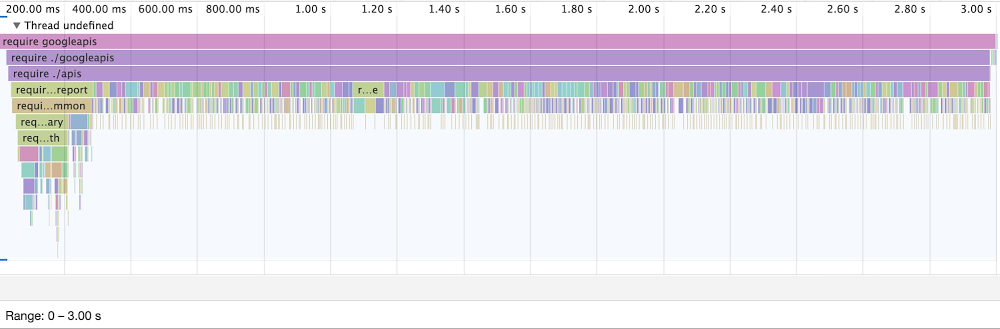
The DPE Client Library team at Google handles the release maintenance, and support of Google Cloud client libraries. Essentially, we act as the open-source maintainers of Google’s 350+ repositories on GitHub. It’s a big job…For this work to scale, it’s been critical to automate various common tasks such as validating licenses, managing releases, and merging pull requests (PRs) once tests pass. To build our various automations, we decided to use the Node.js-based framework Probot, which simplifies the process of writing web applications that listen for Webhooks from the GitHub API. [Editor’s note: The team has deep expertise in Node.js. The co-author Benjamin Coe was the third engineer at npm, Inc, and is currently a core collaborator on Node.js.]Along with the Probot framework, we decided to use Cloud Functions to deploy those automations, with the goal of reducing our operational overhead. We found that Cloud Functions are a great option for quickly and easily turning Node.js applications into hosted services:Cloud Functions can scale automatically as your user-base grows, without the need to provision and manage additional hardware.If you’re familiar with creating an npm module, it only takes a few additional steps to deploy it as a Cloud function; either with the gcloud CLI, or from the Google Cloud Console (see: “Your First Function: Node.js”).Cloud Functions integrate automatically with Google Cloud services, such as Cloud Logging and Cloud Monitoring.Cloud Functions can be triggered by events, from services such as Firestore, PubSub, Cloud Storage, and Cloud Tasks.Jump forward two years, we now manage 16 automations that handle over 2 million requests from GitHub each day. And we continue to use Cloud Functions to deploy our automations. Contributors can concentrate on writing their automations, and it’s easy for us to deploy them as functions in our production environment. Designing for serverless comes with its own set of challenges, around how you structure, deploy, and debug your applications, but we’ve found the trade-offs work for us.Throughout the rest of this article, drawing on these first-hand experiences, we outline best practices for deploying Node.js applications on Cloud Functions, with an emphasis on the following goals:Performance – Writing functions that serve requests quickly, and minimize cold start times.Observability – Writing functions that are easy to debug when exceptions do occur.Leveraging the platform – Understanding the constraints that Cloud Functions and Google Cloud introduce to application development, e.g., understanding regions and zones.With these concepts under your belt, you too can reap the operational benefits of running Node.js-based applications in a serverless environment, while avoiding potential pitfalls.  Best practices for structuring your applicationIn this section, we discuss attributes of the Node.js runtime that are important to keep in mind when writing code intended to deploy Cloud Functions. Of most concern:The average package on npm has a tree of 86 transitive dependencies (see: How much do we really know about how packages behave on the npm registry?). It’s important to consider the total size of your application’s dependency tree.Node.js APIs are generally non-blocking by default, and these asynchronous operations can interact surprisingly with your function’s request lifecycle. Avoid unintentionally creating asynchronous work in the background of your application. With that as the backdrop, here’s our best advice for writing Node.js code that will run in Cloud Functions. 1. Choose your dependencies wiselyDisk operations in the gVisor sandbox, which Cloud Functions run within, will likely be slower than on your laptop’s typical operating system (that’s because gVisor provides an extra layer of security on top of the operating system, at the cost of some additional latency). As such, minimizing your npm dependency tree reduces the reads necessary to bootstrap your application, improving cold start performance.You can run the command npm ls –production to get an idea of how many dependencies your application has. Then, you can use the online tool bundlephobia.com to analyze individual dependencies, including their total byte size. You should remove any unused dependencies from your application, and favor smaller dependencies.Equally important is being selective about the files you import from your dependencies. Take the library googleapis on npm: running require(‘googleapis’) pulls in the entire index of Google APIs, resulting in hundreds of disk read operations. Instead you can pull in just the Google APIs you’re interacting with, like so:It’s common for libraries to allow you to pull in the methods you use selectively—be sure to check if your dependencies have similar functionality before pulling in the whole index.2. Use ‘require-so-slow’ to analyze require-time performanceA great tool for analyzing the require-time performance of your application is require-so-slow. This tool allows you to output a timeline of your application’s require statements, which can be loaded in DevTools Timeline Viewer. As an example, let’s comparet loading the entire catalog of googleapis, versus a single required API (in this case, the SQL API):Timeline of require(‘googleapis’):The graphic above demonstrates the total time to load the googleapis dependency. Cold start times will include the entire 3s span of the chart.Timeline of require(‘googleapis/build/src/apis/sql’):The graphic above demonstrates the total time to load just the sql submodule. The cold start time is a more respectable 195ms.In short, requiring the SQL API directly is over 10 times faster than loading the full googleapis index!3. Understand the request lifecycle, and avoid its pitfallsThe Cloud Functions documentation issues the following warning about execution timelines: A function has access to the resources requested (CPU and memory) only for the duration of function execution. Code run outside of the execution period is not guaranteed to execute, and it can be stopped at any time. This problem is easy to bump into with Node.js, as many of its APIs are asynchronous by default. It’s important when structuring your application that res.send() is called only after all asynchronous work has completed. Here’s an example of a function that would have its resources revoked unexpectedly:In the example above, the promise created by set() will still be running when res.send() is called. It should be rewritten like this:This code will no longer run outside the execution period because we’ve awaited set() before calling res.send(). A good way to debug this category of bug is with well-placed logging: Add debug lines following critical asynchronous steps in your application. Include timing information in these logs relative to when your function begins a request. Using Logs Explorer, you can then examine a single request and ensure that the output matches your expectation; missing log entries, or entries coming significantly later (leaking into subsequent requests) are indicative of an unhandled promise.During cold starts, code in the global scope (at the top of your source file, outside of the handler function) will be executed outside of the context of normal function execution. You should avoid asynchronous work entirely in the global scope, e.g, fs.read(), as it will always run outside of the execution period.4. Understand and use the global scope effectivelyIt’s okay to have ‘expensive’ synchronous operations, such as require statements, in the global scope. When benchmarking cold start times, we found that moving require statements to the global scope (rather than lazy-loading within your function) lead to a 500ms to 1s improvement in cold start times. This can be attributed to the fact that Cloud Functions are allocated compute resources while bootstrapping.Also consider moving other expensive one-time synchronous operations, e.g., fs.readFileSync, into the global scope. The important thing to avoid asynchronous operations, as they will be performed outside of the execution period.Cloud functions recycle the execution environment; this means that you can use the global scope to cache expensive one-time operations that remain constant during function invocations:It’s critical that we await asynchronous operations before sending a response, but it’s okay to cache their response in the global scope.5. Move expensive background operations into Cloud TasksA good way to improve the throughput of your Cloud function, i.e., reduce overall latency during cold starts and minimize the necessary instances during traffic spikes, is to move work outside of the request handler. Take the following application that performs several expensive database operations:The response sent to the user does not require any information returned by our database updates. Rather than waiting for these operations to complete, we could instead use Cloud Tasks to schedule this operation in another Cloud function, and respond to the user immediately. This has the added benefit that Cloud Task queues support retry attempts, shielding your application from intermittent errors, e.g., a one-off failure writing to the database.Here’s our prior example split into a user-facing function and a background function:User-facing function:Background function:Deploying your applicationThe next section of this article discusses settings, such as memory, and location,that you should take into account when deploying your application.1. Consider memory’s relationship to performanceAllocating more memory to your functions will also result in the allocation of more CPU (see: ‘’Compute Time”). For CPU-bound applications, e.g., applications that require a significant number of dependencies at start up, or that are performing computationally expensive operations (see: “ImageMagick Tutorial”), you should experiment with various instance sizes as a first step towards improving request and cold-start performance.You should also be mindful of whether your function has a reasonable amount of available memory when running; applications that run too close to their memory limit will occasionally crash with out-of-memory errors, and may have unpredictable performance in general. You can use the Cloud Monitoring Metrics Explorer to view the memory usage of your Cloud functions. In practice, my team found that 128Mb functions did not provide enough memory for our Node.js applications, which average 136Mb. Consequently, we moved to the 256Mb setting for our functions and stopped seeing memory issues2. Location, location, locationThe speed of light dictates that the best case for TCP/IP traffic will be ~2ms latency per 100 miles1. This means that a request between New York City and London has a minimum of 50ms of latency. You should take these constraints into account when designing your application.If your Cloud functions are interacting with other Google Cloud services, deploy your functions in the same region as these other services. This will ensure a high-bandwidth, low-latency network connection between your Cloud function and these services (see: “Regions and Zones”).Make sure you deploy your Cloud functions close to your users. If people using your application are in California, deploy in us-west rather than us-east; this alone can save 70ms of latency.Debugging and analyzing your applicationThe next section of this article provides some recommendations for effectively debugging your application once it’s deployed.1. Add debug logging to your application:In a Cloud Functions environment, avoid using client libraries such as @google-cloud/logging, and @google-cloud/monitoring for telemetry. These libraries buffer writes to the backend API, which can lead to work remaining in the background after calling res.send() outside of your application’s execution period.Cloud functions are instrumented with monitoring and logging by default, which you can access with Metrics Explorer and Logs Explorer:For structured logging, you can simply use JSON.stringify() which Cloud Logging interprets as structured logs:The entry payload follows the structure described here. Note the timingDelta, as discussed in “Understand the request lifecycle”—this information can help you debug whether you have any unhandled promises hanging around after res.send().There are CPU and network costs associated with logging, so be mindful about the size of entries that you log. For example, avoid logging huge JSON payloads when you could instead log a couple of actionable fields. Consider using an environment variable to vary logging levels; default to relatively terse actional logs, with the ability to turn on verbose logging for portions of your application using util.debuglog.Our takeaways from using Cloud FunctionsCloud Functions work wonderfully for many types of applications:Cloud Scheduler tasks: We have a Cloud function that checks for releases stuck in a failed state every 30 minutes.Pub/Sub consumers: One of our functions parses XML unit test results from a queue, and opens issues on GitHub for flaky tests.HTTP APIs: We use Cloud Functions to accept Webhooks from the GitHub API; for us it’s okay if requests occasionally take a few extra seconds due to cold starts.As it stands today, though, it’s not possible to completely eliminate cold starts with Cloud Functions: instances are occasionally restarted, bursts of traffic lead to new instances being started. As such, Cloud Functions still isn’t a great fit for applications that can’t shoulder the additional seconds that cold starts occasionally add. As an example, blocking a user-facing UI update on the response from a Cloud Function is not a good idea.We want Cloud Functions to work for these types of time-sensitive applications, and have features in the works to make this a reality:Allowing a minimum number of instances to be specified; this will allow you to avoid cold starts for typical traffic patterns (with new instances only being allocated when requests are made above the threshold of minimum instances).Performance improvements to disk operations in gVisor, the sandbox that Cloud Functions run within: A percentage of cold-start time is spent loading resources into memory from disk, which these changes will speed up.Publishing individual APIs from googleapis on npm. This will make it possible for people to write Cloud functions that interact with popular Google APIs, without having to pull in the entire googleapis dependency.With all that said, it’s been a blast developing our automation framework on Cloud Functions, which, if you accept the constraints, and follow the practices outlined in this article is a great option for deploying small Node.js applications;.Have feedback on this article? Have an idea as to how we can continue to improve Cloud Functions for your use case? Don’t hesitate to open an issue on our public issue tracker.1. High Performance Browser NetworkingRelated ArticleNew in Cloud Functions: languages, availability, portability, and moreCloud Functions includes a wealth of new capabilities that make it a robust platform on which to build your applicationsRead Article
Quelle: Google Cloud Platform

Introducing Monitoring Query Language, now GA in Cloud Monitoring

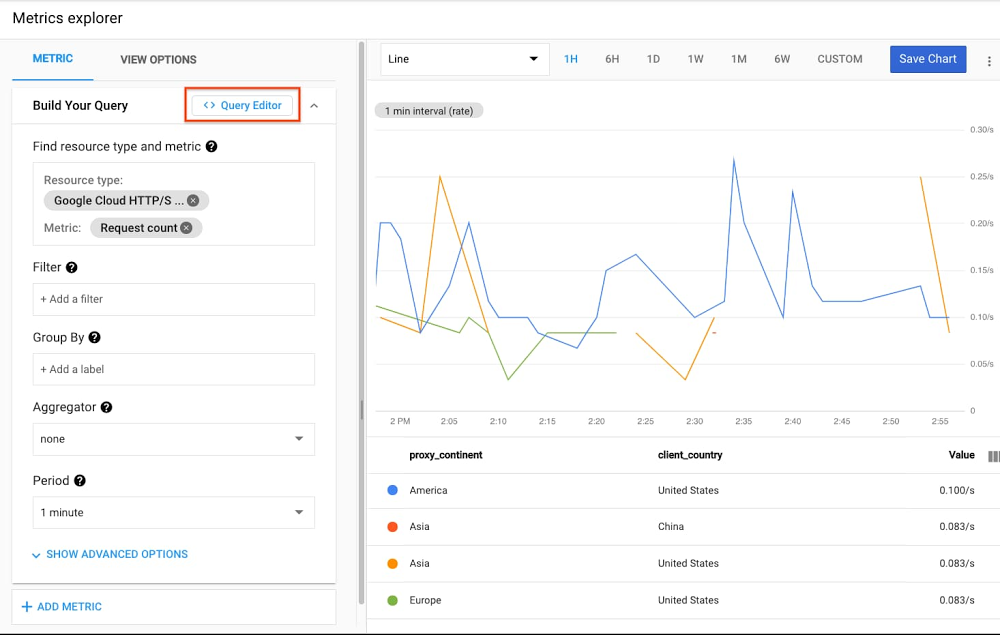
Developers and operators on IT and development teams want powerful metric querying, analysis, charting, and alerting capabilities to troubleshoot outages, perform root cause analysis, create custom SLI / SLOs, reports and analytics, set up complex alert logic, and more. So today we’re excited to announce the General Availability of Monitoring Query Language (MQL) in Cloud Monitoring!MQL represents a decade of learnings and improvements on Google’s internal metric query language. The same language that powers advanced querying for internal Google production users, is  now available to Google Cloud users as well. For instance, you can use MQL to:Create ratio-based charts and alertsPerform time-shift analysis (compare metric data week over week, month over month, year over year, etc.)Apply mathematical, logical, table operations, and other functions to metricsFetch, join, and aggregate over multiple metricsSelect by arbitrary, rather than predefined, percentile valuesCreate new labels to aggregate data by, using arbitrary string manipulations including regular expressionsLet’s take a look at how to access and use MQL from within Cloud Monitoring.Getting started with MQLIt’s easy to get started with MQL. To access the MQL Query Editor, just click on the button in Cloud Monitoring Metrics Explorer:Then, create a query in the Metrics Explorer UI, and click the Query Editor button. This converts the existing query into an MQL query:MQL is built using operations and functions. Operations are linked together using the common ‘pipe’ idiom, where the output of one operation becomes the input to the next. Linking operations makes it possible to build up complex queries incrementally. In the same way you would compose and chain commands and data via pipes on the Linux command line, you can fetch metrics and apply operations using MQL. For a more advanced example, suppose you’ve built a distributed web service that runs on Compute Engine VM instances and uses Cloud Load Balancing, and you want to analyze error rate—one of the SRE “golden signals”.You want to see a chart that displays the ratio of requests that return HTTP 500 responses (internal errors) to the total number of requests; that is, the request-failure ratio. The loadbalancing.googleapis.com/https/request_count metric type has a response_code_class label, which captures the class of response codes.In this example, because the numerator and denominator for the ratio are derived from the same time series, you can also compute the ratio by grouping. The following query shows this approach:This query uses an aggregation expression built on the ratio of two sums:The first sum uses the if function to count 500-valued HTTP responses and a count of 0 for other HTTP response codes. The sum function computes the count of the requests that returned 500.The second sum adds up the counts for all requests, as represented by val().The two sums are then divided, resulting in the ratio of 500 responses to all responses.Now let’s say that we want to create an alert policy from this query. You can go to Alerting, click “Create Policy”, click “Add Condition”, and you’ll see the same “Query Editor” button you saw in Metrics Explorer.You can use the same query as above, but with a condition operator that provides the threshold for the alert:The condition tests each data point in the aligned input table to determine whether the ratio value exceeds the threshold value of 50%. The string ’10^2.%’ specifies that the value should be used as a percentage.In addition to ratios, another common use case for MQL is time shifting. For brevity, we won’t cover this in our blog post, but the example documentation walks you through performing week-over-week or month-over-month comparisons. This is particularly powerful when coupled with long-term retention of 24 months of custom and Prometheus metrics.Take monitoring to the next levelThe sky’s the limit for the use cases that MQL makes possible. Whether you need to perform joins, display arbitrary percentages, or make advanced calculations, we’re excited to make this available to all customers and we are interested to see how you will use MQL to solve your monitoring, alerting, and operations needs. To learn more about MQL, check out the documentation, quickstarts, examples (queries, alerts), a language and function reference, and more.Related ArticleExtended retention for custom and Prometheus metrics in Cloud MonitoringRetention times for custom and Prometheus metrics in Cloud Monitoring has gone from six weeks to 24 months.Read Article
Quelle: Google Cloud Platform

A revolution is coming for data and the cloud: 6 predictions for 2021

Offering predictions can be a challenge, because specific predictions depend on specific timeframes. But looking at the trends that we’re seeing in cloud adoption, there are a few things I’ve seen in 2020 that imply changes we will be seeing in 2021. As someone who was a network engineer when the internet revolution happened, I can see the signs of another revolution—this time built around the cloud and data—and acting on the signs of change will likely tell the difference between the disruptors and the disrupted. Here’s what I see coming down the road, and what’s important to keep in mind as we head into a new year.1. The next phase of cloud computing is about the benefits of transformation (not just cost). In 2021, cloud models will start to include a governed data architecture, with accelerated adoption of analytics and AI throughout an organization. In the past, we’ve seen notable developments that have driven massive cloud adoption movements. The first wave of cloud migration was driven by applications as a service, which gave businesses the tools to develop more quickly and securely for specific applications, e.g. CRM. Then, the second generation saw a lot of companies modernizing infrastructure to move on from physical data center maintenance.  That’s all been useful for businesses, but with all that’s happened in 2020, the third phase—digital transformation—will arrive in earnest. As this happens, we’ll start to see the benefits that come from truly transforming your business. Positive outcomes include the infusion of data analytics and AI/ML into everyday business processes, leading to profound impacts across every industry and society at large.2. Compliance can’t just be an add-on item.The modern cloud model has to be one that can withstand the scrutiny around data sovereignty and accessibility questions. It’ll change how companies do business and how much of society is run. Even large, traditional enterprises are moving to the cloud to handle urgent needs, like increased regulations. The stakes are too high now for enterprises to ignore the critical components of security and privacy. One of the big reasons the cloud—and Google Cloud specifically—is so vital to better data analytics revolves around these questions of compliance and governance. Around the world, for businesses of every size, there’s an increased focus on security, privacy, and data sovereignty. So much of the digital transformation that we’ll see in 2021 will happen out of necessity, but today’s cloud is what makes it possible. Google Cloud is a platform built ground-up based on these foundational requirements, so enterprises can make the transition to the cloud with the assurance that data is protected.  3. Open infrastructure will reign supreme. By 2021, we’ll see 80% or more of enterprises adopt a multicloud or hybrid IT strategy. Cloud customers want options for their workloads. Open infrastructure and open APIs are the way forward, and the open philosophy is one you should embrace. No business can afford to have its valuable data locked into a particular provider or service. This emerging open standard means you’ll start to see multi-cloud and on-premises data sources coming together rapidly. With the right tools, organizations can use multiple cloud services together, letting them gain the specific benefits they need from each cloud as if it was all one infrastructure. The massive shift we’re seeing toward both openness and cloud also brings a shift toward stronger data assets and better data analytics. If you’ve been surprised over the past year about how many data sources exist for your company, or how much of it is gathered, you’re not alone. An open infrastructure will let you choose the cloud path that works best for your business. Data solutions like Looker and BigQuery Omni are specifically designed to work in an open API environment on our open platform to stay ahead of continually changing data sources.4. Harnessing the power of AI/ML will no longer require a degree in data science. Data science, with all of the expertise and specialized tools that have typically been involved, can no longer be the purview of just the privileged few. Teams throughout an organization need to have access to the power of data science, with capabilities like ML modeling and AI, without having to learn an entirely new discipline. For many of these team members, it’ll bring new life into their jobs and the decisions they need to make. If they haven’t been consuming data, they’ll start. With this capacity to give the whole team the power of analytics, businesses will be able to gather, analyze, and act on data far quicker than those who are still using the traditional detached data science model. This improves productivity and informed decision making by giving employees the tools to gather, sort, and share data on demand. It also frees up teams with data science experience that would normally be assembling, analyzing, and creating presentations to concentrate on tasks that are more suited to their abilities and training.  With Google Cloud’s infrastructure and our data and AI/ML solutions, it’s easy to move data to the cloud easily and start analyzing it. Tools like Connected Sheets, Data QnA, and Looker make data analytics something that all employees can do, regardless of whether they are certified data analysts or scientists. 5. More and more of the world’s enterprise data will need to be processed in real time. We’re quickly getting to the point where data residing in the cloud outpaces data residing in data centers. That’s happening as worldwide data is expected to grow 61% by 2025, to 175 zettabytes. That’s a lot of data, which offers a trove of opportunity for businesses to explore. The challenge is capturing data usefulness in the moment. Following past stored data can be informative, but more and more use cases require immediate information, especially when it comes to reacting to unexpected events. For example, identifying and stopping a network security breach in the moment, with real-time data and a real-time reaction, has enormous consequences for a business. That one moment can save untold hours and costs spent on mitigation.This is the same method that we use to help our customers overcome DDOS attacks, and if 2020 has taught us anything, it’s that businesses will need this ability to instantly respond to unexpected problems more than ever moving forward.While real-time data revolutionizes how quickly we gather data, perhaps the most unexpected yet incredibly useful source of data we’ve seen is predictive analytics. Traditionally, data is gathered only from the physical world, meaning the only way to plan for what will happen was to look at what could physically be tested. But with predictive models and AI/ML tools like BigQuery ML, organizations can run simulations based on real-life scenarios and information, giving them data on circumstances that would be difficult, costly, or even impossible to test for in physical environments.Related ArticleRead Article6. More than 50% of data lakes will span multiple clouds and on-premises. We know that aligning the right services to the right use cases can be complicated. And while the cloud opens up a ton of opportunities for better data options, the fact that so many businesses are moving to these cloud solutions means that organizations will need a strong digital strategy to stay competitive, and this extends down to their data storage. Lots of businesses are choosing multicloud for flexibility, especially with so many options available. In the cloud, data storage has taken the shape of either a data warehouse—which stores primarily structured data so that everything is easily searchable—or data lakes—which bring together all of a business’ data together, regardless of structure. We’ll see more of the trend we’ve already seen, starting with the line between lake and warehouse getting blurrier. Google Cloud has a variety of data lake modernization solutions that give organizations the ability to integrate unstructured data as well as use AI/ML solutions to make data lakes easier to navigate, driving insights and collaboration.What’s next for your business?Change is happening fast, and while it can be overwhelming, all these technology changes are really exciting. At the end of it, you’ll be able to respond in real-time to problems, help your business users get their data without delay, and know for sure the entire lifecycle of any of your data. Let’s get started.Check out our guide to building a modern data warehouse or see how data-to-value leaders succeed in driving results from their enterprise data strategy in the report by Harvard Business Review Analytic Services: Turning data into unmatched business value.
Quelle: Google Cloud Platform

Top 9 posts from Google Cloud in 2020

In 2020, everything changed. Who would have expected that how we live, work, communicate, and learn would be different by the end of the year? At Google Cloud, we saw how COVID-19 forced changes not only in how our customers worked in offices, but also how software developers and IT practitioners innovated. To support these changes, we introduced new products, features, and resources to address the needs we hear most from our customers: how to better connect people, how to get smarter with your data, how to build faster, and how to do this all with the confidence that your data is safe. Meeting your customers’ needs is essential, and so is empowering your employees with the tools and information they need in real time.Here, we take a look back at the year’s most popular posts from the Google Cloud blog:1. Google Workspace brought productivity to a new levelThe arrival of Google Workspaceallowed our customers to better connect their workforce with the tools they needed to get anything done, in one place. It included everything our customers loved about G Suite, including all of the familiar productivity apps—Gmail, Calendar, Drive, Docs, Sheets, Slides, Meet—and added a new, deeply integrated user experience. For example, we introduced new ways that core Workspace tools like video, chat, email, files, and tasks became more deeply integrated, powerful, and efficient.2. New features and security measures made Google Meet the place to be2020 was all about connecting virtually. As more employees, educators, and students worked remotely in response to the spread of COVID-19, we wanted to help them stay connected and productive. We rolled out free access to our advanced Google Meet video-conferencing capabilities to all G Suite and G Suite for Education customers globally through September. We added features such as support for larger meetings for up to 250 participants per call; live streaming for up to 100,000 viewers; and the ability to record meetings and save them to Google Drive. We also rolled out other top-requested features, including tiled layouts, low-light mode, noise cancellation, and others. And as the year progressed, we never stopped innovating, introducing Meet on the Nest Hub Max, customizable backgrounds, and moderation controls like meeting attendance, Q&A, and polling. We also shared the array of counter-abuse protections we built to give you confidence that your meetings are safe, including anti-hijacking measures for both web meetings and dial-ins and browser-based security features, 2-step Verification, and our Advanced Protection Program. For schools, we introduced several features to improve the remote learning experiences for teachers and students. 3. Google Cloud learning resources connected cloud students with new topicsTo help you transition to remote work and learning, we shared details about our Google Cloud learning resources, which you can use at home. These include our extensive catalog of over 100 on-demand training courses on Pluralsight and Coursera designed to get you started on the path to certification in cloud architecture, data engineering, and machine learning; hands-on labs on Qwiklabs; and interactive webinars at no cost for 30 days, so you can gain cloud experience—and get smarter about cloud—no matter where you are.  4. The COVID-19 public dataset program opened up a world of research possibilitiesTo aid researchers, data scientists, and analysts in the fight against COVID-19, we made a hosted repository of public datasets, like our COVID-19 Open Data dataset, free to access and query through our COVID-19 Public Dataset Program. Researchers can also use BigQuery MLto train advanced machine learning models with this data right inside BigQuery at no additional cost. 5. Google Cloud’s coronavirus response combined business continuity, monitoring, free resources, and moreWith all of the challenges impacting our customers, we wanted to give them confidence that our people were here when you needed them. We outlined all of the measures we take to make our services available to customers everywhere during the pandemic and beyond. These include regular disaster recovery testing (DiRT) of our infrastructure and processes; multiple SRE coverage areas; compute and storage hardware capacity monitoring and reserves; remote access and backup contingencies for our support teams; enhanced support structure for customers on the front lines; and free access to the premium version of Hangouts Meet to existing customers. 6. AppSheet empowered citizen app developers with no-codeWe were proud to share that Google acquired AppSheet, a leading no-code application development platform used by enterprises across a variety of industries. This acquisition helps enterprises empower millions of citizen developers to more easily and quickly create and extend applications without the need for professional coding skills. Employees will be able to develop richer applications at scale that use Google Sheets and Forms, and top Google technologies like Android, Maps, and Google Analytics. In addition, AppSheet customers can continue to integrate with a number of cloud-hosted data sources, including Salesforce, Dropbox, AWS DynamoDB, and MySQL. 7. API experts brought order to complex design decisionsAs many software developers know, there are two primary models for API design: RPC and REST. Most modern APIs are implemented by mapping them to the same HTTP protocol. It’s also common for RPC API designs to adopt one or two ideas from HTTP while staying within the RPC model, which has increased the range of choices that an API designer faces. We looked at the choices and offered guidance on how to choose between them, focusing on gRPC, OpenAPI, and REST—three significant and distinct approaches for building APIs that use HTTP.8. Google Cloud detective work solved a tricky networking problemIf you’ve ever wondered how Google Cloud Technical Solutions Engineers (TSE) approach your support cases, we offered a Google Cloud mystery story—the case of the missing DNS packets. Follow along to see how they worked closely with our customer to gather information in the course of their troubleshooting, and how they reasoned their way through to a resolution. This true story offers insight into what to expect the next time you submit a ticket to Google Cloud support.9. Google Cloud Next ‘20: OnAir lit up the digital stageFinally, to keep you up to date with all of the important announcements made at Google Cloud Next ‘20: On Air, we offered a week-by-week breakdown focused on product areas like application development, artificial intelligence and machine learning, databases, data analytics and much more. Check out the blog for the full list.That’s a wrap for 2020! Keep coming back to the Google Cloud blog for announcements, helpful advice, customer stories, and more in 2021.Related ArticleRead Article
Quelle: Google Cloud Platform

In case you missed it: here’s what happened in data analytics in 2020

2020 was a tough year. As the global pandemic spread and impacted every country, industry, and individual, we turned to data and analytics to help guide us through the unknown. We used data and the cloud to help us understand the spread of COVID-19 while simultaneously digitally transforming industries to offer a safer way for the public to get what they need when they need it. Data and analytics became a critical tool for our essential workers and businesses as they navigated this trying time. Our data analytics team was hard at work to help organizations rethink their business strategy in order to deliver services to their customers.Everything we heard from customers this year and what we worked on here at Google Cloud reflects this new sense of urgency around using and sharing data across the digital world. Here’s a look back at the four major themes we focused on in 2020 and why they will be more relevant than ever in 2021.Beyond BI—do more with intelligent services The amount of data generated today is overwhelming, but an abundance of data doesn’t necessarily equate to useful information. Companies are already employing business intelligence (BI) to get insights from their data and achieve better business outcomes. Now, they can augment their current solutions with AI and machine learning (ML) to analyze massive datasets, recognize patterns, and gain insights that help define the past, the present—and the future.For example, Looker enables teams to go beyond traditional reports and dashboards to deliver modern BI, integrated insights, data-driven workflows, and custom applications using Looker Blocks. Users also benefit from real-time analytics and aggregate awareness capabilities to stream the most relevant data for high performance and efficient queries. You can use BigQuery ML to build custom ML models without moving data from the warehouse, including real-time AI solutions like anomaly detection. Additionally, the natural language interface Data QnA, announced at Next OnAir, empowers business users to analyze datasets conversationally without adding more work for BI teams.Related ArticleRead ArticleOpen platforms for choice, flexibility, and portabilityWith the proliferation of SaaS applications and a workload-at-a-time migration mentality, a majority of enterprise cloud architectures are being built with two or more public clouds. This allows enterprises to take advantage of the lowest storage and compute costs, use the most innovative AI and ML services, and provides freedom of portability if needed. That’s why we are committed to being open at Google Cloud.By 2021, over 75% of midsize and large organizations will have adopted a multicloud and/or hybrid IT strategy. Gartner PredictsWe’re breaking down silos across different environments to enable our customers to manage, process, analyze, and activate data—no matter where it is. This year, we introduced BigQuery Omni, our flexible, multi-cloud analytics solution that lets you analyze data in Google Cloud, AWS, and Azure (coming soon) without the need for cross-cloud data movement. In addition, Looker’s in-database architecture allows you to query data where it’s located to give you a consistent way to analyze data, even across multiple databases and clouds. We believe our vision of a multi-cloud, open data analytics future was reflected in this year’s brand-new Gartner Magic Quadrant for Cloud Database Management Systems (DBMS). Google was named a Leader among the furthest three positioned vendors on the completeness-of-vision axis. In 2020, we also helped organizations like Wayfair migrate their on-prem data analytics open source software to our open cloud. This type of portability allows them to take advantage of cloud scale and costs with Dataproc, while lowering the adoption barrier for their data analytics professionals familiar with Apache Spark, Presto, and Apache Hive.To strengthen our backup and DR capabilities across all of Google Cloud, Google recently acquired Actifio. Enterprises running critical workloads on Google Cloud, including hybrid scenarios, can prevent data loss and downtime due to external threats, network failures, human errors, and other disruptions.  Scale intelligently without losing controlData analytics are now mission-critical for many businesses, but how do you respond efficiently to rapid demand and put data into the right hands without driving up costs? Can you achieve flexibility and predictability? Over the past year, we heard from customers as they navigated the unprecedented jump to online shopping as brick-and-mortar retailers shut their doors. At the same time, they still had to plan for regular calendar events like Black Friday/Cyber Monday and product launches. We announced BigQuery Flex Slots to help them scale their cloud data warehouses up and down quickly while only paying for what they consumed. We also made it easier to optimize data processing and migration to the cloud with a new Dataflow change data capture (CDC) solution that focuses on ingesting and processing changed records, rather than all available data. In addition, we recognize that organizations are dealing with an increasing number of rich assets to meet the demands of a data-driven workforce. Data is now used by everyone in an organization—not just data analysts. To us, that means giving people smart tools to derive more value regardless of their roles, such as a data catalog for self-service data discovery or product recommendation reference patterns that make it easier to use data to improve customer experience.Making data analytics work for youDespite its challenges, 2020 was also a year of unimaginable growth, innovation, and inspiration. At Google Cloud, we learned a lot about what’s important to you and how you’re using data analytics to reach new milestones. We heard stories from KeyBank and Trendyol Group as they migrated to BigQuery cloud data warehouse, learned how Procter & Gamble uses cloud analytics to personalize their consumer experience, and helped ThetaLabs partner with NASA to deliver more engaging streaming video. Major League Baseball (MLB) used Google Cloud to derive better insights from baseball data that helps broadcasters and content generators tell better stories and drive fan engagement. Conrad Electric selected Looker to gain visibility into product performance and unlock insights to optimize them accordingly. And Blue Apron embedded smart analytics across the entire customer journey, from recipe recommendations and improving the quality of their supply chain to streamlining packaging workflows. But perhaps the most inspiring leaps have been the ways smart analytics can be leveraged to help in the face of crisis. For instance, Commonwealth Care Alliance (CCA) used data analytics from Google Cloud to help clinicians and care managers prioritize care for high-risk patients. Reliable data and an easy way to get answers has made it possible for them to keep pace with changing factors and ensure they could provide the best care for their members.Get ready for 2021 Google Cloud data analytics training for all skill levels gives you the confidence to build a data cloud and take advantage of our open, flexible, and intelligent platform. Learn more about our smart analytics solutions at Google Cloud. On behalf of Google, we’d like to thank you for being on this journey with us. We wish you the warmest of holiday seasons and can’t wait to see what we’ll build together in 2021. Gartner, Magic Quadrant for Cloud Database Management Systems, November 23, 2020, Donald Feinberg, Adam Ronthal, Merv Adrian, Henry Cook, Rick GreenwaldGartner does not endorse any vendor, product or service depicted in its research publications and does not advise technology users to select only those vendors with the highest ratings or other designation. Gartner research publications consist of the opinions of Gartner’s research organization and should not be construed as statements of fact. Gartner disclaims all warranties, expressed or implied, with respect to this research, including any warranties of merchantability or fitness for a particular purpose.Related ArticleMost popular public datasets to enrich your BigQuery analysesCheck out free public datasets from Google Cloud, available to help you get started easily with big data analytics in BigQuery and Cloud …Read Article
Quelle: Google Cloud Platform

2020: The year in databases at Google Cloud

2020 was a year unlike any other, and all its unexpectedness brought foundational enterprise technology into the spotlight. Businesses needed their databases to be reliable, scalable, and consistently well-performing. As a result, migration plans accelerated, rigid licensing fell further out of favor, and transformative application development sped up. This was clear even in 2019, when cloud database management system (DBMS) revenues were $17 billion, up 54% from 2018, according to Gartner Predicts. We’ll be eager to see what Gartner reports from 2020, but from our perspective, growth accelerated significantly this year. We believe that our data vision of openness and flexibility was reflected in the first-ever DBMS Magic Quadrant this year. Gartner named Google Cloud a Leader in DBMS for 2020. We heard from customers across industries that this was the year they started or stepped up their database modernization. To help them meet their mission-critical goals, Google Cloud continued to launch new products and features. Here’s what was new and notable this year.New options, new flexibility entered the cloud database sceneDatabase migration service now available for Cloud SQLDatabase migrations can be a challenge for enterprises. We give our customers a uniquely easy, secure, and reliable experience with the recent launch of our serverless Database Migration Service (DMS), which provides high-fidelity, minimal downtime migrations for MySQL and PostgreSQL workloads and is designed to be truly cloud-native. Our blog announcing the launch has more info, and steps to get you started. SQL Server, managed in the cloudEnterprise companies often tell us how important the ability to migrate to Cloud SQL for SQL Server is to their larger goals of infrastructure modernization and a multi-cloud strategy. Cloud SQL for SQL Server is now generally available globally to help you keep your SQL Server workloads running. Our blog on the subject lists the five steps to get started migrating, a link to the full migration guide, and a helpful video for more details. Bare Metal Solution for Oracle databases comes to five new Google Cloud regionsBare Metal Solution lets businesses run specialized workloads such as Oracle databases in Google Cloud Regional Extensions, while lowering overall costs and reducing risks associated with migration. Last year we announced the availability of Bare Metal Solution in five more regions: Ashburn, Virginia; Frankfurt; London; Los Angeles, California; and Sydney. We also launched four more sites this year: Amsterdam, São Paulo, Singapore, and Tokyo. Customers did amazing things with cloud databases in 2020We’ve seen some clear trends emerge in cloud migration. We’ve seen customers follow what we’re referring to as a three-phase journey: migration, when they transition large commercial and open source databases; modernization, which involves moving from legacy to open source databases; and transformation, building next-gen applications and opening up new possibilities. Wherever you are in this journey, Google Cloud is focused on supporting you with the services, best practices, and tooling ecosystem to enable your success.At pharmaceutical and pharmacy technology giant McKesson, teams chose Cloud SQL to modernize their legacy environment. 3D printing and design company Makerbot shared how they architected Google Cloud’s tightly integrated tools—including Google Kubernetes Engine (GKE), Pub/Sub, and Cloud SQL—for an innovative autoscaling solution.We heard from Bluecore, developer of a marketing platform for large retailers that delivers campaigns through predictive data models, about how they turned to Cloud SQL for a fully managed solution that offered campaign creation functionality without slowing down the retail brand’s website. Customers like Handshake, provider of a platform to connect universities, also chose a Cloud SQL migration. Financial solutions provider Freedom Financial Network switched from Rackspace to Cloud SQL to meet growing demand. And at Google Cloud Next ‘20: OnAir, we heard from ShareChat and The New York Times about the successes they’ve found using our cloud-native databases. We also heard from Khan Academy, which uses Cloud Firestore to help meet the rising demand for online learning. Enterprise readiness arrived for open source databasesIn the event of a regional outage in Google Cloud, you want your application and database to quickly start serving your customers in another available region. This year, we launched Cloud SQL cross-region replication, available for MySQL and PostgreSQL database engines. We’ve worked closely with Cloud SQL customers facing business continuity challenges to simplify the experience, and our blog explains how to get started and offers a look at how Major League Baseball puts cross-region replication to use.In addition, Cloud SQL added committed use discounts as well as more maintenance controls, serverless exports, and point-in-time-recovery for Postgres.This past fall, we announced that Cloud SQL now supports MySQL 8. You now have access to a variety of powerful new features for better productivity—such as instant DDL statements (e.g. ADD COLUMN), atomic DDL, privilege collection using roles, window functions, and extended JSON syntax. Check out the full list of new features. Cloud SQL database service adds PostgreSQL 13We also launched support in Cloud SQL for PostgreSQL 13, giving you access to the latest features of PostgreSQL while letting Cloud SQL handle the heavy operational lifting. Recent PostgreSQL 13 performance improvements across the board include enhanced partitioning capabilities, increased index and vacuum efficiency, and better extended monitoring. Our recent blog has more details, more features, and instructions for getting started. Tools for measuring performance of Memorystore for RedisA popular open source in-memory data store, Redis is used as a database, cache, and message broker. Memorystore for Redis is Google Cloud’s fully managed Redis service. Memorystore recently added support for Redis 5.0, as well as VPC service controls, Redis Auth and TLS encryption. You’ll see how you can measure the performance of Memorystore for Redis, as well as performance tuning best practices for memory management, query optimizations, and more. Cloud-native databases: trusted for enterprise workloads, better for developers Google Cloud Spanner is the only managed relational database with unlimited scale, strong consistency, and 99.999% availability. (Check out more details on what’s new in Spanner.) In 2020, we announced new enterprise capabilities for Spanner, including the general availability of managed backup-restore and ninenew multi-regions of Spanner that offer 99.999% availability. Spanner also introduced support for new SQL capabilities, including query optimizer versioning, foreign keys, check constraints, and generated columns. Plus, Spanner introduced the C++ client library for C++ application developers and local Emulator that lets you develop and test your applications using a local emulator, helping reduce application development costs. Bigtable, our fully managed NoSQL database service, now offers managed backups for high business continuity and lets users add data protection to workloads with minimal management overhead. Bigtable expanded its support for smaller workloads, letting you create production instances with one or two nodes per cluster, down from the previous minimum of three nodes per cluster.Firestore, which lets mobile and web developers build apps easily, added new features such as the Rules Playground, letting you test your updated Firebase Security rules quickly. The Firestore Unity SDK, added this year, makes it easy for game developers to adopt Firestore. In addition, Firestore introduced a C++ client library and offers a richer query language with a range of new operators, including not-in, array-contains, not-equal, less than, greater than, and others. That’s a wrap for the year in databases. Stay tuned to the Google Cloud Blog for up-to-the-minute announcements, launches, and best practices for 2021. Gartner, Magic Quadrant for Cloud Database Management Systems, November 23, 2020, Donald Feinberg, Adam Ronthal, Merv Adrian, Henry Cook, Rick GreenwaldGartner does not endorse any vendor, product or service depicted in its research publications and does not advise technology users to select only those vendors with the highest ratings or other designation. Gartner research publications consist of the opinions of Gartner’s research organization and should not be construed as statements of fact. Gartner disclaims all warranties, expressed or implied, with respect to this research, including any warranties of merchantability or fitness for a particular purpose
Quelle: Google Cloud Platform

2020 review: How serverless solutions helped customers thrive in uncertainty

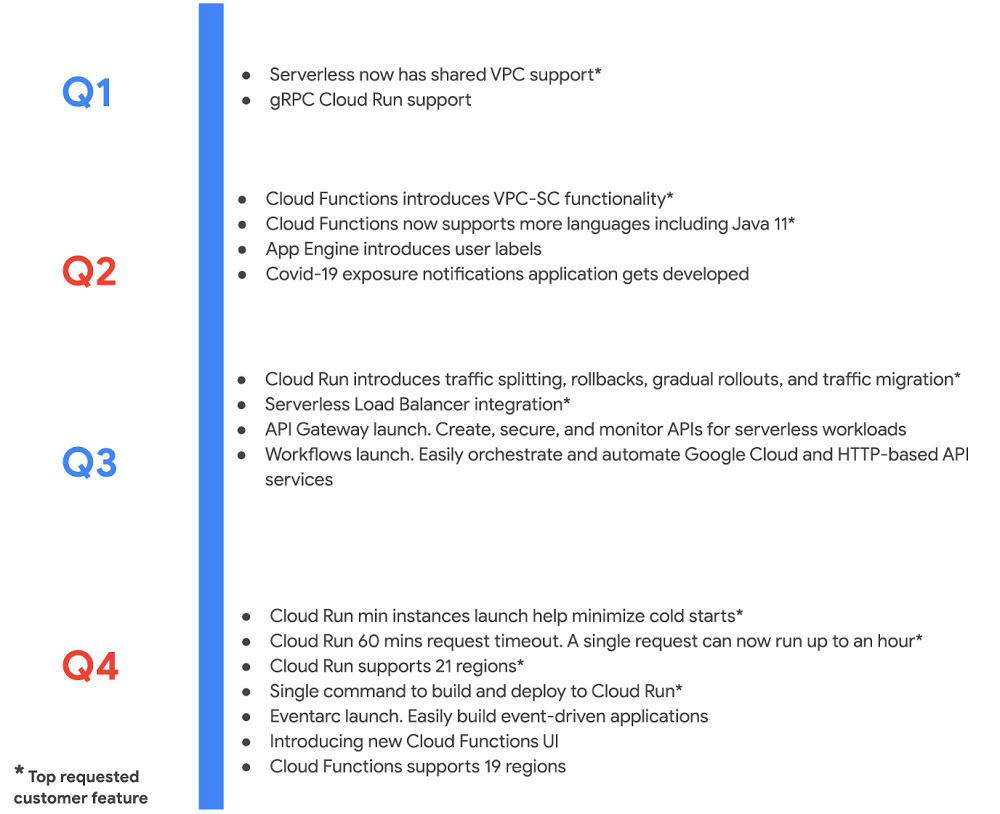
What a year it has been. 2020 challenged even the most adaptive enterprises, upending their best laid plans. Yet, so many Google Cloud customers turned uncertainty into opportunity. They leaned into our serverless solutions to innovate rapidly, in many cases introducing brand new products, and delivering new features to respond to market demands. We were right there with them, introducing over a 100 new capabilities—faster than ever before! I’m grateful for the inspiration our customers provided, and the tremendous energy around our serverless solutions and cloud-native application delivery. Cloud Run proved indispensable amidst uncertainty As digital adoption accelerated, developers turned to Cloud Run—it’s the easiest, fastest way to get your code to production securely and reliably. With serverless containers under the hood, Cloud Run is optimized for web apps, mobile backends, and data processing, but can also run most any kind of application you can put in a container. Novice users in our studies built and deployed an app on Cloud Run on their first try in less than five minutes. It’s so fast and easy that anyone can deploy multiple times a day. It was a big year for Cloud Run. This year we added an end-to-end developer experience that goes from source and IDE to deploy, expanded Cloud Run to a total of 21 regions, and added support for streaming, longer timeouts, larger instances, gradual rollouts, rollbacks and much much more. These additions were immediately useful to customers. Take MediaMarktSaturn, a large European electronics retailer, which chose Cloud Run to handle a 145% traffic increase across its digital channels. Likewise, using Cloud Run and other managed services, IKEA was able to spin solutions for challenges brought by the pandemic in a matter of days, while saving 10x the operational costs. And unsurprisingly, Cloud Run has emerged as a service of choice for Google developers internally, who used it to spin up a variety of new projects throughout the year. With Cloud Run, Google Cloud is redefining serverless to mean so much more than functions, reflecting our belief that self-managing infrastructure and an excellent developer experience shouldn’t be limited to a single type of workload. That said, sometimes a function is just the thing you need, and this year we worked hard to add new capabilities to Cloud Functions, our managed function as a service offering. Here is a sampling: Expanded features and regions: Cloud Functions added 17 new capabilities and is available in several new regions, for a total 19 regions.  A complete serverless solution: We also launched API Gateway, Workflows and Eventarc. With this suite, developers can now create, secure, and monitor APIs for their serverless workloads, orchestrate and automate Google Cloud and HTTP-based API services, and easily build event-driven applications.Private access: With the integration between VPC Service Controls and Cloud Functions, enterprises can secure serverless services to mitigate threats, including data exfiltration. Enterprise can also take advantage of VPC Connector for Cloud Functions to enable private communication between cloud resources and on-premises hybrid deployments. Enterprise scale: Enterprises working with huge data sets can now leverage gRPC to connect a Cloud Run servicewith other services. And finally, the External HTTP(S) Load Balancing integration with Cloud Run and Cloud Functions lets enterprises run and scale services worldwide behind a single external IP address. While both Cloud Run and Cloud Functions have seen strong user adoption in 2020, we also continue to see strong growth in App Engine, our oldest serverless product, thanks largely to its integrated developer experience and automatic scaling benefits. In 2020, we added support for new regions, runtimes, and Load Balancing, to App Engine to further build upon developer productivity and scalability benefits.Click to enlargeBuilt-in security powered continuous innovation Companies have had to reconfigure and rethink their business to adapt to the new normal during the pandemic. Cloud Build, our serverless continuous integration/continuous delivery (CI/CD) platform, helps by speeding up the build, test, and release cycle. Developers perform deep security scans within the CI/CD pipeline and ensure only trusted container images are deployed to production.Consider the case of Khan Academy, which raced to meet unexpected demand as students moved to at-home learning. Khan Academy used Cloud Build to experiment rapidly with new features such as tailored schedules, while scaling seamlessly on App Engine. Then there was New York State, whose unemployment systems saw a 1,600% jump in new unemployment claims during the pandemic. The state rolled out a new website built on fully managed serverless services including Cloud Build, Pub/Sub, Datastore, and Cloud Logging to handle this increase. We added a host of new capabilities to Cloud Build in 2020 across the following areas to make these customer successes possible: Enterprise readiness: Artifact Registry brings together many of the features requested by our enterprise customers, including support for granular IAM, regional repositories, CMEK , VPC-SC, along with the ability to manage Maven, npm packages and containers. Ease of use: With just a few clicks, you can create CI/CD pipelines that implement out-of-the-box best practices for Cloud Run and GKE. We also added support for buildpacks to Cloud Build to help you easily create and deploy secure, production-ready container images to Cloud Run or GKE. Make informed decisions: With the new Four Keys project, you can capture key DevOps Research & Assessment (DORA) metrics to get a comprehensive view of your software development and delivery process. Additionally, the new Cloud Build dashboard provides deep insights into how to optimize your CI/CD process.Interoperability across CI/CD vendors: Tekton, founded by Google in 2018 and donated to the Continuous Delivery Foundation (CDF) in 2019, is becoming the de facto standard for CI/CD across vendors, languages, and deployment environments, with contributions from over 90 companies. In 2020, we added support for new features like triggers to Tekton.  GitHub integration: We brought advanced serverless CI/CD capabilities to GitHub, where millions of you collaborate on a day-to-day basis. With the new Cloud Build GitHub app, you can configure and trigger builds based on specific pull request, branch, and tag events.Click to enlargeContinuous innovation succeeds when your toolchain provides security by default, i.e., when security is built into your process. For New York State, Khan Academy and numerous others, a secure software supply chain is an essential part of delivering software securely to customers. And the availability of innovative, powerful, best-in-class native security controls is precisely why we believe Google Cloud was named a leader in the latest Forrester Wave™ IaaS Platform Native Security, Q4 2020 report, and rated highest among all providers evaluated in the current offering category.Onboarding developers seamlessly to cloud We know cloud development can be daunting, with all its services, heaps of documentation and a continuous flow of new technologies. To help, we invested in making it easier to onboard to cloud and maximizing developer productivity:Cloud Shell Editor with in-context tutorials: My personal favorite go-to tool for learning and using Google Cloud is our Cloud Shell Editor. Available on ide.cloud.google.com, Cloud Shell Editor is a fully functional development tool that requires no local setup, and is available directly from the browser. We recently enhanced Cloud Shell Editor with in-context tutorials, built-in auth support for Google Cloud APIs, and extensive developer tooling. Do give it a try, we hope you like it as much as we do!In-context tutorials available within Cloud Shell EditorSpeed up cloud-native development: To improve the process of building serverless applications, we integrated Cloud Run and Cloud Code. And to speed up Kuberentes development via Cloud Code, we added support for buildpacks. We also added built-in support for 400 popular Kubernetes CRDs out of the box, along with new features such as inline documentation, completions, and schema validation to make it easy for developers to write YAML. Leverage the best of Google Cloud: Cloud Code now lets you easily integrate numerous APIs, including AI/ML, compute, databases, identity and access management as you build out your app. Additionally, with new Secret Manager integration, you can manage sensitive data like API keys, passwords, and certificates, right from your IDE.Modernize legacy applications:  With Spring Cloud GCP we made it easy for you to modernize legacy Java applications with little-to-no code changes. Additionally, we announced free accessto the Anthos Developer Sandbox, which allows anyone with a Google account to develop applications on Anthos at no cost.Click to enlargeOnwards to 2021In short, it’s been a busy year, and like everyone else, we’re looking out to 2021, when everyone can benefit from the accelerated digital transformation that companies undertook this year. We hope to be a part of your journey in 2021, helping developers build applications quickly and securely that allow your business to adapt to market changes and improve your customers’ experience. Stay safe, have a happy holiday, and we look forward to working with you to build the next generation of amazing applications!Related ArticleWhat’s new with Google CloudFind our newest updates, announcements, resources, events, learning opportunities, and more in one handy location.Read Article
Quelle: Google Cloud Platform