Discover why leaders need to upskill teams in ML, AI and data

Tech companies are ramping up the search for highly skilled data analytics, AI and ML professionals, with the race to AI accelerating the crunch.1 They are looking for cloud experts  who can successfully build, test, run, and manage complex tools and infrastructure, in roles such as data analysts, data engineers, data scientists, and ML engineers. This workforce takes vast amounts of data and  puts it to work solving top business challenges, including customer satisfaction, production quality and operational efficiency. Learn about the business impact of data analytics, ML and AI skillsFind out how Google Cloud ML, AI and data analytics training and certification can empower your team to positively impact operations in our latest IDC Business Value Paper, sponsored by Google. Key findings include:69% improvement in staff competency levels31% greater data accuracy in products developed29% greater overall employee productivityDownload the latest IDC Business Value Paper, sponsored by Google, “The Business Value of Google Cloud ML, AI, Data Analytics Training and Certification.” (#US48988122, July 2022).Google Cloud customers prioritize ML, AI and data training to meet strategic organizational needsOur customers are seeing the importance and impact of data analytics, AI and ML training on their teams and business operations. The Home Depot (THD) upskilled staff on BigQuery to derive business insights and meet customer demand, with 92% reporting that training was valuable, and 75% confirming that they used knowledge from their Google Cloud training on a weekly basis.2THD was challenged with upskilling IT staff to extract data from the cloud in support of efficient business operations. Additionally, they were working on a very short timeline (weeks as opposed to years) to train staff to enable a multi-year cloud migration completion. This included thousands of employees and a diverse range of topics. Find out how they successfully executed this major undertaking by developing a strategic approach to their training program in this blog.LG CNS wanted to grow cloud skills internally to provide a high level of innovation and technical expertise for their customers. They enjoyed the flexibility and ability to tailor content to meet their objectives, and have another cohort planned.3Looking to drive digital transformation and solution delivery, LG CNS partnered with Google Cloud to develop a program that included six weeks of ML training through the Advanced Solutions Lab (ASL). Read the blog to learn more about their experience.Gain the latest data analytics, ML and AI skills on Google Cloud Skills BoostDiscover the latest Google Cloud training in data analytics, ML and AI on Google Cloud Skills Boost. Explore the role based learning paths available today which include hands-on labs and courses. Take a look at the Data Engineer, ML Engineer, Database Engineer and Data Analystlearning paths today for you and your team to get started on your upskilling journey. To learn about the impact ML, AI and data analytics training can have on your business, take a look at the IDC Business Value Paper, available for download now.1. Tech looks to analytics skills to bolster its workforce2. THD executed a robust survey directly with associates to gauge the business gains of the training program. Over the course of two years, more than 300 associates completed the training delivered by ROI Training.3. Google Cloud Learning services’ early involvement in the organizational stages of this training process, and agile response to LG CNS’s requirements, ensured LG CNS could add the extra week of MLOps training to their program as soon as they began the initial ASL ML course.
Quelle: Google Cloud Platform

Flexible committed use discounts — a simple new way to discount Compute Engine instances

Saving money never goes out of style. Today, many of our customers use Compute Engine resource-based committed use discounts (CUDs) to help them save on steady-state compute usage within a specific machine family and region. As part of our commitment to offer more flexible and easy ways for you to manage your spend, we now offer a new type of committed use discount for Compute Engine: flexible CUDs.Flexible CUDs are spend-based commitments that offer predictable and simple flat-rate discounts (28% off 1-year, and 46% off 3-years) that apply across multiple VM families and regions. Similar to resource-based CUDs, you can apply flexible CUDs across projects within the same billing account, and to VMs of different sizes and tenancy, to support changing workload requirements while keeping costs down. Today, Compute Engine flexible CUDs are available for most general-purpose (N1, N2, E2, N2D) and compute-optimized (C2, C2D) VM usage, including instance CPU and memory usage across all regions (refer to the complete list with more VM families to come). Similar to resource-based CUDs, flexible CUDs are discounts over usage, not capacity reservations. To ensure capacity availability, make a separate reservation, and CUDs will apply automatically to any eligible usage as a result.You can purchase CUDs from any billing account, and the discount can apply to any eligible usage in projects paid for by that billing account. When you purchase a flexible CUD, you pay the same commitment fee for the entirety of the commitment term, even if your usage falls below this commitment value. The commitment fee is billed monthly. Once a commitment is purchased, it cannot be canceled.For the best combination of savings and flexibility, you can combine resource-based CUDs and flexible CUDs together. You can have standard resource-based CUDs to cover your most stable resource usage and flexible spend based CUDs to cover your more dynamic resource usage. Every hour, standard CUDs apply first to any eligible usage followed by flexible CUDs, optimizing the use of your CUDs. Finally, any usage overage or usage that’s not eligible for either type of CUDs, will be charged based on your on-demand rates. Here is a quick summary of the differences between resource based CUDs and flexible CUDsWhat customers are saying about flexible CUDs“Media.net is a global company with dynamic resource requirements. With flexible CUDs, Media.net is able to quickly and easily save money on baseline workload requirements, while giving it the flexibility to use different machine types and regions. Media.net chose Spot VMs after exploring various options to support spiky workloads, as they provided Media.net with both deep discounts and simple, predictable pricing. Flexible CUDs and Spot VMs were the perfect combination to optimize costs for the dynamic capacity needs of the business.” — Amit Bhawani, Sr VP of Engineering, Media.net“As Lucidworks expands our product offerings, Google Cloud’s Flexible CUDs have been the perfect solution to optimize cost while giving us the flexibility to shift workloads to different regions based on customer demographics and different instance families based on performance characteristics.” — Matt Roca, Director of Cloud Governance and Security, LucidworksUnderstanding flexible CUDs You can purchase a flexible CUD in the Google Cloud console or via the API. A flexible CUD goes into effect one hour after purchase, and the discounts will automatically be applied to any eligible usage. Your flexible CUD is applied to eligible on-demand spend by the hour. If during a given hour, you spend less than what you committed to, you will not fully utilize your commitment or realize your full discount.For example: If you want to cover $100 worth of on-demand spend every hour by a flexible CUD, you will pay $54/hour (46% off) for 3 years (payable monthly), and receive a $100 credit that applies automatically to any eligible on-demand spend. The $100 credit burns down at the eligible on-demand rate for every eligible SKU, and expires if unused.Attributing flexible CUDs creditsIf you are running multiple projects within the same billing account, the credits from flexible CUDs are attributed proportionally across projects within the billing account and across SKUs within the same project according to their usage proportion.Planning for flexible CUDs purchasesA good way to think about how to purchase and use resource based CUDs with flexible CUDs is to first forecast and purchase resource based CUDs based on your steady state resource spend, to get the deepest discounts. A best practice is to use flexible CUDs for more variable and growing workloads, and to use on-demand VMs, or Spot VMs, for the rest of your usage. Get started with flexible CUDs todayBuilding a business in the cloud can be complicated; paying for it should be easy. We designed flexible CUDs to make it easy for organizations to enjoy significant discounts across a wide variety of Google Cloud resources in a way that’s simple and predictable. For more details on how to purchase and use flexible CUDs and to get started, refer to this documentation.
Quelle: Google Cloud Platform

Practicing the principle of least privilege with Cloud Build and Artifact Registry

People often use Cloud Build and Artifact Registry in tandem to build and store software artifacts – these include container images, to be sure, but also OS packages and language specific packages. Consider a venn diagram where these same users are also users who use the Google Cloud project as a shared, multi-tenant environment. Because a project is a logical encapsulation for services like Cloud Build and Artifact Registry, administrators of these services want to apply the principle of least privilege in most cases. Of the numerous benefits from practicing this, reducing the blast radius of misconfigurations or malicious users is perhaps most important. Users and teams should be able to use Cloud Build and Artifact Registry safely – without the ability to disrupt or damage one another.With per-trigger service accounts in Cloud Build and per-repository permissions in Artifact Registry, let’s walk through how we can make this possible.The before times Let’s consider the default scenario – before we apply the principle of least privilege. In this scenario, we have a Cloud Build trigger connected to a repository. When an event happens in your source code repository (like merging changes into the main branch), this trigger is, well, triggered, and it kicks off a build in Cloud Build to build an artifact and subsequently push that artifact to Artifact Registry.Fig. 1 – A common workflow involving Cloud Build and Artifact RegistryBut what are the implications of permissions in this workflow? Well, let’s take a look at the permissions scheme. Left unspecified, a trigger will execute a build with the Cloud Build default service account. Of the several permissions granted by default to this service account are Artifact Registry permissions at the project level. Fig. 2 – The permissions scheme of the workflow in Fig. 1Builds, unless specified otherwise, will run using this service account as its identity. This means those builds can interact with any artifact repository in Artifact Registry within that Google Cloud project. So let’s see how we can set this up!Putting it into practiceIn this scenario, we’re going to walk through how you might set up the below workflow, in which we have a Cloud Build build trigger connected to a GitHub repository. In order to follow along, you’ll need to have a repository set up and connected to Cloud Build – instructions can be found here, and you’ll need to replace variable names with your own values.This build trigger will kick off a build in response to any changes to the main branch in that repository. The build itself will build a container image and push it to Artifact Registry.The key implementation detail here is that every build from this trigger will use a bespoke service account that only has permissions to a specific repository in Artifact Registry.Fig. 3 – The permissions scheme of the workflow with principle of least privilegeLet’s start by creating an Artifact Registry repository for container images for a fictional team, Team A.code_block[StructValue([(u’code’, u’gcloud artifacts repositories create ${TEAM_A_REPOSITORY} \rn–repository-format=docker \rn–location=${REGION}’), (u’language’, u”), (u’caption’, <wagtail.wagtailcore.rich_text.RichText object at 0x3e158e564a90>)])]Then we’ll create a service account for Team A.code_block[StructValue([(u’code’, u’gcloud iam service-accounts create ${TEAM_A_SA} \rn–display-name=$TEAM_A_SA_NAME’), (u’language’, u”), (u’caption’, <wagtail.wagtailcore.rich_text.RichText object at 0x3e158e564f90>)])]And now the fun part. We can create an IAM role binding between this service account and the aforementioned Artifact Registry repository; below is an example of how you would do this with gcloud:code_block[StructValue([(u’code’, u’gcloud artifacts repositories add-iam-policy-binding ${TEAM_A_REPOSITORY} –location $REGION –member=”serviceAccount:${TEAM_A_SA}@${PROJECT_ID}.iam.gserviceaccount.com” –role=roles/artifactregistry.writer’), (u’language’, u”), (u’caption’, <wagtail.wagtailcore.rich_text.RichText object at 0x3e158cfacd90>)])]What this effectively does is it gives the service account permissions that come with the artifactregistry.writer role, but only for a specific Artifact Registry repository.Now, for many moons, Cloud Build has already allowed for users to provide a specific service account for use in their build specification – for manually executed builds. You can see an example of this in the following build spec:code_block[StructValue([(u’code’, u”steps:rn- name: ‘bash’rn args: [‘echo’, ‘Hello world!’]rnlogsBucket: ‘LOGS_BUCKET_LOCATION’rn# provide your specific service account belowrnserviceAccount: ‘projects/PROJECT_ID/serviceAccounts/${TEAM_A_SA}rnoptions:rn logging: GCS_ONLY”), (u’language’, u”), (u’caption’, <wagtail.wagtailcore.rich_text.RichText object at 0x3e1587dff310>)])]But, for many teams, automating the execution of builds and incorporating it with how code and configuration flows through their teams and systems is a must. Triggers in Cloud Build are how folks achieve this! When creating a trigger in Cloud Build, you can either connect it to a source code repository or set up your own webhook. Whatever the source may be, triggers depend on systems beyond the reach of permissions we can control in our Google Cloud project using Identity and Access Management. Let’s now consider what could happen when we do not apply the principle of least privilege when using build triggers with a Git repository.What risk are we trying to mitigate?The Supply Chain Levels for Software Artifacts (SLSA) security framework details potential threats in the software supply chain – essentially the process of how your code is written, tested, built, deployed, and run.  Fig. 4 – Threats in the software supply chain identified in the SLSA frameworkWith a trigger taking action to start a build based on a compromised source repo, as seen in threat B, we can see how this effect may compound in effect downstream. If builds run based on actions in a compromised repo, we have multiple threats now in play that follow.By minimizing the permissions that these builds have, we reduce the scope of impact that a compromised source repo can have. This walkthrough specifically looks at minimizing the effects of having a compromised package repo in threat G. In this example we are building out, if the source repo is compromised, only packages in the specific Artifact Registry repository created will be affected; this is because our service account associated with the trigger only has permissions to that one repository.Creating a trigger to run builds with a bespoke service account requires only one additional parameter; when using gcloud for example, you would specify the –-service-account parameter as follows:code_block[StructValue([(u’code’, u’gcloud beta builds triggers create github \rn–name=team-a-build \rn–region=${REGION} \rn–repo-name=${TEAM_A_REPO} \rn–repo-owner=${TEAM_A_REPO_OWNER} \rn–pull-request-pattern=main \rn–build-config=cloudbuild.yaml \rn–service-account=projects/${PROJECT_ID}/serviceAccounts/${TEAM_A_SA}@${PROJECT_ID}.iam.gserviceaccount.com’), (u’language’, u”), (u’caption’, <wagtail.wagtailcore.rich_text.RichText object at 0x3e1587e1f190>)])]TEAM_A_REPO will be the GitHub repository you created and connected to Cloud Build earlier, TEAM_A_REPO_OWNER will be the GitHub username of the repository owner, and TEAM_A_SA will be the service account we created earlier. Aside from that, all you’ll need is a cloudbuild.yaml manifest in that repository, and your trigger will be set! With this trigger set up, you can now test the scope of permissions your builds that run based on this trigger have, verifying that they only have permission to work with the TEAM_A_REPOSITORY in Artifact Registry.In conclusionConfiguring minimal permissions for build triggers is only one part of the bigger picture, but a great step to take no matter where you are in your journey of securing your software supply chain. To learn more, we recommend taking a deeper dive into the SLSA security framework and Software Delivery Shield – Google Cloud’s fully managed, end-to-end solution that enhances software supply chain security across the entire software development life cycle from development, supply, and CI/CD to runtimes. Or if you’re just getting started, check out this tutorial on Cloud Build and this tutorial on Artifact Registry!Related ArticleIntroducing Cloud Build private pools: Secure CI/CD for private networksWith new private pools, you can use Google Cloud’s hosted Cloud Build CI/CD service on resources in your private network or in other clouds.Read Article
Quelle: Google Cloud Platform

A deep dive into Spanner’s query optimizer

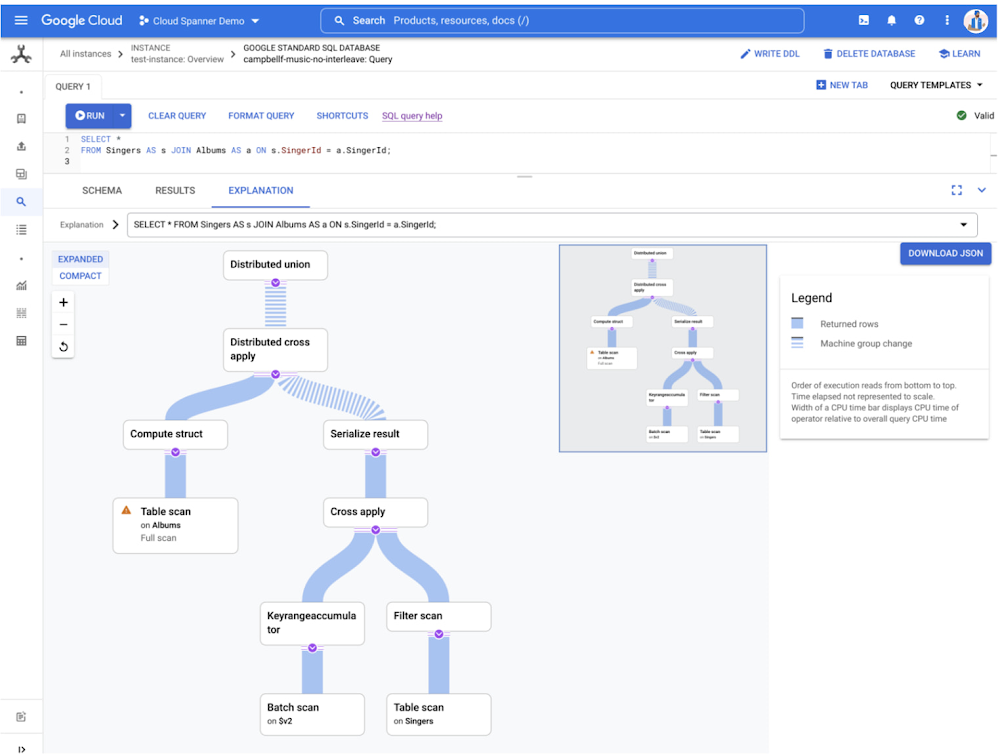
Spanner is a fully managed, distributed relational database that provides unlimited scale, global consistency, and up to five 9s availability. It was originally built to address Google’s needs to scale out Online Transaction Processing (OLTP) workloads without losing the benefits of strong consistency and familiar SQL that developers rely on. Today, Cloud Spanner is used in financial services, gaming, retail, health care, and other industries to power mission-critical workloads that need to scale without downtime. Like most modern relational databases, Spanner uses a query optimizer to find efficient execution plans for SQL queries. When a developer or a DBA writes a query in SQL, they describe the results they want to see, rather than how to access or update the data. This declarative approach allows the database to select different query plans depending on a wide variety of signals, such as the size and shape of the data and available indexes. Using these inputs, the query optimizer finds an execution plan for each query.You can see a graphical view of a plan from the Cloud Console. It shows the intermediate steps that Spanner uses to process the query. For each step, it details where time and resources are spent and how many rows each operation produces. This information is useful for identifying bottlenecks and to test changes to queries, indexes, or the query optimizer itself.How does the Spanner query optimizer work?Let’s start with the following example schema and query, using Spanner’s Google Standard SQL dialect. Schema:code_block[StructValue([(u’code’, u’CREATE TABLE Accounts (rn id STRING(MAX) NOT NULL,rn name STRING(MAX) NOT NULL,rn age INT64 NOT NULL,rn) PRIMARY KEY(id);rn rnCREATE INDEX AccountsByName ON Accounts(name);rn rnCREATE TABLE Orders (rn id STRING(MAX) NOT NULL,rn account_id STRING(MAX) NOT NULL,rn date DATE,rn total INT64 NOT NULL,rn) PRIMARY KEY(id);’), (u’language’, u”), (u’caption’, <wagtail.wagtailcore.rich_text.RichText object at 0x3e14c06e31d0>)])]Query:code_block[StructValue([(u’code’, u’SELECT a.id, o.order_idrnFROM Accounts AS a rnJOIN Orders AS o ON a.id = o.account_idrnWHERE a.name = “alice”rn AND o.date = “2022-1-1″;’), (u’language’, u”), (u’caption’, <wagtail.wagtailcore.rich_text.RichText object at 0x3e14ef462f90>)])]When Spanner receives a SQL query, it is parsed into an internal representation known as relational algebra. This is essentially a tree structure in which each node represents some operation of the original SQL. For example, every table access will appear as a leaf node in the tree and every join will be a binary node with its two inputs being the relations that it joins. The relational algebra for our example query looks like this:The query optimizer has two major stages that it uses to generate an efficient execution plan based on this relational algebra: heuristic optimization and cost-based optimization. Heuristic optimization, as the name indicates, applies heuristics, or pre-defined rules, to improve the plan. Those heuristics are manifested in several dozen replacement rules which are a subclass of algebraic transformation rule. Heuristic optimization improves the logical structure of the query in ways that are essentially guaranteed to make the query faster, such as moving filter operations closer to the data they filter, converting outer joins to inner joins where possible, and removing any redundancy in the query. However, many important decisions about an execution plan cannot be made heuristically, so they are made in the second stage, cost-based optimization, in which the query planner uses estimates of latency to choose between available alternatives. Let’s first look at how replacement rules work in heuristic optimization as a prelude to cost-based optimization.A replacement rule has two steps: a pattern matching step and an application step. In the pattern matching step, the rule attempts to match a fragment of the tree with some predefined pattern. When it finds a match, the second step is to replace the matched fragment of the tree with some other predefined fragment of tree. The next section provides a straightforward example of a replacement rule in which a filter operation is moved, or pushed, beneath a join.Example of a replacement ruleThis rule pushes a filer operation closer to the data that it is filtering. The rationale for doing this is two-fold: Pushing filters closer to the relevant data reduces the volume of data to be processed later in the pipelinePlacing a filter closer to the table creates an opportunity to use an index on the filtered column(s) to scan only the rows that qualify the filter.The rule matches the pattern of a filter node with a join node as its child. Details such as table names and the specifics of the filter condition are not part of the pattern matching. The essential elements of the pattern are just the filter with the join beneath it, the two shaded nodes in the tree illustrated below. The two leaf nodes in the picture need not actually be leaf nodes in the real tree, they themselves could be joins or other operations. They are included in the illustration simply to show context.The replacement rule rearranges the tree, as shown below, replacing the filter and join nodes. This changes how the query is executed, but does not change the results. The original filter node is split in two, with each predicate pushed to the relevant sides of the join from which the referenced columns are produced. This tells the query execution to filter the rows before they’re joined, so the join doesn’t have to handle rows that would later be rejected.Cost-based optimizationThere are big decisions about an execution plan for which no effective heuristics exist. These decisions must be made with an understanding of how different alternatives will perform. Hence the second stage of the query optimizer is the cost-based optimizer. In this stage, the optimizer makes decisions based on estimates of the latencies, or the costs, of different alternatives. Cost-based optimization provides a more dynamic approach than heuristics alone. It uses the size and shape of the data to calculate multiple execution plans. To developers, this means more efficient plans out-of-the-box and less hand tuning. The architectural backbone of this stage is the extensible optimizer generator framework known as Cascades. Cascades is the foundation of multiple industry and open-source query optimizers. This optimization stage is where the more impactful decisions are made, such as which indexes to use, what join order to use, and what join algorithms to use. Cost-based optimization in Spanner uses several dozen algebraic transformation rules. However, rather than being replacement rules, they are exploration and implementation rules. These classes of rules have two steps. As for replacement rules, the first step is a pattern matching step. However, rather than replacing the original matched fragment with some fixed alternative fragment, in general they provide multiple alternatives to the original fragment. Example of an exploration ruleThe following exploration rule matches a very simple pattern, a join. It generates one additional alternative in which the inputs to the join have been swapped. Such a transformation doesn’t change the meaning of the query because relational joins are commutative, in much the same way that arithmetic addition is commutative. The content of unshaded nodes in the following illustration do not matter to the rule and they are shown only to provide context.The following tree shows the new fragment that is generated. Specifically, the shaded node below is created as an available alternative to the original shaded node. It does not replace the original node. The unshaded nodes have swapped positions in the new alternative but are not modified in any way. They now have two parents instead of one. At this point, the query is no longer represented as a simple tree but as a directed acyclic graph (DAG). The rationale for this transformation is that the ordering of the inputs to a join can profoundly impact its performance. Typically, a join will perform faster if the first input that it accesses, which for Spanner means left side, is the smaller one. However, the optimal choice will also depend on many other factors, including the available indexes and the ordering requirements of the query.Example of an implementation ruleOnce again the following implementation rule pattern matches a join but this time it generates two alternatives: apply join and hash join. These two alternatives replace the original logical join operation.The above fragment will be replaced by the following two alternatives which are two possible ways of executing a join.Cascades and the evaluation engineThe Cascades engine manages the application of the exploration and implementation rules and all the alternatives they generate. It calls an evaluation engine to estimate the latency of fragments of execution plans and, ultimately, complete execution plans. The final plan that it selects is the plan with the lowest total estimated latency according to the evaluation engine. The optimizer considers many factors when estimating the latency of a node in an execution plan. These include exactly what operation the node performs (e.g. hash join, sort etc.), the storage medium when accessing data, and how the data is partitioned. But chief among those factors is an estimate of how many rows will enter the node and how many rows will exit the node. To estimate those row counts Spanner uses built-in statistics that characterize the actual data.Why does the query optimizer need statistics?How does the query optimizer select which strategies to use in assembling the plan? One important signal is descriptive statistics about the size, shape, and cardinality of the data. As part of regular operation, Spanner periodically samples each database to estimate metrics like distinct values, distributions of values, number of NULLs, data size for each column, and some combination of columns. These metrics are called optimizer statistics.To demonstrate how statistics help the optimizer pick a query plan, let’s consider a simple example using the previously described schema. Let’s look at the optimal plan for this query:code_block[StructValue([(u’code’, u’SELECT id, age FROM Accounts WHERE name = @p’), (u’language’, u”), (u’caption’, <wagtail.wagtailcore.rich_text.RichText object at 0x3e14edfdcf10>)])]There are two possible execution strategies that the query optimizer will consider:Base table plan: read all rows from Accounts and filter out those whose name is different from the value of parameter, @p.Index plan: Read the rows of accounts where name is equal to @p from the AccountsByName index. Then join the set with the Accounts table to fetch the age column.Let’s compare these visually in the plan viewer:Interestingly, even for this simple example there is no query plan that is obviously best. The optimal query plan depends on filter selectivity, or how many rows in Accounts match the condition. For the sake of simplicity let’s suppose that 10 rows in Accounts have name = “alice”, while the remaining 45,000 rows have name = “bob”. The latency of the query with each plan might look something like, using the fastest index plan for alice as our baseline:We can see in this simple example that the optimal query plan choice depends on the actual data stored in the database and the specific conditions in the query, in this example, up to 175 times faster. The statistics describe the shape of data in the database and help Spanner estimate which plan would be preferable for the query.Optimizer statistics collectionSpanner automatically updates the optimizer statistics to reflect the changes to the database schema and data. A background process recalculates them roughly every three days. The query optimizer will automatically use the latest version as input to query planning.In addition to automatic collection, you can also manually refresh the optimizer statistics using the ANALYZE DDL statement. This is particularly useful when a database’s schema or data are changing frequently, such as in a development environment, where you’re changing tables or indexes, or in production when large amounts of data are changing, such as in a new product launch or a large data clean-up. The optimizer statistics include:Approximate number of rows in each table.Approximate number of distinct values of each column and each composite key prefix (including index keys). For example if we have table T with key {a, b, c}, Spanner will store the number of distinct values for {a}, {a, b} and {a, b, c}.Approximate number of NULL, empty and NaN values in each column.Approximate minimum, maximum and average value byte size for each column.Histogram describing data distribution in each column. The histogram captures both ranges of values and frequent values.For example the Accounts table in the previous example has 45,010 total rows. The id column has 45,010 distinct values (since it is a key) and the name column has 2 distinct values (“alice” and “bob”).Histograms store a small sample of the column data to denote the boundaries of histogram bins. Disabling garbage collection for a statistics package will delay wipeout of this data. Query optimizer versioningThe Spanner development team is continuously improving the query optimizer. Each update broadens the class of queries where the optimizer picks the more efficient execution plan. The log of optimizer updates is available in the public documentation.We are doing extensive testing to ensure that new query optimizer versions select better query plans than before. Because of this, most workloads should not have to worry about query optimizer rollouts. By staying current they automatically inherit improvements as we enable them.There is a small chance, however, that an optimizer update will flip a query plan to a less performant one. If this happens, it will show up as a latency increase for the workload. Cloud Spanner provides several tools for customers to address this risk.Spanner users can choose which optimizer version to use for their queries. Databases use the newest optimizer by default. Spanner allows users to override the default query optimizer version through database options or set the desired optimizer version for each individual query.New optimizer versions are released as off-by-default for at least 30 days. You can track optimizer releases in the public Spanner release notes. After that, the new optimizer version is enabled by default. This period offers an opportunity to test queries against the new version to detect any regressions. In the rare cases that the new optimizer version selects suboptimal plans for critical SQL queries, you should use query hints to guide the optimizer. You can also pin a database or an individual query to the older query optimizer, allowing you to use older plans for specific queries, while still taking advantage of the latest optimizer for most queries. Pinning optimizer and statistics versions allows you to ensure plan stability to predictably rollout changes.In Spanner the query plan will not change as long the queries are configured to use the same optimizer version and rely on the same optimizer statistics. Users wishing to ensure that execution plans for their queries do not change can pin both the optimizer version and the optimizer statistics.To pin all queries against a database to an older optimizer version (e.g. version 4), you can set a database option via DDL:code_block[StructValue([(u’code’, u’ALTER DATABASE MyDatabase SET OPTIONS (optimizer_version = 4);’), (u’language’, u”), (u’caption’, <wagtail.wagtailcore.rich_text.RichText object at 0x3e14edff4350>)])]Spanner also provides a hint to more surgically pin a specific query. For example:code_block[StructValue([(u’code’, u’@{OPTIMIZER_VERSION=4} SELECT * FROM Accounts;’), (u’language’, u”), (u’caption’, <wagtail.wagtailcore.rich_text.RichText object at 0x3e14b7cf5fd0>)])]The Spanner documentation provides detailed strategies for managing the query optimizer version. Optimizer statistics versioningIn addition to controlling the version of the query optimizer, Spanner users can also choose which optimizer statistics will be used for the optimizer cost model. Spanner stores the last 30 days worth of optimizer statistics packages. Similarly to the optimizer version, the latest statistics package is used by default, and users can change it at a database or query level.Users can list the available statistics packages with this SQL query:code_block[StructValue([(u’code’, u’SELECT * FROM INFORMATION_SCHEMA.SPANNER_STATISTICS’), (u’language’, u”), (u’caption’, <wagtail.wagtailcore.rich_text.RichText object at 0x3e14b7cf54d0>)])]To use a particular statistics package it first needs to be excluded from garbage collection.code_block[StructValue([(u’code’, u’ALTER STATISTICS <package_name> SET OPTIONS (allow_gc=false);’), (u’language’, u”), (u’caption’, <wagtail.wagtailcore.rich_text.RichText object at 0x3e14ec3b7d50>)])]Then to use the statistics package by default for all queries against a database:code_block[StructValue([(u’code’, u’ALTER DATABASE <db>rnSET OPTIONS (optimizer_statistics_package = “<package name>”);’), (u’language’, u”), (u’caption’, <wagtail.wagtailcore.rich_text.RichText object at 0x3e14c01e5950>)])]Like the optimizer version above, you can also use a hint to pin the statistics package for an individual query using a hint:code_block[StructValue([(u’code’, u’@{OPTIMIZER_STATISTICS_PACKAGE=<package name>} SELECT * FROM Accounts;’), (u’language’, u”), (u’caption’, <wagtail.wagtailcore.rich_text.RichText object at 0x3e14c0f13b10>)])]Get started todayGoogle is continuously improving out-of-the-box performance of Spanner and reducing the need for manual tuning. The Spanner query optimizer uses multiple strategies to generate query plans that are efficient and performant. In addition to a variety of heuristics, Spanner uses true cost-based optimization to evaluate alternative plans and select the one with the lowest latency cost. To estimate these costs, Spanner automatically tracks statistics about the size and shape of the data, allowing the optimizer to adapt as schemas, indexes, and data change. To ensure plan stability, you can pin the optimizer version or the statistics that it uses at the database or query level. Learn more about the query optimizer or try out Spanner’s unmatched availability and consistency at any scale today for free for 90 days or as low as $65 USD per month.
Quelle: Google Cloud Platform
Building advanced Beam pipelines in Scala with SCIO

Apache Beam is an open source, unified programming model with a set of language-specific SDKs for defining and executing data processing workflows. Scio, pronounced shee-o, is Scala API for Beam developed by Spotify to build both Batch and Streaming pipelines. In this blog we will uncover the need for SCIO and a few reference patterns.Why ScioSCIO provides high level abstraction for developers and is preferred for following reasons:Striking balance between concise and performance. Pipeline written in Scala are concise compared to java with similar performanceEasier migration for Scalding/Spark developers due to similar semantics compared to Beam API thereby avoiding a steep learning curve for developers.Enables access to a large ecosystem of infrastructure libraries in Java e.g. Hadoop, Avro, Parquet and high level numerical processing libraries in Scala like Algebirdand Breeze.Supports Interactive exploration of data and code snippets using SCIO REPLReference Patterns Let us checkout few concepts along with examples: 1. Graph CompositionIf you have a complex pipeline consisting of several transforms, the feasible approach is to compose the logically related transforms into blocks.  This would make it easy to manage and debug the graph rendered on dataflow UI. Let us consider an example using popular WordCount pipeline. Fig:  Word Count Pipeline without Graph Composition Let us modify the code to group the related transforms into blocks:Fig:  Word Count Pipeline with Graph Composition2. Distributed CacheDistributed Cache allows to load the data from a given URI on workers and use the corresponding data across all tasks (DoFn’s) executing on the worker. Some of the common use cases are loading serialized machine learning model from object stores like Google Cloud Storage for running predictions,  lookup data references etc.Let us checkout an example that loads lookup data from CSV file on worker during initialization and utilizes to count the number of matching lookups for each input element.Fig:  Example demonstrating Distribute Cache3. Scio JoinsJoins in Beam are expressed using CoGroupByKey  while Scio allows to express various join types like inner, left outer and full outer joins through flattening the CoGbkResult. Hash joins (syntactic sugar over a beam side input) can be used, if one of the dataset is extremely small (max ~1GB) by representing a smaller dataset on the right hand side. Side inputs are small, in-memory data structures that are replicated to all workers and avoids shuffling. MultiJoin can be used to join up to 22 data sets. It is recommended that all data sets be ordered in descending size, because non-shuffle joins do require the largest data sets to be on the left of any chain of operators Sparse Joins can be used for cases where the left collection (LHS) is much larger than the right collection (RHS) that cannot fit in memory but contains a sparse intersection of keys matching with the left collection .  Sparse Joins are implemented by constructing a Bloom filter of keys from the right collection and split the left side collection into 2 partitions. Only the partition with keys in the filter go through the join and the rest are either concatenated (i.e Outer join) or discarded (Inner join). Sparse Join is especially useful for joining historical aggregates with incremental updates.Skewed Joins are a more appropriate choice for cases where the left collection (LHS) is much larger and contains hotkeys.  Skewed join uses Count Mink Sketch which is a probabilistic data structure to count the frequency of keys in the LHS collection.  LHS is partitioned into Hot and chill partitions.  While the Hot partition is joined with corresponding keys on RHS using a Hash join, chill partition uses a regular join and finally both the partitions are combined through union operation.Fig:  Example demonstrating Scio JoinsNote that while using Beam Java SDK you can also take advantage of some of the similar join abstractions using Join Library extension4. AlgeBird Aggregators and SemiGroupAlgebird is Twitter’s abstract algebra library containing several reusable modules for parallel aggregation and approximation. Algebird Aggregator or Semigroup can be used with aggregate and sum transforms on SCollection[T] or aggregateByKey and sumByKey transforms on SCollection[(K, V)].  Below example illustrates computing parallel aggregation on customer orders and composition of result into OrderMetrics classFig:  Example demonstrating Algebird Aggregators Below code snippet expands on previous example and demonstrates the SemiGroup for aggregation of objects by combining fields.Fig:  Example demonstrating Algebird SemiGroup5. GroupMap and GroupMapReduceGroupMap can be used as a replacement of groupBy(key) + mapValues(_.map(func)) or _.map(e  => kv.of(keyfunc, valuefunc)) + groupBy(key)Let us consider the below example that calculates the length of words for each type. Instead of grouping by each type and applying length function, the GroupMap allows combining these operations by applying keyfunc and valuefunc. Fig:  Example demonstrating GroupMapGroupMapReduce  can be used to derive the key and apply the associative operation on the values associated with each key. The associative function is performed locally on each mapper similarly to a “combiner” in MapReduce (aka combiner lifting) before sending the results to the reducer.  This is equivalent to keyBy(keyfunc) + reduceByKey(reducefunc) Let us consider the below example that calculates the cumulative sum of odd and even numbers in a given range.  In this case individual values are combined on each worker and the local results are aggregated to calculate the final resultFig:  Example demonstrating GroupMapReduceConclusionThanks for reading and I hope now you are motivated to learn more about SCIO.  Beyond the patterns covered above, SCIO contains several interesting features likeimplicit coders for Scala case classes,  Chaining jobs using I/O Taps , Distinct Count using HyperLogLog++ , Writing sorted output to files etc.  Several use case specific libraries like BigDiffy (comparison of large datasets) , FeaTran (used for ML Feature Engineering) were also built on top of SCIO. For Beam lovers with Scala background, SCIO is the perfect recipe for building complex distributed data pipelines.
Quelle: Google Cloud Platform
Built with BigQuery: How True Fit's data journey unlocks partner growth

Editor’s note: The post is part of a series highlighting our awesome partners, and their solutions, that are Built with BigQuery.“True Fit is in a unique position where we help shoppers find the right sizes of apparel and footwear through near real time, adaptable ML models thereby rendering a great shopping experience while also enabling retailers with higher conversion, revenue potential and more importantly access to actionable key business metrics. Our ability to process volumes of data, adapt our core ML models, reduce complex & slower ecosystems, exchange data easily with our customers etc, have been propelled multi-fold via BigQuery and Analytics Hub” – says Raj Chandrasekaran, CTO, True FitTrue Fit has built the world’s largest dataset for apparel and footwear retailers over the last twelve years, connecting purchasing and preference information for more than 80 million active shoppers to data for 17,000 brands across its global network of retail partners. This dataset powers fit personalization for shoppers as they buy apparel and footwear online and connects retailers with powerful data and insight to inform marketing, merchandising, product development and ecommerce strategy.Gathering data, correlating and analyzing it are the underlying foundation to making smart business decisions to grow and scale a retailer’s business. This is especially important for retailers that are utilizing data packages to target which consumers to market their brands and products to. Deriving meaningful insights from data has become a larger focus for retailers as the market grows digitally, competition for share of wallet increases and consumer expectations for more personalized  shopping experiences continues to rise.But, how do companies share datasets regardless of the magnitude amongst each other in a scalable manner by optimizing infrastructure costs and securely sharing data? How can companies access and use the data into their own environment without needing a complicated / time consuming process to physically move the data? How would a company know how to utilize this data to suit their own business needs? True Fit partnered with Google and the Built with BigQuery initiative to solve these questions.Google Cloud services such as BigQuery and Analytics Hub have become vital to how True Fit optimizes the entire lifecycle of data from ingestion to distribution of data packages with its retail partners. BigQuery is a fully managed, serverless and limitless scale data warehousing solution with tighter integration with several Google Cloud products. Analytics Hub, powered by BigQuery, allows easy creation of data exchanges for producers and simplifies the discovery and consumption of the data for the consumers. Data shared via the exchanges can further be enriched with more datasets available in the Analytics Hub marketplace.Using the above diagram, let us take a look at how the process works across different stages:Event Ingestion – True Fit leverages Cloud Logging with Fluentd to stream logging events into BigQuery as datasets. BigQuery’s unique capability in real time streaming allows for real time debugging and analysis of all activity across the True Fit ecosystem.Denormalization – Scheduled queries are set up to take the normalized data in the event logs and convert them into denormalized core tables. These tables are easy to query and contain all information needed to assist BI analysts and data scientists with their research without the need for complicated table joins.Aggregations – Aggregations are created and updated on the fly as data is ingested using a mix of scheduled queries and direct BigQuery table updates. Reports are always fresh and can be delivered without ever having to worry about stale data.Alerting – Alerts are set up all across the True Fit architecture which leverage the real-time aggregations. These alerts not only inform True Fit when there are data discrepancies or missing data but have also been configured to inform our partners when the data they provide contains errors. For example, True Fit will notify a retailer if the product catalog provided drops below specific thresholds we’ve previously seen from them. Alerts range from anything like an email, SMS message, or even a real-time toast message in a True Fit UI that a retailer is using to provide their data.Secure Distribution – Exchange’s are created in the Analytics Hub. The datasets are published as one or more listings into the Exchange. Partners subscribe to the listing as a linked dataset to get instant access to data and act upon it accordingly. This unlocks use cases that range from everywhere from marketing; to shopper chat bots; and even real-time product recommendations based on a shopper’s browsing behavior. Analytics Hub allows True Fit to expose only the data they intend to share to specific partners using simple to understand IAM roles. Adding the built-in Analytics Hub Subscriber role to a partner’s service account on a specific listing of dataset created just for them makes it so that they are the only one to get access to that data. Gone are the days of dealing with API keys or credential management!True Fit’s original data lake was built using Apache Hive prior to switching to BigQuery. At roughly 450TiB, extracting data from this data lake became quite a challenge to do in real-time. It took approximately 24 hours before data packages would become available to core retail partners which impacted our ability to produce reports and data packages at scale. Even after the data packages were available, partners had difficulty downloading these data packages and importing them into their own data warehouses to utilize due to the size and formats. The usefulness of the data packages would occasionally get put into question due to the data becoming stale and it was difficult to alert on any data discrepancies because of the time delay before these data packages would be available.BigQuery has allowed True Fit to produce these same data packages in real time as events occur; unlocking new marketing opportunities. Retail partners have also praised how easily consumable Analytics Hub has made the process because the data “just appears” alongside their existing data warehouse as linked datasets. True Fit publishes a number of BigQuery data packages for its retail partners via Analytics Hub which allows them to generate personalized onsite and email campaigns for their own shoppers in a manner far beyond the capabilities not available in the past. Below are just a sample of ways in which True Fit partners personalize their campaigns utilizing the True Fit data packages. Partners have the ability to:Find the True Fit shoppers of a desired category near real-time who’ve been browsing extra specific products in the last couple weeksEnhance their understanding of their shopper demographic data and category affinitiesRetrieve size and fit recommendations for specific in-stock products for a provided set of shoppers or have True Fit determine what the ideal set of shoppers for those products would beMatch their in-stock, limited run styles and sizes to applicable True Fit shoppersEnhance emails and on-site triggers based on products the shopper has recently viewed or purchased across the True Fit networkIf you’re a retailer looking to unlock your own growth using real-world data in real-time, be sure to check out the data packages offered by True Fit!To learn more about True Fit on Google Cloud, visit https://www.truefit.com/businessThe Built with BigQuery advantage for ISVs Through the Built with BigQuery Program launched in April ‘22 as part of the Google Data Cloud Summit, Google is helping data-driven companies like True Fit build innovative applications on Google’s data cloud with simplified access to technology, helpful and dedicated engineering support, and joint go-to-market programs. Participating companies can: Get started fast with a Google-funded, pre-configured sandbox. Accelerate product design and architecture through access to designated experts from the ISV Center of Excellence who can provide insight into key use cases, architectural patterns, and best practices. Amplify success with joint marketing programs to drive awareness, generate demand, and increase adoption.BigQuery gives ISVs the advantage of a powerful, highly scalable data warehouse that’s integrated with Google Cloud’s open, secure, sustainable platform. And with a huge partner ecosystem and support for multi-cloud, open source tools, and APIs, Google provides technology companies the portability and extensibility they need to avoid data lock-in.Click here to learn more about Built with BigQuery.We thank the many Google Cloud and True Fit team members who contributed to this ongoing collaboration and review, especially Raj Chandrasekaran, CTO True Fit and Sujit Khasnis, Cloud Partner Engineering
Quelle: Google Cloud Platform

Introducing Cloud Workstations: Managed and Secure Development environments in the cloud

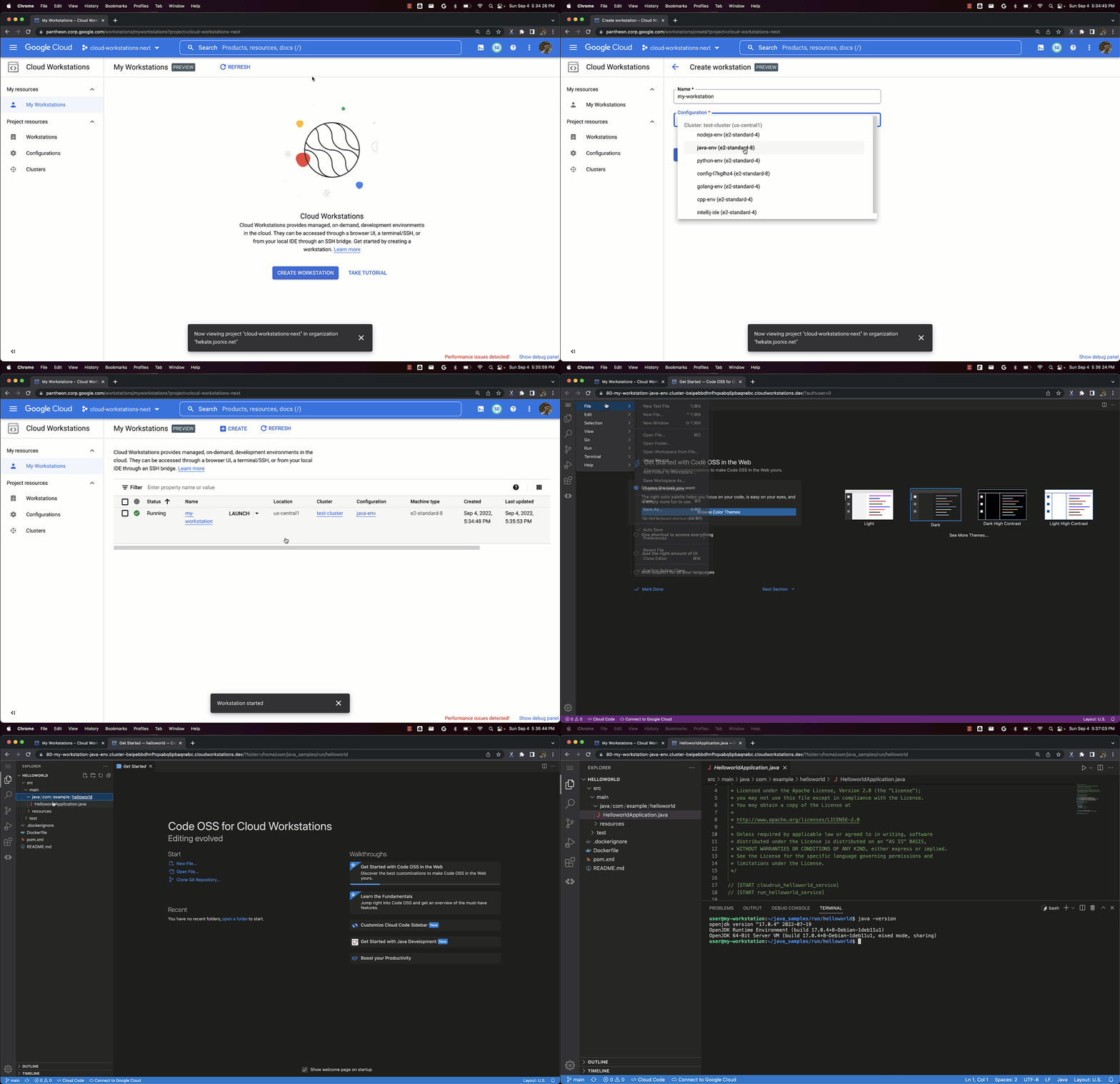
With the unprecedented increase in remote collaboration over the last two years, development teams have had to find new ways to collaborate, driving increased demand for tools to address the productivity challenges of this new reality. This distributed way of working also introduces new security risks, such as data exfiltration — information leaving the company’s boundaries. For development teams, this means protecting the source code and data that serves as intellectual property for many companies. At Google Cloud Next, we introduced the public Preview of Cloud Workstations, which provides fully managed and integrated development environments on Google Cloud. Cloud Workstations is a solution focused on accelerating developer onboarding and increasing the productivity of developers’ daily workflows in a secure manner, and you can start using it today simply by visiting the Google Cloud console and configuring your first workstation.Cloud Workstations: Just the factsCloud Workstations provides managed development environments with built-in security, developer flexibility, and support for many popular developer tools. Cloud Workstations addressing the needs of enterprise technology teams.Developers can quickly access secure, fast, and customizable development environments anywhere, via a browser or from their local IDE. With Cloud Workstations, you can enforce consistent environment configurations, greatly reducing developer ramp-up time and addressing “works on my machine” problems.Administrators can easily provision, scale, manage, and secure development environments for their developers, providing them access to services and resources that are private, self-hosted, on-prem, or even running in other clouds. Cloud Workstations makes it easy to scale development environments, and helps automate everyday tasks, enabling greater efficiency and security.Cloud Workstations focuses on three core areas:Fast developer onboarding via consistent environmentsCustomizable development environmentsSecurity controls and policy supportFast developer onboarding via consistent environmentsGetting developers started on a new project can take days or weeks, with much of that time spent setting up the development environment. The traditional model of local setup may also lead to configuration drift over time, resulting in “works on my machine” issues that erode developer productivity and stifle collaboration.To address this, Cloud Workstations provides a fully managed solution for creating and managing development environments. Administrators or team leads can set up one or more workstation configurations as their teams’ environment templates. Updating or patching the environments of hundreds or thousands of developers is as simple as updating their workstation configuration and letting Cloud Workstations handle the updates.Developers can create their own workstations by simply selecting among the configurations to which they were granted access, making it easy to ensure consistency. When developers start writing code, they can be certain that they are using the right version of their tools.Customizable development environmentsDevelopers use a variety of tools and processes optimized to their needs. We designed Cloud Workstations to be flexible when it comes to tool choice, enabling developers to use the tools they’re the most productive with, while enjoying the benefits of remote development. Here are some of the capabilities that enable this flexibility:Multi-IDE support: Developers use different IDEs for different tasks, and often customize them for their maximum efficiency. Cloud Workstations supports multiple managed IDEs such as IntelliJ IDEA Ultimate, PyCharm Professional, GoLand, WebStorm, Rider, Code-OSS, and many more. We’ve also partnered with JetBrains so that you can bring your existing licenses to Cloud Workstations. These IDEs are provided via optimized browser-based or local-client interfaces, avoiding the latency and challenges of general-purpose remote desktop tools such as latency and limited customization.Container-based customization: Beyond IDEs, development environments also comprise libraries, IDE extensions, code samples, and even test databases and servers. To help ensure your developers are getting the tools they need quickly, you can extend the Cloud Workstations container images with the tools of your choice.Support for third-party DevOps tools: Every organization has its own tried and tested tools — Google Cloud services such as Cloud Build, but also third-party tools such as GitLab, TeamCity, or Jenkins. By running Cloud Workstations inside your Virtual Private Cloud (VPC), you can connect to tools self-hosted in Google Cloud, on-prem, or even in other clouds.Security controls and policy supportWith Cloud Workstations, you can extend the same security policies and mechanisms you use for your production services in the cloud to your developer workstations. Here are some of the ways that Cloud Workstations helps to ensure the security of your development environments:No source code or data is transferred or stored on local machines.Each workstation runs on a single dedicated virtual machine, for increased isolation between development environments.Identity and Access Management (IAM) policies are automatically applied, and follow the principle of least privilege, helping to limit workstation access to a single developer.Workstations can be created directly inside your project and VPC, allowing you to help enforce policies like firewall rules or scheduled disk backups.VPC Service Controls can be used to define a security perimeter around your workstations, constraining access to sensitive resources, and helping prevent data exfiltration.Environments can be automatically updated after a session reaches a time limit, so that developers automatically get any updates in a timely manner.Fully private ingress/egress is also supported, so that only users inside your private network can access your workstations.What customers and partners are saying”We have hundreds of developers all around the world that need to be able to be connected anytime, from any device. Cloud Workstations enabled us to replace our custom solution with a more secure, controlled and globally managed solution.” — Sebastien Morand, Head of Data Engineering, L’Oréal“With traditional full VDI solutions, you have to take care of the operating system and other factors which are separate from the developer experience. We are looking for a solution that solves problems without introducing new ones.” — Christian Gorke, Head of Cyber Center of Excellence, Commerzbank“We are incredibly excited to tightly partner with Google Cloud around their Cloud Workstations initiative, that will make remote development with JetBrains IDEs available to Google Cloud users worldwide. We look forward to working together on making developers more productive with remote development while improving security and saving computation resources.” — Max Shafirov, CEO, JetBrainsGet started todayTry Cloud Workstations today by visiting your console, or learn more on our webpage, in our documentation or by watching this Cloud Next session. Cloud Workstations is a key part of our end-to-end Software Delivery Shield offering. To learn more about Software Delivery Shield, visit this webpage.
Quelle: Google Cloud Platform

Meet Google Cloud at Supercomputing 2022

Google Cloud is excited to announce our participation in the Supercomputing 2022 (SC22) conference in Dallas, TX from November 13th – 18th, 2022. Supercomputing is the premier conference for High Performance Computing and is a great place to see colleagues, learn about the latest technologies, and meet with vendors, partners and HPC users. We’re looking forward to returning to Supercomputing fully for the first time since 2019 with a booth, talks, demos, labs, and much more.We’re excited to invite you to meet Google’s architects and experts in booth #3213, near the exhibit floor entrances. If you’re interested in sitting down with our HPC team for a private meeting, please let us know at hpc-sales@google.com. Whether it’s your first time speaking with Google ever, or your first time seeing us at Supercomputing, we are looking forward to meeting with you. Bring your tough questions, and we’ll work together to solve them.In the booth, we’ll have lab stations where you can get hands-on with Google Cloud labs covering topics ranging from HPC to Machine Learning and Quantum Computing. Come check out one of our demo stations to dive into the details of how Google Cloud and our partners can help handle your toughest workloads. We’ll also have a full schedule of talks from Google, Cloud HPC partners, and Google Cloud users hosted in our booth theater.Be sure to visit our booth to review our full booth talk schedule. Here is a sneak peak at a few talks and speakers we have scheduled:Using GKE as a Supercomputer – Louis Bailleul, Petroleum Geo-ServicesGoogle Cloud HPC Toolkit – Carlos Boneti, Google CloudMichael Wilde, Parallel WorksSuresh Andani, Sr. Director, AMDQuantum Computing at Google – Kevin Kissell, Google CloudTensor Processing Units (TPUs) on Slurm – Nick Ihli, SchedMDWomen in HPC Panel – Cristin Merritt, Women in HPC; Annie Ma-Weaver, Google CloudDAOS on GCP – Margaret Lawson, Google Cloud; Dean Hildebrand, Google CloudThere will also be talks, tutorials, and other events hosted by Google staff throughout the conference, including:Tutorial: Parallel I/O in Practice, Co-hosted by Brent WelchExhibitor Forum Talk: HPC Best Practices on Google Cloud, Hosted by Ilias KatsardisStorage events co-organized by Dean Hildebrand, including:IO500 Birds of a Feather (List of top HPC storage systems)DAOS Birds of a Feather (Emerging HPC Storage System)DAOS on GCP talk in the Intel boothKeynote by Arif Merchant at the Parallel Data Systems WorkshopConverged Computing: Bringing Together the HPC and Cloud Communities BoF, Bill Magro – PanelistEthics in HPC BoFco-organized by Margaret LawsonCloud operating model: Challenges and opportunities, Annie Ma-Weaver – PanelistGoogle Cloud is also excited to sponsor Women in HPC at SC22, and we look forward to seeing you at the Women in HPC Networking Reception, the WHPC Workshop, and Diversity Day.If you’ll be attending Supercomputing, reach out to your Google account manager or the HPC team to let us know. We look forward to seeing you there.
Quelle: Google Cloud Platform

What’s new in Firestore from Cloud Next and Firebase Summit 2022

Developers love Firestore because of how fast they can build an application end to end. Over 4 million databases have been created in Firestore, and Firestore applications power more than 1 billion monthly active end users using Firebase Auth. We want to ensure developers can focus on productivity and enhanced developer experience, especially when their apps are experiencing hyper-growth. To achieve this, we’ve made updates to Firestore that are all aimed at developer experience, supporting growth and reducing costs.COUNT functionWe’ve rolled out the COUNT() function, which gives you the ability to perform cost-efficient, scalable, count aggregations. This capability supports use cases like counting the number of friends a user has, or determining the number of documents in a collection. For more information, check out our Powering up Firestore to COUNT() cost-efficiently blog.Query Builder and Table ViewWe’ve rolled out Query Builder to enable users to visually construct queries directly in the console across Google Cloud and Firebase platforms. The results are also shown in a table format to enable deeper data exploration.For more information, check out our Query Builder blog.Scalable backend-as-a-service (BaaS)Firestore BaaS has always been able to scale to millions of concurrent users consuming data with real time queries, but up until now, there has been a limit of 10,000 write operations per second per database. While this is plenty for most applications, we are happy to announce that we are now removing this limit and moving to a model where the system scales up automatically as your write traffic increases.For applications using Firestore as a backend-as-a-service, we’ve removed the limits for write throughput and concurrent active connections. As your app takes off with more users, you can be confident that Firestore will scale smoothly. For more information, check out our  Building Scalable Real Time Applications with Firestore blog.Time-to-liveTo help you efficiently manage storage costs, we’ve introduced time-to-live (TTL), which enables you to pre-specify when documents should expire, and rely on Firestore to automatically delete expired documents.For more information, check out our blog: Manage Storage Costs Using Time-to-Live in FirestoreAdditional Features for Performance and Developer ExperienceIn addition, the following features have been added to further improve performance and developer experience:Tags have been added to enable developers to tag databases, along with other Google Cloud resources, to apply policy and observer group billing.Cross-service security rules allow secure sharing of Cloud Storage objects, by referencing Firestore data in Cloud Storage Security Rules.Offline query (client-side) indexing Preview enables more performant client-side queries by indexing data stored in the web and mobile cache.  Read documentation for more information.What’s nextGet started with Firestore.
Quelle: Google Cloud Platform

Real-time Data Integration from Oracle to Google BigQuery Using Striim

Editor’s notes: In this guest blog, we have the pleasure of inviting Alok Pareek, Founder & EVP Products, at Striim to share latest experimental results from a performance study on real-time data integration from Oracle to Google Cloud BigQuery using Striim. Relational databases like Oracle are designed to store data, but they aren’t well suited for supporting analytics at scale. Google Cloud BigQuery is a serverless, scalable cloud data warehouse that is ideal for analytics use cases. To ensure timely and accurate analytics, it is essential to be able to continuously move data streams to BigQuery with minimal latency. The best way to stream data from databases to BigQuery is through log-based Change Data Capture(CDC). Log-based CDC works by directly reading the transaction logs to collect DML operations, such as inserts, updates, and deletes. Unlike other CDC methods, log-based CDC provides a non-intrusive approach to streaming database changes that puts minimal load on the database.Striim — a unified real-time data integration and streaming platform — comes with out-of-the-box log-based CDC readers that can move data from various databases (including Oracle) to BigQuery in real-time. Striim enables teams to act on data quickly, producing new insights, supporting optimal customer experiences, and driving innovation. In this blog post, we will outline experimental results cited in Striim’s recent white paper, Real-Time Data Integration from Oracle to Google BigQuery: A Performance Study. Building a Data Pipeline from Oracle to Google BigQuery with Striim: ComponentsWe used the following components to build a data pipeline to move data between an Oracle database to BigQuery in real time:Oracle CDC AdaptersA Striim adapter is a process that connects the Striim platform to a specific type of external application or file. Adapters enable various data sources to be connected to target systems with streaming data pipelines for real-time data integration.Striim comes with two Oracle CDC adapters to help manage different workloads.LogMiner-based Oracle CDC Reader uses Oracle LogMiner to ingest database changes on the server side and replicate them to the streaming platform. This adapter is ideal for low and medium workloads.OJet adapter uses a high-performance log mining API to support high volumes of database changes on the source and replicate them in real time.   This adaptor is ideal for high volume high throughput CDC workloads.With two types of Oracle adapters to choose from, when is it advisable to use one over the other?Our results show that if your DB workload profile is between 20GB and 80GB of CDC data per hour, the LogMiner based Oracle CDC reader is a good choice. If you work with a higher amount of data, then the OJet adapter is better; currently, it’s the fastest Oracle CDC Reader available. Here’s a table and chart that shows the latency (read-lag)  for both adapters:BigQuery WriterStriim’s BigQuery Writer is designed to save time and storage; it takes advantage of partitioned tables on the target BigQuery system and supports partition pruning in its merge queries. Database WorkloadFor our experiment, we used a custom-built, high-scale database workload simulation. This workload, SwingerMultiOps, is based on Swingbench — a popular workload for Oracle databases. It’s a multithreaded JDBC (Java Database Connectivity) application that generates concurrent DB sessions against the source database. We took the Order Entry (OE) schema of the Swingbench workload. In SwingerMultiOps, we continued to add more tables until we reached a total of 50 tables. Each of these tables comprised of  varying data types.Building the Data Pipeline: StepsWe built the data pipeline for our experiment following these steps:1. Configure the source database and profile the workloadStriim’s Oracle adapters connect to Oracle server instances to mine for redo data. Therefore it’s important to have the source database instance tuned for optimum redo mining performance. Here’s what you need to keep in mind about the configuration:Profile the DB workload to measure the load it generates on the source databaseRedo log sizes to a reasonably large value of 2G per log groupFor the OJet adapter, set a large size for the DB streams_pool_size to mine redo as quickly as possibleFor an extremely high CDC data rate of around 150 Gb/hour, set streams_pool_size to 4G2. Configure the Oracle adapterFor both adapters, default settings are enough to get started. The only configuration required is to set the DB endpoints to read data from the source database. Based on your need, you can use Striim to perform any of the following:Handle large transactionsRead and write data to a downstream databaseMine from a specific SCN or timestampRegardless of which Oracle adapter you choose, only one adapter is needed to collect all data streams from the source database. This practice helps to cut the overhead incurred by both adapters.3. Configure the BigQuery WriterUse BigQuery Writer to configure how your data moves from source to database. For instance, you can set your writers to work with a specified dataset to move large amounts of data in parallel.For performance improvement, you can use multiple BigQuery writers to integrate incoming data in parallel. Using a router ensures that events are distributed such that a single event isn’t sent to multiple writers.Tuning the number of writers and their properties helps to ensure that data is moved from Oracle to BigQuery in real time. Since we’re dealing with large volumes of incoming streams, we configure 20 BigQuery Writers in our experiment. There are many other BigQuery Writer properties that can help you to move and control data. You can learn about them in detail here.How to Execute the Striim App and Analyze ResultsWe used a Google BigQuery dataset to run our data integration infrastructure. We performed the following tasks to run our simulation and capture results for analysis:Start the Striim app on the Striim serverStart monitoring our app components using the Tungsten Console by passing a simple scriptStart the Database WorkloadCapture all DB events in the Striim app, and let the app commit all incoming data to the BigQuery targetAnalyze the app performanceThe Striim UI image below shows our app running on the Striim server. From this UI, we can monitor the app throughput and latency in real time.Results Analysis: Comparing the Performance of two Oracle ReadersAt the end of the DB workload run, we looked at our captured performance data and analyzed the performance. Details are tabulated below for each of the source adapter types.*LEE => Lag End-to-EndThe charts below show how the CDC reader lag varies with the input rate as the workload progresses on the DB server.Lag chart for Oracle Reader:Lag chart for OJet Reader:Use Striim to Move Data in Real Time to Google Cloud BigQueryThis experiment showed how to use Striim to move large amounts of data in real time from Oracle to BigQuery. Striim offers two high-performance Oracle CDC readers to support data streaming from Oracle databases. We demonstrated that Striim’s OJet Oracle reader is optimal for larger workloads, as measured by read-lag, end-to-end lag, and CPU and memory utilization. For smaller workloads, Striim’s LogMiner-based Oracle reader offers excellent performance. For more in-depth information, please refer to the white paper, check out a demo, Striim’s Marketplace listing or contact Striim.
Quelle: Google Cloud Platform