Break down data silos with the new cross-cloud transfer feature of BigQuery Omni

To help customers break down data silos, we launched BigQuery Omni in 2021. Organizations globally are using BigQuery Omni to analyze data across cloud environments. Now, we are excited to launch the next big evolution for multi cloud analytics: cross-cloud analytics. Cross-cloud analytics tools help analysts and data scientists easily, securely, and cost effectively distribute data between clouds to leverage the analytics tools they need. In April 2022, we previewed a SQL supported LOAD statement that allowed AWS/Azure blob data to be brought into BigQuery as a managed table for advanced analysis. We’ve learned a lot in this preview period. A few learnings stand out:Cross-cloud operations need to meet analysts where they are. In order for analysts to work with distributed data, workspaces should not be siloed. As soon as analysts are asked to leave their SQL workspaces to copy data, set up permissions, or grant permission, workflows break down and insights are lost. Same SQL can be used to periodically copy data using BigQuery scheduled queries. The more of the workflow that can be managed by SQL, the better. Networking is an implementation detail, latency should be too. The longer an analyst needs to wait for an operation to complete, the less likely a complete workflow is to be completed end-to-end. BigQuery users expect high performance for a single operation, even if those operations are managed across multiple data centers.Democratizing data shouldn’t come at the cost of security. In order for data admins to empower data analysts and engineers, they need to be assured there isn’t additional risk in doing so. By default, data admins and security teams are increasingly looking for solutions that don’t persist user credentials between cloud boundaries. Cost control comes with cost transparency. Data transfer costs can get costly, and we hear frequently this is the number 1 concern for multi-cloud data organizations. Providing transparency into single operations and invoices in a consolidated way is critical to driving success for cross-cloud operations. Allowing administrators to cap costs for budgeting is a must.This feedback is why we’ve spent much of this year improving our cross-cloud transfer product to optimize releases around these core tenants: Usability: The LOAD SQL experience allows for data filtering and loading within the same editor across clouds. LOAD SQL supports data formats like JSON, CSV, AVRO, ORC and PARQUET. With semantics for both appending and truncating tables, LOAD supports both periodic syncs and refreshing the complete table semantics. We’ve also added SQL support for data lake standards like Hive partitioning and JSON data type.  Security: With a federated identity model, users don’t have to share or store credentials between cloud providers to access and copy their data. We also now support CMEK support for the destination table to help secure data as it’s written in BigQuery and VPC-SC boundaries to mitigate data exfiltration risks. Latency: With data movement managed by BigQuery Write API, users can effortlessly move just the relevant data without having to wait for complex pipes. We’ve improved job latency significantly for the most common load jobs and are seeing performance improvements with each passing day. Cost auditability: From one invoice, you can see all your compute and transfer costs for LOADs across clouds. Each job comes with statistics to help admins manage budgets.During our preview period, we saw good proof points on how cross-cloud transfer can be used to accelerate time to insight and deliver value to data teams. Getting started with a cross-cloud architecture can be daunting, but cross-cloud transfer has been used to help customers jumpstart proof of concepts because it enables the migration of subsets of data without committing to a full migration. Kargo used cross-cloud transfer to accelerate a performance test of BigQuery. “We tested Cross-Cloud Transfer to assist with a proof of concept on BigQuery earlier this year.  We found the usability and performance useful during the POC,” said Dinesh Anchan, Manager of Engineering at Kargo. We also saw this product being used to combine key datasets across clouds. A common challenge for customers is to manage cross-cloud billing data. CCT is being used to tie files together which have evolving schema on delivery for blob storage. “We liked the experience of using Cross-Cloud transfer to help consolidate our billing files across GCP, AWS, and Azure.  CCT was a nice solution because we could use SQL statements to load our billing files into BigQuery,” said the engineering lead of a large research institution. We’re excited to release the first of many cross-cloud features through BigQuery Omni. Check out the Google Cloud Next session to learn about more upcoming launches in the multicloud analytics space including support for Omni tables and local transformations to help supercharge these experiences for analysts and data scientists. We’re investing in cross-cloud because cloud boundaries shouldn’t slow innovation. Watch this space.Availability and pricingCross-Cloud Transfer is now available in all BigQuery Omni regions. Check the BigQuery Omni pricing page for data transfer costs.Getting StartedIt has never been easier for analysts to move data between clouds. Check out our getting started (AWS/Azure) page to try out this SQL experience. For a limited trial, BigQuery customers can explore BigQuery Omni at no charge using on-demand byte scans from September 15, 2022 to March 31, 2023 (the “trial period”) for data scans on AWS/Azure. Note: data transfer fees for Cross-Cloud Transfer will still apply.
Quelle: Google Cloud Platform

BigQuery Geospatial Functions – ST_IsClosed and ST_IsRing

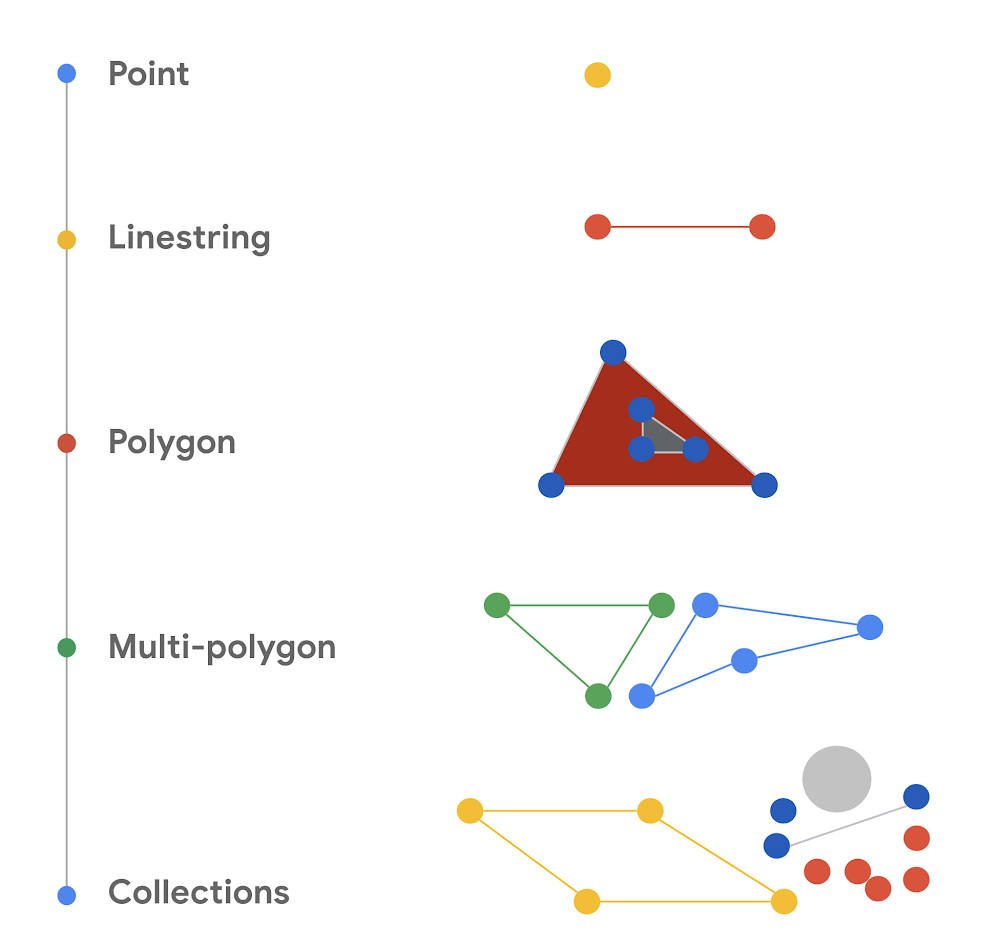
Geospatial data analytics lets you use location data (latitude and longitude) to get business insights. It’s used for a wide variety of applications in industry, such as package delivery logistics services, ride-sharing services, autonomous control of vehicles, real estate analytics, and weather mapping. BigQuery, Google Cloud’s large-scale data warehouse, provides support for analyzing large amounts of geospatial data. This blog post discusses two geography functions we’ve recently added in order to expand the capabilities of geospatial analysis in BigQuery: ST_IsClosed and ST_IsRing.BigQuery geospatial functionsIn BigQuery, you can use the GEOGRAPHY data type to represent geospatial objects like points, lines, and polygons on the Earth’s surface. In BigQuery, geographies are based on the Google S2 Library, which uses Hilbert space-filling curves to perform spatial indexing to make the queries run efficiently. BigQuery comes with a set of geography functions that let you process spatial data using standard ANSI-compliant SQL. (If you’re new to using BigQuery geospatial analytics, start with Get started with geospatial analytics, a tutorial that uses BigQuery to analyze and visualize the popular NYC Bikes Trip dataset.) The new ST_IsClosed and ST_IsRing functions are boolean accessor functions that help determine whether a geographical object (a point, a line, a polygon, or a collection of these objects) is closed or is a ring. Both of these functions accept a GEOGRAPHY column as input and return a boolean value. The following diagram provides a visual summary of the types of geometric objects.For more information about these geometric objects, see Well-known text representation of geometry in Wikipedia.Is the object closed? (ST_IsClosed)The ST_IsClosed function examines a GEOGRAPHY object and determines whether each of the elements of the object has an empty boundary. The boundary for each element is defined formally in the ST_Boundary function. The following rules are used to determine whether a GEOGRAPHY object is closed:A point is always closed.A linestring is closed if the start point and end point of the linestring are the same.A polygon is closed only if it’s a full polygon.A collection is closed if every element in the collection is closed. An empty GEOGRAPHY object is not closed. Is the object a ring? (ST_IsRing)The other new BigQuery geography function is ST_IsRing. This function determines whether a GEOGRAPHY object is a linestring and whether the linestring is both closed and simple. A linestring is considered closed as defined by the ST_IsClosed function. The linestring is considered simple if it doesn’t pass through the same point twice, with one exception: if the start point and end point are the same, the linestring forms a ring. In that case, the linestring is considered simple.Seeing the new functions in actionThe following query shows you what the ST_IsClosed and ST_IsRing function return for a variety of geometric objects. The query creates a series of ad-hoc geography objects and uses the UNION ALL statement to create a set of inputs. The query then calls the ST_IsClosed and ST_IsRing functions to determine whether each of the inputs are closed or are rings. You can run this query in the BigQuery SQL workspace page in the Google Cloud console.code_block[StructValue([(u’code’, u”WITH example AS(rn SELECT ST_GeogFromText(‘POINT(1 2)’) AS geographyrn UNION ALLrn SELECT ST_GeogFromText(‘LINESTRING(2 2, 4 2, 4 4, 2 4, 2 2)’) AS geographyrn UNION ALLrn SELECT ST_GeogFromText(‘LINESTRING(1 2, 4 2, 4 4)’) AS geographyrn UNION ALLrn SELECT ST_GeogFromText(‘POLYGON((0 0, 2 2, 4 2, 4 4, 0 0))’) AS geographyrn UNION ALLrn SELECT ST_GeogFromText(‘MULTIPOINT(5 0, 8 8, 9 6)’) AS geographyrn UNION ALLrn SELECT ST_GeogFromText(‘MULTILINESTRING((0 0, 2 0, 2 2, 0 0), (4 4, 7 4, 7 7, 4 4))’) AS geographyrn UNION ALLrn SELECT ST_GeogFromText(‘GEOMETRYCOLLECTION EMPTY’) AS geographyrn UNION ALLrn SELECT ST_GeogFromText(‘GEOMETRYCOLLECTION(POINT(1 2), LINESTRING(2 2, 4 2, 4 4, 2 4, 2 2))’) AS geography)rnSELECTrn geography,rn ST_IsClosed(geography) AS is_closed, rn ST_IsRing(geography) AS is_ring rnFROM example;”), (u’language’, u”), (u’caption’, <wagtail.wagtailcore.rich_text.RichText object at 0x3e3a1a99e8d0>)])]The console shows the following results. You can see in the is_closed and is_ring columns what each function returns for the various input geography objects.The new functions with real-world geography objectsIn this section, we show queries using linestring objects that represent line segments that connect some of the cities in Europe. We show the various geography objects on maps and then discuss the results that you get when you call ST_IsClosed and ST_IsRing for these geography objects. You can run the queries by using the BigQuery Geo Viz tool. The maps are the output of the tool. In the tool you can click the Show results button to see the values that the functions return for the query.Start point and end point are the same, no intersectionIn the first example, the query creates a linestring object that has three segments. The segments are defined by using four sets of coordinates: the longitude and latitude for London, Paris, Amsterdam, and then London again, as shown in the following map created by the Geo Viz tool:The query looks like the following:code_block[StructValue([(u’code’, u”WITH example AS (rnSELECT ST_GeogFromText(‘LINESTRING(-0.2420221 51.5287714, 2.2768243 48.8589465, 4.763537 52.3547921, -0.2420221 51.5287714)’) AS geography)rnSELECT rn geography, rn ST_IsClosed(geography) AS is_closed,rn ST_IsRing(geography) AS is_ringrnFROM example;”), (u’language’, u”), (u’caption’, <wagtail.wagtailcore.rich_text.RichText object at 0x3e3a1b7e4ed0>)])]In the example table that’s created by the query, the columns with the function values show the following:ST_IsClosed returns true. The start point and end point of the linestring are the same.ST_IsRing returns true. The geography is closed, and it’s also simple because there are no self-intersections.Start point and end point are different, no intersectionAnother scenario is when the start and end points are different. For example, imagine two segments that connect London to Paris and then Paris to Amsterdam, as in this map:The following query represents this set of coordinates:code_block[StructValue([(u’code’, u”WITH example AS (rnSELECT ST_GeogFromText(‘LINESTRING(-0.2420221 51.5287714, 2.2768243 48.8589465, 4.763537 52.3547921)’) AS geography)rnSELECT rn geography, rn ST_IsClosed(geography) AS is_closed,rn ST_IsRing(geography) AS is_ringrnFROM example;”), (u’language’, u”), (u’caption’, <wagtail.wagtailcore.rich_text.RichText object at 0x3e3a1b685b10>)])]This time, the ST_IsClosed and ST_IsRing functions return the following values:ST_IsClosed returns false. The start point and end point of the linestring are different.ST_IsRing returns false. The linestring is not closed. It’s simple because there are no self-intersections, but ST_IsRing returns true only when the geometry is both closed and simple.Start point and end point are the same, with intersectionThe third example is a query that creates a more complex geography. In the linestring, the start point and end point are the same. However, unlike the earlier example, the line segments of the linestring intersect. A map of the segments shows connections that go from London to Zürich, then to Paris, then to Amsterdam, and finally back to London:In the following query, the linestring object has five sets of coordinates that define the four segments:code_block[StructValue([(u’code’, u”WITH example AS (rnSELECT ST_GeogFromText(‘LINESTRING(-0.2420221 51.5287714, 8.393389 47.3774686, 2.2768243 48.8589465, 4.763537 52.3547921, -0.2420221 51.5287714)’) AS geography)rnSELECT rn geography,rn ST_IsClosed(geography) AS is_closed,rn ST_IsRing(geography) as is_ringrnFROM example;”), (u’language’, u”), (u’caption’, <wagtail.wagtailcore.rich_text.RichText object at 0x3e3a1b676910>)])]In the query, ST_IsClosed and ST_IsRing return the following values:ST_IsClosed returns true. The start point and end point are the same, and the linestring is closed despite the self-intersection.ST_IsRing returns false. The linestring is closed, but it’s not simple because of the intersection.Start point and end point are different, with intersectionIn the last example, the query creates a linestring that has three segments that connect four points: London, Zürich, Paris, and Amsterdam. On a map, the segments look like the following:The query is as follows:code_block[StructValue([(u’code’, u”WITH example AS (rnSELECT ST_GeogFromText(‘LINESTRING(-0.2420221 51.5287714, 8.393389 47.3774686, 2.2768243 48.8589465, 4.763537 52.3547921)’) AS geography)rnSELECT rn geography, rn ST_IsClosed(geography) AS is_closed,rn ST_IsRing(geography) AS is_ringrnFROM example;”), (u’language’, u”), (u’caption’, <wagtail.wagtailcore.rich_text.RichText object at 0x3e3a18e3a590>)])]The new functions return the following values:ST_IsClosed returns false. The start point and end point are not the same.  ST_IsRing returns false. The linestring is not closed and it’s not simple.Try it yourselfNow that you’ve got an idea of what you can do with the new ST_IsClosed and ST_IsRing functions, you can explore more on your own. For details about the individual functions, read the ST_IsClosed and ST_IsRing entries in the BigQuery documentation. To learn more about the rest of the geography functions available in BigQuery Geospatial, take a look at the BigQuery geography functions page.Thanks to Chad Jennings, Eric Engle and Jing Jing Long for their valuable support to add more functions to BigQuery Geospatial.  Thank you Mike Pope for helping review this article.
Quelle: Google Cloud Platform

Low-latency fraud detection with Cloud Bigtable

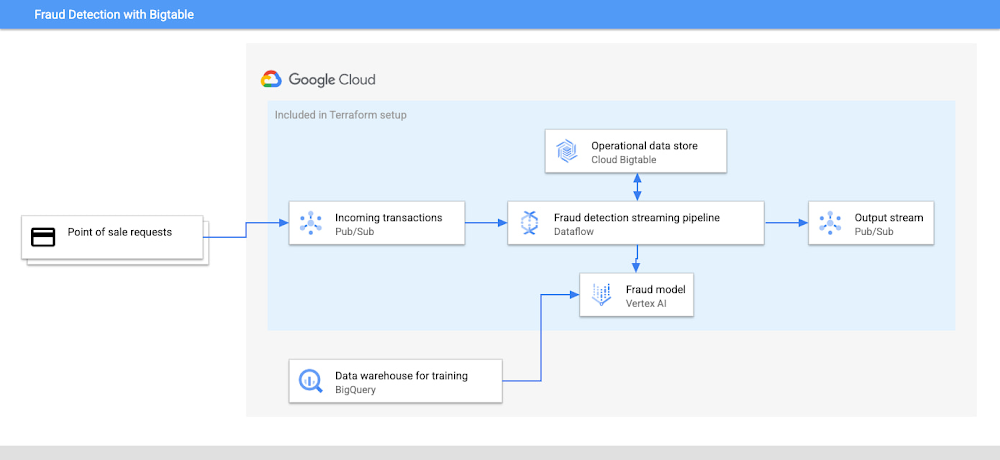
Each time someone makes a purchase with a credit card, financial companies want to determine if that was a legitimate transaction or if it is using a stolen credit card, abusing a promotion or hacking into a user’s account. Every year, billions of dollars are lost due to credit card fraud, so there are serious financial consequences. Companies dealing with these transactions need to balance predicting fraud accurately and predicting fraud quickly. In this blog post, you will learn how to build a low-latency, real-time fraud detection system that scales seamlessly by using Bigtable for user attributes, transaction history and machine learning features. We will follow an existing code solution, examine the architecture, define the database schema for this use case, and see opportunities for customizations.The code for this solution is on GitHub and includes a simplistic sample dataset and pre-trained fraud detection model plus a Terraform configuration. This blog and example’s goal is to showcase the end-to-end solution rather than machine learning specifics since most fraud detection models in reality can involve hundreds of variables. If you want to spin up the solution and follow along, clone the repo and follow the instructions in the README to set up resources and run the code.code_block[StructValue([(u’code’, u’git clone https://github.com/GoogleCloudPlatform/java-docs-samples.gitrncd java-docs-samples/bigtable/use-cases/fraudDetection’), (u’language’, u”), (u’caption’, <wagtail.wagtailcore.rich_text.RichText object at 0x3e50a2a96bd0>)])]Fraud detection pipelineWhen someone initiates a credit card purchase, the transaction is sent for processing before the purchase can be completed. The processing includes validating the credit card, checking for fraud, and adding the transaction to the user’s transaction history. Once those steps are completed, and if there is no fraud identified, the point of sale system can be notified that the purchase can finish. Otherwise, the customer might receive a notification indicating there was fraud, and further transactions can be blocked until the user can secure their account.The architecture for this application includes:Input stream of customer transactionsFraud detection modelOperational data store with customer profiles and historical dataData pipeline for processing transactionsData warehouse for training the fraud detection model and querying table level analyticsOutput stream of fraud query resultsThe architecture diagram below shows how the system is connected and which services are included in the Terraform setup.Pre-deploymentBefore creating a fraud detection pipeline, you will need a fraud detection model trained on an existing dataset. This solution provides a fraud model to try out, but it is tailored for the simplistic sample dataset. When you’re ready to deploy this solution yourself based on your own data, you can follow our blog on how to train a fraud model with BigQuery ML.Transaction input streamThe first step towards detecting fraud is managing the stream of customer transactions. We need an event-streaming service that can horizontally scale to meet the workload traffic, so Cloud Pub/Sub is a great choice. As our system grows, additional services can subscribe to the event-stream to add new functionality as part of a microservice architecture. Perhaps the analytics team will subscribe to this pipeline for real time dashboards and monitoring.When someone initiates a credit card purchase, a request from the point of sale system will come in as a Pub/Sub message. This message will have information about the transaction like location, transaction amount, merchant id and customer id. Collecting all the transaction information is critical for us to make an informed decision since we will update the fraud detection model based on purchase patterns over time as well as accumulate recent data to use for the model inputs. The more data points we have, the more opportunities we have to find anomalies and make an accurate decision.Transaction pipelinePub/sub has built-in integration with Cloud Dataflow, Google Cloud’s data pipeline tool, which we will use for processing the stream of transactions with horizontal scalability. It’s common to design Dataflow jobs with multiple sources and sinks, so there is a lot of flexibility in pipeline design. Our pipeline design here only fetches data from Bigtable, but you could also add additional data sources or even 3rd party financial APIs to be part of the processing. Dataflow is also great for outputting results to multiple sinks, so we can write to databases, publish an event stream with the results, and even call APIs to send emails or texts to users about the fraud activity.Once the pipeline receives a message, our Dataflow job does the following:Fetch user attributes and transaction history from BigtableRequest a prediction from Vertex AIWrite the new transaction to BigtableSend the prediction to a Pub/Sub output streamcode_block[StructValue([(u’code’, u’Pipeline pipeline = Pipeline.create(options);rnrnPCollection<RowDetails> modelOutput =rn pipelinern .apply(rn “Read PubSub Messages”,rn PubsubIO.readStrings().fromTopic(options.getInputTopic()))rn .apply(“Preprocess Input”, ParDo.of(PREPROCESS_INPUT))rn .apply(“Read from Cloud Bigtable”,rn ParDo.of(new ReadFromTableFn(config)))rn .apply(“Query ML Model”,rn ParDo.of(new QueryMlModelFn(options.getMLRegion())));rnrnmodelOutputrn .apply(rn “TransformParsingsToBigtable”,rn ParDo.of(WriteCBTHelper.MUTATION_TRANSFORM))rn .apply(rn “WriteToBigtable”,rn CloudBigtableIO.writeToTable(config));rnrnmodelOutputrn .apply(rn “Preprocess Pub/Sub Output”,rn ParDo.of(rn new DoFn<RowDetails, String>() {rn @ProcessElementrn public void processElement(rn @Element final RowDetails modelOutput,rn final OutputReceiver<String> out)rn throws IllegalAccessException {rn out.output(modelOutput.toCommaSeparatedString());rn }rn }))rn .apply(“Write to PubSub”,rn PubsubIO.writeStrings().to(options.getOutputTopic()));rnrnpipeline.run();’), (u’language’, u”), (u’caption’, <wagtail.wagtailcore.rich_text.RichText object at 0x3e50874dbbd0>)])]Operational data storeTo detect fraud in most scenarios, you cannot just look at just one transaction in a silo – you need the additional context in real time in order to detect an anomaly. Information about the customer’s transaction history and user profile are the features we will use for the prediction.We’ll have lots of customers making purchases, and since we want to validate the transaction quickly, we need a scalable and low-latency database that can act as part of our serving layer. Cloud Bigtable is a horizontally-scalable database service with consistent single-digit millisecond latency, so it aligns great with our requirements. Schema designOur database will store customer profiles and transaction history. The historical data provides context which allows us to know if a transaction follows its customer’s typical purchase patterns. These patterns can be found by looking at hundreds of attributes. A NoSQL database like Bigtable allows us to add columns for new features seamlessly unlike less flexible relational databases which would require schema changes to augment. Data scientists and engineers can work to evolve the model over time by mixing and matching features to see what creates the most accurate model. They can also use the data in other parts of the application: generating credit card statements for customers or creating reports for analysts. Bigtable as an operational data store here allows us to provide a clean current version of the truth shared by multiple access points within our system.For the table design, we can use one column family for customer profiles and another for transaction history since they won’t always be queried together. Most users are only going to make a few purchases a day, so we can use the user id for the row key. All transactions can go in the same row since Bigtable’s cell versioning will let us store multiple values at different timestamps in row-column intersections. Our table example data includes more columns, but the structure looks like this:Since we are recording every transaction each customer is making, the data could grow very quickly, but garbage collection policies can simplify data management. For example, we might want to keep a minimum of 100 transactions then delete any transactions older than six months. Garbage collection policies apply per column family which gives us flexibility. We want to retain all the information in the customer profile family, so we can use a default policy that won’t delete any data. These policies can be managed easily via the Cloud Console and ensure there’s enough data for decision making while trimming the database of extraneous data. Bigtable stores timestamps for each cell by default, so if a transaction is incorrectly categorized as fraud/not fraud, we can look back at all of the information to debug what went wrong. There is also the opportunity to use cell versioning to support temporary features. For example, if a customer notifies us that they will be traveling during a certain time, we can update the location with a future timestamp, so they can go on their trip with ease. QueryWith our pending transaction, we can extract the customer id and fetch that information from the operational data store. Our schema allows us to do one row lookup to get an entire user’s information.code_block[StructValue([(u’code’, u’Table table = getConnection().getTable(TableName.valueOf(options.getCBTTableId()));rnResult row = table.get(new Get(Bytes.toBytes(transactionDetails.getCustomerID())));rnrnCustomerProfile customerProfile = new CustomerProfile(row);’), (u’language’, u”), (u’caption’, <wagtail.wagtailcore.rich_text.RichText object at 0x3e50874db150>)])]Request a predictionNow, we have our pending transaction and the additional features, so we can make a prediction. We took the fraud detection model that we trained previously and deployed it to Vertex AI Endpoints. This is a managed service with built-in tooling to track our model’s performance.code_block[StructValue([(u’code’, u’PredictRequest predictRequest =rn PredictRequest.newBuilder()rn .setEndpoint(endpointName.toString())rn .addAllInstances(instanceList)rn .build();rnrnPredictResponse predictResponse = predictionServiceClient.predict(rn predictRequest);rndouble fraudProbability =rn predictResponsern .getPredictionsList()rn .get(0)rn .getListValue()rn .getValues(0)rn .getNumberValue();rnrnLOGGER.info(“fraudProbability = ” + fraudProbability);’), (u’language’, u”), (u’caption’, <wagtail.wagtailcore.rich_text.RichText object at 0x3e50874dbc10>)])]Working with the resultWe will receive the fraud probability back from the prediction service and then can use it in a variety of ways. Stream the predictionWe will receive the fraud probability back from the prediction service and need to pass the result along. We can send the result and transaction as a Pub/Sub message in a result stream, so the point of sale service and other services can complete processing. Multiple services can react to the event stream, so there is a lot of customization you can add here. One example would be to  use the event stream as a Cloud Function trigger for a custom function that notifies users of fraud via email or text.Another customization you could add to the pipeline would be to include a mainframe or a relational database like Cloud Spanner or AlloyDB to commit the transaction and update the account balance. The payment will only go through if the balance can be removed from the remaining credit limit otherwise the customer’s card will have to be declined.code_block[StructValue([(u’code’, u’modelOutputrn .apply(rn “Preprocess Pub/Sub Output”,rn ParDo.of(rn new DoFn<RowDetails, String>() {rn @ProcessElementrn public void processElement(rn @Element final RowDetails modelOutput,rn final OutputReceiver<String> out)rn throws IllegalAccessException {rn out.output(modelOutput.toCommaSeparatedString());rn }rn }))rn .apply(“Write to PubSub”,rn PubsubIO.writeStrings().to(options.getOutputTopic()));’), (u’language’, u”), (u’caption’, <wagtail.wagtailcore.rich_text.RichText object at 0x3e50a0d5ef50>)])]Update operational data storeWe also can write the new transaction and its fraud status to our operational data store in Bigtable. As our system processes more transactions, we can improve the accuracy of our model by updating the transaction history, so we will have more data points for future transactions. Bigtable scales horizontally for reading and writing data, so keeping our operational data store up to date requires minimal additional infrastructure setup.Making test predictionsNow that you understand the entire pipeline and it’s up and running, we can send a few transactions to the Pub/Sub stream from our dataset. If you’ve deployed the codebase, you can generate transactions with gcloud and look through each tool in the Cloud Console to monitor the fraud detection ecosystem in real time.Run this bash script from the terraform directory to publish transactions from the testing data:code_block[StructValue([(u’code’, u’NUMBER_OF_LINES=5000rnPUBSUB_TOPIC=$(terraform -chdir=../ output pubsub_input_topic | tr -d ‘”‘)rnFRAUD_TRANSACTIONS_FILE=”../datasets/testing_data/fraud_transactions.csv”rnLEGIT_TRANSACTIONS_FILE=”../datasets/testing_data/legit_transactions.csv”rnrnfor i in $(eval echo “{1..$NUMBER_OF_LINES}”)rndorn # Send a fraudulent transactionrn MESSAGE=$(sed “${i}q;d” $FRAUD_TRANSACTIONS_FILE)rn echo ${MESSAGE}rn gcloud pubsub topics publish ${PUBSUB_TOPIC} –message=”${MESSAGE}”rn sleep 5rnrn # Send a legit transactionrn MESSAGE=$(sed “${i}q;d” $LEGIT_TRANSACTIONS_FILE)rn echo ${MESSAGE}rn gcloud pubsub topics publish ${PUBSUB_TOPIC} –message=”${MESSAGE}”rn sleep 5rndone’), (u’language’, u”), (u’caption’, <wagtail.wagtailcore.rich_text.RichText object at 0x3e50a0d5ea50>)])]SummaryIn this piece, we’ve looked at each part of a fraud detection pipeline and how to ensure each has scale and low-latency using the power of Google Cloud. This example is available on GitHub, so explore the code, launch it yourself, and try making modifications to match your needs and data. The Terraform setup included uses dynamically scalable resources like Dataflow, Pub/sub, and Vertex AI with an initial one node Cloud Bigtable instance that you can scale up to match your traffic and system load.Related ArticleHow Cloud Bigtable helps Ravelin detect retail fraud with low latencyDetecting fraud with low latency and accepting payments at scale is made easier thanks to Bigtable.Read Article
Quelle: Google Cloud Platform
How InstaDeep used Cloud TPU v4 to help sustainable agriculture

You are what you eat. We’ve all been told this, but the truth is what we eat is often more complex than we are – genetically at least. Take a grain of rice. The plant that produces rice has 40,000 to 50,000 genes, double that of humans, yet we know far more about the composition of the human genome than of plant life. We need to close this knowledge gap quickly if we are to answer the urgent challenge of feeding 8 billion people, especially as food security around the globe is likely to worsen with climate change.For this reason,  AI company InstaDeep has teamed up with Google Cloud to train a large AI model with more than 20 billion parameters on a dataset of reference genomes for cereal crops and edible vegetables, using the latest generation of Google’s Tensor Processing Units (Cloud TPU v4), which is particularly suited for training efficiency at scale. Our aim is to improve food security and sustainable agriculture by creating a tool that can analyze and predict plants’ agronomic traits from genomic sequences. This will help identify which genes make some crops more nutritious, more efficient to grow, and more resilient and resistant to pests, disease and drought.Genomic language models for sustainable agricultureEver since farming began, we have been, directly or indirectly, trying to breed better crops with higher yields, better resilience and, if we’re lucky, better taste too. For thousands of years, this was done by trial and error, growing crops year-on-year while trying to identify and retain only the most beneficial traits as they naturally arise from evolutionary mutations. Now that we have access to the genomic sequences of plants, we hope to directly identify beneficial genes and predict the effect of novel mutations.However, the complexity of plant genomes often makes it difficult to identify which variants are beneficial. Revolutionary advances in machine learning (ML) can help to understand the link between DNA sequences and molecular phenotypes. This means we now have precise and cost-effective prediction methods to help us close the gap between genetic information and observable traits. These predictions can help identify functional variants and accelerate our understanding of which genes link to which traits – so we can make better crop selections.Moreover, thanks to the vast library of available crop genetic sequences, training large models on hundreds of plant genomes means we can transfer the knowledge from thoroughly-studied species to those that are less understood but important for food production – especially in developing countries. And by doing this digitally, AI can quickly map and annotate the genomes of both common and rare crop variants.One of the major limitations of traditional ML methods for plant genomics has been they mostly rely on supervised learning techniques. They need labeled data. Such data is scarce and expensive to collect, severely limiting these methods. Recent advances in natural language processing (NLP), such as Transformer architectures and BERT-style training (Bidirectional Encoder Representations from Transformers), allow scientists to train massive language models on raw text data to learn meaningful representations. This unsupervised learning technique changes the game. Once learned, the representations can be leveraged to solve complex regression or classification tasks – even when there is a lack of labeled data.InstaDeep partners with Google Cloud to train the new generation of AI models for genomics on TPUsResearchers have demonstrated that large language models can be especially effective in proteomics. To understand how this works, imagine reading amino acids as words and proteins as sentences. The treasure trove of raw genomics data – in sequence form – inspired InstaDeep and Google Cloud to apply similar technologies on nucleotides, this time reading them as words and chunks of genomes as sentences. Moreover, the representations that the system learned improved in line with the size of the models and datasets, NLP research studies showed. This finding led InstaDeep researchers to train a set of increasingly larger language models on genomics datasets ranging from 1 billion to 20 billion parameters.Models of 1 billion and 5 billion parameters were trained on a dataset comprising the reference genomes for several edible plants, including fruit, cereal and vegetables for a total of 75 billion nucleotides.The training dataset must increase in the same proportion as the model capacity, recent work has shown. Thus, we created a larger dataset gathering all reference genomes available on the National Center for Biotechnology Information (NCBI) database including human, animal, non-edible plant and bacteria genomes. This dataset, which we used to train a 20 billion-parameter Transformer model, comprised 700 billion tokens, exceeding the size of most datasets typically used for NLP applications, such as the Common Crawl or Wikipedia dataset. Both teams announced that the 1 billion-parameter model will be shared with the scientific community to further accelerate plant genomics research.The compact and meaningful representations of nucleotide sequences learned by these models can be used to tackle molecular phenotype prediction problems. To showcase their ability, we trained a model to predict the gene function and gene ontology (i.e. a gene’s attribute) for different edible plant species. Early results have demonstrated that this model can predict these characteristics with high accuracy – encouraging us to look deeper at what these models can tell us. Based on these results, we decided to annotate the genomes of three plant species with considerable importance for many developing countries: cassava, sweet potato, and yam. We are working on making these annotations freely available to the scientific community and hope that these will be used to further guide and accelerate new genomic research.Overcoming scaling challenges with massive models and datasets with Cloud TPUsThe compute requirement for training our 20 billion-parameter model with billions of tokens is massive. While modern accelerators offer impressive peak performance per chip, to utilize this performance often requires tightly coupled hardware and software optimizations. Moreover, maintaining this efficiency when scaling to hundreds of chips presents additional system design challenges. The Cloud TPU’s tightly-coupled hardware and software stack is especially well suited to such challenges. The Cloud TPU software stack is based on the XLA Compiler which offers out-of-the-box optimizations (such as compute and communication overlap) and an easy programming model for expressing parallelism. We successfully trained our large models for genomics by leveraging Google Tensor Processing Units (TPUv4). Our code is implemented with the JAX framework. JAX provides a functional programming-based approach to express computations as functions that can be easily parallelized using JAX APIs powered by XLA. This helped us to scale from a single host (four chips) configuration to a multi-host configuration without having to tackle any of the system design challenges. The TPU’s cost-effective inter- and intra-communication capabilities led to an almost linear scaling between the number of chips and training time. This allowed us to train the models quickly and efficiently on a grid of 1024 TPUv4 cores  (512 chips). ConclusionUltimately, our hope is that the functional characterization of genomic variants predicted by deep learning models will be critical to the next era in agriculture, which will largely depend on genome editing and analysis. We envisage that novel approaches, such as in-silico mutagenesis – the assessment of all possible changes in a genomic region by a computer model – will be invaluable in prioritizing mutations that improve plant fitness and guiding crop improvements. Attempting similar work in wet-lab experiments would be difficult to scale and nearly impossible in nature. By making our current and future annotations available to the research community, we also hope to help democratize breeding technologies so that they can benefit all of global agriculture.Further ReadingTo learn more about the unique features of Cloud TPU v4 hardware and software stack we encourage readers to explore Cloud TPU v4 announcement. To learn more about scaling characteristics, please see this benchmark and finally we recommend reading PJIT Introduction to get started with JAX and SPMD parallelism on Cloud TPU.This research was made possible thanks to the support of Google’s TPU Research Cloud (TRC) Program which enabled us to use the Cloud TPUv4 chips that were critical to this work.
Quelle: Google Cloud Platform

BigQuery’s performance powers AutoTrader UK’s real-time analytics

Editor’s note: We’re hearing today from Auto Trader UK, the UK and Ireland’s largest online automotive marketplace, about how BigQuery’s robust performance has become the data engine powering real-time inventory and pricing information across the entire organization. Auto Trader UK has spent nearly 40 years perfecting our craft of connecting buyers and sellers of new and used vehicles. We host the largest pool of sellers, listing more than 430,000 cars every day and attract an average of over 63 million cross platform visits each month. For the more than 13,000 retailers who advertise their cars on our platform, it’s important for them (and their customers) to be able to quickly see the most accurate, up-to-date information about what cars are available and their pricing. BigQuery is the engine feeding our data infrastructure Like many organizations, we started developing our data analytics environment with an on-premise solution and then migrated to a cloud-based data platform, which we used to build a data lake. But as the volume and variety of data we collected continued to increase, we started to run into challenges that slowed us down. We had built a fairly complex pipeline to manage our data ingestion, which relied on Apache Spark to ingest data from a variety of data sources from our online traffic and channels. However, ingesting data from multiple data sources in a consistent, fast, and reliable way is never a straightforward task. Our initial interest in BigQuery came after we discovered it integrated with a more robust event management tool for handling data updates. We had also started using Looker for analytics, which already connected to BigQuery and worked well together. As a result, it made sense to replace many parts of our existing cloud-based platform with Google Cloud Storage and BigQuery.Originally, we had only anticipated using BigQuery for the final stage of our data pipeline, but we quickly discovered that many of our data management jobs could take place entirely within a BigQuery environment. For example, we use the command-line tool DBT, which offers support for BigQuery, to transform our data. It’s much easier for our developers and analysts to work with than Apache Spark since they can work directly in SQL. In addition, BigQuery allowed us to further simplify our data ingestion. Today, we mainly use Kafka Connect to sync data sources with BigQuery.Looker + BigQuery puts the power of data in the hands of everyoneWhen our data was in the previous data lake architecture, it wasn’t easy to consume. The complexity of managing the data pipeline and running Spark jobs made it nearly impossible to expose it to users effectively. With BigQuery, ingesting data is not only easier, we also have multiple ways we can consume it through easy-to-use languages and interfaces. Ultimately, this makes our data more useful to a much wider audience.Now that our BigQuery environment is in place, our analysts can query the warehouse directly using the SQL interface. In addition, Looker provides an even easier way for business users to interact with our data. Today, we have over 500 active users on Looker—more than half the company. Data modeled in BigQuery gets pushed out to our customer-facing applications, so that the dealers can log into a tool and manage stock or see how their inventory is performing. Striking a balance between optimization and experimentationPerformance in BigQuery can be almost too robust: It will power through even very unoptimized queries. When we were starting out, we had a number of dashboards running very complex queries against data that was not well-modeled for the purpose, meaning every tile was demanding a lot of resources. Over time, we have learned to model data more appropriately before making it available to end-user analytics. With Looker, we use aggregate awareness, which allows users to run common query patterns across large data sets that have been pre-aggregated. The result is that the number of interactively run queries  are relatively small. The overall system comes together to create a very effective analytics environment — we have the flexibility and freedom to experiment with new queries and get them out to end users even before we fully understand the best way to model. For more established use cases, we can continue optimizing to save our resources for the new innovations. BigQuery’s slot reservation system also protects us from unanticipated cost overruns when we are experimenting.One of the examples where this played out was when we rolled new analytic capabilities out to our sales teams. They wanted to use analytics to drive conversations with customers in real-time to demonstrate how advertisements were performing on our platform and show the customer’s return on their investment. When we initially released those dashboards, we saw a huge jump in usage of the slot pool. However, we were able to reshape the data quickly and make it more efficient to run the needed queries by matching our optimizations to the pattern of usage we were seeing.Enabling decentralized data managementAnother change we experienced with BigQuery is that business units are increasingly empowered to manage their own data and derive value from it. Historically, we had a centralized data team doing everything from ingesting data to modeling it to building out reports. As more people adopt BigQuery across Auto Trader, distributed teams build up their own analytics and create new data products. Recent examples include stock inventory reporting, trade marketing and financial reporting. Going forward, we are focused on expanding BigQuery out into a self-service platform that enables analysts within the business to directly  build what they need. Our central data team will then evolve into a shared service, focused on maintaining the data infrastructure and adding abstraction layers where needed so it is easier for those teams to perform their tasks and get the answers they need.BigQuery kicks our data efforts into overdriveAt Auto Trader UK, we initially planned for BigQuery to play a specific part in our data management solution, but it has become the center of our data ingestion and access ecosystem. The robust performance of BigQuery allows us to get prototypes out to business users rapidly, which we can then optimize once we fully understand what types of queries will be run in the real world. The ease of working with BigQuery through a well-established and familiar SQL interface has also enabled analysts across our entire organization to build their own dashboards and find innovative uses for our data without relying on our core team. Instead, they are free to focus on building an even richer toolset and data pipeline for the future.Related ArticleHow Telus Insights is using BigQuery to deliver on the potential of real-world big dataBigQuery’s impressive performance reduces processing time from months to hours and delivers on-demand real-world insights for Telus.Read Article
Quelle: Google Cloud Platform
Seer Interactive gets the best marketing results for their clients using Looker

Marketing strategies based on complex and dynamic data get results. However, it’s no small task to extract easy-to-act-on insights from increasing volumes and ever-evolving sources of data including search engines, social media platforms, third-party services, and internal systems. That’s why organizations turn to us at Seer Interactive. We provide every client with differentiating analysis and analytics, SEO, paid media, and other channels and services that are based on fresh and reliable data, not stale data or just hunches. More data, more waysAs digital commerce and footprints have become foundational for success over the past five years, we’ve experienced exponential growth in clientele. Keeping up with the unique analytics requirements of each client has required a fair amount of IT agility on our part. After outgrowing spreadsheets as our core BI tool, we adopted a well-known data visualization app only to find that it couldn’t scale with our growth and increasingly complex requirements either. We needed a solution that would allow us to pull hundreds of millions of data signals into one centralized system to give our clients as much strategic information as possible, while increasing our efficiency. After outlining our short- and long-term solution goals, we weighed the trade-offs of different designs. It was clear that the data replication required by our existing BI solution design was unsustainable. Previously, all our customer-facing teams created their own insights. More than 200 consultants were spending hours each week pulling and compiling data for our clients, and then creating their own custom reports and dashboards. As data sets grew larger and larger, our desktop solutions simply didn’t have the processing power required to keep up, and we had to invest significant money in training any new employees in these complex BI processes. Our ability to best serve our customers was being jeopardized because we were having trouble serving basic needs, let alone advanced use cases.We selected Looker, Google Cloud’s business intelligence solution, as our BI platform. As the direct query leader, Looker gives us the best available capabilities for real-time analytics and time to value. Instead of lifting and shifting, we designed a new, consolidated data analytics foundation with Looker that uses our existing BigQuery platform, which can scale with any amount and type of data. We then identified and tackled quick-win use cases that delivered immediate business value for our team and clients.  Meet users where they are in skills, requirements, and preferencesOne of our first Looker projects involved redesigning our BI workflows. We built dashboards in Looker that automatically serve up the data our employees need, along with filters they use to customize insights and set up custom alerts. Users can now explore information on their own to answer new questions, knowing insights are reliable because they’re based on consistent data and definitions. More technical staff create ad hoc insights with governed datasets in BigQuery and use their preferred visualization tools like Looker  Studio, Power BI, and Tableau. We’ve also duplicated some of our data lakes to give teams a sandbox that they can experiment in using Looker embedded analytics. This enables them to quickly see more data and uncover new opportunities that provide value to our clients. Our product development team is also able to build and test prototypes more quickly, letting us validate hypotheses for a subsection of clients before making them available across the company. And because Looker is cloud based, all our users can analyze as much data as they want without exceeding the computing power of their laptops.Seamless security and faster developmentWe leverage BigQuery’s access and permissioning capabilities. Looker can inherit data permissions directly from BigQuery and multiple third-party CRMs, so we’ve also been able to add granular governance strategies within our Looker user groups. This powerful combination ensures that data is accessed only by users who have the right permissions. And Looker’s unique “in-database” architecture means that we aren’t replicating and storing any data on local devices, which reduces both our time and costs spent on data management while bolstering our security posture. Better services and hundreds of thousands of dollars in savingsTime spent on repetitive tasks adds up over months and years. With Looker, we automate reports and alerts that people frequently create. Not only does this free up teams to discover insights that they previously wouldn’t have time to pinpoint, but they have fresh reports whenever they are needed. For instance, we automated the creation of multiple internal dashboards and external client analyses that utilize cross-channel data. In the past, before we had automation capabilities, we used to only generate these analyses up to four times a year. With Looker, we can scale and automate refreshed analyses instantly—and we can add alerts that flag trends as they emerge. We also use Looker dashboards and alerts to improve project management by identifying external issues such as teams who are nearing their allocated client budgets too quickly or internal retention concerns like employees who aren’t taking enough vacation time.Using back-of-the-napkin math, let’s say every week 50 different people spend at least one hour looking up how team members are tracking their time. By building a dashboard that provides time-tracking insights at a glance, we save our collective team 2,500 hours a year. And if we assume the hourly billable rate is $200 an hour, we’re talking $500,000 in savings—just from one dashboard. Drew Meyer Director of Product, Seer InteractiveThe insights and new offerings to stay ahead of trends Looker enables us to deliver better experiences for our team members and clients that weren’t possible even two years ago, including faster development of analytics that improve our services and processes. For example, when off-the-shelf tools could not deliver the keyword-tracking insights and controls we required to deliver differentiating SEO strategies for clients, we created our own keyword rank tracking application using Looker embedded analytics. Our application provides deep-dive SEO data-exploration capabilities and gives teams unique flexibility in analyzing data while ensuring accurate, consistent insights. Going forward, we’ll continue adding new insights, data sources, and automations with Looker to create even better-informed marketing strategies that fuel our clients’ success.
Quelle: Google Cloud Platform

Build a chat server with Cloud Run

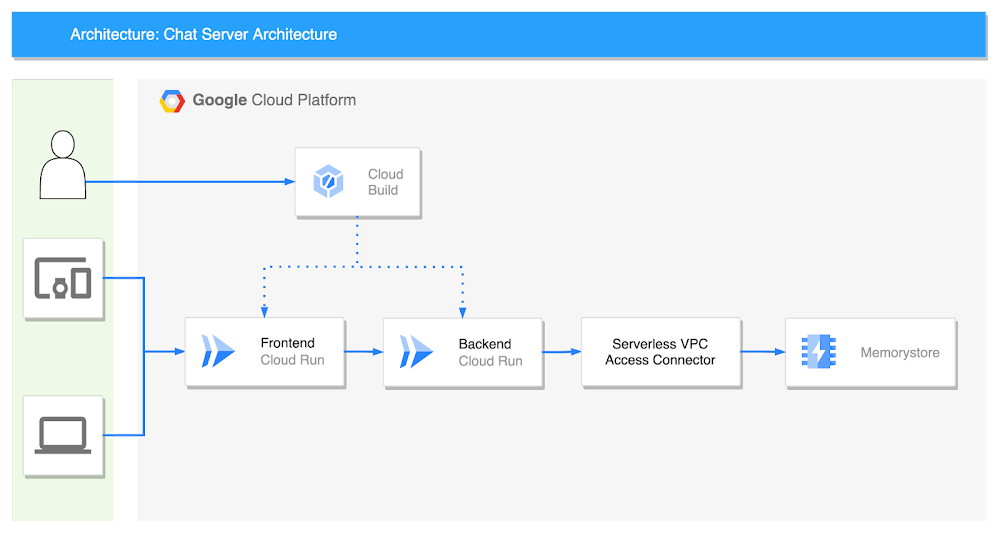
With Cloud Run — the fully-managed serverless container platform on Google Cloud — you can quickly and easily deploy applications using standard containers. In this article, we will explain how to build a chat server with Cloud Run using Python as the development language. We will build it with the FastAPI framework, based on this FastAPI sample source code.[Note that this article does not provide detailed descriptions of each service. Refer to other articles for details like Cloud Run settings and the cloudbuild.yaml file format.]Chat server architectureThe chat server consists of two Cloud Run services: frontend and backend. Code management is done on GitHub. Cloud Build deploys the code, and chat messages are passed between users with Redis pub/sub and Memorystore.Set the “Authentication” option on the Cloud Run frontend service to “Allow all traffic” for frontend and backend. The two services communicate with a WebSocket, and backend and Memorystore can be connected using a serverless VPC access connector.Let’s take a look at each service one by one.Frontendindex.htmlThe frontend service is written only in HTML. Only modify the WebSocket connection part with a URL of backend Cloud Run in the middle. This code is not perfect as it is just a sample to show the chat in action.code_block[StructValue([(u’code’, u'<!DOCTYPE html>rn<html>rn <head>rn <title>Chat</title>rn </head>rn <body>rn <h1>Chat</h1>rn <h2>Room: <span id=”room-id”></span><br> Your ID: <span id=”client-id”></span></h2>rn <label>Room: <input type=”text” id=”channelId” autocomplete=”off” value=”foo”/></label>rn <button onclick=”connect(event)”>Connect</button>rn <hr>rn <form style=”position: absolute; bottom:0″ action=”” onsubmit=”sendMessage(event)”>rn <input type=”text” id=”messageText” autocomplete=”off”/>rn <button>Send</button>rn </form>rn <ul id=’messages’>rn </ul>rn <script>rn var ws = null;rn function connect(event) {rn var client_id = Date.now()rn document.querySelector(“#client-id”).textContent = client_id;rn document.querySelector(“#room-id”).textContent = channelId.value;rn if (ws) ws.close()rn ws = new WebSocket(`wss://xxx-du.a.run.app/ws/${channelId.value}/${client_id}`);rn ws.onmessage = function(event) {rn var messages = document.getElementById(‘messages’)rn var message = document.createElement(‘li’)rn var content = document.createTextNode(event.data)rn message.appendChild(content)rn messages.appendChild(message)rn };rn event.preventDefault()rn }rn function sendMessage(event) {rn var input = document.getElementById(“messageText”)rn ws.send(input.value)rn input.value = ”rn event.preventDefault()rn document.getElementById(“messageText”).focus()rn }rn </script>rn </body>rn</html>’), (u’language’, u”), (u’caption’, <wagtail.wagtailcore.rich_text.RichText object at 0x3eae4aa06ed0>)])]DockerfileThe Dockerfile is very simple. Because it is deployed as HTML, nginx:alpine is a good fit.code_block[StructValue([(u’code’, u’FROM nginx:alpinernrnCOPY index.html /usr/share/nginx/html’), (u’language’, u”), (u’caption’, <wagtail.wagtailcore.rich_text.RichText object at 0x3eae4a9b5dd0>)])]cloudbuild.yamlThe last part of the frontend service is the cloudbuild.yaml file. You only need to edit the project_id and “frontend”.code_block[StructValue([(u’code’, u”steps:rn # Build the container imagern – name: ‘gcr.io/cloud-builders/docker’rn args: [‘build’, ‘-t’, ‘gcr.io/project_id/frontend:$COMMIT_SHA’, ‘.’]rn # Push the container image to Container Registryrn – name: ‘gcr.io/cloud-builders/docker’rn args: [‘push’, ‘gcr.io/project_id/frontend:$COMMIT_SHA’]rn # Deploy container image to Cloud Runrn – name: ‘gcr.io/google.com/cloudsdktool/cloud-sdk’rn entrypoint: gcloudrn args:rn – ‘run’rn – ‘deploy’rn – ‘frontend’rn – ‘–image’rn – ‘gcr.io/project_id/frontend:$COMMIT_SHA’rn – ‘–region’rn – ‘asia-northeast3’rn – ‘–port’rn – ’80’rn images:rn – ‘gcr.io/project_id/frontend:$COMMIT_SHA'”), (u’language’, u”), (u’caption’, <wagtail.wagtailcore.rich_text.RichText object at 0x3eae4b6b4190>)])]Backend Servicemain.pyLet’s look at the server Python code first, starting with the core ChatServer class.code_block[StructValue([(u’code’, u’class RedisService:rn def __init__(self):rn self.redis_host = f”{os.environ.get(‘REDIS_HOST’, ‘redis://localhost’)}”rnrn async def get_conn(self):rn return await aioredis.from_url(self.redis_host, encoding=”utf-8″, decode_responses=True)rnrnrnclass ChatServer(RedisService):rn def __init__(self, websocket, channel_id, client_id):rn super().__init__()rn self.ws: WebSocket = websocketrn self.channel_id = channel_idrn self.client_id = client_idrn self.redis = RedisService()rnrn async def publish_handler(self, conn: Redis):rn try:rn while True:rn message = await self.ws.receive_text()rn if message:rn now = datetime.now()rn date_time = now.strftime(“%Y-%m-%d %H:%M:%S”)rn chat_message = ChatMessage(rn channel_id=self.channel_id, client_id=self.client_id, time=date_time, message=messagern )rn await conn.publish(self.channel_id, json.dumps(asdict(chat_message)))rn except Exception as e:rn logger.error(e)rnrn async def subscribe_handler(self, pubsub: PubSub):rn await pubsub.subscribe(self.channel_id)rn try:rn while True:rn message = await pubsub.get_message(ignore_subscribe_messages=True)rn if message:rn data = json.loads(message.get(“data”))rn chat_message = ChatMessage(**data)rn await self.ws.send_text(f”[{chat_message.time}] {chat_message.message} ({chat_message.client_id})”)rn except Exception as e:rn logger.error(e)rnrn async def run(self):rn conn: Redis = await self.redis.get_conn()rn pubsub: PubSub = conn.pubsub()rnrn tasks = [self.publish_handler(conn), self.subscribe_handler(pubsub)]rn results = await asyncio.gather(*tasks)rnrn logger.info(f”Done task: {results}”)’), (u’language’, u’lang-py’), (u’caption’, <wagtail.wagtailcore.rich_text.RichText object at 0x3eae33b6e410>)])]This is a common chat server code. Inside the ChatServer class, there is a publish_handler method and a subscribe_handler method. publish_handler serves to publish a message to the chat room (Redis) when a message comes in through the WebSocket. subscribe_handler delivers a message from the chat room (redis) to the connected WebSocket. Both are coroutine methods. Connect redis in run method and run coroutine method.This brings us to the endpoint. When a request comes in, this code connects to the WebSocket and connects to the chat server.code_block[StructValue([(u’code’, u’@app.websocket(“/ws/{channel_id}/{client_id}”)rnasync def websocket_endpoint(websocket: WebSocket, channel_id: str, client_id: int):rn await manager.connect(websocket)rnrn chat_server = ChatServer(websocket, channel_id, client_id)rn await chat_server.run()’), (u’language’, u’lang-py’), (u’caption’, <wagtail.wagtailcore.rich_text.RichText object at 0x3eae33b6ec50>)])]Here is the rest of the code. Combined, you get the whole code.code_block[StructValue([(u’code’, u’import asynciornimport jsonrnimport loggingrnimport osrnfrom dataclasses import dataclass, asdictrnfrom datetime import datetimernfrom typing import Listrnrnimport aioredisrnfrom aioredis.client import Redis, PubSubrnfrom fastapi import FastAPI, WebSocketrnrnlogging.basicConfig(level=logging.INFO)rnlogger = logging.getLogger(__name__)rnrnapp = FastAPI()rnrnrnclass ConnectionManager:rn def __init__(self):rn self.active_connections: List[WebSocket] = []rnrn async def connect(self, websocket: WebSocket):rn await websocket.accept()rn self.active_connections.append(websocket)rnrn def disconnect(self, websocket: WebSocket):rn self.active_connections.remove(websocket)rnrn async def send_personal_message(self, message: str, websocket: WebSocket):rn await websocket.send_text(message)rnrn async def broadcast(self, message: dict):rn for connection in self.active_connections:rn await connection.send_json(message, mode=”text”)rnrnrnmanager = ConnectionManager()rnrnrn@dataclassrnclass ChatMessage:rn channel_id: strrn client_id: intrn time: strrn message: str’), (u’language’, u’lang-py’), (u’caption’, <wagtail.wagtailcore.rich_text.RichText object at 0x3eae58e2a910>)])]DockerfileThe following is the Dockerfile for the backend service. Run this application with Uvicorn.code_block[StructValue([(u’code’, u’FROM python:3.8-slimrnWORKDIR /usr/src/apprnCOPY requirements.txt ./rnRUN pip install -r requirements.txtrnCOPY . .rnCMD [ “uvicorn”, “main:app”, “–host”, “0.0.0.0” ]’), (u’language’, u”), (u’caption’, <wagtail.wagtailcore.rich_text.RichText object at 0x3eae58e2a890>)])]requirements.txtPut the packages for FastAPI and Redis into requirements.txt.code_block[StructValue([(u’code’, u’aioredis==2.0.1rnfastapi==0.85.0rnuvicorn[standard]’), (u’language’, u”), (u’caption’, <wagtail.wagtailcore.rich_text.RichText object at 0x3eae4aac4cd0>)])]cloudbuild.yamlThe last step is the cloudbuild.yaml file. Just like the frontend service, you can edit the part composed of project_id and backend, and add the IP of the memorystore created at the back into REDIS_HOST.code_block[StructValue([(u’code’, u”steps:rn # Build the container imagern – name: ‘gcr.io/cloud-builders/docker’rn args: [‘build’, ‘-t’, ‘gcr.io/project_id/backend:$COMMIT_SHA’, ‘.’]rn # Push the container image to Container Registryrn – name: ‘gcr.io/cloud-builders/docker’rn args: [‘push’, ‘gcr.io/project_id/backend:$COMMIT_SHA’]rn # Deploy container image to Cloud Runrn – name: ‘gcr.io/google.com/cloudsdktool/cloud-sdk’rn entrypoint: gcloudrn args:rn – ‘run’rn – ‘deploy’rn – ‘backend’rn – ‘–image’rn – ‘gcr.io/project_id/backend:$COMMIT_SHA’rn – ‘–region’rn – ‘asia-northeast3’rn – ‘–port’rn – ‘8000’rn – ‘–update-env-vars’rn – ‘REDIS_HOST=redis://10.87.130.75’rn images:rn – ‘gcr.io/project_id/backend:$COMMIT_SHA'”), (u’language’, u”), (u’caption’, <wagtail.wagtailcore.rich_text.RichText object at 0x3eae4aac4910>)])]Cloud BuildYou can set Cloud Build to automatically build and deploy from Cloud Run when the source code is pushed to GitHub. Just select “Create trigger” and enter the required values. First, select “Push to a branch” for Event.Next, go to the Source Repository. If this is your first time, you will need GitHub authentication. Our repository also has cloudbuild.yaml, so we also select the “Location” setting as the repository.Serverless VPC access connectorSince both the Frontend service and the Backend service currently exist in the Internet network, you’ll need a serverless VPC access connector  to connect to the memorystore in the private band. You can do this by following this example code:code_block[StructValue([(u’code’, u’bashrngcloud compute networks vpc-access connectors create chat-connector \rn–region=us-central1 \rn–network=default \rn–range=10.100.0.0/28 \rn–min-instances=2 \rn–max-instances=10 \rn–machine-type=e2-micro’), (u’language’, u”), (u’caption’, <wagtail.wagtailcore.rich_text.RichText object at 0x3eae4b1d0f50>)])]Create memorystoreTo create the memorystore that will pass chat messages, use this code:code_block[StructValue([(u’code’, u’bashrngcloud redis instances create myinstance –size=2 –region=us-central1 \rn –redis-version=redis_6_X’), (u’language’, u”), (u’caption’, <wagtail.wagtailcore.rich_text.RichText object at 0x3eae4b1d0cd0>)])]chat testTo demonstrate what you should see, we put two users into a conversation in a chat room called “test”. This will work regardless of how many users you have, and users will not see the conversations in other chat rooms until they join.Wrap-upIn this article, I built a serverless chat server using Cloud Run. By using Firestore instead of Memorystore, it is also possible to take the entire architecture serverless. Also, since the code is written on a container basis, it is easy to change to another environment such as GKE Autopilot, but Cloud Run is already a great platform for deploying microservices. Instances grow quickly and elastically according to the number of users connecting, so why would I need to choose another platform? Try it out now in the Cloud Console.Related ArticleHidden gems of Google BigQueryRead on to learn about BigQuery features I did not know about until recently. Once I discovered them, I loved them immediately. I hope yo…Read ArticleRelated ArticleEfficient File Management using Batch Requests with Google Apps ScriptGoogle Drive can handle small file management but when it comes to larger batches of files, with Google Apps Script, even large batches c…Read Article
Quelle: Google Cloud Platform
Solving internal search problems with Dialogflow

Employees often struggle to find the information they need to be productive. Countless hours are wasted each day as workers peruse a jungle of intranet pages, dig through emails, and otherwise struggle to find the resources they require. Dialogflow ES, a part of Google Cloud’s Contact Center AI (CCAI), can help. We’ve seen as much within Google. Two years ago, our intranet search team realized Dialogflow ES could provide better answers than other methods to employee queries. By harnessing it, they found that searching for answers to workplace questions is a kind of conversation, making Conversational AI technologies a natural enhancement to search functionality. Even better, Dialogflow ES required minimal development to get going.Getting help at scaleThe vast majority of Google’s workforce prefers to resolve problems with self-service resources when possible, according to research by our Techstop team, which provides IT support to the company’s 174,000 employees. Three-quarters of those self-service users start their searches on our internal search portal. Knowing this, our internal search team brainstormed a way to deliver quick answers that are visually similar to the knowledge cards that appear on Google Search. They developed a framework that ties these cards to web search phrases using a core feature of the Dialogflow API called “intents.” These intents use training phrases like “set up Android device” to capture common searches. Instead of powering a chatbot, the intents summon cards with relevant content. Some even contain mini-apps, providing information fetched and customized for the individual employee.Dialogflow ES doesn’t require you to build a full grammar, which can save a ton of time. So it can answer questions if it knows how, but people interacting with it don’t have to play guessing games to figure out how to get the computer to answer.This Dialogflow guide demonstrates how you can add some training phrases to help Dialogflow understand intents.In our internal search platform we call the smart content that we foreground Gadgets. Each one does one of three things: Define informational callout (usually a message detailing a timely change, alert, or update with a link to more information, for example, “Due to the rapidly updating Covid-19 situation, up to date information on return to office can be found <here>.”);Show a “featured answer” or set of follow-up questions and answers at the top (e.g., how to setup a security key);Present a fully interactive answer or tool that completes a simple task, shortcutting a more complicated workflow (e.g., how do I book time off?).Structured prioritization to address the right problemsWhen solving problems it’s important to use your time wisely. The Techstop team developed a large collection of ideas for gadgets, but didn’t have the resources to tackle them all, especially because some gadget ideas were much easier to implement than others. Some ideas came from Google’s internal search engine, telling the Techstop engineers what problems Googlers were researching most frequently. Others came from IT support data, which contained a wealth of wisdom about the most frequent problems Googlers have and how much time Techstop spends on each type of problem.For example, the team knew from helpdesk ticket data that a lot of Googlers needed help with their security keys, which are hardware used for universal 2-factor authentication. They also knew many people visited Techstop to ask about the different laptops, desktops, and other hardware available.But to use our time optimally the team didn’t just attack the biggest problems first. Instead they used the  “ICE” method of prioritization, which involves scoring potential work for Impact, Confidence, and Ease. A gadget with high expected Impact will avert many live support interactions and help employees solve big problems quickly. With high Confidence, we feel reasonably sure we can create effective content and identify accurate Dialogflow training phrases to make the gadget work. With high Ease we think the gadget won’t be too difficult and time consuming to implement. Each of these three dimensions is a simple scale from one to ten, and you can compute an overall score by averaging the three.The Techstop team has continued to use the ICE method as new ideas arise, and it helps them balance different considerations and rank the most promising candidates. Not surprisingly, the first gadgets the team launched were high impact and didn’t take long to develop.Deriving intent with DialogflowDialogflow ES makes it easy to identify a user’s search intent by simply naming it– e.g., “file expense report”–and then providing training phrases related to that intent. We recommend about 15 training phrases or more for best results; in our case three to ten queries were enough to get us started–for example, “work from home expenses,” “expensing home office,” “home office supplies.” In the Dialogflow Console, you can make use of the built-in simulator to test what matches.This will let you do some quick experimentation and find out if this could work for some of your own use cases.The next step towards generating helpful results is to create a map from the intent to the smart content (Gadgets) you wish to show. The way you do this will depend on the languages and frameworks you are using, but it’s generally a data structure to associate string names from Dialogflow with the response you want to give.Then for every query to your system, while requesting search results, you can simultaneously request an intent match from Dialogflow (get started with Dialogflow ES with this quickstart guide). If Dialogflow returns a matching intent, look up the corresponding smart content in your map, and display it to your user. This could be as simple as rendering an additional HTML snippet, or as complex as triggering a Javascript-based interactive tool. With this system you can key off the intent’s action or the name to get the right results in front of the right people. Every intent has a unique name and a corresponding action, which can be associated with any number of intents. So if needed, multiple intents could map to one action, such as one gadget or one piece of HTML. You can also allow intents to bind parameters, so that you could give better results for “flights to <<airport>>”, for example.What if we want to make the results even stronger and more specialized to our audience?Tweaking the specificsDialogflow ES allows you to tune the matching threshold of intent matches in the settings screen. If its confidence value is below the threshold then it will return a default match. When you see the default intent in the search context, you simply do nothing extra. To prevent over-matching (because Dialogflow is primarily designed as a conservation agent, it really wants to find something to tell the user), we’ve found it is helpful to seed the default intent with a lot of common generic terms. For example, if we have an intent for “returning laptop”, it may help to have things like “return”, “return on investment”, “returning intern”, and “c++ return statement” in the default to keep it from over-indexing on common terms like “return”. This is only necessary if your people are likely to use your search interface for looking for information on other kinds of “returns”. You don’t have to plan for this up front and can adjust incrementally with feedback and testing.To support debugging and to make updating intents easier, we monitor for near misses and periodically review matches around the triggering threshold. One way to make this faster and help with debugging is to relax Dialogflow’s intent matching threshold. Instead of setting the confidence at 0.85, for example, we set it to say, 0.6. However, we still only show the user something if there is an intent match AND the confidence is over the real threshold of 0.85 (Dialogflow reports its confidence in its response so this is really only one more line of code). This way, we can inspect the results and see the cases where nothing extra was shown, what Dialogflow thought the closest match would be, if anything, and how close it was. This helps guide how to tune the training phrases.Close the feedback loopTo evaluate smart content promoted by our Dialogflow-based system, we simply look at the success rate (or interaction rate) compared to the best result the search produced. We want to provide extra answers that are relevant, which we evaluate based on clicks.If we are systematically doing better than the organic search results (having higher interaction rates), then providing this content at the top of the page is a clear win. Additionally, we can look at the reporting from the support teams who would have otherwise had to field these requests, and verify that we are mitigating the need for staffed-support loads–for example, by reducing the number of tickets being filed for help with work-from-home expenses. We’ve closed the feedback loop! Starting with the first step of the process, identify what issues have high support costs. Look for places where people should be able to solve a problem on their own. And finally measure improvements in search quality, support load, and user satisfactionRegularly review contentAfter all that it is also good to create some process to review the smart content that you are pushing to the top of the search results every few months. It’s possible that a policy has changed or results need to be updated based on new circumstances. You can also see if the success rate of your content is dropping or the amount of staffed-support load is increasing; both signal that you should review this content again. Another valuable tool is providing a feedback mechanism for searchers to explicitly flag smart content as incorrect or a poor match for the query, triggering review.Go on, do it yourself!So how can you put this to use now?It’s pretty fast to get Dialogflow up and running with a handful of intents, and use the web interface to test out your matching.Google’s Cloud APIs allow applications to talk to Dialogflow and incorporate its output. Think of each search as a chat interaction, and keep adding new answers and new intents over time. We also found it useful to build a “diff tool” to pass popular queries to a testing agent, and help us track where answers change when we have a new version to deploy.The newer edition of Dialogflow, Dialogflow CX, has advanced features for creating more conversational agents and handling more complex use cases. Its visual flow builder makes it easier to create and visualize conversations and handle digressions. It also offers easy ways to test and deploy agents across channels and languages. If you want to build an interactive chat or audio experience, check out Dialogflow CX.First time using these tools? Try out building your own virtual agent with this quickstart for Dialogflow ES. And start solving more problems faster! If you’d like to read more about how we’re solving problems like these inside Google, check out our collection of Corp Eng posts.
Quelle: Google Cloud Platform

What can you build with the new Google Cloud developer subscription?

To help you grow and build faster – and take advantage of the 123 product announcements from Next ‘22 – last month we launched theGoogle Cloud Skills Boost annual subscription with new Innovators Plus benefits. We’re already hearing rave reviews from subscribers from England to Indonesia, and want to share what others are learning and doing to help inspire your next wave of Google Cloud learning and creativity.First, here’s a summary of what the Google Cloud Skills Boost annual subscription1 with Innovators Plus benefits includes;Access to 700+ hands-on labs, skill badges, and courses$500 Google Cloud creditsA Google Cloud certification exam voucherBonus $500 Google Cloud credits after the first certification earned each yearLive learning events led by Google Cloud expertsQuarterly technical briefings hosted by Google Cloud executivesCelebrating learning achievementsSubscribers get access to everything needed to prepare for a Google Cloud certification exam, which are among the top paying IT certifications in 20222. Subscribers also receive a certification exam voucher to redeem when booking the exam.Jochen Kirstätter, a Google Developer Expert and Innovator Champion is using the subscription to prepare for his next Google Cloud Professional certification exam, and has found the labs and courses on Google Cloud Skills Boost have helped him feel ready to go get #GoogleCloudCertified “‘The only frontiers are in your mind’ – with the benefits of #InnovatorsPlus I can explore more services and practice real-life scenarios intensively for another Google Cloud Professional certification.”Martin Coombes, a web developer from PageHub Design, is a new subscriber and has already become certified as a Cloud Digital Leader. That means he’s been able to unlock the bonus $500 of Google Cloud credit benefit to use on his next project. “For me, purchasing the annual subscription was a no brainer. The #InnovatorsPlus benefits more than pay back the investment and I’ve managed to get my first Google Cloud certification within a week using the amazing Google Cloud Skills Boost learning resources. I’m looking forward to further progressing my knowledge of Google Cloud products.”Experimenting and building with $500 of Google Cloud credits We know how important it is to learn by doing. And isn’t hands-on more fun? Another great benefit of the annual subscription is $500 of Google Cloud credits every year you are a subscriber. And even better, once you complete a Google Cloud certification, you will unlock a bonus $500 of credits to help build your next project just like Martin and Jeff did. Rendy Junior, Head of Data at Ruangguru and a Google Cloud Innovator Champion, has already been able to apply the credits to an interesting data analysis project he’s working on. “I used the Google Cloud credits to explore new features and data technology in DataPlex. I tried features such as governance federation and data governance whilst data is located in multiple places, even in different clouds. I also tried DataPlex data cataloging; I ran a DLP (Data Loss Prevention) inspection and fed the tag where data is sensitive into the DataPlex catalog. The credits enable me to do real world hands-on testing which is definitely helpful towards preparing for certification too.”Jeff Zemerick, recently discovered the subscription and has been able to achieve his Professional Cloud Database certification using the voucher and Google Cloud credits to prepare.  “I was preparing for the Google Cloud Certified Professional Cloud Database exam and the exam voucher was almost worth it by itself. I used some of the $500 cloud credits to prepare for the exam by learning about some of the Google Cloud services where I felt I might need more hands-on experience. I will be using the rest of the credits and the additional $500 I received from passing the exam to help further the development of our software to identify and redact sensitive information in the Google Cloud environment. I’m looking forward to using the materials available in Google Cloud Skills Boost to continue growing my Google Cloud skills!”Grow your cloud skills with live learning events Subscribers gain access to live learning events, where a Google Cloud trainer teaches popular topics in a virtual classroom environment. Live-learning events cover topics like BigQuery, Kubernetes, CloudRun, Cloud Storage, networking and security. We’ve set these up to go deep: mini live-learning courses consist of two highly efficient hours of interactive instruction, and gamified live learning events are three hours of challenges and fun. We’ve already had over 400 annual subscribers reserve a spot for upcoming live learning events. Seats are filling up fast for the November and December events, so claim yours before it’s too late. Shape the future of Google Cloud products through the quarterly technical briefings  As a subscriber, you are invited to join quarterly technical briefings, getting insight into the latest product developments and new features, with the opportunity for subscribers to engage and shape future product development for Google Cloud. Coming up this quarter, get face time with Matt Thompson, Google Cloud’s Director of Developer Adoption, who will demonstrate some of the best replicable uses of Google Cloud he’s seen from leading developers. Start your subscription today Take charge of your cloud career today by visiting cloudskillsboost.google to get started with your annual subscription. Make sure to activate your Innovators Plus badge once you do and enjoy your new benefits. 1. Subject to eligibility limitations. 2. Based on responses from the Global Knowledge 2022 IT Skills and Salary Survey.
Quelle: Google Cloud Platform

BigQuery helps Soundtrack Your Brand hit the high notes without breaking a sweat

Editor’s note: Soundtrack Your Brand is an award-winning streaming service with the world’s largest  licensed music catalog built just for businesses, backed by Spotify. Today, we hear how BigQuery has been a foundational component in helping them transform big data into music. Soundtrack Your Brand is a music company at its heart, but big data is our soul. Playing the right music at the right time has a huge influence on the emotions a brand inspires, the overall customer experience, and sales.  We have a catalog of over 58 million songs and their associated metadata from our music providers and a vast amount of user data that helps us deliver personalized recommendations, curate playlists and stations, and even generate listening schedules. As an example, through our Schedules feature our customers can set up what to play during the week.  Taking that one step further, we provide suggestions on what to use in different time slots and recommend entire schedules.Using BigQuery, we built a data lake to empower our employees to access all this content and metadata in a structured way. Ensuring that our data is easily discoverable and accessible allows us to build any type of analytics or machine learning (ML) use case and run queries reliably and consistently across the complete data set. Today, our users are benefiting from this advanced analytics through the personalized recommendations we offer across our core features: Home, Search, Playlists, Stations, and Schedules.Fine-tuning developer productivityThe biggest business value that comes from BigQuery is how much it speeds up our development capabilities and allows us to ship features faster. In the past 3 years, we have built more than 150 pipelines and more than 30 new APIs within our ML and data teams that total about 10 people. That is an impressive rate of a new pipeline every week and a new API every month.  With everything in BigQuery, it’s easy to simply write SQL and have it be orchestrated within a CI/CD toolchain to automate our data processing pipelines. An in-house tool built as a github template, in many ways very similar to Dataform, helps us build very complex ETL processes in minutes, significantly reducing the time spent on data wrangling. BigQuery acts as a cornerstone for our entire data ecosystem, a place to anchor all our data and be our single source of truth. This single source of truth has expanded the limits of what we can do with our data. Most of our pipelines start from a data lake, or end at a data lake, increasing re-usability of data and collaboration. For example, one of our interns built an entire churn prediction pipeline in a couple of days on top of existing tables that are produced daily. Nearly a year later, this pipeline is still running without failure largely due to its simplicity. The pipeline is BigQuery queries chained together into a BigQuery ML model running on a schedule withKubeflow Pipelines. Once we made BigQuery the anchor for our data operations, we discovered we could apply it to use cases that you might not expect, such as maintaining our configurations or supporting our content management system. For instance, we created a Google Sheet where our music experts are able to correct genre classification mistakes for songs by simply adding a row to a Google Sheet. Instead of hours or days to create a bespoke tool, we were able to set everything up in a few minutes. BigQuery’s ability to consume Excel spreadsheets allows business users who play key roles in improving our recommendations engine and curating our music, such as our content managers and DJs, to contribute to the data pipeline.Another example is our use of BigQuery as an index for some of our large Cloud Storage buckets. By using cloud functions to subscribe to read/write events for a bucket, and writing those events to partitioned tables, our pipelines can easily and in a natural way quickly search and access files, such as downloading and processing the audio of new track releases. We also make use of Log Events when a table is added to a dataset to trigger pipelines that process data on demand, such as JSON/CSV files from some of our data providers that are newly imported into BQ. Being the place for all file integration and processing, BQ allows new data to be quickly available to our entire data ecosystem in a timely and cost effective manner while allowing for data retention, ETL, ACL and easy introspection.BigQuery makes everything simple. We can make a quick partitioned table and run queries that use thousands of CPU hours to sift through a massive volume of data in seconds — and only pay a few dollars for the service. The result? Very quick, cost-effective ETL pipelines. In addition, centralizing all of our data in BigQuery makes it possible to easily establish connections between pipelines providing developers with a clear understanding of what specific type of data a pipeline will produce. If a developer wants a different outcome, she can copy the github template and change some settings to create a new, independent pipeline.Another benefit is that developers don’t have to coordinate schedules or sync with each other’s pipelines: they just need to know that a table that is updated daily exists and can be relied on as a data source for an application. Each developer can progress their work independently without worrying about interfering with other developers’ use of the platform.Making iteration our forteOut of the box, BigQuery met and exceeded our performance expectations, but ML performance was the area that really took us by surprise. Suddenly, we found ourselves going through millions of rows in a few seconds, where the previous method might have taken an hour.  This performance boost ultimately led to us improving our artist clustering workload from more than 24 hours on a job running 100 CPU workers to 10 minutes on a BigQuery pipeline running inference queries in a loop until convergence.  This more than 140x performance improvement also came at 3% of the cost. Currently we have more than 100 Neural Network ML models being trained and run regularly in batch in BQML. This setup has become our favorite method for both fast prototyping and creating production ready models. Not only is it fast and easy to hypertune in BQML, but our benchmarks show comparable performance metrics to using our own Tensorflow code. We now use Tensorflow sparingly. Differences in input data can have an even greater impact on the experience of the end user than individual tweaks to the models. BigQuery’s performance makes it easy to iterate with the domain experts who help shape our recommendations engine or who are concerned about churn, as we are able to show them the outcome on our recommendations from changes to input data in real time. One of our favorite things to do is to build a Data Studio report that has the ML.predict query as part of its data source query. This report shows examples of good/bad predictions in the report along with bias/variance summaries and a series of drop-downs, thresholds and toggles to control the input features and the output threshold. We give that report to our team of domain experts to help manually tune the models, putting the model tuning right in the hands of the domain experts. Having humans in the loop has become trivial for our team. In addition to fast iteration, the BigQuery ML approach is also very low maintenance. You don’t need to write a lot of Python or Scala code or maintain and update multiple frameworks—everything can be written as SQL queries run against the data store.Helping brands to beat the band—and the competition BigQuery has allowed us to establish a single source of truth for our company that our developers and domain experts can build on to create new and innovative applications that help our customers find the sound that fits their brand. Instead of cobbling together data from arbitrary sources, our developers now always start with a data set from BigQuery and build forward.  This guarantees the stability of our data pipeline and makes it possible to build outward into new applications with confidence. Moreover, the performance of BigQuery means domain experts can interact with the analytics and applications that developers create more easily and see the results of their recommended improvements to ML models or data inputs quickly. This rapid iteration drives better business results, keeps our developers and domain experts aligned, and ensures Soundtrack Your Brand keeps delivering sound that stands out from the crowd.Related ArticleHow Telus Insights is using BigQuery to deliver on the potential of real-world big dataBigQuery’s impressive performance reduces processing time from months to hours and delivers on-demand real-world insights for Telus.Read Article
Quelle: Google Cloud Platform