Building out your support insights pipeline

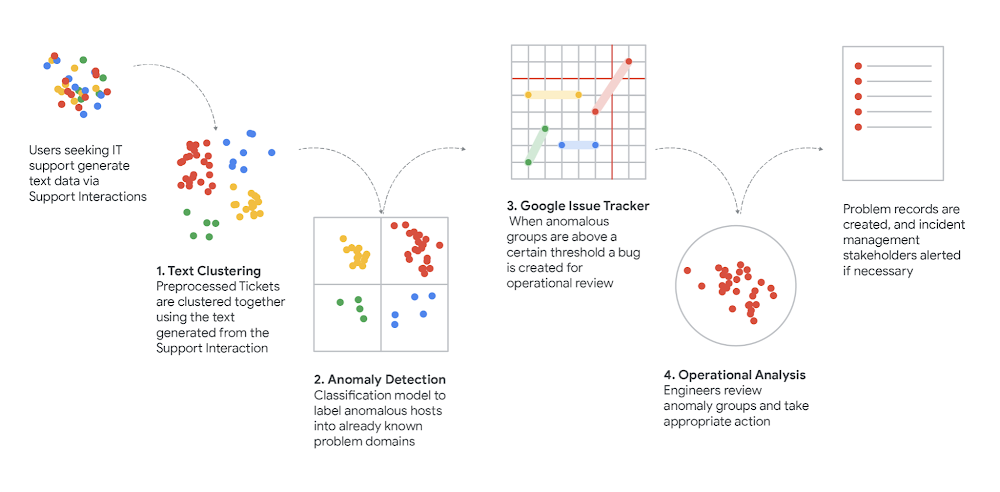
Getting into the detailsWe wrote previously about how we used clustering to connect requests for support (in text form) to the best tech support articles so we could answer questions faster and more efficiently. In a constantly changing environment (and in a very oddball couple of years) we wanted to make sure we’re focused on preserving our people’s productivity by isolating, understanding and responding to new support trends as fast as we can.Now we’d like to get into a bit more detail about how we did all that and what went on behind the scenes of our process: ExtractionGoogle’s historical support ticket data and metadata are stored in BigQuery, as are the analysis results we generate from that data. We read and write that content using the BigQuery API. However, much of these tickets contain information that is not useful to the ML pipeline and should not be included in the preprocessing and text modeling phases. For example, boilerplate generated from our case management tools must be stripped out using regex and other technologies in order to isolate the IT interaction between the tech and users. Furthermore, once all boilerplate has been removed, we use part-of-speech tagging to isolate only the nouns within the interaction, since nouns themselves proved to be the best features for modeling an interaction and differentiating a topic. Any one interaction could have 100+ nouns depending on the complexity.  Using these nouns, we take one more step and use stemming and lemmatization to remove any suffix that may be placed on the noun (e.g., “computers” becomes “computer”). This allows for any modification of the root words to be modeled as the same feature and reduces noise in our clustering results.Once each interaction is transformed into a set of nouns (and unique identifier), we can then move on to more advanced preprocessing techniques.Text ModelingTo cluster the ticket set, it must first be converted into a robust feature space. The core technology underlying our featurization process is TensorFlow transformers, which can be invoked using the TFX API. TensorFlow parses and annotates the tickets’ natural-language contents and these annotations, once normalized and filtered, form a sparse feature space. The Cloud Data Loss Prevention (DLP) API redacts several categories of sensitive information — e.g., person names — from the tickets’ contents, which both mitigates privacy leakage and prunes low-relevance tokens from the feature space.Although clustering can be performed against a sparse space, it is typically more effective if the space is densified to prune excessive dimensionality. We accomplish this using the term frequency-inverse document frequency (TF-IDF) statistical technique with a predefined maximum feature count – we also investigated more heavy-duty densification strategies using trained embedding models, but found that the quality improvements over TF-IDF were marginal for our use case, at the cost of a substantial reduction in human interpretability.ClusteringThe generated ticket feature set is partitioned into clusters using ClustOn. As this is an unsupervised learning problem, we arrived at the clustering process’s hyper-parameterization values via experimentation and human expert analysis. The trained parameters produced by the algorithm are persisted between subsequent runs of the pipeline in order to maintain consistent cluster IDs; this allows later operational systems to directly track and evaluate a cluster’s evolution over real time. The resulting cluster set is sanity-checked by some basic heuristic measures, such a silhouette score, and then rejoined with the initial ticket data for analysis. Moreover, for privacy purposes, each cluster whose ticket cohort size falls below a predefined threshold is omitted from the data set; this ensures that cluster metadata in the output, such as feature data used to characterize the cluster, cannot be traced with high confidence back to individual tickets.Scoring & Anomaly DetectionOnce a cluster has been identified, we need a way to automatically estimate how likely it is that the cluster has recently undergone a state change which might indicate an incipient event, as opposed to remaining in a steady state. “Anomalous” clusters — i.e. those which exhibit a sufficiently high likelihood of an event — can be flagged for later operational investigation, while the rest can be disregarded.Modeling a cluster’s behavior over time is done by distributing its tickets into a histogram according to their time of creation — using 24-hour buckets, reflecting the daily business cycle — and fitting a zero-inflated Poisson regression to the bucket counts using statsmodel1. However, our goal is not just to characterize a cluster’s state, but to detect a discrete change in that state. This is accomplished by developing two models of the same cluster: one of its long-term behavior, and the other of its short-term behavior. The distinction between “long-term” and “short-term” can be as simple as partitioning the histogram’s buckets at some age threshold. But we chose a slightly more nuanced approach: both models are fitted to the entire histogram, but under two different weighting schemata; both decay exponentially by age, but at different rates, so that recent buckets are weighted relatively more heavily in the short-term model than the long-term one.Both models are “optimized,” in that each achieves the maximum log-likelihood in its respective context. But if the long-term model is evaluated in the short-term context instead, its log-likelihood will show some amount of loss relative to the maximum achieved by the short-term model in the same context. This loss reflects the degree to which the long-term model fails to accurately predict the cluster’s short-term behavior — in other words, the degree to which the cluster’s short-term behavior deviates from the expectation established by its short-term behavior — and thus we refer to it as the deviation score. This score serves as our key measure of anomaly; if it surpasses a defined threshold, the cluster is deemed anomalous.OperationalizeUsing the IssueTracker API, bugs are auto-generated each time an anomalous cluster is detected. These bugs contain some summary of the tokens found within the cluster itself as well as a parameterized link to the DataStudio dashboard. These dashboards show the size of the cluster over time, the deviation score and the underlying tickets. These bugs are picked up by Techstop operations engineers and investigated to determine the root causes, allowing for quicker boots on the ground for any outages that may be occurring, as well as a more harmonious flow of data between support operations and change and incident management teams.Staying within the IssueTracker product, operations engineers create Problem Records in a separate queue detailing the problem, stakeholders and any solution content. These problem records are shared widely with frontline operations to help address any ongoing issues or outages.However, the secret sauce does not stop there. Techstop then uses Google’s Cloud AutoML engine to train a supervised model to classify any incoming support requests against known Problem Records (IssueTracker bugs). This model acts as a service for two critical functions:The model is called by our Chrome extension (see this handy guide) to recommend Problem Records to frontline techs based on the current ongoing chat. For a company like Google that has a global IT team, this recommendation engine allows for coverage and visibility of issues in near real timeThe model answers the “how big” question: Many stakeholders want to know how big the problem was, how many end users did this problem affect and so on. By training an AutoML model we can now give good estimators about impact and more importantly we can measure impact of project work that addresses these problems.Resampling & User Journey MappingGoing beyond incident response, we then semi-automatically extracts user journeys from these trends by sampling each cluster to discover the proportion of user intents. These intents are then used to map user pitfalls and generate a sense of topic for each emerging cluster.Since operations are constrained by tech evaluation time, a solution to limit the number of reviews necessary that each agent would need to inspect, while still maintaining the accuracy of analysis, was derived. User intents are defined as user “Goals” an employee may have when engaging with IT support. For example, “I want my cell phone to boot” or “I lost access to an internal tool” are good examples. Therefore, we propose a two-step procedure (to be applied for each cluster).First, we sample chats until the probability that we discover a new intent is small (say <5% or whatever number we want). We can evaluate this probability at each step through the Good-Turing method.A simple Good-Turing estimate of this probability can be found as E(1) / N, where N is the number of sampled chats so far and E(1) is approximately the number of intents that have only been seen once so far. This number should be lightly smoothed for better accuracy; it’s easy to implement this smoothing on our own2 or call a library.Once we have finished, we take the intents that we consider representative (say there are k of them) and create one additional category for “other intents.” Then, we estimate the sample size for multinomial estimation (with k+1 categories) that we still need to reach, given composition accuracy (say, that each intent fraction is within e.g., 0.1 or 0.2 of the actual fraction). To do so, we consider Thompson’s procedure3, but take advantage of the data collected so far to be used as a plugin estimate for the possible values of the parameters, plus we should also consider a grid of parameter values within a confidence interval of the current plugin estimate, to be sufficiently conservative. The procedure is described on page 43 in this article, steps (1) and (2). The procedure is easy to implement and under our current setup, it will be a few lines of code. The procedure gives us the target sample size. If we have already reached this sample size in step 1, we are done. Otherwise, we sample a few more chats to reach this sample size.This work along with the AutoML model allows Google to understand not only the problem impact size, but also key information about user experiences and where the CUJ users are struggling the most. In many cases a problem record will contain multiple CUJs (user intents) with separate personas and root causes. Helping the businessOnce we can make good estimators for different user goals we can work with domain experts to map clear user journeys, i.e., we can now use the data that this pipeline has generated to construct a user journey in a bottoms-up approach. This same amount of work, sifting through data, aggregating similar cases and estimating proportions of user goals would take an entire team of engineers and case scrubbers. With this ML solution we can now get the same (if not better) results with much lower operational costs.These user journeys then can be fed to internal dashboards for key decision makers to understand the health of their products and service areas. It allows for automated incident management and acts as a safeguard against unplanned changes or user-affecting changes that did not go through the proper change management processes. Furthermore, it is critical for problem management and other core functions within our IT service. By having a small team of operational engineers reviewing the output of this ML pipeline, we can create healthy problem records and keep track of our team’s top user issues.How do I do this too?Want to make your own system for insights into your support pipeline? Here’s a recipe to follow that will help you build all the parts you needLoad your data into BigQuery – Cloud BigQueryVectorize it with TF-IDF – TensorFlow VectorizerPerform clustering – TensorFlow ClusteringScore Clusters – Statsmodels Poisson RegressionAutomate with Dataflow – Cloud DataFlowOperationalize – IssueTracker API1. When modeling a cluster, that cluster’s histogram serves as the regression’s endogenous variable. Additionally, the analogous histogram of the entire ticket set, across all clusters, serves as an exogenous variable. The latter histogram captures the overall ebb and flow in ticket generation rates due to cluster-agnostic business cycles (e.g. rates tend to be higher on weekdays than weekends), and its inclusion mitigates the impact of such cycles on each cluster’s individual model.2. Gale, William A., and Geoffrey Sampson. “Good‐turing frequency estimation without tears.” Journal of quantitative linguistics 2.3 (1995): 217-237.3. Thompson, Steven K. “Sample size for estimating multinomial proportions.” The American Statistician 41.1 (1987): 42-46.
Quelle: Google Cloud Platform

How StreamNative facilitates integrated use of Apache Pulsar through Google Cloud

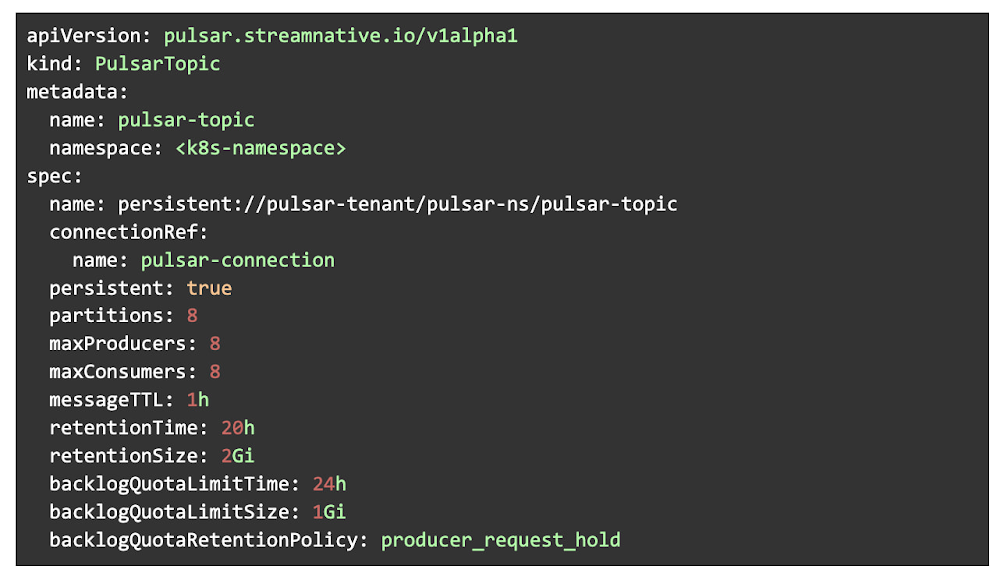
StreamNative, a company founded by the original developers of Apache Pulsar and Apache BookKeeper, is partnering Google Cloud to build a streaming platform on open source technologies. We are dedicated to helping businesses generate maximum value from their enterprise data by offering effortless ways to realize real-time data streaming. Following the release of StreamNative Cloud in August 2020, which provides scalable and reliable Pulsar-Cluster-as-a-Service, we introduced StreamNative Cloud for Kafka. This is to enable a seamless switch between Kafka API and Pulsar. We then launched StreamNative Platform to support global event streaming data platforms in multi-cloud and hybrid-cloud environments.By leveraging our fully-managed Pulsar infrastructure services, our enterprise customers can easily build their event-driven applications with Apache Pulsar and get real-time value from their data. There are solid reasons why Apache Pulsar has become one of the most popular messaging platforms in modern cloud environments, and we have strong beliefs in its capabilities of simplifying building complex event-driven applications. The most prominent benefits of using Apache Pulsar to manage real-time events include:Single API: When building a complex event-driven application, it traditionally requires linking multiple systems to support queuing, streaming and table semantics. Apache Pulsar frees developers from the headache of managing multiple APIs by offering one single API that supports all messaging-related workloads.Multi-tenancy: With the built-in multi-tenancy feature, Apache Pulsar enables secure data sharing across different departments with one global cluster. This architecture not only helps reduce infrastructure costs, but also avoids data silos.Simplified application architecture: Pulsar clusters can scale to millions of topics while delivering consistent performance, which means that developers don’t have to restructure their applications when the number of topic-partitions surpasses hundreds. The application architecture can therefore be simplified.Geo-replication: Apache Pulsar supports both synchronous and asynchronous geo-replication out-of-the-box, which makes building event-driven applications in multi-cloud and hybrid-cloud environments very easy.Facilitating integration between Apache Pulsar and Google CloudTo allow our customers to fully enjoy the benefits of Apache Pulsar, we’ve been working on expanding the Apache Pulsar ecosystem by improving the integration between Apache Pulsar and powerful cloud platforms like Google Cloud. In mid-2022, we added Google Cloud Pub/Sub Connector for Apache Pulsar, which enables seamless data replication between Pub/Sub and Apache Pulsar, and Google Cloud BigQuery Sink Connector for Apache Pulsar, which synchronizes Pulsar data to BigQuery in real time, to the Apache Pulsar ecosystem.Google Cloud Pub/Sub Connector for Apache Pulsar uses Pulsar IO components to realize fully-featured messaging and streaming between Pub/Sub and Apache Pulsar, which has its own distinctive features. Using Pub/Sub and Apache Pulsar at the same time enables developers to realize comprehensive data streaming features on their applications. However, it requires significant development effort to establish seamless integration between the two tools, because data synchronization between different messaging systems depends on the functioning of applications. When applications stop working, the message data cannot be passed on to the other system.Our connector solves this problem by fully integrating with Pulsar’s system. There are two ways to import and export data between Pub/Sub and Pulsar. The first, is the Google Cloud Pub/Sub source that feeds data from Pub/Sub topics and writes data to Pulsar topics. Alternatively, the Google Cloud Pub/Sub sink can pull data from Pulsar topics and persist data to Pub/Sub topics. Using Google Cloud Pub/Sub Connector for Apache Pulsar brings three key advantages:Code-free integration: No code-writing is needed to move data between Apache Pulsar and Pub/Sub.High scalability: The connector can be run on both standalone and distributed nodes, which allows developers to build reactive data pipelines in real time to meet operational needs.Less DevOps resources required: The DevOps workloads of setting up data synchronization are greatly reduced, which translates into more resources to be invested in unleashing the value of data.By using the BigQuery Sink Connector for Apache Pulsar, organizations can write data from Pulsar directly to BigQuery. This is unlike before, where developers could only use Cloud Storage Sink Connector for Pulsar to move data to Cloud Storage, and then query the imported data with external tables in BigQuery which had many limitations,  including low query performance and no support for clustered tables.Pulling data from Pulsar topics and persisting data to BigQuery tables, our BigQuery sink connector supports real-time data synchronization between Apache Pulsar and BigQuery. Just like our Pub/Sub connector, Google Cloud BigQuery Sink Connector for Apache Pulsar is a low-code solution that supports high scalability and greatly reduces DevOps workloads. Furthermore, our BigQuery connector possesses the Auto Schema feature, which automatically creates and updates BigQuery table structures based on the Pulsar topic schemas to ensure smooth and continuous data synchronization.Simplifying Pulsar resource management on KubernetesAll the products of StreamNative are built on Kubernetes, and we’ve been developing tools that can simplify resource management on Kubernetes platforms like Google Cloud Kubernetes (GKE). In August 2022, we introduced Pulsar Resources Operator for Kubernetes, which is an independent controller that provides automatic full lifecycle management for Pulsar resources on Kubernetes.Pulsar Resources Operator uses manifest files to manage Pulsar resources, which allows developers to get and edit resource policies through the Topic Custom Resources that render the full field information of Pulsar policies. It enables easier Pulsar resource management compared with using command line interface (CLI) tools, because developers no longer need to remember numerous commands and flags to retrieve policy information. Key advantages of using Pulsar Resources Operator for Kubernetes include:Easy creation of Pulsar resources: By applying manifest files, developers can swiftly initialize basic Pulsar resources in their continuous integration (CI) workflows when creating a new Pulsar cluster.Full integration with Helm: Helm is widely used as a package management tool in cloud-native environments. Pulsar Resource Operator can seamlessly integrate with Helm, which allows developers to manage their Pulsar resources through Helm templates.How you can contributeWith the release of Google Cloud Pub/Sub Connector for Apache Pulsar, Google Cloud BigQuery Sink Connector for Apache Pulsar, and Pulsar Resources Operator for Kubernetes, we have unlocked the application potential of open tools like Apache Pulsar by making them simpler to build, easier to manage, and extended their capabilities. Now, developers can build and run Pulsar clusters more efficiently and maximize the value of their enterprise data. These three tools are community-driven services and have their source codes hosted in the StreamNative GitHub repository. Our team welcomes all types of contributions for the evolution of our tools. We’re always keen to receive feature requests, bug reports and documentation inquiry through GitHub, emails or Twitter.
Quelle: Google Cloud Platform

How to build comprehensive customer financial profiles with Elastic Cloud and Google Cloud

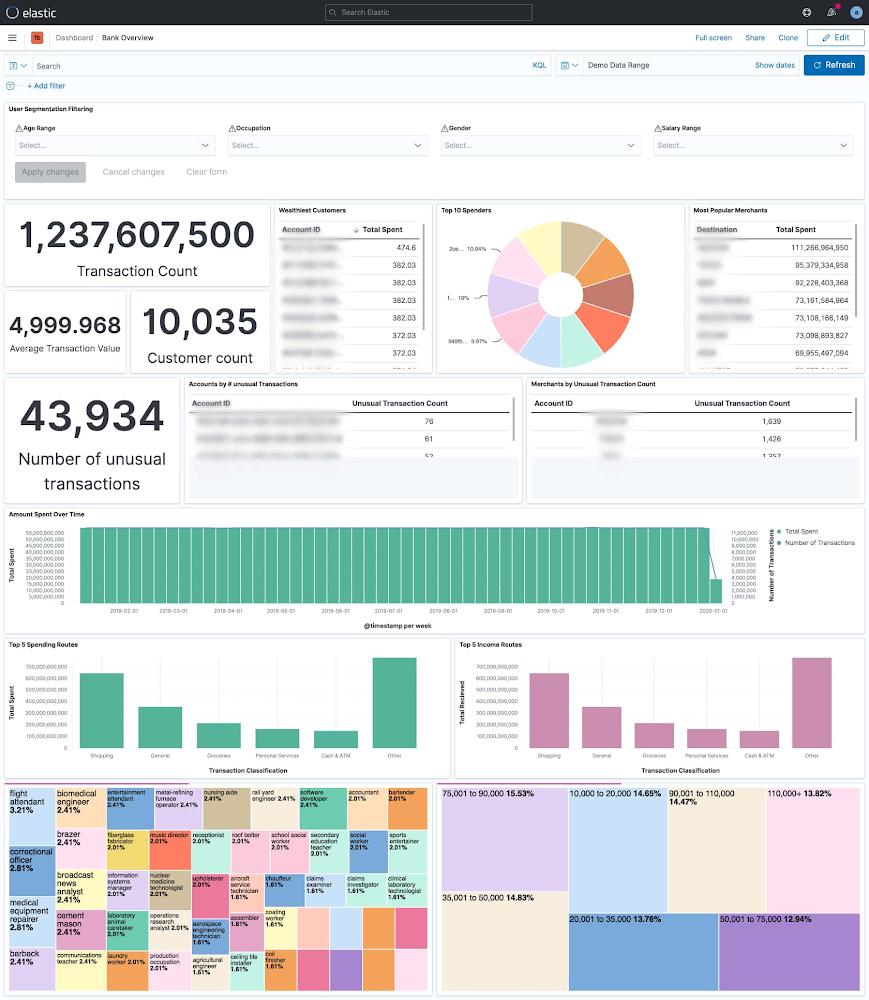
Financial institutions have vast amounts of data about their customers. However, many of them struggle to leverage data to their advantage. Data may be sitting in silos or trapped on costly mainframes. Customers may only have access to a limited quantity of data, or service providers may need to search through multiple systems of record to handle a simple customer inquiry. This creates a hazard for providers and a headache for customers. Elastic and Google Cloud enable institutions to manage this information. Powerful search tools allow data to be surfaced faster than ever – Whether it’s card payments, ACH (Automated Clearing House), wires, bank transfers, real-time payments, or another payment method. This information can be correlated to customer profiles, cash balances, merchant info, purchase history, and  other relevant information to enable the customer or business objective. This reference architecture enables these use cases:1. Offering a great customer experience: Customers expect immediate access to their entire payment history, with the ability to recognize anomalies. Not just through digital channels, but through omnichannel experiences (e.g. customer service interactions).2. Customer 360: Real-time dashboards which correlates transaction information across multiple variables, offering the business a better view into their customer base, and driving efforts for sales, marketing, and product innovation.Customer 360: The dashboard above looks at 1.2 billion bank transactions and gives a breakdown of what they are, who executes them, where they go, when and more. At a glance we can see who our wealthiest customers are, which merchants our customers send the most money to, how many unusual transactions there are – based on transaction frequency and transaction amount, when folks spend money and what kind spending and income they have.3. Partnership management: Merchant acceptance is key for payment providers. Having better access to present and historical merchant transactions can enhance relationships or provide leverage in negotiations. With that, banks can create and monetize new services.4. Cost optimization: Mainframes are not designed for internet-scale access. Along-side with technological limitation, the cost becomes a prohibitive factor. While Mainframes will not be replaced any time sooner, this architecture will help to avoid costly access to data to serve new applications.5. Risk reduction: By standardizing on the Elastic Stack, banks are  longer limited in the number of data sources they can ingest. With this, banks can better respond to call center delays and potential customer-facing impacts like natural disasters. By deploying machine learning and alerting features, banks can detect and stamp out financial fraud before it impacts member accounts.Fraud detection: The Graph feature of Elastic helped a financial services company to identify additional cards that were linked via phone numbers and amalgamations of the original billing address on file with those two cards. The team realized that several credit unions, not just the original one where the alert originated from, were being scammed by the same fraud ring.ArchitectureThe following diagram shows the steps to move data from Mainframe to Google Cloud, process and enrich the data in BigQuery, then provide comprehensive search capabilities through Elastic Cloud.This architecture includes the following components:Move Data from Mainframe to Google CloudMoving data from IBM z/OS to Google Cloud is straightforward with the Mainframe Connector, by following simple steps and defining configurations. The connector runs in z/OS batch job steps and includes a shell interpreter and JVM-based implementations of gsutil, bq and gcloud command-line utilities. This makes it possible to create and run a complete ELT pipeline from JCL, both for the initial batch data migration and ongoing delta updates.A typical flow of the connector includes:Reading the mainframe datasetTranscoding the dataset to ORCUploading ORC file to Cloud StorageRegister ORC file as an external table or load as a native tableSubmit a Query job containing a MERGE DML statement to upsert incremental data into a target table or a SELECT statement to append to or replace an existing tableHere are the steps to install the BQ MainFrame Connector:copy mainframe connector jar to unix filesystem on z/OScopy BQSH JCL procedure to a PDS on z/OSedit BQSH JCL to set site specific environment variablesPlease refer to the BQ Mainframe connector blog for example configuration and commands.Process and Enrich Data in BigQueryBigQuery is a completely serverless and cost-effective enterprise data warehouse. Its serverless architecture lets you use SQL language to query and enrich Enterprise scale data. And its scalable, distributed analysis engine lets you query terabytes in seconds and petabytes in minutes. An integrated BQML and BI Engine enables you to analyze the data and gain business insights. Ingest Data from BQ to Elastic CloudDataflow is used here to ingest data from BQ to Elastic Cloud. It’s a serverless, fast, and cost-effective stream and batch data processing service. Dataflow provides an Elasticsearch Flex Template which can be easily configured to create the streaming pipeline. This blog from Elastic shows an example on how to configure the template.Cloud Orchestration from MainframeIt’s possible to load both BigQuery and Elastic Cloud entirely from a mainframe job, with no need for an external job scheduler.To launch the Dataflow flex template directly, you can invoke the gcloud dataflow flex-template run command in a z/OS batch job step.If you require additional actions beyond simply launching the template, you can instead invoke the gcloud pubsub topics publish command in a batch job step after your BigQuery ELT steps are completed, using the –attribute option to include your BigQuery table name and any other template parameters. The pubsub message can be used to trigger any additional actions within your cloud environment.To take action in response to the pubsub message sent from your mainframe job, create a Cloud Build Pipeline with a pubsub trigger and include a Cloud Build Pipeline step that uses the gcloud builder to invoke gcloud dataflow flex-template run and launch the template using the parameters copied from the pubsub message. If you need to use a custom dataflow template rather than the public template, you can use the git builder to checkout your code followed by the maven builder to compile and launch a custom dataflow pipeline. Additional pipeline steps can be added for any other actions you require.The pubsub messages sent from your batch job can also be used to trigger a Cloud Run service or a GKE service via Eventarc and may also be consumed directly by a Dataflow pipeline or any other application.Mainframe Capacity PlanningCPU consumption is a major factor in mainframe workload cost. In the basic architecture design above, the Mainframe Connector runs on the JVM and runs on zIIP processor. Relative to simply uploading data to cloud storage, ORC encoding consumes much more CPU time. When processing large amounts of data it’s possible to exhaust zIIP capacity and spill workloads onto GP processors. You may apply the following advanced architecture to reduce CPU consumption and avoid increased z/OS processing costs.Remote Dataset Transcoding on Compute Engine VMTo reduce mainframe CPU consumption, ORC file transcoding can be delegated to a GCE instance. A gRPC service is included with the mainframe connector specifically for this purpose. Instructions for setup can be found in the mainframe connector documentation. Using remote ORC transcoding will significantly reduce CPU usage of the Mainframe Connector batch jobs and is recommended for all production level BigQuery workloads. Multiple instances of the gRPC service can be deployed behind a load balancer and shared by all Mainframe Connector batch jobs.Transfer Data via FICON and InterconnectGoogle Cloud technology partners offer products to enable transfer of mainframe datasets via FICON and 10G ethernet to Cloud Storage. Obtaining a hardware FICON appliance and Interconnect is a practical requirement for workloads that transfer in excess of 500GB daily. This architecture is ideal for integration of z/OS and Google Cloud because it largely eliminates data transfer related CPU utilization concerns.We really appreciate Jason Mar from Google Cloud who provided rich context and technical guidance regarding the Mainframe Connector, and Eric Lowry from Elastic for his suggestions and recommendations, and the Google Cloud and Elastic team members who contributed to this collaboration.
Quelle: Google Cloud Platform

Google’s Virtual Desktop of the Future

Did you know that most Google employees rely on virtual desktops to get their work done? This represents a paradigm shift in client computing at Google, and was especially critical during the pandemic and the remote work revolution. We’re excited to continue enabling our employees to be productive, anywhere! This post covers the history of virtual desktops and details the numerous benefits Google has seen from their implementation. BackgroundIn 2018, Google began the development of virtual desktops in the cloud. A whitepaper was published detailing how virtual desktops were created with Google Cloud, running on Google Compute Engine, as an alternative to physical workstations. Further research had shown that it was feasible to move our physical workstation fleet to these virtual desktops in the cloud. The research began with user experience analysis – looking into how employee satisfaction of cloud workstations compared with physical desktops. Researchers found that user satisfaction of cloud desktops was higher than that of their physical desktop counterparts! This was a monumental moment for cloud-based client computing at Google, and this discovery led to additional analyses of Compute Engine to understand if it could become our preferred (virtual) workstation platform of the future.Today, Google’s internal use of virtual desktops has increased dramatically. Employees all over the globe use a mix of virtual Linux and Windows desktops on Compute Engine to complete their work. Whether an employee is writing code, accessing production systems, troubleshooting issues, or driving productivity initiatives, virtual desktops are providing them with the compute they need to get their work done. Access to virtual desktops is simple: some employees access their virtual desktop instances via Secure Shell (SSH), while others use Chrome Remote Desktop — a graphical access tool. In addition to simplicity and accessibility, Google has realized a number of benefits from virtual desktops. We’ve seen an enhanced security posture, a boost to our sustainability initiatives, and a reduction in maintenance effort associated with our IT infrastructure. All these improvements were achieved while improving the user experience compared to our physical workstation fleet.Example of Google Data CenterAnalyzing Cloud vs Physical DesktopsLet’s look deeper into the analysis Google performed to compare cloud virtual desktops and physical desktops. Researchers compared cloud and physical desktops on five core pillars: user experience, performance, sustainability, security, and efficiency.User ExperienceBefore the transition to virtual desktops got underway, user experience researchers wanted to know more about how they would affect employee happiness. They discovered that employees embraced the benefits that virtual desktops offered. This included freeing up valuable desk space to provide an always-on, always available compute experience, accessible from anywhere in the world, and reduced maintenance overhead compared to physical desktops. PerformanceFrom a performance perspective, cloud desktops are simply better than physical desktops. For example, running on Compute Engine makes it easy to spin-up on-demand virtual instances with predictable compute and performance – a task that is significantly more difficult with a physical workstation vendor. Virtual desktops rely on a mix of Virtual Machine (VM) families that Google developed based on the performance needs of our users. These include Google Compute EngineE2 high-efficiency instances, which employees might use for day-to-day tasks, to higher-performance N2/N2D instances, which employees might use for more demanding machine learning jobs. Compute Engine offers a VM shape for practically any computing workflow. Additionally, employees no longer have to worry about machine upgrades (to increase performance, for example) because our entire fleet of virtual desktops can be upgraded to new shapes (with more CPU and RAM) with a single config change and a simple reboot — all within a matter of minutes. Plus, Compute Engine continues to add features and new machine types, which means our capabilities only continue to grow in this space.SustainabilityGoogle cares deeply about sustainability and has been carbon neutral since 2007. Moving from physical desktops to virtual desktops on Compute Engine brings us closer to Google sustainability goals of a net-neutral desktop computing fleet. Our internal facilities team has praised virtual desktops as a win for future workspace planning, because a reduction in physical workstations could also mean a reduction in first-time construction costs of new buildings, significant (up to 30%) campus energy reductions, and even further reductions in costs associated with HVAC needs and circuit size needs at our campuses. Lastly, a reduction in physical workstations also contributes to a reduction in physical e-waste and a reduction in the carbon associated with transporting workstations from their factory of origin to office locations. At Google’s scale, these changes lead to an immense win from a sustainability standpoint. SecurityBy their very nature, virtual desktops mitigate the ability for a bad actor to exfiltrate data or otherwise compromise physical desktop hardware since there is no desktop hardware to compromise in the first place. This means attacks such as USB attacks, evil maid attacks, and similar techniques for subverting security that require direct hardware access become worries of the past. Additionally, the transition to cloud-based virtual desktops also brings with it an enhanced security posture through the use of Google Cloud’s myriad security features including Confidential Computing, vTPMs, and more. EfficiencyIn the past, it was not uncommon for employees to spend days waiting for IT to deliver new machines or fix physical workstations. Today, cloud-based desktops can be created instantaneously on-demand and resized on-demand. They are always accessible, and virtually immune from maintenance-related issues. IT no longer has to deal with concerns like warranty claims, break-fix issues, or recycling. This time savings enables IT to focus on higher priority initiatives all while reducing their workload. With an enterprise the size of Google, these efficiency wins added up quickly. Considerations to Keep in MindAlthough Google has seen significant benefits with virtual desktops, there are some considerations to keep in mind before deciding if they are right for your enterprise. First, it’s important to recognize that migrating to a virtual fleet requires a consistently reliable and performant client internet connection. For remote/global employees, it’s important they’re located geographically near a Google Cloud Region (to minimize latency). Additionally, there are cases where physical workstations are still considered vital. These cases include users who need USB and other direct I/O access for testing/debugging hardware and users who have ultra low-latency graphics/video editing or CAD simulation needs. Finally, to ensure interoperability between these virtual desktops and the rest of our computing fleet, we did have to perform some additional engineering tasks to integrate our asset management and other IT systems with the virtual desktops. Whether your enterprise needs such features and integration should be carefully analyzed before considering a solution such as this. However, should you ultimately conclude that cloud-based desktops are the solution for your enterprise, we’re confident you’ll realize many of the benefits we have!Tying It All TogetherAlthough moving Google employees to virtual desktops in the clouds was a significant engineering undertaking, the benefits have been just as significant.  Making this switch has boosted employee productivity and satisfaction, enhanced security, increased efficiency, and provided noticeable improvements in performance and user experience. In short, cloud-based desktops are helping us transform how Googlers get their work done. During the pandemic, we saw the benefits of virtual desktops in a critical time. Employees had access to their virtual desktop from anywhere in the world, which kept our workforce safer and reduced transmission vectors for COVID-19. We’re excited for a future where more and more of our employees are computing in the cloud as we continue to embrace the work-from-anywhere model and as we continue to add new features and enhanced capabilities to Compute Engine!
Quelle: Google Cloud Platform

How partners can maximize their 2023 opportunity with the transformation cloud

The excitement at Next ‘22 this year was inescapable.  We celebrated a number of exciting announcements and wins that show where the cloud is heading, and what that means for our partners and customers.  As we close out 2022 and finalize our plans for 2023, I wanted to provide a perspective on the most important partner developments from the event to help you hit the ground running next year.Google Cloud’s transformation cloud was front and center throughout our entire event. This powerful technology platform is designed to accelerate digital transformation for any organization by bringing five business-critical capabilities to our shared customers:The ability to build open data clouds to derive insights and intelligence from data.Open infrastructure that enables customers to run applications and store data where it makes the most sense.A culture of collaboration built on Google Workspace that brings people together to connect and create from anywhere, enabling teams to achieve more.The same trusted environment that Google uses to secure systems, data, apps, and customers from fraudulent activity, spam, and abuse.And a foundational platform that uses efficient technology and innovation to drive cost savings and create a more sustainable future for everyone.More than just vision, the transformation cloud is delivering results today. British fashion retailer Mulberry and partner Datatonic have built data clouds to drive a 25% increase in online sales. Vodafone in EMEA is working with our partner Accenture to migrate and modernize its entire infrastructure.  Hackensack Meridian Health in New Jersey is working with partner Citrix to leverage our infrastructure and Google Workspace to modernize its systems, enable collaboration, reduce costs, bolster security, and provide better patient and practitioner experiences. Many more transformation stories are available here and in our partner directory.For our partners, the transformation cloud is your customer satisfaction engine. It enables you to bring new capabilities to market that customers cannot get anywhere else – from overcoming challenges around organizational management, to demand forecasting, supply-chain visibility, and more – all of this is possible only with the capability of our Data, AI/ML, collaboration and security tools.Thomas Kurian and Kevin Ichhpurani provided excellent insight and guidance for partners looking to begin, or accelerate, their journey with the transformation cloud in their Next ‘22 partner keynote. Briefly, here are the three steps partners can take now to set themselves up for success in 2023:Customers expect you to be deeply specialized in cloud solutions and their business Customers have made it clear they expect to work with partners who are deeply knowledgeable about the technology solutions and foundational elements of the transformation cloud. Just as important, it’s no longer good enough for partners to offer a small group of highly trained individuals to do it all. Customers need deep cloud expertise within specific business functions and even within global regions. They need people who know how to leverage our cloud solutions to achieve great outcomes for finance departments, human resources, customer service, operations, and more. And more than that, customers need people who are also experts at driving these kinds of transformations within regional environments defined by unique policies, compliance requirements, and even cultural issues. This is a tall order, but it’s absolutely critical to your growth and success. This is why Google Cloud is investing in the tools, training, and support you need to expand your bench of trained and certified individuals.Second, increase your focus on consumption and service delivery to land and expand opportunities.The demand here is significant and growing. In its 2022 Global IT Market Outlook, analyst firm Canalys stated that partner-delivered IT products and services will account for more than 73% of the total global IT market this year and into next year (about even with its 2021 forecast, which suggests that services remain in high demand). This includes managed services such as cloud infrastructure and software services, managed databases, managed data warehouses, managed analytic tools, and more. These are high-margin endeavors for partners. Equally important, these kinds of services allow your customers to shift their people from managing technology to managing and growing the business.As Thomas Kurian said during his Next ‘22 remarks, Google Cloud is not in the services business–that’s the domain of our partners. We are a product and technology company. This is why we have a partner-led service delivery commitment, and a goal of bring partners into 100% of customer engagements. Third, we are investing to help Google Cloud partners drive consumption and new business. We know you are focused on growing your customer engagements and accelerating customers’ time to value. We’re here to support you:Our Smart Analytics platform is a key market differentiator that enables partners to tap into the fast growing Data & Analytics market, which is expected to hit $500B by 2024.1We are investing $10 billion in cybersecurity and our recent acquisition of Mandiant extends our leadership in this area by combining offense and defense in powerful new ways.Governments worldwide are looking for sovereign cloud solutions to meet their security, privacy, and digital sovereignty requirements. Google Cloud has a highly differentiated solution in this area, and partnerships are critical. We are driving to validate all of our ISV partner solutions through our Cloud Ready – Sovereign Solutions initiative.We are providing increasing resources and support to help partners embed the capabilities of Google Workspace in their solutions.We continue to allow customers to buy partner solutions and decrement their commits just like with Google Cloud products.You’ll see more from us on all of this in kick off 2023. The opportunity to prosper – Google, partners, and customers alike – is tremendous. I’ve never been more excited about the year ahead.1. IDC Forecast Companies to spend 342 B on AI Solutions in 2021Related ArticleWhat’s next for digital transformation in the cloudGoogle Cloud ’Next 22 is here! Check out the official kickoff blog and hear from our CEO, Thomas Kurian, on new customer wins, partnershi…Read Article
Quelle: Google Cloud Platform

Data: the Rx to faster, patient-centric clinical trials

Out of necessity, the life sciences industry has accelerated the innovation and experimentation of drug and device development. The sector, which has traditionally been slow-moving when it comes to clinical trials—for reasons ranging from regulatory, to trial recruitment, to quality control—is now looking towards cloud technology to speed up the process and find new innovative ways to support R&D. With the shift towards patient-centric care delivery and the rapid growth of health data, the case for faster digitization in life sciences has never been stronger. However, there are still a few obstacles to overcome.Innovation roadblocksThe time and costs involved in clinical trials are enormous. The average clinical trial across therapeutic areas come out to:1With these barriers to having a new drug or device approved, it’s no surprise that more than 1 in 5 clinical trials fail due to a lack of funding.2These clinical trials are also subject to stringent regulatory requirements, and the organizations conducting the study often lack efficient and secure ways to collect, store, and analyze data across trial sites. At the same time, siloed data and poor collaboration across sites make it harder to find valuable insights that could influence and accelerate outcomes.The public will likely now greet life sciences companies with less patience for decade-long drug development cycles and more demands for retail-like transparency. Because the pharmaceutical industry needs to update its processes, meeting these expectations won’t be as simple as replicating the COVID-19 vaccine model. How, then, might the industry accelerate bringing new life saving treatments to the market safely and more quickly without a public emergency? Pharma companies now have to find new and innovative ways to conduct R&D more efficiently and drive products to market faster and more efficiently.Google Cloud is empowering scientists throughout the drug discovery pipeline from target identification, to target validation, to lead identification. By combining the power of AlphaFold and Vertex AI, we are able to significantly decrease the time to process protein engineering and de-novo protein design. The value for researchers is immense and leads to: optimized compute resource time, maximized throughput, enhanced and comprehensive trackability and reproducibility. In short, we are enabling life sciences organizations to increase the velocity of protein design and engineering to revolutionize biochemical research and drug discovery.Accelerate your clinical trials in the cloudGoogle Cloud accelerates drug and device development by revolutionizing data collection, storage, and analysis to deliver life-saving treatments faster. It reduces enrollment cycle times through the expansion of clinical trial sites, research data management solutions, and Google’s cross-site collaboration solutions, includingLowering the time and cost of clinical trials.Complying with changing global regulations. Delivering seamless communication across trial sites.Increase patient participation.How Moderna boosted discovery with dataAmerican pharmaceutical company, Moderna, needed an easier and faster way to access actionable insights. Data analysis required significant manual work and led to data silos across the organization.Moderna decided to use Google Cloud for its multi-cloud data strategy and Looker for a more holistic view of its clinical trials. By integrating internal and external data sets, the company:Gained a more complete view of clinical trials.Increased scientific efficiency and collaboration.Was able to make real-time decisions to ensure trial quality.“Looker fits well with our multi-cloud philosophy because we can choose our preferred database and leverage integrations to make our data accessible and actionable.”—Dave Johnson, VP of Informatics, Data Science, and AI at ModernaTechnology can be the enabler the industry needs in the effort to meet expectations for faster and better therapies for patients while keeping the process cost-effective for drug and device makers.1. How much does a clinical trial cost?2. National Library of Medicineaside_block[StructValue([(u’title’, u’How real-world data and analytics help accelerate clinical trials’), (u’body’, <wagtail.wagtailcore.rich_text.RichText object at 0x3ed9fe0c6590>), (u’btn_text’, u’Read more on Transform with Google Cloud’), (u’href’, u’https://cloud.google.com/blog/transform/real-world-data-platform-accelerates-clinical-trails-life-sciences-healthcare-clinica’), (u’image’, None)])]
Quelle: Google Cloud Platform

Performance considerations for loading data into BigQuery

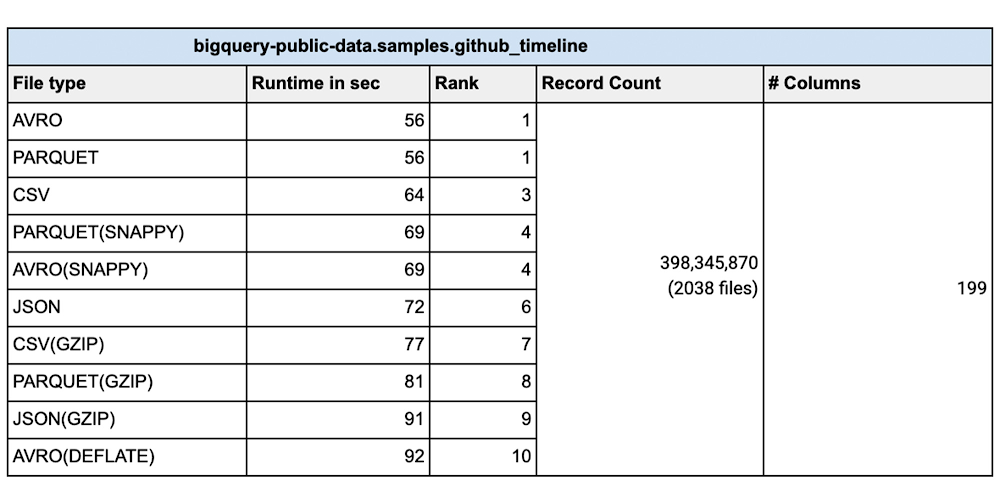
Customers have been using BigQuery for their data warehousing needs since it was introduced. Many of these  customers routinely load very large data sets into their Enterprise Data Warehouse. Whether one is doing an initial data ingestion with hundreds of TB of data or incrementally loading from systems of record, performance of bulk inserts is key to quicker insights from the data. The most common architecture for batch data loads uses Google Cloud Storage(Object storage) as the staging area for all bulk loads. All the different file formats are converted into an optimized Columnar format called ‘Capacitor’ inside BigQuery.This blog will focus on various file types for best performance. Data files that are uploaded to BigQuery, typically come in Comma Separated Values(CSV), AVRO, PARQUET, JSON, ORC formats. We are going to use two large datasets to compare and contrast each of these file formats. We will explore loading efficiencies of compressed vs. uncompressed data for each of these file formats. Data can be loaded into BigQuery using multiple tools in the GCP ecosystem. You can use the Google Cloud console, bq load command, using the BigQuery API or using the client libraries. This blog attempts to elucidate the various options for bulk data loading into BigQuery and also provides data on the performance for each file-type and loading mechanism.IntroductionThere are various factors you need to consider when loading data into BigQuery. Data file formatData compressionLevel of parallelization of data loadSchema autodetect ‘ON’ or ‘OFF’Wide tables vs narrow(fewer columns) tables.Data file formatBulk insert into BigQuery is the fastest way to insert data for speed and cost efficiency. Streaming inserts are however more efficient when you need to report on the data immediately. Today data files come in many different file types including Comma Separated(CSV), JSON, PARQUET, AVRO  to name a few. We are often asked how the file format matters and whether there are any advantages in choosing one file format over the other. CSV files (comma-separated values) contain tabular data with a header row naming the columns. When loading data one can parse the header for column names. When loading from csv files one can use the header row for schema autodetect to pick up the columns. With schema autodetect set to off, one can skip the header row and create a schema manually, using the column names in the header. CSV files can use other field separators(like ; or |) too as a separator, since many data outputs already have a comma in the data. You cannot store nested or repeated data in CSV file format.JSON (JavaScript object notation) data is stored as a key-value pair in a semi structured format. JSON is preferred as a file type because it can store data in a hierarchical format. The schemaless nature of JSON data rows gives the flexibility to evolve the schema and thus change the payload. JSON formats are user-readable. REST-based web services use json over other file types.PARQUET is a column-oriented data file format designed for efficient storage and retrieval of data.  PARQUET compression and encoding is very efficient and provides improved performance to handle complex data in bulk.AVRO: The data is stored in a binary format and the schema is stored in JSON format. This helps in minimizing the file size and maximizes efficiency. From a data loading perspective we did various tests with millions to hundreds of billions of rows with narrow to wide column data .We have done this test with a public dataset named `bigquery-public-data.samples.github_timeline` and `bigquery-public-data.wikipedia.pageviews_2022`. We used 1000 flex slots for the test and the number of loading(called PIPELINE slots) slots is limited to the number of slots you have allocated for your environment. Schema Autodetection was set to ‘NO’. For the parallelization of the data files, each file should typically be less than 256MB uncompressed for faster throughput and here is a summary of our findings:Do I compress the data? Sometimes batch files are compressed for faster network transfers to the cloud. Especially for large data files that are being transferred, it is faster to compress the data before sending over the cloud Interconnect or VPN connection. In such cases is it better to uncompress the data before loading into BigQuery? Here are the tests we did for various file types with different file sizes with different compression algorithms. Shown results are the average of five runs:How do I load the data?There are various ways to load the data into BigQuery. You can use the Google Cloud Console, command line, Client Library or use the REST API. As all these load types invoke the same API under the hood so there is no advantage of picking one way over the other. We used 1000 PIPELINE slots reservations, for doing the data loads shown above. For workloads that require predictable load times, it is imperative that one uses PIPELINE slot reservations, so that load jobs are not dependent on the vagaries of available slots in the default pool. In the real world many of our customers have multiple load jobs happening concurrently. In those cases, assigning PIPELINE slots to individual jobs has to be done carefully keeping a balance between load times and slot efficiency.Conclusion: There is no distinct advantage in loading time when the source file is in compressed format for the tests that we did. In fact for the most part uncompressed data loads in the same or faster time than compressed data. For all file types including AVRO, PARQUET and JSON it takes longer to load the data when the file is compressed. Decompression is a CPU bound activity and your mileage varies based on the amount of PIPELINE slots assigned to your load job. Data loading slots(PIPELINE slots) are different from the data querying slots. For compressed files, you should parallelize the load operation, so as to make sure that data loads are efficient. Split the data files to 256MB or less to speed up the parallelization of the data load.From a performance perspective AVRO and PARQUET files have similar load times. Fixing your schema does load the data faster than schema autodetect set to ‘ON’. Regarding ETL jobs, it is faster and simpler to do your transformation inside BigQuery using SQL, but if you have complex transformation needs that cannot be done with SQL, use Dataflow for unified batch and streaming, Dataproc for streaming based pipelines, or Cloud Data Fusion for no-code / low-code transformation needs. Wherever possible, avoid implicit/explicit data types conversions for faster load times. Please also refer to Bigquery documentation for details on data loading to BigQuery.To learn more about how Google BigQuery can help your enterprise, try out Quickstarts page hereDisclaimer: These tests were done with limited resources for BigQuery in a test environment during different times of the day with noisy neighbors, so the actual timings and the number of rows might not be reflective of your test results. The numbers provided here are for comparison sake only, so that you can choose the right file types, compression for your workload.  This testing was done with two tables, one with 199 columns (wide table) and another with 4 columns (narrow table). Your results will vary based on the datatypes, number of columns, amount of data, assignment of PIPELINE slots and various file types. We recommend that you test with your own data before coming to any conclusion.Related ArticleLearn how BI Engine enhances BigQuery query performanceThis blog explains how BI Engine enhances BigQuery query performance, different modes in BI engine and its monitoring.Read Article
Quelle: Google Cloud Platform

12 no-cost ways to learn Google Cloud over the holidays

The holiday season is upon us! If you are making your list and checking it twice, we’ve got a few learning gifts you can tick off the list and share with others too. For the season of giving, we’ve wrapped up some of our most popular training and certification opportunities and made them available at no-cost. This December we’re aiming to offer something for everyone, whether you’re just getting started with cloud, or knee deep in preparing for a professional certification exam. Start with the fundamentals to gain a deeper understanding of cloud whether you’re in a business or technical role. Perhaps you’re looking to flex your data analytics and ML muscle with BigQuery and SQL, earn a Google Cloud skill badge, or enhance your technical cloud skills. Or jump into a hot topic like sustainability and learn about Google’s commitment to a clean cloud, and how to use sustainability tools. Read on to find something on your learning wishlist.We also have a variety of learning formats to fit your needs. Complete hands-on labs, view courses and webinars, or jump into competitions like the Google Cloud Fly Cup Challenge or our most popular #GoogleClout Challenge of 2022 – and let the fun begin!Are you ready to learn? Take a look at the training we’ve recommended below to work towards your goals as we head into the new year, with new skills, to make the most of new opportunities.We’re giving plenty of learning gifts to choose from this month, so take your pick from the topics below ML, AI and data analyticsWho it’s for: ML, AI and data engineersWhat you’ll take away: A deeper understanding of working in BigQuery and SQL.Level: FoundationalStart learning now:Introduction to SQL for BigQuery and Cloud SQL – Get started with this one hour and 15 minute hands-on lab to learn fundamental SQL querying keywords, which you will run in the BigQuery console on a public dataset, and how to export subsets of a dataset into CSV files, then upload to Cloud SQL. You’ll also learn how to use Cloud SQL to create and manage databases and tables, with hands-on practice on additional SQL keywords that manipulate and edit data.Weather Data with BigQuery – In this 45 minute lab, you’ll use BigQuery to analyze historical weather observations, and run analytics on multiple datasets. Insights from Data with BigQuery – Earn a shareable skill badge when you complete this five hour quest. It includes interactive labs covering the basics of BigQuery, from writing SQL queries, creating and managing database tables in Cloud SQL, and querying public tables to loading sample data into BigQuery.The Google Cloud Fly Cup Challenge – This is a three-stage competition in the sport of drone racing in the Drone Racing League (DRL). You will use DRL’s race data to predict outcomes and give performance improvement tips to pilots (these are the best drone pilots in the world!). There’s a chance to win exclusive swag, prizes, and an expenses paid trip to the DRL World Championship. Registration closes on December 31, 2022.CI/CDWho it’s for: Software DevelopersWhat you’ll take away: Take part in our most popular #GoogleClout challenge of 2022! Build a simple containerized application.Level: FundamentalStart learning now: #GoogleClout – CI/CD in a Google Cloud World – Flex your #GoogleClout in this cloud puzzle that challenges you in a lab format to create a Cloud Build Trigger to rebuild a containerized application hosted on a remote repository. Register it in the Artifact Registry and deploy. You’ll be scored on your results and earn a badge to share.Preparing for Google Cloud certification Who it’s for: Cloud engineers and architects, network and security engineers and Google Workspace administratorsWhat you’ll take away: Explore the breadth and scope of the domains covered in the cloud certification exams, assess your exam readiness and create a study plan. Level: Foundational to advancedStart learning now:Preparing for Google Cloud certification – These courses are for Associate Cloud Engineers, Professional Cloud Architects, Professional Cloud Network Engineers, Professional Cloud Security Engineers, and Google Workspace Administrators preparing for Google Cloud certification exams. You’ll also earn a completion badge when you finish the course.Preparing for the Cloud Architect certification exam – Join this 30 minute on-demand webinar to learn about resources to maximize your study plan, and get tips from a #GoogleCloudCertified Professional Cloud Architect.Intro to Google Cloud for technical professionals Who it’s for: Software DevelopersWhat you’ll take away: Boost your Google Cloud operational and efficiency skills to drive innovation by navigating the fundamentals of compute, containers, cloud storage, virtual machines, and data and machine learning services.Level: FoundationalStart learning now:Getting Started with Google Cloud Fundamentals – This on-demand webinar takes a little less than three hours to complete. Navigate Compute Engine, container strategies, and cloud storage options through sessions and demos. You’ll also learn how to create VM instances, and discover Google Cloud’s big data and machine learning options.Intro to Google Cloud for business professionals Who it’s for: Business roles in the cloud space like HR, marketing, operations and salesWhat you’ll take away: A deeper understanding of cloud computing and how Google Cloud products help achieve organizational goals.Level: FoundationalStart learning now:Cloud Digital Leader learning path -There are four courses in this learning path covering digital transformation, innovating with data, infrastructure and application modernization, and Google Cloud security and operations. Preparing for the Cloud Digital Leader certification exam – In this 30 minute webinar continue your learning journey by preparing for the Google Cloud Digital Leader certification exam. The webinar covers all the resources we’ve made available to help you prepare.SustainabilityWho it’s for: Software DevelopersWhat you’ll take away: Learn how the cleanest cloud in the industry can help you save your cloud bill, and save the planet.Level: FoundationalStart learning nowA Tour of Google Cloud Sustainability -Work through this one hour, hands-on lab, to explore your carbon footprint data, use the Cloud Region Picker, and reduce your cloud carbon footprint with Active Assist recommendations.Keep connected and learning with us in 2023 Accelerate your growth on Google Cloud by joining the Innovators Program. No-cost for users of Google Cloud (including Workspace), it’s for anyone who wants to advance their personal and professional development around digital transformation, drive innovation, and solve difficult business challenges.Continue your learning with Google Cloud in 2023 by starting an annual subscription1 with Innovators Plus benefits. Gain access to $500 in Google Cloud credits, live learning events, our entire on-demand training catalog, a certification voucher, access to special events, and other benefits.Build your skills, reach your goals and advance your career with 12 no-cost ways to learn Google Cloud!1. Start an annual subscription on Google Cloud Skills Boost with Innovators Plus for $299/year, subject to eligibility limitations.Related ArticleA visual tour of Google Cloud certificationsInterested in becoming Google Cloud certified? Wondering which Google Cloud certification is right for you? We’ve got you covered.Read Article
Quelle: Google Cloud Platform

Google Cloud Biotech Acceleration Tooling

Bio-pharma organizations can now leverage quick start tools and setup scripts to begin running scalable workloads in the cloud today. This capability is a boon for research scientists and organizations in the bio-pharma space, from those developing treatments for diseases to those creating new synthetic biomaterials. Google Cloud’s solutions teams continue to shape products with customer feedback and contribute to platforms on which Google Cloud customers can build. This guide provides a way to get started with simplified cloud architectures for specific workloads. Cutting edge research and biotechnology development organizations are often science first and can therefore save valuable resources by leveraging existing technology infrastructure starting points embedded with Google’s best practices. Biotech Acceleration Tooling frees up scientist and researcher bandwidth, while still enabling flexibility. The majority of the tools outlined in this guide come with quick start Terraform scripts to automate the stand up of environments for biopharma workloads.Solution overviewThis deployment creates the underlying infrastructure in accordance with Google’s best practices, configuring appropriate networking including VPC networking, security, data access, and analytics notebooks. All environments are created with Terraform scripts, which define cloud and on-prem resources in configuration files. A consistent workflow can be used to provision infrastructure.If beginning from scratch, you will need to first consider security, networking, and  identity access management set up to keep your organization’s computing environment safe. To do this, follow the steps below:Login to Google Cloud PlatformUse Terraform Automation Repository within Security Foundations Blueprint to deploy your new environmentWorkloads needed can vary, and so should solutions tooling. We offer easy to deploy code and workflows for various biotech use cases including AlphaFold, genomics sequencing, cancer data analysis, clinical trials, and more.AlphaFoldAlphaFold is an AI system developed by DeepMind that predicts a protein’s 3D structure from its amino acid sequence. It regularly achieves accuracy competitive with experiments. It is useful for researchers doing drug discovery and protein design, often computational biologists and chemists. To get started running AlphaFold batch inference on your own protein sequences, leverage these setup scripts. To better understand the batch inference solution, see this explanation of optimized inference pipeline and video explanation. If your team does not need to run AlphaFold at scale and is comfortable running structures one at a time on less optimized hardware, see the simplified AlphaFold run guide.Genomics ToolingResearchers today have the ability to generate an incredible amount of biological data. Once you have this data, the next step is to refine and analyze it for meaning. Whether you are developing your own algorithms or running common tools and workflows, you now have a large number of software packages to help you out.Here we make a few recommendations for what technologies to consider. Your technology choice should be based on your own needs and experience. There is no “one size fits all” solution.Genomics tools that may be of assistance for your organization include generalized genomics sequencing pipelines, Cromwell genomics, Databiosphere dsub genomics, and DeepVariant.CromwellThe Broad Institute has developed the Workflow Definition Language (WDL) and an associated runner called Cromwell. Together these have allowed the Broad to build, run at scale, and publish its recommended practices pipelines. If you want to run the Broad’s published GATK workflows or are interested in using the same technology stack, take a look at this deployment of Cromwell.DsubThis module is packaged to use databiosphere dsub as a Workflow engine, containerized tools (FastQC) and Google cloud lifescience API to automate execution of pipeline jobs. The function can be easily modified to adopt to other bioinformatic tools out there.Dsub is a command-line tool that makes it easy to submit and run batch scripts in the cloud. The cloud function has embedded dsub libraries to execute pipeline jobs in Google cloud.DeepVariantDeepVariant is an analysis pipeline that uses a deep neural network to call genetic variants from next-generation DNA sequencing data.Cancer Data AnalysisISB-CGC (ISB Cancer Gateway in the Cloud) enables researchers to analyze cloud-based cancer data through a collection of powerful web-based tools and Google Cloud technologies. It is one of three National Cancer Institute (NCI) Cloud Resources tasked with bringing cancer data and computation power together through cloud platforms.Interactive web-based Cancer Data Analysis & ExplorationExplore and analyze ISB-CGC cancer data through a suite of graphical user interfaces (GUIs) that allow users to select and filter data from one or more public data sets (such as TCGA, CCLE, and TARGET), combine these with your own uploaded data and analyze using a variety of built-in visualization tools.Cancer data analysis using Google BigQueryProcessed data is consolidated by data type (ex. Clinical, DNA Methylation, RNAseq, Somatic Mutation, Protein Expression, etc.) from sources including the Genomics Data Commons (GDC) and Proteomics Data Commons (PDC) and transformed into ISB-CGC Google BigQuery tables. This allows users to quickly analyze information from thousands of patients in curated BigQuery tables using Structured Query Language (SQL). SQL can be used from the Google BigQuery Console but can also be embedded within Python, R and complex workflows, providing users with flexibility. The easy, yet cost effective, “burstability” of BigQuery allows you to, within minutes (as compared to days or weeks on a non-cloud based system), calculate statistical correlations across millions of combinations of data points.Available Cancer Data SourcesTCGAPan-Cancer Atlas BigQuery DataTherapeutically Applicable Research to Generate Effective Treatments (TARGET)More hereClinical Trials StudiesThe FDA’s MyStudies platform enables organizations to quickly build and deploy studies that interact with participants through purpose-built apps on iOS and Android. MyStudies apps can be distributed to participants privately or made available through the App Store and Google Play.This open-source repository contains the code necessary to run a complete FDA MyStudies instance, inclusive of all web and mobile applications.Open-source deployment tools are included for semi-automated deployment to Google Cloud Platform (GCP). These tools can be used to deploy the FDA MyStudies platform in just a few hours. These tools follow compliance guidelines to simplify the end-to-end compliance journey. Deployment to other platforms and on-premise systems can be performed manually.Data ScienceFor generalized data science pipelines to build custom predictive models or do interactive analysis within notebooks, check out our data science workflow setup scripts to get to work immediately. These include database connections and setup, virtual private cloud enablement, and notebooks.Reference materialLife sciences public datasetsDrug discovery and in silico virtual screening on GCPSemantic scientific literature searchResearch workloads on GCPGenomics and Secondary AnalysisPatient MonitoringVariant AnalysisHealthcare API for Machine Learning and AnalyticsRadiological Image ExtractionRAD Lab – a secure sandbox for innovationDuring research, scientists are often asked to spin up research modules in the cloud to create more flexibility and collaboration opportunities for their projects. However, lacking the necessary cloud skills, many projects never get off the ground.  To accelerate innovation, RAD Lab is a Google Cloud-based sandbox environment which can help technology and research teams advance quickly from research and development to production. RAD Lab is a cloud-native research, development, and prototyping solution designed to accelerate the stand-up of cloud environments by encouraging experimentation, without risk to existing infrastructure. It’s also designed to meet public sector and academic organizations’ specific technology and scalability requirements with a predictable subscription model to simplify budgeting and procurement. You canfind the repository here. RAD Lab delivers a flexible environment to collect data for analysis, giving teams the liberty to experiment and innovate at their own pace, without the risk of cost overruns. Key features include:Open-source environment that runs on the cloud for faster deployment—with no hardware investment or vendor lock-in.Built on Google Cloud tools that are compliant with regulatory requirements like FedRAMP, HIPAA, and GDPR security policies.Common IT governance, logging, and access controls across all projects.Integration with analytics tools like BigQuery, Vertex AI, and pre-built notebook templates.Best-practice operations guidance, including documentation and code examples, that accelerate training, testing, and building cloud-based environments.Optional onboarding workshops for users, conducted by Google Cloud specialists. The next generation of RAD Lab includes RAD Lab UI, which provides a modern interface for less technical users to deploy Google Cloud resources – in just three steps.This guide would not have been possible without the contributions of Alex Burdenko, Emily Du, Joan Kallogjeri, Marshall Worster, Shweta Maniar, and the RAD Lab team.
Quelle: Google Cloud Platform

Cloud Pub/Sub announces General Availability of exactly-once delivery

Today the Google Cloud Pub/Sub team is excited to announce the GA launch of exactly-once delivery feature. With this availability, Pub/Sub customers can receive exactly-once delivery within a cloud region and the feature provides following guarantees:No redelivery occurs once the messages has been successfully acknowledgedNo redelivery occurs while a message is outstanding. A message is considered outstanding until the acknowledgment deadline expires or the message is acknowledged.In case of multiple valid deliveries, due to acknowledgment deadline expiration or client-initiated negative acknowledgment, only the latest acknowledgment ID can be used to acknowledge the message. Any requests with a previous acknowledgment ID will fail.This blog discusses the exactly-once delivery basics, how it works, best practices and feature limitations.Duplicates Without exactly-once delivery, customers have to build their own complex, stateful processing logic to remove duplicate deliveries. With the exactly-once delivery feature, there are now stronger guarantees around not delivering the message while the acknowledgment deadline has not passed. It also makes the acknowledgement status more observable by the subscriber. The result is the capability to process messages exactly once much more easily. Let’s first understand why and where duplicates can be introduced. Pub/Sub has the following typical flow of events:Publishers publish messages to a topic.Topic can have one or more subscriptions and each subscription will get all the messages published to the topic.A subscriber application will connect to Pub/Sub for the subscription to start receiving messages (either through a pull or push delivery mechanism).In this basic messaging flow, there are multiple places where duplicates could be introduced. PublisherPublisher might have a network failure resulting in not receiving the ack from Cloud Pub/Sub. This would cause the publisher to republish the message.Publisher application might crash before receiving acknowledgement on an already published message.SubscriberSubscriber might also experience network failure post-processing the message, resulting in not acknowledging the message. This would result in redelivery of the message when the message has already been processed.Subscriber application might crash after processing the message, but before acknowledging the message. This would again cause redelivery of an already processed message.Pub/SubPub/Sub service’s internal operations (e.g. server restarts, crashes, network related issues) resulting in subscribers receiving duplicates.It should be noted that there are clear differences between a valid redelivery and a duplicate:A valid redelivery can happen either because of client-initiated negative acknowledgment of a message or when the client doesn’t extend the acknowledgment deadline of the message before the acknowledgment deadline expires. Redeliveries are considered valid and the system is working as intended.A duplicate is when a message is resent after a successful acknowledgment or before acknowledgment deadline expiration.Exactly-once side effects“Side effect” is a term used when the system modifies the state outside of its local environment. In the context of messaging systems, this is equivalent to a service being run by the client that pulls messages from the messaging system and updates an external system (e.g., transactional database, email notification system). It is important to understand that the feature does not provide any guarantees around exactly-once side effects and side effects are strictly outside the scope of this feature.For instance, let’s say a retailer wants to send push notifications to its customers only once. This feature ensures that the message is sent to the subscriber only once and no redelivery occurs either once the message has been successfully acknowledged or it is outstanding. It is the subscriber’s responsibility to leverage the email notification system’s exactly-once capabilities to ensure that message is pushed to the customer exactly once. Pub/Sub has neither connectivity nor control over the system responsible for delivering the side effect, and hence Pub/Sub’s exactly-once delivery guarantee should not be confused with exactly-once side effects.How it worksPub/Sub delivers this capability by taking the delivery state that was previously only maintained in transient memory and moving it to a massively scalable persistence layer. This allows Pub/Sub to provide strong guarantees that no duplicates will be delivered while a delivery is outstanding and no redelivery will occur once the delivery has been acknowledged. Acknowledgement IDs used to acknowledge deliveries have versioning associated with them and only the latest version will be allowed to acknowledge the delivery or change the acknowledge deadline for the delivery. RPCs with any older version of the acknowledgement ID will fail. Due to the introduction of this internal delivery persistence layer, exactly-once delivery subscriptions have higher publish-to-subscribe latency compared to regular subscriptions.Let’s understand this through an example. Here we have a single publisher, publishing messages to a topic. The topic has one subscription, for which we have three subscribers.Now let’s say a message (in blue) is sent to subscriber#1. At this point, the message is outstanding, which means that Pub/Sub has sent the message, but subscriber#1 has not acknowledged it yet. This is very common as the best practice is to process the message first before acknowledging it. Since the message is outstanding, this new feature will ensure that no duplicates are sent to any of the subscribers. The persistent layer for exactly-once delivery stores a version number with every delivery of a message, which is also encoded in the delivery’s acknowledgement ID. The existence of an unexpired entry indicates there is already an outstanding delivery and that we should not deliver a message (providing the stronger guarantee around the acknowledgement deadline). An attempt to acknowledge a message or modify its acknowledgement deadline with an acknowledgement ID that does not contain the most recent version can be rejected and a useful error message can be returned to the acknowledgement request.Coming back to the example, a delivery version for the delivery of message M (in blue) to subscriber#1 will be stored internally within Pub/Sub (let’s call it delivery#1). This would track that a delivery of message M is outstanding. Subscriber#1 successfully processes the message and sends back an acknowledgement (ACK#1). The message is then removed eventually from Pub/Sub (pertaining to the topic’s retention policy). Now let’s consider a scenario that could potentially generate duplicates and how Pub/Sub’s exactly-once delivery feature guards against such failures.An exampleIn this scenario, subscriber#1 gets the message and processes it by locking a row on the database. The message is outstanding at this point and an acknowledgement has not been sent to Pub/Sub. Pub/Sub knows through its delivery versioning mechanism that a delivery (delivery#1) is outstanding with subscriber#1.Without the stronger guarantees provided by this feature, a message could be redelivered to the same or a different subscriber (subscriber#2) while it is still outstanding. This would cause subscriber#2 trying to get a lock on the database for the update, resulting in multiple subscribers trying to get locks for the same row, causing processing delays.Exactly-once delivery eliminates this situation. Due to the introduction of the data deduplication layer, Pub/Sub knows that there is an outstanding delivery#1 which is unexpired and it should not deliver the same message to this subscriber (or any other subscriber).Using exactly-once deliverySimplicity is a key pillar of Pub/Sub. We have ensured that the feature is really easy to use. You can create a subscription with exactly-once delivery using the Google Cloud console, the Google Cloud CLI, client library, or Pub/Sub API. Please note that only pull subscription type supports exactly-once delivery, including subscribers that use the StreamingPull API. This documentation section provides more details on creating a pull subscription with exactly-once delivery.Using the feature effectivelyConsider using our latest client libraries to get the best feature experience.You should also use new interfaces in the client libraries that allow you to check the response for acknowledgements. Successful response will guarantee no redelivery. Specific client libraries samples can be found here – C++, C#, Go, Java, Node.js, PHP, Python, RubyTo reduce network related ack expirations, leverage minimum lease extension setting : Python, Node.js, Go (MinExtensionPeriodin)LimitationsExactly-once delivery is a regional feature. That is, the guarantees provided only apply for subscribers running in the same region. If a subscription with exactly-once delivery enabled has subscribers in multiple regions, they might see duplicates.For other subscription types (push and BigQuery), Pub/Sub initiates the delivery of messages and uses the response from the delivery as an acknowledgement; the message receiver has no way to know if the acknowledgement was actually processed. In contrast, pull subscriber clients initiate acknowledgement requests to Pub/Sub, which respond with whether or not the acknowledgement was successful. This difference in delivery behavior means that exactly-once semantics do not align well with non-pull subscriptions.To get started, you can read more about exactly-once delivery feature or simply create a new pull subscription for a topic using Cloud Console or the gcloud CLI.Additional resourcesPlease check out the additional resources available at to explore this feature further:DocumentationClient librariesSamples: Create subscription with exactly-once delivery and Subscribe with exactly-once deliveryQuotas
Quelle: Google Cloud Platform