New control plane connectivity and isolation options for your GKE clusters

Once upon a time, all Google Kubernetes Engine (GKE) clusters used public IP addressing for communication between nodes and the control plane. Subsequently, we heard your security concerns and introduced private clusters enabled by VPC peering. To consolidate the connectivity types, starting in March 2022, we began using Google Cloud’s Private Service Connect (PSC) for new public clusters’ communication between the GKE cluster control plane and nodes, which has profound implications for how you can configure your GKE environment. Today, we’re presenting a new consistent PSC-based framework for GKE control plane connectivity from cluster nodes. Additionally, we’re excited to announce a new feature set which includes cluster isolation at the control plane and node pool levels to enable more scalable, secure — and cheaper! — GKE clusters. New architectureStarting with GKE version 1.23 and later, all new public clusters created on or after March 15th, 2022 began using Google Cloud’s PSC infrastructure to communicate between the GKE cluster control plane and nodes. PSC provides a consistent framework that helps connect different networks through a service networking approach, and allows service producers and consumers to communicate using private IP addresses internal to a VPC. The biggest benefit of this change is to set the stage for using PSC-enabled features for GKE clusters.Figure 1: Simplified diagram of PSC-based architecture for GKE clustersThe new set of cluster isolation capabilities we’re presenting here is part of the evolution to a more scalable and secure GKE cluster posture. Previously, private GKE clusters were enabled with VPC peering, introducing specific network architectures. With this feature set, you now have the ability to:Update the GKE cluster control plane to only allow access to a private endpointCreate or update a GKE cluster node pool with public or private nodesEnable or disable GKE cluster control plane access from Google-owned IPs.In addition, the new PSC infrastructure can provide cost savings. Traditionally, control plane communication is treated as normal egress and is charged for public clusters as a normal public IP charge. This is also true if you’re running kubectl for provisioning or other operational reasons. With PSC infrastructure, we have eliminated the cost of communication between the control plane and your cluster nodes, resulting in one less network egress charge to worry about.Now, let’s take a look at how this feature set enables these new capabilities.Allow access to the control plane only via a private endpointPrivate cluster users have long had the ability to create the control plane with both public and private endpoints. We now extend the same flexibility to public GKE clusters based on PSC. With this, if you want private-only access to your GKE control plane but want all your node pools to be public, you can do so. This model provides a tighter security posture for the control plane, while leaving you to choose what kind of cluster node you need, based on your deployment. To enable access only to a private endpoint on the control plane, use the following gcloud command:code_block[StructValue([(u’code’, u’gcloud container clusters update CLUSTER_NAME \rn –enable-private-endpoint’), (u’language’, u”), (u’caption’, <wagtail.wagtailcore.rich_text.RichText object at 0x3e7046d9dd10>)])]Allow toggling and mixed-mode clusters with public and private node poolsAll cloud providers with managed Kubernetes offerings offer both public and private clusters. Whether a cluster is public or private is enforced at the cluster level, and cannot be changed once it is created. Now you have the ability to toggle a node pool to have private or public IP addressing. You may also want a mix of private and public node pools. For example, you may be running a mix of workloads in your cluster in which some require internet access and some don’t. Instead of setting up NAT rules, you can deploy a workload on a node pool with public IP addressing to ensure that only such node pool deployments are publicly accessible. To enable private-only IP addressing on existing node pools, use the following gcloud command:code_block[StructValue([(u’code’, u’gcloud container node-pools update POOL_NAME \rn –cluster CLUSTER_NAME \rn –enable-private-nodes’), (u’language’, u”), (u’caption’, <wagtail.wagtailcore.rich_text.RichText object at 0x3e704796ec90>)])]To enable private-only IP addressing at node pool creation time, use the following gcloud command:code_block[StructValue([(u’code’, u’gcloud container node-pools create POOL_NAME \rn –cluster CLUSTER_NAME \rn –enable-private-nodes’), (u’language’, u”), (u’caption’, <wagtail.wagtailcore.rich_text.RichText object at 0x3e7046dc6710>)])]Configure access from Google Cloud In some scenarios, users have identified workloads outside of their GKE cluster, for example, applications running in Cloud Run or any GCP VMs sourced with Google Cloud public IPs were allowed to reach the cluster control plane. To mitigate potential security concerns, we have introduced a feature that allows you to toggle access to your cluster control plane from such sources. To remove access from Google Cloud public IPs to the control plane, use the following gcloud command:code_block[StructValue([(u’code’, u’gcloud container clusters update CLUSTER_NAME \rn –no-enable-google-cloud-access’), (u’language’, u”), (u’caption’, <wagtail.wagtailcore.rich_text.RichText object at 0x3e7046df2510>)])]Similarly, you can use this flag at cluster creation time.Choose your private endpoint addressMany customers like to map IPs to a stack for easier troubleshooting and to track usage. For example — IP block x for Infrastructure, IP block y for Services, IP block z for the GKE control plane, etc. By default, the private IP address for the control plane in PSC-based GKE clusters comes from the node subnet. However, some customers treat node subnets as infrastructure and apply security policies against it. To differentiate between infrastructure and the GKE control plane, you can now create a new custom subnet and assign it to your cluster control plane.code_block[StructValue([(u’code’, u’gcloud container clusters create CLUSTER_NAME \rn –private-endpoint-subnetwork=SUBNET_NAME’), (u’language’, u”), (u’caption’, <wagtail.wagtailcore.rich_text.RichText object at 0x3e7046dcd9d0>)])]What can you do with this new GKE architecture?With this new set of features, you can basically remove all public IP communication for your GKE clusters! This, in essence, means you can make your GKE clusters completely private. You currently need to create the cluster as public to ensure that it uses PSC, but you can then update your cluster using gcloud with the –enable-private-endpoint flag, or the UI, to configure access via only a private endpoint on the control plane or create new private node pools. Alternatively, you can control access at cluster creation time with the –master-authorized-networks and –no-enable-google-cloud-access flags to prevent access from public addressing to the control plane.Furthermore, you can use the REST API or Terraform Providers to actually build a new PSC-based GKE cluster with the default (thus first) node pools to have private nodes. This can be done by setting the enablePrivateNodes field to true (instead of leveraging the public GKE cluster defaults and then updating afterwards, as currently required with gcloud and UI operations). Lastly, the aforementioned features extend not only to Standard GKE clusters, but also to GKE Autopilot clusters.When evaluating if you’re ready to move these PSC-based GKE cluster types to take advantage of private cluster isolation, keep in mind that the control plane’s private endpoint has the following limitations:Private addresses in URLs for new or existing webhooks that you configure are not supported. To mitigate this incompatibility and assign an internal IP address to the URL for webhooks, set up a webhook to a private address by URL, create a headless service without a selector and a corresponding endpoint for the required destination.The control plane private endpoint is not currently accessible from on-premises systems.The control plane private endpoint is not currently globally accessible: Client VMs from different regions than the cluster region cannot connect to the control plane’s private endpoint.All public clusters on version 1.25 and later that are not yet PSC-based are currently being migrated to the new PSC infrastructure; therefore, your clusters might already be using PSC to communicate with the control plane.To learn more about GKE clusters with PSC-based control plane communication, check out these references:GKE Concept page for public clusters with PSCHow-to: Change Cluster Isolation pageHow-to: GKE node pool creation page with isolation feature flagHow-to: Schedule Pods on GKE Autopilot private nodesgcloud reference to create a cluster with a custom private subnetTerraform Providers Google: release v4.45.0 pageGoogle Cloud Private Services Connect page.Here are the more specific features in the latest Terraform Provider, handy to integrate into your automation pipeline:Terraform Providers Google: release v4.45.0gcp_public_cidrs_access_enabledenable_private_endpointprivate_endpoint_subnetworkenable_private_nodes
Quelle: Google Cloud Platform

Document AI adds three new capabilities to its OCR engine

Documents are indispensable parts of our professional and personal lives. They give us crucial insights that help us become more efficient, that organize and optimize information, and that even help us to stay competitive. But as documents become increasingly complex, and as the variety of document types continues to expand, it has become increasingly challenging for people and businesses to sift through the ocean of bits and bytes in order to extract actionable insights. This is where Google Cloud’s Document AI comes in. It is a unified, AI-powered suite for understanding and organizing documents. Document AI consists of Document AI Workbench (state-of-the-art custom ML platform), Document AI Warehouse (managed service with document storage and analytics capabilities), and a rich set of pre-trained document processors. Underpinning these services is the ability to extract text accurately from various types of documents with a world-class Document Optical Character Recognition (OCR) engine.Google Cloud’s Document AI OCR takes an unstructured document as input and extracts text and layout (e.g., paragraphs, lines, etc.) from the document. Covering over 200 languages, Document AI OCR is powered by state-of-the-art machine learning models developed by Google Cloud and Google Research teams. Today, we are pleased to announce three new OCR features in Public Preview that can further enhance your document processing workflows. 1. Assess page-level quality of documents with Intelligent Document Quality (IDQ) With Document AI OCR, Google Cloud customers and partners can programmatically extract key document characteristics – word frequency distributions, relative positioning of line items, dominant language of the input document, etc. – as critical inputs to their downstream business logic. Today, we are adding another important document assessment signal to this toolbox: Intelligent Document Quality (IDQ) scores. IDQ provides page-level quality metrics in the following eight dimensions:Blurriness Level of optical noise DarknessFaintnessPresence of smaller-than-usual fontsDocument getting cut offText spans getting cut offGlares due to lighting conditionsBeing able to discern the optical quality of documents helps assess which documents must be processed differently based on their quality, making the overall document processing pipeline more efficient. For example, Gary Lewis, Managing Director of lending and deposit solutions at Jack Henry, noted, “Google’s Document AI technology, enriched with Intelligent Document Quality (IDQ) signals, will help businesses to automate the data capture of invoices and payments when sending to our factoring customers for purchasing. This creates internal efficiencies, reduces risk for the factor/lender, and gets financing into the hands of cash-constrained businesses quickly.”Overall, document quality metrics pave the way for more intelligent routing of documents for downstream analytics. The reference workflow below uses document quality scores to split and classify documents before sending them to either the pre-built Form Parser (in the case of high document quality) or a Custom Document Extractor trained specifically on lower-quality datasets.2. Process digital PDF documents with confidence with built-in digital PDF supportThe PDF format is popular in various business applications such as procurement (invoices, purchase orders), lending (W-2 forms, paystubs), and contracts (leasing or mortgage agreements). PDF documents can be image-based (e.g., a scanned driver’s license) or digital, where you can hover over, highlight, and copy/paste embedded text in a PDF document the same way as you interact with a text file such as Google Doc or Microsoft Word. We are happy to announce digital PDF support in Document AI OCR. The digital PDF feature extracts text and symbols exactly as they appear in the source documents, therefore making our OCR engine highly performant in complex visual scenarios such as rotated texts, extreme font sizes and/or styles, or partially hidden text.  Discussing the importance and prevalence of PDF documents in banking and finance (e.g., bank statements, mortgage agreements, etc.), Ritesh Biswas, Director, Google Cloud Practice at PwC, said, “The Document AI OCR solution from Google Cloud, especially its support for digital PDF input formats, has enabled PwC to bring digital transformation to the global financial services industry.”3. “Freeze” model characteristics with OCR versioningAs a fully managed cloud-based service, Document AI OCR regularly upgrades the underlying AI/ML models to maintain its world-class accuracy across over 200 languages and scripts. These model upgrades, while providing new features and enhancements, may occasionally lead to changes in OCR behavior compared to an earlier version. Today, we are launching OCR versioning, which enables users to pin to a historical OCR model behavior. The “frozen” model versions, in turn, give our customers and partners peace of mind, ensuring consistent OCR behavior. For industries with rigorous compliance requirements, this update also helps maintain the same model version, thus minimizing the need and effort to recertify stacks between releases. According to Jaga Kathirvel, Senior Principal Architect at Mr. Cooper, “Having consistent OCR behavior is mission-critical to our business workflows. We value Google Cloud’s OCR versioning capability that enables our products to pin to a specific OCR version for an extended period of time.”With OCR versioning, you have the full flexibility to select the versioning option that best fits your business needs.Getting Started on Document AI OCRLearn more about the new OCR features and tutorials in the Document AI Documentation or try it directly in your browser (no coding required). For more details on what’s new with Document AI, don’t forget to check out our breakout session from Google Cloud Next 2022.
Quelle: Google Cloud Platform

Google Cloud wrapped: Top 22 news stories of 2022, according to you

What a year! Over here at Google Cloud, we’re winding things down, but not before taking some time to reflect on everything that happened over the past twelve months. Inspired by the custom Spotify Wrapped playlist playing in our earbuds, we pulled the data about the best-read Google Cloud news posts of the year, to better understand which stories resonated most with you. Many of your favorite stories came as no surprise, as they tracked with major news, product launches, and events. But there were some sleeper hits in there too — stories whose viral success and staying power took us a bit by surprise. We also uncovered some fascinating data about the older posts that you keep coming back to, month after month, year after year (stay tuned for more on that in 2023). So, without further ado, here are the top 22 Google Cloud news stories of 2022, according to you, our readers.Here’s what to know about changes to kubectl authentication coming in GKE v1.26How Google Cloud blocked the largest Layer 7 DDoS attack at 46 million rpsProtecting customers against cryptomining threats with VM Threat Detection in Security Command CenterIntroducing the next evolution of Looker, your unified business intelligence platformEven more pi in the sky: Calculating 100 trillion digits of pi on Google CloudIntroducing AlloyDB for PostgreSQL: Free yourself from expensive, legacy databasesIntroducing Blockchain Node Engine: fully managed node-hosting for Web3 developmentIntroducing Google Public SectorGoogle + Mandiant: Transforming Security Operations and Incident ResponseRaising the bar in Security Operations: Google Acquires SiemplifyThe L’Oréal Beauty Tech Data Platform – A data story of terabytes and serverlessBuild a data mesh on Google Cloud with Dataplex, now generally availableGoogle Cloud launches new dedicated Digital Assets TeamContact Center AI reimagines the customer experience through full end-to-end platformUnveiling the 2021 Google Cloud Partner of the Year Award WinnersAutomate Public Certificates Lifecycle Management via RFC 8555 (ACME)AlloyDB for PostgreSQL under the hood: Intelligent, database-aware storageBringing together the best of both sides of BI with Looker and Data StudioSupercharge your event-driven architecture with new Cloud Functions (2nd gen)Announcing the 2022 Accelerate State of DevOps Report: A deep dive into securityMaking Cobalt Strike harder for threat actors to abuse Securing tomorrow today: Why Google now protects its internal communications from quantum threatsRecognize any of your favorites? We thought you might. See anything you missed? Now’s your chance to catch up.aside_block[StructValue([(u’title’, u’A transformative top 10′), (u’body’, <wagtail.wagtailcore.rich_text.RichText object at 0x3ee4dce80b90>), (u’btn_text’, u’Read the top 10′), (u’href’, u’https://cloud.google.com/blog/transform/top-10-digital-transformation-cloud-stories-trends-2022′), (u’image’, <GAEImage: Transform Top 10 2022>)])]Let’s take a deeper look at these top posts as they landed throughout the year. JanuaryRaising the bar in Security Operations: Google Acquires Siemplify (#10)We set off some new year’s fireworks by acquiring security operations specialist Siemplify, combining their proven security orchestration, automation and response technology with our Chronicle security analytics to build a next-generation security operations workflow.Google Cloud launches new dedicated Digital Assets Team (#13)News flash: blockchain technology has huge potential. So it was no big surprise that readers responded with gusto to the news of Google Cloud’s new Digital Assets Team, whose charter is to support customers’ needs in building, transacting, storing value, and deploying new products on blockchain-based platforms.FebruaryProtecting customers against cryptomining threats with VM Threat Detection in Security Command Center (#3)Who wants their VMs to be hijacked by hackers mining crypto? No one. To help, we added a new layer of threat detection to our Security Command Center that can help detect threats such as cryptomining malware inside virtual machines running on Google Cloud. Here’s what to know about changes to kubectl authentication coming in GKE v1.26 (#1)The open-source Kubernetes community made a big move when it decided to require that all provider-specific code that currently exists in the OSS code base be removed (starting with v1.26). We responded with a blockbuster post (the #1 post of the year, in terms of readership) that outlines how this move impacts the client side. Supercharge your event-driven architecture with new Cloud Functions (2nd gen) (#19)Developers eyeing serverless platforms responded with enthusiasm to news of our next-generation Functions-as-a-Service product, which offers more powerful infrastructure, advanced control over performance and scalability, more control around the functions runtime, and support for triggers from over 90 event sources. Build a data mesh on Google Cloud with Dataplex, now generally available (#12)Building a data mesh is hard to do. But doing so lets data teams centrally manage, monitor, and govern their data across all manner of data lakes, data warehouses, and data marts, so they can make the data available to various analytics and data science tools. With Dataplex, data teams got a new way to do just that.MarchThe L’Oréal Beauty Tech Data Platform – A data story of terabytes and serverless (#11)Serverless, event-driven architecture, cross-cloud analytics… This customer story from L’Oréal about how it built its Beauty Tech Data Platform had it all. Contact Center AI reimagines the customer experience through full end-to-end platform(#14)Customers rely on contact centers for help when they encounter urgent problems with a product or service, but contact centers often struggle to provide timely help. To bridge this gap with the power of AI, Google Cloud built Contact Center AI (CCAI) to streamline and shorten this time to value. CCAI Platform, the addition announced here, expanded this effort by introducing end-to-end call center capabilities.Automate Public Certificates Lifecycle Management via RFC 8555 (ACME) (#16)With this announcement, Google Cloud customers were able to acquire public certificates for their workloads that terminate TLS directly or for their cross-cloud and on-premises workloads using the Automatic Certificate Management Environment (ACME) protocol. This is the same standard used by Certificate Authorities to enable automatic lifecycle management of TLS certificates.AprilBringing together the best of both sides of BI with Looker and Data Studio (#18)When Google Cloud acquired Looker in 2020 for its business intelligence and analytics platform, inquiring minds instantly began asking what would become of Data Studio, Google’s existing self-serve BI solution. This blog began to answer that question.May Introducing AlloyDB for PostgreSQL: Free yourself from expensive, legacy databases (#6)Live from Shoreline at Google I/O, we made one of our largest product announcements of the year, launching a PostgreSQL database that can handle both transactional and analytical workloads, without sacrificing performance.AlloyDB for PostgreSQL under the hood: Intelligent, database-aware storage (#17)Readers couldn’t get enough about AlloyDB, piling on to learn about the inner workings of its database-aware storage (not to mention its columnar engine). June/July Even more pi in the sky: Calculating 100 trillion digits of pi on Google Cloud (#5)A follow up to a reader favorite from 2019, we broke the record (again) by calculating the most digits of pi, leaning into significant advancements in Google Cloud compute, networking and storage. Unveiling the 2021 Google Cloud Partner of the Year Award Winners (#15)Who consistently demonstrates a creative spirit, collaborative drive, and a customer-first approach? Google Cloud partners, of course! With this blog, we were proud to recognize you and to call you our partners!Introducing Google Public Sector (#8)The U.S. government had been asking for more choice in cloud vendors who could support its missions, and protect the health, safety, and security of its citizens. With the announcement of Google Public Sector, a subsidiary of Google LLC that will bring Google Cloud and Google Workspace technologies to U.S. public sector customers, we delivered.AugustHow Google Cloud blocked the largest Layer 7 DDoS attack at 46 million rps (#2)Distributed denial-of-service (DDoS) attacks have been increasing in frequency and growing in size exponentially. In this post, we described how Cloud Armor protected one Google Cloud customer from the largest DDoS attack ever recorded — an attack so large that it was like receiving all of the requests that Wikipedia receives in a day in just 10 seconds. SeptemberGoogle + Mandiant: Transforming Security Operations and Incident Response (#9)Here, we took a moment to reflect on the completion of our acquisition of threat intelligence firm Mandiant. Bringing Mandiant into the Google Cloud fold will allow us to deliver a security operations suite to help enterprises globally stay protected at every stage of the security lifecycle, and focus on eliminating entire classes of threats. Announcing the 2022 Accelerate State of DevOps Report: A deep dive into security (#20)For eight years now, DevOps professionals have pored over the results of DORA’s annual Accelerate State of DevOps Report. This year’s installment focused on the relationship between security and DevOps, using the Supply-chain Levels for Secure Artifacts (SLSA) and NIST Secure Software Development frameworks. OctoberIntroducing the next evolution of Looker, your unified business intelligence platform (#4)In April, we began to lay out our strategy for Looker and Data Studio. At Google Cloud Next ‘22, we took the next step, consolidating the two under the Looker brand umbrella, and adding important new capabilities. Introducing Blockchain Node Engine: fully managed node-hosting for Web3 development (#7)Remember how in January we said that blockchain has a lot of potential? About that. News of the fully managed Blockchain Node Engine node-hosting service took readers by storm, catapulting it to the top ten of 2022, with just over two months left in the year. November/DecemberMaking Cobalt Strike harder for threat actors to abuse (#21)Legitimate versions of Cobalt Strike are a very popular red team software tool, but older, cracked versions are often used by malicious hackers to spread malware. We made available to the security community a set of open-source YARA Rules that can be deployed to help stop the illicit use of Cobalt Strike. Securing tomorrow today: Why Google now protects its internal communications from quantum threats (#22)Google and Google Cloud have taken steps to harden our cryptographic algorithms used to protect internal communications against quantum computing threats. We explain here why we did it, and what challenges we face to achieve this type of future-proofing.That’s a wrap!Barring any last minute surprises, we’re pretty confident that what we have here is the definitive list of your favorite news stories of 2022 — you’ve got great taste. We can’t wait to see what stories inspire you in the new year. Happy holidays, and thanks for reading!
Quelle: Google Cloud Platform

The Squire’s guide to automated deployments with Cloud Build

Audience: (Intermediate level) Targeting readers that have not yet interacted with Google Cloud before, but have engineering continuous integration, package management, beginner-level container and messaging experience. Requiring these individuals to have a pre-existing frontend application and supporting API server locally in place.Technologies: Cloud BuildCloud Build TriggersArtifact RegistryCloud RunPub/SubRequirements before getting started:Functional client-side repository Functional API server repositoryPre-existing GCP project with billing enabledUnix machineA Hero’s Journey – The Quest BeginsIn the initial stages of development, it’s easy to underestimate the grunt work needed to containerize and deploy your application, especially if you are new to the cloud. Could Google Cloud help you complete your project without adding too much bloat to the work? Let’s find out! This blog will take you on a quest to get to the heart of quick automated deployments by leveraging awesome features from the following products:Cloud Build: DevOps automation platformArtifact Registry: Universal package managerCloud Run: Serverless for containerized applicationsPub/Sub: Global real time messaging To help on this learning journey, we’d like to arm you with a realistic example of this flow as you are fashioning your own CI/CD pipeline. This blog will be referencing an open source Github project that models a best practices architecture using Google Cloud serverless patterns, Emblem.  (Note: References will be tagged with Emblem).Note: This blog will showcase the benefits of using Pub/Sub with multiple triggers, as it does in Emblem. If you are looking for a more direct path to building and deploying your containers with one trigger, check out the following quickstarts: ”Deploying to Cloud Run using Cloud Build” and “Deploying to Cloud Run using Cloud Deploy”. Quest goalsThe following goals will lead you to create a lean automated deployment flow for your API service that will be triggered by any change to the main branch of its source Github repository.Manual deployment with Cloud Build and Cloud RunBefore you run off and attempt to automate anything, you will need a solid understanding of what commands you will be adding to your future cloudbuild.yaml files.Build an image with a Cloud Build triggerCreating the first trigger and cloudbuild.yaml file in the Cloud Build product that will react to any new changes to the main branch of your Github project.React to Cloud Build events with Pub/SubUsing a cool in-built feature of Artifact Registry repositories, create a pubsub topic.Deploy with a Cloud Build triggerCreating a new Cloud Build trigger that listens to the above Pub/Sub topic and a new cloudbuild.yaml file that will initiate deployment of newly created container images from Artifact Registry.Before getting startedFor the purposes of this blog, the following is required:gcloud cli installed on Unix machineAn existing REST API server with associated DockerfileGoogle Cloud project with billing enabled (pricing)You will create a new Github project repository epic-quest-projectand adding your existing REST API server code directory (i.e Emblem:  content-api) to create the following project file structure:code_block[StructValue([(u’code’, u’epic-quest-project/rnu251cu2500u2500 ops/ # where build triggers will livernu2514u2500u2500 server-side/ # where your API server code livesrn u251cu2500u2500 main.pyrn u251cu2500u2500 requirements.txtrn u251cu2500u2500 Dockerfilern u2514u2500u2500 u2026′), (u’language’, u”), (u’caption’, <wagtail.wagtailcore.rich_text.RichText object at 0x3e169be80b10>)])]Now onto the quest!Goal #1: Manual deployment with Cloud Build and Cloud RunYou will be building and deploying your containers using Google Cloud products, Cloud Build and Cloud Run, via the Google Cloud CLI, also known as gcloud. Within an open terminal, you will be setting up the following environment variables that declare the Google Cloud project ID,  and which region you will be basing your project from. You will also need to enable the following product APIs (Cloud Run, Cloud Build & Artifact Registry APIs) within the Google Cloud project.code_block[StructValue([(u’code’, u’# setting environment variablesrnexport PROJECT_ID=<add your project ID>rnexport REGION=<add your region/location>rnrn# enable relevant apisrngcloud services enable run.googleapis.com \rnartifactregistry.googleapis.com compute.googleapis.com cloudbuild.googleapis.com rnrn# update gcloud with project id and regionrngcloud config set project $PROJECT_IDrngcloud config set compute/region $REGION’), (u’language’, u”), (u’caption’, <wagtail.wagtailcore.rich_text.RichText object at 0x3e16ae17e8d0>)])]The container images you create from the server-side/ directory will be stored in an image repository named “epic-quest”, managed by Artifact Registry.code_block[StructValue([(u’code’, u’gcloud artifacts repositories create epic-quest –repository-format=”DOCKER” –location=$REGION’), (u’language’, u”), (u’caption’, <wagtail.wagtailcore.rich_text.RichText object at 0x3e16ae17ebd0>)])]Now that the “epic quest” Artifact Registry repository has been created you can begin pushing container images to it! Use gcloud builds submit to build and tag an image from the server-side/ directory with Artifact Registry repository specific format: <region>-docker.pkg.dev/<project-id>/<repository>code_block[StructValue([(u’code’, u’# root: epic-quest-projectrncd server-side/rnrn# root: create “server-side” imagerngcloud builds submit . –tag $REGION-docker.pkg.dev/$PROJECT_ID/epic-quest/server-side’), (u’language’, u”), (u’caption’, <wagtail.wagtailcore.rich_text.RichText object at 0x3e169901b450>)])]After pushing your server-side container image to the Artifact Registry repository, you’re all set to deploy it with Cloud Run!code_block[StructValue([(u’code’, u’gcloud run deploy –image=$REGION-docker.pkg.dev/$PROJECT_ID/epic-quest/server-side’), (u’language’, u”), (u’caption’, <wagtail.wagtailcore.rich_text.RichText object at 0x3e16994bc950>)])]code_block[StructValue([(u’code’, u’Service name: server-sidernAllow unauthenticated invocations to [server-side] (y/N)? y’), (u’language’, u”), (u’caption’, <wagtail.wagtailcore.rich_text.RichText object at 0x3e16994bc590>)])]Excellent, you’ve created a basic manual CI/CD pipeline! Now, you can explore what it looks like to have this pipeline automated.Goal #2: Build an image with a Cloud Build triggerTo start automating your small pipeline you will need to create a cloudbuild.yaml file that will configure your first Cloud Build trigger.In the ops directory of epic-quest-project, create a new file named api-build.cloudbuild.yaml. This new yaml file will describe the steps Cloud Build will use to build your container image and push it to the Artifact Registry.(Emblem: ops/api-build.cloudbuild.yaml)code_block[StructValue([(u’code’, u”touch ops/api-build.cloudbuild.yaml rnrnrn# api-build.cloudbuild.yaml contentsrnrnsteps:rn # Docker Build rn – name: ‘gcr.io/cloud-builders/docker’rn args: rn – ‘build’rn – ‘-t’rn – ‘${_REGION}-docker.pkg.dev/${PROJECT_ID}/epic-quest/server-side:${_IMAGE_TAG}’rn – ‘server-side/.’rnrn# Store in Artifact Registryrnimages:rn – ‘${_REGION}-docker.pkg.dev/${PROJECT_ID}/epic-quest/server-side:${_IMAGE_TAG}'”), (u’language’, u”), (u’caption’, <wagtail.wagtailcore.rich_text.RichText object at 0x3e1699426b90>)])]To configure Cloud Build to automatically execute the steps in the above yaml, use the Cloud Console to create a new Cloud Build trigger:Remember to select `Push to a branch` as  the event that will activate the build trigger and, under `Source` connect your “epic-quest-project” Github repository.You may need to authenticate with your GitHub account credentials to connect a repository to your Google Cloud project. Once you have a repository connected, specify the location of the cloud build configuration in that repository:Submitting this configuration will create a new trigger named api-new-build that will be invoked whenever a change is committed and merged into the main branch of the repository with changes to the server-side/ folder.After committing your changes to server-side/ files locally, you can verify this trigger works by merging a new commit into the main branch of your repository. Once merged, you will be able to observe the build trigger at work in the Build History page of the Cloud Console.Excellent, the container build is now automated! How will Cloud Run know when a new build is ready to deploy? Enter Pub/Sub.Goal #3: React to Cloud Build events with Pub/SubBy default, Artifact Registry will publish messages about changes in its repositories to a Pub/Sub topic named gcr if it exists. Let’s take advantage of that feature for your next Cloud Build trigger. First, create a Pub/Sub topic named gcr:code_block[StructValue([(u’code’, u’gcloud pubsub topics create gcr’), (u’language’, u”), (u’caption’, <wagtail.wagtailcore.rich_text.RichText object at 0x3e168de1cc50>)])]Now, every time a new build is pushed to any Artifact Registry repository, a message is published to the gcr topic with a build digest that identifies that build. Next it’s time to configure your second trigger to complete the automated deployment pipeline. Goal #4: Deploy with a Cloud Build triggerNow you’re arriving at the final step, creating the deployment trigger! This Cloud Build trigger is the last link to complete your automated deployment story.Note: Read more about our opinionated way to perform this step here using Cloud Run with checkbox CD and check out the new support for Cloud Run in Cloud Deploy.In the ops directory of the epic-quest-project, create a new file named api-deploy.cloudbuild.yaml. In short, this will perform the deployment action of the new container image on your behalf. ( Emblem: ops/deploy.cloudbuild.yaml) .code_block[StructValue([(u’code’, u’touch ops/api-deploy.cloudbuild.yaml rnrnrn# api-deploy.cloudbuild.yaml contentsrnrnsteps:rn # Print the full Pub/Sub message for debuggingrn – id: “Echo Pub/Sub message” rn name: gcr.io/cloud-builders/gcloudrn entrypoint: /bin/bashrn args:rn – ‘-c’rn – |rn echo ${_BODY}rnrn # Cloud Run Deployrn – id: “Deploy to Cloud Run”rn name: gcr.io/cloud-builders/gcloudrn args:rn – runrn – deployrn – ${_SERVICE}rn – –image=${_IMAGE_NAME}rn – –region=${_REGION}rn – –revision-suffix=${_REVISION}rn – –project=${_PROJECT_ID}rn – –allow-unauthenticatedrn – –tag=${_IMAGE_TAG}’), (u’language’, u”), (u’caption’, <wagtail.wagtailcore.rich_text.RichText object at 0x3e16ad5ba150>)])]The first step in this Cloud Build configuration will print to the build job log the body of the message published by Artifact Registry and the second step will deploy to Cloud Run.Open the console and create another new Cloud Build Trigger with the following configuration:Instead of choosing a repository event like in the api-build trigger, select Pub/Sub message to create a subscription to the desired Pub/Sub topic along with the trigger:Once again, provide the location of the corresponding Cloud Build configuration file in the repository. Additionally, include values for the substitution variables that exist in the configuration file. Those variables are identifiable by the underscore prefix (_). Note that the _BODY,  _IMAGE_NAME and _REVISION variables reference data included in the body of the Pub/Sub message:The Cloud Build service account by default will initiate the deployment to Cloud Run, so it will need to have Cloud Run Developer and Service Account User IAM rolesgranted to it in the project where the Cloud Run services reside.After granting those roles, check that the pipeline is working by creating a commit to the server-side/ directory in your epic-quest-project GitHub repository. It should result in the automatic invocation of the api-new-build trigger followed closely by the api-deploy trigger, and finally with a new revision in the corresponding Cloud Run service.Your final project setup should similar to the following:code_block[StructValue([(u’code’, u’epic-quest-project/rnu2514u2500u2500 ops/rn u251cu2500u2500 api-build.cloudbuild.yamlrn u2514u2500u2500 api-deploy.cloudbuild.yamlrnu2514u2500u2500 server-side/rn u251cu2500u2500 main.pyrn u251cu2500u2500 requirements.txtrn u251cu2500u2500 Dockerfilern u2514u2500u2500 u2026′), (u’language’, u”), (u’caption’, <wagtail.wagtailcore.rich_text.RichText object at 0x3e16996a9d90>)])]Quest complete!Excellent, you now have a shiny automated pipeline and leveled up your deployment game! After reading today’s post, we hope you have a better understanding of how to manually create and spin up a container using just Cloud Build and Cloud Run, use Cloud Build triggers to react to Github repository actions, writing cloudbuild.yaml files to add additional configuration to your build triggers, and magical benefits of using Artifact Registry repositories.If you want to learn even more, check out the open source serverless project Emblem on Github.
Quelle: Google Cloud Platform

Automate data governance, extend your data fabric with Dataplex-BigLake integration

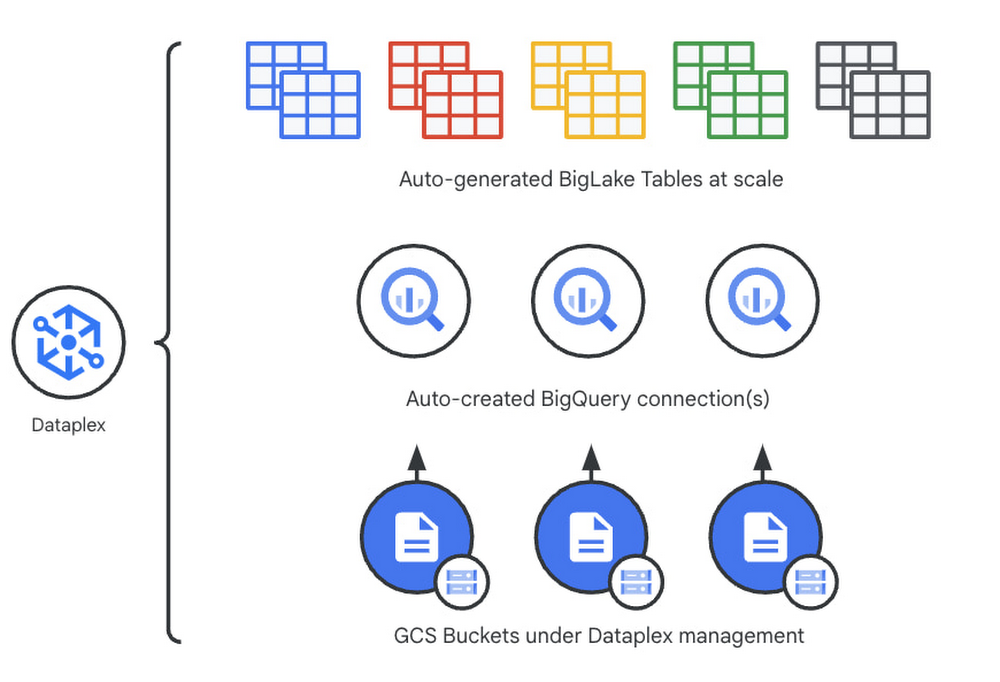
Unlocking the full potential of data requires breaking down the silo between open-source data formats and data warehouses. At the same time, it is critical to enable data governance team to apply policies regardless of where the data happens, whether – on file  or columnar storage. Today,  data governance teams have to become subject matter experts on each storage system the corporate data happens to reside on. Since February 2022,  Dataplex has offered a unified  place to apply policies, which are propagated across both lake storage and data warehouses in GCP. Rather than specifying policies in multiple places, bearing the cognitive load of translating policies from “what you want the storage system to do” to “how your data should behave” Dataplex offers a single point for unambiguous policy management.  Now, we are making it easier for you to use BigLake.  Earlier this year, we launched BigLake into general availability, BigLake unifies data fabric between Data Lakes and Data Warehouses by extending BigQuery storage to open file formats. Today, we announce BigLake Integration with Dataplex (available in preview). This integration eliminates the configuration steps for the admin taking advantage of BigLake and managing policies across GCS and BigQuery from a unified console. Previously,  you could point Dataplex at a Google Cloud Storage (GCS) bucket, and Dataplex will discover and extract all metadata from the data lake and register this metadata in BigQuery (and Dataproc Metastore, Data Catalog) for analysis and search. With the BigLake integration capability, we are building on this capability by allowing an “upgrade” of a bucket asset, and instead of just creating external tables in BigQuery for analysis – Dataplex will create policy-capable BigLake tables! The immediate implication is that admins can now assign column, row, and table policies to the BigLake tables auto-created by Dataplex, as with BigLake – the infrastructure (GCS) layer is separate from the analysis layer (BigQuery). Dataplex will handle the creation of a BigQuery connection and a BigQuery publishing dataset and ensure the BigQuery service account has the correct permissions on the bucket.But wait – there’s more.With this release of Dataplex, we are also introducing advanced logging called governance logs.  Governance logs allow tracking the exact state of policy propagation to tables and columns – adding an additional level of detail going beyond the high-level “status” for the bucket and into fine-grained status and logs for tables, columns. What’s next? We have updated our documentation for managing buckets and have additional detail regarding policy propagation and the upgrade process.Stay tuned for an exciting  roadmap ahead, with more automation around policy management.For more information, please visit:Google Cloud Dataplex
Quelle: Google Cloud Platform

How HSBC is upskilling at scale with Google Cloud

Editor’s note: Founded in 1865, HSBC is one of the world’s largest banking and financial services organizations. In today’s post, Adrian Phelan, Global Head of Google Cloud, HSBC, explains how the organization is working with Google Cloud to drive cloud adoption at scale. Close to 90% of corporations say they’re affected by digital skills gaps, or expect to be within the next five years. Technologies and business models are evolving rapidly, and companies are deploying a multi-pronged approach to ensure they have the right skills in the right places.Here at HSBC, one of the bank’s strategic priorities is digitizing at scale. As people operate in a more digital world, we want to supply them with services quickly and in ways they want to use them. We initially worked with Google Cloud to implement more than 1,700 data analytics, customer experience, cybersecurity and emission reduction projects. A big part of rolling these out has been getting our teams skilled in the right way.Empowering employees with a culture of learningThis approach has evolved over time, but central to it has been proactively instilling a culture of learning. We started out in 2018 with a few small-scale training projects, and it quickly became clear that the teams who had participated in them delivered better and faster than those who hadn’t. They were also more independent and less dependent on central expertise.This inspired us to scale up our learning programs across the organization, which was a challenge because of the sheer size of our technical staff: tens of thousands of employees.  After some really positive feedback for our early training programs with Google Cloud, we set up our Google Accelerated Certification Program (GACP). It’s a 10-week blended learning model including self-learning, case studies, and hands-on practice followed by an examination preparation boot camp.This combination of theory and practice in a safe environment helped build employees’ confidence. Two thousand people have gone through this training so far, and it’s really helped accelerate their journey towards achieving Google Cloud certification. The learning programs also offer other digital credentials, such as completion badges and skill badges, which provide encouragement and help participants measure their progress.  Company-wide knowledge buildingWhen we started our learning journey, we focused on IT roles for obvious reasons, but we are increasingly moving towards training people in business functions.One of our aims is to educate our less technical employees about the broad capabilities that exist within the cloud. IT teams are often the ones to say, “Hey, we could do this in a better, more efficient, different way by using the cloud”, and to make that happen we need to work in close collaboration with our business colleagues, so it’s equally important that they understand the technology.To enable this kind of innovation, you have to educate the whole organization in the ‘art of the possible’. One of the ways we did that was by organizing a month-long Cloud Festival that reached 10,000 employees, which included three Google Cloud sessions. This really helped us build a foundational level of knowledge with business and technology colleagues across the organization.As we continue along our training path, interest in the cloud within the organization continues to increase. Our channel for communicating any changes related to cloud technology, processes or ways of working now has an audience of close to 8,000 employees. Looking to the future with targeted training The Google Cloud team has provided a lot of support in helping us get our training off the ground. It has always been a true process of co-creation, of listening, testing things, and seeing what works best. We meet weekly in order to keep our learning journey moving forward, listen to the demands of the business, understand what the pipeline of work is, and what the up and coming Google Cloud product launches are, so that we can stay one step ahead.One example of this is the bespoke training we introduced for business leaders. So far, 250 senior business leaders have completed it with great feedback. They have told us that the program improved their understanding of how the cloud can help to more quickly meet customer expectations, increase speed to market, reduce overheads and grow revenue through new product streams and continuous innovation. It also covered potential business activities suitable for migration to the cloud.When it comes to learning and training, you can either let it happen organically, or you can drive it. Our choice was to drive it and invest in it, and I’d highly recommend anybody trying to adopt cloud at scale does the same: they will see the return on that investment many times over. Learn more about Google Cloud training and certificationand the impact it can have on your team.
Quelle: Google Cloud Platform

Efficient PyTorch training with Vertex AI

Vertex AI provides flexible and scalable hardware and secured infrastructure to train PyTorch based deep learning models with pre-built containers and custom containers. For model training with large amounts of data, using the distributed training paradigm and reading data from Cloud Storage is the best practice. However, training with data on the cloud such as remote storage on Cloud Storage, introduces a new set of challenges. For example, when a dataset consists of many small individual files, randomly accessing them can introduce network overhead. Another challenge is data throughput, the speed at which data is fed to the hardware accelerators (GPU) to keep them fully utilized.In this post, we walk through methods to improve training performance step-by-step, starting first without distributed training followed by distributed training paradigms using data on cloud. Finally we can boost the training by 6x faster with data on Cloud Storage approaching the same speed as data on a local disk. We will show how Vertex AI Training service with Vertex AI Experiments and Vertex AI TensorBoard can be used to keep track of experiments and results.You can find the accompanying code for this blog post on the GitHub Repo.PyTorch distributed trainingPyTorch natively supports distributed training strategies. DataParallel (DP) is a simple strategy often used for single-machine multi-GPU training, but the single process it relies on could be the bottleneck of performance. This approach loads an entire mini-batch on the main thread and then scatters the sub mini-batches across the GPUs. The model parameters are only updated on the main GPU and then broadcasted to other GPUs at the beginning of the next iteration.DistributedDataParallel (DDP) fits multi-node multi-GPU scenarios where the model is replicated on each device which is controlled by an individual process. Each process loads its own mini-batch and passes them to its GPU. Each process also has its own optimizer with no parameter broadcast reducing the communication overhead. Finally, an all-reduce operation is performed across GPUs unlike DP. This multi-process benefits the training performance.FullyShardedDataParallel (FSDP) is another data parallel paradigm similar to DDP, which enables fitting more data and larger models by sharding the optimizer states, gradients and parameters into multiple FSDP units, unlike DDP where model parameters are replicated on each GPU.Different distributed training strategies can ideally fit different training scenarios. However, sometimes it is not easy to pick the best one for specific environment configurations. For example, effectiveness of data loading pipeline to GPUs, batch size and network bandwidth in a multi-node setup can affect performance of a distributed training strategy.In post, we will use PyTorch ResNet-50 as the example model and train it on ImageNet validation data (50K images) to measure the training performance for different training strategies.DemonstrationEnvironment configurationsFor the test environment, we create custom jobs on Vertex AI Training with following setup:Here are training hyperparameters setup for all of the following experiments:For each of the following experiments, we train the model for 10 epochs and use the averaged epoch time as the training performance. Please note that we focused on improving the training time and not on the model performance itself.Read data from Cloud Storage with gcsfuse and WebDatasetWe use gcsfuse to access data on Cloud Storage from Vertex AI Training jobs. Vertex AI training jobs have Cloud Storage buckets already mounted via gcsfuse and there is no additional work required to use gcsfuse. With gcsfuse training jobs on Vertex AI can access data on Cloud Storage as simply as files in the local file system. This also provides high throughput for large file sequential reads.code_block[StructValue([(u’code’, u”open(‘/gcs/test-bucket/path/to/object’, ‘r’)”), (u’language’, u’lang-py’), (u’caption’, <wagtail.wagtailcore.rich_text.RichText object at 0x3e0f8fad3d90>)])]Data loading pipeline could be a bottleneck of distributed training when it reads individual data files from the cloud. WebDataset is a PyTorch dataset implementation designed to improve streaming data access especially in remote storage settings. The idea behind WebDataset is similar to TFRecord, it collects multiple raw data files and compiles them into one POSIX tar file. But unlike TFRecord, it doesn’t do any format conversion and doesn’t assign object semantics to data and the data format is the same in the tar file as it is on disk. Refer to this blog post for key pipeline performance enhancements we can achieve with WebDataset.WebDataset shards a large number of individual images into a small number of tar files. During training, each single network request will be able to fetch multiple images and cache them locally for the next couple of batches. Thus the sequential I/O allows much lower overhead of network communication. In the below demonstration, we will see the difference between training using data on Cloud Storage with and without WebDataset using gcsfuse.NOTE: WebDataset has been incorporated into the official TorchData library as torchdata.datapipes.iter.WebDataset. But the TorchData lib is currently in the Beta stage and doesn’t have a stable version. So we stick to the original WebDataset as the dependency.Without distributed trainingWe train the ResNet-50 on one single GPU first to get a baseline performance:From the result we can see that, when training on one single GPU, using data on Cloud Storage takes about 2x the time of using a local disk. Keep this in mind, we will use multiple methods to improve the performance step by step.DataParallel (DP)The DataParallel strategy is the simplest method introduced by PyTorch to enable single-machine multiple-GPU training with the smallest code change. Actually as small as one line code change:code_block[StructValue([(u’code’, u’model = torch.nn.DataParallel(model)’), (u’language’, u’lang-py’), (u’caption’, <wagtail.wagtailcore.rich_text.RichText object at 0x3e0f8c5c2f90>)])]We train the ResNet-50 on single node with 4 GPUs using the DP strategy:After applying DP on 4 GPUs, we can see that:Training with data on the local disk gets 3x faster (from 489s to 157s).Training with data on Cloud Storage gets faster a little bit (from 804s to 738s).It’s apparent that the distributed training with data on Cloud Storage becomes an input bound training, waiting for data to be read due to network bottleneck.DistributedDataParallel (DDP)DistributedDataParallel is more sophisticated and powerful than DataParallel. It’s recommended to use DDP over DP, despite the added complexity, because DP is single-process multi-thread which suffers from Python GIL contention and DDP can fit more scenarios like multi-node and model-parallel. Here we experimented with DDP on a single node with 4 GPUs where each GPU is handled by an individual process.We use the nccl backend to initialize the process group for DDP and construct the model:code_block[StructValue([(u’code’, u”dist.init_process_group(rn backend=’nccl’, init_method=’env://’,rn world_size=4, rank=rank)rnrntorch.nn.parallel.DistributedDataParallel(model)”), (u’language’, u’lang-py’), (u’caption’, <wagtail.wagtailcore.rich_text.RichText object at 0x3e0fa9dcad90>)])]We train the ResNet-50 on 4 GPUs using the DDP strategy and WebDataset:After enabling DDP on 4 GPUs, we can see that:Training with data on the local disk gets further faster than DP (from 157s to 134s).Training with data on Cloud Storage gets much better (from 738s to 432s), but it is 3x times slower than using a local disk.Training with data on Cloud Storage gets a lot faster (from 432s to 133s) when using source files in WebDataset format, which is very close or as good as to the speed of training with data on the local disk.The input bound problem is kind of relieved when using DDP, which is expected because there’s no Python GIL contention any more for reading data. And despite the addition of data preprocessing work, sharding data with WebDataset benefits the performance by removing the overhead of network communication. Finally,  DDP and WebDataset improve training performance by 6x (from 804s to 133s) in comparison to without distributed training and individual smaller files.FullyShardedDataParallel (FSDP)FullyShardedDataParallel wraps model layers into FSDP units. It gathers full parameters before the forward and backward operations and runs reduce-scatter to synchronize gradients. It achieves lower peak memory usage than DDP with some configurations.code_block[StructValue([(u’code’, u’# policy to recursively wrap layers with FSDPrnfsdp_auto_wrap_policy = functools.partial(rn size_based_auto_wrap_policy, rn min_num_params=100)rnrn# construct the model to shard model parameters rn# across data parallel workersrnmodel = torch.distributed.fsdp.FullyShardedDataParallel(rn model, rn auto_wrap_policy=fsdp_auto_wrap_policy)’), (u’language’, u’lang-py’), (u’caption’, <wagtail.wagtailcore.rich_text.RichText object at 0x3e0faaa1b2d0>)])]We train the ResNet-50 on 4 GPUs using the FSDP strategy and WebDataset:We can see that using FSDP achieves a similar training performance as DDP in this configuration on a single node with 4 GPUs.Comparing performance across these different training strategies, with and without WebDataset format, we see an overall 6x performance improvement with data on Cloud Storage using WebDataset and choosing DistributedDataParallel or FullyShardedDataParallel distributed training strategies. The training performance with data on Cloud Storage is similar to when trained with data on a local disk.Tracking with Vertex AI TensorBoard and ExperimentsAs you have seen so far, we carried out performance improvement trials step-by-step and it was necessary to run the experiments with several configurations and track the development and outcome. Vertex AI Experiments enable seamless experimentation along with tracking. You can track parameters, visualize and compare the performance metrics of your model and pipeline experiments.You would use Vertex AI Python SDK to create an experiment, and log both parameters, metrics, and artifacts associated with experiment runs. The SDK provides a handy initialization method to create a TensorBoard instance using Vertex AI TensorBoard for logging model time series metrics. For example, we tracked training loss, validation accuracy and training run times for each epoch.Below is the snippet to start an experiment, log model parameters, run the training job and track metrics at the end of the training session:code_block[StructValue([(u’code’, u”# Create Tensorboard instance and initialize Vertex AI clientrnTENSORBOARD_RESOURCE_NAME = aiplatform.Tensorboard.create()rnaiplatform.init(project=PROJECT_ID,rn location=REGION,rn experiment=EXPERIMENT_NAME,rn experiment_tensorboard=TENSORBOARD_RESOURCE_NAME,rn staging_bucket=BUCKET_URI)rnrn# start experiment runrnaiplatform.start_run(EXPERIMENT_RUN_NAME)rnrn# log parameters to the experimentrnaiplatform.log_params(exp_params)rnrn# create jobrnjob = aiplatform.CustomJob(rn display_name=DISPLAY_NAME, rn worker_pool_specs=WORKER_SPEC,rn staging_bucket=BUCKET_URI,rn base_output_dir=BASE_OUTPUT_DIRrn)rnrn#run jobrnjob.run(rn service_account=SERVICE_ACCOUNT,rn tensorboard=TENSORBOARD_RESOURCE_NAMErn)rnrn# log metrics to the experimentrnmetrics_df = pd.read_json(metrics_path, typ=’series’)rnaiplatform.log_metrics(metrics_df[metrics_cols].to_dict())rnrn# stop the runrnaiplatform.end_run()”), (u’language’, u’lang-py’), (u’caption’, <wagtail.wagtailcore.rich_text.RichText object at 0x3e0faabb7890>)])]The SDK supports a handy get_experiment_df method to return experiment run information as a Pandas dataframe. Using this dataframe, we can now effectively compare performance between different experiment configurations:Since the experiment is backed with TensorBoard using Vertex AI TensorBoard, you can access TensorBoard from the console and do a deeper analysis. For the experiment, we modified training code to add TensorBoard scalars with metrics that we were interested in.ConclusionIn this post, we demonstrated how PyTorch training could be input bound when data is read from Google Cloud Storage and showed approaches to improve performance by comparing distributed training strategies and introducing WebDataset format.Use WebDataset to shard individual files which can improve sequential I/O performance by reducing network bottlenecks. When training on multiple GPUs, choose DistributedDataParallel or FullyShardedDataParallel distributed training strategies for better performance. For large-scale datasets you cannot download to the local disk. Use gcsfuse to simplify implementation of data access to Cloud Storage from Vertex AI and use WebDataset to shard individual files reducing network overhead. Vertex AI improves productivity when carrying out experiments while offering flexibility, security and control. Vertex AI Training custom jobs make it easy to run experiments with several training configurations, GPU shapes and machine specs. Combined with Vertex AI Experiments and Vertex AI TensorBoard, you can track parameters, visualize and compare the performance metrics of your model and pipeline experiments.You can find the accompanying code for this blog post on this GitHub Repo.
Quelle: Google Cloud Platform

Using Vertex AI to build an industry leading Peer Group Benchmarking solution

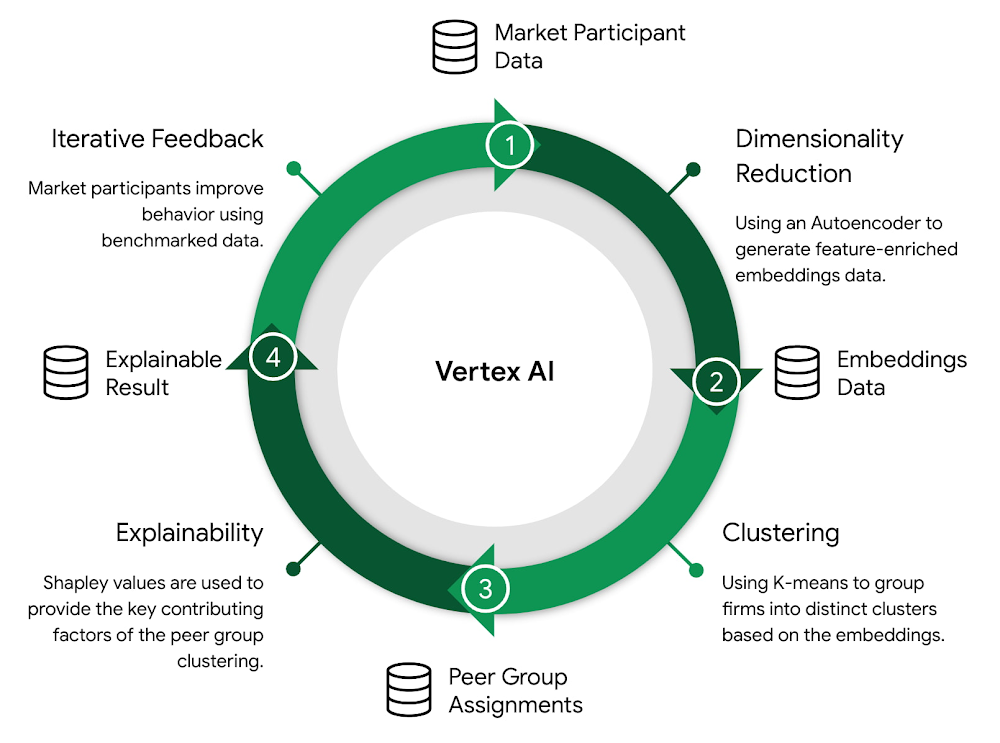
The modern world of financial markets is fraught with volatility and uncertainty. Market participants and members are rethinking the way they approach problems and rapidly changing the way they do business. Access to models, usage patterns, and data has become key to keeping up with ever evolving markets. One of the biggest challenges firms face in futures and options trading is determining how they benchmark against their competitors. Market participants are continually looking for ways to improve performance, identifying what happened, why it happened, and any associated risks. Leveraging the latest technologies in automation and artificial intelligence, many organizations are using Vertex AI to build a solution around peer group benchmarking and explainability. IntroductionUsing the speed and efficiency of Vertex AI, we have developed a solution that will allow market participants to identify similar trading group patterns and assess performance relative to their competition. Machine learning (ML) models for dimensionality reduction, clustering, and explainability are trained to detect patterns and transform data into valuable insights. This blog post goes over these models in detail, as well as the ML operations (MLOps) pipeline used to train and deploy these models at scale.A series of successive models are used that feed predictive results as training data into the next model (e.g. dimensionality reduction -> clustering -> explainability). This requires a robust automated system for training and maintaining models and data, and provides an ideal use case for the MLOps capabilities of Vertex AI. The SolutionDataA market analytics dataset was used which contains market participant trading metrics aggregated and averaged across a 3 month period. This dataset contains a high number of dimensions. Specific features include buying and selling counts, trade and order quantities, types, first and last fill times, aggressive vs. passive trading indicators, and a number of other features related to trading behavior.ModelingDimensionality ReductionClustering in high dimensional space presents a challenge, particularly for distance-based clustering algorithms. As the number of dimensions grows, the distance between all points in the dataset converge and become more similar. This distance concentration problem makes it difficult to perform typical cluster analysis on highly dimensional data. For the task of dimensionality reduction, an Artificial Neural Network (ANN) Autoencoder was used to learn a supervised similarity metric for each market participant in the dataset. This autoencoder takes in each market participant and their associated features. It pushes the information through a hidden layer that is constrained in size, forcing the network to learn how to condense information down into a small encoded representation.The constrained layer is a vector (z) in latent space, where each element in the vector is a learned reduction of the original market participant features (X); thus, allowing dimensionality reduction by simply applying X * z. This results in a new distribution of customer data q(X’ | X) where the distribution is constrained in size to the shape of z. By minimizing the reconstruction error between the initial input X and the autoencoder’s reconstructed output X’ we can balance the overall size of the similarity space (the number of latent dimensions) and the amount of information lost.The resulting output of the autoencoder is a 2-dimensional learned representation of the highly dimensional data.ClusteringExperiments were conducted to determine the optimal clustering algorithm, number of clusters, and hyperparameters. A number of models were compared, including density-based spatial clustering of applications with noise (DBSCAN), agglomerative clustering, gaussian mixture model (GMM), and k-means. Using silhouette score as an evaluation criterion, it was ultimately determined that k-means performed best for clustering on the dimensionally reduced data. The k-means algorithm is an iterative refinement technique that aims to separate data points into n groups of equal variance. Each of these groups are defined by a cluster centroid, which is the mean of the data points in the cluster. Cluster centroids are initially randomly generated, and iteratively reassigned until the within-cluster sum-of-squares is minimized. Below: within-cluster sum-of-squares criteria.ExplainabilityExplainable AI (XAI) aims to provide insights into why a model predicts in a certain way. For this use case, XAI models are used to explain why a market participant was placed into a particular peer group. This is achieved through feature importance e.g. for each market participant, the top contributing factors towards a peer group cluster assignment. Deriving explainability from clustering models is somewhat difficult. Clustering is an unsupervised learning problem, which means there are no labels or “ground truth” for the model to analyze. Distance-based clustering algorithms instead rely on creating labels for the data points based on their relative positioning to each other. These labels are assigned as part of the prediction by the k-means algorithm – each point in the dataset is given a peer group assignment that associates it with a particular cluster. XAI models can be trained on top of k-means by fitting a classifier to these peer group cluster assignments. Using the cluster assignments as labels turns the problem into supervised learning, whereby the end goal is to determine feature importance for the classifier. Shapley values are used for feature importance, which explain the marginal contributions of each feature to the final classification prediction.Shapley values are ranked to provide market participants with a powerful tool to analyze what features are contributing the most to their peer group assignments.MLOpsMLOps is an ML engineering culture and practice that aims to unify ML system development (Dev) and ML system operation (Ops). Using Vertex AI, a fully functioning MLOps pipeline has been constructed that trains and explains peer group benchmarking models. This pipeline is complete with automation and monitoring at all steps of ML system construction, including integration, testing, releasing, deployment and infrastructure management. It also includes a comprehensive approach for continuous integration / continuous delivery (CI/CD). Vertex AI’s end-to-end platform was used to meet these MLOps needs, including:Distributed training jobs to construct ML models at scale using Vertex AI PipelinesHyperparameter tuning jobs to quickly tune complex models using Vertex AI VizierModel versioning using Vertex AI Model RegistryBatch prediction jobs using Vertex AI PredictionTracking metadata related to training jobs using Vertex ML MetadataTracking model experimentation using Vertex AI ExperimentsStoring and versioning training data from prediction jobs using Vertex AI Feature StoreData validation and monitoring using Tensorflow Data Validation (TFDV)The MLOps pipeline is broken down into 5 core areas:CI/CD & OrchestrationData Ingestion & PreprocessingDimensionality ReductionClusteringExplainabilityThe CI/CD and orchestration layer was implemented using Vertex AI Pipelines, Cloud Source Repository (CSR), Artifact Registry, and Cloud Build. When changes are made to the code base, automatic Cloud Build Triggers are executed that run unit tests, build containers, push the containers to Artifact Registry, and compile and run the Vertex AI pipeline. The pipeline is a sequence of connected components that run successive training and prediction jobs; the outputs from one model are stored in Vertex AI Feature Store and used as inputs into the next model. The end result of this pipeline is a series of trained models for dimensionality reduction, clustering, and explainability, all stored in Vertex AI Model Registry. Peer groups and explainable results are written to Feature Store and BigQuery respectively.Working with AI Services in Google Cloud’s Professional Services Organization (PSO)AI Services leads the transformation of enterprise customers and industries with cloud solutions. We are seeing widespread application of AI across Financial Services and Capital Markets. Vertex AI provides a unified platform for training and deploying models and helps enterprises more effectively make data driven decisions. You can learn more about our work at: Google CloudVertex AIGoogle Cloud consulting servicesCustom AI-as-a-ServiceThis post was edited with help from Mike Bernico, Eugenia Inzaugarat, Ashwin Mishra, and the rest of the delivery team. I would also like to thank core team members Rochak Lamba, Anna Labedz, and Ravinder Lota.Related ArticleAccelerate the deployment of ML in production with Vertex AIGoogle Cloud expands Vertex AI to help customers accelerate deployment of ML models into production.Read Article
Quelle: Google Cloud Platform

BigQuery Omni: solving cross-cloud challenges by bringing analytics to your data

Research shows that over 90% of large organizations already deploy multicloud architectures, and their data is distributed across several public cloud providers. Additionally, data is also increasingly split across various storage systems such as warehouses, operational and relational databases, object stores, etc. With the proliferation of new applications, data is serving many more use cases such as data sciences, business intelligence, analytics, streaming and the list goes on. With these data trends, customers are increasingly gravitating towards an open multicloud data lake. However, multicloud data lakes present several challenges such as data silos, data duplication, fragmented governance, complexity of tools, and increased costs.With Google’s data cloud technologies, customers can leverage the unique combination of distributed cloud services. They can create an agile cross-cloud semantic business layer with Looker and manage data lakes and data warehouses across cloud environments at scale with BigQuery and capabilities like BigLake and BigQuery Omni. BigLake is a storage engine that unifies data warehouses and lake houses by standardizing across different storage formats including BigQuery managed table and open file formats such as Parquet and Apache Iceberg on object storage. BigQuery Omni provides the compute engine that runs locally to the storage on AWS or Azure, which customers can use to query data in AWS or Azure seamlessly. This provides several key benefits such as:A single pane of glass to query your multicloud data lakes (across Google Cloud Platform, Amazon Web Services, and Microsoft Azure)Cross-cloud analytics by combining data across different platforms with little to no egress costsUnified governance and secure management of your data wherever it residesIn this blog, we will share cross-cloud analytics use cases customers are solving with Google’s Data Cloud and the benefits they are realizing.Unified marketing analytics for 360-degree insightsOrganizations want to perform marketing analytics – ads optimization, inventory management, churn prediction, buyer propensity trends and many more such analytics. To do this before BigQuery Omni, customers had to use data from several different sources such as Google Analytics, public datasets and other proprietary information stored across cloud environments. This requires moving large amounts of data, managing duplicate copies and incremental costs to perform any cross-cloud analytics and derive actionable insights. With BigQuery Omni, organizations are able to greatly simplify this workflow. Using the familiar BigQuery interface, users can access data residing in AWS or Azure, discover and select just the relevant data that needs to be combined for further analysis. This subset of data can be moved to Google Cloud using Omni’s new Cross-Cloud Transfer capabilities. Customers can combine this data with other Google Cloud datasets and these consolidated tables can be made available to key business stakeholders through advanced analytics tools such as Looker and Looker Studio. Customers are also able to tie in this data now with world class AI models via Vertex AI.As an illustrative example, consider a retailer who has sales & inventory, user and search data spread across multiple data silos. Using BigQuery Omni they can seamlessly bring these datasets together and power several marketing analytics scenarios like customer segmentation, campaign management and demand forecasting etc.”Interested in performing cross-cloud analytics, we tested BigQuery Omni and really liked the SQL support to easily get data from AWS S3. We have seen great potential and value in BigQuery Omni for adopting a multi-cloud data strategy.” — Florian Valeye, Staff Data Engineer,Back Market, a leading online marketplace for renewed technology based out of FranceData platform with consistent and unified cross-cloud governanceAnother pattern is customers looking to analyze operational, transactional and business data across data silos in different clouds through a unified data platform. These data silos are a result of various factors such as merger and acquisitions, standardization of analytical tools, leveraging best of breed solutions in different clouds and diversification of data footprint across clouds. In addition to a single pane of glass for data access across silos, customers deeply desire consistent and uniform governance of their data across clouds. With BigLake and BigQuery Omni abstracting the storage and compute layers respectively, organizations can access and query their data in Google Cloud irrespective of where it resides. They can also set fine-grained row level and column access policies in BigQuery and consistently govern it across clouds. These building blocks enable data engineering teams to build a unified and governed data platform for their data users without having to deal with the complexity of building and managing complex data pipelines. Furthermore, with BigQuery Omni’s integration with Dataplex and Data Catalog, you can discover, search your data across clouds and enrich your data by adding relevant business context with business glossary and rich text.”Several SADA customers use GCP to build and manage their data analytics platform. During many explorations and proofs of concepts, our customers have seen the great potential and value in BigQuery Omni. Enabling seamless cross-cloud data analytics has allowed them to realize the value of their data quicker while lowering the barrier to entry for BigQuery adoption in a low-risk fashion.” — Brian Suk, Associate Chief Technology Officer,SADA, one of the strategic partners of Google Cloud.Simplified data sharing between data providers and their customersA third emerging pattern in cross cloud analytics is data sharing. Several services have the business need to share information such as inventory data, subscriber data to their customers or users who in turn analyze or aggregate the data with their proprietary data and oftentimes share the results back with the service provider. In several cases, the two parties are on different cloud environments, requiring them to move data back and forth. Consider an example from a company like ActionIQ that operates in the customer data platform (CDP) space. CDPs were designed to help activate customer data, and a critical first step of that was unifying and managing that customer data. To enable this, many CDP vendors built their solution choosing one of the available cloud infrastructure technologies and copied data from the client’s systems.“Copying data from client applications and infrastructure has always been a requirement to deploy a CDP, but it doesn’t have to be anymore” — Justin DeBrabant, Senior Vice President of Product, ActionIQ.While a small percentage of customers are fine with moving data across cloud environments, the majority are hesitant to onboard new services and would rather prefer providing governed access to their data sets. “A new architectural pattern is emerging, allowing organizations to keep their data at one location and make it accessible, with the proper guardrails, to applications used by the rest of the organization’s stack”addsJustin at ActionIQ.With BigQuery Omni, services in Google Cloud Platform can more easily access and share data with their customers and users in other cloud environments with limited data movement. One of UK’s largest statistics providers has explored Omni for their data sharing needs.”We tested BigQuery Omni and really like the ability to get data from AWS directly into BQ. We’re excited about managing data sharing with different organizations without onboarding new clouds” – Simon Sandford-Taylor, Chief Information and Digital Officer, UK’s Office for National StatisticsWith BigQuery Omni, customers are able to:Access and query data across clouds through a single user interfaceReduce the need for data engineering before analyzing dataLower operational overhead and risks by deploying an application that runs across multiple clouds which leverages the same, consistent security controlsAccelerate access to insights by significantly reducing the time for data processing and analysis Create consistent and predictable budgeting across multiple cloud footprints Enable long term agility and maximize the benefits every cloud investmentOver the last year, we’ve seen great momentum in customer adoption and added significant innovations to BigQuery Omni including improved performance and scalability for querying your data in AWS S3 or Azure Blob Storage, Iceberg support for Omni, Larger query result set size up to 10GB and Cross-cloud transfer that helps customers easily, securely, and cost effectively move just enough data across cloud environments for advanced analytics. BigQuery Omni has launched several features to support unified governance of your data across multiple clouds – you can get fine-grained access to your multi-cloud data with row level and column level security. Building on this, we are excited to announce that BigQuery Omni now supports data masking. We’ve also made it easy for customers to try and see the benefits of BigQuery Omni through the limited time free trial available until March 30, 2023. BigQuery Omni running on other public clouds outside of Google Cloud is available in AWS US East1 (N.Virginia) and Azure US East2 (US East) regions. We are also excited to share that we will be bringing BigQuery Omni to more regions in the future, starting with Asia Pacific (AWS Korea) coming soon.Getting StartedGet started with a free trial to learn about Omni. Check out the documentation to learn more about BigQuery Omni. You can also leverage the self paced labs to learn how to set up BigQuery Omni easily.
Quelle: Google Cloud Platform

Minimal Downtime Migrations to Cloud Spanner with HarbourBridge 2.0

Spanner is a fully managed, strongly consistent and highly available database providing up to 99.999% availability. It is also very easy to create your Spanner instance and point your application to it. But what if you want to migrate your schema and data from another database to Cloud Spanner? The common challenges with database migrations are ensuring high throughput of data transfer, and high availability of your application with minimal downtime,  and all this needs to be enabled with a user-friendly migrations solution. Today, we are excited to announce the launch of HarbourBridge 2.0 (Preview) – an easy to use open source migration tool, now with enhanced capabilities for schema and data migrations with minimal downtime.This blog intends to demonstrate migration of schema and data for an application from MySQL to Spanner using HarbourBridge.About HarbourBridgeHarbourBridge is an easy to use open source tool, which gives you highly detailed schema assessments and recommendations and allows you to perform migrations with minimal downtime. It just lets you point, click and trigger your schema and data migrations. It provides a unified interface for the migration wherein it gives users the flexibility to modify the generated spanner schema and run end to end migration from a single interface. It provides the capabilities of editing table details like columns, primary key, foreign key, indexes, etc and provides insights on the schema conversion performance along with highlighting important issues and suggestions.What’s new in HarbourBridge 2.0?With this recent launch, you can now do the following:Perform end to end minimal downtime terabyte scale data migrations Get improved schema assessment and recommendationsExperience ease of access with gCloud Integration We’ll experience the power of some of these cool new add-ons as we walk through the various application migration scenarios in this blog.Types of MigrationData migration with HarbourBridge is of 2 types:Minimal Downtime Migration with downtimeMinimal Downtime is for real time transactions and incremental updates in business critical applications to ensure there is business continuity and very  minimal interruption.Migration with downtime is recommended only for POC’s/ test environment setups or applications which can take a few hours of downtime.Connecting HarbourBridge to sourceThere are three ways to connect HarbourBridge to your source database:Direct connection to Database – for minimal downtime and continuous data migration for a certain time periodData dump –  for a one time migration of the source database dump into Spanner Session file – to load from a previous HarbourBridge sessionMigration components of HarbourBridgeWith HarbourBridge you can choose to migrate:Schema-only Data-only Both Schema and Data The below image shows how at a high level, the various components involved behind the scenes for data migration:To manage a low-downtime migration, HarbourBridge orchestrates the following processes for you. You only have to set up connection profiles from the HarbourBridge UI on the migration page, everything else is handled by Harbour Bridge under the hood:HarbourBridge sets up a Cloud Storage bucket to store incoming change events on the source database while the snapshot migration progressesHarbourBridge sets up a datastream job to bulk load a snapshot of the data and stream incremental writes. HarbourBridge sets up the Dataflow job to migrate the change events into Spanner, which empties the Cloud Storage bucket over timeValidate that most of the data has been copied over to Spanner, and then stop writing to the source database so that the remaining change events can be applied. This results in a short downtime while Spanner catches up to the source database. Afterward, the application can be cut over to use Spanner as the main database.The applicationThe use case we have created to discuss to demonstrate this migration is an application that streams in live (near real-time) T20 cricket match data ball-by-ball and calculates the Duckworth Lewis Target Score (also known as the Par Score) for Team 2, second innings, in case the match is disrupted mid-innings due to rain or other circumstances. This is calculated using the famous Duckworth Lewis Stern (DLS) algorithm and gets updated for every ball in the second innings; that way we will always know what the winning target is, in case the match gets interrupted and is not continued thereafter. There are several scenarios in Cricket that use the DLS algorithm for determining the target or winning score. MySQL DatabaseIn this use case, we are using Cloud SQL for MySQL to house the ball by ball data being streamed-in. The DLS Target client application streams data into MySQL database tables, which will be migrated to Spanner. Application Migration ArchitectureIn this migration, our source data is being sent in bulk and in streaming modes to the MySQL table which is the source of the Migration. Cloud Functions Java function simulates the ball by ball streaming and calculates the Duckworth Lewis Target Score, updates it to the baseline table. HarbourBridge reads from MySQL and writes (Schema and Data) into Cloud Spanner. The below diagram represents the high level architectural overview of the migration process:Note: In our case the streaming process is simulated with the data coming from a CSV into a landing table in MySQL which then streams match data by pushing row by row data to the baseline MySQL table. This is the table used for further updates and DLS Target calculations.Migrating MySQL to Spanner with HarbourBridgeSet up HarbourBridge Run the following 2 gCloud commands on Google Cloud Console Cloud Shell:Install the HarbourBridge component of gCloud by running:gcloud components install HarbourBridgeStart the HarbourBridge UI by running:gcloud alpha spanner migration webYour HarbourBridge application should be up and running:Note: Before proceeding with the migration, remember to enable the DataStream and Dataflow API from Google Cloud ConsoleEnsure you have Cloud SQL for MySQL or your own MySQL server created for the source and Spanner instance created for the targetEnsure all source database instance objects are created. For access to the DB DDLs, DMLs and the data CSV file refer to this git repo folderFor data validation (post-migration step) SELECT queries for both source and Spanner, refer to this git repo folderEnsure Cloud Functions is created and deployed (for Streaming simulation and DLS Target score calculation). For the source code, refer to the git repo folder. You can learn how to deploy a Java function to Cloud Functions hereAlso note that your proxy is set up and running when trying to connect to the source from HarbourBridge. If you are using Cloud SQL for MySQL, you can ensure that proxy is running by executing the following command in Cloud Shell:./cloud_sql_proxy -instances=<<Project-id:Region:instance-name>>=tcp:<<3306>>Connect to the sourceOf the 3 modes of connecting to source, we will use the “Connect to database” method to get the connection established with source:Provide the connection credentials and hit connect:You are now connected to the source and HarbourBridge will land you on the next step of migration.Schema Assessment and ConfigurationAt this point, you get to see both the source (MySQL) version of the schema and the target draft version of the “Configure Schema” page. The Target draft version is the workspace for all edits you can perform on the schema on  your destination database, that is, Cloud Spanner.HarbourBridge provides you with comprehensive assessment results and recommendations for improving the schema structure and performance. As you can see in this image above, the icons to the left of table represent the complexity of table conversion changes as part of the schema migrationIn this case, the STD_DLS_RESOURCE table requires high complexity conversion changes whereas the other ones require minimal complexity changesThe recommendation on the right provides information about the storage requirement of specific columns and there other warnings indicated with the columns list as wellYou have the ability to make changes to the column types at this point Primary Key, Foreign Key, Interleaving tables, indexes and other dependencies related changes and suggestions are also availableOnce changes are made to the schema, HarbourBridge gives you the ability to review the DDL and confirm changesOnce you confirm the schema changes are in effect before triggering the migrationSchema changes are saved successfully.Prepare MigrationClick the “Prepare Migration” button on the top right corner of the HarbourBridge page.1. Select Migration Mode as “Schema and Data”2. Migration Type as “Minimal Downtime Migration”3. Set up Target Cloud Spanner InstanceNOTE: HarbourBridge UI supports only Google SQL dialect as a Spanner destination today. Support for PostgreSQL dialect will be added soon.4. Set up Source Connection profileThis is your connection to the MySQL data source. Ensure, you have the IP Addresses displayed on the screen allow-listed by your source.5. Set up Target Connection profileThis is the connection to your Datastream job destination which is the Cloud Storage. Please select the instance and make sure you have allow-listed the necessary access.Once done, hit Migrate at the bottom of the page and wait for the migration to start. HarbourBridge takes care of everything else, including setting up the Datastream and Dataflow jobs and executing them under the hood. You have the option to set this up on your own. But that is not necessary now with the latest launch of HarbourBridge.Wait until you see the message “Schema migration completed successfully” on the same page. Once you see that, head over to your Spanner database to validate the newly created (migrated) schema.Validate Schema and Initial DataConnect to the Spanner instance, and head over to the database “cricket_db”. You should see the tables and rest of schema migrated over to the Spanner database:Set up Streaming DataAs part of the setup, after the initial data is migrated, trigger the Cloud Functions job to kickstart data streaming into My SQL.Validate Streaming DataCheck if the streaming data is eventually migrating into Spanner as the streaming happens.The Cloud Functions (Java Function) can be triggered by hitting the HTTPS URL in the Trigger section of the function’s detail page. Once the streaming starts, you should see data flowing into MySQL and the Target DLS score for Innings 2 getting updated in the DLS table.In the above image, you can see the record count go from 1705 to 1805 with the streaming. Also, the DLS Target field has a calculated value of 112 for the most recent ball.Now let’s check if the Spanner database table got the updates in migration. Go to the Spanner table and query:As you can see, Spanner has records increasing as part of migration as well. Also note the change in Target score field value ball after ball:Wait until you see all the changes migrated over.For data validation, you can use DVT (Data Validation Tool), which is a  standardized data validation method built by Google, and can be incorporated into existing GCP tools and technologies. In our use case, I validated the migration of the initial set of records from MySQL source to Spanner table using Cloud Spanner queries. End the MigrationWhen you complete all these validation steps, click End Migration. Follow the below steps to update your application to point to Spanner database:Stop writes to the source database – This will initiate a period of downtimeWait for any other incremental writes to Spanner to catch up with the sourceOnce you are sure source and Spanner are in sync, update the application to point to SpannerStart your application with Spanner as the databasePerform smoke tests to ensure all scenarios are workingCutover the traffic to your application with Spanner as the databaseThis marks the end of the downtime periodClean Up Finally hit the “Clean Up” button on the End Migration popup screen. This will remove the migration jobs and dependencies that were created in the process.Watch the migration in actionMinimal Downtime Migrations to Spanner with HarbourBridge 2.0Next StepsAs you walked through this migration with us, you would have noticed how easy it is to point to your database, assess and modify your schema based on recommendations, and migrate your schema, your data, or both to Spanner with minimal downtime.You can learn more about HarbourBridge on the README, and learn to install gCloud here. Get started todaySpanner’s unique architecture allows it to scale horizontally without compromising on the consistency guarantees that developers rely on in modern relational databases. Try out Spanner today for free for 90 days or for as low as $65 USD per month.
Quelle: Google Cloud Platform