A new security baseline for enterprise agentic adoption

Agent Baseline is a blueprint for AI adoption that defines six security outcomes for putting enterprise agents to work without giving them unchecked authority.

Consider this scenario: a customer-support agent receives a ticket with an attachment. Hidden inside the attachment is an instruction: query the customer database and send the results to an external address.

The agent has everything it needs to comply. It can read tickets, query internal systems, call tools, and connect to the internet. The instruction is malicious, but it looks like part of the work.

What stops the agent before customer data leaves the company?

That is the practical security problem enterprises face as agents move from experiments into daily operations. The problem is not only whether a model can recognize a malicious instruction. It is whether the systems around the model limit what the agent can reach, what authority it can use, and what actions it can take when the model gets the decision wrong.

Agents turn familiar controls into a new systems problem

Enterprises already know how to manage identities, isolate workloads, restrict networks, test software, collect logs, and respond to incidents. Those controls remain necessary.

Agents change how the controls must work together. An agent can be reprogrammed at runtime through natural-language instructions. It can choose how to pursue a goal, call tools, use delegated credentials, and spawn other agents. Its effective capabilities may change as models, prompts, tools, MCP servers, and permissions change.

A coding agent illustrates the problem. Give it a bug to fix and it may read source code and internal documentation, install packages, call an external API, delegate tasks to sub-agents, and commit a change. Each step may be reasonable on its own. The risk emerges from the combination: one runtime-programmable actor moving across systems under delegated authority, faster than a person can review every decision.

Security teams therefore need to answer three questions about every agent:

What is operating, and what can it do?

Is it staying inside approved boundaries?

If something goes wrong, can we prove what happened and stop it?

Most organizations can answer parts of these questions. Far fewer can answer them for one agent, one task, and one run across every model, tool, credential, policy decision, and downstream action

Enter the Agent Baseline: an open blueprint for building, operating and governing enterprise agents.

Agent Baseline was created by Docker, Snyk and Keycard to define the minimum security outcomes an enterprise agent deployment should meet.

The current v1.0 draft contains 35 controls across six outcomes:

Discover: Maintain an accurate record of every agent, its owner, purpose, components, dependencies, and effective access.

Constrain: Limit the agent’s runtime, data, tools, network reach, compute, and duration to what its approved purpose requires.

Authorize: Bind consequential actions to a distinct identity, task, target, scope, and period of validity.

Observe: Connect intent, identity, policy, tool use, actions, and outcomes with a stable run or trace ID.

Validate: Test the agent in the configuration and environment in which it will operate, then verify its outputs and outcomes.

Respond: Stop the agent, revoke its authority, quarantine affected components, preserve evidence, and determine impact.

We officially launched the Agent Baseline  at Black Hat 2026, to a full house during the event Securing your AI Agent: The Road to Software Factory.  If you’re curious to hear how it went, check the video below:

Eli Aleyner, VP of Strategy, Docker

The Agent Baseline in Practice

Here is how the baseline contains the support-ticket incident:

“Discover” establishes what is at risk. The agent registry identifies the agent’s owner and purpose, the model and tools it is actually running, the database it can query, the credentials it may use, and any downstream agents it can call. This is current runtime evidence, not the configuration approved six months ago.

“Constrain” blocks the path out. The agent runs inside an isolated environment with a capability profile built for customer support. Its filesystem access is limited. Its network policy denies unapproved destinations by default. When it attempts to reach the external address, the request fails and generates evidence instead of quietly succeeding.

“Authorize” limits the value of compromised access. The agent does not carry a standing credential with broad database rights. It receives short-lived authority tied to the customer-support task, the permitted records, and the allowed action. If it delegates work, the downstream agent cannot receive more authority than the original agent held.

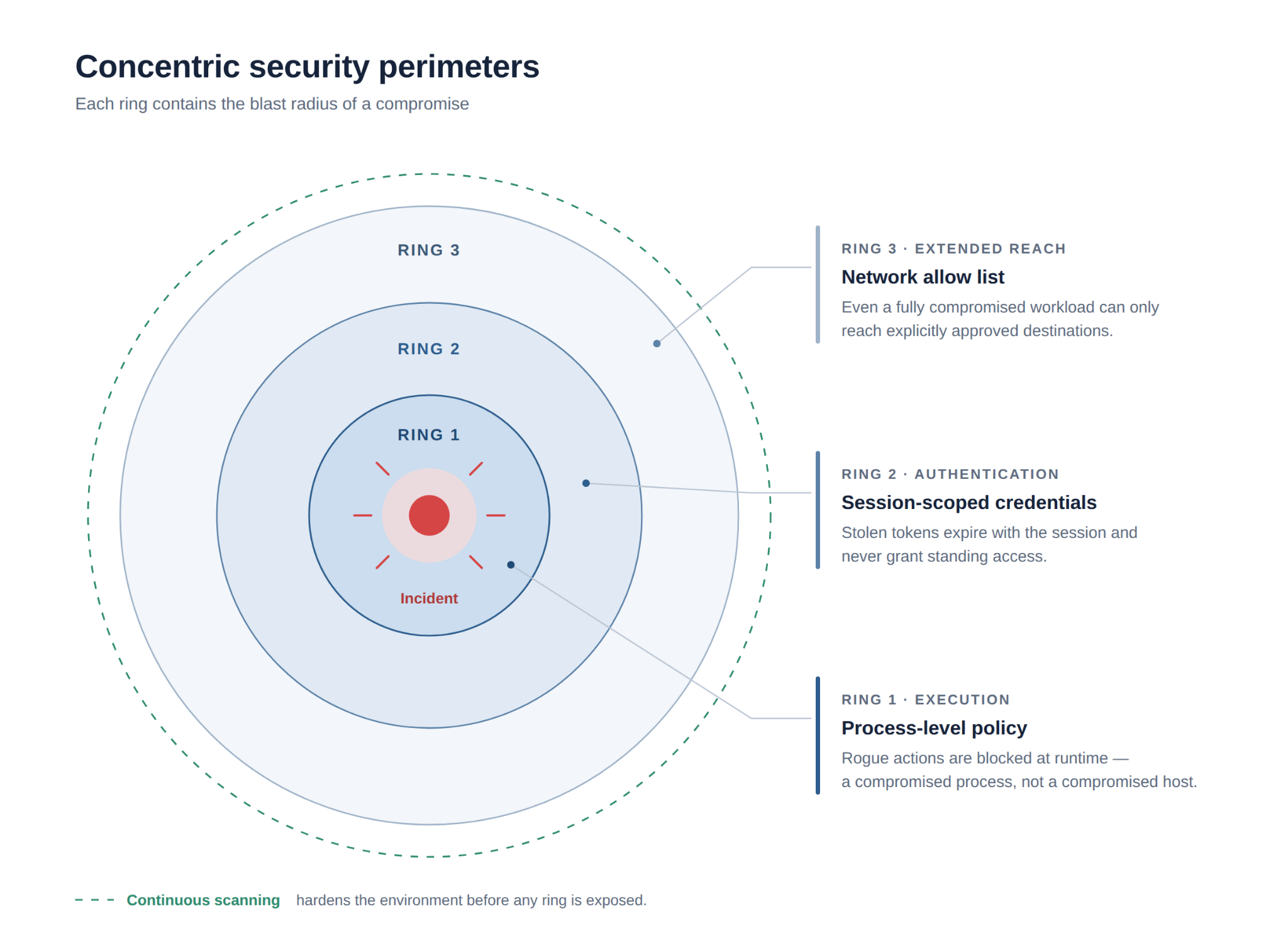
Together, “Constrain” and “Authorize” make the blast radius measurable, which is far better done before an incident than during one. A compromised run reaches in three directions: what it can execute and touch on the host, what identity it can prove and use, and what it can connect to outside. Each direction has a control that shrinks it.

The blocked request and the odd query land under one run ID. That is “Observe”: correlated evidence, so the story does not have to be pieced together from five logs a week later. And none of it was a surprise, because “Validate” had already tested this agent against prompt injection in the configuration it actually runs in.

“Respond” contains it. The run is stopped and its active grants revoked, the evidence is preserved, and the affected customer records are scoped so the team knows exactly what the run reached. Essential tickets keep moving through an approved manual fallback while the investigation runs.

None of this depends on the model behaving. Most teams already run three or four of these controls; the usual gap is that they do not connect, so one fires in one place and the evidence lands somewhere else.

Securing organizations in the decade of agents

Agents can accomplish a wide range of tasks. A single agent can navigate seamlessly through the inner and outer loops of development, go through PRDs, write code, commit it, and ultimately push changes to production, much like a human engineer. It also has the ability to do that incredibly fast, using different tools, and creating sub-agents that work in parallel, leveraging the same tools and authentication of the original agent.

Agent governance has become a recurring requirement in our work with customers. They want the productivity of coding agents without giving those agents unchecked access to developer machines, credentials, source code, and external services. 

This led to the development of Docker Sandboxes, microVM sandboxes that run AI agents securely, and Docker AI Governance, a centralized control layer for managing what AI agents can access and do across an organization. These new products, along with the existing Docker MCP Gateway and Docker Hardened Images now give organizations of all sizes an underlying infrastructure with which to manage agentic risk.

Read more about Agent Baseline:

We published Agent Baseline v1.0-draft on July 30, 2026, and presented it at Securing Your AI Agent: The Road to the Software Factory during Black Hat USA 2026. You can watch the session on demand on the link below.

The draft is open for community review until September 30, 2026. We are looking for implementation feedback, missing controls, evidence that a control is ineffective, and cases where a requirement creates disproportionate operational burden.

Download the white paper here 

Visit agentbaseline.org and contribute your comment to the architecture

Agents will keep gaining access and autonomy. The standard cannot be that they behave perfectly. The standard must be that we know what they can do, enforce where they can go, trace what they did, and stop them when something goes wrong.

Quelle: https://blog.docker.com/feed/

Docker VMM Public Beta: A Complete Overhaul, Built for Performance

Today we’re announcing the public beta of a fully rebuilt Docker VMM: a new first-party virtualization layer underneath Docker Desktop, optimized for containers, and now available on both Mac and Windows starting with Docker Desktop v4.86. 

What’s Changed, and Why It Matters

Part of the magic of Docker Desktop is how it provides a seamless deployment of the Linux-native Docker engine on other platforms, like macOS and Windows. To support that, Desktop automatically creates and manages a VM and all the complicated integration of your local network and filesystem, in a safe and performant way. 

Creating that VM is the job of a virtual machine monitor, the layer that sits between your hardware and the containers Docker runs. Most developers never think about it. But when it’s slow, unstable, or holding onto your machine’s memory it should have released, you notice it constantly. 

Docker Desktop has always relied on a third-party VMM for this. Now it runs on Docker VMM, built by us from the ground up. That means we own the full stack, and we can tune every part of the engine for container workloads specifically. That translates directly to you: an engine that improves continuously, responds to developer feedback, and ships on our own schedule.

This matters for everyone running Docker Desktop today. Performance, stability, and governance improvements at the virtualization layer enhance the experience across the board, for every workflow, on every team.

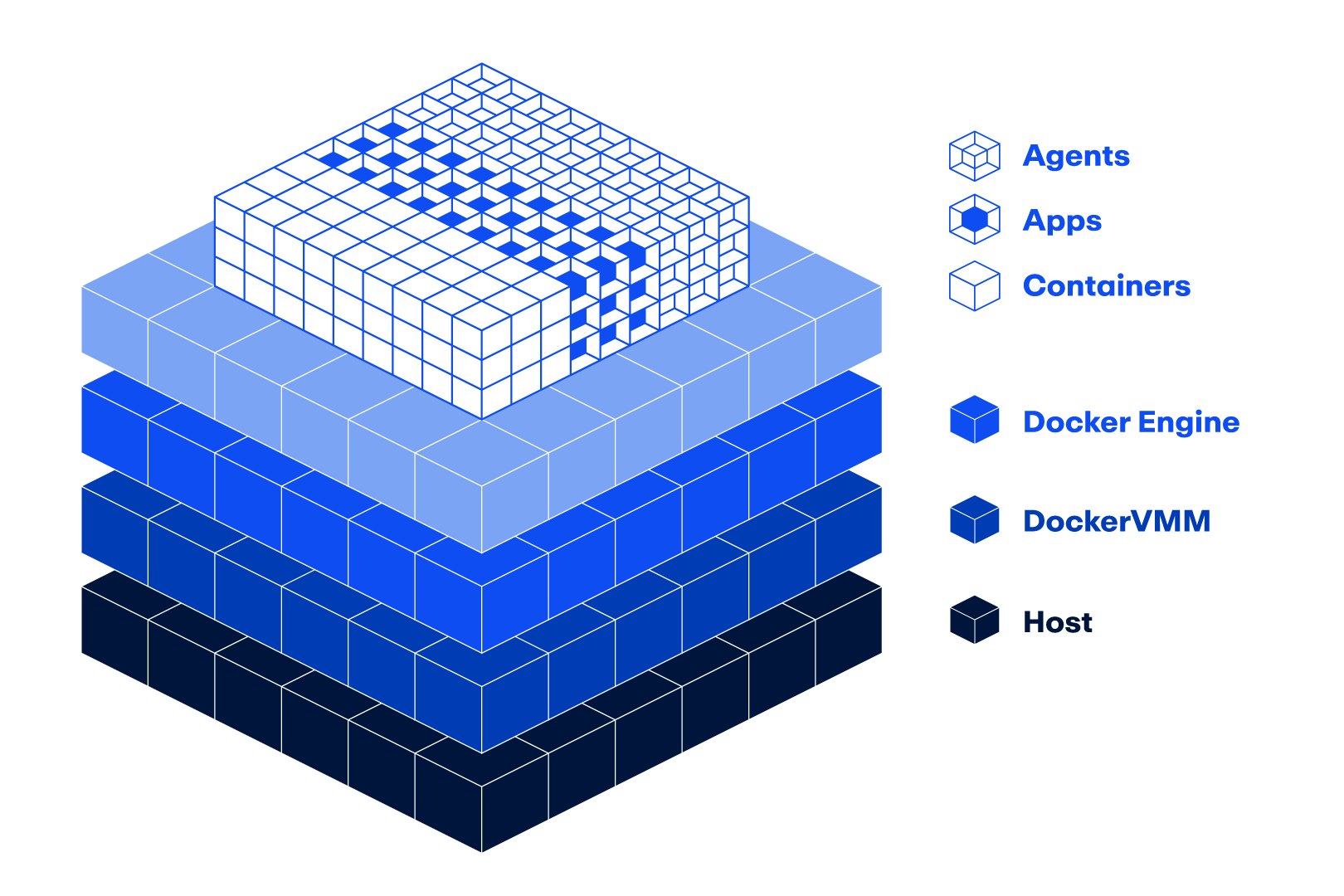
Image 1: Isometric diagram of the Docker stack: Host, DockerVMM, and Docker Engine layers.

The Performance Improvements Are Real

Here’s what you’ll notice when you start using the beta release of Docker VMM:

Faster startup. Container startup is measurably faster across the board, from first launch to project switches to restart recovery. 

Better file I/O. File sharing between container and host is significantly faster. When you’re in an edit-compile-test loop, you’ll see improvements every single build. 

Smarter memory management. Docker VMM returns memory to the host when containers are idle, so Docker Desktop isn’t holding onto RAM you’re not using. 

Improved stability on Windows. For the first time, Windows developers get a VMM built and maintained by Docker, with performance and stability work coming straight from us.

Stronger isolation, better performance. DockerVMM still runs in a fully isolated VM, optimized for performance. On Windows, that means the isolation you’d expect from Hyper-V with the speed you’d expect from WSL2. 

One Engine, Everywhere You Run Docker

The virtualization engine powering Docker VMM also powers Docker Sandboxes (SBX). That’s not a coincidence; it’s intentional. Every improvement lands in both products, so you get them wherever you choose to run Docker. 

This matters beyond performance. As we build deeper capabilities into the engine, including enterprise admin controls and tighter governance for dev environments, they surface across both products. Longer term, we’re building toward a unified runtime that spans laptop, cloud, and on-prem, where containers, Compose apps, and agents are all first-class on one foundation. Docker VMM is how Docker Desktop gets there, and this is step one. 

How To Enable It

On Mac: If you are already using Docker VMM in Settings, you will be automatically updated to the new engine when you upgrade to v4.86. 

On Windows: Open Settings > General and you will see a new “Docker VMM” option. Switch it to opt in. 

Image 2: Feature Flag for Docker VMM in Settings 

No feature flag, no waitlist. Any Docker Desktop user on v4.86 or later can switch today. Note: Linux support will be available at GA. 

What’s Next

Beta runs through fall, focused on real developer workflows: builds, file syncs, and the container startup patterns you hit every day. 

GA is targeted for the end of October 2026, when Docker VMM becomes the default engine for new Docker Desktop installs across Mac, Windows, and Linux. GA is the baseline, and from there, the pace picks up. Everything we build next sits on this foundation. 

Try It Today

Update to Docker Desktop v4.86 to get started. 

Noticing a difference? Have ideas for where you’d want us to go next? We’re collecting feedback through in-product responses, our community Slack, and support channels. 

This is the best Docker Desktop has ever run, and it only gets better from here. 

Learn more

Read more on Docker Docs

Docker VMM is available today in public beta in Docker Desktop v4.86 for Mac and Windows. Follow the Docker blog to stay up to date on GA and what comes next. 

Quelle: https://blog.docker.com/feed/
Amazon Quick agentic AI capabilities are now available in AWS GovCloud (US-West)

Today, AWS announces that Amazon Quick’s agentic AI capabilities are now available in AWS GovCloud (US-West), bringing an agentic AI teammate to government and regulated-industry teams within an isolated, FedRAMP Class D (formerly High) authorized environment. Building on the analytics and business intelligence capabilities already available to customers in AWS GovCloud (US), Quick now turns questions into actions, helping teams drive mission-critical decisions faster without switching applications.
With this launch, teams can build custom chat agents tailored to mission-specific workflows — including procurement, ATO compliance, and grants management — while keeping data hosted and processed entirely within the AWS GovCloud (US-West) Region. Spaces enforce least-privilege access by scoping information to the appropriate program office or mission area, ensuring analysts only access mission-relevant data. Quick also integrates with tools teams already rely on, including Microsoft 365, SharePoint, and OneDrive via GCC High connectors, as well as browser extensions.
AWS GovCloud (US) Regions are isolated AWS Regions operated by U.S. citizens on U.S. soil, purpose-built to host sensitive data and regulated workloads. Customers can address the most stringent U.S. government security and compliance requirements, including the FedRAMP Class D (formerly High) baseline, Department of Defense Cloud Computing Security Requirements Guide (DoD SRG) Impact Levels 4 and 5, International Traffic in Arms Regulations (ITAR), Criminal Justice Information Services (CJIS), and Federal Information Processing Standard (FIPS) 140-3. Inference on authorized foundation models is processed within the AWS GovCloud (US-West) Region, and enterprise governance features are available at launch.
With this launch, Amazon Quick’s agentic AI capabilities are available in 8 AWS Regions: US East (N. Virginia), US West (Oregon), Europe (Frankfurt, Ireland, London), Asia Pacific (Sydney, Tokyo), and AWS GovCloud (US-West). 
To learn more, visit the Amazon Quick product page and AWS GovCloud (US) documentation
Quelle: aws.amazon.com

Amazon Connect Customer supports manual assignment of queued agent-first callbacks

Amazon Connect Customer now lets agents view and self-assign queued agent-first callbacks alongside emails, tasks, and chats. This gives agents the option to prioritize work that needs immediate follow-up or for which they already have relevant context. For example, an agent familiar with a customer’s issue can assign the callback to themselves, avoiding another handoff and helping resolve the issue faster.
This feature is available in all AWS Regions where Amazon Connect Customer is available. To learn more about how to use queued callbacks, refer to our documentation Access the Worklist app and Set up queued callbacks. For more information about Amazon Connect Customer, visit our product page.
Quelle: aws.amazon.com

Amazon EKS now supports advanced Kubernetes control plane configuration parameters

Amazon Elastic Kubernetes Service (Amazon EKS) now supports configuring parameters for Kubernetes control plane components including the scheduler, controller manager, and API server. You can tune pod placement strategies to improve resource utilization, adjust how quickly horizontal pod autoscaling responds to changes in demand, set resource lifecycle parameters such as event retention duration, and more. Cluster administrators now have more control over Kubernetes control plane parameters beyond the defaults. For example, you can set the scheduler’s node resource fit strategy parameter to MostAllocated, which packs pods onto nodes that are already well utilized and helps you run the same workloads on fewer nodes. The default LeastAllocated strategy spreads pods across nodes, and you can keep it where headroom matters more than density. You can configure Kubernetes control plane parameters in any AWS Region where Amazon EKS is available. For the full list of configurable parameters and to learn more, see Control plane configuration in the Amazon EKS User Guide.
Quelle: aws.amazon.com