Hardened Images Explained: Fewer CVEs, Smaller Attack Surface
When security teams scan their container environments for the first time, they often discover hundreds of known vulnerabilities, and almost none of them trace back to application code.
The overwhelming majority come from packages that shipped with the base image: shells, compilers, debug utilities, and libraries the application never calls. In a software supply chain built on containers, the base image is the foundation. If that foundation ships with unnecessary components, every workload built on top of it inherits the risk.
Hardened images address this problem at the source. They are purpose-built base images stripped down to only the runtime components an application needs, continuously patched, and shipped with verifiable metadata that lets security teams confirm exactly what is inside and how it was built.
Key takeaways
Most container vulnerabilities come from unnecessary packages inherited from base images, not from application code.
Hardened images strip out everything a containerized application does not need, reducing attack surface by up to 95%.
Beyond minimization, hardened images include verifiable supply chain metadata: SBOMs, build provenance, and exploitability data.
Container hardening differs from VM hardening; it focuses on image contents and build integrity, not OS-level configuration benchmark.
Why standard container images carry hidden risk
A general-purpose base image like a standard Linux distribution might ship with 400 or more installed packages. A typical containerized application uses 20 to 30 of them. The rest are inherited baggage: package managers, text editors, network diagnostic tools, documentation files, and libraries for use cases the container was never intended to serve.
Each of those unused packages is a potential attack surface. Vulnerability scanners flag them because they are genuinely present in the image, even if the application never imports or executes them. The result is a signal-to-noise problem that burns through security team capacity. When a team faces 200 findings and 80% of them exist in packages no running workload touches, the real vulnerabilities that need immediate attention get buried in triage.
The packages themselves are the other half of the problem. A shell in a production container gives an attacker an interactive environment to work from if they achieve initial access. A package manager lets them install additional tooling. Debug utilities help them map the network and identify lateral movement targets. None of these belong in a production container, but they ship by default in most general-purpose base images, quietly expanding the blast radius of any breach.
What makes a container image “hardened”
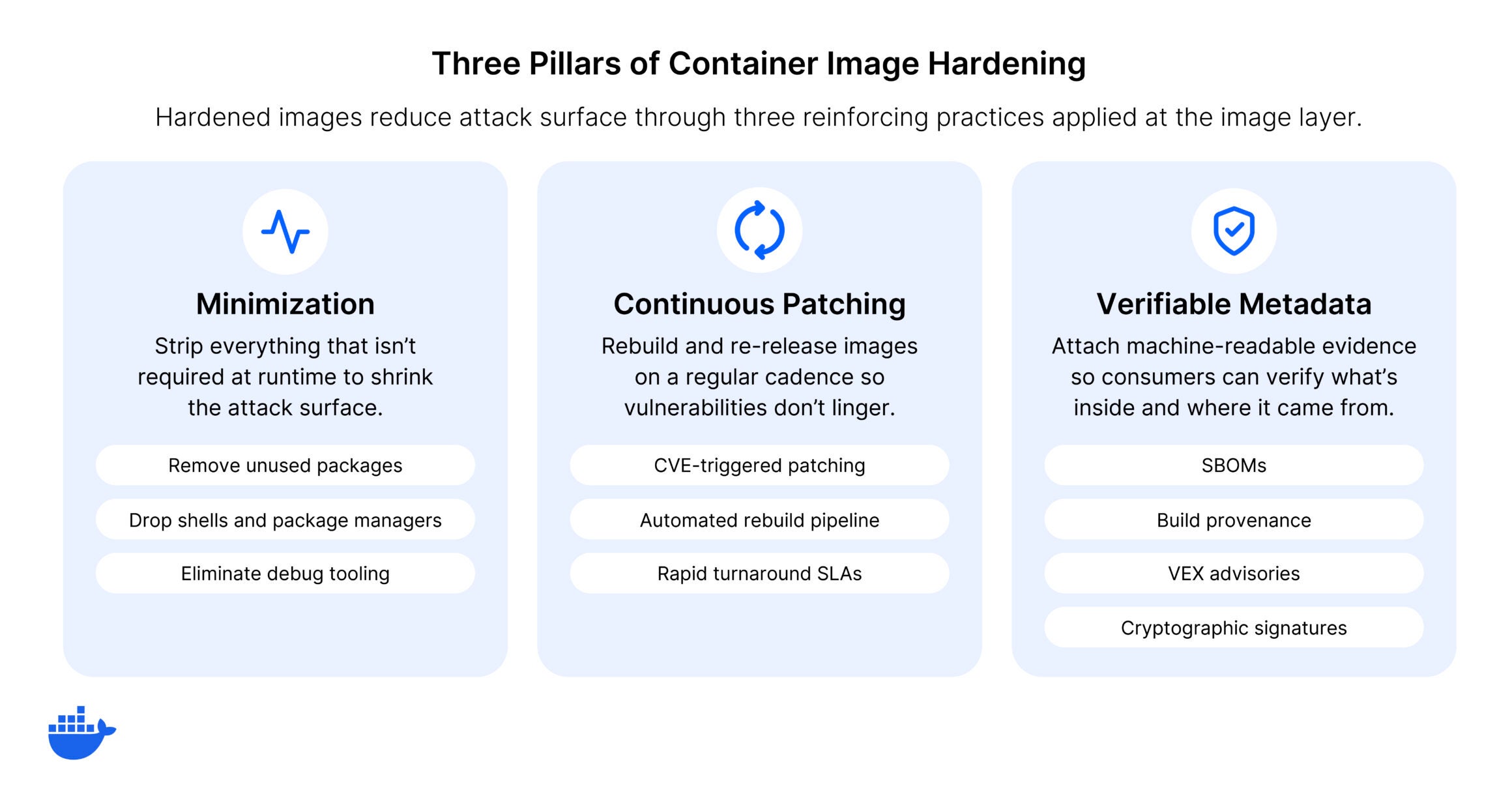
So what are hardened images in practice? Minimization gets the most attention, but it’s only one of three requirements. A genuinely hardened image is also continuously maintained and independently verifiable.
Quick definition: Hardened images are minimal, continuously patched base images that ship only the runtime components an application needs, paired with verifiable supply chain metadata like SBOMs, build provenance, and cryptographic signatures.
Minimized attack surface
The most visible characteristic of a hardened image is minimization. Shells, package managers, and debug tools are removed. Only the runtime components the application needs to function are included. This is more aggressive than simply choosing a slim base image variant. Hardened images are often rebuilt from the package level up, selecting each component deliberately rather than subtracting from a general-purpose distribution.
The result is a dramatically smaller CVE surface. Where a general-purpose image might carry hundreds of known vulnerabilities, a hardened equivalent for the same runtime typically carries single digits or none.
Continuous patching and rebuilds
A hardened image that’s never updated becomes a snapshot of the day it was built. An image hardened on Tuesday can start drifting by Friday: three upstream CVEs published, two library patches released, and the image is already accumulating the kind of exposure it was designed to prevent.
Security requires ongoing maintenance: monitoring upstream projects for fixes, rebuilding images to incorporate patches, and doing this on a defined cadence with clear SLAs. The best hardened images are rebuilt continuously, not on a quarterly or release-driven schedule. That’s what separates production-grade hardened images from one-time efforts to slim down a Dockerfile.
Verifiable supply chain metadata
This is where hardened images connect to the broader supply chain security best practices that organizations are adopting. A truly hardened image ships with:
Software Bills of Materials (SBOMs) that list every package, version, and dependency in the image
Build provenance attestations aligned to frameworks like SLSA, providing cryptographic proof of how and where the image was built
Vulnerability Exploitability eXchange (VEX) data that identifies which CVEs present in the image are not exploitable given how the software is actually configured
Cryptographic signatures that verify the image has not been tampered with between build and deployment
This metadata is what makes automated policy enforcement possible in CI/CD pipelines. A CI gate that blocks deployments unless the base image has a signed SBOM and valid provenance attestation is only feasible when the image provider builds that metadata into the supply chain from the start. For organizations operating in regulated environments, it’s also what allows security and compliance teams to verify an image without reverse-engineering its contents.
Container hardening vs. VM hardening
The term “hardened image” appears in both container and virtual machine contexts, but the two practices address different layers of the stack.
VM hardening focuses on OS configuration: disabling unnecessary services, tightening firewall rules, restricting user permissions, and tuning kernel parameters. Defined by frameworks like CIS Linux Benchmarks. Takes a full operating system and locks it down.
Container hardening operates at the image layer: what is packaged (minimization), how the image was assembled (provenance), and whether the contents are transparent (SBOMs and vulnerability data). Starts from a minimal foundation and builds up only what the application requires.
Both practices are valid and often coexist. Many organizations apply VM hardening to their container host nodes and container hardening to the images running on those nodes. They complement each other, but the techniques, tooling, and evaluation criteria are different. A CIS-hardened AMI and a hardened container base image solve distinct problems at distinct layers.
How to evaluate hardened images
Not all images marketed as hardened meet the same standards. When evaluating options, look for these characteristics:
Transparency: Can you see every package in the image? Is there a complete, machine-readable SBOM?
Provenance: Can you independently verify how and where the image was built? Are attestations signed and aligned to a recognized framework?
Patch cadence: How quickly are upstream security fixes incorporated? Is there a defined SLA, or is patching best-effort?
Compatibility: Do the images work as drop-in replacements in existing Dockerfiles and CI/CD pipelines, or do they require workflow changes?
Vulnerability data integrity: Does the provider suppress or filter CVE data to make the image look cleaner, or do they publish full vulnerability transparency with exploitability context?
The answers to these questions separate genuinely hardened images from images that are simply minimal. Minimization is necessary but not sufficient. Without provenance, patching discipline, and transparency, a small image is just a smaller attack surface with less visibility.
What hardened images are not
The term “hardened” is sometimes applied loosely. Because of this, it’s worth clarifying what does not qualify, because each of these approaches solves part of the problem while leaving the rest exposed.
Choosing a slim or Alpine variant reduces image size, but it does not address provenance, patching cadence, or supply chain metadata. The image is smaller, not hardened.
Running a scanner and manually removing flagged packages produces a point-in-time fix, not a continuously maintained hardened image. The next upstream CVE puts you back where you started.
Building a distroless image from scratch achieves minimization but requires significant ongoing effort to maintain patch currency across every image in a portfolio. Without a defined rebuild cadence and verifiable metadata, the maintenance burden scales with the number of images.
Hardening, in the supply chain security sense, means all of these concerns are addressed systematically: the image is minimal, maintained, and verifiable.
Getting started with hardened images
Hardened container images are becoming the standard foundation for secure container deployments. They address the root cause of most container vulnerability findings: unnecessary packages inherited from general-purpose base images. And with verifiable supply chain metadata, they give security teams the transparency and audit trail that modern compliance requirements demand.
Docker Hardened Images provide this foundation across several thousand images spanning runtimes, frameworks, databases, and infrastructure components. Every image ships with SBOMs, SLSA Build Level 3 provenance, VEX data, and cryptographic signatures. The Community tier is free and open under Apache 2.0 with no restrictions on use or redistribution.
Explore our full catalog of hardened images and start replacing your base images today.
Frequently asked questions
What is the difference between a hardened image and a minimal image?
A minimal image has fewer packages, but that’s only one dimension of hardening. A hardened image also includes continuous patching with defined SLAs, verifiable build provenance, complete SBOMs, and vulnerability exploitability data. Minimization reduces the attack surface; hardening ensures the remaining surface is maintained, transparent, and verifiable.
Do hardened images work with existing CI/CD pipelines?
Well-designed hardened images are built to serve as drop-in replacements for standard base images. If your Dockerfile starts with a general-purpose runtime image, you can typically swap in a hardened equivalent without changing your build process. The key consideration is shell access: some hardened images remove shells entirely, which means build steps that rely on shell commands may need adjustment for multi-stage builds.
How do hardened images reduce CVE counts?
Every package in a container image is a potential source of CVEs. By removing packages the application does not need, hardened images eliminate the vulnerabilities those packages carry. A general-purpose base image with 400 packages might have 200 known CVEs. A hardened equivalent with 30 packages might have fewer than 5, because the vast majority of vulnerable components were never included. This significantly shrinks the surface an attacker can target and reduces the triage burden on security teams.
Quelle: https://blog.docker.com/feed/








