Trump-Klasse: US-Marine kehrt zur Atomkraft zurück
Die nuklear angetriebenen Schlachtschiffe der Trump-Klasse sollen die Machtverhältnisse auf den Weltmeeren neu ordnen. (Militär, Politik)
Quelle: Golem

Die nuklear angetriebenen Schlachtschiffe der Trump-Klasse sollen die Machtverhältnisse auf den Weltmeeren neu ordnen. (Militär, Politik)
Quelle: Golem
PostgreSQL has become foundational to how modern applications are built. It powers everything from early‑stage startups to some of the most demanding production systems in the world. Its longevity isn’t accidental, it’s the result of decades of engineering discipline, community collaboration, and a relentless focus on correctness and extensibility.
As application architectures evolve, and as AI becomes a default part of the software stack, PostgreSQL continues to adapt. This adaptability is a key reason Microsoft has been investing deeply in PostgreSQL: 345 commits contributed to the latest PostgreSQL release, a team of PostgreSQL committers and contributors working directly on the upstream project, and a growing portfolio of managed services, developer tools, and community programs built around Postgres on Azure. Here’s what’s driving that investment, and what it means for the people building on Postgres today.
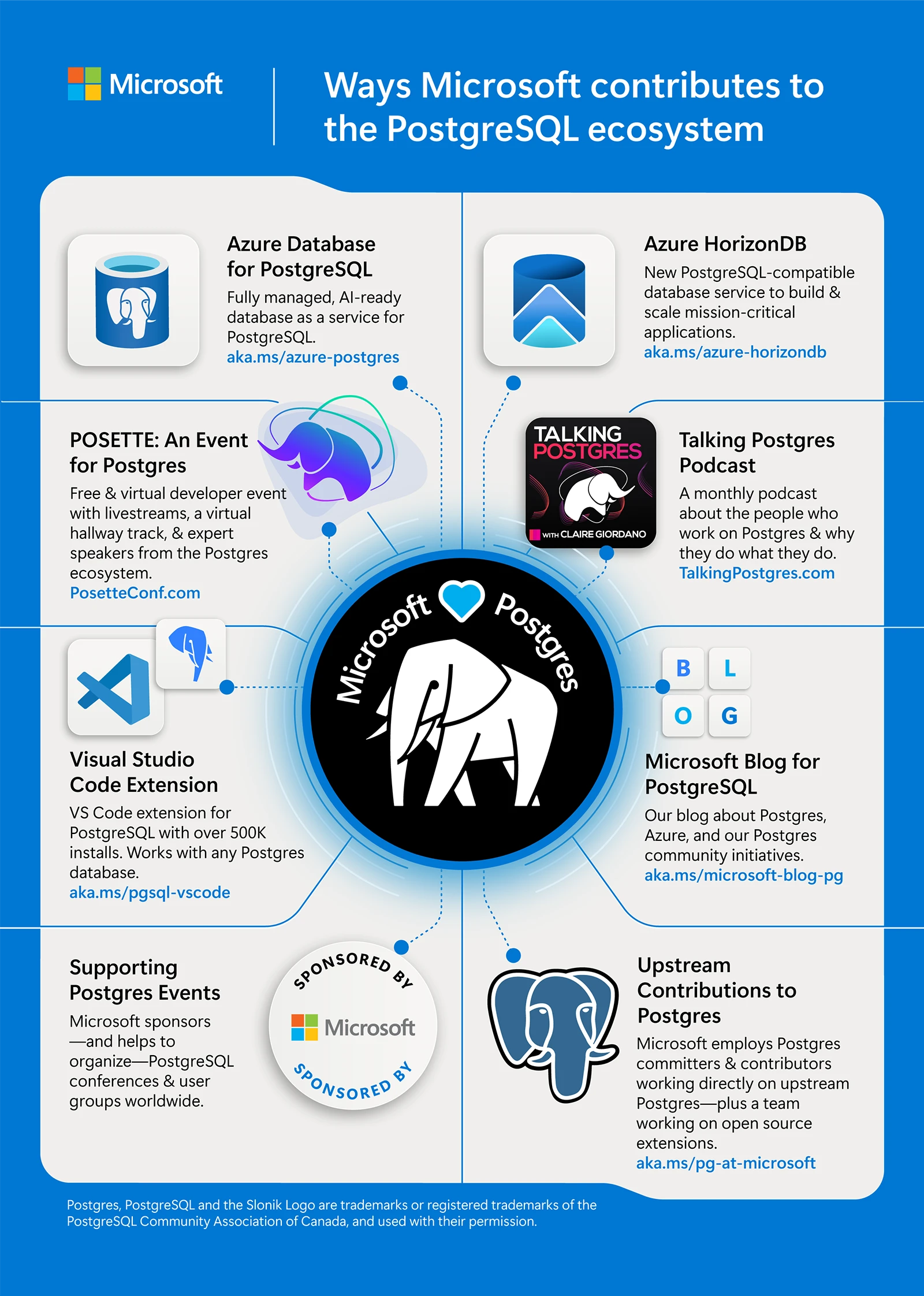
Figure 1: This infographic highlights the many ways Microsoft contributes to and supports the PostgreSQL ecosystem
Discover Azure HorizonDB
Why PostgreSQL, and why now
Across industries, PostgreSQL is increasingly the default choice for new workloads and modernization projects. That shift is driven by three clear trends.
PostgreSQL is trusted with real production systems
PostgreSQL earned its reputation by solving hard problems in production environments: transactional correctness, concurrency control, extensibility, and operational resilience. These characteristics weren’t designed for isolated benchmarks; they emerged through years of running mission critical systems under real pressure.
Microsoft runs PostgreSQL at global scale and sees these same patterns firsthand. Many upstream contributions, such as recent work in PostgreSQL 18 on asynchronous I/O, vacuum behavior, and query planning, are informed directly by production bottlenecks encountered at scale.
This feedback loop works both ways. Improvements made upstream benefit the entire PostgreSQL ecosystem, while lessons learned from large‑scale deployments continue to inform future development.
Databases are becoming part of the AI stack
Databases are no longer isolated storage layers. In modern systems, they increasingly sit inside feedback loops that involve reasoning, ranking, and decision‑making.
Developers building AI‑enabled applications are asking new questions:
How close can vector data live to transactional data?
How can similarity search respect SQL predicates?
How can inference, ranking, and structured data work together without excessive glue code?
PostgreSQL’s extensibility makes it a natural foundation for these patterns. That’s why Azure Database for PostgreSQL and Azure HorizonDB focus on integrating AI‑related capabilities, such as vector search and model invocation, directly into familiar PostgreSQL workflows.
Different workloads, different paths to scale
As applications scale, not every workload benefits from the same architectural approach.
Some teams want a fully open, single‑node PostgreSQL experience with minimal abstraction. Others need elastic scale, multi‑zone replication, and fast failover but don’t want to push complexity into the application layer.
This diversity is why Microsoft supports multiple PostgreSQL deployment models on Azure:
Azure Database for PostgreSQL for open‑source‑aligned workloads and lift‑and‑shift scenarios.
Azure HorizonDB for cloud‑native systems that require scale‑out compute, shared storage, and low‑latency global resilience.
These aren’t forks. They are different engineering responses to different workload realities.
Get started with Azure Database for PostgreSQL
Upstream collaboration and developer tooling
Microsoft’s investment in PostgreSQL goes beyond product announcements for Azure’s managed services to include shipped code from in-house contributors, upstream collaboration, and production reliability. As our learnings expand, we’ve used these insights to enrich the open-source Postgres engine for the broader community.
Upstream contributions that benefit everyone
Postgres committers and developers at Microsoft actively contribute to the PostgreSQL open source project, working alongside the global community on core improvements. Recent version updates include contributions across:
Asynchronous I/O foundations.
Performance improvements in vacuum and memory management.
Planner and execution enhancements for large datasets.
These changes land upstream first, ensuring that improvements are broadly available not tied to any single cloud or service. A transparent overview of our Postgres work is published annually.
Architectural motivations behind Azure HorizonDB
Azure HorizonDB was built to address a specific class of PostgreSQL workloads that are constrained by single node scaling but not well served by application level sharding. For example, high-throughput, low-latency systems that require horizontal scale without adding application complexity.
Key architectural goals shaped Azure HorizonDB:
Independent scaling of compute and storage.
Failover and recovery operations decoupled from data size.
Multi‑zone replication enabled by default.
The result is a PostgreSQL‑compatible service with a shared‑storage, scale‑out design supporting sub‑millisecond multi‑zone commits and growth to thousands of cores, without requiring application rewrites.
Azure HorizonDB extends PostgreSQL’s reach while maintaining compatibility expectations that developers rely on.
Improving the developer experience where work actually happens
PostgreSQL has long been a developer‑centric database. Tooling investments on Azure reflect that mindset.
With more than 500,000 installs, the Visual Studio Code extension for PostgreSQL brings provisioning, schema exploration, performance diagnostics, and migration workflows directly into the IDE developers already use. Integrated GitHub Copilot assistance helps with SQL authoring, tuning, and even complex migrations, such as Oracle to PostgreSQL, which is one of the most challenging real world scenarios teams face.
The extension helps to remove unnecessary friction while keeping PostgreSQL familiar.
Investing in the PostgreSQL ecosystem
PostgreSQL’s progress has always depended on its community. That’s why Microsoft’s investment extends beyond products and services.
Microsoft sponsors and helps organize PostgreSQL conferences and user groups worldwide including PGConf.dev, PGConf EU, PGConf India, and many others. POSETTE: An Event for Postgres is a free and virtual Postgres event organized by the Postgres team at Microsoft and in partnership with AMD. It covers a wide range of topics including internals, ecosystem tools, real world debugging stories, and production architectures. This year’s 5th annual event, hosted 16-19 of June, brings together contributors, users, and engineers from across the Postgres community to share what works in practice.
Explore the schedule for POSETTE 2026
Talking Postgres, a monthly podcast that our team produces, features conversations with people who work with Postgres, from longtime contributors to production engineers solving hard problems at scale.
And the Microsoft Blog for PostgreSQL provides regular deep dives on product updates, migration guidance, and real-world Postgres usage patterns on Azure.
Looking ahead
PostgreSQL is approaching its fourth decade and it’s still accelerating. What began as a research project at UC Berkeley, is now a widely used database for modern applications, from developer experiments to mission-critical production environments.
As the community celebrates this moment, Microsoft’s focus remains consistent:
Strengthening PostgreSQL core through upstream collaboration.
Extending PostgreSQL responsibly for AI‑driven and cloud‑native workloads.
Preserving developer trust through open standards and transparency.
These priorities shape ongoing investments in Azure Database for PostgreSQL, Azure HorizonDB, developer tooling, and community engagement. Updates across these areas are now shared regularly through the Microsoft for PostgreSQL LinkedIn page.
A clear takeaway
PostgreSQL’s success has always been rooted in engineering discipline and community trust. Sustaining that success requires meaningful, long‑term investment, not just in services, but in the project itself and the people behind it.
Microsoft’s commitment to PostgreSQL reflects that belief: contributing upstream, building thoughtfully, and supporting an ecosystem that continues to move the database forward.
Unlock AI‑Ready Performance with Azure Database for PostgreSQL
Build intelligent, high‑performance apps with a fully managed PostgreSQL service that scales effortlessly.
Try today!
The post From commit to cloud: Powering what’s next for PostgreSQL appeared first on Microsoft Azure Blog.
Quelle: Azure
Today, AWS announces that the AWS Partner Central agents now accelerate opportunity creation through natural language conversation. AWS Partner Central agents, released on March 16, 2026, are AI-powered capabilities built on Amazon Bedrock AgentCore that help partners surface pipeline insights, advance deals with next-step recommendations, and identify funding opportunities. With this update, partners create opportunities through a short conversation instead of completing a multi-step form, so partner sales teams spend less time on data entry and more time selling. Partners describe a deal in natural language, upload meeting notes, proposals, or call transcripts (PDF, DOCX, Excel, TXT), or clone an existing opportunity. The agent extracts the information, enriches customer details, and recommends improvements — such as adding missing context, correcting field values, or strengthening the business problem statement — so partners submit higher-quality opportunities, improve pipeline hygiene, and shorten sales cycles. Partners use the feature in the AWS Console through Amazon Q chat, and programmatically through Model Context Protocol (MCP), so sales teams create opportunities from their existing tools. AWS Partner Central agents are available in all commercial AWS Regions. To learn more about agentic capabilities in AWS Partner Central, review this blog. Partners can start using agents by visiting AWS Partner Central in the AWS console and accessing opportunities, after reviewing the agents guide, and to integrate agents into your existing tools, visit the Partner Central agents MCP server guide.
Quelle: aws.amazon.com
Amazon EMR Serverless is now generally available in six additional AWS Regions – Asia Pacific (Hyderabad), Asia Pacific (Malaysia), Asia Pacific (New Zealand), Asia Pacific (Taipei), Asia Pacific (Thailand), and Mexico (Central). Amazon EMR Serverless is a deployment option in Amazon EMR that makes it simple and cost effective for data engineers and analysts to run petabyte-scale data analytics in the cloud. With EMR Serverless, you can run your Apache Spark and Apache Hive applications without having to configure, optimize, tune, or manage clusters. EMR Serverless offers fine-grained automatic scaling, fast launch times, customizable worker configurations, and support for batch, interactive and streaming workloads. To get started, visit the Amazon EMR Serverless User Guide. For pricing info, visit the EMR Serverless pricing page.
Quelle: aws.amazon.com
Amazon CloudWatch Logs now supports retrieving up to 100,000 results using the Logs Insights query language. Customers can specify the limit in their query using the LIMIT command. Previously, customers were limited to 10,000 results and had to split their queries into smaller time ranges to retrieve all results. With this launch, customers can view a larger set of results and use existing features such as patterns, visualization, and export on the full 100,000 result set. The GetQueryResults API has also been updated to support pagination; each invocation can return up to 10,000 results along with a token that can be used to fetch the next set of results. The increased query result limits are available in all commercial AWS regions. You can execute queries and view up to 100,000 results using the Amazon CloudWatch console, AWS CLI, AWS CDK, and AWS SDKs. To learn more, see the Amazon CloudWatch Logs documentation.
Quelle: aws.amazon.com

Die Minidisc kam eigentlich zur rechten Zeit. Doch mit einer seltsamen Produktstrategie verpasste Sony jede Chance. Von Christian Rentrop (MD, Sony)
Quelle: Golem

Godwins Gesetz auf KI anzuwenden könnte helfen, über echte Herausforderungen zu reden – statt mit faulen Vergleichen sinnvolle Debatten zu sprengen. Von Tim Reinboth (Denkpause, KI)
Quelle: Golem

Die Action Cam Insta360 X4 Air für 360°-Aufnahmen in 8K ist bei Amazon im Starter-Bundle zum neuen Tiefstpreis erhältlich. (Actioncam, Kameras)
Quelle: Golem
We’re excited to announce the general availability of Custom Catalogs and Profiles for managing Model Context Protocol (MCP) servers. These two complementary capabilities fundamentally change how teams package, distribute, and manage AI tooling.
Custom MCP Catalogs let organizations curate and distribute approved collections of MCP servers. MCP Profiles enable individual developers to easily build, run, and share their MCP tools and configurations across projects and teams.
In this post, we’ll walk through how to create your own custom catalog – building on and improving our previous approach. We’ll also introduce Profiles, a new primitive that lets you define portable, named groupings of MCP servers. Profiles are designed to solve several practical use cases today, while giving us a foundation to expand in the future.
Creating custom catalogs with Docker
As organizations adopt MCP, we consistently hear the same need: teams need a way to curate a trusted list of MCP servers, including internally built servers.
To address these needs, we built Custom Catalogs. Instead of every team member searching for MCP servers across the open internet, organizations can publish and distribute catalogs that define approved servers. This allows developers to centrally discover and use trusted MCP servers within organizational boundaries.
Custom Catalogs can reference servers from Docker’s MCP Catalog, community sources, and custom MCP servers developed internally, bringing flexibility, control, and trust together in a single experience. We will show you how to do that with a Custom Catalog.
Step-by-step: Building and sharing a custom MCP catalog
In this example, we will create a Custom Catalog containing servers from the Docker MCP Catalog and an MCP server we created ourselves from the CLI. Then we will show you how to use Docker Desktop to import the catalog.
All the functionality we will show can be exercised through the CLI, while a subset of primarily user-centric features can be exercised through Docker Desktop.
Here, we will use my personal Docker Hub ID roberthouse224 in the commands, but you should adapt to use your information where appropriate (e.g. pushing an image).
Step 1: Creating my custom MCP server and pushing it to Docker Hub
We built a reference server called roll-dice (GitHub Repository). It is a regular MCP server that communicates over stdio and can be built as a Docker image. The image has already been built and pushed to Docker Hub.
We can create the metadata that describes the server including where the image can be found and save it to a file named mcp-dice.yaml to be used when creating our catalog.
name: roll-dice
title: Roll Dice
type: server
image: roberthouse224/mcp-dice@latest
description: An mcp server that can roll dice
Step 2: Creating a catalog that includes servers from the Docker MCP Catalog alongside a server you have built yourself
Now we can create a custom catalog containing servers from the Docker MCP Catalog and the MCP server we created ourselves.
docker mcp catalog create roberthouse224/our-catalog
–title "Our Catalog"
–server catalog://mcp/docker-mcp-catalog/playwright
–server catalog://mcp/docker-mcp-catalog/github-official
–server catalog://mcp/docker-mcp-catalog/context7
–server catalog://mcp/docker-mcp-catalog/atlassian
–server catalog://mcp/docker-mcp-catalog/notion
–server catalog://mcp/docker-mcp-catalog/markitdown
–server file://./mcp-dice.yaml
Step 3: Verifying the MCP servers in the custom catalog
We can now list our catalogs and see the catalog that we createddocker mcp catalog list
We can also inspect the contents of the catalogdocker mcp catalog show roberthouse224/our-catalog –format yaml
Step 4: Share the catalog
At the moment our custom catalog only lives on our machine. But what we have – and this is really powerful – is an immutable OCI artifact containing our trusted MCP servers that can be easily shared.
We can push our catalog to a container registry, in this example we’re using Docker Hub. Now, anyone that has access to your organization’s namespace can access the catalog.
docker mcp catalog push roberthouse224/our-catalog
Using a custom MCP catalog
Now that our custom catalog has been shared, colleagues can import it from within Docker Desktop (or from the cli using docker mcp catalog pull).
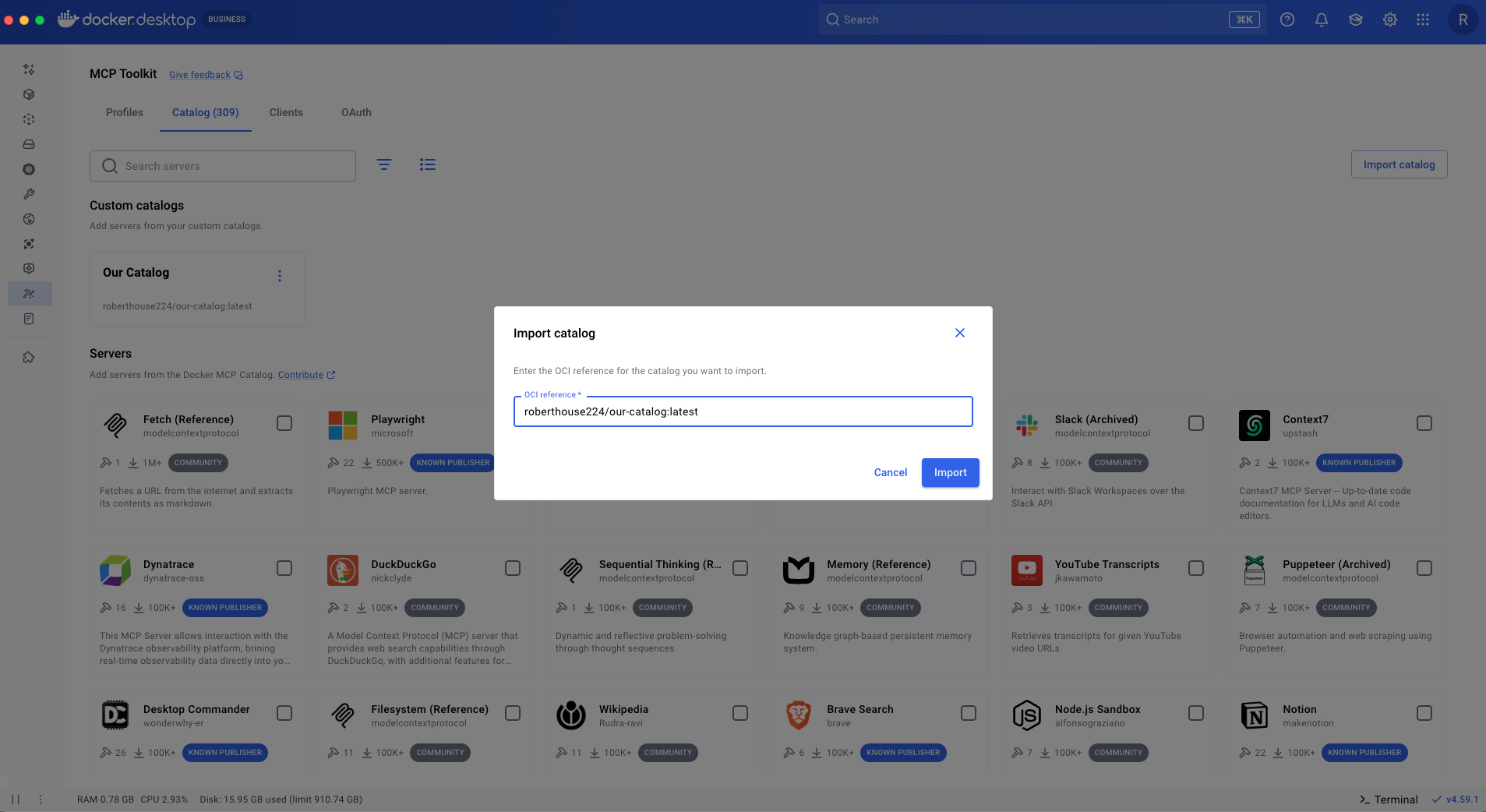
Import the catalog from Docker Desktop by selecting “Import catalog,” and then specifying the OCI reference in the dialog.
Figure 1: Importing a custom catalog from OCI reference
The catalog is now browsable. You can double click into the catalog and see all of the servers contained within it. Notice the custom MCP server that we added named “Roll Dice.”
Figure 2: A custom MCP catalog within the Docker Desktop app, including a newly added “Roll Dice” server.
To make this a private catalog all you need to do is manage access to the repository the way you always have for container images – no new infrastructure to manage or systems to learn.
This is exactly what Jim Clark was describing in his post Private MCP Catalogs and the Path to Composable Enterprise AI.
This simple pattern can be extended to support more complex use cases. For example, you might use a private container registry instead of Docker Hub, or connect to a remote MCP server over streamable HTTP you host yourself rather than running a containerized server as shown in the example.
Now that we have a shareable custom catalog of trusted MCP servers we can shift focus to how individuals can effectively leverage MCP servers from the catalog we built in their workflows.
Using Profiles to create and share MCP Workflows
With MCP Profiles, developers can organize workflows efficiently and maintain separate server collections and configurations for different use cases. Profiles can be shared across teams, enabling collaboration on server setups and ensuring consistent configurations for teams working within the same projects or contexts.
Switch between Profiles
At a basic level, a Profile is a named grouping of MCP servers that can be connected to an agent session. This makes it straightforward to define different Profiles for different ways of working.
Now let’s see an example in action.
We create a profile named coding and another named planning. We browse our custom catalog, select the MCP servers that we want (e.g. Playwright, GitHub, and Context7) then select the “Add to” drop down, and select “New profile”.
Figure 3: Selecting MCP servers to be added to a new profile
Give the profile a name, select the client you want to connect to, and select “Create”.
Figure 4: Creating a new MCP profile named coding in Docker Desktop.
From the Profiles tab, we can see the profile we just created. Our client is connected and our tools are ready to use.
Figure 5: Example of a profile that is connected to a client.
Next we create a profile named planning with servers relevant to planning (e.g. Atlassian, Markitdown, Notion).
Navigate back to “our-catalog” (if not already there), select the servers relevant to planning, and select “Add to” -> “New profile.” Give the profile a name (e.g. planning). Then select “Create” to create the planning profile without a client. Specifying the client is optional.
Figure 6: Example of creating multiple profiles, including separate profiles for coding and planning
Now we have two profiles that mirror two modes of working. When we switch to planning mode we only want the tools from our planning profile to be in context. To do that, we can easily reassign our client to the planning profile.
Figure 7: Reassign Claude Code to the planning profile.
If we go back to coding mode, we just reassign our client back to the coding profile. You can have any number of Profiles that mirror your many ways of working and easily switch between them, keeping only the tools you care about in context.
This will work with any agent, not just Claude Code. Profiles provide a truly portable way to manage your MCP server setups and avoid vendor lock-in.
Persist configuration
You can avoid repeatedly configuring MCP servers by using a Profile. Profiles add a persistence layer for MCP server configurations. When an MCP server exposes configurable options, you can define them once in a Profile and reload them as needed, avoiding repeated configuration.
In this example, we are specifying which paths Markitdown can access.
Figure 8: Using an MCP profile to save server configurations for reuse
Context windows can easily fill up when the MCP servers you use export a lot of tools. With Profiles you can specify which tools are enabled, making sure only the tools you need for a specific task are used.
Here we enable the get_me tool from the GitHub MCP server and disable all the others. All the other tools will not show up in our agent session or contribute to the context window.
Figure 9: Optimize your context window by enabling only the tools you need in the MCP profile
This model of saved configuration becomes far more powerful for MCP servers you build in-house. By exposing richer configuration options, you can reuse the same server across projects, reconfigure its behavior per context, and achieve more predictable outcomes.
Share Profiles
Identifying MCP servers and configurations that work well for a project doesn’t need to be repeated by every team member. Once you’ve found a setup that works, share it with the rest of the team.
To share a Profile you can push it as an OCI artifact to a container registry just like we did with our custom catalog. Just provide a name for it along with an OCI reference.
➜ ~ docker mcp profile push coding [your-namespace]/coding
For someone to pull it down, all they have to do is issue the corresponding pull command.
➜ ~ docker mcp profile pull [your-namspace]/coding
Although the example above demonstrates sharing Profiles across a team, the concept extends naturally to agents as well. An agent skill could, for instance, reference a Profile and pull in the required MCP servers and their configurations as dependencies.
Conclusion and What’s Next
As MCP adoption grows, the challenge isn’t access to tools — it’s coordination. Teams need a way to standardize what’s trusted and supported without constraining how individuals actually work. Custom Catalogs and Profiles are designed to solve exactly that problem.
Custom Catalogs: shared foundation
Custom Catalogs allow platform and admin teams to define approved MCP servers, bundle internal and public tooling together, and distribute those choices as a single, portable artifact. This creates clarity and consistency while significantly reducing the cost of discovery and evaluation.
Profiles: supercharge workflow
Profiles give individual developers a lightweight way to assemble, configure, and reuse MCP servers for specific contexts like coding, planning, or research. Profiles persist configuration, limit context to what matters, and make effective setups easy to share across teams.
Together, these primitives separate:
What an organization recommends (via Custom Catalogs)
How people work day to day (via Profiles)
This separation enables a healthy balance. Platform teams can publish “golden paths” that establish standards and guardrails, while developers retain the freedom to adapt, experiment, and compose profiles that fit their needs.
The result is a system that is portable, composable, and scalable — making MCP easier to adopt, safer to manage, and more effective as it grows across an organization.
What’s Next?
Custom Catalogs and Profiles are the foundation for managing MCP at scale, and we’re just getting started. Next, we’re focused on extending these primitives to support stronger governance, better reuse, and more advanced agent workflows:
Governance and policy controls to restrict MCP usage to approved Custom Catalogs and trusted server sources
Improved discoverability and sharing for both Catalogs and Profiles, making proven setups easier to find and reuse across teams
Expanded Profile-scoped secrets and configuration, providing a more secure and flexible alternative to project-level mcp.json files
Clear best practices for Profiles, including saving dynamic MCP server configurations for reuse and pairing Profiles with emerging workflow optimizations like agent skills
Getting started with Custom Catalogs and Profiles
If you have Docker Desktop 4.56 you are already using Catalogs – our Docker MCP Catalog is now distributed as an OCI artifact and Profiles are supported starting with Docker Desktop 4.63. Try creating your first Profile by exploring the MCP Toolkit in Docker Desktop.
Learn more
Dive into our documentation on Custom Catalogs and Profiles to get started quickly.
Explore Docker’s MCP Catalog and Toolkit on our website.
Ready to go hands-on? Open Docker Desktop or the CLI and start using MCP to streamline and automate your development workflows.
Quelle: https://blog.docker.com/feed/
AWS Organizations now supports higher quotas for service control policies (SCPs). The maximum number of SCPs that can be attached to a single node (root, OU, or account) has increased from 5 to 10, and the maximum SCP size has increased from 5,120 to 10,240 characters.
With these higher quotas, you can write SCPs with finer-grained permissions and conditions, and attach more SCPs per node to build more comprehensive security controls across your organization.
These higher quotas are available in all commercial AWS Regions, the AWS GovCloud (US) Regions, and the China Regions, and are available automatically to all organizations with no action required. To learn more, see quotas for AWS Organizations in the AWS Organizations User Guide.
Quelle: aws.amazon.com






