Get Started with the Atlassian Rovo MCP Server Using Docker

We’re excited to announce that the remote Atlassian Rovo MCP server is now available in Docker’s MCP Catalog and Toolkit, making it easier than ever to connect AI assistants to Jira and Confluence. With just a few clicks, technical teams can use their favorite AI agents to create and update Jira issues, epics, and Confluence pages without complex setup or manual integrations.

In this post, we’ll show you how to get started with the Atlassian remote MCP server in minutes and how to use it to automate everyday workflows for product and engineering teams.

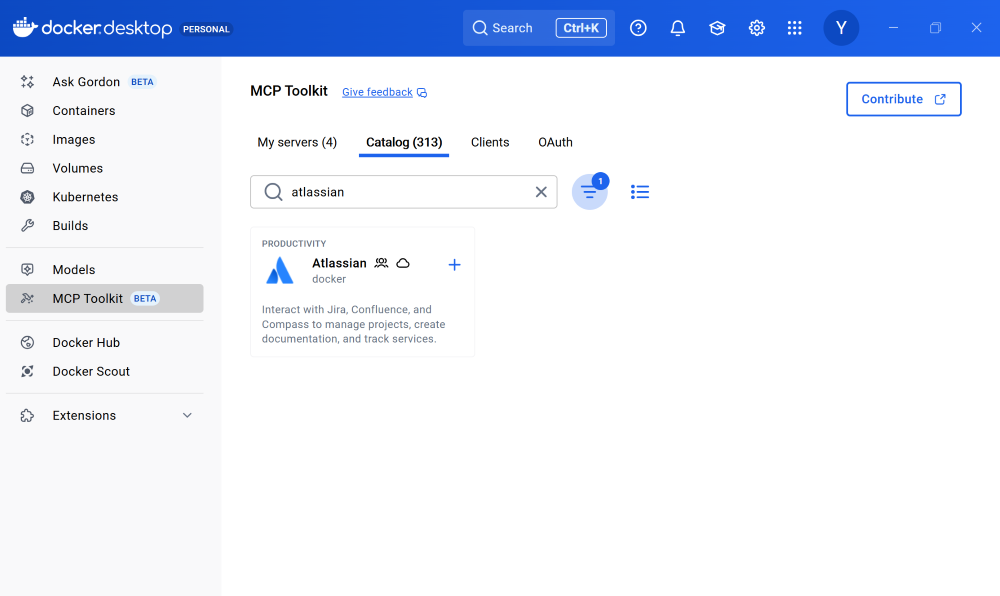
Figure 1: Discover over 300+ MCP servers including the remote Atlassian MCP server in Docker MCP Catalog.

What is the Atlassian Rovo MCP Server?

Like many teams, we rely heavily on Atlassian tools, especially Jira to plan, track, and ship product and engineering work. The Atlassian Rovo MCP server enables AI assistants and agents to interact directly with Jira and Confluence, closing the gap between where work happens and how teams want to use AI.

With the Atlassian Rovo MCP server, you can:

Create and update Jira issues and epics

Generate and edit Confluence pages

Use your preferred AI assistant or agent to automate everyday workflows

Traditionally, setting up and configuring MCP servers can be time-consuming and complex. Docker removes that friction, making it easy to get up and running securely in minutes.

Enable the Atlassian Rovo MCP Server with One Click

Docker’s MCP Catalog is a curated collection of 300+ MCP servers, including both local and remote options. It provides a reliable starting point for developers building with MCP so you don’t have to wire everything together yourself.

Prerequisites

Before you begin, make sure you have:

A machine with 8GB RAM minimum, ideally 16GB

Install Docker Desktop

To get started with the Atlassian remote MCP server:

Open Docker Desktop and click on the MCP Toolkit tab. 

Navigate to Docker MCP Catalog

Search for the Atlassian Rovo MCP server. 

Select the remote version with cloud icon

Enable it with a single click

That’s it. No manual installs. No dependency wrangling.

Why use the Atlassian Rovo MCP server with Docker

Demo by Cecilia Liu: Set up the Atlassian Rovo MCP server with Docker with just a few clicks and use it to generate Jira epics with Claude Desktop

Seamless Authentication with Built-in OAuth

The Atlassian Rovo MCP server uses Docker’s built-in OAuth, so authorization is seamless. Docker securely manages your credentials and allows you to reuse them across multiple MCP clients. You authenticate once, and you’re good to go.

Behind the scenes, this frictionless experience is powered by the MCP Toolkit, which handles environment setup and dependency management for you.

Works with Your Favorite AI Agent

Once the Atlassian Rovo MCP server is enabled, you can connect it to any MCP-compatible client.

For popular clients like Claude Desktop, Claude Code, Codex, or Gemini CLI, connecting is just one click. Just click Connect, restart Claude Desktop, and now we’re ready to go.

From there, we can ask Claude to:

Write a short PRD about MCP

Turn that PRD into Jira epics and stories

Review the generated epics and confirm they’re correct

And just like that, Jira is updated.

One Setup, Any MCP Client

Sometimes AI assistants have hiccups. Maybe you hit a daily usage limit in one tool. That’s not a blocker here.

Because the Atlassian Rovo MCP server is connected through the Docker MCP Toolkit, the setup is completely client-agnostic. Switching to another assistant like Gemini CLI or Cursor is as simple as clicking Connect. No need for reconfiguration or additional setup!

Now we can ask any connected AI assistant such as Gemini CLI to, for example, check all new unassigned Jira tickets. It just works.

Coming Soon: Share Atlassian-Based Workflows Across Teams

We’re working on new enhancements that will make Atlassian-powered workflows even more powerful and easy to share. Soon, you’ll be able to package complete workflows that combine MCP servers, clients, and configurations. Imagine a workflow that turns customer feedback into Jira tickets using Atlassian and Confluence, then shares that entire setup instantly with your team or across projects. That’s where we’re headed.

Frequently Asked Questions (FAQ)

What is the Atlassian Rovo MCP server?

The Atlassian MCP Rovo server enables AI assistants and agents to securely interact with Jira and Confluence. It allows AI tools to create and update Jira issues and epics, generate and edit Confluence pages, and automate everyday workflows for product and engineering teams.

How do I use the Atlassian Rovo MCP server with Docker? 

You can enable the Atlassian Rovo MCP server directly from Docker Desktop or CLI. Simply open the MCP Toolkit tab, search for the Atlassian MCP server, select the remote version, and enable it with one click. Connect to any MCP-compatible client. For popular tools like Claude Code, Codex, and Gemini, setup is even easier with one-click integration. 

Why use Docker to run the Atlassian Rovo MCP server?

Using Docker to run the Atlassian Rovo MCP server removes the complexity of setup, authentication, and client integration. Docker provides one-click enablement through the MCP Catalog, built-in OAuth for secure credential management, and a client-agnostic MCP Toolkit that lets teams connect any AI assistant or agent without reconfiguration so you can focus on automating Jira and Confluence workflows instead of managing infrastructure.

Less Setup. Less Context Switching. More Work Shipped.

That’s how easy it is to set up and use the Atlassian Rovo MCP server with Docker. By combining the MCP Catalog and Toolkit, Docker removes the friction from connecting AI agents to the tools teams already rely on.

Learn more

Get started with MCP Catalog and Toolkit

Explore the Docker MCP Catalog: Discover containerized, security-hardened MCP servers

Read more about the Docker MCP Toolkit: Official Documentation

Quelle: https://blog.docker.com/feed/

The 3Cs: A Framework for AI Agent Security

Every time execution models change, security frameworks need to change with them. Agents force the next shift.

The Unattended Laptop Problem

No developer would leave their laptop unattended and unlocked. The risk is obvious. A developer laptop has root-level access to production systems, repositories, databases, credentials, and APIs. If someone sat down and started using it, they could review pull requests, modify files, commit code, and access anything the developer can access.

Yet this is how many teams are deploying agents today. Autonomous systems are given credentials, tools, and live access to sensitive environments with minimal structure. Work executes in parallel and continuously, at a pace no human could follow. Code is generated faster than developers can realistically review, and they cannot monitor everything operating on their behalf.

Once execution is parallel and continuous, the potential for mistakes or cascading failures scales quickly. Teams will continue to adopt agents because the gains are real. What remains unresolved is how to make this model safe enough to operate without requiring manual approval for every action. Manual approval slows execution back down to human speed and eliminates the value of agents entirely. And consent fatigue is real.

Why AI Agents Break Existing Governance

Traditional security controls were designed around a human operator. A person sits at the keyboard, initiates actions deliberately, and operates within organizational and social constraints. Reviews worked because there was time between intent and execution. Perimeter security protected the network boundary, while automated systems operated within narrow execution limits.

But traditional security assumes something deeper: that a human is operating the machine.  Firewalls trust the laptop because an employee is using it. VPNs trust the connection because an engineer authenticated. Secrets managers grant access because a person requested it. The model depends on someone who can be held accountable and who operates at human speed.

Agents break this assumption. They act directly, reading repositories, calling APIs, modifying files, using credentials. They have root-level privileges and execute actions at machine speed.  

Legacy controls were never intended for this. The default response has been more visibility and approvals, adding alerts, prompts, and confirmations for every action. This does not scale and generates “consent fatigue”, annoying developers and undermining the very security it seeks to enforce. When agents execute hundreds of actions in parallel, humans cannot review them meaningfully. Warnings become noise.

AI Governance and the Execution Layer: The Three Cs Framework

Each major shift in computing has moved security closer to execution. Agents follow the same trajectory. If agents execute, security must operate at the agentic execution layer.

That shift maps governance to three structural requirements: the 3Cs.

Contain: Bound the Blast Radius

Every execution model relies on isolation. Processes required memory protection. Virtual machines required hypervisors. Containers required namespaces. Agents require an equivalent boundary. Containment limits failure so mistakes made by an agent don’t have permanent consequences for your data, workflows, and business. Unlocking full agent autonomy requires the confidence that experimentation won’t be reckless. . Without it, autonomous execution fails.

Curate: Define the Agent’s Environment

What an agent can do is determined by what exists in its environment. The tools it can invoke, the code it can see, the credentials it can use, the context it operates within. All of this shapes execution before the agent acts.

Curation isn’t approval. It is construction. You are not reviewing what the agent wants to do. You are defining the world it operates in. Agents do not reason about your entire system. They act within the environment they are given. If that environment is deliberate, execution becomes predictable. If it is not, you have autonomy without structure, which is just risk.

Control: Enforce Boundaries in Real Time

Governance that exists only on paper has no effect on autonomous systems. Rules must apply as actions occur. File access, network calls, tool invocation, and credential use require runtime enforcement. This is where alert-based security breaks down. Logging and warnings explain what happened or ask permission after execution is already underway. 

Control determines what can happen, when, where, and who has the privilege to make it happen. Properly executed control does not remove autonomy. It defines its limits and removes the need for humans to approve every action under pressure. If this sounds like a policy engine, you aren’t wrong. But this must be dynamic and adaptable, able to keep pace with an agentic workforce.

Putting the 3Cs Into Practice

The three Cs reinforce one another. Containment limits the cost of failure. Curation narrows what agents can attempt and makes them more useful to developers by applying semantic knowledge to craft tools and context to suit the specific environment and task. Control at the runtime layer replaces reactive approval with structural enforcement.

In practice, this work falls to platform teams. It means standardized execution environments with isolation by default, curated tool and credential surfaces aligned to specific use cases, and policy enforcement that operates before actions complete rather than notifying humans afterward. Teams that build with these principles can use agents effectively without burning out developers or drowning them in alerts. Teams that do not will discover that human attention is not a scalable control plane.
Quelle: https://blog.docker.com/feed/

Amazon RDS now provides an enhanced console experience to connect to a database

Amazon RDS now provides an enhanced console experience that consolidates and provides all relevant information needed to connect to a database in one place, making it easier to connect to your RDS databases. The new console experience provides ready-made code snippets for Java, Python, Node.js and other programming languages as well as tools like the psql command line utility. These code snippets are automatically adjusted based on your database’s authentication settings. For example, if your cluster uses IAM authentication, the generated code snippets will use token-based authentication to connect to the database. The console experience also includes integrated CloudShell access, offering the ability to connect to your databases directly from within the RDS console. This feature is available for Amazon Aurora PostgreSQL, Amazon Aurora MySQL, Amazon RDS for PostgreSQL, Amazon RDS for MySQL, Amazon RDS for MariaDB database engines across all commercial AWS Regions. Get started with the new console experience for database connectivity through the Amazon RDS Console. To learn more, see the Amazon RDS and Aurora user guide
Quelle: aws.amazon.com