Gegen den eigenen Copilot: Microsoft verteilt Claude Code an Tausende Mitarbeiter
Microsoft testet den KI-Coding-Assistenten von Anthropic und setzt ihn bei Entwicklern von Windows, Teams und Office ein. (Anthropic, Microsoft)
Quelle: Golem

Microsoft testet den KI-Coding-Assistenten von Anthropic und setzt ihn bei Entwicklern von Windows, Teams und Office ein. (Anthropic, Microsoft)
Quelle: Golem

Fast zwei Jahre nach der Ankündigung erhalten Waze-Nutzer neue Warnungen vor Bodenschwellen, gefährlichen Kurven und Einsatzfahrzeugen. (Waze, Google)
Quelle: Golem
FIPS compliance is a great idea that makes the entire software supply chain safer. But teams adopting FIPS-enabled container images are running into strange errors that can be challenging to debug. What they are learning is that correctness at the base image layer does not guarantee compatibility across the ecosystem. Change is complicated, and changing complicated systems with intricate dependency webs often yields surprises. We are in the early adaptation phase of FIPS, and that actually provides interesting opportunities to optimize how things work. Teams that recognize this will rethink how they build FIPS and get ahead of the game.
FIPS in practice
FIPS is a U.S. government standard for cryptography. In simple terms, if you say a system is “FIPS compliant,” that means the cryptographic operations like TLS, hashing, signatures, and random number generation are performed using a specific, validated crypto module in an approved mode. That sounds straightforward until you remember that modern software is built not as one compiled program, but as a web of dependencies that carry their own baggage and quirks.
The FIPS crypto error that caught us off guard
We got a ticket recently for a Rails application in a FIPS-enabled container image. On the surface, everything looked right. Ruby was built to use OpenSSL 3.x with the FIPS provider. The OpenSSL configuration was correct. FIPS mode was active.
However, the application started throwing cryptography module errors from the Postgres Rubygem module. Even more confusing, a minimal reproducer of a basic Ruby app and a stock postgres did not reproduce the error and a connection was successfully established. The issue only manifested when using ActiveRecord.
The difference came down to code paths. A basic Ruby script using the pg gem directly exercises a simpler set of operations. ActiveRecord triggers additional functionality that exercises different parts of libpq. The non-FIPS crypto was there all along, but only certain operations exposed it.
Your container image can be carefully configured for FIPS, and your application can still end up using non-FIPS crypto because a dependency brought its own crypto along for the ride. In this case, the culprit was a precompiled native artifact associated with the database stack. When you install pg, Bundler may choose to download a prebuilt binary dependency such as libpq.
Unfortunately those prebuilt binaries are usually built with assumptions that cause problems. They may be linked against a different OpenSSL than the one in your image. They may contain statically embedded crypto code. They may load crypto at runtime in a way that is not obvious.
This is the core challenge with FIPS adoption. Your base image can do everything right, but prebuilt dependencies can silently bypass your carefully configured crypto boundary.
Why we cannot just fix it in the base image yet
The practical fix for the Ruby case was adding this to your Gemfile.
gem "pg", "~> 1.1", force_ruby_platform: true
You also need to install libpq-dev to allow compiling from source. This forces Bundler to build the gem from source on your system instead of using a prebuilt binary. When you compile from source inside your controlled build environment, the resulting native extension is linked against the OpenSSL that is actually in your FIPS image.
Bundler also supports an environment/config knob for the same idea called BUNDLE_FORCE_RUBY_PLATFORM. The exact mechanism matters less than the underlying strategy of avoiding prebuilt native artifacts when you are trying to enforce a crypto boundary.
You might reasonably ask why we do not just add BUNDLE_FORCE_RUBY_PLATFORM to the Ruby FIPS image by default. We discussed this internally, and the answer illustrates why FIPS complexity cascades.
Setting that flag globally is not enough on its own. You also need a C compiler and the relevant libraries and headers in the build stage. And not every gem needs this treatment. If you flip the switch globally, you end up compiling every native gem from source, which drags in additional headers and system libraries that you now need to provide. The “simple fix” creates a new dependency management problem.
Teams adopt FIPS images to satisfy compliance. Then they have to add back build complexity to make the crypto boundary real and verify that every dependency respects it. This is not a flaw in FIPS or in the tooling. It is an inherent consequence of retrofitting a strict cryptographic boundary onto an ecosystem built around convenience and precompiled artifacts.
The patterns we are documenting today will become the defaults tomorrow. The tooling will catch up. Prebuilt packages will get better. Build systems will learn to handle the edge cases. But right now, teams need to understand where the pitfalls are.
What to do if you are starting a FIPS journey
You do not need to become a crypto expert to avoid the obvious traps. You only need a checklist mindset. The teams working through these problems now are building real expertise that will be valuable as FIPS requirements expand across industries.
Treat prebuilt native dependencies as suspect. If a dependency includes compiled code, assume it might carry its own crypto linkage until you verify otherwise. You can use ldd on Linux to inspect dynamic linking and confirm that binaries link against your system OpenSSL rather than a bundled alternative.
Use a multi-stage build and compile where it matters. Keep your runtime image slim, but allow a builder stage with the compiler and headers needed to compile the few native pieces that must align with your FIPS OpenSSL.
Test the real execution path, not just “it starts.” For Rails, that means running a query, not only booting the app or opening a connection. The failures we saw appeared when using the ORM, not on first connection.
Budget for supply-chain debugging. The hard part is not turning on FIPS mode. The hard part is making sure all the moving parts actually respect it. Expect to spend time tracing crypto usage through your dependency graph.
Why this matters beyond government contracts
FIPS compliance has traditionally been seen as a checkbox for federal sales. That is changing. As supply chain security becomes a board-level concern across industries, validated cryptography is moving from “nice to have” to “expected.” The skills teams build solving FIPS problems today translate directly to broader supply chain security challenges.
Think about what you learn when you debug a FIPS failure. You learn to trace crypto usage through your dependency graph, to question prebuilt artifacts, to verify that your security boundaries are actually enforced at runtime. Those skills matter whether you are chasing a FedRAMP certification or just trying to answer your CISO’s questions about software provenance.
The opportunity in the complexity
FIPS is not “just a switch” you flip in a base image. View FIPS instead as a new layer of complexity that you might have to debug across your dependency graph. That can sound like bad news, but switch the framing and it becomes an opportunity to get ahead of where the industry is going.
The ecosystem will adapt and the tooling will improve. The teams investing in understanding these problems now will be the ones who can move fastest when FIPS or something like it becomes table stakes.
If you are planning a FIPS rollout, start by controlling the prebuilt native artifacts that quietly bypass the crypto module you thought you were using. Recognize that every problem you solve is building institutional knowledge that compounds over time. This is not just compliance work. It is an investment in your team’s security engineering capability.
Quelle: https://blog.docker.com/feed/
Model Context Protocol (MCP) servers are a spec for exposing tools, models, or services to language models through a common interface. Think of them as smart adapters: they sit between a tool and the LLM, speaking a predictable protocol that lets the model interact with things like APIs, databases, and agents without needing to know implementation details.
But like most good ideas, the devil’s in the details.
The Promise—and the Problems of Running MCP Servers
Running an MCP sounds simple: spin up a Python or Node server that exposes your tool. Done, right? Not quite.
You run into problems fast:
Runtime friction: If an MCP is written in Python, your environment needs Python (plus dependencies, plus maybe a virtualenv strategy, plus maybe GPU drivers). Same goes for Node. This multiplies fast when you’re managing many MCPs or deploying them across teams.
Secrets management: MCPs often need credentials (API keys, tokens, etc.). You need a secure way to store and inject those secrets into your MCP runtime. That gets tricky when different teams, tools, or clouds are involved.
N×N integration pain: Let’s say you’ve got three clients that want to consume MCPs, and five MCPs to serve up. Now you’re looking at 15 individual integrations. No thanks.
To make MCPs practical, you need to solve these three core problems: runtime complexity, secret injection, and client-to-server wiring.
If you’re wondering where I’m going with all this, take a look at those problems. We already have a technology that has been used by developers for over a decade that helps solve them: Docker containers.
In the rest of this blog I’ll walk through three different approaches, going from least complex to most complex, for integrating MCP servers into your developer experience.
Option 1 — Docker MCP Toolkit & Catalog
For the developer who already uses containers and wants a low-friction way to start with MCP.
If you’re already comfortable with Docker but just getting your feet wet with MCP, this is the sweet spot. In the raw MCP world, you’d clone Python/Node servers, manage runtimes, inject secrets yourself, and hand-wire connections to every client. That’s exactly the pain Docker’s MCP ecosystem set out to solve.
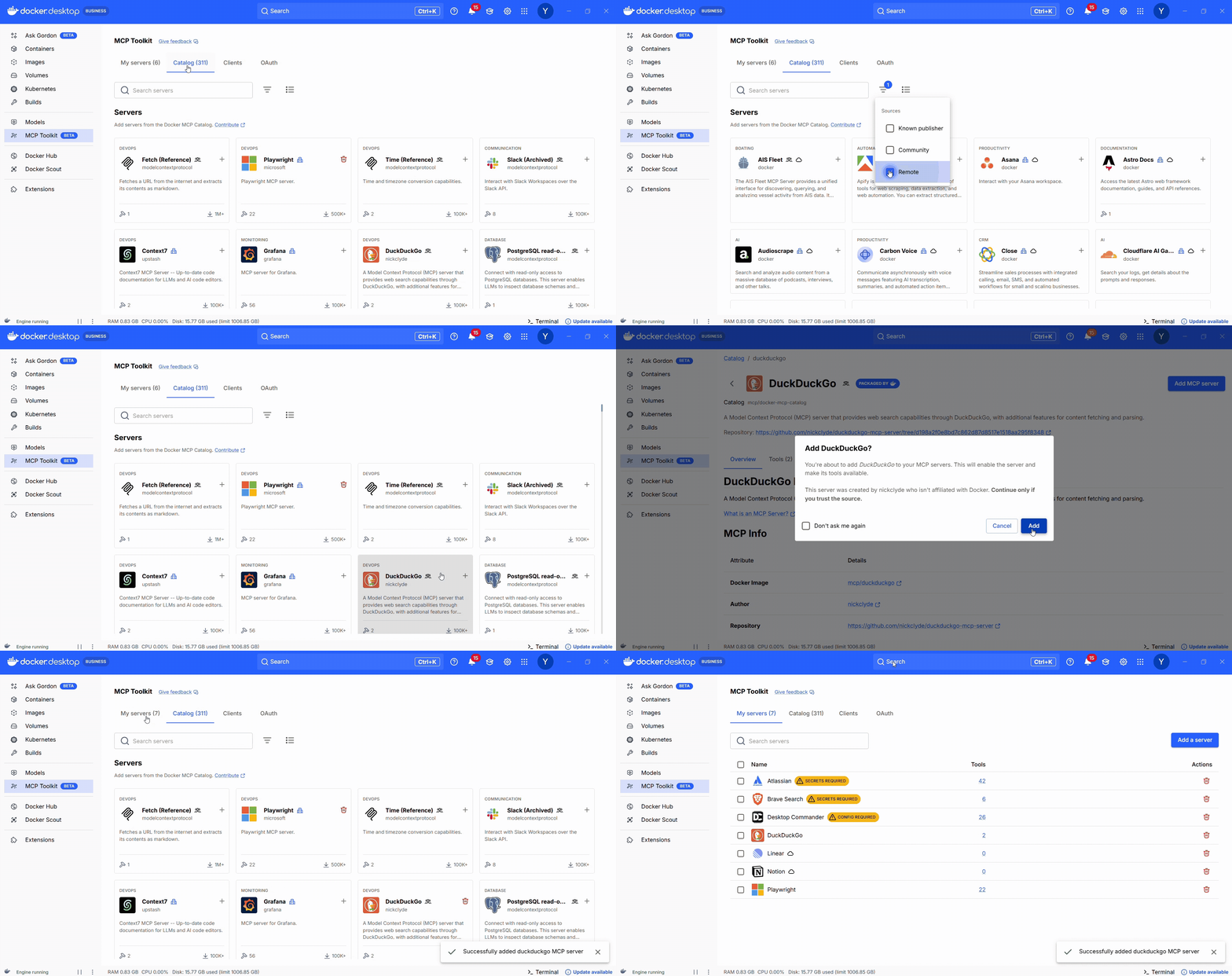
Docker’s MCP Catalog is a curated, containerized registry of MCP servers. Each entry is a prebuilt container with everything you need to run the MCP server.
The MCP Toolkit (available via Docker Desktop) is your control panel: search the catalog, launch servers with secure defaults, and connect them to clients.
How it helps:
No language runtimes to install
Built-in secrets management
One-click enablement via Docker Desktop
Easily wire the MCPs to your existing agents (Claude Desktop, Copilot in VS Code, etc)
Centralized access via the MCP Gateway
Figure 1: Docker MCP Catalog: Browse hundreds of MCP servers with filters for local or remote and clear distinctions between official and community servers
A Note on the MCP GatewayOne important piece working behind the scenes in both the MCP Toolkit and cagent (a framework for easily building multi-agent applications that we cover below) is the MCP Gateway, an open-source project from Docker that acts as a centralized frontend for all your MCP servers. Whether you’re using a GUI to start containers or defining agents in YAML, the Gateway handles all the routing, authentication, and translation between clients and tools. It also exposes a single endpoint that custom apps or agent frameworks can call directly, making it a clean bridge between GUI-based workflows and programmatic agent development.
Moving on: Using MCP servers alongside existing AI agents is often the first step for many developers. You wire up a couple tools, maybe connect to a calendar or a search API, and use them in something like Claude, ChatGPT, or a small custom agent. For step-by-step tutorials on how to automate dev workflows with Docker’s MCP Catalog and Toolkit with popular clients, check out these guides on ChatGPT, Claude Desktop,Codex, Gemini CLI, and Claude Code. Once that pattern clicks, the next logical step is to use those same MCP servers as tools inside a multi-agent system.
Option 2 — cagent: Declarative Multi-Agent Apps
For the developer who wants to build custom multi-agent applications but isn’t steeped in traditional agentic frameworks.
If you’re past simple MCP servers and want agents that can delegate, coordinate, and reason together, cagent is your next step. It’s Docker’s open-source, YAML-first framework for defining and running multi-agent systems—without needing to dive into complex agent SDKs or LLM loop logic.
Cagent lets you describe:
The agents themselves (model, role, instructions)
Who delegates to whom
What tools each agent can access (via MCP or local capabilities)
Below is an example of a pirate flavored chat bot:
agents:
root:
description: An agent that talks like a pirate
instruction: Always answer by talking like a pirate.
welcome_message: |
Ahoy! I be yer pirate guide, ready to set sail on the seas o' knowledge! What be yer quest?
model: auto
cagent run agents.yaml
You don’t write orchestration code. You describe what you want, and Cagent runs the system.
Why it works:
Tools are scoped per agent
Delegation is explicit
Uses MCP Gateway behind the scene
Ideal for building agent systems without writing Python
If you’d like to give cagent a try, we have a ton of examples in the project’s GitHub repository. Check out this guide on building multi-agent systems in 5 minutes.
Option 3 — Traditional Agent Frameworks (LangGraph, CrewAI, ADK)
For developers building complex, custom, fully programmatic agent systems.
Traditional agent frameworks like LangGraph, CrewAI, or Google’s Agent Development Kit (ADK) let you define, control, and orchestrate agent behavior directly in code. You get full control over logic, state, memory, tools, and workflows.
They shine when you need:
Complex branching logic
Error recovery, retries, and persistence
Custom memory or storage layers
Tight integration with existing backend code
Example: LangGraph + MCP via Gateway
import requests
from langgraph.graph import StateGraph
from langchain.agents import Tool
from langchain_openai import ChatOpenAI
# Discover MCP endpoint from Gateway
resp = requests.get("http://localhost:6600/v1/servers")
servers = resp.json()["servers"]
duck_url = next(s["url"] for s in servers if s["name"] == "duckduckgo")
# Define a callable tool
def mcp_search(query: str) -> str:
return requests.post(duck_url, json={"input": query}).json()["output"]
search_tool = Tool(name="web_search", func=mcp_search, description="Search via MCP")
# Wire it into a LangGraph loop
llm = ChatOpenAI(model="gpt-4")
graph = StateGraph()
graph.add_node("agent", llm.bind_tools([search_tool]))
graph.add_edge("agent", "agent")
graph.set_entry_point("agent")
app = graph.compile()
app.invoke("What’s the latest in EU AI regulation?")
In this setup, you decide which tools are available. The agent chooses when to use them based on context, but you’ve defined the menu.And yes, this is still true in the Docker MCP Toolkit: you decide what to enable. The LLM can’t call what you haven’t made visible.
Choosing the Right Approach
Approach
Best For
You Manage
You Get
Docker MCP Toolkit + Catalog
Devs new to MCP, already using containers
Tool selection
One-click setup, built-in secrets, Gateway integration
Cagent
YAML-based multi-agent apps without custom code
Roles & tool access
Declarative orchestration, multi-agent workflows
LangGraph / CrewAI / ADK
Complex, production-grade agent systems
Full orchestration
Max control over logic, memory, tools, and flow
Wrapping UpWhether you’re just connecting a tool to Claude, designing a custom multi-agent system, or building production workflows by hand, Docker’s MCP tooling helps you get started easily and securely.
Check out the Docker MCP Toolkit, cagent, and MCP Gateway for example code, docs, and more ways to get started.
Quelle: https://blog.docker.com/feed/
Amazon MQ now supports the ability for RabbitMQ 4 brokers to connect to JMS applications through the RabbitMQ JMS Topic Exchange plugin and JMS client. The JMS topic exchange plugin is enabled by default on all RabbitMQ 4 brokers, allowing you to use the JMS client to run your JMS 1.1, JMS 2.0, and JMS 3.1 applications on RabbitMQ. You can also use the RabbitMQ JMS client to send JMS messages to an AMQP exchange and consume messages from an AMQP queue to interoperate or migrate JMS workloads to AMQP workloads. To start using your JMS applications on RabbitMQ, simply select RabbitMQ 4.2 when creating a new broker using the M7g instance type through the AWS Management console, AWS CLI, or AWS SDKs, and then use the RabbitMQ JMS client to connect your applications. To learn more about the plugin, see the Amazon MQ release notes and the Amazon MQ developer guide. This plugin is available in all regions where Amazon MQ RabbitMQ 4 instances are available today.
Quelle: aws.amazon.com
AWS Resource Control Policies (RCPs) now provide support for Amazon Cognito and Amazon CloudWatch Logs. Resource control policies (RCPs) are a type of organization policy that you can use to manage permissions in your organization. RCPs offer central control over the maximum available permissions for resources in your organization. With this expansion, you can now use RCPs to manage permissions for Amazon Cognito and Amazon CloudWatch Logs resources. For example, you can create policies that prevent identities outside your organization from accessing these resources, helping you build a data perimeter and enforce baseline security standards across your AWS environment. RCPs are available in all AWS commercial Regions and AWS GovCloud (US) Regions. To learn more about RCPs and view the full list of supported AWS services, visit the Resource control policies (RCPs) documentation in the AWS Organizations User Guide.
Quelle: aws.amazon.com
Amazon Bedrock AgentCore Browser now supports custom Chrome browser extensions, enabling automation for complex workflows that standard browser automation cannot handle alone. This enhancement builds upon AgentCore’s existing secure browser features, allowing users to upload Chrome-compatible extensions to S3 and automatically install them during browser sessions. The feature serves enterprise developers, automation engineers, and organizations across industries requiring specialized browser functionality within a secure environment.
This new feature enables powerful use cases including custom authentication flows, automated testing, and improved web navigation with performance optimization through ad blocking. Organizations gain the ability to integrate third-party tools that operate as browser extensions, eliminating manual processes while maintaining security within the AgentCore Browser environment. This feature is available in all nine AWS Regions where Amazon Bedrock AgentCore Browser is available: US East (N. Virginia), US East (Ohio), US West (Oregon), Asia Pacific (Mumbai), Asia Pacific (Singapore), Asia Pacific (Sydney), Asia Pacific (Tokyo), Europe (Frankfurt), and Europe (Ireland). To learn more about implementing custom browser extensions in Amazon Bedrock AgentCore, visit the Browser documentation.
Quelle: aws.amazon.com
Amazon Neptune Analytics is now available in US West (N. California), Asia Pacific (Seoul), Asia Pacific (Osaka), Asia Pacific (Hong Kong), Europe (Stockholm), Europe (Paris), and South America (São Paulo) regions. You can now create and manage Neptune Analytics graphs in these new regions and run advanced graph analytics. Amazon Neptune is a serverless graph database for connected data, improves the accuracy of AI applications, and lowers operational burden and costs. Neptune instantly scales graph workloads removing the need to manage capacity. By modeling data as a graph, Neptune captures context that improves accuracy and explainability of generative AI applications. To make AI application development easier, Neptune offers fully managed GraphRAG with Amazon Bedrock Knowledge Bases, and integrations with Strands AI Agents SDK and popular agentic memory tools. It also easily analyzes tens of billions of relationships across structured and unstructured data within seconds delivering strategic insights. Neptune is the only database and analytics engine that gives you the power of connected data with the enterprise capabilities and value of AWS. To get started, you can create a new Neptune Analytics graphs using the AWS Management Console, or AWS CLI. For more information on pricing and region availability, refer to the Neptune pricing page and AWS Region Table.
Quelle: aws.amazon.com
Starting today, Amazon Elastic Compute Cloud (Amazon EC2) C8i instances are available in the Europe (London) region. These instances are powered by custom Intel Xeon 6 processors, available only on AWS, delivering the highest performance and fastest memory bandwidth among comparable Intel processors in the cloud. These C8i instances offer up to 15% better price-performance, and 2.5x more memory bandwidth compared to previous generation Intel-based instances. They deliver up to 20% higher performance than C7i instances, with even higher gains for specific workloads. The C8i are up to 60% faster for NGINX web applications, up to 40% faster for AI deep learning recommendation models, and 35% faster for Memcached stores compared to C7i. C8i instances are a great choice for all memory-intensive workloads, especially for workloads that need the largest instance sizes or continuous high CPU usage. C8i instances offer 13 sizes including 2 bare metal sizes and the new 96xlarge size for the largest applications. To get started, sign in to the AWS Management Console. Customers can purchase these instances via Savings Plans, On-Demand instances, and Spot instances. For more information about the new C8i instances visit the AWS News blog.
Quelle: aws.amazon.com

Derzeit gibt es bei Amazon das Wolfbox MF200 im Angebot. Das vielseitige Staubgebläse ist mit 35 Prozent Rabatt erhältlich. (Technik/Hardware, Amazon)
Quelle: Golem






