Erneuerbare Energien: US-Regierung stoppt vorerst riesige Solaranlage
Nördlich von Las Vegas soll eine der weltgrößten Solaranlagen entstehen – nun wurde aber vorerst die Genehmigung widerrufen. (Solarenergie, Politik)
Quelle: Golem

Nördlich von Las Vegas soll eine der weltgrößten Solaranlagen entstehen – nun wurde aber vorerst die Genehmigung widerrufen. (Solarenergie, Politik)
Quelle: Golem

Hohe Patentstrafen sind keine Seltenheit. In einem Fall in Texas ist jedoch eine ungewöhnlich breite Palette von Samsung-Geräten betroffen. (Samsung, Politik)
Quelle: Golem

Immer wieder werden Drohnen an Flughäfen gesichtet. Der Chef des deutschen Airline-Verbands ist über die Zögerlichkeit der Politik verärgert. (Drohne, Politik)
Quelle: Golem
AWS Client VPN now supports MacOS Tahoe client with version 5.3.1. You can now run the AWS supplied VPN client on the latest MacOS versions. AWS Client VPN desktop clients are available free of charge, and can be downloaded here. AWS Client VPN is a managed service that securely connects your remote workforce to AWS or on-premises networks. It supports desktop clients for MacOS, Windows x64, Windows Arm64 and Ubuntu-Linux. With client version 5.3.1 onwards, Client VPN now supports the MacOS Tahoe 26.0. It already supports Mac OS version 13.0, 14.0 and 15.0, Windows 10 (x64) and Windows 11 (Arm64 and x64), and Ubuntu Linux 22.04 and 24.04 LTS versions. To learn more about Client VPN:
Visit the AWS Client VPN product page
Read the AWS Client VPN documentation
Read the AWS Client VPN user guide
Quelle: aws.amazon.com

Wie ein missglückter Copyright-Hinweis aus Reefer Madness einen Kultfilm machte – und was das über die Public Domain verrät. Von Gottfried Hofmann (Urheberrecht, Endlich frei!)
Quelle: Golem

Mit dem Aufstieg von Context Engineering und KI-Agenten verschiebt sich der Fokus von der exakten Wortwahl beim Prompt zum intelligenten Systemdesign. Von Nils Matthiesen (KI, JSON)
Quelle: Golem

Umschulungen der Arbeitsagentur sollen gegen den IT-Fachkräftemangel helfen. Doch nutzen sie Absolventen und Firmen? Teile deine Erfahrung! (Arbeit, Wirtschaft)
Quelle: Golem

Microsoft supports cloud infrastructure demand in Asia
As Asia surges ahead in digital transformation, Microsoft is committed to expanding its cloud infrastructure to match the continent’s demand. In 2025, Microsoft launched new Azure datacenter regions in Malaysia and Indonesia, and is set to expand further with new datacenter regions launching in India and Taiwan in 2026. Microsoft is also announcing our intent to deliver a second datacenter region in Malaysia, called Southeast Asia 3. Across Asian markets, the company is investing billions to expand its AI infrastructure footprint—bringing cutting-edge AI, next-generation networking, and scalable storage to the world’s most populus area. These investments will empower enterprises across Asia to scale seamlessly, unlock the full value of their data, and capture new opportunities for growth.
Learn more about Microsoft Cloud Adoption Framework for Azure
Microsoft’s global infrastructure spans over 70 datacenter regions across 33 countries—more than any other cloud provider—designed to meet data residency, compliance, and performance. In Asia, where businesses across financial services, public sector, manufacturing, retail, and start-ups are deeply integrated into the global economy, Microsoft’s strategically distributed datacenters deliver seamless scalability, low-latency connectivity, and regulatory assurance. By keeping critical data and applications close on fault-tolerant, high-capacity networking infrastructure, organizations can operate confidently across local and international markets—delivering fast, reliable services that meet customer expectations and comply with legal requirements.
With a dozen datacenter regions already live across Asia, we are making significant datacenter region investments to expand across the continent. These investments will become some of our most integral datacenters in the region:
East Asia
East Asia, an historically established market in our Japan and Korea geographies, will see continued growth and expansion. In April 2025, Microsoft launched Azure Availability Zones in the Japan West region—enhancing resilience and efficiency as part of a two-year plan to invest in Japan’s AI and cloud infrastructure.
Additionally, Microsoft announced the launch of Microsoft 365 and associated data residency offerings for commercial customers in the Taiwan North cloud region. Azure services are also accessible to select customers in this region, with general availability for all customers expected in 2026.
Southeast Asia nations
Microsoft is also deepening its commitment in Southeast Asia countries through substantial investments, marked by the launch of new cloud regions in Indonesia and Malaysia in May 2025. The recently launched regions are designed with AI-ready hyperscale cloud infrastructure and three availability zones, providing organizations across Southeastern Asia with secure, low-latency access to cloud services.
The recently launched Indonesia Central region is a welcome addition to this area of the world. It offers comprehensive Azure services and local Microsoft 365 availability, unlocking new capabilities to allow customers to innovate. Our continued investments in Indonesia are expected to drive significant expansion, positioning this datacenter region to become one of the largest regions in Asia over the coming years. Today, more than 100 organizations are already using the Microsoft Cloud from Indonesia, to accelerate their transformation, including:
Binus University is leveraging Azure Machine Learning and Azure OpenAI Service to enhance both campus operations and student learning. AI enables accurate student intake forecasting and automates diploma supplement summaries for over 10,000 graduates annually, improving operational efficiency. On the academic side, BINUS is developing AI-powered tools like personalized AI Tutors, generative AI in libraries for tailored book recommendations, and the Beelingua platform for interactive language learning, all aimed at creating a more adaptive, inclusive, and future-ready educational experience.
GoTo Group integrates GitHub Copilot into its engineering workflow, aiming to boost productivity and innovation. Nearly a thousand engineers have adopted the AI-powered coding assistant, which offers real-time suggestions, chat-based help, and simplified explanations of complex code, significantly speeding up the time to innovate.
Customers such as Adaro, BCA, Binus University, Pertamina, Telkom Indonesia, and Manulife have joined the Indonesia Central cloud region, gaining on-premises access to Microsoft’s hyperscale infrastructure.
The Malaysia West datacenter region, our first cloud region in the country, helps empower Malaysia’s digital and AI transformation with access to Azure and Microsoft 365. A diverse group of organizations, enterprises, and startups are already leveraging the Malaysia West region including:
PETRONAS, Malaysia’s global energy and solutions provider, is partnering with Microsoft to leverage hyperscale cloud infrastructure to continue advancing its digital and AI transformation, as well as clean energy transition efforts in Asia.
Other customers using Microsoft’s new cloud region include FinHero, SCICOM Berhad, Senang, SIRIM Berhad, TNG Digital (the operator of TNG eWallet), and Veeam, along with more organizations expected to come onboard as demand for secure, scalable, and locally-hosted cloud services continues to grow across industries.
In Malaysia, Microsoft is expanding its digital infrastructure footprint further with a new datacenter region, Southeast Asia 3, planned in Johor Bahru. When this next-generation region comes online, it will feature Microsoft’s most comprehensive and strategic cloud services, designed to support advanced workloads and evolving customer needs from across the area.
In addition to Indonesia and Malaysia, Microsoft also announced in 2024, a significant commitment to enable a cloud and AI-powered future for Thailand.
India sub-continent
The India geography already has several live datacenter regions, and this footprint will expand further with the launch of the Hyderabad-based India South Central datacenter region coming in 2026. This is a part of a US $3 billion investment over two years in India cloud and AI infrastructure.
Consider a multi-region approach
Microsoft’s goal is to empower you to build and grow your business with unparalleled performance and availability. One of the best ways to position your organization for growth is to consider how you choose the right Azure regions.
Our infrastructure investments in Asia are driven by the need for greater agility and flexibility in today’s dynamic cloud environment. Organizations can build a more resilient foundation by not locking themselves into a single region, all while optimizing performance. This enables access to Azure services, resources, and capacity across a broader set of geographic areas. A multi-region approach allows businesses to rapidly adapt to changing demands while maintaining high service levels. Our cloud infrastructure supports this agility by distributing services across regions, helping ensure responsiveness and scalability during peak usage. Leveraging a multi-region cloud architecture with any of our Asia-based regions further strengthens application performance, latency, and overall resilience and availability of cloud applications—empowering organizations to stay ahead in a fast-evolving digital landscape.
Opportunities for cost optimization
Pricing is a critical factor when selecting the right Azure regions for your organization. Through our significant investments in Asia, Microsoft is now able to offer newer and more cost-effective Azure regions, catering to both small and large organizations. Our newest regions like Indonesia Central, are designed to provide greater choice and flexibility, enabling businesses to optimize their cloud expenditures while maintaining high performance and availability.
Boost your cloud strategy
Use the Cloud Adoption Framework to achieve your cloud goals with best practices, documentation, and tools for business and technology strategies.
Use the Well Architected Framework to optimize workloads with guidance for building reliable, secure, and performant solutions on Azure.
By choosing to deploy services through any of our Azure regions, customers can leverage the diverse and robust infrastructure that Microsoft is developing across Asia. This approach not only offers resilience and flexibility but also paves the way for innovative solutions that drive economic growth and a more connected future.
Learn more about Cloud Adoption Framework
The post Microsoft’s commitment to supporting cloud infrastructure demand in Asia appeared first on Microsoft Azure Blog.
Quelle: Azure
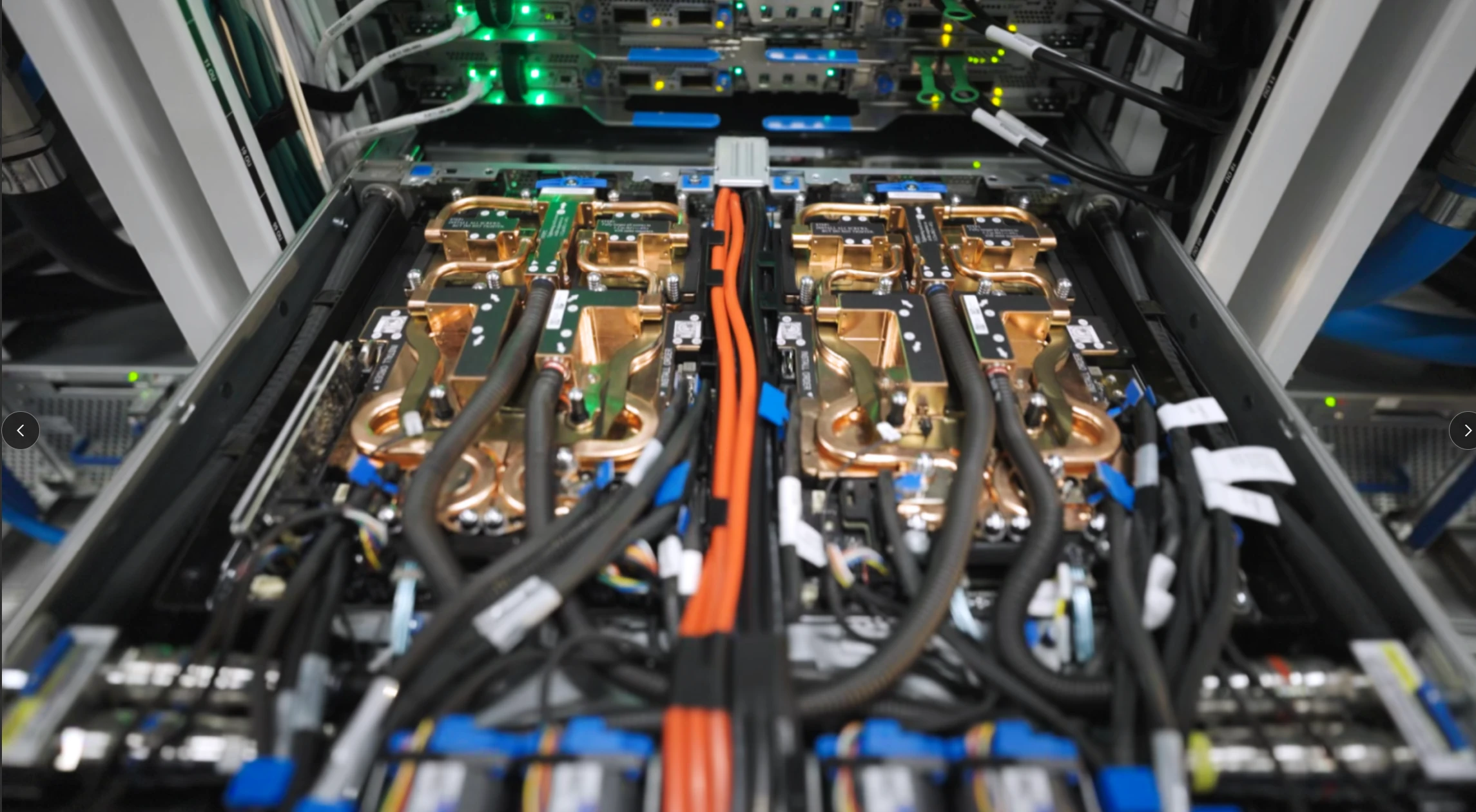
Microsoft delivers the first at-scale production cluster with more than 4,600 NVIDIA GB300 NVL72, featuring NVIDIA Blackwell Ultra GPUs connected through the next-generation NVIDIA InfiniBand network. This cluster is the first of many, as we scale to hundreds of thousands of Blackwell Ultra GPUs deployed across Microsoft’s AI datacenters globally, reflecting our continued commitment to redefining AI infrastructure and collaboration with NVIDIA. The massive scale clusters with Blackwell Ultra GPUs will enable model training in weeks instead of months, delivering high throughput for inference workloads. We are also unlocking bigger, more powerful models, and will be the first to support training models with hundreds of trillions of parameters.
This was made possible through collaboration across hardware, systems, supply chain, facilities, and multiple other disciplines, as well as with NVIDIA.
Power groundbreaking AI innovation with Azure AI Infrastructure
Microsoft Azure’s launch of the NVIDIA GB300 NVL72 supercluster is an exciting step in the advancement of frontier AI. This co-engineered system delivers the world’s first at-scale GB300 production cluster, providing the supercomputing engine needed for OpenAI to serve multitrillion-parameter models. This sets the definitive new standard for accelerated computing.
Ian Buck, Vice President of Hyperscale and High-performance Computing at NVIDIA
From NVIDIA GB200 to GB300: A new standard in AI performance
Earlier this year, Azure introduced ND GB200 v6 virtual machines (VMs), accelerated by NVIDIA’s Blackwell architecture. These quickly became the backbone of some of the most demanding AI workloads in the industry, including for organizations like OpenAI and Microsoft who already use massive clusters of GB200 NVL2 on Azure to train and deploy frontier models.
Now, with ND GB300 v6 VMs, Azure is raising the bar again. These VMs are optimized for reasoning models, agentic AI systems, and multimodal generative AI. Built on a rack-scale system, each rack has 18 VMs with a total of 72 GPUs:
72 NVIDIA Blackwell Ultra GPUs (with 36 NVIDIA Grace CPUs).
800 gigabits per second (Gbp/s) per GPU cross-rack scale-out bandwidth via next-generation NVIDIA Quantum-X800 InfiniBand (2x GB200 NVL72).
130 terabytes (TB) per second of NVIDIA NVLink bandwidth within rack.
37TB of fast memory.
Up to 1,440 petaflops (PFLOPS) of FP4 Tensor Core performance.
Building for AI supercomputing at scale
Building infrastructure for frontier AI requires us to reimagine every layer of the stack—computing, memory, networking, datacenters, cooling, and power—as a unified system. The ND GB300 v6 VMs are a clear representation of this transformation, from years of collaboration across silicon, systems, and software.
At the rack level, NVLink and NVSwitch reduce memory and bandwidth constraints, enabling up to 130TB per second of intra-rack data-transfer connecting 37TB total of fast memory. Each rack becomes a tightly coupled unit, delivering higher inference throughput at reduced latencies on larger models and longer context windows, empowering agentic and multimodal AI systems to be more responsive and scalable than ever.
To scale beyond the rack, Azure deploys a full fat-tree, non-blocking architecture using NVIDIA Quantum-X800 Gbp/s InfiniBand, the fastest networking fabric available today. This ensures that customers can scale up training of ultra-large models efficiently to tens of thousands of GPUs with minimal communication overhead, thus delivering better end-to-end training throughput. Reduced synchronization overhead also translates to maximum utilization of GPUs, which helps researchers iterate faster and at lower costs despite the compute-hungry nature of AI training workloads. Azure’s co-engineered stack, including custom protocols, collective libraries, and in-network computing, ensures the network is highly reliable and fully utilized by the applications. Features like NVIDIA SHARP accelerate collective operations and double effective bandwidth by performing math in the switch, making large-scale training and inference more efficient and reliable.
Azure’s advanced cooling systems use standalone heat exchanger units and facility cooling to minimize water usage while maintaining thermal stability for dense, high-performance clusters like GB300 NVL72. We also continue to develop and deploy new power distribution models capable of supporting the high energy density and dynamic load balancing required by the ND GB300 v6 VM class of GPU clusters.
Further, our reengineered software stacks for storage, orchestration, and scheduling are optimized to fully use computing, networking, storage, and datacenter infrastructure at supercomputing scale, delivering unprecedented levels of performance at high efficiency to our customers.
Looking ahead
Microsoft has invested in AI infrastructure for years, to allow for fast enablement and transition into the newest technology. It is also why Azure is uniquely positioned to deliver GB300 NVL72 infrastructure at production scale at a rapid pace, to meet the demands of frontier AI today.
As Azure continues to ramp up GB300 worldwide deployments, customers can expect to train and deploy new models in a fraction of the time compared to previous generations. The ND GB300 v6 VMs v6 are poised to become the new standard for AI infrastructure, and Azure is proud to lead the way, supporting customers to advance frontier AI development.
Stay tuned for more updates and performance benchmarks as Azure expands production deployment of NVIDIA GB300 NVL72 globally.
Read more from NVIDIA here.
The post Microsoft Azure delivers the first large scale cluster with NVIDIA GB300 NVL72 for OpenAI workloads appeared first on Microsoft Azure Blog.
Quelle: Azure
AI coding assistants have evolved from simple autocomplete tools into full development partners. Yet even the best of them, like Claude Code, can’t act directly on your environment. Claude Code can suggest a database query, but can’t run it. It can draft a GitHub issue, but can’t create it. It can write a Slack message, but can’t send it. You’re still copying, pasting, and context-switching between tools.
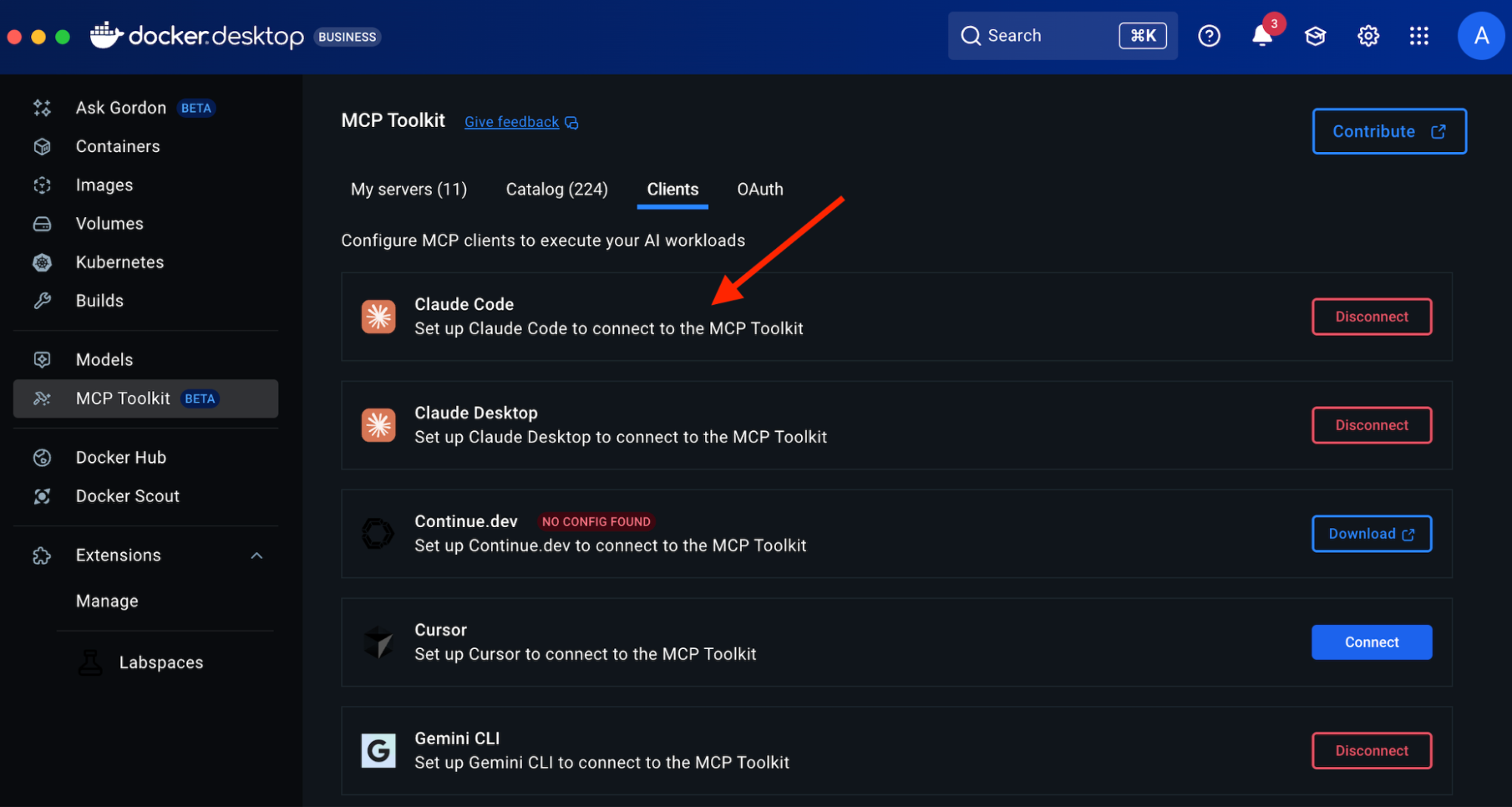
That’s where Model Context Protocol (MCP) and Docker MCP Toolkit come in. MCP connects Claude Code to your real tools, databases, repositories, browsers, and APIs, while Docker MCP Toolkit makes setup effortless and secure. We recently added Claude Code as a client that you can easily enable with one click in Docker Desktop.
In this guide, you’ll learn how to:
Set up Claude Code and connect it to Docker MCP Toolkit.
Configure the Atlassian MCP server for Jira integration.
Configure the GitHub MCP server to access repository history and run git commands.
Configure the Filesystem MCP server to scan and read your local codebase.
Automate tech debt tracking by converting 15 TODO comments into tracked Jira tickets.
See how Claude Code can query git history, categorize issues, and create tickets — all without leaving your development environment.
With more than 200 pre-built, containerized MCP servers, one-click deployment in Docker Desktop, and automatic credential handling, developers can connect Claude Code to trusted environments in minutes — not hours. No dependency issues, no manual configuration, just a consistent, secure workflow across Mac, Windows, and Linux.
Why Claude Code and Docker MCP Toolkit work better together
While MCP provides the protocol, Docker MCP Toolkit makes it practical. Without containerization, setting up MCP servers means managing Node.js versions, Python dependencies, credentials in plaintext config files, and different configurations for every developer’s machine. The setup that should take 2 minutes takes 2-6 hours per developer.
Docker MCP Toolkit eliminates this friction:
200+ pre-built MCP servers in the catalog
One-click deployment through Docker Desktop
Secure credential management via OAuth or encrypted storage
Consistent configuration across Mac, Windows, and Linux
Automatic updates when new server versions release
We built Docker MCP Toolkit to meet developers where they are. If you’re using Claude Code, you should be able to connect it to your tools without wrestling with infrastructure.
Setting up Claude Code in Docker MCP Toolkit
Prerequisites
Install Docker Desktop 4.40 or later
Enable MCP Toolkit
Step 1. Install Claude Code
To install Claude Code, run the following command:
# Install Claude Code
curl -fsSL https://claude.ai/install.sh | sh
# Verify installation
claude –version # Should show 2.0.5+
Step 2. Connect Claude Code to Docker MCP Toolkit
Option 1: One-Click Connection (Recommended)
Open Docker Desktop
Navigate to MCP Toolkit in the sidebar
Click the Clients tab
Find “Claude Code” in the list.
Click Connect
Docker Desktop automatically configures the MCP Gateway connection.
Option 2: Manual Command Line Setup
If you prefer a command-line setup or need to configure a specific project:
Navigate to your project folder in the terminal
Run this command:
docker mcp client connect claude-code
You’ll see output like this:
=== Project-wide MCP Configurations (/your/project/path) ===
● claude-code: connected
MCP_DOCKER: Docker MCP Catalog (gateway server) (stdio)
● cursor: no mcp configured
● vscode: no mcp configured
You might have to restart 'claude-code'.
The connected status confirms Claude Code is linked to the Docker MCP Gateway.
What’s happening under the hood?
The connection command creates a .mcp.json file in your project directory:
{
"mcpServers": {
"MCP_DOCKER": {
"command": "docker",
"args": ["mcp", "gateway", "run"],
"type": "stdio"
}
}
}
This configuration tells Claude Code to use Docker’s MCP Gateway for all MCP server access. The gateway handles routing to your containerized servers.
Step 3. Restart Claude Code
# Exit Claude Code if running, then restart
claude code
Step 4. Verify the Connection
Inside Claude Code, type /mcp to see available MCP servers.
You should see the Docker MCP Gateway listed, which provides access to all enabled MCP servers. The /MCP_DOCKER tools indicate a successful connection. As you enable more MCP servers in Docker Desktop, they’ll appear here automatically.
First Run: What to Expect
When you start Claude Code for the first time after connecting to Docker MCP Toolkit, you’ll see a prompt about the new MCP server:
New MCP server found in .mcp.json: MCP_DOCKER
MCP servers may execute code or access system resources. All tool calls require approval.
Learn more in the MCP documentation (https://docs.claude.com/s/claude-code-mcp).
❯ 1. Use this and all future MCP servers in this project
2. Use this MCP server
3. Continue without using this MCP server
Enter to confirm · Esc to reject
Choose Option 1 (recommended). This configures your project to automatically use Docker MCP Toolkit and any MCP servers you enable in Docker Desktop. You won’t need to approve MCP servers individually each time.
After confirming, you’ll see the Claude Code home screen:
Claude Code v2.0.5
Welcome back!
Sonnet 4.5 · API Usage Billing
/…/your/project/path
Tips for getting started
Run /init to create a CLAUDE.md file with…
Run /terminal-setup to set up terminal in…
Use claude to help with file analysis, ed…
Be as specific as you would with another …
Recent activity
No recent activity
You’re now ready to use Claude Code with MCP servers from Docker Desktop.
Real-World Demo: TODO-to-Ticket Automation Demo
Now that you’ve connected Claude Code to Docker MCP Toolkit, let’s see it in action with a practical example. We’ll automatically convert TODO comments in a real codebase into tracked Jira tickets — complete with git history, priority categorization, and proper linking.
Configuring the required MCP Servers
For this automation, we’ll orchestrate three MCP servers:
Filesystem MCP – to scan your codebase and read source files
GitHub MCP – to run git blame and extract author information
Atlassian (Jira) MCP – to create and manage Jira issues
We’ll walk through enabling and configuring all three MCP servers.
What makes this realistic?
Uses actual codebase (catalog-service-node)
Extracts git blame info to identify code authors
Categorizes by business priority using keyword analysis
Creates properly formatted Jira issues with context
Links back to exact file/line numbers for easy navigation
Time investment:
Manual process: ~20-30 minutes
Automated with Claude Code + MCP: ~2 minutes total
Let’s walk through it step-by-step.
1. Configure the Atlassian MCP Server
In Docker Desktop → MCP Toolkit → Catalog:
Search “Atlassian”
Click + Add
Go to Configuration tab
Add your Atlassian credentials:
atlassian.jira.url: https://yourcompany.atlassian.net
atlassian.jira.username: your email
API tokens in the Secrets section
Important notes:
For Atlassian API authentication, the “username” is always your Atlassian account email address, which you use together with the API token for basic authentication
Click Start Server
As shown in the screenshot, the Atlassian MCP provides 37 tools, including:
jira_create_issue – Create Jira issues
jira_add_comment – Add comments
jira_batch_create_issues – Bulk create
And many more Jira operations
For this demonstration, I created a new JIRA project called “TODO Demo” with a project key “TD”.
2. Configure GitHub MCP Server
The GitHub MCP server supports two authentication methods. We recommend OAuth for the easiest setup.
Option A: OAuth Authentication (Recommended – Easiest)
Open Docker Desktop → MCP Toolkit → Catalog
Search for “GitHub”
Find GitHub Official and click + Add
Go to the Configuration tab
Select OAuth as the authentication method
Click the “authorize with the GitHub OAuth provider” link
You’ll be redirected to GitHub to authorize the connection
After authorization, return to Docker Desktop
Click Start Server
Advantage: No manual token creation needed. Authorization happens through GitHub’s secure OAuth flow.
Option B: Personal Access Token (PAT)
If you prefer to use a Personal Access Token or need more granular control:
Step 1: Create a GitHub Personal Access Token
Go to GitHub.com and sign in to your account
Click your profile picture in the top-right corner
Select “Settings”
Scroll down to “Developer settings” in the left sidebar
Click on “Personal access tokens” → “Tokens (classic)”
Click “Generate new token” → “Generate new token (classic)”
Give your token a descriptive name like “Docker MCP GitHub Access”
Select the following scopes (permissions):
repo (Full control of private repositories)
workflow (if you need workflow actions)
read:org (if you need organization access)
Click “Generate token” and copy the token immediately (you won’t see it again!)
Step 2: Configure in Docker Desktop
In Docker Desktop → MCP Toolkit → Catalog
Find GitHub Official and click + Add
Go to the Configuration tab
Select Personal Access Token as the authentication method
Paste your token in the provided field
Click Start Server
Or via CLI:
docker mcp secret set GITHUB.PERSONAL_ACCESS_TOKEN=github_pat_YOUR_TOKEN_HERE
This gives users the flexibility to choose the method that works best for their workflow, with OAuth being the simpler path for most users.
3. Configure Filesystem MCP Server
The Filesystem MCP server allows Claude Code to read files from your local system. You need to specify which directories it can access.
Step 1: Enable Filesystem MCP Server
Open Docker Desktop → MCP Toolkit → Catalog
Search for “Filesystem”
Find Filesystem (Reference) and click + Add
Step 2: Configure Allowed Paths
Go to the Configuration tab
Under filesystem.paths, add the directories Claude Code should access
For this demo, add your project directory (e.g., /Users/your_username/ or your project path)
You can add multiple paths by clicking the + button
Click Save
Click Start Server
Important: Only grant access to directories you’re comfortable with Claude Code reading. The Filesystem MCP server is scoped to these specific paths for security.
Run the Automation
Clone the repository
git clone https://github.com/ajeetraina/catalog-service-node
Change directory to catalog-service-node and run the following command:
claude code
Paste this instruction into Claude Code:
Scan this codebase for all TODO and FIXME comments.
For each one:
1. Extract the comment and surrounding code context (5 lines before/after)
2. Use git blame to identify who wrote it and when
3. Determine priority based on keywords:
– High: "race condition", "data loss", "security", "failure", "crash"
– Medium: "performance", "slow", "cache", "optimization"
– Low: "documentation", "refactor", "cleanup"
4. Create a Jira issue with:
– Project: TD
– Issue Type: Task
– Summary: Extract from the TODO/FIXME comment
– Description: Include code context and explanation
– Priority: Based on categorization above (use additional_fields: {"priority": {"name": "High"}})
– Labels: ["tech-debt"]
– Add a comment with link to exact GitHub file and line number
Provide a summary showing:
– Total TODOs/FIXMEs found
– Breakdown by priority (High/Medium/Low)
– List of created Jira issues with links
Watch Claude Code Work
Claude Code will orchestrate multiple MCP servers to complete this task:
Filesystem MCP to scan your src/ directory
GitHub MCP to run git blame and get author info
Atlassian MCP to create Jira issues in your TODO Demo project
Here’s what the output looks like:
I'll scan the codebase for TODO and FIXME comments, analyze them, and create Jira issues for tracking.
⏺ Search(pattern: "(TODO|FIXME|XXX|HACK):", output_mode: "content")
⎿ Found 22 lines (ctrl+o to expand)
⏺ Now let me read each file to get the full context around the TODO/FIXME comments (excluding git hooks):
⏺ Read(src/services/StorageService.js)
⎿ Read 70 lines (ctrl+o to expand)
⏺ Read(src/services/InventoryService.js)
⎿ Read 55 lines (ctrl+o to expand)
⏺ Read(src/services/ProductService.js)
⎿ Read 117 lines (ctrl+o to expand)
⏺ Read(src/services/PublisherService.js)
⎿ Read 67 lines (ctrl+o to expand)
⏺ Read(src/index.js)
⎿ Read 100 lines (ctrl+o to expand)
Next, Claude Code runs git blame to identify who created each TODO:
⏺ Now let me run git blame on each file to identify authors and dates:
⏺ Bash(git blame -L 1,15 src/services/StorageService.js)
⎿ 4bdb4454 (Ajeet Raina 2025-10-03 20:08:01 +0530 1) // FIXME: No error handling for S3 upload failures
4bdb4454 (Ajeet Raina 2025-10-03 20:08:01 +0530 2) // Failed uploads leave products without images
4bdb4454 (Ajeet Raina 2025-10-03 20:08:01 +0530 3) // Need to rollback product creation or retry upload
… +12 lines (ctrl+o to expand)
⏺ Bash(git blame -L 1,15 src/services/InventoryService.js)
⎿ 4bdb4454 (Ajeet Raina 2025-10-03 20:08:01 +0530 1) // FIXME: No retry logic for inventory service failures
4bdb4454 (Ajeet Raina 2025-10-03 20:08:01 +0530 2) // When WireMock/external service is down, requests fail immediately
4bdb4454 (Ajeet Raina 2025-10-03 20:08:01 +0530 3) // Need exponential backoff retry mechanism
… +12 lines (ctrl+o to expand)
⏺ Bash(git blame -L 1,13 src/services/ProductService.js)
⎿ 4bdb4454 (Ajeet Raina 2025-10-03 20:08:01 +0530 1)
4bdb4454 (Ajeet Raina 2025-10-03 20:08:01 +0530 2) // TODO: Add pagination support for product listing
4bdb4454 (Ajeet Raina 2025-10-03 20:08:01 +0530 3) // Currently returns all products – will cause performance issues with large
… +11 lines (ctrl+o to expand)
⏺ Bash(git blame -L 1,16 src/services/PublisherService.js)
⎿ 4bdb4454 (Ajeet Raina 2025-10-03 20:08:01 +0530 1) // FIXME: Kafka publish failures are silently ignored
4bdb4454 (Ajeet Raina 2025-10-03 20:08:01 +0530 2) // If Kafka is unavailable, product updates aren't tracked
4bdb4454 (Ajeet Raina 2025-10-03 20:08:01 +0530 3) // Need dead letter queue or retry mechanism
… +13 lines (ctrl+o to expand)
⏺ Bash(git blame -L 1,12 src/index.js)
⎿ 4bdb4454 (Ajeet Raina 2025-10-03 20:08:01 +0530 1) // TODO: Add request rate limiting
4bdb4454 (Ajeet Raina 2025-10-03 20:08:01 +0530 2) // API has no throttling, vulnerable to abuse
4bdb4454 (Ajeet Raina 2025-10-03 20:08:01 +0530 3) // Need per-IP rate limiting
… +9 lines (ctrl+o to expand)
⏺ Now let me categorize by priority and create Jira issues. First, let me get the GitHub remote URL to include in the Jira issues:
⏺ Bash(git remote get-url origin)
⎿ https://github.com/ajeetraina/catalog-service-node
Claude Code then categorizes issues by priority and creates Jira tickets:
Now I'll create Jira issues for all the TODO/FIXME comments. Based on my analysis:
HIGH Priority (contains keywords: race condition, data loss, security, failure, crash):
1. Inventory sync race condition
2. S3 upload failures (data loss potential)
3. Kafka publish failures (data loss)
4. Kafka acknowledgment handling (data loss)
5. Error responses expose internal details (security)
6. Inventory service failures
MEDIUM Priority (performance, slow, cache, optimization):
1. Cache inventory data (performance)
2. Add pagination support (performance)
3. Image resizing/optimization (performance)
4. Batch publishing (performance)
LOW Priority (documentation, refactor, cleanup):
1. LocalStack configuration not documented
2. Product deletion doesn't clean up S3 images (cleanup)
3. No validation for duplicate SKUs
4. Request rate limiting
5. Health check endpoint
6. Event schema versioning
7. Multiple images per product
8. Search functionality
9. Inventory low-stock alerts
In under 2 minutes, Claude Code has:
Scanned the entire codebase
Identified 15+ TODO/FIXME comments
Retrieved git history for each one
Categorized them by business priority
Created properly formatted Jira issues with full context
Linked each issue back to the exact file and line number
What would have taken 20-30 minutes of manual work is now automated and consistent. This Jira automation is just one example. Here’s how MCP transforms other common development workflows:
Workflow Comparison: Before vs. After MCP
Task
Before MCP (Manual)
After MCP (Automated)
Time Saved
Debug Checkout Failures
1. Ask Claude for SQL query
2. Copy query to database client
3. Run query and copy results
4. Paste results back to Claude
5. Get analysis
6. Ask Claude to draft GitHub issue
7. Manually create issue in GitHub
8. Notify team in Slack
You: “Why are checkouts failing? Investigate and create a GitHub issue.”
Claude Code: Queries production database, finds 23% payment timeouts, identifies root cause as connection pool exhaustion, creates GitHub issue #1847, posts to #backend-alerts on Slack. Result: Done. Issue link provided.
~15 min → ~2 min
Investigate Performance Issue
1. Check multiple monitoring dashboards
2. Export slow query logs
3. Analyze locally
4. Document findings in Google Doc
5. Create Jira ticket manually
6. Add links between doc and ticket
7. Notify team
You: “Why are API response times spiking?”
Claude Code:
• Queries slow_queries log
• Finds: 127 queries taking >2s
• Identifies missing index on users.email
• Creates migration file
• Opens PR with fix
• Posts summary to #backend
~20 min → ~3 min
Code Review for Security
1. Review PR manually
2. Run security scanner separately
3. Document findings in notepad
4. Post review comments one by one
5. Create tracking ticket for issues
6. Update security dashboard
You: “Review PR #234 for security issues”
Claude Code:
• Analyzes 12 changed files
• Finds hardcoded API key (config.js:47)
• Finds: SQL injection risk in query build
• Posts inline review comments with fixes
• Creates security ticket SEC-445
• Updates security tracking board
~25 min → ~4 min
From 15 minutes of context switching to 2-3 minutes of continuous flow.
Conclusion
You’ve just seen how Docker MCP Toolkit transforms Claude Code from an isolated coding assistant into an integrated development partner. What used to require copying between terminals, web browsers, and documentation now happens in one continuous flow.
Next steps:
Explore the 220+ MCP servers in the Docker MCP catalog
Connect Claude Code to your databases, APIs, and tools
Share your setup with your team for consistent workflows
The future of development isn’t about switching between tools — it’s about tools that work together seamlessly. Docker MCP Toolkit makes that future available today.
Learn more
Explore the MCP Catalog: Discover containerized, security-hardened MCP servers
Download Docker Desktop to get started with the MCP Toolkit: Run MCP servers easily and securely
Check out our MCP Horror Stories series to see common MCP security pitfalls and how you can avoid them
Quelle: https://blog.docker.com/feed/






