Amazon Aurora DSQL is now available in Europe (Frankfurt)

Starting today, Amazon Aurora DSQL is now available in Europe (Frankfurt). Aurora DSQL is the fastest serverless, distributed SQL database with active-active high availability and multi-Region strong consistency. Aurora DSQL enables you to build always available applications with virtually unlimited scalability, the highest availability, and zero infrastructure management. It is designed to make scaling and resilience effortless for your applications and offers the fastest distributed SQL reads and writes. Aurora DSQL is now available in the following AWS Regions: US East (N. Virginia), US East (Ohio), US West (Oregon), Asia Pacific (Osaka), Asia Pacific (Tokyo), Asia Pacific (Seoul), Europe (Ireland), Europe (London), Europe (Paris), and Europe (Frankfurt). Get started with Aurora DSQL for free with the AWS Free Tier. To learn more, visit the Aurora DSQL webpage and documentation.
Quelle: aws.amazon.com

Amazon Connect outbound campaigns supports preview dialing for greater agent control

Amazon Connect outbound campaigns now offers a preview dialing mode that gives agents more context about a customer before placing a call. Agents can see key customer information—such as name, account balance, and prior interactions—and choose the right moment to call. Campaign managers can tailor preview settings and monitor performance through new dashboards that bring visibility to agent behavior, campaign outcomes, and customer engagement trends. Without proper context, agents struggle to personalize interactions, leading to low customer engagement and poor experiences. Additionally, businesses can face steep regulatory penalties under laws such as the U.S. Telephone Consumer Protection Act (TCPA) or the UK Office of Communications (OFCOM) for delays in customer-agent connection. With preview dialing, campaign managers can define review time limits and optionally enable contact removal from campaigns. During preview, agents see a countdown timer alongside customer data and can initiate calls at any moment. Analytics reveal performance patterns—such as average preview time or discard volume—giving managers data to optimize strategy and coach teams effectively. By reserving an agent prior to placing the call, companies can support compliance with regulations while bringing precision to outbound calling, improving both customer connection and operational control. With Amazon Connect outbound campaigns, companies pay-as-they-go for campaign processing and channel usage. Preview dialing is available in AWS regions, including US East (N. Virginia), US West (Oregon), Africa (Cape Town), Asia Pacific (Seoul), Asia Pacific (Singapore), Asia Pacific (Sydney), Asia Pacific (Tokyo), Canada (Central), Europe (Frankfurt), and Europe (London). To learn more about configuring preview dialing, visit our webpage.
Quelle: aws.amazon.com

Innovation spotlight: How 3 customers are driving change with migration to Azure SQL

Organizations are under constant pressure to modernize their estate. Legacy infrastructure, manual processes, and increasing data volumes in silos make it harder to deliver the performance, security, and agility that today’s business landscape demands to keep pace with the competitive pressures.

Continue reading to learn about how three organizations—Thomson Reuters, Hexure, and CallRevu—each jumpstarted their transformation with migration of their on-premises workloads to Microsoft Azure. As a result, organizations were able to improve operational efficiency and accelerate AI-powered innovation. Their stories reveal how fully managed platform-as-a-service solutions like Microsoft Azure SQL Managed Instance helps organizations move from legacy constraints to a scalable and secure AI-ready foundation ready to power future possibilities.

Try Azure SQL Managed Instance today

Modernization at scale: Thomson Reuters  

For Thomson Reuters, one of the world’s most trusted providers of tax and accounting solutions, modernization was less of an option and more of a necessity. Supporting over 7,000 firms and 70,000 users during the peak of tax season required an infrastructure that was both robust and scalable. The company previously hosted more than 18,000 databases and over 500 terabytes of data on third-party servers, an approach that came with high costs, operational complexity, and challenges scaling to meet seasonal demand.  

By migrating this massive estate into Azure SQL Managed Instance from another cloud hosting environment, Thomson Reuters achieved modernization at scale. With programs like Microsoft Azure Migrate to support every step of the migration journey, and automation tools like PowerShell and Azure Resource Manager templates, they were able to streamline deployments and maintain performance while minimizing disruptions. Azure’s fully managed platform allowed Thomson Reuters to streamline database administration and automated key tasks like backups and updates. As a result, their teams could focus on delivering value to customers rather than managing infrastructure. Azure Virtual Desktop together with Windows 11 facilitated access to tax preparation applications, reducing complexity and costs.  

The benefits were immediate and significant. Thomson Reuters gained: 

Consistent performance during seasonal peaks.

Improved resiliency.

Reduced support overhead.

Optimized costs across licensing and infrastructure.  

Thomson Reuters now has a foundation for continued growth and the flexibility to scale its services as demand requires.

Thomson Reuters transforms tax prep for 7K businesses with Azure SQL Managed Instance

Operational efficiency and performance: Hexure  

While Thomson Reuters’ story highlights scale, Hexure’s migration shows the operational efficiency gains that come from moving to a fully managed platform with Azure SQL Managed Instance and Microsoft Azure App Service. Hexure provides digital solutions for insurance and financial services companies—managing sensitive customer information across many databases and applications.  

The company faced challenges with aging infrastructure that slowed down critical processes and demanded heavy manual intervention. Provisioning new customer instances, managing backups, and handling failovers was time-intensive. Processing delays made it harder to serve clients with the speed and reliability customers expect.  

Migrating to Azure SQL Managed Instance changed that equation. Hexure cut processing times by up to 97%, transforming overnight batch jobs into near-instant operations. Migration times were reduced by more than 80% thanks to built-in compatibility and automation. With Microsoft Azure Key Vault, Hexure could better manage cybersecurity and protection of their data. Features like point-in-time restore, automated backups, and geo-replication not only boosted resilience but also ensured compliance with industry regulations.  

Equally important, the move allowed Hexure to:  

Onboard new customers in minutes versus hours.

Deliver faster shipping cycles for features and platform improvements.

Reduce management of infrastructure—including servers.

With migration, Hexure could now focus on innovation and customer service. For an industry where trust and responsiveness are critical, this operational leap forward directly translates into stronger client relationships.

Hexure cuts processing time by up to 97.2% with Azure SQL Managed Instance

Innovation with AI and insights: CallRevu  

CallRevu’s story illustrates the next frontier: innovation. CallRevu helps automotive dealerships improve lead conversion, follow-up, and customer experience by analyzing phone calls across more than 5,000 locations. Handling this volume of conversational data requires not only advanced analytics, but scalable platform. 

With a fully managed solution built on Azure SQL Managed Instance, Microsoft Azure Kubernetes Service together with Microsoft Azure AI services, CallRevu created a platform that goes beyond storing and managing data. It ensures reliable, scalable performance for call data and transcriptions, while services like Microsoft Azure OpenAI for real-time summaries and insights. This integration allows CallRevu to surface actionable insights in real time—helping dealerships connect marketing to results, improve agent performance, and ultimately drive more sales. 

The company also benefits from the operational simplicity that Azure SQL Managed Instance delivers. By migrating from their on-premises SQL Server environment, they were able to benefit from automated backups, scaling, and monitoring to reduce administrative overhead, while built-in security helps protect sensitive customer interactions. Data is mirrored in Microsoft Fabric allowing Power BI dashboards to generate real-time insights. With a strong and agile data foundation in place, CallRevu can focus on innovating faster—bringing AI-powered capabilities to an industry where customer engagement is a critical differentiator while also:  

Increasing customer satisfaction by 10%.

Saving USD500,000 annually in labor costs.

Increasing lead conversion by 15%.

CallRevu delivers real-time insights for auto dealerships with Azure AI Foundry

Take the next step in your transformation journey  

Modernization is not a one-time project—it’s a journey that is different for every organization. For some organizations, the first step is simply migrating off legacy servers. For others, it’s about rethinking how operations can run more efficiently. And for many, it’s about leveraging cloud and AI to create entirely new opportunities.  

The experiences of Thomson Reuters, Hexure, and CallRevu highlight how migration to a platform-as-a-service anchored on database solutions like Azure SQL Managed Instance supports every stage of that journey. By providing a managed, secure, and scalable cloud platform, backed by the tools and programs, organizations can migrate with confidence, operate more efficiently, and innovate faster.

Ready to get started? Here are some free tools you can start trying today: 

Try Azure SQL Managed Instance free today. 

Learn how Azure Migrate can help you get started.

Join Microsoft at PASS Data Community Summit 2025 to continue your learning journey and how Azure is making it easier than ever to start your transformation journey. Learn more on our sponsorship and presence.
The post Innovation spotlight: How 3 customers are driving change with migration to Azure SQL appeared first on Microsoft Azure Blog.
Quelle: Azure

The Signals Loop: Fine-tuning for world-class AI apps and agents 

In the early days of the AI shift, AI applications were largely built as thin layers on top of off-the-shelf foundation models. But as developers began tackling more complex use cases, they quickly encountered the limitations of simply using RAG on top of off-the-shelf models. While this approach offered a fast path to production, it often fell short in delivering the accuracy, reliability, efficiency, and engagement needed for more sophisticated use cases.

However, this dynamic is shifting. As AI shifts from assistive copilots to autonomous co-workers, the architecture behind these systems must evolve. Autonomous workflows, powered by real-time feedback and continuous learning, are becoming essential for productivity and decision-making. AI applications that incorporate continuous learning through real-time feedback loops—what we refer to as the ‘signals loop’—are emerging as the key to building more adaptive and resilient differentiation over time.

Learn how you can start fine-tuning models with Azure AI Foundry

Building truly effective AI apps and agents requires more than just access to powerful LLMs. It demands a rethinking of AI architecture—one that places continuous learning and adaptation at its core. The ‘signals loop’ centers on capturing user interactions and product usage data in real time, then systematically integrating this feedback to refine model behavior and evolve product features, creating applications that get better over time.

As the rise of open-source frontier models democratizes access to model weights, fine-tuning (including reinforcement learning) is becoming more accessible and building these loops becomes more feasible. Capabilities like memory are also increasing the value of signals loops. These technologies enable AI systems to retain context and learn from user feedback—driving greater personalization and improving customer retention. And as the use of agents continues to grow, ensuring accuracy becomes even more critical, underscoring the growing importance of fine-tuning and implementing a robust signals loop. 

At Microsoft, we’ve seen the power of the signals loop approach firsthand. First-party products like Dragon Copilot and GitHub Copilot exemplify how signals loops can drive rapid product improvement, increased relevance, and long-term user engagement.

Implementing signals loop for continuous AI improvement: Insights from Dragon Copilot and GitHub Copilot

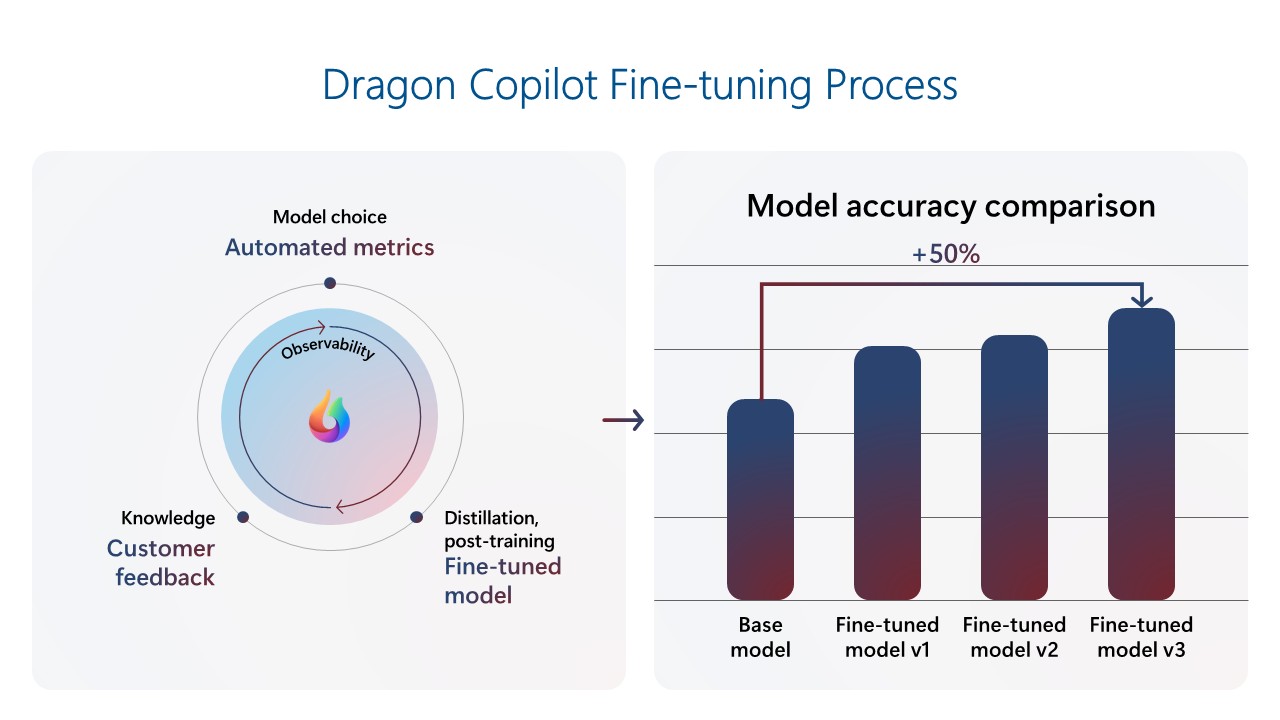
Dragon Copilot is a healthcare Copilot that helps doctors become more productive and deliver better patient care. The Dragon Copilot team has built a signals loop to drive continuous product improvement. The team built a fine-tuned model using a repository of clinical data, which resulted in much better performance than the base foundational model with prompting only. As the product has gained usage, the team used customer feedback telemetry to continuously refine the model. When new foundational models are released, they are evaluated with automated metrics to benchmark performance and updated if there are significant gains. This loop creates compounding improvements with every model generation, which is especially important in a field where the demand for precision is extremely high. The latest models now outperform base foundational models by ~50%. This high performance helps clinicians focus on patients, capture the full patient story, and improve care quality by producing accurate, comprehensive documentation efficiently and consistently.

GitHub Copilot was the first Microsoft Copilot, capturing widespread attention and setting the standard of what AI-powered assistance could look like. In its first year, it rapidly grew to over a million users, and has now reached more than 20 million users. As expectations for code suggestion quality and relevance continue to rise, the GitHub Copilot team has shifted its focus to building a robust mid-training and post-training environment, enabling a signals loop to deliver Copilot innovations through continuous fine-tuning. The latest code completions model was trained on over 400 thousand real-world samples from public repositories and further tuned via reinforcement learning using hand-crafted, synthetic training data. Alongside this new model, the team introduced several client-side and UX changes, achieving an over 30% improvement in retained code for completions and a 35% improvement in speed. These enhancements allow GitHub Copilot to anticipate developer needs and act as a proactive coding partner.

Key implications for the future of AI: Fine-tuning, feedback loops, and speed matter 

The experiences of Dragon Copilot and GitHub Copilot underscore a fundamental shift in how differentiated AI products will be built and scaled moving forward. A few key implications emerge:

Fine-tuning is not optional—it’s strategically important: Fine-tuning is no longer niche, but a core capability that unlocks significant performance improvements. Across our products, fine-tuning has led to dramatic gains in accuracy and feature quality. As open-source models democratize access to foundational capabilities, the ability to fine-tune for specific use cases will increasingly define product excellence.

Feedback loops can generate continuous improvement: As foundational models become increasingly commoditized, the long-term defensibility of AI products will not come from the model alone, but from how effectively those models learn from usage. The signals loop—powered by real-world user interactions and fine-tuning—enables teams to deliver high-performing experiences that continuously improve over time.

Companies must evolve to support iteration at scale, and speed will be key: Building a system that supports frequent model updates requires adjusting data pipelines, fine-tuning, evaluation loops, and team workflows. Companies’ engineering and product orgs must align around fast iteration and fine-tuning, telemetry analysis, synthetic data generation, and automated evaluation frameworks to keep up with user needs and model capabilities. Organizations that evolve their systems and tools to rapidly incorporate signals—from telemetry to human feedback—will be best positioned to lead. Azure AI Foundry provides the essential components needed to facilitate this continuous model and product improvement.

Agents require intentional design and continuous adaptation: Building agents goes beyond model selection. It demands thoughtful orchestration of memory, reasoning, and feedback mechanisms. Signals loops enable agents to evolve from reactive assistants into proactive co-workers that learn from interactions and improve over time. Azure AI Foundry provides the infrastructure to support this evolution, helping teams design agents that act, adapt dynamically, and deliver sustained value.

While in the early days of AI fine-tuning was not economical and required lots of time and effort, the rise of open-source frontier models and methods like LoRA and distillation have made tuning more cost-effective, and tools have become easier to use. As a result, fine-tuning is more accessible to more organizations than ever before. While out-of-the-box models have a role to play for horizontal workloads like knowledge search or customer service, organizations are increasingly experimenting with fine-tuning for industry and domain-specific scenarios, adding their domain-specific data to their products and models.

The signals loop ‘future proofs’ AI investments by enabling models to continuously improve over time as usage data is fed back into the fine-tuned model, preventing stagnated performance.

Build adaptive AI experiences with Azure AI Foundry

To simplify the implementation of fine-tuning feedback loops, Azure AI Foundry offers industry-leading fine-tuning capabilities through a unified platform that streamlines the entire AI lifecycle—from model selection to deployment—while embedding enterprise-grade compliance and governance. This empowers teams to build, adapt, and scale AI solutions with confidence and control. 

Here are four key reasons why fine-tuning on Azure AI Foundry stands out: 

Model choice: Access a broad portfolio of open and proprietary models from leading providers, with the flexibility to choose between serverless or managed compute options. 

Reliability: Rely on 99.9% availability for Azure OpenAI models and benefit from latency guarantees with provisioned throughput units (PTUs). 

Unified platform: Leverage an end-to-end environment that brings together models, training, evaluation, deployment, and performance metrics—all in one place. 

Scalability: Start small with a cost-effective Developer Tier for experimentation and seamlessly scale to production workloads using PTUs. 

Join us in building the future of AI, where copilots become co-workers, and workflows become self-improving engines of productivity.

Learn more

Register for Ignite’s AI fine-tuning in Azure AI Foundry to make your agents unstoppable. 

Download the white paper: Learn how to unlock business-value with fine-tuning.

Explore fine-tuning with Azure AI Foundry documentation.

The post The Signals Loop: Fine-tuning for world-class AI apps and agents  appeared first on Microsoft Azure Blog.
Quelle: Azure

Amazon CloudWatch Agent adds support for Windows Event Log Filters

Amazon CloudWatch agent has added support for configurable Windows Event log filters. This new feature allows customers to selectively collect and send system and application events to CloudWatch from Windows hosts running on Amazon EC2 or on-premises. The addition of customizable filters helps customers to focus on events that meet specific criteria, streamlining log management and analysis. Using this new functionality of the CloudWatch agent, you can define filter criteria for each Windows Event log stream in the agent configuration file. The filtering options include event levels, event IDs, and regular expressions to either “include” or “exclude” text within events. The agent evaluates each log event against your defined filter criteria to determine whether it should be sent to CloudWatch. Events that don’t match your criteria are discarded. Windows event filters help you to manage your log ingestion by processing only the events you need, such as those containing specific error codes, while excluding verbose or unwanted log entries. Amazon CloudWatch Agent is available in all commercial AWS Regions, and the AWS GovCloud (US) Regions. To get started, see Create or Edit the CloudWatch Agent Configuration File in the Amazon CloudWatch User Guide.
Quelle: aws.amazon.com