FabCon Vienna: Build data-rich agents on an enterprise-ready foundation

FabCon Vienna: Build data-rich agents on an enterprise-ready foundation

Welcome everyone to the second annual European Microsoft Fabric Community Conference this week in the vibrant city of Vienna, Austria! With more than 130 sessions and 10 full-day workshops, this year’s sold-out European event is bigger than ever and there’s no shortage of incredible learning experiences. More than 4,200 attendees will get to test their driving skills on a high-octane racing simulator powered by Fabric Real Time Intelligence, ask their questions directly at expert-staffed booths, compete for a chance to be crowned the DataViz World Champion, and celebrate Microsoft Power BI’s tenth anniversary.

This event is an opportunity to get much deeper into Microsoft Fabric, which has now become the fastest growing data platform in Microsoft’s history.1 In less than two years, we’ve been able to expand Microsoft Fabric into a complete data and analytics platform with more than 25,000 customers, including about 80% of the Fortune 500, spanning everything from analytics to databases to real-time insights.

Microsoft has massive investments in Fabric, and I’m thrilled to share a new slate of announcements that will further advance Fabric’s vision as the most comprehensive, enterprise-grade data platform on the planet. These announcements include new OneLake shortcut and mirroring sources, a brand-new Graph database enabling you to connect entities across OneLake, new geospatial capabilities with Maps in Fabric, improved developer experiences, and new security controls—giving you what you need to run your mission-critical scenarios on Fabric.Get started with Microsoft Fabric

Unify your data with OneLake, the AI-ready data foundation

Any successful AI or data project starts with the right data foundation. Organizations like Lumen, IFS, NTT Data, and the Chalhoub Group have all adopted Microsoft OneLake as the unified access point for their data. Lumen—a leader in enterprise connectivity—cut 10,000 hours of manual effort with OneLake. “We used to spend up to six hours a day copying data into SQL servers,” says Chad Hollingsworth, Cloud Architect at Lumen. “Now it’s all streamlined. OneLake allowed us to ingest once and use anywhere.”

With mirroring and OneLake shortcuts, we’ve simplified how you connect to and transform your data with a zero-copy, zero-ETL approach that allows you to instantly connect to any data—no matter the cloud, database, vendor, engine, or format. In addition to the recent announcement of mirroring for Azure Databricks, we are thrilled to announce the preview of mirroring for Oracle and Google BigQuery, allowing you to access your Oracle and Google data in OneLake in near real-time. We are also extending Fabric data agents to support all mirrored databases, so you can ask questions about your external database data. Additionally, we are announcing the general availability of OneLake shortcuts to Azure Blob Storage and the preview of new OneLake shortcut transformations to automatically convert JSON and Parquet files to Delta tables, for instant analysis. Finally, we are releasing the OneLake integration with Azure AI Search into general availability, enabling you to easily ground your custom agents with OneLake data.

https://www.youtube-nocookie.com/embed/vgi5yb7KlxY?rel=0&v=vgi5yb7KlxY

With your data in OneLake, the OneLake catalog then provides the tools to discover, govern, and secure your data from a single place. With more than 30 million monthly active Power BI and Fabric users, it’s already the default source of data and insights. We are also launching OneLake security into full preview and creating a new tab in the OneLake catalog called Secure, where you can manage the security and permissions for all your data items. Along with this new tab, we are releasing OneLake catalog Govern tab into general availability.

https://www.youtube-nocookie.com/embed/UiFm5AjKXHQ?rel=0&v=UiFm5AjKXHQ

We are also excited to enrich our extensibility story with the preview of a new OneLake Table API, which lets apps use GET and LIST calls to discover and inspect OneLake tables stored in either Iceberg or Delta format using Fabric’s security model. Finally, for workspace owners, we are releasing preview of OneLake diagnostics that allows you to capture all the data activity and storage operations for a specific workspace into any lakehouse in the same capacity.

Train smarter agents with connected intelligence from graph and maps in Fabric

The first step in starting any agentic project is data. You need to bring the data together and ensure your data estate can handle the volume of data used in training. But sophisticated AI agents require more than simply huge quantities of data. To provide you with accurate answers grounded on your business, they need to first understand the relationships between data. They need to understand your business operations. They need context.

We believe this is the next major shift now required for a modern AI-ready data estate. You can learn more about this shift and our vision in Jessica Hawk’s blog, “Microsoft leads shift beyond data unification to organization, delivering next gen AI readiness.” To help you provide this context to your agents or any other data project, we are excited to announce the preview of two transformative new features in Fabric: Graph and Maps.

Model, analyze, and visualize complex data relationships

Graph in Fabric is designed to enable organizations to visualize and query relationships that drive business outcomes. Built upon the proven architecture principles of LinkedIn’s graph technology, graph in Fabric can help you reveal connections across customers, partners, and supply chains. But like your data, graph is easier to explain visually:

https://www.youtube-nocookie.com/embed/TFrAAdRdyVc?rel=0&v=TFrAAdRdyVc

“Graph in Microsoft Fabric is a game changer. The highly scalable graph engine coupled with Fabric’s ease of use is a uniquely powerful combination.”

—Luke Hiester, Senior Data Scientist, Eastman Chemical Company

Graph will roll out in various Fabric regions starting on October 1, 2025.

Visualize, analyze, and act on location-based data instantly

Maps in Fabric can help you bring geospatial context to your agents and operations by transforming enormous volumes of location-based data into interactive, real-time visualizations that drive location-aware decisions and enhance business awareness. Check out a full demo of the new experience:

https://www.youtube-nocookie.com/embed/zdZOrYR049E?rel=0&v=zdZOrYR049E

By combining streaming analytics, geospatial mapping, and contextual modeling, maps can help you extract location-based insights for your existing business processes to drive better awareness and outcomes.

You can learn more about graph and maps in Yitzhak Kesselman’s “The Foundation for Powering AI-Driven Operations: Fabric Real-Time Intelligence” blog.

Delighting developers with new tools in Fabric

Power BI is a leader in business intelligence for developers with more than 7 million actively building data visuals. Now, Microsoft Fabric is quickly becoming the home for all data developers. To help developers feel even more at home, we’re adding a huge range of new tooling across Fabric.

First, we’ve released the Fabric Extensibility Toolkit into preview—an evolution of the Microsoft Fabric Workload Development Kit but newly designed to help any developer bring their data apps to Fabric for their own organizations along with a simplified architecture and additional automation to drastically streamline development. Developers can now simply build their own Fabric items, and everything else like distribution, user interface, and security is taken care of for you—try it today.

We’re also introducing the preview of Fabric MCP, a developer-focused Model Context Protocol that enables AI-assisted code generation and item authoring in Microsoft Fabric. Designed for agent-powered development and automation, it streamlines how you build using Fabric’s public APIs with built-in templates and best-practice instructions. It also integrates with tools like Microsoft Visual Studio Code and GitHub Codespaces and is fully open and extensible.

With the general availability of Git integration and deployment pipelines with lakehouses, data warehouses, copy jobs, activator, Power BI reports, and many more, we are excited to announce that you can employ continuous integration and continuous delivery (CI/CD) capabilities across the Fabric platform. We are even extending CI/CD support to Fabric data agents. We are also releasing User Data Functions and the Fabric VS Code extension into general availability. And we are releasing an open-source version of the command line interface in Fabric.

Finally, we are also releasing horizontal tabs for open items, support for multiple active workspaces, and a new object explorer—all designed to make multitasking in Fabric smoother, faster, and more intuitive.

Build your mission-critical scenarios on Microsoft Fabric

Fabric has comprehensive, built-in tools for network security, data security, and governance, enabling any organization to effectively manage and govern their data. A detailed overview of all of the existing capabilities are available in the Fabric Security Whitepaper.

Now, we are thrilled to announce significant additions to our security, capacity management, performance, and migration—all of which further cement Fabric as the ideal data platform for every AI and mission-critical scenario. Frontier firms implementing AI need more than just next-generation AI tools. You need a comprehensive, cost-effective data platform to support your projects with end-to-end data protection, integration with developer tools, and performance that can scale to any need. Microsoft Fabric has both the leading generative AI capabilities and the enterprise-ready foundation to truly foster an AI-powered data culture.

Connect securely to even the most sensitive data

First, we are providing additional safeguards to help you manage secure data connections and precisely manage the level of isolation you need in each workspace. We are excited to announce the general availability of Azure Private Link in Fabric and outbound access protection for Spark, and the soon to be released preview of workspace IP filtering—all at the workspace-level. Additionally, we are expanding mirroring to support on-premises data sources and data sources behind firewalls. Finally, we are excited to announce the general availability of customer managed keys for Fabric workspaces.

More granular capacity management

Gaining control over the jobs running on your Fabric capacities is critical to any mission critical scenario. To give you this control, we are announcing the general availability of surge protection for background jobs and the preview of surge protection for workspaces. With surge protection, you can set limits on background activity consumption and now, specific workspace activity—helping you protect capacities from unexpected surges. Learn more.

Enhanced Fabric Data Warehouse performance

Fabric is engineered to handle massive data volumes with exceptional performance across its analytics engines, and we’re continuously enhancing their efficiency. Since August 2024, we’ve released 40 performance improvements to Fabric Data Warehouse driven by your feedback, resulting in a 36% performance improvement in industry standard benchmarks—try it today.

Seamlessly migrate your Synapse data to Fabric

We are also excited to release the general availability of an end-to-end migration experience natively built into Fabric, enabling Azure Synapse Analytics (data warehouse) customers to transition seamlessly to Microsoft Fabric. The migration experience allows you to migrate both metadata and data from Synapse Analytics and comes with an intelligent assessment, guided support, and AI-powered assistance to minimize the migration effort.

Extend Fabric with partner-created workloads and seamless integration with Snowflake

We are excited to announce the general availability of new partner solutions native to Microsoft Fabric from ESRI, Lumel, and Neo4j. ESRI’s advanced geospatial analytics, Lumel’s vibrant business intelligence insights, and Neo4j’s graph analytics are all just a click away in the Fabric workload hub. In addition, several new partners are announcing capabilities built on Microsoft Fabric, learn more by reading the FabCon Vienna partner blog.

In May of 2024, we announced an expanded partnership with Snowflake—committing both our platforms to provide seamless bi-directional integration and enable customers with the flexibility to do what makes sense for their business. Since then, we’ve expanded interoperability between Snowflake and Microsoft OneLake including the ability to write Snowflake tables to OneLake, the ability to use OneLake shortcuts to access Snowflake tables, the ability to read OneLake tables directly from Snowflake, and full support for Apache Iceberg format in OneLake. Now, we are releasing new Iceberg REST Catalog APIs that allow Snowflake to read Iceberg tables from OneLake, keeping OneLake tables automatically in sync. You can learn more about this new announcement and our partnership by reading the Microsoft OneLake and Snowflake interoperability blog.

See more Microsoft Fabric innovation

In addition to the announcements above, we are excited to share a huge slate of other innovations coming to Fabric, including enhancements to SQL databases in Fabric, the preview of Runtime 2.0, the preview of AI functions in Data Wrangler, the general availability of editing semantic models in the Power BI service, and so much more.

You can learn more about these announcements and everything else by reading the Fabric September 2025 Feature summary blog, the Power BI September feature summary blog, or by exploring the latest blogs on the Fabric Updates channel.

Join us at FabCon Atlanta and Microsoft Ignite

Already excited about the next FabCon? Join us in Atlanta, Georgia, from March 16 to 20, 2026, for even more in-depth sessions, cutting-edge demos and announcements, community networking, and everything else you love about FabCon. Register today and use code MSCATL for a $200 discount on top of current Early Access pricing!

In the meantime, you can join us at Microsoft Ignite this year from November 18 to 21, 2025, either in person in San Francisco or online to see even more innovation coming to Fabric and the rest of Microsoft. You’ll see firsthand the latest solutions and capabilities across all of Microsoft and connect with experts who can help you bolster your knowledge, build connections, and explore emerging technologies.

Explore additional resources for Microsoft Fabric

Sign up for the Fabric free trial.

View the updated Fabric Roadmap.

Try the Microsoft Fabric SKU Estimator.

Visit the Fabric website.

Join the Fabric community.

Read other in-depth, technical blogs on the Microsoft Fabric Updates Blog.

Sign up now for our upcoming ask the Fabric expert sessions

Join us on September 24, 2025, for the “Ask the Experts—Microsoft OneLake” webinar where experts from our OneLake team will join to answer all your questions live.

Get certified in Microsoft Fabric

Join the thousands of other Fabric users who’ve achieved more than 50,000 certifications collectively for the Fabric Analytics Engineers and Fabric Data Engineers roles. To celebrate FabCon Vienna, we are offering the entire Fabric community a 50% discount on exams DP-600, DP-700, DP-900, and PL-300. Request your voucher.

Join the FabCon Global Hackathon

Build real-world data and AI solutions that push the boundaries of what’s possible with Microsoft Fabric. Join the hackathon to compete for prizes up to $10,000.

Read additional blogs by industry-leading partners

How AI-native data platforms are redefining business by PricewaterhouseCoopers LLP.

Your Operational Data Just Became Your Smartest Business Agent by iLink Digital.

From OLTP to AI: Choosing Your Microsoft Fabric Database Engine by Lumel Technologies.

Building scalable e-commerce product recommendations with Microsoft Fabric SQL by MAQ Software.

Things You Should Know About MCP in Microsoft Fabric by Nimble Learn.

How to Estimate Microsoft Fabric Costs: Capacity Planning Strategies for AI Workloads by JourneyTeam.

How Microsoft Fabric Modernized & Transformed ERP Data Analytics by Bizmetric.

Unlocking the full value of Data as a Product with Microsoft Fabric and Purview by Thoughtworks.

The post FabCon Vienna: Build data-rich agents on an enterprise-ready foundation appeared first on Microsoft Azure Blog.
Quelle: Azure
Azure Kubernetes Service Automatic: Fast and frictionless Kubernetes for all

Today, I’m excited to announce the general availability of Azure Kubernetes Service (AKS) Automatic, delivering Kubernetes that’s already configured, optimized, and ready to run—right out of the box. AKS Automatic accelerates app delivery with automation, simplifies Kubernetes operations through intelligent defaults, and enables secure, compliant workloads optimized for AI and cloud-native use cases. AKS Automatic will set the standard for a simplified Kubernetes experience. 

Get an introduction to AKS Automatic

Instead of wrestling with setup and operations, teams go from commit to cloud without friction, accelerating delivery and unleashing innovation. AKS Automatic is the perfect balance between simplification and flexibility. By removing the complexity of Kubernetes infrastructure, it empowers teams to focus on building and running applications, while still preserving the extensibility and openness you expect from Kubernetes.

AKS powers mission-critical workloads for some of the world’s most forward-thinking organizations, including OpenAI, BMW, Hexagon, McDonald’s, and the NBA. Across industries, enterprises are leveraging AKS to scale securely and accelerate innovation. AKS Automatic builds on this trusted foundation to make Kubernetes faster, simpler, and more secure for every team.

Removing the “Kubernetes tax”

Even for the most advanced Kubernetes users, the power of the platform can often come with operational overhead. AKS Automatic was built to remove those barriers by:

Lowering the learning curve for new Kubernetes users. “Easy mode” clusters with best-practice defaults and guardrails simplify configuration and operations, while ensuring every app deployed on AKS has the performance, reliability, and security it requires. Even first-time Kubernetes users can have a reliable cluster up and running, fast.

Freeing up resources and reducing operational overhead. Running Kubernetes traditionally can mean maintaining the control plane, tuning node pools, patching systems, handling upgrades, and scaling–all tasks that can consume considerable time and resources. AKS Automatic offloads these day-two operations to Azure, managing your cluster’s infrastructure (node provisioning, scaling, maintenance, and repairs) automatically–freeing your team up to focus on other things.

Mitigating security and reliability risks from misconfiguration. Kubernetes flexibility can be a double-edged sword–a small mistake in setup can expose security vulnerabilities or undermine reliability. AKS Automatic clusters come secure and production-ready right out –of –the box. They enforce a hardened default configuration and Azure continuously patches and monitors cluster components to keep them up to date. This means a stronger security posture and resilient operations without extra effort.

From container image to deployed application in minutes, AKS Automatic streamlines the entire Kubernetes experience. With intelligent defaults, simplified cluster operations, and proactive security built in, teams are freed up to focus on building and running applications, instead of managing infrastructure.

The AKS Automatic PoC has helped our Enterprise Tooling Platform significantly reduce operational overhead. By streamlining deployment and management, it allowed us to focus more on apps and tools workloads rather than infrastructure. We’re now planning to adopt AKS Automatic as our ETP microservices and hosting platform for production.
—Swamy Asha, Solution Engineer at Royal Mail Group

What AKS Automatic delivers

AKS Automatic simplifies Kubernetes by offering a fully managed, opinionated experience that abstracts away from infrastructure complexity, while keeping the full power of Kubernetes at your fingertips. In practical terms, when you create an AKS Automatic cluster, you get:

One-click, production-ready clusters. Spin up a production-grade cluster in minutes. Azure handles node setup, networking, and integrations using best practices—no upfront decisions required. Defaults like Azure Container Networking Interface (CNI) and Azure Linux nodes are preselected, so you’re ready to deploy immediately.

Intelligent autoscaling without manual tuning. AKS Automatic enables dynamic scaling for both pods and nodes using Horizontal Pod Autoscaler (HPA), Vertical Pod Autoscaler (VPA), and KEDA for event-driven scaling–all enabled out –of –the box. It also introduces automated node provisioning via Karpenter, an open-source Kubernetes autoscaler that dynamically scales your cluster up or down based on real-time demand—no manual configuration needed.

Built-in best practices for security and reliability. Every AKS Automatic cluster is production-ready by default. This means security and reliability features are baked in from the start. You get Microsoft Entra ID integration for authentication, role-based access control, and network policies without extra setup. Node images are patched automatically, and Azure Monitor is preconfigured for logs and metrics. Deployment safeguards help prevent misconfigurations that could impact uptime, while automatic node repairs and built-in scaling ensure your workloads run reliably. This means you get a stable, secure cluster on day one.

Azure’s application platform delivers flexibility in how customers want to scale AI Apps and agents in production, from AKS to Azure Container Apps and Azure App Service. AKS Automatic strengthens Azure’s position by making Kubernetes simpler for all teams, accelerating deployment of AI applications and agents and seamlessly integrating with Azure’s ecosystem of services and developer tools.

Kubernetes continues to draw massive interest from customers building new AI applications and agents, as well as those modernizing existing applications and deploying at scale. Even more, we’ve embedded Microsoft’s expertise running Kubernetes at scale – underpinning Microsoft Teams, M365, Xbox Live and more – directly in AKS Automatic configurations to enhance security, scalability, and performance. 

Developer-friendly and fully extensible Kubernetes. While AKS Automatic handles infrastructure, it keeps the experience familiar for developers and platform engineers. You still get the full Kubernetes API, kubectl, and your existing tools all work as expected. AKS Automatic integrates with CI/CD pipelines (e.g., GitHub Actions), enabling fast, repeatable deployments. If you need to customize something or use a specific Kubernetes feature, you still have the full power of Kubernetes at your fingertips.

A platform optimized for AI and cloud-native workloads. AKS Automatic is purpose-built to support the demands of modern applications, including AI, ML, and cloud-native services. It offers GPU support, intelligent workload placement, and dynamic resource allocation to handle compute-intensive tasks like model training and inference.

Open-source alignment. Importantly, none of this comes at the expense of control or openness. AKS Automatic is built on upstream open-source Kubernetes, and it remains 100% conformant with CNCF standards (just like AKS Standard). It leverages open-source projects like KEDA and Karpenter, staying true to the Kubernetes community while delivering a managed experience.

Benefits for startups and enterprises alike

One of the unique aspects of AKS Automatic is that it’s designed to be valuable to a wide range of customers.

For lean teams and startups, it makes Kubernetes feasible even without dedicated DevOps or platform engineers. You get a “it just works” Kubernetes cluster where a lot of the tricky parts (like scaling, security, upgrades) are handled for you. This means a small team can leverage the power of Kubernetes–flexibility, portability, scaling–without getting bogged down in operations. As your needs grow, you still have all the capabilities of Kubernetes available.

For enterprise IT and platform teams, AKS Automatic offers consistency and efficiency at scale. Enterprise platform teams can provide AKS Automatic clusters as a self-service option to internal groups, and have confidence that those clusters will be secure and well-managed out of the box. It frees up experienced Kubernetes operators to focus on higher-value architecture decisions rather than routine cluster maintenance. And because it’s still AKS, it integrates with enterprise tools like Azure Arc, Azure Monitor, and company-wide policies just as well as standard AKS does.

In both cases, the outcome is the same: teams can spend more time on their applications and business logic, and less time on Kubernetes itself. AKS Automatic removes much of the undifferentiated heavy lifting that came with Kubernetes, which means more developer productivity and operational peace of mind.

Get started with AKS Automatic

Getting started is as easy as selecting the “Automatic” option when you create a new AKS cluster. In the Azure Portal, you’ll find a toggle or SKU selection for AKS Automatic during provisioning. With Azure CLI, you can enable it by specifying tier Automatic when creating a cluster. There’s no separate product or new API–it’s the AKS you know, with a new managed mode.

Explore AKS Automatic today

If you’re interested in learning more or trying it out:

Ready to start focusing on innovation instead of infrastructure? Join us live today for the global virtual launch event of AKS Automatic (or catch the recap)!

Check out the documentation and quickstarts. We have updated guides on Microsoft Learn, such as “Introduction to AKS Automatic” which covers how it works, and a quickstart for deploying an app to an AKS Automatic cluster from a GitHub repository (using our automated CI/CD integration). These resources walk you through the experience step by step.

Try converting a test workload. A great way to evaluate AKS Automatic is to take a non-critical workload or a dev/test environment you have on a standard AKS cluster and deploy it to a new AKS Automatic cluster. You’ll quickly notice the differences in what you don’t have to do (no manual node management, etc.), and you can observe the autoscaling in action by putting some load on it. Since the Kubernetes API is the same, migrating an app is usually straightforward – often it’s as simple as pointing your kubectl context to the new cluster and re-applying your manifests or Helm charts.

Join the community conversation. We’re eager to hear from you–what works well, what could be better, and what features you’d like to see next. Kubernetes at scale is a journey, and GA is a milestone, not the end. As we move forward, we’ll continue to enhance AKS Automatic, guided heavily by user input. Connect with our team on our Monthly Community Calls or on our GitHub.

Our team is thrilled to make AKS Automatic generally available and can’t wait to see how you use it. Whether you’re a startup founder looking to scale your app without hiring an ops team, or an enterprise architect aiming to standardize and simplify your company’s Kubernetes footprint, we believe AKS Automatic will help you achieve more with less hassle. It’s Kubernetes, minus the complexity. We invite you to try it out and let us know what you think–and we look forward to a new wave of cloud-native innovation that AKS Automatic will help unlock.
The post Azure Kubernetes Service Automatic: Fast and frictionless Kubernetes for all appeared first on Microsoft Azure Blog.
Quelle: Azure

How to Build Secure AI Coding Agents with Cerebras and Docker Compose

In the recent article, Building Isolated AI Code Environments with Cerebras and Docker Compose, our friends at Cerebras showcased how one can build a coding agent to use worlds fastest Cerebras’ AI inference API, Docker Compose, ADK-Python, and MCP servers.

In this post, we’ll dive deeper into the underlying technologies and show how the pieces come together to build an AI agent environment that’s portable, secure, and fully containerized. You’ll learn how to create multi-agent systems, run some agents with local models in Docker Model Runner, and integrate custom tools as MCP servers into your AI agent’s workflow.

We’ll also touch on how to build a secure sandbox for executing the code your agent writes, an ideal use case for containers in real-world development. 

Getting Started

To begin, clone the repository from GitHub and navigate into the project directory.

Get the code for the agent, and prepare the .env file to provide your Cerebras API key: 

git clone https://github.com/dockersamples/docker-cerebras-demo && cd docker-cerebras-demo

Next, prepare the .env file to provide your Cerebras API key. You can get a key from the Cerebras Cloud platform.

# This copies the sample environment file to your local .env file
cp .env-sample .env

Now, open the .env file in your favorite editor and add your API key to the CEREBRAS_API_KEY line. Once that’s done, run the system using Docker Compose:

docker compose up –build

The first run may take a few minutes to pull the model and containers. Once it’s up, you can see the agent at localhost:8000.

The first run may take a few minutes to pull the necessary Docker images and the AI model. Once it’s running, you can access the agent’s interface at http://localhost:8000. From there, you can interact with your agent and issue commands like “write code,” “initialize the sandbox environment,” or request specific tools like “cerebras, curl docker.com for me please.”

Understanding the Architecture

This demo follows the architecture from our Compose for Agents repository, which breaks down an agent into three core components:

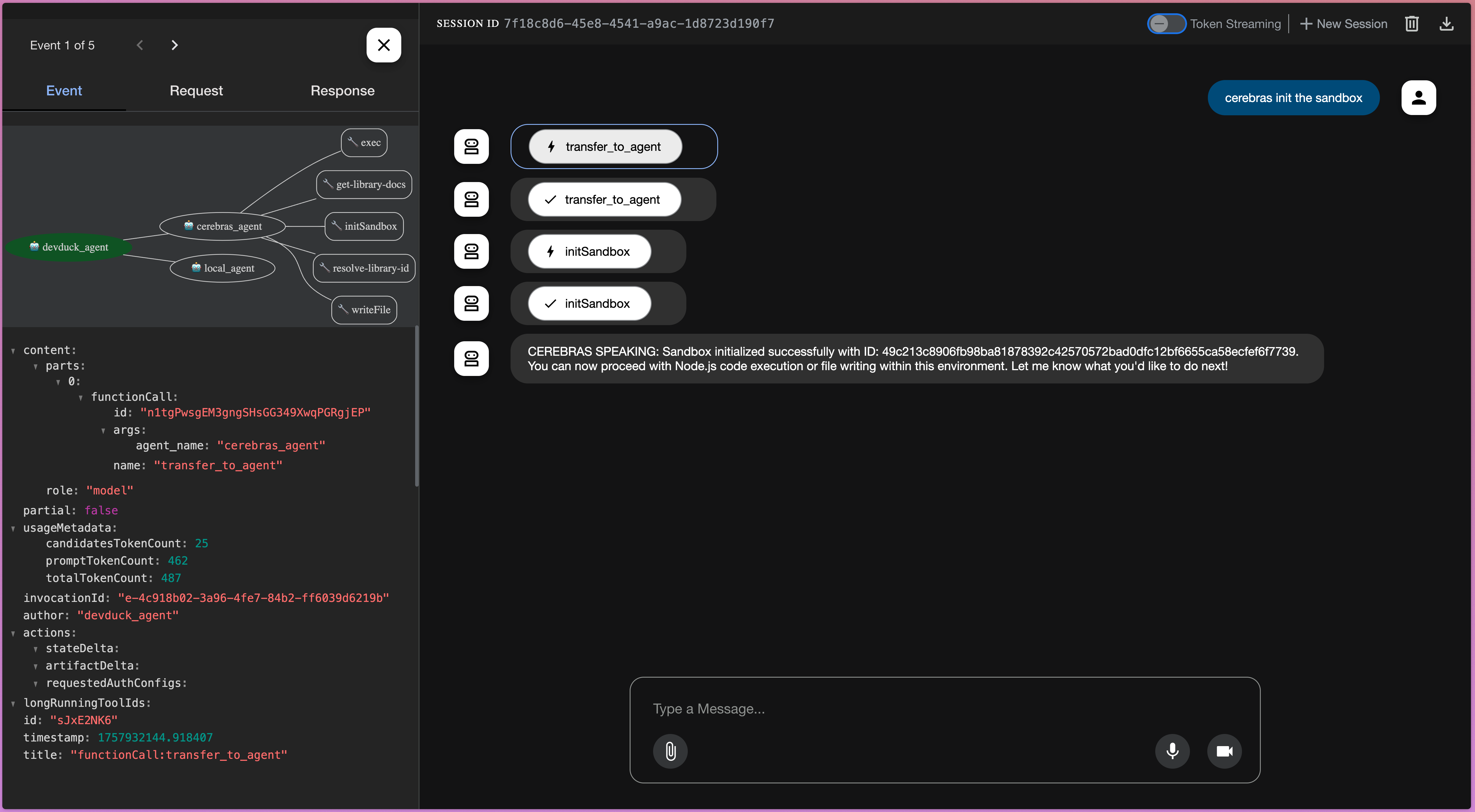
The Agentic Loop: This is the main application logic that orchestrates the agent’s behavior. In our case, it’s an ADK-Python-based application. The ADK-Python framework also includes a visualizer that lets you inspect tool calls and trace how the system reached specific decisions.

The MCP Tools: These are the external tools the agent can use. We provide them securely via the Docker MCP Gateway. In this app we use context7 and node sandbox MCP servers. 

The AI Model: You can define any local or remote AI model you want to use. Here, we’re using a local Qwen model for routing between the local agent and the powerful Cerebras agent which will use Cerebras API. 

Cerebras Cloud serves as a specialized, high-performance inference backend. It can run massive models, like a half-trillion parameter Qwen coder, at thousands of tokens per second. While our simple demo doesn’t require this level of speed, such performance is a game-changer for real-world applications.

Most of the prompts and responses are a few hundred tokens long, as they are simple commands to initialize a sandbox or write some JavaScript code in it. You’re welcome to make the agent work harder and see Cerebras’ performance on more verbose requests. 

For example, you can ask the Cerebras agent to write some JavaScript code, and see it call the functions from the MCP tools to read and write the files and run them as you see on the screenshot below. 

Building a Custom Sandbox as an MCP Server

A key feature of this setup is the ability to create a secure sandbox for code execution. To do this, we’ll build a custom MCP server. In our example, we enable two MCP servers:

context7: This gives our agent access to the latest documentation for various application frameworks.

node-code-sandbox: This is our custom-made sandbox for executing the code our agent writes.

You can find the implementation of our Node.js sandbox server in the node-sandbox-mcp GitHub repository. It’s a Quarkus application written in Java that exposes itself as an stdio mcp-server and uses the awesome Testcontainers library to create and manage the sandbox containers programmatically.

An important detail is that you have full control over the sandbox configuration. We start the container with a common Node.js development image and, as a crucial security measure, disable its networking. But since it’s a custom MCP server, you can enable any security measures you deem necessary. 

Here’s a snippet of the Testcontainers-java code used to create the container:

GenericContainer sandboxContainer = new GenericContainer<>("mcr.microsoft.com/devcontainers/javascript-node:20")
.withNetworkMode("none") // disable network!!
.withWorkingDirectory("/workspace")
.withCommand("sleep", "infinity");

sandboxContainer.start();

Testcontainers provides a flexible, idiomatic API to interact with the sandbox. Running a command or writing a file becomes a simple one-line method call:

// To execute a command inside the sandbox
sandbox.execInContainer(command);

// To write a file into the sandbox
sandbox.copyFileToContainer(Transferable.of(contents.getBytes()), filename);

The actual implementation has a bit more glue code for managing background processes or selecting the correct sandbox if you’ve created multiple, but these one-liners are the core of the interaction.

Packaging and Using the Custom Server

To use our custom server, we first need to package it as a Docker image. For Quarkus applications, a single command does the trick:

./mvnw package -DskipTests=true -Dquarkus.container-image.build=true

This command produces a local Docker image and outputs its name, something like:

[INFO] [io.quarkus.container.image.docker.deployment.DockerProcessor] Built container image shelajev/node-sandbox:1.0.0-SNAPSHOT

Since we’re running everything locally, we don’t even need to push this image to a remote registry. You can inspect this image in Docker Desktop and find its hash, which we’ll use in the next step.

Integrating the Sandbox via the MCP Gateway

With our custom MCP server image ready, it’s time to plug it into the MCP Gateway. We’ll create a custom catalog file (mcp-gateway-catalog.yaml) that enables both the standard context7 server and our new node-code-sandbox.

Currently, creating this file is a manual process, but we’re working on simplifying it. The result is a portable catalog file that mixes standard and custom MCP servers.

Notice two key things in the configuration for the node-code-sandbox MCP server in the catalog:

longLived: true: This tells the gateway that our server needs to persist between the tool calls to track the sandbox’s state. 

image:: We reference the specific Docker image using its sha256 hash to ensure reproducibility.

If you’re building the custom server for the sandbox MCP, you can replace the image reference with the one your build step produced. 

longLived: true
image: olegselajev241/node-sandbox@sha256:44437d5b61b6f324d3bb10c222ac43df9a5b52df9b66d97a89f6e0f8d8899f67

Finally, we update our docker-compose.yml to mount this catalog file and enable both servers:

mcp-gateway:
# mcp-gateway secures your MCP servers
image: docker/mcp-gateway:latest
use_api_socket: true
command:
– –transport=sse
# add any MCP servers you want to use
– –servers=context7,node-code-sandbox
– –catalog=/mcp-gateway-catalog.yaml
volumes:
– ./mcp-gateway-catalog.yaml:/mcp-gateway-catalog.yaml:ro

When you run docker compose up, the gateway starts, which in turn starts our node-sandbox MCP server. When the agent requests a sandbox, a third container is launched – the actual isolated environment. 

You can use tools like Docker Desktop to inspect all running containers, view files, or even open a shell for debugging.

The Security Benefits of Containerized Sandboxes 

This containerized sandbox approach is a significant security win. Containers provide a well-understood security boundary with a smaller vulnerability profile than running random internet code on your host machine, and you can harden them as needed.

Remember how we disabled networking in the sandbox container? This means any code the agent generates cannot leak local secrets or data to the internet. If you ask the agent to run code that tries to access, for example, google.com, it will fail.

This demonstrates a key advantage: granular control. While the sandbox is cut off from the network, other tools are not. The context7 MCP server can still access the internet to fetch documentation, allowing the agent to write better code without compromising the security of the execution environment.

Oh, and a neat detail is that when you stop the containers managed by compose, it also kills the sandbox MCP server, and that in turn triggers Testcontainers to clean up all the sandbox containers, just like it cleans after a typical test run. 

Next Steps and Extensibility

This coding agent is a great starting point, but it isn’t production-ready. For a real-world application, you might want to grant controlled access to resources like the npm registry. You could, for example, achieve this by mapping your local npm cache from the host system into the sandbox. This way, you, the developer, control exactly which npm libraries are accessible.

Because the sandbox is a custom MCP server, the possibilities are endless. You can build it yourself, tweak it however you want, and integrate any tools or constraints you need.

Conclusion

In this post, we demonstrated how to build a secure and portable AI coding agent using Docker Compose and the MCP Toolkit. By creating a custom MCP server with Testcontainers, we built a sandboxed execution environment that offers granular security controls, like disabling network access, without limiting the agent’s other tools.  We connect this coding agent to Cerebras API, so we get incredible inference speed. This architecture provides a powerful and secure foundation for building your own AI agents. We encourage you to clone the repository and experiment with the code! You probably already have Docker and can sign up for a Cerebras API key here.
Quelle: https://blog.docker.com/feed/






