This is issue 1 of a new series – MCP Horror Stories – where we will examine critical security issues and vulnerabilities in the Model Context Protocol (MCP) ecosystem and how Docker MCP Toolkit provides enterprise-grade protection against these threats.
What is MCP?
The Model Context Protocol (MCP) is a standardized interface that enables AI agents to interact with external tools, databases, and services. Launched by Anthropic in November 2024, MCP has achieved remarkable adoption, with thousands of MCP server repositories emerging on GitHub. Major technology giants, including Microsoft, OpenAI, Google, and Amazon, have officially integrated MCP support into their platforms, with development tools companies like Block, Replit, Sourcegraph, and Zed also adopting the protocol.
Think of MCP as the plumbing that allows ChatGPT, Claude, or any AI agent to read your emails, update databases, manage files, or interact with APIs. Instead of building custom integrations for every tool, developers can use one protocol to connect everything.
How does MCP work?
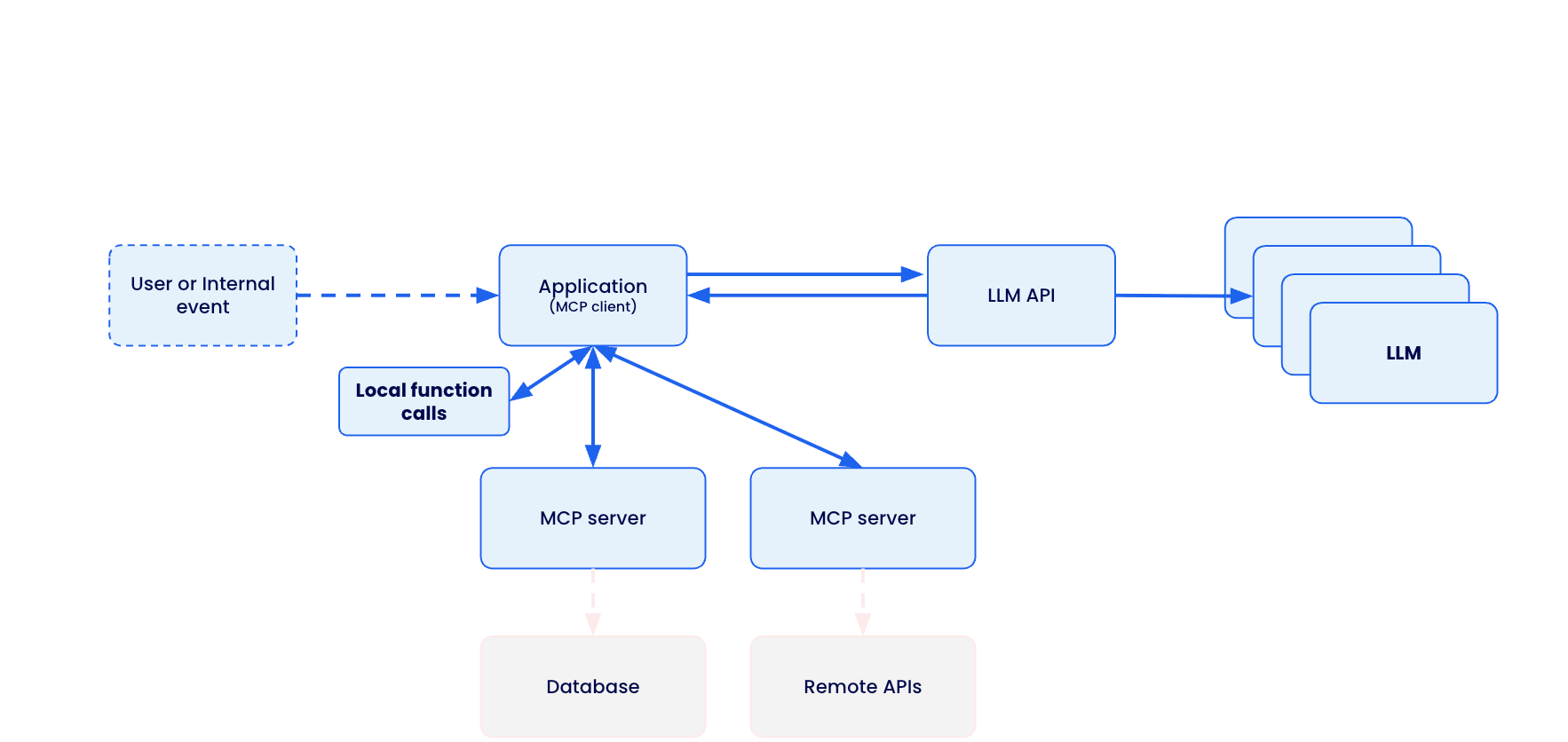
MCP creates a standardized bridge between AI applications and external services through a client-server architecture.
The Model Context Protocol (MCP) creates a standardized bridge between AI applications and external services through a client-server architecture.
When a user submits a prompt to their AI assistant (like Claude Desktop, VS Code, or Cursor), the MCP client actually sends the tool descriptions to the LLM, which does analysis and determines which, if any, tools should be called. The MCP host executes these decisions by routing calls to the appropriate MCP servers – whether that’s querying a database for customer information or calling remote APIs for real-time data. Each MCP server acts as a standardized gateway to its respective data source, translating between the universal MCP protocol and the specific APIs or database formats underneath.
Caption: Model Context Protocol client-server architecture enabling standardized AI integration across databases, APIs, and local functions
The overall MCP architecture enables powerful AI workflows where a single conversation can seamlessly integrate multiple services – for example, an AI agent could analyze data from a database, create a GitHub repository with the results, send a Slack notification to the team, and deploy the solution to Kubernetes, all through standardized MCP interactions. However, this connectivity also introduces significant security risks, as malicious MCP servers could potentially compromise AI clients, steal credentials, or manipulate AI agents into performing unauthorized actions.
The Model Context Protocol (MCP) was supposed to be the “USB-C for AI applications” – a universal standard that would let AI agents safely connect to any tool or service. Instead, it’s become a security nightmare that’s putting organizations at risk of data breaches, system compromises, and supply chain attacks.
The promise is compelling: Write once, connect everywhere. The reality is terrifying: A protocol designed for convenience, not security.
Caption: comic depicting MCP convenience and potential security risk
MCP Security Issues by the Numbers
The scale of security issues with MCP isn’t speculation – it’s backed by a comprehensive analysis of thousands of MCP servers revealing systematic flaws across six critical attack vectors:
OAuth Discovery Vulnerabilities
Command Injection and Code Execution
Unrestricted Network Access
File System Exposure
Tool Poisoning Attacks
Secret Exposure and Credential Theft
1. OAuth Discovery Vulnerabilities
What it is: Malicious servers can inject arbitrary commands through OAuth authorisation endpoints, turning legitimate authentication flows into remote code execution vectors.
The numbers: Security researchers analyzing the MCP ecosystem found that OAuth-related vulnerability represent the most severe attack class, with command injection flaws affecting 43% of analyzed servers. The mcp-remote package alone has been downloaded over 558,846 times, making OAuth vulnerabilities a supply chain attack affecting hundreds of thousands of developer environments.
The horror story: CVE-2025-6514 demonstrates exactly how devastating this vulnerability class can be – turning a trusted OAuth proxy into a remote code execution nightmare that compromises nearly half a million developer environments.
Strategy for mitigation: Watch out for MCP servers that use third-party OAuth tools like mcp-remote, have non-https endpoints, or need complex shell commands. Instead, pick servers with built-in OAuth support and never run OAuth proxies that execute shell commands.
2. Command Injection and Code Execution
What it is: MCP servers can execute arbitrary system commands on host machines through inadequate input validation and unsafe command construction.
The numbers: Backslash Security’s analysis of thousands of publicly available MCP servers uncovered “dozens of instances” where servers allow arbitrary command execution. Independent assessments confirm 43% of servers suffer from command injection flaws – the exact vulnerability enabling remote code execution.
The horror story: These laboratory findings translate directly to real-world exploitation, as demonstrated in our upcoming coverage of container breakout attacks targeting AI development environments.
Strategy for mitigation: Avoid MCP servers that don’t validate user input, build shell commands from user data, or use eval() and exec() functions. Always read the server code before installing and running MCP servers in containers.
3. Unrestricted Network Access
What it is: MCP servers with unrestricted internet connectivity can exfiltrate sensitive data, download malicious payloads, or communicate with command-and-control infrastructure.
The numbers: Academic research published on arXiv found that 33% of analyzed MCP servers allow unrestricted URL fetches, creating direct pathways for data theft and external communication. This represents hundreds of thousands of potentially compromised AI integrations with uncontrolled network access.
The horror story: The Network Exfiltration Campaign shows how this seemingly innocent capability becomes a highway for stealing corporate data and intellectual property.
Strategy for mitigation: Skip MCP servers that don’t explain their network needs or want broad internet access without reason. Use MCP tools with network allow-lists and monitor what connections your servers make.
4. File System Exposure
What it is: Inadequate path validation allows MCP servers to access files outside their intended directories, potentially exposing sensitive documents, credentials, and system configurations.
The numbers: The same arXiv security study found that 22% of servers exhibit file leakage vulnerabilities that allow access to files outside intended directories. Combined with the 66% of servers showing poor MCP security practices, this creates a massive attack surface for data theft.
The horror story: The GitHub MCP Data Heist analysis reveals how these file access vulnerabilities enable unauthorized access to private repositories and sensitive development assets.
Strategy for mitigation: Avoid MCP servers that want access beyond their work folder. Don’t use tools that skip file path checks or lack protection against directory attacks. Stay away from servers running with too many privileges. Stay secure by using containerized MCP servers with limited file access. Set up monitoring for file access.
5. Tool Poisoning Attack
What it is: Malicious MCP servers can manipulate AI agents by providing false tool descriptions or poisoned responses that trick AI systems into performing unauthorized actions.
The numbers: Academic research identified 5.5% of servers exhibiting MCP-specific tool poisoning attacks, representing a new class of AI-targeted vulnerabilities not seen in traditional software security.
The horror story: The Tenable Website Attack demonstrates how tool poisoning, combined with localhost exploitation, turns users’ own development tools against them.
Strategy for mitigation: Carefully review the MCP server documentation and tool descriptions before installation. Monitor AI agent behavior for unexpected actions. Use MCP implementations with comprehensive logging to detect suspicious tool responses.
6. Secret Exposure and Credential Theft
What it is: MCP deployments often expose API keys, passwords, and sensitive credentials through environment variables, process lists, and inadequate secret management.
The numbers: Traditional MCP deployments systematically leak credentials, with plaintext secrets visible in process lists and logs across thousands of installations. The comprehensive security analysis found 66% of servers exhibiting code smells, indicating poor MCP security practices, compounding this credential exposure problem.
The horror story: The Secret Harvesting Operation reveals how attackers systematically collect API keys and credentials from compromised MCP environments, enabling widespread account takeovers.
Strategy for mitigation: Avoid MCP servers that need credentials as environment variables. Don’t use tools that log or show sensitive info. Stay away from servers without secure credential storage. Be careful if docs mention storing credentials as plain text. Protect your credentials by using secure secret management systems.
How Docker MCP Tools Address MCP Security Issues
While identifying vulnerabilities is important, the real solution lies in choosing secure-by-design MCP implementations. Docker MCP Catalog, Toolkit and Gateway represent a fundamental shift toward making security the default path for MCP development.
Security-first Architecture
MCP Gateway serves as the secure communication layer between AI clients and MCP servers. Acting as an intelligent proxy, the MCP Gateway intercepts all tool calls, applies security policies, and provides comprehensive monitoring. This centralized security enforcement point enables features like network filtering, secret scanning, resource limits, and real-time threat detection without requiring changes to individual MCP servers.
Secure Distribution through Docker MCP Catalog provides cryptographically signed, immutable images that eliminate supply chain attacks targeting package managers like npm.
Container Isolation ensures every MCP server runs in an isolated container, preventing host system compromise even if the server is malicious. Unlike npm-based MCP servers that execute directly on your machine, Docker MCP servers can’t access your filesystem or network without explicit permission.
Network Controls with built-in allowlisting ensure MCP servers only communicate with approved destinations, preventing data exfiltration and unauthorized communication.
Secret Management via Docker Desktop’s secure secret store replaces vulnerable environment variable patterns, keeping credentials encrypted and never exposed to MCP servers directly.
Systematic Vulnerability Elimination
Docker MCP Toolkit systematically eliminates each vulnerability class through architectural design.
OAuth Vulnerabilities -> Native OAuth Integration
OAuth vulnerabilities disappear entirely through native OAuth handling in Docker Desktop, eliminating vulnerable proxy patterns without requiring additional tools.
# No vulnerable mcp-remote needed
docker mcp oauth ls
github | not authorized
gdrive | not authorized
# Secure OAuth through Docker Desktop
docker mcp oauth authorize github
# Opens browser securely via Docker's OAuth flow
docker mcp oauth ls
github | authorized
gdrive | not authorized
Command Injection -> Container Isolation
Command injection attacks are contained within container boundaries through isolation, preventing any host system access even when servers are compromised.
# Every MCP server runs with security controls
docker mcp gateway run
# Containers launched with: –security-opt no-new-privileges –cpus 1 –memory 2Gb
Network Attacks -> Zero-Trust Networking
Network attacks are blocked through zero-trust networking with –block-network flags and real-time monitoring that detects suspicious patterns.
# Maximum security configuration
docker mcp gateway run
–verify-signatures
–block-network
–cpus 1
–memory 1Gb
Tool Poisoning -> Comprehensive Logging
Tool poisoning becomes visible through complete interaction logging with –log-calls, enabling automatic blocking of suspicious responses.
# Enable comprehensive tool monitoring
docker mcp gateway run –log-calls –verbose
# Logs all tool calls, responses, and detects suspicious patterns
Secret Exposure -> Secure Secret Management
Secret exposure is eliminated through secure secret management combined with active scanning via –block-secrets that prevents credential leakage.
# Secure secret storage
docker mcp secret set GITHUB_TOKEN=ghp_your_token
docker mcp secret ls
# Secrets never exposed as environment variables
# Block secret exfiltration
docker mcp gateway run –block-secrets
# Scans tool responses for leaked credentials
Enterprise-grade Protection
For production environments, Docker MCP Gateway provides a maximum security configuration that combines all protection mechanisms:
# Production hardened setup
docker mcp gateway run
–verify-signatures # Cryptographic image verification
–block-network # Zero-trust networking
–block-secrets # Secret scanning protection
–cpus 1 # Resource limits
–memory 1Gb # Memory constraints
–log-calls # Comprehensive logging
–verbose # Full audit trail
This configuration provides:
Supply Chain Security: –verify-signatures ensures only cryptographically verified images run
Network Isolation: –block-network creates L7 proxies allowing only approved destinations
Secret Protection: –block-secrets scans all tool responses for credential leakage
Resource Controls: CPU and memory limits prevent resource exhaustion attacks
Full Observability: Complete logging and monitoring of all tool interactions
Security Aspect
Traditional MCP
Docker MCP Toolkit
Execution Model
Direct host execution via npx/mcp-remote
Containerized isolation
OAuth Handling
Vulnerable proxy with shell execution
Native OAuth in Docker Desktop
Secret Management
Environment variables
Docker Desktop secure store
Network Access
Unrestricted host networking
L7 proxy with allowlisted destinations
Resource Controls
None
CPU/memory limits, container isolation
Supply Chain
npm packages (can be hijacked)
Cryptographically signed Docker images
Monitoring
No visibility
Comprehensive logging with –log-calls
Threat Detection
None
Real-time secret scanning, anomaly detection
The result is a security-first MCP ecosystem where developers can safely explore AI integrations without compromising their development environments. Organizations can deploy AI tools confidently, knowing that enterprise-grade security is the default, not an afterthought.
Stay tuned for upcoming issues in this series:
1. OAuth Discovery Vulnerabilities → JFrog Supply Chain Attack
Malicious authorization endpoints enable remote code execution
Affects 437,000+ downloads of mcp-remote through CVE-2025-6514
2. Prompt Injection Attacks → GitHub MCP Data Heist
AI agents manipulated into accessing unauthorized repositories
Official GitHub MCP Server (14,000+ stars) weaponized against private repos
3. Drive-by Localhost Exploitation → Tenable Website Attack
Malicious websites compromise local development environments
MCP Inspector (38,000+ weekly downloads) becomes attack vector
4. Tool Poisoning + Container Escape → AI Agent Container Breakout
Containerized MCP environments breached through combined attacks
Isolation failures in AI development environments
5. Unrestricted Network Access → Network Exfiltration Campaign
33% of MCP tools allow unrestricted URL fetches
Creates pathways for data theft and external communication
6. Exposed Environment Variables → Secret Harvesting Operation
Plaintext credentials visible in process lists and logs
Traditional MCP deployments leak API keys and passwords
In the next issue of this series, we will dive deep into CVE-2025-6514 – the supply chain attack that turned a trusted OAuth proxy into a remote code execution nightmare, compromising nearly half a million developer environments.
Learn more
Explore the MCP Catalog: Visit the MCP Catalog to discover MCP servers that solve your specific needs securely.
Use and test hundreds of MCP Servers: Download Docker Desktop to download and use any MCP server in our catalog with your favorite clients: Gordon, Claude, Cursor, VSCode, etc
Submit your server: Join the movement toward secure AI tool distribution. Check our submission guidelines for more.
Follow our progress: Star our repository and watch for updates on the MCP Gateway release and remote server capabilities.
Quelle: https://blog.docker.com/feed/