Introducing Azure Storage Discovery: Transform data management with storage insights

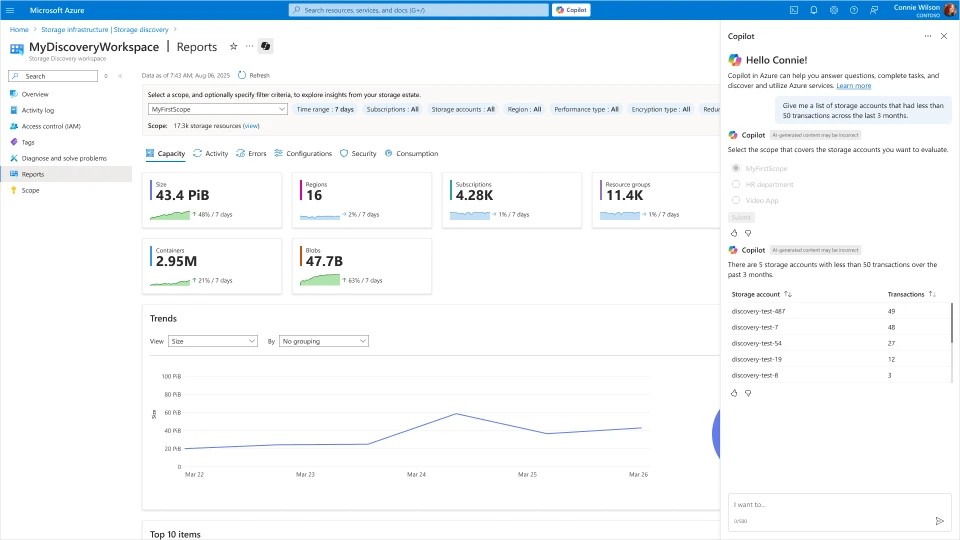
We are excited to announce the public preview of Azure Storage Discovery, a fully managed service that provides you enterprise-wide visibility into your Azure Blob Storage data estate. It provides a single pane of glass to understand and analyze how your data estate has evolved over time, optimize costs, enhance security, and drive operational efficiency. Azure Storage Discovery integrates with the Azure Copilot enabling you to use natural language to unlock insights and accelerate decision-making without utilizing any query language.

As your organization expands its digital footprint in the cloud, managing vast and globally distributed datasets across various business units and workloads becomes increasingly challenging. Insights aggregated across the entire Azure Blob Storage data estate can simplify the detection of outliers, enable long-term trend analysis, and support deep dives into specific resources using filters and pivots. Currently, customers rely on disparate tools and PowerShell scripts to generate, maintain and view such insights. This requires constant development, deployment, and management of infrastructure at scale. Azure Storage Discovery automates and scales this process by aggregating insights across all the subscriptions in your Microsoft Entra tenant and delivering them to you directly within the Azure portal.

Learn more about Azure Storage Discovery

Whether you’re a cloud architect, storage administrator, or data governance lead, Azure Storage Discovery helps you quickly answer key questions about your enterprise data estate in Azure Blob Storage:

How much data do we store across all our storage accounts?

Which regions are experiencing the highest growth?

Can I reduce our costs by finding data that is not being frequently used?

Are our storage configurations aligned with security and compliance best practices?

With Azure Storage Discovery, you can now explore such insights—and many more—with just a few clicks and with a Copilot by your side.

From insight to action with Azure Storage Discovery

Azure Storage Discovery simplifies the process of uncovering and analyzing insights from thousands of storage accounts, transforming complexity into clarity with just a few clicks.

Some of the key capabilities are:

Tap into Azure Copilot to get answers to the most critical storage questions for your business, without needing to learn a new query language or writing a single line of code. You can use Copilot to go beyond the pre-built reports and bring together insights across capacity, activity, errors and configurations.

Gain advanced storage insights that help you analyze how the data estate in Azure Blob Storage is growing, identify opportunities for cost optimization, discover data that is under-utilized, pinpoint workloads that could be getting throttled and find ways to strengthen the security of your storage accounts. These insights are powered by metrics related to storage capacity (object size and object count), activity on the data estate (transactions, ingress, egress), aggregation of transaction errors and detailed configurations for data protection, cost optimization and security.

Interactive reports in the Azure Portal make it simple to analyze trends over time, drill into top storage accounts, and instantly navigate to the specific resources represented in each chart. The reports can be filtered to focus on specific parts of the data estate based on Storage account configurations like regions, redundancy, performance type, encryption type, and others. Organization-wide visibility with flexible scoping to gather insights for multiple business groups or workloads. Analyze up to 1 million storage accounts spread across different subscriptions, resource groups and regions within a single workspace. The ability to drill down and filter data allows you to quickly obtain actionable insights for optimizing your data estate.

Fully managed service available right in the Azure Portal, with no additional infrastructure deployment or impact on business-critical workloads.

Up to 30 days of historical data will automatically be added within hours of deploying Azure Storage Discovery and all insights will be retained for up to 18 months.

Customer stories

Several customers have already started exploring Azure Storage Discovery during the preview to analyze their enterprise Azure Blob Storage data estate. Here are a few customers who found immediate value during the preview.

Getting a 360-degree view of the data estate in Azure Blob Storage

Tesco, one of the world’s largest and most innovative retailers, has been leveraging Storage Discovery in preview to gain an “effortless 360 View” of its data estate in Azure Blob Storage. To boost agility in development, the cloud deployment at Tesco is operated in a highly democratized manner, giving departments and teams autonomy over their subscriptions and storage accounts. However, to manage their cloud spend, ensure their deployment is configured correctly and optimize their data estate, each team is looking for detailed insights in a timely manner. The Cloud Platform Engineering (CPE) team works with each team providing them centralized data for cost analysis, security, and operational reporting. Currently, gathering and reporting on these insights to each team is a highly manual and operationally challenging task. As early adopters they have been using Azure Storage Discovery to provide a centralized, tenant-wide dashboard—to enable a “single-pane-of-glass” for key metrics and baselines. This helps them reduce the resources and time associated with answering simple questions such as “how much data do we have, and where?” or “what’s our baseline trends?”

As our data estate in Azure Storage continues to grow, it has become time consuming to gather the insights required to drive decisions around ‘How’ and ‘What’ we do—especially at the pace which is often demanded by stakeholders. Today, a lot of this is done using PowerShell scripts which even with parallelism, take a significant time to run, due to our overall scale. Anything which reduces the time it takes me to gather valuable insights is super valuable. On the other side, if I were to put my Ops hat on, the data presented is compelling for conversations with application teams; allowing us to focus on what really matters and addressing our top consumers, as opposed to being ‘snowed in’ under a mountain of data.
—Rhyan Waine, Lead Engineer, Cloud Platform Engineering, Tesco

Manage budget by identifying Storage Accounts that are growing rapidly

Willis Towers Watson (WTW) is at the forefront of using generative AI to enhance their offering for Human Resources and Insurance services while also balancing their costs. With Azure Storage Discovery, the team was able to quickly identify storage accounts where data was growing rapidly and increasing costs. With the knowledge of which storage accounts to focus on, they were able to identify usage patterns, roll out optimizations and control their costs.

As soon as my team started using Storage Discovery, they were immediately impressed by the insights it provided. Their reaction was, ‘Great—let’s dive in and see what we can uncover.’ Very quickly, they identified several storage accounts that were growing at an unusual rate. With that visibility, we were able to zero in on those Storage Accounts. We also discovered data that hadn’t been accessed in a long time, so we implemented automatic cleanups using Blob Lifecycle Management to efficiently manage and delete unused data.
—Darren Gipson, Lead DevOps Engineer, Willis Towers Watson

How Storage Discovery works

To get started with Azure Storage Discovery, follow these two simple steps: first, configure a Discovery workspace which contains the definition of the resource, and then define the Scopes that represent your business groups or workloads. Once these steps are completed, Azure Storage Discovery will start aggregating the relevant insights and make them available to you in detailed dashboards that can be found in the Reports page.

Deploying a Discovery workspace enables you to select which part of your data estate in Azure Blob Storage you want to analyze. You can do this by selecting all the subscriptions and resource groups of interest within your Microsoft Entra tenant. Upon successful verification of your access credentials, Azure Storage Discovery will advance to the next step.

Once the workspace is configured, you can create up to 5 scopes, each representing a business group, a workload, or any other logical grouping of storage accounts that has business value to you. This filtering can be done by selecting ARM resource tags that were previously applied to your storage accounts.

After the deployment is successful, Azure Storage Discovery provides reports right within the Azure portal with no additional setup.

Pricing and availability

Storage Discovery is available in select Azure regions during public preview. The service offers a Free pricing plan with insights related to capacity and configurations retained for up to 15 days and a Standard pricing plan that also includes advanced insights related to activity, errors and security configurations retained for up to 18 months to analyze annual trends and cycles in your business workloads. Pricing is based on the number of storage accounts and objects analyzed, with tiered rates to support all sizes of data estates in Azure Blob Storage.

The Free and Standard pricing plans will be offered for free, with no additional cost until September 30th, 2025. Learn more about pricing in the Azure Storage Discovery documentation.

Get started with Azure Storage Discovery

You can get started using Azure Storage Discovery to unlock the full potential of your storage within minutes. We invite you to preview Azure Storage Discovery for data management of your object storage. To get started, refer to the quick start guide to configure your first workspace. To learn more, check out the documentation.

We’d love to hear your feedback. What insights are most valuable to you? What would make Storage Discovery more compelling for your business? Let us know at StorageDiscoveryFeedback@service.microsoft.com.

Discover more about Azure Storage Discovery

The post Introducing Azure Storage Discovery: Transform data management with storage insights appeared first on Microsoft Azure Blog.
Quelle: Azure
The Next Evolution of Docker Hardened Images: Customizable, FedRAMP Ready, AI Migration Agent, and Deeper Integrations

We launched Docker Hardened Images (DHI) in May, and in just two and a half months, adoption has accelerated rapidly across industries. From nimble startups to global enterprises, organizations are turning to DHI to achieve near-zero CVEs, shrink their attack surface, and harden their software supply chain, all without slowing down developers.

In a short time, DHI has become the trusted foundation for production workloads: minimal, signed, continuously patched, and built from the ground up to deliver security at scale. Platform and security teams alike are moving faster and more securely than ever before.

That momentum is why we’re doubling down. We’re expanding Docker Hardened Images with powerful new capabilities: a broader image catalog, flexible customization options, AI migration agent, FedRAMP-ready variants, and tighter integrations with the tools teams already use every day. Many of these enhancements will be in action at Black Hat 2025.

Secure Images for End-to-End Workloads

One of the most consistent things we hear from customers, especially those in security-conscious environments, is that they’re not just running a few basic containers. They’re deploying full-stack systems that span everything from message queues like RabbitMQ and Redis, to web servers like Tomcat and NGINX, databases and storage tools such as PostgreSQL and Prometheus, and developer tools like Azure Functions and Grafana. They also rely on networking components like Envoy, monitoring and observability stacks like Grafana, Loki, and Netdata, and even ML and AI infrastructure like Kubeflow. 

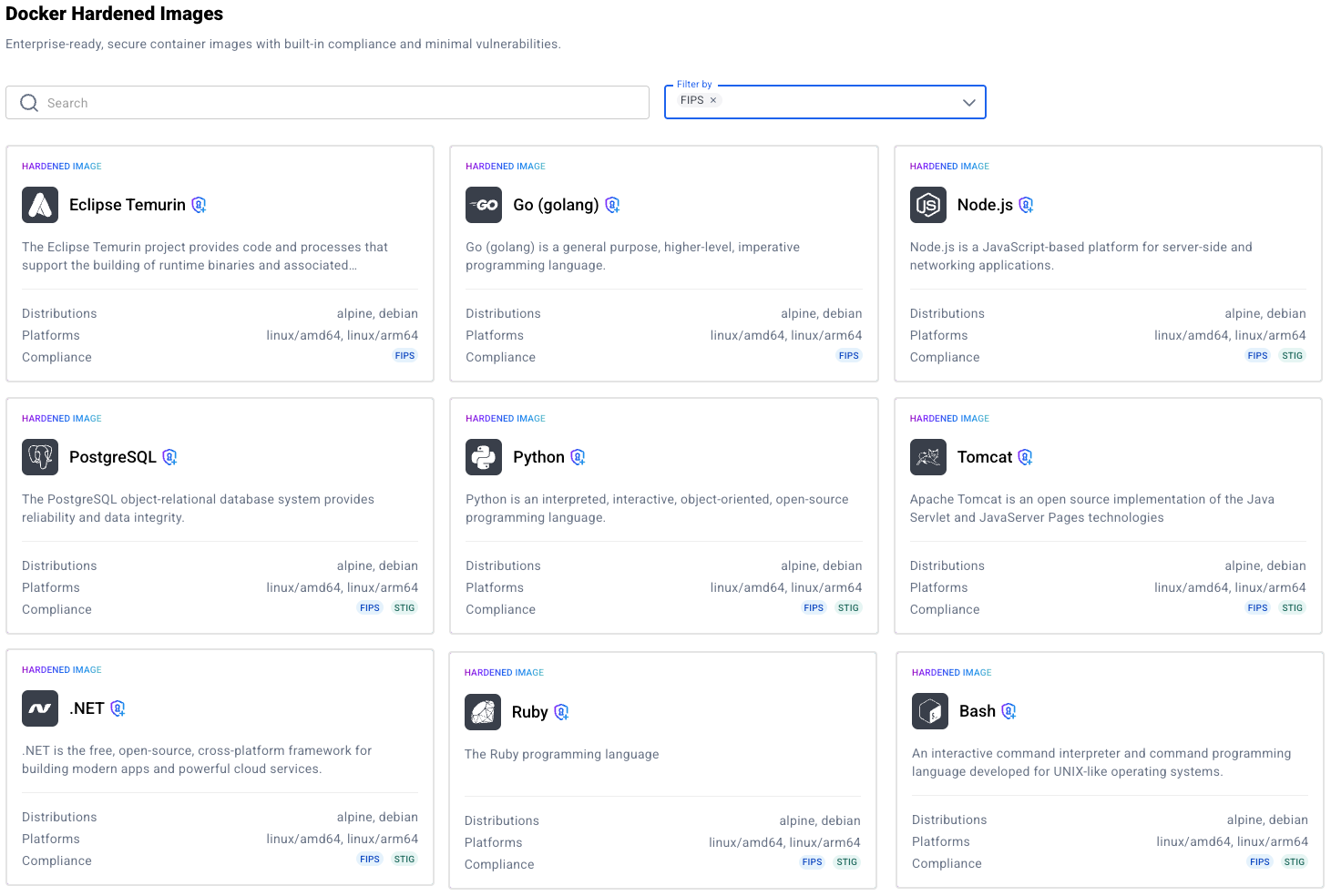
To support these real-world workloads, the Docker Hardened Images (DHI) catalog now includes trusted, production-ready images across all these categories. Every image is SLSA-compliant, signed, and continuously maintained, giving security teams confidence that they’re using secure, verifiable containers without slowing down developers or complicating compliance.

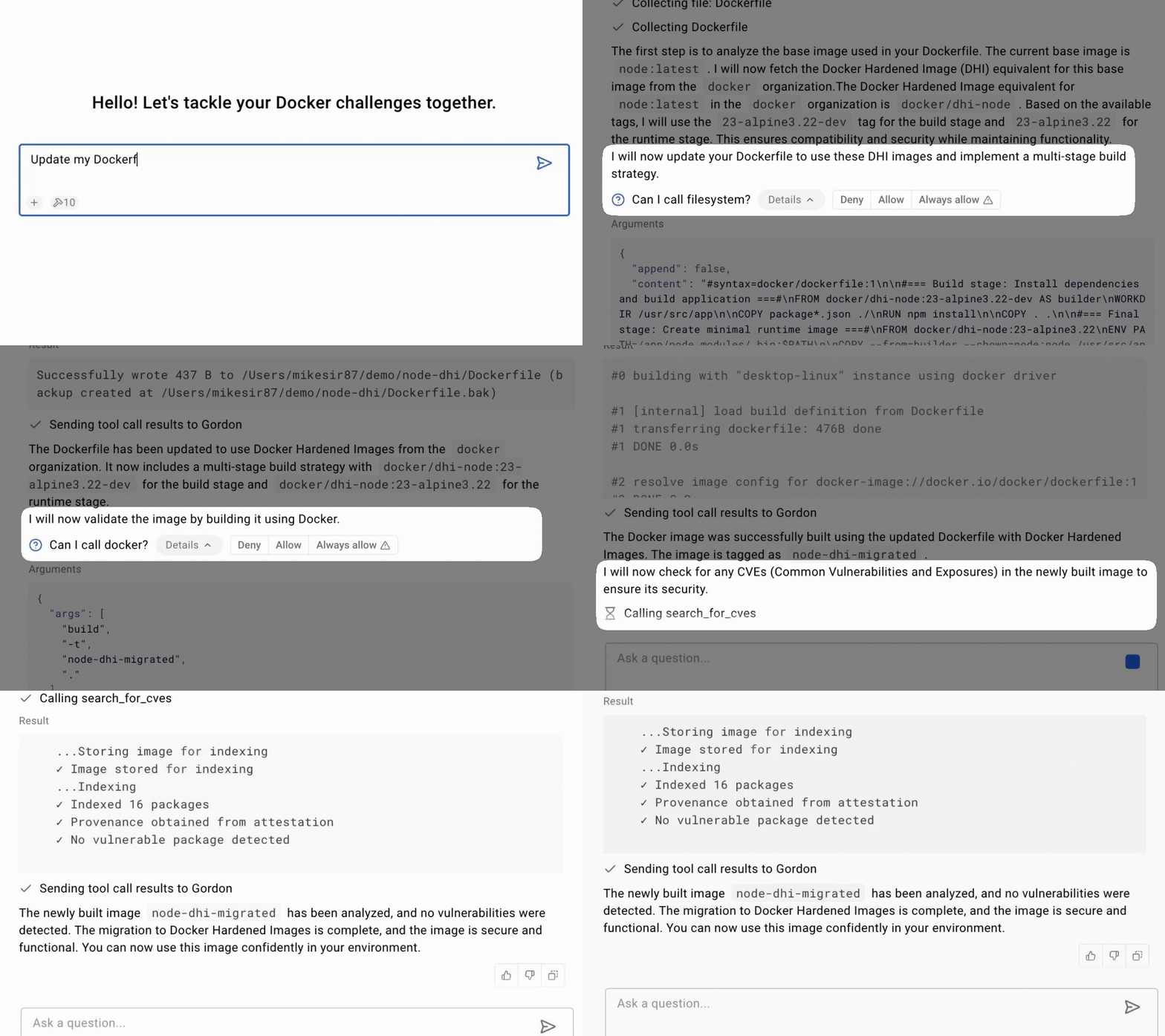
And now, getting started with DHI is even easier. Docker’s AI assistant can automatically analyze your existing containers and recommend or apply equivalent hardened images, streamlining your move from community or internal images. Watch it in action below.

DHI Customization: Flexibility without the risk

Another piece of feedback we’ve heard from customers is how much they appreciate the flexibility of DHI. DHI meets teams where they are, allowing them to customize based on their unique needs rather than forcing them to adapt to rigid constraints. The ability to tailor images while still relying on a hardened, security-first foundation has been a clear win. And now, we’ve taken that experience even further.

With our new self-serve UI, customizing DHI is faster and simpler than ever. You can inject internal certificates, install trusted packages, tweak runtime settings, and define user policies, all without forking base images or wrangling complex workarounds.

Need to configure runtimes, install essential tools like curl, git, or debugging utilities? Want to add custom CA certificates for internal trust chains, set environment variables, or define custom users and groups? With DHI, you can do it all in just a few clicks.

Best of all, your custom images stay secure automatically. Customizations are packaged as OCI artifacts: secure, versioned layers that cleanly separate your logic from the base image. Docker handles the final image build, signs it while maintaining a SLSA Build Level 3 standard, and ensures the image is always up to date.

When the base image receives a security patch or your own artifacts are updated, Docker automatically rebuilds your customized images in the background. No manual work. No surprise drift. Just continuous compliance and protection by default. Customers can create as many customizations as they need for each repository, without any additional cost. 

This is a huge win for platform and security teams. There’s no need to fork base images, write custom CI rebuild scripts, or maintain parallel image pipelines just to meet security or policy requirements. You get the flexibility you need without the operational overhead.

FedRAMP-Ready: Built for compliance from the start

If you’re chasing FedRAMP authorization, meeting strict security standards like FIPS and STIG isn’t optional, it’s mission-critical. But hardening container images manually? That’s wasted time, human error, and endless maintenance.

Docker Hardened Images now ship with FedRAMP-ready variants, engineered to align out of the box with U.S. federal security requirements. These images are FIPS-enabled for strong, validated cryptographic enforcement, STIG-ready with secure defaults baked in, and delivered with signed SBOMs and attestations for full auditability.

All of this is built and maintained by Docker so your team doesn’t have to be in the business of compliance engineering. Just plug these images into your pipeline and go. Under the hood, Docker’s FIPS-enabled images leverage validated cryptographic modules such as OpenSSL, Bouncy Castle, and Go. Each image includes signed attestations linked to NIST certifications and test results, ensuring transparency and traceability across the software supply chain.

Every STIG-ready image is scanned via OpenSCAP during secure builds and comes with signed results, including compliance scores and full scan outputs (HTML and XCCDF). Each result is clearly mapped to NIST 800-53 controls, making it easier for security teams and auditors to assess and track compliance. As you customize these images, Docker helps you track compliance over time, making it easier for security teams and auditors alike.

Learn how Docker is simplifying FedRAMP readiness in this deep-dive blog post

Docker + Wiz: Smarter Vulnerability Management

Docker Hardened Images integrate seamlessly into your existing developer and security workflows, working out of the box with popular tools like GitLab, Sonatype, CloudSmith, Docker Hub, Docker Desktop, GitHub Actions, Jenkins, and more.

Now, we’re taking it a step further: Docker Hardened Images integrate with Wiz, empowering security teams with deeper, context-rich visibility into real risk based on what’s running in production, what’s exposed to the internet, and what interacts with sensitive data.

“Docker’s Hardened Images offer an exceptionally secure foundation with significantly smaller surface areas and near-zero CVEs”, said Oron Noah, VP of Product, Extensibility & Partnerships at Wiz. “The integration between Docker and Wiz empowers DevSecOps teams to operationalize these trusted foundations with complete visibility into container image technologies and precise vulnerability reporting. Rich OpenVEX documents and OSV advisories provided by Docker add context to vulnerabilities reported in Wiz, enabling teams to prioritize the vulnerabilities that matter and remediate faster without slowing down innovation. This integration gives platform and security teams both a secure foundation and a platform to monitor and manage the full container security lifecycle from code to runtime.”

Putting DHI to the Test: Independent Security Assessment

To validate the security posture of Docker Hardened Images, we partnered with Security Research Labs (SRLabs), a leading cybersecurity firm, to conduct an independent assessment. Their review included threat modeling, architectural analysis, and grey-box testing using publicly available artifacts, simulating realistic attack scenarios.

The results reaffirmed our approach. SRLabs verified that all sampled Docker Hardened Images are cryptographically signed, rootless by default, and ship with both SBOM and VEX metadata, a critical combination for modern software supply chain security. 

Importantly, no root escapes or high-severity breakouts were found during the assessment period. SRLabs also validated Docker’s claim of removing common shells and package managers, significantly reducing the attack surface up to 95% smaller than standard images. 7-day patch SLA and build-to-sign pipeline were identified as a strength compared to typical community images. The review also acknowledged areas for improvement such as key revocation and build determinism which are already being actively addressed.

Read more about the SRLabs report here. 

The Future of Hardened Containers Starts Here

Docker Hardened Images are becoming the trusted foundation for building and running secure apps at scale. With a broad catalog, easy customization, FedRAMP-ready variants, and integrations like Wiz, DHI meets teams where they are. Best of all, customization, FIPS, and STIGs are included at no extra cost, simplifying compliance without compromise.

If you’re attending Black Hat 2025, we’d love to connect. Please come visit Docker at Booth #5315 to explore how we’re redefining software supply chain security. And don’t miss our session, “Achieving End-to-End Software Supply Chain Security”, happening on Wednesday, August 6 from 12:05 to 1:30 PM in Lagoon CD, Level 2. We’ll be diving deep into real-world strategies for implementing hardened, traceable, and continuously compliant software delivery pipelines.
Quelle: https://blog.docker.com/feed/

Accelerating FedRAMP Compliance with Docker Hardened Images

Federal Risk and Authorization Management Program (FedRAMP) compliance costs typically range from $450,000 to over $2 million and take 12 to 18 months to achieve, time your competitors are using to capture government contracts. While you’re spending months configuring FIPS cryptography, hardening security baselines, and navigating 400+ security controls, your competitors are already shipping to federal agencies. Companies that want to sell cloud products and services to the US government must meet the rigorous requirements of FedRAMP, which mandates they implement the expansive security controls described in NIST Special Publication 800-53. As more companies go through this process, they’re looking for ways to accelerate the process (faster time-to-market) and reduce the cost of maintaining FedRAMP compliance.

Shift from months of manual compliance work to automated, auditable security. In May, we announced Docker Hardened Images (DHI) – a curated catalog of minimalist images, kept continuously up to date by Docker to ensure near-zero known CVEs. Today, we are announcing support for FIPS 140-compliant and STIG hardened images – two FedRAMP hurdles that companies have found particularly challenging. Below, we will dive into these new features in more detail and give an overview of all the ways DHI addresses pain points associated with FedRAMP.

FIPS-enabled Docker Hardened Images

FIPS Validated Cryptography Made Simple

FIPS 140 is a US government standard that defines security and testing requirements for cryptographic modules that protect sensitive information. FedRAMP requires that companies use cryptographic modules that have been validated by the NIST Cryptographic Module Validation Program (CMVP). 

Although swapping out a cryptographic library for a FIPS-validated one in a base image might seem simple, it can become increasingly difficult as some software must be specifically configured or built from source to use the FIPS-validated module, and even the selection of cryptographic algorithms may need to change. And it’s not just a one-time effort. As you update your software over time, you must be able to prove that your image is still compliant and you haven’t accidentally introduced non-validated cryptographic software.

FIPS-compliant Docker images do all the hard work for you. They are pre-configured to use FIPS-validated software and tested during our secure build process to confirm correct function. But you don’t have to take our word for it. Every FIPS-compliant image comes with signed attestations that list the FIPS-validated software in use, complete with links to its CMVP certification and the test results proving it. We support all major open source cryptographic modules, including OpenSSL, Bouncy Castle, and Go.

{
"certification": "CMVP #4985",
"certificationUrl": "https://csrc.nist.gov/projects/cryptographic-module-validation-program/certificate/4985",
"name": "OpenSSL FIPS Provider",
"package": "pkg:dhi/openssl-provider-fips@3.1.2",
"standard": "FIPS 140-3",
"status": "active",
"sunsetDate": "2030-03-10",
"version": "3.1.2"
}

STIG Hardened Images without the Headache

Security Technical Implementation Guides (STIGs) are the FedRAMP preferred baselines for secure configuration. STIGs are application-specific versions of the more general Security Requirements Guides (SRGs) and are designed to be run programmatically using Security Content Automation Protocol (SCAP) compatible software. Both STIGs and SRGs are published by the US Defense Information Systems Agency (DISA).

Currently, there are no government-published, container-specific STIGs or SRGs. However, per Department of Defence guidance, if there is no related STIG, the most relevant SRG can be used to determine compliance. For containers, that is the General Purpose Operating System (GPOS) SRG. Docker has created a custom STIG that checks for all the container-relevant content from the GPOS SRG. We’re also aligned with industry efforts to create government-published, container-specific STIGs, which we can leverage in the future.

STIG-hardened Docker images are scanned during our secure build process using OpenSCAP and our custom container STIG, and we deliver the results as signed attestations. The STIG compliance score (% of checks passing) is easily visible inside the attestation and from the Docker Hub UI, making it simple to gauge compliance. Not only do we run this scan when we build the initial image, but also anytime we rebuild it using DHI’s new customization features so that you can easily see if you’ve added customizations that would affect your compliance.

STIG-Hardened Docker Images Scoring

In addition to the scan score, we also provide the full HTML and Extensible Configuration Checklist Description Format (XCCDF) output of OpenSCAP so that you can inspect the results yourself. 

The HTML output is convenient for taking a quick look, while XCCDF is great for loading into the SCAP-compliant tool of your (or your auditor’s) choice for rich visualization. For example, Heimdall will helpfully map the checks to the underlying NIST 800-53 controls for you. For those wanting to manually map our checks back to the GPOS SRG, we’ve used consistent numbering of check IDs between the two for easy cross-referencing.

{
"name": "Docker Hardened Image – Debian 12 GPOS STIG Profile",
"output": [
{
"content": "…",
"format": "html",
"mediaType": "text/html"
},
{
"content": "…",
"format": "xccdf",
"mediaType": "application/xml"
}
],
"profile": "xccdf_dhi-debian_profile_.check",
"publisher": "Docker, Inc.",
"result": "passed",
"status": "active",
"summary": {
"defaultScore": 100,
"failedChecks": 0,
"maxDefaultScore": 100,
"notApplicableChecks": 107,
"passedChecks": 91,
"totalChecks": 198
},
"tool": "openscap",
"type": "Vendor published STIG-ready content, SRG aligned",
"version": "0.1"
}

Continuous Compliance at Scale 

Vulnerability Reduction

Docker Hardened Images start with a dramatically reduced attack surface, up to 95% smaller by package count, to limit exposure from the outset, and are kept continuously up to date to ensure near-zero known CVEs. Images are also scanned for viruses and secrets with corresponding attestations that can serve as evidence during audits.

Vulnerability Detection & Remediation

FedRAMP requires that companies monitor and scan for vulnerabilities and remediate them within a defined timeframe (30/90/180 days for high/moderate/low risk). Docker continually monitors various CVE sources to detect applicable vulnerabilities in our hardened images. CVE counts are reported in the Docker Hub UI and as attestations and Docker Scout can be configured to notify you of new vulnerabilities affecting previously pulled images. DHI has a remediation SLA of 7 days for critical/high vulnerabilities and 30 days for medium/low ones (from availability of an upstream fix), ensuring that you can comfortably meet the FedRAMP remediation timelines.

Docker also provides Vulnerability Exploitability eXchange (VEX) attestations that identify vulnerabilities that do not apply to the image (and explains why) so that scanners that support the VEX standard can automatically filter these results, allowing you to look past the noise and focus on exploitability.

Integrity and Supply Chain Transparency

Doctor Hardened Images are built using an SLSA Build Level 3 secure build pipeline that ensures verifiability and prevents tampering during and after the build. Build provenance is provided via signed attestations, and Software Bills of Materials (SBOMs) are generated in multiple popular formats to help satisfy FedRAMP’s asset management and software inventory reporting requirements.

Audit Evidence

You’ve heard attestations mentioned multiple times in this post. There’s a good reason for that. Evidence is everything when demonstrating compliance with FedRAMP or other regulatory frameworks. DHI attestations serve as secure evidence of all aspects of DHI security, from provenance to asset management to vulnerability and other security scanning to FIPS compliance. Attestations follow the in-toto attestation standard, a project of the Cloud Native Computing Foundation (CNCF), ensuring compatibility across a wide range of software vendors.

Government Grade Security for Every Environment

While there are definitely parts of the FedRAMP process specific to the federal government, the NIST 800-53 controls on which it is based are intended to be common-sense security best practices. So whether or not your company is currently subject to FedRAMP, aligning your security practices with the underlying controls makes good sense. We see this with initiatives like GovRAMP that define FedRAMP-aligned security controls for companies selling to state and local governments. 

Ready to accelerate your FedRAMP journey?

Docker Hardened Images are designed both to help you ship software with confidence and to make FedRAMP compliance easier and less costly. Let Developers stay focused on building while giving Compliance teams and Auditors the evidence they need.

We’re here to help. Get in touch with us and let’s harden your software supply chain, together.

Quelle: https://blog.docker.com/feed/

OpenAI’s open‑source model: gpt‑oss on Azure AI Foundry and Windows AI Foundry 

AI is no longer a layer in the stack—it’s becoming the stack. This new era calls for tools that are open, adaptable, and ready to run wherever your ideas live—from cloud to edge, from first experiment to scaled deployment. At Microsoft, we’re building a full-stack AI app and agent factory that empowers every developer not just to use AI, but to create with it.

That’s the vision behind our AI platform spanning cloud to edge. Azure AI Foundry provides a unified platform for building, fine-tuning, and deploying intelligent agents with confidence while Foundry Local brings open-source models to the edge—enabling flexible, on-device inferencing across billions of devices. Windows AI Foundry builds on this foundation, integrating Foundry Local into Windows 11 to support a secure, low-latency local AI development lifecycle deeply aligned with the Windows platform. 

With the launch of OpenAI’s gpt‑oss models—its first open-weight release since GPT‑2—we’re giving developers and enterprises unprecedented ability to run, adapt, and deploy OpenAI models entirely on their own terms. 

For the first time, you can run OpenAI models like gpt‑oss‑120b on a single enterprise GPU—or run gpt‑oss‑20b locally. It’s notable that these aren’t stripped-down replicas—they’re fast, capable, and designed with real-world deployment in mind: reasoning at scale in the cloud, or agentic tasks at the edge. 

And because they’re open-weight, these models are also easy to fine-tune, distill, and optimize. Whether you’re adapting for a domain-specific copilot, compressing for offline inference, or prototyping locally before scaling in production, Azure AI Foundry and Foundry Local give you the tooling to do it all—securely, efficiently, and without compromise. 

Create intelligent applications with Azure AI Foundry

Open models, real momentum 

Open models have moved from the margins to the mainstream. Today, they’re powering everything from autonomous agents to domain-specific copilots—and redefining how AI gets built and deployed. And with Azure AI Foundry, we’re giving you the infrastructure to move with that momentum: 

With open weights teams can fine-tune using parameter-efficient methods (LoRA, QLoRA, PEFT), splice in proprietary data, and ship new checkpoints in hours—not weeks.

You can distill or quantize models, trim context length, or apply structured sparsity to hit strict memory envelopes for edge GPUs and even high-end laptops.

Full weight access also means you can inspect attention patterns for security audits, inject domain adapters, retrain specific layers, or export to ONNX/Triton for containerized inference on Azure Kubernetes Service (AKS) or Foundry Local.

In short, open models aren’t just feature-parity replacements—they’re programmable substrates. And Azure AI Foundry provides training pipelines, weight management, and low-latency serving backplane so you can exploit every one of those levers and push the envelope of AI customization. 

Meet gpt‑oss: Two models, infinite possibilities

Today, gpt‑oss-120b and gpt‑oss-20b are available on Azure AI Foundry. gpt‑oss-20b is also available on Windows AI Foundry and will be coming soon on MacOS via Foundry Local. Whether you’re optimizing for sovereignty, performance, or portability, these models unlock a new level of control. 

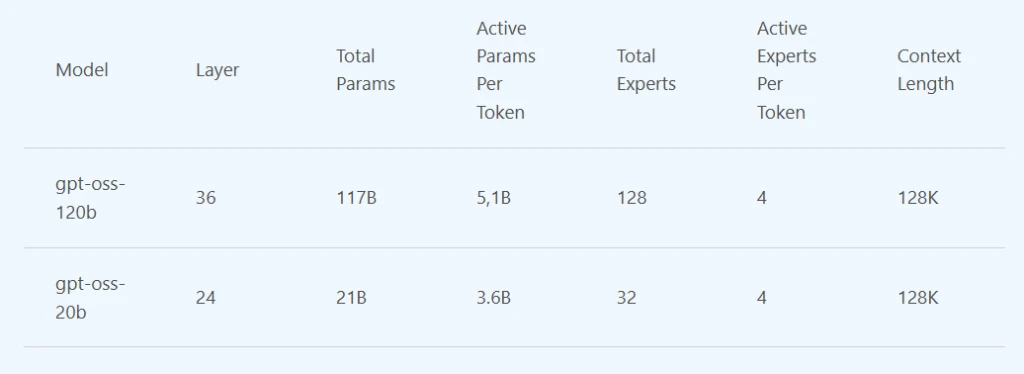
gpt‑oss-120b is a reasoning powerhouse. With 120 billion parameters and architectural sparsity, it delivers o4-mini level performance at a fraction of the size, excelling at complex tasks like math, code, and domain-specific Q&A—yet it’s efficient enough to run on a single datacenter-class GPU. Ideal for secure, high-performance deployments where latency or cost matter.

gpt‑oss-20b is tool-savvy and lightweight. Optimized for agentic tasks like code execution and tool use, it runs efficiently on a range of Windows hardware, including discrete GPUs with16GB+ VRAM, with support for more devices coming soon. It’s perfect for building autonomous assistants or embedding AI into real-world workflows, even in bandwidth-constrained environments. 

Both models will soon be API-compatible with the now ubiquitous responses API. That means you can swap them into existing apps with minimal changes—and maximum flexibility. 

Bringing gpt‑oss to Cloud and Edge 

Azure AI Foundry is more than a model catalog—it’s a platform for AI builders. With more than 11,000 models and growing, it gives developers a unified space to evaluate, fine-tune, and productionize models with enterprise-grade reliability and security. 

Today, with gpt‑oss in the catalog, you can: 

Spin up inference endpoints using gpt‑oss in the cloud with just a few CLI commands.

Fine-tune and distill the models using your own data and deploy with confidence.

Mix open and proprietary models to match task-specific needs.

For organizations developing scenarios only possible on client devices, Foundry Local brings prominent open-source models to Windows AI Foundry, pre-optimized for inference on your own hardware, supporting CPUs, GPUs, and NPUs, through a simple CLI, API, and SDK.

Whether you’re working in an offline setting, building in a secure network, or running at the edge—Foundry Local and Windows AI Foundry lets you go fully cloud-optional. With the capability to deploy gpt‑oss-20b on modern high-performance Windows PCs, your data stays where you want it—and the power of frontier-class models comes to you. 

This is hybrid AI in action: the ability to mix and match models, optimize performance and cost, and meet your data where it lives. 

Empowering builders and decision makers 

The availability of gpt‑oss on Azure and Windows unlocks powerful new possibilities for both builders and business leaders. 

For developers, open weights mean full transparency. Inspect the model, customize, fine-tune, and deploy on your own terms. With gpt‑oss, you can build with confidence, understanding exactly how your model works and how to improve it for your use case. 

For decision makers, it’s about control and flexibility. With gpt‑oss, you get competitive performance—with no black boxes, fewer trade-offs, and more options across deployment, compliance, and cost. 

A vision for the future: Open and responsible AI, together 

The release of gpt‑oss and its integration into Azure and Windows is part of a bigger story. We envision a future where AI is ubiquitous—and we are committed to being an open platform to bring these innovative technologies to our customers, across all our data centers and devices. 

By offering gpt‑oss through a variety of entry points, we’re doubling down on our commitment to democratize AI. We recognize that our customers will benefit from a diverse portfolio of models—proprietary and open—and we’re here to support whichever path unlocks value for you. Whether you are working with open-source models or proprietary ones, Foundry’s built-in safety and security tools ensure consistent governance, compliance, and trust—so customers can innovate confidently across all model types. 

Finally, our support of gpt-oss is just the latest in our commitment to open tools and standards. In June we announced that GitHub Copilot Chat extension is now open source on GitHub under the MIT license—the first step to make VS Code an open source AI editor. We seek to accelerate innovation with the open-source community and drive greater value to our market leading developer tools. This is what it looks like when research, product, and platform come together. The very breakthroughs we’ve enabled with our cloud at OpenAI are now open tools that anyone can build on—and Azure is the bridge that brings them to life. 

Next steps and resources for navigating gpt‑oss

Deploy gpt‑oss in the cloud today with a few CLI commands using Azure AI Foundry. Browse the Azure AI Model Catalog to spin up an endpoint. 

Deploy gpt‑oss-20b on your Windows device today (and soon on MacOS) via Foundry Local. Follow the QuickStart guide to learn more.

Pricing1 for these models is as follows:

*See Managed Compute pricing page here.

1Pricing is accurate as of August 2025.

The post OpenAI’s open‑source model: gpt‑oss on Azure AI Foundry and Windows AI Foundry  appeared first on Microsoft Azure Blog.
Quelle: Azure