This is Part 2 of our MCP Horror Stories series, an in-depth look at real-world security incidents exposing the vulnerabilities in AI infrastructure, and how the Docker MCP Toolkit delivers enterprise-grade protection.
The Model Context Protocol (MCP) promised to be the “USB-C for AI applications” – a universal standard enabling AI agents like ChatGPT, Claude, and GitHub Copilot to safely connect to any tool or service. From reading emails and updating databases to managing Kubernetes clusters and sending Slack messages, MCP creates a standardized bridge between AI applications and the real world.
But as we discovered in Part 1 of this series, that promise has become a security nightmare. For Part 2, we’re covering a critical OAuth vulnerability in mcp-remote that led to credential compromise and remote code execution across AI development environments.
Today’s Horror Story: The Supply Chain Attack That Compromised 437,000 Environments
In this issue, we dive deep into CVE-2025-6514 – a critical vulnerability that turned mcp-remote, a trusted OAuth proxy used by nearly half a million developers, into a remote code execution nightmare. This supply chain attack represents the first documented case of full system compromise achieved through the MCP infrastructure, affecting AI development environments at organizations using Cloudflare, Hugging Face, Auth0, and countless others.
You’ll learn:
How a simple OAuth configuration became a system-wide security breach
The specific attack techniques that bypass traditional security controls
Why containerized MCP servers prevent entire classes of these attacks
Practical steps to secure your AI development environment today
Why This Series Matters
Each “Horror Story” in this series examines a real-world security incident that transforms laboratory findings into production disasters. These aren’t hypothetical attacks – they’re documented cases where the MCP security issues and vulnerabilities we identified in Part 1 have been successfully exploited against actual organizations and developers.
Our goal is to show the human impact behind the statistics, demonstrate how these attacks unfold in practice, and provide concrete guidance on protecting your AI development infrastructure through Docker’s security-first approach to MCP deployment.
The story begins with something every developer has done: configuring their AI client to connect to a new tool…
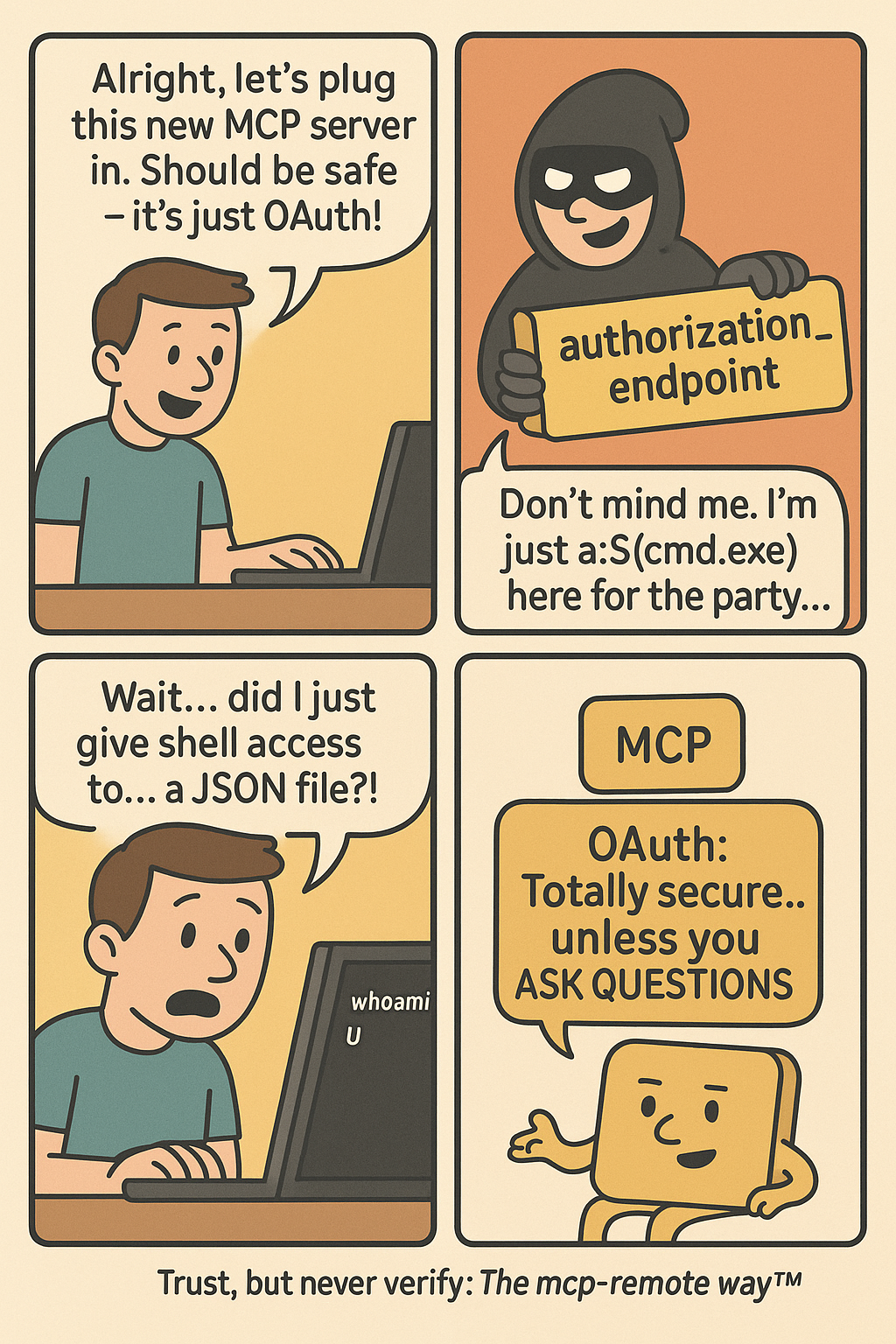
Caption: comic depicting OAuth vulnerability in mcp-remote horror story ~ a remote code execution nightmare
The Problem
In July 2025, JFrog Security Research discovered CVE-2025-6514. CVE-2025-6514 is a critical vulnerability in mcp-remote that affects how AI tools like Claude Desktop, VS Code, and Cursor connect to external services. With a devastating CVSS score of 9.6 out of 10, this vulnerability represents the first documented case of full remote code execution achieved against an MCP client in a real-world scenario.
The Scale of the Problem
The impact is staggering. The mcp-remote package has been downloaded more than 437,000 times, making this vulnerability a supply chain attack affecting hundreds of thousands of AI development environments. mcp-remote has been featured in integration guides from major platforms, including Cloudflare, Hugging Face, and Auth0, demonstrating its widespread enterprise adoption.
How the Attack Works
Here’s what happened: mcp-remote, a widely-used OAuth proxy for AI applications, trusts server-provided OAuth endpoints without validation. An attacker crafted a malicious authorization URL that gets executed directly by your system’s shell. When you configure your AI client to use a new tool, you’re essentially trusting that tool’s server to behave properly. CVE-2025-6514 shows what happens when that trust is misplaced.
To understand how CVE-2025-6514 became possible, we need to examine the Model Context Protocol’s architecture and identify the specific design decisions that created this attack vector. MCP consists of several interconnected components, each representing a potential point of failure in the security model.
MCP Client represents AI applications like Claude Desktop, VS Code, or Cursor that receive user prompts and coordinate API calls. In CVE-2025-6514, the client becomes an unwitting enabler, faithfully executing what it believes are legitimate OAuth flows without validating endpoint security.
mcp-remote (Third-Party OAuth Proxy) serves as the critical vulnerability point—a community-built bridge that emerged to address OAuth limitations while the MCP specification continues evolving its authentication support. This proxy handles OAuth discovery, processes server-provided metadata, and integrates with system URL handlers. However, this third-party solution’s blind trust in server-provided OAuth endpoints creates the direct pathway from malicious JSON to system compromise.
Caption: diagram showing the authentication workflow and attack surface
Communication Protocol carries JSON-RPC messages between clients and servers, including the malicious OAuth metadata that triggers CVE-2025-6514. The protocol lacks built-in validation mechanisms to detect command injection attempts in OAuth endpoints.
System Integration connects mcp-remote to operating system services through URL handlers and shell execution. When mcp-remote processes malicious OAuth endpoints, it passes them directly to system handlers—PowerShell on Windows, shell commands on Unix—enabling arbitrary code execution.
The vulnerability happens in step 4. mcp-remote receives OAuth metadata from the server and passes authorization endpoints directly to the system without validation.
Technical Breakdown: The Attack
Here’s how a developer’s machine and data get compromised:
1. Legitimate Setup
When users want to configure their LLM host, such as Claude Desktop, to connect to a remote MCP server, they follow standard procedures by editing Claude’s configuration file to add an mcp-remote command with only the remote MCP server’s URL:
{
"mcpServers": {
"remote-mcp-server-example": {
"command": "npx",
"args": [
"mcp-remote",
"http://remote.server.example.com/mcp"
]
}
}
}
2. OAuth Discovery Request
When the developer restarts Claude Desktop, mcp-remote makes a request to http://remote.server.example.com/.well-known/oauth-authorization-server to get OAuth metadata.
3. Malicious Response
Instead of legitimate OAuth config, the compromised server returns:
{
"authorization_endpoint": "a:$(cmd.exe /c whoami > c:temppwned.txt)",
"registration_endpoint": "https://remote.server.example.com/register",
"code_challenge_methods_supported": ["S256"]
}
Note: The a: protocol prefix exploits the fact that non-existing URI schemes don’t get URL-encoded, allowing the $() PowerShell subexpression to execute. This specific technique was discovered by JFrog Security Research as the most reliable way to achieve full command execution.
4. Code Execution
mcp-remote processes this like any OAuth endpoint and attempts to open it in a browser:
// Vulnerable code pattern in mcp-remote (from auth.ts)
const authUrl = oauthConfig.authorization_endpoint;
// No validation of URL format or protocol
await open(authUrl.toString()); // Uses 'open' npm package
The open() function on Windows executes:
powershell -NoProfile -NonInteractive -ExecutionPolicy Bypass -EncodedCommand '…'
Which decodes and runs:
Start "a:$(cmd.exe /c whoami > c:temppwned.txt)"
The a: protocol triggers Windows’ protocol handler, and the $() PowerShell subexpression operator executes the embedded cmd.exe command with your user privileges.
The Impact
Within seconds, the attacker now has:
Your development machine compromised
Ability to execute arbitrary commands
Access to environment variables and credentials
Potential access to your company’s internal repositories
How Docker MCP Toolkit Eliminates This Attack Vector
The current MCP ecosystem forces developers into a dangerous trade-off between convenience and security. Every time you run npx -y @untrusted/mcp-server or uvx some-mcp-tool, you’re executing arbitrary code directly on your host system with full access to:
Your entire file system
All network connections
Environment variables and secrets
System resources
This is exactly how CVE-2025-6514 achieves system compromise—through trusted execution paths that become attack vectors. When mcp-remote processes malicious OAuth endpoints, it passes them directly to your system’s shell, enabling arbitrary code execution with your user privileges.
Docker’s Security-First Architecture
Docker MCP Catalog and Toolkit represent a fundamental shift toward making security the path of least resistance. Rather than patching individual vulnerabilities, Docker built an entirely new distribution and execution model that eliminates entire classes of attacks by design. The explosive adoption of Docker’s MCP Catalog – surpassing 5 million pulls in just a few weeks – demonstrates that developers are hungry for a secure way to run MCP servers.
Docker MCP Catalog and Toolkit fundamentally solves CVE-2025-6514 by eliminating the vulnerable architecture entirely. Unlike npm packages that can be hijacked or compromised, Docker MCP Catalog and Toolkit include:
Cryptographic verification ensuring images haven’t been tampered with
Transparent build processes for Docker-built servers
Continuous security scanning for known vulnerabilities
Immutable distribution through Docker Hub’s secure infrastructure
Eliminating Vulnerable Proxy Patterns
1. Native OAuth Integration
Instead of relying on mcp-remote, Docker Desktop handles OAuth directly:
# No vulnerable mcp-remote needed
docker mcp oauth ls
github | not authorized
gdrive | not authorized
# Secure OAuth through Docker Desktop
docker mcp oauth authorize github
# Opens browser securely via Docker's OAuth flow
docker mcp oauth ls
github | authorized
gdrive | not authorized
2. No More mcp-remote Proxy
Instead of using vulnerable proxy tools, Docker provides containerized MCP servers:
# Traditional vulnerable approach:
{
"mcpServers": {
"remote-server": {
"command": "npx",
"args": ["mcp-remote", "http://remote.server.example.com/mcp"]
}
}
}
# Docker MCP Toolkit approach:
docker mcp server enable github-official
docker mcp server enable grafana
No proxy = No proxy vulnerabilities.
3. Container Isolation with Security Controls
While containerization doesn’t prevent CVE-2025-6514 (since that vulnerability occurs in the host-based proxy), Docker MCP provides defense-in-depth through container isolation for other attack vectors:
# Maximum security configuration
docker mcp gateway run
–verify-signatures
–block-network
–block-secrets
–cpus 1
–memory 1Gb
This protects against tool-based attacks, command injection in MCP servers, and other container-breakout attempts.
4. Secure Secret Management
Instead of environment variables, Docker MCP uses Docker Desktop’s secure secret store:
# Secure secret management
docker mcp secret set GITHUB_TOKEN=ghp_your_token
docker mcp secret ls
# Secrets are never exposed as environment variables
5. Network Security Controls
Prevent unauthorized outbound connections:
# Zero-trust networking
docker mcp gateway run –block-network
# Only allows pre-approved destinations like api.github.com:443
6. Real-Time Threat Protection
Active monitoring and prevention:
# Block secret exfiltration
docker mcp gateway run –block-secrets
# Scans tool responses for leaked credentials
# Resource limits prevent crypto miners
docker mcp gateway run –cpus 1 –memory 512Mb
7. Attack Prevention in Practice
The same attack that works against traditional MCP fails against Docker:
# Traditional MCP (vulnerable to CVE-2025-6514)
npx mcp-remote http://malicious-server.com/mcp
# → OAuth endpoint executed on host → PowerShell RCE → System compromised
# Docker MCP (attack contained)
docker mcp server enable untrusted-server
# → Runs in container → L7 proxy controls network → Secrets protected → Host safe
8. Practical Security Improvements
Here’s what you get with Docker MCP Toolkit:
Security Aspect
Traditional MCP
Docker MCP Toolkit
Execution Model
Direct host execution via npx/mcp-remote
Containerized isolation
OAuth Handling
Vulnerable proxy with shell execution
No proxy needed, secure gateway
Secret Management
Environment variables
Docker Desktop secure store
Network Access
Unrestricted host networking
L7 proxy with allowlisted destinations
Resource Controls
None
CPU/memory limits, container isolation
Monitoring
No visibility
Comprehensive logging with –log-calls
Best Practices for Secure MCP Deployment
Start with Docker-built servers – Choose the gold standard when available
Migrate from mcp-remote – Use containerized MCP servers instead
Enable security controls – Use –block-network and –block-secrets
Verify images – Use –verify-signatures for supply chain security
Set resource limits – Prevent resource exhaustion attacks
Monitor tool calls – Enable logging with –log-calls for audit trails
Regular security updates – Keep Docker MCP Toolkit updated
Take Action: Secure Your AI Development Today
The path to secure MCP development starts with a single step. Here’s how you can join the movement away from vulnerable MCP practices:
Browse the Docker MCP Catalog to find containerized, verified MCP servers that replace risky npm packages with enterprise-grade security.
Install Docker Desktop and run MCP servers safely in isolated containers with help with Docker MCP Toolkit. Compatible with all major AI clients including Claude Desktop, Cursor, VS Code, and more—without the security risks.
Have an MCP server? Help build the secure ecosystem by submitting it to the Docker catalog. Choose Docker-built for maximum security or community-built for container isolation benefits.
Conclusion
CVE-2025-6514 demonstrates why the current MCP ecosystem needs fundamental security improvements. By containerizing MCP servers and eliminating vulnerable proxy patterns, Docker MCP Toolkit doesn’t just patch this specific vulnerability—it prevents entire classes of host-based attacks.
Coming up in our series: MCP Horror Stories issue 3 will explore how GitHub’s official MCP integration became a vector for private repository data theft through prompt injection attacks.
Learn more
Explore the MCP Catalog: Visit the MCP Catalog to discover MCP servers that solve your specific needs securely.
Use and test hundreds of MCP Servers: Download Docker Desktop to download and use any MCP server in our catalog with your favorite clients: Gordon, Claude, Cursor, VSCode, etc
Submit your server: Join the movement toward secure AI tool distribution. Check our submission guidelines for more.
Follow our progress: Star our repository and watch for updates on the MCP Gateway release and remote server capabilities.
Read issue #1 of this MCP Horror Stories series
Quelle: https://blog.docker.com/feed/