Agent Factory: Building your first AI agent with the tools to deliver real-world outcomes

This blog post is the second out of a six-part blog series called Agent Factory which will share best practices, design patterns, and tools to help guide you through adopting and building agentic AI.

Tools are defining the next wave of agentic AI

In the previous blog, we explored five common design patterns of agentic AI—from tool use and reflection to planning, multi-agent collaboration, and adaptive reasoning. These patterns show how agents can be structured to achieve reliable, scalable automation in real-world environments.

Across the industry, we’re seeing a clear shift. Early experiments focused on single-model prompts and static workflows. Now, the conversation is about extensibility—how to give agents a broad, evolving set of capabilities without locking into one vendor or rewriting integrations for each new need. Platforms are competing on how quickly developers can:

Integrate with hundreds of APIs, services, data sources, and workflows.

Reuse those integrations across different teams and runtime environments.

Maintain enterprise-grade control over who can call what, when, and with what data.

The lesson from the past year of agentic AI evolution is simple: agents are only as capable as the tools you give them—and only as trustworthy as the governance behind those tools.

Develop agentic AI in Azure AI Foundry

Extensibility through open standards

In the early stages of agent development, integrating tools was often a bespoke, platform-specific effort. Each framework had its own conventions for defining tools, passing data, and handling authentication. This created several consistent blockers:

Duplication of effort—the same internal API had to be wrapped differently for each runtime.

Brittle integrations—small changes to schemas or endpoints could break multiple agents at once.

Limited reusability—tools built for one team or environment were hard to share across projects or clouds.

Fragmented governance—different runtimes enforced different security and policy models.

As organizations began deploying agents across hybrid and multi-cloud environments, these inefficiencies became major obstacles. Teams needed a way to standardize how tools are described, discovered, and invoked, regardless of the hosting environment.

That’s where open protocols entered the conversation. Just as HTTP transformed the web by creating a common language for clients and servers, open protocols for agents aim to make tools portable, interoperable, and easier to govern.

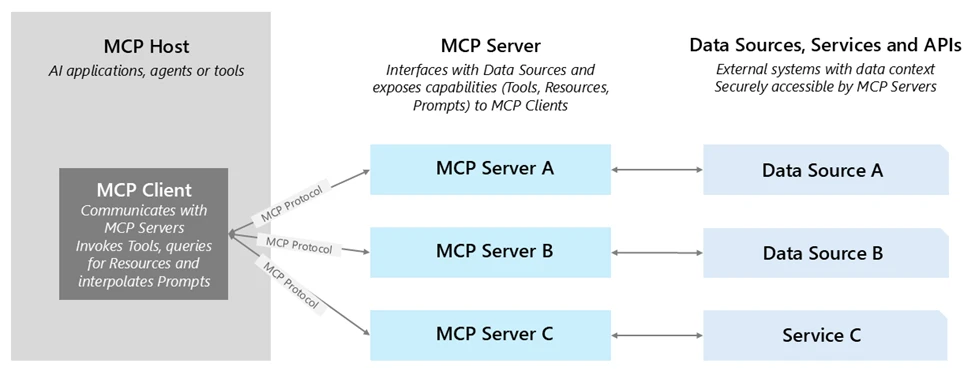
One of the most promising examples is the Model Context Protocol (MCP)—a standard for defining tool capabilities and I/O schemas so any MCP-compliant agent can dynamically discover and invoke them. With MCP:

Tools are self-describing, making discovery and integration faster.

Agents can find and use tools at runtime without manual wiring.

Tools can be hosted anywhere—on-premises, in a partner cloud, or in another business unit—without losing governance.

Azure AI Foundry supports MCP, enabling you to bring existing MCP servers directly into your agents. This gives you the benefits of open interoperability plus enterprise-grade security, observability, and management. Learn more about MCP at MCP Dev Days.

The enterprise toolchain in Azure AI Foundry

Once you have a standard for portability through open protocols like MCP, the next question becomes: what kinds of tools should your agents have, and how do you organize them so they can deliver value quickly while staying adaptable?

In Azure AI Foundry, we think of this as building an enterprise toolchain—a layered set of capabilities that balance speed (getting something valuable running today), differentiation (capturing what makes your business unique), and reach (connecting across all the systems where work actually happens).

1. Built-in tools for rapid value: Azure AI Foundry includes ready-to-use tools for common enterprise needs: searching across SharePoint and data lake, executing Python for data analysis, performing multi-step web research with Bing, and triggering browser automation tasks. These aren’t just conveniences—they let teams stand up functional, high-value agents in days instead of weeks, without the friction of early integration work.

2. Custom tools for your competitive edge: Every organization has proprietary systems and processes that can’t be replicated by off-the-shelf tools. Azure AI Foundry makes it straightforward to wrap these as agentic AI tools—whether they’re APIs from your ERP, a manufacturing quality control system, or a partner’s service. By invoking them through OpenAPI or MCP, these tools become portable and discoverable across teams, projects, and even clouds, while still benefiting from Foundry’s identity, policy, and observability layers.

3. Connectors for maximum reach: Through Azure Logic Apps, Foundry can connect agents to over 1,400 SaaS and on-premises systems—CRM, ERP, ITSM, data warehouses, and more. This dramatically reduces integration lift, allowing you to plug into existing enterprise processes without building every connector from scratch.

One example of this toolchain in action comes from NTT DATA, which built agents in Azure AI Foundry that integrate Microsoft Fabric Data Agent alongside other enterprise tools. These agents allow employees across HR, operations, and other functions to interact naturally with data—revealing real-time insights and enabling actions—reducing time-to-market by 50% and giving non‑technical users intuitive, self-service access to enterprise intelligence.

Enterprise-grade management for tools

Extensibility must be paired with governance to move from prototype to enterprise-ready automation. Azure AI Foundry addresses this with a secure-by-default approach to tool management:

Authentication and identity in built-in connectors: Enterprise-grade connectors—like SharePoint and Microsoft Fabric—already use on-behalf-of (OBO) authentication. When an agent invokes these tools, Foundry ensures that the call respects the end user’s permissions via managed Entra IDs, preserving existing authorization rules. With Microsoft Entra Agent ID, every agentic project created in Azure AI Foundry automatically appears in an agent-specific application view within the Microsoft Entra admin center. This provides security teams with a unified directory view of all agents and agent applications they need to manage across Microsoft. This integration marks the first step toward standardizing governance for AI agents company wide. While Entra ID is native, Azure AI Foundry also supports integrations with external identity systems. Through federation, customers who use providers such as Okta or Google Identity can still authenticate agents and users to call tools securely.

Custom tools with OpenAPI and MCP: OpenAPI-specified tools enable seamless connectivity using managed identities, API keys, or unauthenticated access. These tools can be registered directly in Foundry, and align with standard API design best practices. Foundry is also expanding MCP security to include stored credentials, project-level managed identities, and third-party OAuth flows, along with secure private networking—advancing toward a fully enterprise-grade, end-to-end MCP integration model.

API governance with Azure API Management (APIM): APIM provides a powerful control plane for managing tool calls: it enables centralized publishing, policy enforcement (authentication, rate limits, payload validation), and monitoring. Additionally, you can deploy self-hosted gateways within VNets or on-prem environments to enforce enterprise policies close to backend systems. Complementing this, Azure API Center acts as a centralized, design-time API inventory and discovery hub—allowing teams to register, catalog, and manage private MCP servers alongside other APIs. These capabilities provide the same governance you expect for your APIs—extended to agentic AI tools without additional engineering.

Observability and auditability: Every tool invocation in Foundry—whether internal or external—is traced with step-level logging. This includes identity, tool name, inputs, outputs, and outcomes, enabling continuous reliability monitoring and simplified auditing.

Five best practices for secure, scalable tool integration

Enterprise-grade management ensures tools are secure and observable—but success also depends on how you design and operate them from day one. Drawing on Azure AI Foundry guidance and customer experience, a few principles stand out:

Start with the contract. Treat every tool like an API product. Define clear inputs, outputs, and error behaviors, and keep schemas consistent across teams. Avoid overloading a single tool with multiple unrelated actions; smaller, single-purpose tools are easier to test, monitor, and reuse.

Choose the right packaging. For proprietary APIs, decide early whether OpenAPI or MCP best fits your needs. OpenAPI tools are straightforward for well-documented REST APIs, while MCP tools excel when portability and cross-environment reuse are priorities.

Centralize governance. Publish custom tools behind Azure API Management or a self-hosted gateway so authentication, throttling, and payload inspection are enforced consistently. This keeps policy logic out of tool code and makes changes easier to roll out.

Bind every action to identity. Always know which user or agent is invoking the tool. For built-in connectors, leverage identity passthrough or OBO. For custom tools, use Entra ID or the appropriate API key/credential model, and apply least-privilege access.

Instrument early. Add tracing, logging, and evaluation hooks before moving to production. Early observability lets you track performance trends, detect regressions, and tune tools without downtime.

Following these practices ensures that the tools you integrate today remain secure, portable, and maintainable as your agent ecosystem grows.

What’s next

In part three of the Agent Factory series, we’ll focus on observability for AI agents—how to trace every step, evaluate tool performance, and monitor agent behavior in real time. We’ll cover the built-in capabilities in Azure AI Foundry, integration patterns with Azure Monitor, and best practices for turning telemetry into continuous improvement.

Did you miss the first post in the series? Check it out: The new era of agentic AI—common use cases and design patterns.

Azure AI Foundry
Build AI agents that automate tasks, enhance user experiences, and deliver results.

Learn more

The post Agent Factory: Building your first AI agent with the tools to deliver real-world outcomes appeared first on Microsoft Azure Blog.
Quelle: Azure

The Supply Chain Paradox: When “Hardened” Images Become a Vendor Lock-in Trap

The market for pre-hardened container images is experiencing explosive growth as security-conscious organizations pursue the ultimate efficiency: instant security with minimal operational overhead. The value proposition is undeniably compelling—hardened images with minimal dependencies promise security “out of the box,” enabling teams to focus on building and shipping applications rather than constantly revisiting low-level configuration management.

For good reason, enterprises are adopting these pre-configured images to reduce attack surface area and simplify security operations. In theory, hardened images deliver reduced setup time, standardized security baselines, and streamlined compliance validation with significantly less manual intervention.

Yet beneath this attractive surface lies a fundamental contradiction. While hardened images can genuinely reduce certain categories of supply chain risk and strengthen security posture, they simultaneously create a more subtle form of vendor dependency than traditional licensing models. Organizations are unknowingly building critical operational dependencies on a single vendor’s design philosophy, build processes, institutional knowledge, responsiveness, and long-term market viability.

The paradox is striking: in the pursuit of supply chain independence, many organizations are inadvertently creating more concentrated dependencies and potentially weakening their security through stealth vendor lock-in that becomes apparent only when it’s costly to reverse.

The Mechanics of Modern Vendor Lock-in

Unfamiliar Base Systems Create Switching Friction

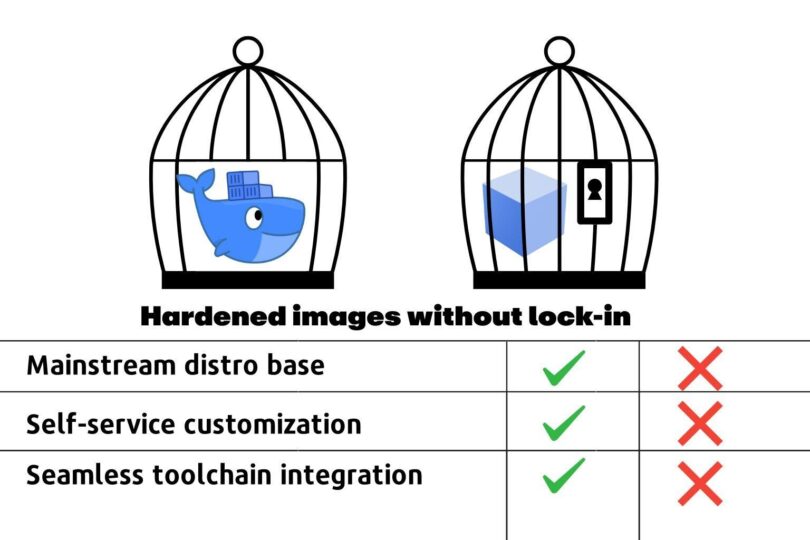
The first layer of lock-in emerges from architectural choices that seem benign during initial evaluation but become problematic at scale. Some hardened image vendors deviate from mainstream distributions, opting to bake their own Linux variants rather  than offering widely-adopted options like Debian, Alpine, or Ubuntu. This deviation creates immediate friction for platform engineering teams who must develop vendor-specific expertise to effectively manage these systems. Even if the differences are small, this raises the spectre of edge-cases – the bane of platform teams. Add enough edge cases and teams will start to fear adoption.

While vendors try to standardize their approach to hardening, in reality, it remains a bespoke process. This can create differences from image to image across different open source versions, up and down the stack – even from the same vendor. In larger organizations, platform teams may need to offer hardened images from multiple vendors. This creates further compounding complexity. In the end, teams find themselves managing a heterogeneous environment that requires specialized knowledge across multiple proprietary approaches. This increases toil, adds risk, increases documentation requirements and raises the cost of staff turnover.

Compatibility Barriers and Customization Constraints

More problematic is how hardened images often break compatibility with standard tooling and monitoring systems that organizations have already invested in and optimized. Open source compatibility gaps emerge when hardened images introduce modifications that prevent seamless integration with established DevOps workflows, forcing organizations to either accept reduced functionality or invest in vendor-specific alternatives.

Security measures, while well-intentioned, can become so restrictive they prevent necessary business customizations. Configuration lockdown reaches levels where platform teams cannot implement organization-specific requirements without vendor consultation or approval, transforming what should be internal operational decisions into external dependencies.

Perhaps most disruptive is how hardened images force changes to established CI/CD pipelines and operational practices. Teams discover that their existing automation, deployment scripts, and monitoring configurations require substantial modification to accommodate the vendor’s approach to security hardening.

The Hidden Migration Tax

The vendor lock-in trap becomes most apparent when organizations attempt to change direction. While vendors excel at streamlining initial adoption—providing migration tools, professional services, and comprehensive onboarding support—they systematically downplay the complexity of eventual exit scenarios.

Organizations accumulate sunk costs through investments in training and vendor-specific tooling that create psychological and financial barriers to switching providers. More critically, expertise about these systems becomes concentrated within vendor organizations rather than distributed among internal teams. Platform engineers find themselves dependent on vendor documentation, support channels, and institutional knowledge to troubleshoot issues and implement changes.

The Open Source Transparency Problem

The hardened image industry leverages the credibility of open source. But it can also undermine the spirit of open source transparency by creating almost a kind of fork but without the benefits of community.. While vendors may provide source code access, this availability doesn’t guarantee system understanding or maintainability. The knowledge required to comprehend complex hardening processes often remains concentrated within small vendor teams, making independent verification and modification practically impossible.

Heavily modified images become difficult for internal teams to audit and troubleshoot. Platform engineers encounter systems that appear familiar on the surface but behave differently under stress or during incident response, creating operational blind spots that can compromise security during critical moments.

Trust and Verification Gaps

Transparency is only half the equation. Security doesn’t end at a vendor’s brand name or marketing claims. Hardened images are part of your production supply chain and should be scrutinized like any other critical dependency. Questions platform teams should ask include:

How are vulnerabilities identified and disclosed? Is there a public, time-bound process, and is it tied to upstream commits and advisories rather than just public CVEs?

Could the hardening process itself introduce risks through untested modifications?

Have security claims been independently validated through audits, reproducible builds, or public attestations?

Does your SBOM meta-data accurately reflect the full context of your hardened image? 

Transparency plus verification and full disclosure builds durable trust. Without both, hardened images can be difficult to audit, slow to patch, and nearly impossible to replace. Not providing easy-to-understand and easy-to-consume verification artefacts and answers functions as a form of lock-in forcing the customer to trust but not allowing them to verify.

Building Independence: A Strategic Framework

For platform teams that want to benefit from the security gains of hardened images and reap ease of use while avoiding lock-in, taking a structured approach to hardened vendor decision making is critical.

Distribution Compatibility as Foundation

Platform engineering leaders must establish mainstream distribution adherence as a non-negotiable requirement. Hardened images should be built from widely-adopted distributions like Debian, Ubuntu, Alpine, or RHEL rather than vendor-specific variants that introduce unnecessary complexity and switching costs.

Equally important is preserving compatibility with standard package managers and maintaining adherence to the Filesystem Hierarchy Standard (FHS) to preserve tool compatibility and operational familiarity across teams. Key requirements include:

Package manager preservation: Compatibility with standard tools (apt, yum, apk) for independent software installation and updates 

File system layout standards: Adherence to FHS for seamless integration with existing tooling

Library and dependency compatibility: No proprietary dependencies that create additional vendor lock-in

Enabling Rapid Customization Without Security Compromise

Security enhancements should be architected as modular, configurable layers rather than baked-in modifications that resist change. This approach allows organizations to customize security posture while maintaining the underlying benefits of hardened configurations.

Built-in capability to modify security settings through standard configuration management tools preserves existing operational workflows and prevents the need for vendor-specific automation approaches. Critical capabilities include:

Modular hardening layers: Security enhancements as removable, configurable components

Configuration override mechanisms: Integration with standard tools (Ansible, Chef, Puppet)

Whitelist-based customization: Approved modifications without vendor consultation

Continuous validation: Continuous verification that customizations don’t compromise security baselines

Community Integration and Upstream Collaboration

Organizations should demand that hardened image vendors contribute security improvements back to original distribution maintainers. This requirement ensures that security enhancements benefit the broader community and aren’t held hostage by vendor business models.

Evaluating vendor participation in upstream security discussions, patch contributions, and vulnerability disclosure processes provides insight into their long-term commitment to community-driven security rather than proprietary advantage. Essential evaluation criteria include:

Upstream contribution requirements: Active contribution of security improvements to distribution maintainers

True community engagement: Participation in security discussions and vulnerability disclosure processes

Compatibility guarantees: Contractual requirements for backward and forward compatibility with official distributions

Intelligent Migration Tooling and Transparency

AI-powered Dockerfile conversion capabilities should provide automated translation between vendor hardened images and standard distributions, handling complex multi-stage builds and dependency mappings without requiring manual intervention.

Migration tooling must accommodate practical deployment patterns including multi-service containers and legacy application constraints rather than forcing organizations to adopt idealized single-service architectures. Essential tooling requirements include:

Automated conversion capabilities: AI-powered translation between hardened images and standard distributions

Transparent migration documentation: Open source tools that generate equivalent configurations for different providers

Bidirectional conversion: Tools that work equally well for migrating to and away from hardened images

Real-world architecture support: Accommodation of practical deployment patterns rather than forcing idealized architectures

Practical Implementation Framework

Standardized compatibility testing protocols should verify that hardened images integrate seamlessly with existing toolchains, monitoring systems, and operational procedures before deployment at scale. Self-service customization interfaces for common modifications eliminate dependency on vendor support for routine operational tasks.

Advanced image merging capabilities allow organizations to combine hardened base images with custom application layers while maintaining security baselines, providing flexibility without compromising protection. Implementation requirements include:

Compatibility testing protocols: Standardized verification of integration with existing toolchains and monitoring systems

Self-service customization:: User-friendly tools for common modifications (CA certificates, custom files, configuration overlays)

Image merging capabilities: Advanced tooling for combining hardened bases with custom application layers

Vendor SLAs: Service level agreements for maintaining compatibility and providing migration support

Conclusion: Security Without Surrendering Control

The real question platform teams must ask is this. Does my hardened image vendor strengthen or weaken my own control of my supply chain? The risks of lock-in aren’t theoretical. All of the factors described above can turn security into an unwanted operational constraint. Platform teams can demand hardened images and hardening process built for independence from the start— rooted in mainstream distributions, transparent in their build processes, modular in their security layers, supported by strong community involvement, and butressed by tooling that makes migration a choice, not a crisis.

When security leaders adopt hardened images that preserve compatibility, encourage upstream collaboration, and fit seamlessly into existing workflows, they protect more than just their containers. They protect their ability to adapt and they minimize lock-in while actually improving their security posture. The most secure organizations will be the ones that can harden without handcuffing themselves.
Quelle: https://blog.docker.com/feed/