Building secure, scalable AI in the cloud with Microsoft Azure

Generative AI is a transformative force, redefining how modern enterprises operate. It has quickly become central to how businesses drive productivity, innovate, and deliver impact. The pressure is on: organizations must move fast to not only adopt AI, but to unlock real value at scale or risk falling behind.  

Achieving enterprise-wide deployment of AI securely and efficiently is no easy feat. Generative AI is like rocket fuel. It can propel businesses to new heights, but only with the right infrastructure and controls in place. To accelerate safely and strategically, enterprises are turning to Microsoft Azure as mission control. Tapping into Azure’s powerful cloud infrastructure and advanced security solutions allows teams to effectively build, deploy, amplify, and see real results from generative AI. 

To understand how businesses are preparing for AI, we commissioned Forrester Consulting to survey Azure customers. The resulting 2024 Forrester Total Economic ImpactTM study uncovers the steps businesses take to become AI-ready, the challenges of adopting generative AI in the cloud, and how Azure’s scalable infrastructure and built-in security helps businesses deploy AI with confidence. 

Read the full study to learn how organizations are leveraging Azure for AI-readiness and to run generative AI securely in the cloud

Challenges with scaling generative AI on-premises 

Scaling generative AI is like designing transportation systems for a rapidly growing city. Just as urban expansion demands modern transportation infrastructure to function efficiently, AI leaders understand that implementing AI in a meaningful way requires a cloud foundation that is powerful, flexible, and built to handle future demand. AI leaders recognize that the power and agility of the cloud is needed to achieve their desired outcomes.  

In fact, 72% of surveyed respondents whose organization migration to Azure for AI-readiness reported that the migration was necessary or reduced the barriers to enabling AI.

65% of business leaders agreed that deploying generative AI in the cloud would meet their organizational objectives to avoid restrictions and limitations of on-prem deployments. 

Businesses that run most or all of their generative AI workloads on-premises face significant roadblocks. On-premises systems, often lacking the agility offered by the cloud, resemble outdated roadways—prone to congestion, difficult to maintain, expensive to expand, and ill-equipped for today’s demands. Businesses attempting to scale AI in these environments encounter complicated obstacles—including infrastructure limitations, a shortage of specialized talent, and integration challenges that slow innovation—that are frustrating to overcome. Challenges like limited network bandwidth and fragmented data environments further complicate adoption.

Deploying generative AI safely is crucial to protecting sensitive data, maintaining compliance, and mitigating risk. Surveyed decision-makers identified four key areas of concerns: 

Data privacy risks, especially with the proliferation of AI-generated content.

Lack of expertise regarding generative AI security best practices.

Compliance complexities with evolving regulations around AI use and data protection.

Shadow IT risks, as users turn to unauthorized tools and apps, exposing organizations to vulnerabilities.

To overcome these challenges, it’s important to partner with a cloud platform that provides built-in security and regulatory compliance. Cloud migration provides the scalable infrastructure, integrated applications, and AI-ready data foundation necessary for generative AI success. Survey respondents who have already transitioned many or all AI workloads to Azure report enhanced global reach, scalability, and flexibility, all major advantages in today’s rapidly evolving AI landscape. 

Why enterprise chooses Azure for AI-readiness 

Infrastructure limitations are a barrier to scaling generative AI. On-premises environments often hinder performance, increase costs, and slow innovation. According to our survey, 75% of organizations migrating to Azure for AI-readiness reported that the migration was necessary or it significantly reduced barriers to generative AI adoption. 

While the benefits of deploying generative AI in the cloud are clear, teams still face hurdles in adopting AI responsibly. Vulnerabilities, limited expertise in AI security, and data privacy risks are the most prominent concerns. Azure addresses these concerns with comprehensive frameworks that safeguard generative AI workloads end-to-end, from development to runtime. 

Surveyed leaders cited Azure’s colocation strategy as a top reason for partnering with Azure for deploying generative AI, eliminating data silos and optimizing performance. Microsoft Defender for Cloud and Microsoft Sentinel enhance protection and make Azure a trusted platform for safe, enterprise-grade generative AI deployment. 

4 key differentiators for deploying generative AI with Azure

1. Enterprise-grade security and compliant solutions

Security concerns are a primary challenge when deploying generative AI in the cloud. Azure protects AI workloads from code to cloud. Azure’s multi-layered approach helps modern organizations meet compliance standards and minimizes risks across the entire AI lifecycle. Key solutions including Defender for Cloud, Microsoft Sentinel, Microsoft Azure Key Vault, and infrastructure as a service (IaaS) provide end-to-end protection for generative AI workloads, ensuring data privacy, development lifecycle protection, and threat management. Backed by Microsoft’s enterprise-grade security, compliance, and responsible AI commitments, Azure empowers teams to build AI solutions that are not only powerful but also ethical, transparent, and compliant. 

2. Scalable cloud infrastructure

Azure’s cloud infrastructure allows businesses to avoid the constraints of legacy environments, enabling them to launch AI projects efficiently and securely. Azure brings a suite of advanced AI and machine learning tools to the table that are mission critical for generative AI success, enabling organizations to break free from siloed data, outdated security frameworks, and infrastructure bottlenecks. By deploying generative AI in the cloud, businesses can accelerate innovation, streamline operations, and build AI-powered solutions with confidence. 

3. Unified data and AI management

Effective AI starts with a solid data foundation. Azure’s data integration and management solutions—Microsoft Fabric, Azure Synapse Analytics, and Azure Databricks—enable organizations to centralize data, improve governance, and optimize AI model performance. By moving beyond the limitations of legacy on-premises environments, businesses gain seamless data access, better compliance, and the scalability needed to drive AI innovation for enterprise. With Azure, organizations can harness high-quality, well-governed data to power more accurate and reliable AI outcomes. 

4. Faster innovation

By adopting Azure, resources can be redirected from infrastructure maintenance to AI-powered innovation. Azure’s flexible, secure cloud environment enables businesses to experiment, adapt, and evangelize AI solutions with less risk than traditional on-premises deployments. Surveyed organizations using Azure reported more than twice the confidence in their ability to build and refine AI and machine learning applications compared to those relying on on-premises infrastructure. Key benefits include greater flexibility, reduced risk when modifying AI solutions, and the ability to reinvest infrastructure resources into AI upskilling and innovation. 

The business impact of secure generative AI on Azure 

Migrating to Azure for AI deployment enhances performance and operational efficiency. Benefits include: 

Optimized resource allocation: Migrating to the cloud frees IT teams from infrastructure management, allowing them to focus on strategic initiatives—such as developing generative AI use cases—that drive meaningful business impact.

Accelerated time to value: Azure AI services empower data scientists, AI and machine learning engineers, and developers, helping them to deliver high-quality models faster.

Enhanced security and compliance: Azure’s integrated security tools protect workloads, reduce breach risks, and meet evolving compliance standards.

Higher AI application performance: Deploying generative AI with Azure improves application performance—driving innovation and growth. 

Innovation without compromise 

As IT professionals and digital transformation leaders navigate the complexities of AI adoption, Azure stands out as a trusted partner for enterprise AI-readiness. With advanced infrastructure, safe and responsible AI practices, and built-in security, Azure offers a secure and scalable foundation for building and running generative AI in the cloud. With Azure, organizations can unlock the full potential of generative AI to drive innovation, accelerate growth, and lasting business value.

Forrester Research
Microsoft customers rely on Azure for AI-readiness to build and run generative AI securely in the cloud

Read the full study

The post Building secure, scalable AI in the cloud with Microsoft Azure appeared first on Microsoft Azure Blog.
Quelle: Azure

Docker State of App Dev: Dev Ex & Productivity 

Report: What’s helping devs thrive — and what’s still holding them back? 

A look at how culture, tooling, and habits are shaping the developer experience today, per Docker’s 2025 State of Application Development Survey.

Great culture, better tools — but developers often still feel stuck. From pull requests stuck in review to tasks without clear estimates, the inner loop remains cluttered with surprisingly persistent friction points. This year’s data maps the disconnect between what developers need, where they’re blocked, and how better tooling and cultural support can keep velocity on track.

Here are six key insights into developer experience and productivity from Docker’s annual State of Application Development Survey, based on responses from over 4,500 industry professionals.

1. How devs learn — and what’s changing

Self-guided learning is on the upswing. Across all industries, fully 85% of respondents turn to online courses or certifications, far outpacing traditional sources like school (33%), books (25%), or on-the-job training (25%). 

Among IT folks, the picture is more nuanced. School is still the top venue for learning to code (65%, up from 57% in our 2024 survey), but online resources are also trending upward. Some 63% of IT pros learned coding skills via online resources (up from 54% in our 2024 survey) and 57% favored online courses or certifications (up from 45% in 2024).

Note: For this year’s report, we surveyed over three times more users across a broader spectrum of industries than for our more IT-focused 2024 report.

As for how devs prefer to learn, reading documentation tops the list, as in last year’s report — that despite the rise in new and interactive forms of learning. Some 29% say they lean on documentation, edging out videos and side projects (28% each) and slightly ahead of structured online training (26%). 

AI tools play a relatively minor role in how respondents learn, with GitHub Copilot cited by just 13% overall — and only 9% among IT pros. It’s also cited by 13% as a preferred learning method.

2. Containers: the great divide?

Among IT pros, container usage soared to 92% — up from 80% in our 2024 survey. Zoom out to a broader view across industries, however, and adoption appears considerably lower. Just 30% of developers say they use containers in any part of their workflow. 

Why the gap? Differences in app structure may offer an explanation: IT industry respondents work with microservice-based architectures more often than those in other industries (68% versus 31%). So the higher container adoption may stem from IT pros’ need for modularity and scalability — which containers provide in spades.

And among container users, needs are evolving. They want better tools for time estimation (31%), task planning (18%), and monitoring/logging (15%) — stubborn pain points across the software lifecycle.

3. An equal-opportunity headache: estimating time

No matter the role, estimating how long a task will take is the most consistent pain point across the board. Whether you’re a front-end developer (28%), data scientist (31%), or a software decision-maker (49%), precision in time planning remains elusive.

Other top roadblocks? Task planning (26%) and pull-request review (25%) are slowing teams down. Interestingly, where people say they need better tools doesn’t always match where they’re getting stuck. Case in point, testing solutions and Continuous Delivery (CD) come up often when devs talk about tooling gaps — even though they’re not always flagged as blockers.

4. Productivity by persona: different hats, same struggles

When you break it down by role, some unique themes emerge:

Experienced developers struggle most with time estimation (42%).

Engineering managers face a three-way tie: planning, time estimation, and designing from scratch (28% each).

Data scientists are especially challenged by CD (21%) — a task not traditionally in their wheelhouse.

Front-end devs, surprisingly, list writing code (28%) as a challenge, closely followed by CI (26%).

Across personas, a common thread stands out: even seasoned professionals are grappling with foundational coordination tasks — not the “hard” tech itself, but the orchestration around it.

5. Tools vs. culture: two sides of the experience equation

On the tooling side, the biggest callouts for improvement include:

Time estimation (22%)

Task planning (18%)

Designing solutions from scratch (17%)

But productivity isn’t just about tools — it’s deeply cultural. When asked what’s working well, developers pointed to work-life balance (39%), location flexibility such as work from home policies (38%), and flexible hours (37%) as top cultural strengths.

The weak spots? Career development (38%), recognition (36%), and meaningful work (33%). In other words: developers like where, when, and how they work, but not always why.

6. What’s easy? What’s not?

While the dev world is full of moving parts, a few areas are surprisingly not challenging:

Editing config files (8%)

Debugging in dev (8%)

Writing config files (7%)

Contrast that with the most taxing areas:

Troubleshooting in production (9%)

Debugging in production (9%)

Security-related tasks (8%)

It’s a reminder that production is still where the stress — and the stakes — are highest.

Bottom line:

Developer productivity isn’t about just one thing. It’s the compound effect of better tools, smarter learning, sharper planning — and yes, a healthy team culture. For orgs to excel, they need to invest not just in platforms, but also in people. Because when you improve the experience, you unlock the performance.

Quelle: https://blog.docker.com/feed/

Using Gordon to Containerize Your Apps and Work with Containers

These days, almost every tech company is looking for ways to integrate AI into their apps and workflows, and Docker is no exception. They’ve been rolling out some impressive AI capabilities across their products. This is my first post as a Docker Captain and in this post, I want to shine a spotlight on a feature that hasn’t gotten nearly enough attention in my opinion: Docker’s AI Agent Gordon (also known as Docker AI), which is built into Docker Desktop and CLI.

Gordon is really helpful when it comes to containerizing applications. Not only does it help you understand how to package your app as a container, but it also reduces the overhead of figuring out dependencies, runtime configs, and other pieces that add to a developer’s daily cognitive load. The best part? Gordon doesn’t just guide you with responses; it can also generate or update the necessary files for you.

The Problem: Containerizing apps and optimizing containers isn’t always easy

Containerizing apps can range from super simple to a bit tricky, depending on what you’re working with. If your app has a single runtime like Node.js, Python, or .NET Core, with clearly defined dependencies and no external services, it will be straightforward.

A basic Dockerfile will usually get you up and running without much effort. But once you start adding more complexity, like a backend, frontend, database, and caching layer, you now have the need for a multi-container app. At this point, you might be dealing with additional Dockerfile configurations and potentially a Docker Compose setup. That’s where things can start to be challenging to get going.

This is where Gordon shines. It’s helpful in containerizing apps and can even handle multi-service container app setups, guiding you through what’s needed and even generating the supporting config files, such as Dockerfiles and docker-compose, to get you going.

Optimizing containers can be a headache too

Beyond just containerizing, there’s also the need to optimize your containers for performance, security, and image size. And let’s face it, optimizing can be tedious. You need to know what base images to use, how to slim them down, how to avoid unnecessary layers, and more.

Gordon can help here too. It provides optimization suggestions, shows you how to apply best practices like multi-stage builds or removing dev dependencies, and helps you create leaner, more secure images.

Why not just use general-purpose Generative AI?

Sure, general-purpose AI tools like ChatGPT, Claude, Gemini, etc. are great and I use them regularly. But when it comes to containers, they can lack the context needed for accurate and efficient help. Gordon, on the other hand, is purpose-built for Docker. It has access to Docker’s ecosystem and has been trained on Docker documentation, best practices, and the nuances of Docker tooling. That means its recommendations are more likely to be precise and aligned with the latest standards.

Walkthrough of Gordon

Gordon can help with containerizing applications, optimizing your containers and more. Gordon is still a Beta feature. To start using Gordon, you need Docker Desktop version 4.38 or later. Gordon is powered by Large Language Models (LLMs), and it goes beyond prompt and response: it can perform certain tasks for you as an AI agent. Gordon can have access to your local files and local images when you give it permission. It will prompt you for access if needed for a task.

Please note, the examples I will show in this post are based on a single working session. Now, let’s dive in and start to explore Gordon.

Enabling Gordon / Docker AI

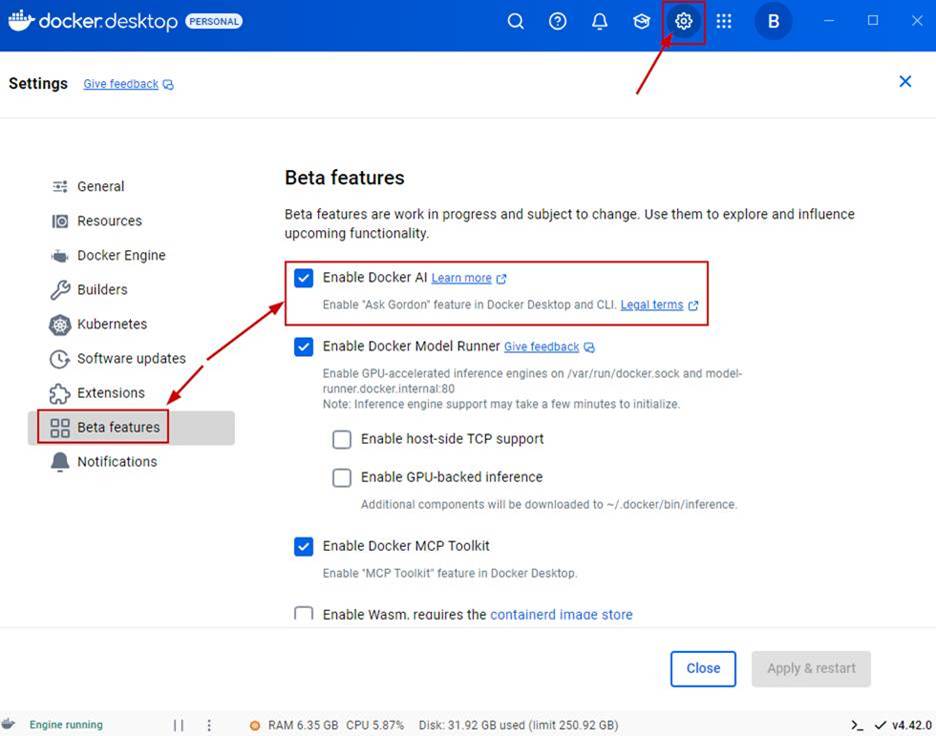
In order to turn Gordon on, go to Settings > Beta features check the Enable Docker AI box as shown in the following screenshot. 

Figure 1: screenshot of where to enable Docker AI in beta features

Accept the terms. The AI in Docker Desktop is in two forms. The first one is through the Docker Desktop UI and is known as Gordon. The second option is Docker AI. Docker AI is accessed through the Docker CLI. The way you activate it is by typing Docker AI in the CLI. I will demonstrate this later on in this blog post.  

Figure 2: screenshot of Docker AI terms acceptance dialog box

Exploring Gordon in Docker Desktop

Now Gordon will appear in your Docker Desktop UI. Here you can prompt it just like any Generative AI tool. Gordon will also have examples that you can use to get started working with it.

You can access Gordon throughout Docker Desktop by clicking on the AI icon as shown in the following screenshot.

Figure 3: screenshot of Docker Desktop interface showing the AI icon for Gordon

When you click on the AI icon a Gordon prompt box appears along with suggested prompts as shown in the following screenshot. The suggestions will change based on the object the AI is next to, and are context-aware.

Figure 4: Screenshot showing Gordon’s suggestion prompt box in Docker Desktop UI

Here is another example of Docker AI suggestions being context-aware based on what area of Docker Desktop you are in. 

 Figure 5: Screenshot showing Docker AI context- specific suggestions 

Another common use case for Gordon is listing local images and using AI to work with them. You can see this in the following set of screenshots. Notice that Gordon will prompt you for permission before showing your local images.

Figure 6: Screenshot showing Gordon referencing local images 

You can also prompt Gordon to take action. As shown in the following screenshot, I asked Gordon to run one of my images.

Figure 7: Screenshot showing Gordon prompts 

If it can’t perform the action, it will attempt to help you. 

Figure 8: Screenshot showing Gordon prompt response to failed request 

Another cool use of Gordon is to explain a container image to you. When you ask this, Gordon will ask you to select the directory where the Dockerfile is and permission to access it as shown in the following screenshot.

Figure 9: Screenshot showing Gordon’s request for particular directory access 

After you give it access to the directory where the Dockerfile is, it will then breakdown what’s in the Dockerfile. 

Figure 10: Screenshot showing Gordon’s response to explaining a Dockerfile 

As shown in the following screenshot, I followed up with a prompt asking Gordon to display what’s in the Dockerfile. It did a good job of explaining its contents, as shown in the following screenshot.

Figure 11: Screenshot showing Gordon’s response regarding Dockerfile contents

Exploring Gordon in the Docker Desktop CLI

Let’s take a quick tour through Gordon in the CLI. Gordon is referred to as Docker AI in the CLI. To work with Docker AI, you need to launch the Docker CLI as shown in the following screenshot. 

Figure 12: Screenshot showing how to launch Docker AI from the CLI 

Once in the CLI you can type “docker ai” and it will bring you into the chat experience so you can prompt Gordon. In my example, I asked Gordon about one of my local images. You can see that it asked me for permission. 

Figure 13: Screenshot showing Docker CLI request for access

Next, I asked Docker AI to list all of my local images as shown in the following screenshot. 

Figure 14: Screenshot showing Docker CLI response to display local images 

I then tested pulling an image using Docker AI. As you can see in the following screenshot, Gordon pulled a nodeJS image for me!

Figure 15: Screenshot showing Docker CLI pulling nodeJS image

Containerizing an application with Gordon

Now let’s explore the experience of containerizing an application using Gordon.

I started by clicking on the example for containerizing an application. Gordon then prompted me for the directory where my application code is. 

Figure 16: Screenshot showing where to enable access to directory for containerizing an application 

I pointed it to my apps directory and gave it permission. It then started to analyze and containerize my app. It picked up the language and started to read through my app’s README file.

Figure 17: Screenshot showing Gordon starting to analyze and containerize app 

You can see it understand the app was written in JavaScript and worked through the packages and dependencies.

Figure 18: Screenshot showing final steps of Gordon processing

Gordon understands that my app has a backend, frontend, and a database, knowing from this that I would need a Docker compose file.

Figure 19: Screenshot showing successful completion of steps to complete the Dockerfiles

From the following screenshot you can see the Docker related files needed for my app. Gordon created all of these.

Figure 20: Screenshot showing files produced from Gordon 

Gordon created the Dockerfile (on the left) and a Compose yaml file (on the right) even picking up that I needed a Postgres DB for this application.

Figure 21: Screenshot showing Dockerfile and Compose yaml file produced from Gordon

I then took it a step further and asked Gordon to build and run the container for my application using the prompt “Can you build and run this application with compose?” It created the Docker Compose file, built the images, and ran the containers!

Figure 22: Screenshot showing completed containers from Gordon

Conclusion

I hope you picked up some useful insights about Docker and discovered one of its lesser-known AI features in Docker Desktop. We explored what Gordon is, how it compares to general-purpose generative AI tools like ChatGPT, Claude, and Gemini, and walked through use cases such as containerizing an application and working with local images. We also touched on how Gordon can support developers and IT professionals who work with containers. If you haven’t already, I encourage you to enable Gordon and take it for a test run. Thanks for reading and stay tuned for more blog posts coming soon.
Quelle: https://blog.docker.com/feed/