EU-Gesetze: 1&1 und Vodafone fürchten um Regulierung
1&1 und europäische Telcos wollen die Regulierung erhalten. Die EU-Kommisson will hier dramatische Änderungen. (1&1, Telekom)
Quelle: Golem

1&1 und europäische Telcos wollen die Regulierung erhalten. Die EU-Kommisson will hier dramatische Änderungen. (1&1, Telekom)
Quelle: Golem

State of the art architecture redefines speed for reasoning models
Microsoft is excited to unveil a new edition to the Phi model family: Phi-4-mini-flash-reasoning. Purpose-built for scenarios where compute, memory, and latency are tightly constrained, this new model is engineered to bring advanced reasoning capabilities to edge devices, mobile applications, and other resource-constrained environments. This new model follows Phi-4-mini, but is built on a new hybrid architecture, that achieves up to 10 times higher throughput and a 2 to 3 times average reduction in latency, enabling significantly faster inference without sacrificing reasoning performance. Ready to power real world solutions that demand efficiency and flexibility, Phi-4-mini-flash-reasoning is available on Azure AI Foundry, NVIDIA API Catalog, and Hugging Face today.
Azure AI Foundry
Create without boundaries—Azure AI Foundry has everything you need to design, customize, and manage AI applications and agents
Explore solutions
Efficiency without compromise
Phi-4-mini-flash-reasoning balances math reasoning ability with efficiency, making it potentially suitable for educational applications, real-time logic-based applications, and more.
Similar to its predecessor, Phi-4-mini-flash-reasoning is a 3.8 billion parameter open model optimized for advanced math reasoning. It supports a 64K token context length and is fine-tuned on high-quality synthetic data to deliver reliable, logic-intensive performance deployment.
What’s new?
At the core of Phi-4-mini-flash-reasoning is the newly introduced decoder-hybrid-decoder architecture, SambaY, whose central innovation is the Gated Memory Unit (GMU), a simple yet effective mechanism for sharing representations between layers. The architecture includes a self-decoder that combines Mamba (a State Space Model) and Sliding Window Attention (SWA), along with a single layer of full attention. The architecture also involves a cross-decoder that interleaves expensive cross-attention layers with the new, efficient GMUs. This new architecture with GMU modules drastically improves decoding efficiency, boosts long-context retrieval performance and enables the architecture to deliver exceptional performance across a wide range of tasks.
Key benefits of the SambaY architecture include:
Enhanced decoding efficiency.
Preserves linear prefiling time complexity.
Increased scalability and enhanced long context performance.
Up to 10 times higher throughput.
Our decoder-hybrid-decoder architecture taking Samba [RLL+25] as the self-decoder. Gated Memory Units (GMUs) are interleaved with the cross-attention layers in the cross-decoder to reduce the decoding computation complexity. As in YOCO [SDZ+24], the full attention layer only computes the KV cache during the prefilling with the self-decoder, leading to linear computation complexity for the prefill stage.
Phi-4-mini-flash-reasoning benchmarks
Like all models in the Phi family, Phi-4-mini-flash-reasoning is deployable on a single GPU, making it accessible for a broad range of use cases. However, what sets it apart is its architectural advantage. This new model achieves significantly lower latency and higher throughput compared to Phi-4-mini-reasoning, particularly in long-context generation and latency-sensitive reasoning tasks.
This makes Phi-4-mini-flash-reasoning a compelling option for developers and enterprises looking to deploy intelligent systems that require fast, scalable, and efficient reasoning—whether on premises or on-device.
The top plot shows inference latency as a function of generation length, while the bottom plot illustrates how inference latency varies with throughput. Both experiments were conducted using the vLLM inference framework on a single A100-80GB GPU with tensor parallelism (TP) set to 1.
A more accurate evaluation was used where Pass@1 accuracy is averaged over 64 samples for AIME24/25 and 8 samples for Math500 and GPQA Diamond. In this graph, Phi-4-mini-flash-reasoning outperforms Phi-4-mini-reasoning and is better than models twice its size.
What are the potential use cases?
Thanks to its reduced latency, improved throughput, and focus on math reasoning, the model is ideal for:
Adaptive learning platforms, where real-time feedback loops are essential.
On-device reasoning assistants, such as mobile study aids or edge-based logic agents.
Interactive tutoring systems that dynamically adjust content difficulty based on a learner’s performance.
Its strength in math and structured reasoning makes it especially valuable for education technology, lightweight simulations, and automated assessment tools that require reliable logic inference with fast response times.
Developers are encouraged to connect with peers and Microsoft engineers through the Microsoft Developer Discord community to ask questions, share feedback, and explore real-world use cases together.
Microsoft’s commitment to trustworthy AI
Organizations across industries are leveraging Azure AI and Microsoft 365 Copilot capabilities to drive growth, increase productivity, and create value-added experiences.
We’re committed to helping organizations use and build AI that is trustworthy, meaning it is secure, private, and safe. We bring best practices and learnings from decades of researching and building AI products at scale to provide industry-leading commitments and capabilities that span our three pillars of security, privacy, and safety. Trustworthy AI is only possible when you combine our commitments, such as our Secure Future Initiative and our responsible AI principles, with our product capabilities to unlock AI transformation with confidence.
Phi models are developed in accordance with Microsoft AI principles: accountability, transparency, fairness, reliability and safety, privacy and security, and inclusiveness.
The Phi model family, including Phi-4-mini-flash-reasoning, employs a robust safety post-training strategy that integrates Supervised Fine-Tuning (SFT), Direct Preference Optimization (DPO), and Reinforcement Learning from Human Feedback (RLHF). These techniques are applied using a combination of open-source and proprietary datasets, with a strong emphasis on ensuring helpfulness, minimizing harmful outputs, and addressing a broad range of safety categories. Developers are encouraged to apply responsible AI best practices tailored to their specific use cases and cultural contexts.
Read the model card to learn more about any risk and mitigation strategies.
Learn more about the new model
Try out the new model on Azure AI Foundry.
Find code samples and more in the Phi Cookbook.
Read the Phi-4-mini-flash-reasoning technical paper on Arxiv.
If you have questions, sign up for the Microsoft Developer “Ask Me Anything”.
Create with Azure AI Foundry
Get started with Azure AI Foundry, and jump directly into Visual Studio Code.
Download the Azure AI Foundry SDK .
Take the Azure AI Foundry learn courses.
Review the Azure AI Foundry documentation.
Keep the conversation going in GitHub and Discord.
The post Reasoning reimagined: Introducing Phi-4-mini-flash-reasoning appeared first on Microsoft Azure Blog.
Quelle: Azure

Raumstationen und große orbitale Solaranlagen können nur stückweise ins All befördert werden. Zukünftig sollen sie direkt dort entstehen. (Raumstation, Nasa)
Quelle: Golem

Eine alte Textilkunst neu belebt: Das österreichische Turtlestitch-Projekt bringt das Sticken durch freie Software in die Gegenwart – und in viele Schulen. Ein Bericht von Erik Bärwaldt (Bildung, Softwareentwicklung)
Quelle: Golem

Die Gerüchte zu neuen Headsets von Apple verdichten sich: 2025 soll ein leistungsfähigeres Vision Pro kommen, 2027 ein leichteres. (Vision Pro, Apple)
Quelle: Golem

Der Amazon Prime Day bietet nicht nur Rabatte auf hochpreisige Artikel, auch günstigere Produkte sind am Sales-Event deutlich reduziert. (Prime Day, Speichermedien)
Quelle: Golem

Verbraucherschützer gewinnen gegen Otto: Ein direkt erreichbarer Kündigungsbutton ist auch dann Pflicht, wenn das Abo automatisch endet. (Otto, Rechtsstreitigkeiten)
Quelle: Golem
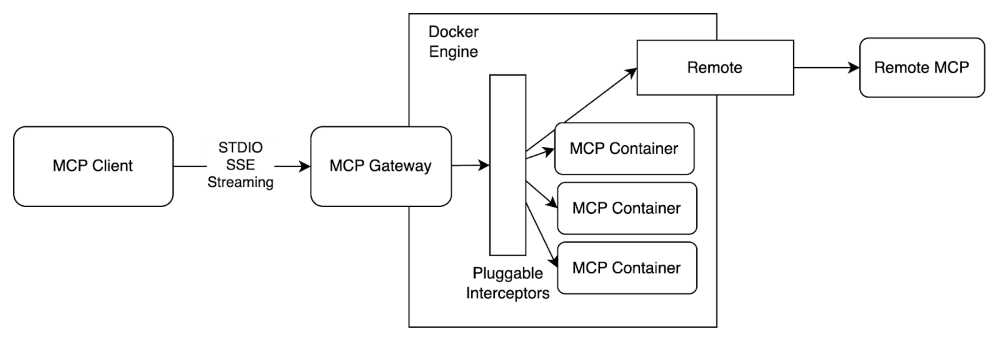
Since releasing the Docker MCP Toolkit, we’ve seen strong community adoption, including steady growth in MCP server usage and over 1 million pulls from the Docker MCP Catalog. With the community, we’re laying the groundwork by standardizing how developers define, run, and share agent-based workloads with Docker Compose.
Now, we’re expanding on that foundation with the MCP Gateway, a new open-source project designed to help you move beyond local development and into production environments. The MCP Gateway acts as a secure enforcement point between agents and external tools. It integrates seamlessly with Docker Compose while enhancing the security posture of the broader MCP ecosystem.
We believe that infrastructure of this kind should be transparent, secure, and community-driven, which is why we’re open-sourcing all of this work. We’re excited to announce that the MCP Gateway project is available now in this public GitHub repository!
When we started building the MCP Gateway project, our vision was to enable a wide range of agents to access trusted catalogs of MCP servers. The goal was simple: make it easy and safe to run MCP servers.
Figure 1: Architecture diagram of the MCP Gateway, securely orchestrating and managing MCP servers
This project’s tools are designed to help users discover, configure, and run MCP workloads. In the sections below, we’ll walk through these tools.
Discovery
To view entries in the current default catalog, use the following CLI command.
docker mcp catalog show
This is the set of servers that are available on your host.
As the Official MCP Registry continues to progress, the details for how MCP server authors publish will change.
For now, we’ve created a PR-based process for contributing content to the Docker MCP Catalog.
Configure
To safely store secrets on an MCP host or to configure an MCP host to support OAuth-enabled MCP servers, we need to prepare the host. For example, servers like the Brave MCP server require an API key. To prepare your MCP host to inject this secret into the Brave MCP server runtime, we provide a CLI interface.
docker mcp secret set 'brave.api_key=XXXXX'
Some servers will also have host-specific configuration that needs to be made available to the server runtimes, usually in the form of environment variables. For example, both the filesystem, and resend server support host specific configurations.
cat << 'EOF' | docker mcp config write
filesystem:
paths:
– /Users/slim
resend:
reply_to: slim@gmail.com
sender: slim@slimslenderslacks.com
EOF
MCP servers have different requirements for host configuration and secret management, so we will need tools to manage this.
Run
An MCP Gateway exposes a set of MCP server runtimes. For example, if clients should be able to connect to Google-maps and Brave, then those two servers can be enabled by default.
docker mcp server enable google-maps brave
docker mcp gateway run
However, each gateway can also expose custom views. For example, here is a gateway configuration that exposes only the Brave and Wikipedia servers, over SSE, and then only a subset of the tools from each.
docker mcp gateway run
–transport=sse
–servers=brave,wikipedia-mcp
–tools=brave_web_search,get_article,get_summary,get_related_topics
Secure
One of the advantages of a gateway process is that users can plug in generic interceptors to help secure any MCP server. By securing the MCP host, we can ease the adoption burden for any MCP client.
Expect this list to grow quickly, but we have an initial set of features available in the repository to begin demonstrating what’ll be possible.
Verify signatures – ensure that the gateway can verify provenance of the MCP container image before using it.
Block-secrets – scan inbound and outbound payloads for content that looks like secrets of some kind.
Log-calls
These can be enabled when starting the gateway.
docker mcp gateway run
–verify-signatures
–log-calls
–block-secrets
Summary
The MCP Gateway is Docker’s answer to the growing complexity and security risks of connecting AI agents to MCP servers. By aggregating multiple MCP servers behind a single, secure interface, it gives developers and teams a consistent way to build, scale, and govern agent-based workloads from local development to production environments.
The Gateway is available out of the box in the latest release of Docker Desktop. Now open source, it’s also ready for you to use with any community edition of Docker. Whether you’re building AI agents or supporting others who do, the MCP Gateway is a great foundational tool for developing secure, scalable agentic applications with MCP. Visit the Gateway GitHub repository to get started!
Quelle: https://blog.docker.com/feed/

With the release of Docker Compose v2.36.0, we’re excited to introduce a powerful new feature: provider services. This extension point opens up Docker Compose to interact not only with containers but also with any kind of external system, all while keeping the familiar Compose file at the center of the workflow.
In this blog post, we’ll walk through what provider services are, how developers can use them to streamline their workflows, how the provider system works behind the scenes, and how you can build your own provider to extend Compose for your platform needs.
Why Provider Services Are a Game-Changer
Docker Compose has long been a favorite among developers for orchestrating multi-container applications in a simple and declarative way. But as development environments have become more complex, the need to integrate non-container dependencies has become a common challenge. Applications often rely on managed databases, SaaS APIs, cloud-hosted message queues, VPN tunnels, or LLM inference engines — all of which traditionally sit outside the scope of Compose.
Developers have had to resort to shell scripts, Makefiles, or wrapper CLIs to manage these external components, fragmenting the developer experience and making it harder to onboard new contributors or maintain consistent workflows across teams.
Provider services change that. By introducing a native extension point into the Compose, developers can now define and manage external resources directly in their compose.yaml. Compose delegates their lifecycle to the provider binary, coordinating with it as part of its own service lifecycle.
This makes Docker Compose a more complete solution for full-stack, platform-aware development — from local environments to hybrid or remote setups.
Using a Provider Service in Your Compose File
Provider services are declared like any other Compose service, but instead of specifying an image, you specify a provider with a type, and optionally some options. The type must correspond to the name of a binary available in your $PATH that implements the Compose provider specification.
As an example we will use the Telepresence provider plugin, which routes Kubernetes traffic to a local service for live cloud debugging. This is especially useful for testing how a local service behaves when integrated into a real cluster:
In this setup, when you run docker compose up, Compose will call the compose-telepresence plugin binary. The plugin performs the following actions:
Up Action:
Check if the Telepresence traffic manager is installed in the Kubernetes cluster, and install it if needed.
Establish an intercept to re-route traffic from the specified Kubernetes service to the local service.
Down Action:
Remove the previously established intercept.
Uninstall the Telepresence traffic manager from the cluster.
Quit the active Telepresence session.
The structure and content of the options field are specific to each provider. It is up to the plugin author to define and document the expected keys and values.If you’re unsure how to properly configure your provider service in your Compose file, the Compose Language Server (LSP) can guide you step by step with inline suggestions and validation.
You can find more usage examples and supported workflows in the official documentation: https://docs.docker.com/compose/how-tos/provider-services/
How Provider Services Work Behind the Scenes
Under the hood, when Compose encounters a service using the provider key, it looks for an executable in the user’s $PATH matching the provider type name (e.g. docker-model cli plugin or compose-telepresence). Compose then spawns the binary and passes the service options as flags, allowing the provider to receive all required configuration via command-line arguments.
The binary must respond to JSON-formatted requests on stdin and return structured JSON responses on stdout.
Here’s a diagram illustrating the interaction:
Communication with Compose
Compose send all the necessary information to the provider binary by transforming all the options attributes as flags. It also passes the project and the service name. If we look at the compose-telepresence provider example, on the up command Compose will execute the following command:
$ compose-telepresence compose –project-name my-project up –name api –port 5732:api-80 –namespace avatars –service api dev-api
On the other side, providers can also send runtime messages to Compose:
info: Reports status updates. Displayed in Compose’s logs.
error: Reports an error. Displayed as the failure reason.
setenv: Exposes environment variables to dependent services.
debug: Debug messages displayed only when running Compose with -verbose.
This flexible protocol makes it easy to add new types and build rich provider integrations.
Refer to the official protocol spec for detailed structure and examples.
Building Your Own Provider Plugin
The real power of provider services lies in their extensibility. You can write your own plugin, in any language, as long as it adheres to the protocol.
A typical provider binary implements logic to handle a compose command with up and down subcommands.
The source code of compose-telepresence-plugin will be a good starting point. This plugin is implemented in Go and wraps the Telepresence CLI to bridge a local dev container with a remote Kubernetes service.
Here’s a snippet from its up implementation:
This method is triggered when docker compose up is run, and it starts the service by calling the Telepresence CLI based on the received options.
To build your own provider:
Read the full extension protocol spec
Parse all the options as flags to collect the whole configuration needed by the provider
Implement the expected JSON response handling over /stdout
Don’t forget to add debug messages to have as many details as possible during your implementation phase.
Compile your binary and place it in your $PATH
Reference it in your Compose file using provider.type
You can build anything from service emulators to remote cloud service starters. Compose will automatically invoke your binary as needed.
What’s Next?
Provider services will continue to evolve, future enhancements will be guided by real-world feedback from users to ensure provider services grow in the most useful and impactful directions.
Looking forward, we envision a future where Compose can serve as a declarative hub for full-stack dev environments, including containers, local tooling, remote services, and AI runtimes.
Whether you’re connecting to a cloud-hosted database, launching a tunnel, or orchestrating machine learning inference, Compose provider services give you a native way to extend your dev environment, no wrappers, no hacks.
Let us know what kind of providers you’d like to build or see added. We can’t wait to see how the community takes this further.
Stay tuned and happy coding!
Quelle: https://blog.docker.com/feed/

Nach rund zwei Jahren als Twitter/X-Chefin hört Linda Yaccarino überraschend auf. Am Vortag hat der Chatbot Grok die Politik Hitlers gelobt. (X, Onlinewerbung)
Quelle: Golem






