What’s New on WordPress.com: Tools to Make Designing Your Site Easier Than Ever

At WordPress.com, we’re always adding features and pushing our blocks and Site Editor to do more so that you can create, design, and publish amazing things with ease. Our newest features are largely design-focused, giving you the confidence to explore a variety of styles and then easily apply them across your entire site. 

Let’s jump in and see what’s new. 

Browse Mode: An easier way to navigate the Site Editor 

Browse Mode allows you to easily explore, navigate, and edit your site’s templates and template parts, including adding new templates right from this interface. To play around with Browse Mode, simply click your site’s icon from the Site Editor. 

When to use this feature: You want to see how all the pieces of your site fit together — and to jump between your templates and template parts for easy editing.  

Clearer access to your advanced block settings

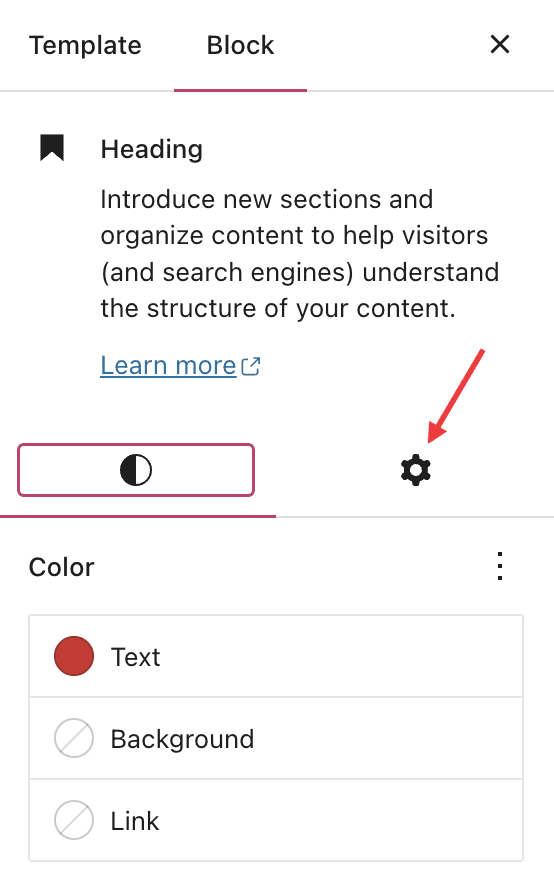
With more powerful blocks comes the need for easier, more intuitive access to advanced settings for those blocks. To that end, we’ve split block settings into two tabs within the sidebar. On the left side, you’ll find standard customization options like color, typography, and spacing. On the right side, you’ll find more advanced options, like layouts, custom CSS, and a button to apply changes across your entire site (more on that below).  

When to use this feature: You’re working on your navigation menu and need more customization than just color or typography options. Go over to advanced settings to change the orientation of the menu from horizontal to vertical — among other things! 

Preview style options with the Style Book 

A number of themes, including staff favorite Twenty Twenty Three, now come with styles, which change the look and feel of your site — color, spacing, etc. — within the overarching design aesthetic of the theme. 

With the newly launched Style Book, you can now see how various styles affect different blocks. You’re able to preview colors, typography, embeddable media, and more. 

When to use this feature: You’re curious about switching up the colors or typography on your site, but you want to know what it’ll look like, especially within specific blocks, before committing. 

Apply design changes across your entire site  

When working and designing in the Site Editor, it’s easy to find yourself having created a certain style that you really like and want emulated across your entire site. With our new “Apply globally” button, you can do just that. 

When to use this feature: You’ve spent some time styling a heading (or other block) on your homepage or a page template, and you want that look to carry over across all the headings (or whichever block you’re working with) on your site. 

In Case You Missed It 

In the midst of holiday season business, you may have missed some of our other recent and exciting updates:  

Boost your traffic with Blaze

Learn how to turn your posts and pages content into clean, compelling ads that run across millions of sites on WordPress.com and Tumblr.

Explore new themes   

We introduced five beautiful new designs in January, including our new default theme, Twenty Twenty Three. 

Grab yourself a .link domain 

A .link domain name and Link in Bio page supercharges your social media by giving you a place to host all of your links.

Insert chapter breaks on your videos 

Chapter breaks offer a quick, convenient way for viewers to navigate longer videos or see the outline of a video’s content at a glance. 

Share your work-in-progress website

With Site Previews, you can generate a unique link for your in-progress Business or eCommerce site that allows your team or clients to access and explore the site without needing to log in. 
Quelle: RedHat Stack

What Data Pipeline Architecture should I use?

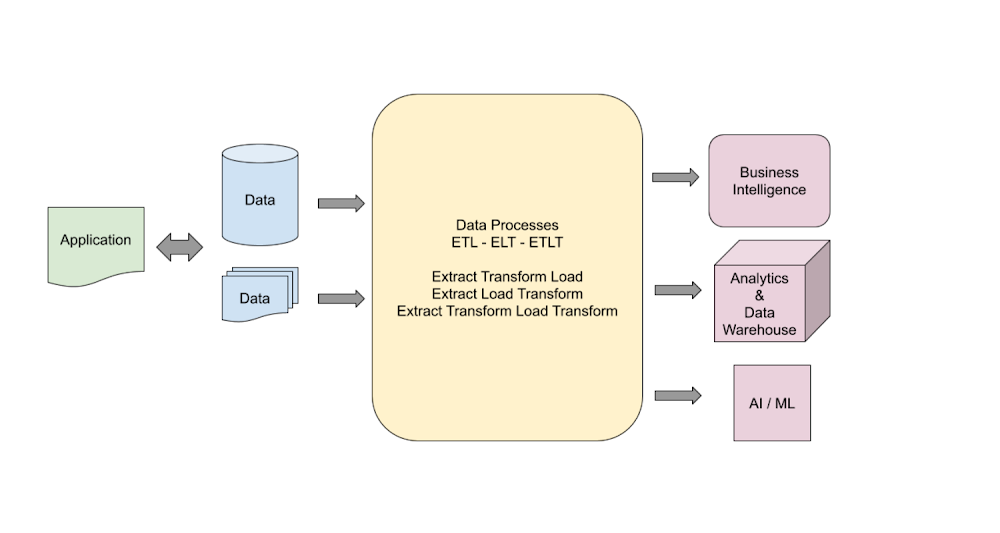
Data is essential to any application and is used in the design of an efficient pipeline for delivery and management of information throughout an organization. Generally, define a data pipeline when you need to process data during its life cycle. The pipeline can start where data is generated and stored in any format. The pipeline can end with data being analyzed, used as business information, stored in a data warehouse, or processed in a machine learning model.Data is extracted, processed, and transformed in multiple steps depending on the downstream system requirements. Any processing and transformational steps are defined in a data pipeline. Depending on the requirements, the pipelines can be as simple as one step or as complex as multiple transformational and processing steps.How to choose a design pattern?When selecting a data pipeline design pattern, there are different design elements that must be considered. These design elements include the following:Select data source formats.Select which stacks to use.Select data transformation tools.Choose between Extract Transform Load (ETL), Extract Load Transform (ELT), or Extract Transform Load Transform (ETLT).Determine how changed data is managed.Determine how changes are captured.Data sources can have a variety of data types. Knowing the technology stack and tool sets that we use is also a key element of the pipeline build process. Enterprise environments come with the challenges that require using multiple and complicated techniques to capture the changed data and to merge with the target data.I mentioned that most of the time the downstream systems define the requirements for a pipeline and how these processes can be interconnected. The processing steps and sequences of the data flow are the major factors affecting pipeline design. Each step might include one or more data inputs, and the outputs might include one or more stages. The processing between input and output might include simple or complex transformational steps. I highly recommend keeping the design simple and modular to ensure that you clearly understand the steps and transformation taking place. Also, keeping your pipeline design simple and modular makes it easier for a team of developers to implement development and deployment cycles. It also makes debugging and troubleshooting the pipeline easier when issues occur.The major components of a pipeline Include: Source dataProcessing Target storageSource data can be the transaction application, the files collected from users, and data extracted from an external API. Processing of the source data can be as simple as one step copying or as complex as multiple transformations and joining with other data sources. The target data warehousing system might require the processed data that is the result of the transformation (such as a data type change or data extraction), and lookup and updates from other systems. A simple data pipeline might be created by copying data from source to target without any changes. A complex data pipeline might include multiple transformation steps, lookup, updates, KPI calculations, and data storage into several targets for different reasons.Source data can be presented in multiple formats. Each will need a proper architecture and tools to process and transform. There can be multiple data types required in a typical data pipeline that might be in any of the following formats:Batch Data: A file with tabular information (CSV, JSON, AVRO, PARQUET and …) where the data is collected according to a defined threshold or frequency with conventional batch processing or micro-batch processing. Modern applications tend to generate continuous data. For this reason, micro-batch processing is a preferred design to collect the data from sources.Transactions Data: Application data such as RDBMS (relational data), NoSQL, Big Data.Stream Data:  Real-time applications that use Kafka, Google Pub/Sub, Azure Stream Analytics, or Amazon Stream Data. Streaming data applications can communicate in real time and exchange messages to meet the requirements. In Enterprise architecture design, the real time and stream processing is a very important component of design.Flat file – PDFs or other non-tabular formats that contain data for processing. For example, medical or legal documents that can be used to extract information.Target data is defined based on the requirements and the downstream processing needs. It’s common to build target data to satisfy the need for multiple systems. In the Data Lake concept, the data is processed and stored in a way that Analytics systems can get insight while the AI/ML process can use the data to build predictive models.Architectures and examplesMultiple architecture designs are covered that show how the source data is extracted and transformed to the target. The goal is to clever the general approaches, and it’s important to remember that each use case can be very different and unique to the customer and need special consideration.The data pipeline architecture can be broken down into Logical and Platform levels. The logical design describes how the data is processed and transformed from the source into the target. The platform design focuses on implementation and tooling that each environment needs, and this depends on the provider and tooling available in the platform. GCP, Azure, or Amazon have different toolsets for the transformation while the goal of the logical design remains the same (data transform) no matter which provider is used. Here is a logical design of a Data Warehousing pipeline:Here is the logical design for a Data Lake pipeline:Depending on the downstream requirements, the generic architecture designs can be implemented with more details to address several use cases.The Platform implementations can vary depending on the toolset selection and development skills. What follows are a few examples of GCP implementations for the common data pipeline architectures.A Batch ETL Pipeline in GCP – The Source might be files that need to be ingested into the analytics Business Intelligence (BI) engine. The Cloud Storage is the data transfer medium inside GCP and then Dataflow is used to load the data into the target BigQuery storage. The simplicity of this approach makes this pattern reusable and effective in simple transformational processes. On the other hand, if we need to build a complex pipeline, then this approach isn’t going to be efficient and effective.A Data Analytics Pipeline is a complex process that has both batch and stream data ingestion pipelines. The processing is complex and multiple tools and services are used to transform the data into warehousing and an AL/ML access point for further processing. Enterprise solutions for data analytics are complex and require multiple steps to process the data. The complexity of the design can add to the project timeline and cost but in order to achieve the business objectives, carefully review and build each component.Machine learning data pipeline in GCP is a comprehensive design that allows customers to utilize all GCP native services to build and process a machine learning process. For more information, see Creating a machine learning pipeline.GCP platform diagrams are created by Google Cloud Developer Architecture.How to choose a data pipeline architecture?There are multiple approaches to designing and implementing data pipelines. The key is to choose the design that meets your requirements. There are new technologies emerging that are providing more robust and faster implementations for data pipelines. Google Big Lake is a new service that introduces a new approach on data ingestion. BigLake is a storage engine that unifies data warehouses by enabling BigQuery and open source frameworks such as Spark to access data with fine-grained access control. BigLake provides accelerated query performance across multi-cloud storage and open formats such as Apache Iceberg.The other major factor in deciding the proper data pipeline architecture is the cost. Building a cost-effective solution is a major factor in deciding the design. Usually, streaming and real-time data processing pipelines are more expensive to build and run compared to using batch models. There are times that the budget runs the decision on which design to choose and how to build the platform. Knowing the details on each component and being able to do cost analysis of the solution ahead of time is important in choosing the right architecture design for your solution. GCP provides a cost calculator that can be used in these cases.Do you really need real-time analytics or will a near real-time system be sufficient? This can resolve the design decision for the streaming pipeline. Are you building cloud native solutions or migrating an existing one from on-premises? All of these questions are important in designing a proper architecture for our data pipeline.Don’t ignore the data volume when designing a data pipeline. The scalability of the design and services used in the platform is another very important factor to consider when designing and implementing a solution. Big Data is growing more and building capacity for processing. Storing the data is a key element to data pipeline architecture. In reality, there are many variables that can help with proper platform design. The data volume and velocity or data flow rates can be very important factors.If you are planning to build a data pipeline for a data science project, then you might consider all data sources that the ML Model requires for future engineering. The data cleansing process is mostly a big part of the data engineering team which must have adequate and sufficient transformational toolsets. Data science projects are dealing with large data sets, which will require planning for storage. Depending on how the ML Model is utilized, either real-time or batch processing must serve the users.What Next?Big Data and the growth of the data in general are posing new challenges for data architects and always challenging the requirements for data architecture. A constant increase of data variety, data formats, and data sources is a challenge as well. Businesses are realizing the value of the data and are automating more processes and demanding real-time access to the analytics and decision making information. This is becoming a challenge to take into consideration all variables for a scalable performance system. The data pipeline must be strong, flexible, and reliable. The data quality must be trusted by all users. Data privacy is one of the most important factors in any design consideration. I’ll cover these concepts in my next article.I highly recommend following Google Cloud quickstart and tutorials as the next steps to learn more about the GCP and experience hands-on practice.Interactive Tutorial: BigQuery tour for data analystsInteractive Tutorial: Train an AutoML tabular modelInteractive Tutorial: Analyze Billing data with BigQueryStay tuned. Thank you for reading! Have a question or want to chat? Find me on Twitter or LinkedIn.
Quelle: Google Cloud Platform

Azure high-performance computing powers energy industry innovation

Azure high-performance computing provides a platform for energy industry innovation at scale.

The rising demand for energy

Global energy demand has rapidly increased over the last few years and looks set to continue accelerating at such a pace. With a booming middle class, economic growth, digitization, urbanization, and increased mobility of populations, energy suppliers are in a race to leverage the development of new technologies that can more optimally and sustainably generate, store, and transport energy to consumers.

With the impact of climate change adding urgency to minimizing energy waste, in addition to optimizing power production leaders in the renewable energy as well as oil and gas industries are accelerating sector-wide innovation initiatives that can drive differentiated impact and outcomes at scale.

As the population of developing countries continues to expand, the energy needs of billions of additional people in rural and especially urban areas will need to be catered to. McKinsey estimates that global energy consumption will triple by 2050, with oil and gas accounting for 65 percent of power consumption by then.

In addition, supplies of conventional oil and gas are also expected to decline in the not-too-distant future, shrinking in concentration to mostly the Middle East (oil) and countries like Russia, Iran, and Qatar (gas). As a result, the transition to more sustainable sources of power is leading global energy producers to leverage next-generation technologies to transform their solutions while simultaneously optimizing their operations.

New innovators in the renewable energy industry are also adopting next-generation technologies such as artificial intelligence (AI), advanced analytics, 3-D imaging, and the internet of things (IoT), supported by high-performance computing (HPC) capabilities, to maximize energy production and ensure a smoother transition to a more sustainable path.

Optimizing operational excellence in the energy industry

Instead of investing in complex, costly, and time-intensive on-premises resources, global energy leaders are leveraging the power of cloud capabilities such as Azure HPC + AI, to simulate highly complex, large-scale models and visualize seismic imaging and modeling, resulting in huge economic gains.

One of the key innovations enabling this strategic advantage is the dynamic scaling capability of Azure HPC + AI, powered by GPUs, which are ideal for running remote visualization, optimized virtual machines, and can be augmented with deep learning and predictive analytics, allowing customers to have on-demand intelligent computing to solve complex problems and drive tangible business outcomes.

Energy multinational bp, for example, believes technology innovation is the key to making a successful transition to net zero. The company chose to create digital twins to find opportunities for optimization and carbon reduction.

Drawing on over 250 billion data signals from an IoT network spanning bp's global operating assets, the company identified various opportunities to scale the digital twin solution to its entire operating base and reduce emissions by as much as 500,000 tons of CO2 equivalent every year.

Going green—Energy industry innovation abounds

The green energy sector is also grabbing hold of the opportunity presented by these exponential technologies to speed up the journey toward a more sustainable energy ecosystem.

Italian energy infrastructure operator Snam is harnessing Azure AI and a full stack of Azure IoT services to reduce carbon emissions and help meet its net-zero targets. Energy efficiency is top of the company's agenda. Snam aims to cut methane emissions by 55 percent by 2025, reach net zero by 2040, and exclusively transport decarbonized gas by 2050.

With any leakage in its operations posing a threat to field workers, maintenance staff, and people living near their network—not to mention the environment—Snam deployed an IoT network for real-time monitoring and to enhance its data collection and processing capabilities.

For wind energy solutions provider Vestas Wind Systems, a combination of Azure HPC and partner Minds.ai's machine learning platform, DeepSim, helped its wind farms mitigate the wake effect, generate more energy, and build a sustainable energy future.

Drawing on the Azure HBv3 virtual machines using third-generation AMD EPYCTM processors, Vestas can scale up and run millions of complex simulations that inform how controllers adjust turbines to optimize energy production.

The computing power offered by the AMD-based Azure HBv3 nodes allows Vestas to drive efficiencies that have the potential to unlock significantly more power and higher profits for wind farm operators by minimizing the estimated 10 percent of wind energy that is lost to wake effects.

Key takeaways

As the energy industry eyes a period of unprecedented growth and change, the role of technology will become ever more profound.

Leveraging powerful Microsoft Cloud capabilities such as HPC, AI, advanced analytics, big data, and IoT, the integrated advanced technology capabilities that have previously been the reserve of only a handful of the largest companies are now truly available to anyone.

Supported by these powerful next-generation technologies, energy companies can unlock greater efficiency, innovation, and growth to achieve gains across their operations and drive the world towards a brighter energy future.

Learn more

To learn more about Microsoft Azure HPC + AI for energy.
Request a demo or contact HPCdemo@microsoft.com.

Quelle: Azure

Azure Native NGINXaas makes traffic management secure and simple—now generally available

Continuing Microsoft Azure’s commitment to empower our ISV partners and customers to adopt and modernize their application of choice and run in the cloud, we are excited to announce general availability (GA) of the NGINXaaS offering on Azure.

In facilitating the cloud transformation journey for cloud architects, developers, IT professionals, and business decision makers who are all working towards their digital transformations, we are expanding on our more than a decade of partnership with F5, the company behind NGINX to provide a deeper integration of NGINX into the Azure ecosystem.

NGINX provides load balancing, traffic management, and security tools for users to configure and manage the incredibly complex make-up of the architectures traffic patterns on their cloud and on-premises environments.

“We are excited to expand our Azure ecosystem with the General availability of NGINX for Azure. This strategic partnership with F5 immediately brings together the power of Azure and NGINX’s application delivery expertise to give our developers and customers more native options on Azure.”—Julia Liuson President, Microsoft Developer Division.

Do more with less

Based on inputs from customers in the Open Source world and other users of the NGINX offering, we worked with F5 to simplify the infrastructure management and provide a seamless experience by integrating the deployment, billing, and support of the NGINX solution on the Azure cloud platform, available via the Azure Marketplace.

By taking the management burden away from the user as part of the managed offering, the customer can now focus on the core elements of their business while the custodians of the NGINX and Azure offering bring our strengths to provide a fully managed, secure, and reliable NGINX offering on Azure.

The deep integration into the Azure Control plane also provides another layer of optimization by promoting all the latest relevant features from the Azure Platform to be automatically available to this service.

Deploying and managing load balancer and traffic manager on Azure

The service integrates the NGINX offering into the Azure Control plane. Through this integration, customers can provision a new NGINX service and configure their Azure resources to seamlessly extend workloads to the cloud and deliver secure and high-performance applications using the familiar and trusted load balancing solution. This gives the user consistency in performance and security across their ecosystem via a one-click deployment. In addition, the customers can manage all of the advanced traffic management features they demand, including JSON Web Token authentication and integrated security, to name a few.

Lift and shift from existing deployments

The integrated offering makes it very easy to migrate application delivery from on-premises to Azure cloud. Enterprises and users can now lift and shift apps to Azure cloud seamlessly by bringing their own or existing configurations of NGINX and deploying them from the Azure portal or Marketplace. Users can then configure advanced traffic management and security, leverage state-of-the-art monitoring capabilities, and port custom configurations.

Unified experience

Build end-to-end traffic management solutions with a unified experience. This service gives the user consistency in performance and security across their portfolio of on-premises and Azure cloud apps by using the same load balancing solution and configurations everywhere via the one-click step deployment.

Secure deployments

The ability to control traffic via virtual networks is a critical consideration for our customers. With this integration, users can seamlessly manage configurations between their own virtual network and the NGINX Cloud virtual network via a custom solution leveraging service, Injection. This is further complemented with unified billing for the NGINX service through Azure subscription invoicing.

Getting started with Azure Native NGINX Service:

Discovery and procuring: Azure customers can find the service listed on Azure Marketplace and review the different purchasing plans offered, and purchase it directly with single billing enabled.

Provisioning the NGINX resources: Within several clicks, you can deploy NGINX service in your desired subscription and datacenter regions with your preferred plan.

In Azure Portal experience: Configure the NGINX Networking components:

Configuring logs and metrics: Customers can determine which Azure resource logs and metrics are sent to the NGINX resource.

Learn more

Introducing F5 NGINX for Azure: An Azure Native SaaS Solution for Modern App Delivery.
A Comprehensive Guide to F5 NGINX for Azure: How to get the most out of Azure Native SaaS Solution for Modern App Delivery.
Introducing F5 NGINX for Azure.

Quelle: Azure

Microsoft Azure Load Testing is now generally available

This blog has been coauthored by Ashish Shah, Partner Director of Engineering, Azure Developer Experience.

We are announcing the general availability of Azure Load Testing. Azure Load Testing is a fully managed load-testing service that enables you to generate high-scale load, gain-actionable insights, and ensure the resiliency of your applications and services regardless of where they're hosted. Developers, testers, and engineering teams can use it to optimize application performance, scalability, or capacity.

Get started with Azure Load Testing now, by quickly creating a load test for your web application by using a URL. If you already have load tests leveraging JMeter, you can easily get started by reusing existing Apache JMeter test scripts.

Building resiliency testing into developer workflows

Our goal at Microsoft is to help developers do more with less effort. When performance, scalability, or resiliency issues are identified in production or even close to production they can be extremely difficult and costly to resolve. With Azure Load Testing developers can catch issues closer to code authoring time as part of their developer workflows saving them valuable time and energy.

“As part of our quality shift left initiatives, the Cloud Ecosystem Security teams were able to prevent multiple unique load related bugs from reaching production by gating production builds using Azure Load Testing as part of our CI/CD pipeline. The service teams have also combined the load from Azure Load Testing with fault injection scenarios from Azure Chaos Studio to replicate, root cause and prevent non happy path scenarios that are hard to catch using regular testing frameworks. Along with service resiliency validation, Azure Load Testing has helped uncover the bounds of the distributed system and saved us costs by eliminating unused resources and frameworks.”—Microsoft Cloud Ecosystem Security engineering team

“The Azure Synapse team uses Azure Load Testing to generate different levels of workloads from high concurrency to large input data sequential execution targeting Synapse SQL Serverless endpoints. With the flexibility of JMeter we can start/stop other services within a cluster that can inject different failures, thus truly testing the resiliency of our service.”—Microsoft Azure Synapse engineering team

Pay only for what you need

Optimize your infrastructure while ensuring your application and services are resilient to severe spikes in customer traffic. Leverage Azure Load Testing to optimize your infrastructure before production, planning for the customer traffic you are expecting, paying only for what you need. Then leverage Azure Load Testing to test for unplanned increases in load.

Figure 1: Easily scale load in Azure Load Testing to check the resiliency of your applications and services.

Regression testing

For Azure-based applications, Azure Load Testing collects detailed resource metrics to help you identify performance bottlenecks across your Azure application components. You can automate regression testing by running load tests as part of your continuous integration and continuous deployment (CI/CD) workflow.


Figure 2: Build Load Testing into your developer workflow with pass/fail criteria.

Azure-specific insights can help you understand how different load scenarios impact all the parts of your application, and you can compare test results across different load tests to understand behavior changes over time.

Azure Load Testing creates monitoring data using Azure Monitor, including Application insights and Container insights, to capture details from the Azure services. Depending on the type of service, different metrics are available. For example, the number of database reads, the type of HTTP responses, or container resource consumption. Both client-side and server-side metrics are available in the Azure Load Testing dashboard.

Figure 3: Get performance insights across client and Azure service side metrics with Azure Load Testing.

Enable advanced load testing scenarios

For more advanced load testing scenarios, you can create a JMeter-based load test, a popular open-source load and performance tool. For example, your test plan might consist of multiple application requests, or input data and parameters to make the test more dynamic. And if you already have existing JMeter test scripts you can reuse them to create load tests with Azure Load Testing.

Figure 4: Azure Load Testing architecture overview.

What has changed since preview?

Since we debuted Azure Load Testing, we have enabled several new capabilities based on customer feedback.

Quick test creation

Quick test creation of Azure Load Testing with URL. Quick test creation lets you create a load test without a JMeter script, enabling you to set up, run, and test your URL in less than five minutes.

Azure SDK Load Testing Libraries

.NET Azure Load Testing Library
Java Azure Load Testing Library
JavaScript Azure Load Testing Library
Python Azure Load Testing Library

JMeter capabilities

Support for user specified JMeter properties. Support for user-specified JMeter properties, making load tests more configurable.
Splitting input data across multiple test engines. If you're using CSV data in your JMeter script, you can process the input data in parallel across multiple test engines. Azure Load Testing enables you to configure a test to split the data evenly across all engine instances.

Authentication, user-managed identities, and customer-managed keys

Authenticate with Client Certificates. Azure Load Testing now enables you to authenticate application endpoints which require a client certificate.
Test Private Endpoints or applications hosted on-premises. Azure Load Testing enables you to test private application endpoints or applications that you host on-premises.
System assigned and user-assigned managed identities. Azure Load Testing now supports both system-assigned and user-assigned managed identities.
Customer managed keys. Azure Load Testing support for customer-managed keys.

Additional metrics

Additional Client-side metrics for pass/fail criteria. Azure Load Testing enables you to leverage pass/fail criteria metrics including additional client-side metrics of requests per second and latency.
View load engine metrics. Ability to view engine health metrics to understand the performance of the test engine during the run, enabling confidence in the test results and improve test configuration.

Compliance and regional availability

Azure Load Testing is HITRUST certified.
Azure Load Testing Regional availability. Azure Load Testing is now available in 11 regions; Australia East, East Asia, East US, East US2, North Europe, South Central US, Sweden Central, UK South, West Europe, West US2, and West US3.

Get started with Azure Load Testing

You can get started with Azure Load Testing by creating an Azure Load Testing resource in the Azure portal. Check out the Azure Load Testing documentation and create your first load test.

Learn more about pricing details on the Azure Load Testing pricing page.

Watch the new DevOps Lab episode, "What's new in Azure Load Testing?"

Azure Load Testing on DevOps Lab

Figure 5: What’s new in Azure Load Testing with April Edwards and Nikita Nallamothu.

Share your feedback

We’d love to hear from you through our feedback forum.
Quelle: Azure

Enable No-Code Kubernetes with the harpoon Docker Extension

(This post is co-written by Dominic Holt, Founder & CEO of harpoon.)

Kubernetes has been a game-changer for ensuring scalable, high availability container orchestration in the Software, DevOps, and Cloud Native ecosystems. While the value is great, it doesn’t come for free. Significant effort goes into learning Kubernetes and all the underlying infrastructure and configuration necessary to power it. Still more effort goes into getting a cluster up and running that’s configured for production with automated scalability, security, and cluster maintenance.

All told, Kubernetes can take an incredible amount of effort, and you may end up wondering if there’s an easier way to get all the value without all the work.

In this post:Meet harpoonHow to use the harpoon Docker ExtensionNext steps

Meet harpoon

With harpoon, anyone can provision a Kubernetes cluster and deploy their software to the cloud without writing code or configuration. Get your software up and running in seconds with a drag and drop interface. When it comes to monitoring and updating your software, harpoon handles that in real-time to make sure everything runs flawlessly. You’ll be notified if there’s a problem, and harpoon can re-deploy or roll back your software to ensure a seamless experience for your end users. harpoon does this dynamically for any software — not just a small, curated list.

To run your software on Kubernetes in the cloud, just enter your credentials and click the start button. In a few minutes, your production environment will be fully running with security baked in. Adding any software is as simple as searching for it and dragging it onto the screen. Want to add your own software? Connect your GitHub account with only a couple clicks and choose which repository to build and deploy in seconds with no code or complicated configurations.

harpoon enables you to do everything you need, like logging and monitoring, scaling clusters, creating services and ingress, and caching data in seconds with no code. harpoon makes DevOps attainable for anyone, leveling the playing field by delivering your software to your customers at the same speed as the largest and most technologically advanced companies at a fraction of the cost.

The architecture of harpoon

harpoon works in a hybrid SaaS model and runs on top of Kubernetes itself, which hosts the various microservices and components that form the harpoon enterprise platform. This is what you interface with when you’re dragging and dropping your way to nirvana. By providing cloud service provider credentials to an account owned by you or your organization, harpoon uses terraform to provision all of the underlying virtual infrastructure in your account, including your own Kubernetes cluster. In this way, you have complete control over all of your infrastructure and clusters.

Once fully provisioned, harpoon’s UI can send commands to various harpoon microservices in order to communicate with your cluster and create Kubernetes deployments, services, configmaps, ingress, and other key constructs.

If the cloud’s not for you, we also offer a fully on-prem, air-gapped version of harpoon that can be deployed essentially anywhere.

Why harpoon?

Building production software environments is hard, time-consuming, and costly, with average costs to maintain often starting at $200K for an experienced DevOps engineer and going up into the tens of millions for larger clusters and teams. Using harpoon instead of writing custom scripts can save hundreds of thousands of dollars per year in labor costs for small companies and millions per year for mid to large size businesses

Using harpoon will enable your team to have one of the highest quality production environments available in mere minutes. Without writing any code, harpoon automatically sets up your production environment in a secure environment and enables you to dynamically maintain your cluster without any YAML or Kubernetes expertise. Better yet, harpoon is fun to use. You shouldn’t have to worry about what underlying technologies are deploying your software to the cloud. It should just work. And making it work should be simple. 

Why run harpoon as a Docker Extension?

Docker Extensions help you build and integrate software applications into your daily workflows. With the harpoon Docker Extension, you can simplify the deployment process with drag and drop, visually deploying and configuring your applications directly into your Kubernetes environment. Currently, the harpoon extension for Docker Desktop supports the following features:

Link harpoon to a cloud service provider like AWS and deploy a Kubernetes cluster and the underlying virtual infrastructure.

Easily accomplish simple or complex enterprise-grade cloud deployments without writing any code or configuration scripts.

Connect your source code repository and set up an automated deployment pipeline without any code in seconds.

Supercharge your DevOps team with real-time visual cues to check the health and status of your software as it runs in the cloud.

Drag and drop container images from Docker Hub, source, or private container registries

Manage your K8s cluster with visual pods, ingress, volumes, configmaps, secrets, and nodes.

Dynamically manipulate routing in a service mesh with only simple clicks and port numbers.

How to use the harpoon Docker Extension

Prerequisites: Docker Desktop 4.8 or later

Step 1: Enable Docker Extensions

You’ll need to enable Docker Extensions under the Settings tab in Docker Desktop

Hop into Docker Desktop and confirm that the Docker Extensions feature is enabled. Go to Settings > Extensions > and check the “Enable Docker Extensions” box.

Step 2: Install the harpoon Docker Extension

The harpoon extension is available on the Extensions Marketplace in Docker Desktop and on Docker Hub. To get started, search for harpoon in the Extensions Marketplace, then select Install.

This will download and install the latest version of the harpoon Docker Extension from Docker Hub.

Step 3: Register with harpoon

If you’re new to harpoon, then you might need to register by clicking the Register button. Otherwise, you can use your credentials to log in.

Step 4: Link your AWS Account

While you can drag out any software or Kubernetes components you like, if you want to do actual deployments, you will first need to link your cloud service provider account. At the moment, harpoon supports Amazon Web Services (AWS). Over time, we’ll be supporting all of the major cloud service providers.

If you want to deploy software on top of AWS, you will need to provide harpoon with an access key ID and a secret access key. Since harpoon is deploying all of the necessary infrastructure in AWS in addition to the Kubernetes cluster, we require fairly extensive access to the account in order to successfully provision the environment. Your keys are only used for provisioning the necessary infrastructure to stand up Kubernetes in your account and to scale up/down your cluster as you designate. We take security very seriously at harpoon, and aside from using an extensive and layered security approach for harpoon itself, we use both disk and field level encryption for any sensitive data.

The following are the specific permissions harpoon needs to successfully deploy a cluster:

AmazonRDSFullAccess

IAMFullAccess

AmazonEC2FullAccess

AmazonVPCFullAccess

AmazonS3FullAccess

AWSKeyManagementServicePowerUser

Step 5: Start the cluster

Once you’ve linked your cloud service provider account, you just click the “Start” button on the cloud/node element in the workspace. That’s it. No, really! The cloud/node element will turn yellow and provide a countdown. While your experience may vary a bit, we tend to find that you can get a cluster up in under 6 minutes. When the cluster is running, the cloud will return and the element will glow a happy blue color.

Step 6: Deployment

You can search for any container image you’d like from Docker Hub, or link your GitHub account to search any GitHub repository (public or private) to deploy with harpoon. You can drag any search result over to the workspace for a visual representation of the software.

Deploying containers is as easy as hitting the “Deploy” button. Github containers will require you to build the repository first. In order for harpoon to successfully build a GitHub repository, we currently require the repository to have a top-level Dockerfile, which is industry best practice. If the Dockerfile is there, once you click the “Build” button, harpoon will automatically find it and build a container image. After a successful build, the “Deploy” button will become enabled and you can deploy the software directly.

Once you have a deployment, you can attach any Kubernetes element to it, including ingress, configmaps, secrets, and persistent volume claims.

You can find more info here if you need help: https://docs.harpoon.io/en/latest/usage.html 

Next steps

The harpoon Docker Extension makes it easy to provision and manage your Kubernetes clusters. You can visually deploy your software to Kubernetes and configure it without writing code or configuration. By integrating directly with Docker Desktop, we hope to make it easy for DevOps teams to dynamically start and maintain their cluster without any YAML, helm chart, or Kubernetes expertise.

Check out the harpoon Docker Extension for yourself!
Quelle: https://blog.docker.com/feed/

Amazon MWAA jetzt PCI DSS-konform

Amazon Managed Workflows for Apache Airflow (MWAA) entspricht jetzt dem Payment Card Industry Data Security Standard (PCI DSS). Amazon MWAA ist ein verwalteter Orchestrierungsservice für Apache Airflow, der das Einrichten und Betreiben von End-to-End-Data-Pipelines in der Cloud vereinfacht. Kunden können jetzt mit Amazon MWAA Workflows verwalten, die Informationen für dem PCI DSS unterliegende Anwendungsfälle wie die Zahlungsabwicklung speichern, verarbeiten und übertragen. 
Quelle: aws.amazon.com

Amazon EC2 X2idn- und X2iedn-Instances sind jetzt in der Region USA West (Nordkalifornien) verfügbar

Ab heute sind speicheroptimierte X2idn- und X2iedn-Instances für Amazon EC2 in USA West (Nordkalifornien) verfügbar. X2idn- und X2iedn-Instances, unterstützt durch Intel Xeon Scalable Processors der dritten Generation und mithilfe des AWAS Nitro System gebaut, wurden für speicherintensive Workloads entwickelt und bieten im Vergleich zu den X1-Instances der vorherigen Generation verbesserte Leistung, Preis und Kosten pro GiB Speicher. Bei X2idn ist das Verhältnis von Speicher zu vCPU gleich 16:1, und bei X2iedn gleich 32:1, wodurch sich diese Instances hervorragend für Workloads wie In-Memory-Datenbanken und -Analysen, Big-Data-Verarbeitungsmaschinen und EDA-Workloads (Electronic Design Automation) eignen.
Quelle: aws.amazon.com