Transform SQL into SQLX for Dataform

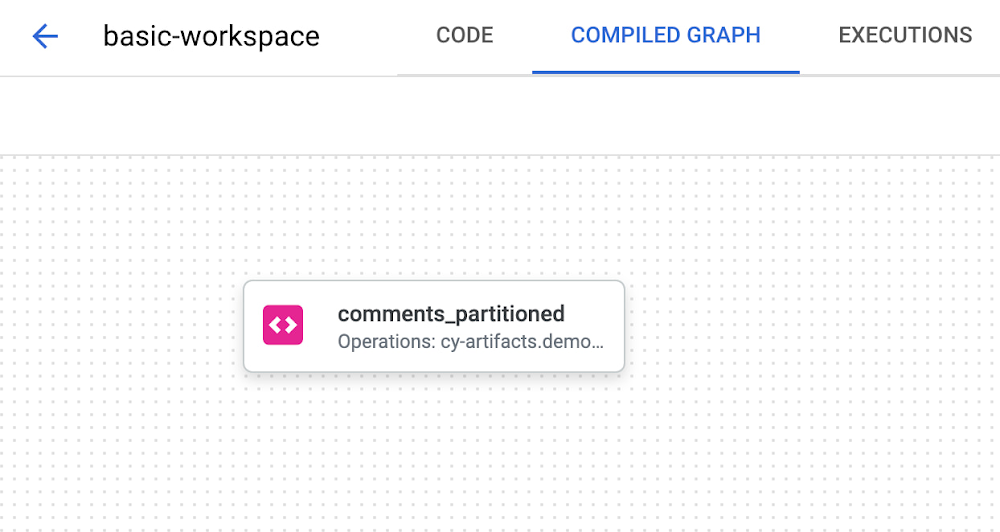
IntroductionDeveloping in SQL poses significant problems when compared to other languages and frameworks.  It’s not easy to reuse statements across different scripts, there’s no way to write tests to ensure data consistency, and dependency management requires external software solutions.  Developers will typically write thousands of lines of SQL to ensure data processing occurs in the correct order.  Additionally, documentation and metadata are afterthoughts because they need to be managed in an external catalog.Google Cloud offers Dataform and SQLX to solve these challenges. Dataform is a service for data analysts to test, develop, and deploy complex SQL workflows for data transformation in BigQuery. Dataform lets you manage data transformation in the Extraction, Loading, and Transformation (ELT) process for data integration. After extracting raw data from source systems and loading into BigQuery, Dataform helps you transform it into a well-defined, tested, and documented suite of data tables.SQLX is an open source extension of SQL and the primary tool used in Dataform. As it is an extension, every SQL file is also a valid SQLX file. SQLX brings additional features to SQL to make development faster, more reliable, and scalable. It includes functions including dependencies management, automated data quality testing, and data documentationTeams should quickly transform their SQL into SQLX to gain the full suite of benefits that Dataform provides.  This blog contains a high-level, introductory guide demonstrating this process.The steps in this guide use the Dataform on Google Cloud console. You can follow along or implement these steps with your own SQL scripts!Getting StartedHere is an example SQL script we will transform into SQLX. This script takes a source table containing reddit data. The script cleans, deduplicates, and inserts the data into a new table with a partition.code_block[StructValue([(u’code’, u’CREATE OR REPLACE TABLE reddit_stream.comments_partitionedrnPARTITION BYrn comment_daternASrnrnWITH t1 as (rnSELECTrn comment_id,rn subreddit,rn author,rn comment_text,rn CAST(total_words AS INT64) total_words,rn CAST(reading_ease_score AS FLOAT64) reading_ease_score,rn reading_ease,rn reading_grade_level,rn CAST(sentiment_score AS FLOAT64) sentiment_score,rn CAST(censored AS INT64) censored,rn CAST(positive AS INT64) positive,rn CAST(neutral AS INT64) neutral,rn CAST(negative AS INT64) negative,rn CAST(subjectivity_score AS FLOAT64) subjectivity_score,rn CAST(subjective AS INT64) subjective,rn url,rn DATE(comment_date) comment_date,rn CAST(comment_hour AS INT64) comment_hour,rn CAST(comment_year AS INT64) comment_year,rn CAST(comment_day AS INT64) comment_dayrnFROM reddit_stream.comments_streamrn)rnSELECT k.*rnFROM (rn SELECT ARRAY_AGG(row LIMIT 1)[OFFSET(0)] krn FROM t1 rowrn GROUP BY comment_idrn)’), (u’language’, u”), (u’caption’, <wagtail.wagtailcore.rich_text.RichText object at 0x3e4d73053f90>)])]1.  Create a new SQLX file and add your SQL In this guide we’ll title our file as comments_partitioned.sqlx.As you can see below, our dependency graph does not provide much information.2. Refactor SQL to remove DDL and use only SELECTIn SQLX, you only write SELECT statements. You specify what you want the output of the script to be in the config block, like a view or a table as well as other types available. Dataform takes care of adding CREATE OR REPLACE or INSERT boilerplate statements.3. Add a config object containing metadataThe config object will contain the output type, description, schema (dataset), tags, columns and their descriptions, and the BigQuery-related configuration. Check out the example below.code_block[StructValue([(u’code’, u’config {rn type: “table”,rn description: “cleaned comments data and partitioned by date for faster performance”,rn schema: “demo_optimized_staging”,rn tags: [“reddit”],rn columns: {rn comment_id: “unique id for each comment”,rn subreddit: “which reddit community the comment occurred”,rn author: “which reddit user commented”,rn comment_text: “the body of text for the comment”,rn total_words: “total number of words in the comment”,rn reading_ease_score: “a float value for comment readability score”,rn reading_ease: “a plain-text english categorization of readability”,rn reading_grade_level: “a plain-text english categorization of readability by school grade level”,rn sentiment_score: “float value for sentiment of comment between -1 and 1″,rn censored: “whether the comment needed to censoring by some process upstream”,rn positive: “one-hot encoding 1 or 0 for positive”,rn neutral: “one-hot encoding 1 or 0 for neutral”,rn negative: “one-hot encoding 1 or 0 for negative”,rn subjectivity_score: “float value for comment subjectivity score”,rn subjective: “one-hot encoding 1 or 0 for subjective”,rn url: “link to the comment on reddit”,rn comment_date: “date timestamp for when the comment occurred”,rn comment_hour: “integer for hour of comment post time”,rn comment_year: “integer for year of comment post time”,rn comment_month: “integer for month of comment post time”,rn comment_day: “integer for day of comment post time”rn },rn bigquery: {rn partitionBy: “comment_date”,rn labels: {rn cost_center: “123456”rn }rn }rn}’), (u’language’, u”), (u’caption’, <wagtail.wagtailcore.rich_text.RichText object at 0x3e4d58b5b190>)])]4. Create declarations for any source tablesIn our SQL script, we directly write reddit_stream.comments_stream. In SQLX, we’ll want to utilize a declaration to create relationships between source data and tables created by Dataform. Add a new comments_stream.sqlx file to your project for this declaration:code_block[StructValue([(u’code’, u’config {rn type: “declaration”,rn database: “my-project”,rn schema: “reddit_stream”,rn name: “comments_stream”,rn description: “A BigQuery table acting as a data sink for comments streaming in real-time.”rn}’), (u’language’, u”), (u’caption’, <wagtail.wagtailcore.rich_text.RichText object at 0x3e4d7271f710>)])]We’ll utilize this declaration in the next step.5. Add references to declarations, tables, and views.This will help build the dependency graph.  In our SQL script, there is a single reference to the declaration. Simply replace reddit_stream.comments_stream with ${ref(“comments_stream”)}. Managing dependencies with the ref function has numerous advantages.The dependency tree complexity is abstracted away. Developers simply need to use the ref function and list dependencies.It enables us to write smaller, more reusable and more modular queries instead of thousand-line-long queries. That makes pipelines easier to debug.You get alerted in real time about issues like missing or circular dependencies6. Add assertions for data validationYou can define data quality tests, called assertions, directly from the config block of your SQLX file. Use assertions to check for uniqueness, null values or any custom row condition. The dependency tree adds assertions for visibility.Here are assertions for our example:code_block[StructValue([(u’code’, u’assertions: {rn uniqueKey: [“comment_id”],rn nonNull: [“comment_text”],rn rowConditions: [rn “total_words > 0″rn ]rn }’), (u’language’, u”), (u’caption’, <wagtail.wagtailcore.rich_text.RichText object at 0x3e4d7271fd10>)])]These assertions will pass if comment_id is a unique key, if comment_text is non-null, and if all rows have total_words greater than zero.7. Utilize JavaScript for repeatable SQL and parameterizationOur example has a deduplication SQL block.  This is a perfect opportunity to create a JavaScript function to reference this functionality in other SQLX files.  For this scenario, we’ll create the includes folder and add a common.js file with the following contents:code_block[StructValue([(u’code’, u’function dedupe(table, group_by_cols) {rn return `rnSELECT k.*rnFROM (rn SELECT ARRAY_AGG(row LIMIT 1)[OFFSET(0)] krn FROM ${table} rowrn GROUP BY ${group_by_cols}rn)rn `rn}rnrnmodule.exports = { dedupe };’), (u’language’, u”), (u’caption’, <wagtail.wagtailcore.rich_text.RichText object at 0x3e4d7271f610>)])]Now, we can replace that code block with this function call in our SQLX file as such: ${common.dedupe(“t1″, “comment_id”)}In certain scenarios, you may want to use constants in your SQLX files. Let’s add a constants.js file to our includes folder and create a cost center dictionary.code_block[StructValue([(u’code’, u’const COST_CENTERS = {rn dev: “000000”,rn stage: “123123”,rn prod: “123456”rn}rnrnmodule.exports = { COST_CENTERS }’), (u’language’, u”), (u’caption’, <wagtail.wagtailcore.rich_text.RichText object at 0x3e4d7271f910>)])]We can use this to label our output BigQuery table with a cost center.  Here’s an example of using the constant in a SQLX config block:code_block[StructValue([(u’code’, u’bigquery: {rn partitionBy: “comment_date”,rn labels: {rn cost_center: constants.COST_CENTERS.devrn }rn }’), (u’language’, u”), (u’caption’, <wagtail.wagtailcore.rich_text.RichText object at 0x3e4d7271f990>)])]8. Validate the final SQLX file and compiled dependency graphAfter completing the above steps, let’s have a look at the final SQLX files:comments_stream.sqlxcode_block[StructValue([(u’code’, u’config {rn type: “declaration”,rn database: “my-project”,rn schema: “reddit_stream”,rn name: “comments_stream”,rn description: “A BigQuery table acting as a data sink for comments streaming in real-time.”rn}’), (u’language’, u”), (u’caption’, <wagtail.wagtailcore.rich_text.RichText object at 0x3e4d7271f750>)])]comments_partitioned.sqlxcode_block[StructValue([(u’code’, u’config {rn type: “table”,rn description: “cleaned comments data and partitioned by date for faster performance”,rn schema: “demo_optimized_staging”,rn tags: [“reddit”],rn columns: {rn comment_id: “unique id for each comment”,rn subreddit: “which reddit community the comment occurred”,rn author: “which reddit user commented”,rn comment_text: “the body of text for the comment”,rn total_words: “total number of words in the comment”,rn reading_ease_score: “a float value for comment readability score”,rn reading_ease: “a plain-text english categorization of readability”,rn reading_grade_level: “a plain-text english categorization of readability by school grade level”,rn sentiment_score: “float value for sentiment of comment between -1 and 1″,rn censored: “whether the comment needed to censoring by some process upstream”,rn positive: “one-hot encoding 1 or 0 for positive”,rn neutral: “one-hot encoding 1 or 0 for neutral”,rn negative: “one-hot encoding 1 or 0 for negative”,rn subjectivity_score: “float value for comment subjectivity score”,rn subjective: “one-hot encoding 1 or 0 for subjective”,rn url: “link to the comment on reddit”,rn comment_date: “date timestamp for when the comment occurred”,rn comment_hour: “integer for hour of comment post time”,rn comment_year: “integer for year of comment post time”,rn comment_month: “integer for month of comment post time”,rn comment_day: “integer for day of comment post time”rn },rn bigquery: {rn partitionBy: “comment_date”,rn labels: {rn cost_center: constants.COST_CENTERS.devrn }rn },rn assertions: {rn uniqueKey: [“comment_id”],rn nonNull: [“comment_text”],rn rowConditions: [rn “total_words > 0″rn ]rn }rn}rnrnWITH t1 as (rnSELECTrn comment_id,rn subreddit,rn author,rn comment_text,rn CAST(total_words AS INT64) total_words,rn CAST(reading_ease_score AS FLOAT64) reading_ease_score,rn reading_ease,rn reading_grade_level,rn CAST(sentiment_score AS FLOAT64) sentiment_score,rn CAST(censored AS INT64) censored,rn CAST(positive AS INT64) positive,rn CAST(neutral AS INT64) neutral,rn CAST(negative AS INT64) negative,rn CAST(subjectivity_score AS FLOAT64) subjectivity_score,rn CAST(subjective AS INT64) subjective,rn url,rn DATE(comment_date) comment_date,rn CAST(comment_hour AS INT64) comment_hour,rn CAST(comment_year AS INT64) comment_year,rn CAST(comment_month AS INT64) comment_month,rn CAST(comment_day AS INT64) comment_dayrnFROM ${ref(‘comments_stream’)}rnWHERE CAST(total_words AS INT64) > 0)rnrnrn${common.dedupe(“t1″, “comment_id”)}’), (u’language’, u”), (u’caption’, <wagtail.wagtailcore.rich_text.RichText object at 0x3e4d72d0e410>)])]Let’s validate the dependency graph and ensure the order of operations looks correct.Now it’s easy to visualize where the source data is coming from, what output type comments_partitioned is, and what data quality tests will occur!Next StepsThis guide outlines the first steps of transitioning legacy SQL solutions to SQLX and Dataform for improved metadata management, comprehensive data quality testing, and efficient development. Adopting Dataform streamlines the management of your cloud data warehouse processes allowing you to focus more on analytics and less on infrastructure management. For more information, check out Google Cloud’s Overview of Dataform.  Explore our official Dataform guides and Dataform sample script library for even more hands-on experiences.Related ArticleDataform is joining Google Cloud: Deploy data transformations with SQL in BigQueryWith our acquisition of Dataform, you can now leverage software development best practices to define, document, test and deploy data tran…Read Article
Quelle: Google Cloud Platform

Tune in today: Learn Live experts are ready to accelerate your skilling

There is a treasure trove of information available at Microsoft Learn, including self-paced lessons, assessments, and certifications waiting to be explored—for every skill level. Whether you’re kicking off your IT career or a seasoned pro looking to master new skills to stay competitive, anyone can get blocked on their path to educational growth. That’s where our interactive Learn Live video series comes to the rescue—Instructors with deep knowledge of Microsoft technology walk participants through a wide array of Microsoft Learn modules in real time and answer your questions live. It’s like having your own virtual tutor for anything Azure.

Many learners benefit from instantaneous communication and feedback. Whether you tune in live or watch the videos on demand, our 60-to-90-minute Learn Live episodes take the time to guide learners through lessons and provide guidance on Microsoft Learn modules. Have a nagging uncertainty about evaluating classification models? Don’t know where to begin implementing your Cosmos DB SQL API account? Glean insights from a live Q&A hosted by professionals—sometimes from the very engineers who built the solutions you’re studying.  From Azure engineers to program managers, cloud advocates, and technical trainers, our team of experts is available for your questions during the episode as well as after through social media.

Your learning path is waiting

If your goal is to get certified in your role, Learn Live sessions are your chance to practice technical skills in an interactive environment with Azure experts and other developers from around the world. Every episode is closed-captioned and offered in several languages. If you are restricted from watching live by time or location, know that after livestreaming each episode can be watched on-demand, and live airings are staggered to accommodate learners worldwide.

Register for one of our ongoing or upcoming series, or dive into our deep roster of previous episodes.

Current Learn Live series

Azure Core IaaS Study Hall

22 episodes; began Dec. 1, 2022, runs every week through May 18, 2023

Discover how to build infrastructure solutions with Azure infrastructure as a service (IaaS) services and products. Start maximizing the value of your IT investments by learning about highly secure, available, and scalable cloud services. Modernize your IT with enterprise-grade cloud infrastructure and migrate your apps with confidence.

Automate your Azure deployments by using Bicep and GitHub Actions

8 episodes; began Nov. 30, 2022, runs every week through Feb. 8, 2023

Gain all the benefits of infrastructure as code by using an automated workflow to deploy your Bicep templates and integrate other deployment activities with your workflows. You'll build workflows using GitHub Actions.

FastTrack for Azure, Live, and On-Demand Series

Beginning February 2023, runs every week through June 2023

Join expert Azure engineers in our regular virtual sessions, designed for Azure users to come together and discuss a specific Azure technology or theme in an interactive setting in a multi-customer, informal environment.


On-Demand Learn Live series (see complete list here)

FastTrack for Azure, Season 1

13 episodes, ran Sept. 13-Dec. 15, 2022

Accelerate your Azure solution implementation with hands-on exercises and demos. This on-demand series will cover a variety of Azure solution areas as directly requested by customers.

Build mobile and desktop apps with .NET MAUI

7 episodes, ran Sept. 7-Nov. 16, 2022

Learn how to use .NET MAUI to build apps that run on mobile devices and on the desktop using C# and Visual Studio. You'll learn the fundamentals of building an app with .NET MAUI and more advanced topics such as local data storage and invoking REST-based web services.

Create machine learning models with R and tidymodels

4 episodes, ran Sept. 2-Sept. 23, 2022

Explore and analyze data by using R, and get an introduction to regression models, classification models, and clustering models by using tidymodels and R.

Azure Hybrid Cloud Study Hall

14 episodes

Learn how to configure, deploy, and manage your hybrid cloud resources using services and hybrid cloud technologies, and walk through Microsoft Learn modules focused on Azure Arc and Azure Stack HCI. You will learn how to manage your on-premises, edge, and multicloud resources and deploy Azure services anywhere with Azure Arc and Azure Stack.

Use Bicep to deploy your Azure infrastructure as code

15 episodes

Discover how to deploy Azure resources by using Bicep, a language and set of tools to help you to deploy your infrastructure as code. Bicep makes your deployments more consistent and repeatable.

Run VMware workloads on Azure VMware Solution

3 episodes (launched at the VMware Solution Event 2022)

Work out how to easily extend your VMware workloads, skills, and tools to the cloud with Azure VMware Solution—the cloud service that lets you run VMware infrastructure natively on Azure.

Hybrid Infrastructure Study Hall

7 episodes

Hone your skills in configuring advanced Windows Server services using on-premises, hybrid, and cloud technologies, and walk through Microsoft Learn modules related to the new Windows Server Hybrid Administrator Associate certification.

Start your learning journey into Azure AI with a Helping Hand (powered by Women in AI)

3 episodes


No matter your previous AI knowledge, this series will take you through what is available in Azure AI, Computer Vision, and Conversational AI. Through a partnership with Microsoft Certified, you will be well on your way to taking the Azure AI Fundamentals certification exam.

Create microservices with .NET and ASP.NET

8 episodes


Create independently deployable, highly scalable, and resilient services using the free and open-source .NET platform. In addition, learn how to develop microservices with .NET and ASP.NET

Azure Cosmos DB certification study hall


24 episodes


Learn how to design, implement, and monitor cloud-native applications that store and manage data. Work on getting certified with the Azure Cosmos DB Developer Specialty certification.

Deploy your apps with Java on Azure using familiar tools and frameworks

3 episodes


Discover how you can build, migrate, and scale Java applications on Azure using the tools and frameworks you know and love, from Spring to Kubernetes to Java EE.


Additional video paths for growth

Learn Live is only part of the Microsoft Learn TV ecosystem—in other words, just one of the hit shows on the Learn TV network. Even with the extensive lineup of series provided by Learn Live, there is even more video content to discover on Learn TV.

Keep up to date on Azure tips, demos, and technical skill-building resources with episodes of Inside Azure for IT and stay on the forefront of key insights, tools, and best practices for optimizing all of your infrastructure for performance, cost efficiency, security, and reliability on Azure.

On the Azure Enablement Show, experts share technical advice, tips, and best practices to accelerate your cloud journey, build well-architected cloud apps, and optimize your solutions in Azure.

Finally, the SAP on Microsoft Azure video tutorial series provides technical guidance and enablement for customers and partners. Improve your cloud infrastructure skills with advanced guidance from Azure experts in this on-demand video series.
Quelle: Azure

Secure your application traffic with Application Gateway mTLS

I am happy to share that Azure Application Gateway now supports mutual transport layer security (mTLS) and online certificate status protocol (OCSP). This was one of the key questions from our customers as they were looking for more secure communication options for the cloud workloads. Here, I cover what mTLS is, how it works, when to consider it, and how to verify it in Application Gateway.

What is mTLS?

Mutual transport layer security (TLS) is a communication process where both parties verify and authenticate each other’s digital certificates prior to setting up an encrypted TLS connection. mTLS is an extension of the standard TLS protocol, and it provides an additional layer of security over TLS. With traditional TLS, the server is authenticated, but the client is not. This means that anyone can connect to the server and initiate a secure connection, even if the client or user is not authorized to do so. By using mTLS you can make sure that both the client and the server must authenticate each other prior to establishing the secure connection, this will make sure there is no unauthorized access possible on either side. mTLS works on the framework of zero trust—never trust, always verify. This framework ensures that no connection should be trusted automatically.

How does mTLS work?

mTLS works by using a combination of secure digital certificates and private keys to authenticate both the client and the server. The client and the server each have their own digital certificate and private key, which are used to establish trust and a secure connection. The client verifies the server's certificate, and the server verifies the client's certificate—this ensures that both parties are who they claim to be.

How are TLS and mTLS different?

TLS and mTLS protocols are used to encrypt network communication betweenclient and server. In TLS protocol only the client verifies the validity of the server prior to establishing the encrypted communication. The server does not validate the client during the TLS handshake. mTLS, on other hand, is a variation of TLS that adds an additional layer of security by requiring mutual authentication between client and server. This means that both the client and server must present a valid certificate before the encrypted connection can be established. This makes mTLS more secure than TLS as it adds an added layer of security by validating authenticity of client and server.

TLS call flow:

mTLS call flow:


When to consider mTLS

mTLS is useful where organizations follow a zero-trust approach. This way a server must ensure of the validity of the specific client or device that wants to use server information. For example, an organization may have a web application that employees or clients can use to access very sensitive information, such as financial data, medical records, or personal information. By using mTLS, the organization can ensure that only authorized employees, clients, or devices are able to access the web application and the sensitive information it contains.
Internet of Things (IoT) devices talk to each other with mTLS. Each IoT device presents its own certificate to each other to get authenticated.
Most new applications are working on microservices-based architecture. Microservices communicate with each other via application programming interfaces (APIs), by using mTLS you can make sure that API communication is secure. Also, by using mTLS you can make sure malicious APIs are not communicating with your APIs
To prevent various attacks, such as brute force or credential stuffing. If an attacker can get a leaked password or a BOT tries to force its way in with random passwords, it will be of no use—without a valid TLS certificate the attacker will not be able to pass the TLS handshake.

At high level now you understand what is mTLS and how it offers more secure communication by following zero trust security model. If you are new to Application Gateway and have never setup TLS in Application Gateway, follow the link to create APPGW and Backend Servers. This tutorial uses self-signed certificates for demonstration purposes. For a production environment, use publicly trusted CA-signed certificates. Once end-to-end TLS is set up, you can follow this link for setting up mTLS. To test this setup the prerequisite is to have OpenSSL and curl tool installed on your machine. You should have access to the client certificate and client private key.

Let’s dive into how to test mTLS Application Gateway. In the command below, the client's private key is used to create a signature for the Certificate Verify message. The private key does not leave the client device during the mTLS handshake.

Verify your mTLS setup by using curl/openssl

curl -vk https://<yourdomain.com> –key client.key –cert client.crt
<Yourdomain.com> -> Your domain address
client.key -> Client’s private key
client.crt -> Client certificate

In the above output, we are verifying if mTLS is correctly set up. If it is set up correctly, during the TSL handshake server will request the client certificate. Next, in the handshake, you need to verify if the client has presented a client certificate along with the Certificate Verify message. Since the client certificate was valid, the handshake was successful, and the application has responded with an HTTP "200" response.

If the client certificate is not signed by the root CA file that was uploaded as per the link in step 8, the handshake will fail. Below is the response we will get if the client certificate is not valid.

Alternatively, you can verify the mTLS connectivity with an OpenSSL command.

openssl s_client -connect <IPaddress> :443 -key client.key -cert client.crt

Once the SSL connection is established type as written below:

GET / HTTP/1.1

Host: <IP of host>

You should get the Response code—200. This validates that mutual authentication is successful.

Conclusion

I hope you have learned now what mTLS is, what problem it solves, how to set it up in Application Gateway and how to validate the setup.  It is one of the several great features of Application gateway that provides our customer with an extra layer of security for the various use cases that we have discussed above. One thing to note is that currently Application Gateway supports mTLS in frontend only (between client and Application gateway). If your backend server is expecting a client certificate during SSL negotiation between Application gateway and backend server, that request will fail. If you want to learn how to send certificates to backend application via http header please wait for our next blog of  mTLS series. In that blog I will go over how to use Rewrite feature to send the client certificate as http header. Also we will discuss how we can do OCSP validation of client certificate.
 

Learn more and get started with Azure Application Gateway

What is Azure Application Gateway | Microsoft Learn

Overview of mutual authentication on Azure Application Gateway | Microsoft Learn

Frequently asked questions about Azure Application Gateway | Microsoft Learn
Quelle: Azure

AWS kündigt drei neue Standorte für AWS Direct Connect an

Heute gab AWS die Eröffnung neuer Standorte für AWS Direct Connect in Melbourne (Australien), Buenos Aires (Argentinien) und Zürich (Schweiz) bekannt. Wenn Sie Ihr Netzwerk an einem dieser Standorte mit AWS verbinden, erhalten Sie privaten, direkten Zugriff auf alle öffentlichen AWS-Regionen (außer denen in China), AWS GovCloud-Regionen und AWS Local Zones.
Quelle: aws.amazon.com

Database Activity Streams für Amazon RDS für Oracle und Amazon Aurora jetzt in 3 weiteren AWS-Regionen verfügbar

Amazon Relational Database Service (Amazon RDS) für Oracle und Amazon Aurora unterstützen jetzt Database Activity Streams in den AWS-Regionen „Europa (Spanien)“, „Naher Osten (VAE)“ und „Asien-Pazifik (Hyderabad)“. Database Activity Streams bietet einen nahezu in Echtzeit ablaufenden Strom von Datenbankaktivitäten und macht Ihre relationale Datenbank damit fit für Compliance und die Erfüllung behördlicher Auflagen. In Verbindung mit Tools von Drittanbietern zur Überwachung von Datenbankaktivitäten kann Database Activity Streams Datenbankaktivitäten überwachen und prüfen und so Ihre Datenbank schützen.
Quelle: aws.amazon.com

AWS Fault Injection Simulator kündigt die Aktion „Pause I/O“ (E/A pausieren) für Volumes von Amazon Elastic Block Store an

AWS Fault Injection Simulator (FIS) unterstützt jetzt „Pause I/O“ (E/A pausieren) für Amazon-EBS-Volumes als neuen FIS-Aktionstyp. Mit der neuen Fehleraktion können Kunden mit hochverfügbaren Anwendungen ihre Architektur und Überwachung testen, z. B. Betriebssystem-Timeout-Konfigurationen und CloudWatch-Alarme, um die Widerstandsfähigkeit gegenüber Speicherfehlern zu verbessern. Kunden können beobachten, wie ihr Anwendungsstack reagiert, und ihren Überwachungs- und Wiederherstellungsprozess optimieren, um die Resilienz und Anwendungsverfügbarkeit zu verbessern.
Quelle: aws.amazon.com